
J657 - Wristwatch JAGUAR - Free user manual and instructions
Find the device manual for free J657 JAGUAR in PDF.



| Product type | Watch |
| Brand | Jaguar |
| Model | J657 |
| Movement | Quartz with retrograde display |
| Main functions | Hours, minutes, retrograde seconds, chronograph with intermediate and cumulative time, AM/PM indicator |
| Display | Retrograde hands for hours and minutes, retrograde seconds counter at 6 o'clock, AM/PM indicator at 9 o'clock |
| Case material | Stainless steel |
| Case diameter | 42 mm |
| Case thickness | 11 mm |
| Strap width | 20 mm |
| Weight | 120 g |
| Power supply | Button cell battery SR626SW |
| Battery life | Approximately 2 years |
| Water resistance | 3 ATM (resistant to splashes) |
| Glass | Mineral |
| Care and cleaning | Clean with a soft, dry cloth. Avoid contact with water, solvents, and chemicals. |
| Time setting | Pull out crown C, then use pushers A (minutes) and B (hours). The AM/PM indicator adjusts automatically every 12 hours. |
| Hand adjustment | Press A and B simultaneously for 2 seconds to enter adjustment mode. Select the hand with B and adjust with A. |
| Chronograph note | Every 3 minutes, the hour hand moves by half an hour step during chronograph usage. |
| Safety | Keep out of reach of children. Contains a button cell battery dangerous if swallowed. |
| Spare parts and repairability | Battery and glass replaceable by a watchmaker. Hand adjustment possible by the user according to instructions. |
Frequently Asked Questions - J657 JAGUAR
User questions about J657 JAGUAR
0 question about this device. Answer the ones you know or ask your own.
Ask a new question about this device
Download the instructions for your Wristwatch in PDF format for free! Find your manual J657 - JAGUAR and take your electronic device back in hand. On this page are published all the documents necessary for the use of your device. J657 by JAGUAR.
USER MANUAL J657 JAGUAR
USERGUIDESOPTM16SPRGH
INDEX
Espanol > p.01
English > p.11
Français > p.21
Deutsch > p.31
Italiano > p.41
Manual del usuario
- Description 12
- Functions 13
-Setting the time 17
-Adjusting the hands 18

Under the regulations on waste electrical and electronic equipment, quartz watches that have reached the end of their life must undergo selective collection
in order to be treated. You may thus dispose of our quartz watches in one of our approved outlets, and at any authorised collection point. Selective collection, treatment, recovery and recycling help to save our environment and protect our health.
1. Description 2. Functions
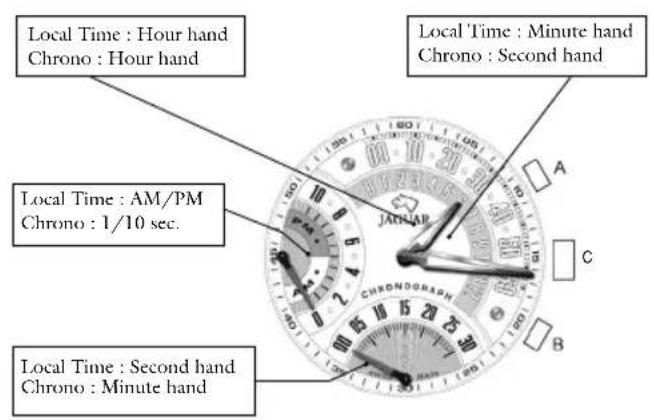
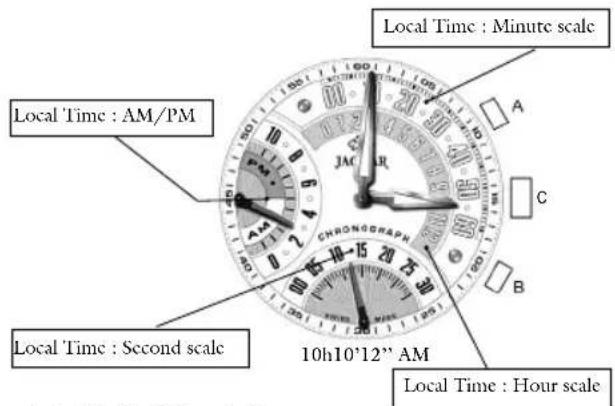
2.1. Mode I: Local time
Hours and minutes are shown on a retrograde display, and seconds on a retrograde counter at 6 o'clock.
- The "AM/PM" indicator is shown at 9 o'clock.
2.2 Selection mode 2.3 Mode II: Chronograph
To change from Local time to Chrono mode, press crown C.
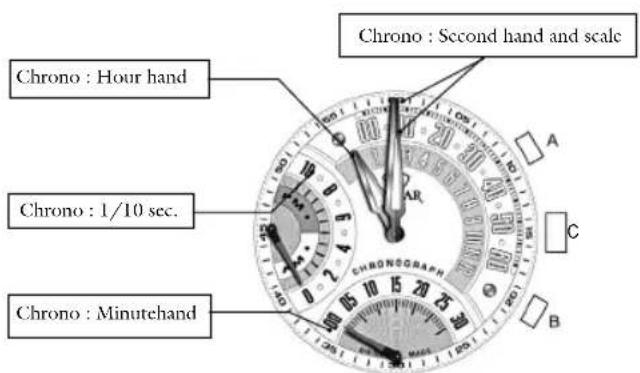
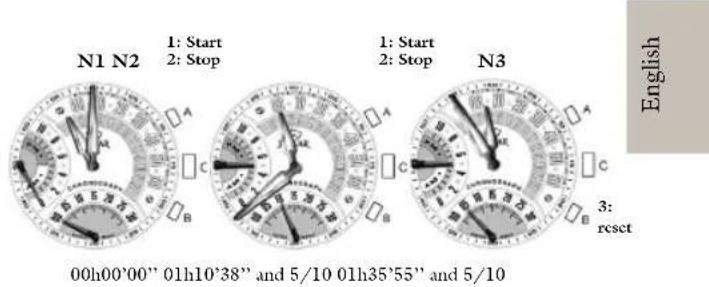
2.3.1. Start/Stop/Cumulative time
-
To start the chronograph, press button A (1).
-
To stop the chronograph, press button A (2).
These operations can be repeated as often as necessary.
The various times are cumulative.
-
To reset the chronograph to zero, press button B (3).
-
Every thirty minutes, the hour hand moves up a half-hour notch, as shown in illustration No. 3.
2.3.2 Intermediate time
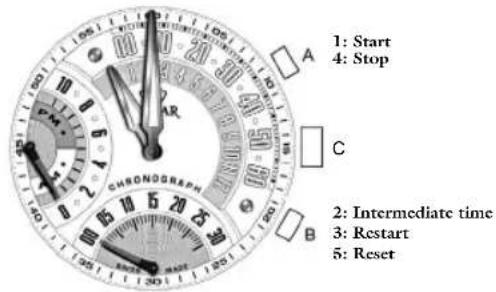
- To start the chronograph, press button A (1).
- To indicate the intermediate time, press button B (2).
- To restart, press button B (3).
The chronograph hands show the time elapsed.
These operations can be repeated as often as necessary.
To stop the chronograph, press button A (4).
- To reset the chronograph to zero, press button B (5).
- Every thirty minutes, the hour hand moves up a half-hour notch, as shown in illustration No. 3.
N.B.: press the crown at any time to display the local time without stopping the chronograph.
3. Setting the time
To set the time, please make sure the watch is in local time position.
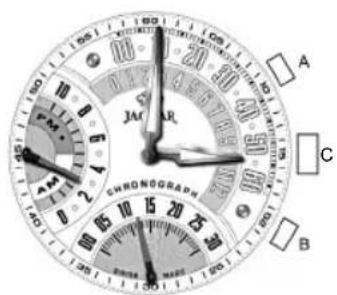
- Pull out crown C and press button A to set the minutes. The second hand is automatically reset to zero
- Press button B to set the hour.
The AM/PM is automatically reset every 12 hours. - To exit setting mode and return to local time, push crown C back into its original position.
4. Adjusting the hands
After an impact or a battery change, you may have to adjust the hands.
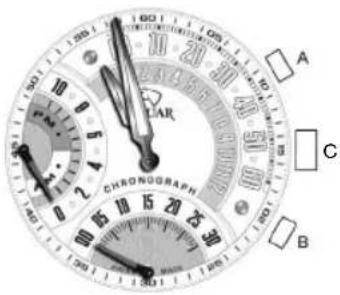
- Simultaneously press buttons A and B for 2 seconds
- If the hands return to the zero position as illustrated press crown C to return to local time.
- If one or more hands need to be adjusted, press button B to select the hand in question.
- The setting sequence is: minute (default), hour, 9 o'clock counter, 6 o'clock counter.
- Press button A to move the position of the hand up a notch. Press and hold down button A to fast forward.
- Press crown C to exit the hand adjustment mode
- To set local time, follow the instructions for setting the time (Chapter 3).

Mode d'emploi
- Description 22
-Fonctions 23 - Reglage de l'heure 27
-Ajustagcdcsaiguillcs. 28
2.1.Mode I:hour locale


Brand : JAGUAR
Model : J657
Category : Wristwatch