
Special Edition J680 - Wristwatch JAGUAR - Free user manual and instructions
Find the device manual for free Special Edition J680 JAGUAR in PDF.


| Product Type | Wristwatch |
| Brand | Jaguar |
| Model | Special Edition J680 |
| Movement Type | Quartz |
| Case Material | Stainless Steel |
| Case Diameter | 42 mm |
| Case Thickness | 11 mm |
| Strap Material | Leather |
| Strap Width | 20 mm |
| Weight | 85 g |
| Water Resistance | 50 meters (5 ATM) |
| Crystal Material | Mineral Glass |
| Dial Color | Black with Silver Accents |
| Display Type | Analog |
| Functions | Hours, Minutes, Seconds, Date |
| Power Source | Battery (SR626SW) |
| Battery Life | Approximately 2 years |
| Clasp Type | Tang Buckle |
| Care Instructions | Wipe with a soft dry cloth; avoid contact with chemicals |
| Warranty | 2 years limited manufacturer warranty |
Frequently Asked Questions - Special Edition J680 JAGUAR
User questions about Special Edition J680 JAGUAR
0 question about this device. Answer the ones you know or ask your own.
Ask a new question about this device
Download the instructions for your Wristwatch in PDF format for free! Find your manual Special Edition J680 - JAGUAR and take your electronic device back in hand. On this page are published all the documents necessary for the use of your device. Special Edition J680 by JAGUAR.
USER MANUAL Special Edition J680 JAGUAR
natural_image
Silhouette of a roaring animal head (no text or symbols)JAGUAR SWISS MADE
USER GUIDE IJM7004P
Information & references

Case
case drawings
Dial, date window and day indicator dial drawings
Hand fitting heights & specifications for hands hand fitting height drawings
Hand setting procedure
- Day indicator
(no quick mode is available for the adjustment of the day indicator)
- Prior to the removal of the day indicator working-hand it is important to remember the day, indicated on the movement. (example: TUE = Tuesday).

- After the dial setting, the day indicator-hand must be set, pointing to same day (example: TUE = Tuesday).
Is is also possible to proceed as follows:
– Prior to the removal of the day indicator working-hand and prior to the placement of the dial, the crown must be turned clockwise (stem position 3) until the day indicator working-hand jumps back into the left position.
- After the dial-setting, the day indicator-hand must be set, pointing to MON.
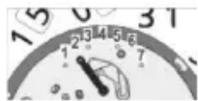
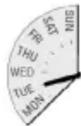

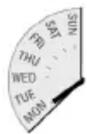
Hand setting procedure
- Hour and minute hand

- Stem position 2 (quick mode): The date must be set to 02 by turning the crown anti clockwise.
- Stem position 3: Turn the crown clockwise until the date changes from 02 to 03.
- Set the hands to 12.00h
Calendar changing phases
Date: 1 ^1/2 - 2 hours. Day of week: 3/4 - 2 hours (after the date change)

By virtue of the regulations pursuant to the handling of waste products deriving from electronic and electrical equipment, end of life cycle watch making products must be selectively collected for processing. You may therefore dispose of your quartz watch making products at any of our retail outlets or any other authorized collection point. The selective collection, processing, rating and recycling of these products helps contribute to safeguarding the environment and protecting our health.

natural_image
Empty white rectangle with black border (no text or symbols)FESTINA GROUP
Via Layetana, 20
08003 BARCELONA
A COMPANY OF THE FESTINA GROUP

Brand : JAGUAR
Model : Special Edition J680
Category : Wristwatch