
J643 - Wristwatch JAGUAR - Free user manual and instructions
Find the device manual for free J643 JAGUAR in PDF.



| Product type | Quartz analog watch |
| Brand | Jaguar |
| Model | J643 |
| Power | Battery 395 (SR927SW), 1.55 V |
| Accuracy | +20/-10 seconds per month |
| Display | Hour, minute, small second hands, date at 12 o'clock |
| Chronograph functions | 1/10 second counter (6h), 30-minute counter (9h), central seconds counter, hours counter after 30 min |
| Time setting | Pull crown to position III, turn, push back to I |
| Date setting | Pull crown to position II, turn, push back to I |
| Quick date correction | Yes, in position II |
| Chronograph - functions | Start/Stop (pusher A), Reset (pusher B), Totalization, Split times |
| Chronograph hand adjustment | Pull crown to III, press A+B for 2s, adjust with A (step by step) and B (next) |
| Maintenance | Clean with a soft, dry cloth. Avoid water and strong shocks. |
| Battery replacement | Entrust to a professional watchmaker |
| Recycling | Selective collection via approved retail points (WEEE compliant) |
| Battery type | 395 (Ø 9.5 mm x 2.6 mm) |
| Warranty | Manufacturer's standard |
Frequently Asked Questions - J643 JAGUAR
User questions about J643 JAGUAR
0 question about this device. Answer the ones you know or ask your own.
Ask a new question about this device
Download the instructions for your Wristwatch in PDF format for free! Find your manual J643 - JAGUAR and take your electronic device back in hand. On this page are published all the documents necessary for the use of your device. J643 by JAGUAR.
USER MANUAL J643 JAGUAR
-Brief specifications 18
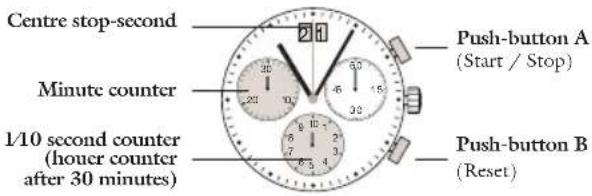
- Description of the display and control buttons 19
- Setting the time / date 20 - 23
-Operation of the chronograph. 24-29
By virtue of the regulations pursuant to the handling of waste products deriving from electronic and electrical equipment, end of lifecycle watch making products must be selectively collected for processing. You may therefore dispose of your quartz watch making products at any of our retail outlets or any other authorized collection point. The selective collection, processing, rating and recycling of these products helps contribute to safeguarding the environment and protecting our health.
Brief specifications
Timc/Date
- Hour hand
- Minute hand
- Small second hand (position 3h)
- Date (position 12h)
Chronograph
1/10 second counter / hour counter after 30 minutes (position 6h)
- Minute counter up to 30 minutes (position 9h)
- Centre stop-second
General
Battery type: 395 (diameter 9.5mm x 2.6mm / SR 927 SW)
Accuracy: +20 / -10 seconds per month
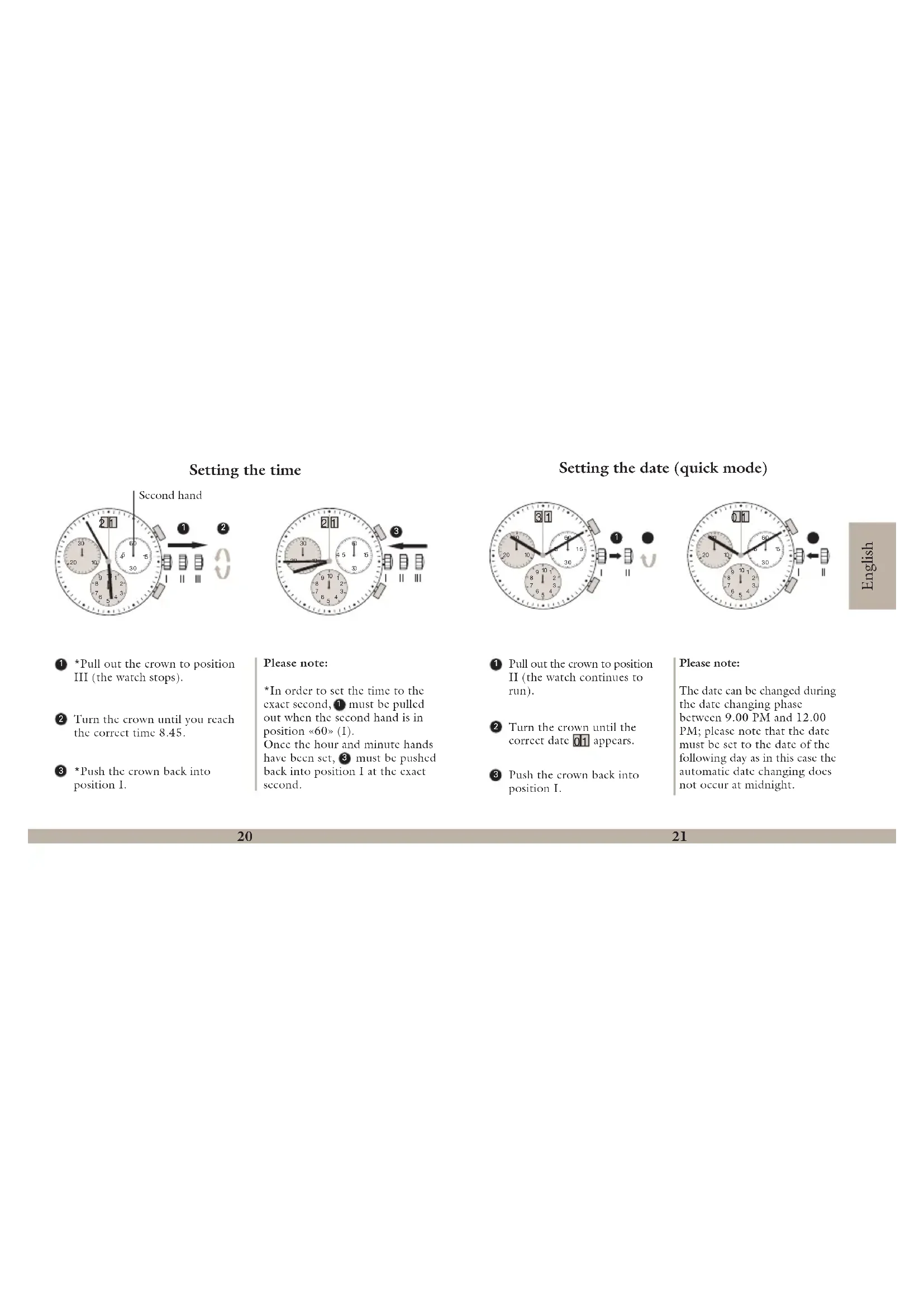
Description of the display and control buttons
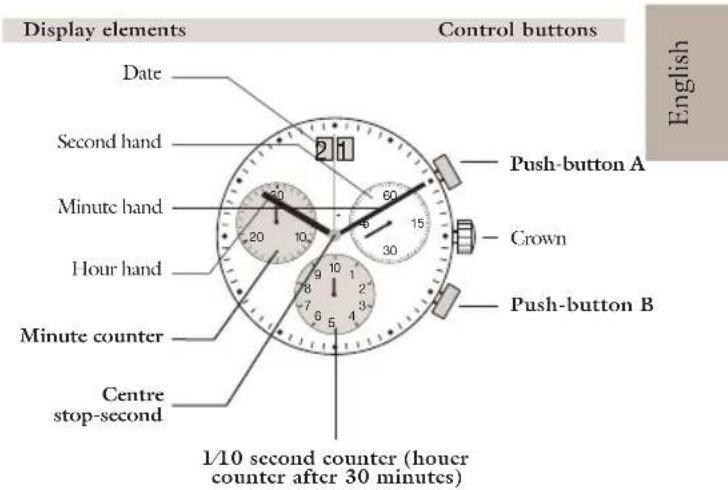
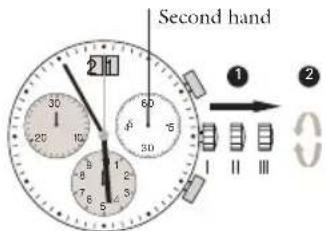
Setting the time
Setting the date (quick mode)
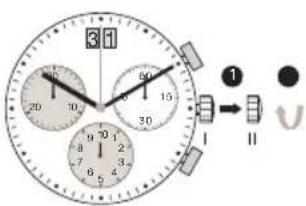

^1 *Pull out the crown to position III (the watch stops).
Turn the crown until you reach the correct time 8.45.
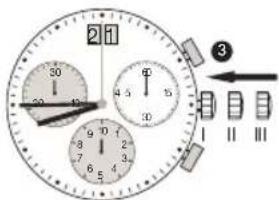
*Push the crown back into position I.
Please note:
*In order to set the time to the exact second, must be pulled out when the second hand is in position 60 (I).
Once the hour and minute hands have been set, 3 must be pushed back into position I at the exact second.
Pull out the crown to position II (the watch continues to run).
Turn the crown until the correct date appears.
Push the crown back into position I.
Please note:
The date can be changed during the date changing phase between 9.00 PM and 12.00 PM; please note that the date must be set to the date of the following day as in this case the automatic date changing does not occur at midnight.
Setting the date/time following a battery change
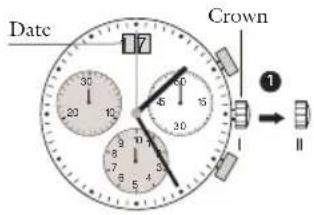
Example:
-Date/time on the watch: 1/1:25 AM
Present date/time: 8.30PM
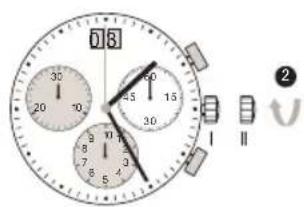
Pull out the crown to position II (the watch continues to run).
Turn the crown until yesterday's date appears 03.

↓
*Pull out the crown to position III (the watch stops).
Turn the crown until the correct date appears.
5 **Continue to turn the crown until the correct time 8.30 PM appears.
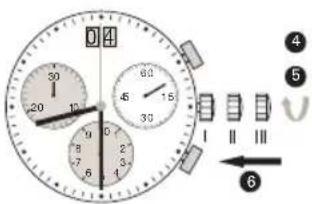
Push the crown back into position I.
Please note:
To set your watch to the exact second, please refer to the chapter entitled «setting the time».
*Please observe the AM/PM clock rhythm.
Chronograph:
The minute counter measures 30 minutes per rotation.
The center stop-second measures 60 seconds per rotation.
- The 1/10 second counter measures 1 second per rotation. After 30 minutes this counter works as hour counter. The how counter measures 10 hours per rotation.
Chronograph: basic function
(start / stop / rcst)
Control buttonsDisplay elements

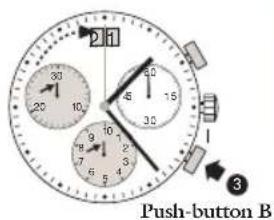
Example:
Please note:
Before using the chronograph functions, please ensure that: the crown is in position (= normal position). the 3 chronograph hands are precisely at zero position following activation of pushbutton B. Should this not be the case, the positions of the hands must be adjusted (see the chapter entitled «adjusting the chronograph hands to zero position»).
1 Start: Press push-button A.
Stop: to stop the timing, press push-button A. once more and read the three chronograph hands: 4min/38sec/7/10 sec
Zero positioning: Prcss push-button B.
(The three chronograph hands will be reset to their zero positions).
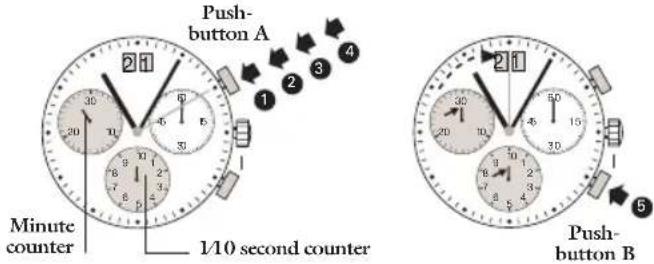
Chronograph: accumulated timing
Example:
1 Start: (start timing)
Stop: (c.g. 15 min 5 sec following)
Restart: (timing is resumed)
*Stop: (c.g. 13 min 5 sec following) = 28 min 10 sec (The accumulated measured time is show
The three chronograph hands are returned to their zero positions.
Please note:
- Following 4 , the accumulation of the timing can be continued by pressing push button A (Restart / Stop, Restart / Stop,...)
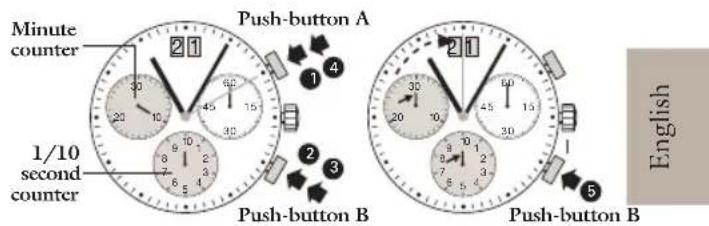
Chronograph: intermediate or interval timing
Example:
1 Start: (start timing)
Display interval:
c.g. 10 minutes 10 seconds
(timing continues in the background)
3 Making up the measured time: (the 3 chronograph hands are quickly advanced to the ongoing measured time).
4 Stop: (Final time is displayed)
5 Reset:
The 3 chronograph displays are returned to their zero position
Please note:
- Following 3 further intervals or intermediates can be displayed by pressing push-button B (display interval / make up measured time, ...)
Adjusting the chronograph hands to zero position

Example:
One or several chronograph hands are not in their correct zero positions and have to be adjusted (e.g. following a battery change).
Pull out the crown to position III (all 3 chronograph hands are in their correct or incorrect zero position).
2 Kcp push Buttons A and B deprocessed simultaneously for at least 2 seconds (the centre stopsecond rotates by 360^ corrective mode is activated).


Mode d'emploi



- Brief specifications
- Timc/Date
- Chronograph
- General
- Description of the display and control buttons
- Setting the time
- Setting the date (quick mode)
- Please note:
- Setting the date/time following a battery change
- Chronograph:
- Chronograph: basic function
- Example:
- Adjusting the chronograph hands to zero position
- Mode d'emploi
Brand : JAGUAR
Model : J643
Category : Wristwatch