TM 2 Pro de Luxe - Treadmills Christopeit - Free user manual and instructions
Find the device manual for free TM 2 Pro de Luxe Christopeit in PDF.



| Product Type | Electric Treadmill |
| Brand | Christopeit |
| Model | TM 2 Pro de Luxe |
| Dimensions (unfolded) | L 165 x l 71 x H 125 cm |
| Dimensions (folded) | L 80 x l 71 x H 148 cm |
| Running surface dimensions | L 120 x l 40 cm |
| Weight (approx.) | Approx. 70 kg |
| Power supply | 220-240 V ~ 50-60 Hz, 925 W |
| Motor | 0.92 kW (1.25 HP), peak 1.3 kW (1.75 HP) |
| Speed | 1 to 16 km/h, adjustable in 2 km/h increments |
| Workout programs | 25 speed programs (P1-P25) + 3 manual programs (time, distance, calories) |
| Display | LCD Blue Back Light: time, speed, distance, calories, heart rate |
| Heart rate sensors | Hand grip sensors |
| Maximum user weight | 120 kg |
| Foldable | Yes, with gas shock absorber and quick release |
| Additional features | Start/Stop buttons and speed adjustment on handles, quick speed key 2-16 km/h, MP3 input, safety clip |
| Safety | Emergency stop clip, on/off switch |
| Maintenance | Silicone lubrication every 50 hours, belt centering adjustment |
| Usage class | H/C (private domestic) |
| Spare parts | Available from the manufacturer (see list in the manual) |
| Warranty | Not specified |
Frequently Asked Questions - TM 2 Pro de Luxe Christopeit
User questions about TM 2 Pro de Luxe Christopeit
0 question about this device. Answer the ones you know or ask your own.
Ask a new question about this device
Download the instructions for your Treadmills in PDF format for free! Find your manual TM 2 Pro de Luxe - Christopeit and take your electronic device back in hand. On this page are published all the documents necessary for the use of your device. TM 2 Pro de Luxe by Christopeit.
USER MANUAL TM 2 Pro de Luxe Christopeit
Assembly and exercise instructions for Order 12411/12414/12416
NL
Schritt 2:
Schritt 4:
Schritt 5:
Schritt 6:
natural_image
Line drawing of a treadmill with directional arrows indicating motion (no text or symbols)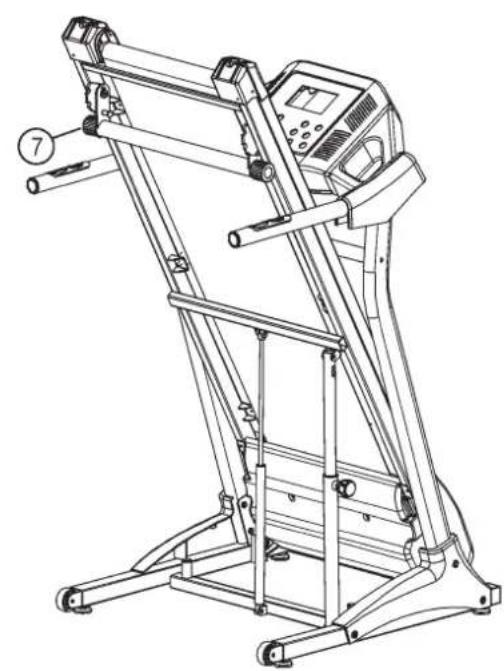
natural_image
Line drawing of a standard treadmill with control panel and wheels (no text or symbols)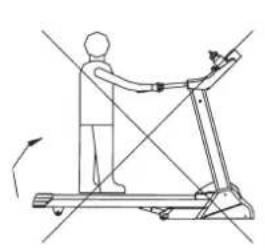
natural_image
Line drawing of a person using a treadmill with directional arrows indicating motion (no text or symbols)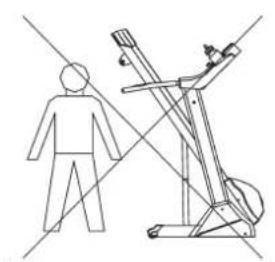
natural_image
Line drawing of a person standing next to a treadmill with motion lines (no text or symbols)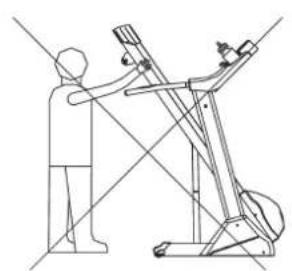
natural_image
Line drawing of a person using a leg presser machine (no text or symbols present)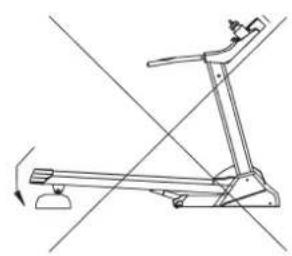
natural_image
Line drawing of a treadmill with motion lines indicating movement (no text or symbols)natural_image
Technical line drawing of a mechanical component with clamping and mounting features (no text or symbols)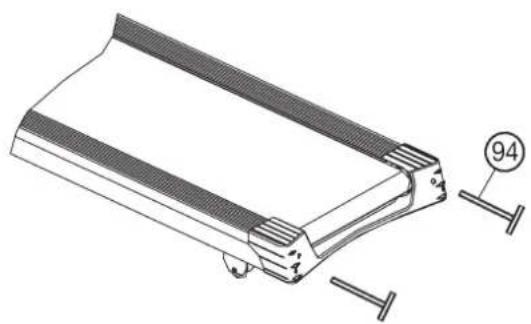
natural_image
Technical line drawing of a mechanical component with fasteners and a numbered detail (no text or symbols)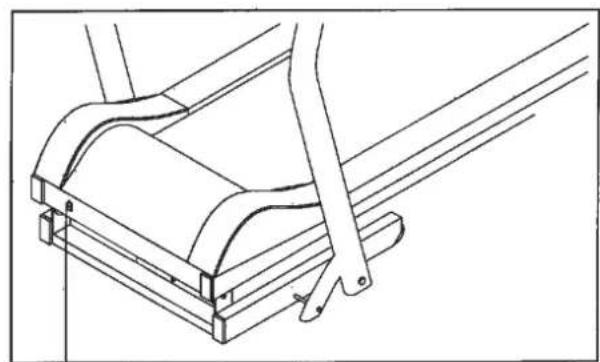
natural_image
Technical line drawing of a mechanical assembly with no visible text or symbols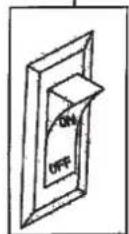
Anzeigen:
Puls-Display (Pulse):
km/h- Display (Speed):
Zeit-Display (Time):
Kalorien-Display (Calories):
natural_image
Simple line drawing of a person in a kneeling or stretching pose with an arrow indicating motion (no text or symbols)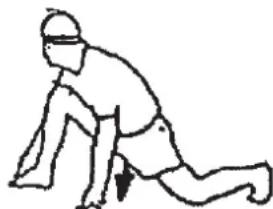
natural_image
Line drawing of a person in a kneeling or stretching pose (no text or symbols)- Summary of Parts Page 3 - 4
- Important Recommendations and Safety Information Page 14
- Technical data Page 15 - 16
- Assembly Instructions With Exploded Diagrams Page 17 - 20
- Console Key pad functions Page 21 - 22
- Training Instructions, Warm up exercises (Warm Up) Page 23
Dear customer,
We congratulate you on your purchase of this home training sports unit and hope that we will have a great deal of pleasure with it. Please take heed of the enclosed notes and instructions and follow them closely concerning assembly and use.
Please do not hesitate to contact us at any time if you should have any questions.
Important Recommendations and Safety Instructions
Our products are all TÜV-GS tested and therefore represent the highest current safety standards. However, this fact does not make it unnecessary to observe the following principles strictly.
-
Assembly the machine exactly as described in the installation instructions and use only the enclosed, specific parts of the machine contained in the parts list. Before assembling, verify the completeness of the delivery against the delivery notice and the completeness of the carton against the parts list in the installation and operating instructions. In case of repair please ask your dealer for advice.
-
Check the firm seating off all screws, nuts and other connections before using the machine for the first time and at regular intervals (every 1-2 months) to ensure that the trainer is in a safe condition. Replace defective components immediately and/or keep the equipment put of the use until repair.
-
Set up the machine in a dry, level place and protect it from moisture and water. Uneven parts of the floor must be compensated by suitable measures and by the provided adjustable parts of the machine if such are installed. Ensure that no contact occurs with moisture or water.
-
Place a suitable base (e.g. rubber mat, wooden board etc.) beneath the machine if the area of the machine must be specially protected against indentations, dirt etc.
-
Before beginning training, remove all objects within a radius of 2 metres from the machine.
-
Do not use aggressive cleaning agents to clean the machine and employ only the supplied tools or suitable tools of your own to assemble the machine and for any necessary repairs. Remove drops of sweat from the machine immediately after finishing training.
-
WARNING! Systems of the heart frequency supervision can be inexact. Excessive training can lead to serious health damage or to the death. Consult a doctor before beginning a planned training programme. He can define the maximum exertion (pulse, Watts, duration of training etc.) to which you may expose yourself and can give you precise information on the correct posture during training, the targets of your training and your diet. Never train after eating large meals.
-
Only train on the machine when it is in correct working order. Use original spare parts only for any necessary repairs. WARNING: Replace the worm parts immediately and keep this equipment out of use until repaired.
-
When setting the adjustable parts, observe the correct position and the marked, maximum setting positions and ensure that the newly adjusted position is correctly secured. Please remove the Tools you need to adjust after adjusting a new position.
-
Unless otherwise described in the instructions, the machine must only be used for training by one person at a time. The exercise time should not overtake 60 min./daily.
-
Wear training clothes and shoes which are suitable for fitness training with the machine. Your clothes must be such that they cannot catch during training due to their shape (e.g. length). Your training shoes should be appropriate for the trainer, must support your feet firmly and must have non-slip soles.
- WARNING! If you notice a feeling of dizziness, sickness, chest pain or other abnormal symptoms, stop training and consult a doctor.
- Never forget that sports machines are not toys. They must therefore only be used according to their purpose and by suitably informed and instructed persons.
- People such as children, invalids and handicapped persons should only use the machine in the presence of another person who can give aid and advice. Take suitable measures to ensure that children never use the machine without supervision.
- Ensure that the person conducting training and other people never move or hold any parts of their body into the vicinity of moving parts.
- At the end of its life span this product is not allowed to dispose over the normal household waste, but it must be given to an assembly point for the recycling of electric and electronic components. You may find the symbol on the product, on the instructions or on the packing. The materials are reusable in accordance with their marking. With the re-use, the material utilization or the protection of our environment. Please ask the local administration for the responsible disposal place.
- To protect the environment, do not dispose of the packaging materials, used batteries or parts of the machine as household waste. Put these in the appropriate collection bins or bring them to a suitable collection point.
- The maximum permissible load (=body weight) is specified as 120 kg. Evaluate your body weight before you starting the exercise.
- If the connecting cable of this item is damaged, this must be replaced by the manufacturer or the customer service or with an electrically certified person.
- This machine has been tested and certified in compliance with EN 957-1:2005, EN 957-6:2010 + EMC Directive 2004/108/EC.
Part-List + Spare-Part List
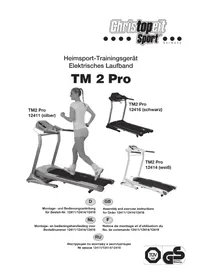
TM 2 Pro Order No.
12411 (silver), 12414 (white), 12416 (black)
Technical data: Issue: 01.07.2014
• 0,92KW (1,25PS) Motor with Peak power 1,3KW (1,75PS)
• Speed from 1 – 16 km/h adjustable
• 25 installed training programs
• 3 individual program with
• Speed and Start/Stop functions at hand rails
• Hand pulse measurement at hand rails
- Manually incline adjustable
• Vibration absorbing running surface
• Safety pin for emergency stop
- Foldable for save space
- Blue Back Light LCD Display computer showing at same time: speed, distance, time, heart rate and approx. calories
- Quick Speed buttons for 2, 4, 6, 8, 10, 12, 14 and 16 km/h
• Technical data 220-240Volt\~50-60Hz/925Watt
• Max. body weight 120 KG
• Possible connection for MP 3 Player
• Treadmill weight 52,7Kg
• Exercise space approx: min. 6 m²
• Walking surface approx. L 120, W 40 cm
Space requirement approx. L 165, W 71, H 125 cm
Space requirement foldable approx. L 80 W, 71, H 148 cm
Please check after opening the packing that all the parts shown in the following assembly steps are there. Once you are sure that this is the case, you can start assembly.
Please contact us if any components are defective or missing, or if you need any spare parts or replacements in future:
This treadmill is created only for private Home sports activity and not allowed to us in a commercial or professional area. Home Sport use class H/C

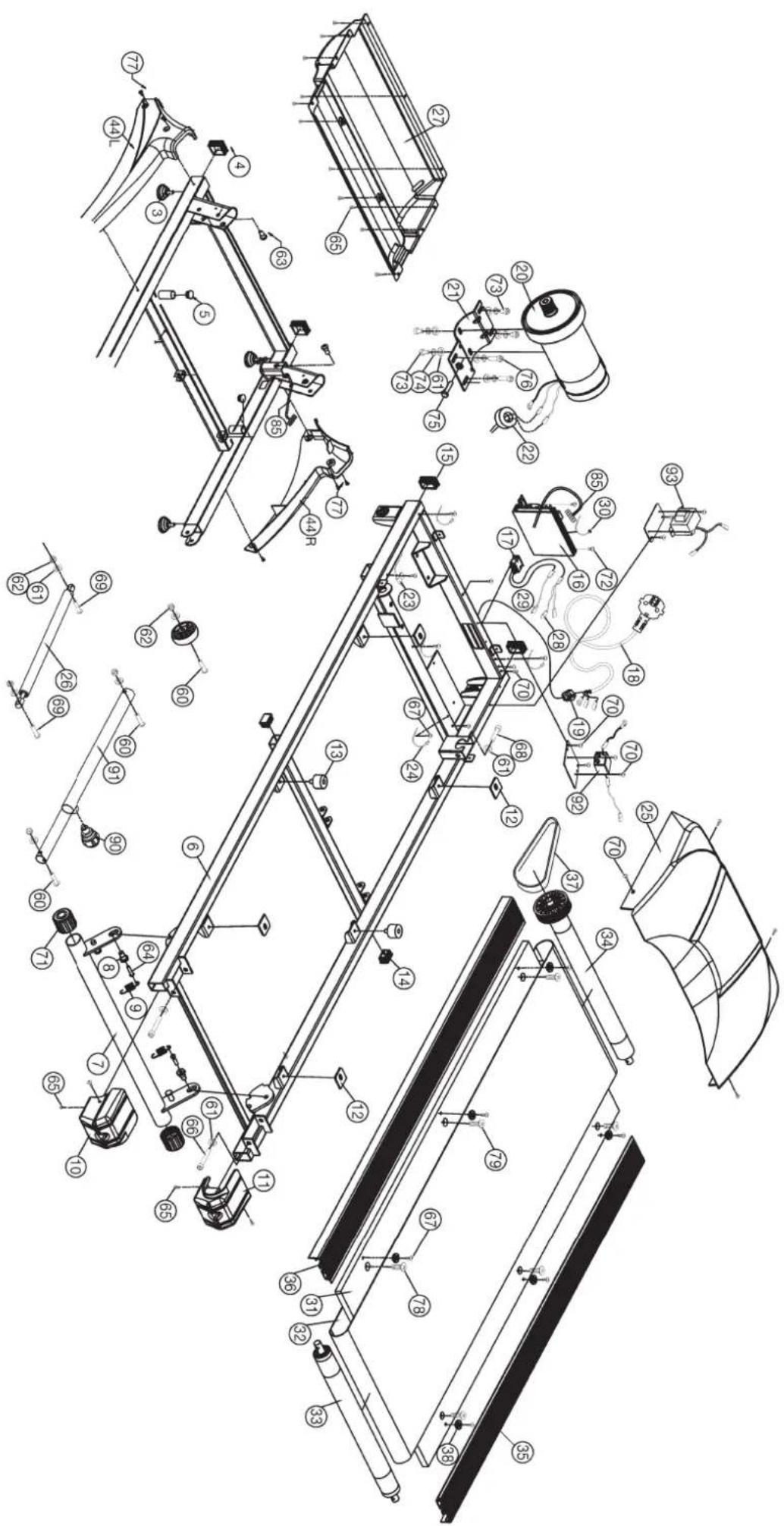
| Illustration No. | Designation | Dimensions mm | Quantity Stück | Attached to illustration No. | ET number 12411 silver | ET number 12414 white | ET number 12416 black |
| 1 | Bottom frame | 1 | 6 | 33-1241101-SI | 33-1241101-WS | 33-1241101-SW | |
| 2 | Transportation wheel | 2 | 1 | 36-1241-07-BT | 36-1241-07-BT | 36-1241-07-BT | |
| 3 | Height adjustable foot | M8 | 4 | 1 | 36-1241-08-BT | 36-1241-08-BT | 36-1241-08-BT |
| 4 | Square cap | 40x40 | 2 | 1 | 36-1241-09-BT | 36-1241-09-BT | 36-1241-09-BT |
| 5 | End cap | 22 | 2 | 1 | 36-1241-10-BT | 36-1241-10-BT | 36-1241-10-BT |
| 6 | Main frame | 1 | 1 | 33-1241-02-SI | 33-1241-02-WS | 33-1241-02-SI | |
| 7 | Incline bar | 1 | 6 | 33-1241-03-SI | 33-1241-03-WS | 33-1241303-SW | |
| 8 | Screw | M10x21 | 2 | 7 | 36-1241-11-BT | 36-1241-11-BT | 36-1241-11-BT |
| 9 | Tension spring | 2 | 7 | 36-1241-12-BT | 36-1241-12-BT | 36-1241-12-BT | |
| 10 | End cap left | 1 | 6 | 36-1241-05-BT | 36-1241405-BT | 36-1241305-BT | |
| 11 | End cap right | 1 | 6 | 36-1241-06-BT | 36-1241406-BT | 36-1241306-BT | |
| 12 | Cushion pad | 4 | 6 | 36-1241-12-BT | 36-1241-12-BT | 36-1241-12-BT | |
| 13 | Rubber cushion pad | 2 | 6 | 36-1241-13-BT | 36-1241-13-BT | 36-1241-13-BT | |
| 14 | End cap | 30x20 | 2 | 6 | 36-1241-14-BT | 36-1241-14-BT | 36-1241-14-BT |
| 15 | End cap | 40x25 | 2 | 6 | 36-1241-15-BT | 36-1241-15-BT | 36-1241-15-BT |
| 16 | PC controller board | 1 | 6 | 36-1241104-BT | 36-1241104-BT | 36-1241104-BT | |
| 17 | Main switch | 1 | 6 | 36-1241-17-BT | 36-1241-17-BT | 36-1241-17-BT | |
| 18 | AC power cable | 1 | 16 | 36-1241-18-BT | 36-1241-18-BT | 36-1241-18-BT | |
| 19 | AC power cable protector | 1 | 18 | 36-1241-19-BT | 36-1241-19-BT | 36-1241-19-BT | |
| 20 | Motor | 1 | 21 | 33-1241-04-SI | 33-1241-04-SI | 33-1241-04-SI | |
| 21 | Motor base assembly | 1 | 6+20 | 33-1241-05-SI | 33-1241-05-SI | 33-1241-05-SI | |
| 22 | Magnet ring | 1 | 20 | 36-1241-20-BT | 36-1241-20-BT | 36-1241-20-BT | |
| 23 | Speed sensor | 1 | 6+16 | 36-1241-21-BT | 36-1241-21-BT | 36-1241-21-BT | |
| 24 | Nylon strap | 5x150 | 5 | 23+85+96 | 36-1241-22-BT | 36-1241-22-BT | 36-1241-22-BT |
| 25 | Cover of motor | 1 | 6 | 36-1241-01-BT | 36-1241404-BT | 36-1241301-BT | |
| 26 | Gas spring | 1 | 1+6 | 36-1241-23-BT | 36-1241-23-BT | 36-1241-23-BT | |
| 27 | Bottom cover of motor | 1 | 6 | 36-1241-24-BT | 36-1241-24-BT | 36-1241-24-BT | |
| 28 | Blue connecting plug | 1 | 16 | 36-1241-25-BT | 36-1241-25-BT | 36-1241-25-BT | |
| 29 | Brown connecting plug | 1 | 16 | 36-1241-26-BT | 36-1241-26-BT | 36-1241-26-BT | |
| 30 | Cable strap | 3x100 | 5 | 16 | 36-1241-27-BT | 36-1241-27-BT | 36-1241-27-BT |
| 31 | Running board | 1 | 6 | 36-1241-28-BT | 36-1241-28-BT | 36-1241-28-BT | |
| 32 | Running belt | 400x2545 | 1 | 33+34 | 36-1241-04-BT | 36-1241-04-BT | 36-1241-04-BT |
| 33 | Rear roller | 1 | 6 | 33-1241-06-SI | 33-1241-06-SI | 33-1241-06-SI | |
| 34 | Front roller | 1 | 6 | 33-1241-07-SI | 33-1241-07-SI | 33-1241-07-SI | |
| 35 | Side rail | 2 | 6+31 | 36-1241-38-BT | 36-1241-38-BT | 36-1241307-BT | |
| 36 | Double glue tape | 2 | 35 | 36-1241-30-BT | 36-1241-30-BT | 36-1241-30-BT | |
| 37 | Flat belt | 180 J6 | 1 | 20+34 | 36-1241-31-BT | 36-1241-31-BT | 36-1241-31-BT |
| 38 | Plastic buckle | 6 | 31+35 | 36-1241-32-BT | 36-1241-32-BT | 36-1241-32-BT | |
| 39L | Lift post left | 1 | 1 | 33-1241102-SI | 33-1241102-WS | 33-1241102-SI | |
| 39R | Lift post right | 1 | 1 | 33-1241103-SI | 33-1241103-WS | 33-1241103-SI |
| Illustration No. | Designation Stuck | Dimensions 12411 silver | Quantity 12414 white | Attached to | ET number 12416 black | ET number | ET number | number | ||
| 40 | Connection tube | 1 | 39L+39R | 33-1241-10-SI | 33-1241-10-WS | 33-1241-10-SI | ||||
| 41L | Handle bar left | 1 | 39L | 33-1241104-SI | 33-1241104-WS | 33-1241104-SW | ||||
| 41R | Handle bar right | 1 | 39R | 33-1241105-SI | 33-1241105-WS | 33-1241105-SW | ||||
| 44L | Stützrohrverkleidung links | 1 | 1+39L | 36-1241101-BT | 36-1241401-BT | 36-1241601-BT | ||||
| 44R | Stützrohrverkleidung rechts | 1 | 1+39R | 36-1241102-BT | 36-1241402-BT | 36-1241602-BT | ||||
| 45 | End cap | 32 | 2 | 41 | 36-1241-34-BT | 36-1241-34-BT | 36-1241-34-BT | |||
| 46 | Hand grip foam | 2 | 41 | 36-1241-35-BT | 36-1241-35-BT | 36-1241304-BT | ||||
| 47L-51 | Hand pulse unit | 1 | 41L | 36-1241105-BT | 36-1241105-BT | 36-1241105-BT | ||||
| with remote buttons left | ||||||||||
| 47R-51 | Hand pulse unit | 1 | 41R | 36-1241106-BT | 36-1241106-BT | 36-1241106-BT | ||||
| with remote buttons right | ||||||||||
| 52-58 | Computer unit | 1 | 41L+41R | 36-1241103-BT | 36-1241403-BT | 36-1241603-BT | ||||
| 59 | Safety key | 1 | 52 | 36-1241-29-BT | 36-1241-29-BT | 36-1241-29-BT | ||||
| 60 | Inner hex screw | M8x45 | 14 | 1,39,40,41,98+99 | 39-10110 | 39-10110 | 39-10110 | |||
| 61 | Flat washer | 8//16 | 25 | 60,66,68,69,73+76 | 39-9862-CR | 39-9862-CR | 39-9862-CR | |||
| 62 | Nut | M8 | 6 | 60,69 | 39-9918-CR | 39-9918-CR | 39-9918-CR | |||
| 63 | Screw | M10x28 | 2 | 1+6 | 36-1241-37-BT | 36-1241-37-BT | 36-1241-37-BT | |||
| 64 | Inner hex screw | 2 | 8 | 36-1241-38-BT | 36-1241-38-BT | 36-1241-38-BT | ||||
| 65 | Inner hex screw | 4x12 | 15 | 10,11+27 | 39-10188 | 39-10188 | 39-10188 | |||
| 66 | Inner hex screw | M8x80 | 2 | 6+33 | 39-9956 | 39-9956 | 39-9956 | |||
| 67 | Cross head screw | 4x15 | 18 | 31+52 | 39-10187 | 39-10187 | 39-10187 | |||
| 68 | Inner hex screw | M8x55 | 1 | 6+34 | 39-10056 | 39-10056 | 39-10056 | |||
| 69 | Inner hex screw | M8x35 | 1 | 26 | 39-10133 | 39-10133 | 39-10133 | |||
| 70 | Screw | M4x10 | 13 | 6,25,92+93 | 39-10188 | 39-10188 | 39-10188 | |||
| 71 | Foot cap | 2 | 7 | 36-1241-39-BT | 36-1241-39-BT | 36-1241-39-BT | ||||
| 72 | Screw | M4x15 | 2 | 16 | 39-10187 | 39-10187 | 39-10187 | |||
| 73 | Inner hex screw | M8x15 | 4 | 6,20+21 | 39-9888 | 39-9888 | 39-9888 | |||
| 74 | Spring washer | for M8 | 6 | 73+76 | 39-9864-VC | 39-9864-VC | 39-9864-VC | |||
| 75 | Hex screw | M8x40 | 1 | 6+21 | 39-10125-VC | 39-10125-VC | 39-10125-VC | |||
| 76 | Inner hex screw | M8x35 | 2 | 6+21 | 39-10133 | 39-10133 | 39-10133 | |||
| 77 | Screw | M5x10 | 6 | 1+44 | 39-9903 | 39-9903 | 39-9903 | |||
| 78 | Sunk screw | M6x25 | 4 | 31 | 39-9959 | 39-9959 | 39-9959 | |||
| 79 | Sunk screw | M6x20 | 2 | 31 | 39-9958 | 39-9958 | 39-9958 | |||
| 80 | Inner hex screw | M8x12 | 2 | 39 | 39-9922 | 39-9922 | 39-9922 | |||
| 81 | Curved washer | 8//19 | 2 | 81 | 39-9966-CR | 39-9966-CR | 39-9966-CR | |||
| 82 | Screw | 4x20 | 2 | 47+52 | 39-9909-SW | 39-9909-SW | 39-9909-SW | |||
| 83 | Cross head screw | 3x8 | 15 | 52 | 39-10076-SW | 39-10076-SW | 39-10076-SW | |||
| 84 | Audio cable | 1 | 52 | 36-1142-30-BT | 36-1142-30-BT | 36-1142-30-BT | ||||
| 85 | Connection cable 1 | 1 | 16+86 | 36-1241107-BT | 36-1241107-BT | 36-1241107-BT | ||||
| 86 | Connection cable2 | 1 | 85+87 | 36-1241108-BT | 36-1241108-BT | 36-1241108-BT | ||||
| 87 | Connection cable 3 | 1 | 86+52 | 36-1241109-BT | 36-1241109-BT | 36-1241109-BT | ||||
| 88 | Cable for hand pulse and remote buttons 1 | 1 | 47+52 | 36-1241110-BT | 36-1241110-BT | 36-1241110-BT | ||||
| 89 | Cable for hand pulse and remote buttons 2 | 1 | 47+52 | 39-10111-SW | 39-10111-SW | 39-10111-SW | ||||
| 90 | Quick Release | 1 | 91 | 36-1241-44-BT | 36-1241-44-BT | 36-1241-44-BT | ||||
| 91 | Telescopic security | 1 | 1+6 | 33-1241-13-SI | 33-1241-13-SI | 33-1241-13-SI | ||||
| 92 | AC capacitor | 1 | 16 | 36-1241-45-BT | 36-1241-45-BT | 36-1241-45-BT | ||||
| 93 | Transformer | 1 | 16 | 36-1241-46-BT | 36-1241-46-BT | 36-1241-46-BT | ||||
| 94 | Tool set | 1 | 36-1241-47-BT | 36-1241-47-BT | 36-1241-47-BT | |||||
| 95 | Assembly and exercise instruction | 1 | 36-1241604-BT | 336-1241604-BT | 36-1241604-BT | |||||
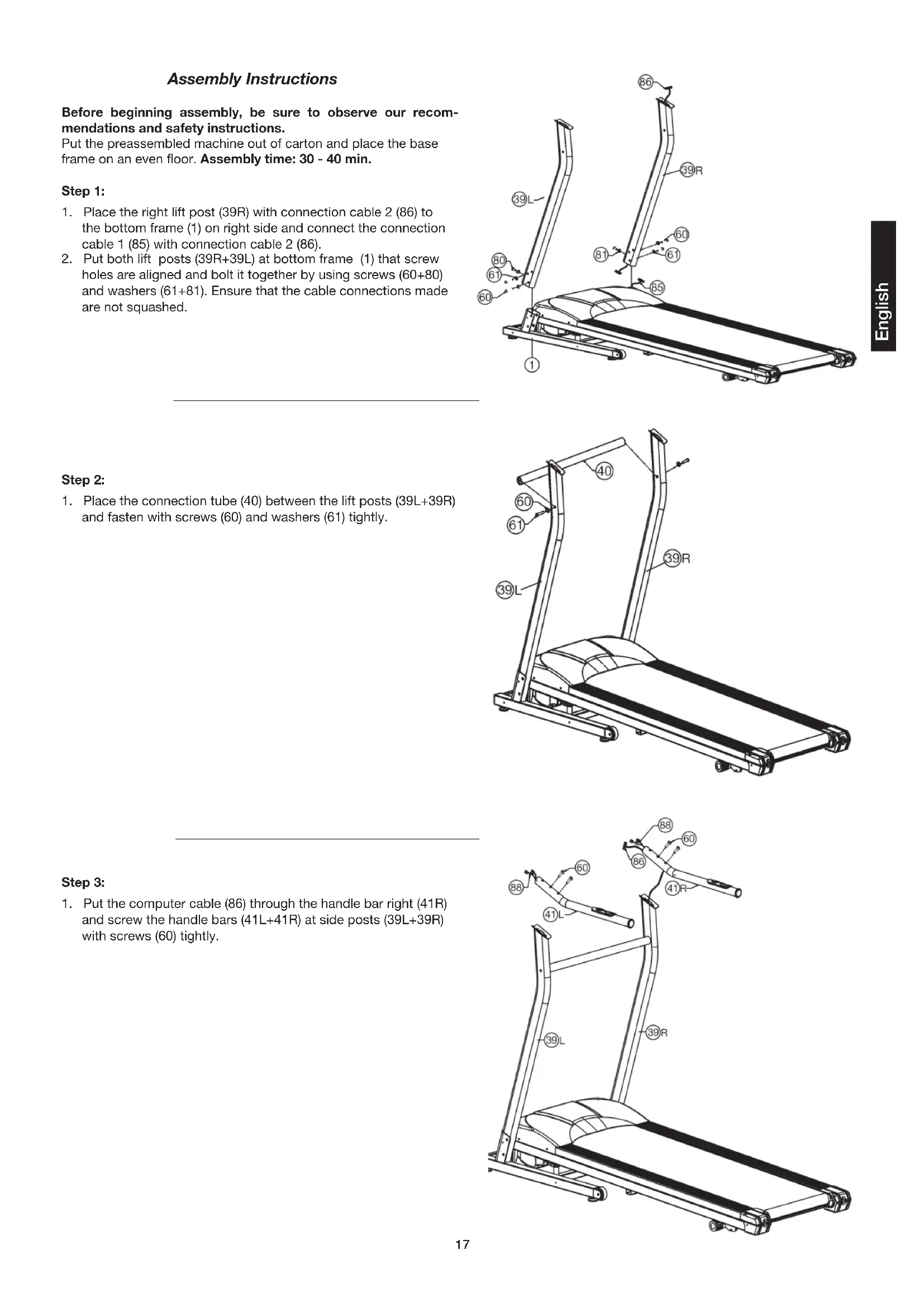
Assembly Instructions
Before beginning assembly, be sure to observe our recommendations and safety instructions.
Put the preassembled machine out of carton and place the base frame on an even floor. Assembly time: 30 - 40 min.
Step 1:
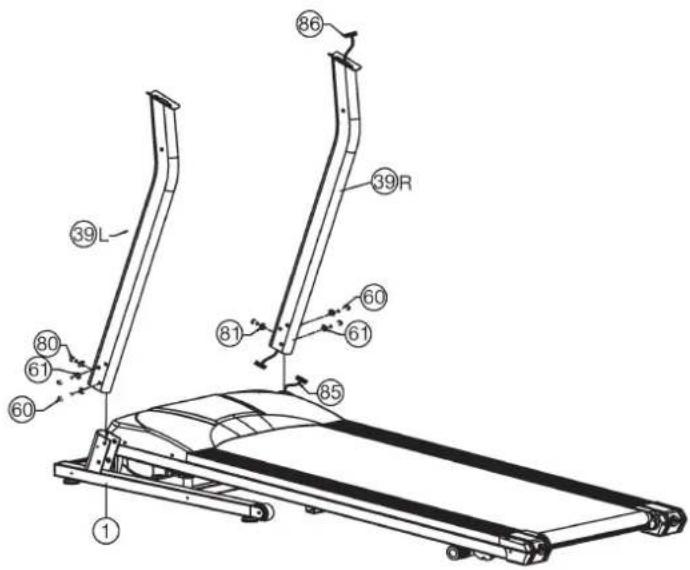
- Place the right lift post (39R) with connection cable 2 (86) to the bottom frame (1) on right side and connect the connection cable 1 (85) with connection cable 2 (86).
- Put both lift posts (39R+39L) at bottom frame (1) that screw holes are aligned and bolt it together by using screws (60+80) and washers (61+81). Ensure that the cable connections made are not squashed.
Step 2:
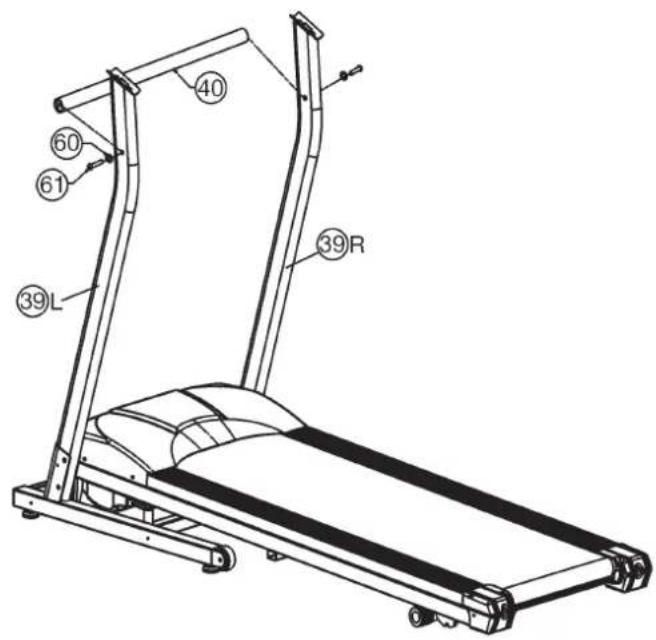
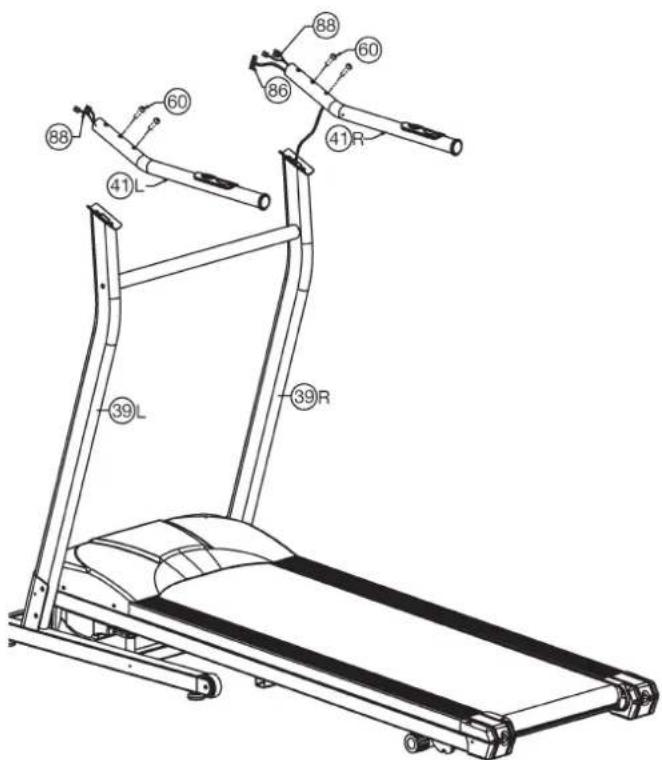
- Place the connection tube (40) between the lift posts (39L+39R) and fasten with screws (60) and washers (61) tightly.
Step 3:
- Put the computer cable (86) through the handle bar right (41R) and screw the handle bars (41L+41R) at side posts (39L+39R) with screws (60) tightly.
Step 4:
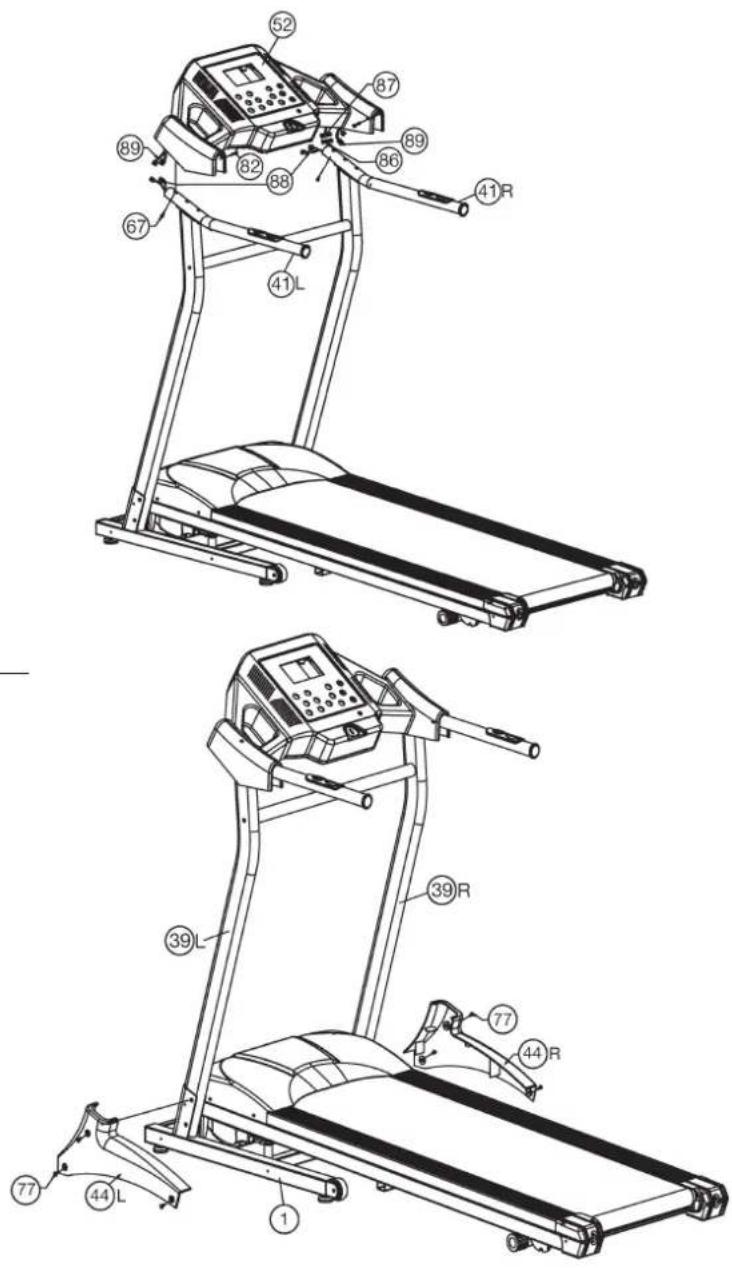
- Put the computer (52) onto the ends of handle bars (41) and connect the computer cable 1+2 (86+87) and key-/pulse cables 1+2 (88+89). Take care that the cables won't be squashed.
- Tighten the computer (52) at handle bars (41) with screws (67+82).
Step 5:
- Attach handlebar support cover (44L+44R) to main frame (1) and supports (39L+39R) and fix them by using screws (77).
Step 6:
Checks and How to start
- Check the correct installation and function of all screwed and plug connections.
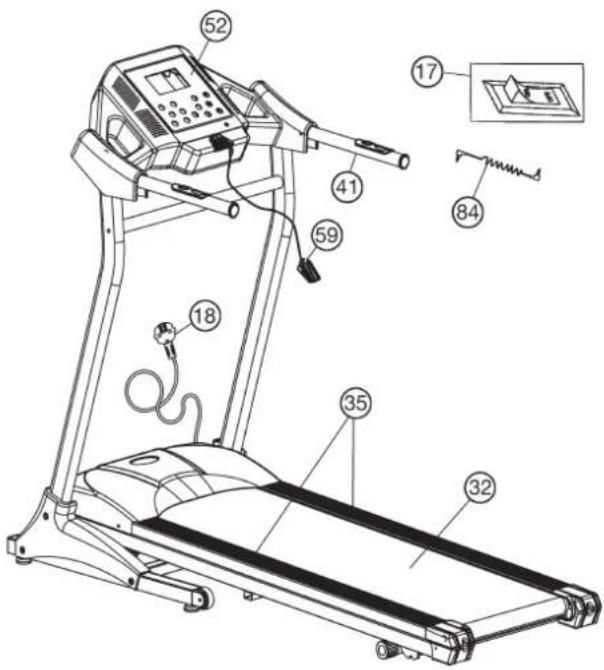
- When everything is in order, connect the power supply cable (18) with wall power (220-240V\~50-60Hz) and switch on the main switch (17) below the front frame.
- Put the safety key (59) onto the computer (52) and the computer will show normal manual mode. Put the safety clip (59) at your exercising cloth and stand on the side rails (35). Press Start-Button and after a Count Down the treadmill start moving. Start walking onto the walk surface (32) when speed is slowly and follow the speed. Familiarize yourself with the machine at a low speed settings.
- Run in the middle of the running surface (32), hold yourself tight at handrail (41) if you feel insecure and don't step on the side foot rails (35). Only run with look at the Computer on the treadmill during the running. In emergency case, step of the treadmill lateral and hold on to the handle (41).
- If you like to use an external MP3 player for example, connect with cable (84) and computer (52).
Note:
Please keep the tool set and the instructions in a safe place as these may be required for repairs or spare parts orders becoming necessary later.
Incline adjustment:
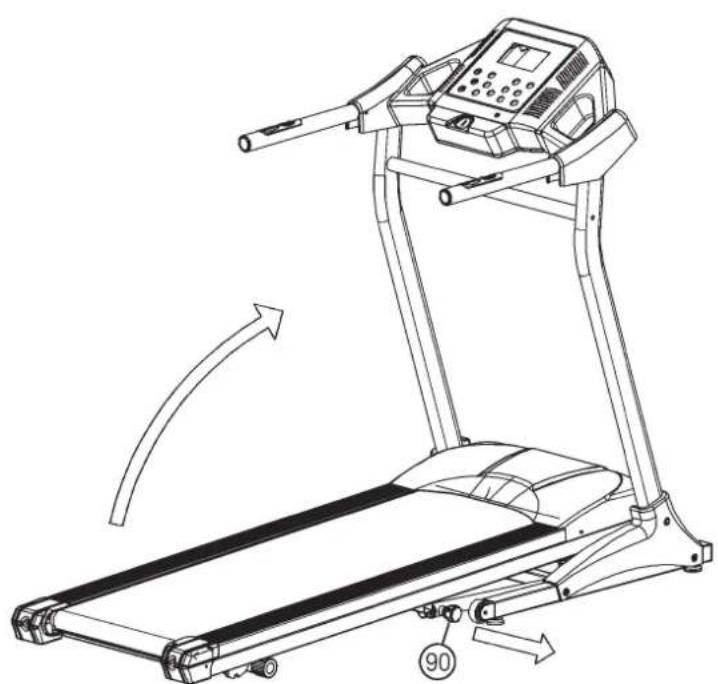
Fold up the running frame in upright position by unlock the security knob (90) until it is automatically locked. Pull out the incline bar (7) of arrested position and place into another incline position. Unlock security knob (90) and fold down the running frame into exercise position for start exercising. The incline adjustment is an additional exercise level for running, as to a mountain.
How to move/store your treadmill:
- Unlock the security knob (90) and put one hand at the end caps of the running frame and lift up into vertically position that it automatically locks the upright position.
- Place your hands on top of the handrails, than lean the machine toward your body until it is easy moveable on transportation rollers.
Warning:
Before folding up the treadmill switch off and wait until the running surface totally stopped.
Don't start the treadmill in fold up position!
natural_image
Line drawing of a treadmill with directional arrows indicating motion (no text or symbols)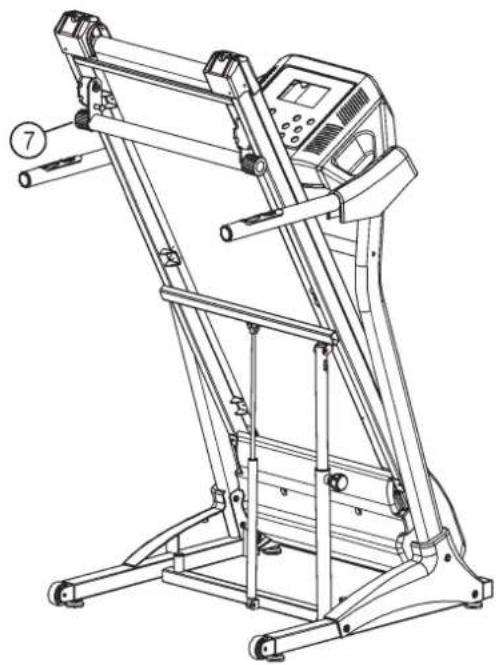
natural_image
Line drawing of a treadmill with control panel and wheels (no text or symbols)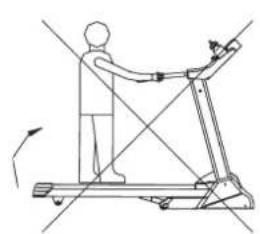
natural_image
Line drawing of a person using a treadmill with motion arrows indicating movement (no text or symbols)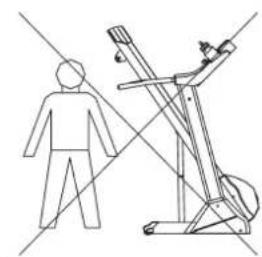
natural_image
Line drawing of a person standing next to a treadmill with a camera, intersected by two diagonal lines (no text or symbols)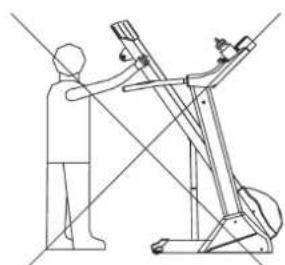
natural_image
Line drawing of a person using a treadmill to lift a machine (no text or symbols)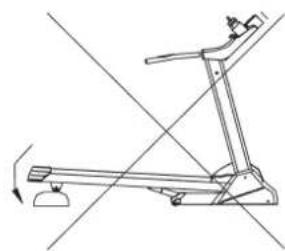
natural_image
Line drawing of a treadmill with no text or symbolsMaintenance and adjusting
1. Lubrication for the running belt:
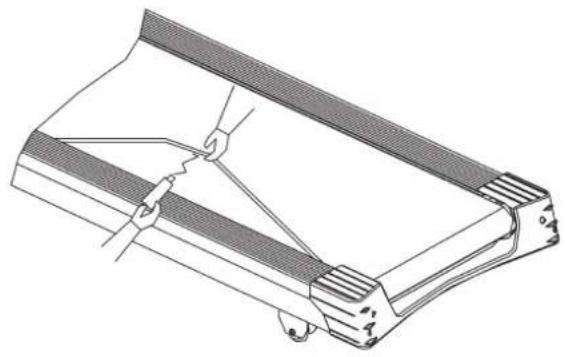
In order to keep the machine in the best condition, please add some Silicone oil between the running belt and the running board after 50 hours or 1 to 2 month of use. But the running belt may slip, if you lubricate too much. To lubricate the belt please pull the walking belt up and injection the silicone oil into the gap between belt and walking deck.
2. Adjusting running belt:
You need to adjust the walking belt to the normal position, per the following steps if it is off.
- Set speed at 3-5km.
- Using the Allen key to adjust the belt tension bolt on the end cap of the system frame.
- If you want to move the belt towards left, turn the right tension bolt clockwise.
- If you want to move the belt towards right, turn the left tension bolt clockwise.
- If you have already done according to the steps above and it is still not at the good range, then the running belt should be damaged already, please contact your local dealer for replacement.
Note: Make sure that the running surface is as centered as possible. Once these moves too far from the center, (about 10 mm) it should be readjusted into the center.
3. Running belt slips:
- Make sure the walking belt is not too loose.
- Make sure the motor belt is not too loose.
4. No light on the Display:
- Check if the power plug is properly connected.
- Check if the safety key on the computer is in place.
- Check if the wire in the right post is properly connected.
Remind! Before you inspect any wire or electrician part, please ensure that the Power supply has been turned off.
5. Abnormal noise from the machine
- Check if any screw of machine is loose.
- Check if the motor belt is off.
- Check if the running belt is off.
Note:
Please contact your local dealer if you have checked all the above listed things but the problem is still there.
natural_image
Technical line drawing of a mechanical component with clamping mechanism (no text or symbols)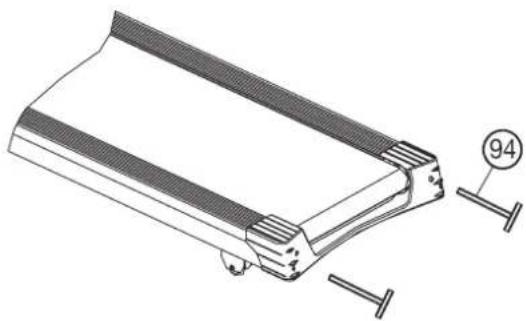
natural_image
Technical line drawing of a mechanical component with fasteners and a numbered detail (no text or symbols)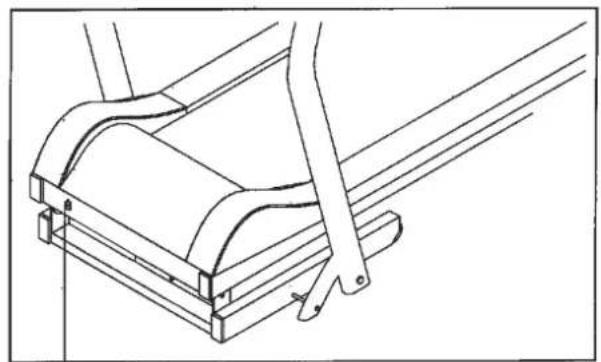
natural_image
Technical line drawing of a mechanical assembly with no visible text or symbols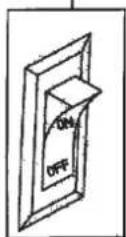
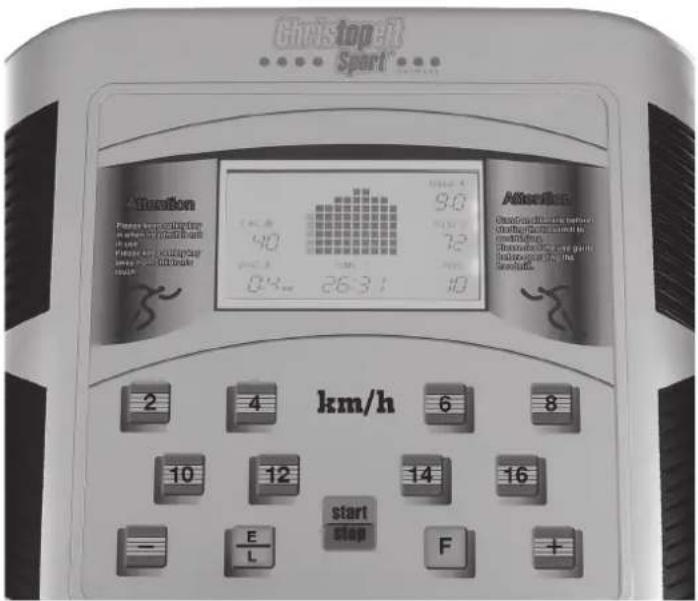
USER MANUAL OF COMPUTER
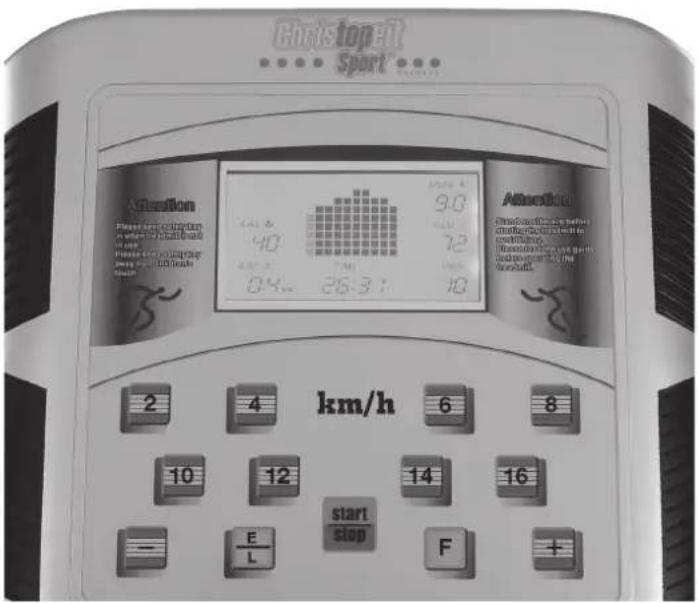
Function of Displays:
Pulse-Display:
Shows actually heart rate data.
Speed-Display:
Shows actually speed in km/h.
Distance-Display:
Shows actually distance in KM.
Time-Display:
Shows actually time of exercising in minutes and seconds.
Calories-Display:
Shows actually calories in kcal.
Program-No. Display:
Shows actually exercise programs P1\~P25.
Program-profile Display:
Shows the exercise profile of exercise programs P1\~P25.
Function of keys:
F-key:
PROGRAM key: On the stop status, press F-key to select exercising speed programs -P1-P25-
E/L-key:
Select key of time-program, distance program or calories program. Pressing this key after program stop deletes all settings.
Start/Stop: Press Start/Stop-key to start exercise program (motor starts running) and press Start/Stop-key during exercising stops program (running motor will slow stop).
“+”-key:
Press speed up key increase settings or motor speed.
“-”-key:
Press speed down key decrease settings or motor speed.
Quick Speed- keys 2, 4, 6, 8, 10, 12, 14, 16km/h:
Press one of these keys and the speed changes direct into 2, 4, 6, 8, 10, 12, 14, and 16km/h
MANUAL MODE:
How to start manual mode:
Put in the AC plug in wall power 230V\~50Hz and put on the power switch (17).
Put safety clip (59) onto the computer and it will show normal manual mode.
Stand your feet on both side rails.
Put the safety key at you exercise cloth and press start/stop-key to start with exercising. After a 5 sec. count down, the motor begin to run slowly and you can step on the running belt and follow the speed. Adjust the speed with "+" and "-" -keys into desired speed. If put off the safety clip from computer at any time, the motor stop slowly and the display will show E0. After put on the safety key on computer the normal manually program will show.
Press "+" or "-" -key to adjust value of speed.
Press quick speed -key to adjust speed quickly.
All values of the displays will counter up.
Setting Programs Time-Distance-Calories:
Time Program:
On the normal manual mode, press E/L-key, to enter time program The time display will flash and the initial value is 20:00. Press "+" -key or "-" -key to set value. The range is: 8:00-99:00. If set a value the display counts up till zero and then stops running motor.
Distance-Program:
On the normal manual mode, press E/L-key, to enter distance program The distance display will flash and the initial value is 5,00KM. Press "+" -key or "-" -key to set value. The range is: 1,00-99:00KM. If set a value the display counts up till zero and then stops running motor.
Calories-Program:
On the normal manual mode, press E/L-key, to enter calories program. The calories display will flash and the initial value is 500kcal. Press "+" -key or "-" -key to set value. The range is: 10-990kcal. If set a value the display counts up till zero and then stops running motor.
RANGE OF ALL FUNCTIONS:
| INITIAL INITIAL SETTING VALUE RANGE | RANGE | DISPLAY | ||
| TIME(MIN:SEC) 0:00 | 20:00 | 8:00-99 | 0:00-99:59 | |
| SPEED(KM/H) | 0.0 | N/A | N/A | 1.0-16.0 |
| DISTANCE(KM) 0.00 | 5.00 | 1.00 | -99.00 0.00 | -99.99 |
| PULSE(BPM) | P | N/A | N/A | 40-199 |
| CALORIES(KCAL) | 0 | 500 | 10-990 | 0-999 |
Exercise programs P1-P25:
On the normal manual mode, press F-key to chose one of the exercise speed programs P1-P25. Each program is divided into 10 intervals of time and the speed changes as following program list shows. Initial setting time is 20mins, set a time for training session and press Start/Stop to start the program. Pressing Start/Stop again to have a break or finish earlier the program. Press speed "+" or "-" - key to adjust speed during the program if it is to quick or slow. With next intervals of time the speed level will change back to program mode.
If the program runs till end of time the motor will stop running after the display counts down time to zero.
PROGRAM SPEED TABLE:
| PRO-GRAM | min-> | 1 2 | 3 4 5 | 6 7 8 9 | 10 11 | 2 13 14 | 15 16 | 17 18 | 19 20 | 21 22 23 | 24 25 | 26 27 | 28 29 30 | ||||||||||||||||||
| 1 | km/h: | 3 | 3 | 4 | 4 | 4 | 4 | 5 | 5 | 5 | 5 | 6 | 6 | 6 | 6 | 7 | 7 | 7 | 7 | 6 | 6 | 6 | 6 | 5 | 5 | 5 | 4 | 4 | 4 | 3 | 3 |
| 2 | km/h: | 4 | 4 | 5 | 7 | 9 | 11 | 11 | 11 | 9 | 7 | 5 | 5 | 7 | 9 | 11 | 11 | 11 | 11 | 9 | 7 | 5 | 5 | 7 | 9 | 11 | 11 | 9 | 5 | 4 | 4 |
| 3 | km/h: | 5 | 5 | 5 | 5 | 12 | 12 | 5 | 5 | 5 | 12 | 12 | 5 | 5 | 5 | 12 | 12 | 5 | 5 | 5 | 12 | 12 | 5 | 5 | 5 | 12 | 12 | 5 | 5 | 5 | 5 |
| 4 | km/h: | 5 | 5 | 6 | 6 | 6 | 6 | 7 | 7 | 7 | 7 | 8 | 8 | 8 | 8 | 9 | 9 | 9 | 9 | 8 | 8 | 8 | 8 | 7 | 7 | 7 | 6 | 6 | 6 | 5 | 5 |
| 5 | km/h: | 5 | 7 | 9 | 7 | 5 | 7 | 9 | 7 | 5 | 7 | 9 | 11 | 9 | 7 | 5 | 7 | 9 | 11 | 9 | 7 | 5 | 5 | 7 | 9 | 7 | 5 | 7 | 9 | 7 | 5 |
| 6 | km/h: | 5 | 6 | 7 | 8 | 9 | 8 | 7 | 6 | 5 | 6 | 7 | 8 | 9 | 8 | 7 | 6 | 5 | 6 | 7 | 8 | 9 | 8 | 7 | 6 | 5 | 6 | 7 | 8 | 9 | 8 |
| 7 | km/h: | 7 | 7 | 8 | 10 | 12 | 14 | 14 | 14 | 12 | 10 | 8 | 8 | 10 | 12 | 14 | 14 | 14 | 14 | 12 | 10 | 8 | 8 | 10 | 12 | 14 | 14 | 12 | 8 | 8 | 8 |
| 8 | km/h: | 7 | 7 | 8 | 9 | 10 | 11 | 12 | 13 | 14 | 15 | 15 | 15 | 15 | 15 | 15 | 15 | 15 | 15 | 15 | 15 | 13 | 13 | 11 | 11 | 11 | 9 | 9 | 6 | 6 | 6 |
| 9 | km/h: | 4 | 4 | 6 | 6 | 8 | 8 | 10 | 10 | 11 | 11 | 12 | 12 | 10 | 10 | 8 | 8 | 7 | 7 | 8 | 8 | 7 | 7 | 6 | 6 | 5 | 5 | 4 | 4 | 3 | 3 |
| 10 | km/h: | 7 | 7 | 9 | 9 | 11 | 11 | 13 | 13 | 14 | 14 | 13 | 13 | 11 | 11 | 10 | 10 | 12 | 12 | 11 | 11 | 10 | 10 | 9 | 9 | 8 | 8 | 7 | 7 | 6 | 6 |
| 11 | km/h: | 4 | 4 | 6 | 6 | 8 | 8 | 10 | 10 | 8 | 8 | 6 | 6 | 4 | 4 | 3 | 3 | 2 | 2 | 3 | 3 | 5 | 5 | 7 | 7 | 9 | 9 | 7 | 7 | 5 | 5 |
| 12 | km/h: | 2 3 | 4 5 4 | 3 2 3 4 | 5 6 | 7 | 8 | 9 | 10 | 9 | 8 | 7 | 6 | 5 | 4 | 3 | 4 | 5 | 6 | 7 | 6 | 5 | 4 | 3 | |||||||
| 13 | km/h: | 3 | 3 | 4 | 4 | 5 | 5 | 6 | 6 | 7 | 7 | 8 | 8 | 9 | 9 | 10 | 10 | 9 | 9 | 8 | 8 | 7 | 7 | 6 | 6 | 5 | 5 | 4 | 4 | 3 | 3 |
| 14 | km/h: | 3 | 4 | 5 | 6 | 7 | 6 | 5 | 4 | 7 | 9 | 9 | 7 | 6 | 5 | 4 | 5 | 6 | 7 | 7 | 6 | 5 | 4 | 7 | 9 | 8 | 7 | 6 | 5 | 4 | 3 |
| 15 | km/h: | 9 | 9 | 9 | 8 | 8 | 8 | 7 | 7 | 7 | 6 | 6 | 6 | 5 | 5 | 5 | 5 | 5 | 5 | 6 | 6 | 6 | 7 | 7 | 7 | 8 | 8 | 8 | 9 | 9 | 9 |
| 16 | km/h: | 8 8 | 10 | 10 | 12 | 12 | 14 | 14 | 14 | 14 | 14 | 14 | 13 | 13 | 12 | 12 | 11 | 11 | 13 | 13 | 14 | 14 | 14 | 14 | 12 | 12 | 10 | 10 | 8 | 8 | |
| 17 | km/h: | 1 | 2 | 3 | 4 | 5 | 6 | 7 | 8 | 9 | 10 | 11 | 12 | 11 | 10 | 9 | 8 | 7 | 6 | 5 | 4 | 3 | 2 | 1 | 2 | 3 | 4 | 5 | 6 | 5 | 4 |
| 18 | km/h: | 6 | 6 | 6 | 4 | 4 | 4 | 8 | 8 | 8 | 10 | 10 | 10 | 8 | 8 | 8 | 6 | 6 | 6 | 4 | 4 | 4 | 6 | 6 | 6 | 8 | 8 | 8 | 6 | 6 | 6 |
| 19 | km/h: | 2 | 2 | 3 | 3 | 3 | 3 | 4 | 4 | 4 | 4 | 5 | 5 | 5 | 5 | 6 | 6 | 6 | 6 | 5 | 5 | 5 | 5 | 4 | 4 | 4 | 3 | 3 | 3 | 2 | 2 |
| 20 | km/h: | 3 | 3 | 4 | 6 | 8 | 10 | 10 | 10 | 8 | 6 | 4 | 4 | 6 | 8 | 10 | 10 | 10 | 10 | 8 | 6 | 4 | 4 | 6 | 8 | 10 | 10 | 8 | 6 | 4 | 4 |
| 21 | km/h: | 6 | 6 | 6 | 13 | 13 | 6 | 6 | 6 | 13 | 13 | 6 | 6 | 6 | 13 | 13 | 6 | 6 | 6 | 13 | 13 | 6 | 6 | 6 | 13 | 13 | 6 | 6 | 6 | 13 | 13 |
| 22 | km/h: | 4 | 4 | 5 | 5 | 5 | 5 | 6 | 6 | 6 | 6 | 7 | 7 | 7 | 7 | 8 | 8 | 8 | 8 | 7 | 7 | 7 | 7 | 6 | 6 | 6 | 5 | 5 | 5 | 4 | 4 |
| 23 | km/h: | 8 | 8 | 8 | 8 | 7 | 7 | 6 | 6 | 6 | 5 | 5 | 5 | 4 | 4 | 4 | 4 | 4 | 4 | 5 | 5 | 5 | 6 | 6 | 6 | 7 | 7 | 7 | 8 | 8 | 8 |
| 24 | km/h: | 4 | 5 | 6 | 7 | 8 | 9 | 9 | 8 | 7 | 6 | 5 | 4 | 4 | 5 | 6 | 7 | 8 | 9 | 9 | 8 | 7 | 6 | 5 | 4 | 4 | 5 | 6 | 7 | 8 | 9 |
| 25 | km/h: | 1 | 2 | 3 | 4 | 5 | 6 | 7 | 8 | 9 | 10 | 11 | 12 | 12 | 11 | 10 | 9 | 8 | 7 | 6 | 5 | 4 | 3 | 2 | 1 | 1 | 2 | 3 | 4 | 5 | 6 |
Function of safety key
The safety clip has an emergency function. In fear or danger or if you fall down Or jumped from it, the safety clip will lose position at computer and stops the motor with break system.
Put the safety key out from computer on any status, the display is E0, the buzzer beep each second. Put the safety key on computer, then the display will enter normal manual mode. All parameter reset to zero.
Error codes:
E 0 = Safety key not found, put on Safety key
E 1 = Speed signal missing, check speed Sensor
E 3 = Self check error, controller defective
Training instructions
You must consider the following factors in determining the amount of training effort required in order to attain tangible physical and health benefits:
1. Intensity:
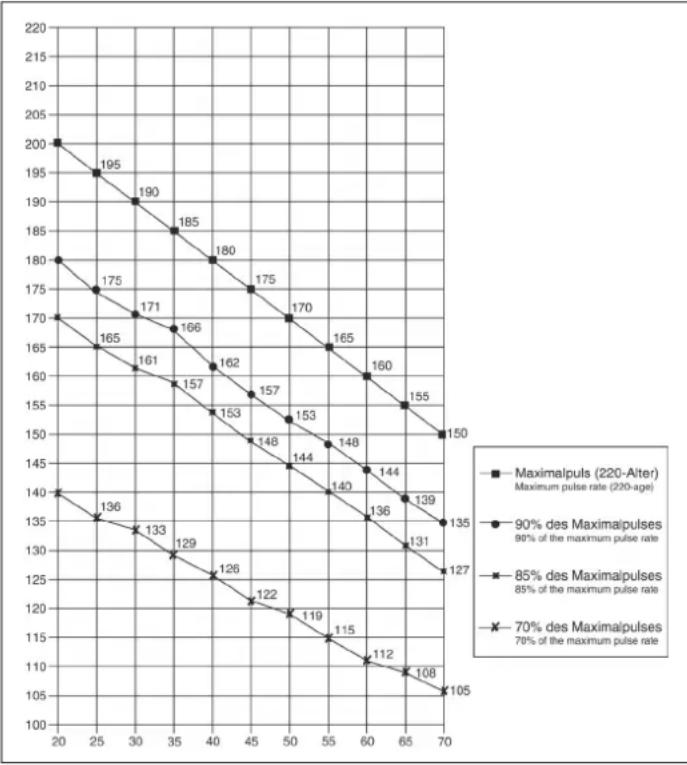
The level of physical exertion in training must exceed the level of normal exertion without reaching the point of breathlessness and / or exhaustion. A suitable guideline for effective training can be taken from the pulse rate. During training this should rise to the region of between 70% to 85% of the maximum pulse rate (see the table and formular for determination and calculation of this).
During the first weeks, the pulse rate should remain at the lower end of this region, at around 70% of the maximum pulse rate. In the course of the following weeks and months, the pulse rate should be slowly raised to the upper limit of 85% of the maximum pulse rate. The better the physical condition of the person doing the exercise, the more the level of training should be encreased to remain in the region of between 70% to 85% of the maximum pulse rate. This should be done by lengthening the time for the training and / or increasing the level of difficulty.
If the pulse rate is not shown on the computer display or if for safety reasons you wish to check your pulse rate, which could have been displayed wrongly due to error in use, etc., you can do the following:
a. Pulse rate measurement in the conventional way (feeling the pulse at the wrist, for example, and counting the number of beats in one minute). b. Pulse rate measurement with a suitable specialised device (available from dealers specialising in health-related equipment).
2.Frequency
Most experts recommend a combination of health-conscious nutrition, which must be determined on the basis of your training goal, and physical training three times a week. A normal adult must train twice a week to maintain his current level of condition. At least three training sessions a week are required to improve one's condition and reduce one's weight. Of course the ideal frequency of training is five sessions a week.
3. Planning the training
Each training session should consist of three phases: the warm-up phase, the training phase, and the cool-down phase. The body temperature and oxygen intake should be raised slowly in the warm-up phase. This can be done with gymnastic exercises lasting five to ten minutes.
Then the actual training (training phase) should begin. The training exertion should be relatively low for the first few minutes and then raised over a period of 15 to 30 minutes such that the pulse rate reaches the region of between 70% to 85% of the maximum pulse rate.
In order to support the circulation after the training phase and to prevent aching or strained muscles later, it is necessary to follow the training phase with a cool-down phase. This should be consist of stretching exercises and / or light gymnastic exercises for a period of five to ten minutes.
You find further information on the subject warm-up exercises, stretch exercises or general gymnastics exercises in our download area under www.christopeit-sport.com
4. Motivation
The key to a successful program is regular training. You should set a fixed time and place for each day of training and prepare yourself mentally for the training. Only train when you are in the mood for it and always have your goal in view. With continuous training you will be able to see how you are progressing day by day and are approaching your personal training goal bit by bit.
line
| X-axis | Maximalpuls (220-Aiter) Maximum pulse rate (220-age) | 90% des Maximaipulses 98% of the maximum pulse rate | 85% des Maximaipulses 85% of the maximum pulse rate | 70% des Maximaipulses 70% of the maximum pulse rate | |---|---|---|---|---| | 20 | 200 | 180 | 170 | 140 | | 25 | 195 | 175 | 165 | 136 | | 30 | 190 | 171 | 161 | 133 | | 35 | 185 | 166 | 157 | 129 | | 40 | 180 | 162 | 153 | 126 | | 45 | 175 | 157 | 148 | 122 | | 50 | 170 | 153 | 144 | 119 | | 55 | 165 | 148 | 140 | 115 | | 60 | 160 | 144 | 136 | 112 | | 65 | 155 | 139 | 131 | 108 | | 70 | 150 | 135 | 127 | 105 |Calculation formula: Maximum pulse rate = 220 - age (220 minus your age)
90% of the maximum pulse rate = (220 - age) x 0.9
85% of the maximum pulse rate = (220 - age) x 0.85
70% of the maximum pulse rate = (220 - age) x 0.7
Warm up exercises (Warm Up)
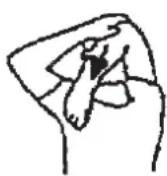
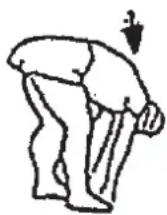
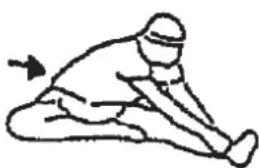
Start your warm up by walking on the spot for at least 3 minutes and then perform the following gymnastic exercises to the body for the training phase to prepare accordingly. The exercises do not overdo it and only as far run until a slight drag felt. This position will hold a while.
natural_image
Simple line drawing of a person in a kneeling or stretching pose with an arrow indicating motion (no text or symbols)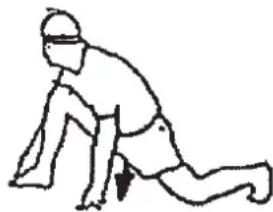
natural_image
Line drawing of a person in a kneeling position with a downward arrow indicating motion (no text or symbols)Reach with your left hand behind your head to the right shoulder and pull with the right hand slightly to the left elbow. After 20sec. switch arm.
Bend forward as far forward as possible and let your legs almost stretched. Show it with your fingers in the direction of toe. 2 x 20sec.
Sit down with one leg stretched out on the floor and bend forward and try to reach the foot with your hands. 2 x 20sec.
Kneel in a wide lunge forward and support yourself with your hands on the floor. Press the pelvis down. Change after 20 sec leg.
After the warm-up exercises by some arms and legs shake loose.
Don't finish the exercise phase abruptly, but will cycle leisurely something without resistance from to return to the normal pulse-zone. (Cool down) We recommend the warm-up exercises at the end of the training be conducted and to end your workout with shaking of the extremities.
Étape n° 2:
Etape n° 4:
Étape n° 6:
natural_image
Line drawing of a treadmill with motion arrows indicating movement, no text or symbols present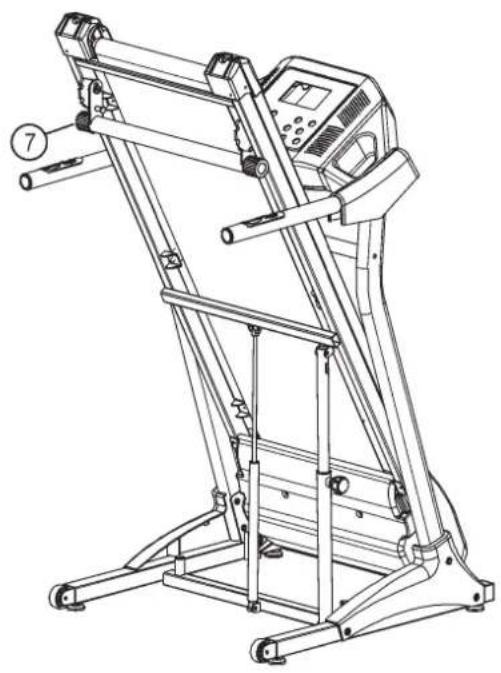
natural_image
Line drawing of a treadmill with control panel and wheels (no text or symbols)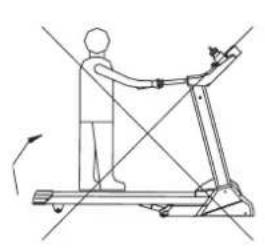
natural_image
Line drawing of a person using a treadmill with directional arrows indicating motion (no text or symbols)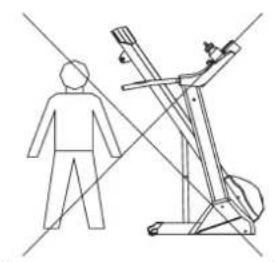
natural_image
Line drawing of a person standing next to a treadmill with a dog on top (no text or symbols)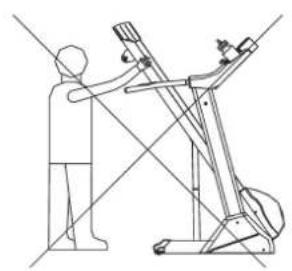
natural_image
Line drawing of a person using a treadmill to lift a machine, with no text or symbols present.
natural_image
Line drawing of a treadmill with motion lines indicating movement (no text or symbols)natural_image
Technical line drawing of a mechanical component with clamping mechanism (no text or symbols)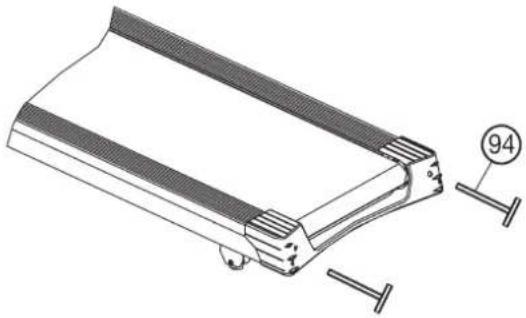
natural_image
Technical line drawing of a mechanical component with mounting flanges and a numbered detail (94), no readable text or symbols present.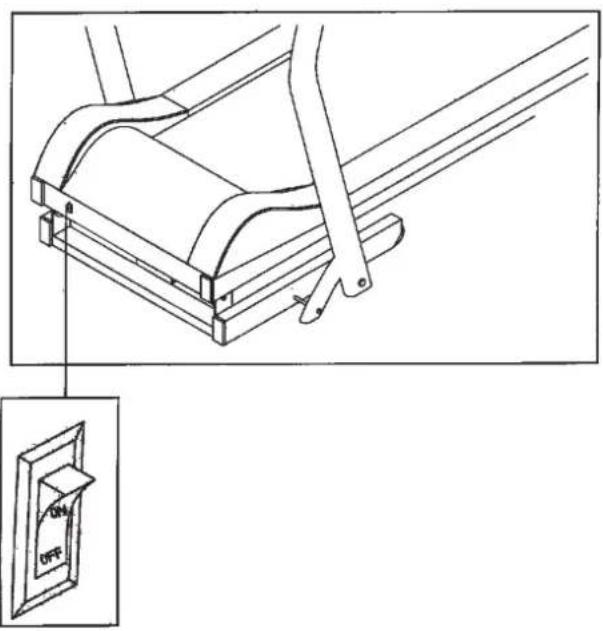
Affichages:
Ecran Pulse (Pulsation):
natural_image
Simple line drawing of a person in a kneeling or stretching pose with an arrow indicating motion (no text or symbols)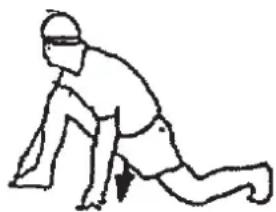
natural_image
Simple line drawing of a person in a kneeling position, wearing headband and holding an object (no text or symbols)12411 (silver), 12414 (white), 12416 (black)
Stap 2:
Stap 4:
Stap 6:
Incline aanpassing:
natural_image
Line drawing of a treadmill with directional arrows indicating motion (no text or symbols)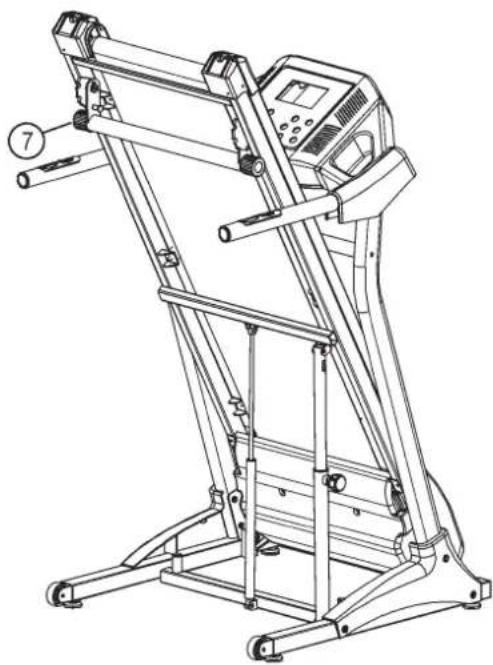
natural_image
Line drawing of a standard treadmill with control panel and wheels (no text or symbols)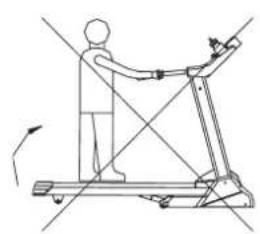
natural_image
Line drawing of a person using a treadmill with motion lines indicating movement (no text or symbols)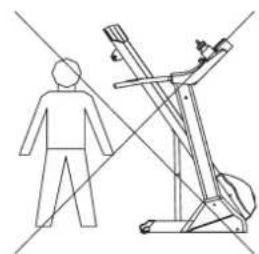
natural_image
Line drawing of a person standing next to a treadmill with diagonal lines indicating motion (no text or symbols)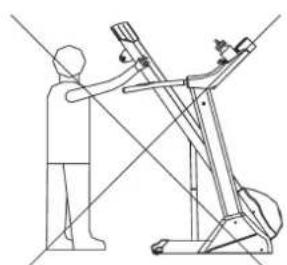
natural_image
Line drawing of a person using a treadmill to lift a machine (no text or symbols)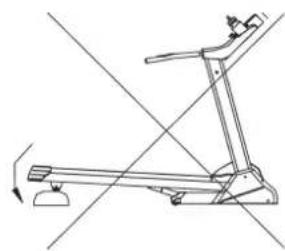
natural_image
Line drawing of a treadmill with diagonal lines indicating motion or alignment (no text or symbols)natural_image
Technical line drawing of a mechanical assembly with clamping components (no text or symbols)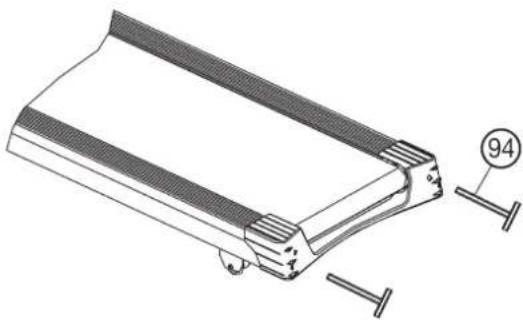
natural_image
Technical line drawing of a mechanical component with fasteners and a numbered detail (no text or symbols)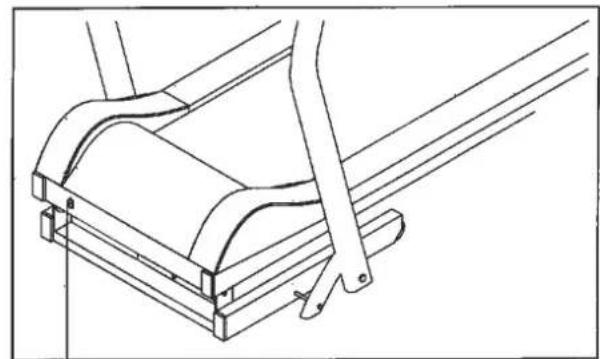
natural_image
Technical line drawing of a mechanical assembly with no visible text or symbols
Beeldschermen:
Beeldscherm Polsslag (Pulse):
3. Planning van de training
natural_image
Simple line drawing of a person in a kneeling or stretching pose with an arrow indicating motion (no text or symbols)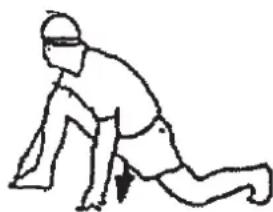
natural_image
Line drawing of a person in a kneeling position with a headband and arrow indicating movement (no text or symbols)12411 (silver), 12414 (white), 12416 (black)
natural_image
Line drawing of a treadmill with directional arrows indicating motion (no text or symbols)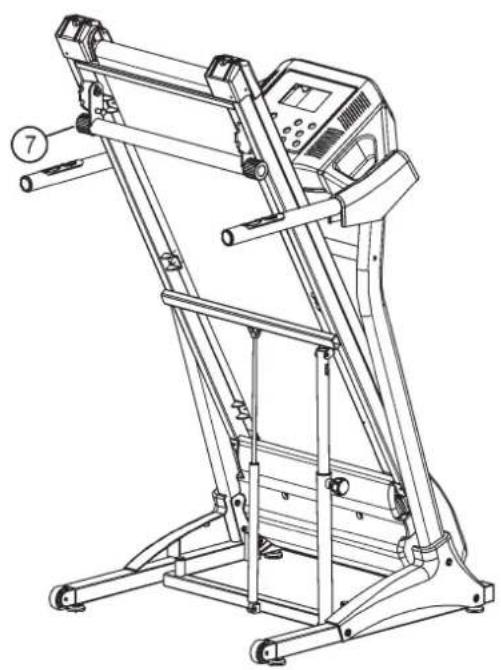
natural_image
Line drawing of a treadmill with control panel and wheels (no text or symbols)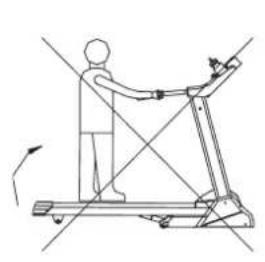
natural_image
Line drawing of a person using a treadmill with directional arrows indicating motion (no text or symbols)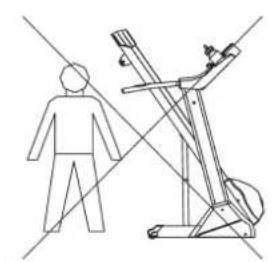
natural_image
Line drawing of a person standing next to a treadmill with a dog on top, intersected by diagonal lines (no text or symbols)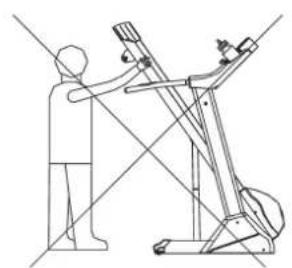
natural_image
Line drawing of a person using a balance scale to lift a machine, with no text or symbols present.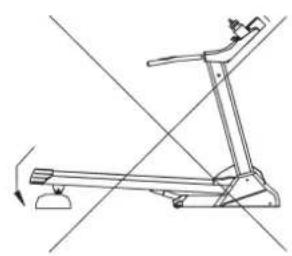
natural_image
Line drawing of a treadmill with motion lines indicating movement (no text or symbols)Описание компьютера
Функции:
© by Top-Sports Gilles GmbH D-42551 Velbert (Germany)
Service:
Tel.: +49 (0)2051/6067-0
Fax: +49 (0)2051/6067-44