AP2300 - Photo printer SAGEM - Free user manual and instructions
Find the device manual for free AP2300 SAGEM in PDF.



| Product type | Photo printer |
| Brand | SAGEM |
| Model | AP2300 |
| Display | 2.4-inch LCD |
| Connections | Memory card slots, PictBridge, WiFi (optional), Bluetooth (optional), video output, IRDA |
| Power supply | Power adapter PF60N24AS0 – 230 V, 50/60 Hz |
| Consumables | AgfaPhoto photo paper and ribbon exclusively |
| Main functions | Crystal Image, red-eye correction, zoom, special effects (sepia, B&W, etc.), slideshow, sudoku, wallpaper customization |
| Printing | From memory cards (SmartMedia, etc.) and computer (drivers on CD-ROM) |
| Operating temperature | 15 °C to 35 °C |
| Warranty | 1 year parts and labor (excluding consumables) |
| Included accessories | Power adapter, power cord, paper tray, installation guide, CD-ROM, ribbon (depending on model), WiFi adapter (depending on model), photo paper pack (depending on model), remote control (depending on model), video cable (depending on model) |
| Safety | Do not open during printing, do not touch the print head, avoid humidity and dust, use AgfaPhoto consumables |
| General information | Manufacturer: Sagem Communication, 4 rue du Petit Albi - 95800 Cergy Saint-Christophe - FRANCE |
Frequently Asked Questions - AP2300 SAGEM
User questions about AP2300 SAGEM
0 question about this device. Answer the ones you know or ask your own.
Ask a new question about this device
Download the instructions for your Photo printer in PDF format for free! Find your manual AP2300 - SAGEM and take your electronic device back in hand. On this page are published all the documents necessary for the use of your device. AP2300 by SAGEM.
USER MANUAL AP2300 SAGEM
AGFAPHOTO is used under license of Agfa-Gevaert AG.
produced for and sold by Sagem Communication, www.sagem.com


English
Welcome
Thank you for purchasing our new photo printer. With this high quality printer you can get the most out of your digital photos. The Crystal Image and red-eye image optimising functions provide faultless print and copy quality of your photos.
You will also find the following on the web site www.agfaphotoprinter.com:
- print drivers for PCs,
- a list of answers to frequently asked questions (FAQ).
A detailed user guide is supplied on the CD-ROM.
Safety instructions and recommendations

Do not install your photo printer in a humid room (bathroom, laundry, kitchen, etc.), or within 1.50m of a tap or water source, or outside. The printer should be operated within an ambient temperature range of 10^ to 35^ . Your printer should be used at an ambient temperature of between 15^ and 35^ for optimum printing results.
Do not set up your printer in a dusty environment as dust deposits might adversely affect the print quality of your photos.
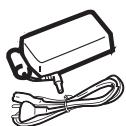
Only use the power supply that is supplied (PF60N24AS0 of Shanghai Moons' Automation Control Co., Ltd). Connect it to a mains outlet in compliance with the installation instructions in this booklet and the indications stated on the identification label located on the unit (voltage, current and frequency of the electricity network). As a precaution, in case of danger, the mains adapters act as a disconnecting mechanism for the 230V power supply. They should be placed near the device and should be easily accessible.
Never open the top cover when the printer is operating, as you risk breaking the film that may result in a printer malfunction.
After using the printer, wait a few moments after switching the printer off before opening it. To avoid injury, never touch the print head.
Only use AgfaPhoto consumables, if not you are likely to damage the equipment and invalidate the guarantee.

The crossed-out waste bin stuck on the product means that the product belongs to the family of electrical and electronic equipment.
In this respect, the European regulations ask you to dispose of it selectively:
- At sales points in the event of the purchase of similar equipment.
- At the collection points made available to you locally (drop-off centre, selective collection, etc.).

The CE marking certifies that the product meets the main requirements of the European Parliament and Council directive 1999/5/CE on telecommunications terminal equipment, regarding safety and health of users, and regarding electromagnetic interference.
The declaration of compliance can be consulted on the site www.agfaphotoprinter.com category "support", or can be requested at the following address:
AGFAPHOTO is used under license of Agfa-Gevaert AG
AP2300-2700 are produced for Sagem Communication and distributed or sold by Sagem Communication
Sagem Communication - Customer relations department
Your printer and its accessories
Place your set in front of you. Take out the various components for your printer and check that the components shown below are present :
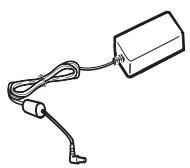
Power supply block
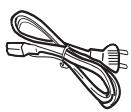
Mains lead
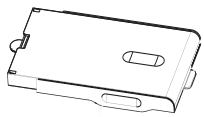
Paper tray
Photo printer

Installation guide
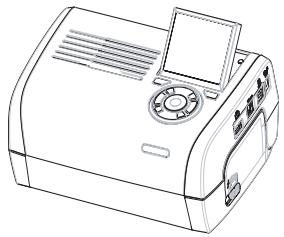

CD-ROM
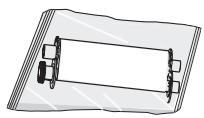
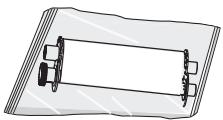
Ribbon
(dependently on model)
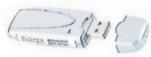
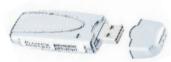
WiFi adapter
(dependently on model)
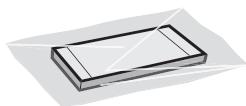
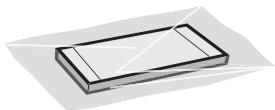
Photo paper block
(dependently on model)
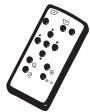
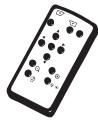
Remote control
(dependently on model)
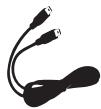
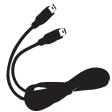
Video cable
(dependently on model)
3




Connections
Memory card insertion slots
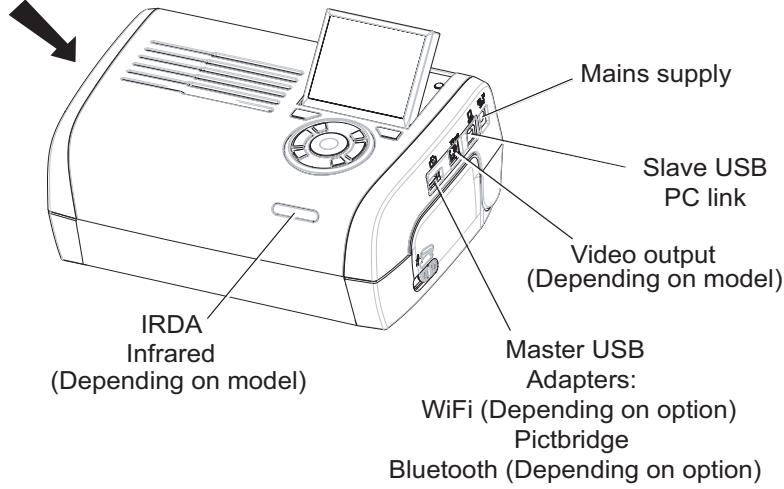

Before making the connections, please consult the safety instructions at the start of the user booklet on the CD-ROM provided with your printer.
| Video output | IRDA | WiFi | Bluetooth | |
| AP2300 | - | - | - | - |
| AP2700 | ● | ● | Option | Option |
Remarks:
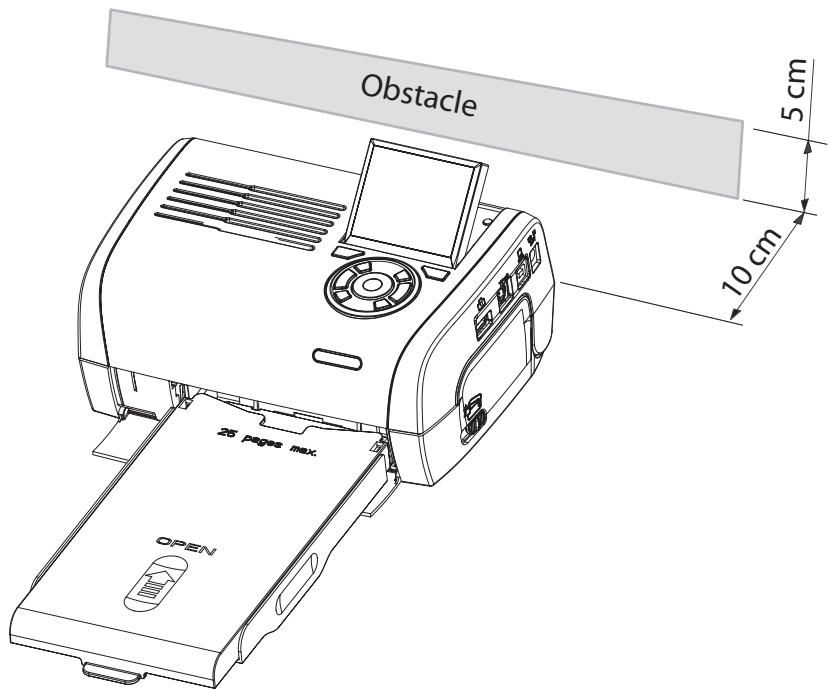
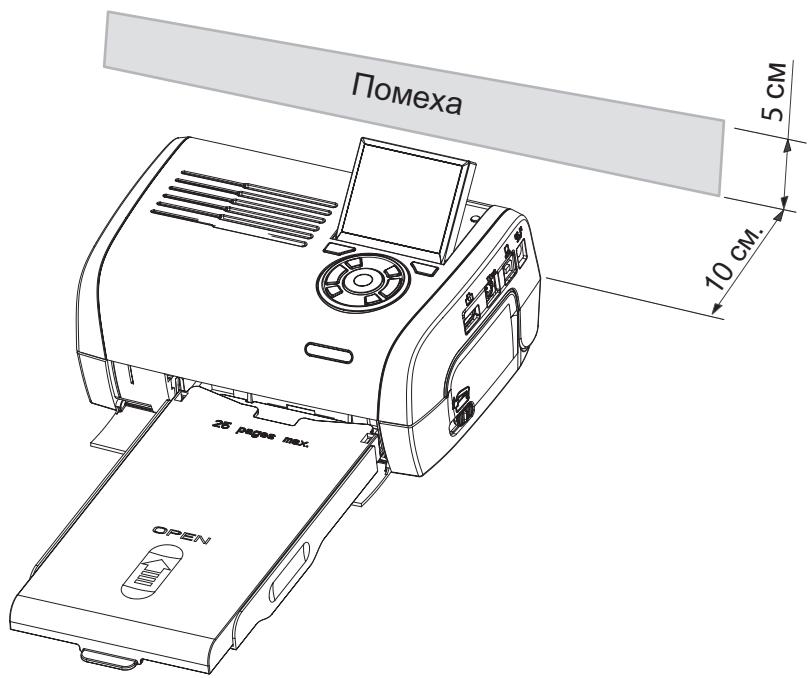
To guarantee that the sheet of paper moves correctly while printing, make sure that to allow at least 10 centimetres free space at the back of the printer.
Do not set up your printer in a dusty environment as dust deposits might adversely affect the print quality of your photos.

Setting up the printer
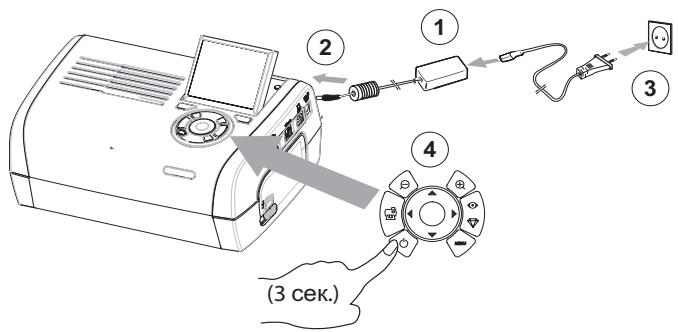
Powering up
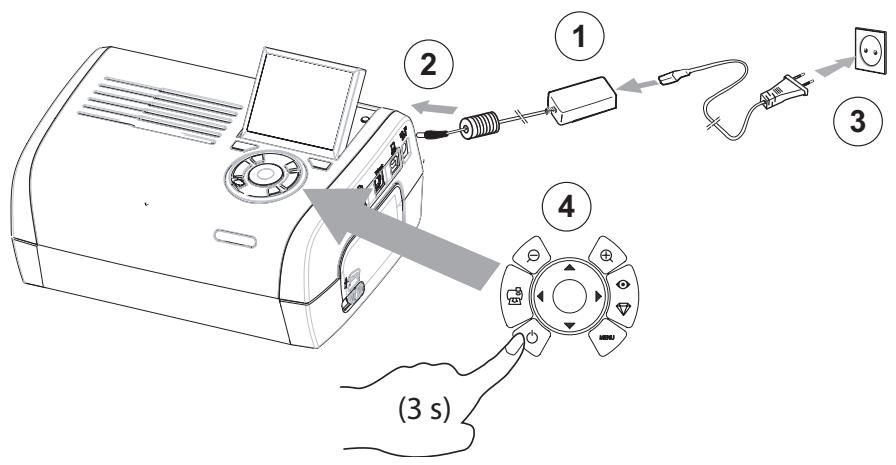
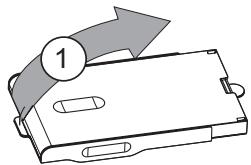
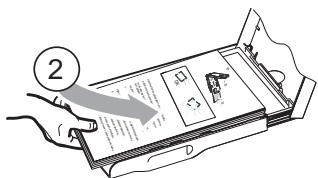
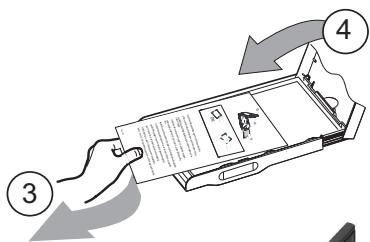
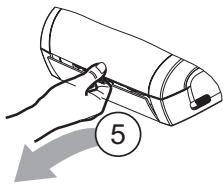
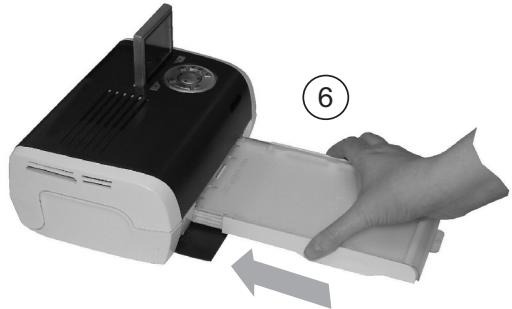
Inserting paper
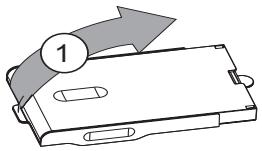
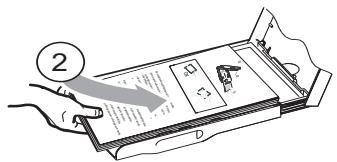
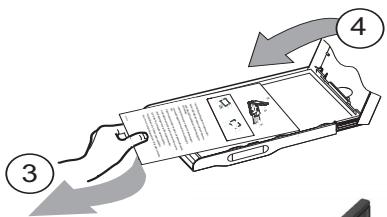
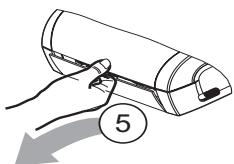
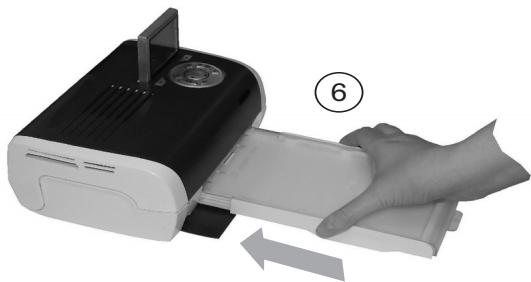
6



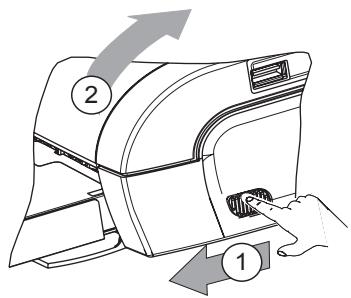
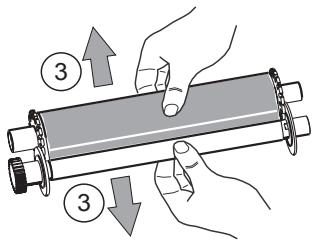
Installing the ribbon
Remark:
Use manufacturer consumables only. These are specially designed to provide optimum print quality.
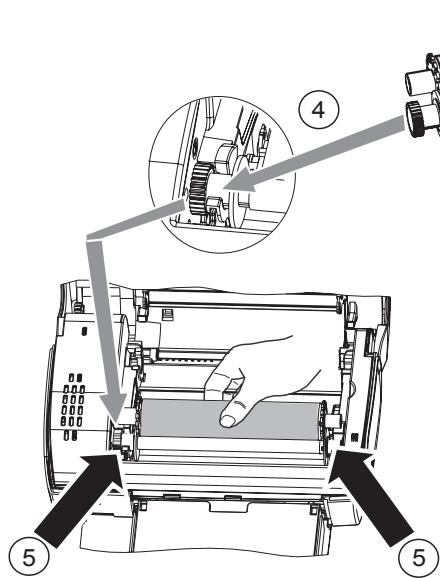
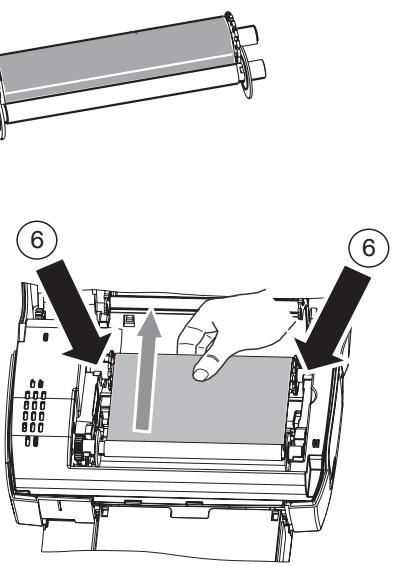

Tighten the ribbon on these spindles (6) and close the printer.
7


Description of the user interface
The interface is used to:
-
choose photographs one at a time or switch into mosaic mode (9 photographs on screen),
-
start the printout of a photograph directly,
-
enable automatic improvement of the photograph prior to printout.
-
enable automatic improvement of the photograph prior to printout,
-
set the "Format", "Preferences" and "Image setting" parameters according to your requirements.
-
select several photographs and choose a different number of copies for each photograph to be printed,
- zoom in on a photograph and print it.
Description of the keypad
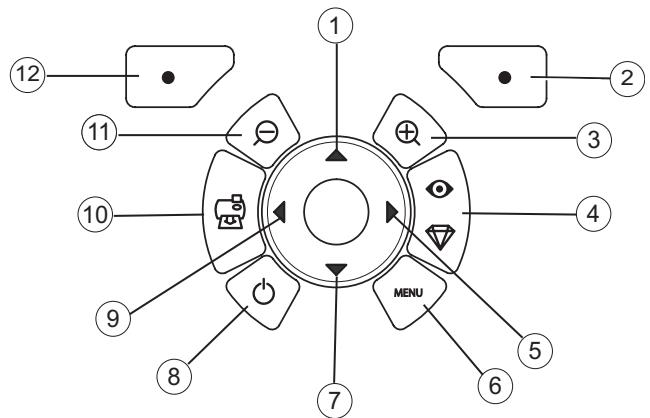
No.
Key
| 1 / 5 / 7 / 9 | Browser |
| 2 | Validate / Enter / Add a copy |
| 3 | Zoom + |
| 4 | Crystal image / Red eyes |
| 6 | Menu |
| 8 | On / Off |
| 10 | |
| 11 | Zoom - |
| 12 | Back / Cancel / Remove a cop |


DESCRIPTION OF THE GRAPHIC USER INTERFACE
.2.4" LCD screen (1), to view your photographs
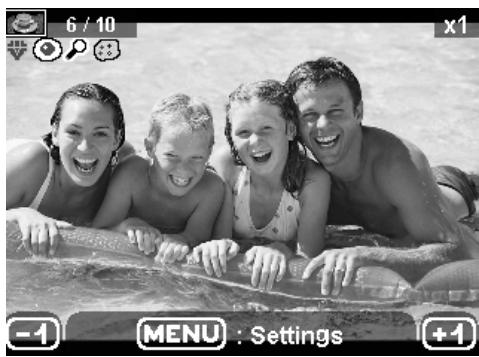
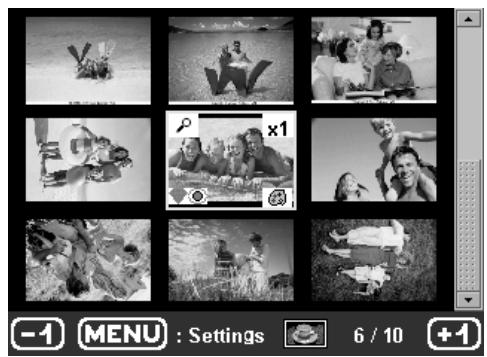
The icon...
indicates...
the photograph number

the number of copies selected

Crystal image function enabled

red eye function enabled

zoom applied to part of the image

modifications made to the image

remove a copy

selection key

access menus MENU key

add a copy

selection key
9


PRINTING A PHOTOGRAPH FROM A MEMORY CARD
Check that the consumables (paper and ribbon) are installed.
Check that your printer is plugged in and switched on.
Insert your memory card into the correct slot, as shown on the diagram below.
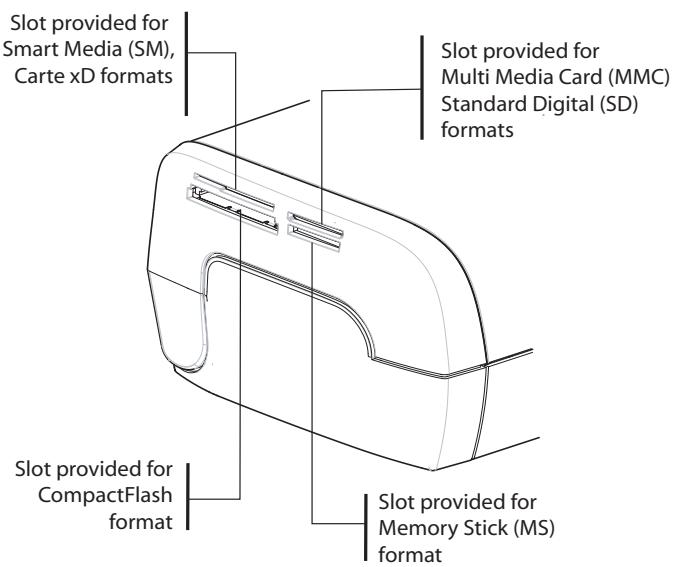
Remarks: SmartMedia CONTACTS DOWNWARD.
The memory cards do not go completely inside the read slot. NEVER USE FORCE. Remove the card and check that you are inserting it the right way round into the correct slot.
For further information, refer to the user booklet on the CD-ROM provided with your printer.
Insert your memory card; after reading the card, the last photograph will be displayed on the LCD screen.
Press the key to display the first photograph on the card. Scroll through the photographs with
the and keys. After selecting the photograph, press the key and follow the
instructions displayed on screen to print your photograph.
Improving the print quality
Use the "Crystal Image" and "Red Eye" correction functions.
Crystal Image makes all the necessary settings and corrections related to picture sharpness, colour management and contrast automatically to obtain the best print quality possible.
Furthermore, exposure defects will be corrected (for example, under-exposed photos will be made lighter or the portions of photo with strong contrasts will be compensated for). The red-eye correction function touches up "red eyes" on shots taken with the flash.
Remarks:
By default, the "Crystal Image" and "Red Eye" correction functions are disabled.
When printing from a personal computer, the "Crystal Image" and "Red Eye" correction functions are not proposed.
The following table shows the number of times that the

key must be pressed to enable or disable
the components of the "Crystal Image" function.
| Number of presses on the key | "Crystal Image" and "Red Eye" correction function status | |
| "Crystal Image" optimisation | "Red Eye" correction | |
| 0 (Default status) | Disabled | Disabled |
| 1 | Enabled | Disabled |
| 2 | Enabled | Enabled |
| 3 | Disabled | Enabled |
| 4 [return to default status] | Disabled | Disabled |
Other functions
New effects (special effects, sepia, B&W, negative, black & white and colour embossing, solarisation, black & white and colour contour, charcoal).
Organisation of photographs (choice of location).
Slide show.
TV display [depending on model].
Sudoku.
Screen background customisation.
Use of these functions is detailed in the user booklet on the CD-ROM provided with your printer.
11



Guarantee
GUARANTEE (UK Terms and Conditions)
In order to apply the guarantee, you should contact your dealer. Proof of purchase will be required. Should malfunctioning arise, the dealer will advise you what to do.
If you bought your equipment from Sagem Communication directly, the following shall apply :
A) Sagem Communication undertakes to remedy by repair, free of charge for labour and replacement parts, any defects in the equipment during a period of twelve [12] months from the date of original delivery of the Equipment, where those defects are a result of faulty workmanship.
During this twelve month guarantee period, the defective equipment will be repaired free of charge; the customer must however return the defective equipment at his/her own expense, to the address given by Sagem Communication After Sales Department, the phone number of which can be found on the delivery slip. Unless the customer has concluded with Sagem Communication a maintenance contract in respect of the equipment which specifically provides for repairs to be carried out at the customer's premises, the repairs will not be carried out on the equipment at the customer's premises. The following sentence applies to purchases of equipment for the customer's trade, business or profession. Except as otherwise expressly provided in this Document and to the extent permitted by law, Sagem Communication makes no representations or warranties, express or implied, statutory or otherwise, and to such extent, all terms and conditions implied by law are hereby excluded.
This guarantee does not affect the Customer's statutory rights.
B) Exclusions From Guarantee
Sagem Communication shall have no liability under the guarantee in respect of :
- damage, defects breakdown or malfunction due to :
-failure to properly follow the installation process and instructions for use; or
-an external cause to the equipment (including but not limited to, lightening, fire, shock or water damage of any nature); or
-modifications made without the written approval of Sagem Communication; or
-a failure or neglect to maintain the equipment or inappropriate maintenance; or
-unsuitable operating conditions, particularly of temperature and humidity; or
-repair or maintenance of the equipment by persons not authorised by Sagem Communication.
- wear and tear from normal daily use of the equipment and its accessories
- damage due to insufficient or bad packaging of equipment when returned to Sagem Communication
- supply of new versions of software
- work on any equipment or software modified or added without the prior written consent of Sagem Communication malfunctions not resulting from the Equipment or from software installed in user workstations for the purpose of use of the equipment
- communication problems related to an unsuitable environment, including :
-problems related to access and/or connection to the Internet such as interruptions by access networks or malfunction of the line used by the subscriber or his correspondent
-transmission faults (for example poor geographical coverage by radio transmitters, interference or poor line quality)
-
the local network fault (wiring, servers, workstations) or the failure of the transmission network
-
the normal servicing (as defined in the user guide supplied with the equipment) as well as malfunctioning due to servicing not being carried out, servicing costs are in any event always borne by the customer.
C) In the cases set forth in B) as well as after expiry of the twelve month guarantee period, the customer must ask Sagem Communication for an estimate, and he/she must accept the estimate and agree to pay the charges mentioned in it before returning the equipment to Sagem Communication. The repair and delivery costs will be invoiced to the customer.
The foregoing shall apply unless otherwise agreed in writing with the customer and only for the UK. If any provision of this guarantee shall be held to be in whole or in part invalid or illegal due to an obligatory rule applicable to consumers pursuant to their national legislation, such invalidity or illegality shall not impair or affect the remaining provisions or parts of this guarantee.

AGFAPHOTO is used under license of Agfa-Gevaert AG
AP2300-2700 are procuded for Sagem Communication and distributed or sold by
Sagem Communication
Sagem Communication - Customer relations department
AGFAPHOTO is used under license of Agfa-Gevaert AG
AP2300-2700 are procued for Sagem Communication and distributed or sold by
Sagem Communication
Sagem Communication - Customer relations department
AGFAPHOTO is used under license of Agfa-Gevaert AG
AP2300-2700 are procued for Sagem Communication and distributed or sold by Sagem Communication
Sagem Communication - Customer relations department
AGFAPHOTO is used under license of Agfa-Gevaert AG
AP2300-2700 are procued for Sagem Communication and distributed or sold by Sagem Communication
Sagem Communication - Customer relations department
AGFAPHOTO is used under license of Agfa-Gevaert AG
AP2300-2700 are procued for Sagem Communication and distributed or sold by Sagem Communication
Sagem Communication - Customer relations department
AGFAPHOTO is used under license of Agfa-Gevaert AG
AP2300-2700 are procued for Sagem Communication and distributed or sold by Sagem Communication
Sagem Communication - Customer relations department
AGFAPHOTO is used under license of Agfa-Gevaert AG
AP2300-2700 are procued for Sagem Communication and distributed or sold by Sagem Communication
Sagem Communication - Customer relations department
AGFAPHOTO is used under license of Agfa-Gevaert AG
AP2300-2700 are procued for Sagem Communication and distributed or sold by
Sagem Communication
Sagem Communication - Customer relations department
www.agfaphotoprinter.com, support category.

AGFAPHOTO is used under license of Agfa-Gevaert AG
AP2300-2700 are procuded for Sagem Communication and distributed or sold by
Sagem Communication
Sagem Communication - Customer relations department
Tov aipO uavIpyapwV TOU EXET EITIAESEI

Tyn evpyoioiog ncs aeitoupyic Crystal image

TnV EvEpyoToiOn TnC λειOupyiaC Kokivw μαιw

Tn neyEoovon Tnmuos nS EIKOAS

T TPOITOTIOINOIEI TOU EYIVAV OTNVEIKOVA

TO TAIKTKPO EITIAOYHS

AGFAPHOTO is used under license of Agfa-Gevaert AG
AP2300-2700 are procued for Sagem Communication and distributed or sold by Sagem Communication
Sagem Communication - Customer relations department
AGFAPHOTO is used under license of Agfa-Gevaert AG
AP2300-2700 are procuded for Sagem Communication and distributed or sold by
Sagem Communication
Sagem Communication - Customer relations department
JIeHTa
(B 3aBNCMOCTN OT MOdJIIN)
BLOKΦOTO6yMaH
(B 3aBnCmOCTN OT MoJeJI)
AanTep nIa 6ecnpoBOnHO doctynaWiFi
(B 3aBcIMOCTU OT MOdJIIN)
YdaneHHoe ynpabJIeHne
(B 3aBNCMOCTN OT MOdJIIN)
Bundeokaeb
(B 3aBNCIMOCTN OT MOJeIN)
3





PoiKlIoueHnA
Pa3bEmДЯустановки
KapTbI NaMRTN
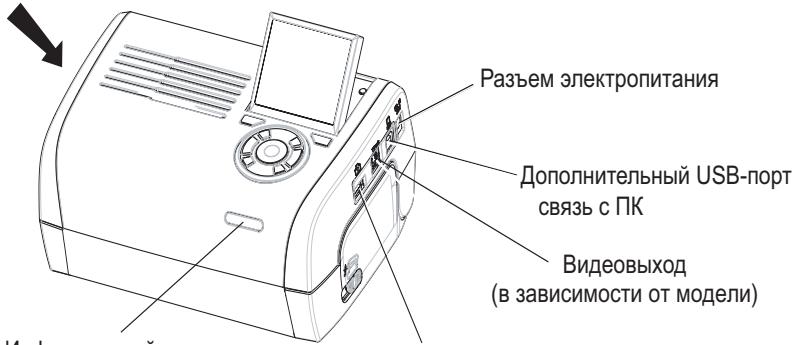
Инфрарасьй пот
IRDA
(B 3aBNCIMOCTN OT MOdJIIN)
TnabHbIe USB-aanTebpI:
Bluetooth (B 3aBnCmOCTn OT BapnaHT)

Ipeep nookkquehnem BnHMaTeIbHo n3yUHe npabuHa texhkn
6e30nacHOCTN, npBBeHbIe B NaaJIe 3TOrO "PykoBOcTBa
NIOJIb3OBATeJЯ".
| Видевыхов | IRDA | WiFi | Bluetooth | |
| AP2300 | - | - | - | - |
| AP2700 | ● | ● | ВарваNT | ВарваNT |
4




Примочан: Дя obecneченя npabINbHо NOdauNo ByMaRn BO BpeM NeaTn y6eNITcB, YTO c3aДипriNTepa Imeetc He MeHee 10 caHTmEtpoC cBo6OHOrO MeCTa.
He yctaHabnBaIte npInTeB 3aIbIeHHOM MecTe, TAK KAc OceHaOuJa IbJIb MoKet OTpuCaTeNbHO NobMaTb Ha KaueCTBO NeaTn FoToTorpaFm.


PoiIroTOBka npHTepa K pa6Ote
PoiKlIouHe 3JIeKTPoNtAnHn
YctaHOBka 6ymarN
6




YctaHOBka KapTpndja
UncNo BbIbpaHHbIX CHIMKOB

UncNo BbIbpaHHbIX KOnn

AknBnpoBaHa fynKunr Crystal Image

AKTINBIPOBAHaФуннклЯ Red-Eye

YbenuenHe uactn foToIrpaofni

U3meHnB u3opaKeHH

YdaJIeHne KOnIN, KNaBnHa BbIbopa


YnyucheHne KaueCTBa neaTn
IcnoJIb3yIte KoppeKtnpyUoJne fynKmIn "Crystal Image" n "YcTaPHeHn eΦΦeKtA KpaChbIX rJa3".
Фуннциma Crystal Image ATOMATUHECKYCTAHABINBAETBCE HACTPOKNI INCnpabJIeHNI, KOTOpbIe Heo6xOdIMbl dIy OBeCneHnHaHnyuXH 3aHEnH pe3KoCTn FOToRpaPhiN, a TAKKe ZbEta N KOHTpACTHOCTn, cTO pInbOodIT K yUyUHeHNO KaHeCTBa FOToRpaPhiN.
Kpome TOrO, 3aTf yHKUINIO3BOLJAErKOPeKTHPOBaTb DeEeKtblkCNO3HcNn (HaNPIMep, fOTORpaHm C HeoCTatoCHOH KcN03MUnHe bDyET npdAbaTcB6OJIbIaR JPKoCTb, a N3bIbTOHg KOHTpactHOCTb HEKOTOpbIX fOTORpaFKn OyET KOMNEHCnPOBaHs. YHKUNy UcTpaHEHn 3ΦeKTA "KpachbIX rna3" Red-Eye npimehraTe c KfOTORpaFNaM, CdenaHHbIM CO BCbIIuKoI.
Примechа: По умлчаню корpeктуруюше Фуннкции "Crystal Image" и "Устранене зфөгета Кразсны Глэ" OTKПЮЧЕнbl.
Ybaxaemblnokynatelb,
BbToIbKo YTO npNo6peHn npInTeP Sagem Communication, mMb 6IarOaApIM Bac 3a 3Ty NOKynk. 3Ta npOyKuN8 bblna n3rOToBHeHa B CTrpEmHeH N BbICOKOMy KaHeCTBy, KOtOpoe, KaK Mbl HaedeEMcra, DOJIxHO doCTaBnTb Bam a6conIOthoe yDoBneTBopeneHne.
Ecni, He cmoTpa Ha Bce Hauu ycnnia, Bbl obapyknn Kaoi-TO daOpnhb IeΦeK, noxaynta, o6patntecb M mara3nH, rde Bbl npnooppeiio ToBap. Tam Bbl noluynte nHΦopmaun O daIbHeuix DeIcTBnx.
ObopydobAHne, KOTOpoe Bby ToIbKO UTo npIObpeIN (He yUHTbIBaJeHbI, 6ymar...r) rapaHTnpoBaHO kOMnAhnE Sagem Communication, OTHOCITeBHO KOMNIKeKTIyUOxN x c6OpKn*, corNaCHO HIXeONiCAHHbIM ycNoBnM n IpoCeDypam. TapaTnI NOKpbIbAet DeΦeKtB I POn3BODCTBA, BO3HkUe B pe3yIbTaTe HeNPaBnJIbHOc6OpKn IIn I3bYHOB DeTanei, B TeYeHne 12 (DbEnaDcaTn) MeCzEeB, HauHna O T dAtBI nOKynKn ObopydOBAHn (ДЯ akCEccyApOB: TpN (3) Mecza, CUnTA O T dAtBI NOKynKn). 3Ta rapaHTnI paCnpocSTpaHaeTcHa OOBpydOBAHne, INcNoIb3OBAHnHOe NIObOaUOuIM ObaPazOM.
Y Bac nontpe6yHOT doka3aTeIbCTBO O nOKyIke; nO3OMy peKoMeHdyETc xpaHITb Yek B hAedxHOM MeCTe.
ObopyoBaHne, OTPeMOHTnPOBaHHO B TeueHne cPoka DeiCTBna rapaHTnI, rapaHTnpoBaHO KOMpaHnei
Sagem Communication (Детали и сборka)¹ до постену днэ:
- NCTeueHnBbIeunomyHToRrapaHTmHorO cPoka, nJIn,
- Tpex (3) MecraeB, coДнЯ устра themselves defekeTa kompanHnei Sagem Communication.
- Tpex (3) Meçaueb, co dHry yctpaHENr deΦeKt a KomnHnei Sagem Communication.
Hnkaoe obopuyobahne He 6ydt OdoJKeHo BO BpeMa peMOHa.
IpeTeM, KaK cTaB Ha peMOHT dEeKTHoe oOboyOBaHne, He 3a6yIbTe:
- Coxpahntb BCE nepcoHaJIbHbIe dAHHbIe, TAK KAK OHN MOrY 6bITb ydaJIeHbI BO BpEmpeMOHTa. Kompanna Sagem Communication He Hecet OTBETCTBeHHocTn 3a yHNUToXeHne BaIINx nepcoHaJIbHbIX daHHbIX n He 6ydt 3aHmAtbcra IX NOBtOPHOY yCTaHOBKOH na BaIeM obOpdyObaHN.
BnOxNtB bynakOBky cobopyoBaHnem BaIe nM, aDpec n TeJeΦoH.
BLOKHTbByynakOBky KOINIOdoKA3aTeJIbCTBaO nokyIke o6OpdyoBAHn.
-Держпгпспсceбе Всakceccуapы (провoda...),pacxODньe MaTePnAnbIи BaShи nUHьe пиборы (КартblпamЯТи,иnp...)
BnOxNtB yynakOBky c obopydobAHnem Baue nme, aDpe n TepeOH.
BLOKHTbByynakOBky KONIO DOka3aTeJIbCTBa O nokynke o6OpydoBaHna.
-Держinte пи cebe BCE akceccyapbl (npoboda...),pacxoHbIe MaTePnAbl n BaIi NmHbIe npin6Opbl (KapTbI NaMrtN, n np...)
3Ta rapaHTnHa paacnpoctpaHЯETcHa 3aKoHHbIe npaba yacThbIX noTpe6nteJIe.
HnKecIeNyUoee OTHocntcTc TOnbko K BeJIInKobpTaHm. Ecnn KaKoi-Jin6o NyHKT daHHoR rapaHTn Okajetc TaCTNUHO nIN NONHOCTbIO He 3aKOHEN INN He 6yDeT COOTBETCTBOBaT bPnIMHeMbIM B o6raTeJbHOM nopAKe K Notpe6NTeJIam npabuIma, B COOTBETCTBn C aHrJnIckIM 3aKOHODaTeJIbCTBOM, 3Ta He3aKOHHOCTb INN HecOoBTcTBNe PpaBnIaM He NOBnIAJOT N He aHHyIpyIOT octaJIbHbe IyHKtI 3TOI rapaHTn.



TAPAHINHbIE YCLOBNIA
Ybaxaemblnokynatelb,
BbToIbKo YTO npNo6peHn PnINTep Sagem Communication, mMb 6IarOaIapm Bac 3a 3Ty NOKynk. 3Ta npOyKuN8 bblna n3rOToBHeHa B CTrpEmHeH N BblcOKOMy KaHeCTBy, KOTOpoe, KaK Mbl HaedeEMcra, DoJxHo doCTabNTb Bam abconIOthoe yDobNeTbOpeneHne.
Ecni, He cmoTpa Ha Bce Hauu ycnnia, Bbl obapyknn Kaoi-TO daOpnhb IeΦeK, noxaynta, o6patntecb M mara3nH, rde Bbl npnoobpeiio Tobap. Tam Bbl noluynte nHΦopmaun O daIbHeuix DeIcTBnx.
ObopydobAHne, kotope BbToIbKO UTo npIOBpEN (He yUHTbIBaJeHbI, bymar...rapaANTPOBaHO KOMnAHne Sagem Communication, OTHOCINTEbHO KOMNIEKTKUOxN x c6OpKn*, cornaCHO HnHexoNCaHHbIM ycNOBm I npOeDypam. rapAtony NOKpbIAeT DeEeKtbl POn3BOcCTBa, BO3HKnUe B pe3yNbTaTe HeNPABInbHO C6OpKn INI N3bYHOB DeTaN, B TeueHne 12 (DbenaTn) MecaueB, hauHnaO T daTbI nOKynKn obopydOBAHn (ДЯ akceccayOB: TpN (3) Mecaua, cHTaR O DaTbI NOKynKn). 3Ta rapaHTnra pacnpocstpanHa ha obopydOBAHne, IncnoIb3OBAHNoe pIoobaUoIm o6pa3OM.
Y Bac nontpe6yHOT doka3aTeIbCTBO O nOKyIke; nO3OMy peKoMeHdyETc xpaHITb Yek B hAedxHOM MeCTe.
ObopyoBaHne, OTPeMOHTnPOBaHHO B TeueHne cPoka DeiCTBna rapaHTnI, rapaHTnpoBaHO KOMpaHnei
Sagem Communication (Детали и сборka)¹ до постену днэ:
Hnkaoe obopuyobahne He 6ydt OdoJKeHo BO BpeMa peMOHa.
IpeTeM, KaK cTaB Ha peMOHT dEeKTHoe oOboyOBaHne, He 3a6yIbTe:
3Ta rapaHTnHa paacnpoctpaHЯETcHa 3aKoHHbIe npaba yacThbIX noTpe6nteJIe.
HnKecIeNyUoee OTHocntcTc TOnbko K BeJIInKobpTaHm. Ecnn KaKoi-Jin6o NyHKT daHHoR rapaHTn Okajetc TaCTNUHO nIN NONHOCTbIO He 3aKOHEN INN He 6yDeT COOTBETCTBOBaT bPnIMHeMbIM B o6raTeJbHOM nopAKe K Notpe6NTeJIam npabuIma, B COOTBETCTBn C aHrJnIckIM 3aKOHODaTeJIbCTBOM, 3Ta He3aKOHHOCTb INN HecOoBTcTBNe PpaBnIaM He NOBnIAJOT N He aHHyIpyIOT octaJIbHbe IyHKtI 3TOI rapaHTn.



































TAPAHINHbIE NCKJIIOUeHENIA
He rapaHTnpyIOTc:
BHeuHn pafKTop (BKnIOUaI He OrpaHnUBAcB ydaPAMN, N3bIToCHbIM CBeTOM, YMbIuHneHNOI npOeH, HcOCTOpOxHbIMN DeiCTBnAIMN, BO3rOpAHMe, NOBpeKdEHNMAI, Bbl3BaHbIMN pa3INuHbIMN XnIDKOCTaMn, HaceKoMbIMN-Napa3NTaMn HecOOBTcTBcyUoiMm 3NeKtpNuCeckMn NaHpRKeHneM); nJI
www.agfaphotoprinter.com, support category.
Türkçe
HOSS GELDINIZ
AGFAPHOTO is used under license of Agfa-Gevaert AG
AP2300-2700 are procued for Sagem Communication and distributed or sold by Sagem Communication
Sagem Communication - Customer relations department
GARANTIYE DAHIL OLMAYANLAR
www.agfaphotoprinter.com, support category.
Magyar
Udvzöljuk
AGFAPHOTO is used under license of Agfa-Gevaert AG
AP2300-2700 are procued for Sagem Communication and distributed or sold by Sagem Communication
Sagem Communication - Customer relations department
www.agfaphotoprinter.com, support category.

- English
- Welcome
- Safety instructions and recommendations
- Your printer and its accessories
- Connections
- Remarks:
- Setting up the printer
- Installing the ribbon
- Description of the user interface
- Description of the keypad
- DESCRIPTION OF THE GRAPHIC USER INTERFACE
- PRINTING A PHOTOGRAPH FROM A MEMORY CARD
- Remarks: SmartMedia CONTACTS DOWNWARD.
- Improving the print quality
- Other functions
- Guarantee
- GUARANTEE (UK Terms and Conditions)
- B) Exclusions From Guarantee
- PoiKlIoueHnA
- PoiIroTOBka npHTepa K pa6Ote
- YctaHOBka 6ymarN
- YctaHOBka KapTpndja
- YnyucheHne KaueCTBa neaTn
- TAPAHINHbIE YCLOBNIA
- TAPAHINHbIE NCKJIIOUeHENIA
- He rapaHTnpyIOTc:
- Türkçe
- HOSS GELDINIZ
- GARANTIYE DAHIL OLMAYANLAR
- Magyar
- Udvzöljuk
Brand : SAGEM
Model : AP2300
Category : Photo printer