
HmIPDBB - Doorbells Homematic IP - Free user manual and instructions
Find the device manual for free HmIPDBB Homematic IP in PDF.



User questions about HmIPDBB Homematic IP
0 question about this device. Answer the ones you know or ask your own.
Ask a new question about this device
Download the instructions for your Doorbells in PDF format for free! Find your manual HmIPDBB - Homematic IP and take your electronic device back in hand. On this page are published all the documents necessary for the use of your device. HmIPDBB by Homematic IP.
USER MANUAL HmIPDBB Homematic IP
natural_image
White rectangular plastic container with a small square cutout on the side (no text or symbols)EN Installation and operating manual
text_image
D LR03/AAA + EAbbildung 1
5 Allgemeine
Systeminformationen
natural_image
Technical illustration of a screwdriver with a blue arrow indicating force or direction (no text or symbols)Abbildung 2
natural_image
Line drawing of a hand holding a pen, pointing at a device component with two circular ports (no text or symbols)Abbildung 3
natural_image
Technical line drawing of a mechanical assembly with springs and housing (no text or symbols)Abbildung 4
text_image
Illustration showing smartphone scanning interface with wireless signals and a smart refrigerator, plus hand gestures for app access.Abbildung 5
1 Package contents....15
2 Information about this manual....15
3 Hazard information 15
4 Function and device overview....16
5 General system information 17
6 Start-up....17
6.1 Installation....17
6.2 Pairing 18
6.3 Placing/changing the label 19
7 Operation....19
8 Changing battery ....19
9 Troubleshooting....20
9.1 Low battery....20
9.2 Command not confirmed 20
9.3 Duty Cycle 21
9.4 Error codes and flashing sequences 22
10 Restoring factory settings 23
11 Maintenance and cleaning....23
12 General information about radio operation....24
13 Disposal.... 24
14 Technical specifications....25
1 Package contents
1x Doorbell Button
2x Labels
2x Wall plugs, 5 mm
2x Screws, 3.0 x 30 mm
2x Screw seals
1x 1.5 V LR03/micro/AAA battery
1x Operating manual
2 Information about this manual
Please read this manual carefully before operating your Homematic IP components. Keep the manual so you can refer to it at a later date if you need to. If you hand over the device to other persons for use, please hand over this manual as well.
Symbols used:

Important! This indicates a hazard.

Note. This section contains important additional information!
3 Hazard information

Do not open the device. It does not contain any parts that need to be maintained by the user. In the event of an error, please have the device checked by an expert.

For safety and licensing reasons (CE), unauthorised changes and/or modifications of the device are not permitted.

The device is not a toy: do not allow children to play with it. Do not leave packaging material lying around. Plastic films, plastic bags, pieces of polystyrene, etc., can be dangerous in the hands of a child.

We accept no liability for damage to property or personal injury caused by improper use or the failure to observe the hazard warnings. In such cases, all warranty claims are void. We accept no liability for any consequential damage.

Device for outdoor use. Operate in a weather-protected location. Do not expose to vibrations, constant sunlight, other heat radiation or to mechanical stress.

Do not use the device if there are signs of damage, e.g. to the housing or control elements, or if it demonstrates a malfunction. If in doubt, have it checked by a specialist.

The device is only suitable for use in residential environments.

Using the device for any purpose other than that described in this operating manual does not fall within the scope of intended use and will invalidate any warranty or liability.
4 Function and device overview
The Homematic IP Doorbell Button is suitable for outdoor applications by the weather-resistant housing and can be mounted next to a door, for example. A customised sound can be played in conjunction with other Homematic IP devices, such as the combination signalling device (HmlP-MP3P) or a voice assistant (Amazon Alexa or Google Assistant). As well as being used as a doorbell, the doorbell button can also be used as a wireless pushbutton for switching lights.
With the included labels, you can individually label the doorbell button, e.g. with your name or the function of the device.
Thanks to the radio communication and battery operation, the doorbell button is highly flexible where mounting and selecting a mounting location are concerned.
Mounting and removal are particularly easy using the screws and plugs supplied.
Device overview:
(A) Wall mounting bracket (cover)
(B) Push-button
(C) Electronic unit
(D) Battery compartment
(E) System button (pairing button and LED)
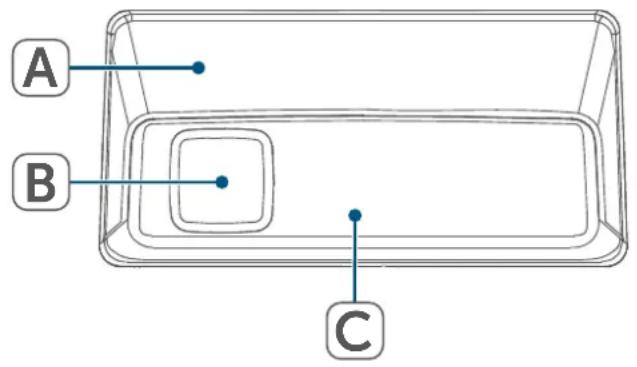
text_image
A B C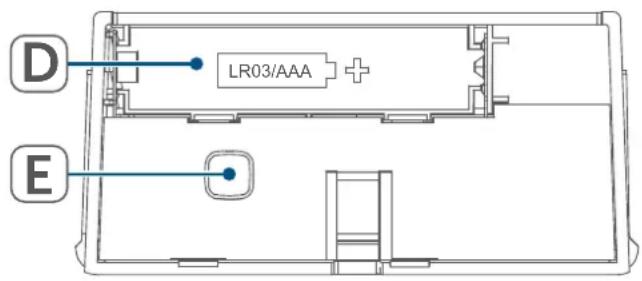
text_image
D LR03/AAA + EFigure 1
5 General system information
This device is part of the Homematic IP Smart Home system and communicates via the Homematic IP wireless protocol. All devices in the Homematic IP system can be configured easily and individually with a smartphone using the Homematic IP app. The functions provided by the system in combination with other components are described in the Homematic IP User Guide. All current technical documents and updates can be found at www.homematic-ip.com.
6 Start-up
6.1 Installation

Please read this entire section before commencing device installation.

When selecting a mounting location and drilling in the vicinity of switches or socket outlets, check for electrical wires and power supply cables.
To mount the device, proceed as follows:
- Select the desired mounting location (e.g. next to the entrance door).
- Press the lug on the back side of the wall bracket (A) slightly to the rear (using a flat-blade screwdriver, if necessary) to loosen the electronic unit from the wall bracket.
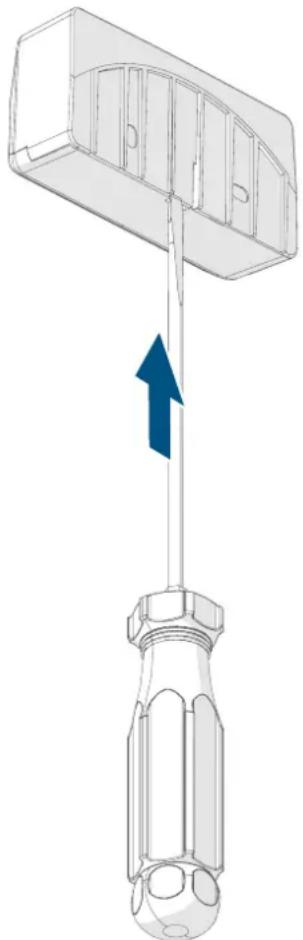
natural_image
Diagram of a screwdriver with a blue arrow indicating force application (no text or symbols present)Figure 2
- Place the wall-mounting bracket at the desired location.
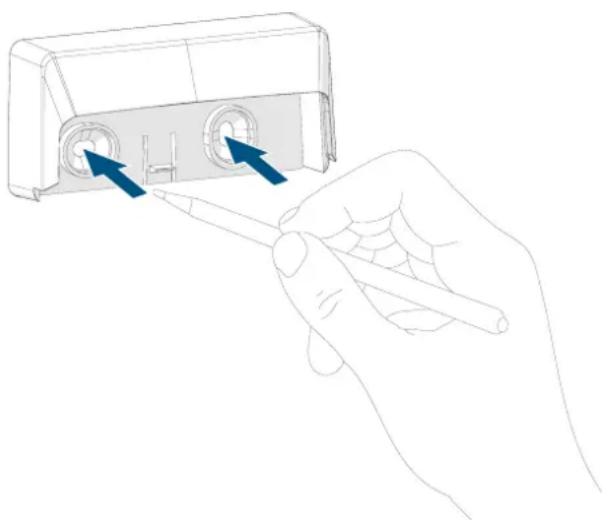
- Mark through the screw holes where you will make the corresponding bore holes in the wall mounting bracket on the wall.
natural_image
Line drawing of a hand holding a pen inserted into a device housing (no text or symbols)Figure 3
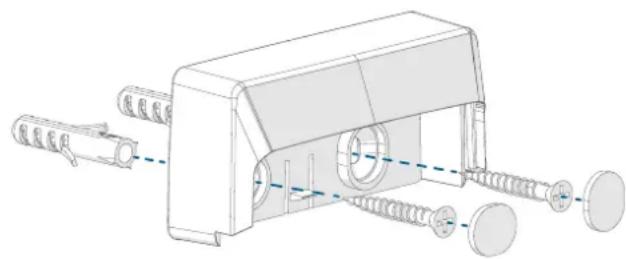
- Drill holes 5 mm wide and 35 mm deep. Insert the plugs.
- Place the wall mounting bracket over the holes. Affix the wall bracket using the enclosed screws.
- Cover the screw heads with the supplied screw seals.
natural_image
Technical illustration of a mechanical assembly with springs and housing (no text or symbols)Figure 4
- Do not yet place the doorbell button into the wall bracket.
6.2 Pairing

Please read this entire section before starting the pairing procedure.

First of all, set up your Homematic IP Home Control Unit or Homematic IP Access Point using the Homematic IP app to be able to use other Homematic IP devices in the system. Detailed information on this can be found in the operating instructions for the Home Control Unit or Access Point.
To enable the device to be integrated into your system and to communicate with other Homematic IP devices, it must first be paired at the Homematic IP Home Control Unit of Homematic IP Access Point.
To pair the device, proceed as follows:
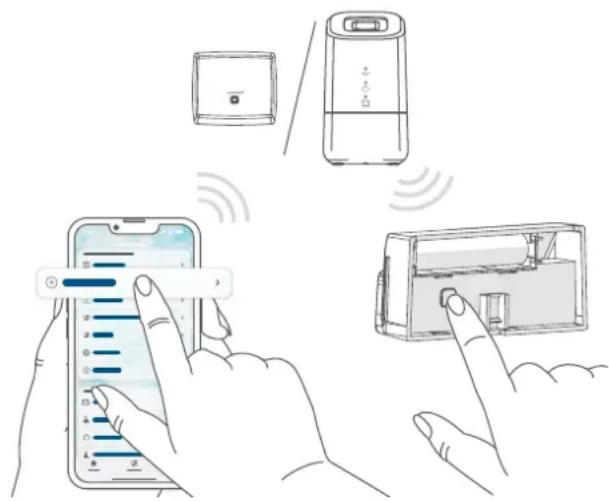
- Open the Homematic IP app on your smartphone.
- Select the menu item "Pair device".
- Turn over the electronic unit (C).
- Remove the insulation strip from the battery compartment (D) of the electronic unit to activate the device. The pairing mode is active for 3 minutes.

You can start pairing mode manually for another 3 minutes by briefly pressing the System button (E).
text_image
Illustration showing smartphone scanning interface with battery, remote control, and smart lock mechanismFigure 5
Your device will automatically appear in the Homematic IP app.
- To confirm, enter the last four digits of the device number (SGTIN) in your app, or scan the QR code.
The device number can be found on the sticker supplied or attached to the device.
- Wait until pairing is completed.
- If pairing was successful, the LED (E) lights up green. The device is now ready for use.
- If the LED lights up red, please try again.
- In the app, give the device a name and allocate it to a room.
- Follow the instructions in the app for further configuration.
- Beschriftungsetikett anbringen/wechseln
6.3 Placing/changing the label
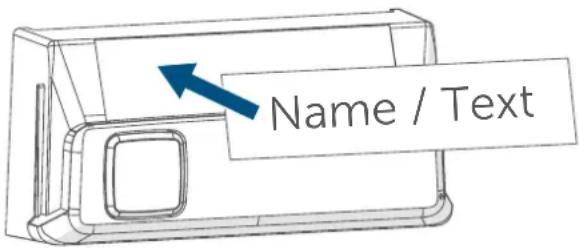
You can use the supplied labels to mark the doorbell button with your own name. To place the label on your doorbell button, please proceed as follows:
- Press the lug on the back side of the wall bracket (A) slightly to the rear (using a flat-blade screwdriver, if necessary) to loosen the electronic unit (C) from the wall bracket ( see figure 2).
- Write the desired text (e.g. your name or the push-button function) on your label.
- Remove the label from the adhesive foil.
- Stick the label in the field provided on the electronic unit of the doorbell button.
text_image
Name / TextFigure 6
- Place the doorbell button into the wall bracket.
7 Operation
After pairing, the doorbell button can be operated via a brief push of the button. In conjunction with other Homematic IP devices, such as the Homematic IP Combination Signalling Device or voice assistants (Amazon Alexa or Google Assistant), pressing the button can play back a sound or switch on lighting, for example.
After pressing the doorbell button, a positive or negative acoustic feedback is triggered – depending on whether the radio command was received or not. This function is disabled by default and can be activated via the Homematic IPapp.
8 Changing battery
If the battery symbol is displayed in the app or an empty battery is indicated on the device (see „9.4 Error codes and flashing sequences“ on page 22), replace the used battery with a new LR03/micro/AAA battery. You must observe the correct battery polarity.
To replace the device batteries, please proceed as follows:
- Press the lug on the back side of the wall bracket (A) slightly to the rear (using a flat-blade screwdriver, if necessary) to loosen the electronic unit (C) from the wall bracket ( see figure 2).
- Remove the empty battery from the battery compartment (D).
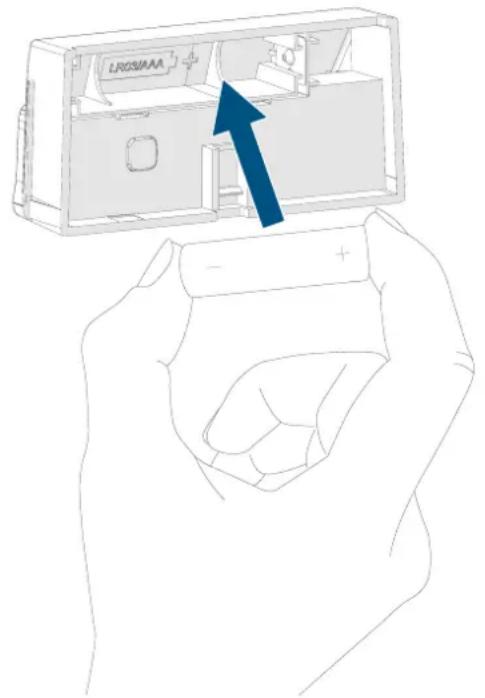
- Insert a new 1.5 V LR03/micro/battery into the battery compartment, making sure that it is the right way round.
natural_image
Illustration of a hand holding a battery with an arrow pointing to the interior of a device (no text or symbols present)Figure 7
- Place the doorbell button into the wall bracket.
Once the battery has been inserted, the device will perform a self-test (approx. 2 seconds). Afterwards, initialisation is carried out. The LED test display will indicate that initialisation is complete by lighting up orange and green (see „9.4 Error codes and flashing sequences“ on page 22).

Caution! There is a risk of explosion if the batteries are not replaced correctly. Replace only with the same or equivalent type. Never recharge non-rechargeable batteries. Do not throw the batteries into a fire. Do not expose batteries to excessive heat. Do not short-circuit batteries. Doing so will present a risk of explosion.

Contact with batteries that are dead or damaged can cause skin irritation. Use protective gloves in this case.
9 Troubleshooting
9.1 Low battery
Provided that the voltage value permits it, the device will remain ready for operation even if the battery voltage is low. Depending on the particular load, it may be possible to send transmissions again repeatedly, once the batteries have been allowed a brief recovery period.
If the voltage drops again during transmission, the error code for empty batteries will be displayed on the device (see "9.4 Error codes and flashing sequences" on page 22). In this case, replace the flat battery with a new one (see "8 Changing battery" on page 19).
9.2 Command not confirmed
If at least one receiver does not confirm a command, the device LED (E) lights up red at the end of the failed transmission process. The reason for the failed transmission may be radio in-
terference (see „12 General information about radio operation“ on page 24).
This may be caused by the following:
- Receiver cannot be reached.
- Receiver is unable to execute the command (load failure, mechanical blockage, etc.) or
- Receiver is faulty.
9.3 Duty Cycle
The duty cycle is a legally regulated limit of the transmission time of devices in the 868 MHz range. The aim of this regulation is to safeguard the operation of all devices working in the 868 MHz range.
In the 868 MHz frequency range we use, the maximum transmission time of any device is 1% of an hour (i.e. 36 seconds in an hour). Devices must cease transmission when they reach the 1% limit until this time restriction comes to an end. Homematic IP devices are designed and produced with 100% conformity to this regulation.
During normal operation, the duty cycle is not usually reached. However, repeated and radio-intensive pairing processes mean that it may be reached in isolated instances during start-up or initial installation of a system. If the duty cycle limit is exceeded, this is indicated by long red lighting of the device LED (E), and may manifest itself in the device temporarily working incorrectly. The device will start working correctly again after a short period (max. 1 hour).
9.4 Error codes and flashing sequences
| Flashing code Meaning Solution | ||
| Short orange flashes | Radio transmission/at-tempting to transmit/configuration data is trans-mitted | Wait until the transmis-sion is completed. |
| 1x long green light | Transmission confirmed | You can continue opera-tion. |
| 1x long red flash | Transmission failed or duty cycle limit reached | Please try again (see „9.2 Command not confirmed" on page 20) or (see „9.3 Duty Cycle" on page 21). |
| Short orange flashing (every 10 s) | Pairing mode active | Enter the last four digits of the device serial number to confirm (see „6.2 Pai-ring" on page 18). |
| Brief steady orange light (after green or red confir-mation) | Battery empty | Replace the battery (see „8 Changing battery" on page 19). |
| 6x long red flashes Device defective | Please see the display on your app for error mes-sages or contact your retailer. | |
| 1x orange and 1x green flash (after inserting bat-teries) | Test display | You can continue once the test display has stopped. |
| Alternating long and short orange flashing | Device software updating (OTAU) | Wait until the update is completed. |
10 Restoring factory settings

The device's factory settings can be restored. If you do this, you will lose all your settings.
Proceed as follows to restore the factory settings of the device:
- Press the lug on the back side of the wall bracket (A) slightly to the rear (using a flat-blade screwdriver, if necessary) to loosen the electronic unit (C) from the wall bracket (→see figure 2).
- Remove the battery.
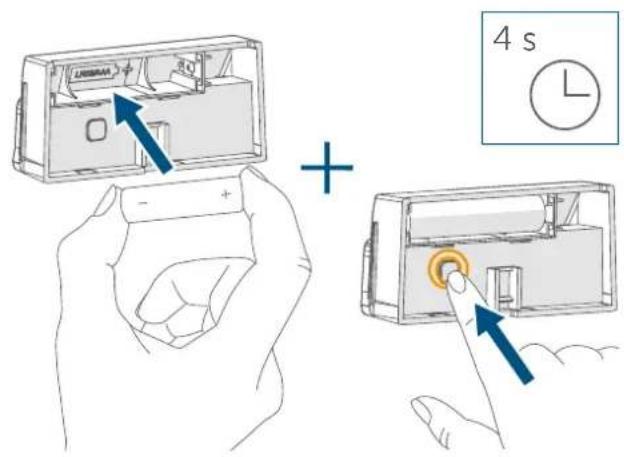
- Insert the new battery, making sure that it is the right way around, and press and hold the system button (E) for 4 seconds at the same time until the device firmware. LED (E) quickly starts flashing orange.
text_image
4 s UNIMAX + - +Figure 8
- Release the system button.
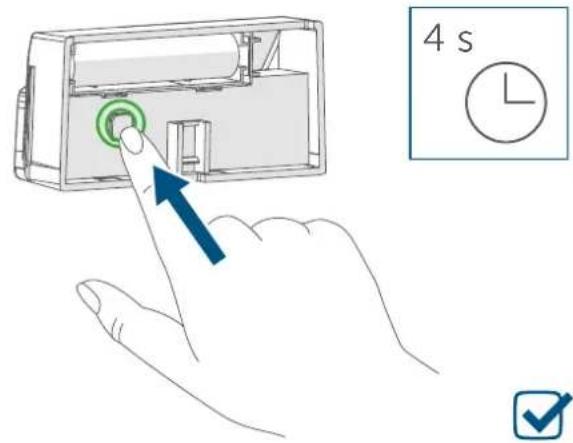
- Press and hold down the system button again for 4 seconds, until the device LED lights up green.
text_image
4 s LFigure 9
- Release the system button to conclude restoring the factory settings.
The device will perform a restart.
11 Maintenance and cleaning

The device does not require you to carry out any maintenance other than replacing the battery when necessary. Leave any maintenance or repair to a specialist.
Clean the device using a soft, clean, dry and lint-free cloth. The cloth can be slightly dampened with lukewarm water to remove more stubborn marks. Do not use any detergents containing solvents, as they could corrode the plastic housing and label.
12 General information about radio operation
Radio transmission is performed on a non-exclusive transmission path, which means that there is a possibility of interference occurring. Interference can also be caused by switching operations, electrical motors or defective electrical devices.

The transmission range within buildings can differ significantly from that available in open space. Besides the transmitting power and the reception characteristics of the receiver, environmental factors such as humidity in the vicinity play an important role, as do on-site structural/screening conditions.
eQ-3 AG, Maiburger Straße 29, 26789 Leer, Germany hereby declares that the radio equipment type Homematic IP HmIP-DBB is compliant with Directive 2014/53/EU. The full text of the EU declaration of conformity can be found at: www.homematic-ip.com
13 Disposal
Instructions for disposal

This symbol means that the device and the single-use or rechargeable batteries must not be disposed of as household waste or general waste, or in a yellow bin or yellow bag. For the protection of health and the environment, you must take the product, all electronic parts included in the package contents, and the batteries to a municipal collection point for waste electrical and electronic equipment to
ensure correct disposal of the same.
Distributors of electrical and electronic equipment or batteries must also take back waste equipment or used batteries free of charge.
By disposing of them separately, you are making a valuable contribution to the reuse, recycling and other methods of recovery of used devices and used batteries.
You must separate any used single-use and rechargeable batteries found in used electrical and electronic devices from the used device if they are not enclosed by the used device before handing it over to a collection point and dispose of them separately at the local collection points.
Please also remember that you, the end user, are responsible for deleting personal data on any waste electrical and electronic equipment before disposing of it.
Information about conformity

The CE mark is a free trademark that is intended exclusively for the authorities and does not imply any assurance of properties.

For technical support, please contact your retailer.
14 Technical specifications
Device short description: HmIP-DBB
Supply voltage: 1x 1.5 V LR03/micro/AAA
Current consumption: 200 mA max.
Battery life: 1 year (typ.)
Protection rating: IP43
Ambient temperature: -20 to +50°C
Dimensions (W x H x D): 72 x 25 x 36 mm
Weight: 41 g (incl. batteries)
Radio frequency band: 868.0-868.6 MHz 869.4-869.65 MHz
Max. radio transmission power: 10 dBm
Receiver category: SRD category 2
Typical range in open space: 210 m
Duty cycle: < 1 % per h/< 10 % per h
Subject to modifications.
Table des matières
text_image
D LR03/AAA + EFigure 1
natural_image
3D diagram of a screwdriver with a blue arrow indicating force or direction (no text or symbols)Figure 2
natural_image
Line drawing of a hand holding a pen inserted into a device component (no text or symbols)Figure 3
natural_image
Technical line drawing of a mechanical assembly with springs and rollers (no text or symbols)Figure 4
text_image
Illustration showing smartphone scanning and interacting with a smart refrigerator, with Chinese UI elements and signal icons.Figure 5
Poids : 41 g (piles comprises)
text_image
D LR03/AAA + EFigura 1
natural_image
3D diagram of a screwdriver with a blue arrow indicating force or direction (no text or symbols)Figura 2
natural_image
Line drawing of a hand holding a pen, pointing to a device component with two circular ports (no text or symbols)Figura 3
natural_image
Technical diagram of a mechanical assembly with springs and housing (no text or symbols)Figura 4
text_image
Illustration showing smartphone scanning, wireless signal transmission, and smart refrigerator usage with Chinese labelsFigura 5
text_image
D LR03/AAA + EFigura 1
natural_image
Diagram of a screwdriver with a blue upward arrow indicating force or movement (no text or symbols present)Figura 2
natural_image
Line drawing of a hand holding a pen inserted into a device housing (no text or symbols)Figura 3
natural_image
Technical line drawing of a mechanical assembly with springs and housing (no text or symbols)Figura 4
text_image
Illustration showing smartphone scanning interface with icons and control buttons, including a smart refrigerator and battery pack.Figura 5
text_image
4 s UNIBR4 +Figura 8
text_image
D LR03/AAA + EAfbeelding 1
natural_image
Diagram of a screwdriver with a blue arrow indicating force application (no text or symbols present)Afbeelding 2
natural_image
Line drawing of a hand holding a pen inserted into a device component (no text or symbols)Afbeelding 3
natural_image
Technical line drawing of a mechanical assembly with springs and housing (no text or symbols)Afbeelding 4
text_image
Illustration showing smartphone scanning interface with icons and control buttons, including a smart lock and battery pack.Afbeelding 5
Apparaatcode: HmIP-DBB
Voedingsspanning: 1x 1,5 V LR03/micro/AAA
Stroomopname: 200 mA max.
Free download of the Homematic IPapp!

text_image
Blue QR code image, scannable for digital content retrieval
Download on the
App Store

text_image
Blue QR code image, scannable for digital content retrieval
GET IT ON
Google Play
Bevollmächtigter des Herstellers: Manufacturer's authorised representative

eQ-3 AG
Maiburger Straße 29
26789 Leer / GERMANY
www.eQ-3.de