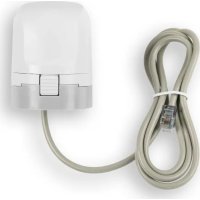
HmIPVDMOT - Motorized actuator Homematic IP - Free user manual and instructions
Find the device manual for free HmIPVDMOT Homematic IP in PDF.



| Product type | Motorized actuator for heating valve |
| Dimensions | 44 × 54 × 50 mm (without connection cable) |
| Weight | 80 g |
| Power supply | 3.3 V DC, SELV, 120 mA max. |
| Main functions | Regulates the room temperature by adjusting the valve position and water flow. Must be paired with a Homematic IP underfloor heating actuator (HmIP-FALMOT-C12). |
| Maintenance and cleaning | No maintenance required. Clean with a soft, clean, dry, lint-free cloth. Do not use solvents. |
| Safety | Do not open the device. Use only in a dry and dust-free environment. Keep out of reach of children. Fixed installation only. |
| Spare parts and repairability | Valve adapter VA 80 (M30 x 1.5 mm) included. For other dimensions, adapter required (not supplied). Repairs to be carried out by a specialist. |
| General information | Brand Homematic IP, type HmIP-VDMOT, protection class III, IP20, ambient temperature 0-50°C, linear stroke 4.3 ± 0.3 mm, thread M30 x 1.5 mm. |
Frequently Asked Questions - HmIPVDMOT Homematic IP
User questions about HmIPVDMOT Homematic IP
0 question about this device. Answer the ones you know or ask your own.
Ask a new question about this device
Download the instructions for your Motorized actuator in PDF format for free! Find your manual HmIPVDMOT - Homematic IP and take your electronic device back in hand. On this page are published all the documents necessary for the use of your device. HmIPVDMOT by Homematic IP.
USER MANUAL HmIPVDMOT Homematic IP
natural_image
White electrical connector with coiled cable against blue background (no text or symbols)
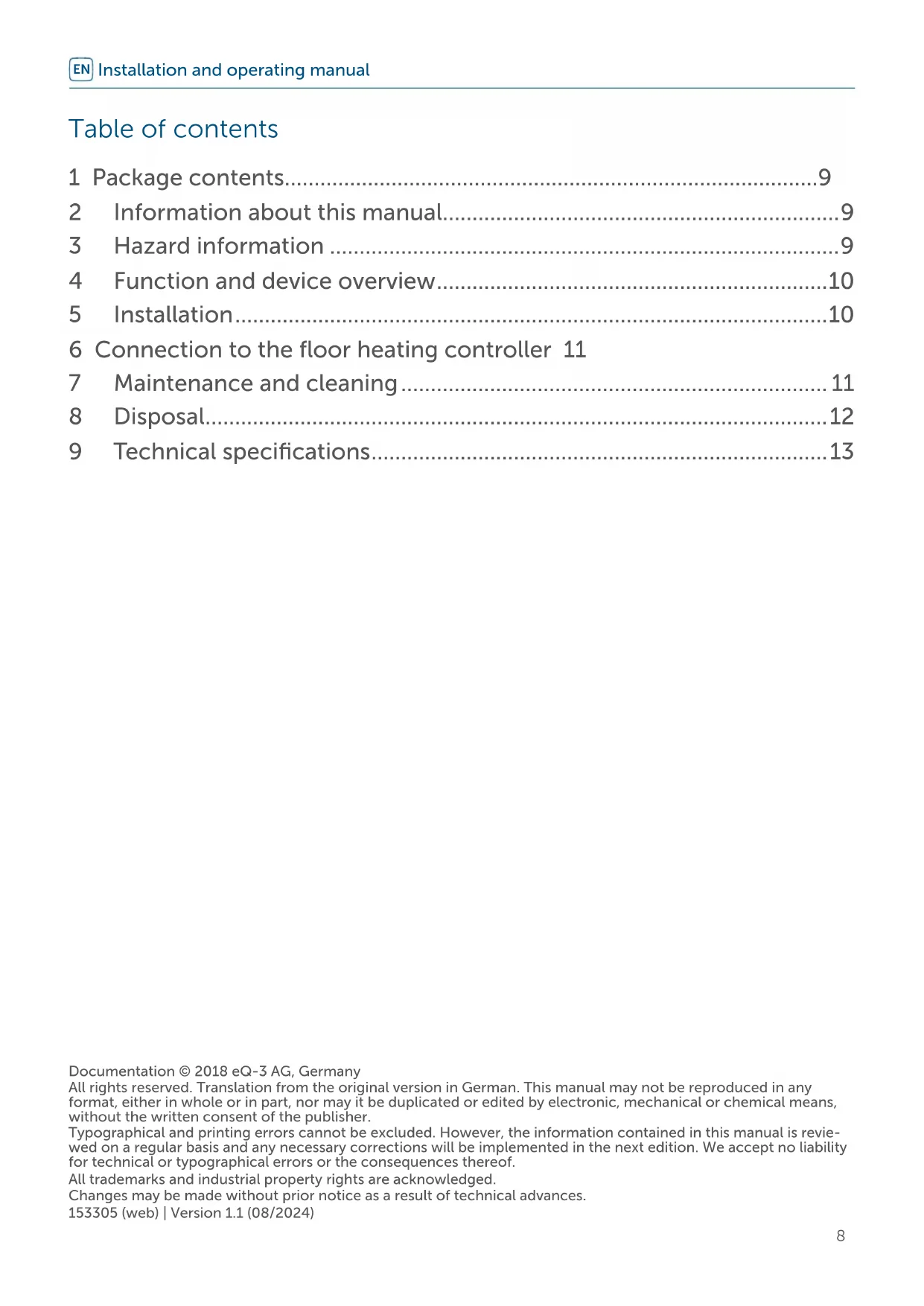
Installation and operating manual

text_image
Diagram showing a mechanical assembly with labeled parts and directional arrows indicating motion or rotation.Abbildung 2
text_image
Diagram of a mechanical device with labeled parts 1 and 2, showing directional arrows and a cylindrical base.Abbildung 4
natural_image
Illustration of a network device connected to a cylindrical sensor or connector (no text or symbols present)Abbildung 5
1 Package contents....9
2 Information about this manual....9
3 Hazard information 9
4 Function and device overview....10
5 Installation....10
6 Connection to the floor heating controller 11
7 Maintenance and cleaning....11
8 Disposal....12
9 Technical specifications....13
Documentation © 2018 eQ-3 AG, Germany
All rights reserved. Translation from the original version in German. This manual may not be reproduced in any format, either in whole or in part, nor may it be duplicated or edited by electronic, mechanical or chemical means, without the written consent of the publisher.
Typographical and printing errors cannot be excluded. However, the information contained in this manual is reviewed on a regular basis and any necessary corrections will be implemented in the next edition. We accept no liability for technical or typographical errors or the consequences thereof.
All trademarks and industrial property rights are acknowledged.
Changes may be made without prior notice as a result of technical advances.
153305 (web) | Version 1.1 (08/2024)
1 Package contents
1x Valve Drive – motorised
1x Valve adapter VA 80 (thread size M30 x 1.5 mm)
1x User manual
2 Information about this manual
Please read this manual carefully before operating your Homematic IP components. Keep the manual so you can refer to it at a later date if you need to. If you hand over the device to other persons for use, please hand over this manual as well.
Symbols used:

Attention!
This indicates a hazard.

Note. This section contains important additional information!
3 Hazard information

Do not open the device. It does not contain any parts that can be maintained by the user. In the event of an error, have the device checked by an expert.

For safety and licensing reasons (CE), unauthorized change and/or modification of the device is not permitted.

The device may only be operated in dry and dust-free environment and must be protected from the effects of moisture, vibrations, solar or other methods of heat radiation, cold and mechanical loads.

The device is not a toy; do not allow children to play with it. Do not leave packaging material lying around. Plastic films/bags, pieces of polystyrene, etc. can be dangerous in the hands of a child.

We accept no liability for damage to property or personal injury caused by improper use or failure to observe the hazard warnings. In such cases, all warranty claims are void. We accept no liability for any consequential damage.

The device may only be used for fixed installations. The device must be securely attached within a fixed installation.

In case of visible damage of the existing radiator/valve drive, valve or heating pipes, please contact a specialist.

The device must only be operated within residential buildings.

Using the device for any purpose other than that described in this operating manual does not fall within the scope of intended use and will invalidate any warranty or liability.
4 Function and device overview
With the Homematic IP Valve Drive – motorised you can control the valve position and thus regulate the water flow rate to regulate the room temperature.
The valve has to be operated in connection with a Homematic IP Floor Heating Actuator – 12 channels, motorised (HmIP-FALMOT-C12).
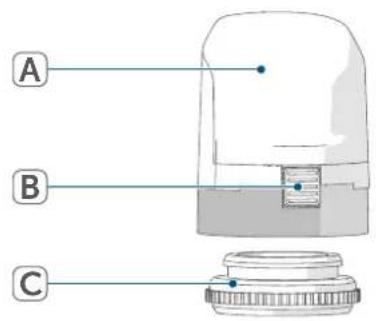
Device overview:
(A) Electronic unit (thermostat)
(B) Display
(C) System button (pairing button and LED)
text_image
A B CFigure 1
5 Installation
i The valve drive can be installed in any position (e.g. upside down).
For installation, no tools are required.
To install the valve drive, proceed as follows:
- Make sure if the valve drive fits to the thread size M30 x 1.5 mm. We recommend to use the valve template available for download in the download area of www.homematic-ip.com. If the valve drive differs, you will need a corresponding adapter.
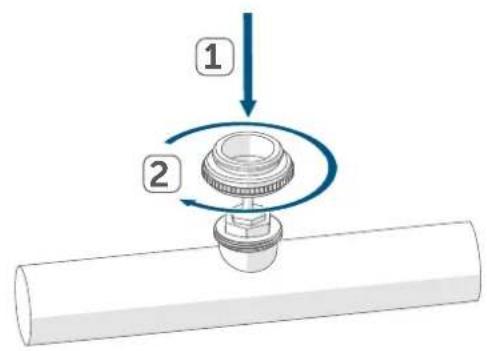
- Attach the supplied valve adapter (VA 80) to the valve.
text_image
Diagram showing a mechanical assembly with labeled parts 1 and 2, indicating a step in motion.Figure 2
- Attach the valve drive to the adapter. Make sure that the valve drive engages properly.
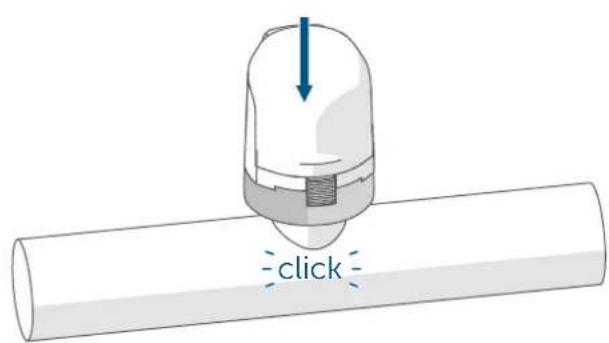
text_image
clickFigure 3

To disassemble the device press the catch and remove the valve drive from the adapter.
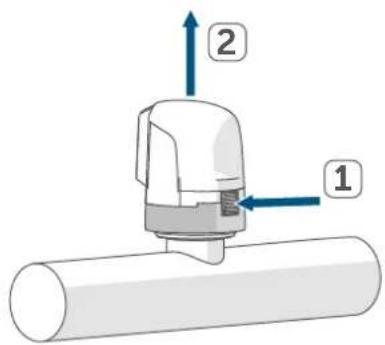
text_image
Diagram of a mechanical device with labeled parts 1 and 2, showing directional arrows and a cylindrical base.Figure 4
6 Connection to the floor heating controller
For the regulation of the room temperature, the valve drive must be connected directly to the Homematic IP Floor Heating Actuator – 12 channels, motorised (HmIP-FALMOT-C12). To do this, please proceed as follows:
- Connect the connecting cable of the valve drive to the clamp terminals of the floor heating actuator.
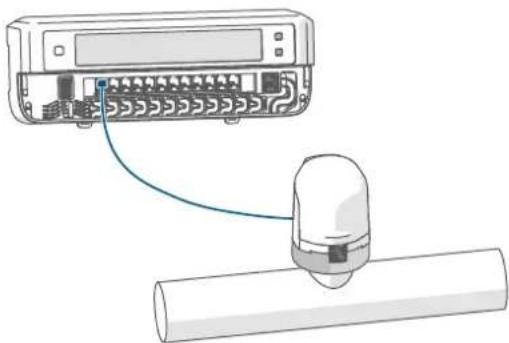
natural_image
Illustration of a network device connected to a cylindrical device via cable (no text or symbols)Figure 5
7 Maintenance and cleaning

The device does not require you to carry out any maintenance other than replacing the battery when necessary. Enlist the help of an expert to carry out any repairs.
Clean the device using a soft, lint-free cloth that is clean and dry. Do not use any detergents containing solvents, as they could corrode the plastic housing and label.
8 Disposal
Instructions for disposal

This symbol means that the device must not be disposed of as household waste, general waste, or in a yellow bin or a yellow sack.
For the protection of health and the environment, you must take the product and all electronic parts included in the scope of delivery to a municipal collection point for old electrical and electronic equipment to ensure their correct disposal. Distributors of electrical and electronic equipment must also take back obsolete equipment free of charge.
By disposing of it separately, you are making a valuable contribution to the reuse, recycling and other methods of recovery of old devices.
Please also remember that you, the end user, are responsible for deleting personal data on any old electrical and electronic equipment before disposing of it.
Information about conformity

The CE mark is a free trademark that is intended exclusively for the authorities and does not imply any assurance of properties.

For technical support, please contact your retailer.
9 Technical specifications
Device short name: HmIP-VDMOT
Supply voltage: 3.3 VDC, SELV
Current consumption: 120 mA max.
Degree of protection: IP20
Protection class: III
Ambient temperature: 0 to 50 °C
Method of operation: Type 1
Connection: M30 x 1.5 mm
Pollution degree: 2
Linear travel: 4.3 ±0.3 mm
Dimensions: 44 x 54 x 50 mm (without connecting
cable)
Weight:
80 g
Subject to technical changes.
Table des matières
text_image
Diagram showing a mechanical assembly with labeled parts and directional arrows indicating motion or rotation.Figure 2
text_image
Diagram of a mechanical device with labeled parts 1 and 2, showing directional arrows and a cylindrical base.Figure 4
natural_image
Illustration of a network device connected to a cylindrical sensor or connector (no text or symbols present)Figure 5
text_image
Diagram showing a mechanical assembly with labeled parts and directional arrows indicating motion or rotation.Figura 2
text_image
Diagram of a mechanical device with labeled parts 1 and 2, showing directional arrows and a cylindrical base.Figura 4
natural_image
Illustration of a device connected to a cylindrical component (no text or symbols visible)Figura 5
text_image
Diagram showing a mechanical assembly with labeled parts and directional arrows indicating motion or rotation.Figura 2
text_image
Diagram of a mechanical device with labeled parts 1 and 2, showing directional arrows and a cylindrical base.Figura 4
natural_image
Illustration of a network device connected to a cylindrical sensor or sensor component (no text or symbols present)Figura 5
text_image
Diagram showing a mechanical assembly with labeled parts and directional arrows indicating motion or rotation.Afbeelding 2
text_image
Diagram of a mechanical device with labeled parts 1 and 2, showing directional arrows and a cylindrical base.Afbeelding 4
natural_image
Illustration of a device connected to a cylindrical component (no text or symbols visible)Afbeelding 5
Apparaatcode: HmIP-VDMOT
Voedingsspanning: 3,3 VDC, SELV
Stroomopname: 120 mA max.
Free download of the Homematic IPapp!

text_image
Blue QR code image, scannable for digital content retrieval
Download on the
App Store

text_image
Blue QR code image, scannable for digital content retrieval
GET IT ON
Google Play
Bevollmächtigter des Herstellers: Manufacturer's authorised representative

eQ-3 AG
Maiburger Straße 29
26789 Leer / GERMANY
www.eQ-3.de