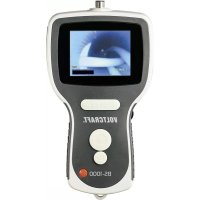
BS1000T - Video camera VOLTCRAFT - Free user manual and instructions
Find the device manual for free BS1000T VOLTCRAFT in PDF.

Document temporarily unavailable
The manual is currently being transferred to our new server. It will be accessible again in a few hours. Thank you for your patience.


| Product Type | Basic Endoscopic Device |
| Brand | Voltcraft |
| Model | BS1000T |
| Display | TFT 3.5" (8.89 cm), dynamic resolution 320x240, static 640x480 |
| Power Supply | Li-Po battery 3.7 V DC or power adapter 5 V DC (input 100-240 V AC, 50/60 Hz, output 5 V/2 A) |
| Battery | Integrated rechargeable lithium polymer |
| Storage Media | SD card up to 8 GB |
| Photo Format | JPEG (640x480) |
| Video Format | ASF (640x480) with MPEG4 compression |
| Video Output | Composite (PAL/NTSC) |
| Connections | Mini USB, AV OUT, DC jack |
| Illumination | Adjustable brightness LED (rotary knob) |
| Functions | Photo capture, video recording, 2x digital zoom, image mirror/rotate |
| Operating Temperature | -20 to +60 °C (charging: 0 to +40 °C) |
| Package Contents | Basic device, carrying case, power adapter, USB cable, AV cable, 4 GB SD card, cleaning accessories, instruction manual |
| Maintenance | Clean with a clean, antistatic cloth; rinse the camera after use in liquid |
| Safety | Use only when power is off; do not expose the base device to water; keep out of reach of children |
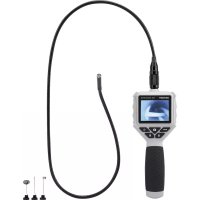
| Compatible Accessories | Flexible endoscopic cameras (Ø5.5 mm or Ø4 mm), semi-rigid (Ø5.5 mm), for pipes (Ø28 mm) |
| Mounting Options | Thread for mounting |
Frequently Asked Questions - BS1000T VOLTCRAFT
User questions about BS1000T VOLTCRAFT
0 question about this device. Answer the ones you know or ask your own.
Ask a new question about this device
Download the instructions for your Video camera in PDF format for free! Find your manual BS1000T - VOLTCRAFT and take your electronic device back in hand. On this page are published all the documents necessary for the use of your device. BS1000T by VOLTCRAFT.