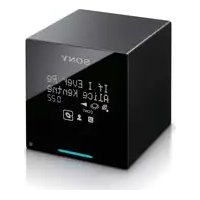
TDMNC1 - Audio/video extension SONY - Free user manual and instructions
Find the device manual for free TDMNC1 SONY in PDF.



| Product Type | Audio/Video extension (Digital Media Port adapter) |
| Brand | Sony |
| Model | TDMNC1 (TDM-NC1) |
| Connectivity | 10Base-T/100Base-TX Ethernet, wireless LAN (via WLAN Setup Assistant) |
| Compatible Systems | Sony AV systems with DIGITAL MEDIA PORT interface (e.g., DAV series) |
| Supported Music File Formats | .wav, .omg, .oma, .mp3, .m4a, .wma |
| Server Software | M-crew Server (included) |
| Minimum PC Requirements | Pentium III 1 GHz, 256 MB RAM (XP) / 512 MB (Vista), 50 MB free space, XGA display |
| Supported Operating Systems | Windows Vista (Ultimate/Business/Home Premium/Home Basic), Windows XP (Home/Professional/Media Center) SP2 or higher |
| Music Recognition | Powered by Gracenote MusicID |
| Firewall Configuration | Requires open ports for multiple M-crew services (UDP/TCP) |
| Installation Type | Software installation from CD-ROM; TDM-NC1 connected via network |
| Dimensions (approx.) | Not specified; compact adapter |
| Weight (approx.) | Not specified; lightweight |
| Power Supply | Powered via DIGITAL MEDIA PORT interface |
Frequently Asked Questions - TDMNC1 SONY
User questions about TDMNC1 SONY
0 question about this device. Answer the ones you know or ask your own.
Ask a new question about this device
Download the instructions for your Audio/video extension in PDF format for free! Find your manual TDMNC1 - SONY and take your electronic device back in hand. On this page are published all the documents necessary for the use of your device. TDMNC1 by SONY.
USER MANUAL TDMNC1 SONY
M-crew Server Ver. 2.5
Installation Instructions
English
Francais
Espanol
Installation Instructions Instructions d'installation Instrucciones de instalacion
Deutsch
Nederlands
Italiano
Installationsanleitung Installatie-instructies Istruzioni di installatione
Svenska
Copyright laws prohibit reproducing the software or the manual accompanying it in whole or in part, or renting the software without the permission of the copyright holder.
- In no event will Sony be liable for any financial damage, or loss of profits, including claims made by third parties, arising out of the use of the software supplied with this unit.
- In the event a problem occurs with this software as a result of defective manufacturing, Sony will replace it. However, Sony bears no other responsibility.
- The software provided with this unit cannot be used with equipment other than that which is so designated.
- Please note that, due to continued efforts to improve quality, the software specifications may be changed without notice.
- Operation of this unit with software other than that provided is not covered by the warranty.
- "M-crew Server" is a trademark of Sony Corporation.
- Microsoft, Windows, Windows NT and Windows Media are trademarks or registered trademarks of Microsoft Corporation in the United States and/or other countries.
- IBM and PC/AT are registered trademarks of International Business Machines Corporation.
- Macintosh is the registered trademark of Apple Inc. in the United States and/or other countries.
- Pentium and Celeron are trademarks or registered trademarks of Intel Corporation.
- All other trademarks and registered trademarks are trademarks or registered trademarks of their respective holders.
- ^TM and ® marks are omitted in this manual.
Gracenote
Corporate Description
- Music recognition technology and related data are provided by Gracenote. Gracenote is the industry standard in music recognition technology and related content delivery. For more information visit www.gracenote.com.
Proprietary Legends
- CD and music-related data from Gracenote, Inc., copyright © 2000-2007 Gracenote. Gracenote Software, copyright © 2000-2007 Gracenote. This product and service may practice one or more of the following U.S. Patents: #5,987,525; #6,061,680; #6,154,773, #6,161,132, #6,230,192, #6,230,207, #6,240,459, #6,330,593, and other patents issued or pending. Some services supplied under license from Open Globe, Inc. for U.S. Patent: #6,304,523.
- Gracenote® is a registered trademark of Gracenote, Inc. The Gracenote logo and logotype, and the "Powered by Gracenote" logo are trademarks of Gracenote.

gracenote.
Program © 2007 Sony Corporation
Documentation © 2007 Sony Corporation
OpenSSL
Copyright © 1998-2001 The OpensSL Project. All rights reserved.
Copyright © 1995-1998 Eric Young (eay@cryptsoft.com). All rights reserved.
- "This product includes software developed by the OpenSSL Project for use in the OpenSSL Toolkit (http://www.openss1.org)"
1 Redistributions of source code must retain the above copyright notice, this list of conditions and the following disclaimer.
2 Redistributions in binary form must reproduce the above copyright notice, this list of conditions and the following disclaimer in the documentation and/or other materials provided with the distribution.
3 All advertising materials mentioning features or use of this software must display the following acknowledgment: "This product includes software developed by the OpenSSL Project for use in the OpenSSL Toolkit. (http://www.openss1.org/)
4 The names "OpenSSL Toolkit" and "OpenSSL Project" must not be used to endorse or promote products derived from this software without prior written permission. For written permission, please contact openssl-core@openssl.org.
5 Products derived from this software may not be called "OpenSSL" nor may "OpenSSL" appear in their names without prior written permission of the OpenSSL Project.
6 Redistributions of any form whatsoever must retain the following acknowledgment: "This product includes software developed by the OpensSL Project for use in the OpensSL Toolkit (http://www.openssl.org/)".
- THIS SOFTWARE IS PROVIDED BY THE OpensSL PROJECT "AS IS" AND ANY EXPRESSED OR IMPLIED WARRANTYES, INCLUDING, BUT NOT LIMITED TO, THE IMPLIED WARRANTYES OF MERCHANTABILITY AND FITNESS FOR A PARTICULAR PURPOSE ARE DISCLAIMED. IN NO EVENT SHALL THE OpensSL PROJECT OR ITS CONTRIBUTORS BE LIABLE FOR ANY DIRECT, INDIRECT, INCIDENTAL, SPECIAL, EXEMPLARY, OR CONSEQUENTIAL DAMAGES (INCLUDING, BUT NOT LIMITED TO, PROCEDURE OF SUBSTITUTE GOODSOR SERVICES;LOSS OF USE,DATA,OR PROFITS;OR BUSINESS INTERRUIPTION)HOWEVERCAUSEDANDONANYTHEORYOF LIABILITY,WHETHERINCONTRACT,STRICTLIABILITY,ORTORT (INCLUDING NEGLIGENCEOR OTHERWISE)ARISINGINANYWAYOUT OF THE USE OF THIS SOFTWARE,EVENIFADVISEDOFTHEPOSSIBILITYOF SUCH DAMAGE.
1 Redistributions of source code must retain the copyright notice, this list of conditions and the following disclaimer.
2 Redistributions in binary form must reproduce the above copyright notice, this list of conditions and the following disclaimer in the documentation and/or other materials provided with the distribution.
3 All advertising materials mentioning features or use of this software must display the following acknowledgement: "This product includes cryptographic software written by Eric Young (eay@cryptsoft.com)". The word 'cryptographic' can be left out if the routines from the library being used are not cryptographic related :-).
4 If you include any Windows specific code (or a derivative thereof) from the apps directory (application code) you must include an acknowledgement: "This product includes software written by Tim Hudson (tjh@cryptsoft.com)".
- THIS SOFTWARE IS PROVIDED BY ERIC YOUNG "AS IS" AND ANY EXPRESS OR IMPLIED WARRANTY, INCLUDING, BUT NOT LIMITED TO, THE IMPLIED WARRANTY OF MERCHANTABILITY AND FITNESS FOR A PARTICULAR PURPOSE ARE DISCLAIMED. IN NO EVENT SHALL THE AUTHOR OR COLLABORORS BE LIABLE FOR ANY DIRECT, INDIRECT, INCIDENTAL, SPECIAL, EXEMPLARY, OR CONSEQUENTIAL DAMAGES (INCLUDING, BUT NOT LIMITED TO, PROCEDURE OF SUBSTITUTE GOODS OR SERVICES; LOSS OF USE, DATA, OR PROFITS; OR BUSINESS INTERruption) HOWEVER CAUSED AND ON ANY THEORY OF LIABILITY, WHETHER IN CONTRACT, STRICT LIABILITY, OR TORT (INCLUDING NEGLIGENCE OR OTHERWISE) ARISING IN ANY WAY OUT OF THE USE OF THIS SOFTWARE, EVEN IF ADVISED OF THE POSSIBILITY OF SUCH DAMAGE.
Table of Contents
System Requirements 7
Before installing the software 10
Installing
Installing M-crew Server 11
Making the AUTO LINK FOLDER Settings 16
Making the Windows Firewall Settings 18
Making the Security Software Firewall Settings 20
Registering the TDM-NC1 on your computer manually 22
Making the wireless LAN function settings for connected equipment (WLAN Setup Assistant) 24
Other Information
Starting up M-crew Server 26
Uninstalling the M-crew Server software 27
Installed Modules 30
Troubleshooting 32
The screen does not respond, or the responses are incorrect 32
M-crew Server does not start up 32
The message "Gracenote information not found." appears 32
Installation was not successful 33
M-crew Server may not be recognizing the unit 35
There is no sound from the unit 37
Cannot listen to WEB RADIO 38
Unable to access web radio stations 39
The task tray icon not present 39
The task tray icon darkened 39
"Mcrew Folder Watcher", "Mcrew Webradio Server" and "Mcrew Pccd Service" are not present in the service 40
"Mcrew Folder Watcher", "Mcrew Webradio Server" and "Mcrew Pccd Service" cannot be instantiated from the service .... 40
The application does not operate correctly. Music files managed by the application cannot be seen from the TDM-NC1 .... 41
Operation has become slow because a large amount of music files has been registered in the application 41
Cannot uninstall M-crew Server 41
Tracks are grayed-out 42
Cannot obtain title information from Gracenote MusicID 42
The music file of CDs inserted using [RECORD FROM CD] is not displayed 42
Processing takes a while after choosing [Update] in [IMPORT FILES (AUTO MODE)] 42
AMS does not work 42
Cannot play music files that contain characters in a European language area (ISO8859 characters) 43
System Requirements
The following software and hardware are required to run M-crew Server.
□A compatible PC/AT that satisfies the performance requirements described below.
M-crew Server does not run in an Apple Macintosh environment.
- CPU*: Intel Pentium III 1 GHz (1 GHz or more is recommended) or Celeron 1 GHz (1 GHz or more is recommended) or better
- Operation is guaranteed with processors equal to or greater than the above-mentioned class. 64 bit CPUs are noncompliant.
- RAM: 256 MB or more is recommended (Windows XP) 512 MB or more is recommended (Windows Vista)
- Video board and display driver: Must be capable of XGA (1024 × 768 pixels) display with at least 65,536 colors.
- Free space on hard disk: At least 50 MB (including M-crew Server, help and related modules) free space on the system drive. This does not include the space for storing the database and music files. In addition, 300 MB is needed on the system drive for the Microsoft related modules, and 100 MB on the hard disk for Adobe Reader. However, these may not be necessary depending on the operating environment.
- CD-ROM or DVD drive (for software installation and recording music files from CD)
- Available 10Base-T, 100Base-TX: At least one
Sound board
OS: Windows Vista Ultimate, Windows Vista Business, Windows Vista Home Premium, Windows Vista Home Basic, Windows XP Home Edition (SP2 or higher), Windows XP Professional (SP2 or higher), Windows XP Media Center Edition 2004 (SP2 or higher), Windows XP Media Center Edition 2005 (SP2 or higher)
M-crew Server does not run on Microsoft Windows 3.1, Windows 95, Windows 98, Windows Me, Windows NT, Windows 2000 Professional, Windows XP (prior to SP2), Windows Vista Starter Edition or Windows Vista Enterprise environment.
When installing, log on as the administrator.
□ Microsoft .NET Framework module version 2.0 or higher
□Internet access (for Gracenote access and WEB RADIO)
□Display: XGA (1024 × 768 pixels)
Must be able to display at least 65,536 colors.
□Used Language: English/German/French
User privileges
- M-crew Server can be used only by users with administrator privileges.
- M-crew Server does not support the switching users function.
Notes
- Operations are not guaranteed for all the recommended computer environments mentioned above.
- Operation is not assured in personally constructed computers.
- Operation is assured in personally upgraded (to Windows Vista) computers.
- Original brand and home_made personal computers do not apply.
-
Music files that can be registered have file names ending in ".wav", ".omg", ".oma", ".mp3", ".m4a" and ".wma". However, note that registration may not be possible in some cases.
-
If you perform an operation (recording, file importing, using other applications, etc.) that places a load on the server computer while playing back a track registered to the server computer, the sound may skip. In addition, the sound may also skip depending on the network status.
- Depending on the network condition, you may not be able to play some stations with WEB RADIO.
Before installing the software

Do not connect the TDM-NC1 to your computer before the installation is completed.

Close down all applications running on the computer before installing the software.

Be sure to log on through a user name which belongs to the computer's administrator to install the software.
Note for NAS-CZ1 or CPF-IX001 users
Install M-crew Server Ver. 2.5 (this software) without uninstalling M-crew Server Ver. 1.0 or 2.0. M-crew Server Ver. 1.0 or 2.0 is uninstall automatically. The content information can be used even after installing M-crew Server Ver. 2.5.
Installing M-crew Server
Installation may take some time depending on the environment. A progress bar is displayed while installation is underway. Wait until the installation is finished.
1 Turn on your computer and login as an administrator. Wait for Windows to load.
2 Insert the supplied CD-ROM into the CD-ROM drive of your computer.
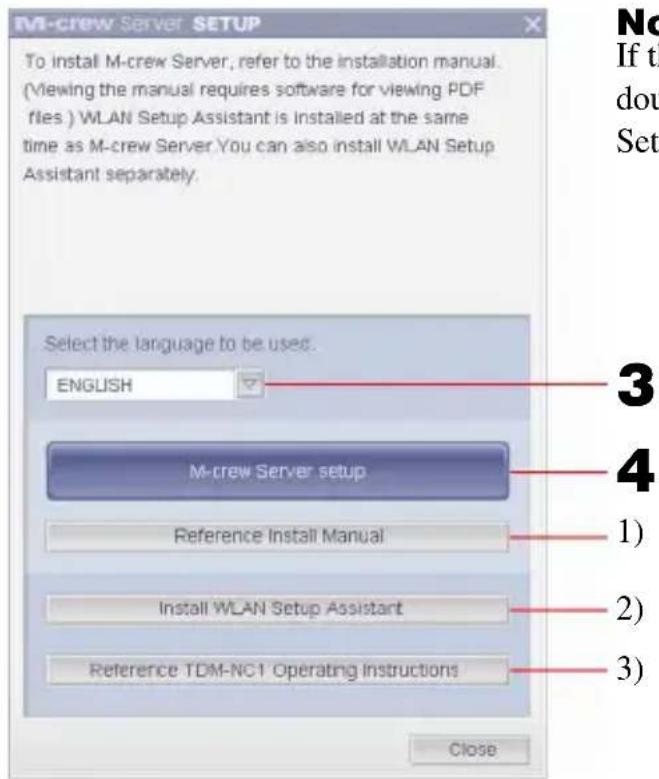
The "M-crew Server SETUP" window appears.
Note
If the window does not open, double-click the [CD-ROM Setup.exe] icon.
1) Click to display the M-crew Server Installation Instructions (this manual).
2) Click to start up the WLAN Setup Assistant.
3) Click to display the TDM-NC1 Operating Instructions.
For Windows Vista users
The "Auto Play" window appears.
Click [Run setup.exe] to install the program.
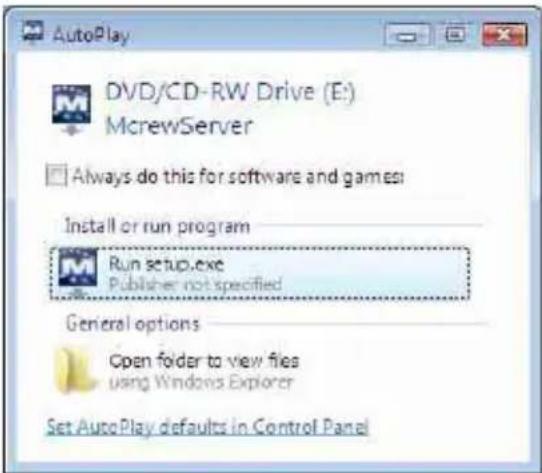
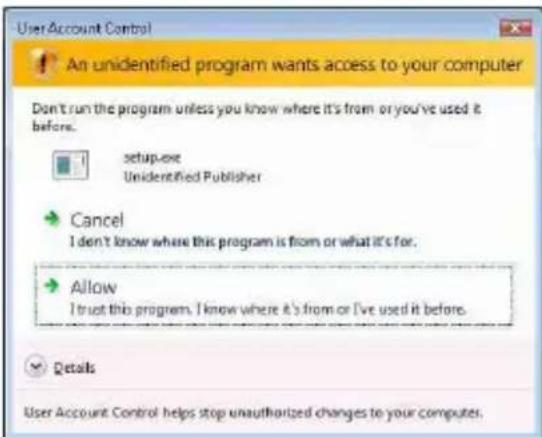
Then the "User Account Control" (UAC) window appears.
Click [Allow]. If you click [Cancel], you will be unable to start the installation.
3 Select the language to be used.
4 Click [M-crew Server setup].
The "Server SETUP" window appears. Click [OK]. If ".NET Framework" (2.0 or higher) is installed on your computer, the "M-crew Server License Agreement" window appears.
Note
If“.NET Framework” (2.0 or higher) is not installed on your computer, the“.NET Framework Installer” window appears. Click [Install] to install“.NET Framework 2.0” and follow the displayed instructions.
5 Read the license agreement.
If you accept the following license agreement, check [I accept these terms.] and click [NEXT]. The "INSTALL LAUNCHER" window appears. If you do not accept the license agreement, check [I do not accept these terms.] and click [CANCEL].
6 Click [Install].
The installation of M-crew Server starts. If you click [Cancel], M-crew Server is not installed.
Note
A warning window may appear during installation of Windows Media Format SDK 9.5.

If you click [OK] at this time, M-crew Server will be installed correctly; however, Windows Media Player will not be registered at the Windows system restore point.
If you click [Cancel], M-crew Server is not installed correctly. Click [Cancel] on the M-crew Server INSTALL LAUNCHER to cancel the installation, then set "System Restore" to [ON] and perform installation again.
7 After the installation is completed, click [Reboot] to restart your computer.
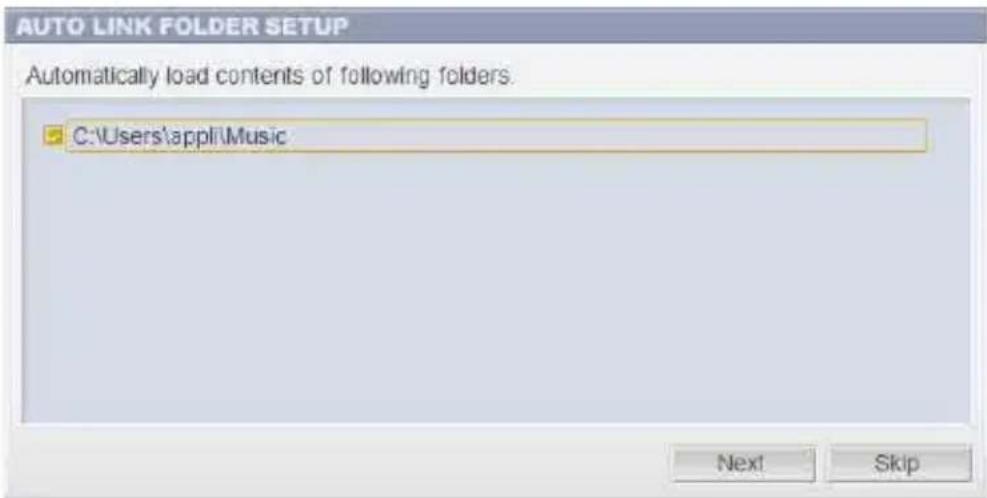
After restarting your computer, the "AUTO LINK FOLDER SETUP" window appears automatically.
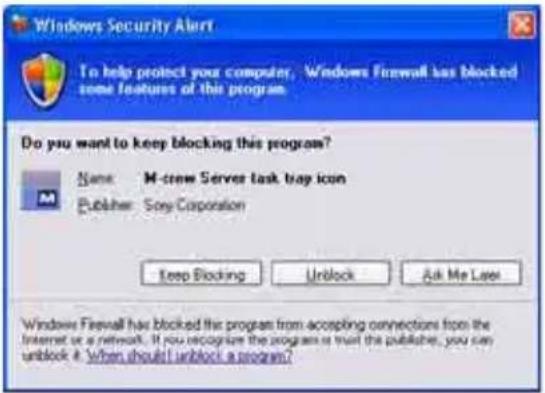
If the "Windows Security Alert" window appears
Click [Unblock] to unblock the program.
Make sure that "M-crew Server task tray icon" appears in "Name", then click [Unblock]. If you click [Keep Blocking], you will be unable to use M-crew Server (page 33).
8 Make the AUTO LINK FOLDER settings.
For details, see "Making the AUTO LINK FOLDER Settings" (page 16). After the settings are done, the "ICF SETTINGS" window appears.
9 Make the Windows firewall settings.
For details, see "Making the Windows Firewall Settings" (page 18). After the settings are done, the "Security software Firewall setting guide" window appears.
10 Make the security software firewall settings.
For details, see "Making the Security Software Firewall Settings" (page 20).
11 Make the unit settings, referring to the Operating Instructions or Quick Setup Guide.
Notes
- The M-crew Server software uses the installed folders, so do not delete, move, or edit any of the installed folders. Managing these folders like general files on Windows Explorer could cause the contents to become unstable or corrupted.
- While the installation is still in progress, do not interrupt the operation or take the CD-ROM out of the CD-ROM drive. Doing so may render it impossible to install the software thereafter.
- When M-crew Server is installed correctly, the task tray icon is displayed on the task bar.
Making the AUTO LINK FOLDER Settings
When the AUTO LINK FOLDER settings are completed, all
supportable music files in the folder and the sub folder that exists on the path indicated in the window are automatically loaded to M-crew Server.
Here is the detailed explanation of step 8 (page 14) of "Installing M-crew Server".
To skip this setting, click [Skip].
Notes
-
If the "AUTO LINK FOLDER SETUP" window does not automatically appear after rebooting, click [Start] - [All Programs] - [M-crew Server] - [TOOLS] - [AUTO LINK] in that order. In this case, [Next] and [Skip] become [OK] and [Cancel].
-
Operation has become slow because a large amount of music files has been registered in the application.
1 Click to place a check next to the directory path that contains the files to be loaded.
Click again to remove checks next to paths that are not to be loaded.
Tip
Sub-folders of the selected folder are also subject to the AUTO LINK function.
Example: When the two paths [C:\AAA\BBB\CCC] and
[C:\AAA\BBB\CCC\DDD] can be selected.
When [C:\AAA\BBB\CCC] is selected, the DDD folder which is located below the CCC folder is also automatically subject to the AUTO LINK function.
Therefore, [C:\AAA\BBB\CCC\DDD] is disabled.
2 Click [Next].
The music files located in the checked directory path(s) are loaded automatically.
For Windows Vista users
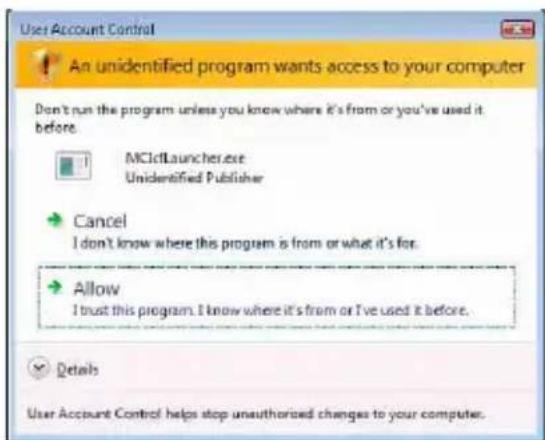
After making the AUTO LINK FOLDER settings in installing M-crew Server, the "User Account Control" (UAC) window appears.
Click [Allow]. If you click [Cancel], you will be unable to start up the ICF settings.
Note
All supportable music files that exist in the path indicated in the window are automatically imported to M-crew Server.
Making the Windows Firewall Settings
This setting opens the Windows Firewall so you can enjoy music files stored on your computer via the unit.
Here is the detailed explanation of step 9 (page 14) of "Installing M-crew Server".
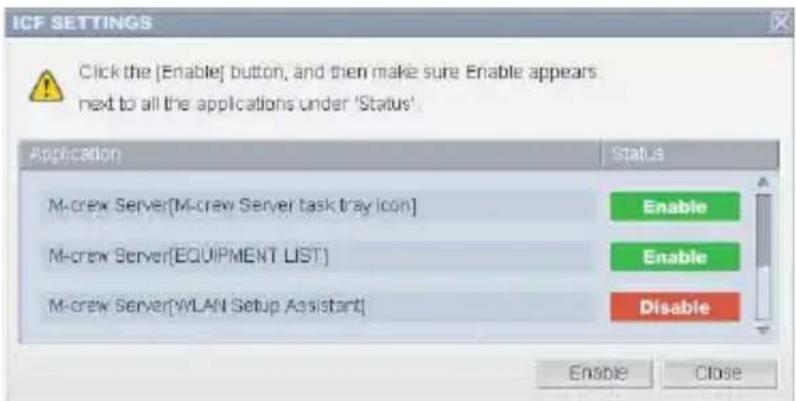
Windows XP and later versions have a simple firewall function as a standard feature. This firewall function is called“ICF”,and lets users limit communications between home networks or small-scale office networks and the Internet.When this firewall is enabled,the firewall must be set to allow communication of specific ports and programs in order to perform communication between M-crew Server and this unit.These settings are made at the“ICF SETTINGS”window.
However, note that making these settings may expose your computer to illicit access.
Notes
-
If the "ICF SETTINGS" window does not automatically appear even after the AUTO LINK FOLDER Settings has completed, click [Start] - [All Programs] - [M-crew Server] - [TOOLS] - [ICF Settings] in that order.
-
When a check mark is placed in [Don't allow exceptions] under [On (recommended)] in the Windows Firewall settings, M-crew Server cannot be used even if the ICF settings are made in the "ICF SETTINGS" window. To use M-crew Server, remove the check mark from this checkbox.
For Windows Vista users
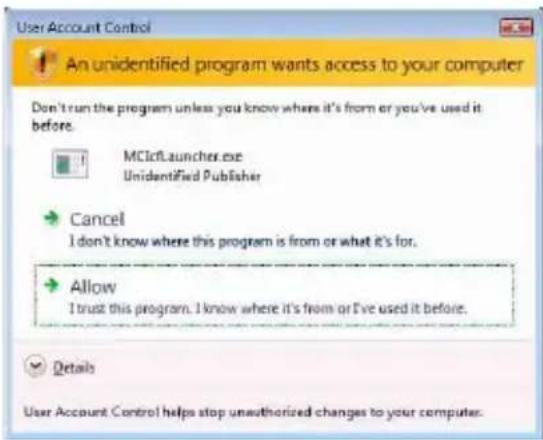
The "User Account Control" (UAC) window appears.
Click [Allow]. If you click [Cancel], you will be unable to make the ICF settings.
1 Click [Enable].
"Enable" or "Disable" appears for each items.
If "Disable" appears, click [Enable] repeatedly until "Enable" appears for all status items.
2 Click [Close].
The "Security software Firewall setting guide" window appears automatically.
Making the Security Software Firewall Settings
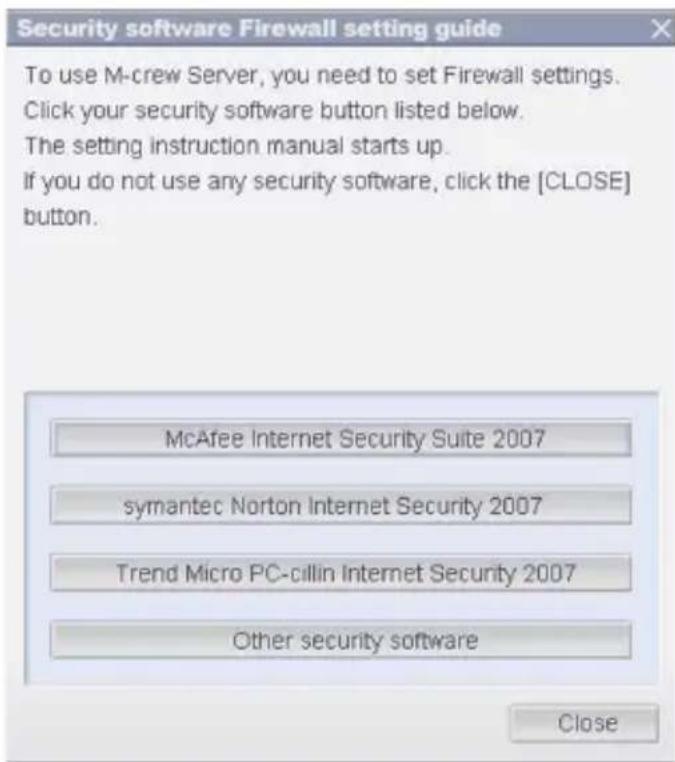
If commercially available anti-virus software is installed on your computer, this setting opens the Firewall.
Here is the detailed explanation of step 10 (page 14) of "Installing Mcrew Server".
If the security software is not installed on your computer, click [Close] then go to step 11 (page 14) of "Installing M-crew Server".
Note
If the "Security software Firewall setting guide" window does not automatically appear after setting "ICF SETTINGS" (page 18), click [Start] - [All Programs] - [M-crew Server] - [TOOLS] - [Security Software Firewall Setting guide] in that order.
1 Click your security software.
The following .exe files need to be enabled using the configuration table below. For a detailed description of how to configure your firewall software, view the operation manual of the firewall software used.
| TDM-NC1 FIREWALL CONFIGURATION TABLE | ||||
| Program | Allow Incoming | Allow Outgoing | UDP | TCP |
| McrewServer.exe | ✓ | ✓ | ||
| McTaskTray.exe | ✓ | ✓ | ||
| McService.exe | ✓ | ✓ | ✓ | ✓ |
| McFolderWatcher.exe | ✓ | ✓ | ||
| McrewHTTPService.exe | ✓ | ✓ | ✓ | |
| McrewUPnPService.exe | ✓ | ✓ | ✓ | ✓ |
| McWLANSearch.exe | ✓ | ✓ | ✓ | |
| MCMachineRegist.exe | ✓ | ✓ | ✓ | ✓ |
| McPccdService.exe | ✓ | ✓ | ||
The web browser is activated, and the setting guide of your security software appears. If your security software is not on the list, click [Other security software].
Note
To display the guide (web browser), your computer needs to be connected to the Internet.
2 Follow the on-screen message.
Note
After installing M-crew Server, the task tray icon appears on the taskbar. Refer to "Troubleshooting" in the Operating Instructions.
Registering the TDM-NC1 on your computer manually
When the TDM-NC1 is connected to your computer after installing the M-crew Server, the TDM-NC1 is registered automatically on your computer. Register the TDM-NC1 on your computer manually for higher security.
1 Turn on the AV system with DIGITAL MEDIA PORT interface (Sony DAV series, etc.).
2 Press M E N U^*1 on the remote.
3 Press or on the remote repeatedly until "REGISTER?"*2 appears, and then press ENTER on the remote.
The count down display appears in the display of the TDM-NC1.
4 Click [Start] - [All Programs] - [M-crew Server] - [TOOLS] - [EQUIPMENT LIST] in that order.
The "M-crew Server EQUIPMENT LIST" window appears on your computer screen.
5 Set "Equipment selection mode:" to "Manual", and click [Add] on your computer.
The registration starts.
"Complete!" appears in the display of the TDM-NC1 when the registration is complete.
1 "NETWORK MENU" appears in the case of NAS-CZ1 and "MENU" appears in the case of CPF-IX001.
2 "REGISTRATION?" appears in the case of NAS-CZ1 and "REGISTER?" appears in the case of CPF-IX001.
If the "Windows Security Alert" window appears
Click [Unblock] to unblock the program.
Make sure that "EQUIPMENT LIST Application" appears in "Name", then click [Unblock]. If you click [Keep Blocking], you will be unable to use M-crew Server (page 33).
![SONY TDMNC1 - Click [Unblock] to unblock the program. - 1](/content/2026/03/489918/images/e3d2df0d6dd18db385f5dbfdc03ff345eb2eab95b4d0a6b47e811a85b150cc8e.jpg)
Making the wireless LAN function settings for connected equipment (WLAN Setup Assistant)
Search for connected equipment in order to make the wireless LAN function settings for the connected equipment.
"WLAN Setup Assistant" is installed at the same time as M-crew Server, but it can also be installed independently.
For details on the wireless LAN setup, see "Case C: Wireless connection (setting up by the computer)" of the Operating Instructions supplied with the TDM-NC1.
1 Turn on the AV system with DIGITAL MEDIA PORT interface (Sony DAV series, etc.).
2 Press MENU on the remote.
3 Press or on the remote repeatedly until "SETUP BY PC?" appears, then press ENTER on the remote.
The count down display appears in the display of the TDM-NC1.
4 Click [Start] - [All Programs] - [M-crew Server] - [TOOLS] - [WLAN Setup Assistant] in that order.
The "WLAN Setup Assistant" window appears on your computer screen.
5 Click [Next].
Equipment search starts.
When connected equipment is found, the wireless LAN setup screen for that equipment is displayed.
If no equipment is found, check the connection and perform the procedure again from step 3. For details on connections, see "Case C: Wireless connection (setting up by the computer)" of the Operating Instructions supplied with the TDM-NC1.
If the "Windows Security Alert" window appears
Click [Unblock] to unblock the program.
Make sure that "McWLANSearch.exe" appears in "Name", then click [Unblock]. If you click [Keep Blocking], you will be unable to use M-crew Server (page 33).
![SONY TDMNC1 - Click [Unblock] to unblock the program. - 1](/content/2026/03/489918/images/6f10bc17d7d24c69e75a3c4ce5d3f957954f8f2b636c191c08c2e220ef7e0368.jpg)
Starting up M-crew Server
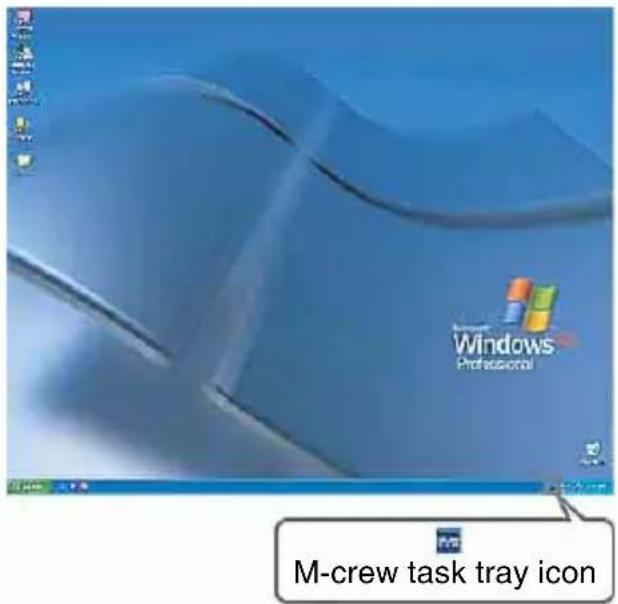
Click [Start] - [All Programs] - [M-crew Server] - [M-crew Server] in that order.
Or, double-click the task tray icon.
Or, right-click the task tray icon, and select [M-crew Server].
For details about the M-crew Server operation, refer to the M-crew Server Help. Click [Start] - [All Programs] - [M-crew Server] - [MANUAL] - [HELP] in that order to run M-crew Server Help.
Uninstalling the M-crew Server software
Log on through a user name which belongs to the computer's administrator and follow the procedures below.
Refer to the operating instructions of your computer for details on logging on as a user name which belongs to the computer's administrator.
1 Stop the service.
Right-click the task tray icon, then click [Stop Music Service] in the menu.
The task tray icon display becomes dim.
Click [Uninstall/Change] (Windows Vista).
The "User Account Control" (UAC) window appears. Click [Allow].
![SONY TDMNC1 - Click [Uninstall/Change] (Windows Vista). - 1](/content/2026/03/489918/images/8ff053888b04f2bf4ffa6e8489183eedf344a1e6cf77f558f19bcb286bea1ba5.jpg)
2 Hide the task tray icon.
Right-click the task tray icon, then click [Exit] in the menu.
The task tray icon display disappears.
3 Click [Start] - [Control Panel] in that order.
The "Control Panel" window appears.
4 When Windows XP is in Classic View, switch to Category View, then click [Add or Remove Programs].
The "Add or Remove Programs" window appears.
When Windows Vista is in Classic View, click [Control Panel Home], then click [Uninstall a Program] under [Programs].
The "Uninstall or change a program" window appears.
5 Select and click [M-crew Server] in the "Currently Installed Programs" list (Windows XP).
When [M-crew Server] does not appear in the "Currently Installed Programs" list, click [Change/Remove] and proceed to step 7.
Select and click [M-crew Server] in the list (Windows Vista).
6 Click [Change/Remove] (Windows XP).
Click [Uninstall/Change] (Windows Vista).
The "User Account Control" (UAC) window appears. Click [Continue].
7 Reboot the computer.
Notes
- When uninstalling M-crew Server, a command prompt window appears. Command prompt processing may take some time. However, the uninstall work is proceeding during this time, so do not click [Cancel] in the "Installsheild" window.
- When uninstalling "Mcrew Music Server", the window indicating that uninstall is underway may be displayed for a long time. This means that the uninstall process is underway, so do not close the window. (Do not click the or in the cancel window.)
-
When "WLAN Setup Assistant" is installed separately from M-crew Server, it can be uninstalled in the "Add or Remove Programs" window (Windows XP) or the "Uninstall or change program" window (Windows Vista).
-
Even if "WLAN Setup Assistant" was installed by a separate setup window from M-crew Server, it is uninstalled when M-crew Server is uninstalled.
- "OpenMG Limited Patch" and "OpenMG Secure Module" may be used by other software (SonicStage, VAIO Media, etc.). If OpenMG SDK is not being used, uninstall "OpenMG Limited Patch" and "OpenMG Secure Module" in the "Add or Remove Programs" window (Windows XP) or the "Uninstall or change a program" window (Windows Vista).
*Version numbers and other information are attached to these modules and patches.
- After uninstalling M-crew Server, the following folders can be deleted. However, since a database is also deleted, the registration information on music file of M-crew Server is lost.
-C:\Program Files\Mcrewserver
-C:\Program Files\Sony\Mcrew Music Server
Installed Modules
| Module name Description | ||
| Microsoft Module | .NET Framework Version2.0 *3 | This module is provided by Microsoft, and is necessary in order to use this application.Refer to the Microsoft home page and other materials for a detailed description of these Microsoft Modules. |
| Microsoft Data Access Components (MDAC) 2.8 | ||
| Windows MediaFormatSDK9.5 Runtime | ||
| OpenMG SDK Open | OpenMG SDK 4.7 *3 | This module realizes the copyright protection technology used to download and manage music distribution service and music files from CD, etc, onto a computer. |
| Gracenote MusicID | Gracenote Module This module | is needed to use the Gracenote music information database.Refer to www.gracenote.com for a detailed description of Gracenote MusicID. |
| Music Server Mcrew | Music Server 2.5 *3 | This module operates as a service and performs streaming of music files to connected equipment. |
| M-crew Server M-crew | Music Server 2.5 *3 | This module loads and manages music files from music CDs and computers.It also sets and manages connected equipment. |
| M-crew Server related modules | DatabaseClear.exe*1 *2 | This module deletes the entire database when the music files data database managed by M-crew Server becomes corrupted and the application is unable to operate properly. |
| McCompactDB.exe*1 *2 | This module optimizes the database to reduces the file size when the file size of the music files data database managed by M-crew Server increases and application operation becomes slow. | |
| FWServiceInstall.exe *1 *2 | This module installs the M-crew Folder Watcher service. | |
| FWServiceUnInstall.exe*1 *2 | This module uninstalls the M-crew Folder Watcher service. | |
| ServiceInstall.exe*1 *2 | This module installs the M-crew Webradio Server service. | |
| ServiceUnInstall.exe*1 *2 | This module uninstalls the M-crew Webradio Server service. | |
| PccdServiceInstall.exe*1 *2 | This module installs the M-crew Pccd Service. | |
| PccdServiceUnInstall.exe *1 *2 | This module uninstalls the M-crew Pccd Service. |
1 These modules are located in the folder where M-crew Server is installed. Normally this is below C:\Program Files\Mcrewserver.
2 The "User Account Control" (UAC) window appears when these modules starting. Click [Allow] to start them.
*3 These modules are displayed in the "Add or Remove Programs" window (Windows XP) or the "Uninstall or change program" window (Windows Vista).
Troubleshooting
Should you encounter a problem while installing or uninstalling Mcrew Server, use the following troubleshooting to remedy the problem. If the problem persists after checking all the below items, consult your nearest Sony dealer.
In case an error message appears, it is recommended that you write it down.
The screen does not respond, or the responses are incorrect
- Try turning the unit off and then on again, and restart your computer.
- Start up another software that you use frequently, and confirm that the computer is functioning normally.
- Try uninstalling M-crew Server and then reinstalling it again.
M-crew Server does not start up
- The user privileges are not administrator.
M-crew Server can be used only by users with administrator privileges. To use M-crew Server, change the user privileges to administrator or log on as a user with administrator privileges.
The message "Gracenote information not found." appears
- Make sure that Internet access has been properly performed.
- If using a proxy server, make sure that the proxy server is set correctly in the "PROXY SETTINGS" window.
Installation was not successful
- Be sure to close down all applications before installing the software.
If you start the installation while other programs are running, a malfunction may occur. This is especially true for programs that require large amounts of system resources, such as virus-check software.
- Make sure your computer has enough hard disk drive space.
At least 50 MB (including M-crew Server, help and related modules) free space on the system drive. This does not include the space for storing the database and music files. In addition, 300 MB is needed on the system drive for the Microsoft related modules, and 100 MB on the hard disk for Adobe Reader. However, these may not be necessary depending on the operating environment. If your computer does not have enough space, the installation may not be possible.
- [Keep Blocking] was clicked in the "Windows Security Alert" window.
1 Click [Start] - [Control Panel] in that order. The "Control Panel" window appears.
2 When Windows XP is in Category View, switch to Classic View, then click [Network Connections].
3 Click [Change Windows Firewall settings] on the left edge.
The "Windows Firewall" window appears.
4 Click [Exceptions].
5 Click [Add Program]. The "Add a program" window appears.
6 Select [M-crew Server task tray icon] from the "Programs" list, then click [OK].
Make sure that the task tray icon appears and is checked in the "Programs and Services" list in [Exceptions] of the "Windows Firewall" window.
7 Click [OK].
- If the installation is still unsuccessful after trying all the above remedies.
Uninstall M-crew Server and reinstall it.
For details, see "Installing M-crew Server" (page 11) and "Uninstalling the M-crew Server software" (page 27).
- If the installation seems to be stopped.
The installation may take 10 minutes or more depending on your computer or CD-ROM drive. During the installation, watch out for the occurrence of any of the following problems.
- The progress bar on the display is not moving. The access lamp has not lit for a few minutes.
The installation is progressing normally. Please wait.
M-crew Server may not be recognizing the unit
- Check the "ICF SETTINGS" window.
1 Click [Start] – [All Programs] – [M-crew Server] – [TOOLS] – [ICF Settings] in that order.
The "ICF SETTINGS" window appears.
For Windows Vista users
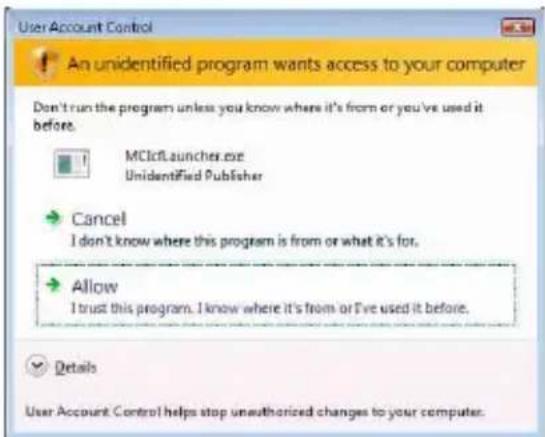
The "User Account Control" (UAC) window appears.
Click [Allow]. If you click [Cancel], you will be unable to make the ICF settings.
2 Click [Enable].
"Enable" or "Disable" appears for each item.
If "Disable" appears, click [Enable] repeatedly until "Enable" appears for all status items.
3 Click [Close].
- Check that there is no check mark in [Don't allow exceptions] under [On (recommended)] in the Windows Firewall settings.
- Check that the connection status information matches the TDM-NC1's network settings.
1 Click [Start] - [Control Panel] - [Network Connections] in that order (Windows XP).
Click [Start] - [Control Panel] in that order (Windows Vista).
2 Double-click [Local Area Connection] (Windows XP). Click [View network status and tasks] under [Network and Internet] (Windows Vista).
3 Click [Support], then check the connection status (Windows XP).
Click [View status] in [Network] (Windows Vista).
- Restart your computer.
- When communication is limited by firewall software other than the OS functions, enable the following .exe files.
For a detailed description of the setting method, see the operation manual of the firewall software used.
- If have security software installed, confirm the security software settings, following the instructions in the "Security software Firewall setting guide" window.
| TDM-NC1 FIREWALL CONFIGURATION TABLE | ||||
| Program | Allow Incoming | Allow Outgoing | UDP | TCP |
| McrewServer.exe | ✓ | ✓ | ||
| McTaskTray.exe | ✓ | ✓ | ||
| McService.exe | ✓ | ✓ | ✓ | ✓ |
| McFolderWatcher.exe | ✓ | ✓ | ||
| McrewHTTPService.exe | ✓ | ✓ | ✓ | |
| McrewUPnPService.exe | ✓ | ✓ | ✓ | ✓ |
| McWLANSearch.exe | ✓ | ✓ | ✓ | |
| MCMachineRegist.exe | ✓ | ✓ | ✓ | ✓ |
| McPccdService.exe | ✓ | ✓ | ||
There is no sound from the unit
- M-crew Server is not selected by the server selection on the TDM-NC1 side.
- The server side unit registration is not correct.
1 Check the connection between the TDM-NC1 and your computer.
For details on connections, see "STEP ⑦: Connecting the TDM-NC1 to the network" of the Operating Instructions provided with the TDM-NC1.
2 Turn on the AV system with DIGITAL MEDIA PORT interface (Sony DAV series, etc.).
The TDM-NC1 is registered automatically on your computer.
The server side must also be set when performing unit registration manually. See "Registering the TDM-NC1 on your computer manually" (page 22).
- Make sure the TDM-NC1 is properly connected.
For details, see "STEP ⑦: Connecting the TDM-NC1 to the network" of the Operating Instructions provided with the TDM-NC1. Also check your computer's network settings.
- Check for the task tray icon.
Refer to the startup instructions. Also refer to "The task tray icon not present" (page 39).
- Make sure the task tray icon is lighting.
If the task tray icon is darkened like, refer to "The task tray icon darkened" (page 39).
- Make sure the TDM-NC1 is registered in M-crew Server.
Refer to the instructions for confirming registration.
- Check the ERROR LOG VIEWER.
Start up M-crew Server, then click [ERROR LOG] in the LAUNCHER window, or right-click the task tray icon and click [ERROR LOG VIEWER]. Check the contents displayed in the ERROR LOG VIEWER.
- Initialize the database.
The database has entered an illegal status, and may need to be initialized. Execute "DatabaseClear.exe" (page 31). Care should be taken when initializing the database, as the registered music files information will be initialized if you execute "DatabaseClear.exe".
- Restart your computer.
Cannot listen to WEB RADIO
- Make sure that the computer's Internet access is correct.
If using a proxy server, make sure that the proxy server is set correctly in the "PROXY SETTINGS" window.
The IE setting is reflected when the "PROXY SETTINGS" window is closed or M-crew Server is started. If you change the IE setting, close the "PROXY SETTINGS" window, or start M-crew Server again.
- Wait for stability of tuning from web radio station.
You may not be able to hear broadcasts in some cases depending on the station's server status.
Unable to access web radio stations
- Make sure that the computer's Internet access is correct.
- The WEB RADIO function supports only internet URLs that start with "http://" and end with ".asx". (Example: http://www.example.com/radio.asx) Also, playback may not be possible depending on the broadcast station.
- If using a proxy server, make sure that the proxy server is set correctly in the "PROXY SETTINGS" window.
The task tray icon not present
- Click [Start] - [All Programs] - [M-crew Server] - [TOOLS] - [M-crew Server task tray icon] in that order.
- Right-click the task tray icon. Click [Start Music Service].
- Uninstall M-crew Server and reinstall it.
The task tray icon darkened
The service is not active. Check the following items.
- Right-click the task tray icon. Click [Start Music Service].
- Click [Start] - [All Programs] - [M-crew Server] - [TOOLS] - [ICF Settings] in that order and check the application condition.
-
Uninstall M-crew Server and reinstall it.
-
When Windows XP is in Category View, switch to Classic View, then click [Start] - [Control Panel] - [Administrative Tools] - [Services] in that order to open the window.
Check that "Mcrew Folder Watcher", "Mcrew Music Streaming Server", "Mcrew Webradio Server", "Mcrew UPnP Music Server" and "Mcrew Pccd Service" are present, and that "Status" is set to "Started".
- When Windows Vista is in Category View, switch to Classic View, then click [Start] - [Control Panel] - [Administrative Tools] - [Services] in that order to open the window.
The "User Account Control" (UAC) window appears. Click [Continue]. Check that "Mcrew Folder Watcher", "Mcrew Music Streaming Server", "Mcrew Webradio Server", "Mcrew UPnP Music Server" and "Mcrew Pccd Service" are present, and that "Status" is set to "Started".
"Mcrew Folder Watcher", "Mcrew Webradio Server" and "Mcrew Pccd Service" are not present in the service
- Start up "FWServicelInstall.exe", "ServicelInstall.exe" and "PccdServicelInstall.exe" located in the folder where M-crew Server is installed, or reinstall M-crew Server.
"Mcrew Folder Watcher", "Mcrew Webradio Server" and "Mcrew Pccd Service" cannot be instantiated from the service
- Start up "FWServiceUnInstall.exe", "ServiceUnInstall.exe" and "PccdServiceUnInstall.exe" located in the folder where M-crew Server is installed, or in the INSTMODULE folder of the installation CD.
The application does not operate correctly. Music files managed by the application cannot be seen from the TDM-NC1
- The database has entered an illegal status, and may need to be initialized.
Run "DatabaseClear.exe" located in the folder where M-crew Server is installed, and delete the entire database. Care should be taken when initializing the database, as the registered music files information will be deleted if you execute "DatabaseClear.exe".
Operation has become slow because a large amount of music files has been registered in the application
- Run "McCompactDB.exe" located in the folder where M-crew Server is installed, and optimize the database.
Cannot uninstall M-crew Server
1 Stop the service.
Right-click the task tray icon, then click [Stop Music Service] in the menu.
2 Hide the Task tray icon.
Right-click the task tray icon, then click [Exit] in the menu.
3 Click [Start] - [Control Panel] - [Add or Remove Programs] in that order (Windows XP).
Select [M-crew Server] and remove it.
Click [Start] - [Control Panel] - [Programs and Features] in that order (Windows Vista).
Select [M-crew Server] and remove it.
Tracks are grayed-out
- There are no corresponding files.
Cannot obtain title information from Gracenote MusicID
- The setting is CD TEXT.
- The tracks are not registered at Gracenote MusicID.
Bad network connection. - The proxy settings are incorrect.
- [Access Gracenote automatically] is not checked in the "Gracenote MusicID" window.
The music file of CDs inserted using [RECORD FROM CD] is not displayed
- The CD-ROM drive was not selected correctly.
Processing takes a while after choosing [Update] in [IMPORT FILES (AUTO MODE)]
- The processing time varies depending on the music file of folders to be imported.
Please wait a while. Note that there is usually no need to use [Update].
AMS does not work
- AMS is not available for tracks listed on the left side in [IMPORT FILES (MANUAL MODE)]
This is not an error. It is part of the M-crew Server specifications.
Cannot play music files that contain characters in a European language area (ISO8859 characters)
- When Windows XP is in Category View, switch to Classic View, then click [Start] - [Control Panel] - [Regional and Language Options] in that order. Click [Advanced] and select a language that can handle ISO8859 in "Language for non-Unicode programs".
- When Windows Vista is in Category View, switch to Classic View, then click [Start] – [Control Panel] – [Regional and Language Options] in that order. Click [Administrative] and [Change system locale...]. The "User Account Control" (UAC) window appears. Click [Continue]. Then select a language that can handle ISO8859 in "Language for non-Unicode programs".
Corporate Description
- Music recognition technology and related data are provided by Gracenote. Gracenote is the industry standard in music recognition technology and related content delivery. For more information visit www.gracenote.com.
Proprietary Legends
- CD and music-related data from Gracenote, Inc., copyright © 2000-2007 Gracenote. Gracenote Software, copyright © 2000-2007 Gracenote. This product and service may practice one or more of the following U.S. Patents: #5,987,525; #6,061,680; #6,154,773, #6,161,132, #6,230,192, #6,230,207, #6,240,459, #6,330,593, and other patents issued or pending. Some services supplied under license from Open Globe, Inc. for U.S. Patent: #6,304,523.
- Gracenote® is a registered trademark of Gracenote, Inc. The Gracenote logo and logotype, and the "Powered by Gracenote" logo are trademarks of Gracenote.

gracenote.
Program © 2007 Sony Corporation
Documentation © 2007 Sony Corporation
OpenSSL
Copyright © 1998-2001 The OpensSL Project. All rights reserved.
Copyright © 1995-1998 Eric Young (eay@cryptsoft.com). All rights reserved.
- "This product includes software developed by the OpenSSL Project for use in the OpenSSL Toolkit (http://www.openss1.org)"
1 Redistributions of source code must retain the above copyright notice, this list of conditions and the following disclaimer.
2 Redistributions in binary form must reproduce the above copyright notice, this list of conditions and the following disclaimer in the documentation and/or other materials provided with the distribution.
3 All advertising materials mentioning features or use of this software must display the following acknowledgment: "This product includes software developed by the OpenSSL Project for use in the OpenSSL Toolkit. (http://www.openss1.org/)
4 The names "OpenSSL Toolkit" and "OpenSSL Project" must not be used to endorse or promote products derived from this software without prior written permission. For written permission, please contact openssl-core@openssl.org.
5 Products derived from this software may not be called "OpenSSL" nor may "OpenSSL" appear in their names without prior written permission of the OpenSSL Project.
6 Redistributions of any form whatsoever must retain the following acknowledgment: "This product includes software developed by the OpenssL Project for use in the OpenssL Toolkit (http://www.openss1.org/)".
- THIS SOFTWARE IS PROVIDED BY THE OpensSL PROJECT "AS IS" AND ANY EXPRESSED OR IMPLIED WARRANTYES, INCLUDING, BUT NOT LIMITED TO, THE IMPLIED WARRANTYES OF MERCHANTABILITY AND FITNESS FOR A PARTICULAR PURPOSE ARE DISCLAIMED. IN NO EVENT SHALL THE OpensSL PROJECT OR ITS CONTRIBUTORS BE LIABLE FOR ANY DIRECT, INDIRECT, INCIDENTAL, SPECIAL, EXEMPLARY, OR CONSEQUENTIAL DAMAGES (INCLUDING, BUT NOT LIMITED TO, PROCEDURE OF SUBSTITUTE GOODSOR SERVICES;LOSS OF USE,DATA,OR PROFITS;OR BUSINESS INTERRUIPTION) HOWEVER CAUSED AND ON ANY THEORY OF LIABILITY,WHETHERINCONTRACT,STRICTLIABILITY,ORTORT (INCLUDING NEGLIGENCEOR OTHERWISE)ARISING IN ANY WAY OUT OF THE USE OF THIS SOFTWARE,EVEN IF ADVISED OF THE POSSIBILITY OF SUCH DAMAGE.
1 Redistributions of source code must retain the copyright notice, this list of conditions and the following disclaimer.
2 Redistributions in binary form must reproduce the above copyright notice, this list of conditions and the following disclaimer in the documentation and/or other materials provided with the distribution.
3 All advertising materials mentioning features or use of this software must display the following acknowledgement: "This product includes cryptographic software written by Eric Young (eay@cryptsoft.com)". The word 'cryptographic' can be left out if the routines from the library being used are not cryptographic related : -).
4 If you include any Windows specific code (or a derivative thereof) from the apps directory (application code) you must include an acknowledgement: "This product includes software written by Tim Hudson (tjh@cryptsoft.com)".
- THIS SOFTWARE IS PROVIDED BY ERIC YOUNG "AS IS" AND ANY EXPRESS OR IMPLIED WARRANTY, INCLUDING, BUT NOT LIMITED TO, THE IMPLIED WARRANTY OF MERCHANTABILITY AND FITNESS FOR A PARTICULAR PURPOSE ARE DISCLAIMED. IN NO EVENT SHALL THE AUTHOR OR COLLABORBE LIABLE FOR ANY DIRECT, INDIRECT, INCIDENTAL, SPECIAL, EXEMPLARY, OR CONSEQUENTIAL DAMAGES (INCLUDING, BUT NOT LIMITED TO, PROCEDUREMENT OF SUBSTITUTE GOODS OR SERVICES; LOSS OF USE, DATA, OR PROFITS; OR BUSINESS INTERRUsION) HOWEVER CAUSED AND ON ANY THEORY OF LIABILITY, WHETHER IN CONTRACT, STRICT LIABILITY, OR TORT (INCLUDING NEGLIGENCE OR OTHERWISE) ARISING IN ANY WAY OUT OF THE USE OF THIS SOFTWARE, EVEN IF ADVISED OF THE POSSIBILITY OF SUCH DAMAGE.
Table des matieres
| TABLEAU DE CONFIGURATION DU PARE-FEU DU TDM-NC1 | ||||
| Programme | Autorise le traffic entrant | Autorise le traffic sortie | UDP | TCP |
| McrewServer.exe | ✓ | ✓ | ||
| McTaskTray.exe | ✓ | ✓ | ||
| McService.exe | ✓ | ✓ | ✓ | ✓ |
| McFolderWatcher.exe | ✓ | ✓ | ||
| McrewHTTPService.exe | ✓ | ✓ | ✓ | |
| McrewUPnPService.exe | ✓ | ✓ | ✓ | ✓ |
| McWLANSearch.exe | ✓ | ✓ | ✓ | |
| MCMachineRegist.exe | ✓ | ✓ | ✓ | ✓ |
| McPccdService.exe | ✓ | ✓ | ||
| TABLEAU DE CONFIGURATION DU PARE-FEU DU TDM-NC1 | ||||
| Programme | Autorise le traffic entrant | Autorise le traffic sortie | UDP | TCP |
| McrewServer.exe | ✓ | ✓ | ||
| McTaskTray.exe | ✓ | ✓ | ||
| McService.exe | ✓ | ✓ | ✓ | ✓ |
| McFolderWatcher.exe | ✓ | ✓ | ||
| McrewHTTPService.exe | ✓ | ✓ | ✓ | |
| McrewUPnPService.exe | ✓ | ✓ | ✓ | ✓ |
| McWLANSearch.exe | ✓ | ✓ | ✓ | |
| MCMachineRegist.exe | ✓ | ✓ | ✓ | ✓ |
| McPccdService.exe | ✓ | ✓ | ||
Corporate Description
- Music recognition technology and related data are provided by Gracenote. Gracenote is the industry standard in music recognition technology and related content delivery. For more information visit www.gracenote.com.
Proprietary Legends
- CD and music-related data from Gracenote, Inc., copyright © 2000-2007 Gracenote. Gracenote Software, copyright © 2000-2007 Gracenote. This product and service may practice one or more of the following U.S. Patents: #5,987,525; #6,061,680; #6,154,773, #6,161,132, #6,230,192, #6,230,207, #6,240,459, #6,330,593, and other patents issued or pending. Some services supplied under license from Open Globe, Inc. for U.S. Patent: #6,304,523.
- Gracenote® is a registered trademark of Gracenote, Inc. The Gracenote logo and logotype, and the "Powered by Gracenote" logo are trademarks of Gracenote.

gracenote.
Program © 2007 Sony Corporation
Documentation © 2007 Sony Corporation
OpenSSL
Copyright © 1998-2001 The OpensSL Project. All rights reserved.
Copyright © 1995-1998 Eric Young (eay@cryptsoft.com). All rights reserved.
- "This product includes software developed by the OpenSSL Project for use in the OpenSSL Toolkit (http://www.openss1.org)"
1 Redistributions of source code must retain the above copyright notice, this list of conditions and the following disclaimer.
2 Redistributions in binary form must reproduce the above copyright notice, this list of conditions and the following disclaimer in the documentation and/or other materials provided with the distribution.
3 All advertising materials mentioning features or use of this software must display the following acknowledgment: "This product includes software developed by the OpenssL Project for use in the OpenssL Toolkit. (http://www.openss1.org/)
4 The names "OpenSSL Toolkit" and "OpenSSL Project" must not be used to endorse or promote products derived from this software without prior written permission. For written permission, please contact openssl-core@openssl.org.
5 Products derived from this software may not be called "OpenSSL" nor may "OpenSSL" appear in their names without prior written permission of the OpenSSL Project.
6 Redistributions of any form whatsoever must retain the following acknowledgment: "This product includes software developed by the OpenssL Project for use in the OpenssL Toolkit (http://www.openss1.org/)".
- THIS SOFTWARE IS PROVIDED BY THE OpensSL PROJECT "AS IS" AND ANY EXPRESSED OR IMPLIED WARRANTYES, INCLUDING, BUT NOT LIMITED TO, THE IMPLIED WARRANTYES OF MERCHANTABILITY AND FITNESS FOR A PARTICULAR PURPOSE ARE DISCLAIMED. IN NO EVENT SHALL THE OpensSL PROJECT OR ITS CONTRIBUTORS BE LIABLE FOR ANY DIRECT, INDIRECT, INCIDENTAL, SPECIAL, EXEMPLARY, OR CONSEQUENTIAL DAMAGES (INCLUDING, BUT NOT LIMITED TO, PROCEDURE OF SUBSTITUTE GOODSOR SERVICES;LOSSOFUSE,DATA,ORPROFITS;OR BUSINESS INTERRUIPTION)HOWEVERCAUSEDANDONANYTHEORYOF LIABILITY,WHETHERINCONTRACT,STRICTLIABILITY,ORTORT (INCLUDING NEGLIGENCEOROTHERWISE)ARISINGINANYWAYOUT OF THE USE OF THIS SOFTWARE,EVENIFADVISEDOFTHEPOSSIBILITYOF SUCH DAMAGE.
1 Redistributions of source code must retain the copyright notice, this list of conditions and the following disclaimer.
2 Redistributions in binary form must reproduce the above copyright notice, this list of conditions and the following disclaimer in the documentation and/or other materials provided with the distribution.
3 All advertising materials mentioning features or use of this software must display the following acknowledgement: "This product includes cryptographic software written by Eric Young (eay@cryptsoft.com)". The word 'cryptographic' can be left out if the routines from the library being used are not cryptographic related :-).
4 If you include any Windows specific code (or a derivative thereof) from the apps directory (application code) you must include an acknowledgement: "This product includes software written by Tim Hudson (tjh@cryptsoft.com)".
- THIS SOFTWARE IS PROVIDED BY ERIC YOUNG "AS IS" AND ANY EXPRESS OR IMPLIED WARRANTY, INCLUDING, BUT NOT LIMITED TO, THE IMPLIED WARRANTY OF MERCHANTABILITY AND FITNESS FOR A PARTICULAR PURPOSE ARE DISCLAIMED. IN NO EVENT SHALL THE AUTHOR OR COLLABORBE LIABLE FOR ANY DIRECT, INDIRECT, INCIDENTAL, SPECIAL, EXEMPLARY, OR CONSEQUENTIAL DAMAGES (INCLUDING, BUT NOT LIMITED TO, PROCEDUREMENT OF SUBSTITUTE GOODS OR SERVICES; LOSS OF USE, DATA, OR PROFITS; OR BUSINESS INTERRUsION) HOWEVER CAUSED AND ON ANY THEORY OF LIABILITY, WHETHER IN CONTRACT, STRICT LIABILITY, OR TORT (INCLUDING NEGLIGENCE OR OTHERWISE) ARISING IN ANY WAY OUT OF THE USE OF THIS SOFTWARE, EVEN IF ADVISED OF THE POSSIBILITY OF SUCH DAMAGE.
Índice
| TABLA DE CONFIGURACION DEL FIREWALL DE TDM-NC1 | ||||
| Programa | Permitir entrantes | Permitir salientes | UDP | TCP |
| McrewServer.exe | ✓ | ✓ | ||
| McTaskTray.exe | ✓ | ✓ | ||
| McService.exe | ✓ | ✓ | ✓ | ✓ |
| McFolderWatcher.exe | ✓ | ✓ | ||
| McrewHTTPService.exe | ✓ | ✓ | ✓ | |
| McrewUPnPService.exe | ✓ | ✓ | ✓ | ✓ |
| McWLANSearch.exe | ✓ | ✓ | ✓ | |
| MCMachineRegist.exe | ✓ | ✓ | ✓ | ✓ |
| McPccdService.exe | ✓ | ✓ | ||
| TABLA DE CONFIGURACION DEL FIREWALL DE TDM-NC1 | ||||
| Programa | Permitir entrantes | Permitir salientes | UDP | TCP |
| McrewServer.exe | ✓ | ✓ | ||
| McTaskTray.exe | ✓ | ✓ | ||
| McService.exe | ✓ | ✓ | ✓ | ✓ |
| McFolderWatcher.exe | ✓ | ✓ | ||
| McrewHTTPService.exe | ✓ | ✓ | ✓ | |
| McrewUPnPService.exe | ✓ | ✓ | ✓ | ✓ |
| McWLANSearch.exe | ✓ | ✓ | ✓ | |
| MCMachineRegist.exe | ✓ | ✓ | ✓ | ✓ |
| McPccdService.exe | ✓ | ✓ | ||
Corporate Description
- Music recognition technology and related data are provided by Gracenote. Gracenote is the industry standard in music recognition technology and related content delivery. For more information visit www.gracenote.com.
Proprietary Legends
- CD and music-related data from Gracenote, Inc., copyright © 2000-2007 Gracenote. Gracenote Software, copyright © 2000-2007 Gracenote. This product and service may practice one or more of the following U.S. Patents: #5,987,525; #6,061,680; #6,154,773, #6,161,132, #6,230,192, #6,230,207, #6,240,459, #6,330,593, and other patents issued or pending. Some services supplied under license from Open Globe, Inc. for U.S. Patent: #6,304,523.
- Gracenote® is a registered trademark of Gracenote, Inc. The Gracenote logo and logotype, and the "Powered by Gracenote" logo are trademarks of Gracenote.

gracenote.
Program © 2007 Sony Corporation
Documentation © 2007 Sony Corporation
OpenSSL
Copyright © 1998-2001 The OpensSL Project. All rights reserved.
Copyright © 1995-1998 Eric Young (eay@cryptsoft.com). All rights reserved.
- "This product includes software developed by the OpenSSL Project for use in the OpenSSL Toolkit (http://www.openss1.org)"
1 Redistributions of source code must retain the above copyright notice, this list of conditions and the following disclaimer.
2 Redistributions in binary form must reproduce the above copyright notice, this list of conditions and the following disclaimer in the documentation and/or other materials provided with the distribution.
3 All advertising materials mentioning features or use of this software must display the following acknowledgment: "This product includes software developed by the OpenssL Project for use in the OpenssL Toolkit. (http://www.openss1.org/)
4 The names "OpenSSL Toolkit" and "OpenSSL Project" must not be used to endorse or promote products derived from this software without prior written permission. For written permission, please contact openssl-core@openssl.org.
5 Products derived from this software may not be called "OpenSSL" nor may "OpenSSL" appear in their names without prior written permission of the OpenSSL Project.
6 Redistributions of any form whatsoever must retain the following acknowledgment: "This product includes software developed by the OpenssL Project for use in the OpenssL Toolkit (http://www.openss1.org/)".
- THIS SOFTWARE IS PROVIDED BY THE OpensSL PROJECT "AS IS" AND ANY EXPRESSED OR IMPLIED WARRANTYES, INCLUDING, BUT NOT LIMITED TO, THE IMPLIED WARRANTYES OF MERCHANTABILITY AND FITNESS FOR A PARTICULAR PURPOSE ARE DISCLAIMED. IN NO EVENT SHALL THE OpensSL PROJECT OR ITS CONTRIBUTORS BE LIABLE FOR ANY DIRECT, INDIRECT, INCIDENTAL, SPECIAL, EXEMPLARY, OR CONSEQUENTIAL DAMAGES (INCLUDING, BUT NOT LIMITED TO, PROCEDURE OF SUBSTITUTE GOODSOR SERVICES;LOSSOFUSE,DATA,ORPROFITS;OR BUSINESS INTERRUIPTION)HOWEVERCAUSEDANDONANYTHEORYOF LIABILITY,WHETHERINCONTRACT,STRICTLIABILITY,ORTORT (INCLUDING NEGLIGENCEOROTHERWISE)ARISINGINANYWAYOUT OF THE USE OF THIS SOFTWARE,EVENIFADVISEDOFTHEPOSSIBILITYOF SUCH DAMAGE.
1 Redistributions of source code must retain the copyright notice, this list of conditions and the following disclaimer.
2 Redistributions in binary form must reproduce the above copyright notice, this list of conditions and the following disclaimer in the documentation and/or other materials provided with the distribution.
3 All advertising materials mentioning features or use of this software must display the following acknowledgement: "This product includes cryptographic software written by Eric Young (eay@cryptsoft.com)". The word 'cryptographic' can be left out if the routines from the library being used are not cryptographic related :-).
4 If you include any Windows specific code (or a derivative thereof) from the apps directory (application code) you must include an acknowledgement: "This product includes software written by Tim Hudson (tjh@cryptsoft.com)".
- THIS SOFTWARE IS PROVIDED BY ERIC YOUNG "AS IS" AND ANY EXPRESS OR IMPLIED WARRANTY, INCLUDING, BUT NOT LIMITED TO, THE IMPLIED WARRANTY OF MERCHANTABILITY AND FITNESS FOR A PARTICULAR PURPOSE ARE DISCLAIMED. IN NO EVENT SHALL THE AUTHOR OR COLLABORBE LIABLE FOR ANY DIRECT, INDIRECT, INCIDENTAL, SPECIAL, EXEMPLARY, OR CONSEQUENTIAL DAMAGES (INCLUDING, BUT NOT LIMITED TO, PROCEDUREMENT OF SUBSTITUTE GOODS OR SERVICES; LOSS OF USE, DATA, OR PROFITS; OR BUSINESS INTERRUsION) HOWEVER CAUSED AND ON ANY THEORY OF LIABILITY, WHETHER IN CONTRACT, STRICT LIABILITY, OR TORT (INCLUDING NEGLIGENCE OR OTHERWISE) ARISING IN ANY WAY OUT OF THE USE OF THIS SOFTWARE, EVEN IF ADVISED OF THE POSSIBILITY OF SUCH DAMAGE.
Inhaltsverzeichnis
Corporate Description
- Music recognition technology and related data are provided by Gracenote. Gracenote is the industry standard in music recognition technology and related content delivery. For more information visit www.gracenote.com.
Proprietary Legends
- CD and music-related data from Gracenote, Inc., copyright © 2000-2007 Gracenote. Gracenote Software, copyright © 2000-2007 Gracenote. This product and service may practice one or more of the following U.S. Patents: #5,987,525; #6,061,680; #6,154,773, #6,161,132, #6,230,192, #6,230,207, #6,240,459, #6,330,593, and other patents issued or pending. Some services supplied under license from Open Globe, Inc. for U.S. Patent: #6,304,523.
- Gracenote® is a registered trademark of Gracenote, Inc. The Gracenote logo and logotype, and the "Powered by Gracenote" logo are trademarks of Gracenote.

gracenote.
Program © 2007 Sony Corporation
Documentation © 2007 Sony Corporation
OpenSSL
Copyright © 1998-2001 The OpensSL Project. All rights reserved.
Copyright © 1995-1998 Eric Young (eay@cryptsoft.com). All rights reserved.
- "This product includes software developed by the OpenSSL Project for use in the OpenSSL Toolkit (http://www.openss1.org)"
1 Redistributions of source code must retain the above copyright notice, this list of conditions and the following disclaimer.
2 Redistributions in binary form must reproduce the above copyright notice, this list of conditions and the following disclaimer in the documentation and/or other materials provided with the distribution.
3 All advertising materials mentioning features or use of this software must display the following acknowledgment: "This product includes software developed by the OpenssL Project for use in the OpenssL Toolkit. (http://www.openss1.org/)
4 The names "OpenSSL Toolkit" and "OpenSSL Project" must not be used to endorse or promote products derived from this software without prior written permission. For written permission, please contact openssl-core@openssl.org.
5 Products derived from this software may not be called "OpenSSL" nor may "OpenSSL" appear in their names without prior written permission of the OpenSSL Project.
6 Redistributions of any form whatsoever must retain the following acknowledgment: "This product includes software developed by the OpenssL Project for use in the OpenssL Toolkit (http://www.openss1.org/)".
- THIS SOFTWARE IS PROVIDED BY THE OpensSL PROJECT "AS IS" AND ANY EXPRESSED OR IMPLIED WARRANTYES, INCLUDING, BUT NOT LIMITED TO, THE IMPLIED WARRANTYES OF MERCHANTABILITY AND FITNESS FOR A PARTICULAR PURPOSE ARE DISCLAIMED. IN NO EVENT SHALL THE OpensSL PROJECT OR ITS CONTRIBUTORS BE LIABLE FOR ANY DIRECT, INDIRECT, INCIDENTAL, SPECIAL, EXEMPLARY, OR CONSEQUENTIAL DAMAGES (INCLUDING, BUT NOT LIMITED TO, PROCEDURE OF SUBSTITUTE GOODSOR SERVICES;LOSS OF USE,DATA,OR PROFITS;OR BUSINESS INTERRUIPTION) HOWEVER CAUSED AND ON ANY THEORY OF LIABILITY,WHETHERINCONTRACT,STRICTLIABILITY,ORTORT (INCLUDING NEGLIGENCEOR OTHERWISE)ARISING IN ANYWAY OUT OF THE USE OF THIS SOFTWARE,EVEN IF ADVISED OF THE POSSIBILITY OF SUCH DAMAGE.
1 Redistributions of source code must retain the copyright notice, this list of conditions and the following disclaimer.
2 Redistributions in binary form must reproduce the above copyright notice, this list of conditions and the following disclaimer in the documentation and/or other materials provided with the distribution.
3 All advertising materials mentioning features or use of this software must display the following acknowledgement: "This product includes cryptographic software written by Eric Young (eay@cryptsoft.com)". The word 'cryptographic' can be left out if the rouines from the library being used are not cryptographic related :-).
4 If you include any Windows specific code (or a derivative thereof) from the apps directory (application code) you must include an acknowledgement: "This product includes software written by Tim Hudson (tjh@cryptsoft.com)".
- THIS SOFTWARE IS PROVIDED BY ERIC YOUNG "AS IS" AND ANY EXPRESS OR IMPLIED WARRANTY, INCLUDING, BUT NOT LIMITED TO, THE IMPLIED WARRANTY OF MERCHANTABILITY AND FITNESS FOR A PARTICULAR PURPOSE ARE DISCLAIMED. IN NO EVENT SHALL THE AUTHOR OR COLLABORBE LIABLE FOR ANY DIRECT, INDIRECT, INCIDENTAL, SPECIAL, EXEMPLARY, OR CONSEQUENTIAL DAMAGES (INCLUDING, BUT NOT LIMITED TO, PROCEDUREMENT OF SUBSTITUTE GOODS OR SERVICES; LOSS OF USE, DATA, OR PROFITS; OR BUSINESS INTERRUsION) HOWEVER CAUSED AND ON ANY THEORY OF LIABILITY, WHETHER IN CONTRACT, STRICT LIABILITY, OR TORT (INCLUDING NEGLIGENCE OR OTHERWISE) ARISING IN ANY WAY OUT OF THE USE OF THIS SOFTWARE, EVEN IF ADVISED OF THE POSSIBILITY OF SUCH DAMAGE.
Inhoudspgave
Corporate Description
- Music recognition technology and related data are provided by Gracenote. Gracenote is the industry standard in music recognition technology and related content delivery. For more information visit www.gracenote.com.
Proprietary Legends
- CD and music-related data from Gracenote, Inc., copyright © 2000-2007 Gracenote. Gracenote Software, copyright © 2000-2007 Gracenote. This product and service may practice one or more of the following U.S. Patents: #5,987,525; #6,061,680; #6,154,773, #6,161,132, #6,230,192, #6,230,207, #6,240,459, #6,330,593, and other patents issued or pending. Some services supplied under license from Open Globe, Inc. for U.S. Patent: #6,304,523.
- Gracenote® is a registered trademark of Gracenote, Inc. The Gracenote logo and logotype, and the "Powered by Gracenote" logo are trademarks of Gracenote.

gracenote.
Program © 2007 Sony Corporation
Documentation © 2007 Sony Corporation
OpenSSL
Copyright © 1998-2001 The OpensSL Project. All rights reserved.
Copyright © 1995-1998 Eric Young (eay@cryptsoft.com). All rights reserved.
- "This product includes software developed by the OpenSSL Project for use in the OpenSSL Toolkit (http://www.openss1.org)"
1 Redistributions of source code must retain the above copyright notice, this list of conditions and the following disclaimer.
2 Redistributions in binary form must reproduce the above copyright notice, this list of conditions and the following disclaimer in the documentation and/or other materials provided with the distribution.
3 All advertising materials mentioning features or use of this software must display the following acknowledgment: "This product includes software developed by the OpensSL Project for use in the OpensSL Toolkit. (http://www.openssl.org/)
4 The names "OpenSSL Toolkit" and "OpenSSL Project" must not be used to endorse or promote products derived from this software without prior written permission. For written permission, please contact openssl-core@openssl.org.
5 Products derived from this software may not be called "OpenSSL" nor may "OpenSSL" appear in their names without prior written permission of the OpenSSL Project.
6 Redistributions of any form whatsoever must retain the following acknowledgment: "This product includes software developed by the OpenssL Project for use in the OpenssL Toolkit (http://www.openss1.org/)".
- THIS SOFTWARE IS PROVIDED BY THE OpensSL PROJECT "AS IS" AND ANY EXPRESSED OR IMPLIED WARRANTYES, INCLUDING, BUT NOT LIMITED TO, THE IMPLIED WARRANTYES OF MERCHANTABILITY AND FITNESS FOR A PARTICULAR PURPOSE ARE DISCLAIMED. IN NO EVENT SHALL THE OpensSL PROJECT OR ITS CONTRIBUTORS BE LIABLE FOR ANY DIRECT, INDIRECT, INCIDENTAL, SPECIAL, EXEMPLARY, OR CONSEQUENTIAL DAMAGES (INCLUDING, BUT NOT LIMITED TO, PROCEDURE OF SUBSTITUTE GOODSOR SERVICES;LOSS OF USE,DATA,OR PROFITS;OR BUSINESS INTERRUIPTION) HOWEVER CAUSED AND ON ANY THEORY OF LIABILITY,WHETHERINCONTRACT,STRICTLIABILITY,ORTORT (INCLUDING NEGLIGENCEOR OTHERWISE)ARISING IN ANYWAY OUT OF THE USE OF THIS SOFTWARE,EVEN IF ADVISED OF THE POSSIBILITY OF SUCH DAMAGE.
1 Redistributions of source code must retain the copyright notice, this list of conditions and the following disclaimer.
2 Redistributions in binary form must reproduce the above copyright notice, this list of conditions and the following disclaimer in the documentation and/or other materials provided with the distribution.
3 All advertising materials mentioning features or use of this software must display the following acknowledgement: "This product includes cryptographic software written by Eric Young (eay@cryptsoft.com)". The word 'cryptographic' can be left out if the rouines from the library being used are not cryptographic related :-).
4 If you include any Windows specific code (or a derivative thereof) from the apps directory (application code) you must include an acknowledgement: "This product includes software written by Tim Hudson (tjh@cryptsoft.com)".
- THIS SOFTWARE IS PROVIDED BY ERIC YOUNG "AS IS" AND ANY EXPRESS OR IMPLIED WARRANTY, INCLUDING, BUT NOT LIMITED TO, THE IMPLIED WARRANTY OF MERCHANTABILITY AND FITNESS FOR A PARTICULAR PURPOSE ARE DISCLAIMED. IN NO EVENT SHALL THE AUTHOR OR COLLABORBE LIABLE FOR ANY DIRECT, INDIRECT, INCIDENTAL, SPECIAL, EXEMPLARY, OR CONSEQUENTIAL DAMAGES (INCLUDING, BUT NOT LIMITED TO, PROCEDUREMENT OF SUBSTITUTE GOODS OR SERVICES; LOSS OF USE, DATA, OR PROFITS; OR BUSINESS INTERRUsION) HOWEVER CAUSED AND ON ANY THEORY OF LIABILITY, WHETHER IN CONTRACT, STRICT LIABILITY, OR TORT (INCLUDING NEGLIGENCE OR OTHERWISE) ARISING IN ANY WAY OUT OF THE USE OF THIS SOFTWARE, EVEN IF ADVISED OF THE POSSIBILITY OF SUCH DAMAGE.
Indice
| TABELLA DI CONFIGURAzione FIREWALL TDM-NC1 | ||||
| Programma | Consenti Ingresso | Consenti Uscita | UDP | TCP |
| McrewServer.exe | ✓ | ✓ | ||
| McTaskTray.exe | ✓ | ✓ | ||
| McService.exe | ✓ | ✓ | ✓ | ✓ |
| McFolderWatcher.exe | ✓ | ✓ | ||
| McrewHTTPService.exe | ✓ | ✓ | ✓ | |
| McrewUPnPService.exe | ✓ | ✓ | ✓ | ✓ |
| McWLANSearch.exe | ✓ | ✓ | ✓ | |
| MCMachineRegist.exe | ✓ | ✓ | ✓ | ✓ |
| McPccdService.exe | ✓ | ✓ | ||
| TABELLA DI CONFIGURAZIONE FIREWALL TDM-NC1 | ||||
| Programma | Consenti Ingresso | Consenti Uscita | UDP | TCP |
| McrewServer.exe | ✓ | ✓ | ||
| McTaskTray.exe | ✓ | ✓ | ||
| McService.exe | ✓ | ✓ | ✓ | ✓ |
| McFolderWatcher.exe | ✓ | ✓ | ||
| McrewHTTPService.exe | ✓ | ✓ | ✓ | |
| McrewUPnPService.exe | ✓ | ✓ | ✓ | ✓ |
| McWLANSearch.exe | ✓ | ✓ | ✓ | |
| MCMachineRegist.exe | ✓ | ✓ | ✓ | ✓ |
| McPccdService.exe | ✓ | ✓ | ||
- Verificare ERROR LOG VIEWER.
Corporate Description
- Music recognition technology and related data are provided by Gracenote. Gracenote is the industry standard in music recognition technology and related content delivery. For more information visit www.gracenote.com.
Proprietary Legends
- CD and music-related data from Gracenote, Inc., copyright © 2000-2007 Gracenote. Gracenote Software, copyright © 2000-2007 Gracenote. This product and service may practice one or more of the following U.S. Patents: #5,987,525; #6,061,680; #6,154,773, #6,161,132, #6,230,192, #6,230,207, #6,240,459, #6,330,593, and other patents issued or pending. Some services supplied under license from Open Globe, Inc. for U.S. Patent: #6,304,523.
- Gracenote® is a registered trademark of Gracenote, Inc. The Gracenote logo and logotype, and the "Powered by Gracenote" logo are trademarks of Gracenote.

gracenote.
Program © 2007 Sony Corporation
Documentation © 2007 Sony Corporation
OpenSSL
Copyright © 1998-2001 The OpensSL Project. All rights reserved.
Copyright © 1995-1998 Eric Young (eay@cryptsoft.com). All rights reserved.
- "This product includes software developed by the OpenSSL Project for use in the OpenSSL Toolkit (http://www.openss1.org)"
1 Redistributions of source code must retain the above copyright notice, this list of conditions and the following disclaimer.
2 Redistributions in binary form must reproduce the above copyright notice, this list of conditions and the following disclaimer in the documentation and/or other materials provided with the distribution.
3 All advertising materials mentioning features or use of this software must display the following acknowledgment: "This product includes software developed by the OpenSSL Project for use in the OpenSSL Toolkit. (http://www.openss1.org/)
4 The names "OpenSSL Toolkit" and "OpenSSL Project" must not be used to endorse or promote products derived from this software without prior written permission. For written permission, please contact openssl-core@openssl.org.
5 Products derived from this software may not be called "OpenSSL" nor may "OpenSSL" appear in their names without prior written permission of the OpenSSL Project.
6 Redistributions of any form whatsoever must retain the following acknowledgment: "This product includes software developed by the OpenssL Project for use in the OpenssL Toolkit (http://www.openss1.org/)".
- THIS SOFTWARE IS PROVIDED BY THE OpensSL PROJECT "AS IS" AND ANY EXPRESSED OR IMPLIED WARRANTYES, INCLUDING, BUT NOT LIMITED TO, THE IMPLIED WARRANTYES OF MERCHANTABILITY AND FITNESS FOR A PARTICULAR PURPOSE ARE DISCLAIMED. IN NO EVENT SHALL THE OpensSL PROJECT OR ITS CONTRIBUTORS BE LIABLE FOR ANY DIRECT, INDIRECT, INCIDENTAL, SPECIAL, EXEMPLARY, OR CONSEQUENTIAL DAMAGES (INCLUDING, BUT NOT LIMITED TO, PROCEDURE OF SUBSTITUTE GOODSOR SERVICES;LOSS OF USE,DATA,OR PROFITS;OR BUSINESS INTERRUIPTION) HOWEVER CAUSED AND ON ANY THEORY OF LIABILITY,WHETHERINCONTRACT,STRICTLIABILITY,ORTORT (INCLUDING NEGLIGENCEOR OTHERWISE)ARISING IN ANYWAY OUT OF THE USE OF THIS SOFTWARE,EVEN IF ADVISED OF THE POSSIBILITY OF SUCH DAMAGE.
1 Redistributions of source code must retain the copyright notice, this list of conditions and the following disclaimer.
2 Redistributions in binary form must reproduce the above copyright notice, this list of conditions and the following disclaimer in the documentation and/or other materials provided with the distribution.
3 All advertising materials mentioning features or use of this software must display the following acknowledgement: "This product includes cryptographic software written by Eric Young (eay@cryptsoft.com)". The word 'cryptographic' can be left out if the routines from the library being used are not cryptographic related :-).
4 If you include any Windows specific code (or a derivative thereof) from the apps directory (application code) you must include an acknowledgement: "This product includes software written by Tim Hudson (tjh@cryptsoft.com)".
- THIS SOFTWARE IS PROVIDED BY ERIC YOUNG "AS IS" AND ANY EXPRESS OR IMPLIED WARRANTY, INCLUDING, BUT NOT LIMITED TO, THE IMPLIED WARRANTY OF MERCHANTABILITY AND FITNESS FOR A PARTICULAR PURPOSE ARE DISCLAIMED. IN NO EVENT SHALL THE AUTHOR OR COLLABORBE LIABLE FOR ANY DIRECT, INDIRECT, INCIDENTAL, SPECIAL, EXEMPLARY, OR CONSEQUENTIAL DAMAGES (INCLUDING, BUT NOT LIMITED TO, PROCEDUREMENT OF SUBSTITUTE GOODS OR SERVICES; LOSS OF USE, DATA, OR PROFITS; OR BUSINESS INTERRUsION) HOWEVER CAUSED AND ON ANY THEORY OF LIABILITY, WHETHER IN CONTRACT, STRICT LIABILITY, OR TORT (INCLUDING NEGLIGENCE OR OTHERWISE) ARISING IN ANY WAY OUT OF THE USE OF THIS SOFTWARE, EVEN IF ADVISED OF THE POSSIBILITY OF SUCH DAMAGE.
Corporate Description
- Music recognition technology and related data are provided by Gracenote. Gracenote is the industry standard in music recognition technology and related content delivery. For more information visit www.gracenote.com.
Proprietary Legends
- CD and music-related data from Gracenote, Inc., copyright © 2000-2007 Gracenote. Gracenote Software, copyright © 2000-2007 Gracenote. This product and service may practice one or more of the following U.S. Patents: #5,987,525; #6,061,680; #6,154,773, #6,161,132, #6,230,192, #6,230,207, #6,240,459, #6,330,593, and other patents issued or pending. Some services supplied under license from Open Globe, Inc. for U.S. Patent: #6,304,523.
- Gracenote® is a registered trademark of Gracenote, Inc. The Gracenote logo and logotype, and the "Powered by Gracenote" logo are trademarks of Gracenote.

gracenote.
Program © 2007 Sony Corporation
Documentation © 2007 Sony Corporation
OpenSSL
Copyright © 1998-2001 The OpensSL Project. All rights reserved.
Copyright © 1995-1998 Eric Young (eay@cryptsoft.com). All rights reserved.
- "This product includes software developed by the OpenSSL Project for use in the OpenSSL Toolkit (http://www.openss.org)"
1 Redistributions of source code must retain the above copyright notice, this list of conditions and the following disclaimer.
2 Redistributions in binary form must reproduce the above copyright notice, this list of conditions and the following disclaimer in the documentation and/or other materials provided with the distribution.
3 All advertising materials mentioning features or use of this software must display the following acknowledgment: "This product includes software developed by the OpensSL Project for use in the OpensSL Toolkit. (http://www.openssl.org)"
4The names "OpenSSL Toolkit" and "OpenSSL Project" must not be used to endorse or promote products derived from this software without prior written permission. For written permission, please contact openssl-core@openssl.org.
5 Products derived from this software may not be called "OpenSSL" nor may "OpenSSL" appear in their names without prior written permission of the OpenSSL Project.
6 Redistributions of any form whatsoever must retain the following acknowledgment: "This product includes software developed by the OpensSL Project for use in the OpensSL Toolkit (http://www.openssl.org)".
- THIS SOFTWARE IS PROVIDED BY THE OpensSL PROJECT "AS IS" AND ANY EXPRESSED OR IMPLIED WARRANTYES, INCLUDING, BUT NOT LIMITED TO, THE IMPLIED WARRANTYES OF MERCHANTABILITY AND FITNESS FOR A PARTICULAR PURPOSE ARE DISCLAIMED. IN NO EVENT SHALL THE OpensSL PROJECT OR ITS CONTRIBUTORS BE LIABLE FOR ANY DIRECT, INDIRECT, INCIDENTAL, SPECIAL, EXEMPLARY, OR CONSEQUENTIAL DAMAGES (INCLUDING, BUT NOT LIMITED TO, PROCEDUREMENT OF SUBSTITUTE GOODS OR SERVICES; LOSS OF USE, DATA, OR PROFITS; OR BUSINESS INTERRUsION) HOWEVER CAUSED AND ON ANY THEORY OF LIABILITY, WHETHER IN CONTRACT, STRICT LIABILITY, OR TORT (INCLUDING NEGLIGENCE OR OTHERWISE) ARISING IN ANY WAY OUT OF THE USE OF THIS SOFTWARE, EVEN IF ADVISED OF THE POSSIBILITY OF SUCH DAMAGE.
1 Redistributions of source code must retain the copyright notice, this list of conditions and the following disclaimer.
2 Redistributions in binary form must reproduce the above copyright notice, this list of conditions and the following disclaimer in the documentation and/or other materials provided with the distribution.
3 All advertising materials mentioning features or use of this software must display the following acknowledgement: "This product includes cryptographic software written by Eric Young (eay@cryptsoft.com)". The word 'cryptographic' can be left out if the routines from the library being used are not cryptographic related :-).
4 If you include any Windows specific code (or a derivative thereof) from the apps directory (application code) you must include an acknowledgement: "This product includes software written by Tim Hudson (tjh@cryptsoft.com)".
- THIS SOFTWARE IS PROVIDED BY ERIC YOUNG "AS IS" AND ANY EXPRESS OR IMPLIED WARRANTYES, INCLUDING, BUT NOT LIMITED TO, THE IMPLIED WARRANTY OF MERCHANTABILITY AND FITNESS FOR A PARTICULAR PURPOSE ARE DISCLAIMED. IN NO EVENT SHALL THE AUTHOR OR CONTRIBUTORS BE LIABLE FOR ANY DIRECT, INDIRECT, INCIDENTAL, SPECIAL, EXEMPLARY, OR CONSEQUENTIAL DAMAGES (INCLUDING, BUT NOT LIMITED TO, PROCEDUREMENT OF SUBSTITUTE GOODS OR SERVICES; LOSS OF USE, DATA, OR PROFITS; OR BUSINESS INTERRUsION) HOWEVER CAUSED AND ON ANY THEORY OF LIABILITY, WHETHER IN CONTRACT, STRICT LIABILITY, OR TORT (INCLUDING NEGLIGENCE OR OTHERWISE) ARISING IN ANY WAY OUT OF THE USE OF THIS SOFTWARE, EVEN IF ADVISED OF THE POSSIBILITY OF SUCH DAMAGE.
Spistresci
Corporate Description
- Music recognition technology and related data are provided by Gracenote. Gracenote is the industry standard in music recognition technology and related content delivery. For more information visit www.gracenote.com.
Proprietary Legends
- CD and music-related data from Gracenote, Inc., copyright © 2000-2007 Gracenote. Gracenote Software, copyright © 2000-2007 Gracenote. This product and service may practice one or more of the following U.S. Patents: #5,987,525; #6,061,680; #6,154,773, #6,161,132, #6,230,192, #6,230,207, #6,240,459, #6,330,593, and other patents issued or pending. Some services supplied under license from Open Globe, Inc. for U.S. Patent: #6,304,523.
- Gracenote® is a registered trademark of Gracenote, Inc. The Gracenote logo and logotype, and the "Powered by Gracenote" logo are trademarks of Gracenote.

gracenote.
Program © 2007 Sony Corporation
Documentation © 2007 Sony Corporation
OpenSSL
Copyright © 1998-2001 The OpensSL Project. All rights reserved.
Copyright © 1995-1998 Eric Young (eay@cryptsoft.com). All rights reserved.
- "This product includes software developed by the OpenSSL Project for use in the OpenSSL Toolkit (http://www.openss1.org)"
1 Redistributions of source code must retain the above copyright notice, this list of conditions and the following disclaimer.
2 Redistributions in binary form must reproduce the above copyright notice, this list of conditions and the following disclaimer in the documentation and/or other materials provided with the distribution.
3 All advertising materials mentioning features or use of this software must display the following acknowledgment: "This product includes software developed by the OpenssL Project for use in the OpenssL Toolkit. (http://www.openss1.org/)
4 The names "OpenSSL Toolkit" and "OpenSSL Project" must not be used to endorse or promote products derived from this software without prior written permission. For written permission, please contact openssl-core@openssl.org.
5 Products derived from this software may not be called "OpenSSL" nor may "OpenSSL" appear in their names without prior written permission of the OpenSSL Project.
6 Redistributions of any form whatsoever must retain the following acknowledgment: "This product includes software developed by the OpenssL Project for use in the OpenssL Toolkit (http://www.openss1.org/)".
- THIS SOFTWARE IS PROVIDED BY THE OpensSL PROJECT "AS IS" AND ANY EXPRESSED OR IMPLIED WARRANTYES, INCLUDING, BUT NOT LIMITED TO, THE IMPLIED WARRANTYES OF MERCHANTABILITY AND FITNESS FOR A PARTICULAR PURPOSE ARE DISCLAIMED. IN NO EVENT SHALL THE OpensSL PROJECT OR ITS CONTRIBUTORS BE LIABLE FOR ANY DIRECT, INDIRECT, INCIDENTAL, SPECIAL, EXEMPLARY, OR CONSEQUENTIAL DAMAGES (INCLUDING, BUT NOT LIMITED TO, PROCEDURE OF SUBSTITUTE GOODSOR SERVICES;LOSS OF USE,DATA,OR PROFITS;OR BUSINESS INTERRUIPTION) HOWEVER CAUSED AND ON ANY THEORY OF LIABILITY,WHETHERINCONTRACT,STRICTLIABILITY,ORTORT (INCLUDING NEGLIGENCEOR OTHERWISE)ARISING IN ANYWAY OUT OF THE USE OF THIS SOFTWARE,EVEN IF ADVISED OF THE POSSIBILITY OF SUCH DAMAGE.
1 Redistributions of source code must retain the copyright notice, this list of conditions and the following disclaimer.
2 Redistributions in binary form must reproduce the above copyright notice, this list of conditions and the following disclaimer in the documentation and/or other materials provided with the distribution.
3 All advertising materials mentioning features or use of this software must display the following acknowledgement: "This product includes cryptographic software written by Eric Young (eay@cryptsoft.com)". The word 'cryptographic' can be left out if the rouines from the library being used are not cryptographic related :-).
4 If you include any Windows specific code (or a derivative thereof) from the apps directory (application code) you must include an acknowledgement: "This product includes software written by Tim Hudson (tjh@cryptsoft.com)".
- THIS SOFTWARE IS PROVIDED BY ERIC YOUNG "AS IS" AND ANY EXPRESS OR IMPLIED WARRANTY, INCLUDING, BUT NOT LIMITED TO, THE IMPLIED WARRANTY OF MERCHANTABILITY AND FITNESS FOR A PARTICULAR PURPOSE ARE DISCLAIMED. IN NO EVENT SHALL THE AUTHOR OR COLLABORBE LIABLE FOR ANY DIRECT, INDIRECT, INCIDENTAL, SPECIAL, EXEMPLARY, OR CONSEQUENTIAL DAMAGES (INCLUDING, BUT NOT LIMITED TO, PROCEDUREMENT OF SUBSTITUTE GOODS OR SERVICES; LOSS OF USE, DATA, OR PROFITS; OR BUSINESS INTERRUsION) HOWEVER CAUSED AND ON ANY THEORY OF LIABILITY, WHETHER IN CONTRACT, STRICT LIABILITY, OR TORT (INCLUDING NEGLIGENCE OR OTHERWISE) ARISING IN ANY WAY OUT OF THE USE OF THIS SOFTWARE, EVEN IF ADVISED OF THE POSSIBILITY OF SUCH DAMAGE.
Indholdsfortegnelse
Systemkrav 7
Før softwaren installeres 10
Installation
Start of M-crew Server 26
Afin installation of M-crew Server-softwaren 27
Installerede modulera 30
Fejlfinding 32
Vinduet "Control Panel" vises.
4 Hvis Windows XP er i Classic View, skal du skifte til Category View og derefter klikke på [Add or Remove Programs].
Vinduet "Add or Remove Programs" vises.
Vinduet "ICF SETTINGS" vises.
For Windows Vista-brugere
Vinduet "User Account Control" (UAC) vises.
Se after ERROR LOG VIEWER.
Corporate Description
- Music recognition technology and related data are provided by Gracenote. Gracenote is the industry standard in music recognition technology and related content delivery. For more information visit www.gracenote.com.
Proprietary Legends
- CD and music-related data from Gracenote, Inc., copyright © 2000-2007 Gracenote. Gracenote Software, copyright © 2000-2007 Gracenote. This product and service may practice one or more of the following U.S. Patents: #5,987,525; #6,061,680; #6,154,773, #6,161,132, #6,230,192, #6,230,207, #6,240,459, #6,330,593, and other patents issued or pending. Some services supplied under license from Open Globe, Inc. for U.S. Patent: #6,304,523.
- Gracenote® is a registered trademark of Gracenote, Inc. The Gracenote logo and logotype, and the "Powered by Gracenote" logo are trademarks of Gracenote.

gracenote.
Program © 2007 Sony Corporation
Documentation © 2007 Sony Corporation
OpenSSL
Copyright © 1998-2001 The OpensSL Project. All rights reserved.
Copyright © 1995-1998 Eric Young (eay@cryptsoft.com). All rights reserved.
- "This product includes software developed by the OpenSSL Project for use in the OpenSSL Toolkit (http://www.openss1.org)"
1 Redistributions of source code must retain the above copyright notice, this list of conditions and the following disclaimer.
2 Redistributions in binary form must reproduce the above copyright notice, this list of conditions and the following disclaimer in the documentation and/or other materials provided with the distribution.
3 All advertising materials mentioning features or use of this software must display the following acknowledgment: "This product includes software developed by the OpenssL Project for use in the OpenssL Toolkit. (http://www.openss1.org/)
4 The names "OpenSSL Toolkit" and "OpenSSL Project" must not be used to endorse or promote products derived from this software without prior written permission. For written permission, please contact openssl-core@openssl.org.
5 Products derived from this software may not be called "OpenSSL" nor may "OpenSSL" appear in their names without prior written permission of the OpenSSL Project.
6 Redistributions of any form whatsoever must retain the following acknowledgment: "This product includes software developed by the OpenssL Project for use in the OpenssL Toolkit (http://www.openss1.org/)".
- THIS SOFTWARE IS PROVIDED BY THE OpensSL PROJECT "AS IS" AND ANY EXPRESSED OR IMPLIED WARRANTYES, INCLUDING, BUT NOT LIMITED TO, THE IMPLIED WARRANTYES OF MERCHANTABILITY AND FITNESS FOR A PARTICULAR PURPOSE ARE DISCLAIMED. IN NO EVENT SHALL THE OpensSL PROJECT OR ITS CONTRIBUTORS BE LIABLE FOR ANY DIRECT, INDIRECT, INCIDENTAL, SPECIAL, EXEMPLARY, OR CONSEQUENTIAL DAMAGES (INCLUDING, BUT NOT LIMITED TO, PROCEDURE OF SUBSTITUTE GOODSOR SERVICES;LOSSOFUSE,DATA,ORPROFITS;OR BUSINESS INTERRUIPTION)HOWEVERCAUSEDANDONANYTHEORYOF LIABILITY,WHETHERINCONTRACT,STRICTLIABILITY,ORTORT (INCLUDING NEGLIGENCEOROTHERWISE)ARISINGINANYWAYOUT OF THE USE OF THIS SOFTWARE,EVENIFADVISEDOFTHEPOSSIBILITYOF SUCH DAMAGE.
1 Redistributions of source code must retain the above copyright notice, this list of conditions and the following disclaimer.
2 Redistributions in binary form must reproduce the above copyright notice, this list of conditions and the following disclaimer in the documentation and/or other materials provided with the distribution.
3 All advertising materials mentioning features or use of this software must display the following acknowledgement: "This product includes cryptographic software written by Eric Young (eay@cryptsoft.com)". The word 'cryptographic' can be left out if the rouines from the library being used are not cryptographic related :-).
4 If you include any Windows specific code (or a derivative thereof) from the apps directory (application code) you must include an acknowledgement: "This product includes software written by Tim Hudson (tjh@cryptsoft.com)".
- THIS SOFTWARE IS PROVIDED BY ERIC YOUNG "AS IS" AND ANY EXPRESS OR IMPLIED WARRANTY, INCLUDING, BUT NOT LIMITED TO, THE IMPLIED WARRANTY OF MERCHANTABILITY AND FITNESS FOR A PARTICULAR PURPOSE ARE DISCLAIMED. IN NO EVENT SHALL THE AUTHOR OR COLLABORBE LIABLE FOR ANY DIRECT, INDIRECT, INCIDENTAL, SPECIAL, EXEMPLARY, OR CONSEQUENTIAL DAMAGES (INCLUDING, BUT NOT LIMITED TO, PROCEDUREMENT OF SUBSTITUTE GOODS OR SERVICES; LOSS OF USE, DATA, OR PROFITS; OR BUSINESS INTERRUsION) HOWEVER CAUSED AND ON ANY THEORY OF LIABILITY, WHETHER IN CONTRACT, STRICT LIABILITY, OR TORT (INCLUDING NEGLIGENCE OR OTHERWISE) ARISING IN ANY WAY OUT OF THE USE OF THIS SOFTWARE, EVEN IF ADVISED OF THE POSSIBILITY OF SUCH DAMAGE.
Sisällysluettelo
Corporate Description
- Music recognition technology and related data are provided by Gracenote. Gracenote is the industry standard in music recognition technology and related content delivery. For more information visit www.gracenote.com.
Proprietary Legends
- CD and music-related data from Gracenote, Inc., copyright © 2000-2007 Gracenote. Gracenote Software, copyright © 2000-2007 Gracenote. This product and service may practice one or more of the following U.S. Patents: #5,987,525; #6,061,680; #6,154,773, #6,161,132, #6,230,192, #6,230,207, #6,240,459, #6,330,593, and other patents issued or pending. Some services supplied under license from Open Globe, Inc. for U.S. Patent: #6,304,523.
- Gracenote® is a registered trademark of Gracenote, Inc. The Gracenote logo and logotype, and the "Powered by Gracenote" logo are trademarks of Gracenote.

gracenote.
Program © 2007 Sony Corporation
Documentation © 2007 Sony Corporation
OpenSSL
Copyright © 1998-2001 The OpensSL Project. All rights reserved.
Copyright © 1995-1998 Eric Young (eay@cryptsoft.com). All rights reserved.
- "This product includes software developed by the OpenSSL Project for use in the OpenSSL Toolkit (http://www.openss1.org)"
1 Redistributions of source code must retain the above copyright notice, this list of conditions and the following disclaimer.
2 Redistributions in binary form must reproduce the above copyright notice, this list of conditions and the following disclaimer in the documentation and/or other materials provided with the distribution.
3 All advertising materials mentioning features or use of this software must display the following acknowledgment: "This product includes software developed by the OpenssL Project for use in the OpenssL Toolkit. (http://www.openss1.org/)
4 The names "OpenSSL Toolkit" and "OpenSSL Project" must not be used to endorse or promote products derived from this software without prior written permission. For written permission, please contact openssl-core@openssl.org.
5 Products derived from this software may not be called "OpenSSL" nor may "OpenSSL" appear in their names without prior written permission of the OpenSSL Project.
6 Redistributions of any form whatsoever must retain the following acknowledgment: "This product includes software developed by the OpenssL Project for use in the OpenssL Toolkit (http://www.openss1.org/)".
- THIS SOFTWARE IS PROVIDED BY THE OpensSL PROJECT "AS IS" AND ANY EXPRESSED OR IMPLIED WARRANTYES, INCLUDING, BUT NOT LIMITED TO, THE IMPLIED WARRANTYES OF MERCHANTABILITY AND FITNESS FOR A PARTICULAR PURPOSE ARE DISCLAIMED. IN NO EVENT SHALL THE OpensSL PROJECT OR ITS CONTRIBUTORS BE LIABLE FOR ANY DIRECT, INDIRECT, INCIDENTAL, SPECIAL, EXEMPLARY, OR CONSEQUENTIAL DAMAGES (INCLUDING, BUT NOT LIMITED TO, PROCEDURE OF SUBSTITUTE GOODSOR SERVICES;LOSS OF USE,DATA,OR PROFITS;OR BUSINESS INTERRUIPTION) HOWEVER CAUSED AND ON ANY THEORY OF LIABILITY,WHETHERINCONTRACT,STRICTLIABILITY,ORTORT (INCLUDING NEGLIGENCEOR OTHERWISE)ARISING IN ANYWAY OUT OF THE USE OF THIS SOFTWARE,EVEN IF ADVISED OF THE POSSIBILITY OF SUCH DAMAGE.
1 Redistributions of source code must retain the copyright notice, this list of conditions and the following disclaimer.
2 Redistributions in binary form must reproduce the above copyright notice, this list of conditions and the following disclaimer in the documentation and/or other materials provided with the distribution.
3 All advertising materials mentioning features or use of this software must display the following acknowledgement: "This product includes cryptographic software written by Eric Young (eay@cryptsoft.com)". The word 'cryptographic' can be left out if the routines from the library being used are not cryptographic related :-).
4 If you include any Windows specific code (or a derivative thereof) from the apps directory (application code) you must include an acknowledgement: "This product includes software written by Tim Hudson (tjh@cryptsoft.com)".
- THIS SOFTWARE IS PROVIDED BY ERIC YOUNG "AS IS" AND ANY EXPRESS OR IMPLIED WARRANTY, INCLUDING, BUT NOT LIMITED TO, THE IMPLIED WARRANTY OF MERCHANTABILITY AND FITNESS FOR A PARTICULAR PURPOSE ARE DISCLAIMED. IN NO EVENT SHALL THE AUTHOR OR COLLABORBE LIABLE FOR ANY DIRECT, INDIRECT, INCIDENTAL, SPECIAL, EXEMPLARY, OR CONSEQUENTIAL DAMAGES (INCLUDING, BUT NOT LIMITED TO, PROCEDUREMENT OF SUBSTITUTE GOODS OR SERVICES; LOSS OF USE, DATA, OR PROFITS; OR BUSINESS INTERRUsION) HOWEVER CAUSED AND ON ANY THEORY OF LIABILITY, WHETHER IN CONTRACT, STRICT LIABILITY, OR TORT (INCLUDING NEGLIGENCE OR OTHERWISE) ARISING IN ANY WAY OUT OF THE USE OF THIS SOFTWARE, EVEN IF ADVISED OF THE POSSIBILITY OF SUCH DAMAGE.
Índice
Requisitos do systema 7
Antes de instalar o software 10
Instalar
Instalar o M-crew Server 11
Definir as Windows Firewall Settings 18
Definir as Security Software Firewall Settings 20
Registrar o TDM-NC1 no computador manualmente 22
9 Definir as Windows Firewall Settings.
10 Definir as security software firewall settings.
[C:\AAA\BBB\CCC] e [C:\AAA\BBB\CCC\DDD].
Definir as Windows Firewall Settings
Definir as Security Software Firewall Settings
| TABELA DE CONFIGURAÇÃO DA FIREWALL DO TDM-NC1 | ||||
| Programa | Permite entrada | Permite saísa | UDP | TCP |
| McrewServer.exe | ✓ | ✓ | ||
| McTaskTray.exe | ✓ | ✓ | ||
| McService.exe | ✓ | ✓ | ✓ | ✓ |
| McFolderWatcher.exe | ✓ | ✓ | ||
| McrewHTTPService.exe | ✓ | ✓ | ✓ | |
| McrewUPnPService.exe | ✓ | ✓ | ✓ | ✓ |
| McWLANSearch.exe | ✓ | ✓ | ✓ | |
| MCMachineRegist.exe | ✓ | ✓ | ✓ | ✓ |
| McPccdService.exe | ✓ | ✓ | ||
Remover o software M-crew Server
- Verifique a janela "ICF SETTINGS".
| TABELA DE CONFIGURAÇÃO DA FIREWALL DO TDM-NC1 | ||||
| Programa | Permite entrada | Permite*saida | UDP | TCP |
| McrewServer.exe | ✓ | ✓ | ||
| McTaskTray.exe | ✓ | ✓ | ||
| McService.exe | ✓ | ✓ | ✓ | ✓ |
| McFolderWatcher.exe | ✓ | ✓ | ||
| McrewHTTPService.exe | ✓ | ✓ | ✓ | |
| McrewUPnPService.exe | ✓ | ✓ | ✓ | ✓ |
| McWLANSearch.exe | ✓ | ✓ | ✓ | |
| MCMachineRegist.exe | ✓ | ✓ | ✓ | ✓ |
| McPccdService.exe | ✓ | ✓ | ||
- M-crew Server Ver. 2.5
- Gracenote
- Corporate Description
- Proprietary Legends
- gracenote.
- OpenSSL
- Table of Contents
- Installing
- Other Information
- System Requirements
- □A compatible PC/AT that satisfies the performance requirements described below.
- Notes
- Before installing the software
- Note for NAS-CZ1 or CPF-IX001 users
- Installing M-crew Server
- Note
- For Windows Vista users
- Select the language to be used.
- Click [M-crew Server setup].
- Read the license agreement.
- Click [Install].
- After the installation is completed, click [Reboot] to restart your computer.
- If the "Windows Security Alert" window appears
- Make the AUTO LINK FOLDER settings.
- Make the Windows firewall settings.
- Make the security software firewall settings.
- Make the unit settings, referring to the Operating Instructions or Quick Setup Guide.
- Making the AUTO LINK FOLDER Settings
- Click to place a check next to the directory path that contains the files to be loaded.
- Tip
- Click [Next].
- Making the Windows Firewall Settings
- Click [Enable].
- Click [Close].
- Making the Security Software Firewall Settings
- Click your security software.
- Follow the on-screen message.
- Registering the TDM-NC1 on your computer manually
- Click [Unblock] to unblock the program.
- Making the wireless LAN function settings for connected equipment (WLAN Setup Assistant)
- Starting up M-crew Server
- Uninstalling the M-crew Server software
- Stop the service.
- Click [Uninstall/Change] (Windows Vista).
- Hide the task tray icon.
- Click [Start] - [Control Panel] in that order.
- When Windows XP is in Classic View, switch to Category View, then click [Add or Remove Programs].
- When Windows Vista is in Classic View, click [Control Panel Home], then click [Uninstall a Program] under [Programs].
- Select and click [M-crew Server] in the "Currently Installed Programs" list (Windows XP).
- Select and click [M-crew Server] in the list (Windows Vista).
- Click [Change/Remove] (Windows XP).
- Reboot the computer.
- Installed Modules
- Troubleshooting
- The screen does not respond, or the responses are incorrect
- M-crew Server does not start up
- The message "Gracenote information not found." appears
- Installation was not successful
- Select [M-crew Server task tray icon] from the "Programs" list, then click [OK].
- Click [OK].
- - If the installation is still unsuccessful after trying all the above remedies.
- - If the installation seems to be stopped.
- - The progress bar on the display is not moving. The access lamp has not lit for a few minutes.
- M-crew Server may not be recognizing the unit
- Click [Start] – [All Programs] – [M-crew Server] – [TOOLS] – [ICF Settings] in that order.
- Click [Enable].
- Click [Close].
- There is no sound from the unit
- - Check the ERROR LOG VIEWER.
- - Initialize the database.
- Cannot listen to WEB RADIO
- - Make sure that the computer's Internet access is correct.
- - Wait for stability of tuning from web radio station.
- Unable to access web radio stations
- The task tray icon not present
- The task tray icon darkened
- "Mcrew Folder Watcher", "Mcrew Webradio Server" and "Mcrew Pccd Service" are not present in the service
- "Mcrew Folder Watcher", "Mcrew Webradio Server" and "Mcrew Pccd Service" cannot be instantiated from the service
- The application does not operate correctly. Music files managed by the application cannot be seen from the TDM-NC1
- Operation has become slow because a large amount of music files has been registered in the application
- Cannot uninstall M-crew Server
- Tracks are grayed-out
- Cannot obtain title information from Gracenote MusicID
- The music file of CDs inserted using [RECORD FROM CD] is not displayed
- Processing takes a while after choosing [Update] in [IMPORT FILES (AUTO MODE)]
- AMS does not work
- Cannot play music files that contain characters in a European language area (ISO8859 characters)
- Table des matieres
- Índice
- Inhaltsverzeichnis
- Inhoudspgave
- Indice
- Spistresci
- Indholdsfortegnelse
- Installation
- For Windows Vista-brugere
- Se after ERROR LOG VIEWER.
- Sisällysluettelo
- Instalar
- Definir as Windows Firewall Settings.
- Definir as security software firewall settings.
- Definir as Windows Firewall Settings
- Definir as Security Software Firewall Settings
- Remover o software M-crew Server
Brand : SONY
Model : TDMNC1
Category : Audio/video extension