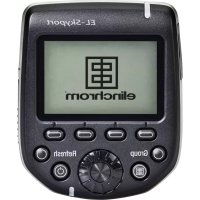
ELSkyport Transmitter Pro - Remote trigger Elinchrom - Free user manual and instructions
Find the device manual for free ELSkyport Transmitter Pro Elinchrom in PDF.


| Product type | Remote flash trigger |
| Brand | Elinchrom |
| Model | ELSkyport Transmitter Pro (EL-Skyport Plus HS) |
| Camera compatibility | Canon, Nikon, Sony, Olympus (depending on version) |
| Flash compatibility | All Elinchrom flashes with built-in or external EL-Skyport receiver |
| Indoor range | Up to 60 m |
| Outdoor range | Up to 200 m |
| Frequency channels | 40 channels (20 in Normal mode, 20 in Fast mode) |
| Groups | 4 groups + All |
| Synchronization modes | Standard, HS (up to 1/8000 s), Second curtain, ODS |
| Power supply | 2 AA batteries (alkaline or NiMH) |
| Battery life | Approximately 35 hours and over 15,000 triggers (1000 mAh batteries) |
| Dimensions (L x W x H) | 69 x 84 x 59 mm |
| Weight | Approximately 170 g (with batteries), 120 g (without batteries) |
| Display | Backlit graphic display (green in normal mode, red in fast mode) |
| Main functions | Remote power control, modeling lamp, AF assist light, lock, firmware update via USB |
| USB port | Mini USB for firmware update |
| Sync port | 2.5 mm jack (max voltage 3 V DC) |
| Mounting | Shoe with bayonet lock |
| Operating temperature | Not specified, use in controlled environment |
| Maintenance and cleaning | Use a soft dry cloth. Avoid solvents. |
| Safety | Complies with Industry Canada CNR and FCC standards. Class 3R lasers. |
| Spare parts and repairability | Standard AA batteries, downloadable firmware. No specific spare parts mentioned. |
| General information | Manufactured by Elinchrom, Switzerland. Instructions available in multiple languages. |
Frequently Asked Questions - ELSkyport Transmitter Pro Elinchrom
User questions about ELSkyport Transmitter Pro Elinchrom
0 question about this device. Answer the ones you know or ask your own.
Ask a new question about this device
Download the instructions for your Remote trigger in PDF format for free! Find your manual ELSkyport Transmitter Pro - Elinchrom and take your electronic device back in hand. On this page are published all the documents necessary for the use of your device. ELSkyport Transmitter Pro by Elinchrom.
USER MANUAL ELSkyport Transmitter Pro Elinchrom
is a registered trademark of ELINCHROM LTD, RENENS, SWITZERLAND
USER MANUAL
GEBRAUCHSANLEITUNG
MANUEL D'UTILISATION
MANUAL DE FUNCIONAMIENTO
MANUALE D'USO
GEBRUIKSAANWIJZING
PYKOBODCTBO NO 3KCIJYATAUM
eu-za-ma-nu-ər
用户手册
EL-Skyport Transmitter Plus HS
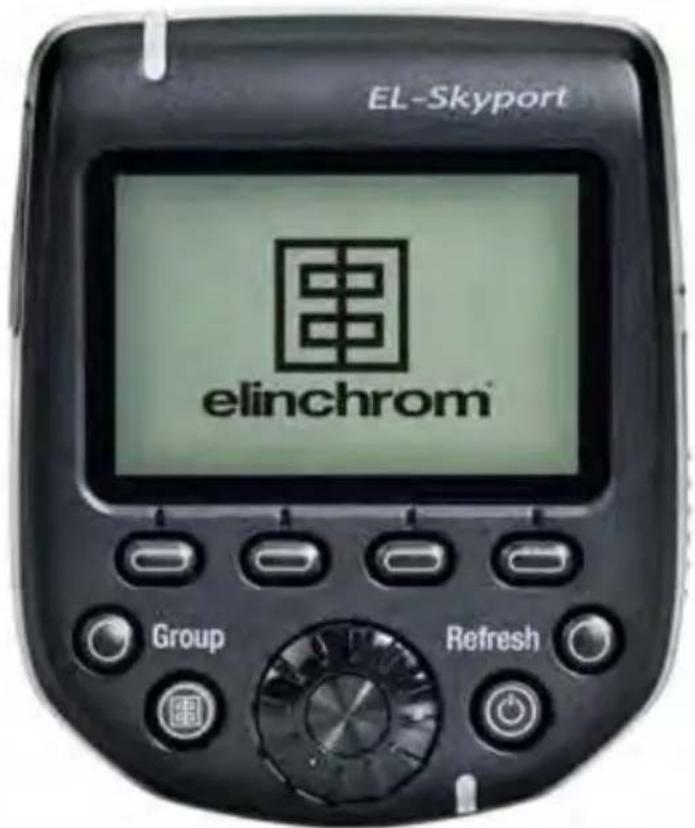
TABLE OF CONTENTS
DECLARATION OF CONFORMITY 5
VERSIONS 6
FEATURES 6
INSTALLING THE BATTERIES 7
BATTERIES 7
COMPATIBILITY 8
TRIGGERING 8
REMOTE CONTROL 8
FREQUENCY CHANNELS 8
TECHNICAL DATA 9
HOT-SHOE ADAPTER 10
MOUNTING ON THE CAMERA 10
DISPLAY 11
BUTTONS 12
SETUP MENU 14
MANUFACTURING RESET 16
TROUBLESHOOTING 16
FIRMWARE UPDATE 18
INTRODUCTION
Dear Photographer,
Thank you for choosing ELINCHROM.
All Elinchrom products are manufactured using the most advanced technology. Carefully selected components are used to ensure the highest quality and the equipment is subjected to many tests both during and after manufacture. We trust that it will give you many years of reliable service.
Please read this User Manual carefully before you use your new Elinchrom product. You will find information for your safety and how to benefit from all the programmable features.
This Manual may show images of products with accessories which are not part of sets or single units. Elinchrom set and single unit configurations may change without advice and may differ in other countries.
For further details, upgrades, news and the latest information about the Elinchrom system, please regularly visit the Elinchrom website. The latest user guides and technical specifications can be downloaded from the "Support" area.
Technical data, features and functions of Elinchrom flash units and accessories may change without notice. The listed specification can differ due to tolerances in components or measuring instruments. Technical data is subject to change. No guarantee for misprints.
Please check for the most recent manual at our website: www.elinchrom.com/support
Thanks,
Your Elinchrom-Team
EN
The Product is classified as a Class 3R laser product, according to the following standards IEC/EN 60825-1 "Radiation Safety of Laser Products".
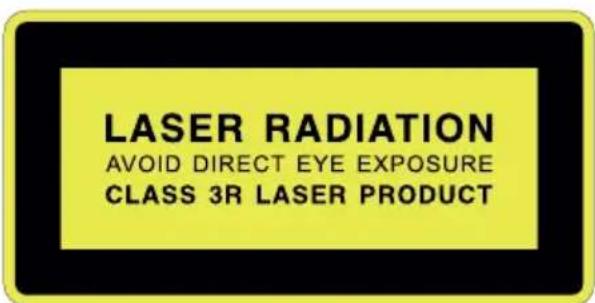
Class 3R: A Class 3R Laser is considered safe if handled carefully, with restricted beam viewing. With a class 3R laser, the MPE can be exceeded, but with a low risk of injury. Visible continuous lasers in Class 3R are limited to 5mW . For other wavelengths and for pulsed lasers, other limits apply.
DECLARATION OF CONFORMITY USA AND CANADA
EN This device complies with Part 15 of the FCC Rules and with Industry Canada licence-exempt RSS standard(s). Operation is subject to the following two conditions: (1) this device may not cause harmful interference, and (2) this device must accept any interference received, including interference that may cause undesired operation. This product complies with the Canadian ICES-003 Class B specifications.
Radiation Exposure Statement
EN This equipment complies with portable RF exposure limit in Canada and the USA set forth an uncontrolled environment and is safe for intended operation as described in this manual. Further RF exposure reduction can be achieved if the product can be kept as far as possible from the user body.
FCC Class B Compliance note
This equipment has been tested and found to comply with the limits for a Class B digital device, pursuant to Part 15 of the FCC Rules. These limits are designed to provide reasonable protection against harmful interference in a residential installation. This equipment generates, uses and can radiate radio frequency energy and, if not installed and used in accordance with the instructions, may cause harmful interference to radio communications. However, there is no guarantee that interference will not occur in a particular installation. If this equipment does cause harmful interference to radio or television reception, which can be determined by turning the equipment off and on, the user is encouraged to try to correct the interference by one or more of the following measures:
- Reorient or relocate the receiving antenna.
- Increase the separation between the equipment and receiver.
- Connect the equipment into an outlet on a circuit different from that to which the receiver is connected.
- Consult the dealer or an experienced radio/television technician for help.
Any changes or modifications not expressly approved by the party responsible for compliance could void the user's authority to operate this equipment. This device is limited to operation on permissible Part 15 frequencies, and it does not have the ability to be configured by end users or professional installers to operate outside the authorized bands.
EL SKYPORT TRANSMITTER PLUS HS
VERSIONS
The ELSP Transmitter Plus HS is available for the following cameras
- Canon
- Nikon®
- Sony
- Olympus®
FEATURES
Large graphic control display.
- Backlight in green or red (green for Normal Sync Mode, red for Speed Sync Mode).
- Fast access buttons and rotating wheel for easy control.
- Secure Hot-Shoe connection with bayonet locking system.
- Standard 2 AA Batteries (Accepts rechargeable batteries).
- 2.5mm phone jack trigger output, for direct synchronisation with a flash unit.
- Firmware update with integrated Mini-USB socket.
40 Remote channels.
- 20 frequency channels in Normal Sync mode.
- 20 frequency channels in Speed Sync mode. (For all latest Elinchrom flash units with 20 frequency channels.)
4 Groups and ALL.
- EL-Skyport Sync Modes.
- Normal Sync Mode (maximum distance range).
-
Speed Sync Mode (faster shutter speed, when HS is activated, but reduced distance range).
-
Sync Modes:
-
Standard (using the middle contact of the Hot-Shoe).
- HS (Sync up to 1/8000s, automatic controlled).
- Second curtain mode*).
-
ODS (manual Over-Drive-Sync) fine tune the time delay when HS mode is active, from 0.1 to 5.0 ms.
-
Auto MOD *** to control the modelling light of the Elinchrom flash units for focusing.
-
Shutter Mode** (half pressed shutter release controls the modelling lamps).
-
DOF Mode (The camera "DOF" button controls the modelling lamp).
-
AF Light integrated.****
-
REMOTE Control with automatic feedback from Elinchrom flash units.
-
EL - flash units can be controlled "All" together, in "Groups" or "single" units.
- Flash power up & down.
-
Modelling lamp on/off or power up & down. (For all latest Elinchrom flash units with 20 frequency channels.)
-
Sleep mode and Auto OFF mode programmable.
Manufacturing RESET. -
These features are not supported by Nikon® but can be activated in the camera menu.
** Not supported by Nikon®
*** Not supported by Sony® and Olympus®
*** Not supported by some Sony® and Olympus® cameras
INSTALLING THE BATTERIES
Press the battery compartment cover and slide it in the direction of the arrow to open the battery cover (See Picture 1).
Insert the batteries. Make sure the "+" and -" battery contacts are correctly oriented (See Picture 2). (Note: Please use 2 pieces of AA alkaline batteries or AA type NIMH batteries).
Press cover against Transmitter and slide it back into the locked position.
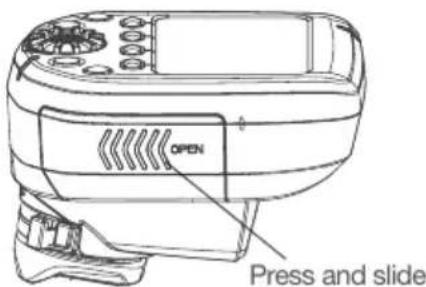
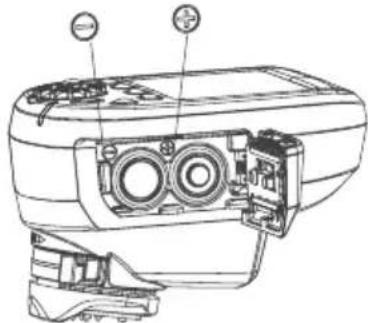
Picture 1 Picture 2
BATTERIES
- 2x AA batteries are used for the Transmitter.
- Installing the batteries improperly will not damage the Transmitter.
Non-rechargeable (dry cell) AA batteries like zinc-carbon, Alkaline types or rechargeable batteries in the AA size such as nickel-cadmium (NiCd) or nickel-metal hydride (NiMH) can be used. - Do not mix battery types.
- Do not use Lithium AA batteries in this transmitter.
EN
COMPATIBILITY
There are three different Elinchrom EL-Skyport flash unit Generations in the market:
1ST GENERATION
- EL-Skyport Transceiver RX module (Style RX, Digital RX, Ranger RX).
2ND GENERATION
- Built-in EL-Skyport module Mk1 (BRX, D-Lite RX, Quadra, Quadra Hybrid).
3RD GENERATION
Built-in EL-Skyport module Mk2 (ELC and ELB). This generation offers extended distance range
TRIGGERING
Triggering works with all existing Elinchrom flash units with built-in or plug-in EL-Skyport Transceivers.
REMOTE CONTROL
WHEN ALL OR GROUP 1 - 4 IS SELECTED
- All Elinchrom flash units with EL-Skyport are supported when changing "PWR±, MOD± or MOD on/off". When modelling lamp power settings are changed with the MOD on/off or MOD+/- button, the Elinchrom flash in use will switch to free modelling mode. To return to proportional modelling lamp mode, settings must be made on the EL flash unit.
Some units do not support all modelling features, "--" is then displayed (i.e. for Ranger, Quadra, ELB400).
WHEN A SINGLE UNIT IS SELECTED
The selected unit is highlighted with a frame in the display and can be controlled individually.
Only Elinchrom flash units with built-in EL-Skyport receivers of the 2nd and 3rd generation are supported.
Note:
1st Generation units are detected, but will show "--" in the display. There is no feedback of the unit settings to the EL-Syport Transmitter Plus HS, but they will be triggered normally.
FREQUENCY CHANNELS
Some older Elinchrom flash units with EL-Skyport built-in will support Frequency channels 1 to 4 or 1 to 8 (such as BRX, D-Lite RX, Quadra).
The latest Elinchrom flash units with EL-Skyport built-in will support up to 20 different Frequency channels 1 to 20 (ELC, ELB).
TECHNICAL DATA
| PARAMETER SPECIFICATION | |
| VERSIONS | Canon®,Nikon®, Sony®, Olympus®. |
| TRIGGERING COMPATIBILITY | ALL Elinchrom flash units with built-in EL-Skyport Receiver or Transceiver and the EL-Skyport RX Transceiver modules, plus EL-Skyport Universal. |
| REMOTE CONTROL COMPATIBILITY | ALL Elinchrom flash units with built-in EL-Skyport Transceiver: ELC Pro HD, ELB 400, Ranger Quadra RX, Quadra Hybrid, D-Lite RX series, BRX Series, Master RX Series and FRX series (NOTE: EL-Units used with the plug-in Transceiver RX module have limited remote features). |
| DISTANCE RANGE | Indoor >60m. Outdoor >200m. Note: The full distance range is available with the latest Elinchrom flash units such as ELC or ELB. Other, or older Elinchrom flash units will have a limited distance range. |
| BATTERIES | 2x AA batteries (standard or rechargeable). |
| BATTERY LIFETIME | Depends on the type of batteries and the usage. For two standard batteries with 1000mAh each it is approx. 35 hours working time and more than 15000 trigger releases. |
| REMOTE CONTROL | Max. 10 units can be detected displayed and remote controlled. |
| FREQUENCY CHANNELS | 20 channels in Normal mode and 20 channels in Speed mode. |
| EL-SKYPORT MODES (ELSP) | Normal / Speed - Sync mode. |
| TRIGGER/CONTROL GROUPS | "All" or in "Groups" (Group 1 to 4). |
| SYNC MODES | Standard, HS (with or without ODS), Second Curtain. |
| USB SOCKET | For firmware updating. |
| SR SOCKET | Trigger Output 2.5mm Phone Jack mono (max. sync-voltage 3VDC). |
| DIMENSIONS (W x L x H) | 69 x 84 x 59 mm (2.7x 3.3x 2.3 in.) |
| WEIGHT | Approx. 170g (6 oz),including 2x AA-batteries. 120g (4.2 oz) without batteries. |
EN

HOT-SHOE ADAPTER
FEATURES
The hot-shoe adapter offers special connection pins for the communication with the attached camera.
There are four different Elinchrom Transmitter variants available
- Canon for Canon EOS type A cameras with ETTL II / ETTL features
- Nikon for Nikon cameras with iTTL features
- Sony
Olympus
The communication with the camera is required to benefit from the extra features like:
SYNC Mode
o HS and ODS Mode
o Second Curtain
- Auto MOD
- AF Light
Note: Not all cameras support all features!
LIST OF TESTED CAMERAS
The latest summary of camera models and supported features can be found on the Elinchrom website at: http://www.elinchrom.com/support.php
MOUNTING ON THE CAMERA
An easy locking bayonet mechanism is used to lock the Transmitter securely into the Camera's hotshoe.
ATTACHING
- Turn off the camera and the EL-Skyport transmitter.
- Align the EL-Skyport transmitter hotshoe with the camera's hotshoe mount.
- Slide it all the way into the camera's hotshoe mount.
- Move the tab on the locking ring to the right until it clicks in place. (See picture 3)
DETACHING
- Unlock: press the lock-release button and move the tab all the way to the left. (see picture 4)
- Slide the EL-Skyport transmitter off the camera's hotshoe mount.
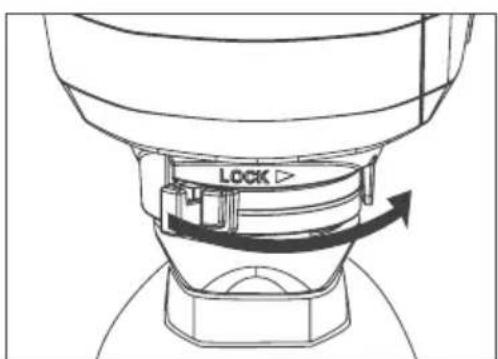
Picture 3
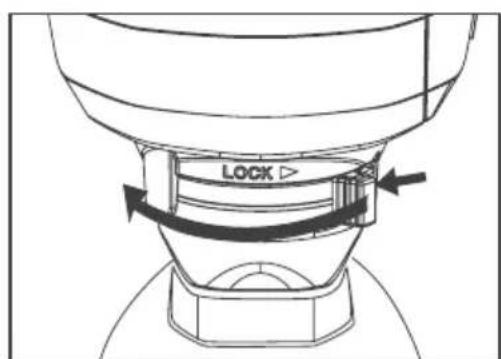
Picture 4
DISPLAY
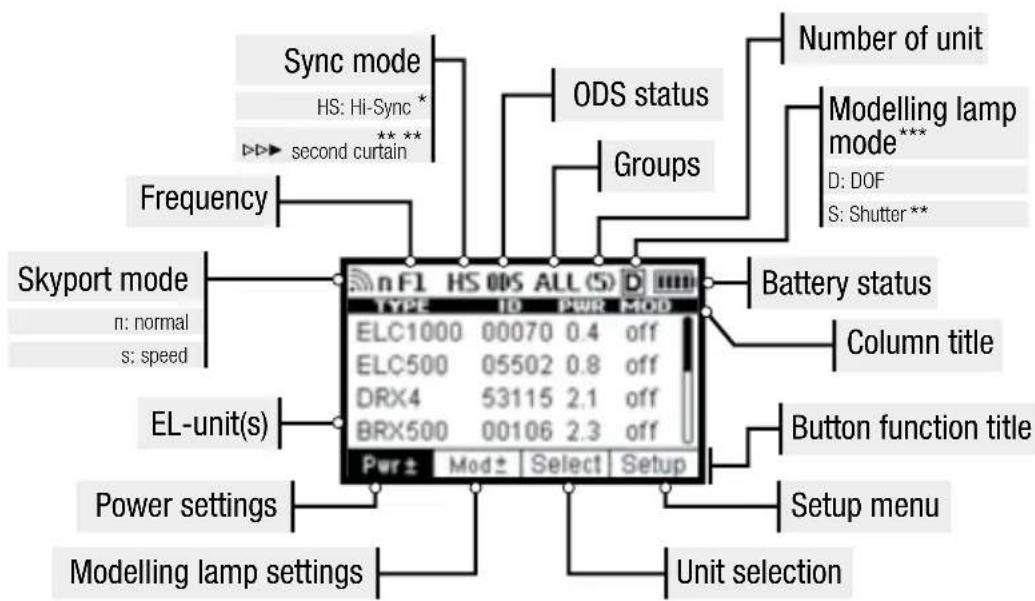
The graphic display shows the status and settings of the Elinchrom unit.
The display illumination can be switched on or off.
In Normal Sync mode, the illumination is green. In Speed Sync mode, the illumination is red.
The contrast of the display can be adjusted in the setup menu.
The top bar of the display shows the status of the Elinchrom Transmitter.
The bottom bar in the display shows the functions of the 4 speed buttons.
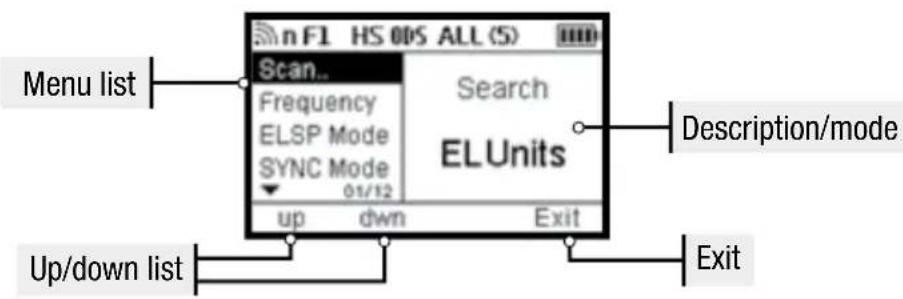
The middle area shows a list of the Elinchrom flash units detected, It also shows setup items for the Setup menu when selected.
DISPLAY PANEL - DASHBOARD
DISPLAY PANEL - SETUP MENU
- These features are not supported by Nikon® but can be activated in the camera menu.
** Not supported by Nikon®
*** Not supported by Sony®, Olympus ®
EN
BUTTONS

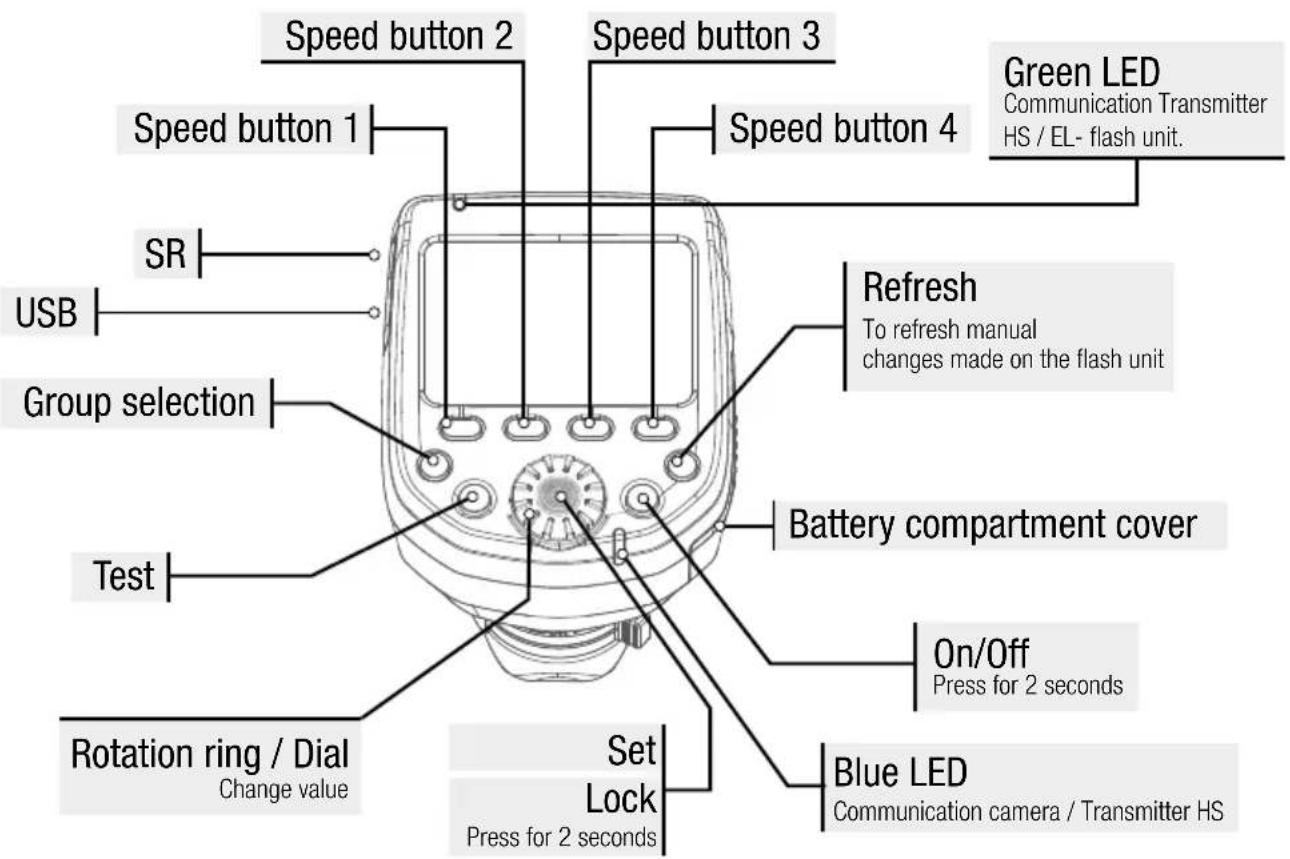
SPEED BUTTONS 1-4
The Speed Buttons enable quick setting of the functions indicated below. Functions in Bold type indicate the function of these buttons when SETUP mode is selected.
SPEED BUTTON 1 (LEFT)
Pwr ± change the flash power in 1/10 f-stop up/down with the dial.
up scroll up in the setup menu when SETUP is selected.
SPEED BUTTON 2 (MIDDLE LEFT)
Press this button once or twice to toggle between the modelling lamp features. Mod switch the modelling lamp on/off with the dial. Mod ± change the modelling lamp power in 1/10 f-stop up/down with the dial. down scroll down in the setup menu when SETUP is selected.
SPEED BUTTON 3 (MIDDLE RIGHT)
Select toggle between the displayed (found) Elinchrom flash units. Flash and modelling lamp settings can be individually adjusted on the selected flash unit, when highlighted with a frame.
After approx. 5 seconds the frame will disappear and adjustments in the settings will affect all units in all Groups, when Group "ALL" is selected. If Group 1 - 4 is selected only the flash units in that Group will be modified.
SPEED BUTTON 4 (RIGHT)
Setup by pressing this button the functions of the speed buttons will change and the SETUP menu is selected. In the SETUP menu features can be adjusted and activated.
Exit Exit the Setup menu and switch back to standard display mode.
ON/OFF
Press and hold for min. 2 seconds to switch the EL-SkyportTransmitter Plus HS On/Off.
GROUP BUTTON
Press to toggle between 1 through 4 groups and "ALL."
TEST BUTTON (WITH EL LOGO)
Pressing the TEST button will fire all flashes when "ALL" is selected or any single group, 1 through 4 is selected. Please remember to deactivate photocells for accurate EL-Skyport triggering of your flash units.
REFRESH BUTTON
Press the Refresh button any time power setting has been done on a separate EL flash unit to update the power setting display of the Skypport HS.
If a Group is selected, only the information for that selected Group will refresh.
When "ALL" is selected, information for all groups will be refreshed.
A flash that was not scanned and found when the Skyport HS was switched ON cannot be added with the Refresh feature.
If a flash is added, select SETUP and SCAN in the setup menu or switch the transmitter OFF and ON again. The refresh can take up to 4 seconds, depending on how many flash units are found and operated by the transmitter.
Note:
To update the display information after flash power changes have been applied directly at the flash unit, please press the REFRESH button. Changes are not automatically updated, to avoid interferences with the flash triggering.
ROTATION RING
Turn the rotation ring to select various functions and change power levels of the EL flashes.
SET / CONFIRMATION BUTTON (ROTATION RING)
Press to confirm a modification made in the Setup menu.
Press to switch on the display illumination.
Press to return to normal operation when Skyport HS has switched to Standby mode.
Press 2s to lock all functions and settings. Press again to unlock.
The locking feature blocks the function of the dial and other buttons to prevent mis-setting while carrying the Skyport HS.
SETUP MENU
SCAN..
When the Skyport HS is switched ON, it will automatically search for Elinchrom flash units with built-in or plug-in EL-Skyport Transceiver modules.
The Scan feature is also available in the Setup Menu. A re-scan is required, when new flash units have been added to the lighting setup.
To find EL flash units,
- all EL flash units must be switched on,
- all flashes must have built-in or plug-in EL-Skyport Transceiver modules.
- the Transmitter Plus HS and the EL flash unit must be set for the same frequency channel settings.
FREQUENCY CHANNELS
Up to 20 EL-Skyport frequency channels can be selected.
Note:
- Only the latest Elinchrom flash units (ELC 500/1000 Pro HD, ELB 400 and future versions) will support up to 20 frequency channels.
All "RX" flash units will support up to 8 channels and some older Elinchrom flash units support up to 4 channels.
ELSP MODE
The Skypport HS has two operating modes that offer different shooting functionality.
Normal mode
Normal mode is compatible with the very first Elinchrom flash units incorporating EL-Skyport.
When selected, display illumination and status LED will light in green.
- Speed mode
The Speed mode enables faster shutter speeds of up to 1/1000s depending on the camera using normal flash synchronisation (i.e. for leaf shutter cameras and some mirrorless).
To use shutter speeds of up to 1/8000s the HS mode must be activated when used in both Normal and Speed mode. The display illumination and status LED are displayed in red when is in speed mode.
Note:
- The greatest working distance is available in Normal mode. Speed mode reduces working distance by 50% . Skyport transceivers in all remote flashes must have EL-Skyport mode capability to use Speed mode.
SYNC MODE
Select the synchronization mode:
- Standard mode
In Standard mode most cameras will work with shutter speeds up to 1/200s - 1/250s.
- HS Hi-Sync mode*
In HS mode the shutter speed can be up to 1/8000s depending on the camera and the flash unit. The HS mode requires flash units or flash heads with a long flash duration for best results. Heads or flash units equipped with the A flash tubes (Action) are not recommended.
Second Curtain mode (^*)^(***)
The Second Curtain mode gives the ability to fire the flash just before the shutter closes, for moving effects.
- With Nikon cameras, these features are activated within the camera menu.
ODS SETUP
The Over-Drive-Sync (ODS) can improve the overall exposure, when the HS Sync mode is active.
ODS relies on flash units with long flash durations, so results will depend on the flash duration of the lights used (which also changes at different power levels), as well as the camera used. Full frame cameras with large sensors and slow shutters are unfortunately the hardest to get good results with, but lights with long enough flash durations can still achieve clean frames all the way to 1/8000th. In addition using ODS, they can gain up to 2 f-stops more light, essential when sun light must be overpowered.
The ODS Setup offers adjustment from 0.1 to 5.0ms or can be switched off.
The ODS value will vary depending on the camera and the flash unit which is used and must be adjusted manually
Note:
Over-Drive-Sync (ODS) can only be used when the SYNC mode is set to HS.
- When ODS is adjusted, the position of the flash cutoff (dark edge at top or bottom of picture) can be moved within the frame. When switched OFF, the flash trigger point will be selected automatically when in HS mode.
AUTO MOD***
- Off
The modelling light of the Elinchrom flash units does not change.
- Shutter**
Pressing the camera's shutter button for focusing will cause the modelling lamp of the EL flash unit will switch on for a few seconds as an aid to focusing in low light. (Not supported by Nikon)
DOF
The Elinchrom flash units will switch on their modelling lamp for as long as the DOF (Depth of field) button on the camera is held.
AF LIGHT***
Activates the Auto-Focus assist light of the Skyport HS when the shutter release is half pressed for focusing (check also camera settings).
KEYCLICK
When activated, pressing any control button will be indicated by a beep tone.
SLEEP
When not uise for a time, the Skyport HS will switch to Sleep Mode to save battery power.
Delay Sleep mode from 1 to 60 minutes or turn OFF.
AUTO OFF
The Skyport HS will automatically turn OFF when left unattended for a time.
Delay Auto Off start from 1 to 60 minutes or turn OFF.
When Sleep mode and Auto Off are both active, the Transmitter Plus HS will switch the power OFF at the user set Sleep Mode delay.
CONTRAST
The display contrast can be adjusted from 80 to 120%
BACKLIGHT
The display illumination of the device can be switched on/off
- With Nikon ® cameras, these features are activated within the camera menu.
** Not supported by Nikon 假
*** Not supported by Sony ^ 念 and Olympus.
**** Not supported by some Sony® and Olympus® cameras.
MANUFACTURING RESET
Pressing and holding in the Left and Right Speed buttons while switching the Skyport HS ON (approximately 2 seconds) will reset the Skyport HS to manufacture settings. All user settings, except the display contrast, will be reset.
FIRMAWARE UPDATE
To update the Firmware of the Transmitter Plus HS, the Elinchrom Transmitter HS Updater is required. Available from the Elinchrom website.
TROUBLESHOOTING
Pressing and holding in the Left and Right Speed buttons while switching the Skyport HS ON (approximately 2 seconds) will reset the Skyport HS to manufacture settings. All user settings, except the display contrast, will be reset.
| HAVING THIS PROBLEM? PLEASE CHECK THE FOLLOWING POINTS: | |
| THE UNIT IS NOT SWITCHING ON | ·Check battery polarity and replace both discharged batteries. |
| FLASH UNIT CANNOT BE TRIGGERED WHEN THE MODE “ALL” IS SELECTED | ·Transmitter and receiver must have the same frequency channel settings. ·ELSP MODE: transmitter and receiver must have the same synchronisation mode settings: normal or speed sync mode. ·Check that the EL-Skyport receiver in all EL-units with built-in receivers, is switched on. ·Check that the transmitter version corresponds to your Canon or Nikon camera. |
| SOME UNITS ARE NOT TRIGGERING WHEN THE GROUP MODE IS SELECTED | ·Check the group settings of the EL- flash unit. ·Reduce the distance to any unresponsive unit. ·Transmitter and receiver must have the same synchronisation mode settings: normal or speed sync mode, and frequency channel settings. |
| THE TEST BUTTON WORKS, BUT THE CAMERA WILL NOT TRIGGER FLASH UNITS | ·Check the hotshoe fitting. ·Check the camera settings (tum hotshoe communication on). ·Check that the transmitter version corresponds to your Canon or Nikon camera. ·Check the list of compatible cameras. |
| SOME INFORMATION IS NOT DISPLAYED ABOUT DIGITAL RX, RANGER RX OR STYLE RX UNITS | ·Units equipped with a plug-in Transceiver RX are limited in remote features. These units can however be triggered and controlled (but with no visual feedback) by the EL-Skyport Transmitter Plus HS. |
| LIMITED DISTANCE RANGE: | • Reposition the units. • Increase the distance from walls and ceilings. • ELSP Mode: In speed sync mode the distance range is reduced by approximately 50 %, switch back to normal sync mode. • Outdoors, the distance range could be reduced due to humidity, interference, obstacles etc. |
| INTERFERENCE WITH OTHER 2.4 GHZ NETWORKS, UNRELIABLE TRIGGERING: | • Try another frequency channel for both transmitter and the receiver of the EL-unit. • Reduce the distance between the flash unit and transmitter. |
| HS MODE; SYNC UP TO 1/8000S: | • Elinchrom Action (previously A) heads are not optimised for the HS mode. To benefit from better performance please use flash units with Pro flashtubes (Standard or S previously) or ideally use with dedicated HS heads. • ODS fine tuning helps to optimise HS performance. • If there is visible banding please reduce the shutter speed on your camera, or set ODS and adjust to minimise or avoid banding. • HS functionality only works with Canon or Nikon cameras and the appropriate transmitter. |
| SCANNING EL-UNITS: NO EL-UNIT FOUND, OR SOME UNITS ARE MISSING. | • Switch on all enabled EL-units, than switch on the EL-Skyport Transmitter Plus HS on or go to setup and rescan. • Frequency, group and ELSP mode settings must match with the transmitter. • Ensure that all EL-Skyport Transmitter Plus HS enabled units are operating on the latest firmware. |
EN
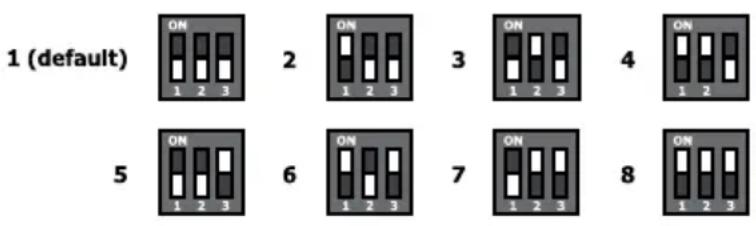
FREQUENCY CHANNEL FOR EL-SKYPORT SPEED RECEIVERS
This is not relevant to this product, but it may help with frequency set-up on legacy EL-Skyport units.
DOWNLOAD THE EL-SKYPORT TRANSMITTER PLUS HS USERGUIDE
Obtain the complete user guide using this link: http://bc.gs/elspths
DOWNLOAD CONFORMITY
Find your declaration for EC and USA & Canada conformity here: http://bc.gs/ec
FIRMAWARE UPDATE BY USB PORT
Please download our latest firmware and follow the instructions: http://bc.gs/fw



INHALT
CLASS 3R LASER PRODUCT
DECLARATION OF CONFORMITY USA AND CANADA
EN This device complies with Part 15 of the FCC Rules and with Industry Canada licence-exempt RSS standard(s). Operation is subject to the following two conditions: (1) this device may not cause harmful interference, and (2) this device must accept any interference received, including interference that may cause undesired operation. This product complies with the Canadian ICES-003 Class B specifications.
Radiation Exposure Statement
EN This equipment complies with portable RF exposure limit in Canada and the USA set forth an uncontrolled environment and is safe for intended operation as described in this manual. Further RF exposure reduction can be achieved if the product can be kept as far as possible from the user body.
FCC Class B Compliance note
This equipment has been tested and found to comply with the limits for a Class B digital device, pursuant to Part 15 of the FCC Rules. These limits are designed to provide reasonable protection against harmful interference in a residential installation. This equipment generates, uses and can radiate radio frequency energy and, if not installed and used in accordance with the instructions, may cause harmful interference to radio communications. However, there is no guarantee that interference will not occur in a particular installation. If this equipment does cause harmful interference to radio or television reception, which can be determined by turning the equipment off and on, the user is encouraged to try to correct the interference by one or more of the following measures:
- Reorient or relocate the receiving antenna.
- Increase the separation between the equipment and receiver.
- Connect the equipment into an outlet on a circuit different from that to which the receiver is connected.
- Consult the dealer or an experienced radio/television technician for help.
Any changes or modifications not expressly approved by the party responsible for compliance could void the user's authority to operate this equipment. This device is limited to operation on permissible Part 15 frequencies, and it does not have the ability to be configured by end users or professional installers to operate outside the authorized bands.
EL SKYPORT TRANSMITTER PLUS HS
VERSIONEN
ROTATING RING / DIAL
DECLARATION OF CONFORMITY USA AND CANADA
EN This device complies with Part 15 of the FCC Rules and with Industry Canada licence-exempt RSS standard(s). Operation is subject to the following two conditions: (1) this device may not cause harmful interference, and (2) this device must accept any interference received, including interference that may cause undesired operation. This product complies with the Canadian ICES-003 Class B specifications.
Radiation Exposure Statement
EN This equipment complies with portable RF exposure limit in Canada and the USA set forth an uncontrolled environment and is safe for intended operation as described in this manual. Further RF exposure reduction can be achieved if the product can be kept as far as possible from the user body.
FCC Class B Compliance note
This equipment has been tested and found to comply with the limits for a Class B digital device, pursuant to Part 15 of the FCC Rules. These limits are designed to provide reasonable protection against harmful interference in a residential installation. This equipment generates, uses and can radiate radio frequency energy and, if not installed and used in accordance with the instructions, may cause harmful interference to radio communications. However, there is no guarantee that interference will not occur in a particular installation. If this equipment does cause harmful interference to radio or television reception, which can be determined by turning the equipment off and on, the user is encouraged to try to correct the interference by one or more of the following measures:
- Reorient or relocate the receiving antenna.
- Increase the separation between the equipment and receiver.
- Connect the equipment into an outlet on a circuit different from that to which the receiver is connected.
- Consult the dealer or an experienced radio/television technician for help.
Any changes or modifications not expressly approved by the party responsible for compliance could void the user's authority to operate this equipment. This device is limited to operation on permissible Part 15 frequencies, and it does not have the ability to be configured by end users or professional installers to operate outside the authorized bands.
TRANSMETTEUR EL SKYPORT PLUS HS
VERSIONS
INSTALLATIONS DES PILES
TEST BUTTON (AVEC LOGO EL)
ROTATING RING / DIAL
INFORMATIONS DE CONFORMITE
DECLARATION OF CONFORMITY USA AND CANADA
EN This device complies with Part 15 of the FCC Rules and with Industry Canada licence-exempt RSS standard(s). Operation is subject to the following two conditions: (1) this device may not cause harmful interference, and (2) this device must accept any interference received, including interference that may cause undesired operation. This product complies with the Canadian ICES-003 Class B specifications.
Radiation Exposure Statement
EN This equipment complies with portable RF exposure limit in Canada and the USA set forth an uncontrolled environment and is safe for intended operation as described in this manual. Further RF exposure reduction can be achieved if the product can be kept as far as possible from the user body.
FCC Class B Compliance note
This equipment has been tested and found to comply with the limits for a Class B digital device, pursuant to Part 15 of the FCC Rules. These limits are designed to provide reasonable protection against harmful interference in a residential installation. This equipment generates, uses and can radiate radio frequency energy and, if not installed and used in accordance with the instructions, may cause harmful interference to radio communications. However, there is no guarantee that interference will not occur in a particular installation. If this equipment does cause harmful interference to radio or television reception, which can be determined by turning the equipment off and on, the user is encouraged to try to correct the interference by one or more of the following measures:
- Reorient or relocate the receiving antenna.
- Increase the separation between the equipment and receiver.
- Connect the equipment into an outlet on a circuit different from that to which the receiver is connected.
- Consult the dealer or an experienced radio/television technician for help.
Any changes or modifications not expressly approved by the party responsible for compliance could void the user's authority to operate this equipment. This device is limited to operation on permissible Part 15 frequencies, and it does not have the ability to be configured by end users or professional installers to operate outside the authorized bands.
TRASMETITORE EL SKYPORT PLUS HS
VERSIONI
ROTATING RING / DIAL
Up to 20 EL-Skyport frequency channels can be selected.
Nota:
DECLARATION OF CONFORMITY USA AND CANADA
EN This device complies with Part 15 of the FCC Rules and with Industry Canada licence-exempt RSS standard(s). Operation is subject to the following two conditions: (1) this device may not cause harmful interference, and (2) this device must accept any interference received, including interference that may cause undesired operation. This product complies with the Canadian ICES-003 Class B specifications.
Radiation Exposure Statement
EN This equipment complies with portable RF exposure limit in Canada and the USA set forth an uncontrolled environment and is safe for intended operation as described in this manual. Further RF exposure reduction can be achieved if the product can be kept as far as possible from the user body.
FCC Class B Compliance note
This equipment has been tested and found to comply with the limits for a Class B digital device, pursuant to Part 15 of the FCC Rules. These limits are designed to provide reasonable protection against harmful interference in a residential installation. This equipment generates, uses and can radiate radio frequency energy and, if not installed and used in accordance with the instructions, may cause harmful interference to radio communications. However, there is no guarantee that interference will not occur in a particular installation. If this equipment does cause harmful interference to radio or television reception, which can be determined by turning the equipment off and on, the user is encouraged to try to correct the interference by one or more of the following measures:
- Reorient or relocate the receiving antenna.
- Increase the separation between the equipment and receiver.
- Connect the equipment into an outlet on a circuit different from that to which the receiver is connected.
- Consult the dealer or an experienced radio/television technician for help.
Any changes or modifications not expressly approved by the party responsible for compliance could void the user's authority to operate this equipment. This device is limited to operation on permissible Part 15 frequencies, and it does not have the ability to be configured by end users or professional installers to operate outside the authorized bands.
EL SKYPORT TRANSMITTER PLUS HS
VERSIONES
ROTATING RING / DIAL
Second Curtain mode*
DECLARATION OF CONFORMITY USA AND CANADA
EN This device complies with Part 15 of the FCC Rules and with Industry Canada licence-exempt RSS standard(s). Operation is subject to the following two conditions: (1) this device may not cause harmful interference, and (2) this device must accept any interference received, including interference that may cause undesired operation. This product complies with the Canadian ICES-003 Class B specifications.
Radiation Exposure Statement
EN This equipment complies with portable RF exposure limit in Canada and the USA set forth an uncontrolled environment and is safe for intended operation as described in this manual. Further RF exposure reduction can be achieved if the product can be kept as far as possible from the user body.
FCC Class B Compliance note
This equipment has been tested and found to comply with the limits for a Class B digital device, pursuant to Part 15 of the FCC Rules. These limits are designed to provide reasonable protection against harmful interference in a residential installation. This equipment generates, uses and can radiate radio frequency energy and, if not installed and used in accordance with the instructions, may cause harmful interference to radio communications. However, there is no guarantee that interference will not occur in a particular installation. If this equipment does cause harmful interference to radio or television reception, which can be determined by turning the equipment off and on, the user is encouraged to try to correct the interference by one or more of the following measures:
- Reorient or relocate the receiving antenna.
- Increase the separation between the equipment and receiver.
- Connect the equipment into an outlet on a circuit different from that to which the receiver is connected.
- Consult the dealer or an experienced radio/television technician for help.
Any changes or modifications not expressly approved by the party responsible for compliance could void the user's authority to operate this equipment. This device is limited to operation on permissible Part 15 frequencies, and it does not have the ability to be configured by end users or professional installers to operate outside the authorized bands.
EL SKYPORT TRANSMITTER PLUS HS
VERSIES
ROTATING RING / DIAL
- all EL flash units must be switched on,
- all flashes must have built-in or plug-in EL-Skyport Transceiver modules.
- the Transmitter Plus HS and the EL flash unit must be set for the same frequency channel settings.
FREQUENCY CHANNELS
CLASS 3R LASER PRODUCT
Klacc 3R:Ja3ep Klaacca 3R cHTaetc8be3oIacbIM npi co6IIOJeHm Mep npedocTopoXHOCTN npn orpaHueHn BpeMeHHa6JIIOeHn 3a LyOH. npi npimeHeHH Ja3epa Klaacca 3R BO3MOxHo npBbIeHne MPE (MaKcImaJIbHo DOyCTUMORO BO3dEINCTBn), HO C Hn3KoJ TpaBMOOnacHOCTbIO. MoIHOCTb BuIMIMOr HnpepbIBHO ra3epa Klaacca 3R orpaHueHa 5 MBt. IJra Ia3epOB c dpyroJ DInHOH BOJHbI IN JIyMnylbChbIX Ja3epOB npImeHryOTc dpyrNe OPAHueHn.
DECLARATION OF CONFORMITY USA AND CANADA
EN This device complies with Part 15 of the FCC Rules and with Industry Canada licence-exempt RSS standard(s). Operation is subject to the following two conditions: (1) this device may not cause harmful interference, and (2) this device must accept any interference received, including interference that may cause undesired operation. This product complies with the Canadian ICES-003 Class B specifications.
Radiation Exposure Statement
EN This equipment complies with portable RF exposure limit in Canada and the USA set forth an uncontrolled environment and is safe for intended operation as described in this manual. Further RF exposure reduction can be achieved if the product can be kept as far as possible from the user body.
FCC Class B Compliance note
This equipment has been tested and found to comply with the limits for a Class B digital device, pursuant to Part 15 of the FCC Rules. These limits are designed to provide reasonable protection against harmful interference in a residential installation. This equipment generates, uses and can radiate radio frequency energy and, if not installed and used in accordance with the instructions, may cause harmful interference to radio communications. However, there is no guarantee that interference will not occur in a particular installation. If this equipment does cause harmful interference to radio or television reception, which can be determined by turning the equipment off and on, the user is encouraged to try to correct the interference by one or more of the following measures:
- Reorient or relocate the receiving antenna.
- Increase the separation between the equipment and receiver.
- Connect the equipment into an outlet on a circuit different from that to which the receiver is connected.
- Consult the dealer or an experienced radio/television technician for help.
Any changes or modifications not expressly approved by the party responsible for compliance could void the user's authority to operate this equipment. This device is limited to operation on permissible Part 15 frequencies, and it does not have the ability to be configured by end users or professional installers to operate outside the authorized bands.
ПЕДАТЧИК EL SKYPORT PLUS HS
BEPCN
Ipeedatuk ELSP Transmitter Plus HS Bbinyckaetcnd foToKaMeP cJeDyUxn npOn3BOnTeJei
- Canon
- Nikon®
- Sony
- Olympus ®.
XAPAKTEPNUCTUKN
- Bolbwoi rpaΦnueckn dinCnnei nIy npaBHeHna.
- POnDCBeTka DnCnner 3eJeHoro nIIN KpaCHoro CbEta (3eJIeHa NpDCBeTKa B HopMaJIbHOM peKIMe CnHXPOHn3aUIN, KpaCHa NpDCBeTKa B peKIMe CKOpocTHoN CnHXPOHn3aUIN).
- Khonkn 6bictporo doctyna n Bpaasaioeecra konecnko dny ydo6horo ynpablenia.
- HaedxHoe coeDInHeHne Tuna,ropaun 6aMaK" c CnCTEmoF om Kcaun.
- 2 cTaHapTHbIX 3JIeMeHTa NITaHnI TUNa AA (dOnyckaETcra nCNoJIb3OBAHne aKKyMyJrTopHbIX 6aTapeek).
pa3bem 2,5 MM dIy npabJIeHn 3aTbOpom. - 06HOBJIeHHe BCTpoEHHoro IOp npn noMoUpa3bema mini USB.
40 kaHaoB dIy dNCTaHIOHHO ynpabJeHn
20 yactoTHbIX kaHApOB* B HopMaJIbHOM pexKIme cINHXPOHn3aUIN.
20 acToTHbIX KaHaIOB* B peXIMe CKOpOCTHOINHxPOHn3aUN.
- Pexkmbi ynpabHeHn OTeJeNbHbIM rpynnamn (4 rpynnbl) n pexkM "BCE".
-
Pexkmbi cHxpoHn3aun nocpeDCTBOM EL-Skyport.
-
HopmaJIbHbI peKIM cINHXPOHN3aUN (MaKcIMaJIbHaJaJIbHOCTb DeiCTBnJ).
-
CkopocTHoH peKIM cHxPOHN3aUN (yBEniHeHne ckopoCTn 3aTBopa, OcO6eHHo npn aKTNaCmpeKIMa HS, Ho npn cHxKeHn DaJIbHOCTn DeIcTbN).
-
Pexnmbi cHxpoHn3aun***
-
CtaHapThbI (ncnoJIb3yeTc cpeHn KOHTaKT ,ropeyero 6aMaKa")
- HS *** (ckopoctb cnHxpoHn3aUm do 1/8000 cekyHdbI, aBtOMaTneCKoe ynpabJIeHne).
- ODS (pyuHaH hAcToPka Over-Drive-Sync) ToH aHaCTpOka CnHXPOH3aUIN BpeKIme HS dJa MaKcMmaJIbHOm MOUHOCTn I paBHomePHOJ 3KcNo3uIN.
-
Pekim CnHxpoH3aUm NO BToPoI uToPke***.
-
BcTpoeHna IOncBcTeKa aBTOΦokyca***
-
Auto MOD *** Ддя упавеленя плотьим CBETOM BCпшек Elinchrom дя phokycupobkn.
-
Pekim 3aTbopa**** (nolyhaxka TKHONKa cnYcKa 3aTbopa ynpabIeT lamno nHOTHO CBeTa).
-
PexkIM DOF (KhONka "DOF" (npoCmOTpa rIy6Hbpe3KocTn) fOToKaMepbI ynpaBnEeT Iamnoi nIIOTHORO CBeta).
-
INCTAHLIOHHOE ynpabJIeHne** c aBtOMaTnuecko o6paTHoN CBy3bO O T BCnblwek Elinchrom.
-
UnpaBHeHne BCnblIkwamEL Bo3MoXHo B pexImax "Bce", "FpyPna BCnblIwek" uIn "OtdeIbHaBCnblIwka".
- YBeJIuHeHHe N yMeHbWeHHe MOLJIHOCTN BCJIbIJKM.
BkHIOueHne/ BbIKIOueHne JAMNBI NINOTHO CBE Ta NIN N3MeHHe NHTeHCNBHOCTN CBEa.
Bo3MOxHocTb nporpaMMnpoBaHn cnaeero peKmua n aBTOMaTHueCKOrO BbIKJIOUeHn.
- CBPOC do cTaHapThbIX HAcTpoek.
*IgBex nocJeHnx MoJEn BcNbIeK Elinchrom c 20 yactOTbIMn KaHaJaMn u COBMeCTmBIX C6oJIee paHHIMMoJEnaMn.
**Для BCex BCnbIeK Elinchrom co BCtpoeHHbIM npneMHNKOM n TpaHCnBepom EL-Skyport.
** DOnoJIHnTeIbHbIe cyHKuIN foToKamep Canon n Nikon c ,ropaHm 6aUmaKOM" TTL (OrpaHnueHne dJa Nikon cm. Hxke).
*** DaaHbIe FyHKUIN He NoDJIepKUBaIOrCra Nikon, HO MOryt 6blb aKTUBIpOBAHbI B MeHIO ynpabJeHnI OTOKaMepbl.
**** He nopeknaotc Nikon.
YCTAHOBKA 3JIEMEHTOB NITAHNIA
YTo6bI OTKpbITb OTCEK 3JIeMeHToB NITaHnA, HaxKMITE Ha KpbIuKy OTceKa N CdBINHbTe ee B yKa3aHHOM CTpeKnO HanpaBHeHN (Pnc. 1).
YctaHOBtE 3JIeMeHbI NITAHN.I PObepbTe npabunbHOCTb yCTaHOBKn 3JIeMeHToB NITAHN C yUeTOM NOJrPHoCTn: ^一 + ^一 n _m = m (Pnc.2).
TEXHnueCKXAPAKTEPNUCTUKN
| ПAPAMETР XAPAKTEPRICTKA | |
| ВЕРСИ | Canon®, Nikon®, Sony®, Olympus®. |
| COBMECTIMOCTь ДЛЯ СINHXPOHIN3AUПИ | BCE BCNsIIshKs Elinchrom co BCTroeHNbIMПриемнICOM Или ТраимсИвером EL-Skyport и ТраимсИвером EL-Skyport RX пIJOC EL- Skyport Universal. |
| COBMECTIMOCTь ДЛЯ ДИСТAHLCIOHNO уПAPABЛECHИ | Bce BCNsIIshKs Elinchrom co BCTroeHNbIMТраимсИвером EL- Skyport: ELC Pro HD, ELB 400, Ranger Quadra RX, Quadra Hybrid, серия D-Lite RX, серия BRX, серия Master RX и серия FRX (ПРIMEЧАHIE: BCNsIIshKs EL, IncNoJIb3UeMbIe c поКлIOчeMbIM ТраимсИвером RX обладают орaramпeнblIMи ФункцяМи ДИСТAHLCIOHNOуПapавlenя). |
| ДАЛБНОCTь ДЕЙСТВИ | Вnomeшени>60metpoB. Вichte nomeшени>200metpoB. Прime�ани: МakcIMальnaя дальноctь DeelCTBRIДоCTуПиС c полeДHMIM Моделяm BCNsIIshek Elinchrom, наразимeR, ELC Или ELB. Поче Или boJee paHnne Моделяm BCNsIIshek Elinchrom обладают ОрaramпeннОДальноctью DeelCTBRI. |
| ЗЛЕМЕТы ПИТAHИ | 2x AAэLEмента рintаня (ODHOPa3OBORиSCNoJIb3OBAHANЯ Или c ВОЗMOЖHOCSTью ПОДЗAPЯДКи). |
| СРOK ЗСПЛУATALДИ ЗЛЕМЕТOB ПИТAHИ | ВзависIMСоТи OT TINаэLEмENTOB рintаня ИInteHCSNBOCTN ИсNoJIb3OBAHIM. Ддя ДыХ STAnDAPTHbIXэLEмENTOB рintаня по 1 000 Mau priблелTIELBO 35 чacob рабочero ВсpeMuи Ибilee 15 000 cIpyckOB 3ATBopa. |
| ДИСТAHLCIOHNO уПAPABЛECHИ | ДанhoeоборUDOBANHE может расnoZHAHT, отобразИ. И obecseчNTь дИСТAHLCIOHNOуПapавlenie МakсIMуM 10 устрийСТВам. |
| ЧАCTOTHbie KAHAJBI | 20 kaHajOB в НормальHom ржIMe сInxhoHIN3auzi n 20 kaHajOB В ржIMe skopocSTHOc SInxhoHIN3auzi n. |
| PEXKIMBI EL-SKYPORT (ELSP) | РexIM HOPMaJIbHO/ skopocSTHOc SInxhoHIN3auzi n. |
| ГРУПБI ДЛЯ СINHXPOHIN3AUПИ 3ATBOPA/ уПAPABЛECHИ | «В cose» Или «Групma» (ГрупьI ot 1 до 4). |
| PEXKIMBI CINHXPOHIN3AUПИ | Стандарту thi, HS (с Или Бe3 ODS), по Втори StTopke. |
| PA3bEM USB | Ддя obHOBLeHЯ BCTroeHNHOrO ПО. |
| PA3bEM SR | Разьмдя ураловеня затворom 2.5 MM mono (мakc. напrajженье синхрони3auzi n 3 B поТ.Toka). |
| ГАБAPITbI (Lx xД xВ) | 69x84x59MM (2.7x3.3x2.3 duIMa) |
| ВEC | Прибл. 170r (6Unni), ВКLIчayа 2xAAбатAPEйки, 120r (4,2 Unni)бe3батapeек. |
COEINHEHNE „TROPYN BAIIMAK“
ФУHKLIMN
IpepaTnK Elinchrom Skypor Plus HS moKeT nCnoB3OBAtbcra, KaK OCHOBHO CnHxpoHn3aTOp (nyckaTeJIb) c peylnpOBKO MOuHocTN dJa IIO6o foTOkamepbic CoeINHeHem Tnna ,rOpAyn 6aumak". OnncanHbIe HIXe fynKcun Tpebyot hAnuYnKaMEpbI Canon nn Nikon, cobMeCTmOc cnCTeMoSkypor. DnA obecneueHnHaJnxKaUero fynKcUnOHnpOBAHn, B nepedaTnke Skypor HS npeducMOrpeHbI cneuaJIbHbIe coeHNHTeJIbHbIe WtbpN, oBeceuBaIOUme CBra3b C nCNoB3yeMoN foToKamepoR.
IocTynHbI DBe Bercn npepaTuKa Elinchrom:
- Canon Дд Зеркальньх Камсн Canon EOS TINA A, COBmecTIMbIX C peXHUMOM aBTOBcNbIuKUETTLII/ETTL.
- Nikon對於3epkaJIbHbIX φοToaannapaTOB Nikon DSLR, coBmecTmblx c peXMMOM ynpaBHeNBAcblkoi iTTL.
CneuHaBHe TepMaHaBb CBA3N B KpeIeHn FOToKaMebp Tnna ,rOpAaMak" No3BOJHO tncNoB3OBaTb CJeDyUOune yHKcnn Elinchrom Skyport HS:
- Pekim CnHxpoHn3aUm
- Pekumbl HS n ODS
CnHxpoHn3aunnoBtOpOwTTopKe - ABTomatNueckn peXkIM NINJIOTHORO CBeta
-ПодCBETka abToΦOKyca
PnmuemueHHe:YHKnIIOeepKNaIOTcHe IaBCEx FOToKaMeP.
IPEUEHb FOToKAMEP, IPOWEJINX NcblAHnA
AkyaJIbHbI nepeueHb MoJeIe foToKamep I noDJIepXnBaEMbIX yHKcI npeICTabIeH ha caIte Elinchrom: http://www.elinchrom.com/support.php
YCTAHOBKA HA FOTOKAMEPY
ROTATING RING / DIAL
Iobopot pyuKn perylnpOBKn no3BOJareT bbl6paTb pa3JIuHbIe cyHKcN IN N3MeHHTb ypoBeHb MOUHOCTN BCbIiuek EL.
SET / CONFIRMATION BUTTON (DIAL CENTRE BUTTON)
HaKaTne KHOJKN IoNTBepKJaet N3MeHeHne, BHeceHHoe B MeHIO HAcTpOJKn. HaKaTne KHOJKN BKJIuOaET NODCBETKy DnCnIeJ.
Ecn Skyport HS haxoHTcB peXIMe OxuaHn, HaxaTne KHOKN Bo3Bpaaet erO B HopMaJIbHbI peXIM pa60Tbl.
HaxmTe u ydepXnBaIe B TeueHne 2 cekynd dIy6boknpOBKn BCEx fynKcun n HacTpoek. IJn CHrTna 6boknpOBKn NOBTOHO HaxmTe KhoNky.
Moxho BbIbpaTb Do 20 yactOTbIX KaHaNoB EL-Skyport.
Приимechanical:
ToIbKO nocJeHnne MoeBn BCnbIwek Elinchrom (ELC 500/1000 Pro HD, ELB 400 n6oJee no3HNHe moEJI) noDnepKnBaHT do 20 acToTHbIX KaHaIOB.
- BCE BCnbluKc cepnn "RX" noDnepxNBAOT do 8 kaHaNoB, a HeKOToPbIe 6OJIee paHHne MoJeIN BcNbluek Elinchrom noDnepxNBAOT do 4 kaHaNoB.
ELSP MODE
PpeDycmOTpeHbI Dba peXIMa pa6oTbI Skyport HS, KOtOpbIe npEJIraIaOT pa3JIuHbIe peXIMbI cBemKn
HopmaJIbHbI peKIM
HopMaJIbHbI pexKIM pa6oTbI COBMeCTUM C nepBbIMN MoeJIaMn BCnbIweK Elinchrom, OchauSeHHbIX EL-Skyport. Ipr pa6ote B HopMaJIbHOM pexKIME NOcCBETKa DnCpJIeR N CBeToNDcoCTOHNr Iopr 3eJIeHbIM CBETOM.
- CkopocTHoI peXIM
NCNOJb3OBAtB BCnblUKNIN DOnONHHTeJIbHbIe BCnblIKC dINTeJIbHOB BCnblIKoN.
He pekomeHnyeTcNcNoJIb3OBAbB BCnblIKN INI dONoJIHHTeJIbHbIE BCnblIKN C NmNpyJIbCHbIMN lamnamr Tuna A (Action).
CnHxpoHn3aunnoBtOpOuTOpKe\*
Pexm cnHxpoHn3aunn no BToPo nToPKe nO3BOJareT 3aNyCTuTB BCnblkU HeNOCpeDCTBeHHo nepe3aKpbITHeM 3aTBopa Irae 3ΦΦeKta DnBxKeHna.
- B φοτOKaMepax Nikon Θι ΦυHKζιν aKTINBnpyIOT B MeHIO φοΤOKaMepbl.
ODS SETUP
Pexm Over-Drive-Sync (ODS) cnocoben ynyuHTb o6yUo 3Kcno3nHIO, npiaKTNBHom pexime HS Sync.
ODS pa3pa60taH dIra BCnblweK c DInTeBHO BcNbIKo, NO3TOMy pe3yIbTaTbI 6dyT 3aBNCeTB OT DInTeBHOCTN BCnblk INCNOJb3yEmbIX NaMn (KOTOPa TaXKe IN3MeHReTCB 3aBNCIMOCtN OT yPOBHA MOUHOCTN), a TAKKe OT MOnEIN FOToKAMepbl. K CoXaJIeHNIO, CLOXHee BCero DOCTNUX XopoUHX pe3yIbTAtoB pRi NcNoJIb3OBAHm KAmep C NOJIHOKaIPOBbIM CeHCOPOM I YBeJIuYeHHo BbIDepxKoH, HO NaMnbl C DoCTaTOUHO JInTeBHOCTbIO BCnblk MOrY To ObecneHTb YeTKoCTb KaJaPa Pn BPemEH BbIDepxKn Do 1/8000 cekHybl. DOnONHteJIbHo, pRi NcNoJIb3OBAHm ODS OH nCMOrYT nOLyHTb Do 2 f-stops 6OJIbWe CBeta, UTO IMeET BaxHoe 3HaueHne pRi Heo6XoIMOCtN nOJaBLeHn COJNeHORO CBeta.
Hactpoika ODS BkIIOUaET B c68 n3MeHeHne ot 0.1 do 5.0 Mc nJIn oTKJIIOUeHne.
3HaueHne ODS BapbnpyetcB 3aBnCmOCTN OT nCnoJIb3yeMoJ FOToKamepbl N BCnblIKN I Tpe6yET HAcTpoKn B pyHOM peKIme.
Приимechanical:
KoHTpaCTHOCTb DnCnIeM OMOH YoYCTaHOBnTb OT 80 do 120%.
BACKLIGHT
IopcbETky dncnner MOxHO BKNIOHTb/OTKIOHTb.
- B φοτokamepax Nikon Θι Φυκύμην ακτήνυργίουν B MeHIo φοΤOKaMepbl.
** He noДержиВается Nikon.
C6P0C 10 3ABOДСКИX HACTPOEK
Haxkatae u ydepKuBaHne IeBoi n npaBoi KnaBn 6bictpOdoctyna (Speed) (npu6JIn3nteNbHO TeueHne 2 cekynd) npu BkIIOUeHHom Skyport HS npuBoiT K c6pocy nepedaTunka Skyport HS do 3aBOdcknx HactpoeK. Bce HactpoIKn noJIb3OBaTeJI, 3a NCKIIOUeHHeM KOHTpactHocTn DnCnJIe, 6ydyT c6poWeHbl.
OBHOBJEHEBCTPPOEHHORIO
ONICAHNE HENCINPABHOCTN BO3MOXHbIE Pn4NHbI
YCTPOICTBO HE BKJIIOYAETCA
3AΓPY3KA CEPTNΦHKATOB COOTBETCTBNA
Декларачи O COOTBETCTBи CTaHapTAM EC, CLLIa N KaHaNbI DoCTyNHBi Ha: http://bc.gs/ec
OBHOBJEHNBE BCTPOEHHOrO NO YEPE3 NOPT USB
3aIpy3nTe aKtyaIbHyIO BepCIO BCTpoEHHOro IOn Ha http://bc.gs/fw n cIeMyTe NHCTpykLmR.


目次
CLASS 3R LASER PRODUCT
DECLARATION OF CONFORMITY USA AND CANADA
EN This device complies with Part 15 of the FCC Rules and with Industry Canada licence-exempt RSS standard(s). Operation is subject to the following two conditions: (1) this device may not cause harmful interference, and (2) this device must accept any interference received, including interference that may cause undesired operation. This product complies with the Canadian ICES-003 Class B specifications.
Radiation Exposure Statement
EN This equipment complies with portable RF exposure limit in Canada and the USA set forth an uncontrolled environment and is safe for intended operation as described in this manual. Further RF exposure reduction can be achieved if the product can be kept as far as possible from the user body.
FCC Class B Compliance note
This equipment has been tested and found to comply with the limits for a Class B digital device, pursuant to Part 15 of the FCC Rules. These limits are designed to provide reasonable protection against harmful interference in a residential installation. This equipment generates, uses and can radiate radio frequency energy and, if not installed and used in accordance with the instructions, may cause harmful interference to radio communications. However, there is no guarantee that interference will not occur in a particular installation. If this equipment does cause harmful interference to radio or television reception, which can be determined by turning the equipment off and on, the user is encouraged to try to correct the interference by one or more of the following measures:
- Reorient or relocate the receiving antenna.
- Increase the separation between the equipment and receiver.
- Connect the equipment into an outlet on a circuit different from that to which the receiver is connected.
- Consult the dealer or an experienced radio/television technician for help.
Any changes or modifications not expressly approved by the party responsible for compliance could void the user's authority to operate this equipment. This device is limited to operation on permissible Part 15 frequencies, and it does not have the ability to be configured by end users or professional installers to operate outside the authorized bands.
EL SKYPORT TRANSMITTER PLUS HS
ハーニン
down 5eTtAePtoeHtJtEeTtAePmEe-ue-tF
