SPBT4110PK - Speaker NEDIS - Free user manual and instructions
Find the device manual for free SPBT4110PK NEDIS in PDF.


User questions about SPBT4110PK NEDIS
0 question about this device. Answer the ones you know or ask your own.
Ask a new question about this device
Download the instructions for your Speaker in PDF format for free! Find your manual SPBT4110PK - NEDIS and take your electronic device back in hand. On this page are published all the documents necessary for the use of your device. SPBT4110PK by NEDIS.
USER MANUAL SPBT4110PK NEDIS
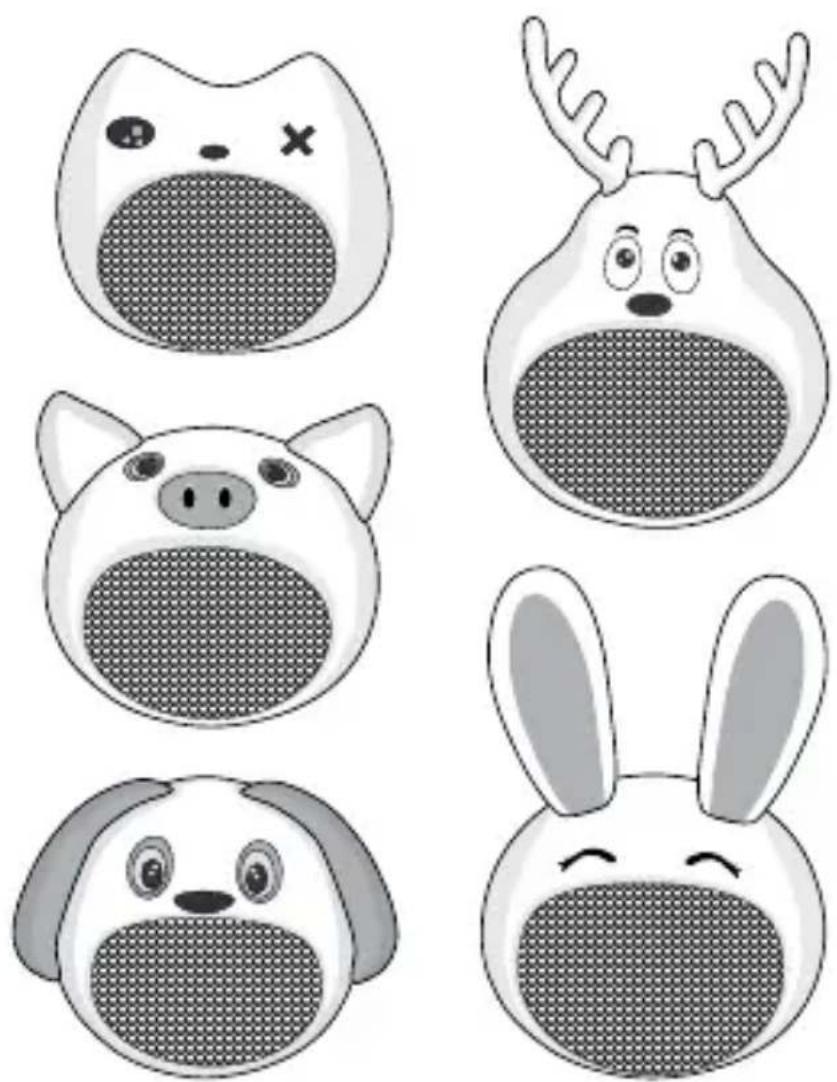
with a unique and fun design
SPBT4110BK | SPBT4110BN
SPBT4110NC | SPBT4110PK
SPBT4110Y W
EN Quick start guide 4
DE Kurzanleitung 8
ned.is/spbt4110bk nec/spt4110bn


ned.is/spbt4110ncnedE/spt2410pk


ned.is/spbt4110yw
A
Bluetooth® Speaker
SPBT4110BK | SPBT4110NC
SPBT4110YW | SPBT4110BN
SPBT4110PK

For more information see the extended manual online:
ned.is/spbt4110bk |ned.is/spbt4110nc
ned.is/spbt4110yw |ned.is/spbt4110bn
ned.is/spbt4110pk
Intended use
The Nedis SPBT4110BK | SPBT4110NC | SPBT4110YW | SPBT4110BN | SPBT4110PK is a Bluetooth speaker that plays audio from your media device.
The product is exclusively intended for playing music from a Bluetooth device and for answering and making hands-free phone calls.
This product is not a toy, it is intended as a speaker.
The product is not intended for professional use.
Any modification of the product may have consequences for safety, warranty and proper functioning.
Specifications
| Product Bluetooth | * Speaker |
| Article number SPBT4110BK | SPBT4110NC|SPBT4110YW | SPBT4110BN |SPBT4110PK | |
| Power input 5 VDC; 0.5 A | |
| Bluetooth® version 5.0 | |
| Bluetooth® frequency range 2402 - 2480 MHz | |
| Bluetooth® signal range Up to 10 m | |
| Frequency response 100 Hz - 20 KHz | |
| Max. radio transmit power 3.89 dBm (SPBT4110BK: 3.47 dBm) | |
| Max. antenna gain -0.58 dBi | |
| Peak power 9 W | |
| Power (RMS) 3 W | |
| Impedance 4 Ω | |
| Sensitivity 81 dB | |
| Driver size 40 mm | |
| Battery type Lithium-ion (602040) | |
| Charging time Up to 1.5 hours | |
| Battery capacity 400 mAh | |
| Play time Up to 3 hours | |
| Built-in microphone Yes | |
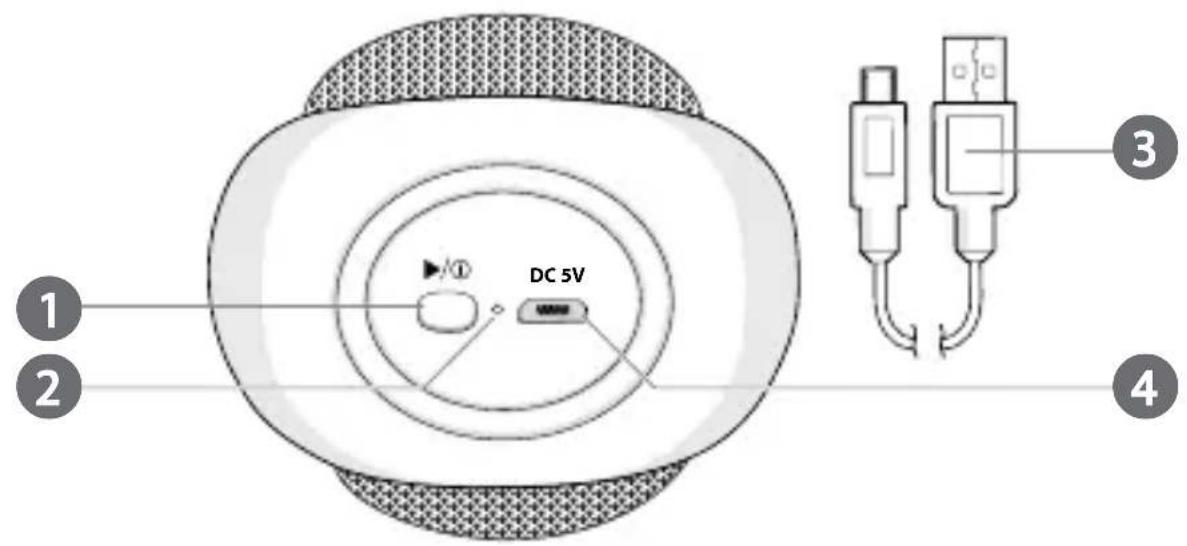
Main parts (image A)

Power button

Status indicator LED

Micro USB cable

Micro USB port
Safety instructions

RNING
- Ensure you have fully read and understood the instructions in this document before you install or use the product. Keep this document for future reference.
- Only use the product as described in this document.
- Do not use the product if a part is damaged or defective. Replace a damaged or defective product immediately.
- This product can be used by children aged from 6 years and above and persons with reduced physical, sensory or mental capabilities or lack of experience and knowledge if they have been given supervision or instruction concerning use of the product in a safe way and understand the hazards involved. Children shall not play with the product. Cleaning and user maintenance shall not be done by children without supervision.
- Not to be used by very young children (0-3 years).
- Usage by children should be supervised at all times.
- Do not drop the product and avoid bumping.
-
This product may only be serviced by a qualified technician for maintenance to reduce the risk of electric shock.
-
Disconnect the product from the power source and other equipment if problems occur.
- Do not expose the product to water or moisture.
- Do not use the product where splashing of water might occur e.g. bathrooms, swimming pools or close to a washbowls.
- This product is equipped with a non-removable internal battery. Do not attempt to replace the battery yourself.
- Provide enough ventilation during charging.
- Do not expose the product to direct sunlight, naked flames or heat.
- Do not open the product.
- Do not use the product at locations where the use of wireless devices is prohibited due to potential interference with other electronic devices, which may cause safety hazards.
- Listening on high volume for a long time will damage your hearing.
Charging the product
-
Plug the micro USB cable A ③ into the micro USB port A ④.
-
Plug the other end of A (3) into a USB adapter.
-
The status indicator LED A (2) lights up red.

turns off when the product is fully charged.
Pair with Bluetooth
- Press and hold the power button A ① for 2 seconds to switch on the product.
- A (2) blinks and the product emits a tone to indicate pairing mode is active.
- Enable Bluetooth on the device you want to pair the speakers with.
- Select "SPBT4110" from the list of available Bluetooth devices on your device.
True Wireless Stereo (TWS)
TWS only works with two speakers of the same type.
- Disable Bluetooth on the device you want to pair the speakers with.
- Switch on both speakers.
- Double press A (1) on one of the speakers.
- After a few seconds A 2 blinks and the product emits a tone to indicate pairing mode is active.
-
A (2) of the other speaker lights up.
-
Enable Bluetooth on the device you want to pair the speakers with.
- Select "SPBT4110" from the list of available Bluetooth devices on your device.
- Double press A (1) of one of the speakers, to switch off the TWS function.
Controlling the music
- Press A (1) to play or pause the music.
Making phone calls
To answer an incoming call, press A ①.
To end a call, press A ①.
Declaration of Conformity
We, Nedis B.V. declare as manufacturer that the product SPBT4110BK | SPBT4110NC | SPBT4110YW | SPBT4110BN | SPBT4110PK from our brand Nedis, produced in China, has been tested according to all relevant CE standards and regulations and that all tests have been passed successfully. This includes, but is not limited to the RED 2014/53/EU regulation.
The complete Declaration of Conformity (and the safety datasheet if applicable) can be found and downloaded via:
webshop.nedis.com/spbt4110bk#support
webshop.nedis.com/spbt4110nc#support
webshop.nedis.com/spbt4110yw#support
webshop.nedis.com/spbt4110bn#support
webshop.nedis.com/spbt4110pk#support
For additional information regarding the compliance, contact the customer service:
Web: www.nedis.com
E-mail: service@nedis.com
Phone: +31 (0)73-5991055 (during office hours)
Nedis B.V., de Tweeling 28
5215 MC's-Hertogenbosch, the Netherlands
ned.is/spbt4110bn |ned.is/spbt4110pk
True Wireless Stereo (TWS)
True Wireless Stereo (TWS)
ned.is/spbt4110bk |ned.is/spbt4110nc
ned.is/spbt4110yw |ned.is/spbt4110bn
ned.is/spbt4110pk
Uso previsto
True Wireless Stereo (TWS)
webshop.nedis.it/spbt4110nc#support
webshop.nedis.com/spbt4110yw#support
webshop.nedis.it/spbt4110bn#support
webshop.nedis.com/spbt4110pk#support
ned.is/spbt4110bk |ned.is/spbt4110nc | ned.is/spbt4110yw |ned.is/spbt4110bn | ned.is/spbt4110pk