
FSBS110AT - Loudspeaker NEDIS - Free user manual and instructions
Find the device manual for free FSBS110AT NEDIS in PDF.


| Product type | Bluetooth speaker with alarm clock |
| Brand | Nedis |
| Model | FSBS110AT |
| Dimensions (L x W x H) | 181 x 48 x 96 mm |
| Weight | 422 g |
| Bluetooth version | 5.0 + EDR |
| Transmission range | 10 m |
| Audio power RMS | 5 W |
| Peak audio power | 15 W |
| Sensitivity | 85 dB |
| Frequency response | 100 Hz - 16 kHz |
| Battery type | Lithium-ion (18650) |
| Battery capacity | 1200 mAh |
| Charging time | Approximately 3 hours |
| Battery life | Up to 4 hours |
| Charge input power | 5 V / 1 A (via micro USB) |
| Connectivity | Bluetooth 5.0, 3.5 mm audio input |
| Main functions | Audio playback, wake-up alarm, time setting |
| Maintenance and cleaning | Clean with a dry, soft cloth |
| Safety | Do not immerse, do not charge when wet, avoid shocks |
| Package contents | Speaker, micro USB cable |
| Material | ABS, fabric |
| Impedance | 4 Ω |
| Bluetooth frequency range | 2402 - 2480 MHz |
| Bluetooth pairing code | 0000 |
Frequently Asked Questions - FSBS110AT NEDIS
User questions about FSBS110AT NEDIS
0 question about this device. Answer the ones you know or ask your own.
Ask a new question about this device
Download the instructions for your Loudspeaker in PDF format for free! Find your manual FSBS110AT - NEDIS and take your electronic device back in hand. On this page are published all the documents necessary for the use of your device. FSBS110AT by NEDIS.
USER MANUAL FSBS110AT NEDIS
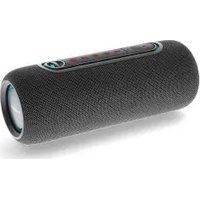
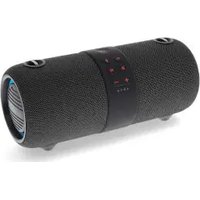
Wrapped in stylish woven fabric
FSBS110AT

natural_image
Line drawing of a rectangular electronic device with ports and buttons, no text or symbols present

ned.is/fsbs110at

EN Quick start guide 4
DE Kurzanleitung 7
FR Guide de démarrage rapide 11
NL Verkorte handleiding 15
IT Guida rapida all'avvio 19
ES Guía de inicio rápido 22
PT Guia de iniciação rápida 26
SV Snabbstartsguide 30
FI Pika-aloitusopas 33
NO Hurtigguide 37
DA Vejledning til hurtig start 40
HU Gyors beüzemelési útmutató 44
PL Przewodnik Szybki start 48
EL Οδηγός γρήγορης εκκίνησης 51
SK Rýchly návod 55
CS Rychlý návod 59
RO Ghid rapid de inițiere 63


natural_image
Two horizontal color swatches: one grayscale from black to white, the other solid-colored from yellow to blue (no text or symbols)




Quick start guide
Bluetooth® speaker FSBS110AT

For more information see the extended manual online: ned.is/fsbs110at
Intended use
This device is intended to use as an audio player and an alarm clock. Any modification of the product may have consequences for safety, warranty and proper functioning.
Parts list (Image A)
① - button
② + button
③ Speaker / time
④ Mode button
⑤ Power switch
⑥ Audio port (3.5mm)
⑦ Status indicator LED
⑧ Micro USB port
⑨ Micro USB cable
Safety instructions
WARNING
- Only use the product as described in this manual.
- Do not use the product if a part is damaged or defective. Replace a damaged or defective device immediately.
- Do not immerse the product in water.
- Do not charge when the product is wet.
- Do not drop the product and avoid bumping.
- This product may only be serviced by a qualified technician for maintenance to reduce the risk of electric shock.
- Disconnect the product from the electrical outlet and other equipment if problems occur.
- Do not expose the product to direct sunlight, naked flames or heat.
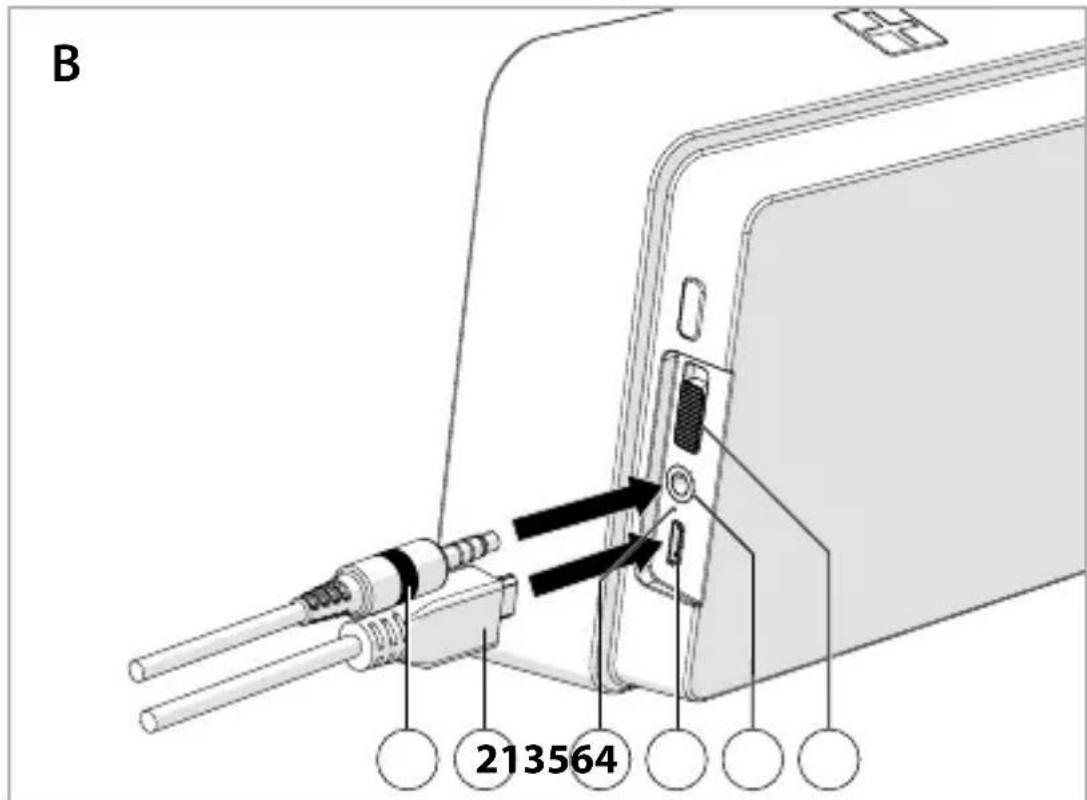
Power supply (Image B)
- Plug the micro USB cable B② into the micro USB port of the product B④.
- Plug the other end of the micro USB cable B② into a USB power adapter to charge the product.


Pair with Bluetooth
- Slide the power switch A⑤ to turn on the product.
- Press and hold the mode button A④ to enter pairing mode.
The status indicator LED A⑦ lights up and the product emits a tone to indicate pairing mode is active. - Activate Bluetooth on your audio source and connect with the product (FSBS110).
- If asked, enter the pairing code '0000'.
The product emits a tone to indicate successful pairing.
Connect with audio cable (Image B)
Audio cable is not included.
To pair the audio source to the product using an audio cable, follow these steps:
- Slide the power switch B⑥ to turn on the product.
- Plug the audio cable B① into the audio port B⑤ to connect the product to your media device.

Switch between modes
- Press and hold the mode button A ④ to switch between time mode and Bluetooth mode.
Control the audio
- Press the -button A ① to decrease the volume.
- Press the +button A ② to increase the volume.
- Press the mode button A ④ to pause or continue playing a track.
Set the time
This function is only available in time mode.
- Press and hold the +button A② for 2 seconds.
The hours start blinking to indicate they can be adjusted. - Use the +button A② and the -button A① to adjust.
- Press and hold the +button A② for 2 seconds.
The minutes start blinking to indicate they can be adjusted. - Use the +button A② and the -button A① to adjust.
- Press and hold the +button A② for 2 seconds.
The time is now set.

Set the alarm
This function is only available in time mode.
-
Press and hold the -button A① for 2 seconds.
The hours start blinking to indicate they can be adjusted. -
Use the +button A② and the -button A① to adjust.
-
Press and hold the -button A① for 2 seconds.
The minutes start blinking to indicate they can be adjusted.
-
Use the +button A② and the -button A① to adjust.
-
Press and hold the -button A① for 2 seconds.
The alarm is now set.
- Double press the -button A① to switch on/off the alarm.
Specifications
| Product Bluetooth® speaker | |
| Article number FSBS110AT | |
| Dimensions (l x w x h) 181 x 48 x 96 mm | |
| Weight 422 g | |
| Channels Mono | |
| RMS audio output 5 W | |
| Peak audio output 15 W | |
| Sensitivity 85 dB | |
| Bluetooth frequency range 2402 - 2480 MHz | |
| Bluetooth® version V5.0 + EDR | |
| Transmission distance 10 m | |
| Maximum transmission power 2 dBm | |
| Maximum antenna gain 1 dBi | |
| Battery type | Lithium-ion (18650) |
| Battery capacity | 1200 mAh |
| Charging input power 5 V / 1 A | |
| Charging time | ±3 hours |
| Playback / talk time | Up to 4 hours |
| Driver unit | ∅ 52 mm |
| Impedance | 4 Ω |
| Frequency response | 100 Hz - 16 KHz |
| Material | ABS, fabric |
Declaration of Conformity
We, Nedis B.V. declare as manufacturer that the product FSBS110AT from our brand Nedis ^® , produced in China, has been tested according to all relevant CE standards and regulations and that all tests have been passed successfully. This includes, but is not limited to the RED 2014/53/EU regulation.
The complete Declaration of Conformity (and the safety datasheet if applicable) can be found and downloaded via webshop.nedis.com/FSBS110AT#support
For additional information regarding the compliance, contact the customer service:
Web: www.nedis.com
E-mail: service@nedis.com
Phone: +31 (0)73-5991055 (during office hours)
Nedis B.V., de Tweeling 28
5215 MC 's-Hertogenbosch, the Netherlands

DE Kurzanleitung
Bluetooth® -Lautsprecher FSBS110AT

① Painike –
② Painike +
③ Kaiutin / aika
5215 MC 's-Hertogenbosch, the Netherlands

5215 MC 's-Hertogenbosch, the Netherlands

Rýchly návod
Reproduktor s funkciou Bluetooth®
FSBS110AT

natural_image
Color palette bar with grayscale shades and a central crosshair symbol (no text or labels)


natural_image
Color palette bar with grayscale shades and a central crosshair symbol (no text or labels)

Nedis BV
De Tweeling 28, 5215 MC 's-Hertogenbosch – The Netherlands 08/19

- Wrapped in stylish woven fabric
- Quick start guide
- Bluetooth® speaker FSBS110AT
- Intended use
- Parts list (Image A)
- Safety instructions
- WARNING
- Power supply (Image B)
- Pair with Bluetooth
- Connect with audio cable (Image B)
- Switch between modes
- Control the audio
- Set the time
- Set the alarm
- Declaration of Conformity
- DE Kurzanleitung
- Bluetooth® -Lautsprecher FSBS110AT
- Rýchly návod
- Reproduktor s funkciou Bluetooth®
- Nedis BV
Brand : NEDIS
Model : FSBS110AT
Category : Loudspeaker