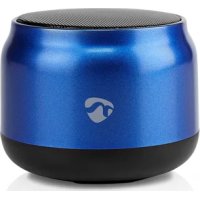
SPBT1005BU - Speaker NEDIS - Free user manual and instructions
Find the device manual for free SPBT1005BU NEDIS in PDF.



| Brand | Nedis |
| Model | SPBT1005BU |
| Product type | Bluetooth speaker |
| Intended use | Playing audio content from a multimedia device via Bluetooth |
| Color | Blue |
| Power | Built-in rechargeable battery, charging via USB-C (5 V/1-2 A) |
| Initial charging time | 3 hours minimum |
| Connectivity | Bluetooth |
| Built-in microphone | Yes, for hands-free calls |
| Controls | On/off, volume, play/pause, track skip, phone |
| LED indicator | Yes, pairing and charging status |
| Auto-off | After 10 minutes of inactivity |
| Charging port | USB-C |
| Included cable | USB-C to USB-A cable |
| Care and cleaning | Do not immerse in water, use a dry cloth |
| Safety | Do not expose to water, heat, or shocks |
| Spare parts | No user-serviceable parts |
| Operating temperature | Indoor only |
| Use | Domestic, non-professional |
Frequently Asked Questions - SPBT1005BU NEDIS
User questions about SPBT1005BU NEDIS
0 question about this device. Answer the ones you know or ask your own.
Ask a new question about this device
Download the instructions for your Speaker in PDF format for free! Find your manual SPBT1005BU - NEDIS and take your electronic device back in hand. On this page are published all the documents necessary for the use of your device. SPBT1005BU by NEDIS.
USER MANUAL SPBT1005BU NEDIS
natural_image
Simple line drawing of a cylindrical container with a flat lid (no text or symbols)

ned.is/spbt1005bu

EN Quick start guide 6
DE Kurzanleitung 9
FR Guide de démarrage rapide 14
NL Snelstartgids 18
IT Guida rapida all'avvio 22
ES Guía de inicio rápido 26
PT Guia de iniciação rápida 30
SV Snabbstartsguide 34
FI Pika-aloitusopas 38
NO Hurtigguide 42
DA Vejledning til hurtig start 46
HU Gyors beüzemelési útmutató 50
PL Przewodnik Szybki start 54
EL Οδηγός γρήγορης εκκίνησης 59
SK Rýchly návod 63
cs Rychlý návod 67
RO Ghid rapid de inițiere 71
Specifications
| Product Bluetooth® Speaker | |
| Article number SPBT1005BU | |
| Maximum battery play time (at 50% volume) | Up to 4 hours |
| Maximum Charging time Up to 3 hours | |
| Bluetooth® version V5.1 | |
| Bluetooth® frequency range 2402 - 2480 MHz | |
| Maximum transmission power 2 dBm | |
| Peak audio output 5 W | |
| RMS audio output 3 W | |
| Driver diameter 52 mm | |
| Impedance 4 Ohm | |
| True Wireless Stereo (TWS) Yes | |
| Connections USB-C | |
| Battery capacity 500 mAh | |
| Charging input power 5.0 VDC ; 0.5 A | |
A
Bluetooth® Speaker
SPBT1005BU

For more information see the extended manual online: ned.is/spbt1005bu
Intended use
This product is intended to stream audio from your media device via Bluetooth®.
The product is intended for indoor use only.
The product is not intended for professional use.
Any modification of the product may have consequences for safety, warranty and proper functioning.
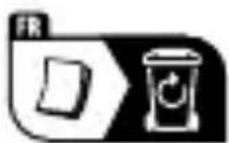
Main parts (image A)
1 Speaker grill
2 USB-C charging port
3 Indicator LED
4 Power button
5 Volume down/previous track button
6 Play/pause button
7 Phone button
8 Volume up/next track button
9 Microphone
10 USB-C - USB Cable
Safety instructions
WARNING
- Ensure you have fully read and understood the instructions in this document before you install or use the product. Keep the packaging and this document for future reference.
- Only use the product as described in this document.
-
Do not use the product if a part is damaged or defective. Replace a damaged or defective product immediately.
-
Disconnect the product from the power source and other equipment if problems occur.
- Do not drop the product and avoid bumping.
- This product may only be serviced by a qualified technician for maintenance to reduce the risk of electric shock.
- Do not expose the product to a high pressure of water or moisture.
- Do not immerse the product in water.
- Do not charge when the product is wet.
- Do not expose the product to water, rain, moisture or high humidity.
- Do not expose the electrical connections to water or moisture.
- Do not dismantle, open or shred cells or batteries.
- Do not expose cells or batteries to heat or fire. Avoid storage in direct sunlight.
- Do not expose the product to direct sunlight, naked flames or heat.
- Do not subject cells or batteries to mechanical shock.
- Disconnect the product from the electrical outlet and other equipment if problems occur.
- Extended exposure to high volumes can cause hearing loss.
- Only use the provided USB charging cable.
- Charge the battery for at least 3 hours before you use it for the first time.
- Do not short-circuit a cell or a battery.
- Do not store cells or batteries haphazardly in a box or drawer where they may short-circuit each other or be short-circuited by other metal objects.
Switching on/off the product
-
Press and hold the power button A 4 to switch on the product. The product automatically enters Bluetooth® pairing mode.
-
Press and hold the power button A 4 to switch off the product. The product automatically switches off after 10 minutes of inactivity.
Charging the product
You can charge the product in two ways.
For charging via the power outlet:
- Plug the USB-C connector of the USB - USB-C charging cable A 10 into the USB-C charging port A 2.
- Plug the other end of the USB-C - USB cable A 10 into a 5V/1 - 2A USB adapter (not included).
-
Plug the USB adapter into a power outlet.
For charging via a USB charging port: -
Plug the USB-C connector of the USB charging cable A 10 into the USB-C charging port A 2.
-
Plug the other end of the USB-C cable A 10 into a 5V/0.5A power source. When the battery is low the speaker emits the voice alert "Please charge".
Playing music from a Bluetooth® audio source
- Switch on the product.
The product automatically enters Bluetooth® pairing mode.
The indicator LED A 3 flashes blue quickly to indicate paring mode is active. Activate Bluetooth® on your audio source and connect with the product (SPBT1005BU).
The indicator LED A 3 lights up blue to indicate pairing is successful.
- Play music from a Bluetooth ^® connected audio source.
Controlling the music
- Press and hold the volume up/next track button A 8 or the volume down/previous track button A 5 to control the volume.
- Press the volume down/previous track button A 5 or the volume up/next track button A 8 to skip between tracks.
- Press the play/pause button A 6 to play or pause the music.
You can also control music and volume from your audio source.
The product is designated for separate collection at an appropriate collection point. Do not dispose of the product with household waste.
For more information, contact the retailer or the local authority responsible for the waste management.
Declaration of Conformity
We, Nedis B.V. declare as manufacturer that the product SPBT1005BU from our brand Nedis ^® , produced in China, has been tested according to all relevant CE standards and regulations and that all tests have been passed successfully. This includes, but is not limited to the RED 2014/53/EU regulation.
The complete Declaration of Conformity (and the safety datasheet if applicable) can be found and downloaded via: nedis.com/SPBT1005BU#support