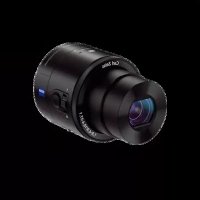
Cybershot DSCQX100 - Camera SONY - Free user manual and instructions
Find the device manual for free Cybershot DSCQX100 SONY in PDF.



| Product type | Digital camera module for smartphone |
| Dimensions (L × H × D) | 62.5 mm × 62.5 mm × 55.5 mm |
| Weight | Approx. 179 g (with battery and memory card) |
| Power source | Rechargeable battery NP-BN (3.6 V) |
| Battery type | NP-BN |
| Battery life (photos) | Approx. 220 shots / 110 min (CIPA standard) |
| Resolution | 20.2 megapixels (1-inch sensor, default setting 18 M) |
| Lens | Zeiss Vario-Sonnar T* 28-100 mm (35 mm equiv.) f/1.8-4.9 |
| Optical zoom | 3.6x |
| Focus | Autofocus controlled via smartphone |
| Video recording | Yes, via PlayMemories Mobile app |
| Connection | Wi-Fi (802.11 b/g/n), NFC, micro-USB |
| Storage | microSD / Memory Stick Micro memory card (not included) |
| Required app | PlayMemories Mobile (Android / iOS) |
| Supplied items | NP-BN battery, micro-USB cable, wrist strap, phone holder, instruction manual |
| Optional accessories | AC adapter AC-UD10 / AC-UD11 |
| Maintenance | Avoid mechanical shocks, extreme temperatures, do not disassemble |
| Safety | Do not expose to moisture, use Sony charger, follow battery precautions |
| Repairability | No user-serviceable parts; contact Sony service |
Frequently Asked Questions - Cybershot DSCQX100 SONY
User questions about Cybershot DSCQX100 SONY
0 question about this device. Answer the ones you know or ask your own.
Ask a new question about this device
Download the instructions for your Camera in PDF format for free! Find your manual Cybershot DSCQX100 - SONY and take your electronic device back in hand. On this page are published all the documents necessary for the use of your device. Cybershot DSCQX100 by SONY.
USER MANUAL Cybershot DSCQX100 SONY
You can download the image management software "PlayMemories Home" from the following URL.
http://www.sony.net/pm/
Owner's Record
The model and serial numbers are located on the back. Record the serial number in the space provided below. Refer to these numbers whenever you call your Sony dealer regarding this product.
Model No. DSC-QX10/DSC-QX100
Serial No.
WARNING
GB
To reduce fire or shock hazard, do not expose the unit to rain or moisture.
CAUTION
Battery pack
If the battery pack is mishandled, the battery pack can burst, cause a fire or even chemical burns. Observe the following cautions.
- Do not disassemble.
- Do not crush and do not expose the battery pack to any shock or force such as hammering, dropping or stepping on it.
-
Do not short circuit and do not allow metal objects to come into contact with the battery terminals.
-
Do not expose to high temperature above 60^ (140°F) such as in direct sunlight or in a car parked in the sun.
- Do not incinerate or dispose of in fire.
- Do not handle damaged or leaking lithium ion batteries.
- Be sure to charge the battery pack using a genuine Sony battery charger or a device that can charge the battery pack.
- Keep the battery pack out of the reach of small children.
- Keep the battery pack dry.
- Replace only with the same or equivalent type recommended by Sony.
- Dispose of used battery packs promptly as described in the instructions.
AC Adaptor
Use the nearby wall outlet (wall socket) when using the AC Adaptor. Disconnect the AC Adaptor from the wall outlet (wall socket) immediately if any malfunction occurs while using the apparatus.
For Customers in Europe
GB
CE
Hereby, Sony Corporation, declares that this DSC-QX10/QX100 Digital Still Camera is in compliance with the essential requirements and other relevant provisions of Directive 1999/5/EC. For details, please access the following URL: http://www.compliance.sony.de/
Notice for the customers in the countries applying EU Directives
Manufacturer: Sony Corporation, 1-7-1 Konan Minato-ku Tokyo, 108-0075 Japan For EU product compliance: Sony Deutschland GmbH, Hedelfinger Strasse 61, 70327 Stuttgart, Germany
Notice
If static electricity or electromagnetism causes data transfer to discontinue midway (fail), restart the application or disconnect and connect the communication cable (USB, etc.) again.
This product has been tested and found compliant with the limits set out in the EMC regulation for using connection cables shorter than 3 meters (9.8 feet).
The electromagnetic fields at the specific frequencies may influence the picture and sound of this unit.
Disposal of Old Electrical & Electronic Equipment (Applicable in the European Union and other European countries with separate collection systems)

This symbol on the product or on its packaging indicates that this product shall not be treated as household waste. Instead it shall be handed over to the applicable collection point for the recycling of electrical and electronic equipment. By ensuring this product is disposed of correctly, you will help prevent potential negative consequences for the environment and human health, which could otherwise be caused by inappropriate waste
handling of this product. The recycling of materials will help to conserve natural resources. For more detailed information about recycling of this product, please contact your local Civic Office, your household waste disposal service or the shop where you purchased the product.
Disposal of waste batteries (applicable in the European Union and other European countries with separate collection systems)

This symbol on the battery or on the packaging indicates that the battery provided with this product shall not be treated as household waste.
On certain batteries this symbol might be used in combination with a chemical symbol. The chemical symbols for mercury (Hg)
or lead (Pb) are added if the battery contains more than 0.0005% mercury or 0.004% lead.
By ensuring these batteries are disposed of correctly, you will help prevent potentially negative consequences for the environment and human health which could otherwise be caused by inappropriate waste handling of the battery. The recycling of the materials will help to conserve natural resources. In case of products that for safety, performance or data integrity reasons require a permanent connection with an incorporated battery, this battery should be replaced by qualified service staff only.
To ensure that the battery will be treated properly, hand over the product at end-of-life to the applicable collection point for the recycling of electrical and electronic equipment.
For all other batteries, please view the section on how to remove the battery from the product safely. Hand the battery over to the applicable collection point for the recycling of waste batteries.
For more detailed information about recycling of this product or battery, please contact your local Civic Office, your household waste disposal service or the shop where you purchased the product.
For Customers in Singapore
Complies with
IDA Standards
DB00353
About the camera
The camera is designed to be connected to a smartphone via Wi-Fi. You can transfer images to a smartphone on the spot just after shooting.
Check the supplied items
- Rechargeable battery pack NP-BN (1)
- Micro USB cable (1)
- Wrist strap (1)
- Smartphone attachment (1)
- Instruction Manual (this manual) (1)
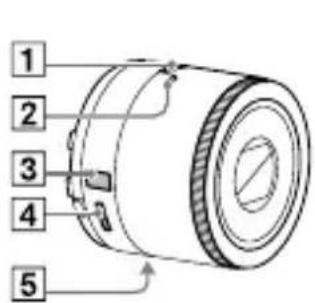
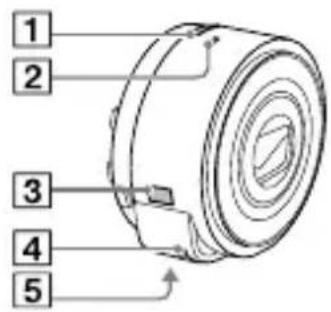
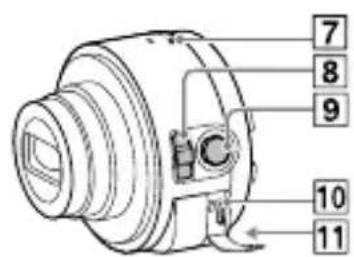
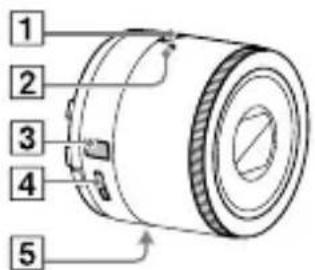
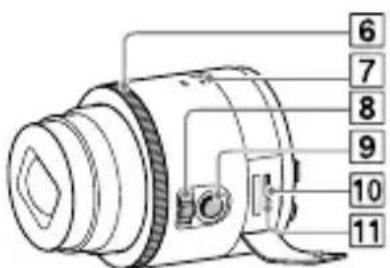
Name of main parts
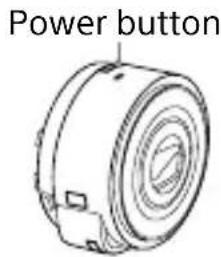
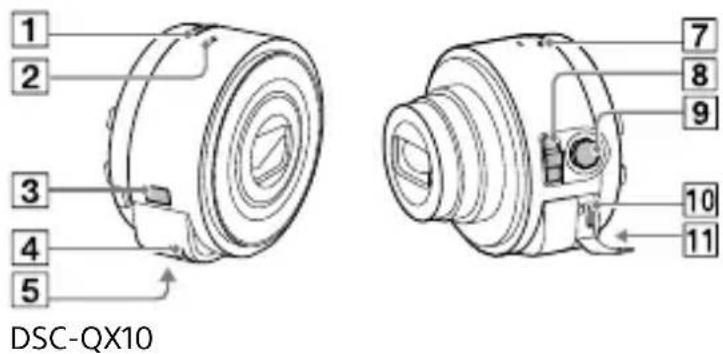
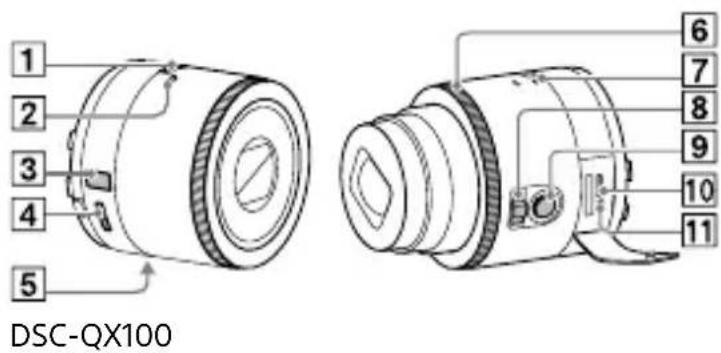
1 Power button
2 Microphone
3 Display panel
: Indicates memory card not inserted
: Indicates remaining battery capacity
4 Hook for strap
5 Tripod socket
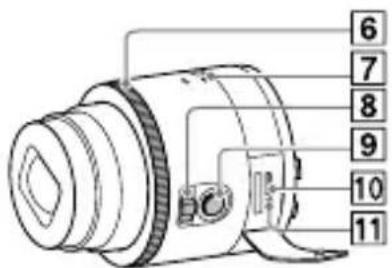
6 Control ring (DSC-QX100)
7 Power/Charge/Movie lamp
Green: Power ON
Orange: Charging
Red: Recording a movie
8 Zoom lever
9Shutter button
10 Multi terminal
11 RESET button
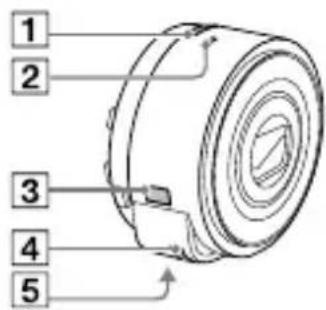
DSC-QX10
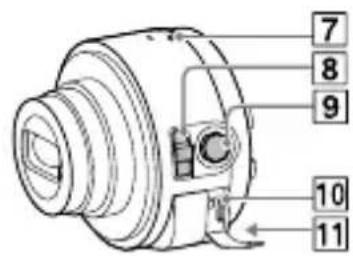
DSC-QX100
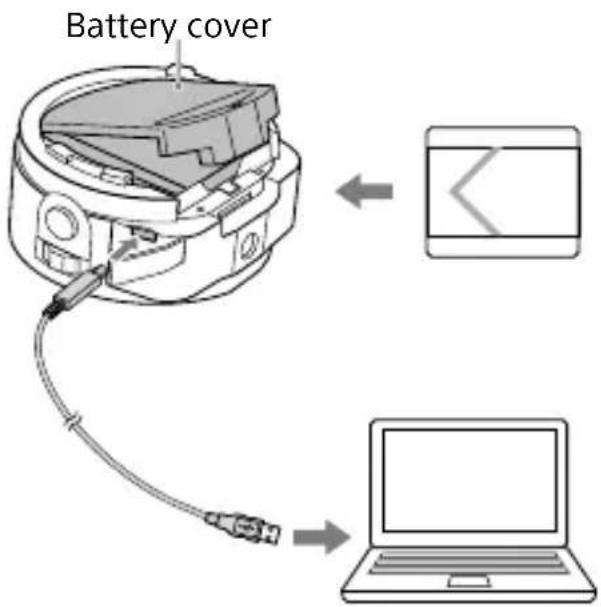
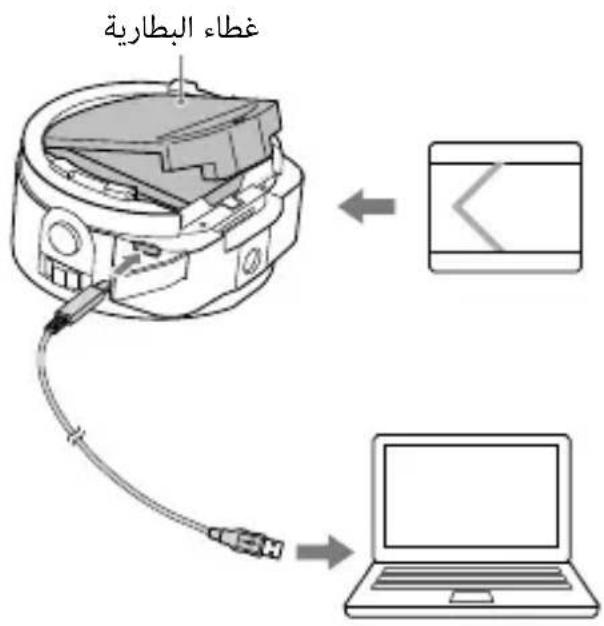
Charging the battery
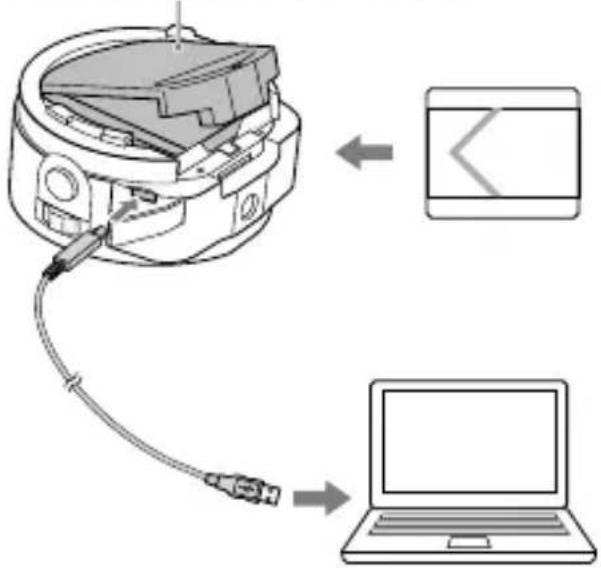
Charge the battery before using the camera. To charge, use the micro USB cable (supplied) to connect the camera to a computer.
- Turn off the power when the battery is being charged.
- If you do not have a computer, use the AC adaptor AC-UD10 or AC-UD11 (both sold separately). The AC-UD11 (sold separately) may not be available in some countries/ regions.
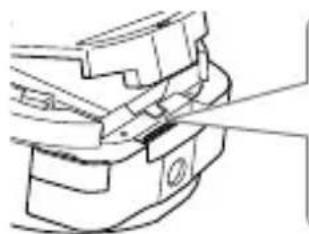
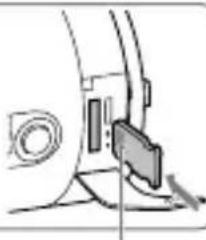
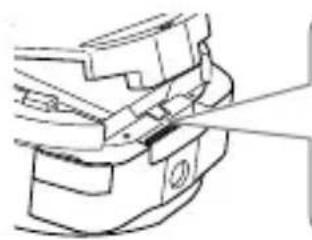
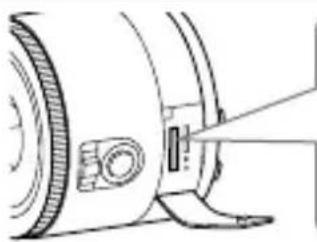
Inserting a memory card
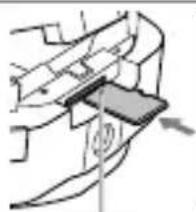
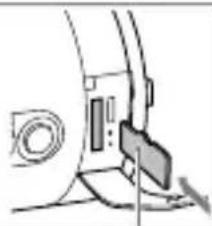
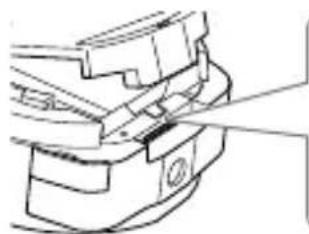
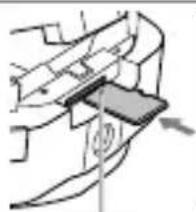
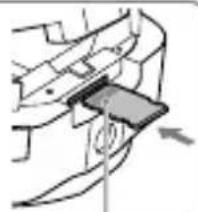
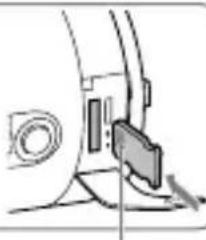
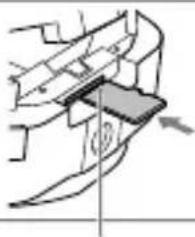
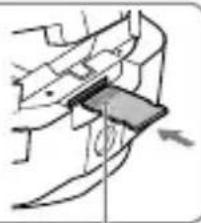
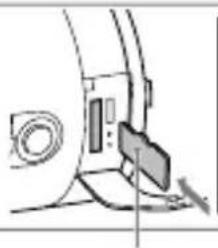
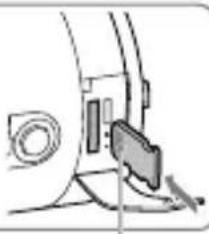
Insert a microSD memory card or "Memory Stick Micro" (M2) media before shooting.
DSC-QX10
microSD memory card
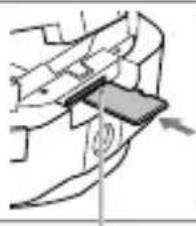
"Memory Stick Micro" media
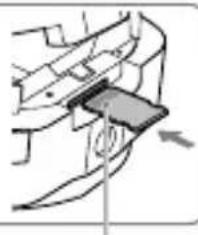
Printed side Terminal side
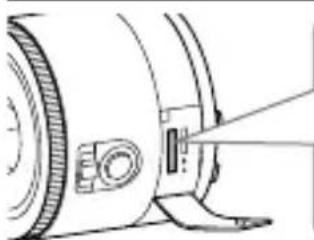
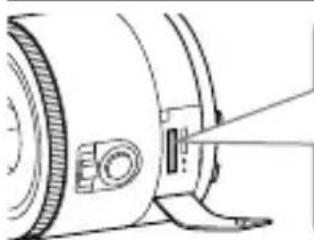
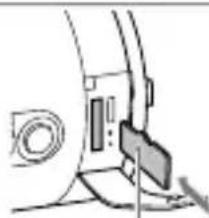
DSC-QX100
microSD memory card
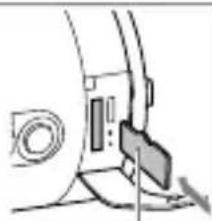
"Memory Stick Micro" media
Printed side Terminal side
Installing "PlayMemories Mobile"
Install "PlayMemories Mobile" to the smartphone before using the camera. If "PlayMemories Mobile" is already installed, update it to the latest version.
PlayMemories
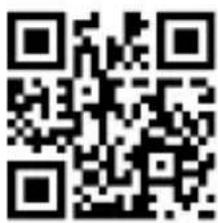
For details on "PlayMemories Mobile", refer to the support website http://www.sony.net/ pmm/
Android
Search for "PlayMemories Mobile" from Google Play and install it.

iPhone
Search for "PlayMemories Mobile" from App Store and install it.

Connecting the camera and a smartphone via Wi-Fi
The connection method varies depending on the type of smartphone. Confirm your smartphone type and connect via Wi-Fi.
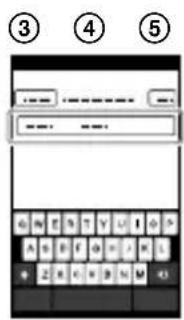
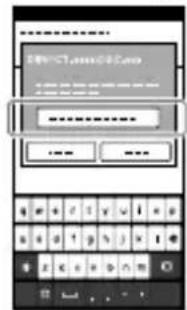
④ Input the password, as printed on the same label (first time only).
Android
①Turn on the power of the camera.
②Start "PlayMemories Mobile" on the smartphone.
③ Select the SSID, as printed on the inside of the camera's battery cover or on the cover of this manual.
Connecting the camera and a smartphone via Wi-Fi (continued)
①
Power button
②
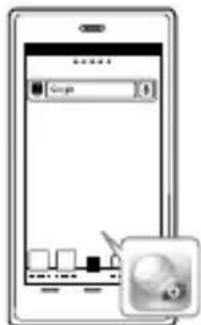
(3)
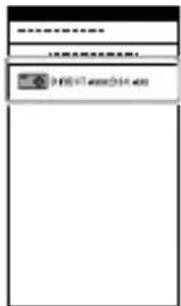
(4)
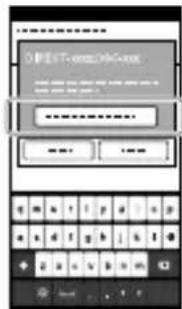
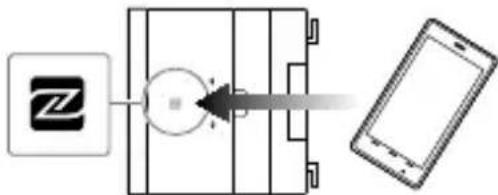
Android (NFC-compatible)
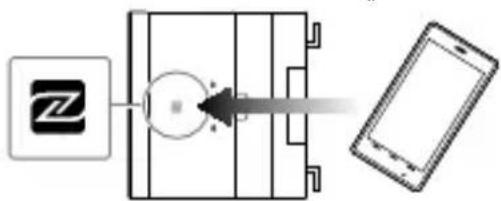
① Touch the N mark) of the smartphone against the N Mark of the camera.
Powered on: Continue to touch (1-2 seconds) without moving until "PlayMemories Mobile" starts up.
Powered off: Keep the camera and a smartphone touching until the lens of the camera extends.
iPhone
①Turn on the power of the camera.
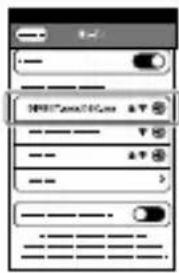
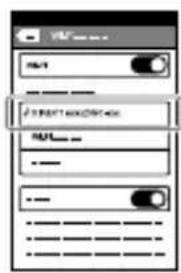
②On the smartphone, select [Settings], then select [Wi-Fi].
③ Select the SSID, as printed on the inside of the camera's battery cover or on the cover of this manual.
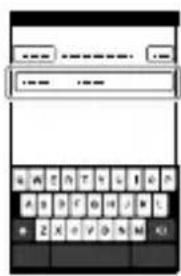
④Input the password, as printed on the same label (first time only).
⑤ Confirm the connection to the SSD of the camera.
⑥ Go back to the Home screen, then start "PlayMemories Mobile".
(1)
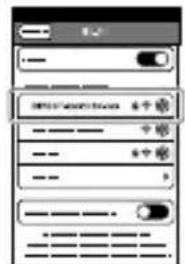
(2)

Continued
Connecting the camera and a smartphone via Wi-Fi (continued)
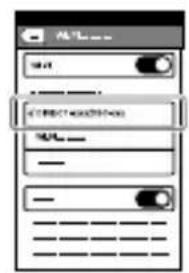
Attaching the camera to a smartphone
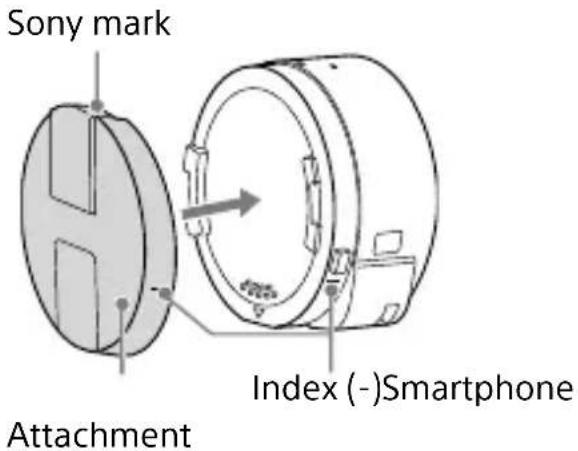
Attach a smartphone after fixing the camera to the smartphone attachment (supplied).
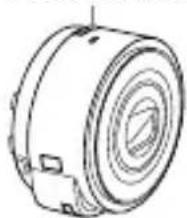
Fix the camera to the attachment. Put the camera into the slot of the attachment, aligning the index, then rotate the attachment until it clicks.
①
Continued
Attaching the camera to a smartphone (continued)
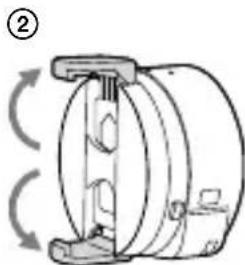
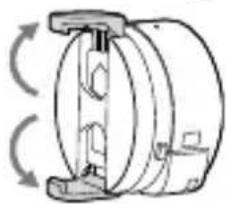
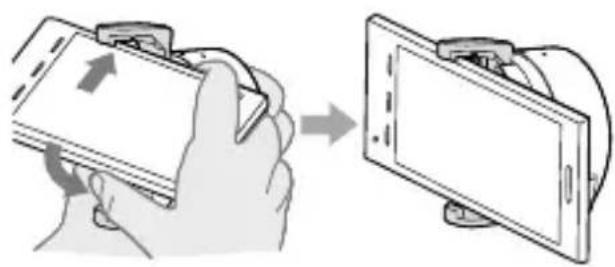
② Open the clamps of the attachment.
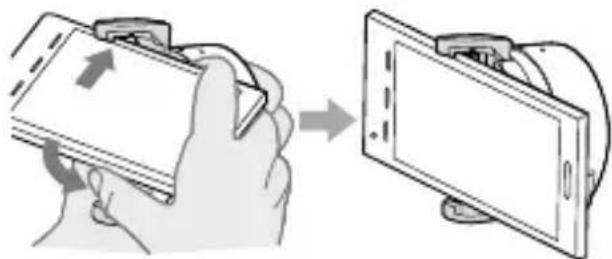
③ Extend the clamps and attach a smartphone.
- Do not swing the camera around with a smartphone attached to it, as the smartphone may slip out of the attachment.
- Make sure no buttons are caught when the smartphone is attached.
(3)
GB
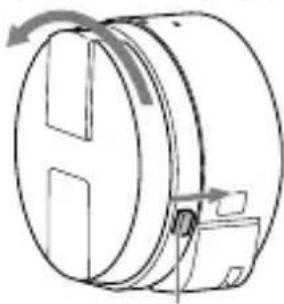
Removing the smartphone attachment
Slide the removal lever to the lens side and rotate the attachment.
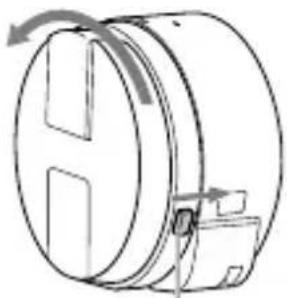
Removal lever
Shooting images
① Start "PlayMemories Mobile" on the smartphone.
② Shoot images with the shutter button of the camera or "PlayMemories Mobile". The shutter button of the camera is not available while shooting movies.
[2M] images are transmitted automatically to the smartphone. [18M] images are saved into the memory card of the camera (default setting).
Screen of "PlayMemories Mobile"
1 Switching exposure modes
2 Settings
3Shutter/movie button
Switching between still image/movie
5Zoom
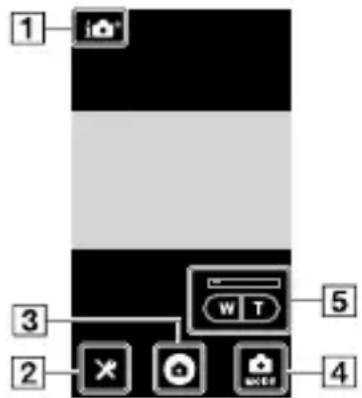
Terminating
① End "PlayMemories Mobile" to return to the Home screen.
② Turn off the power of the camera.
- If you turn off the power of the camera before ending "PlayMemories Mobile", an error message will be displayed. This is not a malfunction.
- The display screen for the application is subject to change without notice by future upgrades.
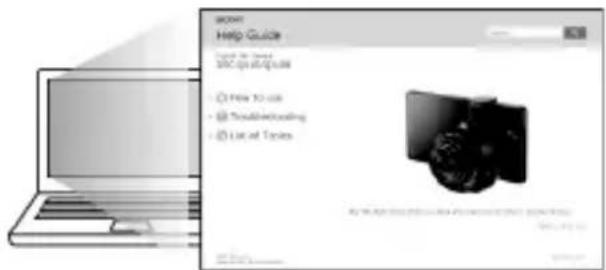
Refer to the Help Guide
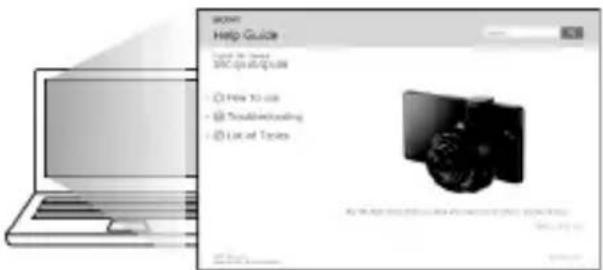
The Help Guide is an online manual. Refer to the Help Guide when you would like to know further details, settings and operations of "PlayMemories Mobile", and precautions.
http://rd1.sony.net/help/dsc/1310/h_zz/
Q & A
Why doesn't the camera charge?
- Turn the power off.
Why the power lamp flashing red?
- Memory card is not inserted correctly. Insert it in the correct direction.
How can I correct the date/time?
- When Wi-Fi connection between the camera and the smartphone is made, the date/time on the camera is automatically set to that of the smartphone.
How can I return to the default setting?
- Turn on the power of the camera, then press the RESET button.
How can I change a setup of image size, etc.?
- You can make changes on the settings screen of "PlayMemories Mobile".
How can I see the number of images or information about the camera?
Refer to the "Specifications" of this manual or the "Help Guide (HTML)".
Continued
Why has the power of the camera turned on unexpectedly?
- If an NFC-enabled smartphone is close to the camera, the power may turn on accidentally. This is not a malfunction.
Why does an image not transfer to my smartphone after shooting?
- Movies are recorded on a memory card, but are not transferred automatically.
I've forgotten the password. Where can I find out what it is?
- The password and SSID are printed on the inside of the battery cover or on the cover of this manual.
Specifications
Dimensions (CIPA compliant):
DSC-QX100: 62.5mm× 62.5mm× 55.5mm (2 1/2 inches ×
2 1/2 inches × 2 1/4 inches) (W/H/D)
DSC-QX10: 62.4mm× 61.8mm× 33.3mm (2 1/2 inches ×
2 1/2 inches × 1 5/16 inches) (W/H/D)
Mass (CIPA compliant) (including NP-BN battery pack, "Memory Stick Micro" media):
DSC-QX100: Approx. 179 g (6.3 oz)
DSC-QX10: Approx. 105 g (3.7 oz)
Power: Rechargeable battery pack NP-BN, 3.6 V
Power consumption (during shooting): 1.1 W
Battery life and number of images that can be recorded
| Battery life Number of images | ||
| Shooting (still images) Approx. 110 min. Approx. 220 images | ||
| Actual shooting (movies) Approx. 25 min. - | ||
| Continuous shooting (movies) Approx. 55 min. (DSC-QX100) Approx. 65 min. (DSC-QX10) | - | |
- The number is based on the CIPA standard.
(CIPA: Camera & Imaging Products Association) - The above number varies depending on the type of smartphone and how it is used.
Trademarks
GB
- The following marks are trademarks of Sony Corporation.
Cyber-shot, "Cyber-shot", "Memory Stick", "Memory Stick Micro", "Memory Stick Micro", "PlayMemories Home".
- microSDXC logo is a trademark of SD-3C, LLC.
- Android, Google Play are trademarks or registered trademarks of Google Inc.
- Wi-Fi, the Wi-Fi logo, Wi-Fi PROTECTED SET-UP are trademarks or registered trademarks of the Wi-Fi Alliance.
- The N Mark is a trademark or registered trademark of NFC Forum, Inc. in the United States and in other countries.
- In addition, system and product names used in this manual are, in general, trademarks or registered trademarks of their respective developers or manufacturers. However, the ^TM or ^® marks are not used in all cases in this manual.
Notes on using the camera
Notes on using the camera
When you attach a smartphone attachment to the camera, be careful not to pinch a finger.
On camera's temperature
Your camera and battery may get hot due to continuous use, but it is not a malfunction.
On the overheat protection
Depending on the camera and battery temperature, you may be unable to record movies or the power may turn off automatically to protect the camera. In this case, leave the power off and wait until the camera and battery temperature goes down. If you turn on the power without letting the camera and battery cool enough, the power may turn off again or you may be unable to record movies.
On use and care
Avoid rough handling, disassembling, modifying, physical shock, or impact such as hammering, dropping, or stepping on the product. Be particularly careful of the lens.
Additional information on this product and answers to frequently asked questions can be found at our Customer Support Website.
http://www.sony.net/
Mode d'emploi

PlayMemories
Complies with IDA Standards DB00353
Available on the iPhone App Store
Touched alimentation

(5)
ANDROD APP ON Google play
iPhone
Available on the iPhone App Store
Available on the Phone
App Store
SchedadiemoriamicroSD
"Memory Stick Micro"
SchedadiemoriamicroSD
"Memory Stick Micro"
DSC-QX100: circa 179 g
DSC-QX10: circa 105 g
Cyber-shot, "Cyber-shot", "Memory Stick", "Memory Stick Micro", "Memory Stick Micro", "PlayMemories Home".
Available on the iPhone App Store
Available on the iPhone
App Store
PT
Cyber-shot, "Cyber-shot", "Memory Stick", "Memory Stick Micro", "Memory Stick Micro", "PlayMemories Home".
: yKa3bIBaet OCTaBnNcra
3apd 6aTapeu
4KpOyOKIpaemHnA
5「He3IO LITaNBA
6 Kolboco ynpaBneHn (DSC-QX100)
7 INДИКaTOp ПNTaHnY/3aprДKN/ BnDEOCbEMKn 3eJIeHbI:ПNTaHne BKJIIOUcHo OpaHKeBbI: BblIOJHReTcR 3aprJa Ka KpacHbI: BblIOJHReTcR BnDEOCbEMKa
8PbIaJXOKTpaHcfoKaTopa
9 KhoNka cnYcka 3aTBopa
10MHOROΦyHKUHOHaJIbHbIpa3bEm
11KhoNka RESET
3apяДka 6aTapeN
3apndte 6aTaapeo nepei nCnoIb3OBAHnem KaMepbl.ДЯ 3apdKn nCnoIb3yIte Ka6eIb Micro USB (npnilaraetc)ДЯ NOdklUoyehna KaMepbl K KOMpbIoTepy.
- BbIKJIOuayTe nHTaHne npn 3apAnke 6atapen.
- Пи OTCYCTBnKOMNbIOTepa ИСПОЛБ3УITE aДaNTepпepeMeHHOro ТOKa AC-UD10 nIIN AC-UD11 (o6a пpoDAJOТсЯ OTdEJIbHo). AДaNTep AC- UD11 (пpoDAeTcЯ OTdEJIbHo) может быт b HeDObTypeH B HeKOTOpbIX СТранх/ргnoHax.
Kpbioka 6aTaapeHoro OTceKa
YctaHOBka KapTbi Namrtn
Пелегд сөемков Вставытө карту памятү microSD ул "Memory Stick Micro" (M2).
DSC-QX10
Kapta namytni microSD
"Memory Stick Micro"
CtopoHa c n306paXeHneM CtopoHa c KOHTaTAMn
DSC-QX100
Kapta namrtn microSD
"Memory Stick Micro"
CTopoHa c n3o6paXeHHem CToPoHa c KOHTaKtAmu
YctaHOBka npiloxeHnra "PlayMemories Mobile"
Ipeed nCnoJb3OBAHneM KaMepbl yCTaHOBtTe npJIoXeHne "PlayMemories Mobile"Ha cMaprfoH. EcIn npJIoXeHne "PlayMemories Mobile" yXe yCTaHOBJIeHo, O6HOBtTe ero do noocJeHn Bercn.
PlayMemories
Mobile
PpO6HbIe CBeHnO npIoJKeHN
"PlayMemories Mobile" cm.
Ha Be6-caIte TexHnuecko
NoIdepKKn
http://www.sony.net/
pmm/
Android
ANDROD APP ON Google play
iPhone
Вынонту поск пиложеня "PlayMemoriesMobile"в магашип AppStoreи установту erо.

Available on the iPhone App Store
- BbIKJIIOUHTe NITaHne.
KaK MoXHo BepHyTbCЯ K NaCTpoIKe no yMoluaHnIO?
- Bключnte nHTaHne KaMepbl, 3aTeM haxmnte KhoNky RESET.
Kak Moxho n3MeHnTb NaCTpoIky pa3Mepa n3O6paJxKeHn T.D.?
Macc (no cTaHdapTy CIPA) (BkIoua 6aTapeHbI 6LoK NP-BN,
"Memory Stick Micro"):
DSC-QX100: npn6n. 179 r
DSC-QX10: npn6JI. 105 r
Cpok cnjx6bI 6aTapeH N KOJIueCTBO n3o6paXKeHn, KOTOpoe MoXHo 3aIncatb
- ΘTO YINCSLO NOJUyeHo Ha OCHOBe CTAHДapTa CIPA.
(CIPA: Camera & Imaging Products Association)
3haueHne Bblwe 3aBnCnT OT Tnna n CnOcO6a NcNoJb3OBaHn CmApTfoHa.
TobapHbIe 3HaKn
- Cnéduyouüne 3HaKn YBIAIOTcT ToBapHbIMn 3HaKaMn Sony Corporation.
Cyber-shot, "Cyber-shot", "Memory Stick", "Memory Stick Micro", "Memory Stick Micro", "PlayMemories Home". - Lorotun microSDXCЯвяетс Товарным 3нakom SD-3C, LLC.
- Android, Google PlayяваяюТоварныМи 3HaKaMи Ил
-ЗaperгостпсробаHHыМи TOВарныМи 3HaKaMи Google Inc.
Wi-Fi, norotn Wi-Fi, Wi-Fi PROTECTED SET-UP yBnIOTc TOBaHbIMN 3HaKAMn n nn 3apeRnCTpnpOBaHHbIMN TOBaHbIMN 3HaKAMn Wi-Fi Alliance. - N Mark явлиятся TOPROВОМ mapкои плп зaperистрюванно TOPROВОМ mapкои NFC Forum, Inc. в СWA и дугх странax.
Kpome TOrO,Ha3BaHnra CnCTeM nN3deIiN,NCNoJIb3YeMbIe B DaHHOM pyKOBOdCTBe,ABJIaOTcB O6UeM clyuae TOBapHBIM 3HaKaMn IIN 3apeRnCTpnpOBaHHbIMTOBapHBIMn 3HaKaMn IX COOTBECTBYIOx pa3pa6OTTuKOB INI pON3BOIDTeJe.ODHaKO,3HaKn TM INI INCNOJb3yIOTcHe BO BCEX ClyuayxB DaHHOM pyKOBOdCTBe.
RU
N3roTOBNTeIb: CoHn KopnopeuH
Ampc: 1-7-1 KoHaH, MnHaTo-Ky,
Tokno 108-0075, JnoHn
CTpaHa-npon3BODnteJb:Krtai
IIMnpTeP Ha TeppuTOpn CTpaH
TamoxeHHoro co103a 3AO "COnn 3JleKtpoHnKc", Pocn, 123103, MockBa,
KapamblweBckn npoe3d,6
Ha3BaHne n aDpEc opraHn3aun, npINHMaUoJe npTeH3nn OT NOKyNaTeJe B Ka3axCTaHe:
COnn OBepcn3 C.A.
IpeDCTaBNTeJIbCTBO B Ka3axCTaHe
050059 AImaTbI, yInuca IBaHnIOBa, n. 58
050059 AnMaTbI KaJaCbl,
IbAHnOB KeWeci, 58 y
RU
사용품명서

PlayMemories
DAURL 111111111111111111111111111111111111111111111111
http://www.sony.net/pm/
主语:山口
相机:Digital Still Camera
Moll: DSC-QX10/QX100
JeJ/JeJ: Sony Corporation/China
#
"PlayMemories Mobile"
"PlayMemories Mobile"
的
日
相正h
http://rd1.sony.net/help/dsc/1310/h_zz/
対照文
Cyber-shot, "Cyber-shot", "Memory Stick", MEMORY Stick Micro", MEMORY STICK MICRO, "PlayMemories Home".
- microSDXC 彼哥は SD-3C, LLCの標準 immigr magna.
- Android, Google Play是Google Inc.的Android Play的Android Play的Android Play
- Wi-Fi, Wi-Fi 彼収, Wi-Fi PROTECTED SET-UPのWi-Fi Alliance的上面は上は通歌上面いに。
- N마크는무국고다국가서NFC Forum,Inc.の상품만들목상품일ndon.
·上部本,子。
KR
Available on the Phone
App Store
透過Wi-Fi將相機和智慧型手機連線
Cyber-shot, "Cyber-shot", "Memory Stick", MEMORYSTICK Micro", MEMORY STICK MICRO", PlayMemories Home".
"Memory Stick", "Cyber-shot",
"Play Memories Home", MemoryStutckro
Cyber-shot
.SD-3C,LLC. 45
. Google Inc. 45
WFi PROTECTED SET-UP WFi Wi-Fi
.Wi-Fi Alliance
NFC Forum, Inc.
S 唯一
y
gTM 1J. ggea aal lal alal
JUULI 130
1
(CIPA: Camera & Imaging Products Association)
.
1olgbl
(CIPA gfo)
(oo/Jb/6) 55.5x 62.5x 62.5:DSC-QX100
(oo/Jb/oo) 33.3xoo 61.8xoo 62.4:DSC-QX10
:"Memory Stick Micro".NP-BN 4a (CIPA g)
179 L: DSC-QX100
105 :DSC-QX10
3.6NP-BN 10000000000000000000000000000000000000000000000000
1.1:(y)
54
SSID
.1JUWl 120 15g gI aRbU
156
gao
NFC 5
-
-
-
-
-
-
-
-
-
-
-
-
-
-
-
-
-
-
-
-
-
-
-
-
-
-
-
-
-
-
-
-
- 1.
-
-
-
-
-
-
-
-
-
-
-
-
-
-
-
-
-
-
-
-
-
-
-
-
-
-
-
-
-
-
-
J 1
J 1
y
"Play Memories Mobile"
g j g all duc yj g jy
1yolJ Jc logalb
Jd>g JJJ1 10
(HTML)
sIbJ 1
.aa[bl] aag
yJgUu 1111 1111
1.
.
1/2
Wi-Fi 5
1 1
LlaJ 1

dclwbl jds g
"PlayMemories Mobile"
-
-
-
-
-
-
-
-
- 10
-
-
-
-
-
-
-
j 1
.
AR
glul b
\*PlayMemories Mobile"
1
2
J 3
4
5

"PlayMemories Mobile" ①
.5u
1 1
"PlayMemories Mobile"
.15
p 2M] j
18M]
.(a|ylll|sly)
J 1
.
J
AR
(2)
(3)
.
3
y
a111 1
S = S_1
5
.1
[..] .
[Wi-Fi]
b. SSID 3
.
.4
. (b) SSID 5
"PlayMemories Mobile"
(NFC) Android
20 ①
(204 2-1) uollolg:dll l
1
"PlayMemories Mobile"
1nol
- 1
(4)
(3)
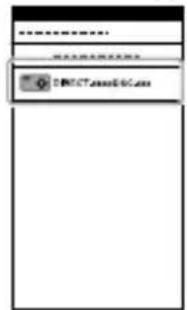
Wi-Fi
Jg Jg Jg Jg Jg Jg Jg Jg Jg Jg Jg Jg Jg Jg Jg Jg Jg Jg Jg Jg Jg Jg Jg Jg Jg Jg Jg Jg Jg Jg Jg Jg Jg Jg Jg Jg Jg Jg Jg Jg Jg Jg Jg Jg Jg Jg Jg Jg Jg Jg Jg
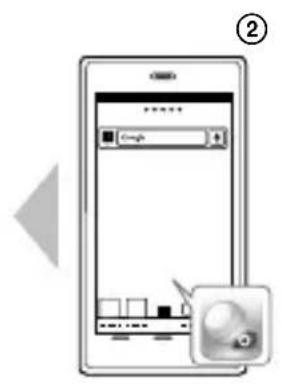
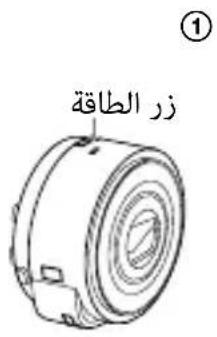
Android
.1JLJIaIbJx ①
"PlayMemories Mobile" Jx ②
.1JLJI
.1JLJI
SSID ③
.1JLJI
.1JLJI
.4
.(b)
"PlayMemories Mobile" محيى
Android
"PlayMemories Mobile" Google Play

"PlayMemories Mobile" App Store

Jdolal "PlayMemories Mobile" 11111111111111111111111111111111111111111111
8513 4aBbJl
. (M2) "Memory Stick Micro" microSD 3
DSC-QX10
oJs aalb microSD
Memory" "Stick Micro
DSC-QX100
sS s b microSD
Memory" "Stick Micro
a
J.1J 1J 1J 1J 1J
JUG (g) USB
.
.
Jgoo Joooiol jggss 15
jleL)AC-UD11 AC-UD10
()AC-UD11y.(J
.1/1gJ 3 (J
DSC-QX10
DSC-QX100
1/2
山山:
sJ:J
pui jyoo:oo
8
9
du.1 = 12 ① b : y = k + 1
RESETjj11
|Jol| Jg
auiuui 11 i j 11 iow
a|j
2
3
a:
aabla aBaaew:
pJooU 4
Jolal
(DSC-QX100)
J 1 J 1 J 1 J 1 J 1 J 1 J 1 J 1 J 1 J 1 J 1 J 1 J 1 J 1 J 1

PlayMemories
.1111111111111111111111111111111111111111111111111111 000000000000000000000000000000000000000000000000000000000000000000000000000000000
JU 1 JU UUU UUUUUUUUUUUUUUUUUUUUUUUUUUUUUUUUUUUUUUUUUUUUUUUUUUUUUUUUUUUUUUUUUUUUUUUUUUUUUUUUUUUUUUUUUUUUUUUUUUUUUUUUUUUUUUUUUUUUUUUUUUUUUUUUUUUUUUUUUUUUUUUUUUUUUUUUUUUUUUUUUUUUUUUUUUUUUUUUUuuuuuuuuuuuuuuuuuuuuuuuuuuuuuuuuuuuuuuuuuuuuuuuuuuuuuuuuuuuuuuuuuuuuuuuuuuuuuuuuuuuuuuuuuuuuuuuuuuuuuuuuuuuuuuuuuuuuuuuuuuuuuuuuuuuuuuuuuuuuuuuuuuuuuuuuuuuuuuuuuuuuuuuuuuuuuuuuuuuuuuuuuuuuuuuuuuuuuuuu uu
4
4yjll 4gogoo
p . 15.5
a
l_S = 5
3 1