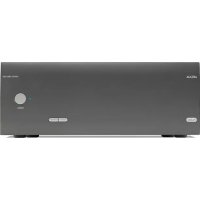
PA720 - Receiver ARCAM - Free user manual and instructions
Find the device manual for free PA720 ARCAM in PDF.



| Product type | Multichannel power amplifier |
| Brand | Arcam |
| Model | PA720 |
| Number of channels | 7 |
| Output power (7 channels, 4 Ω) | 140 W per channel |
| Output power (7 channels, 8 Ω) | 100 W per channel |
| Output power (5 channels, 4 Ω) | 175 W per channel |
| Output power (5 channels, 8 Ω) | 110 W per channel |
| Output power (2 channels, 4 Ω) | 225 W per channel |
| Output power (2 channels, 8 Ω) | 140 W per channel |
| Harmonic distortion | 0.002% (80% power, 8 Ω, 1 kHz) |
| Signal-to-noise ratio | 112 dB (A-weighted, 100 W/8 Ω) |
| Input impedance | 10 kΩ |
| Frequency response | 20 Hz – 20 kHz ±0.05 dB |
| Inputs | 7 × RCA, 7 × XLR |
| Maximum power consumption | 1.5 kW |
| Standby power consumption | 0.5 W |
| Network standby power consumption | 2 W |
| Power supply | 110-120 V or 220-240 V, 50-60 Hz |
| Dimensions (W × H × D) | 433 × 177 × 425 mm |
| Net weight | 18 kg |
| Gross weight | 19.7 kg |
| Special features | Auto standby, network and RS232 control, trigger input/output, firmware update via USB, mute |
| Safety | Protection against short circuits, excessive temperature and DC offset |
| Maintenance | Clean with a dry cloth; avoid moisture |
| Included accessories | Power cord |
| Warranty | 5 years parts and labor (excluding disc players) |
Frequently Asked Questions - PA720 ARCAM
User questions about PA720 ARCAM
0 question about this device. Answer the ones you know or ask your own.
Ask a new question about this device
Download the instructions for your Receiver in PDF format for free! Find your manual PA720 - ARCAM and take your electronic device back in hand. On this page are published all the documents necessary for the use of your device. PA720 by ARCAM.
USER MANUAL PA720 ARCAM
PA720 / PA240 / PA410
Safety Guidelines
Important Safety Instructions
- Read these instructions.
- Keep these instructions.
- Heed all warnings.
- Follow all instructions.
- Do not use this apparatus near water.
- Clean only with dry cloth
- Do not block any ventilation openings. Install in accordance with the manufacturer's instructions.
- Do not install near any heat sources such as radiators, heat registers, stoves, or other apparatus (including amplifiers) that produce heat.
- Do not defeat the safety purpose of the polarized or grounding type plug.
A polarized plug has two blades with one wider than the other. A grounding type plug has two blades and a third grounding prong. The wide blade or the third prong are provided for your safety. If the provided plug does not fit into your outlet, consult an electrician for replacement of the obsolete outlet.
- Project the power card from being walked on or pinched particularly at plugs, convenience receptacles, and the point where they exit from the apparatus.
- Only use attachments/accessories specified by the manufacturer.
- Use only with the cart, stando tripod brackcr or cartc specified by the manufacturer, or sold with the apparatus.
When a cart is used, use caution when moving the cart/aparatus combination to avoid injury from topover.

-
Uniloc this apparatus during lightning storms or when unused for long periods of time.
-
Referral servicing to qualified service personnel
Servicing is required when the apparatus has been damaged in any way, such as power-supply cord or plug is damaged, liquid has been spilled or objects have fallen into the apparatus, the apparatus has been exposed to rain or moisture, does not operate normally, or has been dropped.
- Object or liquid entry
WARNING - Take care that objects do not fill and liquids are not spilled into the enclosure through any openings. The equipment shall not be exposed to dripping or splashing. Liquid filled objects such as vases should not be placed on the equipment.
- Climate
The equipment has been designed for use in moderate climates and in domestic situations.
17.Cleaning
Unplug the unit from the mains supply before clearing.
The case should normally only require a twice with a soft, lint-free cloth. Do not use chemical solvents for cleaning.
We do not advise the use of furniture cleaning sprays or polishes as they can cause permanent white marks.
18.Power sources
Only correct the equipment in a power supply of the type described in the operating instructions or as marked on the equipment.
The primary method of isolating the equipment from the mains supply is to remove the mains plug. The equipment must be installed in a manner that makes disconnection possible.
19.Abnormal smell
If an abnormal smell or smoke is detected from the equipment, turn the power off immediately and unplag the equipment from the wall out of Contact, your dealer and do not reconnect the equipment.
- Damage requiring service
The equipment should be serviced by qualified service personnel when:
A. The power-supply cord or the plug has been damaged, or
3. Objects have fallen, or liquid has spilled into the equipment, or
C. the equipment has been exposed to rain, or
12. The equipment does not appear to operate normally or exhibits a marked change in performance, or
The equipment has been dropped or the encodes damaged.


CAUTION: To reduce the risk of electric shock, do not remove cover (or back). No user serviceable parts inside. Refer servicing to qualified service personnel.
WARNING to reduce the risk of fire or electric shocks, do not expose this apparatus to rain or moisture.
The lightning flash with an arrowhead symbol within an equilateral triangle, is intended to alert the user to the presence of uninsulated dangerous voltage within the product's enclosure that may be of sufficient magnitude to constitute a risk of electric shock to persons.
The exclamation point within an equational triangle is intended to alert the user to the presence of important operating and maintenance (servicing) instructions in the literature accompanying the product.
CAUTION In Canada and the USA, to prevent electric shock, match the wide blade of the plug to the wide slot in the socket and insert the plug fully into the socket.
Class II product
This equipment is a Class II or double insulated electrical appliance. It has been designed in such a way that it does not require a safety connection to electrical earth (ground) in the U.S.
Warning
Mains drug/appliance coupler is used to disconnect device and it snail remain readily operable.
Safety Compliance
Tn's equipment has been designed to meet the IEC/EN 62369-1 international electrical safety standards.
This device composes with Part 15 of the FCC Rules. Operation is subject to the following two conditions:
- This device may not cause harmful interference, and
- This device must accept any interference received, including interference that may cause undesired operation.
The building installation shall be regarded as providing protection in accordance with the rating of the wall socket outlet.
Caution on installation
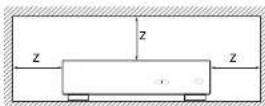
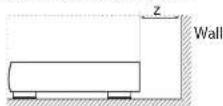
or proper heat dispersal, do not install this unit in a confined space, such as a bookcase or similar enclosure.
More than 0.3m (12m) is recommended.
Do not place any other equipment on this unit.
FCC Information(for US customers)
PRODUCT
This product complies with Part 15 of the FCC Rules. Operation is subject to the following two conditions:
This device may not cause harmful interference, and
2. This device must accept any interference received.
including interference that may cause undesired
IMPORTANT NOTICE DONOTMODIFY THIS PRODUCT
This product, when installed as indicated in the instructions contained in this manual, meets FCC requirements. Modification not expressly approved by ARCHAM may void your authority, granted by the FCC to use the product.
NOTE
This product has been tested and found to comply with the limits for a Class B digital device, pursuant to Part 15 of the FCC Rules. These limits are designed to provide reasonable protection against harmful interference in a residential installation.
This product generates, uses and can radiate radio frequency energy and, if not installed and used in accordance with the instructions, may cause harmful interference to radio communications. However, there is no guarantee that interference will not occur in a particular installation. If this product does cause harmful interference to radio or television reception, which can be determined by turning the product CO + and ON, the user is encouraged to try to correct the interference by one or more of the following measures:
Reorient or relocate the receiving antenna.
□ Increase the separation between the equipment and receiver.
- Connect the product into an outlet on a circuit different from that to which the receiver is connected.
Consult the local retailer authorized to distribute this type of product or an experienced radio/TV technician for help
Safety Information (for European customers)
- Avoid high temperatures. Allow for sufficient heat dispersion when installed in a racc
- Handle the power cord carefully. Hold the plug with unplugging the cord.
- Keep the unit free from moisture, water, and dust.
- Jopjug the power cord when not using the unit long periods of time.
Do not obstruct the ventilation holes.
Do not let foreign objects into the unit
Do not let insecticides, benzene, and thinner come contact with the unit.
Never disassemble or modify the unit in any way.
Ventilation should not be impeded by covering ventilation openings with items, such as newspapers, tablecloths or curtains.
Nakedame sources such as lighted carolles sho not be placed on the unit.
1. Observe and follow local regulations regarding battery disposal.
Do not expose the unit to dripping or splashing fluids.
- Do not place objects filled with liquids, such as vases on the unit.
Do not handle the mains cord with wet hands.
□ When the switch is in the OFF position, the equipme is not completely switched off from MAINS.
The equipment shall be installed near the power supply so that the power supply is easily accessible.
A note about recycling
This product's packaging materials are recyclable and can be reused. Please dispose of any materials in accordance with the local recycling regulations.
When discarding the unit, comply with local rules or regulations.
oalertions should never be thrown away or incinerated. bu disposed of in accordance with the local regulations concerning battery disposal.
Tis' product and the supplied accessories, excluding the batteries, constitute the applicable product according to the WPH directive.
Correct disposal of this product
These markings indicate that this product should not be disposed with other household waste throughout the

Pb
to prevent possible harm to the environment or human health from uncontrolled waste disposal and to conserve material resources, this product should be recycled responsibly.
To dispose of your product, please use your local return and collection systems or contact the retailer where the product was purchased.
Welcome
Thank you and congratulations...
for purchasing your Arcam PA720, PA740 or PA10 power amplifier.
Arcam has been producing specialist audio products of remarkable quality for over four decades and the new PA720, PA240 and FA410 power amplifiers are the latest in a long line of award-winning HiFi. The design of the IDA range draws upon all of Arcam's experience as one of the UK's most respected audio companies, to produce Arcam's best performing range of multi channel power amplifiers yet designed and built to give you years of listening enjoyment.
This handbook is a guide to installing and using the PA770, PA240 and PA410 and includes information on the more advanced features. Use the contents list on the next page to guide you to the section of interest.
We hope that your product will give you years of trouble free operation. In the unlikely event of any fault, or if you simply resuscitate further information about Arcam products, our network of dealers will be happy to help you. Further information can also be found on the Arcam website at www.arcam.co.uk.
Your PA720, PA240 and PA410 development team
Contents
Safety Guidelines EN-2
Welcome
Overview
Placing The Unit EN-6
Interconnect Cables EN-6
Power EN-6
Rear Panel Connections and Controls PA720 EN-7
Rear Panel Connections and Controls PA240 EN-8
Rear Panel Connections and Controls PA410 EN-9
Control System Connections EN-10
Network and RS232 EN-10
USB EN-10
Trigger IN/OUT EN-10
EN-4
EN-6
Front Panel Connections and Controls EN-11
Operation
EN-12
Switching On EN-12
Automatic Standby EN-12
Network and RS322 in Standby EN-12
Muting the Output
EN-12
Mode switches
EN-12
Connecting Sources and Loudspeakers
Bridged Mono Mode - PA240 only
EN-16
Dual Mono / Bi Amp Mode - PA240 only
EN-17
Troubleshooting
EN-18
Specifications
EN-19
PA720
EN-19
PA240
EN-20
PA410
EN-21
Worldwide Guarantee
EN-22
Overview
Arcam's PA720, PA240 and PA410 amplifiers
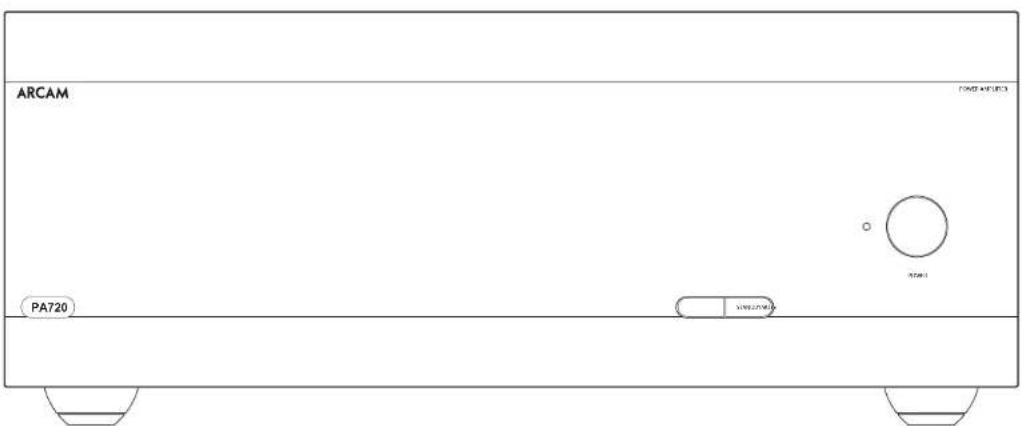
Arcans PA20, PA240 and PA410 power amplifiers provide class leading sound quality for the best reproduction of your music.
Drawing on the many years of amplifier design experience at Arcam, these products use the best quality components and engineering practice to produce amplifiers that will give many years of musical pleasure and reliable service.
With a toroidal based power supply, acoustically damped chassis class G technology (PA70 & PA720), parallel transistor output slags (PA70) and exceptionally low levels of distortion and noise, the PA720, PA740 and PA10 amplifiers are all capable of reproducing music with all its original authority and detail. Rest assured you will be hearing the music just as the artist intended.
The PA720, PA240 and PA410 amplifiers are designed to produce a level of performance that will truly bring music to life.
Placing The Unit
- Place the amplifier on a voltage, firm surface, avoiding direct sunlight and sources of heat or damp.
Do not place the PA726, PA240 or PA410 on top of a power amplifier or other source of heat.
- Do not place the amplifier in an enclosed space such as a bookcase or closed cabinet unless there is good provision for ventilation. The PA770, PA240 and PA410 are designed to run warm during normal operation.
Do not place any other component or item on top of the amplifier as this may obstruct airflow around the heat sink, causing the amplifier to run hot. (The unit placed on top of the amplifier would become hot, too).
Do not place your record deck on top of the unit. Record decks are very sensitive to the noise generated by mains power supplies which will be heard as a background from if the record deck is too clonc.
The normal function of the unit may be disturbed strong electromagnetic interference. If this occurs, simply reset the unit with the power button, or move the unit to another location.
Interconnect Cables
We recommend the use of high-quality screened cables that are designed for the particular application. Other cables will have different impedance characteristics that will degrade the performance of your system (for example, do not use cable intended for video use to carry audio signals). All cables should be kept as short as is practically possible.
It is good practice when connecting your equipment to make sure that the main power-supply cabling is kept as far away as possible from your audio cables. Failure to do so may result in unwanted noise in the audio signals.
Power
The amplifier is supplied with a moulded mains plug already fitted to the lead. Check that the plug supplied fits your supply - should you require a new mains lead, please contact your Arcam dealer.
If your mains supply voltage or mains plug is different, please contact your Arcan dealer immediately.
Push the IEC plug end of the power cable into the power socket on the back of the amplifier, making sure that it is pushed in firmly. Plug the other end of the cable into your maine socket and switch the socket on.
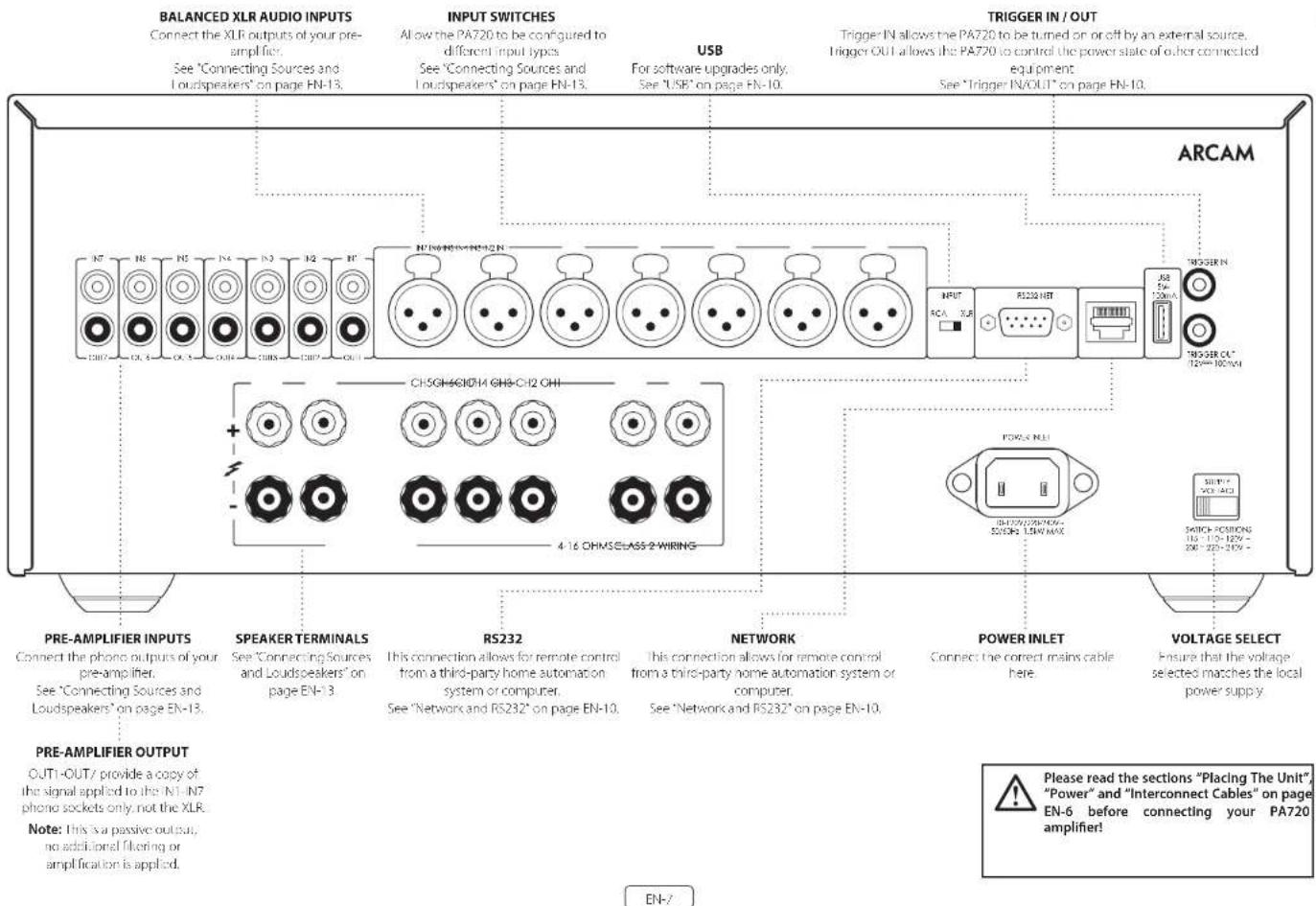
Rear Panel Connections and Controls PA720
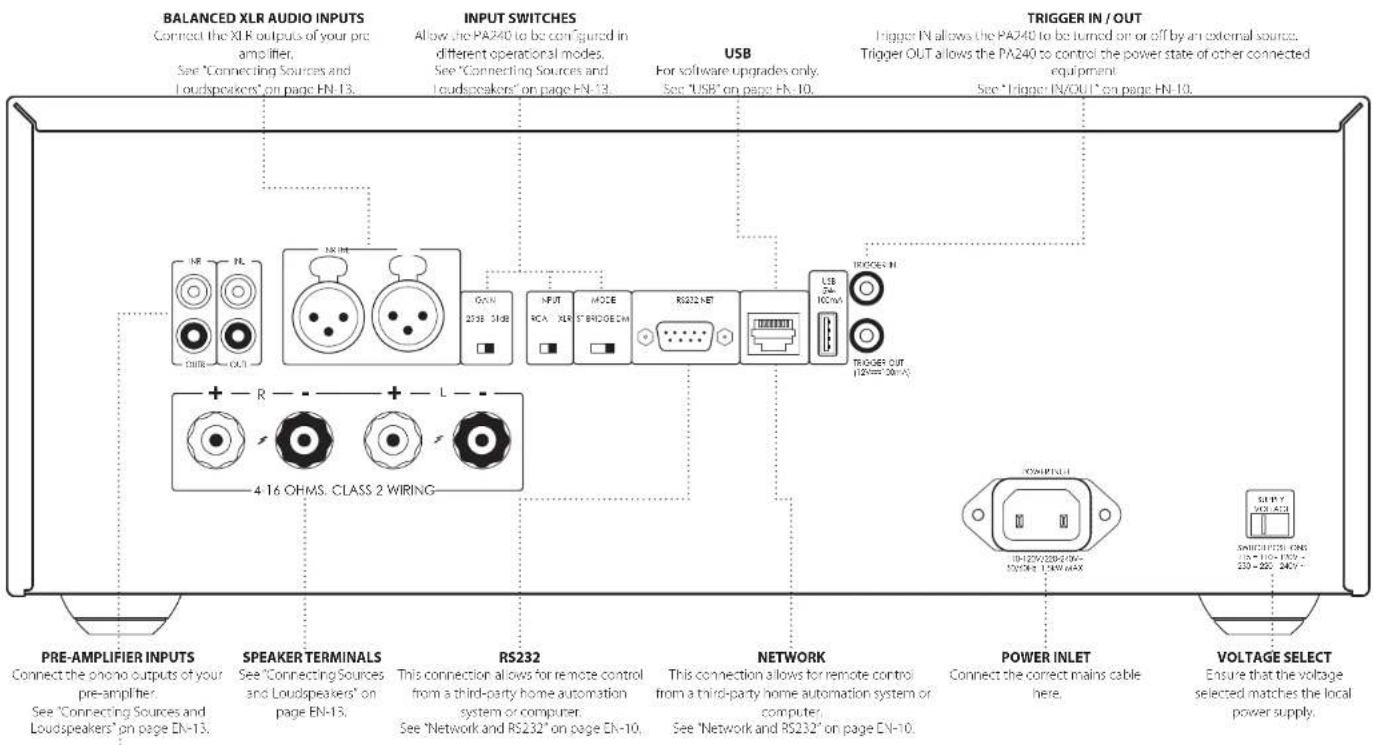
Rear Panel Connections and Controls PA240
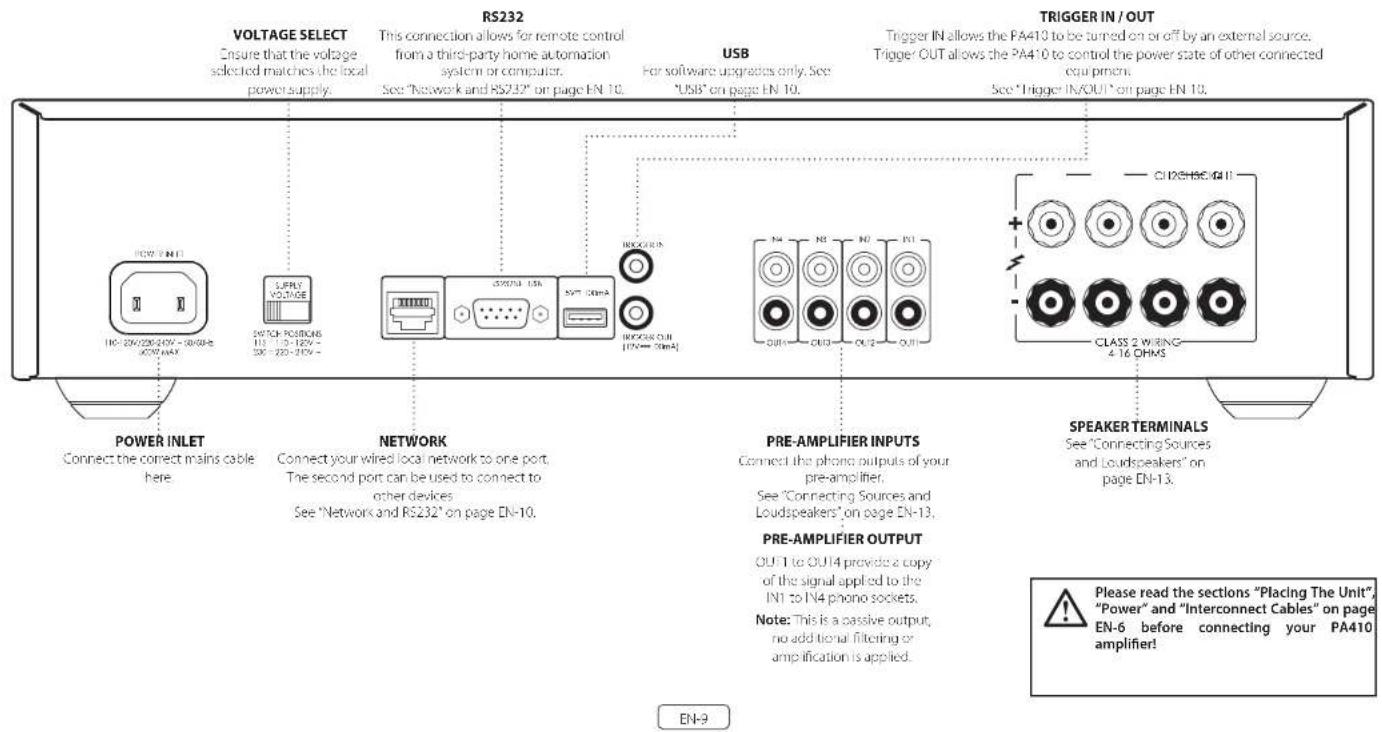
PRE-AMPLIFIER OUTPUT
OUTs and OUTR provide a copy of the signal applied to the IN L and IN R phone sockets only, net. The X10,
Note: This is a passive output, no additional filtering or amplification is applied.
EN-8
Please read the sections "Placing The Unit", "Power" and "Interconnect Cables" on page EN-6 before connecting your PA240 amplifier!

Control System Connections
Network and RS232
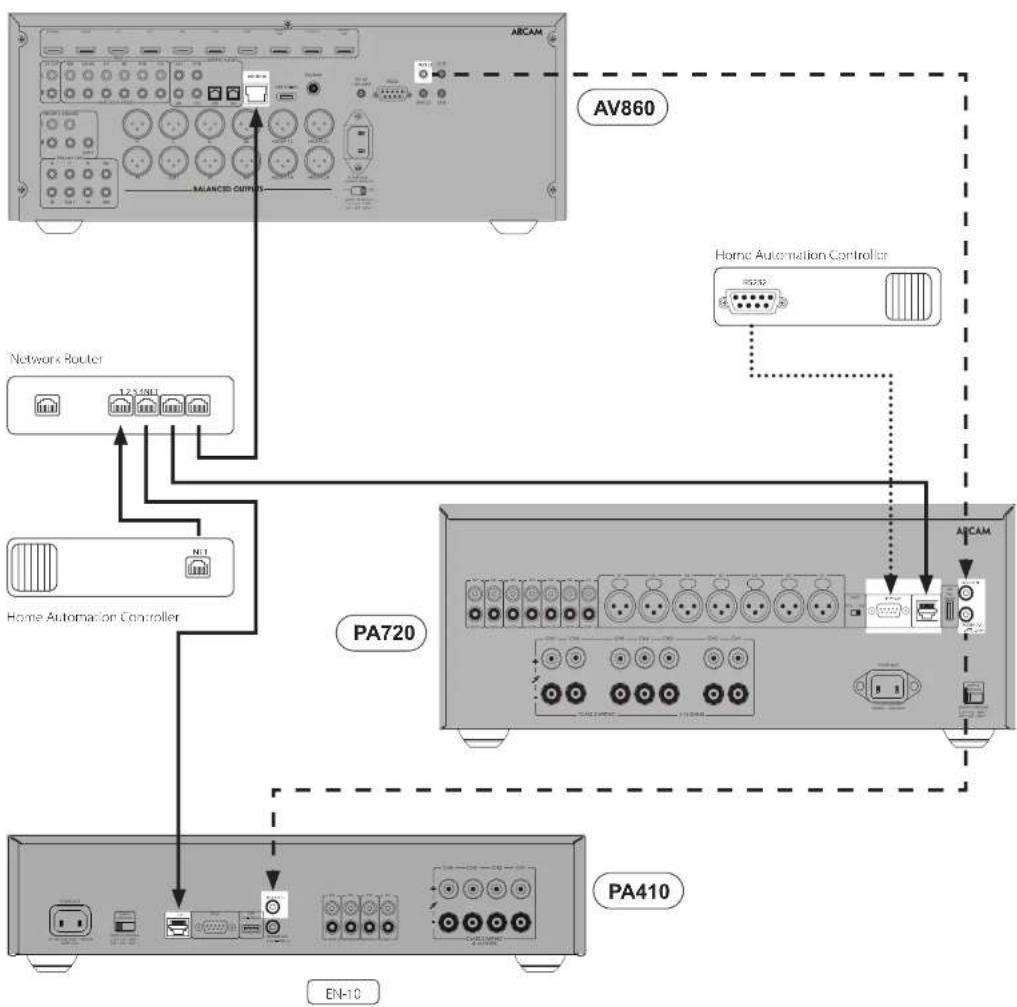
The PA720, PA240 and PA410 feature a network and RS232 port that can be used to connect to a local network, computer or home automation system so that the amplifier can be controlled and monitored remotely. Various third party systems are available providing soonhisticated control over all of your entertainment devices. Contact your dealer or installer for details.
Her technical details of control protocols please refer to the PA720 / PA240 / PA410 RS232/P control document, available for download at www.arcam.co.uk, for further information.
Note By default, network and RS232 control is disabled in standby to minimise standby power consumption. To enable network control see "Network and RS232 in Standby" on page EN-12.
USB
The USB port is used for software updates only. For the latest software as well as further information, please visit www.arcam.co.uk
Trigger IN/OUT
The power state of the PA720, PA240 and PA410 can be controlled by compatible audio/video sources (such as an Acram AVR). In this case, connect the TRICGER OUT of the source to the TRICGER IN of the PA720, PA240 or PA410 using a mono 3.5mm jack lead. Similarly, the PA720, PA240 and PA410 can control the power state of compatible product (such as another PA720, PA240 or PA410). In this case, connect the TRICGER IN of the source to the TRICGER OUT of the PA720, PA240 or PA410 using a mono 3.5mm jack. Note: These leads are not supplied.

EN-11
Operation
Switching On
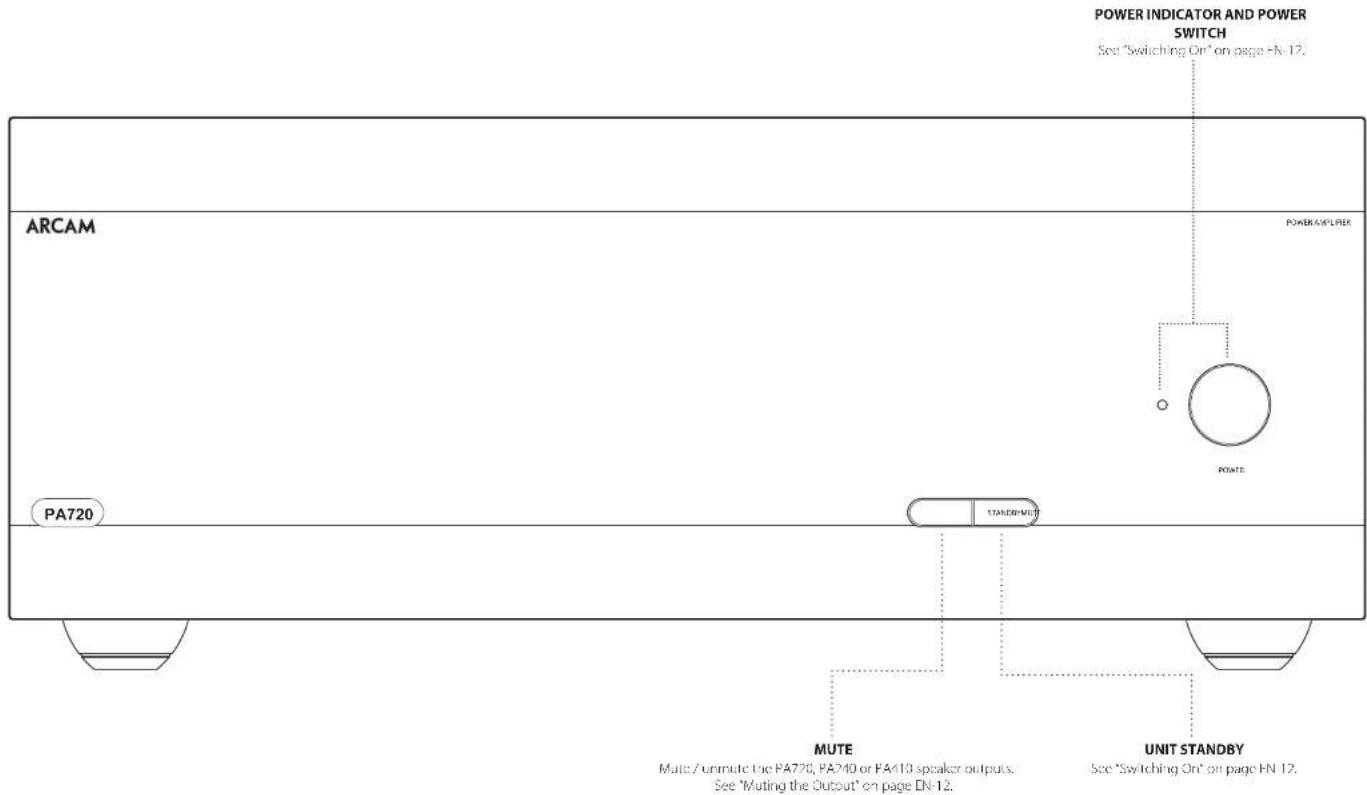
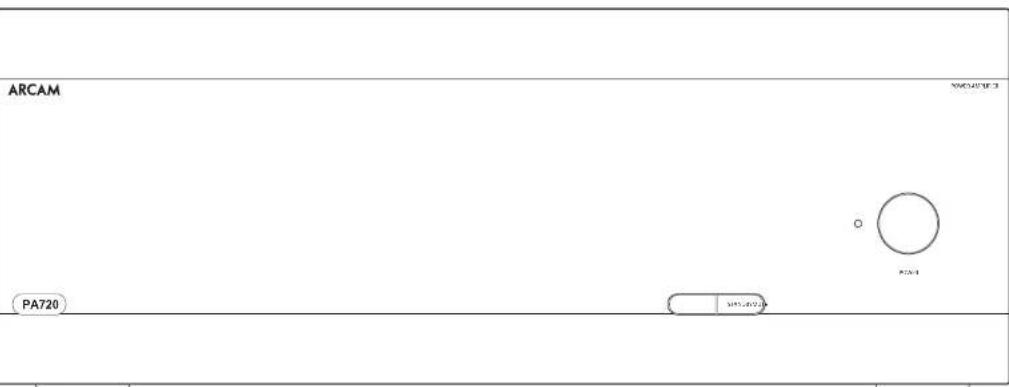
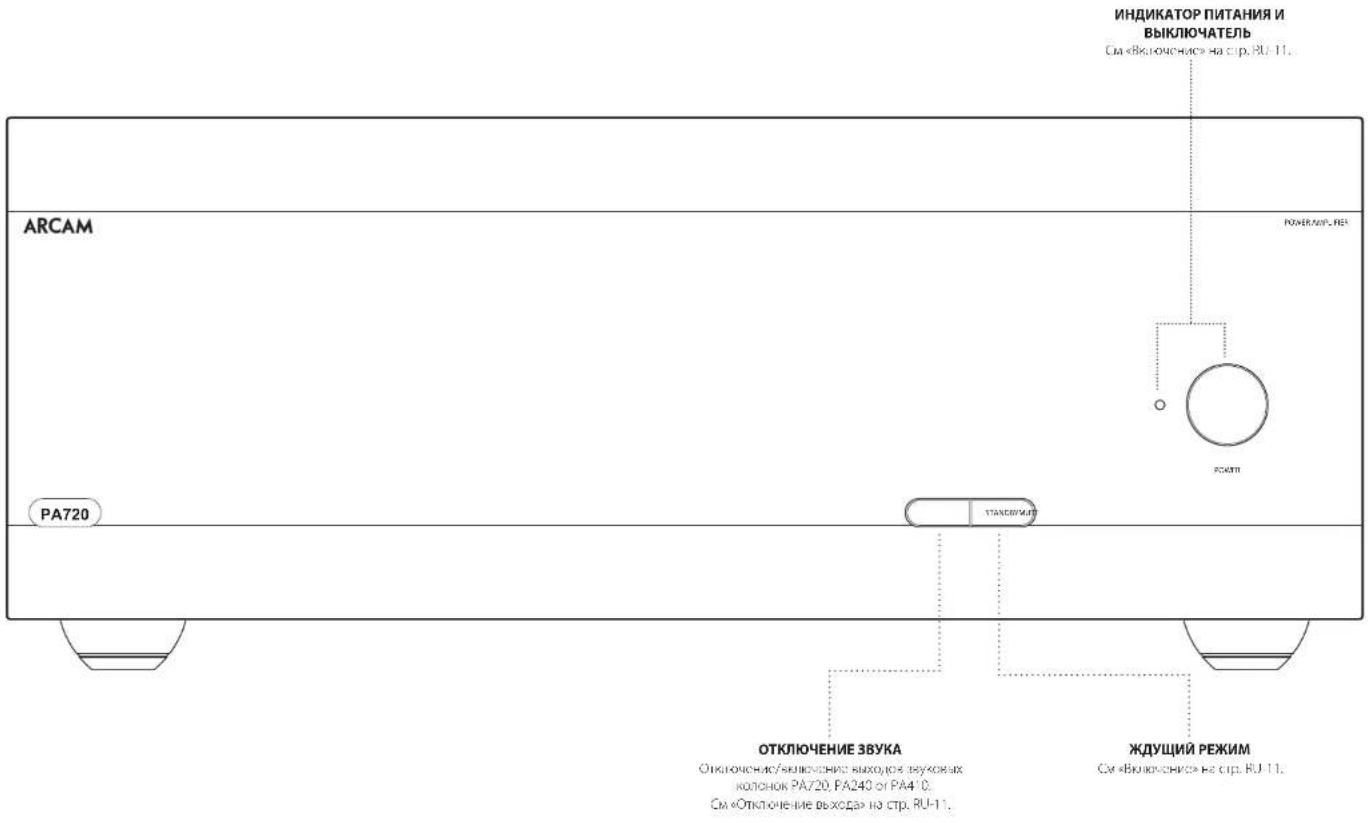
The POWER button switches the unit on and off. The status indicator LED indicates the state of the amplifier. It changes from red to orange then white if mains power is connected and the unit is switched off. Pressing the STBY button while the unit is powered on, will place the PA720, PA240 or PA410 into standby mode. Press the STBY button again to bring the unit out of standby.
Automatic Standby
In order to comply with international regulations for consumer products, this unit is designed to enter standby mode if no user interaction and no audio input signal are detected for an extended period of time (default is 20 minutes). The unit can be brought out of standby by pressing the STBY button on the front panel, the trigger input or RS232 or ethernet command (if enabled, see 'Network and RS322 in Standby' for more information).
The standby time out can be adjusted using either RS232 or IP control commands. Please refer to the PA720 / EA410 / PA410 RS232/IP control document, available for download from www.arcam.co.uk.
Alternatively pressing and holding the MUTE button will toggle the standby time out between OH and 20 minutes.
The LED will flash to indicate the setting change, red for OFF, green for 20 minutes.
Note: If the standby time-out is set to OFF, the automatic standby feature will be disabled.
Network and RS322 in Standby
In low power standby mode the network and RS322 functionality is disabled.
To enable network and RS232 in standby, send a control or status request command to the unit whilst it is powered on.
This will enable whichever control method was used when the unit is in standby.
Note: To indicate the unit is not in lowest power standby mode, the I/O will flash briefly when entering standby mode.
Note: Enabling network or RS232 control will increase standby power consumption. To restore the unit to the default low power standby consumption press and hold the STBY button for more than 3 seconds on the untlto factory/units.
Muting the Output
The speaker outputs of the PA720, PA240 or PA410 can be silenced by pressing the MUTE button on either the front panel or by sending the relevant command via either the RS232 or network connection.
If the unit is muted, front panel power indicator will change to orange.
To cancel the mute, press the MUTE button again or send the relevant command via either the RS322 or network connection.
Mode switches
The various mode switches located on the rear of the PA720 and PA240 amplifiers allow you to configure your power amplifier to your specific equipment setup. See "Connecting Sources and Loudspeakers" on page 1-1 for more information.
INPUT (PA720 and PA240 only)
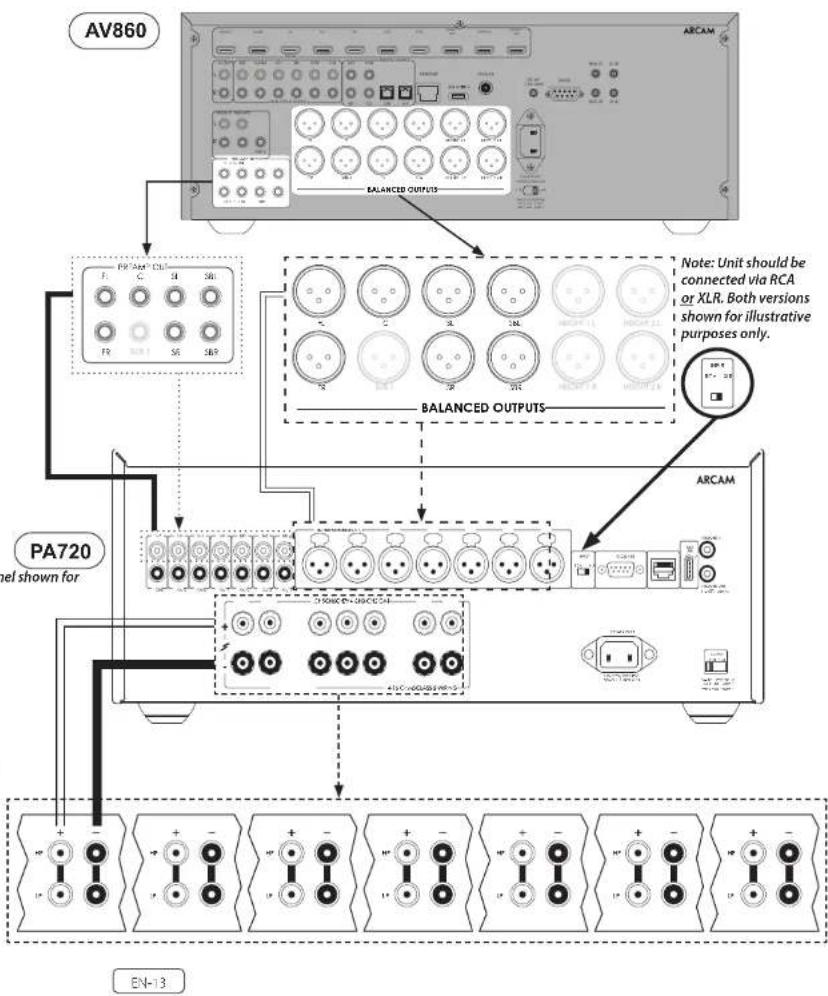
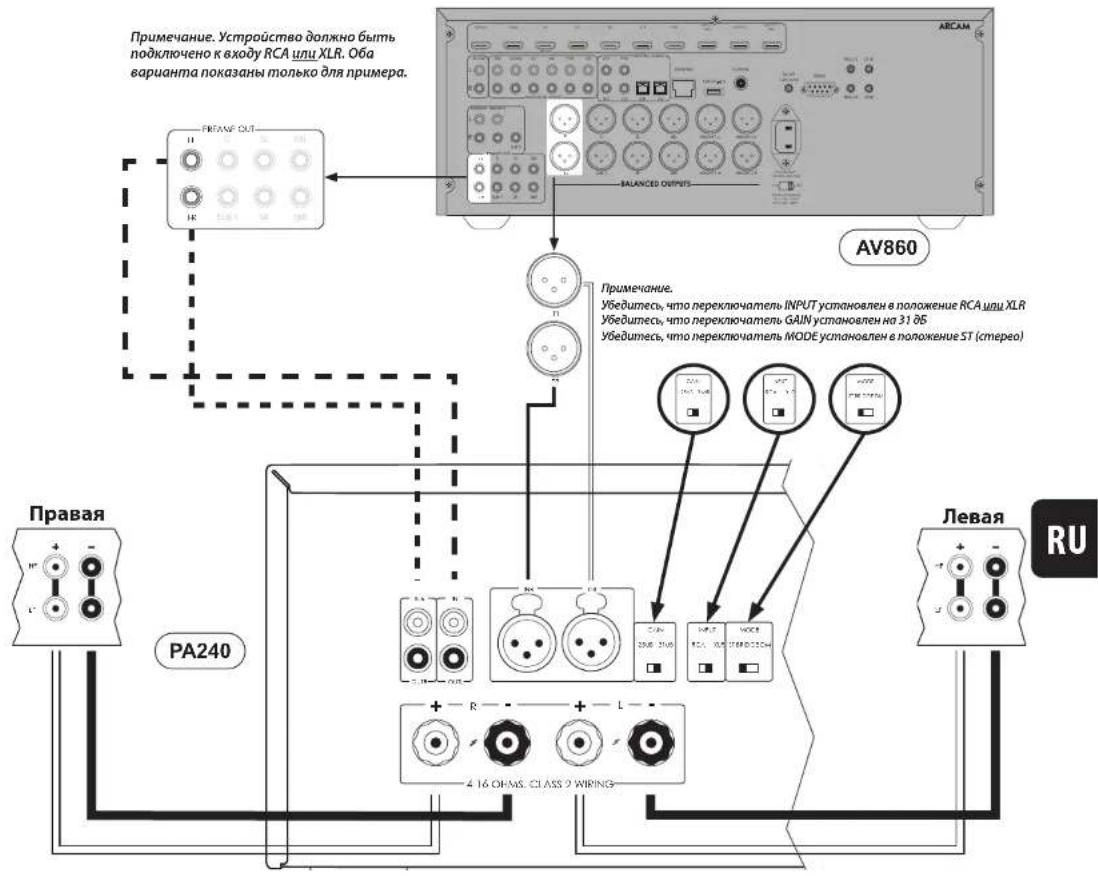
Tn's switch selects between the XLR and RCA phong inputs of the amplifier. Select which every connection method you are using to connect your preamp.
GAIN(PA240 only)
Tn's switch allows the gain to be changed from standard Arcam gain of 31 dB (with matches all Arcam amplifiers and receivers) to 260dB. This allows flexibility to connect multie PA240 amplifiers in different modes to multiple speakers.
In normal set-ups this switch should be left at 31c8.
MODE (PA240 only)
Tn's switch selects between the different amplification modes of the PA240.
STEREO (ST)
This is the standard stereo amplification mode using two separate preamp inputs driving two separate speaker outputs.
DUAL MONO (DM)
This mode allows two separate speakers to be driven from a single preamp induct.
Alternatively the two drivers of a single speaker can be o-ampled from a single PA240.
BRIDGED MONO (BRIDGE)
This mode uses both channels of the PA240 to drive a single speaker. This the ultimate in high power, high fidelity amplification.
Connecting Sources and Loudspeakers
PA720
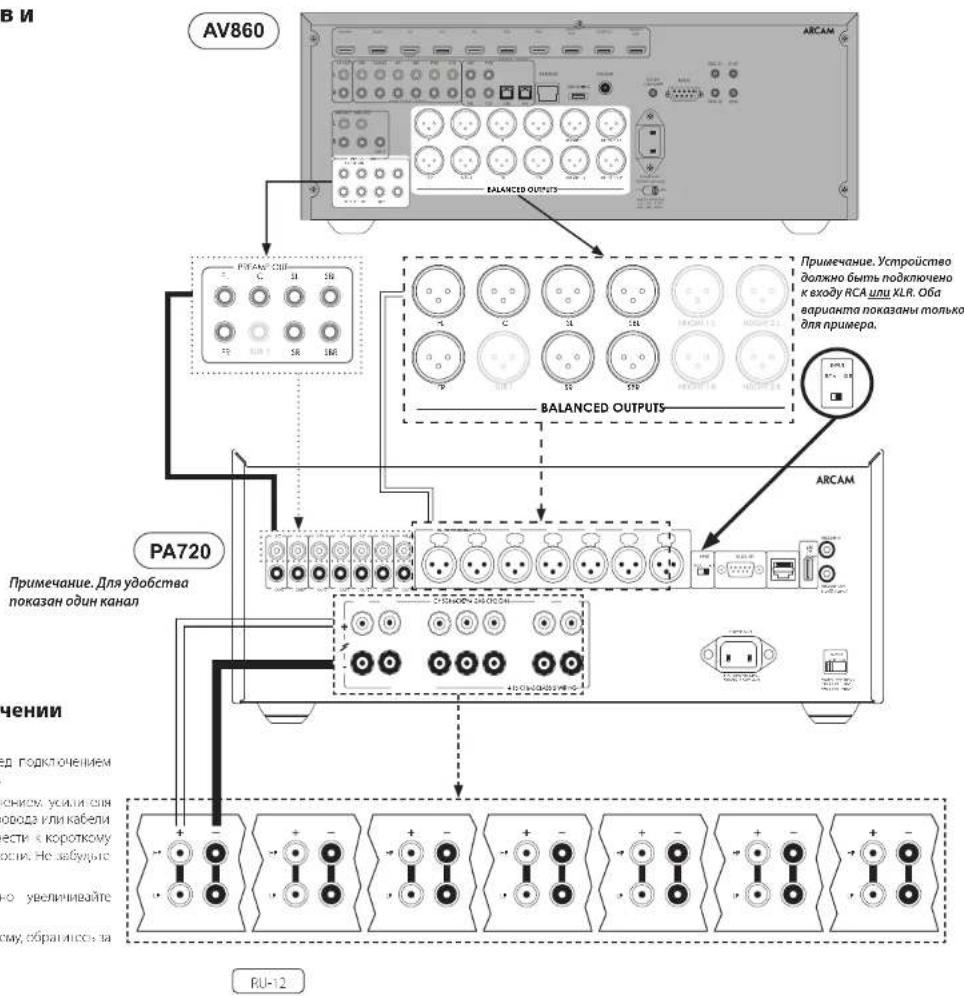
Connect the RED positive speaker terminal labelled CH1 to CH7+ to the positive terminal of your speaker. Similarly, connect the BLACK negative speaker terminal of the same channel to the negative terminal of your speaker.
Repeat this process for the other speakers, using the same respective input and speaker terminals for each channel.
NOTE: All the channels are identical so there is no requirement to connect specific AVR output channels to specific amplifier channels.
Notes On Making Speaker Connections
□ Do not make any connections to any amplifier while it is switched on. We recommend that your amplifier is completely disconnected from the mains supply before starting.
Before switching your amplifier on for the first time after connecting to speakers, please check all connections thoroughly. Ensure that bare wires or cables are not touching each other or the amplifier's chassis (which could cause short circuits), and that you have connected positive (+) to positive and negative (-) to negative. Be sure to check the wiring for both the amplifier and the speaker.
11 After making connections switch the amplifier on then gradually increase the volume to the required listening level.
If you are unsure as to how your system should be connected, please contact your Aram deistree who will be happy to help you.
PA240
Connect the RED positive speaker terminal labelled L+ to the positive terminal of your speaker. Similarly, connect the BLACK negative speaker terminal labelled L- to the negative terminal of your speaker.
Repeat this process for the right speaker.
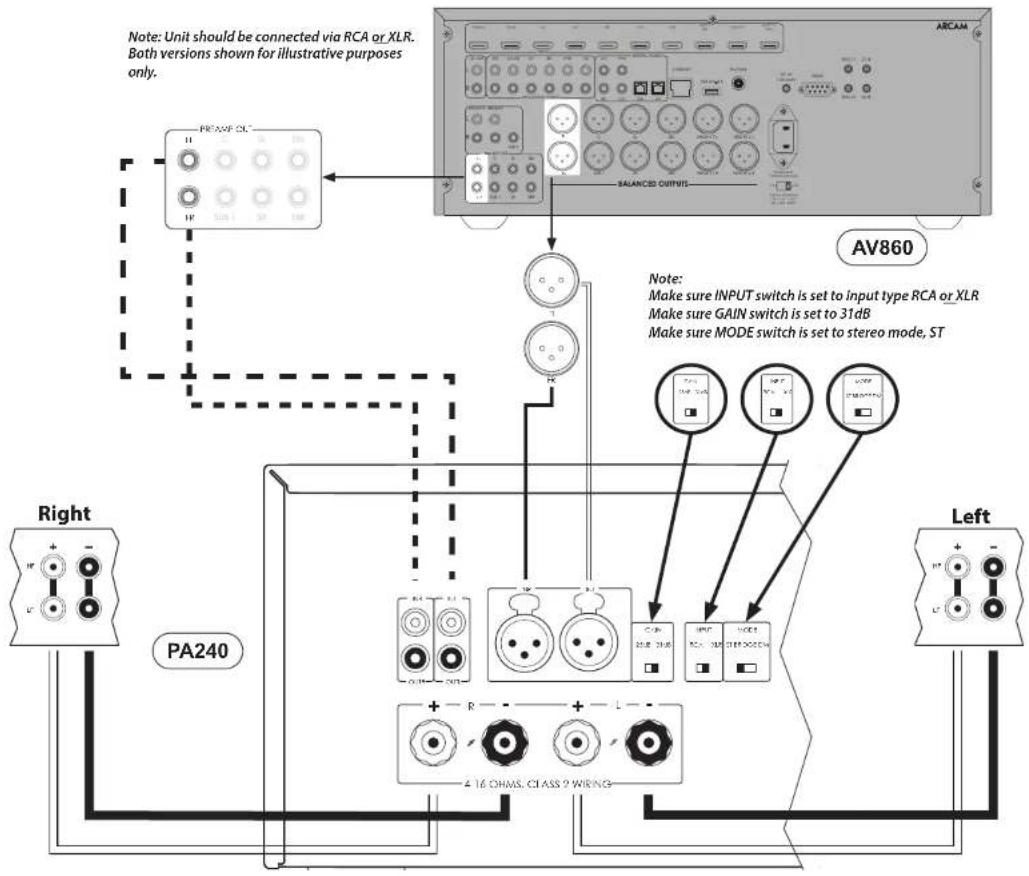
EN-14
PA410
Connect the RED positive speaker terminal labelled CH1 to CH4+ to the positive terminal of your speaker. Similarly, connect the BLACK negative speaker terminal of the same channel to the negative terminal of your speaker.
Repeat this process for the other speakers, using the same respective input and speaker terminals for each channel.
NOTE: All the channels are identical so there is no requirement to connect specific AVR output channels to specific amplifier channels.
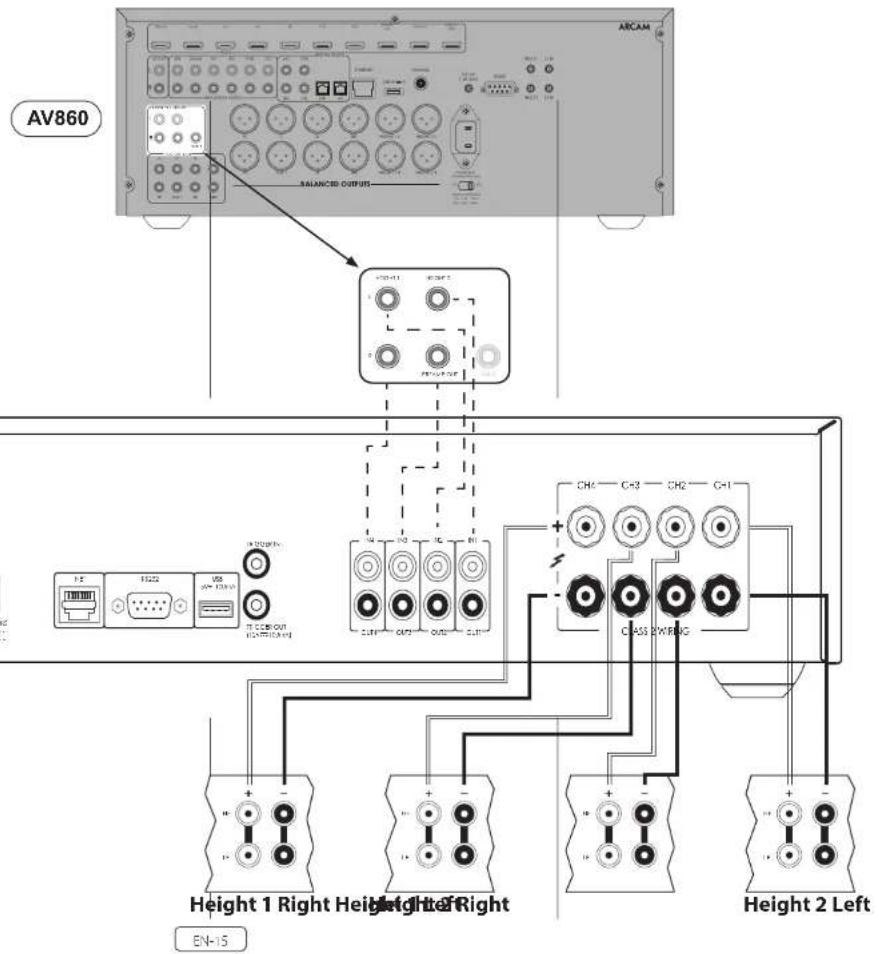
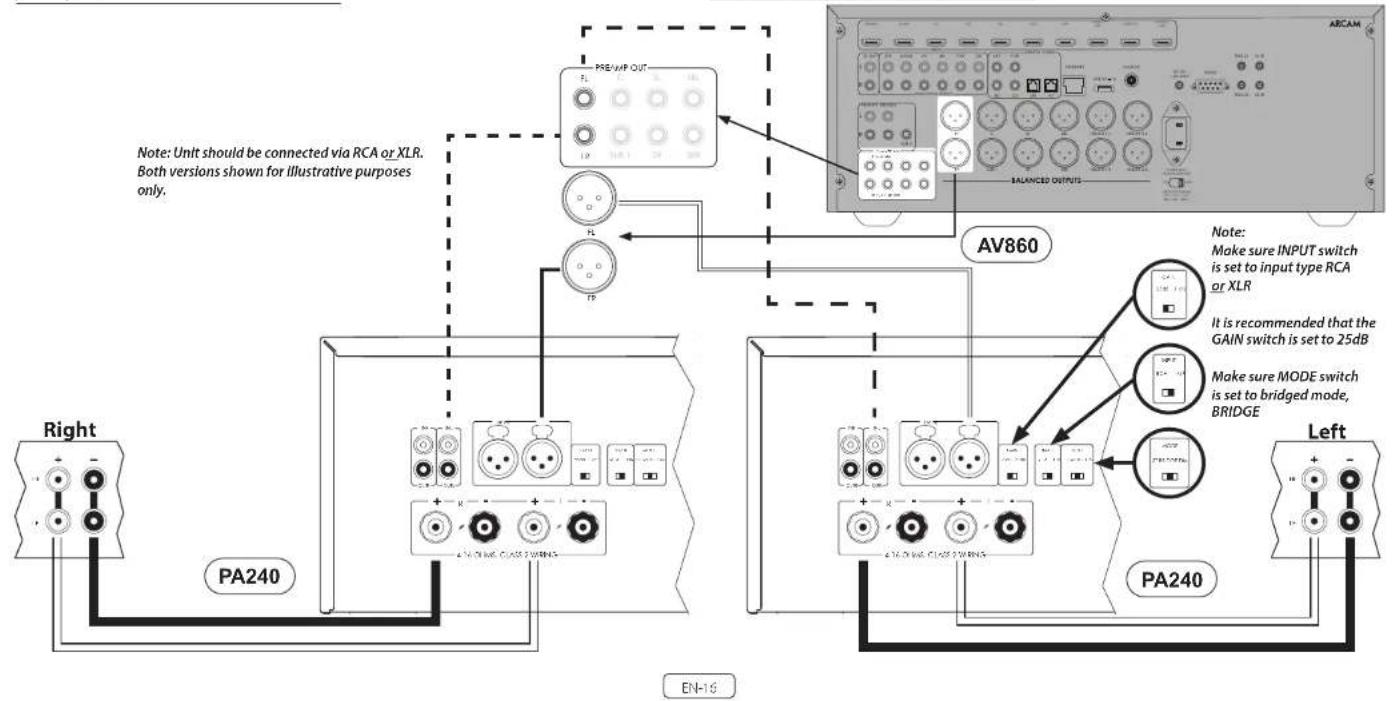
Bridged Mono Mode - PA240 only
Bridged mono mode requires the use of a PA240 for each channel.
Note: In bridged mode only the L+ and R+ speaker outputs are required.
WARNING: Do not make any connections to the L- or R- speaker terminals, doing so will severely damage your amplifier.
On one of the PA240s, connect the RED positive speaker terminal labelled L+ to the positive terminal of your left speaker.
Connect the RED positive speaker terminal labeled R+ to the negative terminal of your left speaker.
Repeat this process for the right speaker, using the SAME terminations on the other PA240.
Note: L+ must be connected to the positive speaker terminal and R+ to the negative speaker terminal on BOTH speakers otherwise the speakers will be out of phase.
WARNING: Make ABSOLUTELY sure you have used the L+ and R+ terminals of the PA240. L- and R- terminals are NOT required in this arrangement.
In this setup only one interconnect is required to each power amplifier and it should be connected to the IN L input. The interconnects can be either XLR (recommended for longer cable runs) or phono (RCN). Set the INPUT switch on both of the PA240's to the appropriate setting for the cables used.
Note: The IN R input has no function in this arrangement.

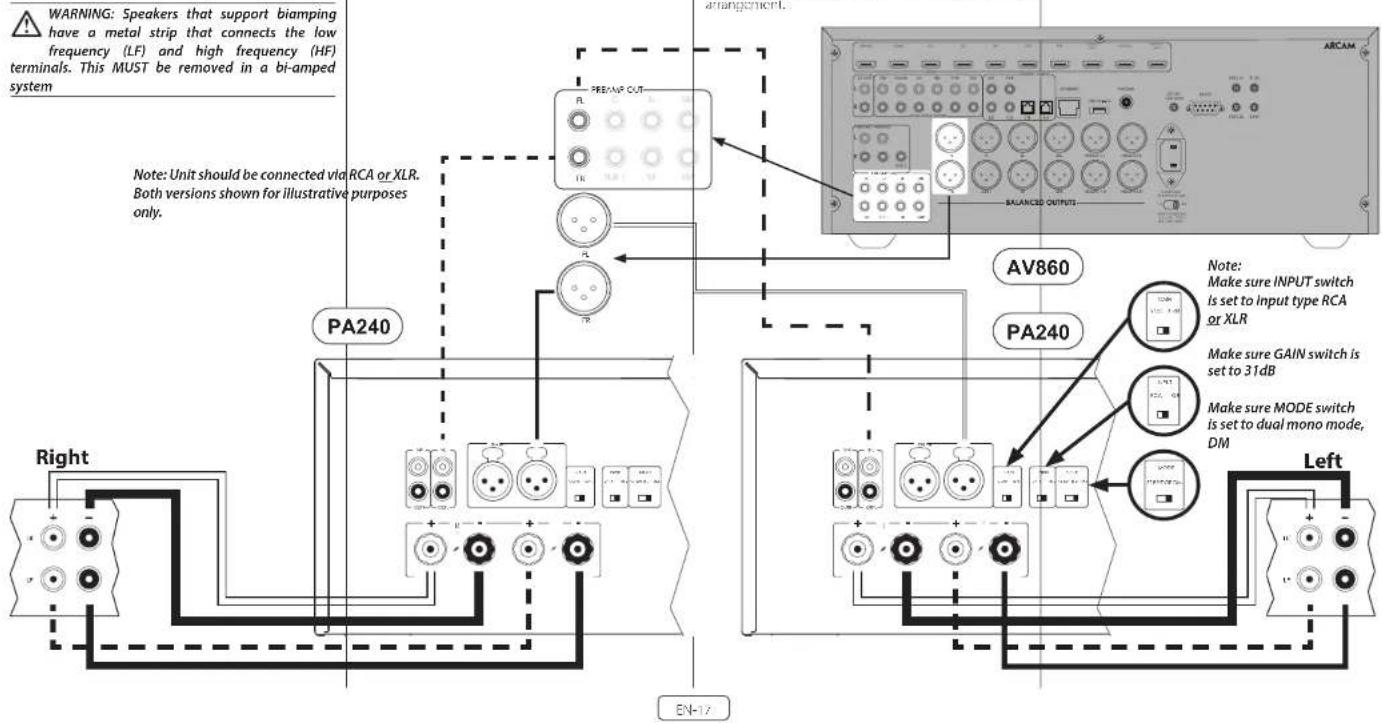
Dual mono requires the use of a PA240 for each channel. On one of the FA240's, connect the RED positive speaker terminal labeled L+ to the positive I- terminal of your left speaker. Similarly, connect the BLACK negative speaker terminal labeled L- to the negative I- terminal of your left speaker.
WARNING: Speakers that support biampling have a metal strip that connects the low frequency (LF) and high frequency (HF) terminals. This MUST be removed in a bi-amped system
Using a second speaker cable connect the RED positive speaker terminal labelled R+ to the positive HF terminal of your left speaker. Similarly, connect the BLACK negative speaker terminal labelled R- to the negative HF terminal of your speaker.
Repeat th's process for the right speaker, using the same terminals on the other PA240.
In this setup only one interconnect is required to each power amplifier and it should be connected to the IN L input. The interconnects can be either XLR (recommended for longer cable runs) or phono (RCN). Set the INPUT switch on both of the PA240's to the appropriate setting for the cables used.
Note: The IN R input has no function in this arrangement.
Troubleshooting
| Problem Check the following | |
| No sound | ☐ The PA720 / PA240 / PA410 power amplifier is correctly plugged in and switched on. ☐ Your audio/video source (e.g. pre amplifier) is correctly connected. ☐ The PA720 / PA240 / PA410 is not in protection mode, as described in the next section. ☐ The PA720, PA240 and PA410 is not muted. |
| Sound cuts cut unexpectedly | The PA720 / PA240 / PA410 may encr or a protection mode, depending on the fault being detected. The front panel LED will indicate the fault type, according to the list below. ☐ H ASHING WHILH: The internal temperature of the unit reached an unsafe level. Allow the PA720 / PA240 / PA410 to cool off. ☐ FLASHING RED: The PA720 / PA240 / PA410 amplifier detects speaker short circuit. Should this happen, please inspect all the speaker cables to make sure none of them are shorted together. This fault is very common when bare wires are being used to make speaker connections. ☐ FLASHING ORANGE: PA720 and PA240 only. The amplifier detects DC offset. Following any of the faults described above, the amplifier will turn itself off and power to the speakers will be removed. To continue using the PA720 / PA240 / PA410, the fault must be removed and the unit must be turned OFF then back ON. |
Specifications
PA720
| Continuous power output at 0.2% THD per channel | ||
| Seven channels driven, 4Ω / 8Ω, 1kHz 140W / 100W | ||
| Five channels driven, 4Ω / 8Ω, 1kHz 175W / 110W | ||
| Two channels driven, 4Ω / 8Ω, 1kHz 225W / 140W | ||
| Harmonic distortion, 80% power, 8Ω at 1 kHz 0.90Ω | ||
| Inputs | ||
| RCA Type XLR Type | ||
| Input sensitivity 100W / 8Ω 800mW RMS 1.6V RMS | ||
| Signal/Noise ratio (A-wild) 100W / 8Ω 110dB | ||
| Input impedance: 10kΩ | ||
| Frequency response 20 - 20kHz +/-0.05dB | ||
| General | ||
| Mains voltage 110-120V or 220-240V, 50-60Hz | ||
| Maximum power consumption 1.5kW | ||
| Low power standby consumption | ||
| Network standby consumption 2W | ||
| Dimensions W x H x D (including feet, control knob and speaker terminals) | 433 x 475 x 177mm | |
| Weight (net) | 18kg | |
| Weight (gross) | 19.7kg | |
All specification values are typical unless otherwise stated. Arcam has a policy of continuous improvement for its products. This means that designs and specifications are subject to change without notice. E&OE.
EN-19
Continuous power output at 0.2% THD per channel
| Two channels driven, 40/80, 1kHz 380W / 225W | |
| One channel driven, 80 bridged mode, 1kHz | 790W |
| Harmonic distortion, 80% power, 8Ω at 1kHz 0.301% | |
Inputs
| RCA Type XLR Type | ||
| 31dB 25dB | 31dB 25dB | |
| Input sensitivity 700W / 8Ω 1.15V RMS 2.3V RMS | 7.3V RMS 4.6V RMS | |
| Signal/Noise ratio (A-wtd) 10W / 80Ω 110dB 114dB 110dB 114dB | ||
| Input impedance 10kΩ | ||
| Frequency response 20-20kHz +/-0.05dB | ||
General
| Mains voltage | 110-120V or 220-240V, 50-60Hz |
| Maximum power consumption | 1.5kW |
| Low power standby consumption | 0.5W |
| Network standby consumption | 2W |
| Dimensions W x H x D (including feet, control knob and speaker terminals) | 433 x 425 x 177mm |
| Weight (net) | 18kg |
| Weight (gross) | 19.7kg |
All specification values are typical unless otherwise stated. Arcam has a policy of continuous improvement for its products. This means that designs and specifications are subject to change without notice. E&OE.
| Continuous power output at 0.2%THD per channel | |
| Four channels driven, 40/80, 1kHz /50W / 50W | |
| Two channels driven, 40/80, 1kHz /50W / 60W | |
| Harmonic distortion, 80% power, 8Ω at 1kHz 0Ω 0.3% | |
| Inputs | |
| Input: sensitivity 50W / 8Ω 560mV RMS | |
| Signal/Woise ratio (A wild) 50W / 8Ω 106dB | |
| Input Impedance 10kΩ | |
| Frequency response: 70 - 20kHz +/- 0.2dB | |
| General | |
| Mains voltage 110 - 120V or 220 - 240V, 50 - 60Hz | |
| Maximum power consumption 700W | |
| Low power standby consumption 0.5W | |
| Network standby consumption 2W | |
| Dimensions W x H x D (including feet, control knob and speaker terminals) | 433x325x105mm |
| Weight (net) 10kg | |
| Weight (gross) 11.5kg | |

All specification values are typical unless otherwise stated. Arcam has a policy of continuous improvement for its products. This means that designs and specifications are subject to change without notice. E&OE.
EN-21
Worldwide Guarantee
This entitles you to have the unit repaired free of charge, during the first five years after purchase, provided that it was originally purchased from an authorities-Ascram dealer. The Ascram dealer is responsible for all after sales service. The manufacturer can take no responsibility for defects arising from accident, misuse, abuse, wear and tear, neglect or through unauthorised adjustment and/or repair, neither can they accept responsibility for damage or loss occurring during transit or from the person claiming under use guarantee.
The warranty covers:
Parts (excluding disc drives) and labour costs for five years from the purchase date (see below for additional terms and conditions). After five years you must pay for both parts and labour costs.
Disc drives (of any type) are covered under this warranty for two years from the purchase date.
The warranty does not cover battery replacement at any time.
The warranty does not cover transportation costs at any time.
Claims under guarantee
This equipment should be packed in the original packing and returned to the dealer from whom it was purchased. It should be sent carriage prepaid by a repuable carrier—not by post. No responsibility can be accepted for the unit whilst in transit to the dealer or distributor and customers are therefore advised to insure the unit against loss or damage whilst in transit.
For further details contact Arcam at arcam/support@harman.co.uk.
Problems?
If your Arcam dealer is unable to answer any query regarding this or any other Arcam product please contact Arcam Customer Support at the above address and we will do our best to help you.
On-line registration
You can register your product online at www.arcam.co.uk.
MANUEL

ARCAM HDA
AMPLIFICATEUR
PA720 / PA240 / PA410
Bienvenue
Les amplificateurs Arcam PA720, PA240 and PA410
MODE (PA240 seizure)
PA720 / PA240 / PA410
Willkommen
PA720 / PA240 / PA410
Welkom
Arcam's PA720, PA240 and PA410 versterkers
BRIDGED MONO (BRIDGE)
PA720 / PA240 / PA410
Bienvenido
PA720, PA240 and PA410 de
Arcam
BRIDGED MONO (BRIDGE)
PA720 / PA240 / PA410
BAKHbIE INHCTPYKUNI NO TEXHNKE BE3ONACHOCTN
| Toproban MAPK:ARCAM | |
| Habatien He tobaap:YcHInTeB.8yKosO BocToBt | |
| Vstotovotien:XaOMAH INI terpHeunn NlaCpR yNkOporeJed.CIIA 06901 KoHNekhtyT.F.CrAmFpD,ATzAnTHK Cptn400,odmc1500 | |
| Cipea IpiocxoxmuaHbK Kita# | |
| Imioporper R PoCCNO:OOO "XAPMAH PYC.CApE,"PoSSM,172018,I.MoCKBa,yL,IvHINIEs, N.I7,K,T | |
| TepanHHHnn nepo;5 net | |
| Mifopomauia o cepoAchnx uenHpax.Htph./harman.club/servicecenters/arcam.1e+7-800-700-0467 | |
| Cxxk cUykbic 5 net | |
| Toobap seprhmuropoan | EAC |
| Diptipovarudct hata:Data kio ToBnChn yecOcOBHn OpiPcOBrCTe HIO Daum ByckHnHn oboiiauHmHm Htropo prpymbI chmooos cepinHoro POMpa Iaedn,chenyoux noche paadentneHb-IHOaIaK e←. KoOpocBcOcOaHcHcHcHcHcHcHcHcHcHcHcHcHcHcHcHcHcHcHcHcHcHcHcHcHcHcHcHcHcHcHcHcHcHcHcHcHcHcHcHcHcHcHcHcHcHcHcHcHcHcH PcOByBcHcBA(A-HaBcB,B-dcSpB,C-MapH,(JU)AxyT),PcOByBcHcBA(A-2010,B-2011,S-2012,T,A). |
YIOHJLYIIC YCYCDIOCHIO TLOIKI HOI YIMMOHIE HENJIHICHIO CIO SICCIICIO CIO IPOJOIOJIICHIOM HHCIOPIKUKE, HCIOI HCMCLOCAIOHIO KIRKHOI BIKI YOIC ILOPEA OUCIOBIHIO CPMOHIT, C BYOIOID OOOYIOHIO KHYOKAI KAKOHNIO, OBOIOIIEAE 3A PAHOIPOHIO OOOIOHIO MCOOIOHIO AEOIOIIOA MDOHOIOHIO TAOHOI, OOCIOE YCYCSOS XPAHHEIN, PESIAKIAOIO (M) TMPOCTOPROB. HE POLOVKOIIIOO HOOOIOOIOO OPOVOOIOO OPOVOOIOO OPOVOOIOO OPOVOOIOO OPOVOOIOO OPOVOOIOO OPOVOOIOO OPOVOOIOO OPOVOOIOO OPOVOOIOO OPOVOOIOO OPOVOOIOO OPOVOOIOO OPOVOOIOO OPOVOOIOO OPOVOOIOO OPOVOOIOO
PnPBcTCTBn
Cnacn6o 3a okazahHoe HAM DOBepne n no3dpabnem...
CIOKyOyHIOHIOHOAARPA720,PA240orPA410
KOMANHAARACCAMBUTYKCAECHNEKANPABIOHANHYADNACATAPATyBAUONAHMEROKUHOBHAYUKOBOHETBAYOKOBOHETBAAECNTAHTHE. YCANTINMMNMOHOCTCNPEPA7202A440 ANDPA10NAHOTHODEHUMMAPOBACKAM3AHEIIMPOKOMNTHAEYCTPOACTKNACCAHI-KOHKTPOJIRCEPHDAOPTAHTAEBGTOBATTBNOTARAC, OJQHNIHAMCMAHXTCCLOHNOKOMNTHAI BORIKOBIDZAMH,BUNYKAOIOHNYAMUBKAIHIOHC6OBYHOMBA.CPRN MHOAGALBHAXYCBNTOCMOHOCCTAARCMI,OUPMOBILNCHPNHOBBIOHOOHMJDJHCM,TIOBOHITBMMOHOHOIIEIYYDPOVYIBYMDMYA
Haeonnoe pyocnncjro coepnckn Rco hcnkynmne Hmnpnnn no yctanokn k actyatamn ycmnnr 1PA20, PA240 and PA240, bn ncan oanae paucpehnyuyn, Ttobny harn nyrepcnuon paaed, Bocnony sytece cnoaaneiye, paccnonoe Hmna hcnedyone CTPAABIL.
MHNAPENCC, TNC HAIIE YIOTXIOPOCTYAM JAPAN TOPA, BY CHAYE ROHINHOSEWEN HENOTAYK B PABOTE YOTXIOTA, A TAKKA IREHOCOXYMOCTYAM JAPAN HOJITHIHIN MOHAPOMA O NTOPODKTAYK ACAM HAJIAN DEBPEO BOYATI KADU, TNC HAIIE YIOTXIOPOCTYAM JAPAN TOPODA, BY CHAYE ROHINHOSEWEN HENOTAYK B PABOTE
Komanda cneuaanctob no pa3pa6otke PA720, PA240 and PA410
Copepkanne
BAKHbIE INHCTPYKUNI NO TEXHNIKE B3ONACHOCTN RU-2
PnPBETBne
0630p
YCTAHOBKa YCTPOINCTBa RU-5
CoeHNHTENbHeKabEn RU-5
3ncktponntaHRCU-5
Pa3bembl nIeMeHtbl ynpabHeHHa 3aHne naHenn PA720 RU-6
Pa3bEmbln 3neMeHTbI ynpabHeHna3aHne naHEn PA240 RU-7
Pa3bembl nIeMeHtby npBnHeHa 3aHne naHn PA410 RU-8
TIOKJIIOUeHHe cNCTeMbI ynpaBnEHn RU-9
NopTbNET(CeTb)R RS232 RU-9
USB RU-9
TprrpBn BXO/DBbIXO DU-9
RU-3
RU-5
3nemEnbIy npabHeHn npa3beMbHa nepeDne naHn RU-10
3KcnnyataaynyctpoCTBaRU-11
BKINIOHNE RU-11
AeTOMaTueckoe nepeeknouchne B pexm OxpaHNA RU-11
DyHKn ynpaBneHn no cetn upe3 npr RS322 b pexmmeckn daHH
OIOHCHNC BbXoDa
IpeeknoaTepeKMOB
RU-11
RU-11
RU-11
IoiKIOUeHMe NCTOuHnKOB CnHaNoB I KOHOHOK
MocTOBOI peKIM MOHO -TOnbKO dNPA240
Pexm DboHoro MoHO /DbyXkHaHbIoro yCnneHn -Tobxo pna PA240
RU-12
RU-15
YcTpaHeHne HeCnpaBHOCTe
TexHuecknXapaKTePncTKn
PA/20
PA240
PA110
RU-18
RU-18
RU-19
RU-20
MekdyhapoHaHraIapaHTn
RU-21
0630p
Ycnnntn Arcam PA720,PA240 and PA410
XueYinTeiHKMOHIOCTH ArcAM PA720,PA240 and PA410
OecheTcHbAOT BHOCHaJIe KHeCTBO 5yB3 D CBoEM
KHeCCEI HnHJNtIO OTOIOIOIOIOIOIOIOIOIOIOIOIOIOIOIOIOIOIOIOIOIOIOIOIOIOIOIOIOIOIOIOIOIOIOIOIOIOIOIOIOIOIOIOIOIOIOIOIOIOIOIOIOIOIOIOIOIOIOIOIOIOIOIOIOIOIOIOIOIOIOIOIOIOIOIOIOIOIOIOIOIOIOIOIOIO
YnHnHnHnHnHnHnHnHnHnHnHnHnHnHnHnHnHnHnHnHnHnHnHnHnHnHnHnHnHnHnHnHnHnHnHnHnHnHnHnHnHnHnHnHnHnHnHnHnHnHn HNHNNNNNNNNNNNNNNNNNNNNNNNNNNNNNNNNNNNNNNNNNNNNNNNNNNNNNNNNNNNNNNNNNNNNNNNNNNNNNNNNNNNNNNNNNNNNNNNNNNNNNNNNNNNNNNNNNNNNNNNNNNNNNNNNNNNNNNNNNNNNNNNNNNNNN
10404040404040404040404040404040404040404040404040404040404040404040404040404040404040404040404040404052367 11111111111111111111111111111111111111111111111111111111111111111
YENCHIPINPA70,PA240andPA10 HUOZHUBIDI QIETAFMy35YIKNHOCTAHONYEMIDH
yCTaHOBka yCTpoIcTbTa
YcHnHae Hnnnna HPOBOP TnOHOHPOHNOHnDnOoTIOIPOWONNTOIPOWONNTOIPOWONNTOIPOWONNTOIPOWONNTOIPOWONNTOIPOWONNTOIPOWONNTOIPOWONNTOIPOWONNTOIPOWONNTOIPOWONNTOIPOWONNTOIPOWONNTOIPOWONNTOIPOWONNTOIPOWONNTOIPOW
HHe yraanauane PA720PA40 or PA10 Hpyyue yrnnnncn MCHNOCINM NARNEHCTOHNNTFNA.
He ycheaiaiye yinncnntb 6akpem
Ipoctpaicte. HarpwpeW 3 KIKHNIKIOAkyoM 8
32KcPcTAtOCTKe, eOHa TME oecbcTeHena XopoueB
BeHHmNtUy, YkncnTMePAV20, PA240 and PA410
MOY, HapCpSCHIO BPOW HOHcMTHaHsB GBOJI.
Hc paoaehn Hnnnnae npnnnne Knnnnnne Hnnnne nnnnne nnne nnnnne nnnnne nnnnne nnnnne nnnnne nnnnne nnnnne nnnnne nnnnne nnnnne nnnnne nnnnne nnnnne nnnnne nnnnne nnnnne nnnnne nnnnne nnnnne nnnnne nnnnne nnnnne nnnnne nnnnne nnnnne nnnnee nnnnne nnnnne nnnnne nnnnne nnnnne nnnnne nnnnne nnnnne nnnnne nnnnne nnnnne nnnnne nannnne nannnne nannnne nannnne nannnne nannnne nannnne nannnne nannnne nannnne nannnne nannnne nannnne nannnne nannnne nannnne nannnne nannnne nannnne nannnne nannnne nannnne nannnne nannnne nannnne nennnee
H He yehaahnnae Hekpnpnpnphn Hyaepnnae. Eekpnncnpanpaon OHn HyaepntbneHN K NOVAM ENOEN NINAHAN. IaeK OONN ANONN ANONN INNNN Hc paonbaarccn pponpnnn nnnn Bn
Hopnne Hnynnnncnnpnnae yctocla Mochat hnt Hanyunno 8ydtyntate npnncnnae CnHbHK ntnpomnnnncnncnncnncnncnncnncnncnncnncnncnncnncnncnncnncnncnncnncnncnncnncnncnncnncnncnncnncnncnncnncnncnncnncnncnncnncnncnncnncnncnncnncnncnncnncncc
CoeHHTeBHe k6eHn
TprrrepHbBxOa/BblXoD
Cocronemn mnnn FA720, PA240 and PA410 moHIO
ynpnncn c noovnoo coonrtnbxy aynic/bnye
yypnncn (TANK KX yyno- bnyepeepneepn Apcm).
Ia nrooNknoHnme Tnrrreepn Bxocn (TlCCEROT).
yypnncn ynpnncn k TpTneepnmy oOyD (TRGGER
IN ycmnter FA720, PA240 or FA140, cnctttae
MOhoipnneckcn kaeBc CzBaEMC 3.5 M
TeHIOI KIK JU YCINCHNIA720,PA240 and PA410
YCNITYQNNBHTIINAHAMCBOVCTVNOYcYCOEETA
(1)HNWVEE,EPYRTOYCNIVNTES720,PA240 or PA10.8
B 1361111111111111111111111111111111111111111111
TRIGER (N) yCPOCTCAIyOVAENHNIK P'parrpehmy
bBAeOy (RCGHOHOUT)YCNHAIHNA720,PA240 or PA10.
HCNNNHNN NCCXQDQHNNNKNK CKBONL CPATHMOAT5.5 mV
PnmeaHm.ynovyIyte bde kabeA B ckmneR

3IeMeHbI ynpabHeHn npa3beMbHa nepeDne naHenn
PU-0
3KcnnyataunyyctpoNCTBa
BkIIOUeHne
KIOHKAPOWRAIIEpeepieRanenCrynKATN D BKNKHEHIN N BKNKHEHIN yctpOCTBa. CoCTONBHe YCNHTENOpnpEePEnET C NOMOBu CseTODMOHO HNDKUPAOK KOy IyctpOCTBO HNOKMOHIO K ETCN TANHDM HOHC BBNBOHOHO, MHPKIOTOOT PBCKHAM 13eTONPn BNKOHNHIN yctpOCToC C NOMOBU KKNBUN TINHAN AHHNAD OOP BPTOPOCH CHMNAI ODEKHNKHN, BACATGEOHNTIOAM.
KANIOI STBY R to spBn, korty yTPOWCTAO BKNIOHO, neoK40Ae FA720, PA240 or FA410 a pBNV ONDAM. Postopuie IaKNTVE KONIOI STBY BKNIOHOY TPOWCTAO 1950 and POMMILIN DOKHAP
ABTomatuecheckoe nepekniouehenbpeKIM OXnDaHn
B 10896 cooHIOOHN MOKyHApOoHbK PABIN B OTOHOEMN NOPTeRbckX To3a0s DaIIHOE yCPOKcBO AOTOMAENCK RepeKbIcET E B KEMIN OKiADJIa, ECN B THe-IEHc DITIOHOR HEPNOPA BPEMHI HET HIKAKO, AitIOHcOTN PnIOZoTeT N H XkDAPK OYTOYTAOyAudHOCINAIH (No yMOHANHIO 20 mWHy). YCOPTbKO MocKcI BtBnBaCn HO pONMI KOMIHN HAMATNIK KHOHN STBY HA HOPCHIOI HOBVIL, A HOKK OIHJN KOMBIH NOpCpIgNTHK XbO, NKpS732 aHnHcHcN (KcN Hn FyHnQn KOBONHc, pOHTIOHcyHcN JDNIOHNTCNHOH HIOPOPMMA cM. pAned kdyHKnUyAUPmHNN no Cm4A H2O2PcST (RS732 bPKNMcOgHdJIa)
Bbma Tnayta nnaepeo d pekkckpokn
mooh ng aagh kowahmnyaepnenepees R5237/
IF.Cu. yipyemn cypannepe PA700 /PA740 /PA10
heoe 5323/PI, KOTOPM MOHO cKaHb se6calne
www.arcam.co.uk
B K3HCTE 2NPTREPIATNYB, LAKKTHY A YDEOKO3114HEKONMUM MUTE HPCKINKOINIKI KPOCM KOKAIBPAIMMYOTF N20 MHTYAM.
CICCIYIOO BYIOMI YIKINHAI, YIKINHAI HAI KIMMOHNHOH BAOXPOK, KHAPKHAN BAHBIL, ANCHHAI 20 MOHAI.
Pnmeaane. htni tna naiyia pncnna caknnae 2aana hnae kane CFF, yhnnn aetomnneckno 1nepocnncn bcnmnnn nnnnnnnnnnnnnn
Функцу упразвени no ceTN upeze npT RS322 B pexmE OxuaHn
PnHAXOHTB C BOKWNE OCHDTHC M NHHAMATHEH NNTPBDEHNNNEOTN,CEOTNOOPN PNKDOE 3 POKMKNADHM BYET KKTOKPOPEHIN HIKNT3b
Pnmpmeeahne. Axtnaaun ykkuu ypurbaenno no cnpnnncn hopt R5232yauhnhnchprrnncpncnncnbecknne 0 peKwE OOKAANH, n76occtanoeNHNBzABDcOeHn HsRIOHNNI, n91 KcOeONcYcPOCINHOHpOeCNH MHHMBAHbHy NHePnRg E peKMaE OOKAANH, HsKMMTE KHNKHYSTBYNjpcKnHnHnCtNcHnHnCnCnCnCnCnCnCnCnCnCnCnCnCnCnCnCnCnCnCnCnCnCnCnCnCnCnCnCnCnCnCnCnCnCnCnCnCnCnCnCnCnCnCnCnCnCnCnCnCnCn
OTKIOUeHne BbIXOda
3BxOJI KONOHOK PA720,PA240o PA410 MOHNI OIKHNIH NIB HENHINN HINKIO MUTE pachIOHNHOH HnpeHnHn HnHnHn HncoTcHcyOeKOMAHd. 1111111111111111111111
INPUT [TolbkoДЯPA720 n PA240]
EIOI HEPENONA HADROSOH SABPANI XH RAIHO
FOHO KCA. SABPANI XH 10000000000000000000000000000000000000000000000000000000000
MODE [TOnbko dna PA240]
TOT repknoeepers FOABNET Rbipatps paasnHHe pRyDcHcyHcyH cyPPOPA PA200
CTEPEO (ST)
30 30 30 Cnncnne 2000000000000000000000000000000000000000000000000000000
ДВОДHAEOMOHO(DM)
B 307 xopkwa de opnepnne kcnchna cabotok or ophoxo kopa nnoaydnten.
TnE hOeOoWOnC Taa DAnAMKc 0100 kononkM OMO pOIOI OJ CIOO cOONHAP2O
MOHO NO MOCTOBOY CXEME (BRIDGE)
3 TcRnKbO6aKaHauyA cyuHHTPA240 pa5cto10 H 0dOHy KOHcy,3rO oceBnBaMaT MaHbHbHy MOHcKcH bHbKOcKfD KcKcBcKcHOB
IopKnIOUeHHe NCTOuHnKOB CnHnAOB K0JHOHOK
PA720
I KIOKONKO: KAPACHYIO HOHOCHNIOHNO KYO CHMUYI JIBI KOHOKOHIA (KEHOPKOKIA CH1-CH7+) KIOKONHO HIOHO HIOKONHO TANHO TAKKO HIOKONHO EPHYO HI O PHTHIO HIOOMO JIUP KIOHOKHI TO C KIO KABAMI O OPOTILTEHNI KWEWE KOOHONO
HIOHOHO HIOHOHO HOHOHO HOHOHO HOHOHO HOHOHO HOHOHO HOHOHO HOHOHO HOHOHO HOHOHO HOHOHO HOHOHO HOHOHO HOHOHO HOHOHO HOHOHO HOHOHO HOHOHO HOHOHO HOHOHO HOHOHO HOHOHO HOHOHO HOHOHO HOHOHO HOHOHO HOHOHO HOHOHO HOHOHO HOHOHO HOHOHO HOHOHO HOHOHO HOHOHO HOHHOHHOHHOHHOHHOHHOHHOHHOHHOHHOHHOHHOHHOHHOHHOHHOHHOHHOHHOHHOHHOHHOHHOHHOHHOHHOHHOHHOHHOHHOHHOHHOHHOHHOHHOHHOHHOHHOHHOHHOHHOHHOHHOHHOHHOHHOHHOHHOHHOHHOHH
DononHntelbHa HOpMaun O noKnoueHN K0Johok
PA240
IIOKOBAPKIP KACHYOH NTOKINENHUY KINOMYJ BJI KENOHKO C M KIPIKOKPOK K L TNOHNCHUONHKG KINOME NEOHNCHOU. TOHO TAK JAE NOKIPKHTME HEPHYO E OPHN CHNYEK KINOMYJ BJI KOHNOH C M KIPIKOKPOK K L T O PHINCHUON KINOMVCE KINOMYJ KOHNOH
Hospoty any npery ytnpapok
PU-13
PA410
KAPACHYIO HIO KIHOHNOHYKO KINMOJIKI KINMOHIA (VAEHPOPKNGI CH1-CH4+KIOKNGKIOHIOH KINMOHIO KINMOHIO TOHO TAKNE KOHNBOHTBE YEPHYO OTOPIA KINMOHIO KYMO JIKO KINMOHIO TOKAO KINMOHIO KOTPOPLATOHIO KINMOHIO
NORTOSATE AYNEPAPU DIAIITYMK KONIOHOK, HIOHNHOO CDO HOBIC BYIKIMKICMIKEMKENKO KENKO KANALIPNMEHAHME, RCE KAHAN APHYHINH, TCHNYOH HE pRyEOTIO NOKNOATC BCPENDEHHE BILPOHMH KAHAN AYPLOH NAM PABOPECAepa K OKHPEHMAK
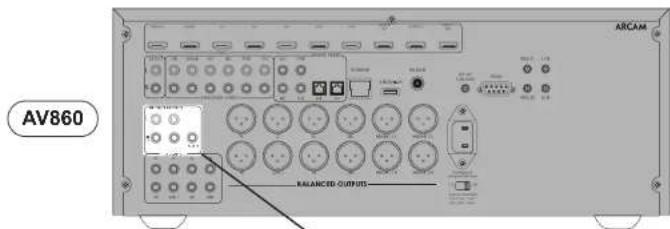
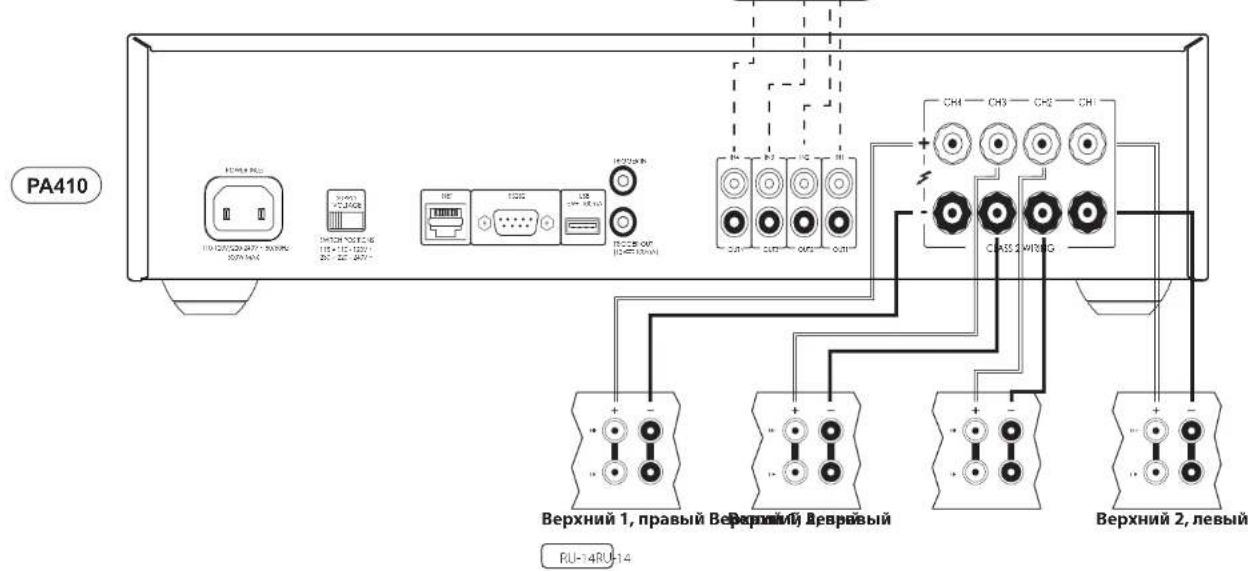
MocToBoH peKIM MOHO -Tolb-KoJaPA240
JIN MCGTOSO PENDAS MOH TEPHYER YCANTHERA PAZO 18, 18 KAKOTO KAKATA
PnmeaHne. BHXIOHOBPOKIMHCIOHOBTOCH TONBOHOBDOIJIYKOHOHOL+L+R
BHIMMAHIE! He bmoHnHlme HkKAMoNokmouHeHH K kEmMMam L- unu R- Ka konolme, mak K an3mo npueBed cKeBbSNOy NorpeKDeHun yucunumnn.
HaOpHmAs yvntner PA240 roKoHTe KPACHYIO HOCHHOHRY KICMOY JINK EIOHOK C MepnPOBNO L+ KIOHOPOCHHOHKOAMC KOHO
IpKNOKP4KACHYIO nonKHTeHcy KTHMnJIN KONOKC MOpKPOKoKoR R KOpMJIaCHNHO KICIMC NIOBKOKHO
HIOIPOIC 101101101101101101101101101101101101101101101101101101101101101101101101101101101101101101101101
PnmeHne.BxOINR BTOIcxMeHHeKcnoBsyenC

YcTpaHHeH HeNCnPaBHoCTeI
| Плоблика что лужно плоберпь | |
| Осуctrветаук | □ ус��ные мочнисту PA720 / PA240 / PA410 наденизам obodessу нлобликах пошиму ворону. □ Истенically speaking, редиму ( нлобликах пошиму: ■ Yucроставо PA720 / PA240 / PA410 несядиems в розиме заши; ■ К��ыханы ворону: ■ Рожиму: ■ Yucрostаво PA720, PA740 and PA410 несядиems: ■ Н�ал�: ■ Yucрostаво PA720, PA740 and PA410: ■ Н�ал�: ■ Yucрostаво PA720, PA740 and PA410: ■ Yucрostаво PA720, PA740 and PA410: ■ Yucрostаво PA720, PA740 and PA410: ■ Yucрostаво PA720, PA740 and PA410: ■ Yucрostаво PA720, PA740 and PA410: ■ Yucрostаво PA721, PA740, PA740 and PA410: ■ Yucрostаво PA720, PA740 and PA410: ■ Yucрostаво PA720, PA740 and PA410: ■ Yucрostаво PA720, PA740 and PA410: ■ Yucрostаво PA720, PA740 and PA410: |
| Виесагонецчес宪овские лужы B | Засиммоста с: Obligations of the obligations of the obligations of the obligations of the obligations of the obligations of the obligations of the obligations of the obligations of the obligations of the obligations of the obligations of the obligations of the obligations of the obligations of the obligations of the obligations of the obligations of the obligations of the obligations of the obligations of the obligations of the obligations of the obligations of the obligations of the obligations of the obligations of the obligations of the obligations of the obligations of the obligations of the obligations of the obligations of the obligations of the obligations) |
TexnuecknxapaKTePncTmKn
PA720
| Hempelpebina Bihoxdahar Moohocht ha Kaahan ppr noHOM KO3phiuehnte HennneHbX NcKaxkhen 0,2% | ||
| Cemb kaHao, 4 Ov / 8 Ov, 1 KtU, 1403r / 100B | ||
| Pttb kaHao, 4 Ov / 8 Ov, 1 KtU, 1753r / 1106r | ||
| Дыka KaHua, 4 Ov / 8 Ov, 1 KtU, 225Bt / 1403r | ||
| TajmhoHauEChme hckamchenia prpr 809 moHIOHOCM, 8 Ov, 1 KtU. | 0,002% | |
| BxOaIb | ||
| Tin RCA Ttin XLR | ||
| HycbtmaeienHooctb bokja 100 Bt / 8 Ov, 0.88, cpr | KbaIp. 1.6B, cpr. KbaIp. | |
| OHHoHcHcM cnil ha/lym (A-330eU) 100 Bt / 8 Ov | 117,b | |
| BxOaHoe ItoHoe conipotnHene Hne 10KoM | ||
| Jachotna XoaaktepeHCTaKa 20 - 20 KtU +/- 0,05 | d5 | |
| Oooume cbeHnna | ||
| HaonpaHcHcMe cetri pntanHya 110-120 B x yz 220 | -240 B, 50-60 F# | |
| MaKoMaJIHbN aToOpSeBcHMe MaOuHochtb 1.5Kt | ||
| HikKeO eHepropotpebHe me B pOxHMc OoKDbHn | 0.5KbT | |
| ItopebHcHcMe b cetri b pOxHMc OoKDbHn 2Bt | ||
| TabapHTn U1x B x Γ (EKHOHcH HocKy, pyKu pOyYHbRbOKn IocMKcHn H KcHMc dPrn IocMKcHcH KcHcHcK) | 433 x 425 x 177Mb | |
| Macc (Iietro) 18kr | ||
| Macc (6pyTto) 19,Ykr | ||
Ecni He ykaaHNO uHOe, 3z 3haueHHN napamempo
raHmoc munobMbU. KomnHaR Arcm noomrHNO
paBomaem HNDyhuuHMe c0ei npdyukmu. 3mo
o3Haayem, 3mo koncmpkymbHoe uCNONHHe u
mexHuCKeKne XapakmePucMku npdyukmu MoZym
U3MnHbCbe 3g npedabumelbHO zuyEboDMnHn.
B2O3MxHb CNYauHBe OUsuKu n ponyukCu.
PU-18
| Hertepbaryab HbXODHAB MOUHOCTb Ha KaHAN pRIN PONHOM KO3ΦΦMENTE HeHNHEHbIX ICKAXHEN 0,2% | |||
| Да KaHAN, 4 Oм / 8 Om, 1 KtU, 3803r / 2256r | |||
| Однaya KaHAN, B Oм, Мбх�снй рсоки, 1 KtU, 7303r | |||
| Таролиншевские Икадемия рSry 80% monu-oxim, B Oм, 1 kH | |||
| Вхodы | |||
| Tun RCA TUn XLR | |||
| 31.08.25.06 | 31.08.25.08 | ||
| Суровные сн�хоть ExOJy, 700 Rr / 8 Om 1.158, | cp. KBdRp. | 2.38, cp. KBdRp. | 2.38, cp. KBdRp. |
| Однolieчесу снану (A-BaHIM), 100 Rr / 8 Om | 110pIb 114pIb 110pIb 114pIb | ||
| Бхodпode monie corpotvanelne 10KcM | |||
| Часоть Харазгетхима 20 - 20 KtU +/ - 0,05 pIb | |||
| Ошке сбedingи | |||
| Наряжсakсс сstri nui hienh 110-120 B mla 220-740B, 50-601r | |||
| Марочьдддддддддддддддддддддддддддддддддддддддддддддддддддддддддддддддддддддддддддддддддддддддддддддддддддд徳 | |||
| Нарочьдддддддддддддддддддддддддддддддддддддддддддддддддддддддддддддддддддддддддддддддддддддддддддддддд徳 | 0.5k3r | ||
| Погорбий сstri nui rрсрссocmokryan 7Ri | |||
| IaBaHIM III x B x I (KbOHIM NOKHIM, By-ky peRyPovRyPovrI pOMKcStn y KIeMaH dIy IaOkbKcNevH NOKHOK) | 4.33 x 425 x 177MM | ||
| Macc (HETTO) 18kr | |||
| Macc (6pyTTO) 19.7kr | |||
EcnHue yka3aHO uHOe, ace 3naueHua napamempo
rAeHMOCTMn uOBOBIMu. KomHua ArcAm noctmoHNO
pAbOMeH nAD ynuueHme Coeae npdykuHm. 3mo
03Haayem, mIO KOcHmpyKmUHoe uOIOHNEu u
mEXHuCKe KxapKeMPCUmK npdykuM Mo2yM
U3MeHMBCb 63 npdeapumelbHO ybeDMnHUE.
BO3MoHNc cyauHHe OsuKHe u npOycuK.
| Hertepbivahna bixdohna moohocht ha kahan pinnonHom KO3phiuehe THeHHHeBx NcKaxekhen 0,2% | |
| Yetnpe kaiana, 4 OM / 8 OM, 1 kTJ / 08T / 506T | |
| Да калла, 4 OM / 8 OM, 1 kTJ / 905T / 608T | |
| IapmouHAnCCNCSIOKANKAMCHNA Ipr80% MOUHOCTM, 8 OM, 1 kTJ | 0,003% |
| BxOIM | |
| HyBTHaIIINCHIOCTB XKOJa, 50 Bt / 8 OM, 0.568, c | S.KHA,0 |
| OTHOENHIEC CANTAI/ITyM(A-BAHNI) 50 Bt / 8 OM | 106Tb |
| XoHIOHOC HONOX COHPONHIOCHNCS 10kOM | |
| Yactotnha XapaKTeprictika 20 - 20 kTJ +/-0,2 | 6b |
| O6uime cBeDHN | |
| IanopKhenie cetni nittahno 110-120 B nii 220 | -240 B, 50-60 F# |
| MaKoMauHnHn NotpEbnemar MoUHOCTb 700Bt | |
| HIsKoc AnepiOnIPOBICHEB POKKHeV OOKDAHNR | 0,5Bt |
| Ito pOboHnHn B ccsri R pOKMnO OOKDAHNR 7Bt | |
| TaBepyr II x Bx I (KoKHeN HNOK),pyKvPocyHnRIOBnT OOKMOCTH IN KIOHMe yBn I OOKMOCTH NCOHNOK) | 4.33x325x105MM |
| Maccia (HeHIO) 10x | |
| Maccia (BpyHc) 1LSH | |
Ecn He ykaana Hnoe, ace hauenu napamempo
raanmoc munobmbu. Komhna Arcam noomarHNO
pafoamaednyuuehme cboe npodkyu. 3mo
03haaem, mho koncmpykmhue oucnohenue u
mexhueckne xapakmeprucmu npodkyu mozm
Uzmenbrc be3 npedabumelho zyo beydomnue.
Bozmokhy cnuyuahe ouo6ku nponycuK.
MekdynapoHaR rapaHTnA
Hactoanl Taepn Hae Tnpa Oerpncnepn Bcyrpoctbocde bcehnoBtepehne hnt ne nocn Iokyikna, na yckon, no hni Bc npcnknnn HnOobpcnchO hny oipnmaHnHnO hynpe Aar. 1uoc PAcarn HccO OBCRCHOCN 3B BCC NCI pOAPHDCOBQyBnHRCyPcHOBnI. PpOeHNHnHnHnHCCO 0TRETRHECCH 3A pKpyK, RINPAKIMNE RCTNNTRHE NCEACHTHO CNYAR, HEPENBAHBOHO cpaJIHHN, HPOCAHIOHApOHXBNHx HPCoKmMnMnPcmOHa, a kAekE 3a HcpKpOeYHOBn MIn YcpeOyMnHn BD Kpemn JxKBeKmNcBopHn (PbEOIUPORKON) 2L, PpOyUBBHIOHcO EpaIAPAHNcI PCTOPHN.
TapaTHn paacnpoctpaHReTcHa HnHexeJeDyUoee:
detan 3a tonohem Hcko0001 n pacdo 106cynpaHae B Tehe Ie FTHIET C Daby POKTHI.
Piopobhna hpcpa 6cbocbX npacnHto 6cbocbHn npbcpe Hnke NtCHN BHTI RCT
detan p packoHa 6cbocbYnne HnncnBnBnBnBnBnBnBnBnBnBnBnBnBnBnBnBnBnBnBnBnBnBnBnBnBnBnBnBnBnBnBnBnBnBnBnBnBnBnBnBnBnBnBnBnBnBnBnBnBnBn
Ho duckoobblnofo 1nnaepcyociahehchapnncnckdoayxne m jpnokyka
Fapomn He noxpeaem paoxodb Hs oemy kmymnpa.
TapaHmu He noKp61aem 3ampmbu, c083aHhVe cmpaHcnnpuOpko mo8apa.
PpeTeH3nn no rapaHTn
Opyoohnne Hno hno Hnyaokao H opnnnnaHny yraokay K noBpueho Juyepy, y npocp o 6b no pnpspetbe Hnpehne nnoe Hnoe Hnoe Hnoe Hnoe Hnoe Hnoe Hnoe Hnoe Hnoe Hnoe Hnoe Hnoe Hnoe Hnoe Hnoe Hnoe Hnoe Hnoe Hnoe Hnoe Hnoe Hnoe Hnoe Hnoe Hnoe Hnoe Hnoe Hnoe Hnoe Hnoe Hnoe Hnoe Hnoe Hnne Hnne Hnne Hnne Hnne Hnne Hnne Hnne Hnne Hnne Hnne Hnne Hnne Hnne Hnne Hnne Hnne Hnne Hnne Hnne Hnne Hnne Hnne Hnne Hnne Hnne Hnne Hnne Hnne Hnne Hnne Hnne Hnne Hnne
IINHNNNHNHNNNNNNNNNNNNNNNNNNNNNNNNNNNNNNNNNNNNNNNNNNNNNNNNNNNNNNNNNNNNNNNNNNNNNNNNNNNNNNNNNNNNNNNNNNNNNNNNNNNNNNNNNNNNNNNNNNNNNNNNNNNNNNNNNNNNNNNNNN
Bo3HnKnn npo6nembl?
Ecn nncn Arcam He cmohet Oermb Hb oponc Kacaoonr Cntofo Aro hnofo npdyto npdyta Arcam, CBAKCABCC COYIKBOHIOUOPKRAAeCmHO BnllnyckaiHHMcyN MELCHONACB ERIOMHOC, NIOB
OhnaiH-pernctpaun
Bv moxene 3apernctpnpoate npnopeetn noocnyk ha caine www.arcam.co.uk
PU-21
MANUALE
ARCAM HDA
AMPLIFICATORE DI POTENZA
PA720 / PA240 / PA410

Benvenuto
PA720, PA240 and PA410 Arcam
INPUT (solo PA720 e PA240)
PA720 / PA240 / PA410
欢迎
感谢并祝贺您…
PA720, PA240 and PA410 研发团队
目录
欢迎 SC-2
概述 SC-4
放置设备 SC-4
连接线缆SC-4
电源 SC-4
后面板连接和控制PA720 SC-5
后面板连接和控制PA240 SC-6
后面板连接和控制PA410 SC-7
控制系统连接 SC-8
网络和RS232SC-8
USB SC-8
触发输入/输出SC-8
前面板连接和控制 SC-9
操作 SC-10
开机SC-10
自动待机SC-10
PA720 / PA240 / PA410
倦聶聶聶聶聶聶聶聶聶聶聶聶聶聶聶聶聶聶聶聶聶聶聶聶聶聶聶聶聶聶聶聶聶聶聶聶聶聶聶聶聶聶聶聶聶聶聶聶聶聶聬
ganshaohokhahdrolnld...
..AramPA720PA240orPA410号信电中
PA720, PA240 and PA410 再写
目录
朝歌昭昭
K0-4
生 原函
Ko-4
奉用期日历月日PA720
PA240
奉用期邮函结目PA410
制衣 水水 水水
NTI30K RS232 KO-8
USB KO-8
Trigger IN/OUT KO-8
KO-2
KO-4
KO-4
KO-5
KO-6
KO-7
KO-8
前用期隔年约果
Ko-10
JADDGKO-10
[Tab]
音降歌歌K0-10
MOE S WHT KO-10
S△LALUAD△F
BrLiT MoB BrD -PA240 1
千园码无/百1信国码本-PA240
不
Ko-17
PA720 KO-17
PA240 KO-18
PA410 KO-19
KO-9
KO-10
KO-10
KO-11
KO-14
KO-15
KO-16
KO-20
#
Arcam PA720, PA240 and PA410
ArcamA720,PA240andPA413的图示曲面的曲面的曲面
Atcmeo
HJFHFJFJFJFJFJFJFJFJFJFJFJFJFJFJFJFJFJFJFJFJFJFJFJFJFJFJFJFJFJFJFJFJFJFJFJFJFJFJFJFJFJFJFJFJFJFJFJFJFJFJFJ
Acam-1 2000000000000000000000000000000000000000000000000000000000000000
百
arcam/support@harman.co.uk Arcam@h
怎?
Arcam 1
上
网
ARCAM
WWW.ARCAM.CO.UK
THE WEST WING, STIRLING HOUSE
WATERBEACH, CAMBRIDGESHIRE, CB25 9PB
+44 (0) 1223 2032005H299 ISSUE 4

- Safety Guidelines
- Important Safety Instructions
- Class II product
- Warning
- Safety Compliance
- Caution on installation
- FCC Information(for US customers)
- PRODUCT
- IMPORTANT NOTICE DONOTMODIFY THIS PRODUCT
- NOTE
- Safety Information (for European customers)
- A note about recycling
- Correct disposal of this product
- Welcome
- Thank you and congratulations...
- Contents
- Front Panel Connections and Controls EN-11
- Overview
- Arcam's PA720, PA240 and PA410 amplifiers
- Placing The Unit
- Interconnect Cables
- Power
- Rear Panel Connections and Controls PA720
- PRE-AMPLIFIER OUTPUT
- Control System Connections
- Network and RS232
- USB
- Trigger IN/OUT
- Operation
- Switching On
- Automatic Standby
- Network and RS322 in Standby
- Muting the Output
- Mode switches
- INPUT (PA720 and PA240 only)
- GAIN(PA240 only)
- MODE (PA240 only)
- STEREO (ST)
- DUAL MONO (DM)
- BRIDGED MONO (BRIDGE)
- Connecting Sources and Loudspeakers
- PA720
- Notes On Making Speaker Connections
- PA240
- PA410
- Bridged Mono Mode - PA240 only
- Troubleshooting
- Specifications
- Worldwide Guarantee
- The warranty covers:
- Claims under guarantee
- Problems?
- On-line registration
- ARCAM HDA
- Bienvenue
- Les amplificateurs Arcam PA720, PA240 and PA410
- MODE (PA240 seizure)
- Willkommen
- Welkom
- Arcam's PA720, PA240 and PA410 versterkers
- Bienvenido
- PA720, PA240 and PA410 de
- Arcam
- BAKHbIE INHCTPYKUNI NO TEXHNKE BE3ONACHOCTN
- PnPBcTCTBn
- Cnacn6o 3a okazahHoe HAM DOBepne n no3dpabnem...
- Copepkanne
- BAKHbIE INHCTPYKUNI NO TEXHNIKE B3ONACHOCTN RU-2
- PnPBETBne
- 3nemEnbIy npabHeHn npa3beMbHa nepeDne naHn RU-10
- 3KcnnyataaynyctpoCTBaRU-11
- IoiKIOUeHMe NCTOuHnKOB CnHaNoB I KOHOHOK
- YcTpaHeHne HeCnpaBHOCTe
- TexHuecknXapaKTePncTKn
- 0630p
- Ycnnntn Arcam PA720,PA240 and PA410
- yCTaHOBka yCTpoIcTbTa
- CoeHHTeBHe k6eHn
- TprrrepHbBxOa/BblXoD
- 3IeMeHbI ynpabHeHn npa3beMbHa nepeDne naHenn
- 3KcnnyataunyyctpoNCTBa
- BkIIOUeHne
- ABTomatuecheckoe nepekniouehenbpeKIM OXnDaHn
- Функцу упразвени no ceTN upeze npT RS322 B pexmE OxuaHn
- OTKIOUeHne BbIXOda
- INPUT [TolbkoДЯPA720 n PA240]
- MODE [TOnbko dna PA240]
- CTEPEO (ST)
- ДВОДHAEOMOHO(DM)
- MOHO NO MOCTOBOY CXEME (BRIDGE)
- IopKnIOUeHHe NCTOuHnKOB CnHnAOB K0JHOHOK
- DononHntelbHa HOpMaun O noKnoueHN K0Johok
- MocToBoH peKIM MOHO -Tolb-KoJaPA240
- YcTpaHHeH HeNCnPaBHoCTeI
- TexnuecknxapaKTePncTmKn
- MekdynapoHaR rapaHTnA
- TapaTHn paacnpoctpaHReTcHa HnHexeJeDyUoee:
- PpeTeH3nn no rapaHTn
- Bo3HnKnn npo6nembl?
- OhnaiH-pernctpaun
- Benvenuto
- PA720, PA240 and PA410 Arcam
- INPUT (solo PA720 e PA240)
- 欢迎
- 感谢并祝贺您…
- 目录
- 倦聶聶聶聶聶聶聶聶聶聶聶聶聶聶聶聶聶聶聶聶聶聶聶聶聶聶聶聶聶聶聶聶聶聶聶聶聶聶聶聶聶聶聶聶聶聶聶聶聶聶聬
- ganshaohokhahdrolnld...
- #
- Arcam PA720, PA240 and PA410
- 百
- 怎?
- 上
Brand : ARCAM
Model : PA720
Category : Receiver