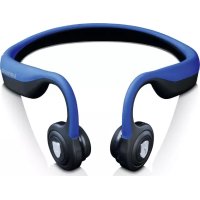
BCH1000 - Headphones LENCO - Free user manual and instructions
Find the device manual for free BCH1000 LENCO in PDF.



| Product type | Bone conduction headset |
| Brand | Lenco |
| Model | BCH1000 |
| Weight | 39 g |
| Battery life (playback) | Up to 8 hours |
| Charging time | 2 hours |
| Standby time | Up to 10 days |
| Bluetooth range | ~10 m |
| Bluetooth version | V5.0 |
| Bluetooth protocols | AVRCP 1.6, A2DP 1.3, HFP 1.7, HSP 1.2 |
| Speaker type | Bone conduction |
| Speaker sensitivity | 100 ± 3 dB |
| Microphone sensitivity | -40 ± 3 dB |
| Power supply | Rechargeable lithium-ion battery via micro-USB port (5V DC) |
| Package contents | Headset, micro-USB cable, user manual, storage pouch, 1 pair of noise-reducing silicone earplugs, 1 pair of silica gel regulator |
| Care and cleaning | Clean with a soft, dry cloth. Do not immerse in water. |
| Safety | Do not expose to water, flames, or extreme heat. Disconnect during lightning storms or if not used for extended periods. Do not open or modify. |
| Operating temperature | 0°C to 45°C |
| Warranty | Compliant with European regulations. Contact the retailer for repairs. |
Frequently Asked Questions - BCH1000 LENCO
User questions about BCH1000 LENCO
0 question about this device. Answer the ones you know or ask your own.
Ask a new question about this device
Download the instructions for your Headphones in PDF format for free! Find your manual BCH1000 - LENCO and take your electronic device back in hand. On this page are published all the documents necessary for the use of your device. BCH1000 by LENCO.
USER MANUAL BCH1000 LENCO
natural_image
Black athletic earband with adjustable head and ear (no text or symbols visible)User manual – Bone conduction bluetooth headphone Gebruikshandleiding – Beengeleidende Bluetooth-hoofdtelefoon Bedienungsanleitung – Bluetooth-Knochenleitungskopfhörer Mode d'emploi – Casque Bluetooth à conduction osseuse Manual de usuario – Auricular Bluetooth con conexión ósea
Index
ENGLISH 3
NEDERLANDS....14
DEUTSCH....27
FRANÇAIS 40
ESPAÑOL....52
Version: 1.0
CAUTION:
Usage of controls or adjustments or performance of procedures other than those specified herein may result in hazardous radiation exposure.
This unit should not be adjusted or repaired by anyone except qualified service personnel.
KEEP THESE INSTRUCTIONS IN MIND:
- Do not use this device near water.
- Clean only with a slightly damp cloth.
- Do not cover or block any ventilation openings. When placing the device on a shelf, leave 5 cm (2") free space around the whole device.
- Install in accordance with the supplied user manual.
- * Don't step on or pinch the power adaptor. Be very careful, particularly near the plugs and the cable's exit point. Do not place heavy items on the power adaptor, which may damage it. Keep the entire device out of children's reach! When playing with the power cable, they can seriously injure themselves.
- * Unplug this device during lightning storms or when unused for a long period.
- Keep the device away from heat sources such as radiators, heaters, stoves, candles and other heat-generating products or naked flame.
- Avoid using the device near strong magnetic fields.
- Electrostatic discharge can disturb normal usage of this device. If so, simply reset and restart the device following the instruction manual. During file transmission, please handle with care and operate in a static-free environment.
- Warning! Never insert an object into the product through the vents or openings. High voltage flows through the product and inserting an object can cause electric shock and/or short circuit internal parts. For the same reason, do not spill water or liquid on the product.
- Do not use in wet or moist areas such as bathrooms, steamy kitchens or near swimming pools.
- Do not use this device when condensation may occur.
- Although this device is manufactured with the utmost care and checked several times before leaving the factory, it is still possible that problems may occur, as with all electrical appliances. If you notice smoke, an excessive build-up of heat or any other unexpected phenomena, you should disconnect the plug from the main power socket immediately.
-
This device must operate on a power source as specified on the specification label. If you are not sure of the type of power supply used in your home, consult your dealer or local power company.
-
* The socket outlet must be installed near the equipment and must be easily accessible.
-
* Do not overload ac outlets or extension cords. Overloading can cause fire or electric shock.
-
* Devices with class 1 construction should be connected to a main socket outlet with a protective earthed connection.
-
* Devices with class 2 construction do not require a earthed connection.
-
Keep away from rodents. Rodents enjoy biting on power cords.
-
* Always hold the plug when pulling it out of the main supply socket. Do not pull the power cord. This can cause a short circuit.
-
Avoid placing the device on any surfaces that may be subject to vibrations or shocks.
-
To clean the device, use a soft dry cloth. Do not use solvents or petrol based fluids. To remove severe stains, you may use a damp cloth with dilute detergent.
-
The supplier is not responsible for damage or lost data caused by malfunction, misuse, modification of the device or battery replacement.
-
Do not interrupt the connection when the device is formatting or transferring files. Otherwise, data may be corrupted or lost.
-
If the unit has USB playback function, the usb memory stick should be plugged into the unit directly. Don't use an usb extension cable because it can cause interference resulting in failing of data.
-
The apparatus shall not be exposed to dripping or splashing and make sure that no objects filled with liquids, such as vases, are placed on or near the apparatus.
-
* To completely disconnect the power input, the mains plug of the apparatus shall be disconnected from the mains, as the disconnect device is the mains plug of apparatus.
-
If the unit works with battery, Battery shall not be exposed to excessive heat such as sunshine, fire or the like.
-
Attention should be drawn to the environmental aspects of battery disposal.
-
The apparatus can only be used in moderate extremely cold or climates warm environments should be avoided.
-
The rating label has been marked on the bottom or back panel of the apparatus.
-
This device is not intended for use by people (including children) with physical, sensory or mental disabilities, or a lack of experience and knowledge, unless they're under supervision or have received instructions about the correct use of the device by the person who is responsible for their safety.
-
This product is intended for non professional use only and not for commercial or industrial use.
-
Make sure the unit is adjusted to a stable position. Damage caused by using this product in an unstable position or by failure to follow any other warning or precaution contained within this user manual will not be covered by warranty.
-
Never remove the casing of this apparatus.
-
Never place this apparatus on other electrical equipment.
- Do not use or store this product in a place where it is subject to direct sunlight, heat, excessive dust or vibration.
- Do not allow children access to plastic bags.
- Only use attachments/accessories specified by the manufacturer.
- Refer all servicing to qualified service personnel. Servicing is required when the apparatus has been damaged in any way, such as the power supply cord or the plug, when liquid has been spilled or objects have fallen into the apparatus, when the apparatus has been exposed to rain or moisture, does not operate normally, or has been dropped.
- *Do not use a damaged power cord or plug or a loose outlet. Doing so may result in fire or electric shock.
- Prolonged exposure to loud sounds from personal music players may lead to temporary or permanent hearing loss.
INSTALLATION
• Unpack all parts and remove protective material.
*Do not connect the unit to the mains before checking the mains voltage and before all other connections have been made.
* These instructions are related only to products using power cable or AC power adaptor.
Package contents
| Headphone | 1 piece |
| Micro USB cable | 1 piece |
| User Manual | 1 piece |
| Storage bag | 1 piece |
| Noise reduction Silicone Ear Plugs | 1 pair |
| Silica gel regulator | 1 pair |
Product Overview
① Play/pause Key
② Multi-function key (power on/off, make/answer calls, Bluetooth connection)
③ LED Indicator
④ Volume control key
⑤ Micro-USB Charging port
⑥ Microphone
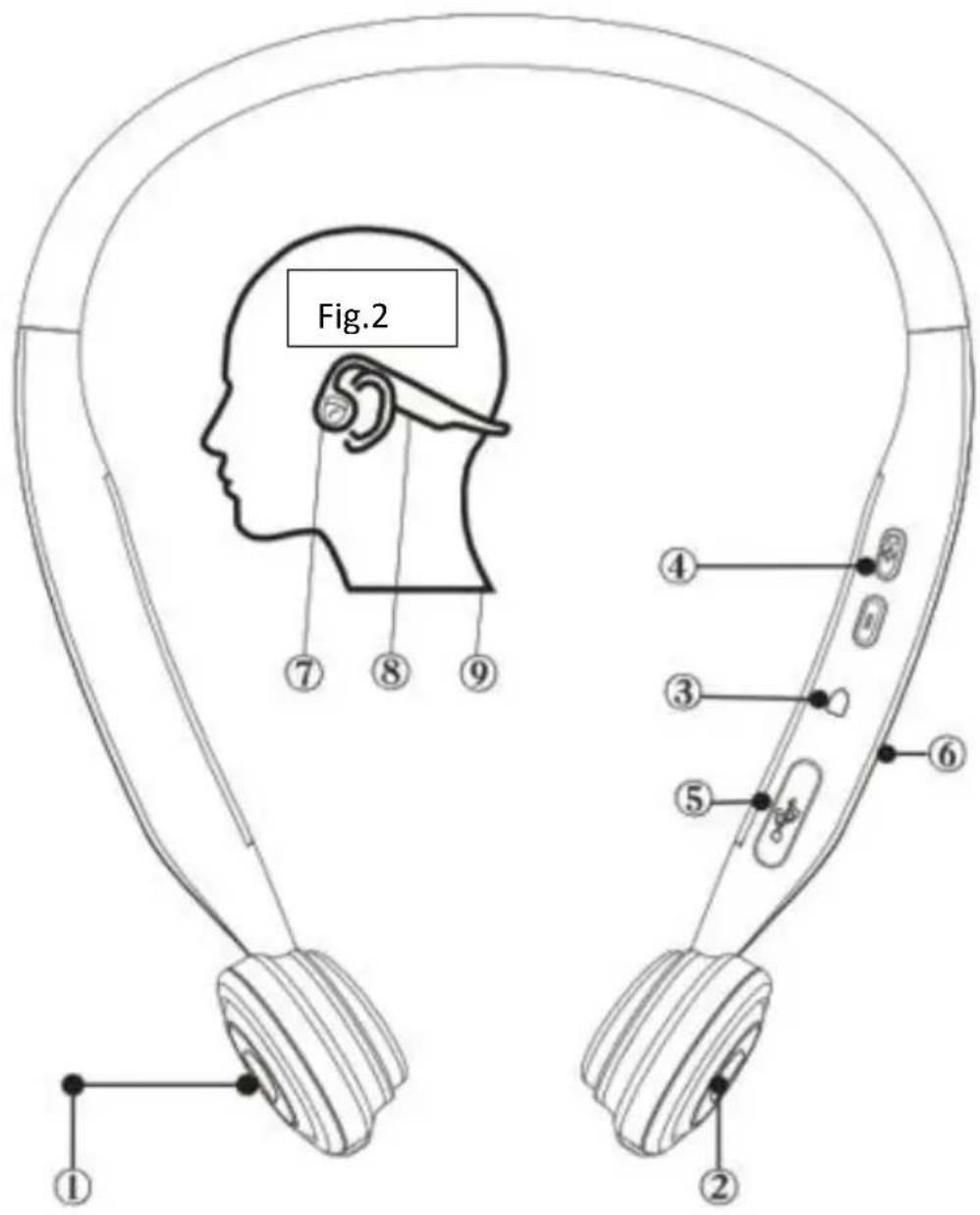
Fig.1
How to set up HBC-200/BCH-1000
1. Pairing
When you pair the Bluetooth headphone for the first time (and the HBC-200/BCH-1000 is off), press and hold the key (2) for 5 seconds and release it when you hear "Power on, Enter pairing". The led light flashes red and blue when in pairing mode
2. Connecting
Enter the Bluetooth settings on your phone, scan for new Bluetooth devices and select "HBC-200/BCH-1000". When the connection is made, you will hear a 'connection successful' message on the HBC-200/BCH-1000. If the connection attempt has failed, please repeat the above.
3. Reconnecting
To power on the HBC-200/BCH-1000 press and hold the (2) key for 3 seconds and release it when you hear the "Power on" message. The headphone will be re-connected in a few seconds. (This only works when it has been paired with a device before)
4. Disconnect and pair with another device
Turn of the HBC-200/BCH-1000
Hold the key (2) for more than 3 seconds, the headphone will enter the pairing mode. You will hear "Power on, Enter pairing". Select "HBC-200/BCH-1000" in the list of found Bluetooth devices and the headphone will be paired in a few seconds.
5. Use Siri
If the headset is connected to an apple IOS device, you can use the Siri virtual assistant.
Make sure that Siri is enabled on your IOS smart device (Iphone/Ipad).
To use Siri: Short press the button (2) on the HBC-200/BCH-1000 to start Siri.
When you hear the Siri beep, you can speak.
Please Note that Siri can only be used on Apple IOS systems.
Charging the battery (Fig. 5)
To charge the headphone's internal battery, connect it to a wall charger or PC. Use the the supplied Micro-USB cable, connect the Micro USB connection (5) on the HBC-200/BCH-1000 and connect the other end to the Wall charger/pc. The LED color is red when charging and it turns to solid blue when the battery is fully charged.
Note:
- Please charge the headphone with a 5VDC USB charger or computer's USB port.
- It is recommended to fully charge the battery before first use.
- Do not remove or replace the battery as it will damage the headphone and will void the warranty.
Wearing the Headphone
As shown in Fig.2, place the headphone around your neck with the speakers touching your frontal earbones. Don't place the speakers onto your ears like a normal headphone.
⑦ Place against your frontal earbones
⑧ Place the upper curve over your ear shells
⑨ Place at your nape
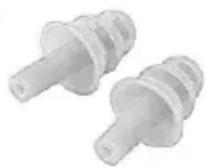
Earplugs
If you want to listen to your favorite music without disturbing ambient sounds, use the supplied silicone earplugs in environments where it is safe to block out ambient noise, like on a train or airplane.
LED Light status
| Color | Explanation |
| The red indicator flashes once every 3 seconds | Unit has Low battery power. Please recharge. |
| The red indicator flashes 3 times | Unit is Powering on/off |
| Red (solid) | Charging in progress |
| Blue (solid) | Charging is completed |
| The blue indicator flashes once every 5 seconds | Incoming call/making a call |
| Quick flashing red and blue | Headphone is in pairing mode. |
Troubleshooting
| Problem | Possible Cause | Solution |
| Not powering on | Low battery | Charge the headphone |
| Bluetooth pairing unsuccessful | Beyond the maximum effective range | Place the headphone closer to the device which you want to connect with. |
Music Play functions
| Function | Operation | Voice Prompt |
| Play/pause | Press the Play “key (1) | None |
| Previous/next | Long press “-” or “+” (4) for 2s. | None |
| Volume +/- | Press “+” or “-” (4) | Beep sound when the maximum volume has been reached |
Remark: the Previous function by long press on “-” is not working with some streaming services like Spotify.
Phone Call functions
| Function | Operation | Voice Prompt |
| Answer/end a call | Press “key (2) | None |
| Reject a call | Long press “key (2) | None |
| Dial the last call | Press “key twice (2) | None |
| Voice Assist (Siri or Google) | Press “key (2) | None |
| Mute microphone / un-mute | Click “Key | None |
Note: The volume control function only works during music play or making a phone call.
Specifications
| Play Time | Up to 8 hours |
| Charging Time | 2 hours |
| Standby duration | Up to 10 days |
| Connection range | ~10m |
| Bluetooth Version | V5.0 |
| Bluetooth protocol | AVRCP1.6, A2DP1.3, HFP1.7, HSP1.2 |
| Speaker type | Bone conduction |
| Speaker sensitivity | 100 ± 3db |
| Microphone sensitivity | -40 ± 3db |
| Weight | 39g/1.37 ounces |
Maintenance
- Keep the headphones in a cool and dry place. Its working temperature shall be 0 \~ 45°C (32 \~ 113°F). Working in a too cold, too hot or too damp place may shorten its service life.
- Charge the headphone before use if it has not been used for a long time
- Do not immerse the headphone in water or other liquids. The HBC-200/BCH-1000 is drip resistant but may not be immersed into fluids.
- High volume may cause sound distortion and damage your hearing.
- Clean the headphones with a dry soft cloth.
- Keep the headphones away from hard and sharp objects to prevent damage.
- Do not charge the headphones immediately after exercise as the residual sweat in the charging port may damage the headphones' circuit. To reduce the risk of damage, please keep the charging port dry before charging the headphones.
GUARANTEE
Lenco offers service and warranty in accordance to European law, which means that in case of repairs (both during and after the warranty period) you should contact your local dealer.
Important note: It is not possible to send products that need repairs to Lenco directly.
Important note: If this unit is opened or accessed by a non-official service center in any way, the warranty expires.
This device is not suitable for professional use. In case of professional use, all warranty obligations of the manufacturer will be voided.
DISCLAIMER
Updates to Firmware and/or hardware components are made regularly. Therefore some of the instruction, specifications and pictures in this documentation may differ slightly from your particular situation. All items described in this guide for illustration purposes only and may not apply to particular situation. No legal right or entitlements may be obtained from the description made in this manual.
DISPOSAL OF THE OLD DEVICE
natural_image
Symbol of a trash bin crossed with no text or numbers, representing waste sorting or discharge (no text present)This symbol indicates that the relevant electrical product or battery should not be disposed of as general household waste in Europe. To ensure the correct waste treatment of the product and battery, please dispose them in accordance to any applicable local laws of requirement for disposal of electrical equipment or batteries. In so doing, you will help to conserve natural resources and improve standards of environmental protection in treatment and disposal of electrical waste (Waste Electrical and Electronic Equipment Directive).
SERVICE
For more information and helpdesk support, please visit www.lenco.com
LET OP:
AFVOER VAN HET OUDE APPARAAT
natural_image
Symbol of a trash bin crossed with no text or numbers, representing waste sorting or disposal (no text present)natural_image
Symbol of a trash bin crossed with no text or numbers, representing waste sorting or disposal (no text present)natural_image
Symbol of a trash bin crossed with no text or numbers, representing waste sorting or disposal (no text present)natural_image
Symbol of a trash bin crossed with two crossed lines, no text or numbers present

- CAUTION:
- KEEP THESE INSTRUCTIONS IN MIND:
- INSTALLATION
- Package contents
- Product Overview
- How to set up HBC-200/BCH-1000
- Pairing
- Connecting
- Reconnecting
- Disconnect and pair with another device
- Use Siri
- Charging the battery (Fig. 5)
- Note:
- Wearing the Headphone
- Earplugs
- Music Play functions
- Phone Call functions
- Specifications
- Maintenance
- GUARANTEE
- DISCLAIMER
- DISPOSAL OF THE OLD DEVICE
- SERVICE
- LET OP:
- AFVOER VAN HET OUDE APPARAAT
Brand : LENCO
Model : BCH1000
Category : Headphones