
CYBER-SHOT DSC-W520 - Camera SONY - Free user manual and instructions
Find the device manual for free CYBER-SHOT DSC-W520 SONY in PDF.


User questions about CYBER-SHOT DSC-W520 SONY
0 question about this device. Answer the ones you know or ask your own.
Ask a new question about this device
Download the instructions for your Camera in PDF format for free! Find your manual CYBER-SHOT DSC-W520 - SONY and take your electronic device back in hand. On this page are published all the documents necessary for the use of your device. CYBER-SHOT DSC-W520 by SONY.
USER MANUAL CYBER-SHOT DSC-W520 SONY
To reduce fire or shock hazard, do not expose the unit to rain or moisture.
IMPORTANT SAFETY INSTRUCTIONS -SAVE THESE INSTRUCTIONS
DANGER
TO REDUCE THE RISK OF FIRE OR ELECTRIC SHOCK, CAREFULLY FOLLOW THESE INSTRUCTIONS
If the shape of the plug does not fit the power outlet, use an attachment plug adaptor of the proper configuration for the power outlet.
CAUTION
Battery pack
If the battery pack is mishandled, the battery pack can burst, cause a fire or even chemical burns. Observe the following cautions.
- Do not disassemble.
- Do not crush and do not expose the battery pack to any shock or force such as hammering, dropping or stepping on it.
- Do not short circuit and do not allow metal objects to come into contact with the battery terminals.
- Do not expose to high temperature above 60^ (140^) such as in direct sunlight or in a car parked in the sun.
- Do not incinerate or dispose of in fire.
- Do not handle damaged or leaking lithium ion batteries.
- Be sure to charge the battery pack using a genuine Sony battery charger or a device that can charge the battery pack.
- Keep the battery pack out of the reach of small children.
- Keep the battery pack dry.
- Replace only with the same or equivalent type recommended by Sony.
- Dispose of used battery packs promptly as described in the instructions.
Battery charger
Even if the CHARGE lamp is not lit, the battery charger is not disconnected from the AC power source (mains) as long as it is connected to the wall outlet (wall socket). If some trouble occurs while using the battery charger, immediately shut off the power by disconnecting the plug from the wall outlet (wall socket).
GB
For Customers in the U.S.A. and Canada
I RECYCLING LITHIUM-ION BATTERIES
Lithium-Ion batteries are recyclable.
You can help preserve our environment by returning your used rechargeable batteries to the collection and recycling location nearest you.

For more information regarding recycling of rechargeable batteries, call toll free
1-800-822-8837, or visit http://www.rbrc.org/
Caution: Do not handle damaged or leaking Lithium-Ion batteries.
For Customers in Europe
I Notice for the customers in the countries applying EU Directives
The manufacturer of this product is Sony Corporation, 1-7-1 Konan Minato-ku Tokyo, 108-0075 Japan. The Authorized Representative for EMC and product safety is Sony Deutschland GmbH, Hedelfinger Strasse 61, 70327 Stuttgart, Germany. For any service or guarantee matters please refer to the addresses given in separate service or guarantee documents.
This product has been tested and found compliant with the limits set out in the EMC Directive for using connection cables shorter than 3 meters (9.8 feet).
Attention
The electromagnetic fields at the specific frequencies may influence the picture and sound of this unit.
Notice
If static electricity or electromagnetism causes data transfer to discontinue midway (fail), restart the application or disconnect and connect the communication cable (USB, etc.) again.
Disposal of Old Electrical & Electronic Equipment (Applicable in the European Union and other European countries with separate collection systems)

This symbol on the product or on its packaging indicates that this product shall not be treated as household waste. Instead it shall be handed over to the applicable collection point for the recycling of electrical and electronic equipment. By ensuring this product is disposed of correctly, you will help prevent potential negative consequences for the environment and human health, which could otherwise be caused by inappropriate waste handling of this product. The recycling of materials will help to conserve natural resources. For more detailed information about recycling of this product,
please contact your local Civic Office, your household waste disposal service or the shop where you purchased the product.
Disposal of waste batteries (applicable in the European Union and other European countries with separate collection systems)

This symbol on the battery or on the packaging indicates that the battery provided with this product shall not be treated as household waste. On certain batteries this symbol might be used in combination with a chemical symbol. The chemical symbols for mercury (Hg) or lead (Pb) are added if the battery contains more than 0.0005% mercury or 0.004% lead. By ensuring these batteries are disposed of correctly, you will help prevent
potentially negative consequences for the environment and human health which could otherwise be caused by inappropriate waste handling of the battery. The recycling of the materials will help to conserve natural resources.
In case of products that for safety, performance or data integrity reasons require a permanent connection with an incorporated battery, this battery should be replaced by qualified service staff only. To ensure that the battery will be treated properly, hand over the product at end-of-life to the applicable collection point for the recycling of electrical and electronic equipment.
For all other batteries, please view the section on how to remove the battery from the product safely.
Hand the battery over to the applicable collection point for the recycling of waste batteries. For more detailed information about recycling of this product or battery, please contact your local Civic Office, your household waste disposal service or the shop where you purchased the product.
Notice for customers in the United Kingdom
A moulded plug complying with BS 1363 is fitted to this equipment for your safety and convenience.
Should the fuse in the plug supplied need to be replaced, a fuse of the same rating as the supplied one and approved by ASTA or BSI to BS 1362, (i.e., marked with an 和 or 和 mark) must be used.
If the plug supplied with this equipment has a detachable fuse cover, be sure to attach the fuse cover after you change the fuse. Never use the plug without the fuse cover. If you should lose the fuse cover, please contact your nearest Sony service station.
Refer to "Cyber-shot User Guide" (HTML) on supplied CD-ROM
For details on advanced operations, please read "Cyber-shot User Guide" (HTML) on the CD-ROM (supplied) using a computer.
GB

Insert the CD-ROM into the CD-ROM drive.
For Windows users:
① Click [User Guide] [Install].
② Start "User Guide" from the shortcut on the desktop.
For Macintosh users:
① Select the [User Guide] and copy [eng] folder stored in the [User Guide] folder to your computer.
② After copying is complete, double-click "index.html" in the [eng] folder.
Checking the accessories supplied
- Battery charger BC-CSN/BC-CSNB (1)
- Power cord (mains lead) (not supplied in the USA and Canada) (1)
- Rechargeable battery pack NP-BN1 (1)
Dedicated USB cable (Sony Corporation 1-837-597-) (1) -
Wrist strap (1)
CD-ROM (1) -
Cyber-shot application software
"Cyber-shot User Guide" -
Instruction Manual (this manual) (1)
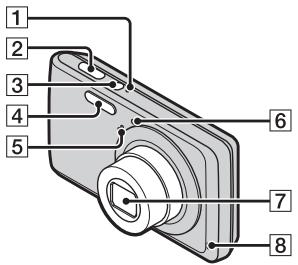
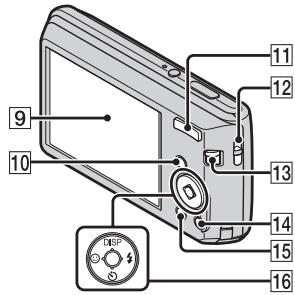
Identifying parts
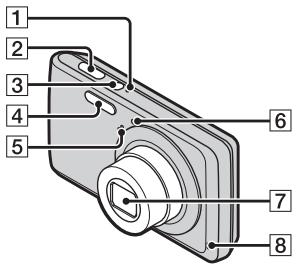
ON/OFF (Power) lamp
2 Shutter button
3 ON/OFF (Power) button
4 Flash
5 Microphone
6 Self-timer lamp/Smile Shutter lamp
7 Lens
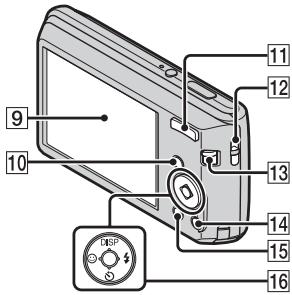
Speaker
9 LCD screen
10 (Playback) button
For shooting: W/T (Zoom) button For viewing: (Playback zoom) button/ (Index) button
12 Hook for wrist strap
13 Mode switch
14 血 (Delete) button
15 MENU button
16 Control button
Menu on: ▲/▼/▲/▶/●
Menu off: DISP/♂/♀
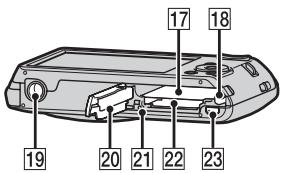
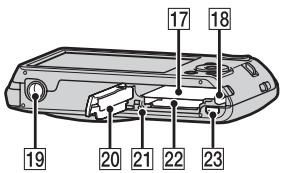
17 Battery insertion slot
18 Battery eject lever
19 Tripod receptacle
- Use a tripod with a screw less than 5.5mm (7/32 inches) long. Otherwise, you cannot firmly secure the camera, and damage to the camera may occur.
20 Battery/memory card cover
21 Access lamp
22 Memory card slot
23 (USB)/A/V OUT jack
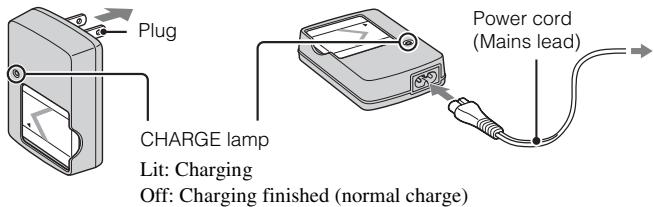
Charging the battery pack
For customers in the USA and Canada
For customers in countries/regions other than the USA and Canada
GB
1 Insert the battery pack into the battery charger.
- You can charge the battery even when it is partially charged.
2 Connect the battery charger to the wall outlet (wall socket).
- If you continue charging the battery pack for about one more hour after the CHARGE lamp turns off, the charge will last slightly longer (full charge).
Charging time
Full charge time: approx. 245 min.
Normal charge time: approx. 185 min.
Notes
- The above charging times apply when charging a fully depleted battery pack at a temperature of 25^ ( 77^ ). Charging may take longer depending on conditions of use and circumstances.
- Connect the battery charger to the nearest wall outlet (wall socket).
- When charging is finished, disconnect the power cord (mains lead) from the wall outlet (wall socket), and remove the battery pack from the battery charger.
- Be sure to use the battery pack or the battery charger of the genuine Sony brand.
Battery life and number of images you can record/ view
| Battery life (min.) | No. of Images | |
| Shooting still images | Approx. 110 | Approx. 220 |
| Viewing still images | Approx. 170 | Approx. 3400 |
| Shooting movies | Approx. 110 | — |
Notes
- The number of images that can be recorded is an approximate number when shooting with a fully charged battery pack. The number may be less depending on the circumstances.
-
The number of images that can be recorded is when shooting under the following conditions:
-
Using Sony "Memory Stick PRO Duo" (Mark2) media (sold separately).
- When a fully charged battery pack (supplied) is used at an ambient temperature of 25^ (77^) .
- The number of still images that can be recorded is based on the CIPA standard, and is for shooting under the following conditions.
(CIPA: Camera & Imaging Products Association)
- [SteadyShot] is set to [Off].
- DISP (Screen Display Settings) is set to [Normal].
- Shooting once every 30 seconds.
- The zoom is switched alternately between the W and T ends.
- The flash strobes once every two times.
-
The power turns on and off once every ten times.
-
The battery life for movies is when shooting under the following conditions:
-
Recording mode: VGA
-
When continuous shooting ends because of set limits (page 19), press the shutter button down again and continue shooting. Shooting functions such as the zoom do not operate.
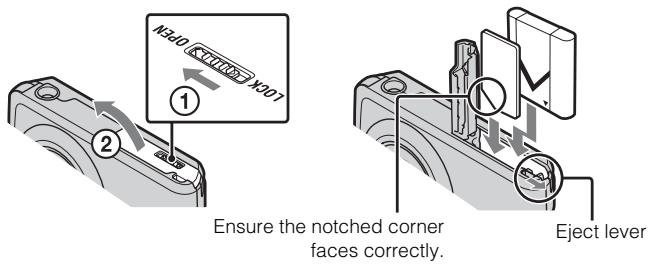
Inserting the battery pack/a memory card (sold separately)
GB
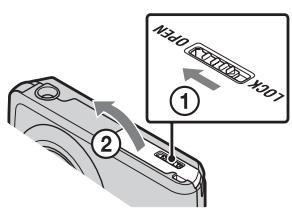
1 Open the cover.
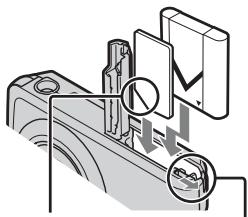
2 Insert the memory card (sold separately).
- With the notched corner facing as illustrated, insert the memory card until it clicks into place.
3 Insert the battery pack.
- Align the battery pack with the guide arrow inside the battery insertion slot. Then, insert the battery pack until the battery eject lever locks into place.
4 Close the cover.
- Closing the cover with the battery inserted incorrectly may damage the camera.
Memory cards that you can use
| Memory Card | For still images | For movies | |
| A | Memory Stick PRO Duo | ○ | ○ |
| Memory Stick PRO-HG Duo | ○ | ○ | |
| Memory Stick Duo | ○ | — | |
| B | SD memory card | ○ | ○ |
| SDHC memory card | ○ | ○ |
- In this manual, products in A are collectively referred to as "Memory Stick Duo" media.
- In this manual, products in B are collectively referred to as SD card.
- When recording movies, it is recommended that you use Class 2 or faster SD cards.
To remove the memory card/battery pack
Memory card: Push the memory card in once.
Battery pack: Slide the battery eject lever. Be sure not to drop the battery pack.
Note
- Never remove the memory card/battery pack when the access lamp (page 8) is lit. This may cause damage to data in the memory card/internal memory.
Setting the date and time
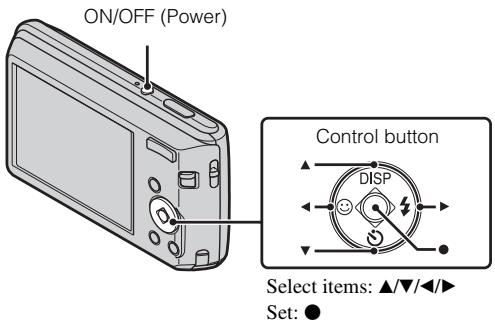
Date & Time setting is displayed when you press the ON/OFF (Power) button for the first time.
GB
1 Press the ON/OFF (Power) button.
Date & Time setting is displayed when you press the ON/OFF (Power) button for the first time.
- It may take time for the power to turn on and allow operation.
2 Set [Date & Time Format], [Daylight Savings] and [Date & Time], then press [OK].
- Midnight is indicated as 12:00 AM, and noon as 12:00 PM.
3 Select the desired area following the instructions on the screen, then press [OK].
4 Select the desired display color and display resolution mode, following the instructions on the screen.
Shooting still images/movies
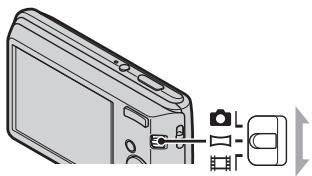
Mode switch
Shooting still images:
1 Press the shutter button halfway down to focus.
When the image is in focus, a beep sounds and the indicator lights.
2 Press the shutter button fully down.
Shooting movies:
1 Press the shutter button fully down to start recording.
- You can zoom by pressing the W/T (zoom) button before shooting.
2 Press the shutter button fully down again to stop recording.
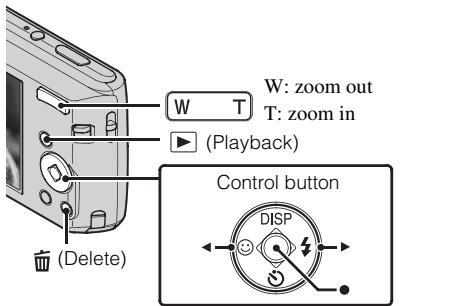
Select images: (next)/ (previous)
Set:
1 Press the (Playback) button.
Selecting next/previous image
Select an image with (next)/ (previous) on the control button. Press in the center of the control button to view movies.
- Deleting an image
① Press (Delete) button.
② Select [This Image] with on the control button, then press .
Returning to shooting images
Press the shutter button halfway down.
GB
List of icons displayed on the screen (When shooting still images)
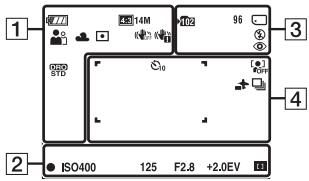
1
| Display | Indication |
| 4771 | Battery remaining |
| 483 14M | Low battery warning |
| Scene Selection | Image size |
| Scene Recognition icon | Scene Selection |
| i | Shooting mode |
| Scene Recognition icon | Scene Recognition mode |
| White balance | Metering Mode |
| SteadyShot | SteadyShot |
| Vibration warning | Anti Blink |
| DRO STD | DRO |
| [6] | Smile Detection |
| Sensitivity indicator | Sensitivity indicator |
| Zoom scaling | |
2
| Display | Indication |
| ● | AE/AF lock |
| ISO400 | ISO number |
| 125 | Shutter speed |
| F2.8 | Aperture value |
| +2.0EV | Exposure Value |
| [+] | AF range finder frame indicator |
3
| Display | Indication |
| 102 | Recording folder |
| 96 | Number of recordable images |
| Recording/Playback Media (memory card, internal memory) | |
| Flash mode | |
| Red-eye reduction | |
| Flash charging |
4
| Display | Indication |
| 0 | Self-timer |
| OFF | Face Detection |
| Destination | |
| Burst Settings | |
| AF range finder frame | |
| + | Spot metering cross-hairs |
Introduction of other functions
Other functions used when shooting or playing back can be operated using the Control button or MENU button on the camera. This camera is equipped with a Function Guide that allows you to easily select from the functions. While displaying the guide, try the other functions.
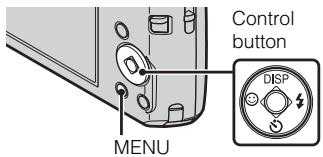
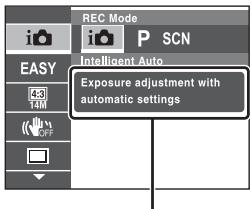
Function Guide
Control button
DISP (Screen Display Settings): Allows you to change the screen display.
(Self-Timer): Allows you to use the self-timer.
(Smile Shutter): Allows you to use the Smile Shutter mode.
(Flash): Allows you to select a flash mode for still images.
Menu Items
Shooting
| REC Mode | Select recording mode. |
| Scene Selection | Select pre-set settings to match various scene conditions. |
| Easy Mode | Shoot still images using minimal functions. |
| Shooting Direction | Set the direction to pan the camera when shooting Sweep Panorama images. |
| Image Size | Select the image size for still images, panoramic images or movie files. |
| SteadyShot | Select the anti-blur mode. |
| Burst Settings | Select single-image mode or burst mode. |
| EV | Adjust the exposure manually. |
| ISO | Adjust the luminous sensitivity. |
| White Balance | Adjust color tones of an image. |
| Focus | Select the focus method. |
| Metering Mode | Select the metering mode that sets which part of the subject to measure to determine the exposure. |
| Smile Detection Sensitivity | Set the Smile Shutter function sensitivity for detecting smiles. |
| Face Detection | The camera detects faces and adjusts various settings automatically. |
| Anti Blink | Set to automatically shoot two images and select image in which the eyes are not blinking. |
| DRO | Set DRO function to correct the brightness and contrast and improve the image quality. |
Viewing
| Easy Mode | Set the text-size increases and all indicators become easier to see. |
| Slideshow | Select a method of continuous playback. |
| Retouch | Retouch an image using various effects. |
| Delete | Delete an image. |
| Protect | Protect the images. |
| DPOF | Add a print order mark to a still image. |
| Rotate | Rotate a still image to the left or right. |
| Select Folder | Select a folder which contains the images you want to play back. |

Setting items
If you press the MENU button while shooting or during playback,
(Settings) is provided as a final selection. You can change the default settings on the (Settings) screen.
| Shooting Settings | Grid Line/Disp. Resolution/Digital Zoom/Red Eye Reduction/Blink Alert |
| Main Settings | Beep/Language Setting/Function Guide/Display color/Power Save/Initialize/Video Out/USB Connect/LUN Setting |
| Memory Card Tool* | Format/Create REC. Folder/Change REC. Folder/Delete REC. Folder/Copy/File Number |
| Clock Settings | Area Setting/Date & Time Setting |
- If a memory card is not inserted, (Internal Memory Tool) will be displayed and only [Format] and [File Number] can be selected.
Number of still images and recordable time of movies
The number of still images and recordable time may vary depending on the shooting conditions and the memory card.
Still images
(Units: Images)
| Capacity Size | Internal memory | Memory card |
| Approx. 28 MB | 2 GB | |
| 14M | 4 | 300 |
| VGA | 170 | 11000 |
| 16:9(11M) | 6 | 380 |
Movies
The table below shows the approximate maximum recording times. These are the total times for all movie files. The recordable movie file size is up to approx. 2 GB for each file.
(Units: hour : minute : second)
| Capacity Size | Internal memory | Memory card |
| Approx. 28 MB | 2 GB | |
| VGA | 00:00:25 | 00:25:00 |
| QVGA | 00:01:00 | 01:15:00 |
Notes on using the camera
Changing the language setting
The screen language setting, press the MENU button, then select

(Settings) (Main Settings) [Language Setting].
On use and care
Avoid rough handling, disassembling, modifying, physical shock, or impact such as hammering, dropping or stepping on the product. Be particularly careful of the lens.
Notes on recording/playback
- Before you start recording, make a trial recording to make sure that the camera is working correctly.
- The camera is neither dust-proof, nor splash-proof, nor water-proof.
- Avoid exposing the camera to water. If water enters inside the camera, a malfunction may occur. In some cases, the camera cannot be repaired.
- Do not aim the camera at the sun or other bright light. It may cause the malfunction of the camera.
- If moisture condensation occurs, remove it before using the camera.
- Do not shake or strike the camera. It may cause a malfunction and you may not be able to record images. Furthermore, the recording media may become unusable or image data may be damaged.
Do not use/store the camera in the following places
- In an extremely hot, cold or humid place In places such as in a car parked in the sun, the camera body may become deformed and this may cause a malfunction.
- Under direct sunlight or near a heater
- The camera body may become discolored or deformed, and this may cause a malfunction.
- In a location subject to rocking vibration
- Near a location that generates strong radio waves, emits radiation or is strongly magnetic place. Otherwise, the camera may not properly record or play back images.
- In sandy or dusty places
- Be careful not to let sand or dust get into the camera. This may cause the camera to malfunction, and in some cases this malfunction cannot be repaired.
On carrying
Do not sit down in a chair or other place with the camera in the back pocket of your trousers or skirt, as this may cause malfunction or damage the camera.
Notes on the LCD screen and lens
The LCD screen is manufactured using extremely high-precision technology so over 99.99% of the pixels are operational for effective use. However, some tiny black and/or bright dots (white, red, blue or green) may appear on the LCD screen. These dots are a normal result of the manufacturing process, and do not affect the recording.
On camera's temperature
Your camera and battery may get warm due to continuous use, but it is not a malfunction.
On the overheat protection
Depending on the camera and battery temperature, the power may turn off automatically to protect the camera. A message will be displayed on the LCD screen before the power turns off.
On charging the battery
If you charge a battery that has not been used for a long time, you may be unable to charge it to the proper capacity. This is due to the battery characteristics, and is not a malfunction. Charge the battery again.
Warning on copyright
Television programs, films, videotapes, and other materials may be copyrighted. Unauthorized recording of such materials may be contrary to the provisions of the copyright laws.
No compensation for damaged content or recording failure
Sony cannot compensate for failure to record or loss or damage of recorded content due to a malfunction of the camera or recording media, etc.
Cleaning the camera surface
Clean the camera surface with a soft cloth slightly moistened with water, then wipe the surface with a dry cloth. To prevent damage to the finish or casing:
- Do not expose the camera to chemical products such as thinner, benzine, alcohol, disposable cloths, insect repellent, sunscreen or insecticide.
Camera
[System]
Image device:
7.76 mm (1/2.3 type) color CCD, Primary color filter
Total pixel number of camera:
Approx. 14.5 Megapixels
Effective pixel number of camera:
Approx. 14.1 Megapixels
Lens: 5 × zoom lens
f = 4.5 ~mm - 22.5 ~mm (25 mm -
125mm (35 mm film equivalent))
F3.3 (W) - F5.8 (T)
Exposure control: Automatic exposure,
Scene Selection (9 modes)
White balance: Automatic, Daylight,
Cloudy, Fluorescent 1/2/3,
Incandescent, Flash
Recording interval for Burst mode:
Approx. 0.9 second
File format:
Still images: JPEG (DCF Ver. 2.0,
Exif Ver. 2.3, MPF Baseline)
compliant, DPOF compatible
Movies: AVI (Motion JPEG)
Recording media: Internal Memory
(approx. 28 MB), "Memory Stick
Duo" media, SD card
Flash: Flash range (ISO sensitivity
(Recommended exposure Index)
set to Auto):
Approx. 0.5m to 3.0m (1 ft 7 3/4
inches to 9 ft 10 1/8 inches) (W)/
approx. 0.5m to 1.5m (1 ft 7 3/4
inches to 4 ft 11 1/8 inches) (T)
[Input and Output connectors]
(USB)/A/V OUT terminal:
Video output
Audio output (Monaural)
USB communication
USB communication: Hi-Speed USB
(USB 2.0)
[LCD screen]
LCD panel:
6.7cm (2.7 type) TFT drive
Total number of dots: 230 400 (960
× 240) dots
[Power, general]
Power: Rechargeable battery pack
NP-BN1,3.6V
Power consumption (during shooting):
0.99 W
Operating temperature: 0^ to 40^
(32°F to 104°F)
Storage temperature: -20^ to +60^
(-4^ to +140^)
Dimensions (CIPA compliant):
96.3mm× 55.6mm× 21.2mm
(3 7/8 inches × 2 1/4 inches ×
27/32 inches) (W/H/D)
Mass (CIPA compliant): Approx. 125g
(4.4 oz) (including NP-BN1 battery
pack and "Memory Stick Duo"
media)
Microphone: Monaural
Speaker: Monaural
Exif Print: Compatible
PRINT Image Matching III:
Compatible
BC-CSN/BC-CSNB battery charger
Power requirements: AC 100 V to 240V 50Hz / 60Hz 2 W
Output voltage: DC 4.2 V, 0.25 A
Operating temperature: 0^ to 40^ (32^ to 104^)
Storage temperature: -20^ to +60^ (-4^ to +140^)
Dimensions: Approx. 55mm× 24mm × 83~mm (2 1/4 inches × 31/32 inches × 3 3/8 inches) (W/H/D)
Mass: Approx. 55g (1.9 oz.)
Rechargeable battery pack NP-BN1
Used battery: Lithium-ion battery
Maximum voltage: DC 4.2 V
Nominal voltage: DC 3.6 V
Maximum charge voltage: DC 4.2 V
Maximum charge current: 0.9 A
Capacity: typical:2.3 Wh (630 mAh) minimum:2.2 Wh (600 mAh)
Design and specifications are subject to change without notice.
Trademarks
- The following marks are trademarks of Sony Corporation.
Cybershot, "Cyber-shot,"
"Memory Stick PRO Duo,"
"Memory Stick PRO-HG Duo,"
"Memory Stick Duo"
Windows is registered trademark of Microsoft Corporation in the United States and/or other countries.
- Macintosh is registered trademark of Apple Inc.
- SDHC logo is trademarks of SD-3C, LLC.
- In addition, system and product names used in this manual are, in general, trademarks or registered trademarks of their respective developers or manufacturers. However, the TM or marks are not used in all cases in this manual.
Additional information on this product and answers to frequently asked questions can be found at our Customer Support Website.
http://www.sony.net/
Printed on 70% or more recycled paper using VOC (Volatile Organic Compound)-free vegetable oil based ink.
AVERTISSEMENT
(CIPA: Camera & Imaging Products Association)
Batterie rechargeable NP-BN1
(CIPA: Camera & Imaging Products Association)
(CIPA: Camera & Imaging Products Association)
(CIPA: Camera & Imaging Products Association)
(CIPA: Camera & Imaging Products Association)
(CIPA: Camera & Imaging Products Association)
Elementary apparatus
(CIPA: Camera & Imaging Products Association)
(CIPA: Camera & Imaging Products Association)
A membranous cystitis (BCC) is a rare complication of the bladder. It is characterized by a mass lesion in the bladder and a cystic component in the bladder wall.
(CIPA: Camera & Imaging Products Association)
- Nastavte funkciu [SteadyShot] na hodnotu [Off].
-Polożka DISP (Screen Display Settings) je nastavená na hodnotu [Normal].
-Snimanie kaźdych 30 sekund. -
Priblizienie sa striedavo prepina medzi stranami W a T.
Blesk blikne kazdy druhykrat.
-Každych desaf rasz sa fotoparat zapne a vypne. -
Vydrž batarie pri snimaní videozáznamov za nasledujúcích podmienok:
-
Režim záznamu: VGA
-Ak sa nepretrzite snimanie ukonci z dovodu nastavenych limitov (s. 18), opatovne stlachte tlacidlo spuste aPokračujte v snimaní. Funkcie snimania, aka napriklad prilizenie, nefunguju.
| Shooting Settings | Grid Line/Disp. Resolution/Digital Zoom/Red Eye Reduction/Blink Alert |
| Main Settings | Beep/Language Setting/Function Guide/Display color/Power Save/Initialize/Video Out/USB Connect/LUN Setting |
| Memory Card Tool* | Format/Create REC. Folder/Change REC. Folder/Delete REC. Folder/Copy/File Number |
| Clock Settings | Area Setting/Date & Time Setting |
(CIPA: Camera & Imaging Products Association)
Stalla in alternative
Cyber-shot, "Cyber-shot", "Memory Stick PRO Duo", "Memory Stick PRO-HG Duo", "Memory Stick Duo"
(CIPA: Camera & Imaging Products Association):
(CIPA: Camera & Imaging Products Association)
- [SteadyShot] er indstillet til [Fra].
Cyber-shot, "Cyber-shot",
"Memory Stick PRO Duo", "Memory Stick PRO-HG Duo", "Memory Stick Duo"
VAŽNE SIGURNOSNE UPUTE
-SACUVAJTE OVE UPUTE
OPASNOST
POZORNO SLIJEDITE OVE UPUTE KAKO BISTE
SMANJILI OPASNOST OD POZARA ILI
STRUJNOGUDARA
Ako se utikač ne moze izravno utaknuti u mrežnu uticnicu, prikljucite ga preko adaptera za utikač Čija konfiguracija odgovara mrežnoj uticnici.
POZOR
Baterijska Jedinica
Baterijska jedinica kojom se neispravno rukuje moze se rasprsnuti, prouzroci t pozar pa ck i kemijske opekline. Drzite se sljedecih mjera opreza.
Nemojte rastavljati bateriju.
Nemojte razbijati bateriju niti je izlagati udarcima ili primjeni sile kao npr. udarcima Čekićem, bacanju ili gaženju.
Bateriju nemojte katko spajati i pazite da metalni predmeti ne dodu u dodir s prikljucima baterije.
- Ne izlažite bateriju temperaturama iznad 60^ npr. na mjestima izloženim izravnoj suncevoj svjetosti ili vizilima parkiranim na suncu.
Bateriju nemojte spaljivati ni bacati u vatru.
- Ne dirajte ostecene ni curece litij-ionske baterije.
- Baterjsku jeginicu obvezno punite originalnim Sonyjevim punjačom baterije ili drugim uredajem kojim se moze puniti baterija.
- Držite baterijsku jedinicu izvan dosega male djece.
Baterijsku Jedinicu drzite na suhom mjestu.
- Zamijenite samo's baterijomiste vrste ili ekvivalentnom baterijom po preparuci Tvrtke Sony.
- Istrosene baterijske jedinice zbrinite na nacin opisan u uputama.
Punjac baterijee
Čak i kad ne gori CHARGE svjetlo, dovod elektricne struje u punjać baterije.nije prekinut sve dok je prikljucen u zidnu utičnicu. U sluceju problema dok punjać baterije radi, odmah prekinite dovod struje isklučivanjem utikača iz zidne utičnice.
Zakorisnike u Europa
(CIPA: Camera & Imaging Products Association)
- [SteadyShot] je postavljen na [Isključeno].
- DISP (Postavkezaslonskog prikaza) je postavljen na [Uobičajeno].
Razmak izmedu snimanja je 30 sekundi.
-Zumiranje se naizmjence ijemenja izmedu krajeva Wi T. - Bljeskalica se uključuje svaki drugi put.
-
Napajanje se uključuje i isključuje svaki deseti put.
-
Vijek trajanja baterije za snimanje videoozapisa vrijedi za snimanje u slejdećim uvjetima:
-
Način snimanja: VGA
-Kada se kontinuirano snimanje prekine uslijeed postavljenih ograničenja (stranica 18), ponovno pritsnite okidač i nastavite smatii. Funkcije snimanja kao što je zum ne rade.
Umetanje baterije/memorijske kartice (prodaje se zasebno)
Pazite da je odrezani kraj
ispravno okrenut.
Poluga za izbacivanje
1 OtvoritePoklopac.
2 Umetnite memorijsku karticu (prodaje se zasebno).
(CIPA: Camera & Imaging Products Association)
7-1 Konan, Minato-ku, Tokyo, 108-0075 Japan
Türkiye İrtibat Numaralan:
Tel: 0216-633 98 00
Faks: 0216-632 70 30
e-mail: bilgi@eu.sony.com
TR
SONY YETKILI SERVISLERI
ADANA CENGIZ ELEKTRONIK (322) 2251587/ADIYAMAN STAR ELEKTRONIK (416) 2165383/ANKARA (Anittepe) BILGILI ELEKTRONIK (312) 2308382, (Mamak) FILIZ ELEKTRONIK (312) 3689834, (Aydinlikevler) DUZOLLAR ELEKTRONIK (312) 3169852/ANTALYA NECMI ELK.SAN.TIC. LTD. STI. (242) 3451374, EKEN ELEKTRONIK (242) 3124242, OLCAY ELEKTRONIK (242) 7467603, (Alanya) ERTUNC ELEKTRONIK (242) 5136314/BURSA UFO ELKT. MUH.TIC.LTD.STI. (224) 2341192/BOLU ARDA ELEKTRONIK (374) 2155748/ CANAKKALE GUVEN ELEKTRONIK (286) 2173618/DENIZLI MAVI ELK. LTD. STI. (258) 2421749/DIYARBAKIR TELEVIZON HASTANESI (412) 2236869/ ESKISEHIR GÖRGUN ELEKTRONIK (222) 2265626/ERZURUM ELEKTRONAL TIC. (442) 2130528/GIRESUN ÖZEN ELEKTRONIK (454) 2168161/GAZIANTEP IBRAHIM SERIN (342) 2153545/HATAY ZEKİ ELEKTRONIK (326) 2210597/ICEL SEDAFON ELK.S.T.LTD. STI. (324) 3227655/ISTANBUL (Moda) SENTEZ ELK.S.T.LTD. STI. (216) 4145250, (Kadiköy) ENDER ELEK.LTD. (216) 3468024, (Suadiye) MERCOM ELK.LTD.STI. (216) 3612858, (Goztepe) ITEM LTD. STI. (216) 5664888, (Usküdar) BURCU ELEKTRONIK (216) 5536929, (Maslak) MODVI ELK.SAN.TIC.LTD. (212) 2862270, (Sisli) VEBE ELK.SN.TC.LT.STI. (212) 2336778, (1.Levent) AVE ELEKTRONIK (212) 2864077, (Fatih) CIHAN ELK. SAN. TIC. LTD. STI. (212) 5317001, (Bakirköy) VIP VIDEO ELK. TIC. LTD. STI. (212) 5705868, (Bakirköy) MEST ELK.SAN.TIC.LTD. (212) 5438242, (Besiktas) P.M. ELEKTRONIK LTD.STI. (212) 2275247, (Florya) AVC ELK.LTD. STI. (212) 5740426/ZMIR BULENT EROL (232) 4221225, (Hatay ASIL-ELK.SR.T.LTD. STI. (232) 2288310, (Karshiaka) TEKNIK TV.ELK.LTD. STI. (232) 3696175, (Güzelaliyil) APEX ELEKTRONIK (232) 2464044/KARS SAHIN ELEKTRONIK (474) 238373/KAYERSI CAGDAS ELEKTRONIK (352) 222627, KÜRΚCUOGLU (352) 2210634/KOCAELI TEKNIK TV. (262) 3223368/KONYA DENIZ ELEKTRONIK (332) 3501735, ÖZEL ELEKTRONIK (332) 3514425/MALATYA GURBUZ ELEKTRONIK (422) 3250460/MARDIN(Nusaybin) CFTSÜREN ELK.PAZ.LTD.(482) 4153592/MUGLA(Marmaris) MTM SERVICE (252) 4126217/RIZE METE ELEKTRONIK (464) 2120078/SAKARYA ISMAIL SENOGLU (264) 2714704/SAMSUN YALIM ELEKTRONIK (362) 2334883/SiIRT ISMET ELEKTRONIK (484) 2245724/SIVAS CAN ELEKTRONIK (346) 2230015/TRABZON LIDER ELEKTRONIK (462) 3232641/ZONGULDKO ZODEMIRLER TV. (372) 3167044
ITHALATCI FIRMA
SONY®
SONY EURASIA PAZARLAMA AS.
PPOEIANOIOIHsH
Tia va anotpεεTE Tov kivduvo npkayiac nλεκtponληiac, mν ηκθετεTE nσuokεun σβροχ n uypaia.
HMANTIKE OAHIGE IATN A AAEIA -YAA TE AYTE TIZ OAHIGE KINADYNO
ΓIA NA MEIΩΣΕTE TON KINΔYNO ΠYPKΑΓΙAΣ 'H HAEKTPONΛΗΙΑΣ, AKOΛΟΥΘΗΣΤΕ ΠPOΞXTΙΚΑ AYTEΣ TΙΣ ODΗΓΙΕΣ
Av to ojma tov bvoaos dev taqie 1e Tyn nExtQuxn npia, xnoiouoioote 0ooaaoyea bvoaos xataaanns dataaegy ayn nExtQuxn npia.
PPOsOXH
Mnatapia
Av nataia vnootei xaxietaxeigou, mtooge i va exqayei, va poaaleoie oia anoia xnauxuaevauata. Abetaetis axolovoe poofovalaeis.
Mynvauoovauooyeite.
Mny oraoeTe xu my npiotaTe me duvoan tn utaroi,my tn xtwnoeTe me ophiogui,my tn oieTe xawu uynytny natnoeTe.
MnV TnV Boauxvovwve Te aun V apivete metaalixva vtegovta 0e eanf me ta teguaia nT5 mataoias.
MnV exbETe Tnv mataqia oe vnnie geoanaies avw tov 60^ yia naedeyva, exteevneyn aoea oto oosv tov nauov, n eoe aotoxinro 0taouevevo xato tov nlaio.
Mnyaite tynmuataia, oute va tnye tare otn fouid.
Mnyxonmaoioite mataagie c noov exovnxataotgacei n aogoviaocov dawooj loiou.
- Na φοθιζετε τήν ματαίαρia Μόνο μέ ἀνγησιο φοθιστή ματαίων Sony ἡ μα συσχεύν που ματοείνν α φοθιζει τήν ματαίαρia.
Koatae 1aia aia aio a ta aiaia.
- atneite tyn μataqia oeyn.
- Avtataotote mvo e idio n avtiotyo tvno nov ovvtataa o'tn Sony.
AiooggiyTe Tc pntaagic aoeo, oos πegyopaetot otis odnyies.
Φopriotic μnatapia
Aoxa aavnlyvia CHARGE dev eiva avamiev, o oototns mtatagov dev aonovdeetataoyntqofo0oia evaaloooeuv geuato, eoov elva ouvede meoc ogoatodto. Eav naovoiataei onoiobnorto oiojma xata tnoiouoivouofoi mtaotwaiownty nvooyooh neoovototn to ovoa aio to oveuatodt.
Tia Touc nEaTeC oTnv Eupwnn
1 PiεoTe to kouμni (Avanapaywyñ).
Enueiwoeic yia Tov Tpno Xpnon Tnc mXavnC
Alambda nrcpuoounc yawaaac
Tia Tns yIooos oOovns, toe to xovmuI MEnu xua, otN ovveexia, eUxE (Pvoioeic) (Kuoies vOthoiεi) → [Language Setting].