
GWS 21230 HV Professional - Angle grinder BOSCH - Free user manual and instructions
Find the device manual for free GWS 21230 HV Professional BOSCH in PDF.
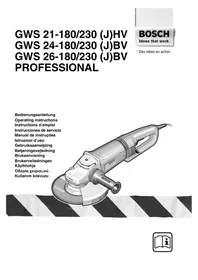


| Product type | Professional angle grinder |
| Brand | Bosch |
| Model | GWS 21230 HV Professional |
| Rated power input | 2100 W |
| Power output | 1350 W |
| No-load speed | 6500 rpm |
| Max. grinding wheel diameter | 230 mm |
| Spindle thread | M14 |
| Weight (without cable) | 4.4 kg |
| Protection class | II (double insulation) |
| Inrush current limitation | Yes (soft start, 16 A fuse sufficient) |
| Vibration damping device | Vibration Control (< 2.5 m/s²) |
| Switch | With lock (On/Off) |
| Protective guard | With clamping screw or quick-release |
| Auxiliary handle | Vibration-damping, screwable in 3 positions |
| Head rotation | In 90° steps |
| Applications | Cutting, grinding, brushing (metal and stone) |
| Sound pressure level | 90 dB(A) |
| Sound power level | 103 dB(A) |
| Maintenance | Clean cooling vents regularly |
| After-sales service | Authorized Bosch service centers |
| Included accessories | Auxiliary handle, pin spanner, protective guard |
Frequently Asked Questions - GWS 21230 HV Professional BOSCH
User questions about GWS 21230 HV Professional BOSCH
0 question about this device. Answer the ones you know or ask your own.
Ask a new question about this device
Download the instructions for your Angle grinder in PDF format for free! Find your manual GWS 21230 HV Professional - BOSCH and take your electronic device back in hand. On this page are published all the documents necessary for the use of your device. GWS 21230 HV Professional by BOSCH.
USER MANUAL GWS 21230 HV Professional BOSCH
GWS 21-180/230 (J)HV GWS 24-180/230 (J)BV GWS 26-180/230 (J)BV PROFESSIONAL


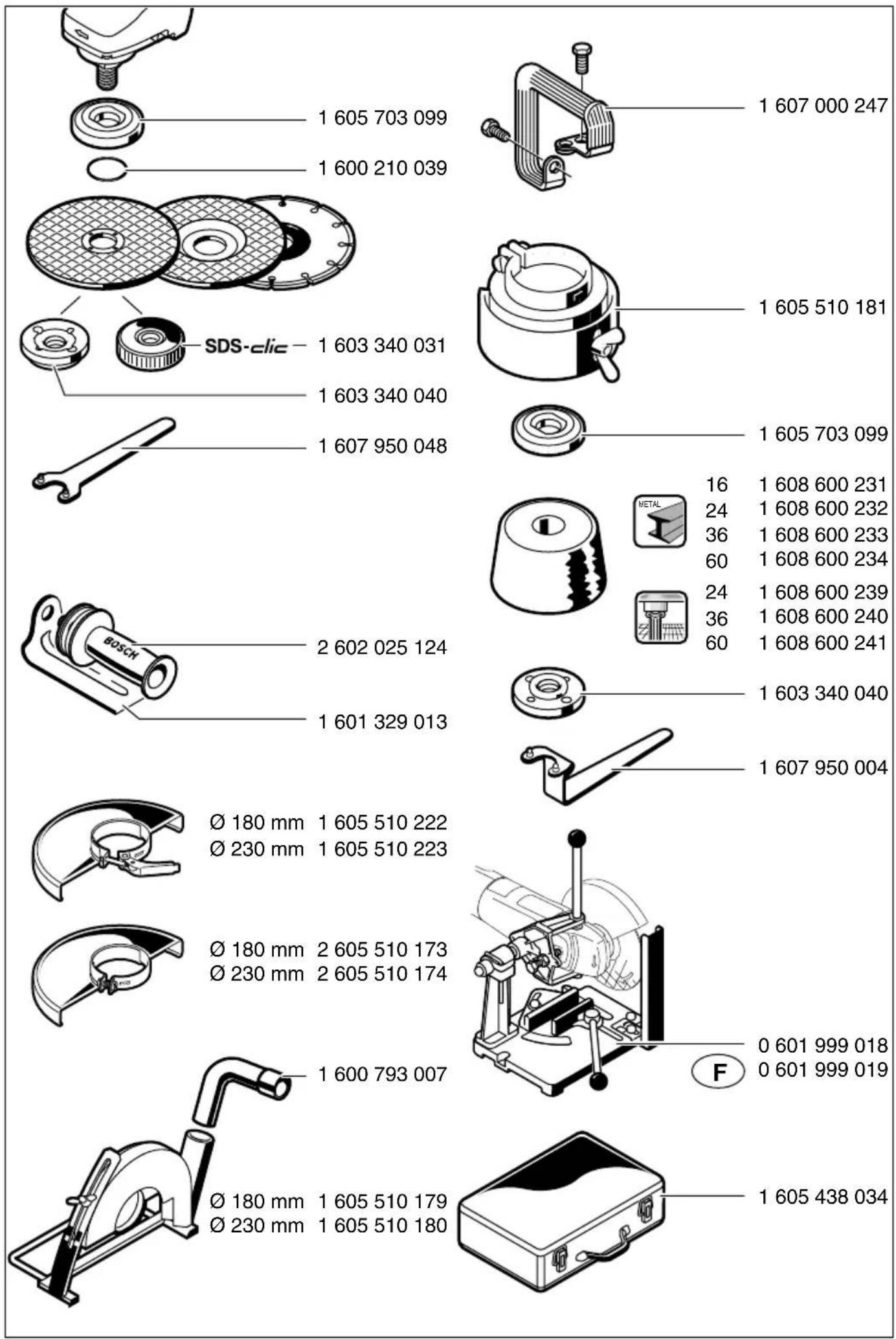
1 605 703 099
1 600 210 039
SDS-clic
1 603 340 031
1 603 340 040
1 607 950 048
2 602 025 124
1 601 329 013
∅ 180 mm
∅ 230 mm
1 605 510 222
∅ 180 mm
∅ 230 mm
2 605 510 174
1 600 793 007
∅ 180 mm
∅ 230 mm
1 605 510 179
1 605 510 180
1 607 000 247
1 605 510 181
1 605 703 099
16
24
36
60
24
36
60
1 608 600 231
1 608 600 232
1 608 600 233
1 608 600 234
1 608 600 239
1 608 600 240
1 608 600 241
1 603 340 040
1 607 950 004
0 601 999 018
0 601 999 019
1 605 438 034
![graph TD A["Professional plus"] --> B["Professional"] B --> C["professional eco"] C --> D["professional"] D --> E["professional RAPIDO"] F["Professional"] --> G["blue:Metal top"] G --> H["blue:Metal"] H --> I["professional"] I --> J["blue:Metal top"] J --> K["blue:Metal"]](/content/2026/03/481170/images/3890d361a47597bbfa7415bb92e3045d0cba5e9f6f9d411106114075bf305745.jpg)
4-5·1609 929 F55·04.01
Device characteristics
| Winkelschleifer GWS 21-180 HV | PROFESSIONAL | GWS 21-230 HV PROFESSIONAL | GWS 24-180 BV PROFESSIONAL |
| Bestellnummer 0 601 851 B.. 0 601 852 B.. 0 601 853 B.. | |||
| Mit Anlaufstrombegrenzung GWS 21-180 JHV PROFESSIONAL | GWS 21-230 JHV PROFESSIONAL | GWS 24-180 JBV PROFESSIONAL | |
| Bestellnummer 0 601 851 G.. 0 601 852 G.. 0 601 853 G.. | |||
| Nennaufnahmeleistung* [W] 2 100 2 100 2 400 | |||
| Abgabeleistung [W] 1 350 1 350 1 700 | |||
| Leerlaufdrehzahl [min -1] 8 500 6 500 8 500 | |||
| Schleifscheiben-∅, max. [mm] 180 230 180 | |||
| Schleifspindelgewinde | M 14 | M 14 | M 14 |
| Gewicht ohne Netzkabel, ca. [kg] | 4,4 | 4,4 | 5,2 |
| Schutzklasse | ☐ / II | ☐ / II | ☐ / II |
| Winkelschleifer GWS 24-230 BV | PROFESSIONAL | GWS 26-180 BV PROFESSIONAL | GWS 26-230 BV PROFESSIONAL |
| Bestellnummer 0 601 854 B.. 0 601 855 B.. 0 601 856 B.. | |||
| Mit Anlaufstrombegrenzung GWS 24-230 JBV PROFESSIONAL | GWS 26-180 JBV PROFESSIONAL | GWS 26-230 JBV PROFESSIONAL | |
| Bestellnummer 0 601 854 G.. 0 601 855 G.. 0 601 856 G.. | |||
| Nennaufnahmeleistung* [W] 2 400 2 600 2 600 | |||
| Abgabeleistung [W] 1 700 1 800 1 800 | |||
| Leerlaufdrehzahl [min -1] 6 500 8 500 6 500 | |||
| Schleifscheiben-∅, max. [mm] 230 180 230 | |||
| Schleifspindelgewinde | M 14 | M 14 | M 14 |
| Gewicht ohne Netzkabel, ca. [kg] | 5,2 | 5,2 | 5,2 |
| Schutzklasse | ☐ / II | ☐ / II | ☐ / II |
For your safety
Separating rock
Senior Vice President Head of Product
Engineering Certification
Please observe the order number of your machine. The trade names of the individual machines may vary. Inrush currents cause short-time voltage drops. Under unfavourable power supply conditions, other equipment may be affected. If the system impedance of the power supply is lower than 0.25 Ohm, disturbances are unlikely to occur. * The values given are valid for nominal voltages [U] of 230/240 V. For lower voltages and models for specific countries, these values can vary.
Intended Use
The machine is intended for cutting, roughing and brushing metal and stone materials without using water. For cutting stone, a cutting guide is required.
Information on Structures
Slots in structural walls are subject to the Standard DIN 1053, Part 1 or country-specific regulations.
These regulations are to be observed under all circumstances. Before beginning work, consult the responsible structural engineer, architects or the construction supervisor.
Noise/Vibration Information
Measured values determined according to EN 50 144.
Typically the A-weighted noise levels of the machine are: Sound pressure level: 90 dB (A); sound power level: 103 dB (A).
Wear hearing protection!
The typical hand/arm vibration is below 2.5 m/s² (1.7 m/s²).
Machine Elements
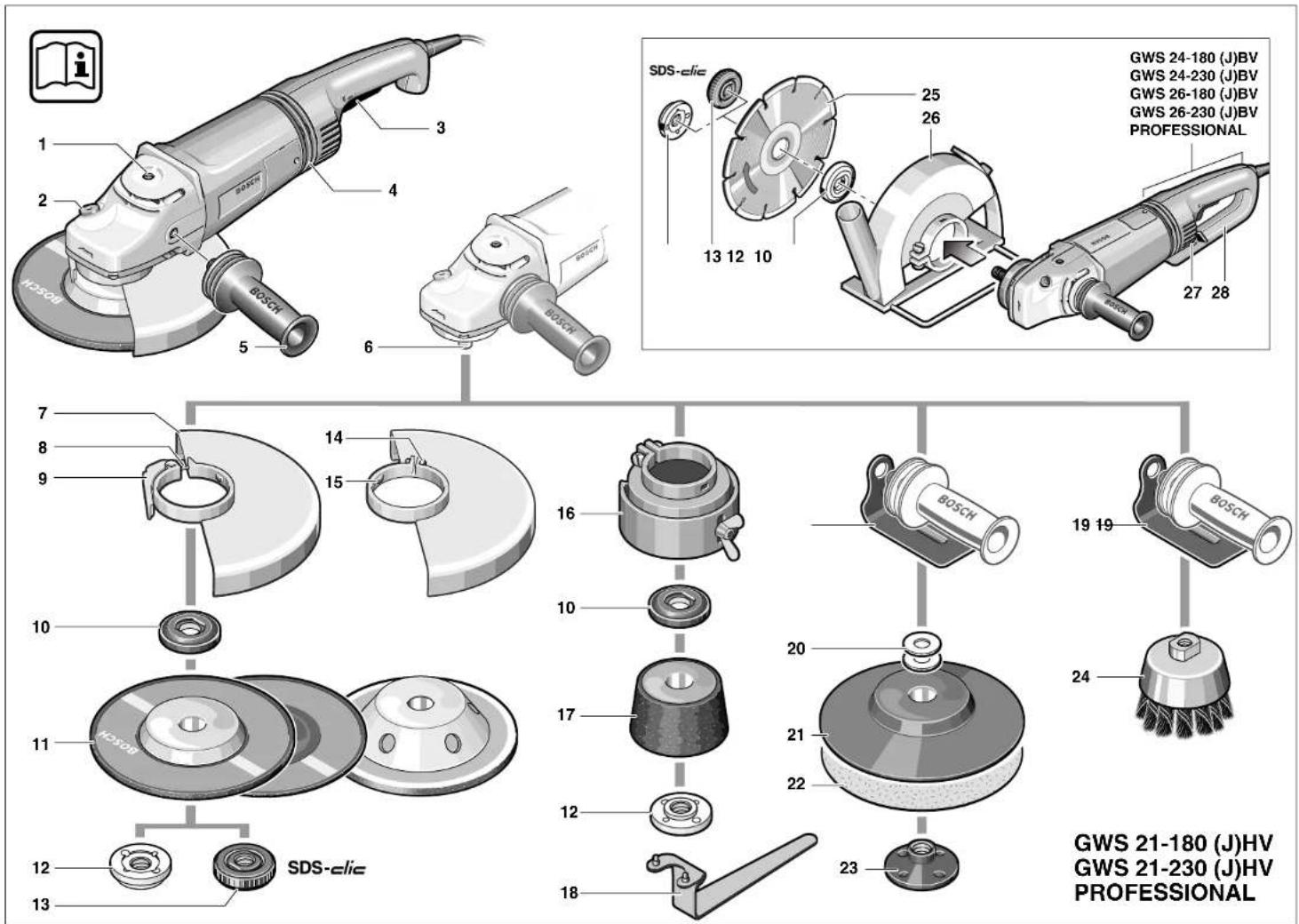
The numbering of the device elements refers to the illustration of the machine on the graphics page.
While reading the operating instructions, unfold the graphics page for the device and leave it open.
1 Thread for auxiliary handle (3x) 2 Spindle lock button 3 On/Off switch 4 Vibration damper 5 Auxiliary handle 6 Grinder spindle 7 Protection guard 8 Adjustment screw 9 Clamping lever 10 Mounting flange with O-ring 11 Grinding/cutting disc* 12 Clamping nut 13 Quick-clamping nut*
14 Clamping screw 15 Coded projection 16 Guard, grinding cup* 17 Grinding cup* 18 Two-pin spanner for clamping nut* 19 Hand guard* 20 Spacer discs* 21 Rubber sanding plate* 22 Sanding sheet* 23 Round nut* 24 Cup brush* 25 Diamond cutting disc* 26 Cutting guide with dust extraction protection guard* 27 Handle unlocking button 28 Handle 29 Cutting grinder stand*
* Not all of the accessories illustrated or described are included as standard delivery.

For Your Safety
Working safely with this machine is possible only when the operating and safety information are read completely and the instructions contained therein are strictly followed. In addition, the
general safety notes in the enclosed booklet must be observed. Before using for the first time, ask for a practical demonstration.
■Wear protective glasses and hearing protection. ■Wear additional protection equipment for your safety, such as protective gloves, sturdy shoes, hard hat and apron. ■The dust that is produced while working can be detrimental to health, inflammable or explosive. Suitable safety measures are required. Examples: Some dusts are regarded as carcinogenic. Use suitable dust/chip extraction and wear a dust respirator. ■Dust from light alloys can burn or explode. Always keep the workplace clean, as blends of materials are particularly dangerous.
■If the mains cable is damaged or cut through while working, do not touch the cable but immediately pull the mains plug. Never use the machine with a damaged cable. ■Connect machines that are used in the open via a residual current device (RCD) with an actuating current of 30 mA maximum. Do not operate the machine in rain or moisture. ■When working with the machine, always hold it firmly with both hands and provide for a secure stance. ■Secure the workpiece. A workpiece clamped with clamping devices or in a vice is held more secure than by hand. ■Always direct the cable to the rear away from the machine. ■Always switch the machine off and wait until it has come to a standstill before placing it down. ■For power outage or when the mains plug is pulled, unlock the On/Off switch immediately and turn it to the off position. This prevents uncontrolled restarting. ■The machine must be used only for dry cutting/grinding.
For all work with the machine, the auxiliary handle must be mounted. Hold the power tool only by the insulated gripping surfaces when performing an operation where the cutting tool may run into hidden wiring or its own cord. Contact with a "live" wire will make exposed metal parts of the tool "live" and shock the operator. Use appropriate detectors to determine if utility lines are hidden in the work area or call the local utility company for assistance. Contact with electric lines can lead to fire and electric shock. Damaging a gas line can lead to explosion. Penetrating a water line causes property damage or may cause an electric shock. For work with grinding or cutting discs, the protection guard 7 must be mounted. For work with the rubber sanding plate 21 or with the cup brush 24/disc brush/flap disc, the hand guard 19 (accessory) is to be mounted. Use dust extraction when working with stone. The vacuum cleaner must be approved for masonry dust. When cutting stone, use the cutting guide. Do not work with materials containing asbestos. Use only grinding tools with a permissible speed at least as high as the no-load speed of the machine. Check grinding tools before use. The grinding tool must be properly mounted and turn freely. Perform a test run for at least 30 seconds without load. Do not use damaged, out-of-round or vibrating grinding tools. Protect the grinding tool from impact, shock and grease. Apply the machine to the workpiece only when switched on. Keep hands away from rotating grinding tools. Pay attention to the direction of rotation. Always hold the machine so that sparks and grinding dust fly away from the body. When grinding metal, flying sparks are produced. Take care that no persons are endangered. Due to danger of fire, no combustible materials should be located in the vicinity (spark flight zone).
Be careful when cutting grooves, e.g. in structural walls: See Information on Structures. Blocking the cutting disc leads to jerking reaction forces on the machine. In this case switch off the machine immediately. Pay attention to the dimensions of the grinding disc. The mounting hole diameter must fit the mounting flange 10 without play. Do not use reducers or adapters. Never use cutting discs for rough grinding. Do not exert any lateral pressure on the cutting discs. Observe the manufacturer's instructions for mounting and using grinding tools. Caution! The grinding tool runs on after the machine is switched off. Do not clamp the machine in a vice. Never allow children to use the machine. Bosch is only able to ensure perfect operation of the machine if the original accessories intended for it are used.

Mounting the Protective Devices
Before any work on the machine itself, pull the mains plug.
For work with grinding or cutting discs, the protection guard 7 must be mounted.
Protection Guard with Locking Screw
The coded projection 15 on the protection guard 7 ensures that only a guard that fits the machine type can be mounted.
Loosen the clamping screw 14, if necessary.
Place the protection guard 7 with coded projection 15 into the coded groove on the spindle collar of the machine head and rotate to the required position (working position).
The closed side of the protection guard 7 must always point to the operator.
Tighten clamping screw 14.
Protection Guard with Quick Clamp

The protection guard is preadjusted to the diameter of the spindle collar. If required, the tightening tension of the clamping bracket can be changed by tightening or loosening the adjustment screw 8. Always ensure that the protection guard 7 is seated tightly on the spindle collar.
Open the clamping lever 9.
Place the protection guard 7 on the spindle collar of the machine head and turn to the required position (working position).
To fasten the protection guard 7, close the clamping lever 9.
The closed side of the protection guard 7 must always point to the operator.
Auxiliary Handle
For all work with the machine, the auxiliary handle must be mounted.
Screw the auxiliary handle 5 into the head of the machine according to the working method.
Vibration Damping

The integrated vibration damper 4 and the vibration-dampening auxiliary handle reduce occurring vibrations to below 2.5 m/s² according to EN 50144, and enable vibration-reduced and thus more agreeable and secure working.

Do not make any alterations to the vibration damper 4 and the auxiliary handle. Do not continue to use damaged parts.
Hand Guard
For work with the rubber sanding plate 21 or with the cup brush 24/disc brush/flap disc, the hand guard 19 (accessory) is to be mounted. The hand guard 19 is fastened with the auxiliary handle 5.
Mounting the Grinding Tools
Before any work on the machine itself, pull the mains plug.

Use only grinding tools with a permissible speed at least as high as the no-load speed of the machine.
Grinding and cutting discs become very hot while working; do not touch until they have cooled.
Clean the grinder spindle and all parts to be mounted. For clamping and loosening the grinding tools, lock the grinder spindle 6 with the spindle lock button 2.
Actuate the spindle lock button 2 only when the grinder spindle is at a standstill!
Grinding/Cutting Disc
Pay attention to the dimensions of the grinding disc. The mounting hole diameter must fit the mounting flange 10 without play. Do not use reducers or adapters.
When using a diamond cutting disc, take care that the direction-of-rotation arrow on the diamond cutting disc and the direction of rotation of the machine (direction-of-rotation arrow on the machine head) agree.
For mounting, see the illustration page.
Screw on the clamping nut 12 and tighten with the two-pin spanner (see Section "Quick-clamping Nut").
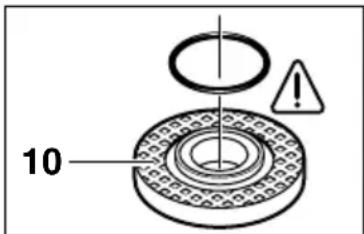
An O-ring (plastic part) is inserted in the mounting flange 10 around the spigot.
If the O-ring is missing or damaged, it must always be replaced (Order No. 1 600 210 039) before mounting the mounting flange 10.

After mounting the grinding tool and before switching on, check that the grinding tool is correctly mounted and can turn freely.
Flap Disc
Depending on the application, remove the protection guard 7 and mount the hand guard 19. Place the special mounting flange 10 (accessory, Order No. 2 605 703 028) and the flap disc on the grinder spindle 6. Screw on the clamping nut 12 and tighten with the two-pin spanner.
Rubber Sanding Plate 21
Depending on the application, remove the protection guard 7 and mount the hand guard 19.
Before mounting the rubber sanding pad 21, place the 2 spacers 20 onto the grinding spindle.
For mounting, see the illustration page.
Screw on the round nut 23 and tighten with the two-pin spanner.
Cup Brush 24/Disc Brush
Depending on the application, remove the protection guard 7 and mount the hand guard 19.
The grinding tool must be screwed onto the grinding spindle 6 until it rests firmly against the grinder spindle flange at the end of the grinder spindle threads. Tighten with an open-end spanner.
Grinding Cup

When working with grinding cups, use the special guard 16.
The grinding cup 17 should always protrude from the guard 16 only as far as absolutely necessary for the work to be performed in each case.
Adjust the guard 16 to this distance.
For mounting, see the illustration page.
Screw on the clamping nut 12 and tighten with the fitting offset two-pin spanner 18.
Quick Clamping Nut SDS-clic
Instead of the clamping nut 12, the quick-clamping nut 13 (accessory) can be used. Grinding tools can then be mounted without using tools.
The quick-clamping nut 13 may be used only for grinding and cutting discs.
Use only a flawless, undamaged quick-clamping nut 13.
When screwing on, take care that the side with printing does not point to the grinding disc. The arrow must point to the index mark 30.
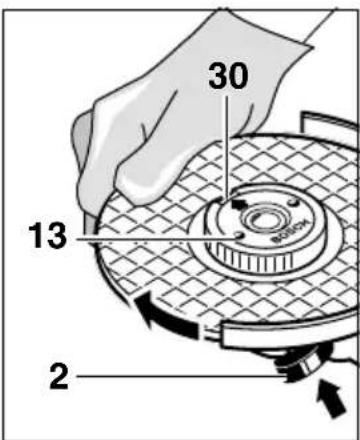
Lock the grinder spindle with the spindle lock button 2. Tighten the quick-clamping nut by forcefully turning the grinding disc in the clockwise direction.
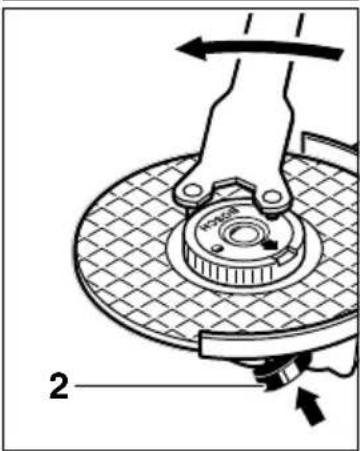
A properly tightened undamaged, quick-clamping nut can be loosened by hand turning the knurled ring in anticlockwise direction.
Never loosen a tight quick-clamping nut with pliers but use a two-pin spanner. Insert the two-pin spanner as shown in the illustration.
Approved Grinding Tools
All grinding tools mentioned in this operating manual instruction can be used.
The permissible speed [rpm] or the circumferential speed [m/s] of the grinding tools used must at least match the values given in the table.
Therefore, always observe the permissible rotational/circumferential speed on the label of the grinding tool.
| max.[mm] [mm] | d[rpm] [m/s] | ||||
| D | b | ||||
 | 180 | 8 | 22.2 | 8 500 | 80 |
| 230 | 8 | 22.2 | 6 500 | 80 | |
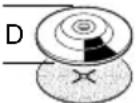 | 180 | - | - | 8 500 | 80 |
| 230 | - | - | 6 500 | 80 | |
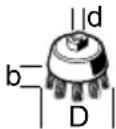 | 100 | 30 M | 14 8 500 | 45 | |
Starting Operation
Observe correct mains voltage: The voltage of the power source must agree with the voltage specified on the nameplate of the machine. Equipment marked with 230 V can also be connected to 220 V.
Switching On and Off
To start the machine, press the On/Off switch 3 forward and then down.
To lock-on, push the pressed On/Off switch 3 further forwards.
To switch off the machine, release the On/Off switch 3 or push and release it then.
Switch version without lock (country-specific):
To start the machine, press the On/Off switch 3 forward and then down.
To switch off the machine, release the On/Off switch 3.

Test run!
Check the grinding tool before use. The grinding tool must be properly mounted and rotate freely. Perform a test run of at least 30 seconds without load. Do not use damaged, out-of-round or vibrating grinding tools.

Reduced Starting Current (Type J)
As a result of soft starting, a 13 A fuse is adequate.

A machine without reduced starting current requires higher fuse protection (use at least a 13 A time-delay fuse).
Operating Instructions
Clamp the workpiece if it does not remain stationary due to its own weight. Do not strain the machine so heavily that it comes to a standstill. Grinding and cutting discs become very hot while working; do not touch until they have cooled.
Rough Grinding

The best roughing results are achieved when setting the machine at an angle of 30° to 40°. Move the machine back and forth with moderate pressure. In this manner, the workpiece will not become too hot, does not discolor and no grooves are formed.

Never use a cutting disc for roughing.
Flap Disc
With the flap disc (accessory), curved surfaces and profiles (contour sanding) can be worked.
Flap discs have a considerably higher service life than sanding sheets, lower noise level and lower sanding temperatures.
Cutting
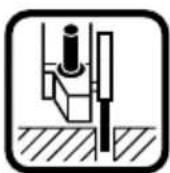
When cutting, do not press, jam or oscillate the machine. Work with moderate feed, adapted to the material being machined.
Do not reduce the speed of running down cutting discs by applying sideward pressure.
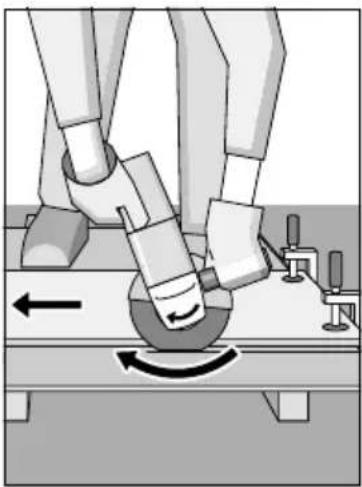
The direction in which the cutting is performed is important.
The machine must always work in an up-grinding motion. Therefore, never move the machine in the other direction! Otherwise, the danger exists of it being pushed uncontrolled out of the cut.
Grinder Stand
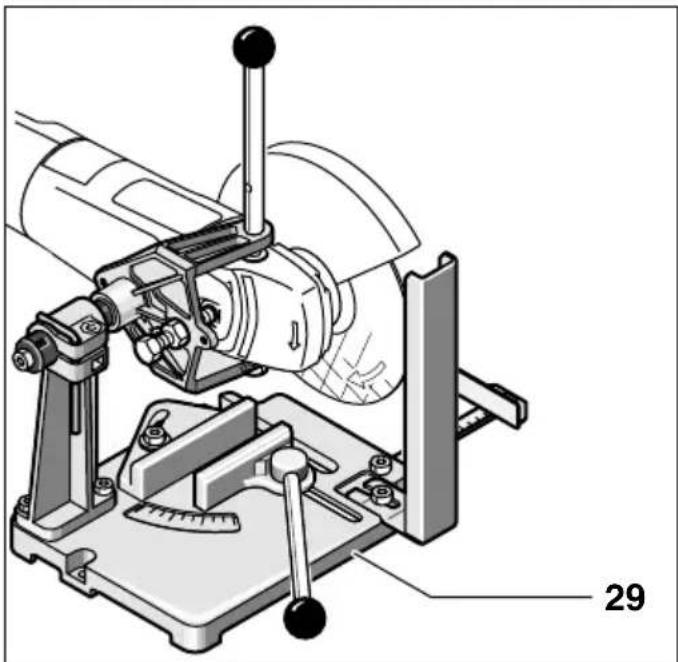
With the grinder stand 29 (accessory), workpieces can be cut at angles of 0 to 45° at the same lengths.
The safety notes and operating instructions in the respective operating instructions manual of the angle grinder are to be strictly observed. Use only original Bosch grinder stands.
Cutting Stone
The machine must be used only for dry cutting/grinding.
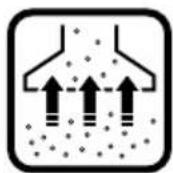

It is best to use a diamond cutting disc. As a safety measure against jamming, use the cutting guide 26 with the special dust extraction protection guard.
Operate the machine with dust extraction only. In addition, wear a dust mask.
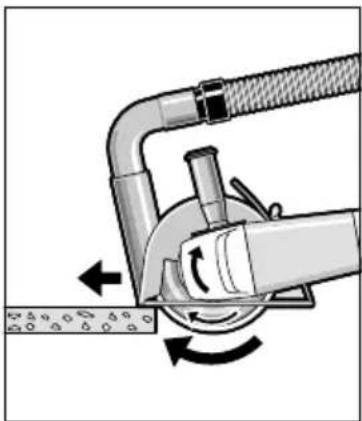
The vacuum cleaner must be approved for the extraction of masonry dust.
Bosch provides suitable vacuum cleaners.
Switch on the machine and place the front part of the cutting guide on the workpiece.
Slide the machine with moderate feed, adapted to the material to be worked (Figure).
For cutting especially hard material, e.g., concrete with high pebble content, the diamond cutting disc can overheat and become damaged as a result. This is clearly indicated by circular sparking, rotating with the diamond cutting disc.
In this case, interrupt the cutting process and allow the diamond cutting disc to cool by running freely at no-load speed for a short time.
Noticeable decreasing work progress and circular sparking are indications of a diamond cutting disc that has become dull. Briefly cutting into abrasive material (e.g., lime-sand brick) can re-sharpen the disc.
Rotating the Machine Head
Before any work on the machine itself, pull the mains plug.
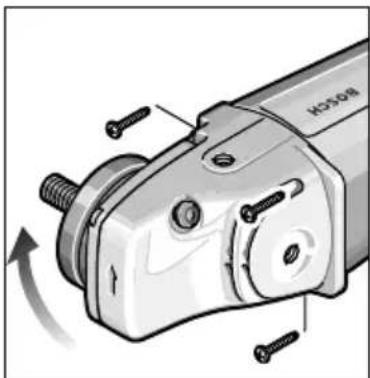
The machine head can be rotated with respect to the machine housing in 90° steps. In this manner, the On/Off switch can be brought to an advantageous handling position for special working situations, e.g., for cutting work with the cutting guide 26/cutting grinder stand 29 (accessory) or for left-handed persons.
Unscrew completely the four screws.
Rotate the machine head carefully and without removing from the housing to the new position.
Screw in the screws again and tighten.
Turning the Machine Handle (GWS 24/26-180/230 (J)BV)
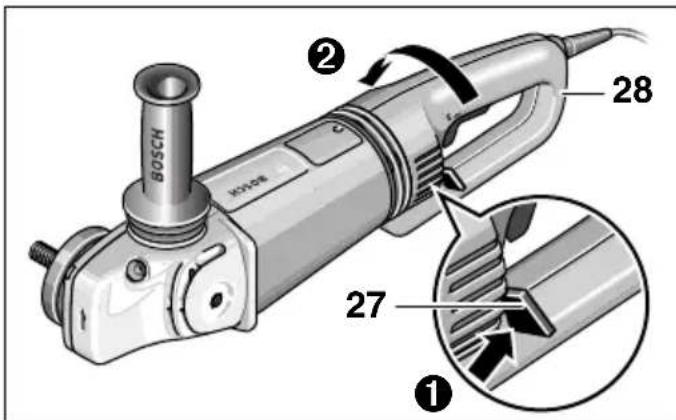
The handle 28 can be turned with respect to the motor housing by 90° either to the left or right. This allows for the On/Off switch to be positioned more conveniently for certain working situations, e.g., for cutting work with the cutting guide/grinder stand (accessories) and for left-handers.
Pull the handle unlocking button 27 firmly in the direction of the arrow (①), turning the handle 28 at the same time to the desired position (②) until it engages. The figure shows the handle 28 turned by 90°.

The handle unlocking button 27 and the On/Off switch 3 have a safety interlock.
The machine cannot be switched on if the handle 28 is not engaged in one of the three possible positions.
The handle 28 cannot be unlocked if the On/Off switch 3 is locked.
Maintenance and Cleaning
Before any work on the machine itself, pull the mains plug.

For safe and proper working, always keep the machine and the ventilation slots clean.

In extreme working conditions, conductive dust can accumulate in the interior of the machine when working with metal. The protective insulation of the machine can be degraded. The use of a stationary extraction system is recommended in such cases as well as frequently blowing out the ventilation slots and installing a residual current device (RCD).
When the vibration-dampening elements of the vibration damper 4 are damaged, e.g., torn in, then the machine must be sent to an after-sales service agent for maintenance (for address, see section "Service and Customer Assistance").
If the machine should fail despite the care taken in manufacturing and testing procedures, repair should be carried out by an after-sales service centre for Bosch power tools.
In all correspondence and spare parts orders, please always include the 10-digit order number given on the nameplate of the machine.
WARNING! Important instructions for connecting a new 3-pin plug to the 2-wire cable.
The wires in the cable are coloured according to the following code:
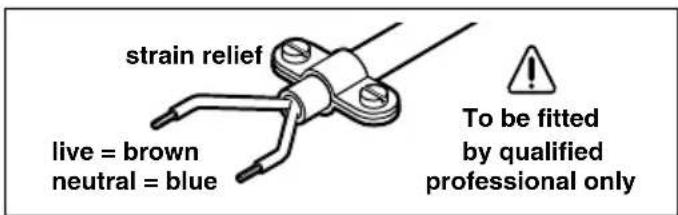
Do not connect the blue or brown wire to the earth terminal of the plug.
Important: If for any reason the moulded plug is removed from the cable of this machine, it must be disposed of safely.
Environmental Protection

Recycle raw materials instead of disposing as waste
The machine, accessories and packaging should be sorted for environmental-friendly recycling.
These instructions are printed on recycled paper manufactured without chlorine.
The plastic components are labelled for categorized recycling.
Service and Customer Assistance
Exploded views and information on spare parts can be found under: www.bosch-pt.com
Great Britain
Robert Bosch Ltd. (B.S.C.)
P.O. Box 98
Broadwater Park
North Orbital Road
Denham-Uxbridge
Middlesex UB 9 5HJ
©Service.... +44 (0) 18 95 / 83 87 82
©Advice line ...... +44 (0) 18 95 / 83 87 91
Fax....+44 (0) 18 95 / 83 87 89
Ireland
Beaver Distribution Ltd.
Greenhills Road
Tallaght-Dublin 24
©Service....+353 (0)1 / 414 9400
Fax....+353 (0)1 / 459 8030
Australia
Robert Bosch Australia Ltd.
RBAU/SPT2
1555 Centre Road
P.O. Box 66 Clayton
3168 Clayton/Victoria
Phone: +61 (0)1 / 800 804 777
Fax: +61 (0)1 / 800 819 520
www.bosch.com.au
E-Mail: CustomerSupportSPT@au.bosch.com
New Zealand
Robert Bosch Limited
14-16 Constellation Drive
Mairangi Bay
Auckland
New Zealand
CE Declaration of Conformity
We declare under our sole responsibility that this product is in conformity with the following standards or standardization documents: EN 50 144 according to the provisions of the directives 89/336/EEC, 98/37/EC.
Dr. Egbert Schneider Dr. Eckerhard Strötgen
Senior Vice President Head of Product
Engineering Certification
ppa. Iwana i.v. Nudgen
Subject to change without notice
For your safety
Robert Bosch France S.A.
After-sales service/Power tools
Senior Vice President Head of Product
Engineering Certification

For your safety
Stone cutting
Senior Vice President Head of Product
Engineering Certification
For your safety
Mounting the abrasive tools
Dr. Egbert Schneider Dr. Eckerhard Strötgen Senior Vice President Head of Product Engineering Certification
Senior Vice President Head of Product
Engineering Certification
For your safety
Quick-release nut SDS-clic
Cutting stone
Dr. Egbert Schneider Dr. Eckerhard Strötgen Senior Vice President Head of Product Engineering Certification
Dr. Egbert Schneider Dr. Eckerhard Strötgen Senior Vice President Head of Product Engineering Certification
Safety measures
Senior Vice President Head of Product
Engineering Certification
ppa. Aneka i.v. Nuoyen
For your safety
Cutting stone
The machine head can be rotated in 90° steps against the machine housing. This allows the on/off switch to be placed in a better position for special types of work; e.g., for cutting with the foot plate 26/cutting stand 29 (accessories) or for left-handed users.
Unscrew the four screws completely.
Senior Vice President Head of Product
Engineering Certification
ppa. Aneka i.v. Nuoyen
Work safety
Senior Vice President Head of Product
Engineering Certification
ppa. Aneka i.v. Nuoyen
Cutting of rocks
Dr. Egbert Schneider Dr. Eckerhard Strötgen Senior Vice President Head of Product Engineering Certification
ppa. Aneka i.v. Nuoyen
For Your Safety
Cutting of rocks
Bosch San. ve Tic. A.S.
Ahi Evran Cad. No:1 Kat:22
Polaris Plaza
80670 Maslak/Istanbul
📞 +90 (0)212 / 335 06 00
Fax ....+90 (0)212 / 346 00 48-49
CE Declaration of Conformity
Senior Vice President Head of Product
Engineering Certification
ppa. A##na i.v. N##gen


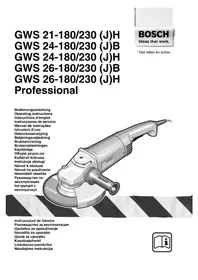
- GWS 21-180/230 (J)HV GWS 24-180/230 (J)BV GWS 26-180/230 (J)BV PROFESSIONAL
- FOR YOUR SAFETY
- SEPARATING ROCK
- INTENDED USE
- INFORMATION ON STRUCTURES
- NOISE/VIBRATION INFORMATION
- MACHINE ELEMENTS
- MOUNTING THE PROTECTIVE DEVICES
- PROTECTION GUARD WITH LOCKING SCREW
- PROTECTION GUARD WITH QUICK CLAMP
- AUXILIARY HANDLE
- VIBRATION DAMPING
- HAND GUARD
- MOUNTING THE GRINDING TOOLS
- GRINDING/CUTTING DISC
- FLAP DISC
- RUBBER SANDING PLATE
- FOR MOUNTING, SEE THE ILLUSTRATION PAGE
- CUP BRUSH 24/DISC BRUSH
- GRINDING CUP
- QUICK CLAMPING NUT SDS-CLIC
- THE QUICK-CLAMPING NUT 13 MAY BE USED ONLY FOR GRINDING AND CUTTING DISCS
- APPROVED GRINDING TOOLS
- STARTING OPERATION
- SWITCHING ON AND OFF
- SWITCH VERSION WITHOUT LOCK (COUNTRY-SPECIFIC)
- TEST RUN
- REDUCED STARTING CURRENT (TYPE J)
- OPERATING INSTRUCTIONS
- ROUGH GRINDING
- CUTTING
- GRINDER STAND
- CUTTING STONE
- ROTATING THE MACHINE HEAD
- TURNING THE MACHINE HANDLE (GWS 24/26-180/230 (J)BV)
- MAINTENANCE AND CLEANING
- ENVIRONMENTAL PROTECTION
- RECYCLE RAW MATERIALS INSTEAD OF DISPOSING AS WASTE
- SERVICE AND CUSTOMER ASSISTANCE
- GREAT BRITAIN
- IRELAND
- AUSTRALIA
- NEW ZEALAND
- CE DECLARATION OF CONFORMITY
- STONE CUTTING
- MOUNTING THE ABRASIVE TOOLS
- QUICK-RELEASE NUT SDS-CLIC
- SAFETY MEASURES
- WORK SAFETY
- CUTTING OF ROCKS
Brand : BOSCH
Model : GWS 21230 HV Professional
Category : Angle grinder