MAS 144 LiIon - Drill Meister Craft - Free user manual and instructions
Find the device manual for free MAS 144 LiIon Meister Craft in PDF.



| Brand | Meister Craft |
| Model | MAS 144 LiIon |
| Product type | Cordless drill/driver |
| Power supply | Li-Ion battery 14.4 V / 1500 mAh |
| Charger | JLH 081 850 370G, input 100–240 V~ 50/60 Hz, output 18.5 V / 370 mA |
| Charging time | Approximately 3 to 5 hours |
| No-load speed | 0–400 rpm (1st gear) / 0–1200 rpm (2nd gear) |
| Max. torque | 25 Nm |
| Drilling capacity | Wood: 19 mm, Aluminum: 10 mm, Steel: 8 mm |
| Chuck | Quick-release chuck, max. capacity 10 mm |
| Torque setting | 16+1 positions, including drilling position |
| Rotation direction | Forward / reverse / spindle lock |
| Lighting | Integrated LED work light |
| Battery charge indicator | 3-color LED (red, yellow, green) |
| Noise level | LpA = 83 dB(A), LWA = 94 dB(A), uncertainty K = 3 dB |
| Vibration | Drilling in metal: < 2.5 m/s², uncertainty K = 1.5 m/s² |
| Weight | Approximately 1.2 kg (with battery) |
| Dimensions (L × W × H) | Approximately 250 × 200 × 80 mm |
| Delivery contents | Drill, 1 battery, charger, 2 double-ended bits 45 mm, carrying case, instruction manual, warranty certificate |
| Maintenance | Clean the housing with a damp cloth, no solvents. Fully discharge and recharge the battery every 2 months. |
| Safety | Read the instruction manual before use. Use protective equipment. Do not expose to rain. Charge only with the supplied charger. |
| General information | Household use only. Manufacturer warranty valid with warranty certificate. Opening the appliance voids the warranty. |
Frequently Asked Questions - MAS 144 LiIon Meister Craft
User questions about MAS 144 LiIon Meister Craft
0 question about this device. Answer the ones you know or ask your own.
Ask a new question about this device
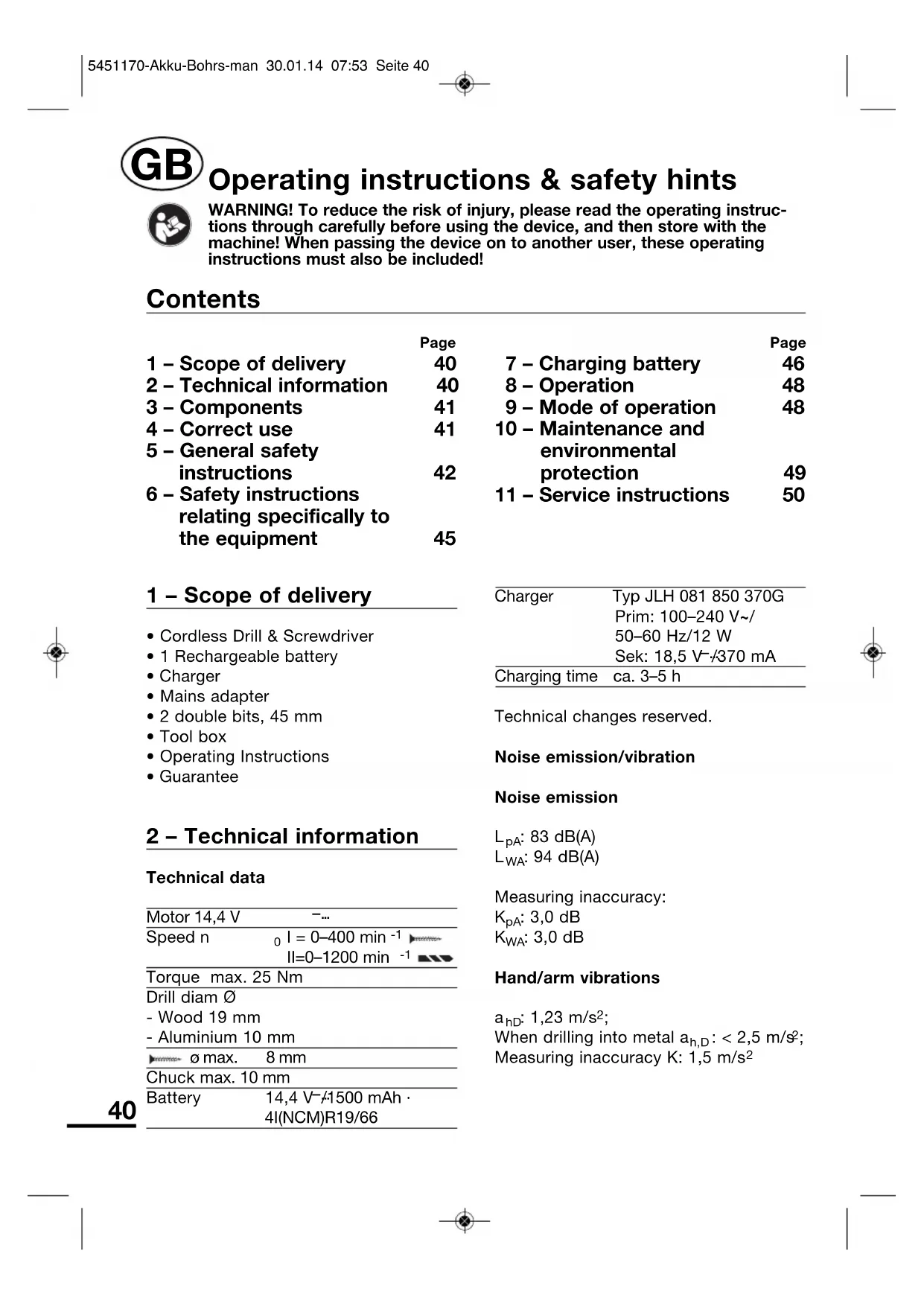
Download the instructions for your Drill in PDF format for free! Find your manual MAS 144 LiIon - Meister Craft and take your electronic device back in hand. On this page are published all the documents necessary for the use of your device. MAS 144 LiIon by Meister Craft.
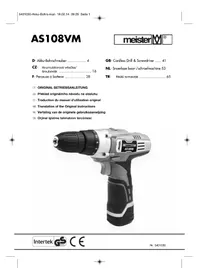
USER MANUAL MAS 144 LiIon Meister Craft
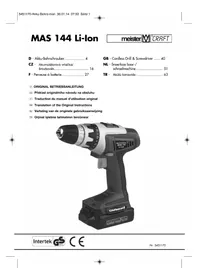
GB - Cordless Drill & Screwdriver ..... 40
NL - Snoerloze boor-/schroefmachine .... 51
natural_image
Black lithium-ion power drill with visible model number 144 and branding (no text-heavy elements)Intertek

CE
Nr. 5451170
text_image
Abb. 1 1 2 10 MAS 144 Li-Ion 14 3 11 9 7 6 5 12 15 8 POWER PACK 16.CV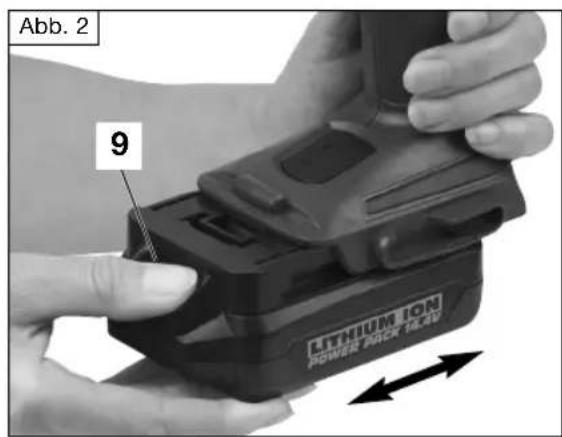
text_image
Abb. 2 9 LITHIUM ION POWER PACK 16.40natural_image
Close-up of a drill bit being inserted into a drill bit, showing multiple drill bits (no text or symbols visible)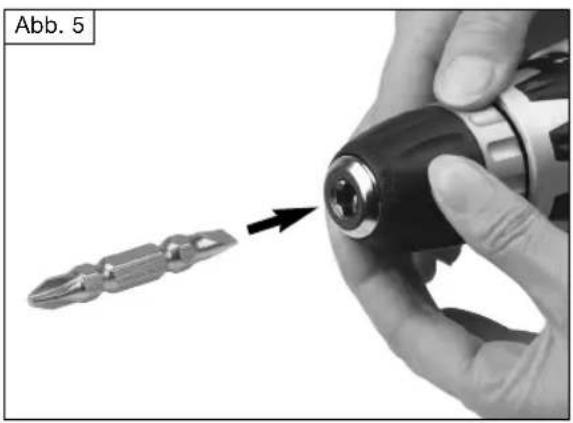
natural_image
Close-up of hands using a drill bit to adjust a screwdriver into a key (no text or symbols visible)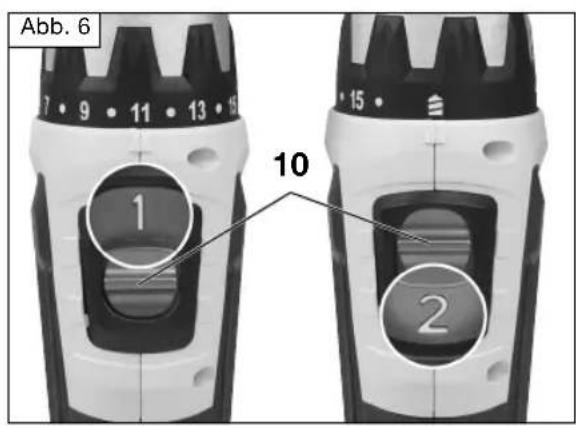
text_image
Abb. 6 10 2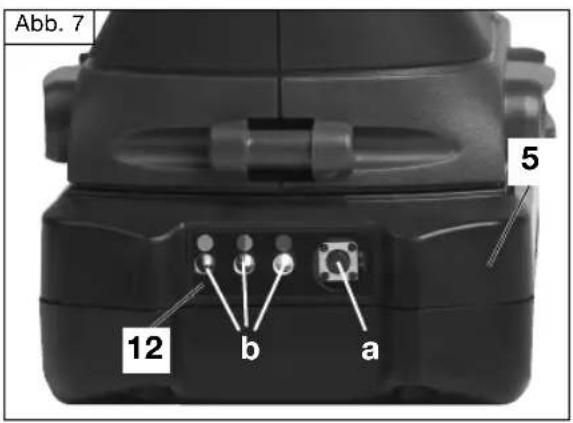
text_image
Abb. 7 5 12 b a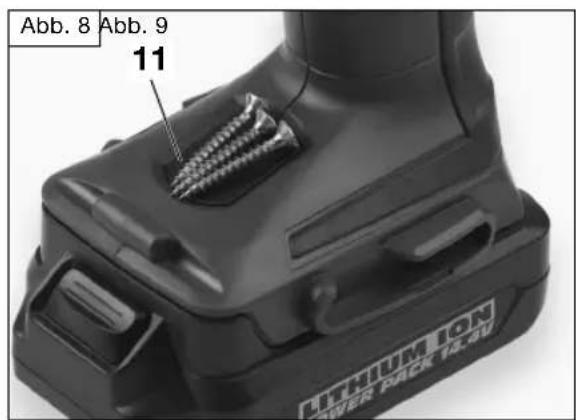
text_image
Abb. 8 Abb. 9 11 LITHIUM ON POWER PACK 14.5V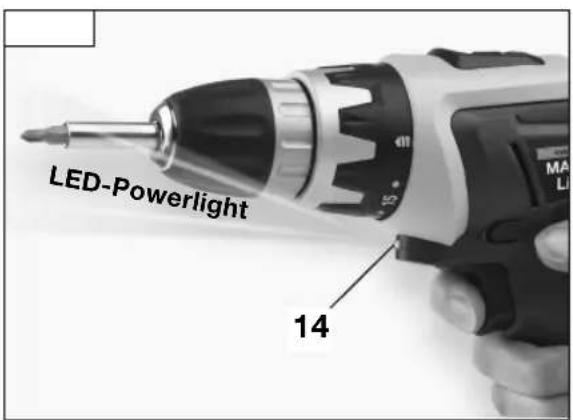
text_image
LED-Powerlight 14
Operating instructions & safety hints

WARNING! To reduce the risk of injury, please read the operating instructions through carefully before using the device, and then store with the machine! When passing the device on to another user, these operating instructions must also be included!
Contents
| Page | Page | ||
| 1 – Scope of delivery | 40 | 7 – Charging battery | 46 |
| 2 – Technical information | 40 | 8 – Operation | 48 |
| 3 – Components | 41 | 9 – Mode of operation | 48 |
| 4 – Correct use | 41 | 10 – Maintenance and environmental protection | 49 |
| 5 – General safety instructions | 42 | ||
| 6 – Safety instructions relating specifically to the equipment | 45 | 11 – Service instructions | 50 |
1 - Scope of delivery
• Cordless Drill & Screwdriver
• 1 Rechargeable battery
- Charger
- Mains adapter
• 2 double bits, 45 mm
- Tool box
- Operating Instructions
- Guarantee
2 - Technical information
Technical data
| Motor 14,4 V | -... |
| Speed n | 0 l = 0–400 min ^-1 ▶II=0–1200 min ^-1 ▶ |
| Torque max. 25 Nm | |
| Drill diam ∅- Wood 19 mm- Aluminium 10 mm | |
| ▶∅ max. | 8 mm |
| Chuck max. 10 mm | |
| Battery | 14,4 V−/1500 mAh ·4I(NCM)R19/66 |
| Charger | Typ JLH 081 850 370GPrim: 100–240 V~/50–60 Hz/12 WSek: 18,5 V-/370 mA |
| Charging time | ca. 3–5 h |
Technical changes reserved.
Noise emission/vibration
Noise emission
L_pA : 83 dB(A) L_WA : 94 dB(A)
Measuring inaccuracy:
Measured values determined in accordance with EN 60745-1.
The specified vibration emission value was measured in accordance with a standardised test procedure and can be used in order to compare one electrical tool with another. The specified vibration emission value can also be used for preliminary evaluation of the disturbance.
CAUTION! The vibration emission value may fluctuate from the specified value during use of the electri cal tool. These fluctuations will depend on the way in which the tool is used.
Safety measures must be taken in order to protect the operator. As a result, the evaluation of the disturbance must be made whilst taking account of the actual conditions of use. (All parts of the operating cycle must be taken into account for this purpose. This also includes times in which the tool is switched off and times in which it is switched on, but is running without load.)
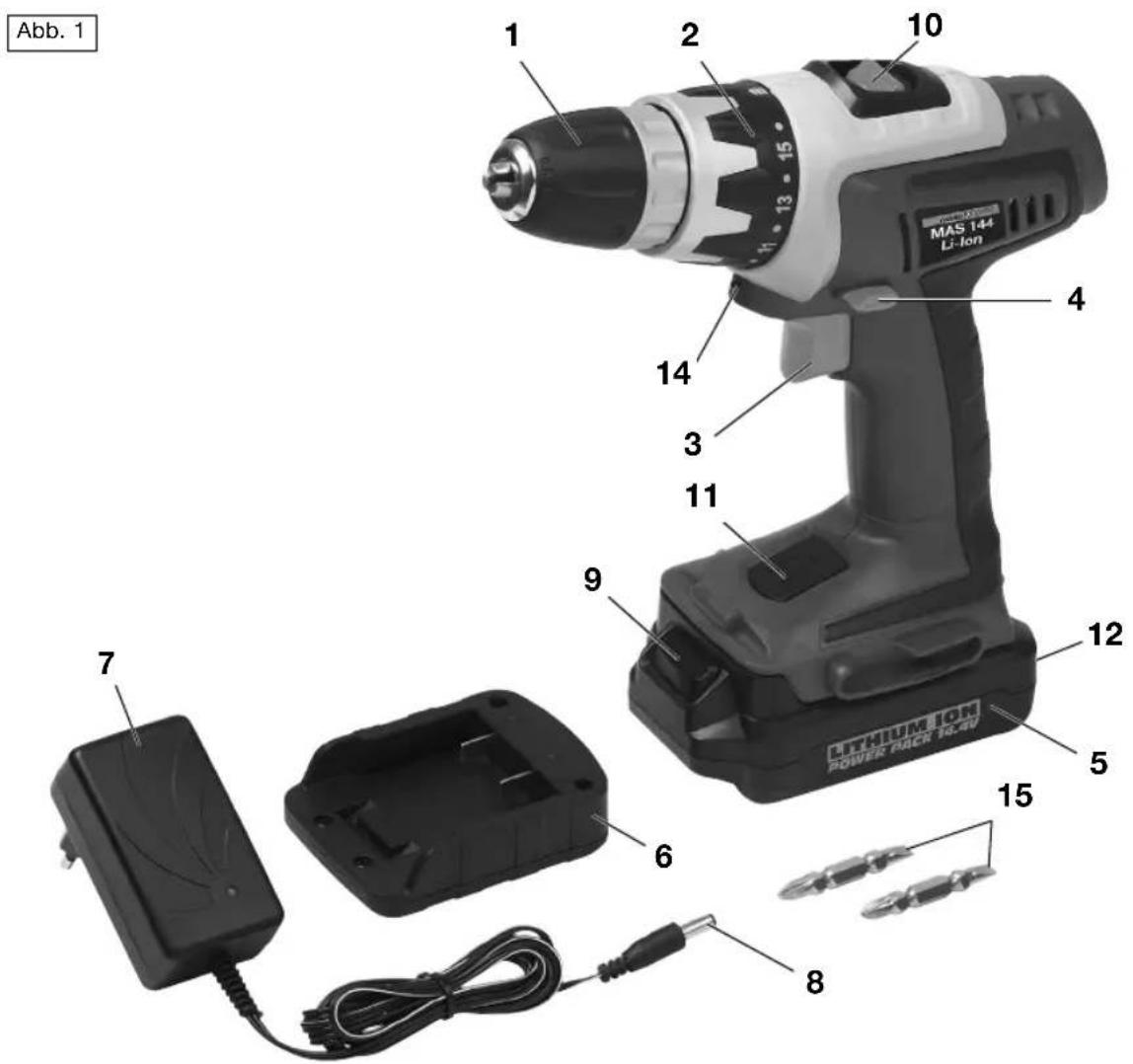
3 - Components
1 Drill chuck
2 Torque setting 16+1
3 On/Off switch
4 Clockwise/anti-clockwise running
5 Rechargeable battery
6 Charger
7 Mains adapter
8 Charging plug
9 Unlocking button
10 SPEED switch ( 1^st/2^nd gear)
11 Magnetic rest
12 Battery charging display
13 LED for charge control
14 LED working light
15 2 double bits, 45 mm
4 - Correct use
Drilling in wood and metal, screw-driving. Employ the machine, charging unit and accessories (follow manufacturer's directives!) for specified area of application only! All other applications are explicitly excluded.
The machine is intended only for use in the household.
This unit may not be used by people (including children) with reduced physical, sensory or mental capacities, with a lack of experience and without the appropriate knowledge, unless they are supervised by someone who is responsible for their safety or have been instructed by such a person with regard to how the unit is to be operated. Children should be supervised to ensure that they do not play with the device.
Improper use of the product
All applications carried out with the device that are not listed in the „Proper use“ chapter will be considered improper use.
Uses for which the tool is not designed may cause risks and injury. Do not use accessories that are not intended specifically for this electrical tool.
Tool inserts that do not fit precisely to the sanding spindle of the electrical tool will rotate unevenly, vibrate very heavily and may lead to a loss of control.
There is a risk of injury. The user of the device is liable for all property and
personal damages occurring as the result of incorrect use.
If other components or non-original components are used with the machine, the manufacturer guarantee is voided.
Remaining risks:
The operating instructions for this electrical tool contains comprehensive tips for the safe handling of electrical tools. However, every electrical tool has a certain level of remaining risks which cannot be excluded by the protective mechanisms on the device. Only operate electrical tools always with necessary care.
Remaining risks may be, for example:
- Touching rotating parts or tools.
- Injury caused by flying tools or tool parts.
- Risk of fire with insufficient ventilation of the motor.
- Adverse effects on the hearing caused by working without ear defenders.
The ability to work safely is dependant on the familiarity of the operator when it comes to handling the given electrical tool. Appropriate knowledge of the machinery and careful behaviour when working help to minimise the remaining risks.
WARNING! During operation, this power tool generates an electro magnetic field. This field may, under certain circumstances, influence active or passive medical implants. In order to reduce the risk of serious or deadly injuries, we
recommend persons with such a medical implant to consult their doctor and the manufacturer of the medical implant before using the power tool.
5 – General safety instructions for handling power tools
WARNING! Read all safety warnings and all instructions.
Failure to follow the warnings and instructions may result in electric shock, fire and/or serious injury.
Save all warnings and instructions for future reference.
The term „power tool” in the warnings refers to your mains operated (corded) power tool or battery-operated (cordless) power tool.
1 Work area
a Keep work area clean and well lit.
Cluttered and dark areas invite
accidents.
b Do not operate power tools in explosive atmospheres, such as in the presence of flammable liquids, gases or dust. Power tools create sparks which may ignite the dust or fumes.
c Keep children and bystanders away while operating a power tool. Distractions can cause you to lose control.
2 Electrical Safety
a Power tool plugs must match the outlet. Never modify the plug in any way. Do not use any adapter plugs with earthed (grounded) power tools. Unmodified plugs and
matching outlets will reduce risk of electric shock.
b Avoid body contact with earthed or grounded surfaces, such as pipes, radiators, ranges and refrigerators. There is an increased risk of electric shock if your body is earthed or grounded.
c Do not expose power tools to rain or wet conditions. Water entering a power tool will increase the risk of electric shock.
d Do not abuse the cord. Never use the cord for carrying, pulling or unplugging the power tool. Keep cord away from heat, oil, sharp edges or moving parts. Damaged or entangled cords increase the risk of electric shock.
e When operating a power tool outdoors, use an extension cord suitable for outdoor use. Use of a cord suitable for outdoor use reduces the risk of electric shock.
If it is not possible to avoid using the electrical tool in a damp environment, use a residual current circuit-breaker. The use of a residual current circuit-breaker reduces the risk of an electrical shock.
3 Personal safety
a Stay alert, watch what you are doing and use common sense when operating a power tool. Do not use a power tool while you are tired or under the influence of drugs, alcohol or medication. A moment of inattention while operating power tools may result in serious personal injury.
b Use personal protective equipment. Always wear eye protection. Protective equipment such as dust masks, non-skid safety shoes, hard hat, or hearing protection used for appropriate conditions will reduce personal injuries.
c Prevent unintentional starting. Ensure the switch is in the off-position before connecting to power source and/or battery pack, picking up or carrying the tool. Carrying power tools with your finger on the switch or energising power tools that have the switch on invites accidents.
d Remove any adjusting key or wrench before turning the power tool on. A wrench or a key left attached to a rotating part of the power tool may result in personal injury.
e Do not overreach. Keep proper footing and balance at all times. This enables better control of the power tool in unexpected situations.
f Dress properly. Do not wear loose clothing or jewellery. Keep your hair, clothing and gloves away from moving parts. Loose clothes, jewellery or long hair can be caught in moving parts.
g Keep handles dry, clean and free from oil and grease. Slippery handles do not allow for safe handling and control of the tool in unexpected situations.
h If devices are provided for the connection of dust extraction and collection facilities, ensure these are connected and properly used. Use of
these devices can reduce dust related hazards.
4 Power tool use and care
a Do not force the power tool. Use the correct power tool for your application. The correct power tool will do the job better and safer at the rate for which it was designed.
b Do not use the power tool if the switch does not turn it on and off. Any power tool that cannot be controlled with the switch is dangerous and must be repaired.
c Disconnect the plug from the power source before making any adjustments, changing accessories, or storing power tools. Such preventive safety measures reduce the risk of starting the power tool accidentally.
d Store idle power tools out of the reach of children and do not allow persons unfamiliar with the power tool or these instructions to operate the power tool. Power tools are dangerous in the hands of untrained users.
e Maintain power tools. Check for misalignment or binding of moving parts, breakage of parts and any other condition that may affect the power tool's operation. If damaged, have the power tool repaired before use. Many accidents are caused by poorly maintained power tools.
f Keep cutting tools sharp and clean. Properly maintained cutting tools with sharp cutting edges are less likely to bind and are easier to control.
g Use the power tool, accessories and tool bits etc. in accordance with these instructions, taking into account the working conditions and the work to be performed. Use of the power tool for operations different from those intended could result in a hazardous situation.
5 Use and treatment of the battery-operated tool
a Only use chargers to recharge the battery that have been recommended by the manufacturer. When using a charger designated for a particular type of battery, there is a risk of fire if it is used with other batteries.
b Only use the batteries designed for use in the electric tools. The use of other batteries may lead to injury and risk of fire.
c When not in use, keep the battery away from paper clips, coins, keys, nails, screws or other small metallic objects that may bridge the contacts. A short-circuit between the battery contacts can lead to burns or fire.
d Fluid can escape from the battery when used incorrectly. Avoid all contact with this. In the event of accidental contact, rinse with water. If liquid should get into the eyes, get medical assistance. Battery fluid may result in skin irritations and burns.
6 General safety information for battery-powered screwdrivers
Service
a Have your power tool serviced by a qualified repair person using only
identical replacement parts. This will ensure that the safety of the power tool is maintained.
7 Safety information for battery-powered screwdrivers
a Hold the tool by the insulated handle surfaces only when carrying out tasks during which is it possible that the tools will come across hidden power cables or its own cable. Contact with a power-carrying cable can also put metal parts of the unit under power and cause an electric shock.
8 Safety notes for battery/charger
a Keep the charger away from rain or damp. Water entering into the charger will increase the risk of an electrical shock.
b Only use chargers recommended by the manufacturer to recharge the battery. When using a charger designated for a particular type of battery, there is a risk of fire if it is used with other batteries.
c Never use to recharge third-party batteries. The charger is only designed to charge the supplied batteries using the voltages specified in the Technical Data. Otherwise there is a risk of fire or explosion.
d Keep the charger clean. Contamination will increase the risk of an electrical shock.
e Check the charger, cable and plug each time you use the unit. Do not use the charger if you find any damages. Never open the charger up yourself, have it repaired by a
qualified specialist only and with original replacement parts. A damaged charger, cable or plug will increase the risk of an electrical shock.
f Never operate the charger on a surface that will burn easily (for example, paper, textiles etc) or in a flammable environment. There is a risk of fire occurring as a result of the heat generated during the charging process.
g Fluid can escape from the battery when used incorrectly. Avoid all contact with this. In the event of accidental contact, rinse with water. If liquid should get into the eyes, get medical assistance. Battery fluid may result in skin irritations and burns.
h Do not open the battery. There is a risk of short-circuiting.
i Protect the battery from heat, for example, from constant sun and fire. There is a risk of explosion.
j Never short circuit the battery. There is a risk of explosion.
k In the event of damages and incorrect use, vapours may come out of the battery. Ensure plenty of fresh air and, if you have any symptoms, consult a doctor. These vapours may irritate the respiratory system.
6 – Safety instructions relating specifically to the equipment
- Use the appliance, the charger and the attachments, only for their intended applications!
- Before laying the stick screwdriver aside, ensure that all moving parts have come to a standstill.
- Avoid frequent blocking when drilling, tightening or loosening screws.
- Connect the charger only to a 100–240 V AC power supply.
- Charge the screwdriver battery only with the charger supplied.
- Protect the charger and the screwdriver from contact with moisture. Never immerse in water!
- Do not use the charger in the open air.
• To avoid damage to the batteries, never expose them to temperatures of over 50 °C.
CAUTION! Do not short-circuit the contacts of the battery or charger.
- When charging, ensure that the device is correctly connected („+/-“).
- Do not attempt to burn the battery.
- The connection cord cannot be replaced. In case of damage, dispose of the device in the correct manner. In case of damage, dispose of the device in the correct manner.
7 - Charging battery
This battery-powered screwdriver MAS 144 Li-Ion 4I(NCM)R19/66 may only be charged using the JLH 081 850 370G mains adapter unit. The mains adapter unit may only be operated with a power supply that has an alternating current of 100–240 V\~ and a frequency of 50–60 Hz. The use of
any other mains adapter units or the use of the JLH 081 850 370G with another type of power supply may lead to personal and property damage.
Lithium-ion battery technology
This new type of battery has decisive advantages over conventional Ni-Cd batteries:
- No memory effect, i.e. regardless of its charge status the battery can be recharged at any time before or after use without loss of capacity.
- Extremely low self-discharge, so it is ready for use even after longer storage periods.
- Light in weight
- Long service life
Removing the battery from or inserting the battery into the power tool
Press the unlocking button (9) on the battery (5). Pull the battery forwards out of the power tool (Figure 2). To insert the battery, follow the steps in reverse order until you hear it click into place.
Putting the rechargeable battery into and removing it from the charging station
Slide the charging station (6) in accordance with Figure 3 onto the battery until you hear it click into place. To remove, press the unlocking button (9) on the battery and pull the charging station.
Charging process (Figure 3)
CAUTION! The rechargeable battery is not fully charged on
leaving the factory. Charge the rechargeable battery before first use.
CAUTION! The working temperature of the charger is 0 degree to 45 degrees.
Connect the charging plug (8) of the power supply (7) to the charge station (6). Connect the power supply to a power socket (100–240 V\~).
CAUTION! The specifications on the power supply must match the power source. If necessary ask your local power supplier.
As soon as contact with the power network is made, the charge control LED (13) will light up in GREEN.
Put the rechargeable battery into the charging station. During the charging process, the control LED changes from GREEN to RED.
As soon as the charging process is complete, the control LED changes from RED to GREEN.
CAUTION! If a recently used up battery is inserted and the charge control LED does not light immediately, remove the battery and start the charging process again a few minutes later.
The normal charging time is around 3–5 hours. After this, the charger ensures constant maintenance of the charge. The battery is protected from overloading by a thermal protection mechanism, thus it can be left in the charger for long periods of time without damaging the battery. An even warming of the charger and battery is normal and does not represent a fault. A battery with a considerably shortened operating time indicates that it needs to be replaced.
Note: The range of the battery is influenced by the charged state, the frequency of use, the material being processed and the level of energy required to do so.
A new battery only reaches full performance capability after 5 charge and discharge cycles.
It the range of a freshly charged battery should drop considerably when compared to a new one, the battery is old and should soon be replaced by a new one. To do this, contact the specified service station.
Battery charge display (Figure 7)
The battery (5) has a battery charge display (12) that shows information about the charge status of the battery. Pressing the button (a) will light up to three coloured control LEDs (b):
- RED+YELLOW+GREEN: ● The battery is still fully charged.
- RED+YELLOW: The battery is only half charged.
- RED: The battery is empty and must be recharged.
The rechargeable battery is protected by a thermo-protection fuse against overcharging - nevertheless it should be withdrawn from the charging unit on expiry of the charging time. A constant heating of charging unit and rechargeable battery during the charging is normal and does not represent any malfunction.
TIP! It is recommended additionally to control the charging process via an electrical time-switch clock!
8 - Operation
All standard screwdriver bits, bit holders and drills, up to a diameter of 10 mm (not in the scope of delivery), can be clamped in the drill chuck (1) (Fig. 4).
The machine is provided with a quick-action drill chuck. In this way, you can replace the accessories in manual operation rapidly and without drill chuck keys (Fig. 5).
The drill chuck of clockwise/anti-clockwise rotation machines is always fixed with a left-hand thread bolt. This is to be loosened in front through the drill chuck (1) before a drill chuck change. Left-hand thread bolts can be loosened through clockwise rotation only.
The screwdriver bits and drill bits with a length of 45 mm can also be inserted directly into the bit receptacle (Fig. 5).
Prior to start up
Insert a wood screw gently into the hole pre-drilled using a drill bit. Machine screws should be started off gently. Fit a suitable bit or socket to the battery-powered screwdriver and place firmly against the screw.
Starting and stopping
CAUTION! Risk of over winding caused by screwing screws in too deep. Watch the screwing process carefully and, if necessary, stop early and finish the process with
an ordinary screwdriver. Always practise first!
- Starting: Press the ON/OFF switch (3): The screwing process will start. Press and keep the switch during the screwing process.
- Stopping: As soon as the screw has been screwed in or removed fully, release the On/Off switch.
LED working light (Figure 9)
As long as the On/Off switch (3) is held down, the LED working light (14) is lit in order to illuminate dark working areas. The working light goes out when the On/Off switch is released.
SPEED switching (1 ^st /2 ^nd gear) (Figure 6)
With the SPEED switch (11), two different speed ranges can be selected.
- Switch position I: 0–400 rpm for turning screws in and out
- Switch position II: 0–1200 rpm for screw-driving and drilling
The speed range to be selected is determined by the respective material and the planned activity, and is to be determined through work on a specimen.

CAUTION! Carry out changeover with motor stopped only.
9 - Mode of operation
Electronic rotation speed regulation
Using the electronic rotation speed regulation (3), you can adapt the
rotation speed continuously to the respective job.
- Light pressure on the switch (3) = low rotation speed, in order to loosen stuck bolts.
- Switch pressed hard = highest possible rotation speed, for boring.
CAUTION! Avoid the motor coming to a standstill under loading when boring or screw-driving!
Clockwise/anti-clockwise run
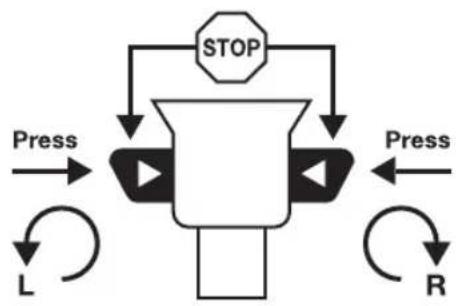
You determine the rotation direction with the aid of the slide switch (4) above the operating switch.
flowchart
graph TD
    A["STOP"] --> B["Press"]
    B --> C["L"]
    C --> D["R"]
    D --> E["Press"]
    E --> F["Stop"]
    style A fill:#f9f,stroke:#333
    style F fill:#f9f,stroke:#333
PLEASE NOTE! Change rotation direction only with motor stopped!
- Screw-driving in bolts: Slide switch to Position R.
- Turning off bolts: Slide switch to Position L.
Rotation stop
The rotation spindle is locked in the centre position of the right/left rotation switch (4), and thus acts as safety position when taking a break or changing a bit or a drill.
In the rotation stop mode, the power tool cannot be put into operation using the On/Off switch.
CAUTION! Carry out changeover with motor stopped only.
Setting the torque
With the torque setting selection switch (2) you can pre-set the required torque in 16 + 1 levels. When the correct setting is selected the power tool stops as soon as a screw is flush with the material or when the previously set torque is reached.
The correct torque will depend on the material and the screw size and should be determined by trial runs.
To remove screws, you may select a higher torque or switch to the "Drill" icon ▶ the "Drill" setting, the torque setting function is deactivated.
CAUTION! In order to prevent damage to the battery, the On/Off switch should not be activated after an automatic stop of the power tool. Any protruding screws should be tightened with a screwdriver.
Magnetic rest (Figure 8)
The power tool has a practical magnetic rest (11). This can be used to house screws or bits for a short time.
10 - Maintenance and environmental protection
Clean the case only with a damp cloth – Do not use solvents! Then dry well. To
maintain capacity, we recommend completely discharging and recharging the battery every two months. Store only fully charged batteries. They should therefore be recharged from time to time. The place of storage must be dry; the ambient temperature must not fall below 0 °C or rise above 40 °C.
CAUTION! Electrical and battery operated units that no longer work should not be disposed of in the household waste! They are to be collected separately, in accordance with the 2012/19 EU directive for the
disposal of electrical and electronic waste, and sent for proper and environmentally-friendly recycling.
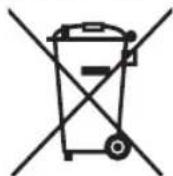
ATTENTION! Batteries must be removed from battery-powered tools and disposed of separately in accordance with relevant waste-battery regulations. Batteries must never be disposed of with domestic waste!
Please discard power tools no longer usable at a local collection point. Collection and disposal of packaging materials separately by types complying with local rules and regulations. For details, please contact your municipal authority concerned.
11 - Service instructions
- Store the machine, operating instructions and where necessary the accessories in the original packaging. In this way you will always have all the information and parts ready to hand.
- MeisterCRAFT devices are to a large extent maintenancefree, a damp cloth being sufficient to clean the casing.
Please note additional hints given in the operating instructions.
- MeisterCRAFT devices are subject to stringent quality control. If however a functional fault should occur, send the device to our servicing address. The repairs will be carried out in a short time.
- A brief description of the defect speeds up the faulttracing and repair time. If within the guarantee period, please enclose the guarantee document and the proof of purchase.
- In so far as a repair under guarantee is not concerned, we will charge the repair costs to your account.
PLEASE NOTE! Opening of the device invalidates the guarantee claim!
IMPORTANT! We point out expressly that in accordance with the Product Liability Act we do not take responsibility for any damage caused by our appliances, in so much that said damage is caused by improper repair, or original parts or parts released by us not being used when parts are changed, or repairs not being conducted by Meister Werk zeuge GmbH, Customer Service or an authorised specialist! The same applies analogously to the accessories used.
- Pack the device well or use the original packaging in order to avoid transit damage.
- Even after the expiry of the guarantee period, we would like to help you and carry out any repairs at a favourable price.

... is herewith declared to conform with the following guidelines:
GB - The object of the declaration described above is in conformity with Directive 2011/65/EU of the European Parliament and of the Council of 8 June 2011 on the restriction of the use of certain hazardous substances in electrical and electronic equipment.