ManualGo.com
MSZEF25VGKB - Air Conditioning MITSUBISHI - Free user manual and instructions
Find the device manual for free MSZEF25VGKB MITSUBISHI in PDF.



Download the instructions for your Air Conditioning in PDF format for free! Find your manual MSZEF25VGKB - MITSUBISHI and take your electronic device back in hand. On this page are published all the documents necessary for the use of your device. MSZEF25VGKB by MITSUBISHI.
USER MANUAL MSZEF25VGKB MITSUBISHI
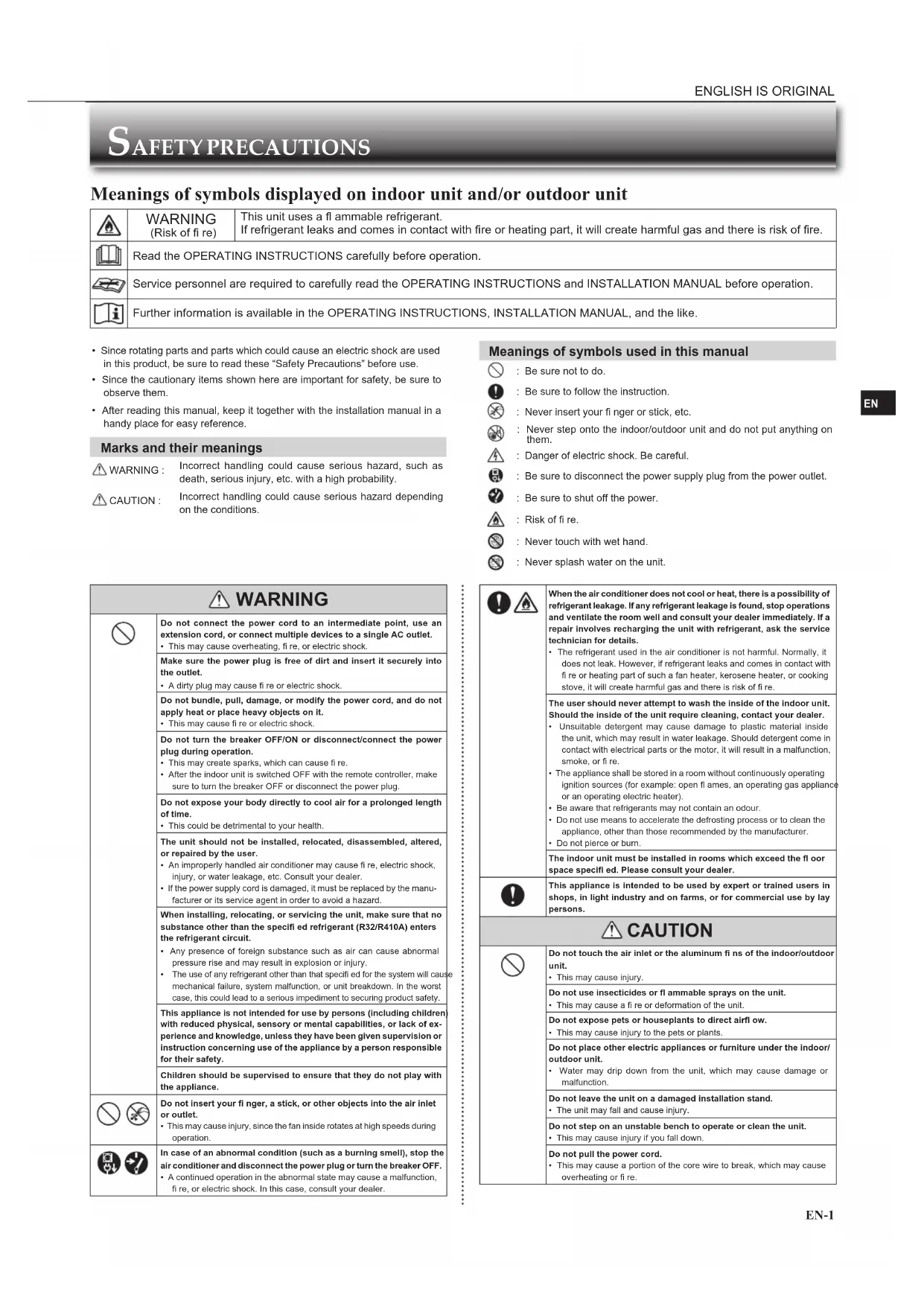
- Since rotating parts and parts which could cause an electric shock are used in this product, be sure to read these “Safety Precautions” before use.• Since the cautionary items shown here are important for safety, be sure to observe them.• After reading this manual, keep it together with the installation manual in a handy place for easy reference. Marks and their meanings WARNING :Incorrect handling could cause serious hazard, such as death, serious injury, etc. with a high probability. CAUTION :Incorrect handling could cause serious hazard depending on the conditions. Meanings of symbols used in this manual : Be sure not to do. : Be sure to follow the instruction. : Never insert your fi nger or stick, etc. : Never step onto the indoor/outdoor unit and do not put anything on them. : Danger of electric shock. Be careful. : Be sure to disconnect the power supply plug from the power outlet. : Be sure to shut off the power. : Risk of fi re. : Never touch with wet hand. : Never splash water on the unit. SAFETY PRECAUTIONS Meanings of symbols displayed on indoor unit and/or outdoor unit WARNING (Risk of fi re)This unit uses a fl ammable refrigerant. If refrigerant leaks and comes in contact with fi re or heating part, it will create harmful gas and there is risk of fi re. Read the OPERATING INSTRUCTIONS carefully before operation.Service personnel are required to carefully read the OPERATING INSTRUCTIONS and INSTALLATION MANUAL before operation.Further information is available in the OPERATING INSTRUCTIONS, INSTALLATION MANUAL, and the like. WARNING Do not connect the power cord to an intermediate point, use an extension cord, or connect multiple devices to a single AC outlet.• This may cause overheating, fi re, or electric shock.Make sure the power plug is free of dirt and insert it securely into the outlet.• A dirty plug may cause fi re or electric shock.Do not bundle, pull, damage, or modify the power cord, and do not apply heat or place heavy objects on it.• This may cause fi re or electric shock.Do not turn the breaker OFF/ON or disconnect/connect the power plug during operation.• This may create sparks, which can cause fi re.• After the indoor unit is switched OFF with the remote controller, make sure to turn the breaker OFF or disconnect the power plug. Do not expose your body directly to cool air for a prolonged length of time.• This could be detrimental to your health.The unit should not be installed, relocated, disassembled, altered, or repaired by the user.• An improperly handled air conditioner may cause fi re, electric shock, injury, or water leakage, etc. Consult your dealer.• If the power supply cord is damaged, it must be replaced by the manu-facturer or its service agent in order to avoid a hazard.When installing, relocating, or servicing the unit, make sure that no substance other than the specifi ed refrigerant (R32/R410A) enters the refrigerant circuit.• Any presence of foreign substance such as air can cause abnormal pressure rise and may result in explosion or injury. The use of any refrigerant other than that specifi ed for the system will cause mechanical failure, system malfunction, or unit breakdown. In the worst case, this could lead to a serious impediment to securing product safety.This appliance is not intended for use by persons (including children) with reduced physical, sensory or mental capabilities, or lack of ex-perience and knowledge, unless they have been given supervision or instruction concerning use of the appliance by a person responsible for their safety.Children should be supervised to ensure that they do not play with the appliance. Do not insert your fi nger, a stick, or other objects into the air inlet or outlet.• This may cause injury, since the fan inside rotates at high speeds during operation. In case of an abnormal condition (such as a burning smell), stop the air conditioner and disconnect the power plug or turn the breaker OFF.• A continued operation in the abnormal state may cause a malfunction, fi re, or electric shock. In this case, consult your dealer. When the air conditioner does not cool or heat, there is a possibility of refrigerant leakage. If any refrigerant leakage is found, stop operations and ventilate the room well and consult your dealer immediately. If a repair involves recharging the unit with refrigerant, ask the service technician for details.• The refrigerant used in the air conditioner is not harmful. Normally, it does not leak. However, if refrigerant leaks and comes in contact with fi re or heating part of such a fan heater, kerosene heater, or cooking stove, it will create harmful gas and there is risk of fi re.The user should never attempt to wash the inside of the indoor unit. Should the inside of the unit require cleaning, contact your dealer.• Unsuitable detergent may cause damage to plastic material inside the unit, which may result in water leakage. Should detergent come in contact with electrical parts or the motor, it will result in a malfunction, smoke, or fi re.• The appliance shall be stored in a room without continuously operating ignition sources (for example: open fl ames, an operating gas appliance or an operating electric heater).• Be aware that refrigerants may not contain an odour.• Do not use means to accelerate the defrosting process or to clean the appliance, other than those recommended by the manufacturer.• Do not pierce or burn.The indoor unit must be installed in rooms which exceed the fl oor space specifi ed. Please consult your dealer.This appliance is intended to be used by expert or trained users in shops, in light industry and on farms, or for commercial use by lay persons. CAUTION Do not touch the air inlet or the aluminum fi ns of the indoor/outdoor unit.• This may cause injury.Do not use insecticides or fl ammable sprays on the unit.• This may cause a fi re or deformation of the unit.Do not expose pets or houseplants to direct airfl ow.• This may cause injury to the pets or plants.Do not place other electric appliances or furniture under the indoor/outdoor unit.• Water may drip down from the unit, which may cause damage or malfunction.Do not leave the unit on a damaged installation stand.• The unit may fall and cause injury.Do not step on an unstable bench to operate or clean the unit.• This may cause injury if you fall down.Do not pull the power cord.• This may cause a portion of the core wire to break, which may cause overheating or fi re.JG79Y701L02_01En.indd 1 2020/03/16 10:51:58To use this unit correctly and safely, be sure to read these operating instructions before use.
EN-2 SAFETY PRECAUTIONS Do not charge or disassemble the batteries, and do not throw them into a fi re. This may cause the batteries to leak, or cause a fi re or explosion.Do not operate the unit for more than 4 hours at high humidity (80% RH or more) and/or with windows or outside door left open.• This may cause the water condensation in the air conditioner, which may drip down, wetting or damaging the furniture. • The water condensation in the air conditioner may contribute to growth of fungi, such as mold.Do not use the unit for special purposes, such as storing food, raising animals, growing plants, or preserving precision devices or art objects.• This may cause deterioration of quality, or harm to animals and plants.Do not expose combustion appliances to direct airfl ow.• This may cause incomplete combustion.Never put batteries in your mouth for any reason to avoid accidental ingestion.• Battery ingestion may cause choking and/or poisoning.Before cleaning the unit, switch it OFF and disconnect the power plug or turn the breaker OFF.• This may cause injury, since the fan inside rotates at high speeds during operation.When the unit will be unused for a long time, disconnect the power plug or turn the breaker OFF.• The unit may accumulate dirt, which may cause overheating or fi re.Replace all batteries of the remote controller with new ones of the same type.• Using an old battery together with a new one may cause overheating, leakage, or explosion.If the battery fl uid comes in contact with your skin or clothes, wash them thoroughly with clean water. If the battery fl uid comes in contact with your eyes, wash them thoroughly with clean water and immediately seek medical attention.Ensure that the area is well-ventilated when the unit is operated together with a combustion appliance.• Inadequate ventilation may cause oxygen starvation.Turn the breaker OFF when you hear thunder and there is a possibility of a lightning strike.• The unit may be damaged if lightning strikes.After the air conditioner is used for several seasons, perform inspec-tion and maintenance in addition to normal cleaning.• Dirt or dust in the unit may create an unpleasant odor, contribute to growth of fungi, such as mold, or clog the drain passage, and cause water to leak from the indoor unit. Consult your dealer for inspection and maintenance, which require specialized knowledge and skills.Do not operate switches with wet hands.• This may cause electric shock.Do not clean the air conditioner with water or place an object that contains water, such as a fl ower vase, on it.• This may cause fi re or electric shock.Do not step on or place any object on the outdoor unit.• This may cause injury if you or the object falls down. IMPORTANT Dirty fi lters cause condensation in the air conditioner which will contribute to the growth of fungi such as mold. It is therefore recommended to clean air fi lters every 2 weeks.Before starting the operation, ensure that the horizontal vanes are in the closed posi-tion. If operation starts when the horizontal vanes are in the open position, they may not return to the correct position. WARNING Consult your dealer for installing the air conditioner. • It should not be installed by the user since installation requires special-ized knowledge and skills. An improperly installed air conditioner may cause water leakage, fi re, or electric shock.Provide a dedicated power supply for the air conditioner.• A non-dedicated power supply may cause overheating or fi re.Do not install the unit where fl ammable gas could leak.• If gas leaks and accumulates around the outdoor unit, it may cause an explosion.Earth the unit correctly.• Do not connect the earth wire to a gas pipe, water pipe, lightning rod, or a telephone earth wire. Improper earthing may cause electric shock. CAUTION Install an earth leakage breaker depending on the installation location of the air conditioner (such as highly humid areas).• If an earth leakage breaker is not installed, it may cause electric shock.Ensure that the drain water is properly drained.• If the drain passage is improper, water may drip down from the indoor/outdoor unit, wetting and damaging the furniture.In case of an abnormal condition Immediately stop operating the air conditioner and consult your dealer. For installation WARNING (Improper handling may have serious consequences, including serious injury or death.)This appliance can be used by children aged from 8 years and above and persons with reduced physical, sensory or mental capabilities or lack of experience and knowledge if they have been given supervi-sion or instruction concerning use of the appliance in a safe way and understand the hazards involved.Children shall not play with the appliance. Cleaning and user mainte-nance shall not be made by children without supervision.Do not use the Wi-Fi interface nearby the medical electrical equipment or people who have a medical device such as a cardiac pacemaker or an implantable cardioverter-defi brillator.• It can cause an accident due to malfunctions of the medical equipment or device.Do not install the Wi-Fi interface nearby the automatic control devices such as automatic doors or fi re alarms.• It can cause accidents due to malfunctions.Do not touch the Wi-Fi interface with wet hands.• It can cause damage to the device, electric shock, or fi re.Do not splash water on the Wi-Fi interface or use it in a bathroom.• It can cause damage to the device, electric shock, or fi re.When the Wi-Fi interface is dropped, or the holder or cable is dam-aged, disconnect the power supply plug or turn the breaker OFF.• It may cause fi re or electric shock. In this case, consult your dealer. CAUTION (Improper handling may have consequences, including injury or damage to building.)Do not step on unstable stepstool to set up or clean the Wi-Fi interface.• It may cause injury if you fall down.Do not use the Wi-Fi interface nearby other wireless devices, micro-waves, cordless phones, or facsimiles.• It can cause malfunctions. For Wi-Fi interface JG79Y701L02_01En.indd 2 2020/03/16 10:51:59EN EN-3
Indoor unit Outdoor unit Outdoor units may be different in appearance.Air inlet (back and side)Refrigerant pipingDrainage hoseAir outletDrain outletSpec name plate *1*1 The manufacturing year and month are indicated on the spec name plate.
PREPARATION BEFORE OPERATION
Before operation: Insert the power supply plug into the power outlet and/or turn the breaker on. Installing the remote controller batteries
Press RESET. Setting current time
Press CLOCK. Press CLOCK again. Press either the TIME button or the TIMER buttons to set the time. Each press changes the clock 1 minute forward/backward (10 minutes when pressed longer). Press the DAY button to set the day.Your MITSUBISHI ELECTRIC product is designed and manufactured with high quality materials and components which can be recycled and/or reused.This symbol means that electrical and electronic equipment, batteries and accumulators, at their end-of-life, should be disposed of separately from your household waste.If a chemical symbol is printed beneath the symbol (Fig. 1), this chemical sym-bol means that the battery or accumulator contains a heavy metal at a certain concentration. This will be indicated as follows: Hg: mercury (0.0005%), Cd: cadmium (0.002%), Pb: lead (0.004%) In the European Union there are separate collection systems for used electrical and electronic products, batteries and accumulators.Please, dispose of this equipment, batteries and accumulators correctly at your local community waste collection/recycling centre.Please, help us to conserve the environment we live in! Note: This symbol mark is for EU countries only.This symbol mark is according to the directive 2012/19/EU Article 14 Information for users and Annex IX, and/or to the directive 2006/66/EC Article 20 Information for end-users and Annex II.To dispose of this product, consult your dealer. DISPOSAL Fig. 1Set temperature : 24°CFan speed : MediumHorizontal vane : Auto
When the remote controller cannot be used... Emergency operation can be activated by pressing the emergency operation switch (E.O. SW) on the indoor unit.Each time the E.O. SW is pressed, the operation changes in the following order: : Lit : Not litEmergency COOL Emergency HEAT Stop Operation indicator lampRemote control receiving sectionEmergency operation switch *2Horizontal vaneAir inletAir fi lter(Air purifying fi lter)Air cleaning fi lter(Silver-ionized air purifi er fi lter)Heat exchangerFront panelAir outletSpec name plate *1Wi-Fi interface Page 6 JG79Y701L02_01En.indd 3 2020/03/16 10:52:00EN-4 ● OPERATING INSTRUCTIONS ●
PREPARATION BEFORE OPERATION
Temperature buttons Each press raises or lowers the temperature by 1°C.(AUTO) (COOL) (DRY) (HEAT) (FAN) Up-down airfl ow control button FAN speed control button TIME, TIMER set button Change the time forward/backward (ON timer) : The unit turns ON at the set time. (OFF timer) : The unit turns OFF at the set time. Press (forward) and (backward) to set the time of timer. WEEKLY TIMER set buttons Press to enter the weekly timer setting mode. Press and to select setting day and number. Press , , and to set ON/OFF, time, and tem- perature. Press to complete and transmit the weekly timer setting. Press to turn the weekly timer ON. ( lights.) Press again to turn the weekly timer OFF. ( goes out.) OFF/ON (stop/operate) button Operation select button Signal transmitting sectionDistance of signal : About 6 mBeep(s) is (are) heard from the indoor unit when the signal is received.Operation display section(Backlight display*)OFF/ON (stop/operate) buttonTemperature buttonsOperation select button ECONO COOL buttonFAN speed control buttonVANE control buttonTIME, TIMER set buttons forward button backward buttonCLOCK buttonRESET button Lid Slide the lid down to open the remote controller. Slide it down further to get to the weekly timer buttons.* The backlight turns on when using the remote controller. The backlight goes off if the remote controller is not used for a while.Only use the remote controller provided with the unit.Do not use other remote controllers.If 2 or more indoor units are installed in proximity to one another, an indoor unit that is not intended to be operated may respond to the remote controller.i-save button WEEKLY TIMER set buttonsBattery replacement indicator (AUTO) (Silent) (Low) (Med.) (High) (Super High) (AUTO) (1) (2) (3) (4) (5) (SWING) Left-right airfl ow direction Move the vertical vane manually before starting operation. ECONO COOL button The set temperature and the airfl ow direction are automati-cally changed by the microprocessor. i-save button A simplifi ed set back function enables to recall the preferred (preset) setting with a single push of the button. Press the button again and you can go back to the previous set-ting in an instance. JG79Y701L02_01En.indd 4 2020/03/16 10:52:02EN EN-5 Instructions: CLEANING
- Switch off the power supply or turn off the breaker before cleaning.• Be careful not to touch the metal parts with your hands.• Do not use benzine, thinner, polishing powder, or insecticide.• Use only diluted mild detergents.• Do not use a scrubbing brush, a hard sponge, or the like.• Do not soak or rinse the horizontal vane.• Do not use water hotter than 50°C.• Do not expose parts to direct sunlight, heat, or fi re to dry.• Do not apply excessive force on the fan as it may cause cracks or breakage. Air fi lter (Air purifying fi lter)
- Clean every 2 weeks • Remove dirt by a vacuum cleaner, or rinse with water.• After washing with water, dry it well in shade. Important
- Clean the fi lters regularly for best performance and to reduce power consumption.• Dirty fi lters cause condensation in the air conditioner which will contribute to the growth of fungi such as mold. It is therefore recommended to clean air fi lters every 2 weeks. Front panel 1. Lift the front panel until a “click” is heard.2. Close the front panel securely and press the positions indicated by the arrows.3. Clean the front panel without detaching it from the unit.• Wipe with a soft dry cloth. A dedicated soft dry cloth is only provided with MSZ-EF**VGB type.• Use the dedicated SOFT DRY CLOTH. Parts Number MAC-1001CL-E • Do not soak the front panel in water. Important
- The surface of the indoor unit is easily scratched, so never rub or hit the unit with something hard. Also, when installing or removing the front panel, handle it with care to prevent scratches on it.• Do not use abrasive cleaner to prevent scratches on the sur-face of the indoor unit.• It is very easy to get fi ngerprints on the surface of the indoor unit. When fi ngerprints are noticeable, gently wipe them off with a soft dry cloth.• When using a commercially available chemical impregnated cloth, follow its instructions.• Do not leave the front panel open for a prolonged time. Air cleaning fi lter (Silver-ionized air purifi er fi lter) Every 3 months:• Remove dirt by a vacuum cleaner.When dirt cannot be removed by vacuum cleaning: Soak the fi lter and its frame in lukewarm water before rinsing it. After washing, dry it well in shade. Install all tabs of the air fi lter.Every year:• Replace it with a new air cleaning fi lter for best performance.• Parts Number MAC-2370FT-E Pull to remove from the air fi lter This information is based on REGULATION (EU) No 528/2012 MODEL NAMETreated Article(Parts name)Active Substances(CAS No.)PropertyInstruction for Use(Safe handling information)MSZ-EF18/22/25/35/42/50VGWMSZ-EF18/22/25/35/42/50VGBMSZ-EF18/22/25/35/42/50VGSMSZ-EF18/22/25/35/42/50VGKWMSZ-EF18/22/25/35/42/50VGKBMSZ-EF18/22/25/35/42/50VGKSFILTERSilver zinc zeolite (130328-20-0)Silver sodium hydrogen zirconium phosphate (265647-11-8)2-octyl-2H-isothiazol-3-one (OIT) (26530-20-1)AntibacterialAntimold• Use this product in line with the instruction manual indications and for the intended purpose only.• Do not put into mouth. Keep away from children.MAC-2370FT-E FILTER Silver zinc zeolite (130328-20-0) Antibacterial• Use this product in line with the instruction manual indications and for the intended purpose only.• Do not put into mouth. Keep away from children.JG79Y701L02_01En.indd 5 2020/03/16 10:52:03● OPERATING INSTRUCTIONS ●
EN-6 Wi-Fi INTERFACE SETTING UP (VGK type only) This Wi-Fi interface, communicates the status information and controls the commands from the MELCloud by connecting to the indoor unit. Note:
- Set up a connection between the Wi-Fi interface and the Router. Refer to the SETUP MANUAL and SETUP QUICK REFERENCE GUIDE provided with the unit.• For SETUP MANUAL, please go to the website below. http://www.melcloud.com/Support• For MELCloud User Manual, please go to the website below. http://www.melcloud.com/SupportWi-Fi interfaceFront panelJG79Y701L02_01En.indd 6 2020/03/16 10:52:04EN EN-7 SPECIFICATIONS Note: 1. Rating condition Cooling — Indoor: 27°C DB, 19°C WB Outdoor: 35°C DB Heating — Indoor: 20°C DB Outdoor: 7°C DB, 6°C WB2. EF18/22 have no specifi cations for single combination. These indoor models are only for multi system air conditioner. As for the specifi cations of multi system, please confi rm your dealer and/or refer to the catalogue.IndoorOutdoorMUZ-EF25/35/42/50VG MUZ-EF25/35VGHCoolingUpper limit32°C DB23°C WB46°C DB 46°C DB Lower limit21°C DB15°C WB-10°C DB -10°C DB HeatingUpper limit27°C DB 24°C DB18°C WB24°C DB18°C WBLower limit20°C DB -15°C DB-16°C WB-20°C DB-21°C WB Guaranteed operating range DB: Dry BulbWB: Wet BulbModelSet name— MSZ-EF25VG(H) MSZ-EF35VG(H) MSZ-EF42VG MSZ-EF50VGIndoorMSZ-EF18VG(K)(W/B/S)MSZ-EF22VG(K)(W/B/S)MSZ-EF25VG(K)(W/B/S) MSZ-EF35VG(K)(W/B/S) MSZ-EF42VG(K)(W/B/S) MSZ-EF50VG(K)(W/B/S) Outdoor — MUZ-EF25VG(H) MUZ-EF35VG(H) MUZ-EF42VG MUZ-EF50VG Function Cooling Heating Cooling Heating Cooling Heating Cooling Heating Cooling Heating Power supply ~ /N, 230 V, 50 Hz Capacity kW — — 2.5 3.2 3.5 4.0 4.2 5.4 5.0 5.8 Input kW — — 0.54 0.700 0.910 0.950 1.200 1.455 1.540 1.560 WeightIndoor kg 11.5 Outdoor kg — 31 34 35 40 Refrigerant fi lling capacity (R32) kg — 0.62 0.74 0.74 1.05 IP codeIndoor IP 20Outdoor — IP 24Permissible excessive operating pressure LP ps MPa — 2.77 HP ps MPa 4.17Noise level (SPL)Indoor (Super High/High/Med./Low/Silent)dB(A)42/36/29/23/1945/37/29/24/2142/36/29/23/1945/37/29/24/2142/36/30/24/2146/38/30/24/2143/39/35/31/2848/41/35/30/2843/40/36/33/3049/43/37/33/30 Outdoor dB(A) — 47 48 49 50 50 51 52 52 Indoor specifi cation for multi connection REGULATION (EU) 2016/2281 Model IndoorMSZ-EF18VG(K)(W/B/S)MSZ-EF22VG(K)(W/B/S)MSZ-EF25VG(K)(W/B/S)MSZ-EF35VG(K)(W/B/S)MSZ-EF42VG(K)(W/B/S)MSZ-EF50VG(K)(W/B/S)CapacityCooling Sensible kW 1.72 2.04 2.30 2.80 3.02 3.55 Latent kW 0.08 0.16 0.20 0.70 1.18 1.45 Heating kW 2.10 2.50 2.90 4.00 4.80 5.70 Input kW 0.027 0.027 0.027 0.031 0.031 0.034 Noise level (Sound power level)Super High/High/Med./Low/Silent dB(A) 60/54/47/41/39 60/54/47/41/39 60/54/47/41/39 60/54/47/42/39 60/57/53/49/46 60/57/53/50/47 In the following cases, stop using the air conditioner and consult your dealer.• When water leaks or drips from the indoor unit.• When the operation indicator lamp blinks.• When the breaker trips frequently.• The remote control signal is not received in a room where an electronic ON/OFF type fl uorescent lamp (inverter-type fl uorescent lamp, etc.) is used.• Operation of the air conditioner interferes with radio or TV reception. An ampli-fi er may be required for the affected device.• When an abnormal sound is heard.• When any refrigerant leakage is found.
21°C DB15°C WB-10°C DB -10°C DB