
RDP-NWR100 - Bluetooth speaker SONY - Free user manual and instructions
Find the device manual for free RDP-NWR100 SONY in PDF.



| Brand | Sony |
| Model | RDP-NWR100 |
| Product type | Amplified stereo speaker for Walkman |
| Water resistance | IPX7 (immersion up to 1 m for 30 min) and IPX4 (water jets) |
| Dimensions (without base) | 192 × 155 × 47 mm |
| Dimensions (with base) | 192 × 150 × 75 mm |
| Weight | Approx. 450 g |
| Power supply | 3 R6 (AA) batteries or power via Walkman |
| Battery life (alkaline batteries) | Approx. 60 h (at 5 mW + 5 mW) / 24 h (at 80 mW + 80 mW) |
| Battery life (manganese batteries) | Approx. 25 h (at 5 mW + 5 mW) / 8 h (at 80 mW + 80 mW) |
| Maximum output power (batteries) | 1 W + 1 W (1 kHz, 8 Ω) |
| Maximum output power (via Walkman) | 100 mW + 100 mW (1 kHz, 8 Ω) |
| Speaker | Full range, magnetic shielding, diameter 40 mm |
| Impedance | 8 Ω |
| Connectivity | WM-PORT connector (specific to Walkman) |
| Compatible devices | Sony Walkman with WM-PORT connector |
| Operating temperature | 5 °C to 35 °C |
| Cleaning | Damp cloth, water-washable protective sheet |
| Safety | Do not immerse, do not disassemble, follow battery instructions |
| Included accessories | Instruction manual |
Frequently Asked Questions - RDP-NWR100 SONY
User questions about RDP-NWR100 SONY
0 question about this device. Answer the ones you know or ask your own.
Ask a new question about this device
Download the instructions for your Bluetooth speaker in PDF format for free! Find your manual RDP-NWR100 - SONY and take your electronic device back in hand. On this page are published all the documents necessary for the use of your device. RDP-NWR100 by SONY.
USER MANUAL RDP-NWR100 SONY
Active Speaker System
有源扬声器系统
| Operating Instructions | GB |
| Mode d'emploi | FR |
| Bedienungsanleitung | DE |
| Manual de instrucciones | ES |
| Gebruiksaanwijzing | NL |
| Istruzioni per l'uso | IT |
| Manual de Instruções | PT |
| Bruksanvising | SE |
| Betjeningsvejledning | DK |
| Käytöohjeet | FI |
| 使用说明书 | CS |
| 使用說明書 | CT |
| 사용kel명서 | KR |
WARNING
Do not disassemble or modify this unit.
It may cause fire or electric shock. To check the inside or repair the unit, consult your nearest Sony dealer.
Do not immerse this unit in water.
This unit is designed to be water resistant; however, it should not be used in water.
Battery safety precautions
Overheating, corrosion or leakage as a result of improper use may cause fire or injury. Observe the following:
- Do not replace the batteries with wet hands.
- Do not heat or disassemble the unit, or place the unit in fire or water.
- Do not use unspecified batteries.
- Do not mix new and old batteries, or batteries of different types.
- Read notes indicated on the battery.
Disposal of Old Electrical & Electronic Equipment (Applicable in the European Union and other European countries with separate collection systems)
This symbol on the product or on its packaging indicates that this product shall not be treated as household waste. Instead it shall be handed over to the applicable collection point for the recycling of electrical and electronic equipment. By ensuring this product is disposed of correctly, you will help prevent potential negative consequences for the environment and human health, which could otherwise be caused by inappropriate waste handling of this product. The recycling of materials will help to conserve natural resources. For more detailed information about recycling of this product, please contact your local Civic Office, your household waste disposal service or the shop where you purchased the product.
Disposal of waste batteries (applicable in the European Union and other European countries with separate collection systems)
This symbol on the battery or on the packaging indicates that the battery provided with this product shall not be treated as household waste.
On certain batteries this symbol might be used in combination with a chemical symbol. The chemical symbols for mercury (Hg) or lead (Pb) are added if the battery contains more than 0.0005% mercury or 0.004% lead.
By ensuring these batteries are disposed of correctly, you will help prevent potentially negative consequences for the environment and human health which could otherwise be caused by inappropriate waste handling of the battery. The recycling of the materials will help to conserve natural resources.
In case of products that for safety, performance or data integrity reasons require a permanent connection with an incorporated battery, this battery should be replaced by qualified service staff only. To ensure that the battery will be treated properly, hand over the product at end-of-life to the applicable collection point for the recycling of electrical and electronic equipment.
For all other batteries, please view the section on how to remove the battery from the product safely. Hand the battery over to the applicable collection point for the recycling of waste batteries.
For more detailed information about recycling of this product or battery, please contact your local Civic Office, your household waste disposal service or the shop where you purchased the product.
Notice for customers: the following information is only applicable to equipment sold in countries applying EU directives
The manufacturer of this product is Sony Corporation, 1-7-1 Konan, Minato-ku, Tokyo, 108-0075 Japan. The Authorized Representative for EMC and product safety is Sony Deutschland GmbH, Hedelfinger Strasse 61, 70327 Stuttgart, Germany. For any service or guarantee matters, please refer to the addresses given in separate service or guarantee documents.
Table of Contents
Features. 3
Usage situation. 3
About the water resistance of this product (Read before using the unit) 3
Notes on using the unit in a location where water may splash on it 4
Notes on using the unit. 5
Getting started 6
Listening to music 8
Installing batteries. 9
Cleaning after use. 10
Troubleshooting. 11
Specifications 13
Features
- Stereo speaker with water resistance
- Two types of power source (by the batteries installed in the unit/by the power of the "WALKMAN") are available.
Operation with the "WALKMAN" in the unit case available.
Usage situation
You can use the unit in the following places:
- bathroom or shower room
- lavatory or kitchen
- outdoors such as a poolside or garden
About the water resistance of this product (Read before using the unit)
Water resistant performance of the unit
The water resistant specifications* of this unit are equivalent to IEC60529 "Degrees of protection against ingress of water (IP Code)" IPX7^2 and IPX4^3 that specifies as "Degrees of protection against ingress of water," but is not completely water-tight.
Do not drop the unit into hot water in a bathtub or purposely use it in water. Depending on usage, water entering the unit may cause fire, electric shock or malfunction.
Use the unit with your full understanding of the following.
Liquids that the water resistant performance specifications apply to
Applicable : fresh water, tap water
Not applicable : liquids other than the above (soapy water, water with detergent or bath agents, shampoo, hot spring water, pool water, seawater, etc.)
1 Requires that the buckles are fastened securely.
^2 IPX7 (Degrees of protection against water immersion): The unit will remain functional without water entering the unit even if the unit is gently immersed in regular temperature tap water (static water) in an aquarium at a depth of 1 meter, or under water for approx. 30 minutes.
^*3 IPX4 (Degrees of protection against jets of water): The un t has been tested and found to remain functional after exposure to direct jet streams of water from any direction where approximately 10~L/ min of water is applied for a period of more than 5 minutes, from a distance of about 30 - 50 cm.
The water resistant performance of the unit is based on our measurements under the conditions herein described. Note that malfunctions as a result of water immersion caused by misuse by the customer are not covered by the warranty.
If data in the "WALKMAN" becomes damaged or erased due to the above reason, no compensation can be offered for data lost in such circumstances.
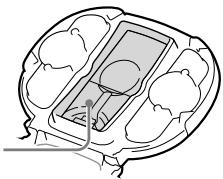
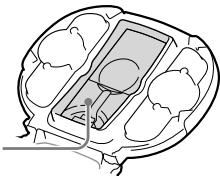
Non-water-resistant area
Be careful not to allow the water to enter the non-water-resistant area while the unit cover is open. It may cause a malfunction.
Non-water-resistant area
Notes on using the unit in a location where water may splash on it
Follow the notes below to avoid malfunction of the unit or "WALKMAN."
- Do not place the unit in a location where shower water may splash on it directly. Do not float the unit on water (hot or cold), and do not use the unit in water. Furthermore, do not splash shower water on the unit directly or purposely splash large amount of water on the unit. Water entering the unit may cause a malfunction of the unit or "WALKMAN."
- If a large amount of water splashes on the unit or you drop the unit into water, see "If the unit gets wet" of "Cleaning after use" (page 10).
- The water resistant specifications of the unit apply only to fresh water and tap water. Never splash other liquids on the unit. If other liquids splash on the unit, rinse them off with gently running tap water with the buckles fastened securely.
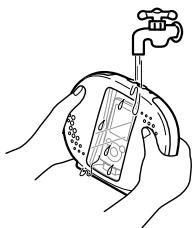
- Do not open the unit cover before removing adhered water or sand, etc., using a soft, dry cloth.
When using the unit in a bathroom, shower room, lavatory or kitchen, etc.
- Do not open the unit cover in a location where water may splash, such as a bathroom or shower room.
- Install a "WALKMAN" and batteries in a stable place of low moisture. Water or foreign objects entering the unit when you open the unit cover may cause a malfunction of the unit or "WALKMAN." Open the unit cover after removing any adhered water.
- Be careful not to splash soap, shampoo, bath agents, detergent, toothpaste, hair products or seasoning, etc, on the unit. The water resistant specifications of the unit apply to only fresh water and tap water. If other liquids splash on the unit, rinse them off with gently running tap water with the buckles fastened securely.
- Do not hold the unit with your hands covered with soap bubbles, etc. The unit may slip and drop.
- Remove water from the unit after use without leaving the unit in the bathroom or shower room.
- Avoid using the unit in high-moisture places such as a bathroom or shower room for extended periods. It is recommended not to use the unit for over an hour in such places. A long period of use could cause deterioration of water resistant performance. A water leak or condensation may cause a malfunction of the "WALKMAN."
When using the unit outdoors such as pool side or garden
- Fasten the buckles of the unit securely and never open or close the unit cover.
-
Install the "WALKMAN" and replace the batteries or operating sheet in a stable, low-moisture location. Water or foreign objects entering the unit when you open or close the cover may cause a malfunction of the unit or "WALKMAN." If water or sand get on the unit, wipe it off using a soft, dry cloth before opening the unit cover.
-
Be careful not to splash the following on the unit.
-
Sand, dust, lake water, pond water, pool water, rain water and snow, etc.
-
Insecticide, fertilizer, detergent for washing a car, wax, etc.
-
Remove any water on the unit and store indoors after use. Do not leave the unit outside, as doing so may cause malfunction of the unit or "WALKMAN," discoloration, or deterioration of the water resistant performance.
If water has entered the unit
- If you find moisture in the unit, stop using the unit and wipe it off using a soft, dry cloth immediately, and then consult your nearest Sony dealer or Sony Service Center.
- If your "WALKMAN" becomes wet, consult your nearest Sony dealer or Sony Service Center immediately. Any resultant repair fees may be charged to you.
Notes on using the unit
To avoid the deterioration of the water resistant performance and the malfunction of the unit and "WALKMAN"
- Do not leave a "WALKMAN" in the unit when not in use. Restore the WM-PORT plug in the WM-PORT plug storage space securely.
- Be careful not to drop the unit or subject it to mechanical shock. Deformation or damage may cause deterioration of the water resistant performance. It is recommended to consult your nearest Sony dealer or Sony Service Center in the event of impact to the unit.
-
Do not insert foreign objects or pointed objects in a hole of the speaker or operating sheet. Damage to the surface of the speaker inside may cause deterioration of water resistant performance.
-
When closing the unit cover, be careful not to allow sand, hair, dust or other minute dirt to keep the cover from closing properly. If the cover is not closed completely water resistant performance may deteriorate and may cause a malfunction of the unit as a result of water entering the unit.
- Do not store the unit in a bag that contains a pointed object. Damage to the operating sheet may cause deterioration of the water resistant performance.
- If you use the unit outdoors, be careful not to allow sand or other minute dirt to enter the speaker holes, which may cause a malfunction of the unit.
Notes on usage environment
- Do not leave the unit in locations where temperatures may become high. Also, if you use the unit in such locations, after use, be sure to open the unit cover to cool the unit before closing.
-
Never place the unit at the following places. The unit may become discolored, distorted or damaged.
-
Exposed to high temperature, such as in a car parked in the sun or under direct sunlight
-
High temperature locations such as in saunas or near a heating device or stove
-
Do not use the unit continuously over an hour in high temperature locations. Water resistant performance may be affected.
- Never leave the unit exposed to high temperature for many hours. If you use in such an environment, cover with a towel, etc.
- Do not blow hot air from a hair dryer, etc., on the unit directly.
- Do not bring the unit from a cold location to a warm location suddenly. Rapid temperature change may cause condensation, and moisture may condense inside of the unit, which may cause a malfunction of the "WALKMAN."
- Especially in cold regions, leaving moisture on its surface may cause the unit to freeze and malfunction. Be sure to wipe off the moisture after using the unit.
Getting started
Names of parts
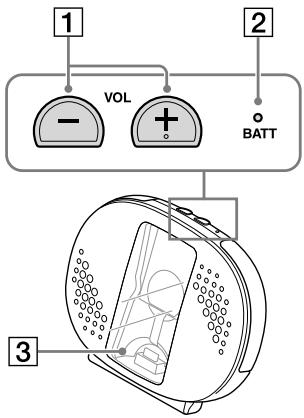
Front
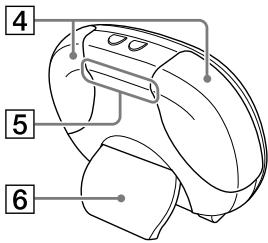
Rear
Interior
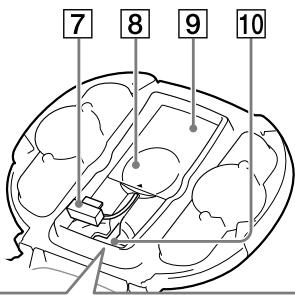
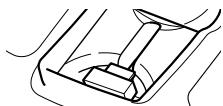
Correct storage of WM-PORT plug
VOL (volume) - / + buttons
BATT (battery) indicator
3 Operating sheet
4 Buckles
5 Handgrip
6 Stand
7 WM-PORT*plug
- The WM-PORT is a dedicated multiterminal connector, used to connect a "WALKMAN" to its accessories.
8 Nonslip sheet
9 Battery cover
10 WM-PORT plug storage space
Restoring the WM-PORT plug
Push down the WM-PORT plug in the WM-PORT plug storage space. If you close the unit while it is not stored correctly, malfunction of the unit may occur.
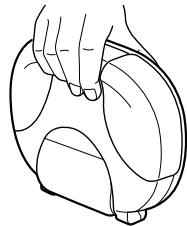
Carrying the unit
When you carry the unit, hold the handgrip securely, as illustrated.
Opening the unit cover
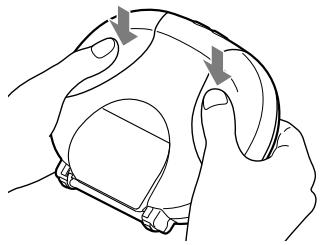
1 Unfasten the buckles.
Push the arrowed parts as illustrated and unfasten the buckles.
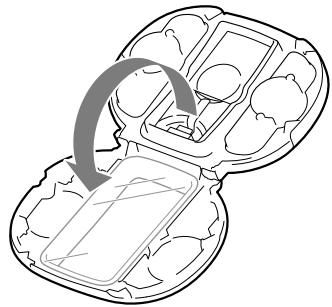
2 Open the unit cover.
Connecting a "WALKMAN" to the unit
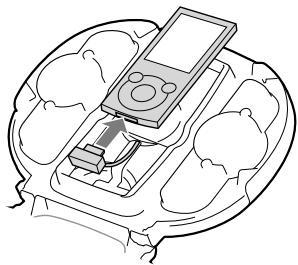
1 Connect the WM-PORT plug to the "WALKMAN."
Pull out the WM-PORT plug and insert it up to the edge of the "WALKMAN" securely.
- Connect the "WALKMAN" after disabling its HOLD function.
- Connect the "WALKMAN" after setting the [SP Output Optimizer] to [Off] on your "WALKMAN."
For information on how to operate, refer to the instructions supplied with your "WALKMAN."
Note
- Remove the accessory case or strap from the "WALKMAN" if attached.
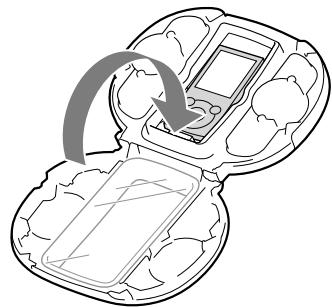
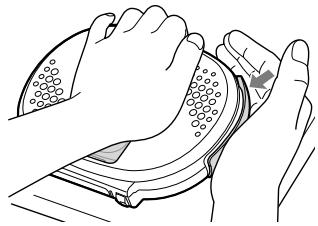
2 Close the unit cover and fasten the buckles.
Place the unit on a flat surface. Holding the unit cover with one hand, fasten the buckles with the other hand until they click.
Before bringing the unit to the bathroom, shower room, etc.
- Check that two buckles are fastened securely.
- Check that the "WALKMAN" is installed in the unit.
Listening to music
1 Turn on the unit.
Turning on the "WALKMAN" makes the unit power on automatically.
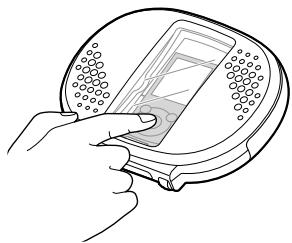
2 Play back content on your "WALKMAN."
Operate your "WALKMAN" through the operating sheet.
3 Press the VOL - / + button on the unit to adjust the volume.
4 Pull up the stand and place the unit on a flat surface.

5 Turn off the unit.
Turning off the "WALKMAN" makes the unit power off automatically.
Notes
- You cannot listen to FM radio from a "WALKMAN" using this unit.
- You cannot record with the "WALKMAN" by using this unit.
- You cannot adjust the volume with the VOL button of the "WALKMAN." To adjust the volume, use the VOL - / + button of the unit.
-
When using the unit in a bathroom or shower room, etc., place the unit in a location where water will not splash on the unit directly.
-
Do not play back a "WALKMAN" in public places at full volume.
Installing batteries
If you use the R6 (size AA) batteries (not supplied), install them in the unit by the procedure below.
1 Open the battery cover.
Open the battery cover, pushing the lower part of it lightly.
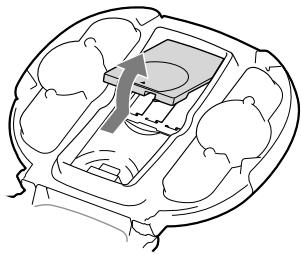
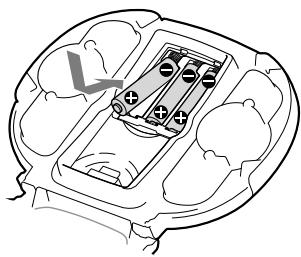
2 Insert batteries (not supplied).
Insert three R6 (size AA) batteries, end first.
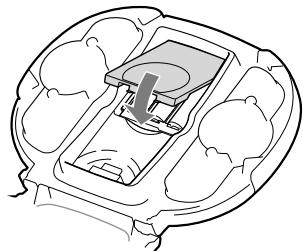
3 Close the battery cover.
Notes
- Do not drop any foreign object into the unit when replacing the batteries.
- If you do not intend to use the unit for an extended period of time, remove the batteries to avoid possible damage from battery leakage and corrosion.
BATT indicator status
Green: The unit is operating by the batteries installed in the unit. When the battery level falls, the indicator will become dark.
Off: Any one of the following:
- The unit is turned off. ("WALKMAN" is in the standby mode to play back.)
- The unit is operating by the power of the "WALKMAN."
- The batteries have run out.
Hints
- When the batteries of the unit have run out, the operation of the unit switches to the power of the "WALKMAN" automatically.
- The BATT indicator lights in green until "WALKMAN" enters standby mode, even if you stop playing back "WALKMAN."
Note
- While the unit is operating by the power of the "WALKMAN," the output level will be lower.
Cleaning after use
Cleaning the unit
If dust, etc., adheres to the unit, wipe it off with a damp cloth.
Note
- Do not wipe the inside of the battery cover and the WM-PORT plug with a wet cloth.
If the unit gets wet
1 Remove water.
Hold the unit with both hands securely as shown below, and shake it up and down lightly about 20 times.
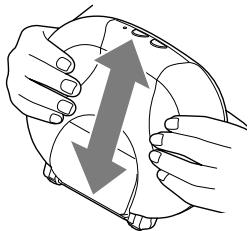
2 Wipe off moisture using a soft, dry cloth.
Wipe off moisture adhered on the unit using a soft, dry cloth.
3 Remove the "WALKMAN" from the unit.
Notes
- When removing water, hold the unit with your hands securely not to slip. Otherwise, injury may occur to yourself or people around you. It may cause a malfunction of the unit or "WALKMAN."
- If you open the battery cover without wiping away water completely, water may enter through the battery cover. In this case, wipe off any moisture completely using a soft, dry cloth.
About the unit
Due to the unit's structure, water may enter around the speaker. However, this will not affect the performance of the unit.
About the speaker
If water enters the speaker, sound may become difficult to hear. In this case, remove the water by the procedure below.
① Wipe off the moisture on the surface of the unit using a soft, dry cloth.
② Leave the unit on the dry cloth for about a couple of hours at room temperature.
Cleaning the operating sheet
If the operating sheet becomes dirty, remove and wash it in water.
To remove the operating sheet
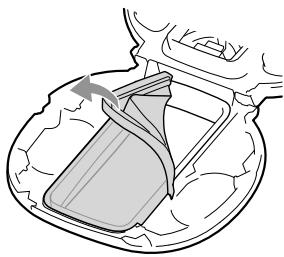
To reattach the operating sheet
Place the unit on a flat surface, and push and insert the operating sheet into the indentation from the edge uniformly.
Note
- Be careful not to catch your finger in the slots of the unit.
Replacement of the operating sheet
Depending on usage, the operating sheet may cause deterioration of the water resistant performance. It is recommended to replace the operating sheet once a year.
Cleaning the nonslip sheet
Remove the nonslip sheet from the battery cover and wash it in water.
To remove the nonslip sheet
Push the arrowed part and remove the nonslip sheet.
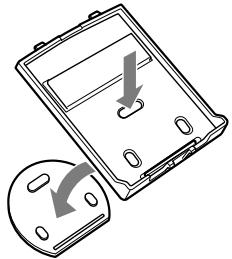
To reattach the nonslip sheet
Align the protrusions of the nonslip sheet with the slots of the battery cover, and press down the arrowed parts firmly.
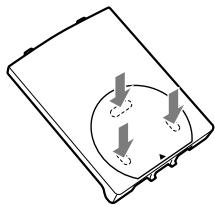
Troubleshooting
Should you encounter a problem with the system, find your problem in the troubleshooting checklist below and take the indicated corrective action. If the problem persists, contact your Sony dealer or Sony Service Center.
You cannot operate the "WALKMAN."
- If the HOLD switch of "WALKMAN" is set to the HOLD position, unset it.
- Your "WALKMAN" is for touch panel operation. You can only operate a "WALKMAN" compatible with this unit.
The sound is distorted.
- Set the sound mode of the "WALKMAN" to [Off] or a flatter setting.
No sound
- Make sure your "WALKMAN" is securely connected to the WM-PORT plug. After prescribing the remedies above, if the problem still persists, press the RESET button of your "WALKMAN" to reset it.
Volume is quiet.
- Press the VOL + button to turn up the volume.
- Replace the batteries with new ones.
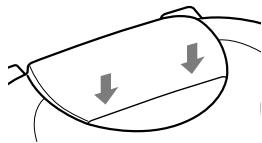
The stand becomes detached.
Install the stand to the unit by the procedure below.
① Fit the upper connections of the stand in the slots on the rear of the unit.
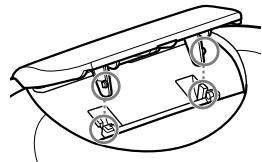
② Press down the stand until you hear a click.
The unit cover becomes detached.
Install the unit cover by the procedure below.
① Fit the lower tabs of the unit cover in the slots of the unit.
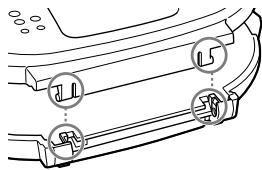
② Press down the unit cover until you hear a click.
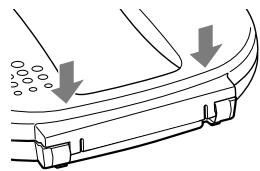
Notes
- Place the unit on a flat surface.
- Do not press down the unit cover forcibly while the buckles are fastened. It may break the unit.
The buckle becomes detached.
Install the buckle to the unit by the procedure below.
① Fit the projections of the unit into the holes on the rear of the buckle.
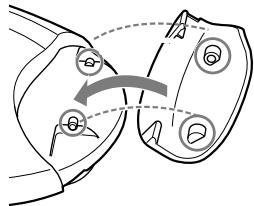
② Position the unit and buckle, and press down the buckle until you hear a click.
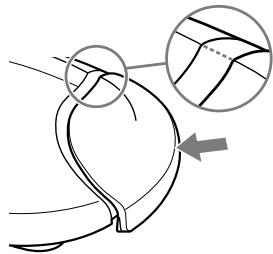
Note
- Hold the unit with the cover hanging open, and reattach the buckle.
Specifications
Compatible device
For details on devices compatible with this unit, see the following web site:
For customers in Europe:
http://support.sony-europe.com/DNA
For customers in Latin America:
http://www.sony-latin.com/index.crp
For customers in other countries/regions:
http://www.sony-asia.com/support
For customers who purchased the overseas
models:
http://www.sony.co.jp/overseas/support/
Speaker
Type: full-range, magnetically-shielded
Speaker size: 40mm dia.
Impedance: 8
Maximum permissible input: 1 W
Amplifier
Maximum output:
1 W + 1 W (1 kHz, 8 Ω) (using a dry-cell battery),
100 mW + 100 mW (1 kHz, 8 Ω) (using the power of the "WALKMAN")
Input: WM-PORT plug
Battery and others
Power source (2-way power supply): R6 (size AA) batteries × 3/ power of the "WALKMAN"
Input terminal: WM-PORT plug × 1
Dimensions (w/h/d): Approx. 192 × 155 × 47 ~mm
Dimensions (w/h/d, when using stand): Approx. 192 × 150 × 75 ~mm
Mass: Approx. 450g
Operating temperature: 5^ to 35^
Battery life
5mW + 5mW output:
approx.60 hours using SONY LR6 (SG)
alkaline batteries;
approx.25 hours using SONY R6 manganese batteries
80mW + 80mW output (volume level at factory setting):
approx. 24 hours* using SONY LR6 (SG) alkaline batteries;
approx. 8 hours* using SONY R6 manganese batteries
For the battery life of the battery supplied from the "WALKMAN," see the following web site:
For customers in Europe:
http://support.sony-europe.com/DNA
For customers in Latin America:
http://www.sony-latin.com/index.crp
For customers in other countries/regions:
http://www.sony-asia.com/support
For customers who purchased the overseas models:
http://www.sony.co.jp/overseas/support/
Supplied Item
Operating Instructions (1)
- Depending on the surrounding temperature or usage, duration may vary.
Design and specifications are subject to change without notice.
"WALKMAN" and "WALKMAN" logo are registered trademarks of Sony Corporation.
AVERTISSEMENT
http://support.sony-europe.com/DNA
Entree admissible maximale: 1W
Amplificateur
http://support.sony-europe.com/DNA
http://support.sony-europe.com/DNA
http://support.sony-europe.com/DNA
No permitted that the water would be used for the construction of the building. No permit to the water, but no water can be used for the construction of the building.
Zona no impermeable
http://support.sony-europe.com/DNA
http://support.sony-europe.com/DNA
http://support.sony-europe.com/DNA
http://support.sony-europe.com/DNA
http://support.sony-europe.com/DNA
Per i clienti in America Latina:
http://www.sony-latin.com/index.crp
$$ " W A L K M A N " $$
http://support.sony-europe.com/DNA
Per i clienti in America Latina:
http://www.sony-latin.com/index.crp
http://support.sony-europe.com/DNA
Para os pacientes na América Latina:
http://www.sony-latin.com/index.crp
http://support.sony-europe.com/DNA
Para os pacientes na América Latina:
http://www.sony-latin.com/index.crp
http://support.sony-europe.com/DNA
Förkunderi Latinamerika:
http://www.sony-latin.com/index.crp
strömmen i "WALKMAN"
Ingångskontakt:
WM-PORT-kontakt × 1
Matt (b / h / d) ..
Cirka 192× 155× 47mm
Matt (b / h / d ,nar stativ anvands):
Cirka 192× 150× 75mm
Vikt: Cirka 450g
Driftstemperatur:
5^ till 35^
http://support.sony-europe.com/DNA
Rengoring after drug
Rengoring afenheden
http://support.sony-europe.com/DNA
Kunderi Latinamerika:
http://www.sony-latin.com/index.crp
Kunder i andre lande/omrader:
http://www.sony-asia.com/support
http://support.sony-europe.com/DNA
Kunder i Latinamerika:
http://www.sony-latin.com/index.crp
Kunderi andlande/omrader:
http://www.sony-asia.com/support
Kunder, der har kocht oversiske modeller:
http://www.sony.co.jp/overseas/support/
Medfolgende del
http://support.sony-europe.com/DNA
http://support.sony-europe.com/DNA
http://support.sony-europe.com/DNA
对于拉丁美洲用户:
http://www.sony-latin.com/index.crp
对于在中国的用户:
http://service.sony.com.cn/KB/
对于其它国家/地区的用户:
http://www.sony-asia.com/support
对于购买海外机型的用户:
http://www.sony.co.jp/overseas/support/
附件
使用说明书(1)
http://support.sony-europe.com/DNA
拉丁美洲的顧客:
http://www.保养-latin.com/index.crp
其他國家/地區的顧客:
http://www.sony-asia.com/support
http://support.sony-europe.com/DNA
拉丁美洲的顧客:
http://www.保养-latin.com/index.crp
其他國家/地區的顧客:
http://www.sony-asia.com/support
SITSSBEMD 200000000000000000000000000000000000000000000000000000000000000000000000000
http://support.sony-europe.com/DNA
拉朗阿蒙拉卡高克的格武:
http://www.sony-latin.com/index.crp
吉达国/吉勒的古略的公园:
http://www.sony-asia.com/support
韩国GOACK的成年:
http://scs.sony.co.kr/walkman/
海の写真の写真の写真の写真:
http://www.sony.co.jp/overseas/support/
山
用: 证
53.10 mm 2
imfoTnS: 8Ω
到用
1 W
中
到 1W + 1W(1kHz,8)
(征程之志)
100mW + 100mW(1kHz
8Ω)("WALKMAN"的技巧
SA
WM-PORT 語引二
BabrLiJi
前章的国昌(2加吉前章):
R6(AA SAeIz) 3/
"WALKMAN"的套路
http://support.sony-europe.com/DNA
拉朗阿蒙利卡高克的格文:
http://www.sony-latin.com/index.crp
吉卜国/吉的
http://www.sony-asia.com/support
中国
http://scs.sony.co.kr/walkman/
海的多日国
http://www.sony.co.jp/overseas/support/
早今舌
音 ~ 歌 皂
dai jin m 10
- Active Speaker System
- 有源扬声器系统
- WARNING
- Disposal of Old Electrical & Electronic Equipment (Applicable in the European Union and other European countries with separate collection systems)
- Disposal of waste batteries (applicable in the European Union and other European countries with separate collection systems)
- Notice for customers: the following information is only applicable to equipment sold in countries applying EU directives
- Table of Contents
- Features
- Usage situation
- About the water resistance of this product (Read before using the unit)
- Liquids that the water resistant performance specifications apply to
- Non-water-resistant area
- Notes on using the unit in a location where water may splash on it
- Follow the notes below to avoid malfunction of the unit or "WALKMAN."
- When using the unit in a bathroom, shower room, lavatory or kitchen, etc.
- When using the unit outdoors such as pool side or garden
- If water has entered the unit
- Notes on using the unit
- To avoid the deterioration of the water resistant performance and the malfunction of the unit and "WALKMAN"
- Notes on usage environment
- Getting started
- Names of parts
- Restoring the WM-PORT plug
- Carrying the unit
- Opening the unit cover
- Unfasten the buckles.
- Open the unit cover.
- Connecting a "WALKMAN" to the unit
- Connect the WM-PORT plug to the "WALKMAN."
- Note
- Close the unit cover and fasten the buckles.
- Before bringing the unit to the bathroom, shower room, etc.
- Listening to music
- Turn on the unit.
- Play back content on your "WALKMAN."
- Press the VOL - / + button on the unit to adjust the volume.
- Pull up the stand and place the unit on a flat surface.
- Turn off the unit.
- Notes
- Installing batteries
- Open the battery cover.
- Insert batteries (not supplied).
- Close the battery cover.
- BATT indicator status
- Off: Any one of the following:
- Hints
- Cleaning after use
- Cleaning the unit
- If the unit gets wet
- Remove water.
- Wipe off moisture using a soft, dry cloth.
- Remove the "WALKMAN" from the unit.
- About the unit
- About the speaker
- Cleaning the operating sheet
- To remove the operating sheet
- To reattach the operating sheet
- Replacement of the operating sheet
- Cleaning the nonslip sheet
- To remove the nonslip sheet
- To reattach the nonslip sheet
- Troubleshooting
- You cannot operate the "WALKMAN."
- The sound is distorted.
- No sound
- Volume is quiet.
- The stand becomes detached.
- The unit cover becomes detached.
- The buckle becomes detached.
- Specifications
- Compatible device
- For customers in Europe:
- For customers in Latin America:
- For customers in other countries/regions:
- For customers who purchased the overseas
- models:
- Speaker
- Amplifier
- Battery and others
- Battery life
- For customers who purchased the overseas models:
- Supplied Item
- AVERTISSEMENT
- Amplificateur
- Per i clienti in America Latina:
- Para os pacientes na América Latina:
- Förkunderi Latinamerika:
- Rengoring after drug
- Rengoring afenheden
- Kunderi Latinamerika:
- Kunder i andre lande/omrader:
- Kunder i Latinamerika:
- Kunderi andlande/omrader:
- Kunder, der har kocht oversiske modeller:
- Medfolgende del
- 对于拉丁美洲用户:
- 对于在中国的用户:
- 对于其它国家/地区的用户:
- 对于购买海外机型的用户:
- 附件
- 拉丁美洲的顧客:
- 其他國家/地區的顧客:
- 拉朗阿蒙拉卡高克的格武:
- 吉达国/吉勒的古略的公园:
- 韩国GOACK的成年:
- 海の写真の写真の写真の写真:
- 山
- 中
- BabrLiJi
- 拉朗阿蒙利卡高克的格文:
- 吉卜国/吉的
- 中国
- 海的多日国
- 早今舌
Brand : SONY
Model : RDP-NWR100
Category : Bluetooth speaker