INEF904DC - Browser ALPINE - Free user manual and instructions
Find the device manual for free INEF904DC ALPINE in PDF.



| Product Type | GPS Navigator with Touchscreen |
| Brand | Alpine |
| Model | INEF904DC |
| Display Unit Dimensions | 235.2 mm (width) x 152.2 mm (height) |
| Power Supply | 12 V DC (car battery), 15 A fuse |
| Adjustable Screen | Forward/backward position, raised/lowered, angles: 0°, 20°, 45°, -20° |
| Connectivity | HDMI, USB, AUX input, front/rear camera, GPS antenna, DAB (optional) |
| Audio Outputs | RCA pre-out: front, rear, subwoofer |
| Main Functions | GPS navigation, multimedia playback, smartphone integration, steering wheel controls |
| Included Accessories | Power cable, GPS antenna, microphone, USB cable, PRE OUT cable, CAN I/F cable, brackets, screws |
| Safety | Professional installation recommended; do not block ventilation; use appropriate fuses |
| Maintenance | Clean with a soft, dry cloth; avoid chemicals |
| Repairability | Spare parts available from Alpine after-sales service |
| Warranty | Consult authorized dealer |
| General Information | Manufactured by Alpine, 184 allée des Érables, CS 52016, 95945 Roissy CDG cedex, France |
Frequently Asked Questions - INEF904DC ALPINE
User questions about INEF904DC ALPINE
0 question about this device. Answer the ones you know or ask your own.
Ask a new question about this device
Download the instructions for your Browser in PDF format for free! Find your manual INEF904DC - ALPINE and take your electronic device back in hand. On this page are published all the documents necessary for the use of your device. INEF904DC by ALPINE.
USER MANUAL INEF904DC ALPINE
Auburn Hills, Michigan 48326 U.S.A.
Phone 1-800-ALPINE-1 (1-800-257-4631)
ALPINE ELECTRONICS OF AUSTRALIA PTY. LIMITED
161-165 Princes Highway, Hallam
Victoria 3803, Australia
Phone 03-8787-1200
ALPINE ELECTRONICS GmbH
Ohmstraße 4
Fletchamstead Highway, Coventry CV4 9TW, U.K.
www.alpine.co.uk
ALPINE ELECTRONICS GmbH Succursale France
Caution concerning the installation location .... 3
Adjust the front-back position of the Display unit (Optional) 4
Attach the Sheet cap (Only necessary when the front-back position of the Display unit is in the forward position) ....4
Mounting the GPS Antenna inside the vehicle 4
Mounting the Microphone 5
Installation example using the Original Mounting Bracket ....5
Install the display unit ....6
Connections 9
If an ACC power supply is not available ..... 11
System Example ......12
Position Adjustment and Mounting Dimensions of the Display ....18

WARNING
This symbol means important instructions. Failure to heed them can result in serious injury or death.
DO NOT DISASSEMBLE OR ALTER.
Doing so may result in an accident, fire or electric shock.
KEEP SMALL OBJECTS SUCH AS SCREWS OUT OF THE REACH OF CHILDREN.
Swallowing them may result in serious injury. If swallowed, consult a physician immediately.
USE THE CORRECT AMPERE RATING WHEN REPLACING FUSES.
Failure to do so may result in fire or electric shock.
DO NOT BLOCK VENTS OR RADIATOR PANELS.
Doing so may cause heat to build up inside and may result in fire.
USE THIS PRODUCT FOR MOBILE 12V APPLICATIONS.
Use for other than its designed application may result in fire, electric shock or other injury.
MAKE THE CORRECT CONNECTIONS.
Failure to make the proper connections may result in fire or product damage.
USE ONLY IN CARS WITH A 12 VOLT NEGATIVE GROUND.
(Check with your dealer if you are not sure.) Failure to do so may result in fire, etc.
BEFORE WIRING, DISCONNECT THE CABLE FROM THE NEGATIVE BATTERY TERMINAL.
Failure to do so may result in electric shock or injury due to electrical shorts.
DO NOT ALLOW CABLES TO BECOME ENTANGLED IN SURROUNDING OBJECTS.
Arrange wiring and cables in compliance with the manual to prevent obstructions when driving. Cables or wiring that obstruct or hang up on places such as the steering wheel, shift lever, brake pedals, etc. can be extremely hazardous.
DO NOT SPLICE INTO ELECTRICAL CABLES.
Never cut away cable insulation to supply power to other equipment. Doing so will exceed the current carrying capacity of the wire and result in fire or electric shock.
DO NOT DAMAGE PIPE OR WIRING WHEN DRILLING HOLES.
When drilling holes in the chassis for installation, take precautions so as not to contact, damage or obstruct pipes, fuel lines, tanks or electrical wiring. Failure to take such precautions may result in fire.
DO NOT USE BOLTS OR NUTS IN THE BRAKE OR STEERING SYSTEMS TO MAKE GROUND CONNECTIONS.
Bolts or nuts used for the brake or steering systems (or any other safety-related system), or tanks should NEVER be used for installations or ground connections. Using such parts could disable control of the vehicle and cause fire etc.
DO NOT INSTALL IN LOCATIONS WHICH MIGHT HINDER VEHICLE OPERATION, SUCH AS THE STEERING WHEEL OR SHIFT LEVER.
Doing so may obstruct forward vision or hamper movement etc. and results in serious accident.
DO NOT INSTALL THE MONITOR NEAR THE PASSENGER SEAT AIR BAG.
If the unit is not installed correctly the air bag may not function correctly and when triggered the air bag may cause the monitor to spring upwards causing an accident and injuries.

CAUTION
This symbol means important instructions. Failure to heed them can result in injury or material property damage.
HAVE THE WIRING AND INSTALLATION DONE BY EXPERTS.
The wiring and installation of this unit requires special technical skill and experience. To ensure safety, always contact the dealer where you purchased this product to have the work done.
USE SPECIFIED ACCESSORY PARTS AND INSTALL THEM SECURELY.
Be sure to use only the specified accessory parts. Use of other than designated parts may damage this unit internally or may not securely install the unit in place. This may cause parts to become loose resulting in hazards or product failure.
ARRANGE THE WIRING SO IT IS NOT CRIMPED OR PINCHED BY A SHARP METAL EDGE.
Route the cables and wiring away from moving parts (like the seat rails) or sharp or pointed edges. This will prevent crimping and damage to the wiring. If wiring passes through a hole in metal, use a rubber grommet to prevent the wire's insulation from being cut by the metal edge of the hole.
DO NOT INSTALL IN LOCATIONS WITH HIGH MOISTURE OR DUST.
Avoid installing the unit in locations with high incidence of moisture or dust. Moisture or dust that penetrates into this unit may result in product failure.
Precautions
- Be sure to disconnect the cable from the (-) battery post before installing your unit. This will reduce any chance of damage to the unit in case of a short-circuit.
- Be sure to connect the colour coded leads according to the diagram. Incorrect connections may cause the unit to malfunction or damage to the vehicle's electrical system.
- When making connections to the vehicle's electrical system, be aware of the factory installed components (e.g. on-board computer). Do not tap into these leads to provide power for this unit. When connecting the unit to the fuse box, make sure the fuse for the intended circuit of the unit has the appropriate amperage. When in doubt, consult your Alpine dealer.
- The unit uses female RCA-type jacks for connection to other units (e.g. amplifier) having RCA connectors. You may need an adaptor to connect other units. If so, please contact your authorized Alpine dealer for assistance.
- Be sure to connect the speaker (−) leads to the speaker (−) terminal. Never connect left and right channel speaker cables to each other or to the vehicle body.
Accessory List
Main unit....1
Display unit....1
Owner's Manual 1set
Power cable....1
GPS Antenna....1
Antenna mounting plate 1
Cable clamp for antenna....1set
USB extension cable....1
PRE OUT cable....1
Microphone 1
CAN I/F cable....1
W.REMOTE cable 1
HDMI Bracket....1
Flush head screw (M5×8)....4
Screw (M5×8) 4
POWER PLATE....1
Cover rear L....1
Cover rear R....1
Flush head screw (M4×13) 2(*1)
Screw (M4×6) 7(*2)
Screw (M3×4) 2(*3)
Sheet cap 4(*4)
- Amounts of Display unit mounting parts marked with * include spare parts provided in case of loss. Store them safely.
*1 Number of spares for up-down adjustment of the Display.
*2 Includes 3 spares for fixing and adjusting the angle of the Display.
*3 Includes 1 spare for fixing the Cover middle.
*4 Includes 2 spares for blocking the display screen.
Installation
Mounting
Consult "Position Adjustment and Mounting Dimensions of the Display" (page 18) in advance so that this unit does not obstruct your field of vision or impair driving when mounted.
Caution
- Do not block the unit's fan, thus preventing air circulation. If blocked, heat will accumulate inside the unit and may cause a fire.
Air ventilation hole
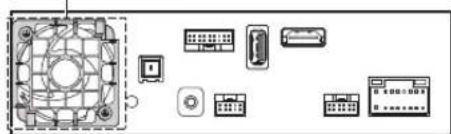
natural_image
Diagram of various electronic components and connectors without any text or labelsRear of the Unit
- When installing the display unit and main unit, do not touch the connectors with your hands.
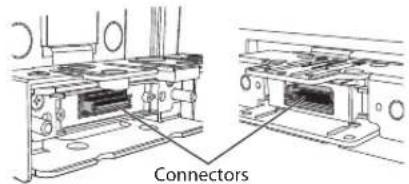
Caution concerning the installation location
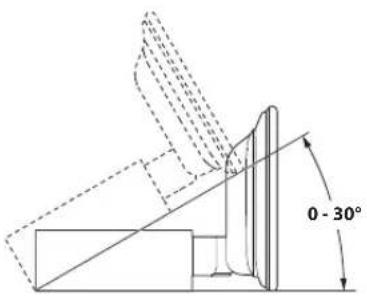
Angle of installation
Install at an angle between horizontal and 30^ . Note that installing at an angle outside of this range will result in a loss of performance and possibly damage.
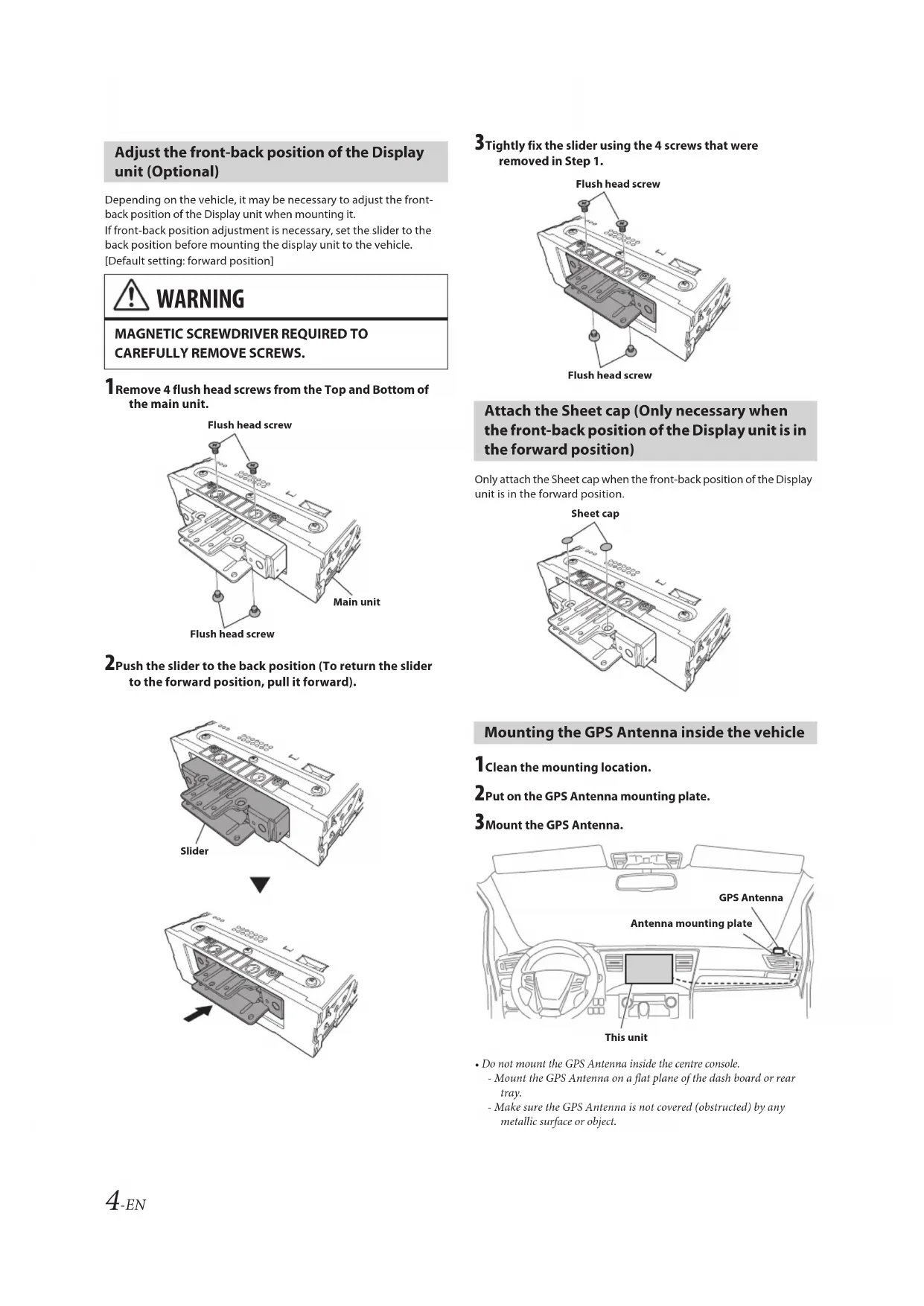
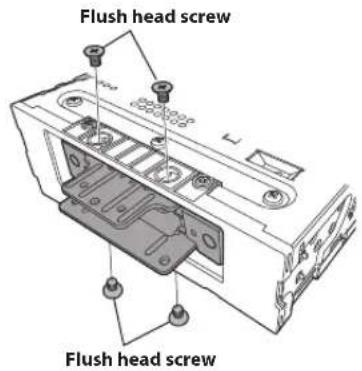
Adjust the front-back position of the Display unit (Optional)
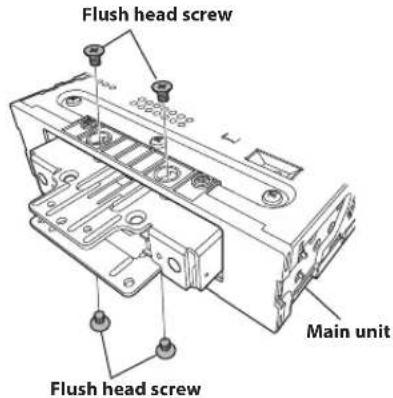
Depending on the vehicle, it may be necessary to adjust the front-back position of the Display unit when mounting it. If front-back position adjustment is necessary, set the slider to the back position before mounting the display unit to the vehicle. [Default setting: forward position]

WARNING
MAGNETIC SCREWDRIVER REQUIRED TO CAREFULLY REMOVE SCREWS.
1 Remove 4 flush head screws from the Top and Bottom of the main unit.
2 Push the slider to the back position (To return the slider to the forward position, pull it forward).
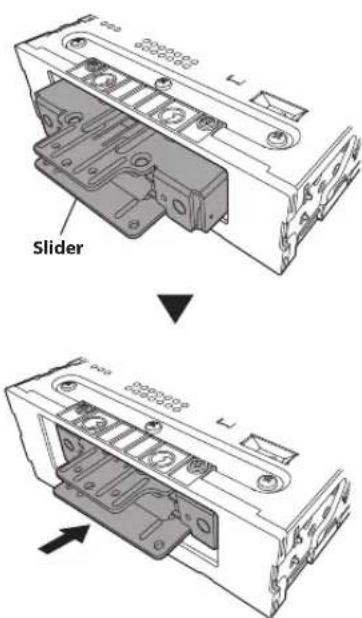
3 Tightly fix the slider using the 4 screws that were removed in Step 1.
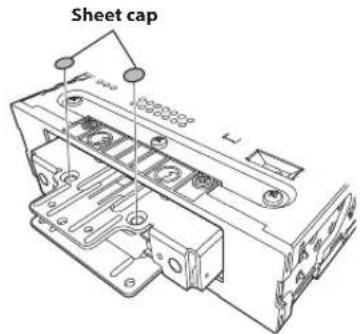
Attach the Sheet cap (Only necessary when the front-back position of the Display unit is in the forward position)
Only attach the Sheet cap when the front-back position of the Display unit is in the forward position.
Mounting the GPS Antenna inside the vehicle
1 Clean the mounting location.
2Put on the GPS Antenna mounting plate.
3Mount the GPS Antenna.
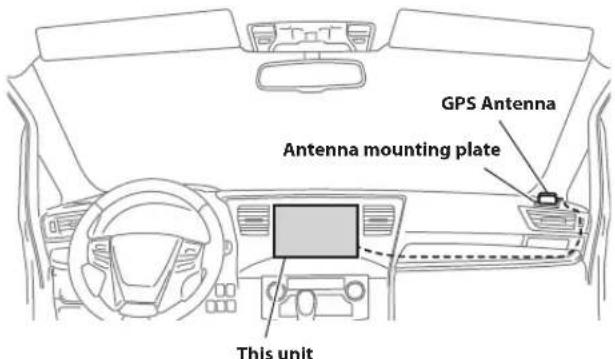
- Do not mount the GPS Antenna inside the centre console.
- Mount the GPS Antenna on a flat plane of the dash board or rear tray.
-
Make sure the GPS Antenna is not covered (obstructed) by any metallic surface or object.
-
If the GPS Antenna is mounted near the unit, the reception becomes poor, and the location of your vehicle may not be displayed correctly.
- Mount the GPS Antenna far away enough from the unit.
- Bundle the GPS Antenna cable away from the rear of the unit.
- Some thermal reflection type or thermal absorption type glass may interrupt high frequency waves. If reception is poor with the antenna installed inside the car, try to mount the antenna outside the car.
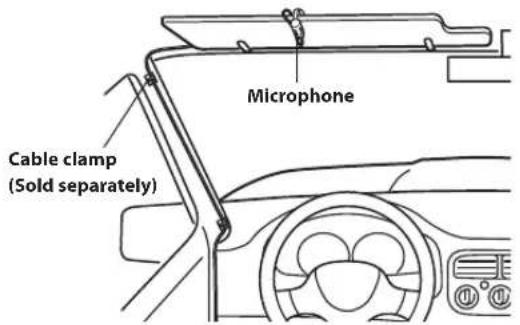
Mounting the Microphone
For safe use, make sure of the following:
- Location is stable and firm.
- Does not interfere with safety equipment.
- Driver's view and operations are not obstructed.
- Microphone is located where the driver's voice can be easily picked up (for example, on the sun visor).
When you speak into the microphone, you should not have to change your driving posture. This may cause a distraction, taking your attention away from safely driving your vehicle. Carefully consider direction and distance while mounting the microphone. Confirm that the driver's voice can be easily picked up at the selected location.
Installation example using the Original Mounting Bracket
1 Mount the original mounting bracket to the main unit using the supplied screws.
- If you do not have the original mounting bracket, mount the Double din KIT* (provided with the side mounting bracket), etc. to the main unit.
*Sold separately.
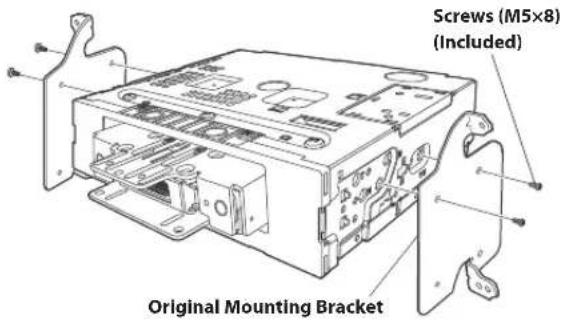
2Connect all other leads of the main unit according to details described in the "Connections" (page 9).
Note on using HDMI Connection Cables (HDMI Cable not included)
When using HDMI connection cables, secure the cables to the HDMI Terminals with the supplied HDMI Bracket.
1) Slide the HDMI Bracket into the grooves (A).
2) Secure it with the screw (B).
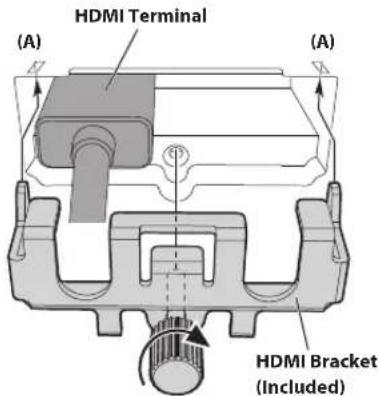
(B)
3Mount the main unit in a car.
- Fix the cables carefully. Do not damage them by mounting them into movable parts, such as the seat rail, or by locating them against sharp or pointed edges.
4 Reattach the removed vehicle parts (panels, etc.) or other aftermarket dash kit back onto the vehicle.
Install the display unit
1 Remove the 2 angle adjustment screws (M4×6) fixing the left and right sides of the Display unit and pull the top of the display forward.
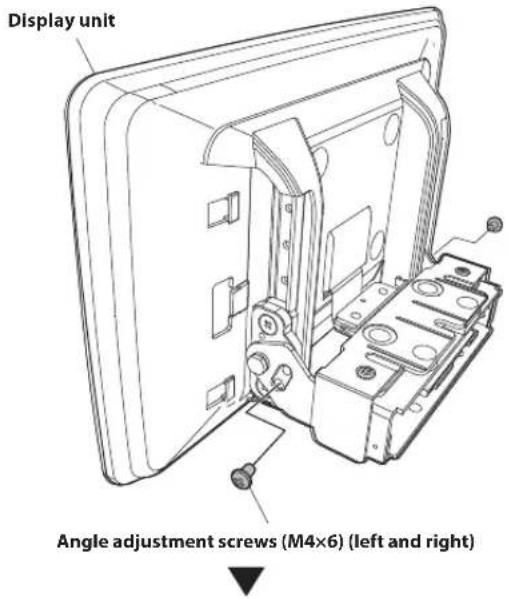
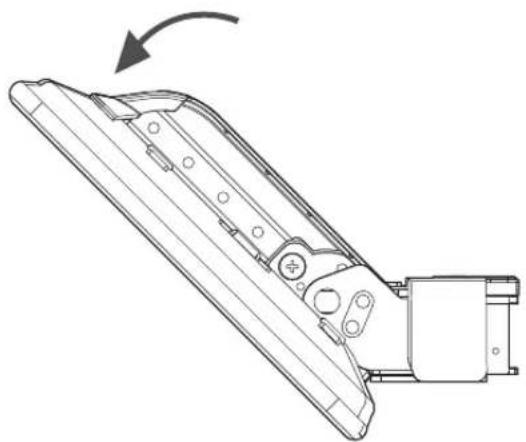
natural_image
Technical line drawing of a mechanical component with an arrow indicating rotation (no text or symbols present)• Vertical positioning screws may need to be removed earlier (See Step 4) in order to manipulate the screen enough to install the POWER PLATE.
2 Fix the Display unit to the slider of the main unit using 4 screws (M4×6).
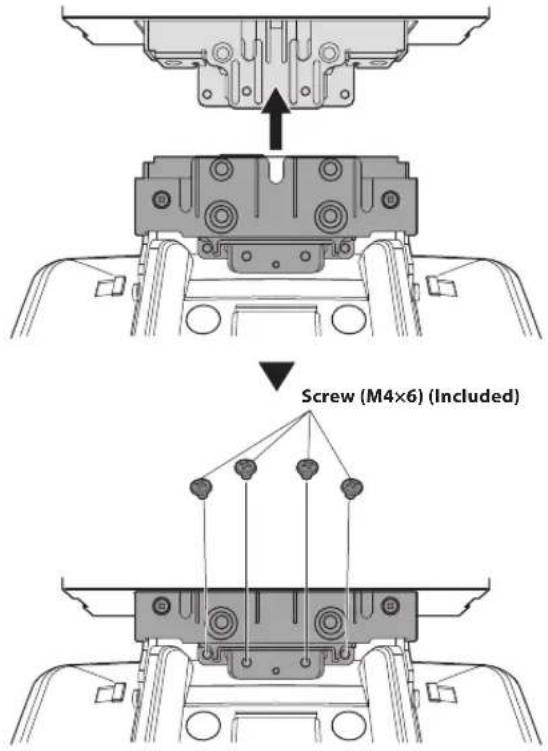
3 Mount the POWER PLATE using a screw (M3×4).
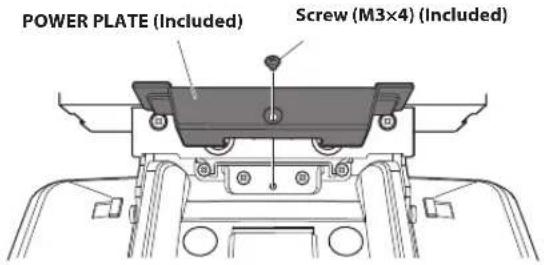
- If you do not attach the POWER PLATE, the display will not turn on. Make sure to attach the POWER PLATE.
4Adjust the mounting position of the display.
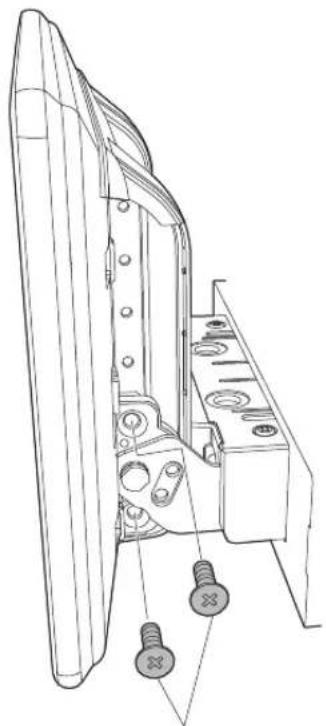
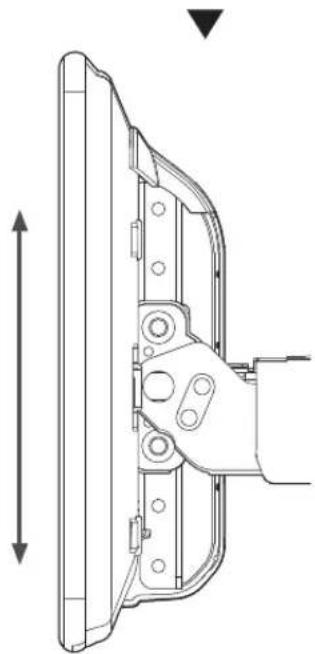
- The available adjustment positions of the Display differ depending on the front-back/up-down/angle positions. Consult "Position Adjustment and Mounting Dimensions of the Display" (page 18) for details. 1) Hold the Display up vertically, remove the 4 flush head screws (M4×13) on the left and right sides for up-down adjustment, and adjust the up-down position of the display.
natural_image
Technical line drawing of a mechanical component with mounting holes and screw fasteners (no text or symbols)Flush head screw (M4×13) (left and right)
natural_image
Technical line drawing of a mechanical bracket assembly with dimension lines (no text or symbols)2) After adjustment, tightly fix the display with the 4 Flush head screws (M4×13) for up-down adjustment.
natural_image
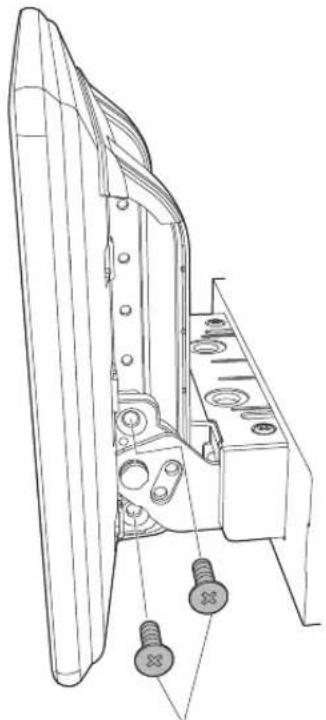
Technical line drawing of a mechanical assembly with two screws and a housing (no text or symbols)Flush head screw (M4×13) (left and right)
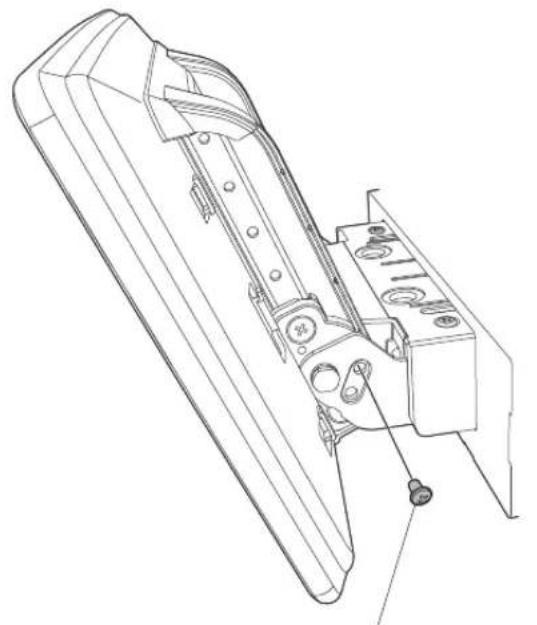
3) Adjust the angle of the display.
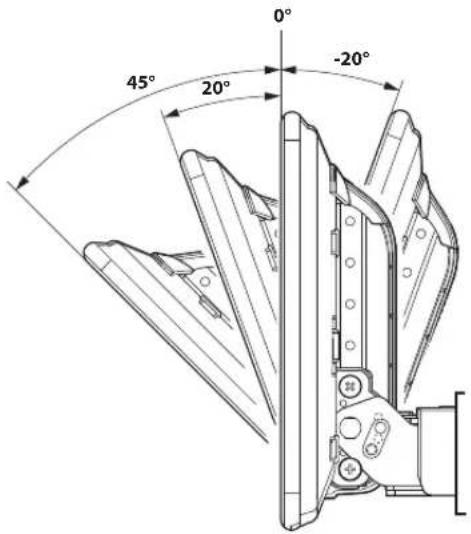
Refer to the illustration below to use the screw holes for angle adjustment.
• Example:
To install the display at the angle of 20^ , use the screw holes 2 and b.
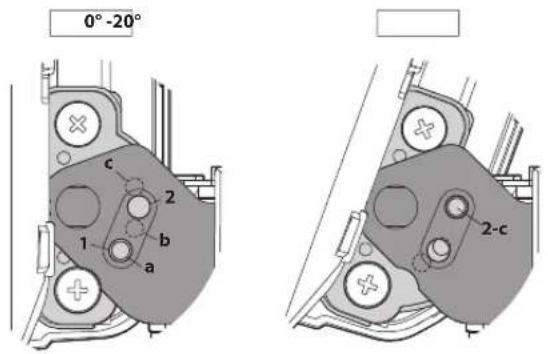
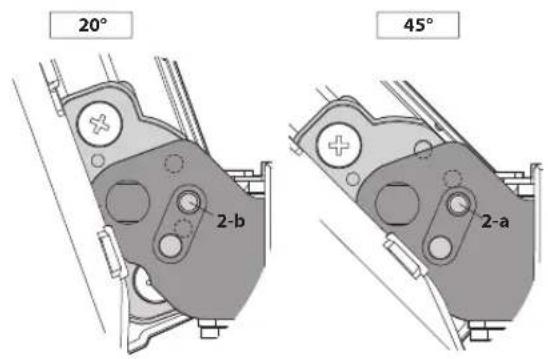
4) After adjustment, secure the display with the 2 angle adjustment screws (M4×6) (left and right) that were removed in Step 1 on page 6.
natural_image
Technical line drawing of a mechanical device with internal components and mounting holes (no text or symbols)Angle adjustment screws (M4×6) (left and right)
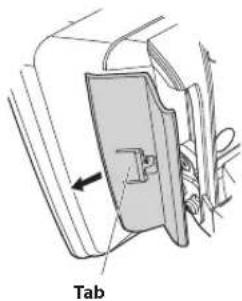
5 Attach Cover rear-L/R to the left and right sides of the display unit.
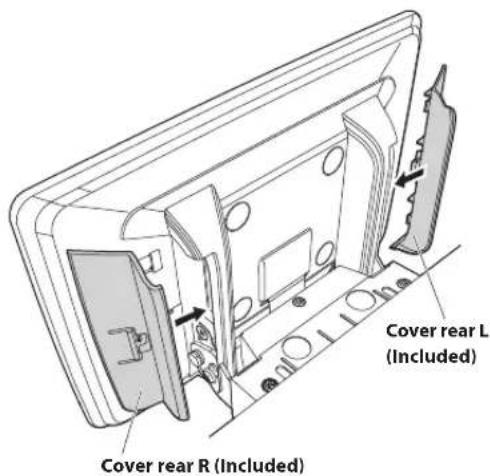
- When removing Cover rear-L/R, push in the tab and slide it.
Connections
flowchart
graph TD
    A["ISO Antenna Plug"] --> B["GPS Antenna (Included)"]
    B --> C["SPEED SENSOR"]
    C --> D["CAMERA"]
    D --> E["CONNECT2 I/F"]
    E --> F["AUX INPUT"]
    F --> G["CAN I/F cable"]
    G --> H["REMO"]
    H --> I["Blue/White"]
    I --> J["REVERSE"]
    J --> K["Orange/White"]
    K --> L["PARKING BRAKE"]
    L --> M["(Yellow/Blue)"]
    M --> N["ACC"]
    N --> O["(Red)"]
    O --> P["GND"]
    P --> Q["(Black)"]
    Q --> R["P. ANT"]
    R --> S["(Blue)"]
    S --> T["BATT"]
    T --> U["(Yellow)"]
    U --> V["POWER cable"]
    V --> W["W.REMOTE cable"]
    W --> X["STEERING REMOTE"]
    X --> Y["EXT REMO OUT"]
    Y --> Z["EXT REMO IN"]
    Z --> AA["MIC IN"]
    AA --> AB["SUBW"]
    AB --> AC["FRONT OUT"]
    AC --> AD["REAR OUT"]

    subgraph Sensor Components
        AE["To the vehicle speed pulse line"] --> AF["To Front or Rear camera"]
        AF --> AG["To CAN Inter face box"]
        AG --> AH["To AUX output device"]
        AH --> AI["To amplifier or equalizer"]
        AI --> AJ["To plus side of the back lamp signal lead of the car"]
        AJ --> AK["To the parking brake signal lead"]
        AK --> AL["To power antenna"]
        AL --> AM["Ignition key"]
        AM --> AN["Battery"]
        AN --> AO["Rear Left"]
        AO --> AP["Front Left"]
        AP --> AQ["Front Right"]
        AQ --> AR["Rear Right"]
        AR --> AS["To steering remote control interface"]
        AS --> AT["To system unit"]
        AT --> AU["Microphone (Included)"]
        AU --> AV["To input terminal of amplifier when adding an external amplifier"]

    style A fill:#f9f,stroke:#333
    style B fill:#ccf,stroke:#333
    style C fill:#cfc,stroke:#333
    style D fill:#fcc,stroke:#333
    style E fill:#cff,stroke:#333
    style F fill:#ffc,stroke:#333
    style G fill:#cfc,stroke:#333
    style H fill:#fcc,stroke:#333
    style I fill:#cfc,stroke:#333
    style J fill:#fcc,stroke:#333
    style K fill:#cfc,stroke:#333
    style L fill:#fcc,stroke:#333
    style M fill:#cfc,stroke:#333
    style N fill:#fcc,stroke:#333
    style O fill:#cfc,stroke:#333
    style P fill:#fcc,stroke:#333
    style Q fill:#fcc,stroke:#333
    style R fill:#fcc,stroke:#333
    style S fill:#fcc,stroke:#333
    style T fill:#fcc,stroke:#333
    style U fill:#fcc,stroke:#333
    style V fill:#cfc,stroke:#333
    style W fill:#cfc,stroke:#333
    style X fill:#cfc,stroke:#333
    style Y fill:#cfc,stroke:#333
    style Z fill:#cfc,stroke:#333
    style AA fill:#cfc,stroke:#333
    style AB fill:#cfc,stroke:#333
    style AC fill:#cfc,stroke:#333
    style AD fill:#cfc,stroke:#333
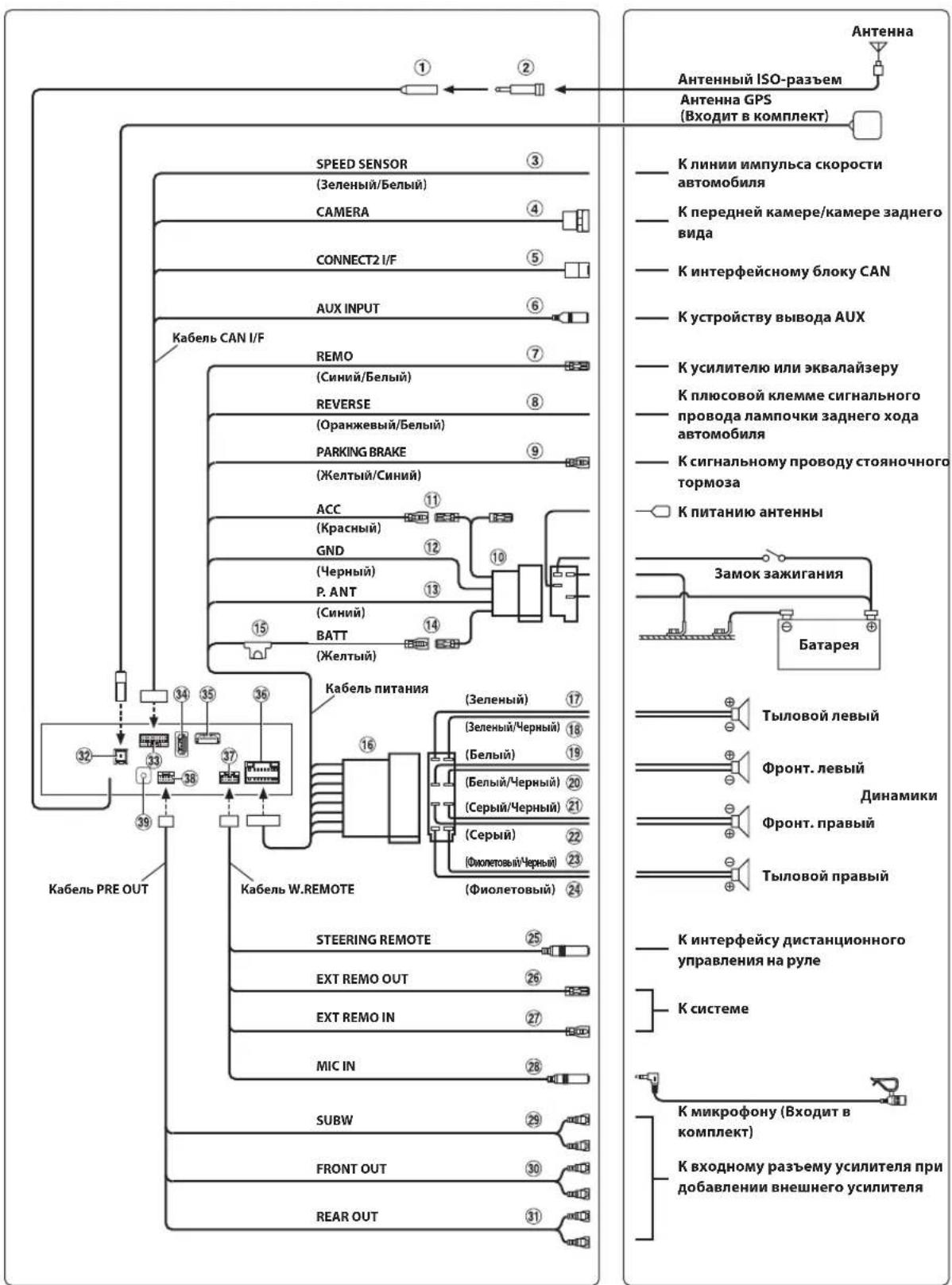
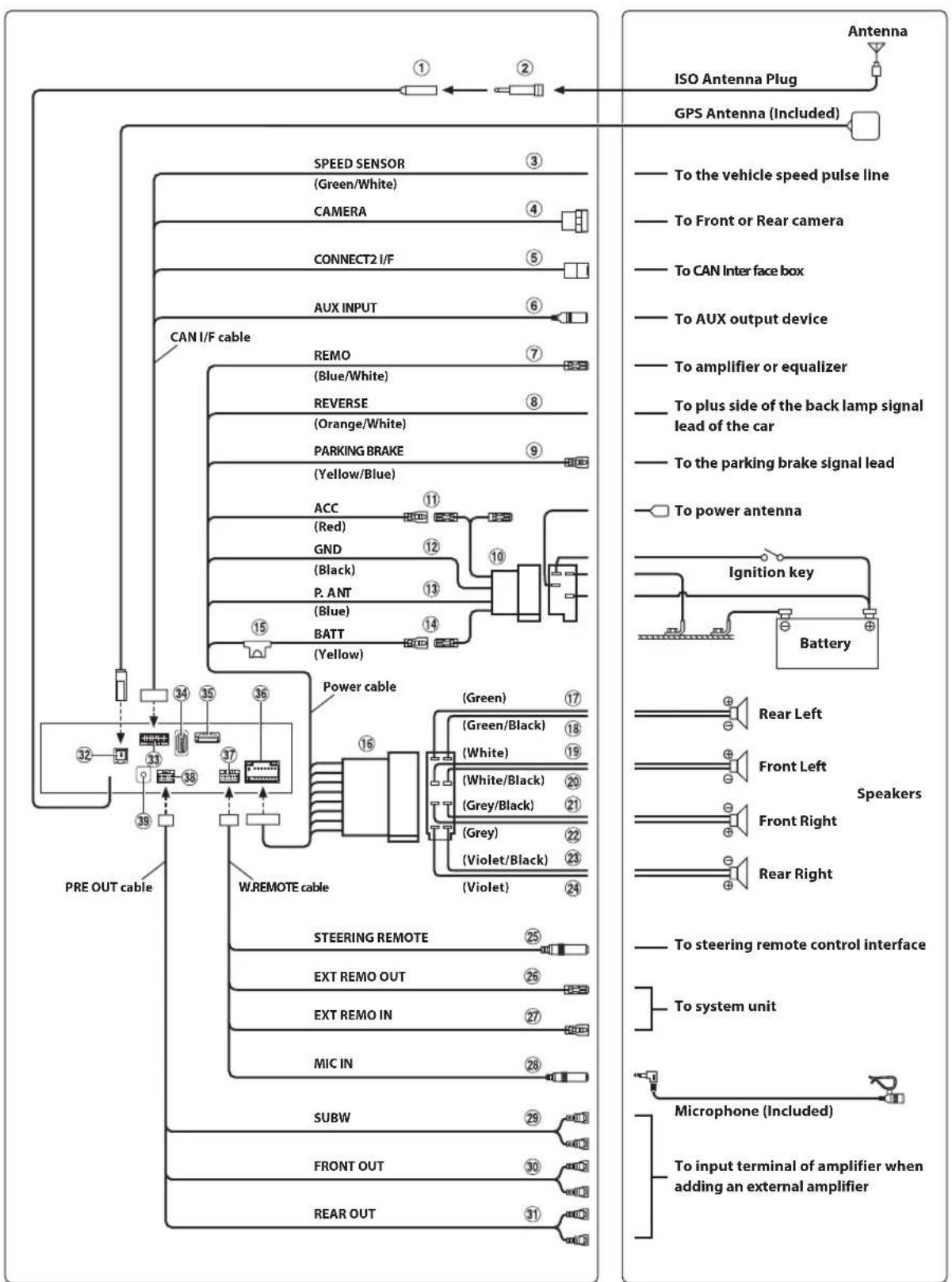
① Radio Antenna Receptacle
② ISO/JASO Antenna Adapter (sold separately)
ISO/JASO Antenna Adapter may be required, depending on the vehicle.
③ Speed Sensor Lead (Green/White)
Improper connection of the speed pulse line may cause important safety features of the vehicle to fail (such as the brakes or air bags). Such failures may result in an accident and loss of life. We strongly recommend that the installation be performed by a trained, authorized Alpine dealer.
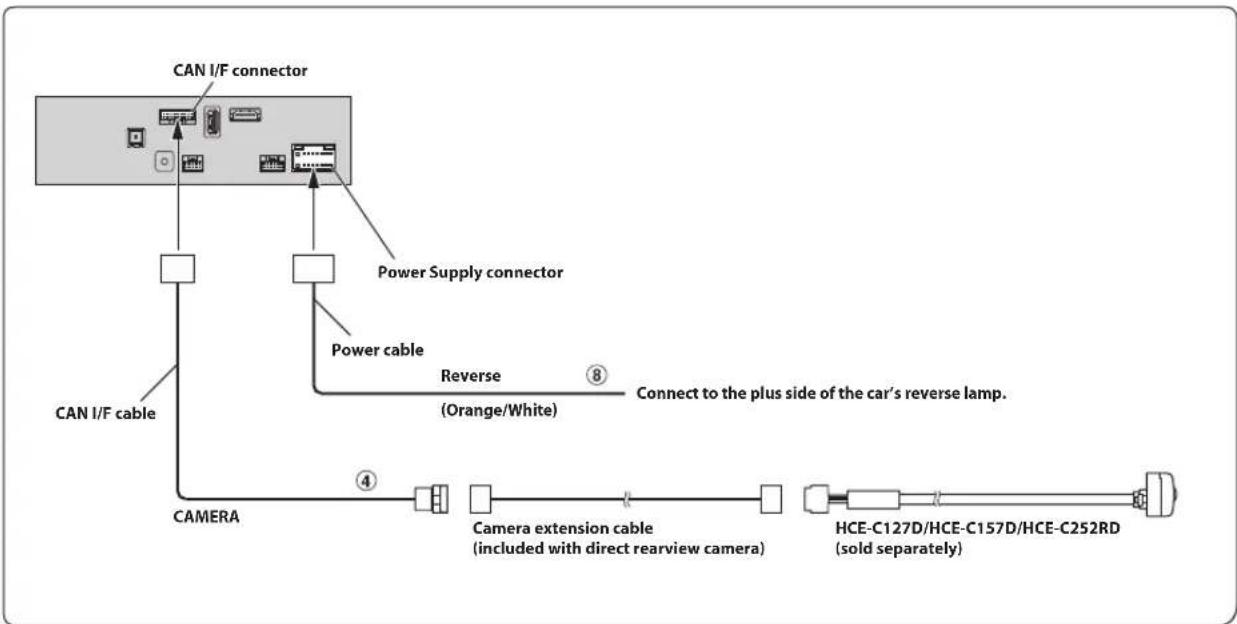
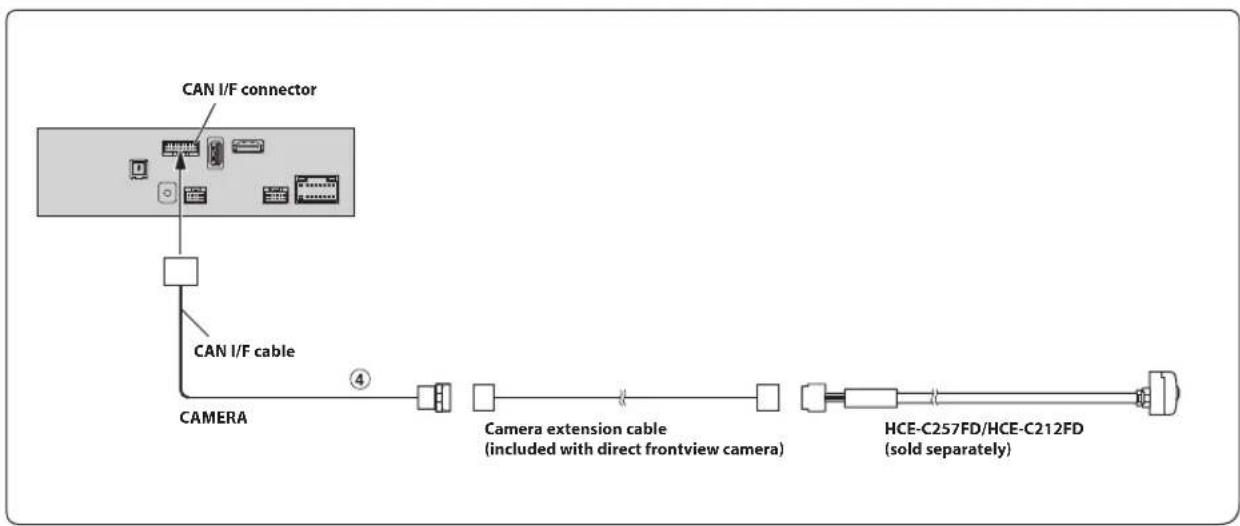
④ Direct CAMERA Input Connector
Use when the optional direct camera is connected.
⑤ CAN Interface Connector
To CAN Interface box
⑥ AUX Input Connector
Input lead for AUX video/audio signal.
- A separately sold AV/RCA interface cable (4-pole mini AV plug to 3-RCA) is required. For details on using an AV/RCA interface cable (4-pole mini AV plug to 3-RCA), see "Usable AV/RCA Interface Cable (4-pole mini AV plug to 3-RCA)" (page 10).
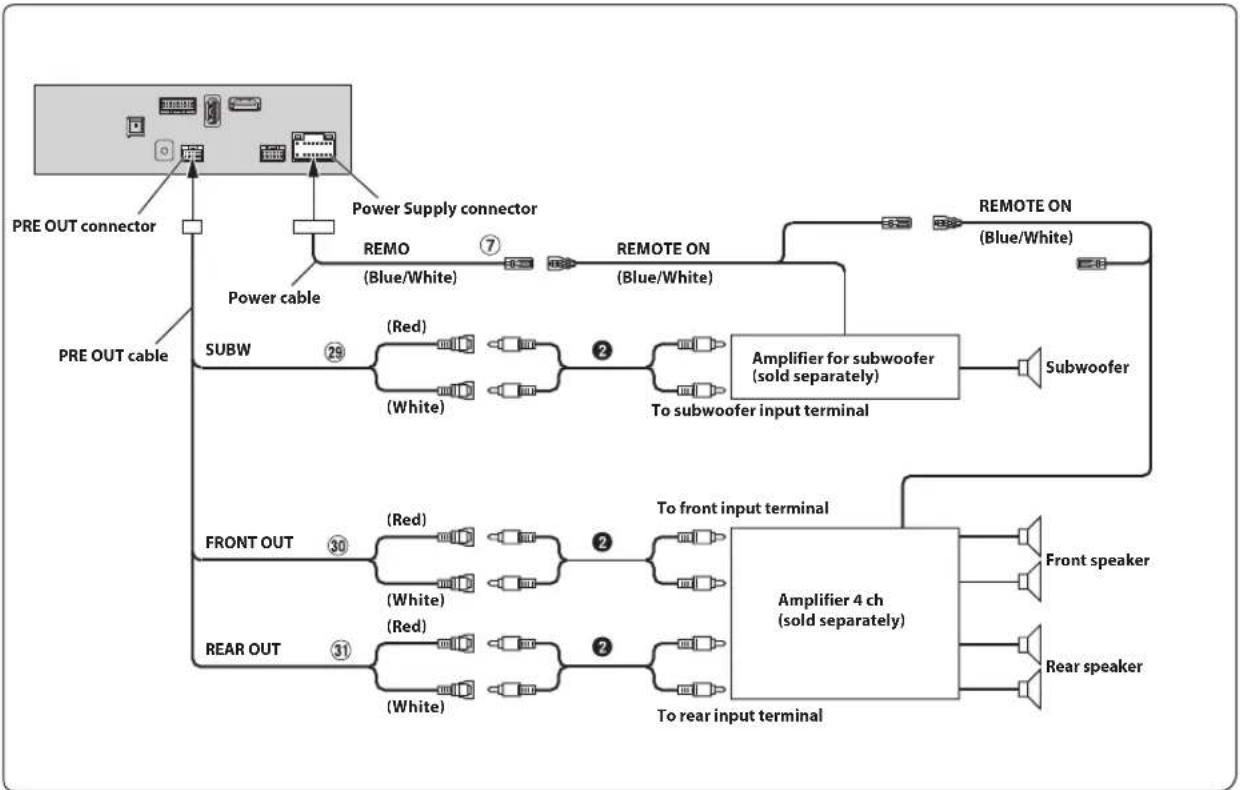
⑦ Remote Turn-On Lead (Blue/White)
Connect this lead to the remote turn-on lead of your amplifier or signal processor.
⑧ Reverse Lead (Orange/White)
⑨ Parking Brake Lead (Yellow/Blue)
Connect this lead to the power supply side of parking brake switch to transmit the parking brake status signals to the unit.
⑩ ISO Power Supply Connector
⑪ Switched Power Lead (Ignition) (Red)
Connect this lead to an open terminal on the vehicle's fuse box or another unused power source that provides (+) 12V only when the ignition is turned on or in the accessory position.
⑫ Ground Lead (Black)
Connect this lead to a good chassis ground on the vehicle. Make sure the connection is made to bare metal and is securely fastened using the sheet metal screw provided.
⑬ Power Antenna Lead (Blue)
Connect this lead to the +B terminal of your power antenna, if applicable.
- This lead should be used only for controlling the vehicle's power antenna. Do not use this lead to turn on an amplifier or a signal processor, etc.
⑭ Battery Lead (Yellow)
Connect this lead to the positive (+) post of the vehicle's battery.
⑮ Fuse Holder (15A)
⑯ ISO Connector (Speaker Output)
⑰ Left Rear (+) Speaker Output Lead (Green)
⑱ Left Rear (−) Speaker Output Lead (Green/Black)
⑲ Left Front (+) Speaker Output Lead (White)
⑳ Left Front (−) Speaker Output Lead (White/Black)
②1 Right Front (−) Speaker Output Lead (Grey/Black)
②2 Right Front (+) Speaker Output Lead (Grey)
23 Right Rear (−) Speaker Output Lead (Violet/Black)
⑳ Right Rear (+) Speaker Output Lead (Violet)
25 Steering Remote Control Interface Connector
To steering remote control interface.
For details about connections, consult your nearest Alpine dealer.
26 EXT REMO OUT
To system unit.
For details about connections, confirm the instruction manual of the system unit.
27 EXT REMO IN
To system unit.
For details about connections, confirm the instruction manual of the system unit.
28 MIC Input Connector
To microphone (Included)
29 Subwoofer RCA Connectors
RED is right and WHITE is left.
30 Front Output RCA Connectors
Can be used as Front Output RCA Connectors. RED is right and WHITE is left.
③1 Rear Output RCA Connectors
Can be used as Rear Output RCA Connectors. RED is right and WHITE is left.
32 GPS Antenna Receptacle
Connect to GPS antenna (Included).
③3 CAN I/F Connector
34 USB Connector
To USB flash drive, iPod/iPhone or Android smartphone.
35 HDMI Input Connector
36 Power Supply Connector
③7 W.REMOTE Connector
38 PRE OUT Connector
39 DAB Antenna Connector
To DAB Antenna (sold separately).
Usable AV/RCA Interface Cable (4-pole mini AV plug to 3-RCA)
Wiring convention of this system is as follows;
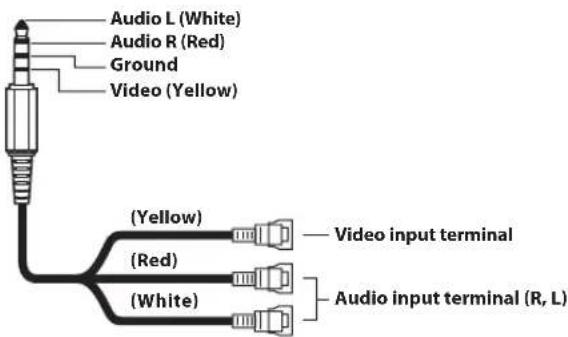
- Configuration commercially available 4-pole mini AV plugs is not standardised.
If an ACC power supply is not available
Connection Diagram of SPST Switch (sold separately)
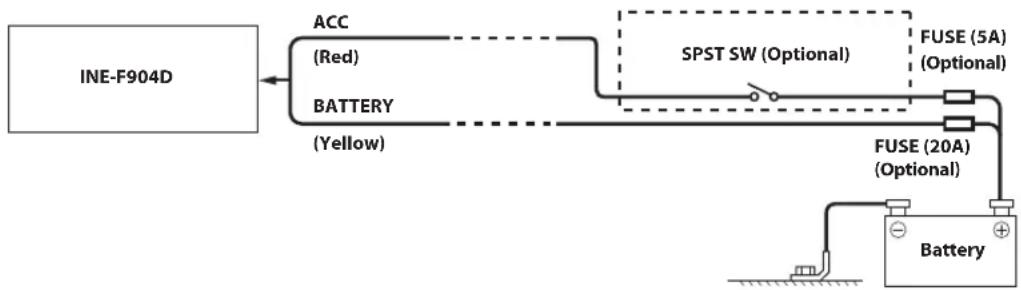
flowchart
graph LR
    A["INE-F904D"] --> B["ACC (Red)"]
    A --> C["BATTERY (Yellow)"]
    B --> D["SPST SW (Optional)"]
    C --> D
    D --> E["FUSE (5A) (Optional)"]
    D --> F["FUSE (20A) (Optional)"]
    F --> G["Battery"]
- If your vehicle has no ACC power supply, add an SPST (single-pole, single-throw) switch (sold separately) and fuse (sold separately).
- The diagram and the fuse amperage shown above are in the case when the unit is used individually.
- If the switched power (ignition) lead of the unit is connected directly to the positive (+) post of the vehicle's battery, the unit draws some current (several hundred milliamperes) even when its switch is placed in the OFF position, and the battery may be discharged.
To prevent external noise from entering the audio system.
- Locate the unit and route the leads at least 10 cm away from the car harness.
- Keep the battery power leads as far away from other leads as possible.
- Connect the ground lead securely to a bare metal spot (remove any paint, dirt or grease if necessary) of the car chassis.
- If you add an optional noise suppressor, connect it as far away from the unit as possible. Your Alpine dealer carries various noise suppressors, contact them for further information.
- Your Alpine dealer knows best about noise prevention measures so consult your dealer for further information.
System Example
Connection of an iPod/iPhone
When connecting to an iPod/iPhone with a Lightning connector
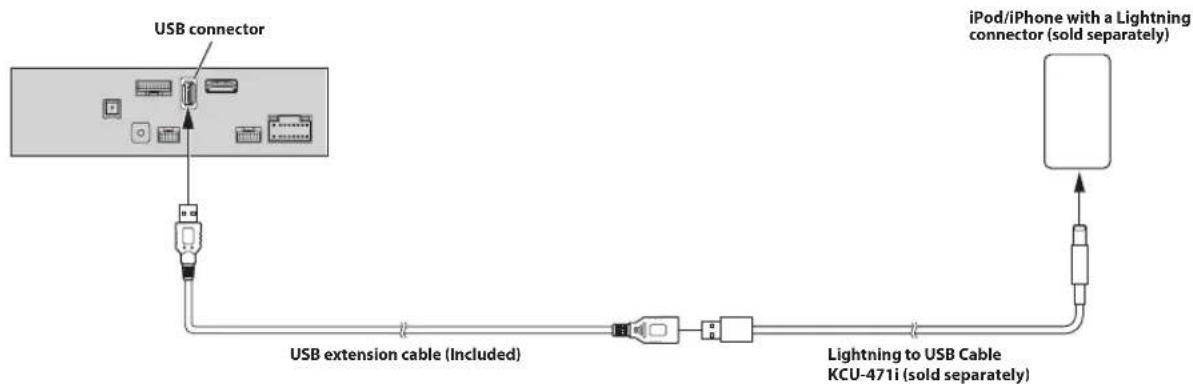
flowchart
graph LR
    A["USB connector"] --> B["USB extension cable (Included)"]
    B --> C["Lightning to USB Cable KCU-471i (sold separately)"]
    C --> D["iPod/iPhone with a Lightning connector (sold separately)"]
■ When connecting to iPhone 4S
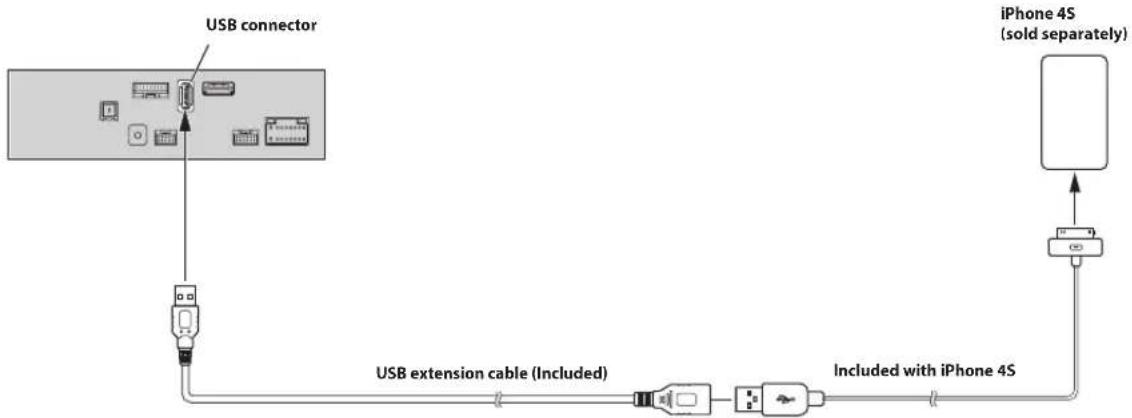
flowchart
graph TD
    A["USB connector"] --> B["USB extension cable (Included)"]
    B --> C["Included with iPhone 4S"]
    C --> D["iPhone 4S (sold separately)"]
- Do not leave an iPod/iPhone in a vehicle for a long time. Heat and humidity may damage the iPod/iPhone, and you may not be able to play it again.
Connection of a Flash Drive
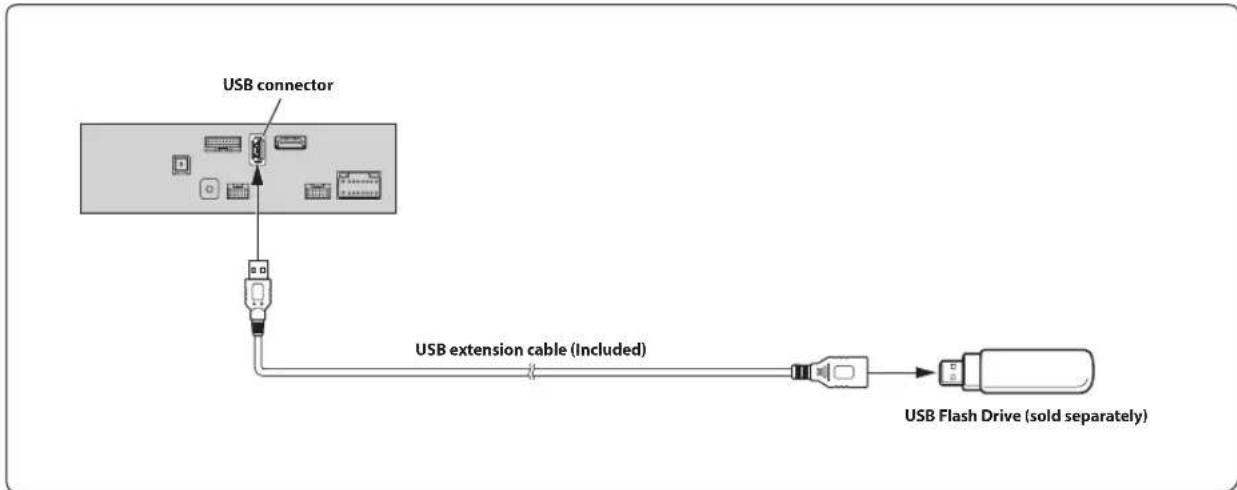
flowchart
graph TD
    A["USB connector"] --> B["USB extension cable (Included)"]
    B --> C["USB Flash Drive (sold separately)"]
- Do not leave a flash drive in a vehicle for a long time. Heat and humidity may damage the flash drive.
Connection of an HDMI Device (iPhone with a Lightning connector)
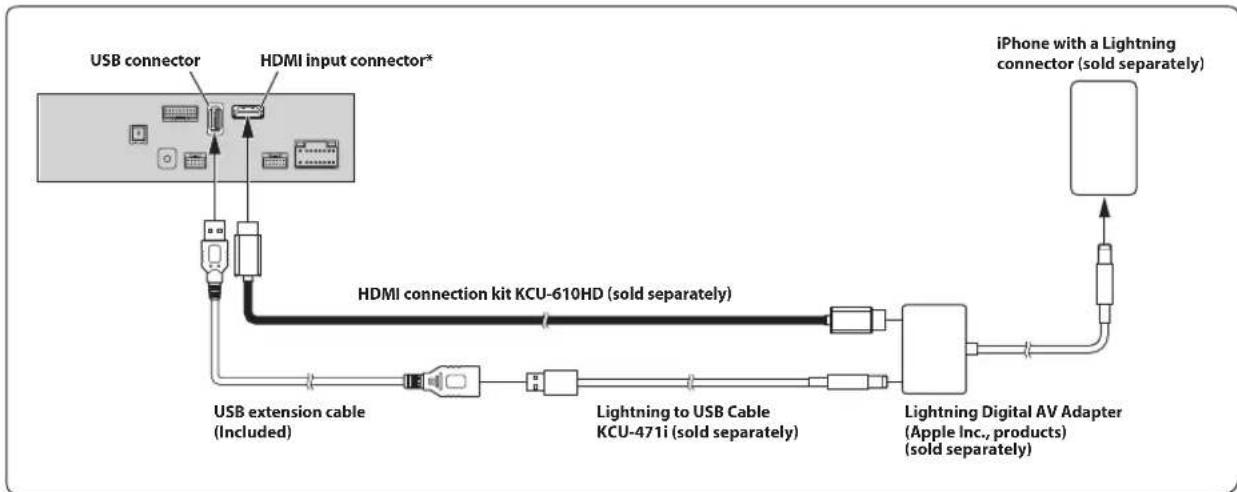
flowchart
graph TD
    A["USB connector"] --> B["HDMI input connector*"]
    B --> C["USB extension cable (Included)"]
    C --> D["Lightning to USB Cable KCU-471i (sold separately)"]
    D --> E["Lightning Digital AV Adapter (Apple Inc., products) (sold separately)"]
    E --> F["iPhone with a Lightning connector (sold separately)"]
    B --> G["HDMI connection kit KCU-610HD (sold separately)"]
* When connecting an HDMI connection cable, be sure to secure it using the supplied HDMI Bracket. For details on how to secure it, see "Note on using HDMI Connection Cables (HDMI Cable not included)" (page 5).
- Set the HDMI Setup to "HDMI." For details, refer to "HDMI Setup" in the OWNER'S MANUAL (CD-ROM).
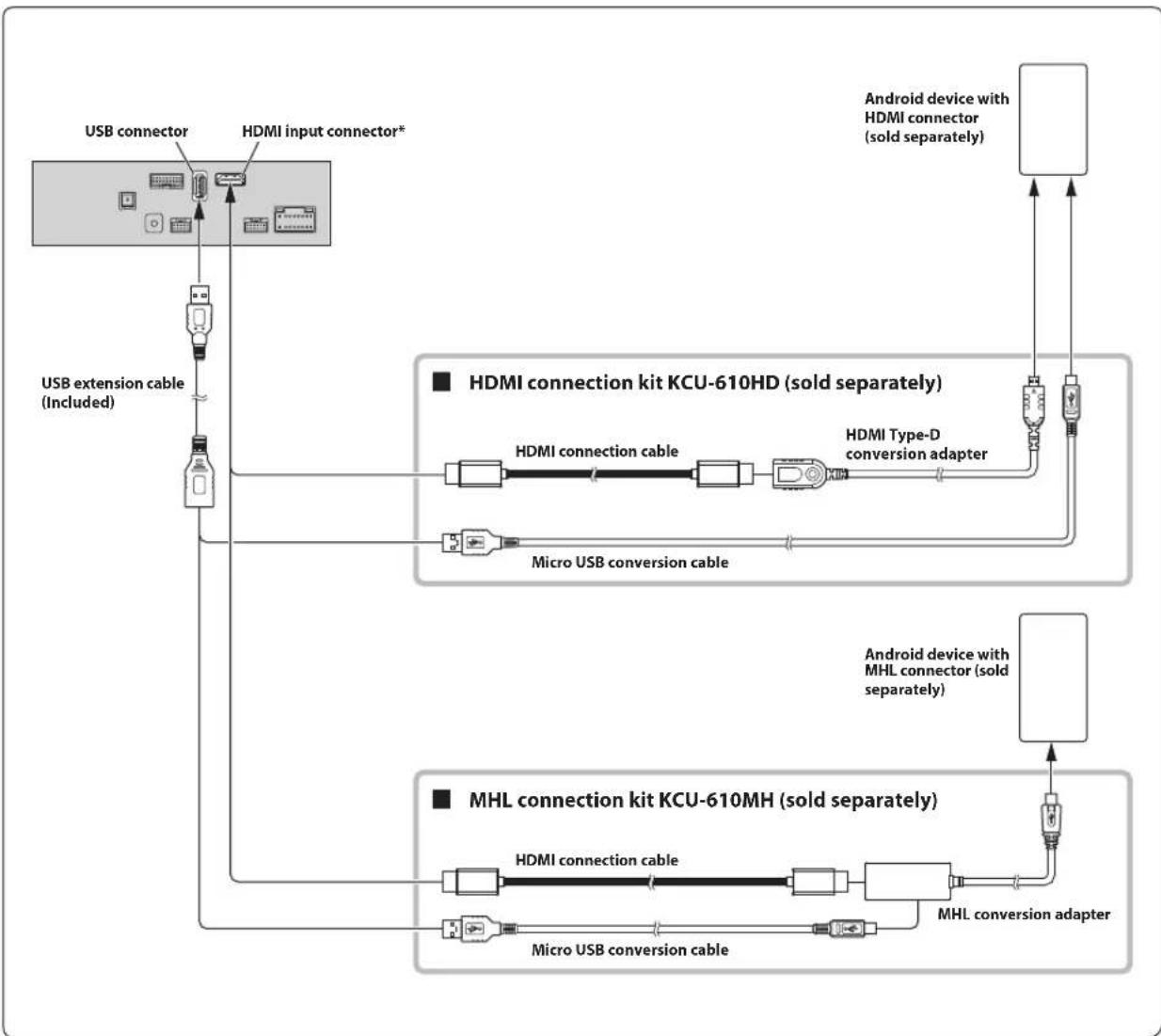
flowchart
graph TD
    A["USB connector"] --> B["USB extension cable (Included)"]
    B --> C["Hybrid"]
    D["HDMI input connector*"] --> E["Hybrid"]
    E --> F["Hybrid"]
    G["Android device with HDMI connector (sold separately)"] --> H["Hybrid"]
    H --> I["Hybrid"]
    J["HDMI connection kit KCU-610HD (sold separately)"] --> K["HDMI connection cable"]
    K --> L["HDMI Type-D conversion adapter"]
    L --> M["Hybrid"]
    N["Micro USB conversion cable"] --> O["Hybrid"]
    O --> P["Hybrid"]
    Q["Android device with MHL connector (sold separately)"] --> R["Hybrid"]
    R --> S["MHL conversion adapter"]
    S --> T["Hybrid"]
    U["MHL connection kit KCU-610MH (sold separately)"] --> V["Hybrid"]
    V --> W["MHL conversion adapter"]
    W --> X["Hybrid"]
    Y["Micro USB conversion cable"] --> Z["Hybrid"]
    Z --> AA["Hybrid"]
- A connection kit or adapter kit suitable for the type of terminal on the connecting device is required.
- Set the HDMI Setup to "HDMI." For details, refer to "HDMI Setup" in the OWNER'S MANUAL (CD-ROM).
* When connecting an HDMI connection cable, be sure to secure it using the supplied HDMI Bracket. For details on how to secure it, see "Note on using HDMI Connection Cables (HDMI Cable not included)" (page 5).
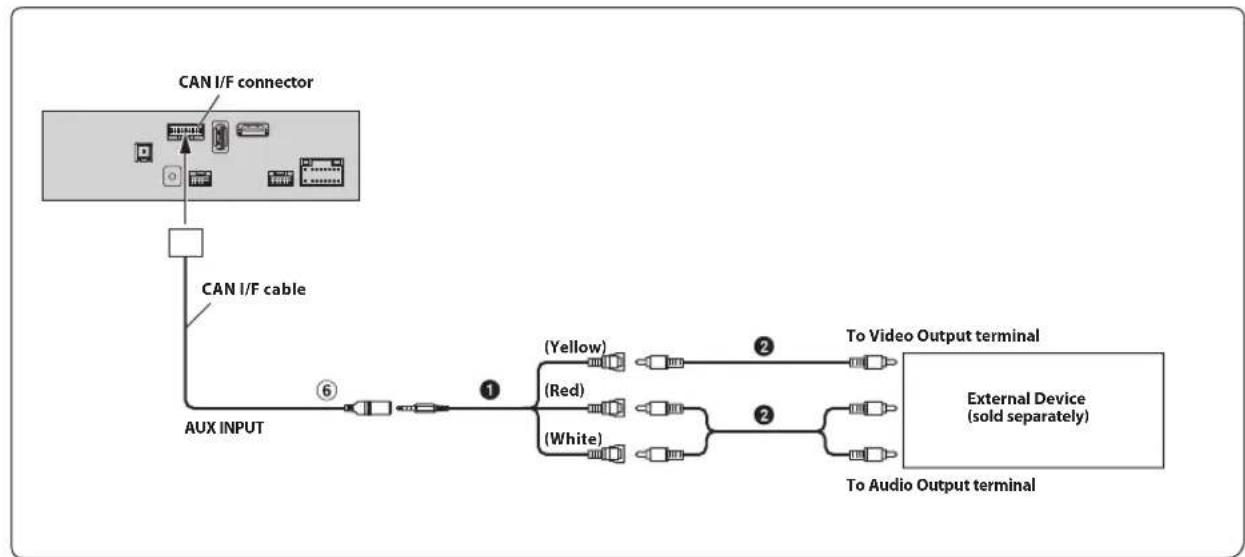
flowchart
graph TD
    A["CAN I/F connector"] --> B["AUX INPUT"]
    B --> C["(Yellow)"]
    B --> D["(Red)"]
    B --> E["(White)"]
    C --> F["To Video Output terminal"]
    D --> G["To Audio Output terminal"]
    E --> H["External Device (sold separately)"]
    style A fill:#f9f,stroke:#333
    style B fill:#ccf,stroke:#333
    style C fill:#cfc,stroke:#333
    style D fill:#cfc,stroke:#333
    style E fill:#cfc,stroke:#333
    style F fill:#fcc,stroke:#333
    style G fill:#fcc,stroke:#333
    style H fill:#fcc,stroke:#333
⑥ AUX Input Connector AV/RCA Interface Cable (4-pole mini AV plug to 3-RCA) (sold separately)
② RCA Extension Cable (sold separately)
- You can change the name of an external device. For details, refer to "Setting the Auxiliary (AUX) Name" in the OWNER'S MANUAL (CD-ROM).
- For details on using an AV/RCA interface cable (4-pole mini AV plug to 3-RCA), see "Usable AV/RCA Interface Cable (4-pole mini AV plug to 3-RCA)" (page 10).
flowchart
graph TD
    A["PRE OUT connector"] --> B["Power supply connector"]
    B --> C["REMOTE ON (Blue/White)"]
    C --> D["Subwoofer"]
    D --> E["Amplifier for subwoofer (sold separately)"]
    E --> F["Front speaker"]
    E --> G["Rear speaker"]
    H["PRE OUT cable"] --> I["Power cable"]
    I --> J["SUBW"]
    J --> K["(Red)"]
    K --> L["(White)"]
    L --> M["(Red)"]
    M --> N["(White)"]
    N --> O["(Red)"]
    O --> P["(White)"]
    P --> Q["(Red)"]
    Q --> R["(White)"]
    R --> S["(Red)"]
    S --> T["(White)"]
    T --> U["(Red)"]
    U --> V["(White)"]
    V --> W["(Red)"]
    W --> X["(White)"]
    X --> Y["(Red)"]
    Y --> Z["(White)"]
    Z --> AA["(Red)"]
    AA --> AB["(White)"]
    AB --> AC["(Red)"]
    AC --> AD["(White)"]
    AD --> AE["(Red)"]
    AE --> AF["(White)"]
    AF --> AG["(Red)"]
    AG --> AH["(White)"]
    AH --> AI["(Red)"]
    AI --> AJ["(White)"]
    AJ --> AK["(Red)"]
    AK --> AL["(White)"]
    AL --> AM["(Red)"]
    AM --> AN["(White)"]
    AN --> AO["(Red)"]
    AO --> AP["(White)"]
    AP --> AQ["(Red)"]
    AQ --> AR["(White)"]
    AR --> AS["(Red)"]
    AS --> AT["(White)"]
    AT --> AU["(Red)"]
    AU --> AV["(White)"]
    AV --> AW["(Red)"]
    AW --> AX["(White)"]
    AX --> AY["(Red)"]
    AY --> AZ["(White)"]
    AZ --> BA["(Red)"]
    BA --> BB["(White)"]
    BB --> BC["(Red)"]
    BC --> BD["(White)"]
    BD --> BE["(Red)"]
    BE --> BF["(White)"]
    BF --> BG["(Red)"]
    BG --> BH["(White)"]
    BH --> BI["(Red)"]
    BI --> BJ["(White)"]
    BJ --> BK["(Red)"]
    BK --> BL["(White)"]
    BL --> BM["(Red)"]
    BM --> BN["(White)"]
    BN --> BO["(Red)"]
    BO --> BP["(White)"]
    BP --> BQ["(Red)"]
    BQ --> BR["(White)"]
    BR --> BS["(Red)"]
    BS --> BT["(White)"]
    BT --> BU["(Red)"]
    BU --> BV["(White)"]
    BV --> BW["(Red)"]
    BW --> BX["(White)"]
    BX --> BY["(Red)"]
    BY --> BZ["(White)"]
    BZ --> CA["(Red)"]
    CA --> CB["(White)"]
    CB --> CC["(Red)"]
    CC --> CD["(White)"]
    CD --> CE["(Red)"]
    CE --> CF["(White)"]
    CF --> CG["(Red)"]
    CG --> CH["(White)"]
    CH --> CI["(Red)"]
    CI --> CJ["(White)"]
    CJ --> CK["(Red)"]
    CK --> CL["(White)"]
    CL --> CM["(Red)"]
    CM --> CN["(White)"]
    CN --> CO["(Red)"]
    CO --> CP["(White)"]
    CP --> CQ["(Red)"]
    CQ --> CR["(White)"]
    CR --> CS["(Red)"]
    CS --> CT["(White)"]
    CT --> CU["(Red)"]
    CU --> CV["(White)"]
    CV --> CW["(Red)"]
    CW --> CX["(White)"]
    CX --> CY["(Red)"]
    CY --> CZ["(White)"]
⑦ Remote Turn-On Lead (Blue/White)
29 Subwoofer RCA Connectors
30 Front Output RCA Connectors
③1 Rear Output RCA Connectors
② RCA Extension Cable (sold separately)
Connection of a Rearview camera
flowchart
graph TD
    A["CAN I/F connector"] --> B["CAN I/F cable"]
    A --> C["Power Supply connector"]
    C --> D["Reverse (Orange/White)"]
    D --> E["Connect to the plus side of the car's reverse lamp."]
    F["CAMERA"] --> G["Camera extension cable (included with direct rearview camera)"]
    G --> H["HCE-C127D/HCE-C157D/HCE-C252RD (sold separately)"]
④ Direct CAMERA Input Connector Reverse Lead (Orange/White)⑧
- Set the Camera Select to "Rear." For details, refer to "Setting the Camera Input" in the OWNER'S MANUAL (CD-ROM).
Connection of a Frontview camera
flowchart
graph LR
    A["CAN I/F connector"] --> B["Camera"]
    B --> C["Camera extension cable (included with direct frontview camera)"]
    C --> D["HCE-C257FD/HCE-C212FD (sold separately)"]
    B --> E["CAMERA"]
    style A fill:#f9f,stroke:#333
    style B fill:#ccf,stroke:#333
    style C fill:#cfc,stroke:#333
    style D fill:#fcc,stroke:#333
④ Direct CAMERA Input Connector
- Set the Camera Select to "Front." For details, refer to "Setting the Camera Input" in the OWNER'S MANUAL (CD-ROM).
Position Adjustment and Mounting Dimensions of the Display
The mounting position of this unit's Display can be adjusted (front-back/up-down/angle). When mounting the Display, confirm the mounting position and mounting dimensions so that it does not obstruct your field of vision or impair driving.

WARNING
• In the following cases, the display cannot be mounted.
- It impairs operation of the steering wheel or various levers (gearshift, windshield wiper switch, turn signal switch, etc.)
- It impairs operation of the airbag
- It significantly impairs operation of the hazard switch
- It impairs identification or operation of any other control switches
- It impairs confirmation of gauges or warning indicators
- It interferes with vehicle equipment (switches, panels, etc.)
* Depending on the vehicle, the glove compartment or cup holders may become inaccessible, or air conditioner ventilation ducts may be covered.
■ Display mounting dimensions and adjustable positions
Display unit size
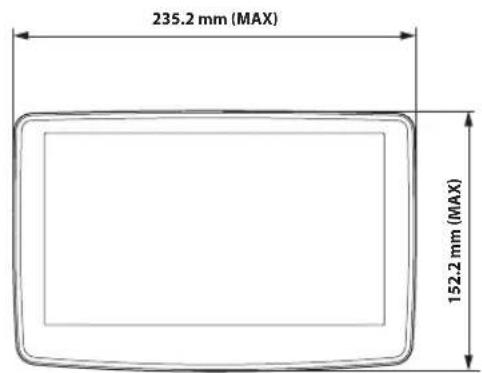
Front-back position
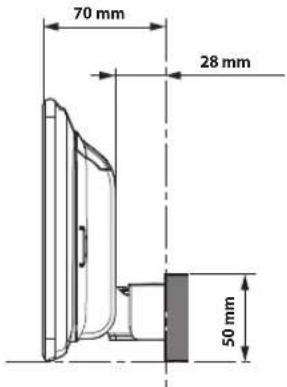
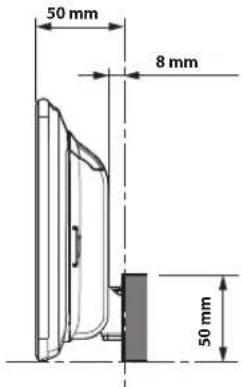
Adjustable Display angle and up-down position
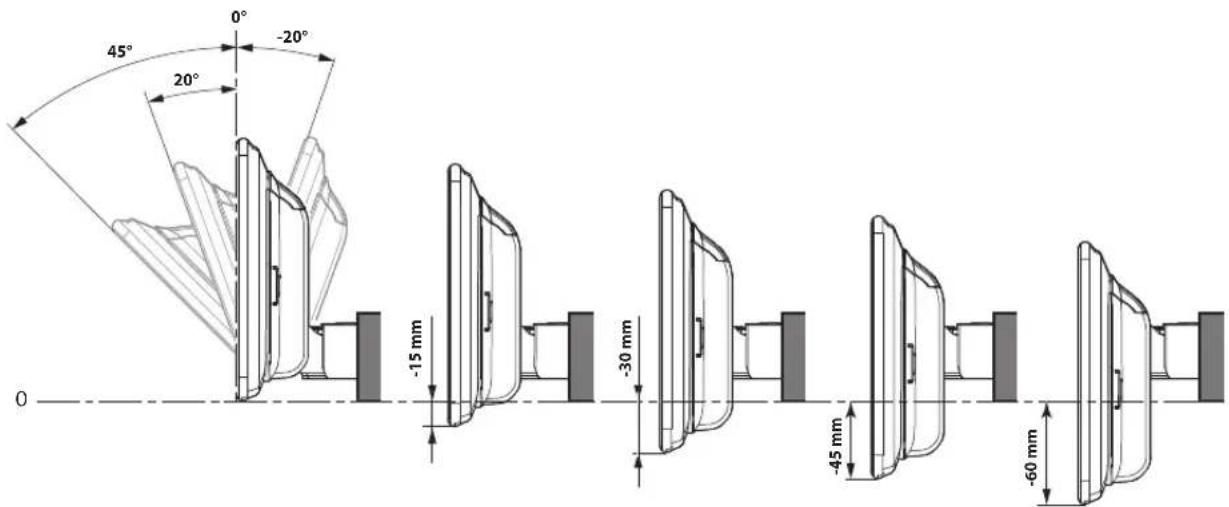
* Depending on the up-down position of the forward and back positions, there are certain positions in which the angle cannot be adjusted. Consult "Mounting Dimensions for Angle Adjustment of the Display" (page 19) for details.
■ Mounting Dimensions for Angle Adjustment of the Display
| Angle: 45° Angle: 20° Angle: -20° | ||||||||||||
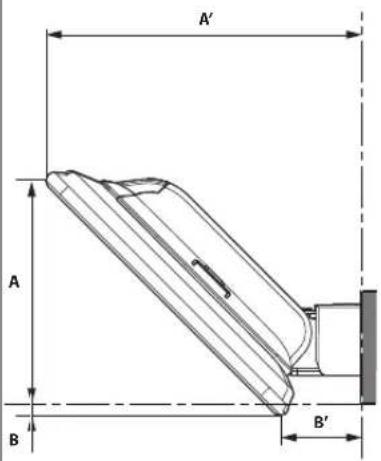 | 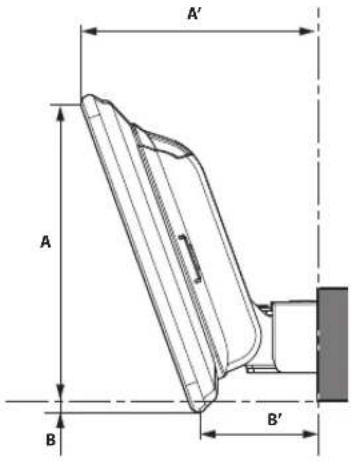 | 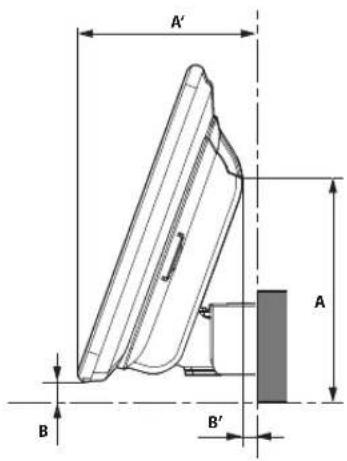 | ||||||||||
| A | A | ' | B | B | ' | A | A | ' | B | B | A | |
| 0 100.8 142.4 -5.3 36.2 134.2 106.7 -5.3 53.4 | 100.2 80 9 | 3 | 5 | 6 | ||||||||
| -15 mm | 120.1 | 101.6 | -19.4 | 48.3 | 86.1 | 85.1 | -4.9 | 10.7 | ||||
| -30 mm | 106 | 96.4 | -33.5 | 43.1 | 72 | 90.3 | -18.9 | 15.8 | ||||
| -45 mm | 91.9 | 91.3 | -47.6 | 38 | 57.9 | 95.4 | -33 | 21 | ||||
| -60 mm | 77.8 | 86.2 | -61.7 | 32.9 | 43.8 | 100.5 | -47.1 | 26.1 | ||||
| Angle: 45° Angle: 20° Angle: -20° | ||||||||||||
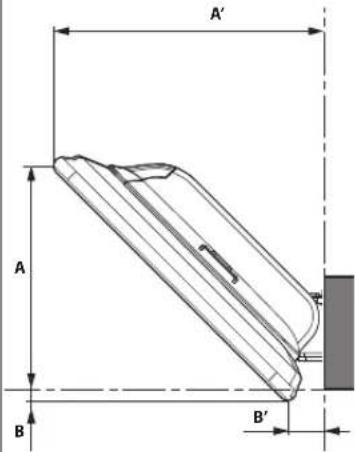 | 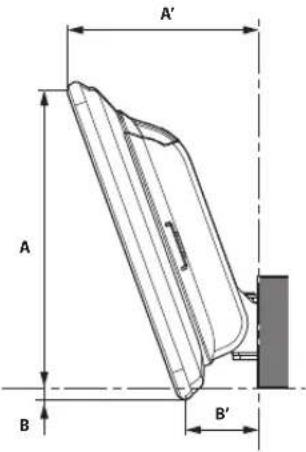 | 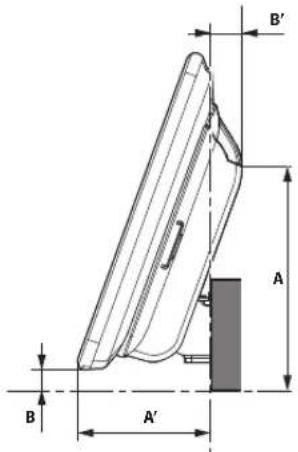 | ||||||||||
| A | A | ' | B | B | ' | A | A | ' | B | B | A | |
| 0 100.8 122.4 -5.3 16.2 134.2 86.7 -5.3 33.4 100.2 60 9.3 -14.4 | ||||||||||||
| -15 mm | 120.1 | 81.6 | -19.4 | 28.3 | 86.1 | 65.1 | -4.9 | -9.3 | ||||
| -30 mm | 72 | 70.3 | -18.9 | -4.2 | ||||||||
| -45 mm | 57.9 | 75.4 | -33 | 1 | ||||||||
| -60 mm | 43.8 | 80.5 | -47.1 6.1 | |||||||||
*The parts in the table cannot be adjusted.
Inhalt
WARNUNG 2
VORSICHT 2
natural_image
Diagram of various electronic devices and components arranged in a grid layout (no text or labels visible)natural_image
Technical line drawing of a mechanical component with an arrow indicating rotation (no text or symbols present)natural_image
Technical line drawing of a mechanical component with screws and mounting holes (no text or symbols)natural_image
Technical line drawing of a mechanical assembly with no visible text or symbolsnatural_image
Technical line drawing of a mechanical component with screws and housing (no text or symbols)natural_image
Technical line drawing of a mechanical assembly with no visible text or symbolsnatural_image
Diagram of various electronic components and devices arranged in a grid layout (no text or labels visible)natural_image
Technical line drawing of a mechanical component with an arrow indicating rotation (no text or symbols present)natural_image
Technical line drawing of a mechanical assembly with two screws and a panel (no text or symbols)natural_image
Technical line drawing of a mechanical component with dimension lines (no text or symbols)natural_image
Technical line drawing of a mechanical component with two screw holes and mounting holes (no text or symbols)natural_image
Technical line drawing of a mechanical device with mounting holes and internal components (no text or symbols)natural_image
Pure diagram of electrical components without any text, numbers, or symbolsnatural_image
Technical line drawing of a mechanical component with an arrow indicating rotation (no text or symbols present)natural_image
Technical line drawing of a mechanical assembly with no visible text or symbolsnatural_image
Technical line drawing of a mechanical assembly with screws and housing (no text or symbols)natural_image
Technical line drawing of a mechanical assembly with no visible text or symbolsnatural_image
Technical line drawing of a mechanical assembly with no visible text or symbolsnatural_image
Pure diagram of electronic components without any text, numbers, or symbolsnatural_image
Technical line drawing of a mechanical component with an arrow indicating rotation (no text or symbols present)natural_image
Technical line drawing of a mechanical component with screws and mounting holes (no text or symbols)natural_image
Technical line drawing of a mechanical assembly with no visible text or symbolsnatural_image
Technical line drawing of a mechanical assembly with two screws and a housing (no text or symbols)natural_image
Technical line drawing of a mechanical assembly with no visible text or symbolsnatural_image
Diagram of a door handle assembly with an arrow indicating direction (no text or symbols)Linguetta
Collegamenti
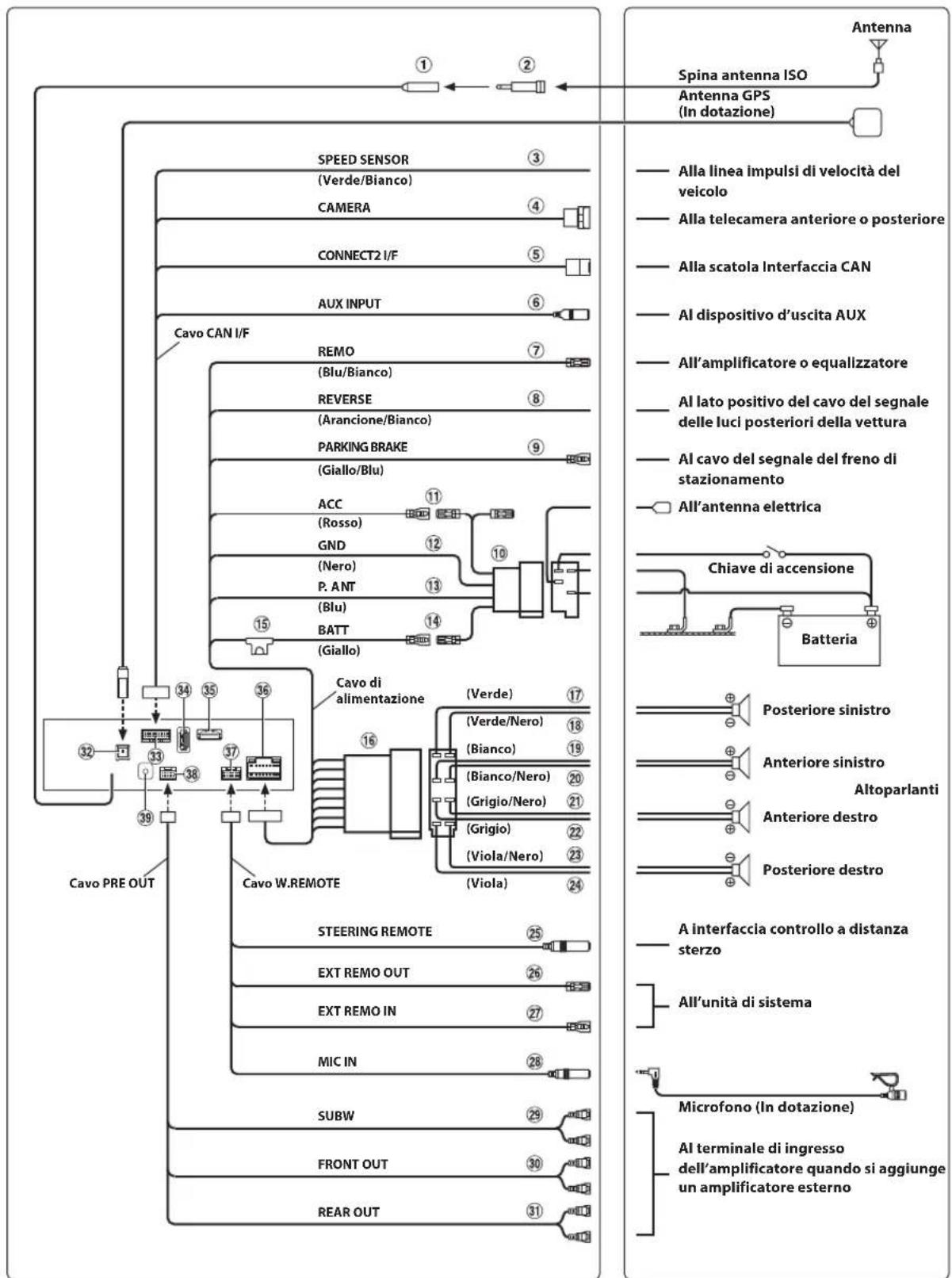
flowchart
graph TD
    A["Cavo PRE OUT"] --> B["Speed Sensor"]
    B --> C["CAMERA"]
    B --> D["CONNECT2 I/F"]
    B --> E["AUX INPUT"]
    B --> F["Cavo CAN I/F"]
    F --> G["REMO"]
    G --> H["(Blu/Bianco)"]
    G --> I["REVERSE"]
    I --> J["(Arancione/Bianco)"]
    I --> K["PARKING BRAKE"]
    K --> L["(Giallo/Blu)"]
    K --> M["ACC"]
    M --> N["(Rosso)"]
    M --> O["GND"]
    M --> P["(Nero)"]
    M --> Q["P. ANT"]
    M --> R["(Blu)"]
    M --> S["BATT"]
    M --> T["(Giallo)"]
    T --> U["Cavo di alimentazione"]
    U --> V["(Verde)"]
    V --> W["(Bianco)"]
    V --> X["(Grigio/Nero)"]
    V --> Y["(Viola/Nero)"]
    U --> Z["(Verde/Nero)"]
    U --> AA["(Bianco/Nero)"]
    U --> AB["(Grigio/Nero)"]
    U --> AC["(Viola/Nero)"]
    U --> AD["(Viola)"]
    U --> AE["(Viola)"]
    U --> AF["(Viola)"]
    U --> AG["(Viola)"]
    U --> AH["(Viola)"]
    U --> AI["(Viola)"]
    U --> AJ["(Viola)"]
    U --> AK["(Viola)"]
    U --> AL["(Viola)"]
    U --> AM["(Viola)"]
    U --> AN["(Viola)"]
    U --> AO["(Viola)"]
    U --> AP["(Viola)"]
    U --> AQ["(Viola)"]
    U --> AR["(Viola)"]
    U --> AS["(Viola)"]
    U --> AT["(Viola)"]
    U --> AU["(Viola)"]
    U --> AV["(Viola)"]
    U --> AW["(Viola)"]
    U --> AX["(Viola)"]
    U --> AY["(Viola)"]
    U --> AZ["(Viola)"]
    U --> BA["(Viola)"]
    U --> BB["(Viola)"]
    U --> BC["(Viola)"]
    U --> BD["(Viola)"]
    U --> BE["(Viola)"]
    U --> BF["(Viola)"]
    U --> BG["(Viola)"]
    U --> BH["(Viola)"]
    U --> BI["(Viola)"]
    U --> BJ["(Viola)"]
    U --> BK["(Viola)"]
    U --> BL["(Viola)"]
    U --> BM["(Viola)"]
    U --> BN["(Viola)"]
    U --> BO["(Viola)"]
    U --> BP["(Viola)"]
    U --> BQ["(Viola)"]
    U --> BR["(Viola)"]
    U --> BS["(Viola)"]
    U --> BT["(Viola)"]
    U --> BU["(Viola)"]
    U --> BV["(Viola)"]
    U --> BW["(Viola)"]
    U --> BX["(Viola)"]
    U --> BY["(Viola)"]
    U --> BZ["(Diode"]
    BZ --> CA["Spina antenna ISO"]
    CA --> CB["Antenna GPS (In dotazione)"]

    subgraph Antenna System
        D1["Alla linea impulsi di velocità del veicolo"]
        D2["Alla telecamera anteriore o posteriore"]
        D3["Alla scatola Interfaccia CAN"]
        D4["Al dispositivo d'uscita AUX"]
        D5["All'amplificatore o equalizzatore"]
        D6["Al lato positivo del cavo del segnale delle luci posteriori della vettura"]
        D7["Al cavo del segnale del freno di stazionamento"]
        D8["All'antenna elettrica"]
        D9["Chiave di accensione"]
        D10["Batteria"]
        D11["Posteriore sinistro"]
        D12["Anteriore sinistro"]
        D13["Altoparlanti"]
        D14["Anteriore destro"]
        D15["Posteriore destro"]
        D16["A interfaccia controllo a distanza sterzo"]
        D17["All'unità di sistema"]
        D18["Microfono (In dotazione)"]
        D19["Al terminale di ingresso dell'amplificatore quando si aggiunge un amplificatore esterno"]
natural_image
Diagram of various electronic components arranged in a grid layout (no text or labels visible)Enhetens baksida
natural_image
Technical line drawing of a mechanical component with an arrow indicating rotation (no text or symbols present)natural_image
Technical line drawing of a mechanical assembly with mounting holes and screw fasteners (no text or symbols)natural_image
Technical line drawing of a mechanical assembly with no visible text or symbolsnatural_image
Technical line drawing of a mechanical component with two screw holes and mounting holes (no text or symbols)natural_image
Technical line drawing of a mechanical device with internal components and mounting holes (no text or symbols)natural_image
Pure diagram of electrical components without any text, numbers, or symbolsnatural_image
Technical line drawing of a mechanical component with an arrow indicating rotation (no text or symbols present)natural_image
Technical line drawing of a mechanical assembly with screws and housing (no text or symbols)natural_image
Technical line drawing of a mechanical assembly with no visible text or symbolsnatural_image
Technical line drawing of a mechanical assembly with no visible text or symbolsHoekafstelschroeven (M4×6) (links en rechts)
natural_image
Technical line drawing of an electrical component with mounting holes and housing (no text or symbols)natural_image
Technical line drawing of a mechanical component with an arrow indicating rotation (no text or symbols present)natural_image
Technical line drawing of a mechanical assembly with screws and a bracket (no text or symbols)natural_image
Technical line drawing of a mechanical assembly with no visible text or symbolsnatural_image
Technical line drawing of a mechanical assembly with no visible text or symbolsnatural_image
Diagram of a mechanical component with an arrow indicating direction (no text or symbols present)Выступ
Соединения