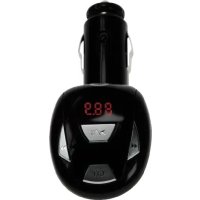
CLLFMCARU - Car stereo CONCEPTRONIC - Free user manual and instructions
Find the device manual for free CLLFMCARU CONCEPTRONIC in PDF.


| Product type | FM transmitter for car |
| Brand | Conceptronic |
| Model | CLLFMCARU |
| Power supply | 12 V DC via cigarette lighter |
| FM frequency bands | 87.7–88.9 MHz and 106.7–107.9 MHz |
| Number of preset channels | 14 |
| Compatible audio formats | MP3, WMA (except DRM) |
| Audio source | USB flash drive or external audio input (2.5 mm jack) |
| Signal-to-noise ratio | 60 dB |
| Frequency response | 20 Hz – 15 kHz |
| Transmission power | -1 to -20 dBm |
| Radiation power | < 50 nW |
| Supported bitrate | 32 – 256 Kbps |
| Safety fuse | 500 mA, 250 V (spare included) |
| Playback modes | Normal and random |
| Indicators | LED for frequency and mode (play, pause, random) |
| Memory | Frequency, last track, volume |
| Package contents | Transmitter, audio cable (3.5 mm to 2.5 mm), spare fuse, user guide |
| Design | Adjustable (tiltable position) |
| Maintenance | Clean with a soft, dry cloth |
| Safety | Use only the supplied fuse; disconnect before replacement |
| Country of origin | Not specified (estimate: China) |
Frequently Asked Questions - CLLFMCARU CONCEPTRONIC
User questions about CLLFMCARU CONCEPTRONIC
0 question about this device. Answer the ones you know or ask your own.
Ask a new question about this device
Download the instructions for your Car stereo in PDF format for free! Find your manual CLLFMCARU - CONCEPTRONIC and take your electronic device back in hand. On this page are published all the documents necessary for the use of your device. CLLFMCARU by CONCEPTRONIC.
USER MANUAL CLLFMCARU CONCEPTRONIC
text_image
Technical diagram of a device with numbered parts and labeled ports, including a control panel and a handheld device.Nr Beschrijving
natural_image
Pure mechanical diagram showing a shaft and wheel connected by a belt, with no text or symbols present.Congratulations on the purchase of your Conceptronic Car FM Transmitter.
The enclosed User Guide gives you a step-by-step explanation how-to use the Conceptronic Car FM Transmitter.
When problems occur, we advise you to go to our support-site (go to www.conceptronic.net and click 'Support'. Here you will find the Frequently Asked Questions Database.
When you have other questions about your product and you cannot find it at our website, then contact us by e-mail: support@conceptronic.net
For more information about Conceptronic products, please visit the Conceptronic Web Site: www.conceptronic.net
1. Introduction
The CLLFMCARU FM transmitter is the bridge between your stored music and your FM car stereo. Connect the audio cable to the headphone connection of your music player or mobile phone and the line-in of the transmitter, or connect your USB memory stick directly to the USB port of the transmitter.
ENGLISH
2. Package Contents
The following items are present in the package of the Conceptronic Car FM Transmitter:
- Conceptronic Car FM Transmitter
• Audio Line-in Cable (3,5mm jack to 2,5mm mini-jack) - Spare Safety Fuse for CLLFMCARU (250V, 500mA)
- Multilanguage Userguide
3. Product Features
- Play audio files (MP3/WMA*) from the USB flash disk directly and transmit the music to your car radio.
- Transmit music from an external audio player (MP3 Player, I-Pod, Disc-Man, etc.) to your car radio.
- Adjust transmission power to avoid station interference.
- Two play mode available: Normal and Random.
- Frequency Display and work state (play, pause or shuffle) LED indicator.
- Adjustable design convenient for you to adjust the device's position.
- 14 Preset channels within two frequency bands: 87.7\~88.9MHz and 106.7\~107.9MHz
- Car cigarette lighter power supply (12V DC power).
- Memory for the last frequency, track number** and volume when you restart the device.
* DRM Protected WMA files are not supported.
** The FM transmitter will only resume the same track number when the FM transmitter is inserted in your car cigarette lighter plug when the USB stick is already inserted.
ENGLISH
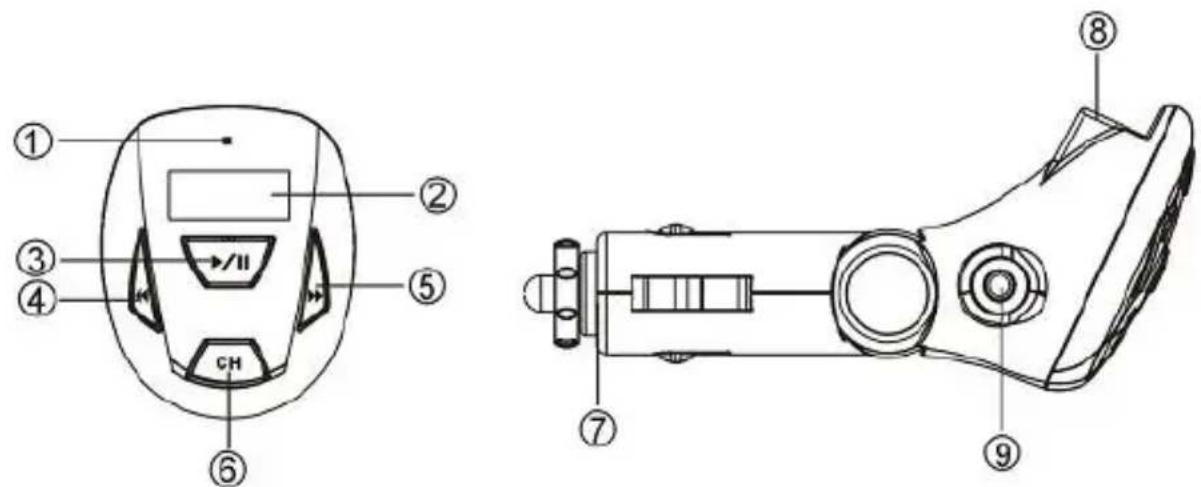
4. The CLLFMCARU explained
text_image
Technical diagram of a handheld device with numbered parts and labeled ports, including a dial indicator and control buttons.Nr Explanation
1 LED Indicator
2 Frequency Display
3 "Play/Pause/Switch Play Mode" Button
4 "Previous Track" Button
5 "Next Track" Button
6 "Channel Frequency/Change Transmit Power" Button
7 Cigarette Lighter Plug
8 USB Port (For connecting an USB Stick)
9 2,5mm Line-In Jack (For connecting an external audio source)
5. Using the Car FM Transmitter
The Car FM transmitter can be used in 2 different ways:
- As MP3/WMA Player. The device plays MP3 or WMA files directly from an USB memory drive.
- As an Audio Bridge. The device receives the audio signal from your external audio source (MP3 Player, I-Pod, Disc-Man, etc.) through the Line-In port.
ENGLISH
In both situations, the music played will be transmitted to your car radio through the frequency shown on the display of the FM Transmitter.
5.1 Button explanation
| Function | Explanation |
| Switch Channel | Press the “CH” button to switch between the 14 preset channels. The selected frequency is indicated on the display. |
| Play/Pause Press the | ▶/|| button to play music, the LED is flashing during playback and the frequency display displays current channel.Press the ▶/|| button to pause the playback. After about 30 seconds the device stops transmitting and displays nothing with the LED steadily on. To resume playback, press the ▶/|| button again. |
| Switch Play Mode Press and hold the play mode. The device provides two play modes: Repeat All (LED flashes slowly) and Random (LED flashes quickly). | ▶/|| button for a while to switch |
| Previous/Next Press the | ◀ button to play the previous track or press the ▶ button to play the next track. |
| Adjust Volume Press and hold the press and hold the | ◀ button to decrease volume, or ▶ button to increase volume. |
ENGLISH
Adjust Power If you hear interference from another FM station, you can adjust the transmission power to clear it. This device provides two power levels: High Power Mode and Low Power Mode. Press and hold the "CH" button for about 10 seconds to switch between the two levels. When the device has Higher Power, the LED becomes red, and when it has Lower Power, the LED turns green.
5.2 The FM Transmitter as MP3/WMA Player
- Load your USB memory drive with MP3 and/or WMA files through your computer.
- Plug the USB memory drive in the USB port of the FM Transmitter.
- Insert the FM Transmitter in your car cigarette lighter socket.
- Turn the ignition key of your car to the "ACC" position, or start the engine. The FM Transmitter will turn on.
Note:
Some cars also provide power on the car cigarette lighter socket and car radio when the ignition key is removed. In that situation, it is not necessary to set the ignition key to the "ACC" position before you can use the FM Transmitter.
- Press the CH button on the FM Transmitter to find a suitable frequency that can be used.
- Tune your car radio to the frequency selected on the FM Transmitter.
- Press the ▶/11 button to start the music playback through your car radio.
ENGLISH
5.3 The FM Transmitter as Audio Bridge
- Connect the 3,5mm jack of the Line-In Cable to your audio source.
- Connect the 2,5mm mini-jack of the Line-In Cable to the Line-In Port of the FM Transmitter.
- Insert the FM Transmitter in your car cigarette lighter socket.
- Turn the ignition key of your car to the "ACC" position, or start the engine. The FM Transmitter will turn on.
Note:
Some cars also provide power on the car cigarette lighter socket and car radio when the ignition key is removed. In that situation, it is not necessary to set the ignition key to the "ACC" position before you can use the FM Transmitter.
- Press the CH button on the FM Transmitter to find a suitable frequency that can be used.
- Tune your car radio to the frequency selected on the FM Transmitter.
- Start the playback on your audio source to listen to the music through your car radio.
Note:
When using the Line-In feature of the FM Transmitter, only the CH button is operational. All other buttons (Play/pause, next, previous, etc.) are only operational in "MP3/WMA Player" Mode.
ENGLISH
6. Safety Fuse replacement
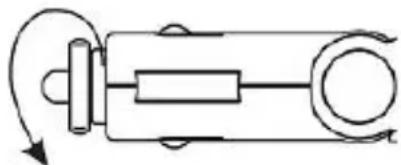
When the FM transmitter does not work, it is possible that the Safety Fuse in the device is broken. Please replace the Safety Fuse with the steps below:
- Remove the FM Transmitter from the car cigarette lighter socket.
- Twist the tip of the cigarette lighter plug counter-clockwise.
natural_image
Pure mechanical diagram showing a shaft and pulley system without any text, numbers, or symbols-
Remove the bad safety fuse and replace it with a new one (provided in the blister-package of the FM Transmitter).
-
Place the tip of the cigarette lighter plug back on its place and twist it clockwise.
7. Technical Specifications
| Item Description | |
| Supported USB storage USB flash disk with USB 1.1 /USB2.0 interface | |
| FM frequency band 87.7~88.9MHz, 106.7~107.9MHz | |
| SNR | 60dB |
| Frequency response range 20HZ-15kHz | |
| Transmitting power -1 ~ -20dBm | |
| Radiation Power < 50nW | |
| File Type Support MP3, WMA (DRM Protected WMA files are not supported) | |
| Audio Source USB flash disk or audio player | |
| Bit Rate 32Kbps–256Kbps | |
| Safety Fuse 500mA, 250V | |
ESPAÑOL
CLLFMCARU de Conceptronic
Guía de Usuario
natural_image
Pure mechanical diagram showing a shaft and pulley system without any text, numbers, or symbolstext_image
Technical diagram of a handheld device with numbered parts and labeled ports, including a dial indicator and control panel.Nr. Erklärung
natural_image
Pure mechanical diagram showing a shaft and pulley system without any text, numbers, or symbolstext_image
Technical diagram of a handheld device with labeled parts including buttons, display, and control panelN° Description
natural_image
Pure mechanical diagram showing a shaft and pulley system without any text, numbers, or symbolsnatural_image
Pure mechanical diagram showing a shaft and housing with rotational arrows, no text or symbols presenttext_image
Technical diagram of a handheld device with numbered parts and labeled ports, including a display panel and internal components.Nº Descrição
natural_image
Pure mechanical diagram showing a shaft and housing with rotational arrows, no text or symbols presenttext_image
Technical diagram of a device with numbered parts, including front and side views with labeled components.Sz. Magyarázat
natural_image
Pure mechanical diagram showing a shaft and housing with rotational arrows, no text or symbols presentDeclaration of CE Conformity
The manufacturer Conceptronic
Address Databankweg 7
3821
AL
Amersfoort,
the
Netherla
Hereby declares that the product
Type FM MP3 TRANSMIT ADVANCED USB
Product CLLFMCARU
CE
The CE symbol confirms that this product conforms to the above named standards and regulations.
This device comply was tested and found to comply with the CE rules, pursuant to Annex 13 of ERC/REC 70-03. It meets the following requirement:
The user must be able to choose transmission channels over the VHF band (87.6 - 107.9 MHz);
The maximum radiated power must not exceed 50 nW e.r.p.;
The equipment must possess an integrated antenna without a connector;
The equipment must be equipped with an audio input (an internal microphone or microphone input are not authorised);
The equipment must cease all transmission in the minute following the absence of a signal at the audio input.
Place and date of issue: Amersfoort, August 4, 2006

natural_image
Simple line drawing of a diagonal line with a small mark at one end (no text or symbols)Herman Looijen, Product Marketing Manager