HBS700 - Wireless Headphones LG - Free user manual and instructions
Find the device manual for free HBS700 LG in PDF.

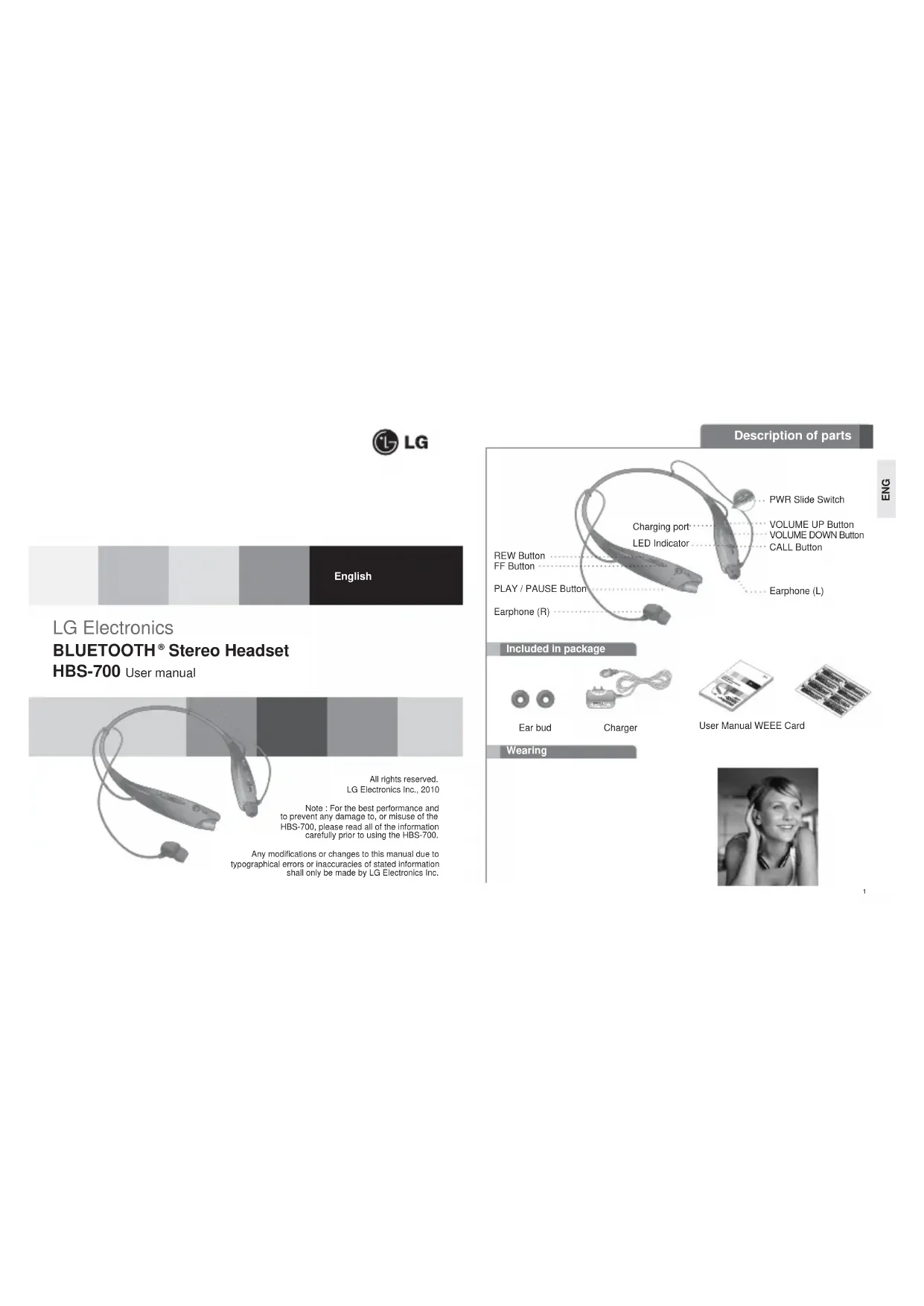


| Product Type | Bluetooth Wireless Headset |
| Brand | LG |
| Model | HBS700 |
| Bluetooth Technology | Bluetooth 2.1+EDR |
| Bluetooth Profiles | Headset, Hands-free, A2DP, AVRCP |
| Dimensions (L x W x H) | 135.6 x 167.3 x 16.9 mm |
| Weight | 32 g |
| Battery Type | Rechargeable Lithium Polymer |
| Battery Capacity | 195 mAh, 3.7 V |
| Standby Time | Up to 360 hours |
| Talk Time | Up to 10 hours |
| Music Play Time | Up to 10 hours |
| Charging Time | Less than 2.5 hours |
| Operating Range | Up to 10 meters |
| Battery Charge Indicator | Blue (high), violet (medium), red (low) |
| Call Management Functions | Answer/end, redial, voice dial, call transfer, call waiting, call reject |
| Audio Functions | Play/Pause, next/previous track, fast forward/rewind, equalizer (Normal/Bass) |
| Multi-connection Function | Connect two Bluetooth devices simultaneously (one for calls, one for music) |
| Voice Command | Yes (via call button) |
| Maintenance and Cleaning | Do not use water, alcohol, or benzene. Wipe with a dry cloth. |
| Safety | Do not expose to moisture or extreme temperatures. Use genuine LG charger. |
| Spare Parts / Repairability | Battery replaceable only by an LG authorized service center. |
| Operating Temperature | -10°C to 60°C |
| Charging Temperature | 10°C to 45°C |
Frequently Asked Questions - HBS700 LG
User questions about HBS700 LG
0 question about this device. Answer the ones you know or ask your own.
Ask a new question about this device
Download the instructions for your Wireless Headphones in PDF format for free! Find your manual HBS700 - LG and take your electronic device back in hand. On this page are published all the documents necessary for the use of your device. HBS700 by LG.
USER MANUAL HBS700 LG
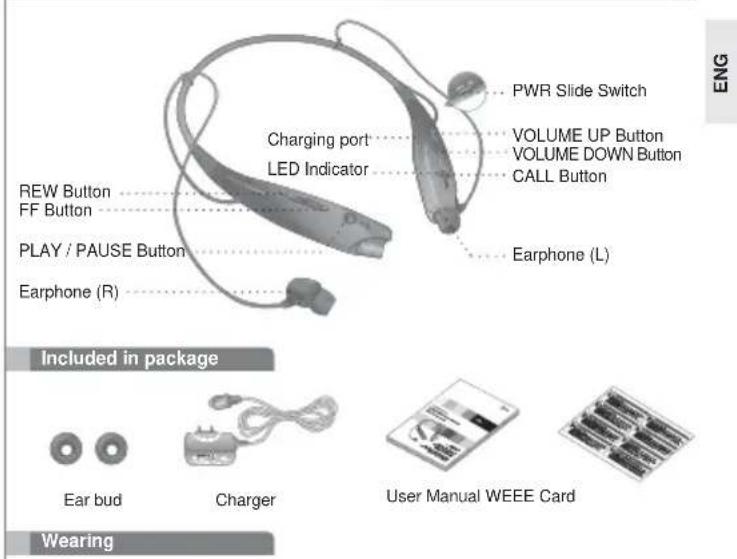
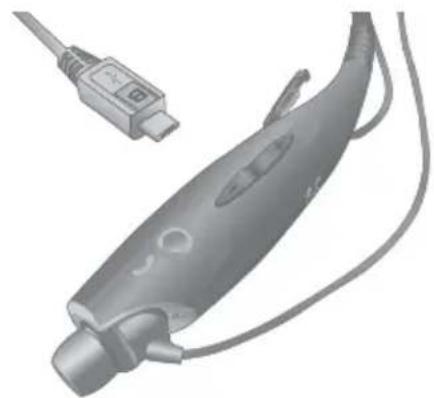
Description of parts

Charging Your Headset
Specification
| ITEM Description | |
| Bluetooth® specification 2.1 | EDR (Headset / Handsfree / A2DP) |
| Battery Battery 3.7V / 195mAh Li-Polymer | |
| Standby time / Talk time Up to | 360Hrs / Up to 10Hrs |
| Music play time | Up to 10 Hrs |
| Charging time < 2.5Hrs | |
| Operation temperature -10°C | ~ 60°C |
| Dimension / Weight 135.6mm(W) X 167.3mm(L) X 16.9mm(T) / 32g | |
How to use
Pairing
Before using the headset for the first time, you must pair it with a Bluetooth-enabled handset.
- To pair your headset with an additional handset, the headset must be placed in Pairing Mode.
There are 2 Pairing Mode Methods with the HBS-700.
Easy Pairing (First Time Pairing)
- Move the power switch to the ON side to turn on the HBS-700. When the headset enters Pairing Mode, the LED indicator will show a solid blue light.
- Using your handset, find the Bluetooth Menu and "search for" or "add" new devices.
- Select "LG HBS-700" from the list of devices and pair it with your handset.
- If asked for the Pass/PIN code please enter "0000" (4 Zeros).
- Note: If your handset supports Secure Simple Pairing (SSP), you will not need to enter Pass/PIN code.
Once pairing has completed successfully, you will hear a beep. - Some handsets might ask for permission to access the phone's contact list. If you receive a message from your handset, please select "OK" or "Allow access"
The HBS-700 will automatically turn off if not paired within 3 minutes.
Manual Pairing (Pairing with another phone or re-pairing)
- With the Power off, press the CALL button and move the power switch to the ON side at the same time for 4 seconds.
- When the headset enters Pairing Mode, the LED indicator will show a solid blue light. After the procedure repeats Easy Pairing steps 2 through 4.
| SETTINGS |
| Sounds Settings |
| BLUETOOTH TURNON |
| Display Settings |
| Phone Settings |
| Call Setting |
| SELECT |
| DEVICES FOUND |
| LG HBS-700 |
| SELECT |
| LG HBS-700 |
| Passkey: 0000 |
| OK |
| HANDSFREE |
| LG HBS-700 added. |
| The handsfree is now ready for use |
| SELECT |
How to use
Controls
Power on / Power off
- Move the power switch to the 'ON' or 'OFF' side.
Volume Control
- Briefly press the VOLUME button.
Charging
- When the charger is connected, with the power on or off, the headset will turn off.
While charging, the LED indicator will show a solid red light.
- When charging is complete, the LED indicator will turn off.
Battery status check
-
Press and hold the VOLUME DOWN button for 3 seconds.
-
There are 3 levels of battery status
| Battery status | High Medium Low | ||
| LED display | Solid blue for 1 second | Solid violet for 1 second | Solid red for 1 second |
Low battery
- An announcement will be made once every 30 seconds.
- If the battery is not charged, the headset will turn off.
Answering a call / Ending a call
- Briefly press the CALL button
Last number radial
- Press and hold the CALL button for 1second to activate "Last Number Redial". The headset will beep, and call the last number dialed.
Making a call
- If you make a call from the handset, the call will (subject to phone settings) automatically transfer to the headset. If the call is not automatically transferred, you can manually transfer the call by press and hold VOLUME UP button for 3 seconds.
Voice dialing
- Briefly press the CALL button to activate "Voice Command". Note: If the handset does not support Voice Dialing, it is possible that performing this action will activate Last Number Redial.
Transferring a call
- While on a call on your handset, press and hold VOLUME UP button for 3 seconds to transfer the audio either from handset or from handset to headset.
Call waiting*
- Answer a second call without hanging up the first call by pressing the CALL button for 1 second (you will hear a beep). Press the CALL button for 1 second to turn to the original call.
- Briefly press the CALL button to terminate the active call or both calls at once. (subject to handset's support)
How to use
Call Reject
- Press the CALL button for 1 second when the handset rings.
Out of range
-
Operating range up to 10 meters (approximately 33 ft)
-
If the headset and handset do not automatically reconnect when they are back within the required range, briefly press the CALL button on the HBS-700 to reconnect
manually.
- It is possible to use these functions only when your handset supports them. For further information about using these features, please consult your handset's user manual.
Audio streaming
-
PLAY: Briefly press the PLAY/PAUSE Button.
-
PAUSE: Briefly press the PLAY/PAUSE button.
-
STOP : Press and hold the PLAY/PAUSE button.
-
NEXT SONG ; Briefly press the FF button.
-
PREVIOUS SONG: Briefly press the REW button.
-
FAST FORWARD : Press and hold the FF button.
-
REWIND : Press and hold the REW button.
-
Music Enhancement (Equalizer): Press and hold VOLUME UP and VOLUME DOWN buttons simultaneously for 1 second to switch between EQ's (Normal or Bass).
Multi-connection
-
In Multi-Connection mode, your handset can only be used to make/receive calls, not to listen to music.
-
To enter Multi-Connection mode:
- Connect your HBS-700 to a handset.
- Power off the HBS-700
- Place your HBS-700 into pairing mode and pair/connect to a Bluetooth Stereo enabled audio device (not your handset). (This Bluetooth Stereo enabled audio device must only support the A2DP/AVBCP profiles, not the headset/hands-free profiles.)
- Once the Bluetooth Stereo enabled device is paired and connected, press the CALL button once briefly on the HBS-700 to reconnect with the handset (only the headset/handsfree profile will connect).
- The handset is now paired with the headset/hands-free profile of the HBS-700. The Bluetooth Stereo enabled audio device is paired with A2DP/AVRCP stereo profiles.
Note: In order to access Multi-Connection mode, at least one of the two devices you are trying to connect to the HBS-700 must be able to select a profile, OR one of the two devices must only support one profile (Either Headset/Hands-free or A2DP/AVRCP). For example: Two handsets which support both the Headset/Hands-free and A2DP/AVRCP profiles cannot be connected to the HBS-700 simultaneously. But, one handset supporting Headset/Hands-free/A2DP/AVRCP and a Bluetooth Stereo Dongle supporting only A2DP/AVRCP is OK.
LED indication
| Function HBS-700 Status | Action | |
| Operating Power | Power on The blue LED light | lickers 4 times. |
| Power off The blue LED | light flickers 4 times and then turns off. | |
| Pairing mode | The blue LED light stays on. | |
| Headset/hands-free | The blue LED light flickers every 5 seconds. | |
| profile connected 2 times | The blue LED light flickers 2 times every 5 seconds. | |
| Call connected | ||
| Charging | Charging | The blue LED stays on. |
| Charging complete | LED turns off. | |
Troubleshooting
| Does not turn on Check | whether the battery Charge the of the HBS-700 is fully charged. | battery. |
| Unable to Check whether communicate with the LG Bluetooth® Headset HBS-700 Bluetooth® | Determine whether your handset supports handset supports the headset or hands-free the tooth profiles. Bluetooth profiles. | |
| Check whether the battery Charge the battery. | ||
| Unable to pair the Check HBS-700 with the headset is on, to the 'ON' side to turnBluetooth®device on the headset. | power switch | |
| Check and make sure the headset is placed in pairing mode. | With the Power off, press the CALL button and move the power switch to the 'ON' side at the same time for 4 seconds to manually place the headset in pairing mode. | |
| Low sound (speaker) Check the speaker volume. Increase the volume level. | ||
Precautions
Do not drop the unit from high places.
Do not modify, repair, or take apart.
Do not expose directly to water, alcohol, benzene, etc. for cleaning.
Do not expose directly to flammables.
Do not place or keep the unit near flammables.
Keep unit away from humidity & dust.
Do not place heavy objects on the unit.
Only use the headset with an original LG charger, otherwise it may be damaged.
- Changes or modifications not expressly approved by the party responsible for compliance could void the user's authority to operate the equipment.
- There is a risk of explosion if the battery is replaced by an incorrect type.
- Dispose of used batteries according to the instructions.
Declaration of Confirmation
FCC NOTICE TO USERS
This device complies with part 15 of the FCC rules. Operation is subject to the following two conditions:
(1) This device may not cause harmful interference and
(2) This device must accept any interference received, including interference that may cause undesired operation.
IMPORTANT NOTE
To comply with the FCC RF exposure compliance requirements, no change to the antenna or the device is permitted. Any change to the antenna or the device could result in the device exceeding the RF exposure requirements and void user's authority to operate the device.
Hereby, LG Electronics Inc. declares that this HBS-700 is in compliance with the essential requirements and other relevant provisions of Directive 1999/5/EC.

Bluetooth C 0983
FCC ID:BEJHBS700
Additional Information
1. Radio frequency exposure
This Bluetooth® Headset, HBS-700, is a radio transmitter and receiver. When in operation, it communicates with a Bluetooth® equipped mobile device by receiving and transmitting radio frequency (RF) electromagnetic fields (microwaves) in the frequency range 2.4 to 2.4835 GHz. The output power of the radio transmitter is low, 0.001 watt. Your Bluetooth® Headset is designed to operate in compliance with the RF exposure guidelines and limits set by national authorities and international health agencies when used any compatible LG Electronics mobile phone.
2. Potentially explosive atmosphere
Turn off your electronic device when in any area with a potentially explosive atmosphere. It is rare, but your electronic device could generate sparks. Sparks in such areas could cause an explosion or fire resulting in bodily injury or even death. Areas with a potentially explosive atmosphere are often, but not always, clearly marked.
3. Battery information
A rechargeable battery has a long service life if treated properly. A new battery or one that has not been used for a long period of time could have reduced capacity the first few times it is used. Do not expose the battery to extreme temperatures, never above +60^(+140^) or under -20^(-4^) . For maximum battery capacity, use the battery in room temperature. If the battery is used in low temperatures, the battery capacity will be reduced. The battery can only be charged in temperatures between +10^(+50^) and +45^(+113^) . For your safety, do not remove the battery incorporated in the product. If you need to replace the battery, take it to the nearest authorised LG Electronics service point or dealer for assistance.
4. Recycling the battery in your Bluetooth® Headset
The battery in your Bluetooth® Headset must be disposed of properly and should never be placed in municipal waste. The LG Electronics service partner removing battery will dispose of it according to local regulations.
5. Conditions
-
The warranty is valid only if the original receipt issued to the original purchaser by the dealer, specifying the date of purchase and serial number, is presented with the product to be repaired or replaced. LG Electronics reserves the right to refuse warranty service if this information has been removed or changed after the original purchase of the product from the dealer.
-
This Warranty does not cover any failure of the product due to normal wear and tear, or due to misuse, including but not limited to use in other than the normal and customary manner, in accordance with instructions for use and maintenance of the product. Nor does this warranty cover any failure of the product due to accident, modification or adjustment, acts of God or damage resulting from liquid.
-
This warranty does not cover product failures due to improper repair installations, modifications or service performed by a non-LG Electronics authorized person. Tampering with any of the seals on the product will void the warranty.
6.Do no use for emergency calls.
Limited Warranty
Subject to the conditions of this Limited Warranty, LG Electronics warrants this product to be free from defects in design, material and workmanship at the time of its original purchase by a consumer, and for a subsequent period of one (1) year. Should your product need warranty service, please return it to the dealer from whom it was purchased or contact your local LG Electronics contact center to get further information.
Important safety information
Avoiding hearing damage Permanent hearing loss may occur if you use your Headset at a high volume. Set the volume to a safe level. You can adapt over time to a higher volume of sound that may sound normal but can be damaging to your hearing. If you experience ringing in your ears or muffled speech, stop listening and have your hearing checked. The louder the volume, the less time is required before your hearing could be affected. Hearing experts suggest that to protect your hearing:
- Limit the amount of time you use Headset at high volume.
- Avoid turning up the volume to block out noisy surroundings.
- Turn the volume down if you can't hear people speaking near you.
Please refer to your handset user guide for more information on how to adjust listening levels on your handset.
Using Headsets safely Use of Headsets to listen to music while operating a vehicle is not recommended and is illegal in some areas. Be careful and attentive while driving. Stop using this device if you find it disruptive or distracting while operating any type of vehicle or performing any other activity that requires your full attention.

LG
BLUETOOTH® Stereo-headset
Specification for Bluetooth®
2.1 + EDR (headset/handfri/A2DP)
Batteri Batteri 3,7 V / 195 mAh Li-polymer
Standbyid / Taletid Op til 360 timer/op til 10 timer
Musikafspilningsstad op til 10 timer
Opladningsid Mindre end 2.5 timer
Overforsel at opkald
- Hold Lydstyrke op-iappen nede i 3 sekunder under et opkald for at overfare lyden enten fra headset tl telfon eer lera tnfo tl headset.
Opkald venter
- Besvar et ated opkud al at afbyde t de aktuelle opkud vcd at holde opskdnskpnne nede 1 sekund (du horer et bin). Trky na opskdnskpnnckn 1 sekund for at na fil det porindelie opkud.
Tryk kortvarigt pa opkaldsknappen for at afslutte det aktive opkald ellerege opkald pa en gang (aflaehangit at Telefonen).
Brugervellednling
Afvis opkald*
- Tryk pa opkaldsknappen i 1 sekund, nár Telefonen ringer.
Uden for rækkeyldde
Subject to the conditions of this Limited Warranty, LG Electronics warrants this product to be free from defects in design, material and workmanship at the time of its original purchase by a consumer, and for a subsequent period of one (1) year. Should your product need warranty service, please return it to the dealer from whom it was purchased or contact your local LG Electronics contact center to get further information.
INFORMATIONS IMPORTANTES SUR LA SECURITE
Anavran an kharan Tepaiauoc khan
- Farnore anyquila to koupti Kaow.
EtnavakAnon Taeutaiou apBpuo
Tnrrnntnne nnnnne nnnnne nnnnne nnnnne nnnnne nnnnne nnnnne nnnnne nnnnne nnnnne nnnnne nnnnne nnnnne nnnnne nnnnne nnnnne nnnnne nnnnne nnnnne nnnnne nnnnne nnnnne nnnnne nnnnne nnnnne nannnee
EevnAeK TACAUU apOo. To aTtaknnkPpokpOoBd avtnapayyivravvX npaxopatmka fko ka to pnyatamorAn kAnon tou TACAUU op8oo.
Poyuaonon paxkMion
Eev npayraaatae a 10 kai an to tAauva, n kai (avaiya a ie ta puiatac tou nakaeuov)
e eepaae o ae aeknauu-uapaeuv. Ea n kai xan fe bnv uauuua uupoeit va my
eepaepe me un uauuape spno mauuue naopatneiae vto kouunl aegonv iyeanr hcvo y a3
kaupeAma.
DwnnnnKAnon
- 1
21
Mettagoppa, unc KAnnc
Oiv npnraonrnnnnae knon n to mepnvo, mne rnpaerpaeeva to kounm aonng enanr gou 3a 3aupema, vaa vae papei rno aoe aocceauy-papopov ao mepuov ano
Aayoyn
Anaviratne aae duuauon kaiy nupic va repnntene rny npin, mnnvraac to koumri KaAesuv er 1 Stukpato (aokoucote evay qakaptnofo) . TnHrto koumri KArAesuv er 1 Beutpao Ama Toe
Pantopn otno n t a n n n n n n n n n n n n n n n n n n n n n n n n n n n n n n n n n n n n n n n n n n n n n n n n n n .
Tpános xphans
Atopoun kngw
-1nntto kouyki KAncy 1 8ntepaTo m ot yTuTn to Tk
ExTOcEUBBAs
-EuBtAa Atnocpyiaoc tyipk 10 tpa
Edy to aaknauuunueaoukou kai ta nayovviv de vnaowwovbuvauutaparva rav anhavkoev enan maaen uacitous amoana, manne tnypua kaupm khaesu oos HBS-700 va ve
Mnnpaive va gpratpaaonrare aainc ts Anmoupylc mvo av n, umaanptfio to maiapwio.
Tn taaraoaepm npapopoe crynnk je auotc Tg Anoupylc, aenpctie oio cxayipbo xphon ng mnnn
Avamapayuyn fyou
- ANAPARQH. nnnnns nyuia to kouynt avanapaywngtaa.
- NAY2H: Namrntc atymuia to koum avatapaywyngmaon.
-IAKONH: nantnnt mappatraeva to kouniif ananapaywnrtnaon. - ENOMENO TPAOY&I: Nannn ennnnnae to xaaenl FF.
- IPOHOYMENDTAPAYATnanymuia to count REW.
TPHOPHTPODOHEH. Hnme hapaneeew to kou
ETIANAOPA: Flantre HAPANEPaVae to koum REW.
BauKun yuokov (doorpa)n. Taonrnt raikovpaXra nai paoatepaevra ka Kupnnn anan nnk
kukoi (vua) Xya Y a Tepaoyarotnke eva Aayy peyto
Anoukuyo koum (Kavovk) mMaaoc.
NoAan ouvbron
- 2m Atmaupyia mokamkac ouvocn, to mauov aac umopel va xpanpomantel mvo me my
pmpatmnnnrrnnaaonknoanr kai yni yni aod
1.2016年H5S-730atmAina
2.Amcyopomrto HBS-700 - Everypromant in Aunuayau auuaing ro HBS-700 k npaypamant oncctyavcbenemu uae aadn f you nnu amumrAa oepoueueb Bluetooth (og to maupepuo aoe).
(Aut) n duusur iu o uo duiuiei tpuuueiu kibl Buaaetivu uduorimicpaov a tropai A2OAPVAVCRPCKoytiaTropaiAqauvihands-free - Mok ayatponondi oai kai ouoae n in uoknouuonpoepuwok Boothoo, maoe tiaoc kouin kno, cfo HBS-700 yva ou vousef e fao u to mauovag (ga bafvduy oop aaluaa hands)
5.HouuTu ty kauov yuyu tye npogai taqunahands free h8s-700. H ouuTu pue in oocn uoy uonotpnpn otppoowkoc Bleetohy vnyu ntoeopowknpa A2DP/AVRCP.
Ee: Fx va aotarkeip npaoaon mauuayla naamnacovcnd, qna nnei rouoaypnu aia 600 aoauekic oan amoe pnoaeblte auvaesr to HSS-700, va yia m suvaininva vmae npaa iia aia kdo auaekucie uvaomptippe povo ev npaa (clts to TaNwagbland-fre free to A2DP/AVRCP).
Tn mapnA:Arv dvaunr nauovpovovsco oovnuu vouo mnpnuCauV ta npopu TnauovpuHvands-fa K2ADP/AVRCP u HBS-700.AAA ov ev tnaivpu umroqta Ta npopu TriKauHvands-fra A2DPIAVCRP k at aocpcpvkBleutho Dongue umroqta pavo to npopu A2DPI AVRCP, tne v neovpu the npopurtonnel.
EvEaEnnauxviac
Lemerult akkumulator
LG Electronics Inc., 2010
Not: Penta pormant a oim s pntu a
Dietel standards spruce
OrcivaaRATTT1995/
Article 3.1 [a] E*60950-2006 + A112000
Article 3.1 (a) ESIEN 30149-1Y1.8.1(2008-04)
Article 3.2 E101N X0228 V1717206-101
International Supervisors
Cunnnnnaa aar aanrnnne da maae nae rnrnne de Nnnd Body
Faser tehnic DRF,1005AO
1.2 Electromagnetic Applications
Stutawski, sicef 1. dme Stutawski-Phamd 137-21
Inmmnnaa aR.C. Rauwssd sub or 2421161632008