Expedition TW4B17000ZA - Watch TIMEX - Free user manual and instructions
Find the device manual for free Expedition TW4B17000ZA TIMEX in PDF.


| Product type | Wristwatch |
| Brand | Timex |
| Model | Expedition TW4B17000ZA |
| Display | Analog and digital |
| Movement | Quartz |
| Water resistance | 200 meters |
| Shock resistance | Yes |
| Backlight | Indiglo electroluminescent |
| Main functions | Chronograph, countdown timer, daily alarm, dual time zone, compass, tachymeter, elapsed time bezel |
| Power source | Button cell battery |
| Warranty | 1 year |
| Care | Rinse with fresh water after contact with seawater |
| Usage precautions | Not for diving; do not operate buttons underwater (except 200m models) |
| Strap type | Stainless steel |
| Crown | Screw-down (on waterproof models) |
| Night mode | Night-Mode: 3-second illumination at button press, active for 8 hours |
Frequently Asked Questions - Expedition TW4B17000ZA TIMEX
User questions about Expedition TW4B17000ZA TIMEX
0 question about this device. Answer the ones you know or ask your own.
Ask a new question about this device
Download the instructions for your Watch in PDF format for free! Find your manual Expedition TW4B17000ZA - TIMEX and take your electronic device back in hand. On this page are published all the documents necessary for the use of your device. Expedition TW4B17000ZA by TIMEX.
USER MANUAL Expedition TW4B17000ZA TIMEX
Register your product at https://www.timex.com/product-registration.html
Registrar tu producto en www.timex.es/es ES/product-registration.html timex.com.mx/pages/registro-de-products
How to Start Your Watch 2
Water and Shock Resistance. 2
Indiglo Night-Light 2
Analog/Digital Model. 2
Elapsed Time Ring. 3
Tachymeter Ring. 3
Compass Ring. 4
How to Adjust Bracelet. 4
Bracket Link Removal 4
Battery 4
Warranty. 4
TIMEX
HOW TO START YOUR WATCH
To start your watch remove the plastic guard from under the crown, then press the crown in against the case. The second hand will begin advancing in one-second intervals.
Some deep-depth water-resistant watches require the setting crown to be screwed in to secure water-resistance. If your watch case has a protrusion with screw threads, the crown must be screwed in after setting the watch.
To screw in, push the crown firmly against the threaded protrusion and hold in while turning the crown clockwise. Continue to screw in the crown until it is tight. You will need to unscrew the crown (counter-clockwise) before pulling it out the next time you want to set your watch.
WATER AND SHOCK RESISTANCE
If your watch is water-resistant, meter marking (WR_M) is indicated.
| Water-Resistance Depth p.s.i.a. | * Water pressure Below Surface |
| 30m/98ft | 60 |
| 50m/164ft | 86 |
| 100m/328ft | 160 |
| 200m/656ft | 284 |
*rounds per square inch absolute
WARNING: TO MAINTAIN WATER-RESISTANCE, DO NOT PRESS ANY BUTTONS OR PULL OUT THE CROWN UNDER WATER UNLESS YOUR WATCH IS INDicated AS 200 METER WATER-RESISTANT.
- Watch is water-resistant only as long as crystal, crown and case remain intact.
- Watch is not a diver watch and should not be used for diving.
- Rinse watch with fresh water after exposure to salt water.
- Shock-resistance will be indicated on the watch face or caseback. Watches are designed to pass ISO test for shock-resistance. However, care should be taken to avoid damaging the crystal.
INDIGLO NIGHT-LIGHT
Press button to activate light. Electroluminescent technology used in the INDIGLO nightlight illuminates entire watch face at night and in low light conditions.
ANALOG/DIGITAL MODEL
4-PUSHER ANALOG/DIGITAL MODEL WITH INDIGLO\* NIGHT-LIGHT & NIGHT-MODE\* FEATURE
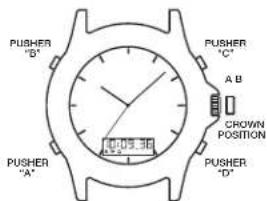
TO USE INDIGLO-NIGHT-LIGHT
- PRESSpusher"Btoilluminatetheentiredial(Bothanaloganddigital).
TO USE NIGHT-MODE\* FEATURE
- PRESS and HOLD INDIGLO® Button for 3 seconds until you hear a beep.
- Pressing any pusher will cause the INDIGLO night-light to illuminate and stay on for 3 seconds.
- NIGHT-MODE® feature will last for 8 hours.
- To deactivate NIGHT-MODE® feature PRESS and HOLD INDIGLO® Button® for 3 seconds.
ANALOG TIME
TO SET ANALOG TIME
- PULL the crown out to the "B" position.
- TURN the crown either way to the correct time.
- PUSH in the crown to the "A" position.
DIGITAL DISPLAY
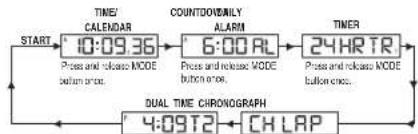
- The Digital display changes to each function every time you PRESS pusher "A" (As illustrated below):
TIME/CALENDAR
DAILY ALARM
COUNTER TIMER
CHRONOGRAPH
DUAL TIME
TO SET TIME/CALENDAR
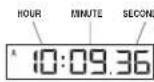
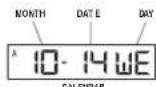
- PRESS pusher "A" to bring up TIME / CALENDAR display.
- PRESS and HOLD pusher "D". HOLD will display until hours flash.
- PRESS pusher "C" to advance hours.
- PRESS pusher "A" and "C" as above to adjust minutes, reset seconds to "00", month, date, year and 12/24 hour format.
- PRESS pusher "D" to complete setting.
NOTE: PRESS and HOLD pusher "C" for 2 seconds in setting mode, to activate fast advance.
View or select the TIME orCALENDAR to appear in your digital display.
- PRESS pusher "C" to view theCALENDAR for 2 seconds.
- PRESS and HOLD pusher "C" for 3 seconds until the watch beeps and changes the display to CALENDAR.
- To view or change the display to TIME, repeat the steps above.
NOTE:
- "A" or "P" will appear when the 12-Hour format is selected.
- Set this time to coordinate with the Analog time or another time zone.
TO SET DAILY ALARM


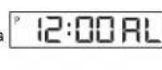
- PRESS pusher "A" to bring up DAILY ALARM display: "ALARM" will appear for 3 seconds followed by the current alarm setting time and time zone. The ALARM mode symbol "AL" and the applicable time zone symbol "T1" or "T2" alternate to give complete information.
- PRESS pusher "D" to let time zone flash.
- PRESS pusher "C" to select time zone.
- PRESS pusher "A" to let hour flash.
- PRESS pusher "C" to advance hour.
- PRESS pusher "A" and "C" as above to adjust the minutes.
- PRESS pusher "D" to complete setting.
- Alarm is automatically activated after setting. ( ) is displayed.
NOTE: PRESS and HOLD pusher "C" for 2 seconds in setting mode, to activate fast advance.
NOTE:
- When the alarm sounds, it will beep for 20 seconds.
To stop the alarm beep, PRESS any pusher.
TIMEX
TO TURN ALARM OR CHIME ON/OFF
- PRESSpusher“A”to bring upDAILYALARMdisplay.
- PRESS pusher "C" to activate or deactivate daily alarm and chime accordingly.
NOTE:
- will appear or disappear according to daily alarm activation or deactivation.
will appear or disappear according to confirm chime activation or deactivation.
The alarm coordinates with the digital time not analog time.
The alarm will sound only if the digital time zone (T1 or T2) selected in the Alarm set mode is currently displayed, as confirmed by the alarm symbol (串)
TO SET/USE COUNTER
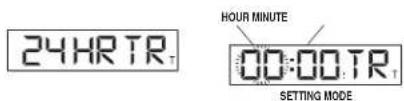
- PRESS pusher "A" to bring up COUNTDOWN TIMER display, "24 HR TR" will appear.
- PRESS pusher "D" to let hours flash.
- PRESS pusher "C" to advance hour.
- PRESS pusher "A" to set the minutes.
- PRESS pusher "A" and "C" as above to adjust minutes.
- PRESS pusher "D" to complete setting.
- PRESS pusher "C" to start the timer.
- PRESS pusher "D" to pause the timer.
- PRESS pusher "C" to re-start the timer, or PRESS pusher "D" again to reset timer to the preset time.
NOTE: PRESS and HOLD pusher "C" for 2 seconds in setting mode, to activate fast advance.
NOTE:
- When the timer counts down to zero it will beep for 20 seconds.
- To stop the timer beep, PRESS any pusher.
- "TMR" will appear to designate that the countdown timer is running.
- Countdown time runs up to 24 hours.
TO USE CHRONOGRAPH

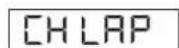
- PRESS pusher "A" to bring up CHRONOGRAPH display; "CH LAP" or "CH SPL" will appear.
- PRESS pusher "D" to select LAP ("LAP") or SPLIT ("SPL").
- PRESS pusher "C" to start timing
- PRESS pusher "C" to record the first Lap or Split time; digits will be frozen for 10 seconds; "LAP" or "SPL" will flash to indicate that the next Lap or Split time is being recorded in the background.
- PRESS pusher "A" to view the running display while the display is frozen.
- PRESS pusher "C" to take another Lap or Split.
- PRESS pusher "D" to pause.
- PRESSpusher"C'to resume timing,or PRESSpusher"D"again to reset.
NOTE:
- CHRONOGRAPH must be reset to zero to switch between LAP and SPLIT.
- Records time up to 24 hours and shows 1/100 of seconds for the first hour.
TO SET DUAL TIME:
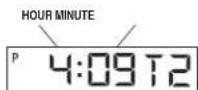
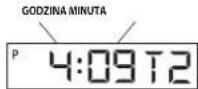
- PRESS pusher "A" to bring up DUAL TIME display. "T2" will appear beside the dual time.
- PRESS and HOLD pusher "D"; "Hold" will display until the hour flashes.
- PRESS pusher "C" to advance hours.
- PRESS pusher "A" to let month flash.
- PRESS pusher "C" to advance month.
- PRESS pusher "A" and "C" as above to adjust date, year, and to set 12/24 hour format.
- PRESS pusher "D" to complete setting.
NOTE: PRESS and hold pusher "C" for 2 seconds in setting mode to activate fast advance.
NOTE:
- While in any setting mode, if no pusher is pressed for 90 seconds the display will automatically return to TIME/CALENDAR mode.
While in any mode other than TIME / CALENDAR mode, whenever pusher "C" or "D" is pressed, the next press of pusher "A" will automatically return the display to TIME / CALENDAR mode.
ELAPSED TIME RING
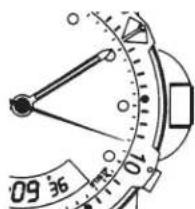
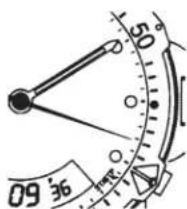
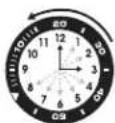
If your watch is equipped with a rotatable outer ring on the face, with numbers corresponding to minutes, you can use this Elapsed Time Ring to time an activity from the start, or to mark the ending time for the duration of an activity.
TO TIME AN ACTIVITY FROM THE START:
Set the Start/Stop triangle at the time (hour or minute) when you start the activity (As shown on the left in the illustration shown below). At completion, you can see how long the activity took.
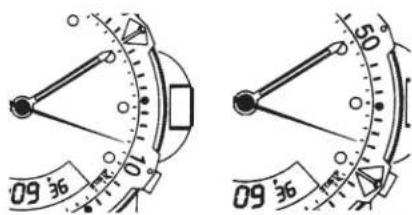
TO MEASURE THE TIME REMAINING:
Set the triangle to the hour or minute position when you wish to complete the activity, and check the watch periodically for progress towards that goal.
In the illustration shown on the right you can stop when the minute hand reaches the 20 minutes past the hour position.
TACHYMETER RING
The tachymeter feature can be used to measure speed in miles per hour (MPH), nautical miles per hour (knots) or kilometers per hour (KPH) using the sweep second hand and the scale on the wall above the watch face. You need to know the actual distance you are covering in miles or km.
Start the chronograph with the second hand at zero (the twelve o'clock position). Within the first minute, the second hand will point to the rate for a one-mile (or one kilometer) course: if it takes 45 seconds, the hand will point to 80 at that position - 80 MPH or 80 KPH.
If within the first minute, a distance greater than one mile or kilometer is covered, multiply the tachymeter number by the distance to get the actual rate; if you went 1.2 miles in 45 seconds, multiply the 80 by 1.2 - 96 MPH.
TIMEX
COMPASS RING
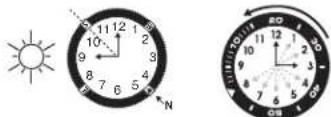
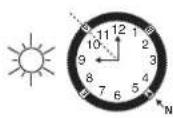
If your watch is equipped with a movable ring around the dial marked at the letters "N", "E", "W", "S" (for the four compass directions) or compass degrees, you can use this feature to find an approximate compass directional reading.
- Lay the watch on a flat surface, or hold it so that the face is parallel to the ground.
- Locate the sun and point the hour hand at the sun.
- In the A.M., rotate the ring until the "S" (south) marker is halfway between the hour hand and 12:00 (after the hour hand or within the shortest distance between the hour hand and 12:00).
- In the P.M., rotate the ring until "S" is before the hour hand and halfway between the hour hand and 12:00.
HOW TO ADJUST BRACELET
(Variations of the following bracelet sections apply to all watch models).
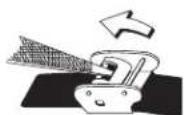
SLIDING CLASP BRACELET
- Open locking plate.
- Move clasp to desired bracelet length.
- Exert pressure while holding locking plate and slide clasp back and forth until it engages in grooves on underside of bracelet.
- Press locking plate down until it snaps closed. Clasp can be damaged if excessive force is used.
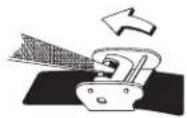
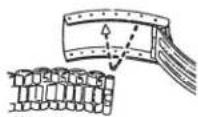
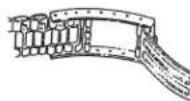
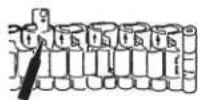
FOLDOVER CLASP BRACELET
- Find spring bar that connects bracelet to clasp.
- Using a pointed tool, push in spring bar and gently twist bracelet to disengage.
- Determine wrist size, then insert spring bar in correct bottom hole.
- Push down on spring bar, align with top hole and release to lock in place.
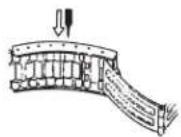
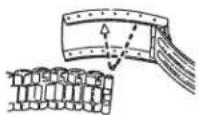
Fig. 2Fig. 1
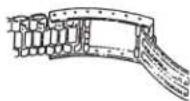
Fig. 3
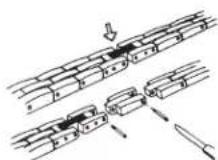
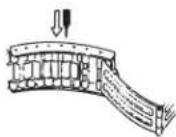
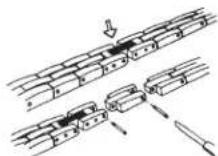
BRACELET LINK REMOVAL
REMOVING LINKS:
- Place bracelet upright and insert pointed tool in opening of link.
- Push pin forcefully in direction of arrow until link is detached (pins are designed to be difficult to remove).
- Repeat until desired number of links are removed.
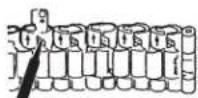
RE-ASSEMBLY:
- Rejoin bracelet parts.
- Push pin back into link in opposite direction of arrow.
- Press pin down securely into bracelet until it is flush.
BATTERY
Timex strongly recommends that a retailer or jeweler replace battery. If applicable, push reset button when replacing battery. Battery type is indicated on caseback. Battery life estimates are based on certain assumptions regarding usage; battery life may vary depending on actual usage.
DO NOT DISPOSE OF BATTERY IN FIRE. DO NOT RECHARGE. KEEP LOOSE BATTERIES AWAY FROM CHILDREN.
EXTENDED WARRANTY
Available in U.S. only. Extend your warranty for an additional 4 years from date of purchase for 5. You can pay with AMEX, Discover, Visa or MasterCard by calling 1800-448-4639 during normal business hours. Payment must be made within 30 days of purchase. Name, address, telephone number, purchase date, and 5-digit model number required. You can also mail a check for5 to: Timex Extended Warranty, P.O. Box 1676, Dept. EF, Little Rock, AR 72203.
TIMEX INTERNATIONAL WARRANTY
http://www.limex.com/productWarranty.html
©2019 Timex Group USA, Inc. TIMEX, INDIGLO and NIGHT-MODE are registered trademarks of Timex Group B.V. and its subsidiaries.
TIMEX
ESPANOL 931-09500
INDICE
LUZ NOCTURNA INDIGLO
PARA UTILIZAR LA LUZ NOCTURNA INDIGLO
BRACELET A FERMOIR DEPLIANT
PARA USAR ALUZ NOTURNA INDIGLO
- PRESSIONe o botao "B" para illuminar todo o mostrador (analogico e digital).
PARASARORECURSO NIGHT-MODE
LUCE NOTTURNA INDIGLO
www.timex.it/it_IT/productWarranty.html
www.timexwatchjp/fs/timex/c/guide/returns
PIMMEAHME: 4Obby yckoprtbYCTaHOBcK, HAKMMTE YDEPKIBAITE KOKIK "C" B YCTaHOBOHOM POKMIMB T BTOHIN2 X CCKUY.
PIMMEAHNE:
Korda TaMep DocHTaET Do HyJy, NoCbIbWITc 3ByKOBOu CmHn, KOTOpBiy Byet npOdoNkTaCb B TeueHHe 20-Tn cekHyd.
HAXMITE Ha IIOby KHOIky dny ppekpaueHn 3BykoBOrO cnHa.
Ha ncknne noanrctc coooienie TMR"cbntehtbctbyouoe o TOMTO pbaotaeTaimep.
- PpOoONKTeBbHocb oBpaTHoro OTCueta - Do 24-x yacob.
IIOJIb3OBAHNE XPOHOPTPAΦOM


- HAXMITE HA konky"A" for bBAbOa XPOIOTPADA Ha DCINNEI; OTOBAP3Tc COO6UHeH "CH LAP" in CH SPL".
2.HAXMNTE Ha KhoNkyD"JnBbOpa MExNy BpeMeHHbIM OTpe3KOM ("LAP") INI pOmeKyTOHbIM BpeMeHem ("SPL"). - HAXMMTE Ha KhoNky C" nHa Haya XpoHOMeTpaka.
4.HAXMMNTHEKHOKY"CGIINPERITPRAUNIPPOJIOJXHTBBOCTNIEBBOI BPEMOHHOROTPPOSAHIMIPPOMEXOHTHOBPEMOHNIPOKA3AHA3ACTBHYT Ha 10 cekyHDAAMIRAKOTLAP"HNIPLSPL"YkazbIBBaHaTO,PTO,BpOHOBOM PEXKIME,POPNBDOJYTC3AANBCPPODJOXHTBEHOCTNcElykoEFO BPEMOHHOROTP0SAHINIPPOMEXOHTHOBPEMHENI
5.HAXMNTA HA KHONKY "A"IJNA IPOCMOTPAIINCINPRAIOBEXKBA TO BPEMA KAK OCHONBOH NCHNIA HAOXITJI BACTBIBWEEM COCTOHNIH. - HAXMITE HA KHONYC "C" IAH HANA INMDEHPOIIOJIKKHTBHOCTN CNEUYEOI BPEMEHHORO OTPREKA UIN POMEKYTOHO RPEMEHA
- HAXMMTE Ha KhoNky "D" nI npnoCTaHOBKn xpoHometpaka
- HAXMNTE Ha KhoNky "C" nla Bo3o6HOBnHn OTCHTa Nn Ha KhoNky "D" eue pa3 nla c6pocca.
ПРИМЕЧАНЕ:
Длгпаунгдь Мску LAP SPLT He6xmo 6hynb XPHOHOPAP.
3AaBbBaBpBnD024-xHcobNOKa3BaBt1/100doNNckyHbB BTEHNNEBPOBOOAC.
YCTAHOBKA BTOPOTO YACOBOTO NORCA:

YACbIMHYTbI
1.HAKMITE HA KHOY “A" Dn BbVOOa INHIKATOPA BTOPORO YACOBORIO IONCA HA HINNOI. PdOM C CMNLOm INHikATOPA BTOPORO Yacoboro noca bblCBETNTC "T2".
2.HAXMNTEUYEPKUNBAITEKNOKY“D”;cnoBO"HOLD"(yepKNA) Byet OToBpaKaTbCnTOxNpO, NOKa He 3amrAOT YachI.
3. HAXIMAYTE Ha KHONky "C" nIy IaMeHHeHn yacOB.
4.HAXMITE HKHONKy"A"JITORA,TO6bSaAMRnMecu.
5. HAXKIMAMTE HA KHONKY "C" dna nMaMeHeHn MecraJia.
6. HAXIMAITE HA KONKIA "A" AND "C", KAK NOK83aHO BbIe, JUe YCTAHOBKIN DaIy, TOna 12/24-HACOBORO FOOPMATA.
7. HAXMITE Ha konky "D" nlaaepueny yctahOBKn.
INPMMEAHHE:YTOBbIyckOpMbYcTaHOBKy,HAXMMITEu ydepXnBaTe KHOIKY“C”BCTAHOBOHOM pKIMMBTECHM2-XCKyHd.
DPMMEYAHNE:
EcN,BIO60yCTaHOBOHOMpeKIMBE THeHIN90cekyHHe bJNA HAKATAHONDAKHOTKA,DcIeJIeABTOMATHECKBI BEPHTCBAPEKM BPEM/KAJIIEHAPB.
BJIIO6M pexKIMe,OTJHUMOT pexKIMa BPEM/KAIEH.DAPb, npn HAKATIN KHONK "C" m/ D"TOCCJUQOs HAKATINE KHOHN "A" ABOTMATIYNECK INBPET DCNPIE B PEXKIM BPEM/KAIEH.DAPb.
KOJIbUO INHTEPBAJIA BPEMEHN
ECIMBaA MoJIeB ChABKeH NIOBOPOTbHM BHEUHM KOJIbOM Ha
Hnep6PbATE, CmIPbAMn COOTBCTBYOUMM MNHTAM, MOXHO NCIOL3OBaTb
DaHoe KOBJIO INTEpBaIb BPEMeHN IIN XPOHOMETPPOBAHNA KAKORO
N50 CoBHMAI INI DEITAEBOHCTN C MCMEHTA IN HAHAA INI INI OTMETK
OKOHHAHMA TOI INI INHO COBIMN INI DEITeBHOCTN.
XPOHOMETPPOBOAHNE DEYTEJIbHOCTN C MOMEHTA EE HauJIA:
YCTAHOBNTPOyTROBnHK Start/Stop (CTapr/CToR) HA BPOMHACNMIHYI HANANA DEITENBOCTN (KAK NOKA3HO HA NHKMEN BLOM PONCYHK).IIO 3aEBPSEHM, Bbl OIPENDENT, KAK IIOO DNIMANCB DHHAR DEITENBOCTb.
TIMEX
N3MEPEHNE OCTABUETOROB PBEMHN:
YCTAHOBHTTEpyrOJIbHK HAACNMIHNNHY, B KOTOPBIE Bbl JKeJAeTe 3ABEPIMTu NIN HINIO DcTEnIbHOCTb, INPPOIOVHECKCN IPOBEPBtA TcHbI, TTOBbI pOcNEiHbIK, KaK OIOIO OCTANOC Bo DCIOCTKHeNZIaI.
KaK nok3aHa HO Ha pncyHke cnpaba,MOXHO OCTaHOBTbC,KOra MHyTHA CTpeIKA NOCTINHT No3UIM 20 MMHT Nocne Yaca.
KOJIbTO TAXEOMETPA
FHyHKnTAXoOMETpa npedHa3HcHb HnN3MpeHnCKOpOCTN MmJHX/ vac (MPH), MOPckx MNJX/Yac (yJax) INN KINOMetpax/ vac (KPH) C nIOJIb3OaHMe CMCHOBHcCekHHO CTpeKNi N MacUtaBHO JnHEKnI HA CTHe NaH cIpepolatom Yacob. He6xoIMMo 3HTb fAkttKeckoe pacCTOHN, KOToPOE TpeyOTCR IpOHTN, B MIVX INN KNOMETpax.
3anyctnte xpohorpa c cekyhdno ctpelko, yctahoehenho B hynbeo nnonokhe (noaun 12-nu cacoB).B teuehne neboMnhyteckyndha ctpelka ykaxet Ha ckopocbI py Kpca dnnHO B odHy MmIO (MN opMH KINOMep);ecn ykaasahoe bpeom coctablan45 ckyedn, to ctpelka nokaxet 80 B stO noaun, OTO oHaAaeT 80 MMb/ucn 80 KM/uc.
EcnBTEHEHNEIepBOMmHbI npOeHO paccTOrHeN DnHO Bc0ee HEM OyH MIOHN KINOMETp,YMHOKTe NOKa3ateJb TAXeOMETpa HA paCCTOHNE IANPOHYENPAKTHeckOCKOPoCTn:ecnBbI pOoiu1.2MnN 45 ckyH,ymHOKTe 60 Ha 1.2=96 MInb/4ac.
KoJIbIcO KOMnIACA
EcnBaaN Yacbl OcaHbHb NpBmKbHb KOBbUcM BOKpy LuepePbNaTa C 0603aHHeHM CTOpOH CEBTA "N", "E", "W", "S"(HeTbe HApBaJIeHn no KOMNACY) UYkAsaTeRIM rpaDycOB, MxHO NcONbOBAb Ta DAnHyo FyHKUIO DnI NOVCA PNOINI3NEbHOrO AANMyTA.
- Ionoxyte yacbHa nnoocky noBepxHcctb mN depkxte nx TAK,TO6blupebpal 6bl npapnnehensemie.
- Onpene nte noonohe Hne conHua n NomeCTNE Yacobyo CTpeKy TAK,TO6bOna yka3bIaBn B CTOPOHy coHua.
3.BpeKIMMEAM(do nOyHn),noBopAHmBaKoJIbU,ycTaHOBHTe 0oo3aHHeHE“S"(or)nocepeDInHe MEkdy vacBOB CTpeKKn n12:00 (Noce YacBOB CTpeKKn mN B npdeIax KpaTaeJeero paCCToHnM MeKKn YacBOB CTpeKKn n12:00).
4.BpeKIMPEMocneNoyDnHNOBopAHBaKoIbO,yCTaHOBNTe 0603HaHeHHeS"(or)doCaobOcTpeKNHIOcepeDInHeMoJyCaobOc 12:00
PEIYIMPOBAHNE BPACTETA
(OyHIN pVBEHbHX NHE naeparapAOB no perynpOBAHIO opacetaO OHOTCOK BAueo ModenYacOB)
BPCJET COCKOB3AUEH 3ACTEXKO
1.OTKpoTBe6IOKnPOBOHyIOJNaCTNHy
2. Nepemectto 3actekyy Ha Hxkyio diny6pacleta.
3.YIepKnBnI npKIMnB 6IOKIOPOBOHHy IOACTHy, DmRtaTe 3actexky B3AeBnOBoTOxPNO, NOKA CHA Hb 3CTAHET B HApabNHOUe KAKABKN He HIXHE CTOPHOE BpaCeta.
3AkapoeBnKPOBCOHYIOIaCTHy,BABdMbeEooIaZeIKINBBAH.NYITHTe, 4TOIb6bTuOHAYCNIBOTKIPBCECTKIIOBPODKHBY3A0CTQKHN.
BPCANET C B3O1ACHOI DBOHOOACTEKK0
1.ObHApyKbTe npKyHHbI CTopXeHb,cooDnHIOUoiu6paCnet c 3actokoi.
2.CnMOIOBIOHCTPMeHTA C OCTPSM KOHLOI BAMBBTTE CTPEKXHBN, OTOPOXHO NOBepHyO,OTcEOBNHHTe OPAchET.
3. OnpndeneVitpea3mep 3aHbTa, 3aTeM BCTabBe TcBxEhB CootBeTCTByOoIee HNHeeCOTBcPteR.
4. HApBHTe HApYKHNHbCTeRKeHb, BbOpBHeTte Eo C bepXHMOTBpCTeAaNOTyCTteY, TcObJb OH BcTaN HA MecTo.
Pnc.2Pnc.1
Pnc.3
YDAJIEHNEIINHHX3BEHbEBBpACJIETA
YDAJIEHNE3BEHbEB:
- NoctabteBbEpaCnet HA Topeu IN BCTabTe HNCTpyMeHCT COCTpM KOHLOM O BTKpIeTO EOTBePCT 3BA
2.CnHNO HADABNTHe HLTNDB HANPAEBNHNCTPENIK,HTo6bOTC0EHNHTB 3AEOHOKCHCTpyu npyCMATPBAeT Heo6xOIMMOCTb pnpIOKeHHY yCNiINI DyJDAJIENH LUTpTa). - NIOBTOPAIte npoueIpy np To tex np, nka He Byet OTCOeINHeH CyKHOE KOJIINHECTBO 38EH6B.
CEOPKA:
- CoeHNHte 4actn 6paCneTa
- BCTABTB WHTIΦT O6PAHO B 3BEO H HAPBAHENH, NPTIBONIOJIOXHOM CTpeJIke.
- 士赫耶克 yctahobne Tnpt Bny Ky bpaceta, Taq, YtoBb OH bIn BPOBEH C KPOKOMK.
BATAPEIKA
IaMehbBatapeKnFpmpMaTImexHactoTeNbHO peKOMeHuyET
OpaalatcK K p03HHNHYPODABUY N IOB3Npy.B 3AByCNMOCTN OT
MoNEH YAOCB, PnI ZAMHe BatapeKnHAKXMITE H KaONKy C6PCCA.Tn
BatapeKnYkazAH Ha zdHEn Kpblike. Pn6bIMNTeNBbHc pckC yXkb
BatapeKn OCHOGAH Ha OPpeDEJIeHBx IPEJIOJOXEHHX OTHCIGTeJIbHO
IOJIb3OBAHm IN MOKET BapbIPoBaTcBc, B 3ABNCMOCTN OT paKTMHCKORO
NOJIb3OBAHm.
HE BPOCAIte BAATAPENKY BOROHb. HE IIO3APJKAITE BATAPENKY.XPAHITNE PACNAKOBAHHbIE BAATAPENKINBDEOCAIFAEMOCTNI DETEN.
ПОНДLEHHA「TAPAHТЯ
DieCTByeTolkoHa TeppptOpnCUla.3a $5 MoXHO pOoNtB TaepAHTIO HA 4 roda co Dna pRnoOpTeHNA. OIINATA pONsBOJITc C nMOUbIO KpeDTHbKapr AMXE,Discover,Visa IIM MasterCard No TeneFOy:1800- 448-4639 B obhHHe paOoHHe Vacsi. OInata pOnkHa 6bIb TPOIN3BeHnBa TteHHe 30-Tn dHne co Dna pRnoOpTeHNA. TpeEYcTa ykaAtaB NoIHOe Mm, aApoc, HOMEP TeEOHCA, DaTI pONOBpETHnA 5-Tn 3HnHb HmOpMDoHN. TaKeO MoXHO bblncatb Yek Ha cyMMy B 5doJIpaob CLua N bblcnatbNo apecy:Timex Extended Warranty,P.O.Box 1676,Dept.EF,Little Rock, AR 72203.
MEXKUYHAPODHAR TAPAHTRIMEX
www.timex.eu/en_GB/productWarranty.html
©2019 Timex Group USA, Inc. TIMEX, INDIGLO n NIGHT-MODE yIaIOTcA zapernCTpnpobaaHbIMn TopoBbIMn MapkAMn KOMMaHnn Timex Group B.V. n 60 dOeepnX npDIOIpyTn.
TIMEX
CESKY 931-09500
OBSAH
USTAWIANIE CZASU W DWOCH STREFACH: