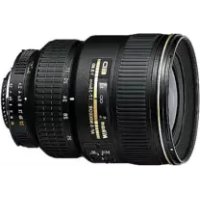
USER MANUAL Nikkor AFS ZoomNikkor 1735mm f2.8D IFED NIKON
AF-S Zoom-Nikkor 17-35mm f/2.8D IF-ED
使用説明書 (P.2-11)
User's Manual (PP. 12–19)
2
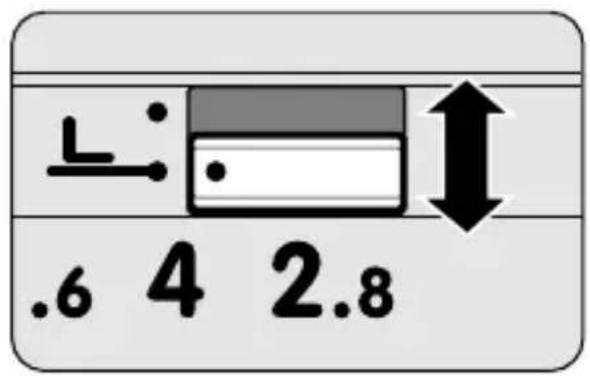
各部の名称
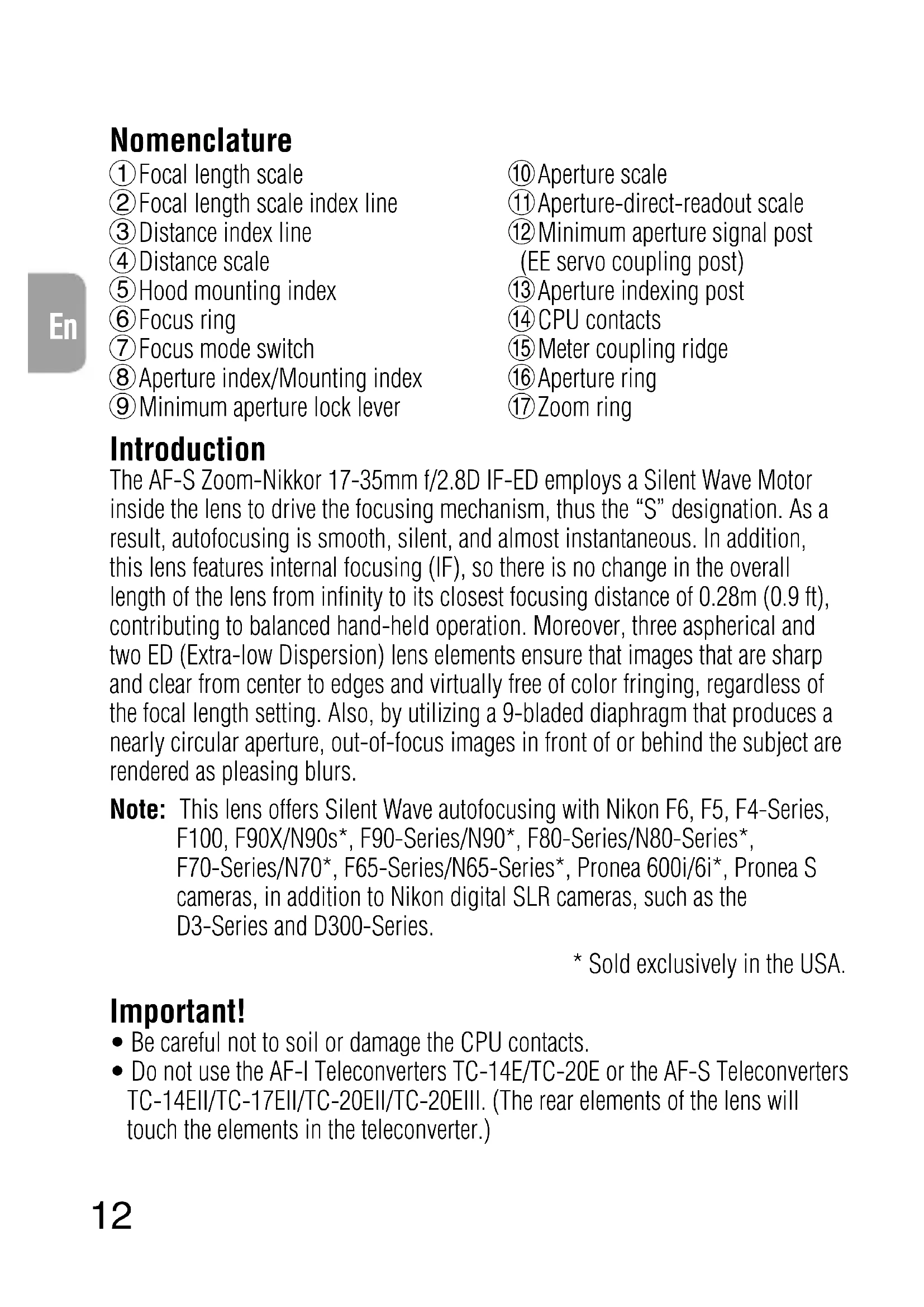
① Focal length scale
②Focal length scale index line
③ Distance index line
④ Distance scale
⑤ Hood mounting index
⑥ Focus ring
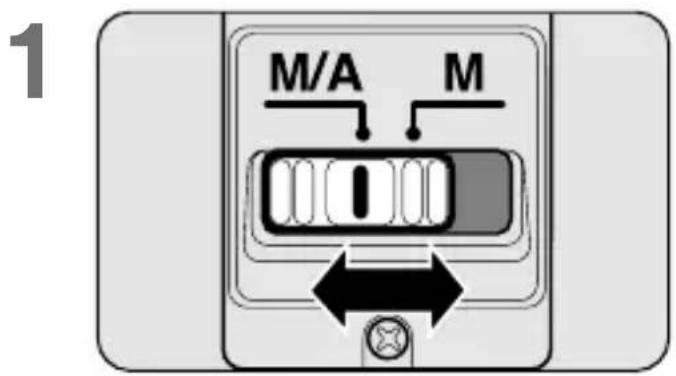
⑦ Focus mode switch
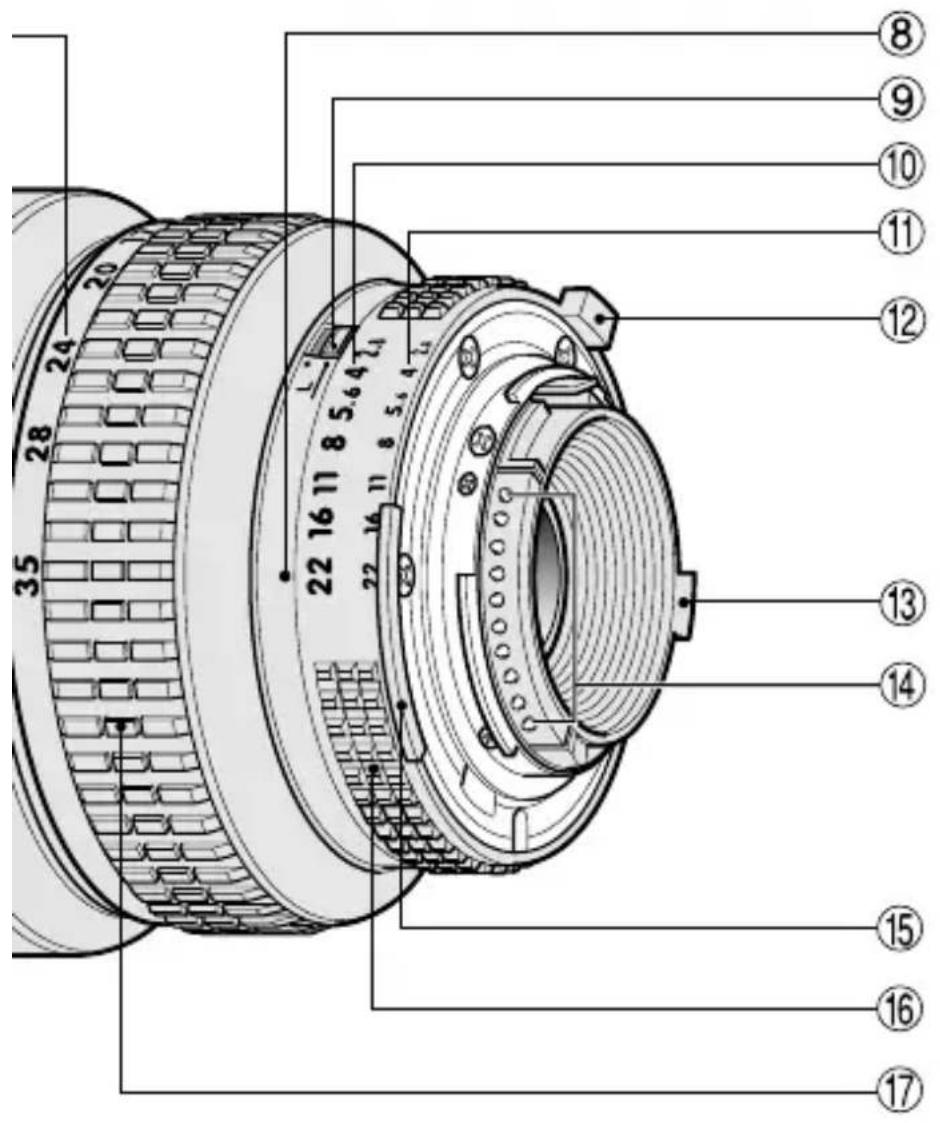
⑧Aperture index/Mounting index
⑨ Minimum aperture lock lever
⑩ Aperture scale
⑪ Aperture-direct-readout scale
⑫ Minimum aperture signal post (EE servo coupling post)
⑬ Aperture indexing post
⑭ CPU contacts
⑮ Meter coupling ridge
⑯ Aperture ring
⑰Zoom ring
Introduction
The AF-S Zoom-Nikkor 17-35mm f/2.8D IF-ED employs a Silent Wave Motor inside the lens to drive the focusing mechanism, thus the “S” designation. As a result, autofocusing is smooth, silent, and almost instantaneous. In addition, this lens features internal focusing (IF), so there is no change in the overall length of the lens from infinity to its closest focusing distance of 0.28m (0.9 ft), contributing to balanced hand-held operation. Moreover, three aspherical and two ED (Extra-low Dispersion) lens elements ensure that images that are sharp and clear from center to edges and virtually free of color fringing, regardless of the focal length setting. Also, by utilizing a 9-bladed diaphragm that produces a nearly circular aperture, out-of-focus images in front of or behind the subject are rendered as pleasing blurs.
Note: This lens offers Silent Wave autofocusing with Nikon F6, F5, F4-Series, F100, F90X/N90s*, F90-Series/N90*, F80-Series/N80-Series*, F70-Series/N70*, F65-Series/N65-Series*, Pronea 600i/6i*, Pronea S cameras, in addition to Nikon digital SLR cameras, such as the D3-Series and D300-Series.
* Sold exclusively in the USA.
Important!
- Be careful not to soil or damage the CPU contacts.
-
Do not use the AF-I Teleconverters TC-14E/TC-20E or the AF-S Teleconverters TC-14EII/TC-17EII/TC-20EII/TC-20EIII. (The rear elements of the lens will touch the elements in the teleconverter.)
-
When mounted on Nikon DX format digital SLR cameras, such as the D300-Series and D7000, the lens' picture angle becomes 79^ - 44^ and its 35mm equivalent focal length is approx. 25.5-52.5mm.
- Do not attach the following accessories to the lens, as they might damage the lens CPU contacts: Auto Extension Ring PK-1, PK-11/11A, Auto Ring BR-4 and K1 Ring. Other accessories may not be suitable when this lens is used with certain camera bodies. For details, refer to user's manual for each product.
- This lens is not compatible when used with a Nikon F3AF camera with the AF Finder DX-1 attached.
Focusing
Set your camera's focus mode selector according to this chart:
| Cameras\Camera's focus mode | Lens' focus mode |
| M/A M | |
| F6, F5, F4-Series, F100, F90X/N90s*, F90-Series/N90*, F80-Series/N80-Series*, F70-Series/N70*, F65-Series/N65-Series*, Pronea 600i/6i*, Pronea S, Nikon digital SLR (Nikon FX/DX format) cameras | AF | Autofocus with manual priority | Manual focus (Electronic rangefinder can be used.) |
| MF | Manual focus (Electronic rangefinder can be used.) |
| Nikon AF cameras (except for F3AF) | AF MF | Manual focus (Electronic rangefinder can be used.) |
| Other Nikon cameras (except for F3AF) | Manual focus |
* Sold exclusively in the USA.
- Autofocus with manual override
Set the focus mode switch (Fig. 1) to M/A. Autofocus is provided, but you can manually override the focus by operating the separate manual focus ring while lightly depressing the shutter release button or the AF start (AF-ON) button on the camera body of cameras so equipped. To cancel manual override, remove your finger from the shutter release button or the AF start button.
- Getting good results with autofocus
Refer to “Notes on using wide or super-wide angle AF Nikkor lenses” (p. 66).
Reproduction Ratio and Shooting Distance
Normal focusing extends from infinity to 0.28m (approx. 0.9 ft). A maximum reproduction ratio of approx. 1:8.9 is obtained at the 17mm setting, while a reproduction ratio of 1:4.6 is possible at 35mm.
Focusing, Zooming and Depth of Field
(Refer to Quick reference charts 1 and 2 on page 73.)
In the M/A (autofocus with manual override) mode, first turn the zoom ring until the desired composition is framed in the viewfinder before autofocusing. In the M (manual focus) mode, focusing is possible at any focal length, but the longer the focal length, the larger the image and the shallower the depth of field, making focusing easier. If your camera has a depth of field preview (stop-down) button or lever, depth of field can be observed while looking through the camera viewfinder.
It is possible to determine depth of field by using the scale provided on page 73.
To Use the Depth-of-Field Scale:
1 Cut out the scales along the lines indicated.
2 Place scale 2 over scale 1 so the top edge of scale 2 is aligned with the focal length in use and the distance is aligned with the central indicator line of scale 1.
3 Read the scale 2 numbers that correspond to the aperture in use. For example, if the lens is prefocused at 1m with the focal length at 28mm and the aperture at f/22, the depth of field will be approx. 0.6m to infinity.
Minimum Aperture Lock (Fig. 2)
For programmed auto or shutter-priority auto exposure shooting, use the minimum aperture lock lever to lock the lens aperture at f/22.
1 Set the lens to its minimum aperture (f/22) by aligning it with the aperture index.
2 Slide the lock lever toward the aperture ring, so the two orange dots are aligned.
To release the lock, slide the lever in the opposite direction.
Recommended Focusing Screens
Various interchangeable focusing screens are available for certain Nikon SLR cameras to suit any picture-taking situation. The ones recommended for use with this lens are:
◎ Excellent focusing
○ Acceptable focusing
Slight vignetting or moiré patterns appear in the viewfinder, but not on the film.
△ Acceptable focusing
The in-focus image in the central spot may prove to be slightly out of focus on film. Focus on the surrounding matte area.
— Not available.
( ) Indicates degree of exposure compensation needed (Center-Weighted metering only). For F6 cameras, compensate by selecting “Other screen” in Custom Setting “b6: Screen comp.” and setting the EV level to -2.0 to +2.0 in 0.5 EV steps. When using screens other than type B or E, “Other screen” must be selected even when the required compensation value is “0” (no compensation required). For F5 cameras, compensate using Custom Setting #18 on the camera body. For F4-Series cameras, compensate using the Exposure Compensation Dial for the focusing screen.
See user's manual of the camera body for more details.
Blank box means not applicable. Since type M screen can be used for both macrophotography at a 1:1 magnification ratio and for photomicrography, it has different applications than other screens.
When using the B/B2/B3, E/E2/E3, and K/K2/K3 focusing screens in cameras other than those listed above, refer to the columns on the F4 + DP-20's B, E and K screens, respectively.
Taking Flash Pictures with Cameras having Built-in Flash
Check the focal length and shooting distance before taking flash pictures to prevent vignetting from occurring.
- For the latest information on vignetting with this lens, see the camera manual.
| Cameras Usable focal length / Shooting distance |
| F65-Series/N65-Series*, F60-Series/N60*, F55-Series/N55-Series*, F50-Series/N50*, F-601/N6006*, Pronea S | Not usable at any focal length setting |
| F70-Series/N70*, Pronea 600i/6i* 35mm / 3m (9.8 ft) or greater |
| F80-Series/N80-Series* 35mm / 1.5m (4.9 ft) or greater |
| D800-Series, D700, D5200, D5100, D3200 35mm / No restriction | 28mm / 1m (3.3 ft) or greater |
| D600 28mm / 1.5m (4.9 ft) or greater 35mm / No restriction | |
| D300-Series, D200 24mm / 1m (3.3 ft) or greater 28mm to 35mm / No restriction | |
| D100 24mm / 0.8m (2.6 ft) or greater 28mm to 35mm / No restriction | |
| D90, D80 24mm / 2m (6.6 ft) or greater 28mm to 35mm / 1m (3.3 ft) or greater | |
| D7000 20mm or greater / 2m(6.6 ft) or greater 24mm or greater / No restriction | |
| 20mm to 24mm / 2.5m (8.2 ft) or greater D70-Series, D50 28mm / 1m (3.3 ft) or greater 35mm / No restriction | |
| 24mm / 2m (6.6 ft) or greater D5000, D3100, D3000, D60, D40-Series 28 mm / 1m (3.3 ft) or greater 35mm / No restriction | |
* Sold exclusively in the USA.
Attaching Bayonet Hood HB-23
Align the index (♩) on the hood with the lens hood mounting index on the lens, and turn the hood counterclockwise (as viewed from the camera) until it click stops at the index (—○).
To facilitate attachment or removal of the hood, hold it by its base rather than its outer edge. To store the lens hood, you can attach it in the reverse position.
Lens Care
- Clean the lens surface with a blower brush. To remove dirt and smudges, use a soft, clean cotton cloth or lens tissue moistened with ethanol (alcohol) or lens cleaner. Wipe in a circular motion from center to outer edge, taking care not to leave traces or touch other parts.
- Never use thinner or benzene to clean the lens as this might damage the lens, result in a fire, or cause health problems.
- To protect the front lens element, an NC filter is recommended at all times. A lens hood also helps protect the front of the lens.
- When storing the lens in the lens case, attach both front and rear caps.
- When the lens will not be used for a long time, store it in a cool, dry place to prevent mold. Also store the lens away from direct sunlight or chemicals such as camphor or naphthalene.
- Do not get water on the lens or drop it in water as this will cause it to rust and malfunction.
- Reinforced plastic is used for some parts of the lens. To avoid damage, never leave the lens in an excessively hot place.
- Rapid changes in temperature may cause damaging condensation inside and outside the lens. Before taking the lens from a warm to a cold environment or vice versa, place it in a bag or plastic case to slow the change in temperature.
Supplied Accessories
77mm snap-on front lens cap
Rear lens cap
Bayonet hood HB-23
Hard Case CL-76
Optional Accessories
77mm screw-in filters
Specifications
Type of lens: D-type AF-S Zoom-Nikkor lens having built-in CPU and Nikon bayonet mount
Focal length: 17mm – 35mm
Maximum aperture: f/2.8
Lens construction: 13 elements in 10 groups (2 glass mold aspherical, 1 compound aspherical and 2 ED lens elements)
Picture angle: 104°-62° with 35 mm (135) format Nikon film-SLR cameras and Nikon FX format digital SLR cameras 79°-44° with Nikon DX format digital SLR cameras 91°-52° with IX240 system cameras
Focal length scale: 17, 20, 24, 28, 35mm
Distance information: Output to camera body
Zooming: Manually via separate zoom ring
Focusing: Nikon Internal Focusing (IF) system (utilizing an internal Silent Wave Motor); autofocus with manual override or manually via separate focus ring
Shooting distance scale: Graduated in meters and feet from 0.28m (1 ft) to infinity ( )
Aperture scale: f/2.8 – f/22 on both standard and aperture-direct-readout scales
Minimum aperture lock: Provided
Diaphragm: Fully automatic
Exposure measurement: Via full-aperture method with AI cameras or cameras with CPU interface system; via stop-down method for other cameras.
Attachment size: 77mm (P = 0.75mm)
Dimensions: Approx. 83mm dia. x 106mm (extension from the camera's lens mounting flange); overall length is approx. 115mm
Weight: Approx. 745g (26.3 oz.)
Specifications and designs are subject to change without any notice or obligation on the part of the manufacturer.
En
Nomenklatur
| EinstellscheibeKamera | EC-BEC-E | A | B | C | D | E | | F | | G3 | G2 | G1 | H2 | H3 | J L | M P | | | R | S T | U |
| F6 | — | ◎ | ◎ | — | — | ◎ | — | — | — | — | — | — | — | — | ◎ | — | ◎ | | — | — | — |
| F5+DP-30 | ◎ | ◎ | ◎ | | — | ◎ | — | | | ○ | | — | — | — | ◎ | — | ◎ | | — | — | — |
| F5+DA-30 | ◎ | ◎(+0.5) | ◎(+0.5) | | — | ◎(+0.5) | — | | | | | — | — | — | ◎ | — | ◎(+0.5) | | — | — | — |
| F4+DP-20 | — | — | ◎ | | — | ◎ | | | | ○ | | — | — | — | ◎(+0.5) | ◎(+0.5) | — | | ◎(+0.5) | — | — |
| F4+DA-20 | — | — | ◎(+0.5) | | — | ◎(+0.5) | | | | | | — | — | — | ◎(+0.5) | ◎(+0.5) | — | | ◎(+0.5) | — | — |
| F3 | — | ◎ | ◎ | | | ◎ | — | | ○ | | | | ○ | | ◎ | ◎ | ◎ | | ◎ | △ | ◎ |
| Appareil\Verre | EC-BEC-E | A | B | C | D | E | | F | | G3 | G2 | G1 | G2 | H3H4 | J L | M P | | | R | S T | U |
| F6 | — | ◎ | ◎ | — | — | ◎ | — | — | — | — | — | — | — | — | ◎ | — | ◎ | | — | — | — |
| F5+DP-30 | ◎ | ◎ | ◎ | | — | ◎ | — | | | ○ | | — | — | — | ◎ | — | ◎ | | — | — | — |
| F5+DA-30 | ◎ | ◎(+0.5) | ◎(+0.5) | | — | ◎(+0.5) | — | | | | | — | — | — | ◎ | — | ◎(+0.5) | | — | — | — |
| F4+DP-20 | — | — | ◎ | | — | ◎ | | | | ○ | | — | — | — | ◎(+0.5) | ◎(+0.5) | — | | ◎(+0.5) | — | — |
| F4+DA-20 | — | — | ◎(+0.5) | | — | ◎(+0.5) | | (+0.5) | | | | — | — | — | ◎ | ◎(+0.5) | — | | ◎(+0.5) | — | — |
| F3 | — | ◎ | ◎ | | | ◎ | — | | ○ | | | | ○ | | ◎ | ◎ | ◎ | | ◎ | △ | ◎ |
Echelle de focale: 17, 20, 24, 28, 35 mm
| Cámara\Pantalla | EC-BEC-E | A | B | C | D | E | | F | | G3 | G2 | G1 | G2 | H3 | J L | M P | | | R | S T | U |
| F6 | — | ◎ | ◎ | — | — | ◎ | — | — | — | — | — | — | — | — | ◎ | — | ◎ | | — | — | — |
| F5+DP-30 | ◎ | ◎ | ◎ | | — | ◎ | — | | | ○ | | — | — | — | ◎ | — | ◎ | | — | — | — |
| F5+DA-30 | ◎ | ◎(+0.5) | ◎(+0.5) | | — | ◎(+0.5) | — | | | | | — | — | — | ◎ | — | ◎(+0.5) | | — | — | — |
| F4+DP-20 | — | — | ◎ | | — | ◎ | | | | ○ | | — | — | — | ◎(+0.5) | ◎(+0.5) | — | | ◎(+0.5) | — | — |
| F4+DA-20 | — | — | ◎(+0.5) | | — | ◎(+0.5) | | (+0.5) | | | | — | — | — | ◎ | ◎(+0.5) | — | | ◎(+0.5) | — | — |
| F3 | — | ◎ | ◎ | | | ◎ | — | | ○ | | | | ○ | | ◎ | ◎ | ◎ | | ◎ | △ | ◎ |
Enfoque excelente
○ Enfoque acceptable
| Schermo Fotocamera | EC-B EC-E | A | B | C | D | E | | F | | G3 | G2 | G1 | H2 | H3 H4 | J L | M P | | | R | S T | U |
| F6 | — | ◎ | ◎ | — | — | ◎ | — | — | — | — | — | — | — | — | ◎ | — | ◎ | | — | — | — |
| F5+DP-30 | ◎ | ◎ | ◎ | | — | ◎ | — | | | ○ | | — | — | — | ◎ | — | ◎ | | — | — | — |
| F5+DA-30 | ◎ | ◎(+0.5) | ◎(+0.5) | | — | ◎(+0.5) | — | | | | | — | — | — | ◎ | — | ◎(+0.5) | | — | — | — |
| F4+DP-20 | — | — | ◎ | | — | ◎ | | | | ○ | | — | — | — | ◎(+0.5) | ◎(+0.5) | — | | ◎(+0.5) | — | — |
| F4+DA-20 | — | — | ◎(+0.5) | | — | ◎(+0.5) | | (+0.5) | | | | — | — | — | ◎ | ◎(+0.5) | — | | ◎(+0.5) | — | — |
| F3 | — | ◎ | ◎ | | | ◎ | — | | ○ | | | | ○ | | ◎ | ◎ | ◎ | | ◎ | △ | ◎ |
名称
Sc
简介
natural_image
Illustration of a person walking on a city bridge with buildings and trees in the background (no text or symbols)
〈人物〉
A person standing in front of a distant background
Notes on using wide or super-wide angle AF Nikkor lenses
In the following situations, autofocus may not work properly when taking pictures using wide or super-wide angle AF Nikkor lenses.
-
When the main subject in the focus brackets is relatively small. As shown in Fig. A (p. 66), when a person standing in front of a distant background is placed within the focus brackets, the background may be in focus, while the subject is out of focus.
-
When the main subject is a small, patterned subject or scene. As shown in Fig. B (p. 66), when the subject is highly patterned or of low contrast, such as a field covered with flowers, autofocus may be difficult to obtain.
In such situations:
(1) Focus on a different subject located at the same distance from the camera, then use the focus lock, recompose, and shoot.
(2) Or set the camera's focus mode selector to M (manual) and focus manually on the subject.
- Also, refer to “Getting Good Results with Autofocus” in your camera’s user’s manual.
natural_image
Illustration of a person standing on a bridge with city buildings in the background (no text or symbols)
站在远景前面的人
1. 对焦包围内的拍摄对象较小时
Notices for Customers in Europe
natural_image
Symbol of a trash bin with crossed lines indicating no waste or discharge, and a solid black rectangle below (no text or labels)
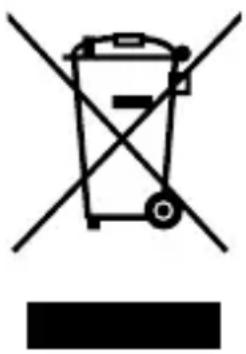
This symbol indicates that electrical and electronic equipment is to be collected separately.
The following apply only to users in European countries:
- This product is designated for separate collection at an appropriate collection point. Do not dispose of as household waste.
- Separate collection and recycling helps conserve natural resources and prevent negative consequences for human health and the environment that might result from incorrect disposal.
- For more information, contact the retailer or the local authorities in charge of waste management.

natural_image
Symbol of a trash bin with crossed lines indicating no waste or discharge, and a solid black rectangle below (no text or labels)
natural_image
Symbol of a trash bin crossed with no text or numbers, representing waste sorting or disposal (no text present)
natural_image
Symbol of a trash bin crossed with no text or numbers, representing waste sorting or disposal (no text present)
natural_image
Symbol of a trash bin with crossed lines indicating no waste or discharge, and a solid black rectangle below (no text or labels)
No reproduction in any form of this manual, in whole or in part (except for brief quotation in critical articles or reviews), may be made without written authorization from NIKON CORPORATION.