Nikkor AFS 70200mm f2.8G ED VR II - Camera lens NIKON - Free user manual and instructions
Find the device manual for free Nikkor AFS 70200mm f2.8G ED VR II NIKON in PDF.



| Product type | Nikon F-mount zoom photo lens |
| Brand and model | Nikon Nikkor AF-S 70-200mm f/2.8G ED VR II |
| Focal length | 70-200 mm |
| Maximum aperture | f/2.8 |
| Optical construction | 21 elements in 16 groups, including 7 ED glass elements and Nano Crystal Coat |
| Angle of view | 34°20' - 12°20' (FX), 22°50' - 8° (DX) |
| Focusing | Autofocus with Silent Wave Motor (SWM), manual override |
| Vibration reduction | Yes, NORMAL and ACTIVE modes, up to 3.5 stops |
| Minimum focus distance | 1.4 m (throughout zoom range) |
| Number of diaphragm blades | 9 (rounded) |
| Aperture range | f/2.8 to f/22 |
| Filter attachment diameter | 77 mm |
| Dimensions (diameter x length) | Approx. 87 mm x 205.5 mm |
| Weight | Approx. 1540 g |
| Tripod collar | Rotating 360°, detachable, 90° click stops |
| Supplied accessories | Front cap LC-77, rear cap, lens hood HB-48, case CL-M2 |
| Care and cleaning | Clean with a blower or soft cloth lightly moistened with ethyl alcohol. Do not use solvents. Protect CPU contacts. |
| Safety | Do not disassemble, do not look at the sun, keep out of reach of children, avoid flammable gases. |
| Repairability | Repairs exclusively by an authorized Nikon service center. Check CPU contacts and rubber seal regularly. |
Frequently Asked Questions - Nikkor AFS 70200mm f2.8G ED VR II NIKON
User questions about Nikkor AFS 70200mm f2.8G ED VR II NIKON
0 question about this device. Answer the ones you know or ask your own.
Ask a new question about this device
Download the instructions for your Camera lens in PDF format for free! Find your manual Nikkor AFS 70200mm f2.8G ED VR II - NIKON and take your electronic device back in hand. On this page are published all the documents necessary for the use of your device. Nikkor AFS 70200mm f2.8G ED VR II by NIKON.
USER MANUAL Nikkor AFS 70200mm f2.8G ED VR II NIKON
Touching the internal parts of the camera or lens could result in injury. Repairs should be performed only by qualified technicians. Should the camera or lens break open as the result of a fall or other accident, take the product to a Nikon-authorized service representative for inspection after unplugging the product and/or removing the battery.
Turn off immediately in the event of malfunction
Should you notice smoke or an unusual smell coming from the camera or lens, remove the battery immediately, taking care to avoid burns.
Continued operation could result in injury.
After removing or disconnecting the power source, take the product to a Nikon-authorized service representative for inspection.
Do not use the camera or lens in the presence of flammable gas
Operating electronic equipment in the presence of flammable gas could result in an explosion or fire.
Do not look at the sun through the lens or viewfinder
Viewing the sun or other strong light sources through the lens or viewfinder could cause permanent visual impairment.
Keep out of reach of children
Particular care should be taken to prevent infants from putting the batteries or other small parts into their mouths.
Observe the following precautions when handling the camera and lens
- Keep the camera and lens unit dry. Failure to do so could result in fire or electric shock.
- Do not handle or touch the camera or lens unit with wet hands. Failure to do so could result in electric shock.
- When shooting with back-lighting, do not point the lens at the sun or allow sunlight to pass directly down the lens as this may cause the camera to overheat and possibly cause a fire.
- When the lens will not be used for an extended period of time, attach both front and rear lens caps and store the lens away from direct sunlight. Failure to do so could result in a fire, as the lens may focus sunlight onto a flammable object.
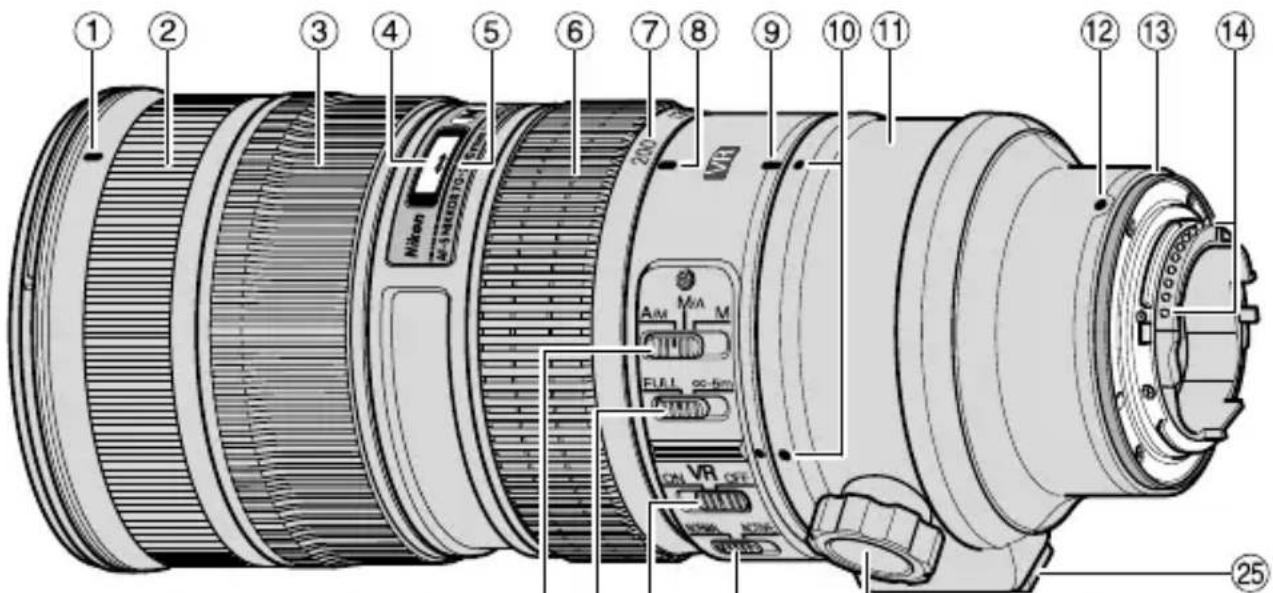
Nomenclature
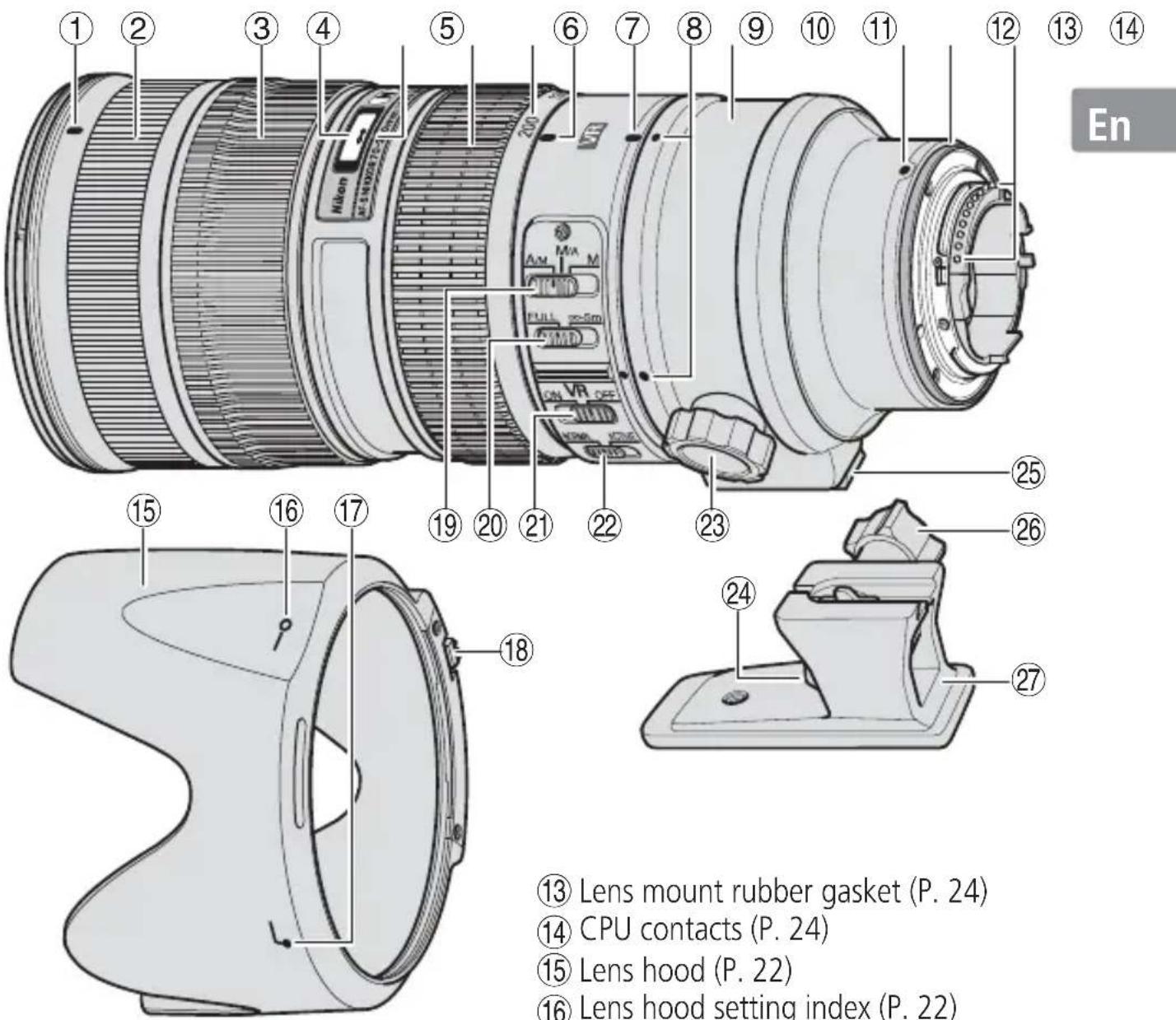
① Lens hood mounting index (P. 22)
② Rubber grip
(3) Focus ring (P. 18)
④ Distance scale (P. 21)
(5) Distance index line
⑥ Zoom ring (P. 21)
(7) Focal length scale
(8) Focal length scale index line
⑨ Tripod collar ring rotating index (P. 21)
⑩ Position indexes (90^) (P. 21)
⑪ Tripod collar ring (P. 21)
② Mounting index
13 Lens mount rubber gasket (P. 24)
14CPU contacts (P.24)
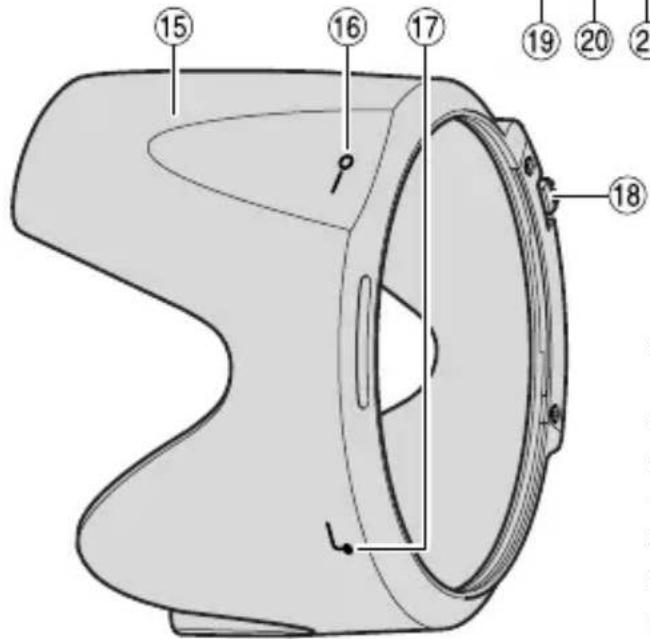
15 Lens hood (P. 22)
16 Lens hood setting index (P. 22)
17 Lens hood attachment index (P. 22)
Lens hood lock release button (P. 23)
19 Focus mode switch (P. 18)
20 Focusing limit switch (P. 19)
(2) Vibration reduction ON/OFF switch (P. 20)
22 Vibration reduction mode switch (P. 20)
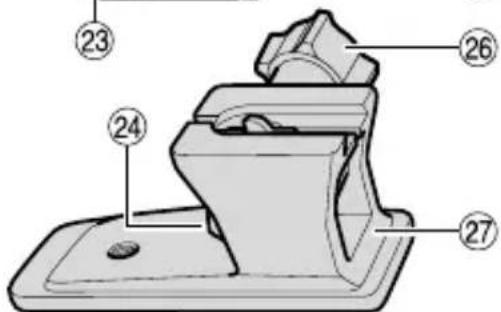
(23) Tripod collar ring fastening screw (P. 21)
(24) Tripod collar lock release lever (P. 22)
②5 Tripod collar mounting foot (P. 21)
②6 Tripod collar lock screw (P. 21)
②⑦ Tripod collar (P. 21)
(): reference page
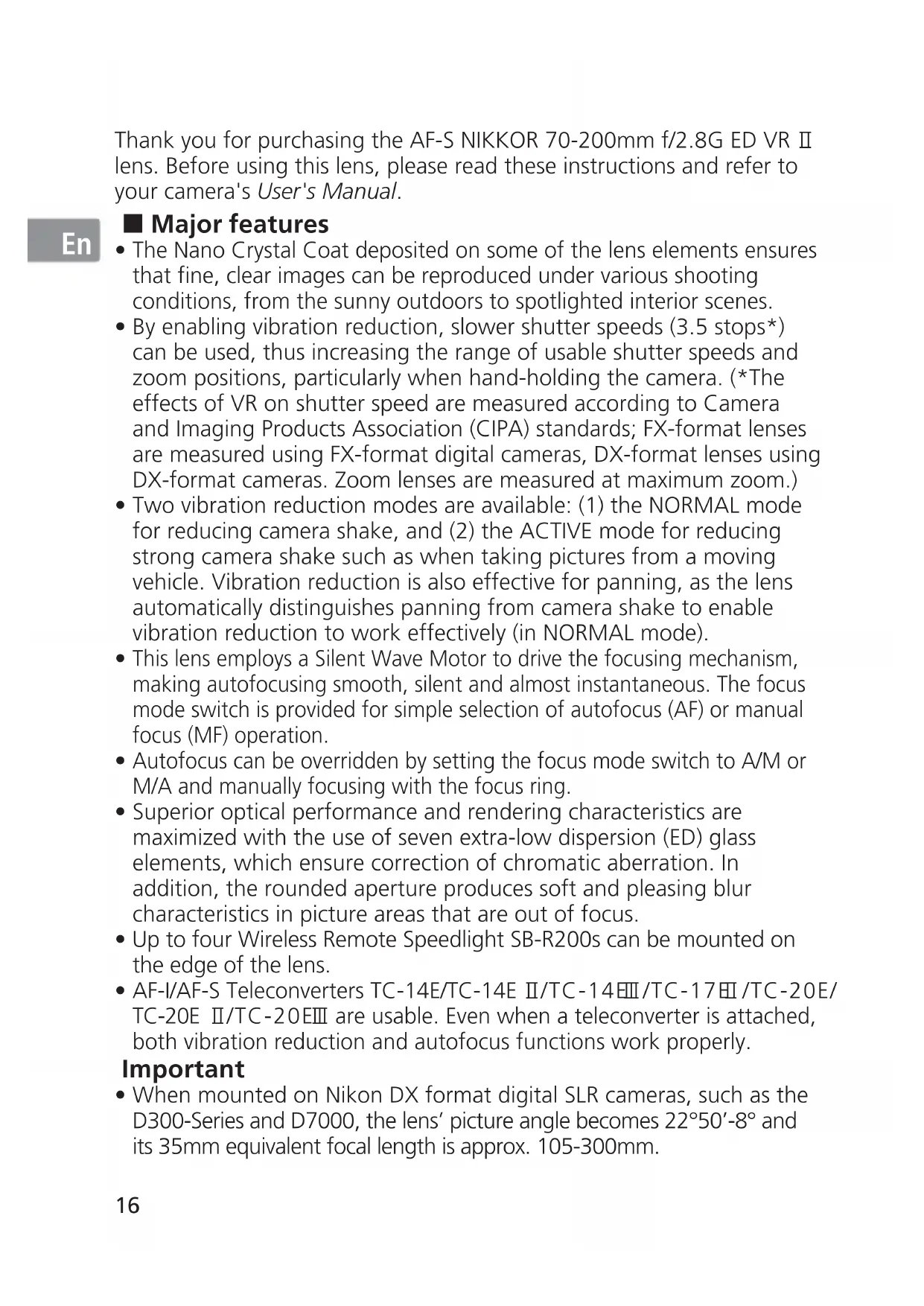
Thank you for purchasing the AF-S NIKKOR 70-200mm f/2.8G ED VR II lens. Before using this lens, please read these instructions and refer to your camera's User's Manual.
En
Major features
- The Nano Crystal Coat deposited on some of the lens elements ensures that fine, clear images can be reproduced under various shooting conditions, from the sunny outdoors to spotlighted interior scenes.
- By enabling vibration reduction, slower shutter speeds (3.5 stops) can be used, thus increasing the range of usable shutter speeds and zoom positions, particularly when hand-holding the camera. (The effects of VR on shutter speed are measured according to Camera and Imaging Products Association (CIPA) standards; FX-format lenses are measured using FX-format digital cameras, DX-format lenses using DX-format cameras. Zoom lenses are measured at maximum zoom.)
- Two vibration reduction modes are available: (1) the NORMAL mode for reducing camera shake, and (2) the ACTIVE mode for reducing strong camera shake such as when taking pictures from a moving vehicle. Vibration reduction is also effective for panning, as the lens automatically distinguishes panning from camera shake to enable vibration reduction to work effectively (in NORMAL mode).
- This lens employs a Silent Wave Motor to drive the focusing mechanism, making autofocusing smooth, silent and almost instantaneous. The focus mode switch is provided for simple selection of autofocus (AF) or manual focus (MF) operation.
- Autofocus can be overridden by setting the focus mode switch to A/M or M/A and manually focusing with the focus ring.
- Superior optical performance and rendering characteristics are maximized with the use of seven extra-low dispersion (ED) glass elements, which ensure correction of chromatic aberration. In addition, the rounded aperture produces soft and pleasing blur characteristics in picture areas that are out of focus.
- Up to four Wireless Remote Speedlight SB-R200s can be mounted on the edge of the lens.
- AF-I/AF-S Teleconverters TC-14E/TC-14E II/TC-14EIII/TC-17EII/TC-20E/ TC-20E II/TC-20EIII are usable. Even when a teleconverter is attached, both vibration reduction and autofocus functions work properly.
Important
- When mounted on Nikon DX format digital SLR cameras, such as the D300-Series and D7000, the lens' picture angle becomes 22^50^-8^ and its 35mm equivalent focal length is approx. 105-300mm.
■ Usable cameras and available functions
There may be some restrictions or limitation for available functions. Refer to camera's User's Manual for details.
| Cameras | Function | Exposure mode | ||||
| VR AF P | *1 | S | A | M | ||
| Nikon digital SLR (Nikon FX/DX format) cameras, F6, F5, F100, F80-Series/ N80-Series*, F75-Series/N75-Series*, F65-Series/N65-Series* | ✓ | ✓ | ✓ | ✓ | ||
| Pronea 600i/6i*, Pronea S*2 | — | ✓ | ✓ | ✓ | ✓ | ✓ |
| F4-Series, F90X/N90s*, F90-Series/N90*, F70-Series/N70* | — | ✓ | ✓ | ✓ | — | — |
| F60-Series/N60*, F55-Series/N55-Series*, F50-Series/N50*, F-401x/N5005*, F-401s/N4004s*, F-401/N4004* | — | — | ✓ | ✓ | ✓ | ✓ |
| F-801s/N8008s*, F-801/N8008*, F-601M/N6000* | — | — | ✓ | ✓ | — | — |
| F3AF, F-601/N6006*, F-501/N2020**, Nikon MF cameras (except F-601M/N6000*) | — | — | ||||
En
Possible —: Not possible VR: Vibration reduction AF: Autofocus
: Sold exclusively in the USA
**: Sold exclusively in the USA and Canada
1: P includes AUTO and Vari-Program System.
*2: Manual (M) is not available.
- If this lens is used with cameras that do not have the vibration reduction function, set the vibration reduction ON/OFF switch to OFF. With the Pronea 600i/6i camera, in particular, battery power may become quickly depleted if this switch is left ON.
Focusing
Set your camera's focus-mode selector according to the chart below:
| Cameras | Camera focus mode | Lens' focus mode switch | ||
| A/M M | A M | |||
| Nikon digital SLR (Nikon FX/DX format) cameras, F6, F5, F4-Series, F100, F90X/N90s*, F90-Series/N90*, F80-Series/ N80-Series*, F75-Series/ N75-Series*, F70-Series/N70*, F65-Series/N65-Series*, Pronea 600i/6i*, Pronea S | AF | Autofocus with manual override (AF priority) | Autofocus with manual override (MF priority) | Manual focus (Electronic rangefinder can be used.) |
| MF | Manual focus (Electronic rangefinder can be used.) | |||
| F60-Series/N60*, F55-Series/N55-Series*, F50-Series/N50*, F-801s/N8008s*, F-801/N8008*, F-601M/N6000*, F-401x/N5005*, F-401s/N4004s*, F-401/N4004* | AF MF | Manual focus (Electronic rangefinder can be used, except with the F-601M/N6000*. ) | ||
- Sold exclusively in the USA
AF: Autofocus MF: Manual focus
A/M (Autofocus with manual override. AF priority) mode and M/A (Autofocus with manual override. MF priority) mode
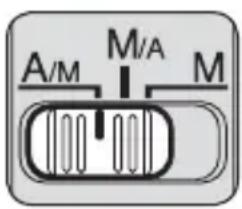
M/A: Autofocus can be overridden by manually focusing with the focus ring.
A/M: Autofocus can be overridden by manually focusing with the focus ring, but focus ring detection sensitivity is lower than in M/A mode. Use this mode to avoid canceling the AF setting by unintentionally moving the focus ring.
1 Set the focus mode switch to A/M or M/A.
2 You can manually override autofocus by operating the focus ring while pressing the shutter release button halfway down or the AF-ON button on the camera.
3 Pressing the shutter release button halfway down or pressing the AF-ON button on the camera again will cancel manual override and return to autofocus mode.
To limit the range of autofocus
This function is only available with autofocus.
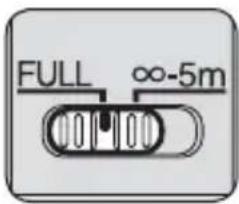
- With AF operation, if the subject is always more than 5m (16.4 ft) away, set the focusing limit switch to - 5m to reduce focusing time.
- If the subject is sometimes 5m (16.4 ft) or closer, set it to FULL.
Vibration reduction mode Basic concept of vibration reduction
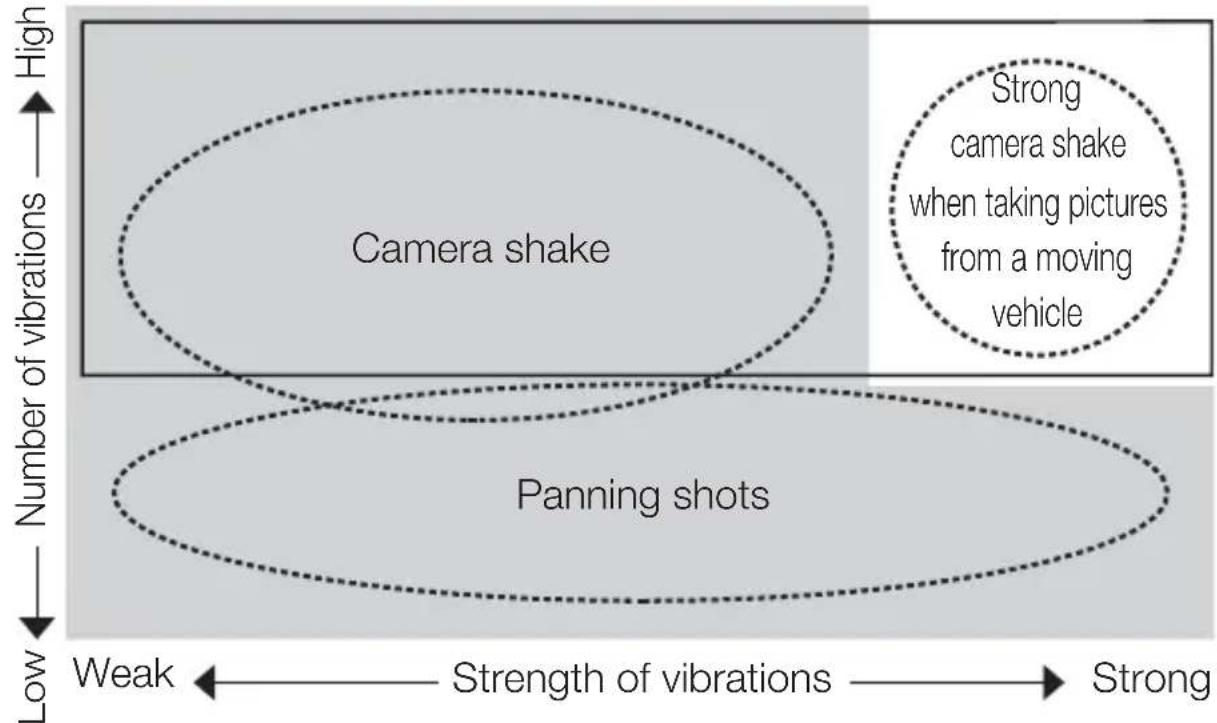

Set the vibration reduction mode switch to NORMAL.
Set the vibration reduction mode switch to ACTIVE.
| When taking pictures Set the vibration reduction mode switch to either NORMAL or ACTIVE. | |
| When taking panning shots Set the vibration reduction mode switch to NORMAL. | |
| When taking pictures from a moving vehicle | Set the vibration reduction mode switch to ACTIVE. |
Setting the vibration reduction ON/OFF switch

ON: Vibration is reduced while the shutter-release button is pressed halfway and also at the instant the shutter is released. Because vibration is reduced in the viewfinder, auto/manual focusing and exact framing of the subject are easier.
OFF: Vibration is not reduced.
Setting the vibration reduction mode switch
First, set the vibration reduction ON/OFF switch ON, then select the following mode:
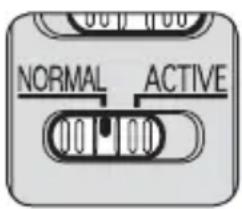
NORMAL: The vibration reduction mechanism primarily reduces camera shake, making smooth panning shots possible.
ACTIVE: The vibration reduction mechanism reduces more noticeable camera shake, such as that which occurs when taking pictures from a moving vehicle. In this mode, the lens does not automatically distinguish panning from camera shake.
Notes on using vibration reduction
- After pressing the shutter-release button halfway, wait until the image in the viewfinder stabilizes before pressing the shutter-release button the rest of the way down.
- Due to the characteristics of the vibration reduction mechanism, the image in the viewfinder may be blurred after the shutter is released. This is not a malfunction.
- When taking panning shots, be sure to set the vibration reduction mode switch to NORMAL. If the camera is panned in a wide arc, compensation for camera shake in the panning direction is not performed. For example, when panning the camera in a horizontal direction, vertical camera shake is reduced. This stabilizes the image whilst allowing the desired panning effect to be realized.
- Do not turn the camera off or remove the lens from the camera while vibration reduction is operating. Failure to observe this note could result in the lens sounding and feeling as if an internal component is loose or broken when it is shaken. This is not a malfunction. Turn the camera on again to correct this.
-
With cameras featuring a built-in flash, vibration reduction does not function while the built-in flash is charging.
-
When the camera is mounted on a tripod, set the vibration reduction ON/OFF switch to OFF. However, it is recommended that the switch be set to ON when using the camera on an unsecured tripod head or with monopod.
Focusing, zooming, and depth of field
Before focusing, rotate the zoom ring to adjust the focal length until the desired composition is framed. If your camera has a depth-of-field preview (stop-down) button or lever, depth of field can be previewed through the camera viewfinder.
- This lens is equipped with the Internal Focusing (IF) system. As the shooting distance decreases, the focal length also decreases.
- The distance scale does not indicate the precise distance between the subject and the camera. Values are approximate and should be used only as a general guide. When shooting distant landscapes, depth of field may influence operation and the subject may appear in focus at a position that is closer than infinity.
For more information, see p. 186.
Setting the aperture
Use the camera to adjust the aperture setting.
Using a tripod
When using a tripod, attach it to the lens' tripod collar instead of the camera.
CAUTION
When using a tripod, be sure to fully tighten the tripod collar lock screw, otherwise the lens may fall off the tripod accidentally and cause bodily injury.
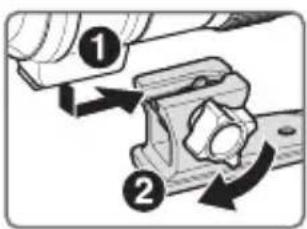
Attaching the tripod
Insert the tripod collar mounting foot into the tripod collar (1), then fully tighten the tripod collar lock screw (2).
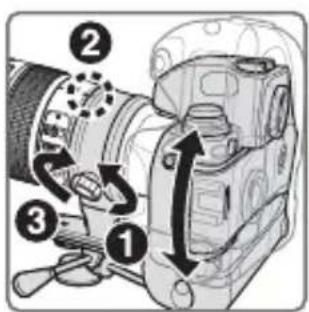
Changing the camera's position
Loosen the tripod collar ring fastening screw (1). Depending on the camera's position (vertical or horizontal), turn the lens to an appropriate position index on the tripod collar ring by aligning the tripod collar ring rotating index on the lens (2), then tighten the screw (3).
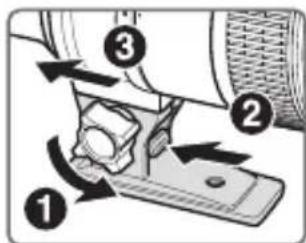
Detaching the tripod
Fully loosen the tripod collar lock screw (1). While holding down the tripod collar lock release lever (2), slide the tripod collar mounting foot (3).
The built-in flash and vignetting
- To prevent vignetting, do not use the lens hood.
- For the latest information on vignetting with this lens, see the camera manual.
| Cameras Supported focal length/Shooting distance | |
| F70-Series/N70* • 85 mm | /2 m (6.6 ft) or greater • 105 mm or longer/No restriction |
| F60-Series/N60* • 105 mm | m/2.5 m (8.2 ft) or greater • 135 mm or longer/No restriction |
| F50-Series/N50* • 135 mm | m/2.5 m (8.2 ft) or greater • 200 mm/No restriction |
| F65-Series/N65-Series*, F55-Series/N55-Series* | • 105 mm/3 m (9.8 ft) or greater • 135 mm or longer/No restriction |
| F75-Series/N75-Series*, Pronea 600i/6i* | • 85 mm/2.5 m (8.2 ft) or greater • 105 mm or longer/No restriction |
| Pronea S • 200 mm/2 m | (6.6 ft) or greater |
*Sold exclusively in the U.S.A.
Using the lens hood
Lens hoods minimise stray light and protect the lens.
Attaching the hood
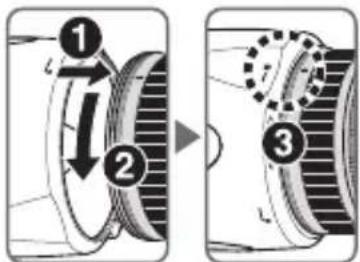
- Be sure that the lens hood mounting index () is aligned with the lens hood setting index (- ) (3).
- To facilitate attachment or removal of the hood, hold it by the base (near the lens hood attachment index (一) ) rather than its outer edge.
- If the lens hood is not correctly attached, vignetting may occur.
- To store the lens hood, attach it in the reverse position.
Detaching the hood
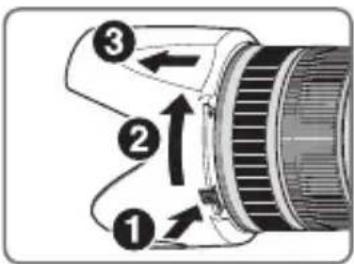
While holding down the lens hood lock release button (1), turn the hood clockwise (as viewed from the camera side) (2, 3).
En
Recommended focusing screens
Various interchangeable focusing screens are available for certain Nikon SLR cameras to suit any picture-taking situation. The ones recommended for use with this lens are:
| Screen Camera | A | B | C | E | EC-B EC-E | G1 | G2 | G3 | G4 | J | L | M | U |
| F6 | ◎ | ◎ | - | ◎ | - | - | - | - | - | ◎ | ◎ | ◎ | |
| F5+DP-30 | ◎ | ◎ | ◎ | ◎ | ◎ | ◎ | ◎ | ◎ | ◎ | ◎ | |||
| F5+DA-30 | ◎ | ◎ | ◎ | ◎ | ◎ | ◎ | (-1.0) | ◎ | ◎ | ◎ |
:Excellent focusing
:Acceptable focusing
Slight vignetting or moiré patterns appear in the viewfinder, but not on the film.
Not available
( : Indicates degree of exposure compensation needed (center- weighted metering only). For F6 cameras, compensate by selecting "Other screen" in Custom Setting "b6: Screen comp." and setting the EV level to -2.0 to +2.0 in 0.5 EV steps. When using screens other than type B or E, "Other screen" must be selected even when the required compensation value is "0" (no compensation required). For F5 cameras, compensate using Custom Setting #18 on the camera body.
See user's manual of the camera body for more details.
Blank box means not applicable. Since type M screen can be used for both macro photography at a magnification ratio of 1:1 or above and for photomicrography, it has different applications than other screens.
Important
- For F5 cameras, only EC-B, EC-E, B, E, J, A, L focusing screens are usable in Matrix Metering.
- When using the B and E focusing screens in cameras other than those listed above, refer to the columns for the B and E screens.
Lens care
- Be careful not to hold the camera body when the lens is attached, as this may cause damage to the camera (lens mount). Be sure to hold both the lens and camera when carrying.
- Be careful not to allow the CPU contacts to become dirty or damaged.
- If the lens mount rubber gasket is damaged, be sure to visit the nearest Nikon-authorized service representative for repair.
- Clean lens surfaces with a blower brush. To remove dirt and smudges, use a soft, clean cotton cloth or lens tissue moistened with ethanol (alcohol) or lens cleaner. Wipe in a circular motion from the center to outer edge, taking care not to leave traces or touch other parts of the lens.
- Never use organic solvent such as thinner or benzene to clean the lens.
- NC filters are available to protect the front lens element. The lens hood also helps to protect the front of the lens.
- When storing the lens in its case, attach both the front and rear lens caps.
- When the lens is mounted on a camera, do not pick up or hold the camera and lens by the lens hood.
- When the lens will not be used for an extended period of time, store it in a cool, dry place to prevent mold and rust. Be sure to store the lens away from direct sunlight or chemicals such as camphor or naphthalene.
- Do not get water on the lens or drop it in water as this will cause it to rust and malfunction.
- Reinforced plastic is used for certain parts of the lens. To avoid damage, never leave the lens in an excessively hot place.
Standard accessories
- 77mm snap-on Front Lens Cap LC-77 - Rear Lens Cap - Bayonet Hood HB-48 - Semi-soft case CL-M2
■ Optional accessory
- 77mm screw-on filters - AF-S Teleconverters (TC-14E II/TC-14II/TC-17E II/TC-20II)
■ Specifications
Type of lens: G-type AF-S Zoom-NIKKOR lens with built-in CPU and Nikon bayonet mount
Focal length: 70-200mm
Maximum f/2.8 aperture:
Lens construction: 21 elements in 16 groups (7 ED and some Nano Crystal Coat-deposited lens elements)
Picture angle: 34^20' -12°20' with 35mm (135) format Nikon film SLR cameras and Nikon FX format digital SLR cameras 22^50' -8° with Nikon DX format digital SLR cameras 27^40' -9°50' with IX240 system cameras
Focal length scale: 70, 85, 105, 135, 200mm
Distance Output to camera information:
Zoom control: Manually via separate zoom ring
Focusing: Nikon Internal Focusing (IF) system, autofocus using a Silent Wave Motor; manually via separate focus ring
Vibration Lens-shift method using voice coil motors (VCMs) reduction:
Shooting distance Graduated in meters and feet from 1.4 m (5 ft) scale: to infinity ()
Closest focusing 1.4 m (4.6 ft) from focal plane at all zoom distance: positions
No. of diaphragm 9 pcs. (rounded) blades:
Diaphragm: Fully automatic
Aperture range: f/2.8 to f/22
Exposure Via full-aperture method with cameras with measurement: CPU interface system
Focusing limit Provided; two ranges available: FULL ( -1.4m) switch: or -5m
Tripod collar: Rotatable through 360^ , lens rotating position index at 90^ , only tripod collar detachable
Attachment size: 77mm (P = 0.75mm)
Dimensions: Approx. 87 mm dia. x 205.5 mm (extension from the camera's lens-mount flange)
Weight: Approx. 1,540 g (3.4 lb)
Specifications and designs are subject to change without any notice or obligation on the part of the manufacturer.
ACHTUNG
Keinesfalls zerlegen.
| Verre Appareil | A | B | C | E | EC-B EC-E | G1 | G2 G3 | G4 | J | L | M | U | |
| F6 | ◎ | ◎ | - | ◎ | - | - | - | - | - | ◎ | ◎ | ◎ | |
| F5+DP-30 | ◎ | ◎ | ◎ | ◎ | ◎ | ◎ | ◎ | ◎ | ◎ | ◎ | |||
| F5+DA-30 | ◎ | ◎ | ◎ | ◎ | ◎ | ◎ | ◎(-1,0) | ◎ | ◎ | ◎ |
| Pantalla Cámara | A | B | C | E | EC-B EC-E | G1 | G2 G3 | G4 | J | L | M | U | |
| F6 | ◎ | ◎ | - | ◎ | - | - | - | - | - | ◎ | ◎ | ◎ | |
| F5+DP-30 | ◎ | ◎ | ◎ | ◎ | ◎ | ◎ | ◎ | ◎ | ◎ | ◎ | |||
| F5+DA-30 | ◎ | ◎ | ◎ | ◎ | ◎ | ◎ | ◎(-1,0) | ◎ | ◎ | ◎ |
: Enfoque excellente
: Enfoque acceptable
Forvara utom rackhall for barn
| Skärnm Kamera | A | B | C | E | EC-B EC-E | G1 | G2 G3 | G4 | J | L | M | U | |
| F6 | ◎ | ◎ | - | ◎ | - | - | - | - | - | ◎ | ◎ | ◎ | |
| F5+DP-30 | ◎ | ◎ | ◎ | ◎ | ◎ | ◎ | ◎ | ◎ | ◎ | ◎ | |||
| F5+DA-30 | ◎ | ◎ | ◎ | ◎ | ◎ | ◎ | ◎(-1,0) | ◎ | ◎ | ◎ |
: Utmärkt fokusering
O: Acceptabel fokusering En latt vinjettering ell er moiremnonster syns i sokaren, men inte pa filmen.
:Intetillgangli
I PENEYNPEJDEHNE He pa36npaTe foToKamepy
He cmoTpne Ha coHnce uepe3 obbeKTHB nIIN BnOncKaTeJIb
EcnmOTpebHa coHnue nIIN dpYrHe nCTOuHKn npKOro CBeta uepe3 06beKTHB nIIN BNDONCKaTeJIb,TO 3TO MOKeT Bbl3BaTb Heo6paTHMOe yxudne 3peHn.
XpaHnTe B HeoctynHom IJIaIeTeMecTe
Iprnmte ocobie mepbl npedoctopoHocTn BO n36eHAnne nonaDaHna 6aTapei n dpyrnx He60bux npedmetOB dTeM B pot.
CoblaTe CneIyUOuIe Mepbl IpeIOCTOpOHHOCTN BO BpMa 3KcPnyatauHn FOToKaMepbl N O6BeHTNbA
He donyckaTe nonadHnB OdbHa foTOkamepy n o6beKTHB. Heco6IIODeHne 3TOro Tpe6OBaHH MoKeT npBeCTn K noKapy nn NopAkeHHIO 3JIeKtpuecknM TOKOM.
He npnacaTec b K foToKampe nIIN oBeHTbBy mokpbIM pykAmn. HecobJIOeHne 3TOrTO Tpe6OBaHnRA MoKeT npNBecTn K nopajKeHnO 3JeKTPnuYeCHM TOKOM.
- Пи сьемпс задим освеценим He habралгіte obbeKTNB ha coJIHuce, a taKHe
- He дonyckайтп поаданя coJIneuHorO CBeta B obbeKTNB, TaK KaK 3TO MOJET
- пИВЕСТИ Kперреву ФOTOKamepbl И EE BO3ROPaHNo.
- EcInn obBeKTHB He 6yJeT nCNoIb3OBAbCra B TeueHne dIInTeIbHO BpeMeHN, npHKpeNITe nepeDHIIO u 3aDHIOU KpbIshKn ObBeKTHBa u He OCTaBJIaIte OBeKTHB NOI npRMBIM COJHeuHbIM NlyaAMn. Heco6JIooHne 3TORO yCIOBn MOKeT npINBeCTN K BO3rOpAHIO, NocKOBky ObBeKTHB MOKeT COcPeIoTOHTb COJHeuHbIe LyuHa KaKOM-JIb6O JeRKOBCPAmEHaIOUeMc PpeDMete.
KoMNoHeTbI
① YcTaHOBOUHnMaMeTHKa6JIeHbI(CTp.81)
② Pe3HOBoe KOJIbIcO
③ ΦokycnpoBOHoe KOJIbO (CTp.78)
④ ⅢkaIpaacCTOHHa(cTp.80)
⑤ ykaataTeIb pacCTOHHN
⑥ Kolbpo perylnpOBn MacuTa6a n3o6paKeHn (cTp.80)
⑦ Μικαλη φούκυχονο πραςτόγαι
⑧ yka3aTeIb IkaJIbI OOKyCHOrO paCCTOHHN
⑨ПоворотьнукаTeььКольцапекхODнkaДякpenленЯHaшТаTNBE(cTp.80)
10 Yka3aTeIIN noIoXeHn (90°) (cTp. 80)
⑪ Kolbulo nepexoHNka dna KpenneHnHa WtataBe (ctp. 80)
12 YCTaHOBOHnA METKa
13 Pe3nHOBBi yNIOHTHeIb KpeJIeHnO6BeKTHBa (cTp.83)
14 KOHTaKTbIMKpOpoeccopa (cTp.83)
⑤Блелда (cTp.81)
16 Metka fHKcaunn 6JeHdbI (CTp.81)
⑦ MeTha KpeHneHn8 6NeHdbI (cTp.81)
18 KhoNka Ocbo60KdHnna 6IeHdbIObEeKTHBa (CTp. 81)
19IpeKIOuTeJIb peKIMOB FOKcHPOBHN (CTp.78)
20OrpaHnHTeIbΦokycuropOBKn(cTp.78)
②IpeKeKIOuATEIb IoDaBJIeHnB Bn6paun ON/OFF (cTp.79)
②IpeeknoaTeJIb peKIMOB NOaBHeHn Bn6paun (cTp.79)
23 KpenenKbBnHT KOJIbca nepexoHnKa dJa KpenJeHnHa uTATNBe (ctp.80)
24 PbyaKOK OCBO60KeHnHa KOJIbua nepexoHNHa JI KpeJIeHnHa 7TATnBe (CTp.80)
25 Onopa Koblupa nepexoHnka JnKpeHneHnHa WtataHBe (ctp. 80)
26ΦHKcnpuyoui BnHT nepexoHnKa dJI KpeIeHna Ha 7TaTnBe (CTp.80)
②7 IepexoHnK dIa KpeJIeHna Ha WtTaTbE (cTp.80) (): cnpaBOuHa CTpaHnca
OCHOBHbIE BO3MOxHOctN
HaHOKpncTaJIInueeKoe NOKpbITne, HAnecEHHOe Ha HeKOTOpbIe 3JIeMeHTbl O6beKTnBa, rapaHTnpyET NOlyuYeHne YeTknx CHIMKOB OTNIuHOrO KaueCTBa B IIO6bIX YcIOBnX -OT CbEMKn Pn COJIHeYHom OCBeUeHn Do CbEMKn B NOMEuEHNx Pn CBTe npOKeHTopOB.
- Пи Вклюechнуфункцип подамени вибраць мохно Использовытб 60лeeДЛNTeJIbHbIe Bbldeржн (3,5 cTypeHn*), Tem caMbIM yBelenuHBaJ dlnapa3OH 3haueHnВbldeржн иЗуma (ocobehno npn pyhov cbemke). (*BlnHne VR ha BbldeprkkyИЗмергетсь COOTBeTCTBnco StanapTaMn Camera and Imaging Products Association (CIPA; AccounaцяnpoIN3BOInTeJeФOTOKamep n uctpoiCTB obpa60THN3O6paJKeH); obekTINbI φopMaTa FX n3MepraIOTc n NOMOu bIO zuΦpoBbIXФOTOKamep φopMaTa FX, obekTINbI φopMaTa DX n3MepraIOTc ФOTOKamepamH φopMaTa DX. 3ym-OBekTINbI IN3MepraIOTc prn MaHCmJaBHom yBelenuHn.)
- П dedусmaTpnaIbOTcЯ Два ржима noablenha Bn6paun: (1) NORMAL (HopmaJIbHbI) peKIM dlya yMeHbWeHnA npOkaHnA foTOkAmepbln (2) ACTIVE (aKTNbHbI) peKIM dlya yMeHbWeHnA cnIbHO rpoKaHnA foTOkAmepbl, KaH, HapnpMep, pRn cBemKe n3 DBnraIOUeOcA aTOMo6nla. POnabLeHne Bn6paun TaKHe 3ΦΦeKTHBNO pPmEHaTeCn pRn CbeMke naOpam, nocKolby o6beKTHB abTomatNueckn OTInuHaet NaHopamHoE DnIXeHne OT dpOkaHnA foTOkAmepbl n ObecneuBaet 3ΦΦeKTHBHO nOdaBleHne Bn6paun (B NORMAL peKIme).
-ДанньиобъektнИсплььуETбсшмьIВOLнови npвOD Silent Wave Motor nIynpablenHЯ MEXaHn3MOMФOKucropOBKN,чTO DeJaet npoceC aBTOfOKcnpOBKn ПлавныIM,6ecшmьIM IN ppaKTnueCkN MrHOBeHHbIM.ПepeKJIouaTeJb peKIMOB fOKycnpOBKN ИсплььуETСДЯ ydo6HOrO nepeKJIuOyeHn MeJdy aBTOMaTnueCkM (AF)и руньIM(MF)pexnmamfoKcnpOBkn.
- PeKIM aBTOΦOKyCnPOBKn MOxHO OTMeHHTb.ДЯ 3TOrO nepemecHTe nepeKlHuATEIb peKIMOB ΦOKyCnPOBKn B NOLOKeHne A/M nIi M/A, a 3aTeM HAcTpaINBaIte ΦOKyc BpyHyU C NOMOuBIO ΦOKyCnPOBOHOrO KOLbua.
- IpeBocxOndbIe ONTnueckne noka3aTeJIu XapaKTePncTHKn H3o6paJHeHn yBeJIuYebldo MaKcMyma 3a CHT NcNoJIb3OBaHnCemN 3JIeMeHToB IN3 CTekJaCo CBepxHn3kOДnCnepCnei (ED), OBeCneuBaUqux KOppeKtnpOBky xpomatnuecko abeppaun. Kpome TOrO, cKpyIeHHa DnaΦparMa oBeCneuHBaET 6Olee KpacNBbIe MArKnEи HeAChbIe OeptanHr Tex Yacte CHIMKa, KOtOpbIe HaxOJaTcB HBe φokyca.
Ha kpaonobeknBa moryt yctaHaBnBaTbCra Onda nnu YetbIpe 6ecnpoBnHbIE BCnblkN Speedlight SB-R200 c dncTaHnOHbIM ynpabLeHnem.
C 3TtM O6bekTNBOM COBmbl TelekoHBepTopbI AF-I/AF-S moJeIe TC-14E/ TC-14EⅡ/TC-14EⅢ/TC-17EⅡ/TC-20E/TC-20EⅡ/TC-20EⅢ.Функи n abTOΦOKyCnPOBKN I NOdABJIeHn Bn6paun pa6oTaOTdoJHKhIM o6pa3OM daKe npn npncOeDHHom TelekoHBepTope.
BHHMaHne
YcTaHOBka nepeKJIouaTeI naBHeHnBn6paun ON/OFF
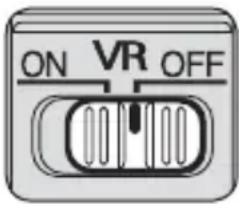
ON (BHJI.): Iopablenhe Bn6paun BbINOJHReTc npn HauKATN cnYCKOBON KHOIN 3aTBOPa HANOLOBHy N B MOMENT cnyska 3aTBopa. NocOJIbky B bIOOnCKaTeNe BbINOJHReTc nOpablenhe Bn6paun, aBTOMATUeChy/o/pyHyo OKycnPOBky nToHoe KaDpnpOBaHne OBeKaTa CbEMHN BblONHTb Jere.
OFF(BbIKI.):PoaBHeNHe Bn6paun He npMeHareTc.
UcTaHOBka nepeKJIouaTeIa peKIma IoAbLeHnBa6paCn
Cnayana nepemecntte nepekIouateIb noablenBn6paun ON/OFF B noJooHne ON, 3aTeM Bbl6epnte cledyuosn peKIM:
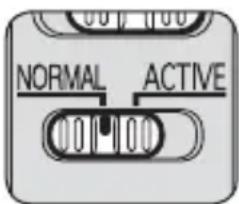
NORMAL: MexaHn3M NOaBHeHb Bn6paCn rIaBbIM o6pa30m yMeHb7aet dpoJxHne KamepbI, YTO nO3BOJrE T IaBHO BblONHrTb CbEMky NaHOpam.
ACTIVE: MexaHn3M nOdaBHeHn Bn6paCn KOMneHCnpyeT Han6oJee 3aMeTHbIe dPoKaHn HcToKamepbl, HApPImep dPoKaHn e ToKamepbl npn CbemKe c DnNkUeOcra ABTomO6nJI. B 3TOM peKHe He BbINOJIReTCa ABTomATuYeCKOro pa3LIueHn O6BeKTbBOM nAhopAMHO CbemKn n DpoKaHn FcTOKamepbl.
PpHMeaHnNo HcNoIb3ObaHnIOpaBLeHnBn6paun
- Tocne HaKaTnA cnYcKOBoH KHOHn 3aTBopa HAnOJIOBHy Heo6XoDmO DoxHaTbCra Cta6NJI3aunn H3O6paKeHH B BVIOONcHAteIe NpeD TeM, KaH HaKaTb cnYcKOByo KHOHny 3aTBopa DO KOHca.
- BcneDCTBnE OcO6eHHocTe XapaHTepnCTnK MexaHn3Ma NODaBHeHn Bn6paun NoCte TOrO, KaK 6yET OTnyeHa KHOJka CnYcKa 3aTBopa, N3o6paXeHne B BVIONCaTeJe MOxET OKa3aTbcr CMA3aHHbIM.
- Пи сьемп панорамьх снмков He 3a6ydbTe yctahOBNTb NepeKIOUaTeIb peKIMа
Падыгеля вибраци B noLOXeHne NORMAL. Пи сьемп панорамь NO shIpOKoTpaEKTopи
Падыгеля вибраци ФOTOKamepbl B haPapBLeHn Cьемп панорамь He 6ydet BBINOJIrTbCry.
Наример, пи панорамьовани ФOTOKamepbl B roPn3OHTaJIbHOM HaPapBLeHn NOdaBJIYOTcR
ee ВерTKaJIbHbIe ДpoJahNЯ. 3TO nO3BOJraT cA6NJIN3uPoBaTb N3O6paXeHne, a TAKHe DoCTNHyxHOrO 3ΦΦeKTA панорамьованя.
He BbHIOaHTe FOToKamepy HcHMaIte C FOToKamepbI OBeKTnB Pp np Pa6Ote BpeHMe IOaBHeNBA B6paun. Ecn IpeHe6pey 3TmnpmeuHaem, To npn COtpaeHHN OBeHTNa MoKe TocblaTaBCr 3Byk, Ka npn OTcoEHNHeHH NIn NOJOMHe BHyTpEHnX KOMHOENTOB. 3TO He ABJeTcHcnpabHOCtBu. DJIy UcTpaHEnra 3ToI CNTyaCnn CHObA BKnIOHTe FOToKamepy. - Ppi HcnoIb30BaHnn MoJeIe FTOKAmep, OChaIeHHbIX BCTpoEHHO BCnbIiHKoN, npn 3apJde BCnbIiHKn FyHKnI NaabJIeHnB Ibpaun He pa6oTaT.
- EcIn foToKamepa ycTaHOBJeHa Ha 7TaTHB, ycTaHOBtpe nepeKIOUaTeIb NOaBHeHn Bn6paCm ON/OFF e b noLoJKeHne OFF. Ondako 3TO T nepeKIOUaTeIb peKOMeHNyETcR yCTaHOBtB B noLoJKeHne ON npu HcNoJIb3OBAHHn foToKAMepbHa 7TaTINBE C He3aKpeNJIeHHoI rOLOBKOHn HA MOHONOde.
BcTpoeHHa BcNbIshka N BnHbEtnpoBaHne
-Bo n36eKaHHe BnHbTeHnpoBaHHa He nCNoJb3yIte 6JeHdy o6beKTHBa.
Дя полуеня послднй Инфорmaци O Виньтураани C данным obteknbOM CM. ркововдъв к Фотokамpe.
| Фотонамеры | Повдержныаеме Фокуншке пасстаянке/Расстаянке съемп |
| Серия F70 | • 85 мM/2 м ял nxьшe • 105 мM ял nxьшe/6e3 орданчени |
| Серия F60 | • 105 мM/2,5 м ял nxьшe • 135 мM ял nxьшe/6e3 орданчени |
| Серия F50 | • 135 мM/2,5 м ял nxьшe • 200 мM/6e3 орданчени |
| Серия F65, Серия F55 | • 105 мM/3 м ял nxьшe • 135 мM ял nxьшe/6e3 орданчени |
| Серия F75, Pronea 600i | • 85 мM/2,5 м ял nxьшe • 105 мM ял nxьшe/6e3 орданчени |
| Pronea S | • 200 мM/2 м ял nxьшe |
IcnoIb30BaHne 6JeHdbI
BleHda MInHMn3npyeT pacceyHHbI CBETn 3aunuaeTo6beKTHB.
PnncoeDnHeHne 6JeHdbI
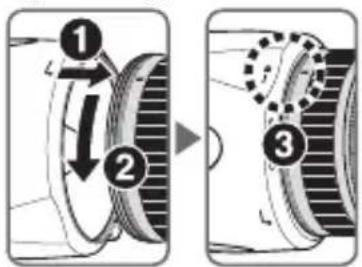
- Y6eHNTecb, yTO yCTaHOBOUHaЯ MeTHa 6JIeHdbI () COBnaJaET C MeTKoI ΦИKcaUNI 6JIeHdbI (-O) (3).
-Дяоблereня уctaHOBN nIN CHTn8 6IeHdbI ydepnBaIte ee 3a OCHOBAHne (pIOM C yCTaHOBOUHON MeTHOJ 6JIeHDbI (—)), a He 3a BHeSHIOKpOMky. - Ecnn 6IeHda yCTaHOBJIeHa Ha OObBeKTHN BHeHaJLeJHaUIM O6pa3OM, MoXeT Bo3HNKHyTb 3ΦΦeKT BnHbETnPOBaHn.
-ДяхраненябileндыпрсоeннЯTe eeв O6paTHOM NOLOKeHn.
OTcoeHHeHne 6IeHdbI
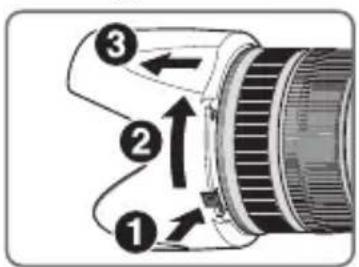
HaKImaHa pbIyauKOK OCBO6KdHn8 6JeHdbI
ObBeKTnBa (1), NOBepHTe 6JeHdy no YacOBoY
CTpeJIke (ecnn CMOTpEt b CO CTOpOHbI FOToKaMepbI)
(2,3).
■ PeKOMeHnyeMbIe ΦOKyCnpoBOuHbIe 3KpaHbI
CmeHHbIe fokcnpoBOHbI eKpaHbI, doCTyINHbIe IJI ONpeJeHHbIX 3epKaJIbHbIX fotoKamep Nikon, nomoraT OcyuaceTBJrTb CbeMHy npaKTnueChN B IIO6bIX cHTyaunx. C 3TNM oBeKTHBOM peKOMeHdyETcra HCNoJIb3OBAtB cIeDyUOune fokcnpoBOHbIe kpaHbI.
| Эндан Фотокамра | A | B | C | E | EC-B EC-E | G1 | G2 G3 | G4 | J | L | M | U | |
| F6 | ◎ | ◎ | - | ◎ | - | - | - | - | - | ◎ | ◎ | ◎ | |
| F5+DP-30 | ◎ | ◎ | ◎ | ◎ | ◎ | ◎ | ◎ | ◎ | ◎ | ◎ | |||
| F5+DA-30 | ◎ | ◎ | ◎ | ◎ | ◎ | ◎ | ◎(-1.0) | ◎ | ◎ | ◎ |
@: NckJIIOHTeIbHoe KaueCTBO OKucnPOBKn
O:Приемлеме КауесТВО Фоксювн Heбolyоe BnHbETnpOBaHne Ил Myap MOryT HmEtB MeCTO B BnDOnCKaTeJI, Ho He Ha ПлЕнke.
一:Heoctynho
( ):Обозначает HeобхODIMyU Велуну NonpaBn 3Kcno3n (ToIbko npn nCNoIb3OBaHnц eHTpaIbHO-B3BWeSeHoro 3aMepa).При nCNoIb3OBaHnФОTOkAmeF6 ДЯЗадань ВELUNHbI NonpaBKn 3Kcno3nДЯ ПОьБaTeIbCKOи HAcTpoNkn b6 Screen comp. («Компeнcaця ФOKUCPBOOCHOr O3KpaHa») Bbl6epnte BapnaHT Other screen («Дpy罗'ЗкрAn»)ИЗадай Te yPoBeHb EVВДиana3OHe OT-2,0do +2,0cшarOM 0,5EV.При nCNoIb3OBaHnФOKUCPBOOCHbIX 3KpaHOB c TINpAMn,OTINuHbIMNOTBиE,BapnaHT Other screen («Дpy罗'ЗкрAn») Heo6xODIMO Bbl6nPaTb ДдkeВ TOM Clyuae, KORda 3NaueHne NonpaBKn paBHo 0 (NonpaBHa He Tpe6Byetc).При nCNoIb3OBaHnФOTOKaMeF5 BeJInuHy NonpaBn 3Kcno3nUn MOJHo 3aDaTb C NOMOuBo NOlb3OBaTeIbCKOи HAcTpoNkn #18 (Ha Kopnyce ФOTOKaMepbl). Bolee noDpo6HbIe CBeDeHn CM. B pyKOBoIDCTBe NOlb3OBaTeJIY FOToKaMepbl.
Iyctoe nole 03haaet, yTO fokycnpoBOHyB hKpaH nCnoB3OBaTb HeIb3A. NocOJIbky kpan Tnna M MoKeT nCNoB3OBaTbCg KaK dJa MaKpocbEMKn npu yBeInueHnn 1:1 n Bblwe, TaK n Dlan MmKpoΦOTorpaΦnPOBaHnn, erO npImHeHne OTInuaeTcR OT npImeHnR dpyrNX eKpaHOB.
BHHMaHne
(): Referentiepagina
| Matglazen Camera | A | B | C | E | EC-B EC-E | G1 | G2 G3 | G4 | J | L | M | U | |
| F6 | ◎ | ◎ | - | ◎ | - | - | - | - | - | ◎ | ◎ | ◎ | |
| F5+DP-30 | ◎ | ◎ | ◎ | ◎ | ◎ | ◎ | ◎ | ◎ | ◎ | ◎ | |||
| F5+DA-30 | ◎ | ◎ | ◎ | ◎ | ◎ | ◎ | ◎(-1.0) | ◎ | ◎ | ◎ |
| Schermo Fotocamera | A | B | C | E | EC-B EC-E | G1 | G2 G3 | G4 | J | L | M | U | |
| F6 | ◎ | ◎ | - | ◎ | - | - | - | - | - | ◎ | ◎ | ◎ | |
| F5+DP-30 | ◎ | ◎ | ◎ | ◎ | ◎ | ◎ | ◎ | ◎ | ◎ | ◎ | |||
| F5+DA-30 | ◎ | ◎ | ◎ | ◎ | ◎ | ◎ | ◎(-1.0) | ◎ | ◎ | ◎ |
Aeepyonoioe aoeowc oepiTwn duotopyia
Eav npnoe ka n aoovn ooun va npoepxetai ano tn wtoypaikn uynavn to qako, aapoeote aoeowc tnv matapia, pooexovtac va unv kaite. H ouvexnc itoupyia npoei va npokaolei tpaumatioo.
MetaTnV aPaipeoN n Tnv anooovdeoN Tnc Pnync Tpoopodoiac, PnyaiveTe To npoiov oE Eouioobotnevo avipopoosno epic tnC Nikon yia eIeewpno.
Mny xpoiooie tN oToypaikn uXavn n To qako npouia u aepiow
H i toupyia nektpovikou eonlioou napovoiia uφkctwv aepiwv evexi kivduvo ekpnncnpiupkayiac.
Mny koitate tov nIIO mEOW tou qakou n Tou OKOENTPOU
Eav KoIATE TOV nAIO n aAIEC PnYEc Duvatou mcos TOU paKoU n TOU OKOTpou mOpEi va pokAne i moviun oTikn 3aBn.
To oiaotpo paKou eaxiotonoie to npaoito qwc kal npootateu to paKO.
| 照相机\对焦屏 | A | B | C | E | EC-BEC-E | G1 | G2 | G3 | G4 | J | L | M | U |
| F6 | ◎ | ◎ | - | ◎ | ◎-◎ | - | ◎ | - | - | ||||
| F5+DP-30 | ◎ | ◎ | ◎ | ◎ | ◎ | ◎ | ◎ | ◎ | ◎ | ◎ | |||
| F5+DA-30 | ◎ | ◎ | ◎ | ◎ | ◎ | ◎ | ◎(-1.0) | ◎ | ◎ | ◎ |
| 對焦屏 相機 | A | B | C | E | EC-B EC-E | G1 | G2 | G3 | G4 | J | L | M | U | |
| F6 | ◎ | ◎ | - | ◎ | - | - | - | - | - | - | ◎ | ◎ | ◎ | |
| F5+DP-30 | ◎ | ◎ | ◎ | ◎ | ◎ | ◎ | ◎ | ◎ | ◎ | ◎ | ◎ | |||
| F5+DA-30 | ◎ | ◎ | ◎ | ◎ | ◎ | ◎ | (-1.0) | ◎ | ◎ | ◎ | ◎ |
@: 最佳對焦
○: 可接受對焦
| Focused distance Depth of field | Reproduction ratio | |||||||
| f/2.8 f/4 | f/5.6 f/8 f/11 | f/16 f/22 | ||||||
| [f=70mm] | ||||||||
| 5 | 4 ft 10-9/16 in. | 4 ft 9-15/16 in. | 4 ft 9-2/16 in. | 4 ft 8-1/16 in. | 4 ft 6-10/16 in. | 4 ft 4-11/16 in. | 4 ft 2-4/16 in. | 1/19.6 |
| 5 ft 1-9/16 in. | 5 ft 2-3/16 in. | 5 ft 3-4/16 in. | 5 ft 4-11/16 in. | 5 ft 6-13/16 in. | 5 ft 10-3/16 in. | 6 ft 3-10/16 in. | ||
| 7 | 6 ft 9 in. | 6 ft 7-15/16 in. | 6 ft 6-6/16 in. | 6 ft 4-5/16 in. | 6 ft 1-9/16 in. | 5 ft 9-15/16 in. | 5 ft 5-8/16 in. | 1/28.2 |
| 7 ft 3-4/16 in. | 7 ft 4-9/16 in. | 7 ft 6-10/16 in. | 7 ft 9-12/16 in. | 8 ft 2-8/16 in. | 8 ft 10-5/16 in. | 10 ft | ||
| 10 | 9 ft 5-14/16 in. | 9 ft 3-10/16 in. | 9 ft 10/16 in. | 8 ft 8-8/16 in. | 8 ft 3-4/16 in. | 7 ft 8-12/16 in. | 7 ft 15/16 in. | 1/41.0 |
| 10 ft 6-15/16 in. | 10 ft 9-13/16 in. | 11 ft 2-6/16 in. | 11 ft 9-8/16 in. | 12 ft 9-2/16 in. | 14 ft 5-4/16 in. | 17 ft 9-15/16 in. | ||
| 15 | 13 ft 10-3/16 in. | 13 ft 5-8/16 in. | 12 ft 11-1/16 in. | 12 ft 2-10/16 in. | 11 ft 4-5/16 in. | 10 ft 4-3/16 in. | 9 ft 2-6/16 in. | 1/62.3 |
| 16 ft 4-7/16 in. | 16 ft 11-8/16 in. | 17 ft 11-4/16 in. | 19 ft 6-10/16 in. | 22 ft 4-15/16 in. | 28 ft 4-1/16 in. | 45 ft 8-14/16 in. | ||
| 30 | 25 ft 7-13/16 in. | 24 ft 3-15/16 in. | 22 ft 6-13/16 in. | 20 ft 5-14/16 in. | 18 ft 1-13/16 in. | 15 ft 7-11/16 in. | 13 ft 1-7/16 in. | 1/126.3 |
| 36 ft 2-3/16 in. | 39 ft 3-2/16 in. | 45 ft 13/16 in. | 57 ft 15/16 in. | 92 ft 15/16 in. | ∞ | ∞ | ||
| ∞ | 173 ft 8-12/16 in. | 126 ft 1-13/16 in. | 89 ft 4-15/16 in. | 63 ft 5-3/16 in. | 45 ft 12/16 in. | 32 ft 13/16 in. | 22 ft 10-9/16 in. | 1/∞ |
| ∞ | ∞ | ∞ | ∞ | ∞ | ∞ | ∞ | ||
| 5 | 4 ft 10-15/16 in. — 5 ft 1-3/16 in. | 4 ft 10-7/16 in. — 5 ft 1-11/16 in. | 4 ft 9-13/16 in. — 5 ft 2-6/16 in. | 4 ft 9 in. — 5 ft 3-6/16 in. | 4 ft 7-13/16 in. — 5 ft 4-15/16 in. | 4 ft 6-4/16 in. — 5 ft 7-5/16 in. | 4 ft 4-5/16 in. — 5 ft 11-1/16 in. | 1/17.0 |
| 7 | 6 ft 9-12/16 in. — 7 ft 2-6/16 in. | 6 ft 8-14/16 in. — 7 ft 3-6/16 in. | 6 ft 7-13/16 in. — 7 ft 4-13/16 in. | 6 ft 6-2/16 in. — 7 ft 6-15/16 in. | 6 ft 3-15/16 in. — 7 ft 10-3/16 in. | 6 ft 1-1/16 in. — 8 ft 3-6/16 in. | 5 ft 9-8/16 in. — 8 ft 11-10/16 in. | 1/24.2 |
| 10 | 9 ft 7-7/16 in. — 10 ft 5-1/16 in. | 9 ft 5-12/16 in. — 10 ft 6-15/16 in. | 9 ft 3-6/16 in. — 10 ft 10-3/16 in. | 9 ft 4/16 in. — 11 ft 2-14/16 in. | 8 ft 8-1/16 in. — 11 ft 10-5/16 in. | 8 ft 2-10/16 in. — 12 ft 10-7/16 in. | 7 ft 8-1/16 in. — 14 ft 7-13/16 in. | 1/34.9 |
| 15 | 14 ft 1-13/16 in. — 15 ft 11-8/16 in. | 13 ft 10-5/16 in. — 16 ft 4-5/16 in. | 13 ft 5-3/16 in. — 17 ft 2/16 in. | 12 ft 10-9/16 in. — 18 ft 2/16 in. | 12 ft 2-3/16 in. — 19 ft 8-1/16 in. | 11 ft 3-12/16 in. — 22 ft 7-9/16 in. | 10 ft 3-6/16 in. — 28 ft 10-3/16 in. | 1/52.8 |
| 30 | 26 ft 9-2/16 in. — 34 ft 1-13/16 in. | 25 ft 8-8/16 in. — 36 ft 12/16 in. | 24 ft 3-8/16 in. — 39 ft 4-7/16 in. | 22 ft 6-4/16 in. — 45 ft 3-4/16 in. | 20 ft 5-4/16 in. — 57 ft 6-8/16 in. | 18 ft 15/16 in. — 93 ft 9 in. | 15 ft 6-15/16 in. — ∞ | 1/106.6 |
| ∞ | 245 ft 10-15/16 in. — ∞ | 178 ft 5-12/16 in. — ∞ | 126 ft 4-13/16 in. — ∞ | 89 ft 7-1/16 in. — ∞ | 63 ft 6-10/16 in. — ∞ | 45 ft 1-11/16 in. — ∞ | 32 ft 1-7/16 in. — ∞ | 1/∞ |
f/2.8 f/4 f/5.6 f/8 f/11 f/16 f/22
| [f=105mm] | ||||||||
| 5 | 4 ft 11-3/16 in. | 4 ft 10-15/16 in. | 4 ft 10-7/16 in. | 4 ft 9-13/16 in. | 4 ft 8-14/16 in. | 4 ft 7-13/16 in. | 4 ft 6-4/16 in. | 1/14.3 |
| 5 ft 13/16 in. | 5 ft 1-3/16 in. | 5 ft 1-11/16 in. | 5 ft 2-6/16 in. | 5 ft 3-8/16 in. | 5 ft 5-1/16 in. | 5 ft 7-7/16 in. | ||
| 7 | 6 ft 10-7/16 in. | 6 ft 9-13/16 in. | 6 ft 9 in. | 6 ft 7-13/16 in. | 6 ft 6-2/16 in. | 6 ft 3-15/16 in. | 6 ft 1-3/16 in. | 1/20.1 |
| 7 ft 1-11/16 in. | 7 ft 2-4/16 in. | 7 ft 3-4/16 in. | 7 ft 4-13/16 in. | 7 ft 6-13/16 in. | 7 ft 10-1/16 in. | 8 ft 3-2/16 in. | ||
| 10 | 9 ft 8-12/16 in. | 9 ft 7-11/16 in. | 9 ft 6 in. | 9 ft 3-10/16 in. | 9 ft 8/16 in. | 8 ft 8-6/16 in. | 8 ft 3-4/16 in. | 1/28.8 |
| 10 ft 3-6/16 in. | 10 ft 4-11/16 in. | 10 ft 6-12/16 in. | 10 ft 9-13/16 in. | 11 ft 2-6/16 in. | 11 ft 9-10/16 in. | 12 ft 9-2/16 in. | ||
| 15 | 14 ft 5-1/16 in. | 14 ft 2-8/16 in. | 13 ft 10-13/16 in. | 13 ft 5-14/16 in. | 12 ft 11-8/16 in. | 12 ft 3-6/16 in. | 11 ft 5-3/16 in. | 1/43.4 |
| 15 ft 7-11/16 in. | 15 ft 10-11/16 in. | 16 ft 3-10/16 in. | 16 ft 10-15/16 in. | 17 ft 10-3/16 in. | 19 ft 4-13/16 in. | 22 ft 1-9/16 in. | ||
| 30 | 27 ft 9-2/16 in. | 27 ft | 25 ft 11-3/16 in. | 24 ft 6-12/16 in. | 22 ft 10-3/16 in. | 20 ft 9-13/16 in. | 18 ft 6-2/16 in. | 1/86.9 |
| 32 ft 7-11/16 in. | 33 ft 9-4/16 in. | 35 ft 7-9/16 in. | 38 ft 7-15/16 in. | 43 ft 11-6/16 in. | 54 ft 6-13/16 in. | 83 ft 3 in. | ||
| ∞ | 374 ft 10-15/16 in. | 272 ft | 192 ft 6-8/16 in. | 136 ft 4-5/16 in. | 96 ft 7-9/16 in. | 68 ft 6-8/16 in. | 48 ft 8-1/16 in. | 1/∞ |
| ∞ | ∞ | ∞ | ∞ | ∞ | ∞ | ∞ | ||
f/2.8 f/4 f/5.6 f/8 f/11 f/16 f/22
[f=135mm]
| 5 | 4 ft 11-6/16 in. 5 ft 10/16 in. | 4 ft 11-3/16 in. 5 ft 13/16 in. | 4 ft 10-15/16 in. 5 ft 1-3/16 in. | 4 ft 10-7/16 in. 5 ft 1-11/16 in. | 4 ft 9-13/16 in. 5 ft 2-6/16 in. | 4 ft 9 in. 5 ft 3-6/16 in. | 4 ft 7-13/16 in. 5 ft 4-15/16 in. | 1/11.8 |
| 7 | 6 ft 10-15/16 in. 7 ft 1-1/16 in. | 6 ft 10-9/16 in. 7 ft 1-9/16 in. | 6 ft 9-15/16 in. 7 ft 2-3/16 in. | 6 ft 9-2/16 in. 7 ft 3-2/16 in. | 6 ft 8-1/16 in. 7 ft 4-7/16 in. | 6 ft 6-8/16 in. 7 ft 6-8/16 in. | 6 ft 4-7/16 in. 7 ft 9-8/16 in. | 1/16.3 |
| 10 | 9 ft 9-15/16 in. 10 ft 2-3/16 in. | 9 ft 9-2/16 in. 10 ft 3 in. | 9 ft 8-1/16 in. 10 ft 4-5/16 in. | 9 ft 6-8/16 in. 10 ft 6-2/16 in. | 9 ft 4-5/16 in. 10 ft 8-14/16 in. | 9 ft 1-7/16 in. 11 ft 1-1/16 in. | 8 ft 9-10/16 in. 11 ft 7-7/16 in. | 1/23.1 |
| 15 | 14 ft 7-7/16 in. 15 ft 4-13/16 in. | 14 ft 5-14/16 in. 15 ft 6-10/16 in. | 14 ft 3-8/16 in. 15 ft 9-8/16 in. | 14 ft 2/16 in. 16 ft 1-13/16 in. | 13 ft 7-11/16 in. 16 ft 8-3/16 in. | 13 ft 1-13/16 in. 17 ft 6 in. | 12 ft 6-2/16 in. 18 ft 9-13/16 in. | 1/34.4 |
| 30 | 28 ft 6-13/16 in. 31 ft 6-15/16 in. | 28 ft 13/16 in. 32 ft 2-10/16 in. | 27 ft 4-1/16 in. 33 ft 3 in. | 26 ft 4-9/16 in. 34 ft 9-13/16 in. | 25 ft 1-9/16 in. 37 ft 3-12/16 in. | 23 ft 6-12/16 in. 41 ft 6-6/16 in. | 21 ft 7-13/16 in. 49 ft 6 in. | 1/68.2 |
| ∞ | 619 ft 4-7/16 in. ∞ | 449 ft 3-4/16 in. ∞ | 317 ft 10-15/16 in. ∞ | 225 ft 8/16 in. ∞ | 159 ft 4-5/16 in. ∞ | 112 ft 11-1/16 in. ∞ | 80 ft 1-1/16 in. ∞ | 1/∞ |
f/2.8 f/4 f/5.6 f/8 f/11 f/16 f/22
| [f=200mm] | ||||||||
| 5 | 4 ft 11-10/16 in. 5 ft 6/16 in. | 4 ft 11-8/16 in. 5 ft 8/16 in. | 4 ft 11-4/16 in. 5 ft 12/16 in. | 4 ft 11-1/16 in. 5 ft 15/16 in. | 4 ft 10-11/16 in. 5 ft 1-7/16 in. | 4 ft 10-1/16 in. 5 ft 2-1/16 in. | 4 ft 9-6/16 in. 5 ft 3 in. | 1/9.2 |
| 7 | 6 ft 11-6/16 in. 7 ft 10/16 in. | 6 ft 11-3/16 in. 7 ft 13/16 in. | 6 ft 10-13/16 in. 7 ft 1-3/16 in. | 6 ft 10-5/16 in. 7 ft 1-13/16 in. | 6 ft 9-10/16 in. 7 ft 2-8/16 in. | 6 ft 8-12/16 in. 7 ft 3-10/16 in. | 6 ft 7-7/16 in. 7 ft 5-3/16 in. | 1/12.3 |
| 10 | 9 ft 10-13/16 in. 10 ft 1-3/16 in. | 9 ft 10-7/16 in. 10 ft 1-11/16 in. | 9 ft 9-13/16 in. 10 ft 2-4/16 in. | 9 ft 8-14/16 in. 10 ft 3-4/16 in. | 9 ft 7-11/16 in. 10 ft 4-11/16 in. | 9 ft 6 in. 10 ft 6-13/16 in. | 9 ft 3-10/16 in. 10 ft 9-13/16 in. | 1/17.0 |
| 15 | 14 ft 9-10/16 in. 15 ft 2-6/16 in. | 14 ft 8-12/16 in. 15 ft 3-6/16 in. | 14 ft 7-7/16 in. 15 ft 4-13/16 in. | 14 ft 5-10/16 in. 15 ft 6-15/16 in. | 14 ft 3-2/16 in. 15 ft 9-15/16 in. | 13 ft 11-10/16 in. 16 ft 2-8/16 in. | 13 ft 7-1/16 in. 16 ft 9-4/16 in. | 1/24.7 |
| 30 | 29 ft 3-4/16 in. 30 ft 9-4/16 in. | 29 ft 2/16 in. 31 ft 13/16 in. | 28 ft 7-5/16 in. 31 ft 6-6/16 in. | 28 ft 15/16 in. 32 ft 2-10/16 in. | 27 ft 4-3/16 in. 33 ft 2-14/16 in. | 26 ft 4-11/16 in. 34 ft 9-10/16 in. | 25 ft 1-13/16 in. 37 ft 3-10/16 in. | 1/48.0 |
| ∞ | 1305 ft 8/16 in. ∞ | 946 ft 5-12/16 in. ∞ | 669 ft 7-1/16 in. ∞ | 473 ft 9-15/16 in. ∞ | 335 ft 4-11/16 in. ∞ | 237 ft 6-2/16 in. ∞ | 168 ft 3-10/16 in. ∞ | 1/∞ |
- With the Nikon Internal Focusing (IF) system, as the shooting distance decreases, the focal length also decreases.
Nikon
No reproduction in any form of this manual, in whole or in part (except for brief quotation in critical articles or reviews), may be made without written authorization from NIKON CORPORATION.




