Nikkor AFS DX 35mm f1.8G - Camera lens NIKON - Free user manual and instructions
Find the device manual for free Nikkor AFS DX 35mm f1.8G NIKON in PDF.



| Product type | NIKKOR DX AF-S photo lens |
| Brand | Nikon |
| Model | Nikkor AFS DX 35mm f/1.8G |
| Focal length | 35 mm (52.5 mm equivalent in 35mm format) |
| Maximum aperture | f/1.8 |
| Minimum aperture | f/22 |
| Optical construction | 8 elements in 6 groups (1 aspherical lens) |
| Angle of view | 44° (DX format) |
| Focus | Silent autofocus (SWM) with manual priority (M/A) or manual |
| Minimum focus distance | 0.3 m (from focal plane) |
| Number of diaphragm blades | 7 (circular) |
| Aperture range | f/1.8 to f/22 |
| Accessory attachment diameter | 52 mm (P = 0.75 mm) |
| Dimensions (diameter × length) | Approximately 70 mm × 52.5 mm |
| Weight | Approximately 200 g |
| Mount type | Nikon bayonet (DX format) |
| Distance information | Transmitted to the camera for 3D matrix metering |
| Supplied accessories | Front cap LC-52, rear cap, lens hood HB-46, case CL-0913 |
| Maintenance and cleaning | Clean with a blower or soft cloth moistened with ethyl alcohol; do not use organic solvents |
| Safety precautions | Do not disassemble, avoid flammable gas, do not look at the sun, keep out of reach of children |
| Flash compatibility | Supports up to 2 wireless SB-R200 flashes; built-in flash not recommended < 0.6 m without lens hood |
Frequently Asked Questions - Nikkor AFS DX 35mm f1.8G NIKON
User questions about Nikkor AFS DX 35mm f1.8G NIKON
0 question about this device. Answer the ones you know or ask your own.
Ask a new question about this device
Download the instructions for your Camera lens in PDF format for free! Find your manual Nikkor AFS DX 35mm f1.8G - NIKON and take your electronic device back in hand. On this page are published all the documents necessary for the use of your device. Nikkor AFS DX 35mm f1.8G by NIKON.
USER MANUAL Nikkor AFS DX 35mm f1.8G NIKON
PykoBODCTBO noIb3OBaTeJI A CTP.42
Notes on Safety Operations
En
CAUTION
Do not disassemble
Touching the internal parts of the camera or lens could result in injury. Repairs should be performed only by qualified technicians. Should the camera or lens break open as the result of a fall or other accident, take the product to a Nikonauthorized service representative for inspection after unplugging the product and/or removing the battery.
Turn off immediately in the event of malfunction
Should you notice smoke or an unusual smell coming from the camera or lens, remove the battery immediately, taking care to avoid burns. Continued operation could result in injury. After removing or disconnecting the power source, take the product to a Nikon-authorized service representative for inspection.
Do not use the camera or lens in the presence of flammable gas
Operating electronic equipment in the presence of flammable gas could result in an explosion or fire.
Do not look at the sun through the lens or viewfinder
Viewing the sun or other strong light sources through the lens or viewfinder could cause permanent visual impairment.
Keep out of reach of children
Particular care should be taken to prevent infants from putting the batteries or other small parts into their mouths.
Observe the following precautions when handling the camera and lens
-
Keep the camera and lens unit dry. Failure to do so could result in fire or electric shock.
-
Do not handle or touch the camera or lens unit with wet hands. Failure to do so could result in electric shock.
- When shooting with back-lighting, do not point the lens at the sun or allow sunlight to pass directly down the lens as this may cause the camera to overheat and possibly cause a fire.
- When the lens will not be used for an extended period of time, attach both front and rear lens caps and store the lens away from direct sunlight. Failure to do so could result in a fire, as the lens may focus sunlight onto a flammable object.
■Nomenclature
En
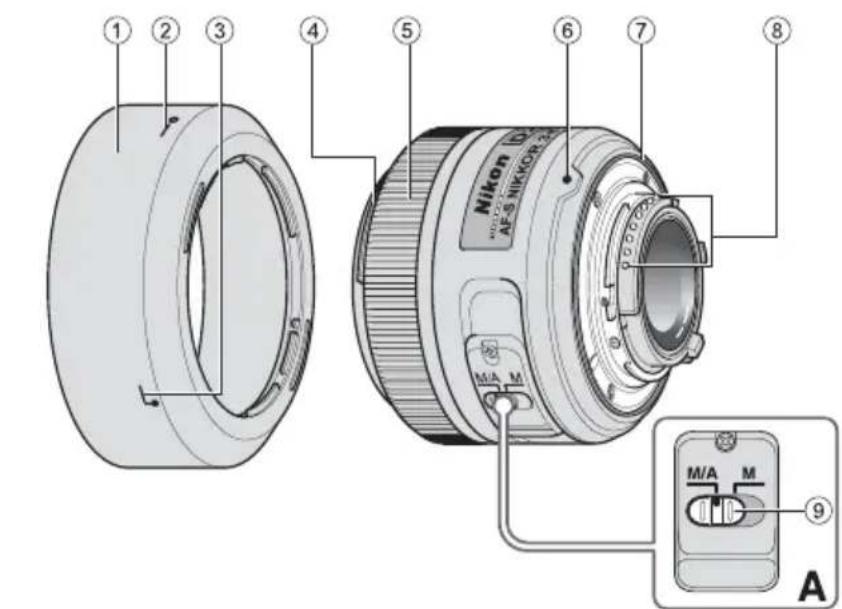
① Lens hood (P. 14)
② Lens hood setting index (P. 14)
③ Lens hood attachment index (P.14)
Lens hood mounting index (P. 14)
⑤ Focus ring (P. 15)
⑥ Mounting index (P. 14)
Lens mount rubber gasket (P. 16)
⑧ CPU contacts (P.16)
⑨ Focus mode switch (P. 15)
( ) : reference page
Thank you for purchasing the AF-S DX NIKKOR 35mm f/1.8G lens. DX Nikkor lenses are specially designed for use with Nikon digital-SLR (Nikon DX format) cameras, such as the D300 and D90. When mounted on Nikon DX format cameras, the lens picture angle is equivalent to approximately 1.5 × the focal length in 35mm format. Before using this lens, please read these instructions and refer to your camera's User's Manual.
Major features
- This lens employs a Silent Wave Motor to drive the focusing mechanism, making autofocusing smooth, silent and almost instantaneous. The focus mode switch (9) is provided for simple selection of autofocus (A) or manual focus (M) operation.
- More accurate exposure control is possible when this is mounted on a Nikon camera with 3D color matrix metering capability, because subject distance information is transferred from the lens to the camera.
- Superior optical performance and rendering characteristics are maximized with the use of one aspherical lens element. In addition, soft and pleasing blur characteristics in portions
of pictures that are out-of focus are achieved by the rounded diaphragm.
- Up to two Wireless Remote Speedlight SB-R200s can be mounted on the edge of the lens.
Using the lens
Mounting the lens on the camera
1 Turn the camera off.
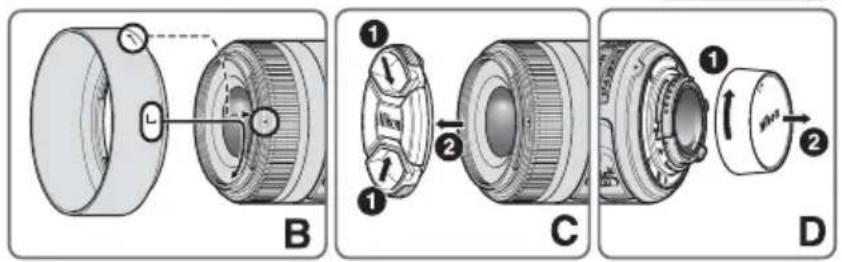
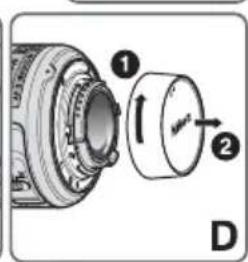
2 Remove the rear lens cap. (Fig. D)
Align the mounting index 6 on the lens with the mounting index on the camera, and rotate the lens counterclockwise until it clicks into place. Be sure that the lens is in the correct position when the mounting index 6 is on the top of the lens.
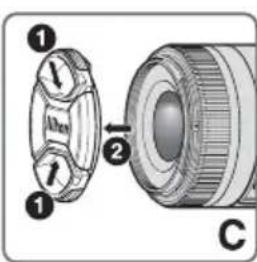
4 Remove the front lens cap. (Fig. C)
Removing the lens from the camera
Turn the camera off.
Press and hold the lens release button on the camera while turning the lens clockwise.
Using the lens hood
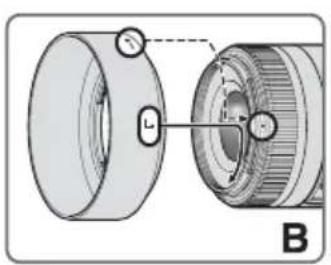
Attaching the hood
Align the lens hood attachment index (either of two indexes) ③ on the hood with the lens hood mounting index ④ on the lens, and
turn the hood counterclockwise (as viewed when holding the camera with the lens facing away from you) until it clicks into place (Fig. B).
- Be sure that the lens hood mounting index is aligned with the lens hood setting index (- ) ②.
- If the lens hood is not correctly attached, vignetting may occur.
- To facilitate attachment or removal of the hood, hold it by the base (near the lens hood attachment index) rather than its outer edge.
- To store the lens hood, attach it in the reverse position.
Detaching the hood
Hold the lens hood by the base (near the lens hood attachment index) and turn clockwise, as viewed when holding the camera with the lens facing away from you, to detach.
■Focusing (Fig. A)
Set your camera's focus mode selector according to the chart below:
| Camera focus mode | Lens' focus mode switch | |
| M/AM | ||
| AF | Autofocus with manual override | Manual focus (Focus assist is available.) |
| MF | Manual focus (Focus assist is available.) | |
For more information on camera focus modes, refer to your camera's User's Manual.
Autofocus with manual override (M/A mode)
1 Set the lens focus mode switch 9 to M/A.
2 Autofocus is enabled, but autofocus operation can be overridden by rotating the separate focus ring 5 while pressing the shutter-release button halfway, or by pressing the AF-ON button on the camera body of cameras so equipped.
Press the shutter-release button halfway or the AF-ON button once again to cancel manual focus and resume autofocus.
Setting the aperture
Use the camera to adjust the aperture setting.
The built-in flash and vignetting
- The built-in flash cannot be used over distances of less than 0.6m (2.0 ft.).
- To prevent vignetting, do not use the lens hood.
- Vignetting is the darkening of the corners around the image that occurs when the light emitted by the flash is obstructed by the lens hood, or lens barrel, depending on the shooting distance.
Lens care
- Be careful not to allow the CPU contacts ⑧ to become dirty or damaged.
- If the lens mount rubber gasket ⑦ is damaged, be sure to visit the nearest Nikonauthorized service representative for repair.
- Clean lens surfaces with a blower brush. To remove dirt and smudges, use a soft, clean cotton cloth or lens tissue moistened with ethanol (alcohol) or lens cleaner. Wipe in a circular motion from the center to the outer edge, taking care not to leave traces or touch other parts of the lens.
- Never use organic solvent such as thinner or benzene to clean the lens, as this could cause damage, result in a fire, or cause health problems.
- NC filters are available to protect the front lens element. The lens hood also helps to protect the front of the lens.
-
When storing the lens in its flexible lens pouch, attach both the front and rear lens caps.
-
When the lens is mounted on a camera, do not pick up or hold the camera and lens by the lens hood.
- When the lens will not be used for an extended period of time, store it in a cool, dry place to prevent mold and rust. Be sure to store the lens away from direct sunlight or chemicals such as camphor or naphthalene.
- Do not get water on the lens or drop it in water as this will cause it to rust and malfunction.
- Reinforced plastic is used for certain the lens. To avoid damage, never leave the lens in an excessively hot place.
Standard accessories
- 52mm snap-on Front Lens Cap LC-52
Rear Lens Cap - Bayonet Hood HB-46
Flexible Lens Pouch CL-0913
■Optional accessory
- 52mm screw-on filters
■Specifications
Type of lens: G-type AF-S DX NIKKOR lens with built-in CPU and Nikon bayonet mount (specially designed for use with Nikon digital-SLR—Nikon DX format—cameras)
Focal length: 35mm
Maximum f/1.8
aperture:
Lens 8 elements in 6 groups (1
construction: aspherical lens element)
Picture angle: 44^
Distance Output to camera
information:
Focusing: Rear Focusing (RF) system, autofocus using a focusing Silent Wave Motor, manually via separate focus ring
Closest 0.3 m (0.98 ft.) from focal
focusing plane
distance:
No.of 7pcs.(rounded)
diaphragm
blades:
Diaphragm: Fully automatic
Aperture f/1.8 to f/22
range:
Exposure Via full-aperture method
measurement:
Attachment 52 mm (P = 0.75mm)
size:
Dimensions: Approximately 70mm (dia.) × 52.5 mm (extension from the camera's lens-mounting flange)
Weight: Approximately 200g (7 oz)
Specifications and designs are subject to change without notice or obligation on the part of the manufacturer.
He pa36npaIte foToKamepy
PpIKoCHOBHeHKe BHyTppeHHM qactm foTOKaMepeblnn O6bekTnBa MoKet npNBecTN K NOyueHIO TpaBM. Pemont doJxhen npON3BOOnTbcra TOnbKO KBaINΦuIupOBaHHbIMn CneuaNtamn. B cnyae IOBpeKdEHN KOpNyca foTOKaMepeblnn O6bekTnBa B pe3yIbTaTe NaDeHn Nn DpyrO rnpocweCTBnR OTKJIIOHTe CeTEBOI 6IOK nITaHn N/IN N3BLeKNTe 6aTapeIO n DOCTaBBte N3deJIne dner npOBepKn B ABTOPIN3OBaHHbI cepBnCHbI ceHTp Nikon.
Ru
B cnyae HncnpaBHOCTn HeMeIeHNO BbIKIOHTe FOToKamepy
Pn noBHeHn Dbima Hn HeObIyHoro 3anaxa,
HCxOJaIeO n3ΦOTOKaMepb Hn O6BeKTHBa,HEMeDneHHO
n3BLeKeTbe 6atapen, CTaparcb He DoNcyCTNb OXoROB.
PpOJIoJxHepe paobtbc yCTpoiCTBOM MOKET npNBecTN K
nOlyeHHIO TpaBM.
Pocne n3BLeueHHa 6batae Hn OTKnIOUeHHa NcTOHnKa
nITaHHa DOCTabBe I3DeJIe NdI npOBepK B 6JIuKaIshn
ABTOPIN3OBAHhbl CepBNCbH cyHTp KOMNaHHN Nikon.
He noIb3yItecB fOToKamepo IIN O6BeKTUBOM npn HAnuH N B Bo3dyXe
JIERKOBOCnIaMeHraUOxXcra30B
Pa6oTa C 3JIeKToHbIM O6OpyDoBaHnEm PnH aHInuB V Bo3DyXe IeKOBocNJaMeHryIOxxCra3OB MoKeT npNBecTN K B3pbBy NnN NOkApY.
He cmoTpnte ha coHnue uepe3 06bekTNB JINBUNCKaTeJIb
EcnnCMOTpebHa coNHe nIIN dpYrne NcTOHnKn npKOro CBeta cepe3 06BeKTNB INN BINOCKaTeNb, TO 3TO MOKeT Bb3BaTb HeO6paTnMoE yXuDSeHnE 3peHnJ.
XpaHnTe B HeOCTynHom JIa TeMeCTe
PpIMTe oocbIe Mepbl npeoctopxHOCTH BO n36exaHne nonadnna 6atapein npynx He60nbux npedmetOB detmB pot.
CobnoaTe cJeDyUoune MepbI npedocToPOxHOCTH BO BpEm 3KcNlyatauIN FOtOKaMEpbI O6bekTnBa
He onyckaTe nonadHnB OdbHa foToKaMepu n o6bekTnB. HecobIoJeHne 3TOr Tpe6oBaHnMoKet npNBecTN K NOxApy INI NopaxKeHIO 3JIeKtpueCeKM TOkOM.
He npkaacaiTecb K foToKaMepe nn nO6BeKTHBy MOKpbIM pykamn. HecobJIOdeHne 3TOrTOpe6oBaHn MOKeT PnBecTN K nopaxKeHIO 3JIeKTPnuEckm TOKOM.
- PnCbEMKe C3aHmN OcBeueHHe HAnpaBJIaTe 06bekTnB Ha CoNHue, a TaKKe He DoynckaTe NOnaDaHnA COHHeHOro CBeTa B 06bekTnB, TaK KaK 3TO MoKet TpNBecTn K NepepeBy foToKaMepbl n ee Bo3rOpaHnIO.
- Ecnn ObkeTnB He 6ydt NcNoJIb3ObaTbc B TeueHne IINTeJIbHO BpeMeHN, PnIKpeNITe NepeDHIIO N 3aIHO KpbIshKo ObkeTnBA H He OCTabJrte ObkeTnB NOI npMblIM CoJIHeYHbIM N LyaMn. HecO6NIoDeHne 3TOrO YcNOBm MOKeT PnIBeCTN K Bo3RopaHIO, NocOKlbky ObkeTnB MoKeT CcOkycnPoBaTb CoJIHeHbIe N LyuHa KaKOM-NI60 JeRKOBCnJaMaHeHIOUeMcPpeMeTe.
■KOMNOHEHTbI
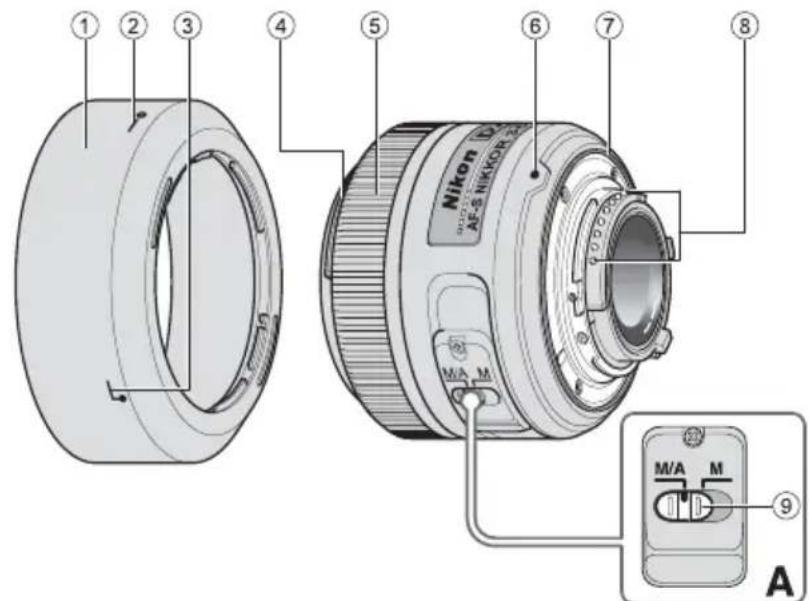
① BneHda(CTP.45)
② MeTkaФИКcaUH6JIeHbI(CTP.45)
③ MeTka KpePJIeHnIa 6JIeHdbl (CTP.45)
④ YcTaHOBOUHAR MeTKa 6JIeHdbI (CTP.45)
⑤ФokycnpoBOOHoeKoJIbIcO(CTP.45)
⑥ YCTaHOBOUHAR MeTKa (CTP. 44)
⑦ Pe3nHObbl yNIOTHNTeIb KpeJIeHnO6BeKtNbA (CTP. 46)
⑧ Pa3bembl npoueccopa (CTP. 46)
⑨ПepeключateNBpexIMOBФokycuropBKN(CTP.45)():cnpaBoUHЯ cTpaHnua
OCHOBHbIE BO3MOXHOCTN
Данн布局бькгИисплб3уET6eСшньI BOHBOI npIBoSilent Wave Motor nIynpaBHeHЯ MExaHn3MOMФOKycuPOBKN,YTO DeIaet IpoUeCC aTbOfOKycuPOBKN pIaBHbIM, 6ecShyMHbIM nIpaKTNUeCKN MrHOBeHHbIM. IpeKJIIOUaTeNb peKIMOBФOKycuPOBKn ⑨ IcNoIb3yETcIgIyDObHOro nepeKIIIOUeHЯ MEXdY aBTOMaTNUeCKM(A) npyHbIM (M) peKImaMnФokycuPOBKn.
-ПиИСПОЛБ3OBAHIN OБЕКТИВа C ФОТOKамрAMN Nikon cФунк ue 3DцБETOBOro MaTpPnHOrO 3aMepa obecneuBaetc60nee TOnHbI KOHTpOJIb 3KcNo3UeN,Тak KaK DaHHbIe OpacCTOraHIN Do OБЕКТAppeDAHOTc C OБЕKТИВa Ha ФОТOKampey.
-Благораря Испльбовнию OДнОй acферческй
ЛИНЗblуЧаЮТС ПпeВOCxODHье OПТУЕСКп
харазКтеристIKN I BO3MOЖHOCТ Nперадч. Крм
ТOrO, СКрглелногдиаФparma ОБecпунBaET
БОлee КрасИВье МЯrkne И НЕrschье OЧерТань ТЕ
ЧаTeР CHIMKA, KOTOpье HaxОДТСВ ВЕ ФOKуca.
Ha KpaHO oBbEeKTHBa MOKHcMOHTnPoBaTb Do DByX 6ecnpoBOdHbIX dNCTaHcNoHHO ynpabJraEmbIX BCnbIweK SB-R200.
IcnoJb3ObaHne o6beKtNbBa
YcTaHOBka o6BeKTHBa Ha KaMepy
1 BbIKHouHTe oToKaMepy.
2 CHHmnte 3aAHHO KpbIuKy o6bekTnBa. (pnc. D)
3 CoBmecHTNe yCTaHOBOHyU MEKy ⑥ Ha OBeKTNBc C YCTaHOBOHOn MEKoHa FOtOKaMepe N NOBepHnte OBeKTNB npOTNb YacOBn CTpeKN Do UeJIYka. Y6eINTEcB, YTO OBeKTNB YCTaHOBHe NpaBnIbHo, npN 3TOM yCTaHOBOHn Ma METKa ⑥ DOJXHa HxOJNTbc B BEpxHE MNOJoxEHn.
4 CHMNTe nepeHIOKpbIuKy o6bekTnBa.(pnc.C)
Charne oBekTnBa c KamepbI
1 BbIKHouHTe oToKaMepy.
2 HaKMTe N ydepKbAaTe KHOJky OTCOeHHeHn oBeKtNaHaΦOTOKaMepe, n NobepHTe oBeKtN B NO YacOBoC TpeJIke.
IcnoJb3ObaHne 6JeHdbI
PpncoeDnHeHne 6JenHbI
CoBmecTnMBMeTKyKpeJIeHn6IeHdbI(,
1IO6aH3DByXMeTOK)③HaYCTaHOBOUHOmMeTKe
6IeHDbI 4HaOBeKTNB,IOBOPaUNBaNTe
6IeHny IpOTnVB YacOBoN CTpeJIKN (depKa
ΦOTOKamepy OBeKtNBOM OT Ce6)do IONHOJ
ΦHKcaunn (pnc.B).
- y6eIntecb, yTO yCTaHOBOHHaMaMeTka 6JneHdbi coBnadaet C MeTKoФHKcauN 6JHeHdbI (—O) ②.
- Ecni 6IeHda yCTaHOBJIeHa Ha o6BeKTnB HeHaIpeKaIIM O6pa3OM, MOKeT BO3HNKHyTb 3ΦΦeK T BnHbETnpOBaHn.
-ДяооблereнуycTaHOBиИи ChЯТЯ 6JIeHdbI ydepxBaIte ee 3a ochobAHne (pAdom C MeTKoI KpenJIeHn6JIeHdbI), a He 3a BHeuHIOKpOMky.
-Дяхраненябпндьлриссйнгte eeв obpaTHOM NOLOXKeHn.
OTcoeINHeHne 6JeHdbI
YTo6bI OTCOeHnHTb 6JIeHdy, yJepKuBaIte ee 3a OCHOBaHHe (PraOM C MetKOJ KpeNIIeHn8 6JIeHdbI) N NOBepHnTe No YacOBoB CTpeJIke, yJepKuBaI aΦOTOKaMepy 06BeKTNBOM OT Ce6J.
ФokycnpoBka(pnc.A)
YcTaHOBHTe CeJIeKTop pExkmaΦOKyCnPOBKn KaMepbI B COOTBETCTBn C HIXKePnBeDeHHoT TaBnCeIe.
No reproduction in any form of this manual, in whole or in part (except for brief quotation in critical articles or reviews), may be made without written authorization from NIKON CORPORATION.
NIKON CORPORATION
Printed in China
© 2010 Nikon Corporation

YP4L02(D9) 7MAA57D9-02





- Notes on Safety Operations
- CAUTION
- Do not disassemble
- Turn off immediately in the event of malfunction
- Do not use the camera or lens in the presence of flammable gas
- Do not look at the sun through the lens or viewfinder
- Keep out of reach of children
- Observe the following precautions when handling the camera and lens
- ■Nomenclature
- Major features
- Using the lens
- Mounting the lens on the camera
- Removing the lens from the camera
- Using the lens hood
- Attaching the hood
- Detaching the hood
- ■Focusing (Fig. A)
- Autofocus with manual override (M/A mode)
- Setting the aperture
- The built-in flash and vignetting
- Lens care
- Standard accessories
- ■Optional accessory
- ■Specifications
- He pa36npaIte foToKamepy
- Ru
- B cnyae HncnpaBHOCTn HeMeIeHNO BbIKIOHTe FOToKamepy
- He noIb3yItecB fOToKamepo IIN O6BeKTUBOM npn HAnuH N B Bo3dyXe
- JIERKOBOCnIaMeHraUOxXcra30B
- He cmoTpnte ha coHnue uepe3 06bekTNB JINBUNCKaTeJIb
- XpaHnTe B HeOCTynHom JIa TeMeCTe
- CobnoaTe cJeDyUoune MepbI npedocToPOxHOCTH BO BpEm 3KcNlyatauIN FOtOKaMEpbI O6bekTnBa
- ■KOMNOHEHTbI
- OCHOBHbIE BO3MOXHOCTN
- IcnoJb3ObaHne o6beKtNbBa
- YcTaHOBka o6BeKTHBa Ha KaMepy
- Charne oBekTnBa c KamepbI
- IcnoJb3ObaHne 6JeHdbI
- PpncoeDnHeHne 6JenHbI
- OTcoeINHeHne 6JeHdbI
- ФokycnpoBka(pnc.A)
Brand : NIKON
Model : Nikkor AFS DX 35mm f1.8G
Category : Camera lens