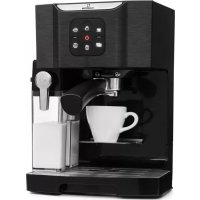
BellaVita - Coffee machine Klarstein - Free user manual and instructions
Find the device manual for free BellaVita Klarstein in PDF.


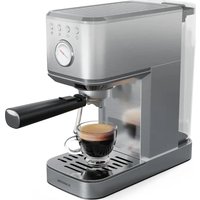
| Brand | Klarstein |
| Model | BellaVita |
| Product type | Espresso machine with integrated milk frother |
| Power supply | 220-240 V ~ 50/60 Hz |
| Power | 1240-1450 W |
| Water tank capacity | 1.4 L (1400 ml) |
| Coffee type usable | Ground coffee (finely ground espresso) |
| Main functions | Single espresso, double espresso, cappuccino, latte macchiato, milk foam |
| Control panel | Touch with backlight |
| Light indicators | Red (low water level), Yellow (descaling) |
| Quantity programming | Manually adjustable for each drink |
| Milk foam system | Integrated milk container with lever and consistency adjustment button |
| Filter holder | With single and double cup filter elements |
| Drip tray | Large removable tray |
| Self-cleaning function | 60-second cycle for the milk system |
| Descaling | Two-step automatic program (with vinegar or descaling agent) |
| Safety | Automatic shut-off, low water level alarm, stable surface |
| Maintenance and cleaning | Clean the milk container and filters after each use; descaling recommended every 70 uses |
| Weight (approx.) | 4.5 kg |
| Dimensions (approx.) | 30 x 25 x 35 cm |
| Item number | 10032806, 10032807, 10041240 |
| Manufacturer | Chal-Tec GmbH, Germany |
| Intended use | Household only |
Frequently Asked Questions - BellaVita Klarstein
User questions about BellaVita Klarstein
0 question about this device. Answer the ones you know or ask your own.
Ask a new question about this device
Download the instructions for your Coffee machine in PDF format for free! Find your manual BellaVita - Klarstein and take your electronic device back in hand. On this page are published all the documents necessary for the use of your device. BellaVita by Klarstein.
USER MANUAL BellaVita Klarstein
INHALTSVERZEICHNIS
Berlin Brands Group UK Limited
PO Box 42
272 Kensington High Street
London, W8 6ND
United Kingdom
SICHERHEITSHINWEISE
natural_image
Symbol of a trash bin crossed with a diagonal line, no text or numbers presentCongratulations on purchasing this device. Please read the following instructions carefully and follow them to prevent possible damages. We assume no liability for damage caused by disregard of the instructions and improper use. Scan the QR code to get access to the latest user manual and more product information.

CONTENT
Safety Instructions 16
Overview and Buttons 17
Before First Use 18
Auto Programmes 18
Manual Adjustment of the
Filling Quantity 21
Cleaning and Care 22
Troubleshooting 23
Hints on Disposal 24
TECHNICAL DATA
| Item number 10032806, 10032807, 10041240 | |
| Power supply 220-240 V ~ 50/60 Hz | |
| Power consumption 1240-1450 W | |
MANUFACTURER & IMPORTER (UK)
Manufacturer:
Chal-Tec GmbH, Wallstrasse 16, 10179 Berlin, Germany.
Importer for Great Britain:
Berlin Brands Group UK Limited
PO Box 42
272 Kensington High Street
London, W8 6ND
United Kingdom
SAFETY INSTRUCTIONS
- Read all the safety and operating instructions carefully and retain them for future reference.
- The appliance is designed exclusively for private use and for the envisaged purpose. This appliance is not fit for commercial use.
- Don't use it outdoors. Keep it away from sources of heat, direct sunlight, humidity (never dip it into any liquid) and sharp edges. Do not use the appliance with wet hands. If the appliance is humid or wet, unplug it immediately.
- When cleaning or putting it away, switch off the appliance and always pull out the plug from the socket (pull the plug itself, not the lead) if the appliance is not being used and remove the attached accessories.
- Do not operate the machine without supervision. Never leave the operating machine unattended. If you leave the room you should always turn the device off. Remove the plug from the socket.
- The device and the mains lead have to be checked regularly for signs of damage. If damage is found the device must not be used.
- Do not try to repair the appliance on your own. Always contact an authorized technician. To avoid the exposure to danger, always have faulty cable be replaced only by the manufacturer, by our customer service or by qualified person and with a cable for the same type.
- In order to ensure your children's safety, please keep all packaging (plastic bags, boxes, polystyrene etc.) out of their reach.
- This device is not intended to be used by individuals (including children) who have restricted physical, sensory or mental abilities and/or insufficient knowledge and/or experience, unless they are supervised by and individual who is responsible for their safety or and have received instructions on how oto use the device. Children should be supervised at all times in order to ensure that they do not play with device.
- Place the coffee machine on a firm and flat surface. Position it so that it cannot tip over.
- Never apply accessory attachments which are not specified for this appliance.
- Do not touch hot parts of appliance.
- Do not place the device directly next to a gas or electric cooker or any other source of heat.
- The water tank must only be filled with cold water! Never open the filter cover during the boiling process, as otherwise this may cause burns.
• The appliance is only to be used as described in this user manual.
- Do not use the appliance for any commercial purposes.
- Any other use is not intended and can result in damages or personal injuries.
- The manufacturer assumes no liability for damages caused by improper use.
- This appliance is not intended for use by persons(including children) with reduced physical, sensory or mental capabilities, or lack of experience and knowledge, unless they have been given supervision or instruction concerning use of the appliance by a person responsible for their safety. Children should be supervised to ensure that they do not play with the appliance.
OVERVIEW AND BUTTONS
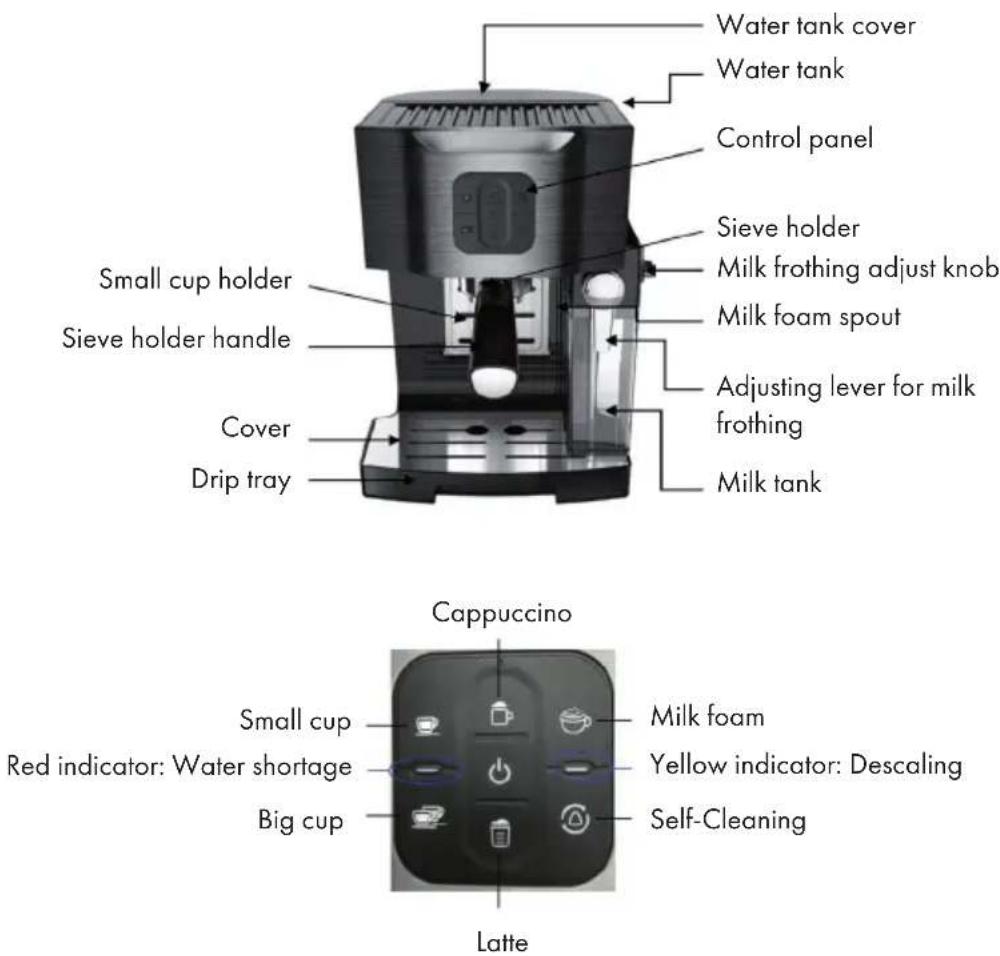
Note: The unit has the water shortage warning function. When the water tank lacks of water, the unit will start alarming with red indicator illuminated red and unit beeping alternately. After the water thank re-fill with water, press any button to resume the water pumping first until the red illumination turn off. The unit is then ready for pre-heating.
BEFORE FIRST USE
- Put the milk tank assembly into the machine and plug in.
• Fill max 1400 ml water into the water tank
- Press power on. All buttons on the control panel will flash simultaneously. Press any button to pump the water into the pipeline till the white lighting turns off. Pre-heating mode begins.
- Once the temperature reaches the default setting, the lighting stops flashing and the unit beeps
AUTO PROGRAMMES
(1) Single cup espresso brewing

- Place the single cup filter insert in sieve holder.
- Use the coffee spoon to fill single cup filter with fine ground espresso coffee, approximately one spoon for single cup filter. Press the coffee powder down into the filter, using the flat end of the measuring spoon to help.
- Insert sieve holder in the machine with the handle pointing to the left, turn the handle to right until lock well with shower head. Press the single cup button.
- The button will be illuminated white and the solenoid pump will start water pumping.
- The brewing cycle will complete once the unit beeps once.
(2) Double cup espresso brewing

- Place the double cup filter insert in sieve holder.
- Use the coffee spoon to fill double cup filter with fine ground espresso coffee, approximately one and a half spoon for double cup filter. Press the coffee powder down into the filter, using the flat end of the measuring spoon to help.
- Insert sieve holder in the machine with the handle pointing to the left, turn the handle to right until lock well with shower head. Press the double cup button.
- The button will be illuminated white and the solenoid pump will start water pumping.
- The brewing cycle will complete once the unit beeps once.
(3) Cappuccino Brewing

- To detach the milk tank assembly, carefully hold the milk tank by one hand, and press the button on right side of milk tank cover by another hand to remove the milk tank assembly, gently move out the milk tank assembly to the side at the same time.
- Remove the milk tank cover by pressing the release button on the side of the milk tank cover, flipping it up to one side and taking it off.
- Add the milk into the milk tank. Always fill the milk beneath the max mark. The suggested temperature for milk is 4-8 °C.
- Put on the milk tank cover, insert the milk tank assembly into the correct position. Adjust the angle of milk foam spout to the right place by using the milk frothing lever. This machine enables the user to adjust the foam ratio by rotating the knob from Max to Min to enjoy the desired foam.
- Place single cup filter insert in sieve holder.
- Fill the filter with fine ground espresso coffee, press the coffee powder down into the filter, using the flat end of the measuring spoon to help.
- Insert sieve holder in the machine with the handle pointing to the left, turn the handle to right until lock well with shower head. Press the cappuccino button.
- The button will be illuminated white and the unit will start working. The pump will work intermittently to pump the water and the milk foam will come out to your cup first. After the milk foam finished, the unit starts to brew the coffee into the cup.
- The cappuccino brewing cycle will complete once the unit beeps once.
(4) Latte Brewing

- To detach the milk tank assembly, carefully hold the milk tank by one hand, and press the button on right side of milk tank cover by another hand to remove the milk tank assembly, gently move out the milk tank assembly to the side at the same time.
- Remove the milk tank cover by pressing the release button on the side of the milk tank cover, flipping it up to one side and taking it off.
- Add the milk into the milk tank. Always fill the milk beneath the max mark. The suggested temperature for milk is 4-8 °C.
- Put on the milk tank cover, insert the milk tank assembly into the correct position. Adjust the angle of milk foam spout to the right place by using the milk frothing lever. This machine enables the user to adjust the foam ration by rotating the knob the Max to Min to enjoy the desired foam.
- Place one single cup filter insert in sieve holder.
- Fill the filter with fine ground espresso coffee, press the coffee powder down into the filter, using the flat end of the measuring spoon to help.
- Insert sieve holder in the machine with the handle pointing to the left, turn the handle to right until lock well with shower head. Press the latte button.
- The button will be illuminated white and the unit will start working. The pump will work intermittently to pump the water and the milk foam will come out to your cup first. After the milk foam finished, the unit starts to brew the coffee into the cup.
- The latte brewing cycle will complete once the unit beeps once.
Important: Clean the milk frothing system after each use to avoid any milk residue. User can simply wash the milk tank and clean the tube under tap water, then fill in the milk tank with clean water and press clean button.
Important: Clean the milk frothing system after each use to avoid any milk residue. User can simply wash the milk tank and clean the tube under tap water, then fill in the milk tank with clean water and press clean button.
(5) Milk foam

- To detach the milk tank assembly, carefully hold the milk tank by one hand, and press the button on right side of milk tank cover by another hand to remove the milk tank assembly, gently move out the milk tank assembly to the side at the same time.
- Remove the milk tank cover by pressing the release button on the side of the milk tank cover, flipping it up to one side and taking it off.
- Add the milk into the milk tank. Always fill the milk beneath the max mark. The suggested temperature for milk is 4-8 °C.
- Put on the milk tank cover, insert the milk tank assembly into the correct position. Adjust the angle of milk foam spout to the right place by using the milk frothing lever.
- Press the milk foam button.
- The button will be illuminated white. The pump will work intermittently to pump the water and the milk foam will come out to your cup.
- The milk foam cycle will complete once the unit beeps once.
(6) Self-Cleaning

- Fill water into water tank to max mark.
- Short press the cleaning button. The clean button will flash. The pump will start working intermittently, and clean the milk frothing system for 60 seconds.
- The self-cleaning will complete once the unit beeps once, and machine enters into standby mode.
(7) Descaling and intense cleaning of the machine

Fill water into water tank to max mark, and put white household vinegar into water. Press the cleaning button over 3 seconds. The clean button will flash. The unit will start first step of cleaning:
1 The pump will work intermittently for 20 seconds for coffee brewing system.
2 The pump will intermittently work for 20 seconds for milk frothing system.
3 The unit repeats step 1 and 2 for 22 cycles independently.
4 The first step of cleaning finishes. The light is on. Press cleaning button again to enter 2nd step. Be reminded to add enough water into water tank to continue the 2nd step of descaling.
5 The pump works intermittently for 2 min to clean the milk frothing system.
6 The pump works intermittently for 3 minutes and 40 seconds to clean the coffee brewing system.
7 The cleaning is completed with the unit beeps twice. And the unit will back to standby mode.
MANUAL ADJUSTMENT OF THE FILLING QUANTITY
For each menu below, this unit enables the user to set the size to their desired amount:
- Espresso, double Espresso and Milk foam
• Cappuccino and Latte
Steps to set Espresso, double Espresso and Milk foam:
1 The unit will enter pre-heating first after power on. All lighting will flash. Wait till the lights become solid. Then start to set the size.
2 Push & keep pressing the button(Espresso, double espresso, milk foam) you will hear 3 beeps.
3 Holding the button for more than 3S until the desired quantity is reached. Then release the button, the quantity will automatically be saved for next time use.
Steps to set Cappuccino and Latte:
1 The unit will enter pre-heating first after power on. All lighting will flash. Wait till the lights become solid. User can then start to set the size.
2 Push either Capp or Latte button first to enter the Capp or latte menu.
(A) Press the button again and hold it for more than 3s to start the milk foam size setting. Release the button until the desired milk foam quantity is reached.
(B) The unit then goes on for coffee brewing. Press down & hold the button again to set the coffee size. Release the button when the desired quantity of coffee size is reached.
3 The quantity of Capp or Latte is automatically saved for next time use.
How to reset to Default


• Make sure the machine is in off state but power on.
- Press and hold Espresso & double espresso buttons
- Press on/off button. All five lighting flash & 5 beeps mean that factory default setting is achieved.
- Release the buttons
TIPS FOR MAKING COFFEE
- Preheat the cups! A cold cup reduces the temperature of the coffee by 20 °C.
- Use ceramic cups. Do not use pottery or glass.
- Heat the filter cup and the coffee machine by starting a cycle with water only and without ground coffee in the filter.
• To make a Long Black, add hot water to an espresso.
CLEANING AND CARE
- Clean the milk tank and the filters after every use with mild detergent and warm water.
- Rinse through the tube in the milk tank with clear hot water to remove milk residues after every use.
- If necessary, clean the water tank and the drip tray and the cover with mild detergent and warm water.
- Regularly run the cleaning programme to clean the milk tank system as well as the coffee outlet on the filter.
- Wipe down the housing with a damp cloth. If necessary, use a little mild detergent to remove more intense soiling.
- Thoroughly dry the device and all accessories before assembling it again.
- Check the mains cable regularly for any damage.
Descaling the machine
Regular decalcifying is important and is recommended after using your product for 70 times. This coffee maker offers a built-in reminder. When the ON/OFF indicator of the coffee maker flashes rapidly, you should:
1 Fill the water tank with descaling agent and water to Max mark according to the descaling agent instructions.
2 Place the filter inside the holder and keep it there during the descaling process.
3 Place a container right under the filter to collect the descaling water.
4 Wait for several minutes until the descaling agent dissolves with the water.
5 Press the coffee/tea button to start the brewing until the cycle is finished.
6 Repeat the operation several more times if necessary.
7 Fill the water tank with clean water till MAX mark in order to rinse the brewing circuit.
8 Press the coffee/tea button again to do the rinse cycle until the cycle is finished. Repeat it twice at least using clean water.
TROUBLESHOOTING
| Problem Possible Cause | |
| Coffee is leaking. Too much coffee in the filter. | Coffee grind is too fine. (Please use coarsed ground only!) |
| Coffee has been tamped too tightly. | |
| The filter is clogged with coffee ground. |
HINTS ON DISPOSAL
natural_image
Symbol of a trash bin crossed with a diagonal line, no text or labels presentIf there is a legal regulation for the disposal of electrical and electronic devices in your country, this symbol on the product or on the packaging indicates that this product must not be disposed of with household waste. Instead, it must be taken to a collection point for the recycling of electrical and electronic equipment. By disposing of it in accordance with the rules, you are protecting the environment and the health of your fellow human beings from negative consequences. For information about the recycling and disposal of this product, please contact your local authority or your household waste disposal service.
Estimado cliente,
ÍNDICE DE CONTENIDOS
Berlin Brands Group UK Limited
PO Box 42
272 Kensington High Street
London, W8 6ND
United Kingdom
natural_image
Symbol of a trash bin crossed with a diagonal line, no text or numbers presentSOMMAIRE
Berlin Brands Group UK Limited
PO Box 42
272 Kensington High Street
London, W8 6ND
United Kingdom
CONSIGNES DE SÉCURITÉ
natural_image
Symbol of a trash bin crossed with a diagonal line, no text or numbers presentINDICE
PRODUTTORE E IMPORTATORE (UK)
Produttore:
Chal-Tec GmbH, Wallstraße 16, 10179 Berlino, Germania.
Berlin Brands Group UK Limited
PO Box 42
272 Kensington High Street
London, W8 6ND
United Kingdom
AVVERTENZE DI SICUREZZA
natural_image
Symbol of a trash bin crossed with a diagonal line, no text or numbers presentINHOUDSOPGAVE
Berlin Brands Group UK Limited
PO Box 42
272 Kensington High Street
London, W8 6ND
United Kingdom
VEILIGHEIDSINSTRUCTIES
INSTRUCTIES VOOR AFVOER
natural_image
Symbol of a trash bin crossed with a diagonal line, no text or numbers present
- INHALTSVERZEICHNIS
- SICHERHEITSHINWEISE
- CONTENT
- MANUFACTURER & IMPORTER (UK)
- Manufacturer:
- Importer for Great Britain:
- SAFETY INSTRUCTIONS
- OVERVIEW AND BUTTONS
- BEFORE FIRST USE
- AUTO PROGRAMMES
- Single cup espresso brewing
- Double cup espresso brewing
- Cappuccino Brewing
- Latte Brewing
- Milk foam
- Self-Cleaning
- Descaling and intense cleaning of the machine
- MANUAL ADJUSTMENT OF THE FILLING QUANTITY
- Steps to set Espresso, double Espresso and Milk foam:
- Steps to set Cappuccino and Latte:
- How to reset to Default
- TIPS FOR MAKING COFFEE
- CLEANING AND CARE
- Descaling the machine
- TROUBLESHOOTING
- HINTS ON DISPOSAL
- Estimado cliente,
- ÍNDICE DE CONTENIDOS
- SOMMAIRE
- CONSIGNES DE SÉCURITÉ
- INDICE
- PRODUTTORE E IMPORTATORE (UK)
- Produttore:
- AVVERTENZE DI SICUREZZA
- INHOUDSOPGAVE
- VEILIGHEIDSINSTRUCTIES
- INSTRUCTIES VOOR AFVOER
Brand : Klarstein
Model : BellaVita
Category : Coffee machine