
Mini 10032175 - Oven Klarstein - Free user manual and instructions
Find the device manual for free Mini 10032175 Klarstein in PDF.


| Product type | Countertop oven with ceramic hobs |
| Brand | Klarstein |
| Model | Mini 10032175 |
| Power supply | 230 V ~ 50 Hz |
| Cooking hob power | 1600 W + 1600 W |
| Oven power | 1600 W |
| Oven capacity | 38 L |
| Oven temperature range | 100 - 230 °C |
| Hob temperature levels | From 250 °C (level 1) to 550 °C (level 4) |
| Timer | Up to 60 minutes |
| Cooking functions | Top heat, bottom heat, both, grill, reheating, convection, rotisserie |
| Included accessories | Baking tray, grill rack, rotisserie spit, handle |
| Door material | Reinforced safety glass |
| Cleaning | Warm soapy water, avoid abrasives and sharp objects |
| Safety | Automatic shut-off when timer is OFF; hot surfaces; do not use outdoors |
| Repairability | Repairs only by a professional |
Frequently Asked Questions - Mini 10032175 Klarstein
User questions about Mini 10032175 Klarstein
0 question about this device. Answer the ones you know or ask your own.
Ask a new question about this device
Download the instructions for your Oven in PDF format for free! Find your manual Mini 10032175 - Klarstein and take your electronic device back in hand. On this page are published all the documents necessary for the use of your device. Mini 10032175 by Klarstein.
USER MANUAL Mini 10032175 Klarstein
Congratulations on purchasing this equipment. Please read this manual carefully and take care of the following hints to avoid damages. Any failure caused by ignoring the mentioned items and cautions mentioned in the instruction manual are not covered by our warranty and any liability.
CONTENT
Safety Instructions 14
Product Description 15
Before first Use 16
Operation 18
Care and Cleaning 21
Hints on Disposal 21
TECHNICAL DATA
| Item number 10032175 | |
| Power supply 230 V ~ 50 Hz | |
| Power (Plates) 1600 W + 1600 W | |
| Power (Oven) 1600 W | |
| Capacity 38 L |
DECLARATION OF CONFORMITY
Producer:
Chal-Tec GmbH, Wallstraße 16, 10179 Berlin, Germany.
This product is conform to the following European
Directives:

2014/30/EU (EMC)
2014/35/EU (LVD)
2011/65/EU (RoHS)
2009/125/EG (ErP)
SAFETY INSTRUCTIONS
- Read all the safety and operating instructions carefully and retain them for future reference.
- Do not touch hot surfaces. Always use handles or knobs.
- Close supervision is necessary when any appliance is used by or near children.
- To protect against electric shock, do not immerse cord, plug or any parts of the oven in water or any other liquids.
- Do not let cord hang over edge of table or counter, or touch hot surfaces.
- Do not operate appliance with damaged cord or plug or after the appliance malfunctions or has been damage in any manner. Return appliance to it's authorized agent for repair, as special purpose tools are required
- The use of accessory attachments not recommended by the appliance manufacturer may cause hazard or injury.
- Do not place on or near a hot gas or electric burner.
- When operating the oven, keep at least four inches of free space on all sides of the oven to allow for adequate air circulation. Unplug from outlet when not in use and before cleaning.
- Allow to cool before putting on or taking off parts, and before cleaning.
- To disconnect, turn the time control to OFF, then remove the plug. Always hold the plug, and never pull the cord. Do not cover crumb tray or any part of the oven with metal foil. This may cause the oven to overheat.
- Use extreme caution when removing the tray, racks or disposing of hot grease or other hot liquids.
- Do not clean the inside of the oven with metal scouring pads, pieces can break off the pad and touch electrical parts, creating a risk of electric shock.
- Oversized foods or metal utensils must not be inserted in a toaster oven as they may create a fire or risk of electric risk.
- A fire may occur if the oven is covered or touching flammable material, including the curtains, draperies,
- walls, and the like, when in operation. Do not store any item on top of the appliance when in operation.
- Extreme cautions should be exercised when using cooking or baking containers constructed of anything other than metal or ovenproof glass.
- Be sure that nothing touches the top or bottom elements of the oven.
- Do not place any of the following materials in the oven: cardboard, plastic, paper, or anything similar.
- Do not store any materials other than manufacturer's recommended accessories in this oven when not in use.
Always wear protective, insulated oven gloves when inserting or removing items from the hot oven. - This appliance has a tempered, safety glass door. The glass is stronger than ordinary glass and more resistant to breakage. Tempered glass can still break around edges. Avoid scratching door surface or nicking edges.
- This appliance is OFF when the Timer Control button is in the "OFF" position.
- Do not use outdoors. Do not use appliance for other than intended use.
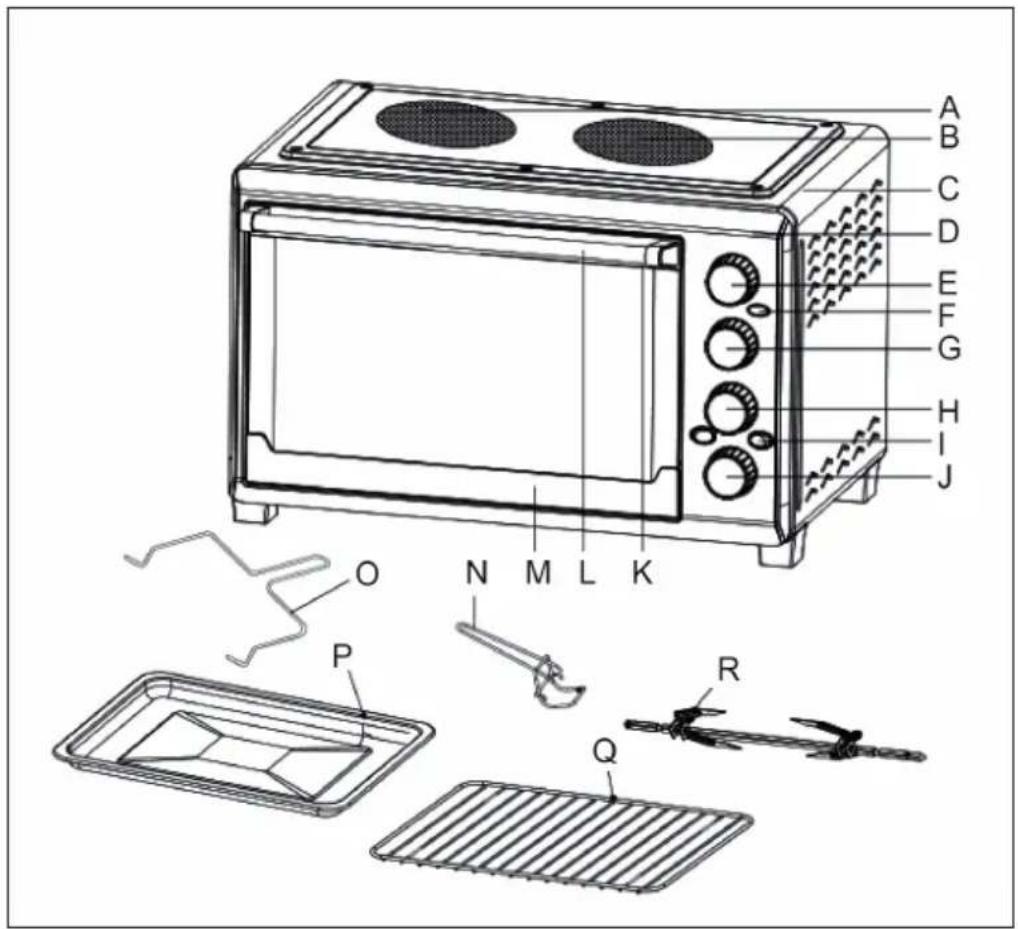
| A Left ceramic plate J Time control knob |
| B Right ceramic plate K Upper door frame |
| C Housing L Door handle |
| D front panel M Lower door frame |
| E oven Temperature knob N Tray handle |
| F Indicator light O Rotisserie handle |
| G Ceramic plates temperature knob P Bake tray |
| H Switch knob Q Wire rack |
| I Function control knob R Rotisserie spit |
BEFORE FIRST USE
Wash all the accessories in hot, soapy water or in the dish washer. Thoroughly dry all accessories and re-assemble in oven, plug oven into outlet and you are ready to use your new toaster oven. After re-assembling your oven, we recommend that you run it at the highest temperature (230 °C) on the toast function for approximately 15 minutes to eliminate any packing residue that may remain after shipping.
Please familiarize yourself with the following oven functions and accessories prior to first use:
Ceramic Plates and oven Control
The oven could work separately.
- The ceramic plates could work separately
- The oven could work with one of ceramic plate at the same time.
- When the left and right ceramic plates (1600W + 1600W) are working at the same time, oven could not work, since oven could work only with one of ceramic plate at the same time.
9 control modes are as follows:
Off / upper heating / lower heating / upper & lower heating / upper & lower heating & left plates / upper & lower & right plates / left plates / right plates / left & right plates.
Modes and Symboles
| OFF | The oven or ceramic plates could not work. |
| Upper heating | |
| Lower heating | |
| Upper & lower heating | |
| Upper & lower heating & left ceramic plates | |
| Upper & lower heating & right ceramic plates |
| Left ceramic plates |
| Right ceramic plates |
| Left & right ceramic plates |
The temperature Range of ceramic plate is 0 550^ Off,1,2,3,4 indicate the temperature. It is increasing from low to high.
1 is around 250^
2 is around 350^
3 is around 450^
4 is around 550^
Oven temperature and functions
Oven temperature Control: choose the desired temperature from 100^ to 230^ for cooking, the inner light will be on only when oven is working.
Function Control: There are 5 function selection and 4 rack positions inside the oven:
| Broil | Please note that the Broil function uses only the upper heating elements. | |
| Bake | Please note that the Bake function uses only the bottom heating elements. | |
| Toast | Both upper and lower heating elements work together, suitable for toasting bread,muffins,frozen waffles,pizza,etc. | |
| ←→ | Rotisserie | Rotisserie motor work,suitable for cooking a whole chicken, fish,pork,beef etc. |
| * | Convection | Convection fan work,suitable for toasting bread,muffins,frozen waffles,pizza,etc. |
Timer:
When you turn activate the timer segment of the control, turn to the right ( clockwise) to toast or use as a timer (up to 60 minutes). This function also has a bell rings at the end of the programmed time.
Indicator Light:
It will light when the timer is turned on.
Bake Tray:
For use in broiling and roasting meat, poultry, fish and various other foods.
Wire Rack:
For toasting, baking, and general cooking in casserole dishes and standard pans.
Tray Handle:
Allows you to pick up the wire rack, and bake tray when they are hot.
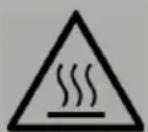
CAUTION
Risk of burns! To avoid risk of injury or burns, do not touch hot surfaces when oven is in use. Always use oven mitts.
OPERATION
How to use the Convection Function

Convection cooking combines hot air movement by means of a fan with the regular features (broil, bake and toast). Convection cooking provides faster cooking in many cases than regular radiant types toaster oven. The convection fan works when you turn the knob to Lower heater and Convection. The convection fan works automatically when the function knob is turned on.
We recommend that you do not cook a roast larger than 4-5 lbs. on the rotisserie set.
Chicken should be bound in a string to prevent the chicken legs or wings from unraveling during roasting so that rotisserie assembly will rotate smoothly. For best results we recommend that you preheat the oven for 15 minutes on 230^ .
1 Insert the meat or poultry that you are going to cook onto the rotisserie set. Making sure that the meat or poultry is secured tightly with the skewer clamps and thumbscrews. Make sure that the meat or poultry is centered onto the skewer.
2 Insert the pointed end of the rotisserie skewer into the drive socket located on the right hand side of the oven wall. Make sure that the square end of the rotisserie skewer rests on the rotisserie skewer support located on the left hand side of the oven wall.
3 Slide the bake tray onto the lowest position to catch possible food drippings.
4 Turn the temperature control knob to your desired temperature.
5 Turn the function knob to Rotisserie.
6 Turn the timer knob to your desired cooking time.
7 When the cooking is completed, the oven bell will ring; turn the third function knob to "OFF".
8 Remove the rotisserie set from the oven by placing the hooks of the rotisserie handle under the grooves on either side of the rotisserie set, lift the left side of the rotisserie set first by lifting it up and out. Then pull the rotisserie set out of the drive socket and carefully remove the roast from the oven.
9 Take the meat or poultry off the rotisserie skewer and place on a cutting board or platter.
How to Toast
Please note that the TOAST function uses all the heating elements. Large capacity oven allows for toasting 4 to 6 slices of bread, 6 muffins, frozen waffles or frozen pancakes. When toasting only 1 or 2 items, place food on the bake rack in the center of the oven.
1 Place food on the wire rack and slide into the middle rack position.
2 Set temperature knob to appropriate temperature.
3 Set function knob to Toast Function.
4 Turn time knob to your desired cooking time.
5 When toastiscompleted,bellwillringtosignaltheendof thetoastcycle.
6 Turn the function knob to "OFF" position.
Broil

Please note that the BROIL function uses only the upper heating elements. For best results, it is recommended that your preheat the oven for 15 minutes on 230^ .
1 Place food on the wire rack and slide into the middle rack position.
2 Set temperature knob to appropriate temperature.
3 Set function knob to Broil Function.
4 Turn time knob to your desired cooking time.
5 When toastiscompleted,bellwillringtosignaltheendof thetoastcycle.
6 Turn the function knob to OFF position.
Note: Wire Rack should be positioned in the middle of the oven with the indentations pointing down.
Bake

Please note that BAKE function uses only the bottom heating elements. For best results, it is recommended that you preheat the oven for 15 minutes on 230^ .
1 Place food on the wire rack and slide into the middle rack position.
2 Set temperature knob to appropriate temperature.
3 Set function knob to Bake Function.
4 Turn time knob to your desired cooking time.
5 When toastiscompleted,bellwillringtosignaltheendof thetoastcycle.
6 Turn the function knob to OFF position.
Note: Wire Rack should be positioned in the middle of the oven with the indentations pointing down.
How to use the right Plate

- Place food to be cooked on the hotplate.
- Turn the main function switch knob to the right hotplate selector.
- Turn the timer control to your desired cooking time and the hotplate can work.. Finally turn the timer control to "OFF".
How to use the left Plate

- Place food to be cooked on the hotplate.
- Turn the main function switch knob to the left hotplate selector.
- Turn the timer control to your desired cooking time and the hotplate can work.
-
Finally turn the timer control to "OFF".
-
Place food to be cooked on the right and left Hotplate.
- Turn the main function switch knob to the both hotplates selector.
- Turn the timer control to your desired cooking time and the hotplate can work.
- Finally turn the timer control to "OFF".
CARE AND CLEANING
- Clean the appliance every time after use.
- Remove the plug from the wall socket and allow the appliance to cool down completely.
- Use warm water with a small amount of washing-up liquid to clean the baking tray, the grille and the removal tool. Rinse the items with plenty of water and dry them thoroughly.
- Use a damp cloth to clean the interior and exterior of the oven and the door. Dry them thoroughly.
- Place all the items back in the oven and store the oven.
Note: Never use corrosive or scouring cleaning agents or sharp objects (such as knives or hard brushes) to clean the appliance. Never immerse the appliance, the power cord or the plug in water or any other fluid.
HINTS ON DISPOSAL
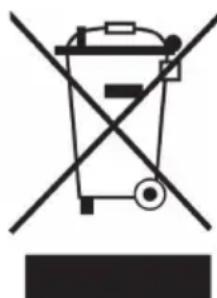
According to the European waste regulation 2012/19/EU this symbol on the product or on its packaging indicates that this product may not be treated as household waste. Instead it should be taken to the appropriate collection point for the recycling of electrical and electronic equipment. By ensuring this product is disposed of correctly, you will help prevent potential negative consequences for the environment and human health, which could otherwise be caused by inappropriate waste handling of this product. For more detailed information about recycling of this product, please contact your local council or your household waste disposal service.
Estimado cliente:


- CONTENT
- TECHNICAL DATA
- DECLARATION OF CONFORMITY
- SAFETY INSTRUCTIONS
- BEFORE FIRST USE
- Ceramic Plates and oven Control
- Modes and Symboles
- Oven temperature and functions
- Timer:
- Indicator Light:
- Bake Tray:
- Wire Rack:
- Tray Handle:
- CAUTION
- OPERATION
- How to use the Convection Function
- How to Toast
- Broil
- Bake
- How to use the right Plate
- How to use the left Plate
- CARE AND CLEANING
- HINTS ON DISPOSAL
- Estimado cliente:
Brand : Klarstein
Model : Mini 10032175
Category : Oven