SJXP680GBK - Fridge SHARP - Free user manual and instructions
Find the device manual for free SJXP680GBK SHARP in PDF.


| Technical specifications | Combined refrigerator, total capacity 340 L, energy class E |
|---|---|
| Dimensions | Height 185 cm, Width 60 cm, Depth 65 cm |
| Weight | 75 kg |
| Cooling system | Static cooling |
| Usage | Temperature adjustment via mechanical thermostat |
| Interior lighting | LED |
| Maintenance | Manual defrost, regular cleaning of seals |
| Safety | Door locking system, materials compliant with safety standards |
| General information | 2-year warranty, after-sales service available |
Frequently Asked Questions - SJXP680GBK SHARP
User questions about SJXP680GBK SHARP
0 question about this device. Answer the ones you know or ask your own.
Ask a new question about this device
Download the instructions for your Fridge in PDF format for free! Find your manual SJXP680GBK - SHARP and take your electronic device back in hand. On this page are published all the documents necessary for the use of your device. SJXP680GBK by SHARP.
USER MANUAL SJXP680GBK SHARP
"Plasmacluster" and "Device of a cluster of grapes" are trademarks of Sharp Corporation.
- Safety information 5
Installation 7
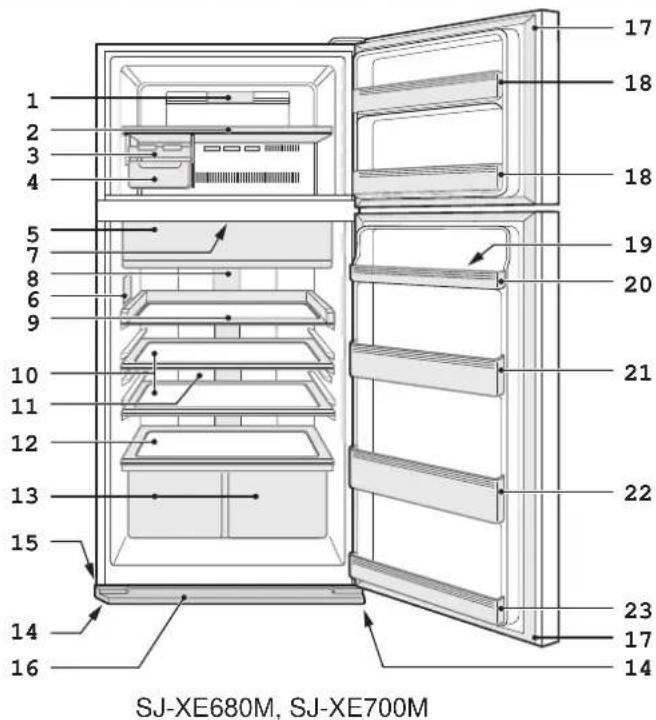
Description 8
Useful modes 9
Control panel 10 (SJ-XP680G, SJ-XP700G)
Control panel 12 (SJ-XE680M, SJ-XE700M) - Storing food 14
Care and cleaning 15
Before you call for service 16
Product FICHE 17
ES Contenido
Thank you very much for buying this SHARP product. Before using your SHARP refrigerator, please read this operation manual to ensure that you gain the maximum benefit from it.
- This refrigerator is intended for making ice cubes, refrigerating and freezing foods.
- This refrigerator is for household use only, with ambient temperature indicated in the table. The climate class is specified on the rating plate. The refrigerator is fully functional at the ambient temperature range of the indicated climate class. If the refrigerator is used at colder temperatures, the refrigerator will not be damaged up to a temperature of +5^ .
- The refrigerator should not be subjected to temperatures of -10^ or below for a long period of time.
Household use only
| Climate class | Acceptable range of ambient temperature |
| SN +10°C to 32°C | |
| N +16°C to 32°C | |
| ST +16°C to 38°C | |
| T +16°C to 43°C | |
EN
Safety information

Warning This means that there are high risks of death or serious injury.

Caution This means that there are high risks of material damage or personal injury.

Warning
Refrigerant
This refrigerator contains flammable refrigerant (R600a: isobutane) and insulation blowing gas (cyclopentane). Observe the following rules to prevent ignition and explosion.
- Do not allow any sharp objects to have contact with the refrigeration system. The refrigeration system behind and inside the refrigerator contains refrigerant.
- Do not use mechanical devices or other means to accelerate the defrosting process. (This refrigerator has adopted automatic defrosting system.)
- Do not use electrical appliances inside the refrigerator.
- Do not block the space around the refrigerator.
- Do not use flammable sprays, such as spray paint near the refrigerator.
In the case of failure of the refrigeration system, do not touch the wall socket and use open flames.
Open the window and air out the room. Then ask a service agent approved by SHARP for service.
Installation
- Do not install the refrigerator in a damp or wet location. It may cause the damage to the insulation or electrical leak. Dew may also appear on the outer cabinet and it causes rust.
The refrigerator should be installed flatly and firmly on the floor.
Power cord, Plug, Socket
Read carefully the following rules to prevent electric shock or fire.
- Connect the power plug into the wall socket firmly and directly. Do not use an extension cord or adapter plug.
- Connect the power plug to the socket with the required rated voltage.
Connect the earth pin to the earth terminal properly.
Make sure that the power cord has not been damaged during installation or moving. If the power plug or cord is loose, do not insert the power plug.
- Do not touch the power plug with wet hands.
- Disconnect from the main electricity supply by removing the main plug from the socket.
Do not remove by pulling the power cord.
- Dust deposited on the power plug may cause fire. Wipe it off carefully.
Pull out the plug if the refrigerator is not used for a long time. - Should the flexible supply cord be damaged, it must be replaced by service agent approved by SHARP, a special cord is required.
In use
- Do not store volatile and flammable materials such as ether, petrol, propane gas, aerosol cans, adhesive agents and pure alcohol etc. These materials are easy to explode.
- Do not store temperature-sensitive products such as pharmaceutical products in the refrigerator. There are high risks of changes in product quality.
- Do not attempt to change or modify this refrigerator. This may result in fire, electric shock or injury.
- Do not place any object on the top of refrigerator. If the object falls down from the top, it may cause injury.
This appliance can be used by children aged from 8 years or above and persons with reduced physical, sensory or mental capabilities or lack of experience and knowledge if they have been given supervision or instruction concerning use of the appliance in a safe way or understanding the hazards involved. Children shall not play with the appliance. Cleaning and user maintenance shall not be done by children without supervision.
Care and Cleaning
Unplug the refrigerator first to prevent electric shock.
- Do not splash water directly on the outer cabinet or the interior. This may lead to rusting and deterioration of the electrical insulation.
Trouble
If you smell something burnt, pull out the power plug immediately. Then ask a service agent approved by SHARP for service.
In case of gas leak, ventilate the area by opening window. Do not touch the refrigerator or the power socket.

Caution
Transportation
- When you install or move your refrigerator, use curing mat to protect the floor from being damaged.
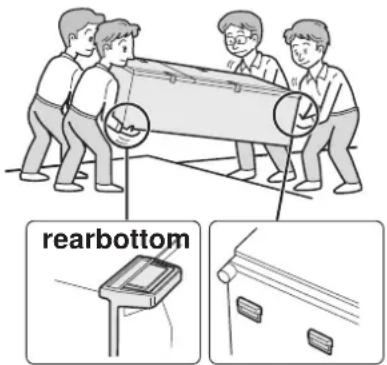
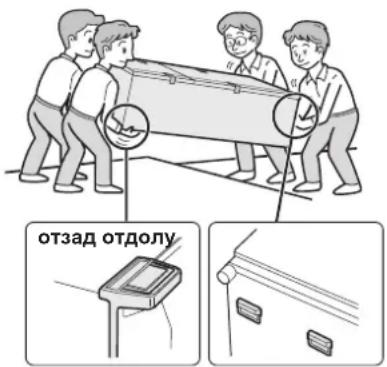
- Carry the refrigerator by holding the handles located on the rear and bottom side. If you lift up the refrigerator improperly, it may cause injury.
Disposal
- Ensure that the refrigerator presents no danger to children while being stored for disposal. (e.g. remove the magnetic door seals to prevent child entrapment.)
- This refrigerator should be disposed appropriately. Take the refrigerator to a professional recycling plant for flammable refrigerant and insulation blowing gases.
In use
- Do not touch the compressor unit or its peripheral parts, as they become extremely hot during operation and the metal edges may cause injury.
- Do not touch foods or metal containers in the freezer compartment with wet hands. This may cause frostbite.
- Do not place bottled drinks and cans in the freezer compartment.
Especially "Express cool" is in operation, there is a high risk that glass bottles may burst. - Do not use other than potable water to make ice cubes.
- Do not open or close the door when other people put a hand near the door. There is a risk that the other people may get their fingers caught in the door.
- Do not put oversized object in the pockets of the door. If the object falls down from the pockets, it may cause injury.
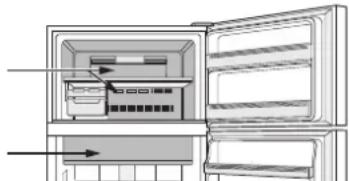
Indicator of temperature
This refrigerator is provided with an indicator of temperature in the refrigerator compartment to allow you to control the average temperature in the coldest zone.
Coldest zone
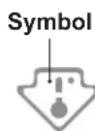
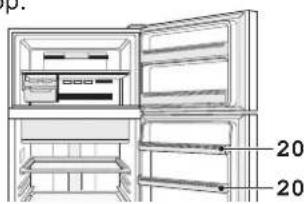
The symbol indicates the coldest zone in the refrigerator compartment. (The door pocket positioned at the same height isn't the coldest zone.)
Checking the temperature in the coldest zone
You can carry out regular checks to ensure the temperature in the coldest zone is correct and, if necessary, adjust the refrigerator temp. control. To maintain a correct temperature inside the appliance, check that the indicator of temperature is always BLUE. If the indicator of temperature turns WHITE, the temperature is too high; in this case, increase the refrigerator temp. control setting and wait for 6 hours before checking the indicator of temperature again.


Correct setting Temperature too high, adjust the refrigerator temp. control.
NOTE
- The internal temperature of the refrigerator depends on various factors such as the ambient temperature of the room, the amount of food stored and the frequency of door opening.
- When fresh food has been introduced or the door has been left open for some time, it is normal for the indicator of temperature to turn WHITE.
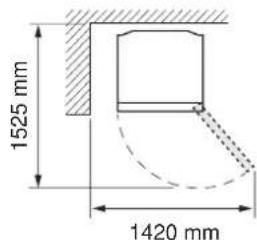
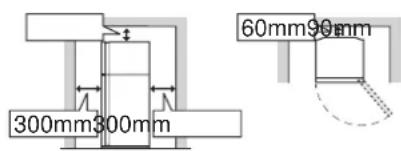
1 Keep adequate ventilation space around the refrigerator.
- The figure shows the minimum required space for installing the refrigerator. The measurement condition of power consumption is conducted under a different space dimension.
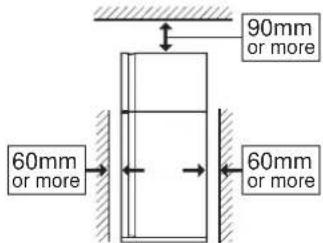
- By keeping greater space, the refrigerator may consume a less amount of power consumption.
- If use the refrigerator in the smaller space dimension than figured, it may cause temperature rise in the unit, loud noise and failure.
- The space between the rear of the refrigerator and the wall should be 60mm or more, and less than 75mm.
If the space is wider than 75mm you may get injured by touching compressor and its peripheral parts which are extremely hot during the operation.
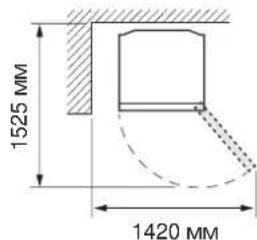
Overall space required in use
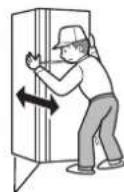
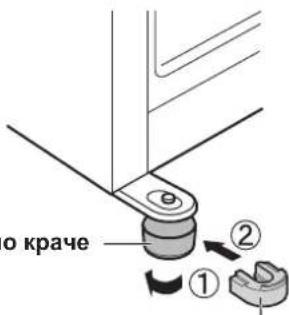
2 Turn the two adjustable feet of the front side to make the spaces to insert the foot supports.
(The foot supports are packed in the refrigerator compartment.)
After inserting the supports, adjust the two feet to stabilize the refrigerator.
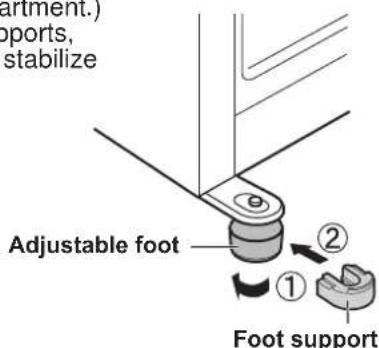
- The refrigerator is slightly tilted backward by inserting the supports. It is effective to install the refrigerator firmly.
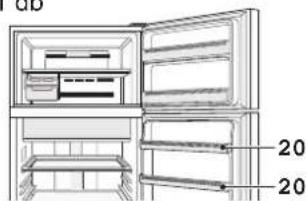
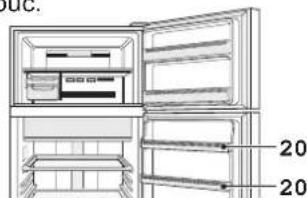
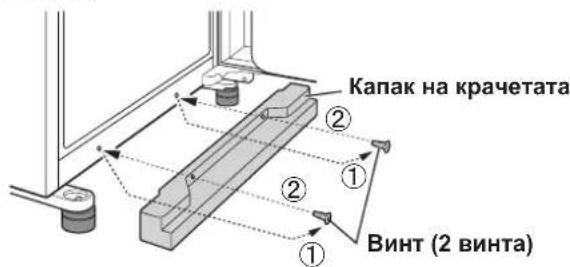
3 Remove the 2 screws of the lower part of the cabinet and use these screws to set the foot cover.
(The foot cover is packed inside the refrigerator compartment.)
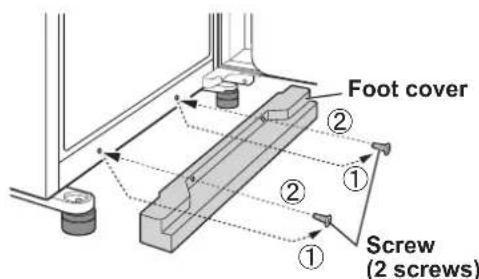
Note
- Place your refrigerator to access the plug.
- Keep your refrigerator out of direct sunlight and do not place next to heat generating appliance.
- Do not place your refrigerator directly on the ground. Insert suitable stand such as wooden board under the refrigerator.
- When you insert the power plug with the door opened, door alarm sounds but it is not abnormal. This sound stops after closing the door.
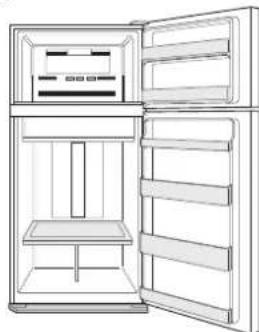
Before using your refrigerator
Clean the inside parts with a cloth soaked in warm water. If soapy water is used, wipe it off thoroughly with water.
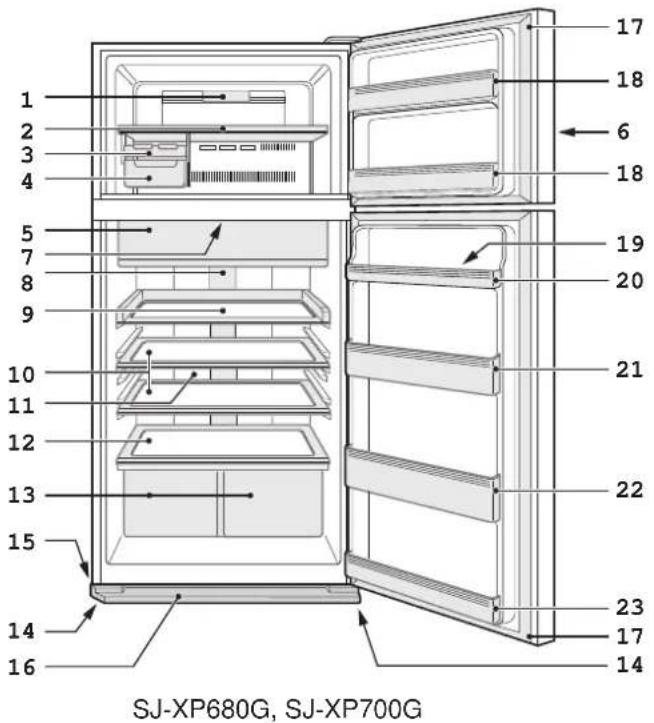
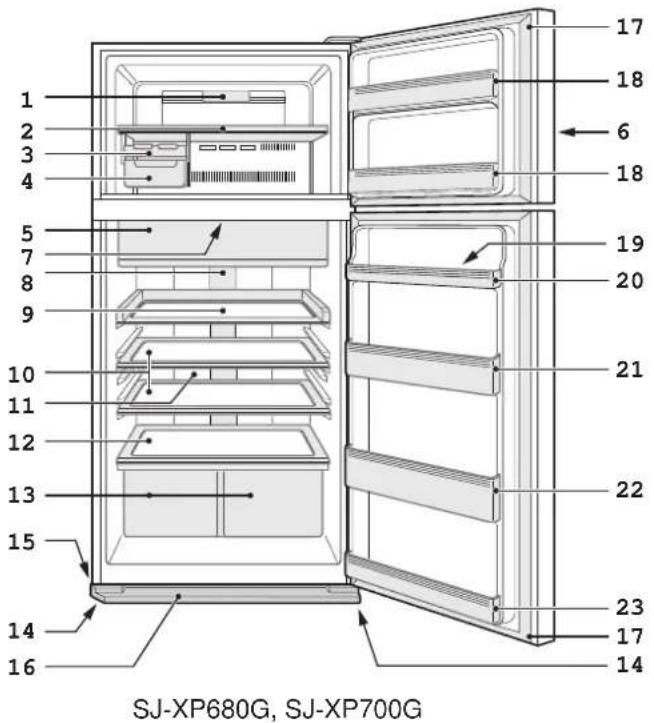
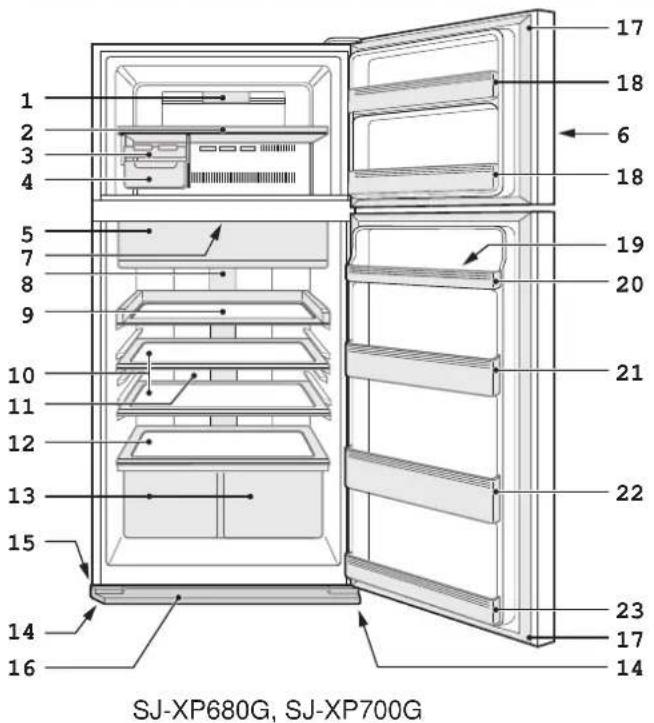
- Freezer light
- Freezer shelf
- Ice cube maker
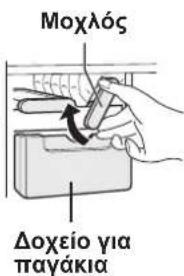
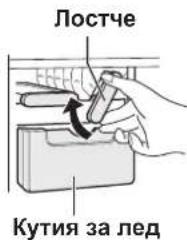
1) Do not overfill this tray with water. Otherwise the ice cubes will join together when frozen.
2) When ice cubes are made, turn the lever clockwise to put the ice into the Ice cube box.
- Ice cube box Note
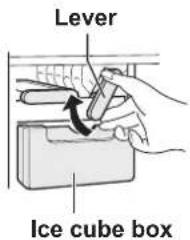
To prevent the ice cube box from being damaged, do not pour oil into the box or make ice in it.
-
Fresh case & door (Chill compartment)
-
Control panel
-
Deodorizing unit Deodorizing catalyst is installed on the routes of cold air. There is no need to operate and clean.
-
Refrigerator light
-
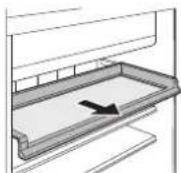
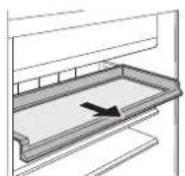
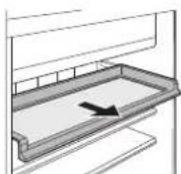
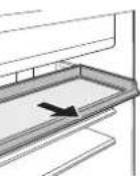
Smooth access shelf You can pull out this shelf.
-
Refrigerator shelf SJ-XP680G, SJ-XE680M:1 pc SJ-XP700G, SJ-XE700M:2 pcs
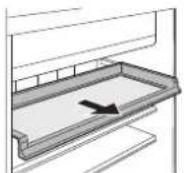
- Hybrid cooling panel The panel cools the refrigerator compartment indirectly from the rear. In this way, food is cooled gently without being exposed to cold air flow.
- Fruit and vegetable shelf
- Fruit and vegetable crisper (2 pcs)
- Adjustable foot (2 pcs)
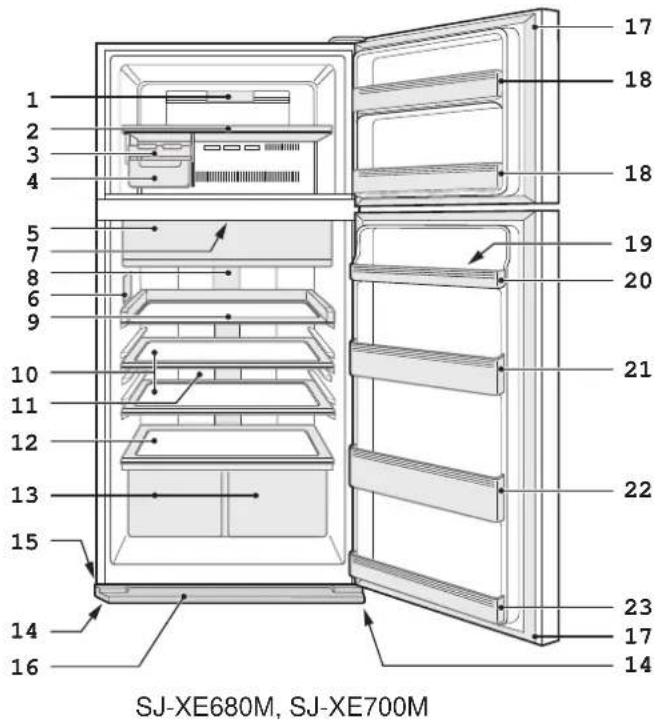
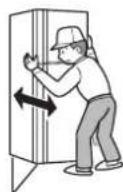
- Caster(4 pcs)
The casters allow the refrigerator to move back and forth. - Foot cover
- Magnetic door seal (2 pcs)
- Freezer door pocket (2 pcs)
- Egg holder
- Egg pocket
SJ-XP680G, SJ-XE680M:2 pcs
SJ-XP700G, SJ-XE700M : 1 pc

Casters
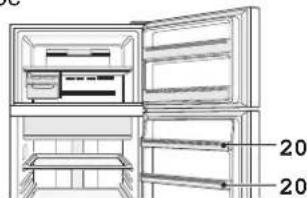
SJ-XP680G, SJ-XE680M
- Refrigerator pocket (Upper)
(Only for SJ-XP700G, SJ-XE700M) - Bottle pocket
- Refrigerator pocket (Bottom)
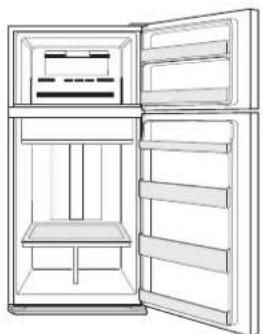
More food can be stored by taking out the internal accessories with normal cooling operation.
You may remove following accessories.
-
Freezer shelf
-
Ice cube maker
- Ice cube box
-
Smooth access shelf
-
Refrigerator shelf
- Fruit and vegetable crisper
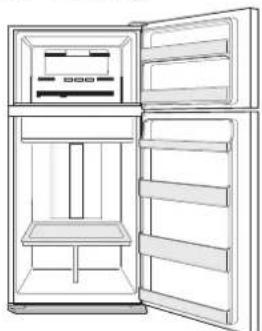

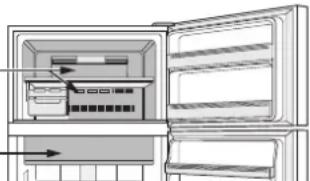
Extra cool

Express freezing

Express cool
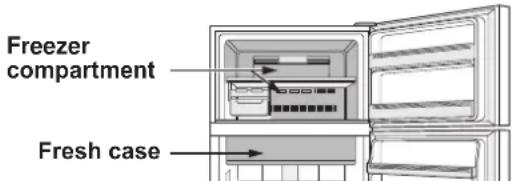
| Extra cool Express | Freezing Express | cool | |
| Feature This mode is to cool beverages or foods to ice-cold. Note : Food with high-moisture may freeze. | This mode speeds up the time to freeze food. | This mode is to cool beverages or foods quickly. | |
| Point of use Fresh case Freezer compartment Freezer compartmentCaution : Do not place glass bottles. There is a high risk that they may burst. | |||
| Operating time 6 hours * 1 | 2 hours *1 | 30 minutes | |
| ·This mode ends automatically. ·The alarm does not sound. | ·This mode ends automatically. ·The alarm sounds. To stop the alarm *2 Press enter button. or Press "Express freezing" button. | ||
| After the operation completed | ·There is no need for taking beverages or foods out. | ·Be sure to take the beverages and foods out when the alarm sounds. ·If the beverages and foods are left in the freezer compartment over approximately 30 minutes, they may freeze. | |
| At the time of power failure during the operation | ·This mode is automatically cancelled. | ·This mode is automatically restarted from the previous state at the time of re-power. | |
1 It may take more time to complete if the operation overlaps with defrosting. This mode starts after defrosting is completed.
2 If you do not stop the alarm, it sounds 30 minutes continuously.

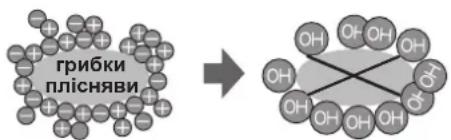
Plasmacluster
Use this feature when you want to keep the inside of the refrigerator clean.
The ionizer inside your refrigerator releases clusters of ions, which are collective masses of positive and negative ions, into the refrigerator compartment. These ion clusters inactivate airborne mold fungus.
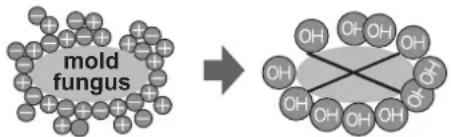
Note
- There may be a slight odor in the refrigerator. This is the smell of ozone generated by the ionizer. The amount of ozone is minimum and quickly disappears in the refrigerator.
Note
- Extra cool, Express freezing and Express cool are not available at the same time while one of the modes is in operation.
- Avoid opening the door as much as possible during the operations of these modes.

Energy saving
(Only for SJ-XP680G, SJ-XP700G)
Use this feature when you want to switch the appliance to energy-saving operation.
While this feature is operating, the inside temperature of the refrigerator and freezer compartment becomes higher than the normal operation as follows.
The displayed temperature is not be changed.
| Freezer compartment | Refrigerator compartment | |
| Under "Energy saving" mode | Approx. 1°C plus | Approx. 2°C plus |
(When the temperature is set at F: -18°C, R: 3°C.)
Cancel this mode when you feel the beverages are not cooled enough or ice making takes longer time.
Note
- The efficiency of power saving depends on the usage environment (controlling temperature, ambient temperature, frequency of opening or closing the door, amount of food).
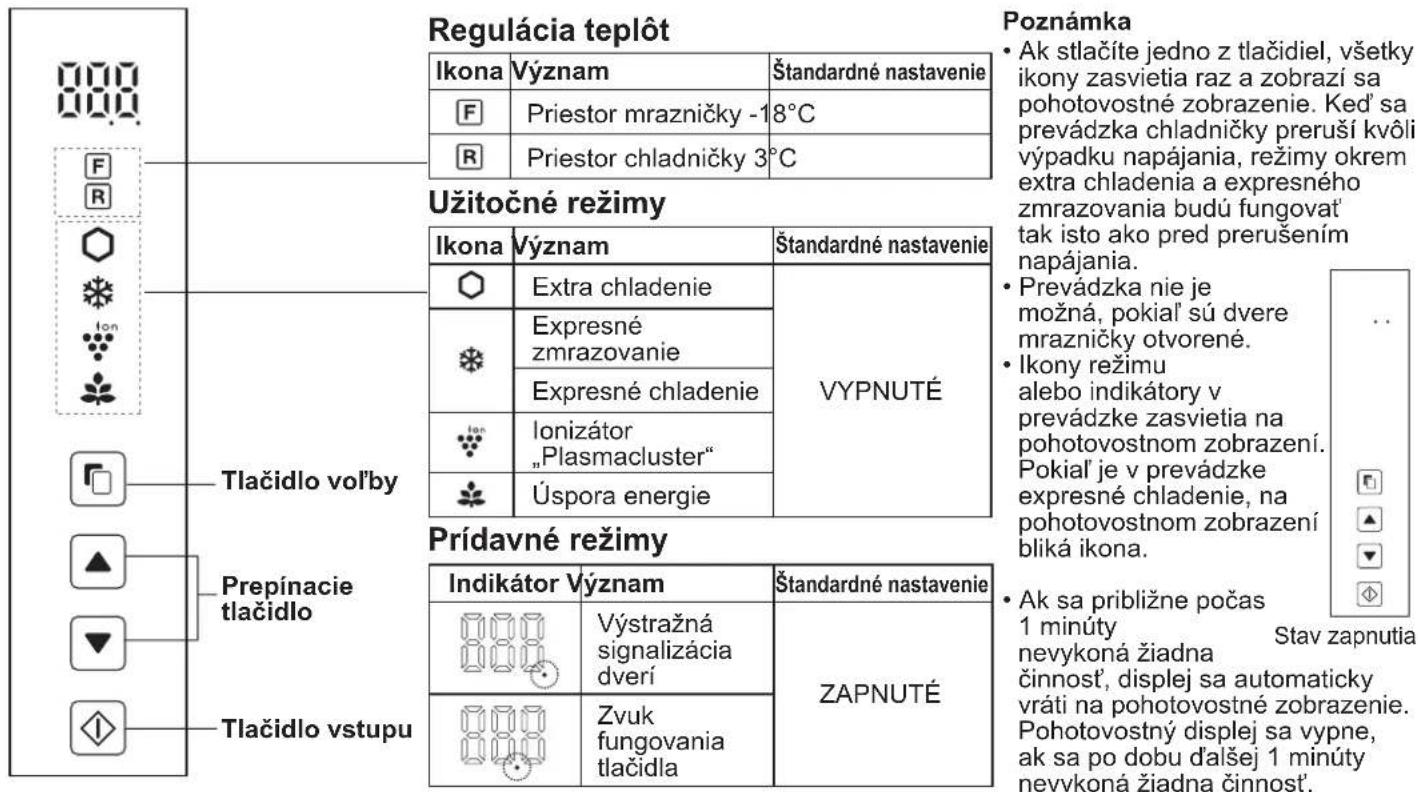
Control panel (SJ-XP680G, SJ-XP700G)
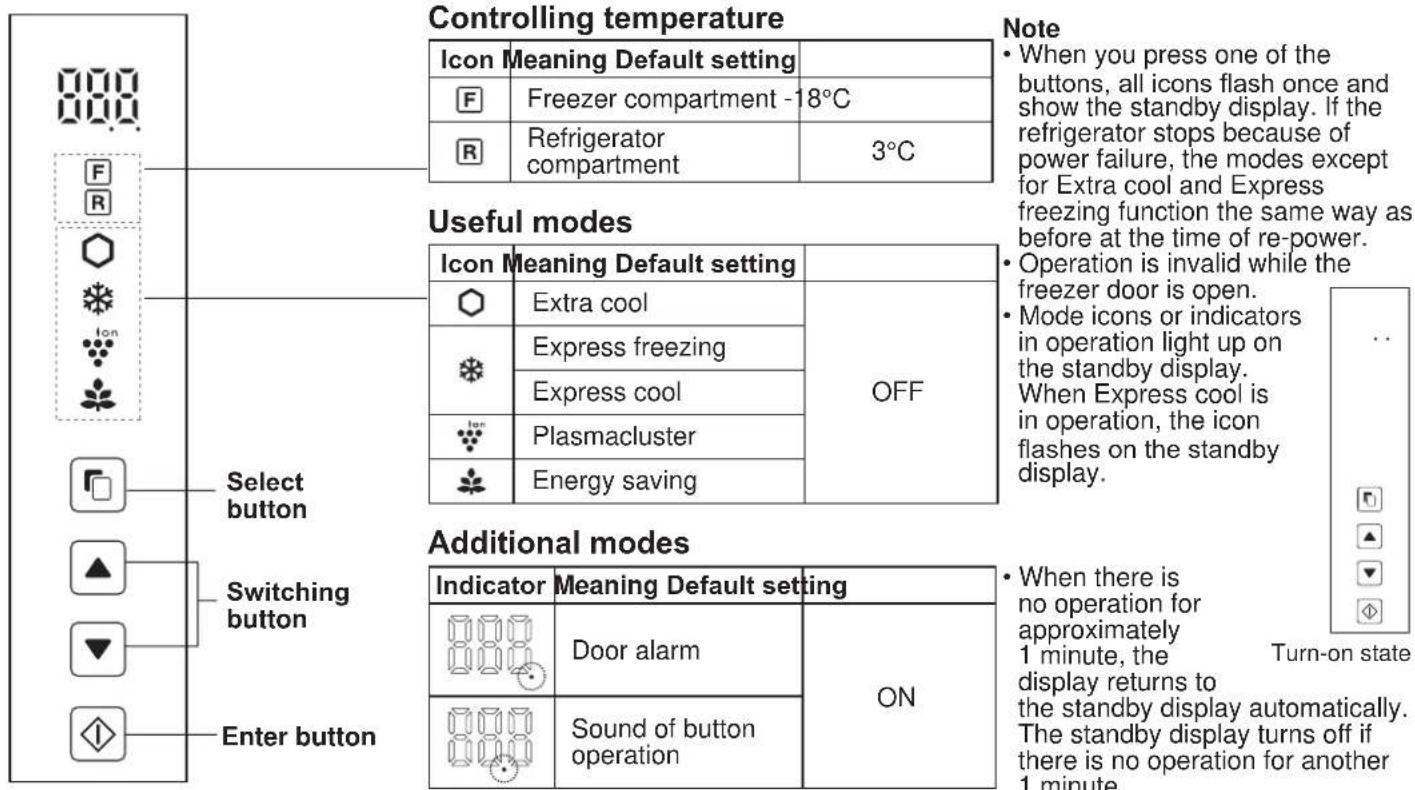
Operations of useful modes
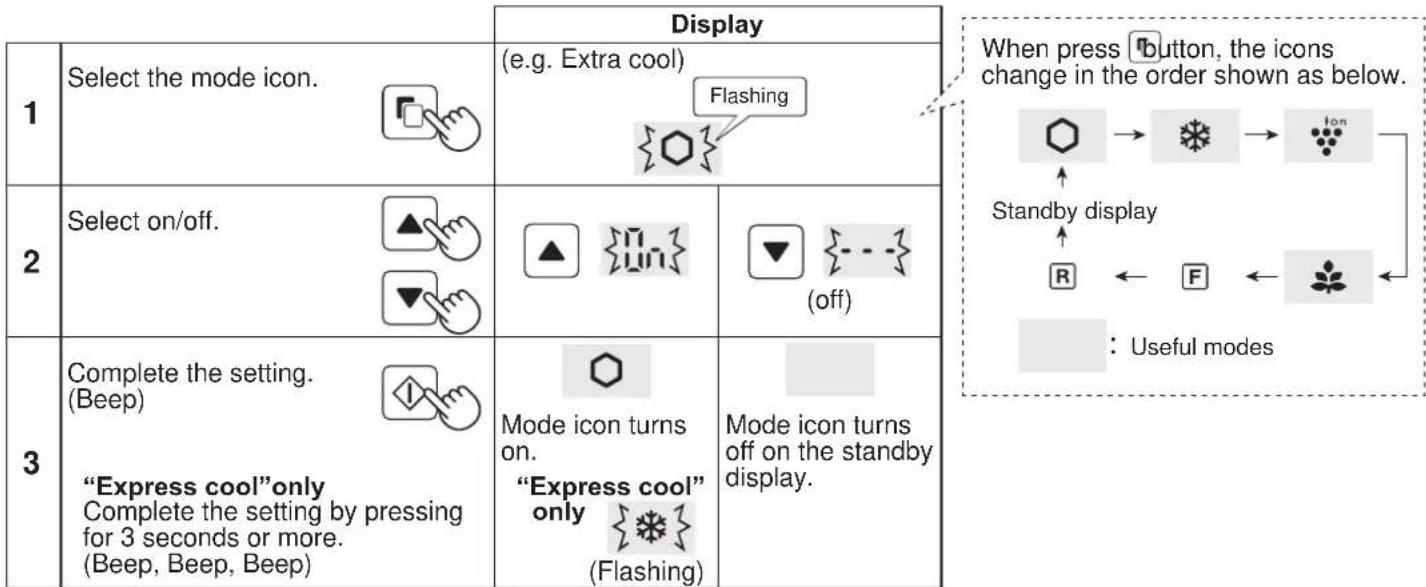
Operation of additional modes
| Summary Cancel operation Display | |||
| Door alarm | ·When the refrigerator door is left open for over 1 minute, door alarm sounds once, and again after 1 minute. ·If the door is left open for approx. 3 minutes, the alarm sounds continuously. ·The alarm stops after close the door. | Press ♂ and Ⓢsimultaneously for 3 seconds or more. (Beep, Beep, Beep) | The indicator turns off. |
| Sound of button operation | ·When you want to switch off button operation sound. | Press ♂ and Ⓢsimultaneously for 3 seconds or more. (Beep, Beep, Beep) | The indicator turns off. |
Note - When you want to turn on the additional mode, follow the same step again. (The indicator turns on.)
Controlling temperature
The refrigerator controls its temperature automatically. However, you can adjust the temperature as below.

How to check the current temperature setting
Press button to select icdR
Default setting
| Freezer compartment Refrigerator compartment | |
| -18 | 3 |
Setting of Freezer/Refrigerator compartment
Freezer compartment
: Adjustable between -13°C and -21°C in step of 1°C
Refrigerator compartment
: Adjustable between 0^ and 6^ in step of 1^
Basic operations
| Basic operations | Display | ||
| 1 | Select Rr R icon. | Freezer compartment | Refrigerator compartment |
| {F} {Flashing} | {R} {Flashing} | ||
| 2 | Set the temperature. | {up} {down} | {Flashing} |
| 3 | Complete the setting. (Boep) | - | - |
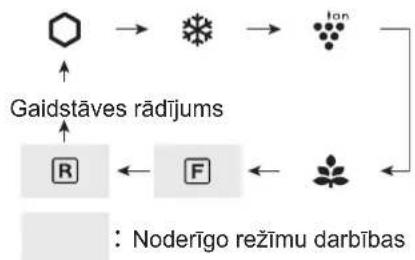
When press button, the icons change in the order shown as below.
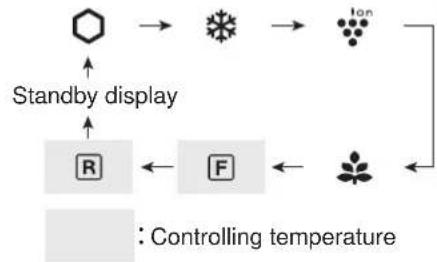
Advanced Setting of Freezer/Refrigerator compartment
The temperature of freezer compartment and refrigerator compartment can be adjusted in step of 0.5^ by following the steps a to c.
Beep beep beep
a. After the step 1 of "Basic operations",
press 3 seconds or more.
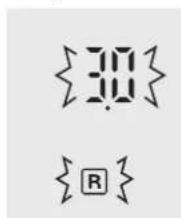
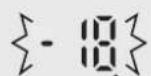
The current preset temperature returns to "Default setting"
(The display is indicated as the picture on the right.)
b. Press or and set the temperature.
C. Complete the setting. (Same as the step 3 of "Basic operations".)
Follow the steps a to c again if you want to adjust the temperature in step of 1^ .
Freezer compartment
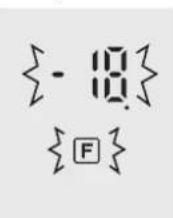
1 switch
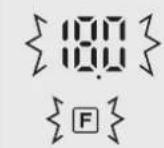
Refrigerator compartment
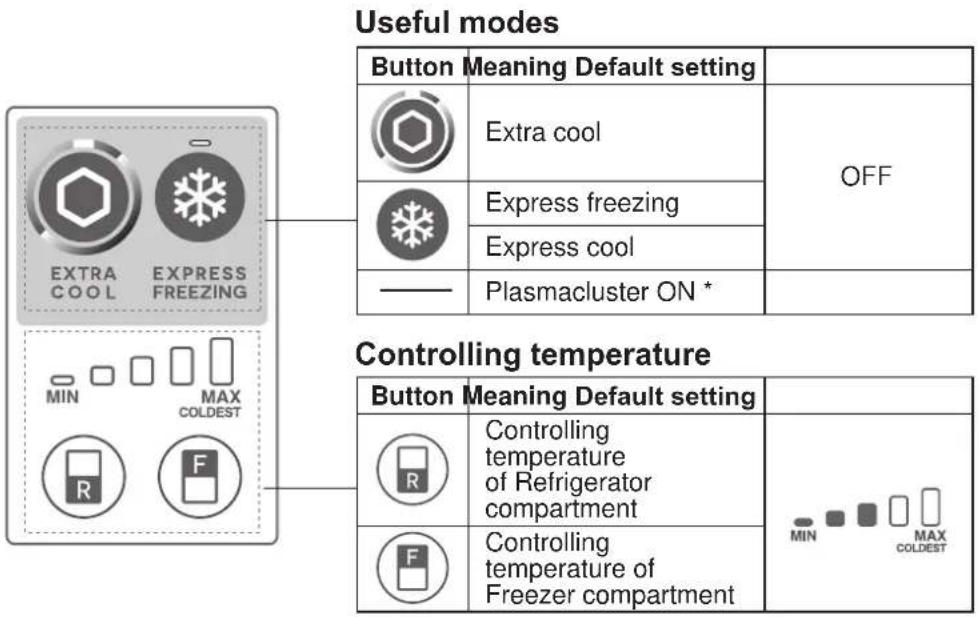
- The Plasmacluster operates automatically when the refrigerator is powered on. There is no need to switch on/off.
Note
If you want to light up the indicator, press "F" or "R" button.
Operations of useful modes (Except for "Plasmacluster")
| Start operation | Cancel operation | |||
| Extra cool Press the mode button. (Beep) | Lighting | Press the mode button. (Beep) | Turn off | |
| Express freezing | Press the mode button. (Beep) | Lighting | Press the mode button. (Beep) | Turn off |
| Express cool Press the mode button for 3 seconds or more. (Beep, Beep, Beep) | Flashing | Press the mode button. (Beep) | Turn off | |
Door Alarm
- When the refrigerator door is left open for over 1 minute, door alarm sounds once, and again after 1 minute.
- If the door is left open for approx. 3 minutes, the alarm sounds continuously.
The alarm stops after close the door.
If Door alarm does not stop
If the door alarm does not stop after closing all doors, it is a defect.
Contact the SHARP service center for service.
Method of stopping the door alarm temporarily
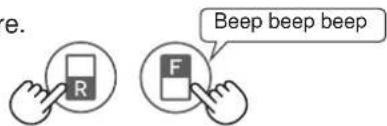
- Press "R" button and "F" button simultaneously and continuously for 3 seconds or more.
- The door alarm sounds again after approximately 2 days.
Controlling temperature
The refrigerator controls its temperature automatically. However, you can adjust the temperature as below.
How to check the current temperature setting
The indicator lights up to show the current temperature level by pressing "F" or "R" button.
Freezer compartment : Press “F” button.
Refrigerator compartment : Press “R” button.
Setting of Freezer/Refrigerator compartment
Freezer compartment
- Press "F" button.
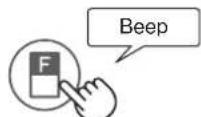
- Press "F" button to change the temperature level.
Refrigerator compartment
- Press "R" button.
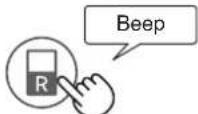
-
Press "R" button to change the temperature level.
-
Temperature indicator changes as the picture below (3 4 5 1 2 3) by pressing "F" or "R" button.
| Level Indicator | |
| 1 | MIN MAX COLDEST |
| 2 | MIN MAX COLDEST |
| 3 | MIN MAX COLDEST |
| 4 | MIN MAX COLDEST |
| 5 | MIN MAX COLDEST |
Note
After adjusting the temperature level, the indicator turns off approximately 5 seconds later.
- The temperature setting remains the same even after power failure.
Advanced Setting of Freezer/Refrigerator compartment
The temperature of refrigerator compartment and freezer compartment can be adjusted in 9 levels (level 1 9 ) by following the steps a to b.
Freezer compartment
a. Press "F" button first. Hold down "F" button and then press "Express freezing" button for 3 seconds or more.
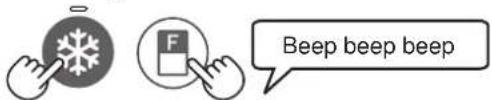
The indicator returns to "Default setting".
b. Press "F" button to change the temperature level.
Follow the steps a to b if you want to adjust the temperature in 5 levels.
Refrigerator compartment
a. Press "R" button first. Hold down "R" button and then press "Express freezing" button for 3 seconds or more.

The indicator returns to "Default setting".
b. Press "R" button to change the temperature level.
Follow the steps a to b if you want to adjust the temperature in 5 levels.
- Temperature indicator changes as the picture below (5 6 7 8 9 1 2 3 4 5) by pressing "F" or "R" button.
$$ \begin{array}{l l l} \circ \dots & \text {O F F} & - \dots & \text {L i g h t i n g} \ \hline \end{array} \quad \left{\right. - \left{\right. \dots \text {F l a s h i n g} $$
| Level Indicator | |
| 1 | MIN MAX COLDEST |
| 2 | MIN MAX COLDEST |
| 3 | MIN MAX COLDEST |
| 4 | MIN MAX COLDEST |
| 5 Default setting | MIN MAX COLDEST |
| 6 | MIN MAX COLDEST |
| 7 | MIN MAX COLDEST |
| 8 | MIN MAX COLDEST |
| 9 | MIN MAX COLDEST |
Refrigeration reduces the rate of food spoilage.
Ensure that the food is of the freshest possible quality to maximize the shelf life of perishable foods.
The following is a general guide to help promote longer food storage.
Fruit / Vegetables
Fruit and vegetables should be loosely enclosed in a plastic material e.g. wrap, bags (do not seal) and placed in the Fruit and vegetable crisper to minimize moisture loss.
Dairy Products & Eggs
- Most dairy products have their best-before date on the outer packaging which informs the recommended temperature and shelf life of the foods.
- Eggs should be stored in the Egg holder.
Meats / Fish / Poultry
- Place on a plate or a dish and cover with paper or plastic wrap.
- For larger cuts of meat, fish, or poultry, place to the rear of the shelves.
- Ensure all cooked food is wrapped securely or placed in an airtight container.
For best freezing
- Quality of foods should be fresh.
- Freeze small quantities of food at a time in order to freeze them quickly.
- Food should be properly sealed or covered tightly.
- Place foods in the freezer evenly.
- Label bags or containers to keep an inventory of freezing food.
Advice for preventing dew or frost inside the refrigerator
- Keep the door securely closed. If the food falls down, it may cause a gap between the cabinet and the door. Move it back to the shelf or the pocket.
- Food with high-moisture should be stored in airtight container or sealed tightly.
Note
- Evenly place the food on the shelves to allow the cooling air to circulate efficiently.
- Hot foods should be cooled before storing. Storing hot foods increases the temperature in the unit and the risk of food spoilage.
- Do not block the outlet and inlet of the cool air circulating circuit with foods or containers; otherwise the foods is not be evenly cooled throughout the refrigerator.

IN OUT
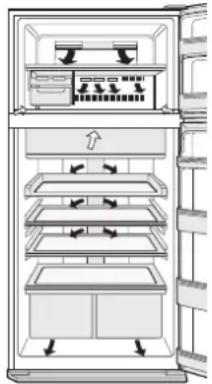
Do not place food directly in front of cold air outlet.
This may lead to the food freezing.
Tips for saving energy
- Keep the ventilation space as much as possible around the refrigerator.
- Keep your refrigerator out of direct sunlight, and do not place it next to heat generating appliance.
- Avoid opening the door as much as possible.
Hot foods should be cooled before storing.
Place the food evenly on the shelves to allow the cool air to circulate efficiently.
Power consumption
Power consumption of this model is measured according to the international standard of refrigerator performance. If the refrigerator is operated with the
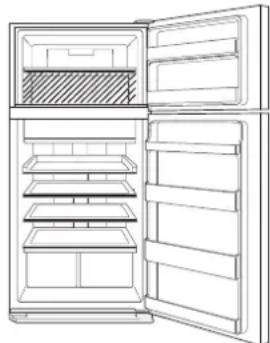
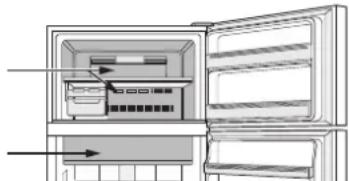
In the refrigerator, it is operated with the accessories (shaded area) taken out, it works under the most energy efficient condition.
- The amount of power consumption of this model is measured with these accessories taken out as indicated shaded area.
- The amount of power consumption of this model is measured under the space dimensions on the right picture.
Care and cleaning

Important
To prevent cracks on inside surfaces and plastic components, follow these tips.
- Wipe out food oil adhered to plastic parts.
- Some household chemicals may cause damage, so use only diluted washing-up liquid (soapy water).
- If undiluted detergent is used or soapy water is not wiped off thoroughly, it may result in cracks of plastic parts.
Cleaning
- Remove the accessories (e.g. shelves) from the cabinet and the door. Wash them by warm soapy dishwashing water. After that, rinse them in clean water and dry. (Only fruit and vegetable shelf is not removable.)
Clean the inside with a cloth soaked in warm soapy dishwashing water. Then, use cold water to wipe off soapy water thoroughly.
Wipe the exterior with a soft cloth each time it gets dirty.
Clean the Magnetic door seal with a toothbrush and warm soapy dishwashing water.
Wipe the control panel with a dry cloth.
Note
- Do not use heavy-duty cleansers or solvents (lacquer, paint, polishing powder, benzine, boiled water, etc.) which may cause damages.
If you pull out the power plug once, wait 5 minutes at least before connecting the power plug again. - The glass shelves weigh approximately 3kg each. Hold them firmly when remove from the cabinet and carry.
- Do not drop objects inside the refrigerator or strike the inner wall. This may cause cracks to inner surface.
Defrosting
Defrosting is automatically operated by a unique energy saving system.
When the compartment light is blown
Contact the service agent approved by SHARP to replace the light. The light is not to be replaced other than by qualified service personnel.
Before transporting
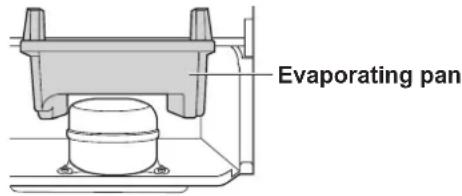
Wipe up water in the evaporating pan. Before wiping up the water, wait more than 1 hour after pulling out the power plug because refrigeration cycle equipment is extremely hot.
(The evaporating pan is located on the rear of the product.)
Switching off your refrigerator
If you want to switch off your refrigerator for an extended period, remove the foods from the refrigerator and clean the inside thoroughly. Pull out the power plug from the socket and keep all doors open.
Before you call for service
Before calling for service, check the following points.
| Problem Solution | ||
| The outside of the cabinet is hot when touching. | It is normal. The hot pipe is in the cabinet in order to prevent dew generation. | |
| When there is refrigerator noise. | It is normal for the refrigerator to make the following sounds. • Loud noise is made by the compressor when its operation starts -- Sound becomes quieter after a while. • The compressor makes loud noise once a day. -- Operating sound is made immediately after automatic defrost operation. • Sound of flowing fluid (gurgling sound, fizzling sound) -- Sound of refrigerant flowing in pipes (sound may become louder from time to time). • Cracking or crunching sound, squeaking sound -- Sound produced by expansion and contraction of inner walls and internal parts during cooling. | |
| Frost or dew appears inside or outside the refrigerator. | This may occur in one of the following cases. Use a wet cloth for wiping frost and a dry cloth for wiping dew. • When the ambient humidity is high. • When the door is frequently opened and closed. • When foods containing plenty of moisture are stored. (Wrapping is required.) | |
| The foods in the refrigerator compartment freeze. | SJ-XP680G, SJ-XP700G | • Is the refrigerator operated for a long time with refrigerator temperature control set at 0°C? -- Change the temperature control back to around 3°C. • Is the refrigerator operated for a long time with freezer temperature control set at -21°C? -- Change the temperature control back to around -18°C. • If ambient temperature is low, foods may freeze even if the refrigerator compartment is set at 6°C. |
| SJ-XE680M, SJ-XE700M | • Is the refrigerator operated for a long time with refrigerator temperature control set MAX COLDEST? -- Change the temperature control to the other setting. • Is the refrigerator operated for a long time with freezer temperature control set MAX COLDEST? -- Change the temperature control to the other setting. • If ambient temperature is low, foods may freeze even if the refrigerator compartment is set MIN. | |
| Odors in the compartment. | • Wrapping is required for the foods with strong odors. • Deodorizing unit cannot remove all odors. | |
If you still require service
Refer to your nearest service agent approved by SHARP.
Product fiche
| ANNEX III (EU) Regulation No.1060/2010 | |||
| A | Trade mark | SHARP | |
| B | Model name SJ-XP680G | SJ-XE680M | SJ-XP700G SJ-XE700M |
| C | Category 7 | ||
| D | Energy efficiency class A | ++ | |
| EE | E colabel award — | ||
| F | Annual energy consumption *1[KWh/ year] | 350 360 | |
| G | Storage volume of all compartments that do not merit a star rating *2[L] | 388 430 | |
| H | Storage volume of all frozen-foodstorage compartments that merit a star rating [L] | *** 148 148 | *** |
| I | The design temperature of “other compartment” warmer than +14°C | — | |
| J | Frost free YES | ||
| K | Temperature rise time [h] | 19 | 19 |
| L | Freezing capacity [Kg/24h] | 7.0 | 7.0 |
| M | Climate class | T | T |
| N | Airborne acoustic noise emission [dB(A)] | 36 | 36 |
| O | Built-in appliance | No (Free-standing type) | |
1 Energy consumption "XYZ" kWh per year, based on standard test results for 24 hours.
Actual energy consumption will depend on how the appliance is used and where it is located.
2 Includes Chill 31L
Information on Disposal for Users (private households)
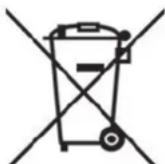

Attention:
Your product is marked with this symbol.
It means that used electrical and electronic products should not be mixed with general household waste.
There is a separate collection system for these products.
1. In the European Union
Attention: If you want to dispose of this equipment, please do not use the ordinary dust bin!
Used electrical and electronic equipment must be treated separately and in accordance with legislation that requires proper treatment, recovery and recycling of used electrical and electronic equipment.
Following the implementation by member states private households within the EU states may return their used electrical and electronic equipment to designated collection facilities free of charge*. In some countries your local retailer may also take back your old product free of charge if you purchase a similar new one.
*) Please contact your local authority for further details.
If your used electrical or electronic equipment has batteries or accumulators, please dispose of these separately beforehand according to local requirements.
By disposing of this product correctly you will help ensure that the waste undergoes the necessary treatment, recovery and recycling and thus prevent potential negative effects on the environment and human health which could otherwise arise due to inappropriate waste handling.
2. In other Countries outside the EU
If you wish to discard this product, please contact your local authorities and ask for the correct method of disposal.
For Switzerland: Used electrical or electronic equipment can be returned free of charge to the dealer, even if you don't purchase a new product. Further collection facilities are listed on the homepage of www.swico.ch or www.sens.ch.
SJ-XP680G, SJ-XE680M
Compartmento frigorifico :Pulse el boton "R"
Ajustes del组成部分 del congelador/frigorífico
Compartmento congelador
- Pulse el botón "F".
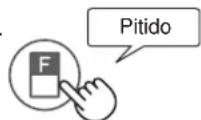
b. Press "R" button to change the temperature level.
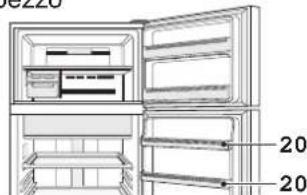
SJ-XP680G, SJ-XE680M
- Balconcino portauova (Superiore) (Solo per i modelli SJ-XP700G, SJ-XE700M)
- Balconcino portabottiglie
- Balconcino frigorifer (Inferiore)
5. Compartment fraicheur & porte (Compartment refroidi)
SJ-XP680G, SJ-XE680M: 1 piece SJ-XP700G, SJ-XE700M: 2 pieces
SJ-XP680G, SJ-XE680M: 2 pieces
SJ-XP700G, SJ-XE700M: 1 piece
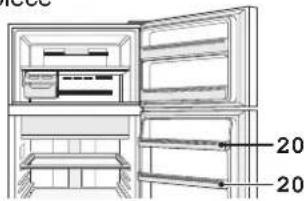
SJ-XP680G, SJ-XE680M
Compartment
congélateur
Compartment fraîcheur
Compartment
congélateur

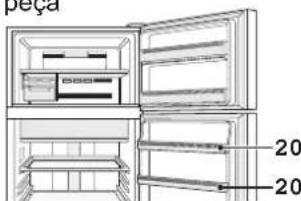
SJ-XP680G, SJ-XE680M
- Receptáculo do frigorífico (Superior)
(Só para os modelos SJ-XP700G, SJ-XE700M) - Receptáculo para garrafas
- Receptáculo do frigorífico (Cargo)
Piv xpnoionoieoTe to yuyeio oac
KaapioTe ta eowtepiKa epn ne eva upaogau Tou evai BpeyuEvo aeepuvepo.Eav xpanoiotoeite oattouvovepo,okoutiote to tmeawc me vepo.
περιγραφη
- Kataauyuktn
- Páφi katauuktn
- NapaKaEuaOtns triyou
1)Mn yepo. Aipopetik ta Tayakia 8eVwOuv otav ayouov.
2) Otav yivouv ta mayakia, yupioTeTov lo pOcTa dejia ia va mouv Ta mayakia oTo doxieio ia mayakia.
- Axexio yia Tayakia 2nmuieiwn
Ia va anopexeuovnthevoc oepocto doxio yia Tayakia, m npixveTe laoi too doxie n kavete nayo oe auto.
- i p i w w p o i o v t w v k a I T o p t a (iαμερισμα συντηρησς)
- NivaKaS eXyXou
- Atooountikn oukeun
O aotoumntikoc katautnc ykathetaatai oticdoouc
yuxpoaepa. aataiteiatalkatoia evpeyia n kaapiooC.
- PapiouaIns npoBaonS
MTopeite va TpaBnEte auto to paoTpoC ta
- Páφí yuyéiou
SJ-XP680G, SJ-XE680M: 1 Tεμ.
SJ-XP700G, SJ-XE700M:2TEU.
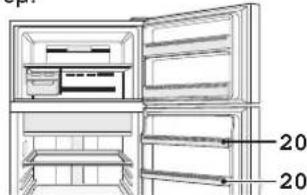
SJ-XP680G, SJ-XE680M
- Onkyn yuyeiou (Ncvw npoc)
(Móvo yα SJ-XP700G, SJ-XE700M)
Avakoua xpeiaaeote to eepic
IyaiveTe OToV IaoiEoTepo AvTIpOoWTo yia eepic EgouioBtopeo aTo Tnv SHARP.
△ελτίο
SJ-XP680G, SJ-XE680M:1St.
SJ-XP700G, SJ-XE700M:2St.
SJ-XP680G, SJ-XE680M:2St.
SJ-XP700G, SJ-XE700M:1St.
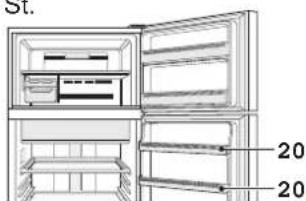
SJ-XP680G, SJ-XE680M
| Grundbeträge | Anzeige | |
| 1 | Wählen Sie das Symbol F oder R | Tiefkühlabteil Kühlabteil {····································································································Blinkt {·································································································Blink |
| 2 | Lagen Sie die Temperatur fest. | {··································································································Blinkt (hoch) {··································································································Runter) |
| 3 | Beenden Sie die Einstellung. (Piep) | - · · · · · |
SJ-XP680G, SJ-XE680M:1stk.
SJ-XP700G, SJ-XE700M: 2 stk.
11. Hybridkoelpaneleel
SJ-XP700G, SJ-XE700M: 1stk.
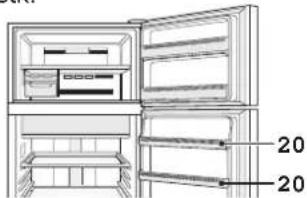
SJ-XP680G, SJ-XE680M
21. Koelkastvak (Bovenste)
SJ-XP680G, SJ-XE680M
SJ-XP680G, SJ-XE680M
18. Compartment uša congelator (2 buc.)
SJ-XP680G, SJ-XE680M: 2 buc.
SJ-XP700G, SJ-XE700M:1buc.
Rotite
SJ-XP680G, SJ-XE680M
21. Sertar frigider (Superior)
- Police v chladnicce SJ-XP680G, SJ-XE680M: 1 ks SJ-XP700G, SJ-XE700M: 2 ks
11. Hybridni chladici panel
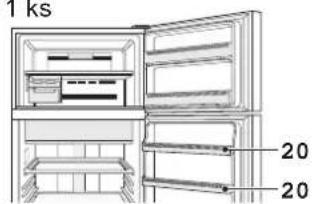
SJ-XP680G, SJ-XE680M
21. Prihradka v chladnicke (Horni) (Pouze pro SJ-XP700G, SJ-XE70
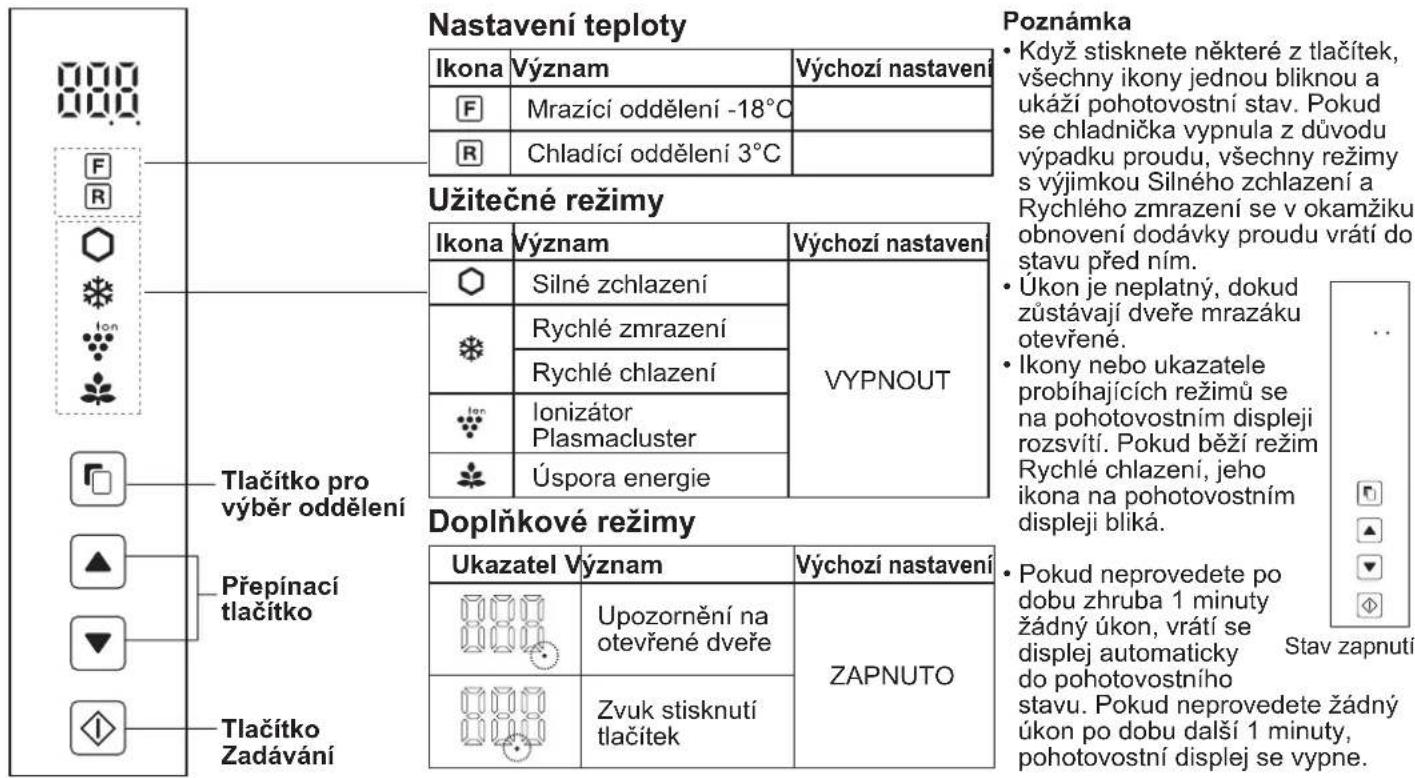
Ovladaci panel (SJ-XP680G, SJ-XP700G)
SJ-XP680G, SJ-XE680M:2 ks
SJ-XP700G, SJ-XE700M:1ks
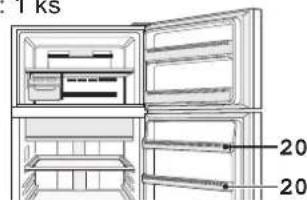
SJ-XP680G, SJ-XE680M
21. Priehradka chladnicky (Vrchná) (Iba SJ-XP700G, SJ-XE700M)
22. Priehradka na flase
23. Priehradka chladnicky (Spodna)
Pri riadnom chladeni je mozné skladovat viac potravin tak, ze vyberiete vnutorné prisluensstvo.
Nasledujuce prisluosenstvo sa da vyberat.
2. Polica mraznicky
3. Vyrobnik'adu
4. Zásobnik na l'ad
9. Plocha vyberacia polica
10. Polica chladnicky
Ovladaci panel (SJ-XP680G, SJ-XP700G)
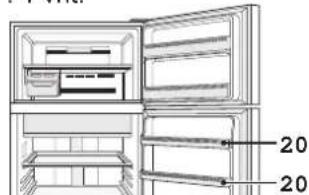
SJ-XP680G, SJ-XE680M: 2 vnt.
SJ-XP700G, SJ-XE700M: 1 vnt.
SJ-XP680G, SJ-XE680M

LT
- Saldytuvo déklas (Viršutiné) (Tik su SJ-XP700G, SJ-XE700M)
- Buteliu lentyna
- Šaldytuvo déklas (Apacia)
Isemus vidinius priedus ir esant normaliam saldymo darbui galima jdeti daugiau maisto produktu.
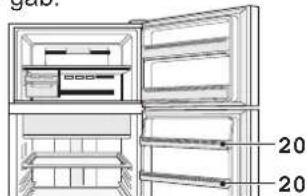
SJ-XP680G, SJ-XE680M: 2 gab.
SJ-XP700G, SJ-XE700M: 1 gab.
SJ-XP680G, SJ-XE680M
- Ledusskapja nodalijums (Augšëjais)
(Tikai modeliem SJ-XP700G, SJ-XE700M) - Pudelun nodalijums
- Ledusskapja nodalijums (Apaksejais)
| Pamata darbhas | Displejs | ||
| 1 | Atlasiet Rai R ikonu. | Pärtekas saldēšanas kameras nodalijums | Ledusskapja nodalijums |
| {···································································································· | {33} | ||
| {F···································································································Mirgo | {R} | ||
| 2 | Iestatiet temperatūru. | {·································································································MirGO (aug-sup) | |
| {·····························································································- | |||
| 3 | Pabeidz iestatīšanu (Ptktiens) | {···················································································- | |
Nospiezot pogu, ikonas nomainas talak noraditaja seciba.
Saldetajkameras/ledusskapja nodalijuma papildu iestatijumi
SJ-XP680G, SJ-XE680M : 1 tk
SJ-XP700G, SJ-XE700M : 2 tk
SJ-XP680G, SJ-XE680M:2tk
SJ-XP700G, SJ-XE700M:1tk
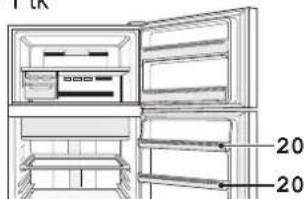
SJ-XP680G, SJ-XE680M
- Külmiku tasku (Ülemine)
(ainult mudelitel SJ-XP700G, SJ-XE700M) - Pudelitasku
- Külmiku tasku (Alumine)
Kui tavapārase jahutamistoimingu ajal sistemised tarvikud vāla vōtta, saab hoiustada suurremal hulgal toitu.
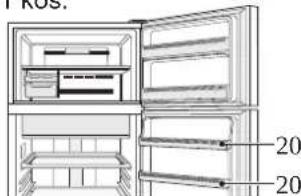
SJ-XP680G, SJ-XE680M
- Hladilni predal (Zgornji) (Le za SJ-XP700G, SJ-XE700M)
- Predal za steklenice
- Hladilni predal (Spodaj)

HaTo BnOka TemnepaTpa, HanaWtuIpepyJrTop TemnepaTpy.
ПРИМITA
BHytpiHn TemnepaTpa MOp03nJbHoI Kamepn 3aJIeKHTb Bi6BaTaBx PAcTOpIB, HApNkJaD, TemnepaTpy npMiuEHHra, KiNbKOcTi npOdyKTIB y Hi T aYactOTn BiKpNBaHH DaBepuT.
Pio3aBHH B XIOJINbHky CBIXN npOyKtIB a6o BiKpBaHH Ha neBn yac DBepzT iHnKaTOp Tempepatyn 3mHoe Cbiin KOIp Ha BIIN -e HopMaIbHO.

1 3a6e3neythe Heo6xidHy BeHTnIaHIO HABKOHO XOJODINbHnka.
Ha maniohky Bka3aHOMiimambHn Heo6xidnnpoctip npBCTaHOBNEXOIOINbHnKa.CnoJNeIeKTPoeHeprii 3aJIeKHTb BiD yMOB BVKNOpCTaHHa Ta BiID npomixkib,3aJIuWeHnXDNy BEHTUNaII.
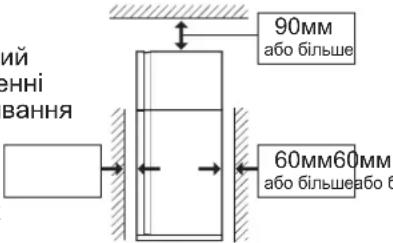
36iNbWeHHB iNbHoro npocTopy HABKONO XOJOniNbHnKa MOKe 3MeHUnTn eHeprocNOKBaHHa.
-Якwo npn ekcnnyatauix xonounbHnka HabkoNo Hboro BnKOpNCTOBycTcMeHwe pOCTopy,HIX yKa3aHO Ha pncyHKy,ce MOKe npn3BecTNdo NiBnueHHa TEmnpaTyPi B XoNOdNbHnky, NiDnueHOrO WMy Ta NOnKOJKeHH.
BicTaHbMIX3aHbOcTINKOxONoNbHnKa Ta cIHOIO NOBHHa 6yTN MIX 60 MM Ta 75 MM. RaIO BIDCTaHbE 6iNbOIO HIX 75MM,TO MOXHa OTPMaTNI OwKOJKeHHr,TopKaOHUCb KOMnPecOpa YI NOro nepupeipHnx YacTHN,RAI E HaD3Bnuahor rapaumni nd yac pobotn.
3araIbHn npoctip Heo6xIDHn dIa BHKOpNCtAHH
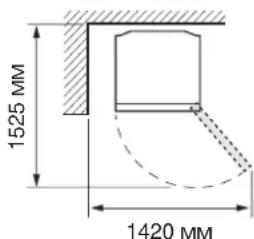
Ha nepeHbomy 6oCi noBepHiT bDi HiKn, 10 peryIIOITbcra, 106 OTpMaTu Micue dna
BCTaHOBHeHHr ONOp dIJI HIXOK.
(OnopnДЯнHiKOK ynaKOBaHo BCEpeuHi
XOJODINJIbHOro BiDIneHnra.)
1) He nepenoBHOte ue nIDOn BOIOU. IHaKwe npn 3amOpoxyBaHHi Ky6NK JbOyD 3NINHyTbcr.
2)KoJn Ky6nKn IbOdy roTObi, NOBOpOTom pyKn 3a rOdINHHNKOBHO CTpiIKoIO nOKnaIITb Ni d y KOHTeHep DnA Ky6NkIB IbOdy.
- KoHTeHep dnn Ky6nKIB JbOdy PpIMitka
Lio6 He nookoNTn KOHTeHep Iy KByKIB IbOy, He HauBaTe B HbOrO oni0 i He po6iB nicra zuBo rLi.
5.BiDineHHI iDBepHNI BiDCIK JnC BIXNX ppyKTIb (KaMepaJIO oxOJNOxKeHH)
6. NaheJIb KepyBaHHa
7.Дeздучстema
De3oDopyupeOBOHy po3aWObaHO Ha 7nIaxy, kIM pyxAcTbcxOIOHe nobITpy. Hema notpe6n Dnro6cnyROByBaHH Ta OunueHH.
8.OcbiTHeHHxOJIoNJIbHnKa
9. POnuJnerKoro DocTyN LIO NOnuMoXHa BUTaH
10.Полицяхолодьhoei kameprn SJ-XP680G, SJ-XE680M:1 wt. SJ-XP700G, SJ-XE700M:2 wt.
- I6pndha oxoJouyua naHeIb
PAnHeB oxoJxue xOOnuNbHe BiDJIeHnR
OnOcepeKOBaHO 33aMy. TaKIM YINHom pOdyKTNI
oxoJxoytcb oBepeXHo, He NotpanJyUcN iI d JIO
XoJODHO NOtOKY NOBITPra. - POnuA dna 4pyKtIB Ta OBOUIB
- KoHTeHep dnn ppykTIB Ta OBOye (2 wT.)
- Hixka, 00 perynbctcbc (2 wT.)
- Poink (4 wt.) 3a donomoroio polnikiv xonodnblHK MOxHa nepecyBaTu Ha3aT Ta Bnepeid.
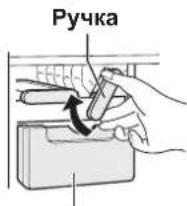
KoHTeHep nny Ky6nKiB IbOdy
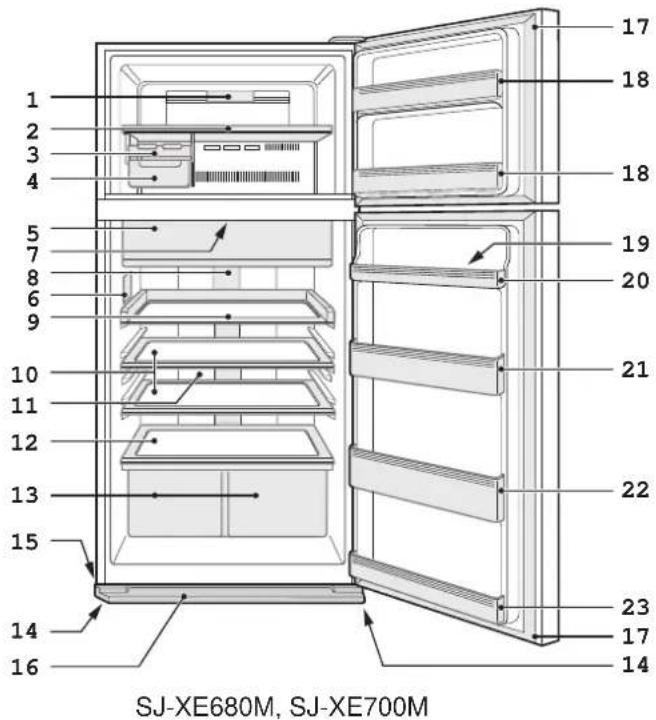
16.ДeКОРТИВHA naHJIb
17. Marhithe yuineHHa DBepu (2 wT.)
18.Деверн BiДиеленma Mopo3nJIbHoI KaMepn (2 wT.)
19.Пдствкадясь
20. BidaineHnaIrae
SJ-XP680G, SJ-XE680M: 2 wt.
SJ-XP700G, SJ-XE700M: 1 wt.
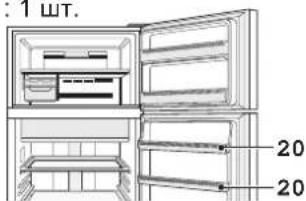
SJ-XP680G, SJ-XE680M
- OchOBHe BiDineHHxOJIOHbHnKa (BepxHe) (TinbKn Jn SJ-XP700G, SJ-XE700M)
- Bicik nna nnawok
23.OCHOBHe BiDdineHHxOJNbHnka (HnxHi)
Moxha 36epiraTu 6ilbwe npodyktiv, BnKOpncTOByOuN cTaHapTHy onepaio OXoJOnKeHHra, kUIO BnHrTn DoaTKOBe npnaad.
Moxha BnHrTaTn Take DoaTkObe npJaAJa:
- KoHTeHep IJIy KU6nKIB JbOdy
- Ponnua nerkoro doctyny
10.Полпцяхолдьhoei kamepn
13. KoHTeHep dIa 4pyKTIB Ta OBOye


ДодаTKOBe OXOЛОжЕнна Швдke 3amopoxkyBaHHa Швдke OXOЛОжЕнна
Mop03nIbHe BiDJIeHnHa
BidiHnna cnbcixnx npOdykTb
| Добатков холоженя | Швдк Заморочьаня | Швдк холоженя | ||
| Харазецпточka | Чeй реким риз国家战略 для охоложеня наоов аоб рcodукг; 6уллихолдни як пid. Примитка :Прodукtn 3 Високою влогістю MOжтуь заморочьаг. | Чeй реким скорочь чac заморочьаня прodукг. | Чeй реким риз国家战略 для ошадко oxolodженин Нал: Бал: Бал: Бал: Бал: Бал: Бал: Бал: Бал: Бал: Бал: Бал: Бал: Бал: Бал: Бал: Бал: Бал: Бал: Бал: Бал: Бал: Бал: Бал: Бал: Бал: Бал: Бал: Бал: Бал: Бал: Бал: Бал: Бал: БAL BAN BAN BAN BAN BAN BAN BAN BAN BAN BAN BAN BAN BAN BAN BAN BAN BAN BAN BAN BAN BAN BAN BAN BAN BAN BAN BAN BAN BAN BAN BAN BAN BAN BAN | Мерозильные вділени. Уbara : He po3taшовіte сіліні піяшки. Е виский ризник,有很大 boн MOжтуь розірbatия. |
| Місце вжівань Ві Операційни чac 6 | Гіділінь дія CBіжін прODуктіВ | Морозильные Віділінь Bіділінь. | Морozильные вділени. Уbara : He po3taшовіte сіліні піяшки. Е виский ризник,有很大 boн MOжтуь розірbatия. | |
| • Псій реким закінчіе рбOSTу副市长 • Сигнан зас tradeg佩жени небун. • Нета по tradeb nabu. • Hета no tradeb nabu. • Hета no tradeb nabu. • Hета no tradeb nabu. • Hета no tradeb nabu. • Hета no tradeb nabu. • Hета no tradeb nabu. • Hета no tradeb nabu. • Hета no tradeb nabu. • Hета no tradeb Nabu. • Hета no tradeb Nabu. • Hета no tradeb Nabu. • Hета no tradeb Nabu. • Hета no tradeb Nabu. • Hета no tradeb Nabu. • Hета no tradeb Nabu. • Hета no tradeb Nabu. • Hета no tradeb Nabu. H H H H H H H H H H H H H H H H H H H H H H H H H H H H H H H H H H H H H H H H H H H H H H H H H H H | • Псій реким закінчіе рбOSTу副市长 • Лунас сігнан • Достеger • Достеger • Достеger • Достеger • Достеger • Достеger • Достеger • Достеger • Достеger • Достеger • Достеger • Достеger • Достеger • Достеger • Достеger • Дostа • Дostа • Дostа • Дostа • Дostа • Дostа • Дostа • Дostа • Дostа • Дostа • Дostа • Дostа • Дostа • Дostа • Дostа • Дostа • Дostа • Дostа • Дostа • Дostа • ДostА • Дostа • Дostа • Дostа • Дostа • Дostа • Дostа • Дostа • Дostа • Дostа • Дostа • Дostа • Дostа • Дostа • Дostа • Дostа • Дostа • Дostа • Дostа • Дostа • Дostс • Дostа • Дostа • Дostа • Дostа • Дostа • Дostа • Дostа • Дostа • Дostа • Дostа • Дostа • Дostа • Дostа • Дostа • Дostа • Дostа • Дostа • Дostа • Дostа • Дostу • Дostа • Дostа • Дostа • Дostа • Дostа • Дostа • Дostа • Дostа • Дostа • Дostа • Дostа • Дostа • Дostа • Дostа • Дostа • Дostа • Дostа • Дostа • Дostа • Дost� • Дostа • Дostа • Дostа • Дostа • Дostа • Дostа • Дostа • Дostа • Дostа • Дostа • Дostа • Дostа • Дostа • Дostа • Дostа • Дostа • Дostа • Дostа • Дostа • Дostраці • Lecem poteби вин matи напоі напоі напоі напоі напоі напоі напоі напоі напоі напоі напоі напоі напоі напоі напоі напоі напоі напоі напоі напоі напо? • Lecem реким abtOMatИнco • ChACOBYTBС. • Lecem реким abtOMatИнco • ChACOBYTBС. • Lecem реким abtOMatИнco • ChACOBYTBС. • Lecem реким abtOMatИнco • ChACOBYTBС. • Lecem реким abtOMatИнco • ChACOBYTBС. • Lecem реким • ChACOBYTBС. • Lecem реким • ChACOBYTBС. • Lecem реким • ChACOBYTBС. • Lecem реким • ChACOBYTBС. • Lecem реким • ChACOBYTBС. • Lecem реким • ChACOBYTBС. • Lecem реким • ChCACOBYTBС. • Lecem реким • ChACOBYTBС. • Lecem реким • ChACOBYTBС. • Lecem реким • ChACOBYTBС. • Lecem реким • ChACOBYTBС. • Lecem реким • ChACOBYTBС. • Lecem реким • ChACOBYTBCS. • Lecem реким • ChACOBYTBCS. • Lecem реким • ChACOBYTBCS. • Lecem реким • ChACOBYTBCS. • Lecem реким • ChACOBYTBCS. • Lecem реким • ChACOBYTBCS. • Lecem реким • ChACOBYTBCS. • Lécem реким • ChACOBYTBCS. • Lécem реким • ChACOBYTBCS. • Lécem реким • ChACOBYTBCS. • Lécem реким • ChACOBYTBCS. • Lécem реким • ChACOBYTBCS. • Lécem реким • ChACOBYTBCS. • Lécem рек imm • ChACOBYTBCS. • Lécem рек imm • ChACOBYTBCS. • Lécem рек imm • ChACOBYTBCS. • Lécem рек imm • ChACOBYTBCS. • Lécem рек imm • ChACOBYTBCS. • Lécem рек imm • ChACOBYTBCS. • Lécem рек imm • ChOCOBYTBCS. • Lécem рек imm • ChOCOBYTBCS. • Lécem рек imm • ChOCOBYTBCS. • Lécem рек imm • ChOCOBYTBCS. • Lécem рек imm • ChOCOBYTBCS. • Lécem рек imm • ChOCOBYTBCS. • Lécem рек imm • ChOCOBYTBcs. • Lécem рек imm • ChOCOBYTBCS. • Lécem рек imm • ChOCOBYTBCS. • Lécem рек imm • ChOCOBYTBCS. • Lécem рек imm • ChOCOBYTBCS. • Lécem рек imm • ChOCOBYTBCS. • Lécem рек imm • ChOCOBYTBCS. • L déc. • ChOCOBYTBCS. • Ldec. • ChOCOBYTBCS. • Ldec. • ChOCOBYTBCS. • Ldec. • ChOCOBYTBCS. • Ldec. • ChOCOBYTBCS. • Ldec. • ChOCOBYTBCS. • Ldec. • ChOCOBYTBCS. • Ldec. • ChOCOBYTBCS. • Ldec. • ChOCOBYTBCS. • Ldec. • ChocOBYTBCS. • Ldec. • ChOCOBYTBCS. • Ldec. • ChOCOBYTBCS. • Ldec. • ChOCOBYTBCS. • Ldec. • ChOCOBYTBCS. • Ldec. • ChOCOBYTBCS. • Ldec. • ChOCOBYTBCS. • Ldec. • ChOCOBYTBCS. • Ldec. • ChOCOBYTB CS. • Ldec. • ChOCOBYTBCS. • Ldec. • ChOCOBYTBCS. • Ldec. • ChOCOBYTBCS. • Ldec. • ChOCOBYTBCS. • Ldec. • ChOCOBYTBCS. • Ldec. • ChOCOBYTBCS. • Ldec. • ChOCOBYTBCS. • Ldec. • ChOCOBYTBCS. • LDEC. • ChOCOBYTBCS. • Ldec. • ChOCOBYTBCS. • Ldec. • ChOCOBYTBCS. • Ldec. • ChOCOBYTBCS. • Ldec. • ChOCOBYTBCS. • Ldec. • ChOCOBYTBCS. • Ldec. • ChOCOBYTBCS. • Ldec. • ChOCOBYTBCS. • Ldec. • ChOBLENN. • ChOBLENN. • ChOBLENN. • ChOBLENN. • ChOBLENN. • ChOBLENN. • ChOBLENN. • ChOBLENN. • ChOBLENN. • ChOBLENN. • ChOBLENN. • ChOBLENN. • ChOBLENN. • ChOBLENN. • ChOBLENN. - ChOBLENN - ChOBLENN - ChOBLENN - ChOBLENN - ChOBLENN - ChOBLENN - ChOBLENN - ChOBLENN - ChOBLENN - ChOBLENN - ChOBLENN - ChOBLENN - ChOBLENN - ChOBLENN - ChOBLENN - CHOBLENN - ChOBLENN - ChOBLENN - ChOBLENN - ChOBLENN - ChOBLENN - ChOBLENN - ChOBLENN - ChOBLENN - ChOBLENN - ChOBLENN - ChOBLENN - ChOBLENN - ChOBLENN - ChOblenN - ChOblenN - ChOblenN - ChOblenN - ChOblenN - ChOblenN - ChOblenN - ChOblenN - ChOblenN - ChOblenN - ChOblenN - ChOblenN - ChOblenN - ChOblenN - ChOblenN |
*1 DnBnKoHaHH MoKe 3HaO6Htncs 6Inbue hacy, kU O npaui NoeHyEtbc3 0npaiciu po3MopoxyBaHH. Pexm 3anyckaetbc niCna toro, k3akHHTbcr po3MopoxyBaHH.
^*2 Якuto He BumkhyTu CNrHaN 3acTepeXeHHa, BIn 6yde 6e3nepepbHO LyHaTu npotraGM 30 xBnHn.

Cnctema Plasmacluster
BnKOpNCToByIte 100 fHyHKJIIO, KOJIIN XOyTe yTPMMyBaTN XoJIoNtBnIK YnCTmU ycepeuHi.
Iohi3atop B XOJIOUNbHNYBnO6JIe IOHHI KJtAcTepe, 0o RABNHO Co6oH HAKONUeHH N03NTNBHX HeraTNBHX IOHIB, IBnYCKAe B OCHOBHe BiDIIneHHX XOJIOUNbHNA. Li iOHHI KJIaCTepn pyHyOTb rpi6Kn PnicHBn, 0o MICTaTBcB NOBITpi.
PpMItka
- Y xoIIOJIbHnky MoKe BiUyBaTncr He3HaHn 3anax. Lc 3anax O3OHy, zo rHepepyetbcr oIH3aTopom. KInbKiCTb O3OHy MiImaJIbHa i WbNko 3HnKae B XOIOJINbHnky.
PpIMtka
- OdaTkoBE oxoJOnOxKeHH, WbUdke 3amOpoxyBaHH Ta WbUdke oxoJOnOxKeHH He npaIooTo b OndHocHo, KOIN OINH 3 uX peKmIB y dii.
-Пдчacpo60TuLnxpeKIMIBяkomora piДшe BiIDkpNBaNTe DBepi.

Ehepro36epexeHn
(TiNbKn dJa SJ-XP680G, SJ-XP700G)
BnKOpNCToByNe daHy fynKcIIO dIa BMnKaHH Ta BmNKaHHpeKIMy eHepro36epeXeHH.
Ko npaue cyf yHKui, BHytpiHn TEmnpaTypa XOIOINbHOrO MOp03NtBHO BiDIneHb CtaE BNIOIO, HIX Tempeata 3a cTaHdapTHoi onepaui, Ra HabeJeHO dan.
BiöobpaxeHa TemnepaTpa He 3MiHIOCTbcra.
BiiKJIIOUHTb dAnH pexkM, kIIO TemnepaTypa oxoJOnKeHNx HanoIB HeIOCTaTHbO HN3bKa a6o npoueDypa BuroTOBHeHH NbOdy 3aIMa 3abarato yacy.
PnmiKa
- EfeKTHBnHCTb eHepro36epeXeHHaJIeKHTb BiID yMOB BVKNOPNCtAHHb (BCTaHOBNeHOI TempepaTyPi, TEMNepaTpyu HABKONNIHbOro cepEOBUNa, YACTOTTu TApMHy BIDUHNHeHH Ta 3aUnHeHH DBePcT, KINbKOcTI npOdyKtIB XoJIOINbHnky).
IotpriHn 3BvKOBm CnHAn
a. Picra i 1 po3iny OCHOBHI onepauii HATNCHTb Ha 3 cekyHn a6o DOBwe.
IToUHa 3a3dAneriDb yCTaHOBNeHa TEMpePaTypa NOBepTaEcTbCra Do «3aBOcBkoRo HanaTuBaHHa (IHnkaJia BnrrJa,ЯK noka3aHo Ha pncyHky npabopuy.)
b. HATNCHTb 360 iHanaaHTyTe temnepaTpy.
C. Bukohai Te Hana Tu BaHHa. (Tak camo, k y di 3 po3iny «OchOBhi onepaii).
BnKoHaTe dii a-c 3HOby, 06 haJauTObyBaTu Tempeatypy 3 iHTepBaIOM 1^
Mop03nJIbHe BIDINENHH
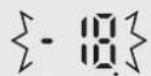
F
XoNoDnJIbHe BiDIneHHN
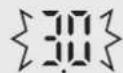

1 nepemkaHHN
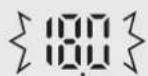
{F}
IobikOBn JnCT TexHiHnx DaHnx
Ybara: He BUKnIaIe daHe oBlaHaHHa Ha 3BUnaHi CMiTHNk!
BnKOpNCTaHe eNkTpuHHe ta eNkTPOHHe ObnaHaHHa NOBnHHe yTuNi3yBaTicb OkpeMo Ta y BiNoBiNDocI 3 aKoHOdaBCTOM OIo yTuNi3aui, BiNHOJIeHHa Ta nepepO6Kn eNkTPOHoro Ta eNkTPOHORO ObnaHaHHa.
3riHNO 3aKoHOdABCTBOM BnacNHKn XOnOuNbHbNKiB, kAi MeuKaHOt b KpaIHax CC, MoKyTb NOBepTaTN BHKOpNCaHI eJeKTpUHi Ta eJeKTPOHH npuAdn Ha cneJIaJIbHI 36ipHi NYkTN 6e3KOuTOBHO. Y deJN KpaIHax MiccEbi npoDaBI MOKyTp TAKOX 6e3KoUToBHO 3aBupTu BHKOpNCaHI npuAdn, kIIO Bu npuD6aTe y Hx HOI npuAdn.
*3a DeTJIbHIoIO INOpMaIeIO 3BepHITcBO npeDCTABHNIKB MlCeBOI BIAJN.
KIO BnKOpNCtAHI eIKTPmHi ABO eIEKTPOHH iPnlaJiMCTB bAtapeKn ABO
AKyMnTApO,YTINI3yTe Ix OKPEMO,BIDNOBIDHO DO BIMOR MlCeBOrO 3aKOHDoAcbTBA.
Ytni3yoyu daHn Bpi6 y haiexhnn cnoci6. Bn Bhece TcBknaJy npabInbHe BiHOBneHHa Ta nepepo6ky daHoro Bnpo6y, i Tm cAmM y 36epexeHHa HABKOJIIMHbOcrepeOBNuTa 3doop8' JIODei Bid HeraTubHORo BnNBy, kNn BnHKaE BHaCNIIDOK HenpaBnBHOi ytNi3auii.
2. Y kpaiahax, 0o He BXOaTb Do cKnay EC
Jaio Bn 6aae Te ytni3yBatu DaHn Bpi6, 3BepHtbc Do npedctabHnkiB MiceBoi Bna 3a iHopmaueo odo npabnlbHOYtuaii.
Дялшьеварii: Викорисдае щелковские abo щелковские oblaданни можа 6e3koштobho NOBERPHTNДИЕР, habITь якulo Ви He 36ирасьnpdabTu HbOrO HOBE oblaданни. IHIJI NYHKTN 36opy Викорисдае щелданни перелicheп на Домашни Be6-CTopIHci: www.swico. ch abo www.sens.ch.
Bnaoradapm Bn,ue n36paXTe To3n npOdyKT Ha SHARP. 3a da n3noI3BaTe nbHooceHHo Baunx XnAinInHK SHARP, npBO npOyeTe pkoBoDCTBOTo 3a pa6ota.
To3n xIaIINHcCnyK 3a OxnaXdaHe n 3aMpa3BaHe Ha XpaHa, KaKTo n 3a reHepupe Ha IeI.
- To3n xJaIINHKe npedHa3HaueH cAmo 3a DomaHa ynoTpe6a npn nocOeHaTa B Ta6nucata OkonHa TemnepaTypa. KImatuHnrt Knac e nocOeH Ha Ta6eJkata Ha ypeDa.
XnadnHnkBt e HanbIHo cyHKcIOHaJIe npi OKoIIHa TeMnepaTpya B paMKInTe Ha TempepatyHnte rpaHnU Ha nocOeHnRA KImMaTnueH KJAc. Ako XnaDnHnkBt Ce n3NoI3Ba npu No-HnCKn TeMnpaTpyn, HmMa da ce CTurHe do noOBpeDi Do +5^
XnauHnKbT He Tp6Ba da ce noIana Ha TemnepaTypa oT -10°C nnn no-Hncka 3a Dblnn nepno.
| Да се Използва само за Домakинску цли | |
| Климатчени Клас | Донустima okолна Темпера typа |
| SN +10°C | do 32°C |
| N +16°C | do 32°C |
| ST +16°C | do 38°C |
| T +16°C | do 43°C |
Информацnia за бezoinachoct

PpeynpekdeHne
0603haaBa roJAM pUCK OT CMBpT UIN TeXKO HapaHbAhe.

BhimaHne
O6o3NaHabra tonpck OT MaTePnAHHuETNnnn nn nnaecko HapaHbAhe.

PpeDynpexKdHne
XlaDnJneH areHT
XnaHnHKbT cBdbpKa 3anaJIM XnaJIneH areHT (R600a: n3o6ytaH) npa3neHbaU areHT (uKlnoneHTaH). Cna3BaIte cNeHNITE npabNla, 3a da npedeOTbpaNTe 3anaJIbaHe n ekCnIOdnpaHe.
IpaTe OxJaNTeJIHaTc CnCTema OT KOHTaKT C OCTpNpeDMTe. OxJaNTeHATA CnCTema OT3aN BbTpE BXJaINHHKA CbDbPxa XJaADInEn areHT.
He n3no3BaIte MExaHnUHn IJIN dpyr cpeIcTBA, 3a da yckopnte pa3Mpa3RaHeTo. (XJaUNHnKbT pa3NoIra Cbc CNCTema 3a aBtOMaTHHO pa3Mpa3BaHe)
He n3no3BaIte eNeKtpnueckn ypeN BbTpE B XnaDnHnKa.
He 6nokupaTe npoctpaHCTBOTo OKoNo xJaUnHnka.
He n3noJIbAaTe 3anaIIMn cnpeIOBe, HanpImep cnpe6oB, B 6JIn3OCT Do XJaAnNHnka.
■Pn NOBpeBa B OXlaIaNITeJIHaTc CnCTema He NIINaIte eJIeKTPnueckn KONTAKT I He N3IOJ3BaIte OTKpNT nIaMbK. OTbOpTe npO3opeua n IpOBeTppe TomeuHHeTo. CbbpKeTe ce cbc cepBu3, Odo6peH OT SHARP.
MOHTAX
He cnaraTe XnAunHnKa Ha BnaxHo nnn MOKpo MRCTO, TbKATO TOBA MOKe Da NOBpeDn N3ONaunrTa Hn da npuHHn TeU. OTbBn Ha KOpnyCa MOKe Da ce 6pa3yBa KOHDH3, KOITo Da npuHHn pbkda.
XJaHnHKbT Tpr6Ba Da 6bDe MOHTnpaH Cta6NJHO Ha IOna HNBenpaH.
3axpaHbaa Ka6eI, 7encen, KOHTaKT
PpoTeTe BnMaTeJIHO CneHIne IpaBnla, 3a Da n36BerHeTe TOKOB yIap nn NoXap.
BknIOyTe 1eNcJa HaeKdHO dIpeKTHO B KOHTaTHe n3no3BaIte ydbJnxTe Inn 1eNcehen aanTep.
Bkniouhe Ie enceJa B KOHTaKc CbC BoTBeTHOTOMHnHaHnHO HAnpeXeHne CnopeT TaBeJIkaTa Ha ypeJa.
CbpxTe HaekJHO 3a3eMaBuaIg IuT KbM 3a3eMaBaIaTa KEma.
YBepTe ce,Ye 3axpaHbAunrKa6en He e NOBpeDeH NO Bpeme Ha MOtaka UNI INPemecTbaHeTo. Ako UencelbTNIN 3axpaHbAunr Ka6en ca pa3xna6eHN, HE BKnIOuBaIte Uencela B KOHTaTa.
He nnpaTe qenCeNa c MOKpn pbc.
I3KJIIOUBAIte ypea ot eIeKTPnueckaT MaPexka, KaTO n3BaJdATE uenceeta OT KOHTa. He n3BaJdaTe 1enCena, IbpnaKn Ka6ena.
CbpaTne noepeNa npax MoKe da npuHn noKap.36bpweTe ro BHMaTeJHo.
I3BaTeIeIeJIaOT KOHTaTa, aKo HMa da non3BaTe XnAdnHnKa DbIro BpeMe.
Ako 3axpanBaunr Ka6en ce nobpei,ToT Tp6Ba da ce CMeHn OT cepBn3, Oo6peH OT SHARP, TbKato ce N3NCKBa Cneuane H Ka6en.
Ynotpe6a
He cxbxpanhaBnTe JETNBNn 3anaNIMMaTepeaNn KaTo eTep,6eH3nH, npoanH (ra3), aepo30JHn fJaakOnn, aXe3NBn, uCT Cnpt n T.H. Te3n MaTePuaNn ca B3pNUBOOAnch.
He cbxpaHraBaTe TemnepaTpyHO-yyBCTBNTeHN HAnpImep fapMaueoTtHuN IpOdyKTu B XJaDuINHnKa. IMa rOJMa ONaCHOCT OT IpomHa B KaueCTBaTa Ha npOdyKTnte.
He ce onntbaite da MoDnOuNpuTe XJaDiNJIHnKa. Toba moKe da npuHnNoXap, TokOB yIap nHapaHraBaHe.
He octaBraTe npEdMeTn Bbpyx XnaHnHaKa.Ako TaKbB npEdMeT NaDHe,MOKe Da npuHH HapaHraBaHe.
03n ype MoKe Da Ce N3No13Ba OT Deca Ha Bb3paCT Na 8 ToHN,OT Xopa C HamaIeHn Fn3Nueckn, CETNBHn IINYMCTBeHn Bb3MOXHOCTn, KaKTo N OT Xopa Be3 ONIT n 3HaHn, CTna Da bBdat NOd HabIoHeHne INI INk Da nE 6bn HApPaBEN IHCTpykTakO THOcHO Be3OnaChata ynotpe6a Ha ypeDa, TaKa Ye da ca pa36paN Bb3MOxHnTe ONaCHOCTn. He No3BOJRAaTe Ha Deca Da cn Irpaart CypeA. POnucTBaHeto n NODpbXkata He 6nBa Da ce npabrt OT Deca 6e3 HaD3Op.

BG
PnN n noCtBaHe
■IbpoN3KIIHcyTe XnAaINHnKa OT KOHTaKTa, 3a Da npedOTbpaTnte TOKOB yap.
He n3nBaTe BOa BbTpne NIN OTBbH NO KOpnyca. Toba MoKe Da npEiN3BnKa NoRbHa PbXJa N NobpeDa Ha eJekTpueeckata N3Olaunr.
Ppo6nem
Ako yceTte Mnpn3Ma Ha n3ropaNo, He3a6abHo n3KlIOyete ueNceTa ot KOHTaKaTa. CbbpxeTe ce cbc cepBn3, Oo6peH ot SHARP.
Pn n3TuHa He ra3 OTBopeTe npO3opea, 3a da npOBetpuTe. He nnaIte XnaIuHnka uN uenceJa.

BHHMaHne
TpaHcnpTupaHe
■PnMOHTaX NJI INpeMeCTBaHe Ha XJaDINHnKa H3NON3BaIte NOJIOKKn 3a IpeDna3BaHe Ha NOOBOTo NOKPITne OT NOBpeDa.
■Pn npenacHe XbaHTe XnaunHnka 3a dpbXknte OT3aNOTOny.
Pn HnnpaBnHO BnraHe Ha XnaDnHnka MoKe da noctpaTaTe.
N3XBbPnAHe
YBepete ce, ye XlaaunHnKbT He npedctabJraBa onaCHOCT 3a Deua, KOraTO cbuNrT Ce cxbxpaHraBa, npen da 6bJe n3BO3eH KaTo OTnaDbK. (HaNP. CbaNete MarHHTHO To yInbTHHe Hn BpTaTa, 3a Da npedOTbPaTnte 3akneUbaHe Ha Deua)
XnaHnHKbT Tp6Ba Da ce H3XBpJN NO CbOTBeTHnHaunH. 3aHeCte XnaHnHnKa B npOpeCnoHaneHcHTbp 3a peuKnnpaHe Ha 3anaJIMn XnaDnHn pa3neHbau areHTn.
Ynotpe6a
He nnaite KOMnpecopa nnu Yactne OKOJno HrO, TbKaTO ce HaropeuBaT MHOrO NO BpeMe Ha pa6oTa MoKe Da ce HapaHnte Ha MeTAJIHnTe p6oBe.
He nnaTe xpaHnTe uN MeTaHnTe CbIOBe BB cpu3epa c Mokpn Pbue. Toba MoKe da npuHHn N3MpB3BaHe.
He cnaarTe 6yTuNkN u KeHOBe BbB ppu3epHTo OToJeHne.
Ima roJm pNCK CTbKJIeHnTE 6yTnIKn Da ce npbChat Oco6eHO no BpeMe Ha ekCnPecHo OxJaKaHa.
3a npabeHe Ha JeI n3noI3BaIte cAmo roHa 3a PneHe B0da.
He OTBapnTe H He 3aTbapnTe Bpata,T KORATO HAKO Dbpkn pBkata cn 6n3o Do Bpata. Ima pnck OT npntuCKaH Ha npctnte.
He cnaarTe TBbpDe roJeMn npEmdEtN B NOCTaBKnte Ha BpaTata.AkO npEmdTbT n3NaHcOT NOCTaBkata, MOKe Da npuHn HapaHraBaHe.
Tempeatypen HndkaTop
XnaHnHKbT pa3nonara c TemepaTypeH INdkaTop B XJaIINHO TO OTDeJeHne, KOHTPOJnPaTe CpeHnata TemepaTypa B Hau-CTydeHaTa 30Ha.
Ha-ctydeHa 30Ha
CmBOJbT yka3Ba Hn-CTydeHaTa 30Ha B XnaHInHO TO TDeJeHne. (NocTabKaTa Ha BpaTa, KOrTO Ce HAMnpa Ha CbUaTa BnCOuHa, He Bn3a B Hn-CTydeHaTa 30Ha.)

CnmboJ
Пюверka на Temпepатура в Найстуденьта 30нa
PeIOBHO npOBepaIte TempepaTpaTb HauCTydeHaTa 3OHa n npn Heo6xoIMocT perynpaTe TepMOCTaTa Ha XJaUNHnKa.
3a da noDbpxkate npabunHata TemnepaTpya Bypeda, npOBepaBaiTe daIIM TemnepaTyPhNRT INDkaTop e BuHaR CNH.AKO TemnepaTyPhNRT INDkaTop cTane 5AJI, TemnepaTypaTa e TBbpDe BnCOKa; B TO3n CnyaJ 3aJaTe NO-BnCOKa CTeneH Ha TepMOCTaTa Ha xnaDnHNka n N3yakaTe 6 Yaca, npEi OTHOBo da npOBepuTe TemnepaTyPhNr INDkaTOp.

CNH
PpabnHa hactpoika

6JN
Temnepaypatae TBbpde Bucoka, HacptpoTe TepMOCTaHa XlaadinHnka.
3A6EJIEXKA
BbtpeunHata TemnepaTpa Ha xnaHnHka 3abncn ot pa3nHnΦakTopn KaTO cTaHata TemnepaTpa, KOJIueCTBOTo XpHa H YeCToTata Ha OTbaprHe Ha BpaTata.
Korato e npnbpaHa npcaHa xpaHa nn Bpata Ta oCTaBeHa OTBopeHa N3BecTHO BpeMe, e HopMaHOTemnepaTyPhnT HnDnKaTop Da cTaHe 6JN.
1 OctaBeTe IOCTaTbUHO IPOCTpaHCTBO 3a BEHTnlaCnRA OKOJIO XnaDnHnka.
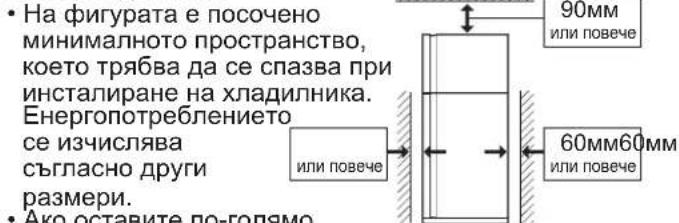
Ako octabte no-roJMynpoctpaHCTBO,XlaDnHHKbT MOKe Da KOHCympaNO-MaIKO TOK.
AkoXnAnHnKbCTeN3NoJ3BaBnpocTpaHCTBO C pa3Mepn,NO-MaIKN OT NOCOHeHHTe Ha qnpyata, TOBA MOKe Da DOBeDe Do npeprBaHe Ha arperata, BUCOKO HnBO Ha UYM NOBpeDa.
Pa3ctoHneto MeKdy 3aHaTa CtpaHa Ha XnaDnHnka HCTeHata Tp8Ba Da 6bDe 60 MM NIOBueye, HO NO-MaJIKO OT 75 MM. AKO IpocTpaHCTBOTo e No-WhPOKO OT 75 MM, 6NXTe MOJIN Da ce HapaHHTe npN DOnpC KOMnPecopa INepnΦepHNTe My YacTN, KOINTO Ca MHORO ROpeuNo Bpeme Ha pa6ota.
O6uO npoctpaHCTBO Heo6xOdmo npn pa60Ta
2 3aBbptete DBeTe npedHn perynpemykpaeta, Taka ye da ce OTbOpN MRCTO, B KOeTo da BKapaTe NOIOXKKITE.
(NoIIOKKeTe ige Hamepnte B xIaIJIHOTO OTDeIeHne.) CneI Kato MOHTnpate NoIOKKeTe, perynnpaTe DBeTe Kpaeta, 3a da cTaBnIuN3npate XJaDINHnka.
Perynipyemo kpaue
Iopnoxxn 3a kpaayetata
- MoHTnpaHnTe NoIIOxKn HAKJaHrT XJaUNHnKa CbBcem JIeKO Ha3aI. Te OcNrypRaBt cTa6NJHOCT Ha XJaUNHnKa.
3 OTBnTe DbTa BnHTa OT DoHaT a Yact Ha Kopnyca n CneI TOBa MOHTnpaIe T cTAX KanaKa Ha KpaYeTa. (KanakbT Ha KpaYEtata ige Hamepnte B XnaJInHoto OTdJeHHe.
3a6eJekka
IocTaBete XnaDnHnKa Taka, Ye uenceT da 6bde DOCTbneH.
- Na3eTe XlaIaIIHnHka O T npIka CbHueBa CBETnHa HrO cnaarate Do n3TOHnHa HToTnHa.
He cnaarTe XnAaHnHnKa HnPaBO Ha 3emrTa. Ocrrype Te nOxDxOra oCHOBa,HaPnMep DbPBeHa nloockCT.
- Ako BKNIOHTe 5eNCEa BA KOHTAKTa npn OTBOpHa Bpata, CE BKNIOUba anapMaTa 3a OTBOpHa Bpata - TOBa e HopMaJHo. AnapMaTa Cnnpa npn 3aTbApRHe Ha Bpata.
PpeIN BKNIOUyBaHe Ha XnaIINHnKa
IOnCTeTe BbTpewHInTe Yactn C Kbpna, Hanoeha C Tonna BOda. Ako n3noJI3BaTe canyHeHa BOda, n36bpweTe ⅢaTeHNO C BOda.

- JIamna Ha 4pn3epa
- PaΦr Na φpɪnεpa
- JeodorehepaTop
1) He npenbnaTe foopMaTa c Boda. B npotnBeH cnuyaH roTobnte K6yeta neI ue 6bDat cJeeneH.
2) Korato ky6yTeTata neI cTaHaT rOToBn, 3aBbPteTe JIOCTYeTO NO yacOBHnKOBaTa CTepeJIka, 3a Da n3CInneTe NeDa B KyTuRA Ta 3a NeI.
- Kytna 3a nei
3a6eJekka
He npabete nei Hn He hannBaTe macno B kyTna 3a nei, 3a da He nOBpeDnte.
- OTeHHe 3a 3ana3BaHe Ha CBExeCTTa n BpaTa (XnaDnHo OTeHne)
- KoHTpOEn nahen
7.Apomatn3aTop
Apomatn3aTopbTe mONTupan Ha nTbTa Ha cTydeHn Bb3dyx. He n3nCKBa ynpabIeHne n nouNCTbaHe.
-
Namna Ha xJaIaIINHnKa
-
N3ternau ce paΦT
To3n padT ce n3terJr.
- PaΦT Ha xJaIaIIHnka
SJ-XP680G, SJ-XE680M:16p.
SJ-XP700G, SJ-XE700M:26p.
- XnbpiDEn OxJaKaDaunanen
PAnenbT INHINPeKTHO OXnaxKaXa XnaHnHOTO OTDeHeHne OT3aI. NToTO3n HauHH OxnaXaHaTeHO Ha xpaHaTa CTaba Neko, 6e3 Ta da ce n3naRa Ha CtydeH Bb3dyuWeH NOTOK.
- PaΦT 3a nIIOBoe n 3eJIeHcyu
- OTeJIeHHe 3a IIIODoBe n 3eJIeHcyu (26p.)
- PerynpyeMo kpaue (2 6p.)
- Konenue(46p.)
KoJIeIuTaNo3BOJRAbT Da DBXKeTe XlaDJIHnKa HAnpeN Ha3aI.
KoJIeIua
- Kanak Ha kpaayeta
- MarHnTHo yNJIbTHeHne Ha BpaTaTa (2 6p.)
-
NocTaBka Ha BpaTata Ha φpH3epa (2 6p.)
19.ΦopMa3aHua -
Kytna 3a Ima
SJ-XP680G, SJ-XE680M:2 6p.
SJ-XP700G, SJ-XE700M:16p.
SJ-XP680G, SJ-XE680M
- Xlaunna noctabka (Topha)
(Camo 3a SJ-XP700G, SJ-XE700M) - NocTabka 3a 6yTuIkn
- XlaaHnHa nocTaBka (DOnHo)
Moxe da cxbxpaHbATE noBce XpHa H xJaAnHnKbT da pa6OTn HopMaHNo, KaTo n3BaNTe BbTpewHHTe npctabKn.
CneHnHT npncTaBKn Ce BaJaT.
- PaΦrHa φpɪn3epa
- Jeioerehepatop
- Kytna 3a nei
-
N3TerTnAe paΦT
-
PaΦT Ha xJaAnJHnKa
- OTeJeHne 3a nNoOBe n 3eJenuyu

EkctpeMHo oxJaXdaneE KcnpecHo 3aMpa3YBaHe EknpecHo oxJaXdane
Φpns3epHo OTdeneHne
OTdJIeHHe 3a 3ana3BaHe HA CBExEcCTTa
| EkstpeMuNo OxlaJxdaHe | EkspneceHo 3ampa3raBaHe | EkspneceHo oxlaJxdaHe | ||
| Функция To3n peKIM | СлуЖи За ИЗТуДЯВане НалNTКИ XрANI Do ПелdeNo StуJdeNo. Завелека : XpANITE С ВICOKO StbIbPkaHne На Влага можд Замрь3HaT. | To3n peKIM Сыкрацaba ВрЕмTo За 3ampa3raBaHe хрAnata. | To3n peKIM сLуЖи 3a 6bp30 oxlaJxdaHe налNTКИ XpANI. | |
| Мостороженie Οтделени 3a Залазанe СБжecTTa | Фпзерно OTdelenenie | Фпзерно OTdelenenie Виманe : He слагайte STbKJIeHn 6bytIkpN. Им Голяma onaCHOCT da ce npbCnat. | ||
| Проблжiteлnot | 6чaca *1 | 2чaca *1 | 30MinHyTn | |
| •To3n peKIM ce n3KlnUoyBa abTomatuHNO. •АларMaTa He ce BklnUoyBa. | •To3n peKIM ce n3KlnUoyBa abTomatuHNO. •АларMaTa ce BklnUoyBa. 3a спранe Ha anapMaTa *2 HATsCHete БуToHa 3a ВьВeждaHe. | HATsCHete БуToHa 3a EKCpsecho 3ampa3raBaHe. | ||
| След ИЗллени Ha onepaunrta | •Няма Нжда Da VaDInTe HapNTKITE Или ХрAnITE. | •Травla Дa ИЗВади Te HAPNTKITE ИхрAnITE, KORATO anapMaTa pro3BvUy. •Ако habNTKITE ИхрAnITE OCTaHaT BvB Фрзерно OTdelenenie NOBEve OT 30MinHyTn, Можд Дa 3amрь3HaT. | ||
| При спраие на Тoka по Врeme Na Опeraцята | •To3n peKIM ce OTmeha abTomatuHNo. •To3n | peKIM ce Bb3O6HOBra ABTomatuHNo рп Вь3CTaHOBraBaHe Na eNeKTPo3axpaHBAHeTO. | ||
^1 Moxe Da OTHeme NOBce BpeMe, aKO ONepaunrTa cBbnaDa C pa3Mpa3raBaHe. To3n peXIM Ce aKTINbnpa CNeI pNkIOUcBaHe Ha pa3Mpa3raBaHeTo.
^2 Ako He cnpeTe aIapMaTa, T' 3ByuN 30 MHyTu 6e3 npekbcBaHe.

Honn3atop "Plasmacluster"
N3noJ3BaIte Ta3nФyHKU8a 3a NOuNCtBaH aBbTpEshOcTTa HxJaUNJIHnKa.
Iohn3aTopbT B xnaDnHnka Ocbo6oxdaBa noJoxntn H n OTPuataeHN hONB XnaDnHOTo OTJeHeHne. Te3n rpynn IOHN npemaxbAT PnceHTa BbB Bb3dyxa.
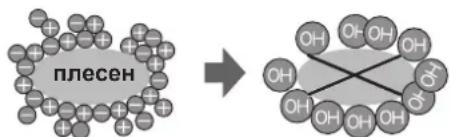
3a6e9ekka
B XnaDnHnKa MoKe Da ce ycea Jeka Mnp3Ma. Toba e Mnp3MaTa Ha 03OHa, reHeeppaH OT NOnH3aTopa. KoNueCTBOTo O3OH e MNHMaHNO 6bp3o Ce pa3rpaKda B XnaDnHnKa.
3a6eJekka
- Pexmnte ektpemHO oxnaqdahe, ekpcpecho 3ampa3rahe n ekpcpecho oxnaqdahe He MORAT da pa60rT eHOBpemHo.
-ПовьзмохнocтИЗбягВаiteДаOTВарЯTeВpaTaTaNВpeMeHaTe3n peKIMN.

EheproceTbaHe (Camo 3a SJ-XP680G, SJ-XP700G)
Ta3nФyHKunnaakTNBnpa eHeprocncctraBaunpapeKIM.
IbpeMe Ha Ta3n FyHKuYBbTpEwHaTa TemnepaTypa Ha XnaJHnKa N FpN3epa Ce NOKaYBa CnpMa 0bnuaHnA, KaKTo CneDba.
Ioka3BaHaTHa HnCnJIe TEMpepaTyPe He ce npomeH.
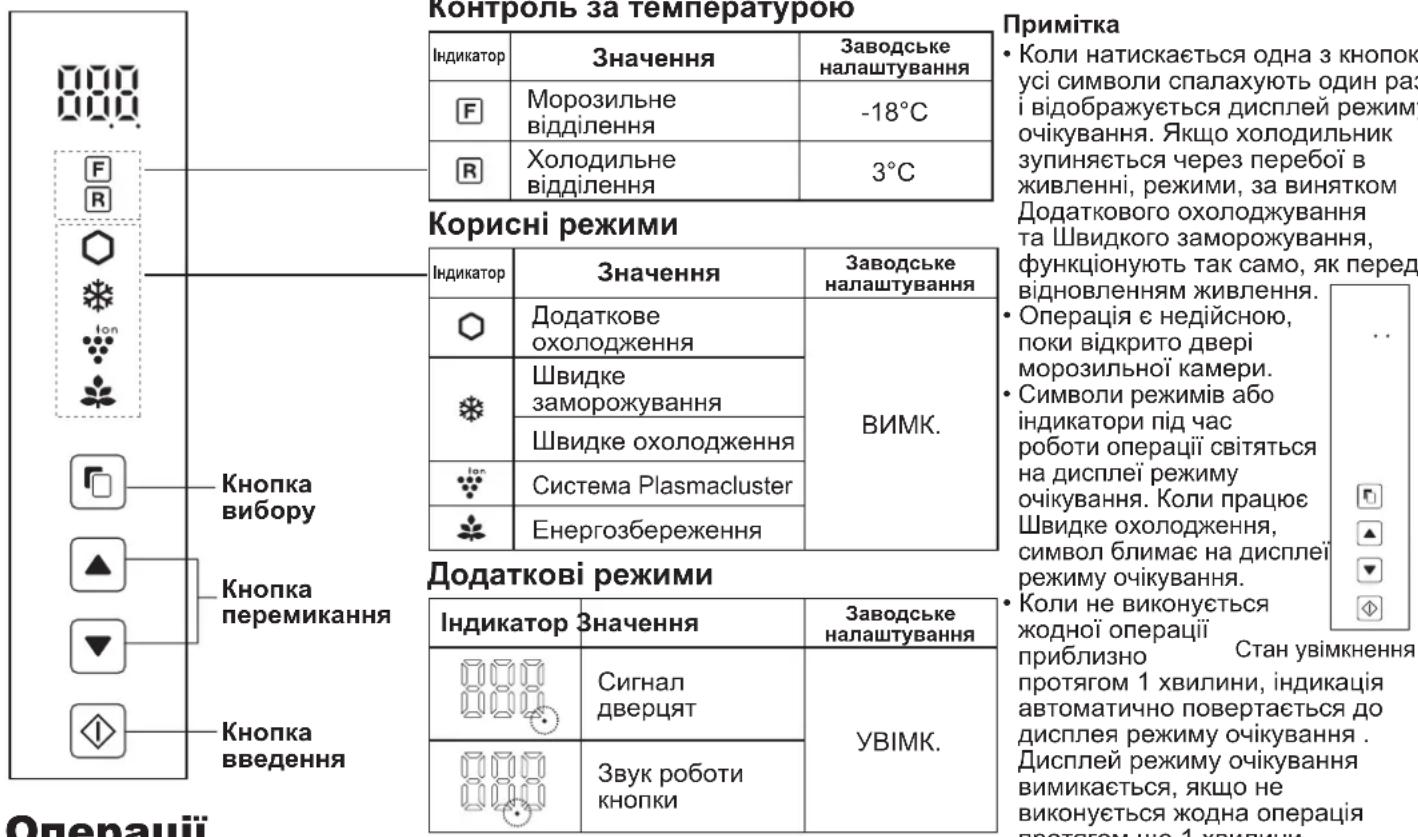
KoHTpOJIeH nAHeI (SJ-XP680G, SJ-XP700G)
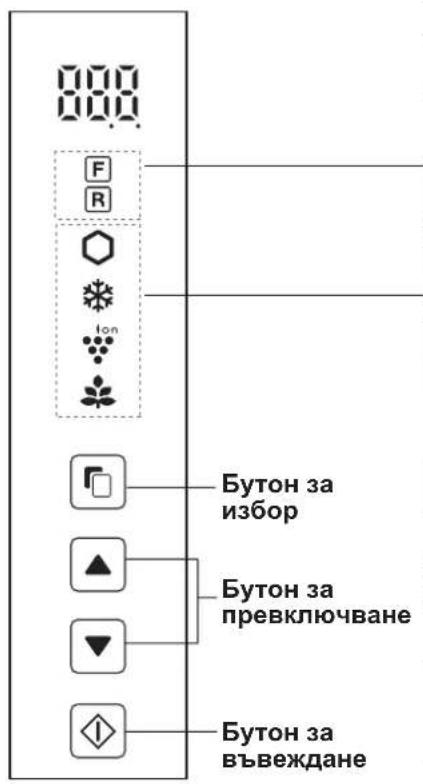
Temnepatypen KOHTpOJ
| Иконka | Знayене | Стандэрпа нachtюкa |
| F | Фризегно отденице | -18°C |
| R | Хлadiлно отденице | 3°C |
Ydo6Hn peKmN
In Europe represented by
SHARP ELECTRONICS EUROPE LTD.
4 Furzeground Way, Stockley Park, Uxbridge, Middlesex, UB11 1EZ, U.K.
Printed in Thailand
Impreso en Tailandia
Stampato in Tailandia
Imprimé en Thailande
Impresso na Thailanda
Tutawthekσtnv Taalavδη
Gedruckt in Thailand
Gedrukt in Thailand
Wydrukowano w Tajlandii
Nyomtatva Thaifoldon
Tiparit in Thailanda
Vytišteno v Thajsku
Vytlacené v Thajsku
Atspaudinta Tailande
Iespiests Taizeme
Trukitud Tais
Natisnjeno na Tajsken
HadpykoBANO B TaillanDi
OTneataHO B TaillanD


