
10033187 - Oven Klarstein - Free user manual and instructions
Find the device manual for free 10033187 Klarstein in PDF.


| Product type | Built-in electric oven |
| Brand | Klarstein |
| Model | 10033187 |
| Power supply | 220-240 V ~ 50 Hz |
| Total power | 2.3 kW |
| External dimensions (H x W x D) | 595 x 595 x 575 mm |
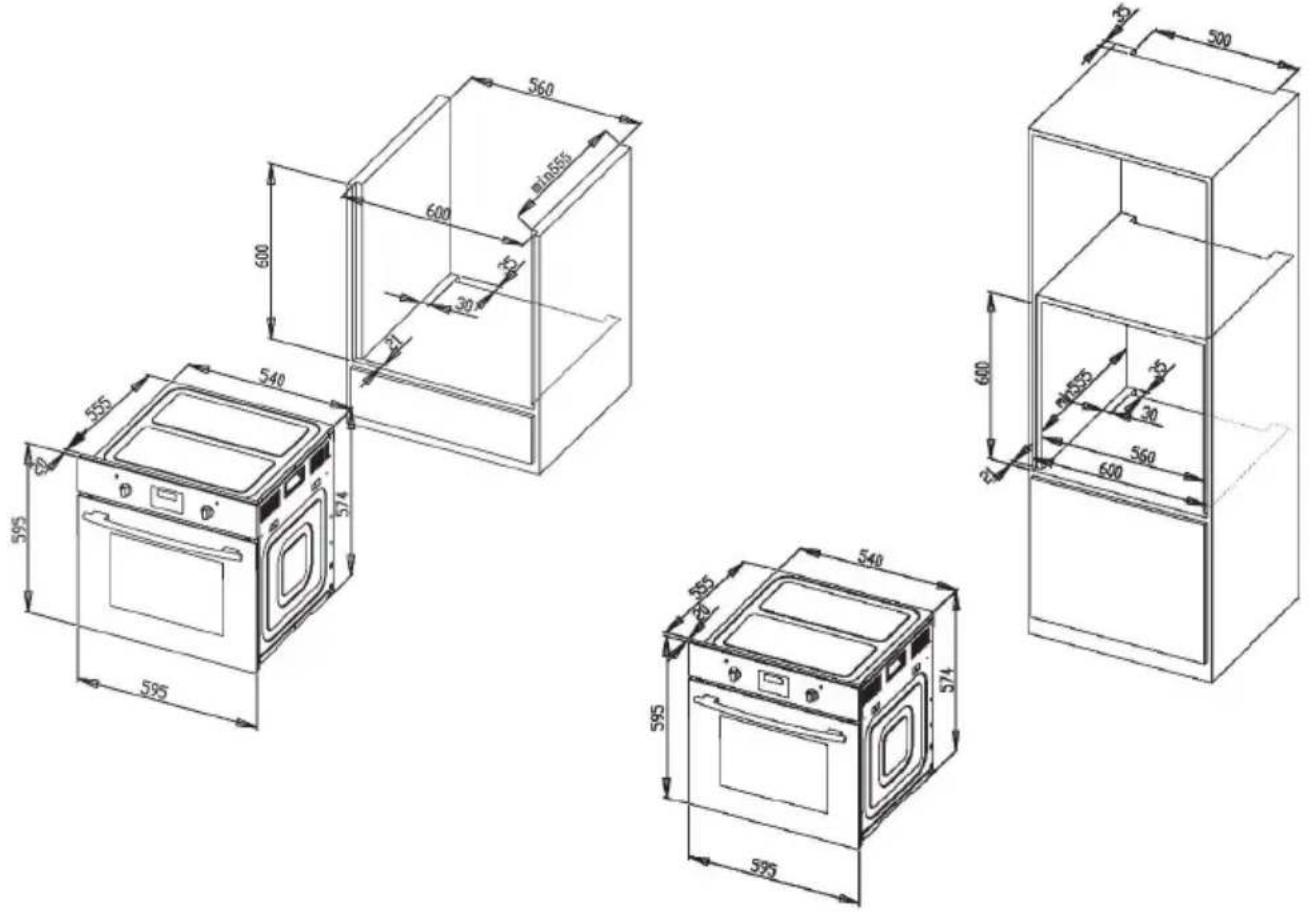
| Built-in dimensions (H x W x D) | 600 x 600 x min. 555 mm |
| Energy efficiency class | A |
| Oven bulb | 25 W, 300 °C |
| Power cable length | 1.5 m |
| Number of cooking functions | 7 (defrost, top/bottom heat, convection heat, single grill, double grill, convection + grill, convection + bottom heat) |
| Temperature range | 50 to 250 °C |
| Display | LED |
| Timer | Yes (short-term alarm, semi-automatic, end of cooking, automatic) |
| Accessories included | Grid, baking tray, side rails |
| Cleaning | Manual; removable door and windows |
| Safety | Door lock, automatic shut-off, overheat protection |
| Installation | Built-in, requires a professional |
| Repairability | Replacement of bulb, door gasket, heating elements |
| Material | Stainless steel |
Frequently Asked Questions - 10033187 Klarstein
User questions about 10033187 Klarstein
0 question about this device. Answer the ones you know or ask your own.
Ask a new question about this device
Download the instructions for your Oven in PDF format for free! Find your manual 10033187 - Klarstein and take your electronic device back in hand. On this page are published all the documents necessary for the use of your device. 10033187 by Klarstein.
USER MANUAL 10033187 Klarstein
Congratulations on purchasing this equipment. Please read this manual carefully and take care of the following hints to avoid damages. Any failure caused by ignoring the items and cautions mentioned in the instruction manual is not covered by our warranty and any liability. Scan the QR code to get access to the latest user manual and other information about the product.

CONTENT
Declaration of Conformity 31
Technical Data 32
Safety instructions 33
Device overview 34
Accessories 35
Control panel and functions 36
Installation 38
Getting started 40
How to operate the oven 46
Main cooking guideline 49
Cleaning and maintenance 51
Troubleshooting 54
Hints on Disposal 56
DECLARATION OF CONFORMITY

Producer:
Chal-Tec GmbH, Wallstraße 16, 10179 Berlin, Germany.
This product is conform to the following European Directives:
2014/30/EU (EMC)
2014/35/EU (LVD)
2011/65/EU (RoHS)
2009/125/EC (ErP)
TECHNICAL DATA
| Item number 10033187 | |
| Power supply 220-240 V ~ 50 Hz |
| Total power consumption 2.3 KW | |
| Cable type/section H05VV-F 3*1.5 mm² | |
| Cable length 1.5 m | |
| External dimensions( height/width/depth) | 595/595/575 mm |
| Installation dimensions( height/width/depth) | 600/600/ min. 555 mm |
| Main oven Multifunction oven | |
| Energy efficiency class A | |
| Oven lamp 25 W/300 °C |
SAFETY INSTRUCTIONS
General Instructions
- Before using this product please study this entire Instruction Manual carefully. Keep this manual in a safe place for future reference. Ensure that other people using the product are familiar with these instructions as well.
- When the oven is first switched on, it may give off an unpleasant smell. This is due to the bonding agent used for the insulating panels within the oven.
- Please run up the new empty product with the conventional cooking function, 250^, 90 minutes to clean oil impurities inside the cavity.
- During the first use, it is completely normal that there will be a slight smoke and odors. If it does occur, you merely have wait for the smell to clear before putting food into the oven.
- Please use the product under the open environment.
- The appliance and its accessible parts become hot during use. Care should be taken to avoid touching heating elements. Children less than 8 years of age shall be kept away unless continuously supervised.
If the surface is cracked, switch off the appliance to avoid the possibility of electric shock. - This appliance can be used by children aged from 8 years and above and persons with reduced physical, sensory or mental capabilities or lack of experience and knowledge if they have been given supervision or instruction concerning use of the appliance in a safe way and understand the hazards involved. Children shall not play with the appliance. Cleaning and user maintenance shall not be made by children without supervision.
- During use, the appliance becomes very hot. Care should be taken to avoid touching heating elements inside the oven.
- Do not allow children to go near the oven when it is operating, especially when the grill is on.
- Ensure that the appliance is switched off before replacing the oven lamp to avoid the possibility of electric shock.
- The means for disconnection must be incorporated in the fixed wiring in accordance with the wiring specifications.
Children should be supervised to ensure that they do not play with the appliance. - This appliance is not intended for use by persons (including children) with reduced physical, sensory or mental capabilities, or lack of experience and knowledge, unless they have been given supervision or instruction concerning use of the appliance by person responsible for their safety.
- Accessible parts may become hot during use. Young children should be kept away:
- A disconnection means must be incorporated in the fixed wiring in accordance with the wiring rules.
- If the supply cord is damaged, it must be replaced by the manufacturer, its service agent or similarly qualified persons in order to avoid a hazard.
- Do not use harsh abrasive cleaners or sharp metal scrapers to clean the oven door glass since they can scratch the surface, which may result in shattering of the glass.
A steam cleaner is not to be used. - The appliances are not intended to be operated by means of an external timer or separate remotecontrol system.
Special Instructions
- Do not use the oven unless you are wearing something on your feet. Do not touch the oven with wet or damp hands or feet.
- For oven: Oven door should not be opened often during the cooking period.
- The appliance must be installed by an authorized technician and put into use. The producer is not responsible for any damage that might be caused by defective placement, and installation by unauthorized personnel.
- When the door or drawer of oven is open do not leave anything on it, you may unbalance your appliance or break the door.
- Some parts of appliance may keep its heat for a long time; it is required to wait for it to cool down before touching onto the points that are exposed to the heat directly.
- If you will not use the appliance for a long time, it is advised to plug it off.
DEVICE OVERVIEW
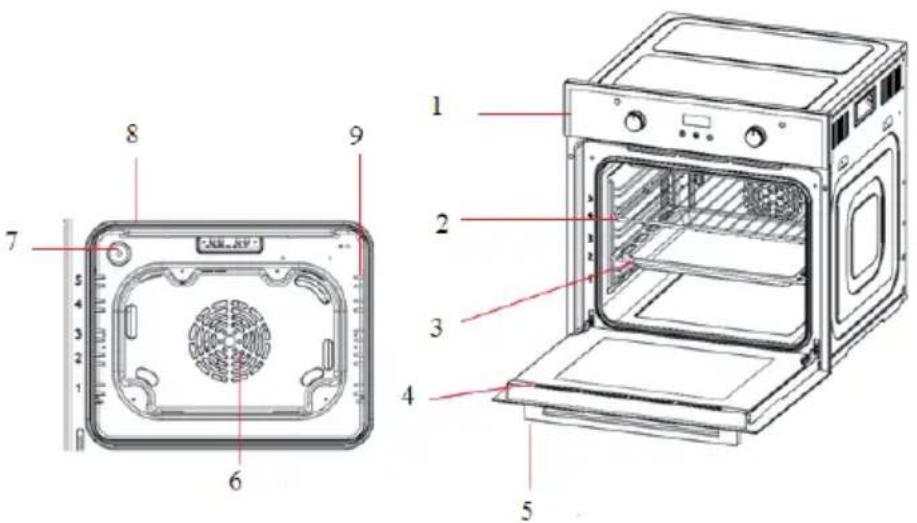
1 Control panel 6 Fan motor (behind steel plate)
2 Wire rack 7 Lamp
3 Tray 8 Grill heating element
4 Door 9 Side shelf
5 Handle
ACCESSIONS
The accessories supplied with your appliance are suitable for making many meals. Ensure that you always insert the accessories into the cooking compartment the right way round.
There is also a selection of optional accessories, with which you can improve on some of your favorite dishes, or simply to make working with your oven more convenient.
Inserting accessories
You can insert the accessories into the cooking compartment at 5 different levels. Always insert them as far as they will go so that the accessories do not touch the door panel.
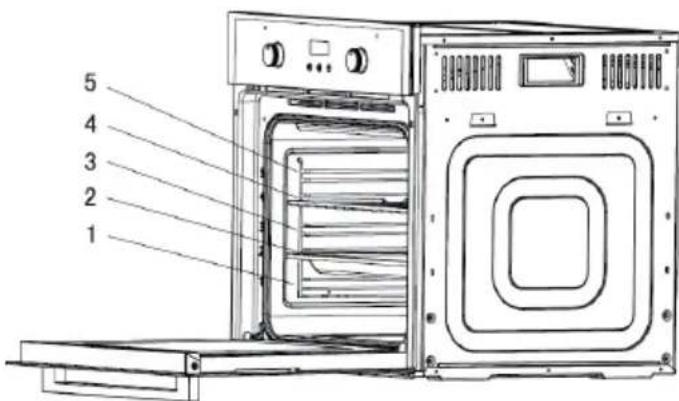
The accessories can be pulled out approximately halfway until they lock in place. This allows dishes to be removed easily.
Note: The accessories may deform when they become hot. Once they cool down again, they regain their original shape. This does not affect their operation.
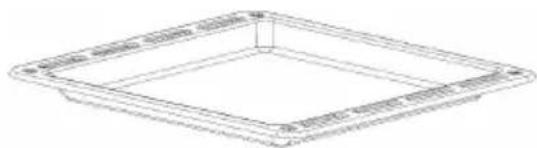
Oven pan: For moist cakes, pastries, frozen meals and large roasts. It can also be used to catch dripping fat when you are grilling directly on the wire rack.
| Wire rack: Used for roasting and for placing the food to be baked, roasted or cooked in casserole dishes to the desired rack. | |
| Side shelf: ①②③④⑤Five different height positions are available.The removable side shelf allows you to set four different height positions for baking food. | Left side shelfRight side shelf |
CONTROL PANEL AND FUNCTIONS
Here you see an overview of the control panel. Depending on the appliance model, individual details may differ.
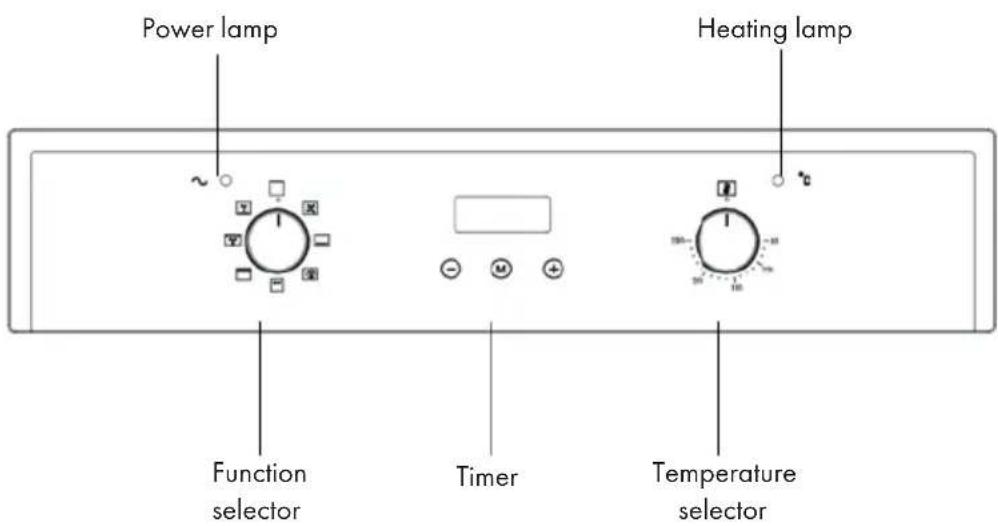
Function selector
Use the function selector to set the type of heating.
This appliance has 7 grill functions available.
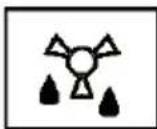
Defrost: The fan runs without heat to reduce the defrosting time of frozen foods. The time required to defrost the food will depend on the room temperature, the quantity and type of food.
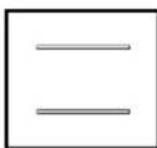
Conventional oven (top and lower element): This method of cooking provides traditional cooking, with heat from the top and lower elements. This function is suitable for roasting and baking on one shelf only.
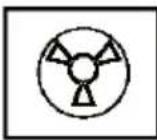
Fan oven: This method of cooking uses the circular heating element whilst the heat is distributed by the fan. This results in a faster and more economical cooking process. The fan oven allows food to be cooked simultaneously at different levels, preventing the transmission of odours and tastes from one dish onto another.
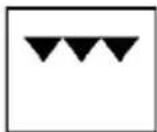
Half grill: This method of cooking utilises only the inner part of the upper heating element, which directs the heat downwards onto the food. This function is suitable for grilling small portions of bacon, toast and meat etc.
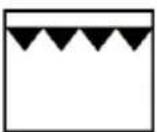
Full grill: This method of cooking utilises the inner and outer parts of the top element, which directs heat downwards onto the food. This function is suitable for grilling medium or large portions of sausages, bacon, steaks, fish etc.
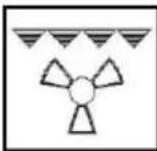
Fan and grill: This method of cooking utilises the top element in conjunction with the fan, which helps to provide a quick circulation of heat. This function is suitable where quick browning is required and "sealing" the juices in, such as steaks, hamburgers, some vegetables etc.
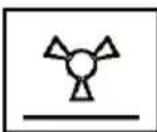
Fan and bottom element: This method of cooking utilises the bottom element in conjunction with the fan, which helps to circulate the heat. This function is suitable for sterilizing and preserving jars.
INSTALLATION
Before installation
The appliance is designed for installation in standard kitchen units. Fit the oven between the kitchen walls and furniture as shown in the illustration below (dimensions in mm).
- Surfaces, synthetic laminates and adhesives used must be heat resistant (100 °C minimum), and neighboring unit fronts up to 70 °C.
- The kitchen cabinets must be set level and fixed.
- A gap of 5mm is required between the appliance and the surrounding unit fronts. If there is a drawer beneath the oven, a shelf must be installed between the oven and the drawer.
Installation method 1 Installation method 2
Installation and connection
-
The door and/or handle must not be used for lifting or moving the appliance.
-
For installation the appliance must be connected in accordance with all local gas and/or electrical regulations.
- Carry the appliance with at least two persons.
- Use the slots or wire handles located at both sides to move the appliance.
Connection to the mains supply
This appliance must be earthed!
- No liability is assumed for any damage caused by using the appliance without an earthed socket.
- The mains lead must not be clamped, bent or trapped or come into contact with hot parts of the appliance. If the mains lead is damaged, it must be replaced by a qualified electrician.
- The mains supply must correspond to be data specified on the rating plate of the appliance. The appliance mains cable must correspond to the specific cations and the power consumption.
WARNING
Risk of electric shock! Risk of electric shock, short circuit or fire due to damage to the mains cable or improper installation. The appliance may only be connected to the mains by an authorized qualified person and must be installed properly. Before carrying out any work on the electrical installation, the appliance must be disconnected from the mains.
Installation
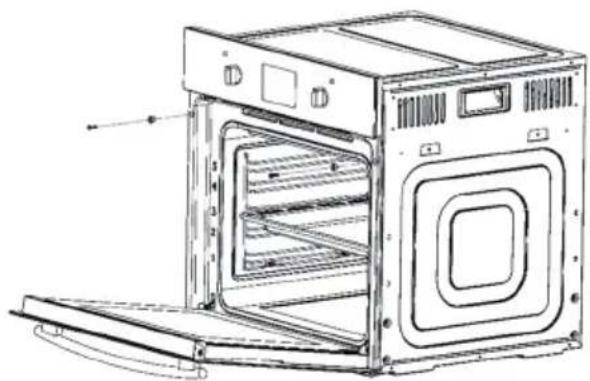
1 Slide the oven through the cabinet opening, align and secure it.
2 Fix your oven with the 2 screws and washers as indicated in the figure.
Final check
- Connect the appliance to the mains supply and switch on the mains supply.
- Check whether the appliance is working.
GETTING STARTED
Notes on use
- The oven is now ready for operation.
- This appliance is intended for domestic use only.
- Use the oven only for cooking food.
- Before cooking, make sure that all unused oven accessories have been removed from the oven.
- Preheat the oven to the cooking temperature before use.
- Place the cooking trays in the center of the oven and leave space in between when using more than one, so that the air can circulate.
- Do not place baking trays on the bottom of the oven and do not cover them with aluminium foil. Both lead to a thermal accumulation. The cooking and roasting times will not coincide and the enamel may be damaged.
- Try to open the oven door as little as possible to see the food (the oven light remains on during cooking).
- Take care when opening the door to avoid contact with hot appliance parts, cooking utensils and steam.
Before first use
- To remove any residue from the oven that may have been left from the manufacturing process, you should select the fan oven function and set the thermostat to its maximum temperature setting.
- It is perfectly normal for a smell to be produced during this process.
- Make sure that all windows in the room are left open during this process.
- It is advisable for you not to remain in the room whilst the burning off process is taking place.
- You should leave the oven on maximum setting for 30-40 minutes.
- After the oven cavity has cooled, it should then be cleaned with warm soapy water, using either a sponge or soft cloth. No abrasive cleaners should be used.
- Clean the outer parts of the oven with warm soapy water, using either a sponge or soft cloth. No abrasive cleans should be used.
- We recommend that an appropriate stainless steel cleaner and polish is regularly used on the stainless steel surfaces of this appliance.
Heating up the oven
To remove the new cooker smell, heat up the oven when it is empty and closed. An hour of Top/bottom heating at 250^ is ideal for this purpose. Ensure that no packaging remnants have been left in the cooking compartment.
1 Use the function selector to set Top/bottom heating.
2 Set the temperature selector to 240^ . After an hour, switch off the oven. To do so, turn the function selector to the "OFF" position.
Cleaning the accessories
Before you use the accessories for the first time, clean them thoroughly with hot soapy water and a soft dish cloth.
Mechanical timer control
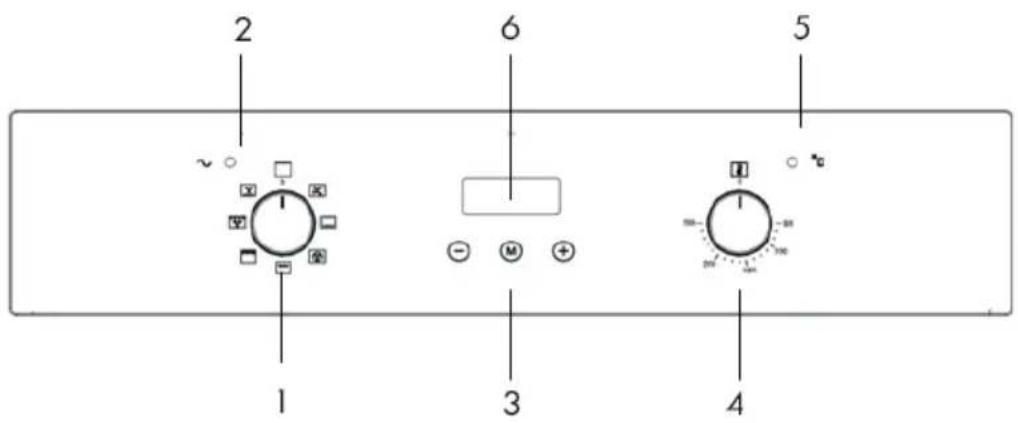
1 Oven function selector knob
2 Power indicator light
3 Oven programmer/timer
4 Thermostat control knob
5 Oven operating light
6 LED display
Oven programmer/timer display
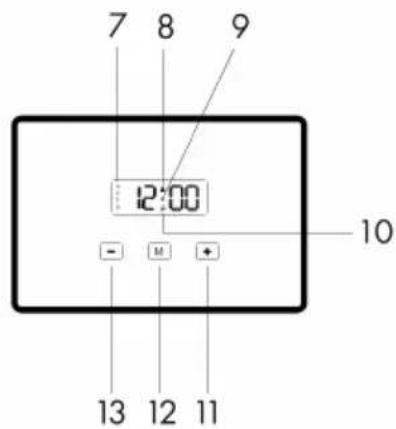
7 Automatic function symbol
8 Oven in use symbol
9 Decimal point symbol
10 Minute minder symbol
11 Plus button
12Programme button (Manual)
13 Minus button
Setting and using the oven programmer/timer
Selecting manual operation mode
After your appliance is connected to your mains supply for the first time (or after a power-cut) the numbers on the timer display will flash. Before you can select a cooking function or set a temperature, you must set the appliance into "manual operation" mode.
- To select manual operation mode, press the programme button (12) for three seconds. The "Oven in use" symbol (8) will light in the display.
Setting the time of day
Before you can use the oven, you must set the time of day.
Make sure the oven is in oven time manual operation mode (as outlined above).
- Press the programme button (12) once to set the time of day. Whilst the decimal point symbol (9) is flashing, use the plus (11) and minus (13) buttons to set the correct time of day.
- When the correct time of day is shown on the LED display, release the plus and minus buttons and wait a few seconds. The decimal point symbol (9) will stop flashing and the oven is ready to use.
The oven Timer
The minute minder function
The minute minder function is a countdown time that can be set on the oven programmer/timer. When the countdown time has finished, an audible signal will sound.
1 Press the programme button (12) twice. The decimal point (9) starts to flash and the "Minute minder" symbol (10) will light on the display and will show "00:00".
2 Use the plus (11) and minus (13) buttons to set the countdown time that you require. The maximum countdown time that can be set is 23 hours and 59 minutes.
3 When the correct countdown time appears on the LED display, release the plus and minus buttons and the countdown will start immediately. The "Minute minder" symbol (10) will remain in the LED display to show that a countdown time is in progress.
4 After a few seconds the LED display will return to showing the time of day.
5 At the end of the countdown time, an audible signal will sound and the Oven in use symbol (8) will go out. The audible signal will sound for 7 minutes before switching off or you can silence it by pressing any of the oven timer buttons.
Note: If the oven is in use whilst using the minute minder function, the oven WILL NOT switch off at the end of the countdown time. YOU MUST turn the oven function selector knob and the thermostat control knob to their "OFF" positions.
The semi-automatic cooking function
This function will allow you to set a countdown time similar to the minute minder function, however the oven will switch off at the end of the cooking time.
1 Place the food that you want to cook inside of the oven and close the door.
2 Select an oven function and cooking temperature using the relevant control knobs
3 Press the programme button (12) three times. The decimal point, the "Oven in use" symbol (8) and the "Automatic cooking" symbol (7) will flash on the LED display. The display will show "00:00".
4 Use the plus (11) and minus (13) buttons to set the cooking time that you require.
5 The maximum countdown time that can be set is 10 hours.
6 When the correct countdown time appears on the LED display, release the plus and minus buttons. Cooking will begin immediately, after a few seconds the countdown time will start.
7 At the end of the cooking time the oven will turn off and an audible signal will sound. The "Automatic cooking" symbol (7) and the "Minute minder" symbol (10) will flash on the LED display.
8 To reset the oven and cancel the audible alarm, press any button once to stop the alarm. Then press and hold the programme button (12) twice for 3 seconds. After the first press the oven time will flash, and on the second press the "Oven in use" symbol (8) appears on the LED display and the "Automatic cooking" symbol (7) goes out.
Note: If you have not turned the oven function selector knob and thermostat control knob to their "OFF" positions, when you reset the oven it will continue to heat.
The end of cooking function
This function is similar to the semi-automatic function, however instead of setting a countdown time, you select the time of day that you want the oven to switch off at.
1 Place the food that you want to cook inside of the oven and close the door.
2 Select an oven function and cooking temperature using the relevant control knobs.
3 Press the programme button (12) four times. The decimal point starts to flash, and the "Oven in use" symbol (8) and the "Automatic cooking" symbol (7) will light on the LED display. The display will show the current time of day which will flash.
4 Use the plus (11) and minus (13) buttons to set the cooking end time that you require.
5 The maximum end time that can be set is 10 hours into the future.
6 When the correct end time appears on the LED display, release the plus and minus buttons. Cooking will begin immediately, after a few seconds the countdown time will start.
7 At the end of the cooking time the oven will turn off and an audible signal will sound. The "Automatic cooking" symbol (7) and the "Minute minder" symbol (10) will flash on the LED display.
8 To reset the oven and cancel the audible alarm, press any button once to stop the alarm. Then press and hold the programme button (12) twice for 3 seconds. After the first press the oven time will flash, and on the second press the "Oven in use" symbol (8) appears on the LED display and the "Automatic cooking" symbol (7) goes out.
Note: If you have not turned the oven function selector knob and thermostat control knob to their "OFF" positions, when you reset the oven it will continue to heat.
The automatic cooking function
This function will allow you to set the time of day that you want the oven to switch off at and how long you want the oven to cook for.
1 Place the food that you want to cook inside of the oven and close the door.
2 Select an oven function and cooking temperature using the relevant control knobs.
3 Press the programme button (12) three times. The decimal point starts to flash, and the "Oven in use" symbol (8) and the Automatic cooking" symbol (7) will light on the LED display
4 Use the plus (11) and minus (13) buttons to set the cooking time that you require.
5 The maximum cooking duration time that can be set is 10 hours.
6 Immediately press the programme button (12). The display will then show the current time of day which will flash.
7 Use the plus (11) and minus (13) buttons to set the cooking end time that you require.
8 The maximum end time that can be set is 10 hours into the future.
9 When the correct end time appears on the LED display, release the plus and minus buttons.
10 Cooking will begin at the calculated preset time.
11 At the end of the cooking time the oven will turn off and an audible signal will sound. The "Automatic cooking" symbol (7) and the "Minute minder" symbol (10) will flash on the LED display.
12 To reset the oven and cancel the audible alarm, press any button once to stop the alarm. Then press and hold the programme button (12) twice for 3 seconds. After the first press the oven time will flash, and on the second press the "Oven in use" symbol (8) appears on the LED display and the "Automatic cooking" symbol (7) goes out.
Note: If you have not turned the oven function selector knob and thermostat control knob to their "OFF" positions, when you reset the oven it will continue to heat.
Cancelling a timer function
- To cancel the minute minder function press the programme button (12) once to select the minute minder function and then reduce the time to "00:00".
-
To cancel the semi-automatic timer press the programme button (12) three times to select the semi-automatic timer then and reduce the time to "00:00".
-
To cancel the end of cooking timer press the programme button (12) four times to select the end of cooking timer and then reduce the time to the current time of day.
- To cancel the automatic timer press the programme button (12) three times and reduce the (duration) time to "00:00" and then press the programme button (12) again and reduce the (end) time to the current time of day.
Note: If you do not turn the oven function selector knob and thermostat control knob to their "OFF" positions, when you reset the timer function, it will continue to heat.
Adjusting the audible signal
The audible signal has 3 tones. To adjust the signal you should proceed as follows:
Note: The oven timer must not be in any form of countdown mode and the "Oven in use" symbol (8) must be lit.
Changing the time of day
Note: The oven timer/programmer must not be in any form of countdown mode and the "Oven in use" symbol (8) must be lit.
Please follow the guidelines in the "Setting the time of day" section.
Selecting a cooking function and temperature
Selecting manual operation mode
After your appliance is connected to your mains supply for the first time, the numbers on the timer display will flash. Before you can select a cooking function or set a temperature, you must set the appliance into "manual operation" mode.
- To select manual operation mode, press the manual button (12) on the control panel.
Thermostat control knob
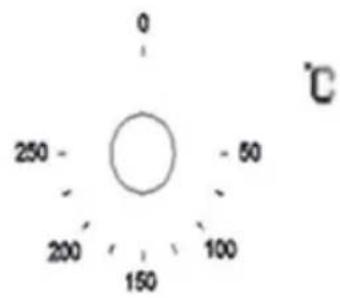
The oven thermostat control knob sets the required temperature of the oven. It is possible to regulate the temperature within a range of 50 - 250^
General information on baking, roasting and grilling
CAUTION
Risk of scalding by hot steam! Take care when opening the oven door as steam may escape.
Tips for baking
1 Use non-stick coated appropriate metal plates or aluminum containers or heat-resistant silicone moulds.
2 Make best use of the space on the rack.
3 It is recommended to place the baking mould in the middle of the rack.
4 Keep the oven door closed.
Tips for roasting
1 Seasoning with lemon juice and black pepper will improve the cooking performance when cooking a whole chicken, turkey or a large piece of meat.
2 Meat with bones takes about 15 to 30 minutes longer before it is cooked than a roast of the same size without bones.
3 You should calculate about 4 to 5 minutes cooking time per centimeter height of the meat.
4 Let meat rest in the oven for about 10 minutes after the cooking time. The juice is better distributed all over the roast and does not run out when the meat is cut.
5 Fish in a fire-resistant dish should be placed on the rack at the medium or lower level.
Tips for grilling
- Grilling is ideal for cooking meat, fish and poultry and will achieve a nice brown surface without it drying out too much. Flat pieces, meat skewers and sausages are particularly suited for grilling as are vegetables with a high water content such as tomatoes and onions.
Tips for saving energy
The following information will help you to use your appliance in an ecological way, and to save energy:
1 Use dark coloured or enamel coated cookware in the oven since the heat transmission will be better.
2 While cooking your dishes, perform a preheating operation if it is advised in the user manual or cooking instructions.
3 Do not open the door of the oven frequently during cooking.
4 Try to cook more than one dish in the oven at the same time, whenever possible. You can cook by placing two cooking vessels onto the wire grill.
5 Cook more than one dish one after another. The oven will already be hot.
6 You can save energy by switching off your oven a few minutes before the cooking time. Do not open the oven door.
7 Defrost frozen dishes before cooking them.
Detailed tips for baking and grilling
How to avoid problems with baking:
1 How to establish whether sponge cake is baked through: Approximately 10 minutes before the end of the baking time specified in the recipe, stick a cocktail stick into the cake at the highest point. If the cocktail stick comes out clean, the cake is ready.
2 The cake collapses: Use less fluid next time or set the oven temperature 10 degrees lower. Observe the specified mixing times in the recipe.
3 The cake has risen in the middle but is lower around the edge: Do not grease the sides of the spring form cake tin. After baking, loosen the cake carefully with a knife.
4 The cake goes too dark on top: Place it lower in the oven, select a lower temperature and bake the cake for a little longer.
5 The cake is too dry: When it is done, make small holes in the cake using a cocktail stick. Then drizzle fruit juice or an alcoholic beverage over it. Next time, select a temperature 10 degree higher and reduce the baking time.
6 The bread or cake (e. g. cheesecake) looks good, but is soggy on the inside (sticky, streaked with water). Use slightly less fluid next time and bake for slightly longer at a lower temperature. For cakes with a moist topping, bake the base first. Sprinkle it with almonds or bread crumbs and then place the topping on top. Please follow the recipe and baking times.
7 The cake is unevenly browned: Select a slightly lower temperature to ensure that the cake is baked more evenly. Bake delicate pastries on one level using Top/bottom heating. Protruding greaseproof paper can affect the air circulation. For this reason, always cut greaseproof paper to fit the baking tray.
8 The bottom of a fruit cake is too light: Place the cake one level lower the next time.
9 The fruit juice overflows: Next time, use a deeper universal pan, if you have one.
10 Small baked items made out of yeast dough stick to one another when baking: There should be a gap of approximately 2 cm around each item. This gives enough space for the baked items to expand well and turn brown on all sides.
11 You were baking on several levels: The items on the top baking tray are darker than that on the bottom baking tray. Always use 3D hot air (circulating air) to bake on more than one level. Baking trays that are placed in the oven at the same time will not necessarily be ready at the same time.
12 Condensation forms when you bake moist cakes: Baking may result in the formation of water vapour, which escapes above the door. The steam may settle and form water droplets on the control panel or on the fronts of adjacent units. This is natural process.
How to avoid problems with grilling:
1 When grilling, preheat the oven for approximately 4 minutes, before placing the food into the cooking compartment. Always grill with the oven door closed.
2 As far as possible, the pieces of food you are grilling should be of equal thickness. This will allow them to brown evenly and remain succulent and juicy.
3 Turn the food you are grilling after 2/3 of the time.
4 Do not add salt to steaks until they have been grilled.
5 Add in a little liquid if the meat is lean. Cover the base of the ovenware with approximately 0,5 cm of liquid.
6 Add liquid generously for pot roasts. Cover the base of the ovenware with approximately 1 - 2cm of liquid.
7 If you are grilling a single piece, the best results are achieved by placing it in the centre of the wire rack. The oven pan should also be inserted at level 1. The meat juices are collected in the pan and the oven is kept cleaner.
8 When grilling, do not insert the baking tray or universal pan at level 4 or 5. The high heat distorts it and the cooking compartment can be damaged when removing it.
9 The grill element switches on and off continually. This is normal. The grill setting determines how frequently this will happen.
10 When the roast is ready, turn off the oven and allow it to rest for an additional 10 minutes. This allows better distribution of the meat juices.
11 For roast pork with a rind, score the rind in a crossways pattern, then lay the roast in the dish with the rind at the bottom.
12 Place whole poultry on the lower wire rack breast-side down. Turn after 2/3 of the specified time.
13 For duck or goose, pierce the skin on the underside of the wings. This allows the fat to run out.
14 Turn the pieces of fish after 2/3 of the time, whole fish does not have to be turned. Place the whole fish in the oven in its swimming position with its dorsal fin facing upwards. Placing half a potato or a small ovenproof container in the stomach cavity of the fish will make it more stable.
15 How to tell when the roast is ready: Use a meat thermometer (available from specialist shops) or carry out a "spoon test". Press down on the roast with a spoon. If it feels firm, it is ready. If the spoon can be pressed in, it needs to be cooked for a little longer.
16 The roast is too dark and the crackling is partly burnt: Check the shelf height and temperature.
17 The roast looks good but the juices are burnt: Next time, use a smaller roasting dish or add more liquid.
18 The roast looks good but the juices are too clear and watery: Next time, use a larger roasting dish and use less liquid.
19 Steam rises from the roast when basted: This is normal and due to the laws of physics. The majority of the steam escapes through the steam outlet. It may settle and form condensation e. g. on the fronts of adjacent units.
MAIN COOKING GUIDLINE
| Foods Accessory Heating function | Rack place Temperature (°C) | Baking time (min) | ||
| Cake | Round model | —— | 2nd layer 140-160 30-45 | |
| Bread | Bake Pan 2nd layer 180- | 200 10-20 | ||
| Bake Pan 3rd layer 170- | 190 10-20 | |||
| Bake Pan | 3rd +1st layer | 160-180 10-20 | ||
| Thin pizza (cold) | Bake Pan 2nd layer 190- | 210 | 15-25 | |
| Deep pizza (cold) | Bake Pan 2nd layer 180- | 200 20-30 | ||
| Bake Pan +rack | 3rd +1st layer | 170-190 25-35 | ||
| Bread piece (9 pieces) | Rack | —— | 3rd layer 160-170 10-15 | |
| Rack | 3rd +1st layer | 160-180 15-25 | ||
| Sausage | Rack | 3rd layer | 160-180 | 10-15 |
| Foods Accessory Heating function | Rock place Temperature (℃) | Baking time (min) | ||
| Ribs Rack 3rd layer 200-220 20-35 | ||||
| Pork | Bake Pan 2nd layer 190-210 70-85 | |||
| Bake Pan 1st layer 180-200 55-70 | ||||
| Beefsteak (3 cm thick) | Bake Pan 2nd layer 190-210 20-35 | |||
| Small whole chicken (1.2 kg) | Rack 2nd layer 200-220 50-60 | |||
| Whole chicken (1.6 kg) | Rack 2nd layer 190-210 50-60 | |||
| Small chicken pieces (150 g) | Rack 3rd layer 200-220 30-40 | |||
| Whole goose (3.5 kg) | Rack 2nd layer 190-220 60-70 | |||
| Big piece of mutton with bone (1.2 kg) | Bake pan | 2nd layer 170-190 60-70 | ||
| Whole fish (1.0 kg) | Rack 2nd layer 200-220 30-40 | |||
| Whole fish (1.5 kg) | Rack 2nd layer 180-200 40-50 | |||
CLEANING AND MAINTENANCE
- The oven should be cleaned after every use. When cleaning the oven the lighting should be switched on to enable you to see the surfaces better.
- The oven chamber should only be washed with warm water and a small amount of washing-up liquid.
After cleaning the oven chamber wipe it dry. - Never clean the oven surfaces by steam cleaning.
- Use either a sponge or soft cloth to clean the oven cavity with warm soapy water. Abrasives should not be used.
- Any stains that may appear on the bottom of the oven will have originated from food splashes or spilt food, these splashes occur during the cooking process. These could possibly be a result of the food being cooked at an excessively high temperature or being placed in cookware that is too small.
- You should select a cooking temperature and function that is appropriate for the food that you are cooking. You should also ensure that the food is placed in an adequately sized dish and that you use the drip tray where appropriate.
- Outer parts of the oven should only be cleaned with warm soapy water, using either a sponge or soft cloth. No abrasive cleaners should be used.
- If you use any form of oven cleaner on your appliance, then you must check with the manufacturer of the cleaner that it is suitable for use on your appliance.
- Any damage that is caused to the appliance by a cleaning product will not be fixed free of charge.
- Do not use cleaning products containing abrasive materials for the cleaning and maintenance of the glass front panel.
Cleaning the oven
- No oven cleaner or any other special cleaning agent is required for cleaning the oven. It is recommended to wipe the oven with a damp cloth while it is still warm.
To clean the side walls and oven door:
1 Take down left and right side-shelves, method is pushing the bottom of shelves and pull to sides at the same time, push up side shelves and rotate up to level, and pull out the rack.
2 Cleaning left and right sides, order of install is opposite to the order of take down.
Detaching and attaching the oven door
For cleaning purposes and to remove the door panels, you can detach the oven door. Each door hinge has a locking rod: When this is closed, the door is fixed in place and cannot be disassembled.
Note: If the hinge is not locked, it may suddenly spring back strongly. Make sure that the locking rod is closed all the time, but it must be open when removing the door.
Remove the door
Full open the door.
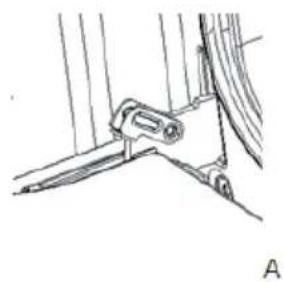
- Fold up the right and left side of the locking rod (picture A).
- Close the door until reach to stop step, hold on both left and right sides of the door, then reclose the door, upward and downward and pull out the door.
Install the oven door
The installation is carried out in reverse order.
- When installing the oven door, make sure both hinge plug into opening mouth directly.
- Both sides of hinge rabbit must bite up each other.
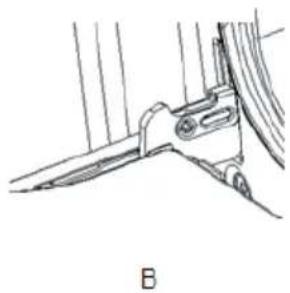
- When open the door, spread down locking rod (picture B).
Remove and install the door panel
Remove the door panel
- Remove the oven door and put it on a piece of cloth.
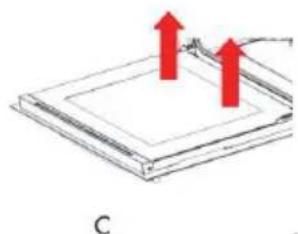
- Using one hand to push the outside glass, the other hand to pull the inside glass, hold the glass then pull out the glass.

CAUTION
Risk of glass breakage! If the glass has some scratches, it may lead to crack. Don't use the glass spatula, acute and corrosive cleaning product or detergent to clean the glass.
Install the door panel
- Plug the inner glass into glass pressure groove.
- Both right and left sides need put down alignment to card slot and push the glass to its place.
Put on the oven door.

Side shelf kit assemble
To assemble the side shelves, remove the two frames, lifting them away from the spacers.
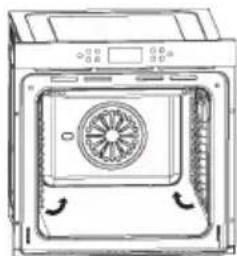
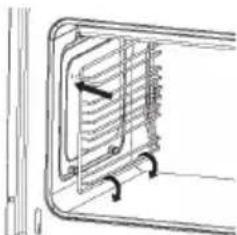
- Secure the two frames with the guide rails, using the holes provided on the oven walls. The holes for the left frame are situated at the top, while the holes for the right frame are at the bottom.
Replacing the bulb of the oven lamp
If the bulb in the oven light fails, it must be replaced.
WARNING:
Risk of electric shock!
Switch off the circuit breaker in the fuse box.
- Place a tea towel in the oven when it is cold to prevent damage.
- Unscrew the glass cover by turning it anti-clockwise.
- Replace the bulb with one of the same type.
- Screw the glass cover back in.
- Remove the tea towel and switch on the circuit breaker.
Regular inspections
In addition to regularly cleaning the oven, the following checks must be carried out:
- Carry out periodic inspections of the control elements and cooking units of the cooker. You should have a technical inspection of the cooker carried out at a service centre at least once every two years.
- Have any operational faults fixed.
- Carry out periodical maintenance of the cooker.

WARNING
All repairs and maintenance activities should be carried out by the appropriate service centre or by an appropriately authorized fitter.
Environmental note: Before discarding an old appliance, switch off and disconnect it from the power supply. Cut off and render any plug useless. Cut the cable off directly behind the appliance to prevent misuse. This should be undertaken by a competent person.
TROUBLESHOOTING
The oven may have some abnormal breakdown during working. You can check the fault list before calling costumer service, maybe it is some breakdown you can repair by yourself.
Normal operation:
- When first using the oven, it may have some situation of peculiar smell and smoking for some hours. Start the heating function by turning the temperature switch to heat the oven for 1 hour without contents. When you use the oven for the first time, then close the heating function, wait for some time until the oven is cold, open the door and clean the oven.
- Cracking sounds can occur during the operation of the oven because of well of metal.
- If the heating foods have some moisture, the heating emission hole may blow steam during the working operation.
- The fan switches on 15 minutes after the oven begins to work. Even if the oven is closed, the fan will continue to operate for 35 minutes.
- Please preheat the oven before baking.
- For long cooking you can switch off the oven before the end of baking and use the residual heat for cooking.
| Problem Possible cause | Possible solution | |
| The oven isn't working. | The power supply is interrupted. | Check your kitchen lamp or other equipment if it is still working. |
| There is a malfunction of the breakers. | Check if your breaker is working on. | |
| You forgot to push the timer function key. | Reset the timer function. | |
| The lamp isn't coming on. | The lamp is defective. Replace the lamp (bulb). | |
| There is no electrical current. | Check if the oven has electrical current. | |
| Problem Possible cause Possible solution | ||
| The oven suddenly stops working during work. | The power supply is interrupted (power failure). | Check your kitchen lamp or other equipment if it is still working. |
| Normally closed thermostat protective. | Check if the cool fan is working, if so, you need to replace the Thermostat with a new normally closed thermostat. | |
| The oven is'nt heating. | The temperature controller has not been adjusted. | Set up the temperature. |
| If this model has a timer, you may not set up the time. | Set up the timer. | |
| No power. Check the power supply. | ||
| The heating element was damaged. | The heating element must be replaced with a new one. | |
| The water comes out the glass door when working. | The door seal is permeable. | The door seal must be replaced with a new one. |
| The hinge is not strong enough | The hinge must be replaced by a new one. | |
| The oven no longer works, but the motor cooler is still running. | The oven is in operation for a long time, so it must be cooled for a long time. | Place your hand against the outlet opening and feel if hot air comes out, if so, that is normal. |
| The normally open thermostats have a problem. | If the air temperature from the outlet opening is room temperature, a new normally open thermostat must be used. | |
If the problem has not been solved:
- Disconnect the unit from the mains supply (deactivate or unscrew the fuse).
- Call the after-sales service of your store reseller. Do not attempt to repair the appliance yourself.
HINTS ON DISPOSAL
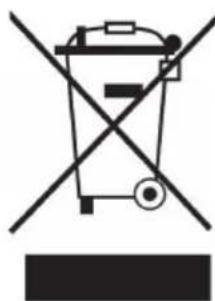
According to the European waste regulation 2012/19/EU this symbol on the product or on its packaging indicates that this product may not be treated as household waste. Instead it should be taken to the appropriate collection point for the recycling of electrical and electronic equipment. By ensuring this product is disposed of correctly, you will help prevent potential negative consequences for the environment and human health, which could otherwise be caused by inappropriate waste handling of this product. For more detailed information about recycling of this product, please contact your local council or your household waste disposal service.
Estimado cliente:


- CONTENT
- DECLARATION OF CONFORMITY
- TECHNICAL DATA
- SAFETY INSTRUCTIONS
- General Instructions
- Special Instructions
- DEVICE OVERVIEW
- ACCESSIONS
- Inserting accessories
- CONTROL PANEL AND FUNCTIONS
- Function selector
- INSTALLATION
- Before installation
- Installation method 1 Installation method 2
- Installation and connection
- Connection to the mains supply
- WARNING
- Final check
- GETTING STARTED
- Notes on use
- Before first use
- Heating up the oven
- Cleaning the accessories
- Mechanical timer control
- Oven programmer/timer display
- Setting and using the oven programmer/timer
- Selecting manual operation mode
- Setting the time of day
- The oven Timer
- The minute minder function
- The semi-automatic cooking function
- The end of cooking function
- The automatic cooking function
- Cancelling a timer function
- Adjusting the audible signal
- Changing the time of day
- Selecting a cooking function and temperature
- Thermostat control knob
- CAUTION
- Tips for baking
- Tips for roasting
- Tips for grilling
- Tips for saving energy
- Detailed tips for baking and grilling
- How to avoid problems with baking:
- How to avoid problems with grilling:
- MAIN COOKING GUIDLINE
- CLEANING AND MAINTENANCE
- Cleaning the oven
- To clean the side walls and oven door:
- Detaching and attaching the oven door
- Remove the door
- Install the oven door
- Remove and install the door panel
- Remove the door panel
- Install the door panel
- Side shelf kit assemble
- Replacing the bulb of the oven lamp
- WARNING:
- Regular inspections
- TROUBLESHOOTING
- Normal operation:
- If the problem has not been solved:
- HINTS ON DISPOSAL
- Estimado cliente:
Brand : Klarstein
Model : 10033187
Category : Oven