C4476 Sport Chronos - Watch Candino - Free user manual and instructions
Find the device manual for free C4476 Sport Chronos Candino in PDF.



| Product type | Wristwatch |
| Brand | Candino |
| Model | C4476 Sport Chronos |
| Movement | Quartz |
| Display | Analog hand |
| Main functions | Hour, minute, second, date, day of week, month, chronograph (1/10 s, seconds, minutes, hours) |
| Chronograph type | Basic functions, cumulative time, split time |
| Settings | Crown (3 positions), push buttons A, B, C, D, E |
| Power source | Standard quartz watch battery |
| Maintenance | Avoid severe shocks, clean with a soft dry cloth |
| Recycling | Selective collection WEEE (Waste Electrical and Electronic Equipment) |
Frequently Asked Questions - C4476 Sport Chronos Candino
User questions about C4476 Sport Chronos Candino
0 question about this device. Answer the ones you know or ask your own.
Ask a new question about this device
Download the instructions for your Watch in PDF format for free! Find your manual C4476 Sport Chronos - Candino and take your electronic device back in hand. On this page are published all the documents necessary for the use of your device. C4476 Sport Chronos by Candino.
USER MANUAL C4476 Sport Chronos Candino
Description of the display and control buttons 16
Chronograph: Basic function....17
Chronograph: Accumulated timing 18
Chronograph: Intermediate or interval timing....19
Adjusting the chronograph hands to zero position 2 D
Setting the time 22
Setting the date [quick mode] 23
Setting the time, date, day of week and month....24

By virtue of the regulations pursuant to the handling of waste products deriving from electronic and electrical equipment, end of lifecycle watch making products must be selectively collected for processing. You may therefore dispose of your quartz
watch making products at any of our retail outlets or any other authorized collection point. The selective collection, processing, rating and recycling of these products helps contribute to safeguarding the environment and protecting our health.
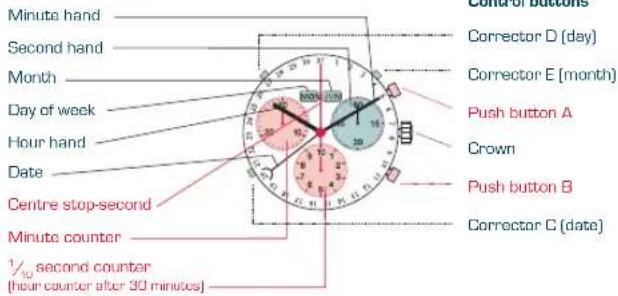
DESCRIPTION OF THE DISPLAY AND CONTROL BUTTONS
Display elements
text_image
Minute hand Second hand Month Day of week Hour hand Date Centre stop-second Minute counter ½ second counter (hour counter after 30 minutes) Corrector D (day) Corrector E (month) Push button A Crown Push button B Corrector C (date)CHRONOGRAPH: BASIC FUNCTION
(START / STOP / RESET)
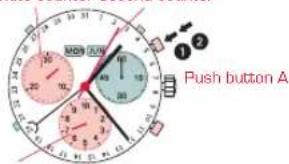
Minute counter Second counter
text_image
1 2 Push button A1 / c second counter
Example:
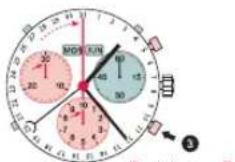
1 Start: Press push-button A.
2 Stop: to stop the timing, press push-button A once more and read the 3 chronograph counters:
4 min / 5 sek / % sec
3 Zero positioning:
Press push-button B. (The 3 chronograph hands will be reset to their zero positions).
CHRONOGRAPH:
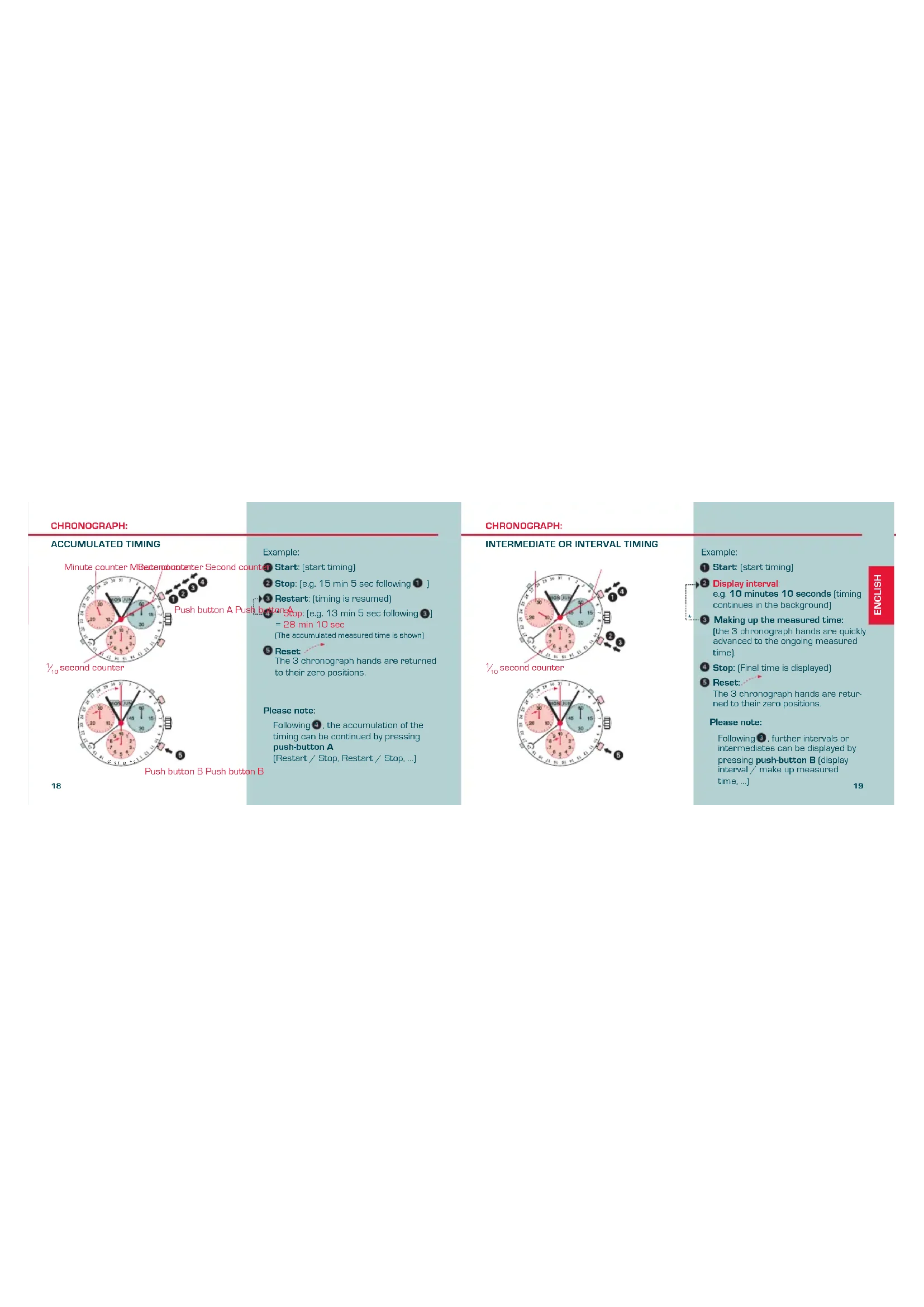
ACCUMULATED TIMING
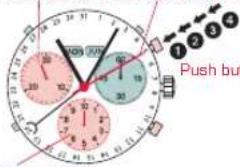
Minute counter MBetercounter Second count
text_image
Push but110 second counter

Push button B Push button B
Example:
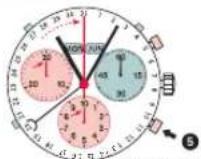
Start: [start timing]
② Stop: (e.g. 15 min 5 sec following ①)
Restart: (timing is resumed)
Stop: [e.g. 13 min 5 sec following 5]
= 28 min 10 sec
(The accumulated measured time is shown)
5 Reset
The 3 chronograph hands are returned to their zero positions.
Please note:
Following ①, the accumulation of the timing can be continued by pressing push-button A
(Restart / Stop, Restart / Stop, ...)
CHRONOGRAPH:
INTERMEDIATE OR INTERVAL TIMING
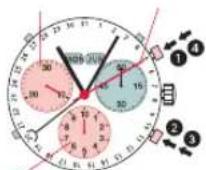
110 second counter
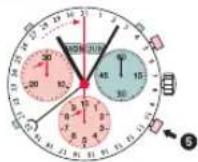
Example:
1 Start: [start timing]
3 Display interval
e.g. 10 minutes 10 seconds [timing continues in the background]
3 Making up the measured time:
(the 3 chronograph hands are quickly advanced to the ongoing measured time).
4 Stop: (Final time is displayed)
5 Reset:
The 3 chronograph hands are returned to their zero positions.
Please note:
Following ③, further intervals or intermediates can be displayed by pressing push-button B [display interval/ make up measured time, ...]
ADJUSTING THE CHRONOGRAPH
HANDS TO ZERO POSITION
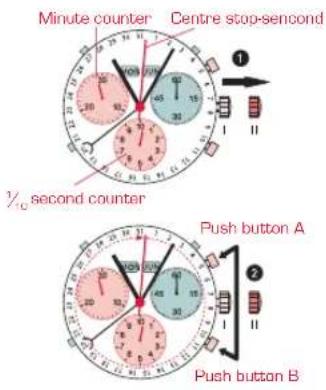
20
Example:
One or several chronograph hands are not in their correct zero positions and have to be adjusted (e.g. following a battery change).
① Pull out the crown to position II (all 3 chronograph hands are in their correct or incorrect zero position).
2 Keep push-buttons A and B depressed simultaneously for at least 2 seconds (the centre stop-second rotates by 360^ corrective mode is activated).
↓

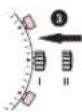
1
Adjusting the centre stop second
Single step A 1 x short
Continuous: A. long
C
Adjusting the next hand B
[Unreadable]
Adjusting the 110 second counter hand (position 6h)
Single step A 1 x short
Continuous A long
Adjusting the next band B
Adjusting the next hand
Adjusting the minute counter
(position 9h)
Single step A 1 x short
Continuous A long
m = 311
Returning the crown to position I Termination of the chronograph hands adjustment (can be carried out at any time).
21
SETTING THE TIME SETTING THE DATE (QUICK MODE)
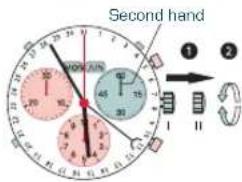
text_image
Second hand 1 2 30 40 50 60 70 80 90 100 110 120 130 140 150 160 170 180 190 200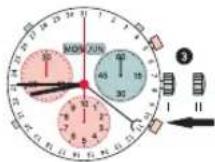
22
1 *Pull out the crown to position II (the watch stops).
2 Turn the crown until you reach the correct time 8.45.
*Push the crown back into position I.
Please note:
In order to set the time to the exact * second, ① must be pulled out when the second hand is in position «60» [1]. Once the hour and minute hands have been set, ② must be pushed back into position I at the exact second.
text_image
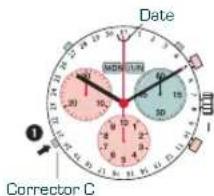
Date MORI-UN 10 20 30 40 50 60 70 80 90 100 Corrector C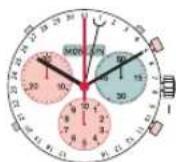
Example after a change of month:
- Date on watch: 31
- Current date: 1
Press the corrector C once to adjust the date 1 day forward.
Please note:
The date for the following day must be set during the date changing phase between 9:00 PM and 00:20 AM.
23
SETTING THE TIME,
DATE, DAY OF WEEK AND MONTH
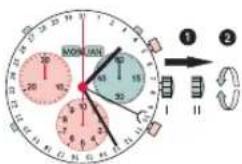
text_image
MONDAY 12:30 15:00 18:00 21:00 24:00 27:00 30:00 33:00 36:00 39:00 42:00 45:00 48:00 51:00 54:00 57:00 60:00 63:00 66:00 69:00 72:00 75:00 78:00 81:00 84:00 87:00 90:00 93:00 96:00 99:00 12:30Day of week
Example:
- On the watch: 10/MON/JAN/1:25 AM
- Current: 20/THU/OCT/8:30 PM
1* Pull out the crown to position II (the watch stops).
2 * * Turn crown until the current time is shown.
3* Push crown to position 1 [watch continues to run].
-
Please note:
To set your watch to the exact second * please refer to the chapter entitled «Setting the time»
Please observe the AM/PM clock rhythm * *
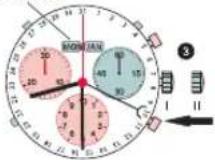
Corrector D Corrector E
Corrector C
Day of week Month
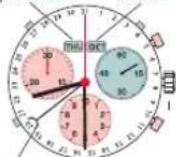
Date
↓
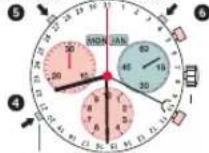
4 Press the corrector C to gradually advance the date hand.
5 Press the corrector D to gradually advance the day of week.
6 Press the corrector E to gradually advance the month.
MODE D'EMPLOI
Adjusting the minute counter
(position 9h)
natural_image
Solid color block image with red top and teal bottom (no text or symbols)FESTINA-CANDINO WATCH LTD
2501 Bienne Switzerland
a company of the Festina Group
www.candino.com