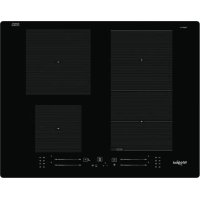
WF S2765 NEIXL - Cooker WHIRLPOOL - Free user manual and instructions
Find the device manual for free WF S2765 NEIXL WHIRLPOOL in PDF.



| Product Type | Built-in Induction Hob |
| Brand | Whirlpool |
| Model | WF S2765 NEIXL |
| Number of Burners | 4 induction cooking zones |
| Special Functions | FlexiSide, 6th Sense (melting, keep warm, simmer, boil), Chef Control, Booster (rapid heating) |
| Connectivity | Wi-Fi, 6th Sense Live app, remote control via Remote |
| Maximum Power | 7.2 kW (adjustable: 2.5 / 4.0 / 6.0 / 7.2 kW) |
| Power Supply | 220-240 V / 50-60 Hz (fixed cable connection) |
| Dimensions (W x D x H) | Approx. 60 x 60 x 85 cm (standard hob) |
| Weight | Approx. 50 kg (estimate) |
| Hob Material | Ceramic glass with iXelium™ treatment |
| Preheating Type | Rapid induction |
| Timer | Dual independent timer for left and right zones |
| Safety | Panel lock, automatic shut-off, pan detection, residual heat indicator, overheating protection |
| Cleaning and Maintenance | Soft cloth, ceramic cleaner; scraper for stubborn residues; avoid abrasives |
| Spare Parts and Repairability | Whirlpool after-sales service, original parts, separator kit C00628720/721 |
| Warranty | 2 years (depending on country), register at www.whirlpool.eu/register |
Frequently Asked Questions - WF S2765 NEIXL WHIRLPOOL
User questions about WF S2765 NEIXL WHIRLPOOL
0 question about this device. Answer the ones you know or ask your own.
Ask a new question about this device
Download the instructions for your Cooker in PDF format for free! Find your manual WF S2765 NEIXL - WHIRLPOOL and take your electronic device back in hand. On this page are published all the documents necessary for the use of your device. WF S2765 NEIXL by WHIRLPOOL.
USER MANUAL WF S2765 NEIXL WHIRLPOOL
Before using the appliance, read these safety instructions. Keep them nearby for future reference. These instructions and the appliance itself provide important safety warnings to be observed at all times. The manufacturer declines any liability for failure to observe these safety instructions, for inappropriate use of the appliance or incorrect setting of controls.
WARNING: If the hob surface is cracked, do not use the appliance - risk of electric shock.
WARNING: Danger of fire: Do not store items on the cooking surfaces.
CAUTION: The cooking process has to be supervised. A short cooking process has to be supervised continuously.
WARNING: Unattended cooking on a hob with fat or oil can be dangerous - risk of fire. NEVER try to extinguish a fire with water: instead, switch off the appliance and then cover flame e.g. with a lid or a fire blanket.
Do not use the hob as a work surface or support. Keep clothes or other flammable materials away from the appliance, until all the components have cooled down completely - risk of fire.
Metallic objects such as knives, forks, spoons and lids should not be placed on the hob surface since they can get hot.
Very young children (0-3 years) should be kept away from the appliance. Young children (3-8 years) should be kept away from the appliance unless continuously supervised. Children from 8 years old and above and persons with reduced physical, sensory or mental capabilities or lack of experience and knowledge can use this appliance only if they are supervised or have been given instructions on safe use and understand the hazards involved. Children must not play with the appliance. Cleaning and user maintenance must not be carried out by children without supervision.
After use, switch off the hobelement by its control and do not rely on the pan detector.
WARNING: The appliance and its accessible parts become hot during use. Care should be taken to avoid touching heating elements. Children less than 8 years of age shall be kept away unless continuously supervised.
The food must not be left in or on the product for more than one hour before or after cooking.
PERMITTED USE
CAUTION: the appliance is not intended to be operated by means of an external switching device, such as a timer, or separate remote controlled system.
This appliance is intended to be used in household and similar applications such as: staff kitchen areas in shops, offices and other working environments;
farm houses; by clients in hotels, motels, bed & breakfast and other residential environments.
No other use is permitted (e.g. heating rooms).
This appliance is not for professional use. Do not use the appliance outdoors.
WARNING: Induction hob may generate the acoustic sound when something is left on the control panel. Switch off the cooktop through the ON/OFF button.
INSTALLATION
The appliance must be handled and installed by two or more persons - risk of injury. Use protective gloves to unpack and install - risk of cuts.
Installation, including water supply (if any), electrical connections and repairs must be carried out by a qualified technician. Do not repair or replace any part of the appliance unless specifically stated in the user manual. Keep children away from the installation site. After unpacking the appliance, make sure that it has not been damaged during transport. In the event of problems, contact the dealer or your nearest After-sales Service. Once installed, packaging waste (plastic, styrofoam parts etc.) must be stored out of reach of children - risk of suffocation. The appliance must be disconnected from the power supply before any installation operation - risk of electric shock. During installation, make sure the appliance does not damage the power cable - risk of fire or electric shock. Only activate the appliance when the installation has been completed.
Carry out all cabinet cutting operations before fitting the appliance and remove all wood chips and sawdust.
If the appliance is not installed above an oven, a separator panel (not included) must be installed in the compartment under the appliance.
ELECTRICALWARNINGS
It must be possible to disconnect the appliance from the power supply by unplugging it if plug is accessible, or by a multi-pole switch installed upstream of the socket in accordance with the wiring rules and the appliance must be earthed in conformity with national electrical safety standards.
Do not use extension leads, multiple sockets or adapters. The electrical components must not be accessible to the user after installation. Do not use the appliance when you are wet or barefoot. Do not operate this appliance if it has a damaged power cable or plug, if it is not working properly, or if it has been damaged or dropped.
Installation using a power cable plug is not allowed unless the product is already equipped with the one provided by the Manufacturer.
If the supply cord is damaged, it must be replaced with an identical one by the manufacturer, its service
agent or similarly qualified persons in order to avoid a hazard - risk of electric shock.
CLEANING AND MAINTENANCE
WARNING: Ensure that the appliance is switched off and disconnected from the power supply before performing any maintenance operation; never use steam cleaning equipment - risk of electric shock.
Do not use abrasive or corrosive products, chlorine-based cleaners or pan scourers.
DISPOSAL OF PACKAGING MATERIALS
The packaging material is 100% recyclable and is marked with the recycle symbol
The various parts of the packaging must therefore be disposed of responsibly and in full compliance with local authority regulations governing waste disposal.
DISPOSAL OF HOUSEHOLD APPLIANCES
This appliance is manufactured with recyclable or reusable materials. Dispos of it in accordance with local waste disposal regulations. For further information on the treatment, recovery and recycling of household electrical appliances, contact your local authority, the collection service for household waste or the store where you purchased the appliance. This appliance is marked in compliance with European Directive 2012/19/EU, Waste Electrical and Electronic Equipment (WEEE) and with the Waste Electrical and Electronic Equipment regulations 2013 (as amended).
By ensuring this product is disposed of correctly, you will help prevent negative consequences for the environment and human health.
The symbol on the product or on the accompanying documentation indicates that it should not be treated as domestic waste but must be taken to an appropriate collection center for the recycling of electrical and electronic equipment.
ENERGY SAVING TIPS
Make the most of your hot plate's residual heat by switching it off a few minutes before you finish cooking.
The base of your pot or pan should cover the hot plate completely; a container that is smaller than the hot plate will cause energy to be wasted. Cover your pots and pans with tight-fitting lids while cooking and use as little water as possible. Cooking with the lid off will greatly increase energy consumption.
Use only flat-bottomed pots and pans.
DECLARATION OF CONFORMITY
This appliance meets Ecodesign requirements of European Regulation 66/2014 and The Ecodesign for Energy-Related Products and Energy Information (Amendment) (EU Exit) Regulations 2019 in compliance with the European standard EN 60350-2.
The information related to low power mode of the appliance in accordance with Regulation (EU) 2023/826 can be found in the following link: https://docs.emeaapplpliance-docs.eu.
NOTE
People with a pacemaker or similar medical device should use care when standing near this induction cooktop while it is on. The electromagnetic field may affect the pacemaker or similar device. Consult your doctor, or the manufacturer of the pacemaker or similar medical device for additional information about its effects with electromagnetic fields of the induction cooktop.
The Manufacturer, Whirlpool Management EMEA S.r.l., declares that this I100 EMEA model of household appliance with radio equipment is compliant with directive 2014/53/UE and Radio Equipment Regulations 2017.
The complete text of the declaration of conformity is present at the following website: https://docs.whirlpool.eu.
The radio equipment operates in the 2.4 GHz ISM frequency band, the maximum radio-frequency power transmitted does not exceed 20 dBm (e.i.r.p.).
This product includes certain open source software developed by third parties. The open source license usage statement is available at the following website: https://docs.whirlpool.eu.
Electrical connection must be made before connecting the appliance to the electricity supply.
Installation must be carried out by qualified personnel who know the current safety and installation regulations. Specifically, installation must be carried out in compliance with the regulations of the local electricity supply company.
Make sure the voltage specified on the data plate located on the bottom of the appliance is the same as that of the home.
Regulations require that the appliance be earthed: use conductors (including the earth conductor) of the appropriate size only.
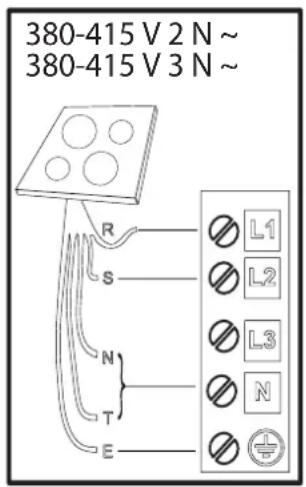
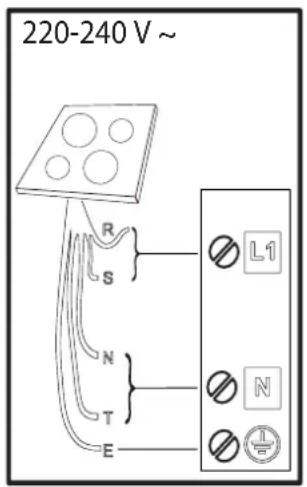
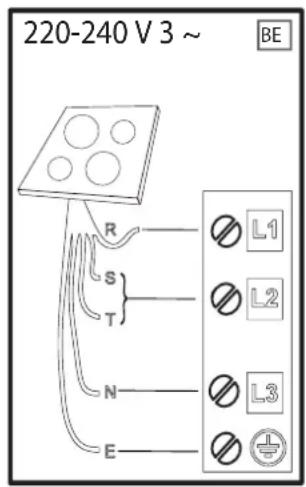
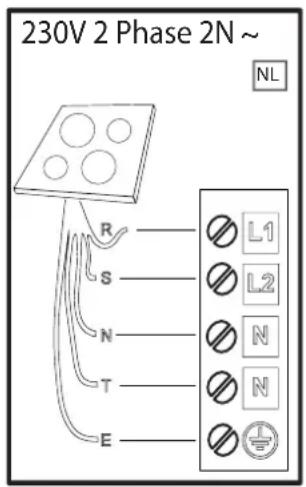
R
black-nero-negro-preto-μαύροσ-must-melns-juodas-czarny-schwarz-noir-zwart-negru-ερho-upn-crna-crno-ερнь-ηρnh-κapa-černá-cierna-fekete-svart-musta-svart-sort-siyah-dubh-svartur
s
brown-marrone-marrón-marrom-kaΦé-pruun-bruns-rudas-brazowy-brauen-brun-bruin-maro-kaΦB-6paon-rjava-smed-kopnuehbi-kopnuehni-KoHbip-hnedy-hnedy-barna-brunt-ruskea-brunt-brunkahverengi-donn-brunn
T
blue (gray)-blu (grigio)-azul (gris)-azul (cinza)-μπλε (γκρι)-sinine (hall)-zila (peleka)-mélyna (pilkas)-niebieski (szary)-blau (grau)-bleu (gris)-blauw (grijs)-albastru (gri)-cinnbo (cno) -nnaBa (cna)modro (sivo)-plava (siva)-cHn (cepui)-CNIH (cipni)-Kek (cyp)-modr (sedá)-modr (sivakék (szürke)-bla (gra)-sininen (harmaa)-la (gra)-blat (grat)-mavi (gri)-gorm (liath)- blár (grár)

yellow/green-giallo/verde-amarillo/verde-amarelo/verdekɪpɪvɑ/πpáσɪvɔ-kollane/roheline-dzeltens/zaɪs-geltona/žalia-žólty/zielony-gelb/grün-jaune/vert-geel/groen-galben/verde-Жьлтɔ/Зелено-Жуто/Зелена-rumeno/zeeleno-žuto/zelena-Жentlb/Зелень-Жовту/Зелени-Жасы/capbl-Žlúta/zelena-Žltá/zeelená-sárga/zold-gul/grønn-keltainen/vihrea-gul/grön-gul/grøn-sari/yesil-bui/glas-gulur/grænn
N
blue-blu-azul-azul-μπλε-sinine-zila-mélyna-niebieski-blau-bleu-blauw-albastru-cnbo-npla-modroplava-cnHn-cnHn-kεk-modr-y-modr-kεk-blα-sininen-bla-blat-mavi-gorm-blár

THANK YOU FOR BUYING A WHirlpool PRODUCT In order to receive a more complete assistance, please register your product on www.whirlpool.eu/register.

Before using the appliance carefully read the Safety Instruction.
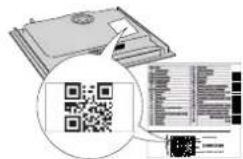
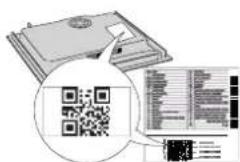
PLEASE SCAN THE QR CODE ON YOUR APPLIANCE IN ORDER TO REACH MORE INFORMATION
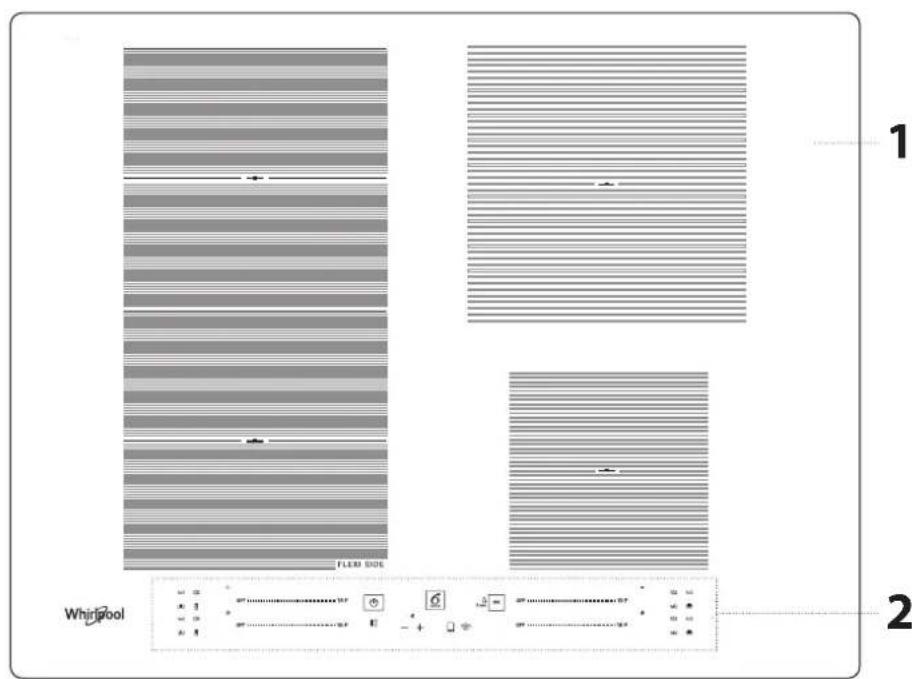
PRODUCT DESCRIPTION
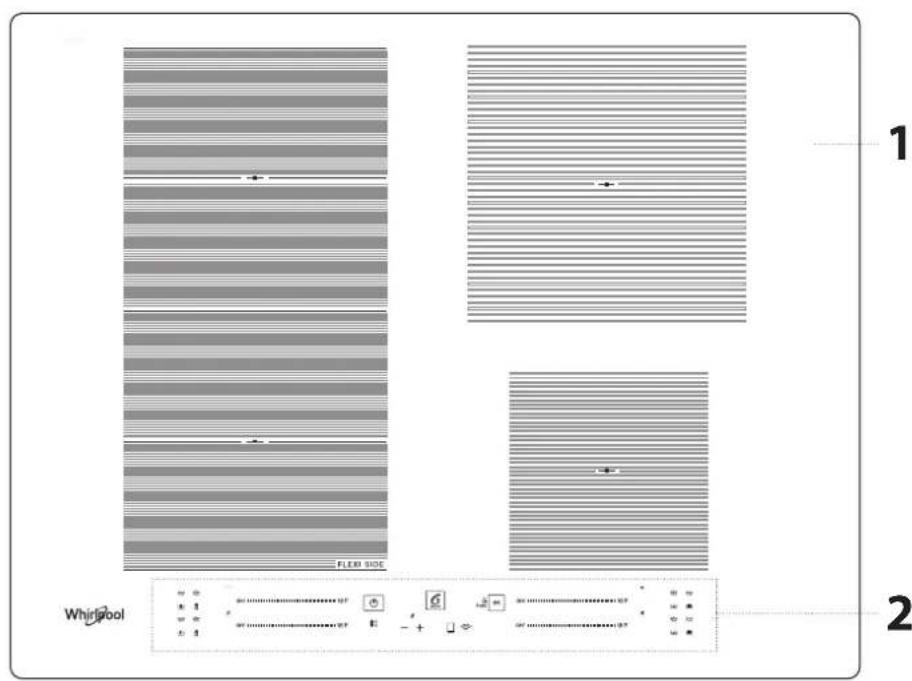
1.Cooktop
2. Control panel
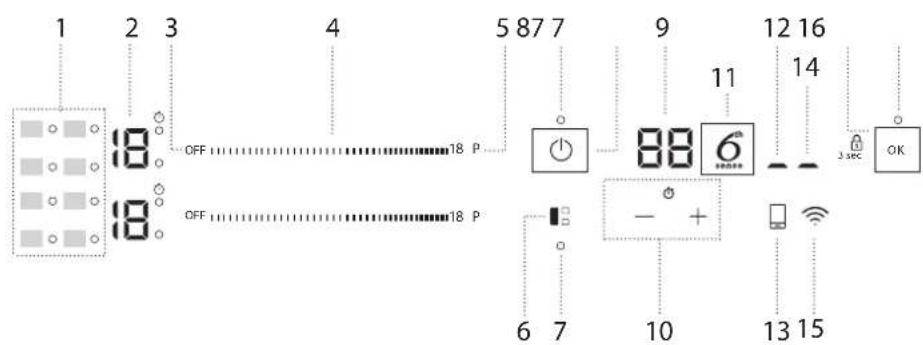
CONTROL PANEL
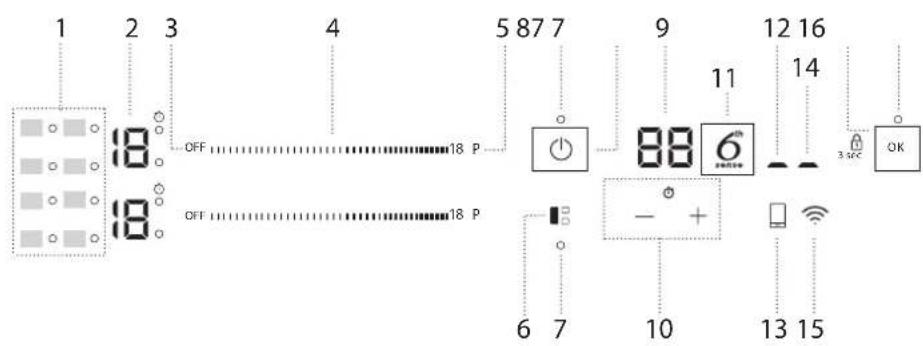
- Symbols/activation of special functions
- Cooking level selected
- Cooking zone off button
4.Scroll keypad - Fast heating button (Booster)
-
FLEXISIDE button
7.Indicator light - function active -
On/Off button
9.Cooking time indicator - Timer
- 6th Sense button
- Remote active indicator
- Remote key
-
Wi-Fi active indicator
-
Wi-Fi key
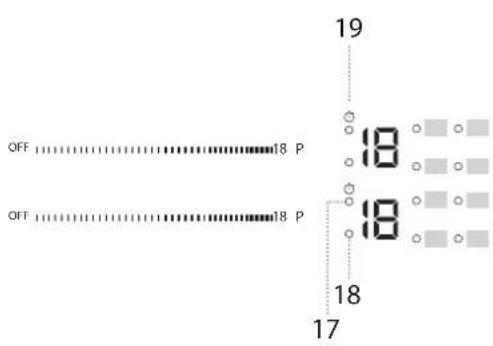
- OK/Key lock button - 3 seconds
- Timer active indicator
- Zone selection indicator
- Timer indicator symbol
ACCESSIONS
Only use pots and pans made from ferromagnetic material suitable for induction hobs. Check for the symbol (generally stamped on the bottom) to determine whether a pot is suitable. A magnet may also be used to check whether the cookware base is magnetic.
| COOKWARE MATERIAL PROPERTIES | ||
| Recommended cookware | Base is made of stainless steel with sandwich design, enamelled steel, cast iron. | Ensures optimum efficiency, heats up quickly, and distributes heat evenly. |
| Suitable cookware | Base is not fully ferromagnetic (magnet sticks only in a portion of the cookware base). | Only the ferromagnetic area heats up. As a result, may heat up less quickly and heat may be distributed less evenly. |
| Suitable cookware | Ferromagnetic base contains areas with aluminium or has a recessed area in the centre. | The ferromagnetic area is smaller than the actual cookware base area. As a result, less power may be delivered and cookware may not heat sufficiently. Cookware may not be detected. |
| Not suitable Norma | thin steel, glass, clay, copper, aluminium and other non-ferromagnetic materials, cookware with rubber feet | Cookware is not detected and will not heat up. |
NOTE: All cookware must have a flat base. Periodically check the base for any sign of warping, as some cookware may undergo deformation due to high heat.
ADAPTERS FOR POTS/PANS UNSUITABLE FOR INDUCTION
The use of adapter plates affects efficiency and therefore increases the time required to heat water or food. Make sure that the ferromagnetic diameter of the cookware base aligns with both the diameter of the adapter plate
FIRST TIME USE
POWER MANAGEMENT
At the time of purchase, the hob is set to the maximum possible power. Adjust the setting concerning the limits of your home's electrical system as described in the following paragraph.
N.B: Depending on the power selected for the hob, some of the cooking zone power levels and functions (e.g. boil or fast heating) could be automatically limited to prevent the selected limit from being exceeded.
To set the power of the hob:
Once you have connected the device to the mains power supply, you can set the power level within 60 seconds.
Press the Wi-Fi button ( ) for at least 5 seconds. The display shows "PL".
Press the button to confirm.
Use the button to increase the power level, and the button to reduce it.
The power levels available are: 2.5kW - 4.0kW - 6.0kW - 7.2kW
Confirm by pressing 1x Ck
The power level selected will stay in the memory even if the power supply is interrupted.
To change the power level, disconnect the appliance from the mains for at least 60 seconds, plug it back in, and repeat the above steps.
If an error occurs during the setting sequence, the "EE" symbol will appear, and you will hear a beep. If this happens, repeat the operation. If the error persists, contact the After-Sales Service.
ACOUSTIC SIGNAL ON/OFF
To switch the acoustic signal on/off:
- Connect the hob to the power supply;
- Wait for the switch-on sequence;
- Press the "P" button of the first scroll keypad at the top left for 5 seconds.
Any alarms set will remain active.
and the diameter of the cooking zone. If these measurements don't match, it can significantly decrease efficiency and performance. Not following these guidelines could lead to heat build up that is not effectively transferred to the pot or pan, potentially causing blackening of the plate and hob.
EMPTY POTS AND PANS
The hob is equipped with an internal safety system that activates the "Automatic off" function when too high temperature is detected. The use of empty pots and pans with a thin base is not recommended. However, when doing so, the temperature might rise quicker than the time needed for the "Automatic off" to be triggered promptly, with the risk of damaging the pan or the hob surface. If this occurs, do not touch the pan nor the hob surface and wait for all components to cool down. If any error message is displayed, call the Service Centre.
SUITABLE SIZE OF PAN/POT BASE FOR THE DIFFERENT COOKING ZONES
To ensure that the hob works properly, use pots of a suitable base diameter for each zone (refer to the table below). Please note that cookware manufacturers often provide the size of the upper diameter of the cookware, rather than the base diameter.
To ensure that the hob works with the expected performance, always use a cooking zone with a size matching the ferromagnetic size of the cookware base.
Place the pan/pot making sure it is well centred on the cooking zone in use. It is recommended not to use pots larger than the size of the cooking zone.
COOKWARE USAGE BY ZONE
| Zone | Suitable cookware shape | Suitable ferromagnetic base (cm) |
| 1 or 2 Round | d or Square 15 | |
| 3 Round | 10 | |
| 4 Round | 15 | |
| 1+2 (FLEXISIDE) | Oval or Rectangular | Short side 16-21 Long side 24-38 |
DEMOMODE (reheating deactivated, see the section on "Troubleshooting")
To switch the demo mode on and off:
- Connect the hob to the power supply;
- Wait for the switch-on sequence;
- Within the first minute, press the fast heating button "P" of the bottom left keypad for 5 seconds (as shown below);
"DE" will show on the display.

WI-FI SETUP (not applicable outside of European Union)
To enable the appliance to be remotely controlled, you have to successfully complete the process to connect your appliance to your home network and App. The setup procedure has to be carried out only once. You will have to carry it out again only if you change your router setup properties (network name and password).
Minimum requirements
Smart device: Android with a 1280x720 (or higher) screen or iOS. See on App store the App compatibility with Android or iOS versions. Wireless router: 2.4Ghz Wi-Fi b/g/n.
How to setup
To use this feature you need to own: a smart phone or a tablet and a wireless router connected to internet.
Please verify with your smart device that the signal strength of your home wireless network close to the appliance is good.
Download the 6^th Sense Live app for your mobile device. You can download the 6^th Sense Live app by visiting either iTunes or Google Play.
Once downloaded, please follow the instructions from App to create an account.
Once you have your account, open the App and press "+?" on the bottom left of the screen to add a new appliance to your account. The 6^th Sense Live App will be your guide to walk you through all of the steps needed to complete the process.
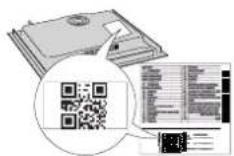
The sticker with QR, SAID and Mac Address code is used to sync a smart device with your appliance.
The pairing procedure has to be carried out again only if you change your router set up properties (network name or password or data provider).
DAILY USE

SWITCHING THE HOB ON/OFF
To turn the hob on, press the power button for around 1 second. To turn the hob off, press the same button again, and all cooking zones will be deactivated.
POSITIONING
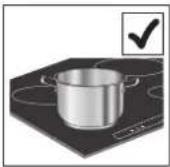
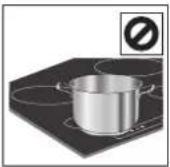
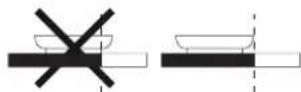
Do not cover the control panel symbols with the cooking pot.
Please note: In the cooking zones close to the control panel, it is advisable to keep pots and pans inside the markings (taking both the bottom of the pan and the upper edge into consideration, as this tends to be larger).
This prevents excessive overheating of the keypad. When grilling or frying, please use the rear cooking zones wherever possible.
ACTIVATING/DEACTIVATING COOKING ZONES AND ADJUSTING POWER LEVELS
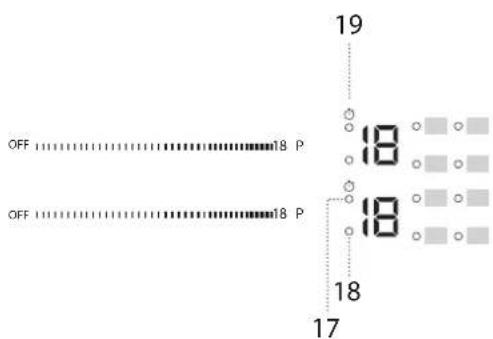
OFF 18P
To activate the cooking zones:
Move your finger horizontally across the scroll keypad (SLIDER) of the required cooking zone to activate it and adjust the power. The level will be shown in line with the area and the indicator light identifying the active cooking zone. The "P" button can be used to select the fast heating function (Booster).
To deactivate the cooking zones:
Select the "OFF" button at the beginning of the scroll keypad.

CONTROL PANEL LOCK
To lock the settings and prevent it from accidentally switching on, press and hold the OK/Key lock button for 3 seconds. A beep and a warning light above the symbol indicate that this function has been activated. The control panel is locked except for the switching off function ( l ). To unlock the controls, repeat the activation procedure.
The timer controls all cooking zones.
To activate the timer:
Press the "+" or "-" button to set the desired time on the cooking zone in use. An indicator light will be activated in line with the specific symbol Once the set time has elapsed, a beep will sound, and the cooking zone will switch off automatically.
The time can be changed at any point, and several timers can be activated simultaneously.
In case 2 timers on the same side of the hob are activated simultaneously, "Zone selection indicator" flashes and the relative cooking time selected is displayed on the central display.
To deactivate the timer:
Press the "+" and "-" buttons together until the timer is deactivated.

TIMER INDICATOR
This LED (when ON) indicates that the timer has been set for the cooking zone.
FUNCTIONS


FLEXISIDE
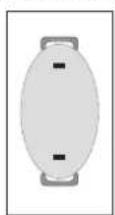
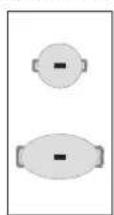
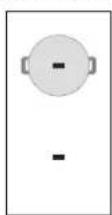
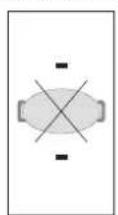
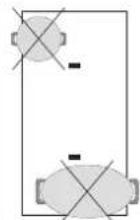
By selecting the "FLEXISIDE" button, you can combine two cooking zones and use them at the same power by covering the entire surface with a large pot or partially with a round/oval pot.
The function always remains on and, when using only one pot, can be moved over the entire area. In this case, both left-hand scroll keypads can be used indifferently.
Ideal for cooking with oval or rectangular pots or with pan supports.
To deactivate the function, press the "FLEXISIDE" button.
N.B. Special functions cannot be selected when using this feature.
IMPORTANT: Place the pots in the center of the cooking zone so that they cover at least one of the reference points (as shown below).

6TH SENSE
The "6th Sense" button activates the special functions.
Place the pot in position and select the cooking zone.
Press the "6th Sense" button. The display of the selected area will show "A".
The indicator for the first special feature available for the cooking zone will light up.
Select the desired special function by pressing the "6th Sense" button one or more times.
The function is activated once the button has been pressed to confirm. To select another special function, press "OFF" and then the "6th Sense" button to choose the required function.
To deactivate the special functions and return to manual mode, press "OFF". The power level when using special functions is pre-set by the hob and cannot be modified.

MELTING
This function allows you to bring food to the ideal temperature for melting and maintain the food condition without the risk of burning.
This method is ideal, as it does not damage delicate foods such as chocolate and prevents them from sticking to the pot.

KEEP WARM
This feature allows you to keep your food at an ideal temperature, usually after cooking is complete or reducing liquids very slowly. Ideal for serving foods at the perfect temperature.

SIMMERING
This function is ideal for maintaining a simmering temperature, allowing you to cook food for long periods with no risk of burning. Ideal for long-cooking recipes (rice, sauces, roasts) with liquid sauces.

BOILING
This function allows you to bring water to the boil and keep it boiling, with lower energy consumption.
About 2 litres of water (preferably at room temperature) should be placed in the pan.
In all cases, users are advised to closely monitor the boiling water and check the amount of water remaining regularly.
If the pots are big and the water quantity is higher than 2 litres, we recommend using a lid to optimize boiling time.

CHEF CONTROL
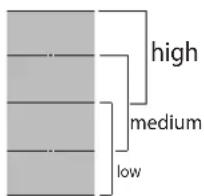
The flexible zone is divided into three cooking zones (see the figure) activated at a pre-set power (high, medium or low) depending on the position of the pot/pan: move the pot/pan over the surface to continue cooking at different temperatures without having to use the controls.

WI-FI KEY
How to connect the cooktop to the Wi-Fi network
To connect the cooktop to the user's Wi-Fi network using the mobile App: turn on the cooktop, press and hold the Wi-Fi button for at least 1 second (as it's touched, a sound will be heard) and for no longer than 2 seconds. As it's released, a long sound will be heard. Follow the instructions via the mobile App. If a second sound before the longer one is heard, the connection to the user's Wi-Fi network by the router's WPS button procedure has been activated (see the following paragraph); please read the "Wi-Fi CONNECTION RESET PROCEDURE" paragraph if you do not want to follow this procedure and run the connection to the Wi-Fi network again using the mobile App.
INDICATORS

RESIDUAL HEAT
If "H" appears on the display, this means that the cooking zone is hot. The indicator lights up even if the zone has not been activated but has been heated due to the adjacent zones' use or because a hot pot has been placed on it.
When the cooking zone has cooled down, the "H" disappears.
To connect the cooktop to the user's Wi-Fi network using the router's WPS button: turn on the cooktop, press the Wi-Fi button (as it's touched, a sound will be heard) and keep it pressed for 3 seconds until a second sound is heard, then release the button. As it's released a long sound will be heard. Press the WPS button on your router within a maximum of two minutes. Follow the instructions via the mobile App.
PLEASE NOTE: If the user connects the cooktop but later decides not to use the Wi-Fi function, the connection can be stopped at any time without following the procedure described below: while the cooktop is on, press the Wi-Fi button (as it's touched, a sound will be heard) and keep it pressed for 7 seconds until a second sound will be heard, then release the button. As it's released a long sound will be heard. To connect the cooktop back, press the Wi-Fi button (as it's touched, a sound will be heard) and keep it pressed for 3 seconds until a second sound will be heard, then release the button. As it's released, a long sound will be heard. This procedure allows to restore the connection, avoiding using the instructions via the mobile App.

REMOTE KEY
How to confirm the commands sent via the mobile app
If the cooktop receives a command from remote (e.g.: a smartphone or a tablet, through the mobile app) the user is required to confirm it by pressing the remote control button: turn on the cooktop and keep the remote control button pressed for at least 1 second (as it's touched a sound will be heard). As it's released, a long sound will be heard.
How to disconnect the cooktop from the Wi-Fi network
To disconnect the cooktop from the user's Wi-Fi network (e.g. when the router has to be replaced): turn the cooktop on, press the remote control button (as it's touched a sound will be heard) and keep it pressed for 7 seconds, until a second sound will be heard, then release the button. As it's released a long sound will be heard.
Wi-Fi connection reset procedure
If an incorrect connection procedure has been selected or if any of the connection procedures described above has to be interrupted before completed (the cooktop hasn't been connected to the network yet): turn the cooktop on, press the remote control button (as it's touched, a sound will be heard) and keep it pressed for 7 seconds, until a second sound will be heard, then release the button. As it's released a long sound will be heard.
In case the reset procedure hadn't been successfully completed (if the long sound isn't heard), disconnect the cooktop from the mains for at least 20 seconds and then reconnected it to the mains; then, repeat the reset procedure from the beginning.

POT INCORRECTLY POSITIONED OR MISSING
This symbol appears if the pot is not suitable for induction cooking, is not positioned correctly or is not of an appropriate size for the cooking zone selected. If no pot is detected within 30 seconds of making the selection, the cooking zone switches off.
COOKING TABLE
The cooking table offers an example of the cooking type for each power level. The actual delivered power of each power level depends on the cooking zone dimension.
| POWER LEVEL TYPE | OF COOKING | LEVEL USE (indicating cooking experience and habits) | |
| Maximum power | P Fast heating/Booster | Ideal for rapidly increasing food temperature to a fast boil (for water) or for rapidly heating cooking liquids. | |
| 14-18 | Frying - boiling | Ideal for browning, starting to cook, frying deep-frozen products, bringing liquids to the boil quickly. | |
| Browning - sautéing - boiling - grilling | Ideal for sautéing, maintaining a lively boil, cooking and grilling. | ||
| 10-14 | Browning - cooking - stewing - sautéing - grilling | Ideal for sautéing, maintaining a gentle boil, cooking and grilling, and preheating accessories. | |
| Cooking - stewing - sautéing - grilling - cooking until creamy | Ideal for stewing, maintaining a gentle boil, cooking and grilling (for longer periods). | ||
| 5-9 | Cooking - simmering - thickening - creaming | Ideal for slower-cook recipes (rice, sauces, roast, fish) with liquids (e.g. water, wine, broth, milk), and creaming pasta. | |
| Ideal for slow-cook recipes (quantities under 1 litre: rice, sauces, roasts, fish) with liquids (e.g. water, wine, broth, milk). | |||
| 1-4 | Melting - defrosting | Ideal for softening butter, gently melting chocolate, thawing small items. | |
| Keeping food warm - creaming risotto | Ideal for keeping small portions of just-cooked food or serving dishes warm and for creaming risotto. | ||
| Zero power | OFF | - | Hob in stand-by or off mode (possible end-of-cooking residual heat, indicated by an "H"). |
CLEANING AND MAINTENANCE
Important:
- Before cleaning, make sure the cooking zones are switched off and that the residual heat indicator ("H") is not displayed.
- Do not use abrasive sponges or scouring pads as they may damage the glass.
- After each use, clean the hob (when it is cool) to remove any deposits and stains from food residue.
- A surface that is not kept suitably clean may reduce the sensitivity of control panel buttons.
-
Use a scraper only if residues are stuck to the hob. Follow the scraper manufacturer's instructions to avoid scratching the glass.
Sugar or foods with high sugar content can damage the hob and must be immediately removed.
Salt, sugar and sand could scratch the glass surface. -
Use a soft cloth, absorbent kitchen paper or a special hob cleaner (follow the Manufacturer's instructions).
- Spills of liquid in the cooking zones can cause the pots to move or vibrate.
After cleaning the hob, dry thoroughly.
If the iXelium™ logo appears on the glass, the hob has been treated with iXelium™ technology, an exclusive Whirlpool finish which ensures perfect cleaning results, as well as keeping the surface of the hob shiny for longer.
To clean iXelium™ hobs, follow these recommendations:
- Use a soft cloth (microfibre is best) dampened with water or with everyday glass cleaning detergent.
-
For best results, leave a wet cloth on the glass hob surface for a few minutes.
-
Check that the electricity supply has not been shut off.
- If you cannot to turn the hob off after using it, disconnect it from the power supply.
- If alphanumeric codes appear on the display when the hob is switched on, consult the following table for instructions.
Please note: The presence of water, liquid spilled from pots or any objects resting on any of the hob buttons can accidentally activate or deactivate the control panel lock function.
| DISPLAY CODE DESCRIPTION | CRIPTION POSSIBLE CAUSES SOLUTION | ||
| F0E1 | Cookware is detected but it is not compatible with requested operation. | The cookware is not well positioned on the cooking zone, or it is not compatible with one or more cooking zones. | Press On/Off button twice to remove the F0E1 code and restore the functionality of the cooking zone. Then, try to use the cookware with a different cooking zone, or use different cookware. |
| F0E7 | Wrong power cord connection. The power supply connection is not exactly as indicated in "ELECTRICAL CONNECTION" paragraph. | Adjust the power supply connection according to "ELECTRICAL CONNECTION" paragraph. | |
| F0EA | The control panel switches off because of excessively high temperatures. | The internal temperature of electronic parts is too high. | Wait for the hob to cool down before using it again. |
| F0E9 | The cooking zone turns off when the temperatures are too high. | The internal temperature of electronic parts is too high. | Wait until the cooking area has cooled off before using it again. |
| F0E2, F0E4, F0E6, F0E8, F0EC, F1E1, F2E1, F6E1, F6E3, F7E5, F7E6 | Disconnect the hob from the power supply.Wait a few seconds then reconnect the hob to the power supply.If the problem persists, call the service centre and specify the error code that appears on the display. | ||
| d E[when the hob is off] | The hob does not switch heat up.The functions do not come on. | DEMO MODE on. | Follow the instructions in the "DEMO MODE" paragraph. |
| Wi-Fi LED: On (fixed)REM LED: blinks slowly(1s On/1s Off) | The hob does not work Buttons are not responding. | Software update is running (it can take more than 1 hour). | Wait for the update to finish before using the hob again. |
| e.g. | The hob does not allow a special function to be activated. | The power regulator limits the power levels in accordance with the maximum value set for the hob. | See paragraph "Power management". |
| e.g. P → S[Power level lower than level requested] | The hob automatically sets a minimum power level to ensure that the cooking zone can be used. | The power regulator limits the power levels in accordance with the maximum value set for the hob. | See paragraph "Power management". |
WI-FI FAQ
Which Wi-Fi protocols are supported?
The Wi-Fi adapter installed supports Wi-Fi b/g/n for European countries.
Which settings need to be configured in the router software?
The following router settings are required: 2.4 GHz enabled, Wi-Fi b/g/n, DHCP and NAT activated.
Which Version of WPS is supported?
WPS 2.0 or higher. Check the router documentation.
Are there any differences between using a smartphone (or tablet) with Android or iOS?
You can use whichever operating system you prefer, it makes no difference.
Can I use mobile 3G tethering instead of a router?
Yes, but cloud services are designed for permanently connected devices.
How can I check whether my home Internet connection is working and wireless functionality is enabled?
You can search for your network on your smart device. Disable any other data connections before trying.
How can I check whether the appliance is connected to my home wireless network?
Access your router configuration (see router manual) and check whether the appliance's MAC address is listed on wireless connected devices page.
Where can I find the appliance's MAC address?
There is a sticker showing the SAID and MAC addresses on the glass.
The MAC address consists of a combination of numbers and letters starting with "88:e7".
How can I check whether the appliance's wireless functionality is enabled?
Use your smart device and the 6^th Sense Live app to check whether the appliance network is visible and connected to the cloud.
Is there anything that can prevent the signal reaching the appliance?
Check that the devices you have connected are not using up all the available bandwidth.
Make sure that your Wi-Fi-enabled devices do not exceed the maximum number permitted by the router.
How far should the router be from the appliance?
Normally the Wi-Fi signal is strong enough to cover a couple of rooms, but this very much depends on the material the walls are made of. You can check the signal strength by placing your smart device next to the appliance.
What can I do if my wireless connection does not reach the appliance?
You can use specific devices to extend your home Wi-Fi coverage, such as access points, Wi-Fi repeaters and power line bridges (not provided with appliance).
How can I find out the name of and password for my wireless network?
See the router documentation. There is usually a sticker on the router showing the information you need to reach the device setup page using a connected device.
What can I do if my router is using the neighbourhood Wi-Fi channel? Force the router to use your home Wi-Fi channel.
What can I do if Wi-Fi's Led is blinking or the appliance is unable to establish a stable connection to my home router?
The appliance might have successfully connected to the router, but it is not able to access the Internet. To connect the appliance to the Internet, you will need to check the router and/or carrier settings.
Router settings: NAT must be on, firewall and DHCP must be properly configured. Password encryption supported: WEP, WPA,WPA2. To try a different encryption type, please refer to the router manual.
Carrier settings: If your Internet service provider has fixed the number of MAC addresses able to connect to the Internet, you may not be able to connect your
appliance to the cloud. The MAC address of a device is its unique identifier. Please ask your Internet service provider how to connect devices other than computers to the Internet.
How can I check whether data is being transmitted?
After setting up the network, switch the power off, wait 20 seconds and then switch on the appliance: Check that the app is showing the UI status of the appliance.
Some settings take several seconds to appear in the app.
How can I change my Whirlpool account but keep my appliances connected? You can create a new account, but remember to remove your appliances from your old account before moving them to your new one.
I changed my router - what do I need to do?
If you can keep the previous network name and password in the new router, then you have nothing to do, the appliance will reconnect automatically.
Otherwise to reconnect the appliance to the new wi network just press "+" in the App home page without unclaiming the appliance and follow the instructions of the App.
SOUNDS PRODUCED DURING OPERATION
Induction hobs may whistle or creak during normal operation.
These noises actually come from the cookware and are linked to the pan bottoms' characteristics (for example, when the bottoms are made from different layers of material or are irregular).
These noises may vary according to the type of cookware used and the amount of food it contains and not the symptom of something wrong.
AFTER-SALES SERVICE
In order to receive a more complete assistance, please register your product on www.whirlpool.eu/register.
BEFORE CALLING THE AFTER-SALES SERVICE:
- See if you can solve the problem by yourself with the help of the TROUBLESHOOTING suggestions.
- Switch the appliance off and back on again to see if the fault persists.
IF AFTER THE ABOVE CHECKS THE FAULT STILL OCCURS, GET IN TOUCH WITH THE NEAREST AFTER-SALES SERVICE.
To receive assistance, call the number shown on the warranty booklet or follow the website's instructions on www.whirlpool.eu.
When contacting our Client After sales service, always specify:
a brief description of the fault;
the type and exact model of the appliance;
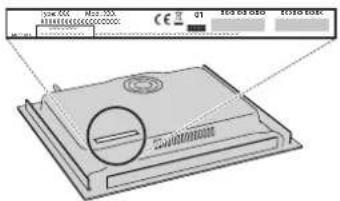
- the serial number (number after the word SN on the rating plate located under the appliance). The serial number is also indicated in the documentation;
Mod. XXX XXX
Ind.C. XXXXXXXXXXXX
- your full address;
- your telephone number.
If any repairs are required, please contact an authorized after-sales service (to guarantee that original spare parts will be used and repairs carried out correctly).
In the case of flush-mounted installation, call the After Sales Service to request assembly of screws kit (if not present).
In case of installation not over a built-in oven, you can call the After Sales Service to buy the divider kit C00628720 (cooktop 60 and 65 cm) or C00628721 (cooktop 77 cm).
If you prefer not to buy the divider kit please ensure that a separator is installed according to the installation instructions.
Policies, standard documentation and additional product information can be found by:
- Using QR code in your appliance;
Visiting our website docs.whirlpool.eu/docs; - Alternatively, contact our After-sales Service (See phone number in the warranty booklet). When contacting our After-sales Service, please state the codes provided on your product's identification plate.
TM/© 2024 Whirlpool. Produced under license.
Conditions requises minimales
$$ - + \text {C O N T A M I N U T I} $$
HELISIGNAAL SEES/VALJAS
m = 311
Mod. XXXXXX
Ind.C. XXXXX XXXXX
SN: XXXX XXXX XXXX
WI-FI - CASTO KLADENÉ OTÁZKY
Ktore Wi-Fi protokoly su podporoyane?
Nainstalovany Wi-Fi adaptor podporuje Wi-Fi b/g/n pre europse krajiny.
INDICATOR TEMPORIZATOR
HUSHOLDNINGSAPPPARATER
MINUTURETS INDIKATOR
RENGJØRING OG VEDLIKEHOLD
MANGE TAKK FOR AT DU HAR KJØPT ET WHIRLPOOL -PRODUKT
For a motta en mer fullstendig assistanse, vennligst registrar produktet ditt pa www.whirlpool.eu/register.

För du bruker apparatet mädu lese sikkerhetsanvisingene noye.
VENNLIGST SKANNER QR-KODEN PÄ DITT APPARAT FOR Å FÅ YTTERLIGERE INFORMASJON
PRODUKTBESKRIVELSE
1.Kokeoverflate
2. Kontrollpanel
BETJENINGSPANEL
- Symbol/aktivering av spezialfunksjoner
- Valgt varmeniva
- Knapp for avsläing av kokesonen
4.Scroll tastatur - Knapp for hurtig oppvarming (Booster)
-
Knapp FLEXISIDE
7.Indikatorlampe -aktiv funksjon -
Pää/Av-knappp
- Indikator for tilberedningstid
- Timer
- Knapp 6^th Sense
- Indikator for aktiv fjernkontroll
- Fjernkontrollens tast
-
Indikator for aktiv Wi-Fi
-
Wi-Fi tast
- OK/Tastspereknapp - 3 sekunder
- Indikator for aktiv timer
- Sonevalgindikator
- Symbol til indicator for timer