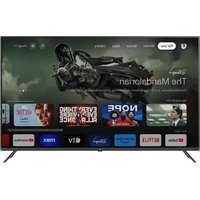
ODL 40652FTB - TV OK - Free user manual and instructions
Find the device manual for free ODL 40652FTB OK in PDF.



| Technical Specifications | OK ODL 40652FTB TV, LED screen, Full HD resolution (1920 x 1080), 40-inch screen size. |
|---|---|
| Connectivity | HDMI ports, USB, VGA input, audio output, built-in Wi-Fi. |
| Usage | Ideal for watching movies, series, video games, and streaming. |
| Maintenance | Clean the screen with a soft cloth, avoid harsh chemicals. |
| Safety | Do not expose to moisture, use on a stable surface, unplug during storms. |
| General Information | 2-year warranty, energy consumption rated A, weight 8 kg. |
Frequently Asked Questions - ODL 40652FTB OK
User questions about ODL 40652FTB OK
0 question about this device. Answer the ones you know or ask your own.
Ask a new question about this device
Download the instructions for your TV in PDF format for free! Find your manual ODL 40652FTB - OK and take your electronic device back in hand. On this page are published all the documents necessary for the use of your device. ODL 40652FTB by OK.
USER MANUAL ODL 40652FTB OK
DIGITAL/OPTISCH AUDIO OUT
The terms HDMI and HDMI High-Definition
Multimedia Interface, and the HDMI logo are trademarks or registered trademarks of HDMI Licensing LLC in the United States and other countries.

DOLEY AUDIO
Manufactured under license from Dolby Laboratories. Dolby, Dolby Audio and the double-D symbol are trademarks of Dolby Laboratories.
Thank you for choosing an ok. product. Please read the instructions carefully and retain them for future reference.
Note: A detailed instruction manual for this TV is available on the following website: http://de.ok-online.com/nc/de/service/downloads.html
IMPORTANT SAFETY INSTRUCTIONS. PLEASE READ THIS MANUAL CAREFULLY AND KEEP IT FOR FUTURE REFERENCE.
Safety information

CAUTION
RISK OF ELECTRIC SHOCK DO NOT OPEN
CAUTION: IN ORDER TO REDUCE THE RISK OF ELECTRIC SHOCK, DO NOT REMOVE THE LID (OR THE BACK PART) THIS DEVICE CONTAINS NO PARTS THAT MAY BE MAINTENANCED BY THE USER. LEAVE ALL MAINTENANCE WORK TO QUALIFIED CUSTOMER SERVICE STAFF.
In extreme weather conditions (storms, lightning) and for extended periods of disuse (vacation), unplug the device's power plug.
The power plug is used to disconnect the TV from the power supply and must therefore be easily accessible at all times. The device also uses power in standby mode if it is not fully disconnected from the power supply.
Note: Please follow the instructions on the screen for the corresponding features.
IMPORTANT - Please read this manual in its entirety before installation or operation.

WARNING: Never allow persons (including children) with reduced physical, sensory or mental abilities or lack of experience and/or knowledge operate electrical devices without supervision!
- This TV is intended for use at altitudes of less than 2000 meters above sea level at a dry location and in regions with a moderate climate.
- The device is intended for household use or similar uses; it is not permitted for use in public places.
- Allow at least 10cm of space around the TV for ventilation.
- Ventilation may not be hindered by covering or adjusting the ventilation openings with objects such as newspapers, tablecloths, curtains, etc.
- The power cable's plug should be easily accessible. Do not place any objects on the power cable (neither the device itself nor furniture, etc.) and do not pinch the cable. Damage to the power cable/plug may result in fires or electric shock. Always touch the power cable by the plug, do not unplug the TV by pulling the power cable from the outlet. Never touch the power cable/plug with wet hands as this may lead to short circuiting or electric shock. Never tie knots in the power cable and never tie it together with other cables. If it is damaged, the cable must be replaced. Replacements must be carried out by a qualified professional only.
- Shield the TV from dripping and splashing water and do not place any objects filled with water such as vases, cups, etc. on or above (e.g. in shelves overhead) the TV.
- Shield the TV from direct sunlight and do not place any open flames (such as burning candles) on or next to the TV.
- Do not operate any heat sources such as electric heaters, radiators, etc. in the immediate vicinity of the device.
- Do not place the TV on the floor or slanted surfaces.
- In order to prevent the risk of suffocation, keep plastic bags out of the reach of infants, children and pets.
- Fasten the stand carefully to the TV. If the delivery includes screws with the stand, tighten the screws in order to prevent the TV from tipping. However, do not overtighten the screws and attach the rubber stoppers properly.
EN
- Never dispose of batteries in an open fire or together with hazardous and/or flammable substances.
Warning: Batteries may not be exposed to excessive heat such as direct sunlight, fire or the like.
| ! | Caution Severe or fatal risk of injury |
| 4 | Risk of electric shock Risk of dangerous voltage |
| ! | Maintenance Important maintenance components |
Label on the device
The follow symbols are used on the device as labels for restrictions and safety precautions as well as safety instructions. Each label should be followed only if it is present on the device. Please heed this information for reasons of safety.

Protection class II device: This device was designed to not require a protective conductor (electrical grounding) for connection to the power supply.

Protection class II device with functional protective conductor: This device was designed to not require a protective conductor (electrical grounding) for connection to the power supply. The protective conductor serves functional purposes.

Protective conductor (grounding): The marked terminal is intended for connection to the protective conductor (grounding) connected to the power supply line.

Potentially fatal terminal: The marked terminal(s) is/are potentially fatal in normal operation mode.

Caution. Please follow the instruction manual: The marked area(s) contain(s) coin-cell batteries that must be replaced by the user.
WARNING
Batteries may not be swallowed as they pose a risk of chemical burns.
This device or the included accessories may contain a coin-cell battery. If a coin-cell battery is swallowed, this will lead within 2 hours to potentially fatal, serious internal burns.
Keep new and used batteries out of the reach of children.
If the battery compartment is not securely closed, stop using the device and keep it out of the reach of children.
If you suspect that batteries have been swallowed or inserted in any body part, seek medical attention immediately.
Please dispose of batteries in accordance with all relevant regulations and restrictions. Remove the batteries from the product before disposal of the product.
WARNING: Do not expose batteries to extreme heat such as direct sunlight or fire.
ATTENTION: Replace the batteries only with the same or equivalent type of battery. Never attempt to recharge non-rechargeable batteries.
WARNING
Do not place the TV on an unstable or slanted surfaces. Otherwise the TV may tip over and cause potentially fatal, serious injury. Many injuries, especially involving children, can be avoided if the following simple safety precautions are taken;
- Only use TV furniture or stands recommended by the device manufacturer.
- Only use furniture that can carry the weight of the TV.
- Make sure that the TV does not extend beyond the edges of the furniture.
- Do not place the TV on high pieces of furniture (e.g. shelves or bookshelves) without securely supporting the furniture itself and the TV.
- Do not place the TV devices on fabrics or other materials that are located between the TV and the furniture.
- Inform your children about the dangers of climbing on high pieces of furniture to reach the TV or the remote control. If you change the location of your TV, follow the same safety precautions.
WARNING FOR WALL MOUNTING
- Read the instruction manual thoroughly before mounting the device to the wall.
- The set for wall mounting is optional. It can be purchased from a local retailer if you did not purchase it with your device.
- Do not mount the TV to the ceiling or a slanted wall.
- Only use the intended screws and accessory parts for wall mounting.
- Tighten the screws for wall mounting securely to prevent the TV from falling. Do not overtighten the screws.
WARNING
Connecting devices that are connected to the building's protective grounding via a network connection or other devices or to a TV distribution system via a coaxial cable may pose a fire hazard. Connection via a cable distribution system is only permitted when the device provides insulation below a certain frequency range (galvanic insulation, see EN 60728-11).
EN
20
PREPARATION
Unpacking and installation
Note: The images are intended only for reference.
-
Unpacking the TV.
-
Installing the stands.
-
Connecting the power cable.
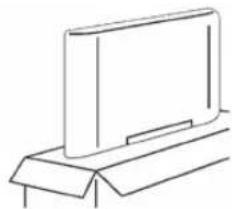
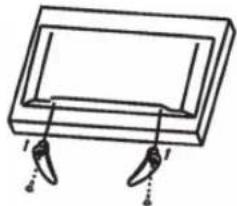
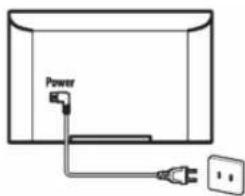
Accessories
Note: The images are intended only for reference.
| Screws (2x) Remote control Quick-start guide | Stands (2x) | |
| Quick Start Guide | ||
| Power cable Screws (2x) Screws (4x) (32") | (40") | |
REMOTE CONTROL
Note
- The images are intended only for reference.
- The same buttons may not be available for some regions or some models.
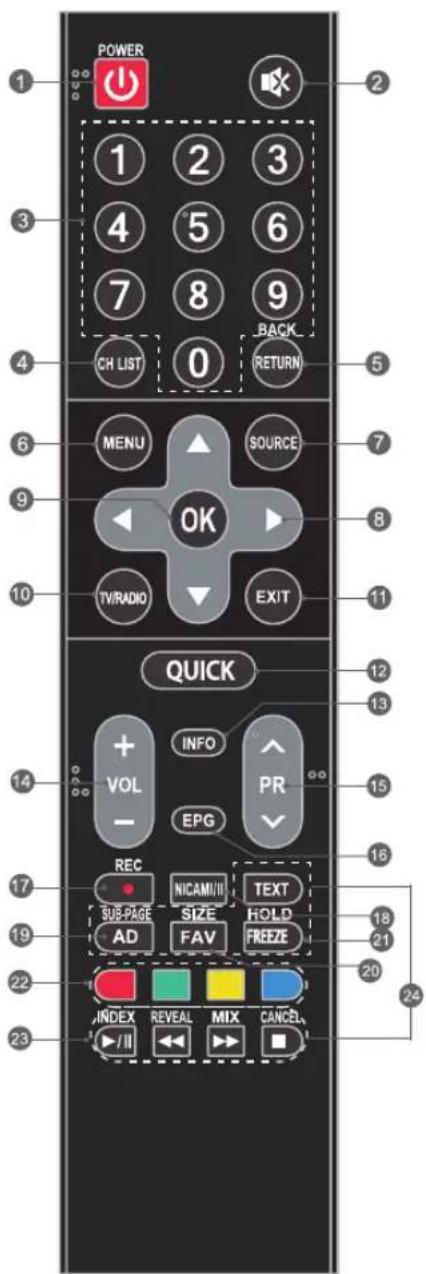
-
POWER(): Tows the TV on or to standby mode
-
MUTE(): Write or unmute the sound
-
Digit keys: Directly select channel
-
CH LIST: Load channel list
-
Return (Back): Return to previous channel
-
MENU: Load the main menu
-
SOURCE: Select the source
-
Navigation keys (▲/▼/▲/▶): Navigate the menu
-
OK: Confirm selection
-
TV/Radio: Switch between TV and radio
-
EXIT: Exit the current page
-
QUICK: Load the quick menu
-
INFO: Display detailed information
-
VOL+/VOL: Increase or decrease volume
-
PR+/PR-: Change to next or previous program
-
EPG: Display the EPG interface in DTV mode
-
RBC: No function for this model
-
NICAM I/II: Select the desired sound playback depending on the channel
-
AD: Turn on the audio description function
-
FAV: Load the favorites list
-
Freeze: Stop and/or restart scrolling
-
Color keys (RED/GREEN/YELLOW/BLUE): Execute ad hoc function in certain modes
-
USB playback control keys Playback/pause ( )/huse or continue playback Stop ( )/Stop playback Rewind ( )/last rewind Fast forward ( )/last forward
24. Teletext keys
TEXT: Load or exit the teletext menu
SIZE: Increase teletext screen size
HOLD: Hold or unfreeze the teletext page
SUB-PAGE: Load or exit sub-page modes
INDEX: Display the index page
REVEAL: Display or hide hidden information
MIX: Teletext screen over program or back to normal teletext mode
CANCEL: Back to TV program while searching a teletext page
EN
22
OPERATION
Inserting the remote control batteries
Insert two AAA batteries into the battery compartment on the remote control and make sure to heed the polarity markings in the compartment.
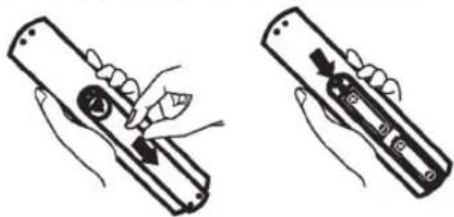
Note: The image is intended as a reference only.
Loading the e-manual
An e-manual is integrated in your TV and can be shown on the screen. To find out more about your TV's various functions, load the e-manual as follows.
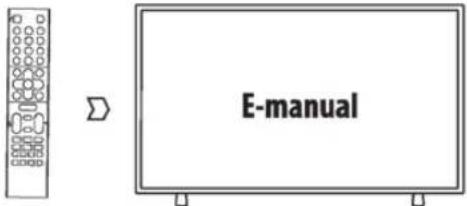
Note: The image is intended as a reference only.
- Press the MENU button to load the main menu.
- Press the blue button to open the e-manual and to check the instructions for the main function.
- Use the following buttons on the remote control to operate your TV in the e-manual.
| 0-9 digit keys Page selection | |
| OK | Go to |
| ← | Press previous page. Press next page. |
| Blue button | Exit e-manual. |
TV switch
Joystick
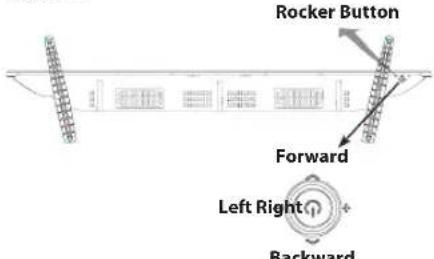
Note: The image is intended as a reference only.
Press the middle:
-
Press in standby mode to turn on the TV.
-
Without OSD, press briefly to access the source menu. Press and hold to turn the TV to standby mode.
-
With OSD, press briefly to confirm a selection. Press long to return or exit.
Press left: Decrease volume or go left.
Press right: Increase volume or go right.
Press forward: Channel down or go down.
Press backward: Channel up or go up.
CONNECTIONS
Connections
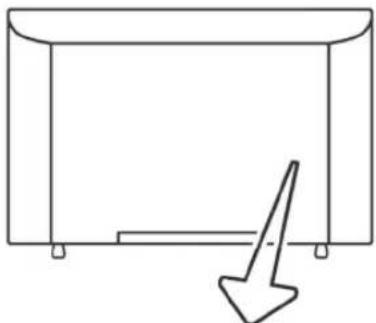
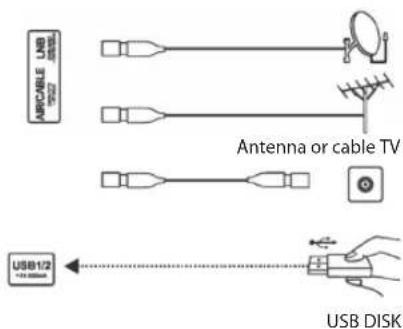
ANTENNA IN
Connect a coaxial cable to receive signals from an antenna, cable or satellite.
USB1
USB interface.
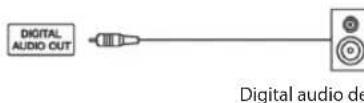
DIGITAL/OPTICAL AUDIO OUT
Use a SPDIF cable to output your TV audio signal to a compatible audio receiver.
EN
24
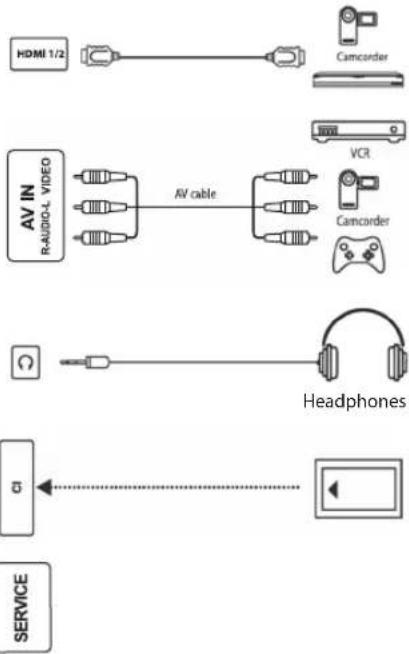
HDMI 1/2
Connect an HDMI input signal from a signal source e.g. a DVD player.
AVIN
Receive audio and video signals from a signal source e.g. a DVD player.
HEADPHONES
The speakers are muted when headphones are connected.
CI
CI card interface.
SERVICE
Service interface for technician only.
Note:
- The images are intended only for reference.
- The same connections may differ according to region or model. Please view your own TV as standard.

If you wish to connect an external device to your TV, make sure that the TV and the external device are turned off. Once all devices are connected, you may turn them back on.
TROUBLESHOOTING
If there are any problems during operation, please see the following instructions. If you cannot resolve the problems, contact your retailer.
GENERAL PROBLEM/SOLUTION
The remote control does not work
- Replace the batteries.
- The batteries are not installed correctly.
- The main power supply is not connected.
Poor reception
- This is normally caused due to interference from other electronic devices or sources of radio interference such as mobile phones.
PICTURE & SOUND / SOLUTION
No picture, no sound
- Check the signal source.
- Connect another electrical device to the power outlet to verify that it is in working order and turned on.
- The power plug has poor contact with the power outlet.
- Check the signal.
No sound, picture OK
- If you hear no sound, deactivate MUTE or increase the volume.
- Open the sound menu and set the "balance".
- Check whether headphones are plugged in. If yes, unplug the headphones.
Abnormal picture
No color or poor image quality:
- Adjust the color option in the menu settings.
- Keep the TV at a sufficient distance from other electronic products.
- Try another channel, this may fix the signal transmission problem.
Poor TV signal (mosaicked or snowy noise)
- Check the signal cable and set the antenna.
- Fine tune the channel.
- Try another channel.
■ MULTIMEDIA PLAYER
"This file is invalid" appears or the sound is normal but the picture is not
- The media file may be damaged. Check whether the file can be played back on a PC.
- Check whether the video and audio codec are supported.
"Unsupported audio format" is displayed or the picture is normal but the sound is not
- The media file may be damaged. Check whether the file can be played back on a PC.
- Check whether the video and audio codec are supported.
THE TV TURNS OFF AUTOMATICALLY
- Check if the automatic power off is activated. Change if necessary.
TECHNICAL DATA
| ODL 32652H-TB ODL 40652F-TB | ||
| TV transmission/ PAL/SECAM | BG/DK/I +NTSC M PAL/SECAM BG/D | K/I +NTSC M |
| Receive channels VHF(BAND I/III)-UHF(BAND U) - HYPERBAND | VHF(BAND I/III)-UHF(BAND U) - HYPERBAND | |
| Digital reception Fully integrated digital terrestrial cable satellite TV (DVB-T-C-S) (DVB-T2, DVB-S2 compliant) | Fully integrated digital terrestrial cable satellite TV (DVB-T-C-S) (DVB-T2, DVB-S2 compliant) | |
| Maximum number of possible channels | DTV: [DVB-T/T2/C]; 600 [DVB-S/S2] 2000 ATV: 100 | DTV: [DVB-T/T2/C]; 600 [DVB-S/S2] 2000 ATV: 100 |
| Supply voltage 100-240 V~, 50/60 Hz 100-240 V~, 50/60 Hz | ||
| Audio German+Nicam Stereo | German+Nicam Stereo | |
| Audio output power 2 x 6 W 2 x 6 W | ||
| Power consumption (W) | 42 W | 63 W |
| Networked standby (W) | < 0.5 W | < 0.5 W |
| TV dimensions (DxWxH) (with stand) (cm) | 19.03 X 73.34 X 48.7 | 8.49 X 90.65 X 52.59 |
| TV dimensions (DxWxH) (without stand) (cm) | 8.51 X 73.34 X 43.85 | 22.74 X 90.65 X 58.19 |
| Screen | 32" | 40" |
| Operating temperatures and operating humidity | 0 °C to 40 °C, max. 85 % humidity | 0°C to 40°C, max. 85 % humidity |
Country restrictions
This device is intended or household and/or office use in all EU countries (and other countries where the corresponding EU guideline is in place) without any restrictions excluding the countries listed below.
| Country Restriction | |
| Bulgaria General permitt for outdoor use and use in public facilities | |
| France Use in closed spaces | spaces only for 2454-2483.5 MHz. |
| Italy A general permit is required for use outside of private spaces. | |
| Greece Use in closed spaces | spaces only for 5470-5725 MHz. |
| Luxembourg General | permit for network and service offers (not for spectrum) |
| Norway Broadcasting | radio waves is not permitted in a geographic radius of 20 km around the center of Ny-Ålesund. |
| Russian Federation Use | in closed spaces only permitted |
The regulations of individual countries are subject to change at any time. It is recommended that the user make an inquiry to the relevant agencies about the current stand of national regulations for 2.4 GHz and 5 GHz WiFi.
ENVIRONMENTAL INFORMATION
Throughout the development of this TV, great value was set upon environmental performance. In order to lower energy consumption, proceed as follows:
The following methods are effective for lowering energy consumption:
- Reduce the TV's backlight
- Turn off the "Wake-on-WiFi" (WoW) function
- Reduce the time after which the TV automatically power off (automatic power-off)
Turn the product off and unplug the power cord when the TV is not in use. This will also reduce energy consumption.
User information on the disposal of used devices and batteries
Devices that bear this symbol may not be disposed of with household waste. Please inform yourself about suitable recycling centers or systems to dispose of these products.
DISPOSAL
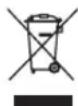
The symbol with the crossed-out waste bin requires separate disposal of waste electrical and electronic devices (WEEE). Electrical and electronic devices may contain materials which represent a health and environmental hazard. Do not dispose of this device with unsorted household waste; dispose at a designated collection point for waste electrical and electronic devices. In this way, you will do your part to protect our natural resources and environment. For further information, please contact your retailer or your local authorities.

Please dispose of batteries in an environmentally friendly manner. Do not throw batteries away with household waste. Please use local recycling and collection points or contact the retailer where you purchased the product.
EN
The information contained in the product fiche is in accordance with the Commission Delegated Regulation (EU) No. 1062/2010 of the supplementing Directive 2010/30/EU of the European Parliament and of the Council with regard to energy labeling of televisions.
Information on TVs
| EU product fiche | |||
| A Supplier's trademark ok. | |||
| B Model number ODL 32652H-TB | |||
| C Energy efficiency category | A | ||
| Value Unit | |||
| D Viewable screen diagonal | |||
| D1in centimeters 81 cm | |||
| D2in inches 32 | |||
| E Power consumption in on-mode | 41.5 W | ||
| F Annual energy consumption1 | 62.0 kWh | Year | |
| G Power consumption in stand-by | 0.40 W | ||
| H Power consumption in network standby mode (LAN) | No network standby mode | ||
| H Power consumption in network standby mode (WLAN) | No network standby mode | ||
| I Power consumption in off mode | No off mode | ||
| J Sceen diagonal in physical | |||
| J1horizontal pixel count 1366 | |||
| J2vertical pixel count | 768 | ||
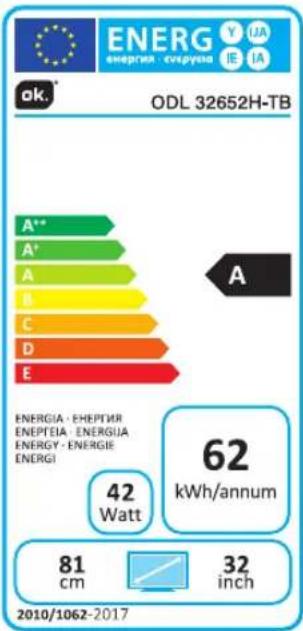
Energy consumption 62.0 kWh/Year based on four hours of TV operation daily in 365 days. The actual energy consumption depends on the way the TV is used.
The information contained in the product fiche is in accordance with the Commission Delegated Regulation (EU) No. 1062/2010 of the supplementing Directive 2010/30/EU of the European Parliament and of the Council with regard to energy labeling of televisions.
Information on TVs
| EU product fiche | |||
| A Supplier's trademark ok. | |||
| B Model number ODL 40652F-TB | |||
| C Energy efficiency category | A | ||
| Value Unit | |||
| D Viewable screen diagonal | |||
| D1in centimeters 101 cm | |||
| D2in inches 40 | |||
| E Power consumption in on-mode | 63.0 W | ||
| F Annual energy consumption1 | 92.0 kWh | Year | |
| G Power consumption in stand-by | 0.30 W | ||
| H Power consumption in network standby mode (LAN) | No network standby mode | ||
| H Power consumption in network standby mode (WLAN) | No network standby mode | ||
| I Power consumption in off mode | No off mode | ||
| J Sceen diagonal in physical | |||
| J1horizontal pixel count 1920 | |||
| J2vertical pixel count | 1080 | ||
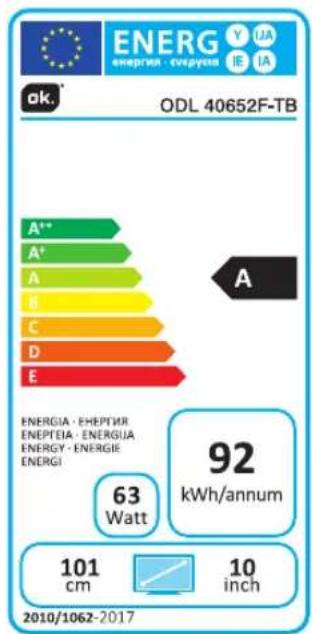
Energy consumption 92.0 kWh/Year based on four hours of TV operation daily in 365 days. The actual energy consumption depends on the way the TV is used.
EN
LICENSE

The terms HDMI and HDMI High-Definition
Multimedia Interface, and the HDMI logo are trademarks or registered trademarks of HDMI Licensing LLC in the United States and other countries.
30

AUDIO
Manufactured under license from Dolby Laboratories. Dolby, Dolby Audio and the double-D symbol are trademarks of Dolby Laboratories.
The terms HDMI and High Definition Multimedia Interface and the HDMI logo are trademarks or registered trademarks of HDMI Licensing Administrator, Inc. in the USA and other countries. Manufactured under license from Dolby Laboratories.
Dolby, Dolby Audio and the double D symbol are trademarks of Dolby Laboratories.
This product contains free software that is subject to the GNU General Public License (GPL) and/or the GNU Lesser General Public License (LGPL). You may redistribute and/or publish it under the terms of the GNU General Public License or the GNU Lesser General Public License as published by the Free Software Foundation, either according to Version 2 or (at your option) any later version.
This program is published in the hope that it is of use to you but WITHOUT ANY GUARANTEE and especially without the implicit guarantee of BEING READY FOR THE MARKET or USE FOR A CERTAIN PURPOSE. You can find details in the GNU General Public License (GPL) and the GNU Lesser General Public License (LGPL). You can obtain the software from Imtron GmbH's customer service (per email at contact@imtron.eu or via the postal address Imtron GmbH, Wankelstr. 5, 85046 Ingolstadt, Germany). You can download the GNU General Public License (GPL) and the GNU Lesser General Public License (LGPL) at www.gnu.org/licenses/.
This device is suited solely for use in closed spaces. This device may be used in all EU countries. Information on Unicable:
This LCD TV complies with the European industry standard EN50494 (2007) "Single cable signal distribution" whereby received satellite signals are distributed via a single coaxial cable.
Imtron GmbH hereby declares that the radio equipment ODL 32652H-TB/ ODL 40652F-TB complies with the EU directive 2014/53/EU. Click on the following link to read the full text of the EU Declaration of Conformity: http://de.ok-online.com/nc/de/service/downloads.html
WARRANTY
We offer a warranty for this device under the following conditions:
- We will remedy free of charge and in accordance with the following conditions (No. 2-6) any product damage or defect that is proven to be based on a material or manufacturing fault, provided the end user reports this immediately upon noticing it and within a period of 24 months following the date of purchase.
- The warranty does not extend to parts that break easily such as glass or plastic e.g. light bulbs. The warranty obligation does not apply in case of minor deviations from product specifications which are insignificant for the value or functional soundness of the product, or by damages due to chemical, electro-chemical or aqueous effects as well as damages generally resulting from external abnormal conditions, or due to irrelevant operating conditions or if the device has come into contact with unsuitable materials. The warranty also does not apply in case of damages to the device due to transport damages for which we are not responsible, improper installation and assembly, improper use, uncommon household use, insufficient maintenance or failure to follow the instructions for operation and installation. The warranty claim does not apply if repairs or other work is carried out by unauthorized persons or if our devices are equipped with additional parts or accessories that are not original parts and cause a defect.
- The warranty will be performed in such a way that we shall decide whether to repair the defective parts or to replace them with working parts free of charge. Devices that can be transported within reason (e.g. by car) and for which a warranty claim is made with reference to this warranty must be handed over or shipped to the nearest customer service point or our service contractor. On-site repairs can only be required for stationary (fixed) devices. Proof of purchase with the date of purchase and/or delivery must also be submitted. Replaced parts pass into our ownership.
- If we decline to repair a defective device or the repair fails, the end user may request to exchange the product for a replacement product of equal value within the aforementioned warranty period.
- Warranty claims do not cause the warranty period to be extended, nor do they trigger a new warranty period. The warranty period for installed replacement parts ends with the warranty period for the entire device.
- Any other or further claims are excluded, especially those for replacement due to damage caused outside of the product, provided there is no obligatory legal liability.
- We are also unconditionally liable by law for damages included in the liability set forth in the German Product Liability Act and for all damages based on intentional or grossly negligent contractual breaches as well as malice by us, our statutory representatives, or our vicarious agents.
- The above warranty policy has no effect upon your legal right to claim warranty.
FR
FÉLICITATIONS
RISQUE D'ÉLECTROCUTION NE PAS OUVRIR
ATTENTION:POUR REDUIRE LE RISQUE D'ÉLECTROCUTION,NE RETIREZ PAS LE COUVERCLE (OU LA PAROI ARRIÈRE). AUCUNE MAINTENANCE N'EST À EFFECTUER PAR L'UTILISATEUR SUR CET APPAREIL. LAISSEZ LES TRAVAUX DE MAINTENANCE À UN PERSONNEL QUALIFIÉ DU SERVICE APRES-VENTE.
DIGITAL/OPTIC AUDIO OUT
IMAGE & SON/SOLUTION
The terms HDMI and HDMI High-Definition
Multimedia Interface, and the HDMI logo are trademarks or registered trademarks of HDMI Licensing LLC in the United States and other countries.

AUDIO
Manufactured under license from Dolby Laboratories. Dolby, Dolby Audio and the double-D symbol are trademarks of Dolby Laboratories.
DIGITAL/OPTISCH AUDIO OUT
The terms HDMI and HDMI High-Definition
Multimedia Interface, and the HDMI logo are trademarks or registered trademarks of HDMI Licensing LLC in the United States and other countries.
60

DOEBY AUDIO
Manufactured under license from Dolby Laboratories. Dolby, Dolby Audio and the double-D symbol are trademarks of Dolby Laboratories.
The terms HDMI and HDMI High Definition
Multimedia Interface, and the HDMI logo are trademarks or registered trademarks of HDMI Licensing LLC in the United States and other countries.

DOLEY AUDIO
Manufactured under license from Dolby Laboratories. Dolby, Dolby Audio and the double D. rothofol
Audio and the double-D symbols: trademarks of Dolby Laboratories.