
EBPA510 - Power bank SAMSUNG - Free user manual and instructions
Find the device manual for free EBPA510 SAMSUNG in PDF.



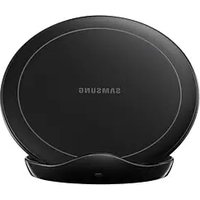
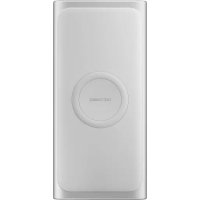
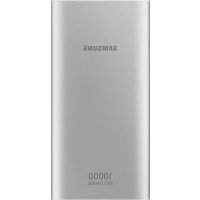
| Product Type | External Portable Battery |
| Brand | Samsung |
| Model | EBPA510 |
| Compatibility | Mobile devices with USB port |
| Box Contents | Battery pack, quick start guide |
| Input Power | Via USB charger (sold separately) |
| Output Power | USB port for charging mobile devices |
| Buttons | On/Off, battery level check |
| LED Indicators | 4 lights for charge level |
| Main Function | Recharge mobile devices on the go |
| Use While Charging | Possible but may extend charging time |
| Operating Temperature | Normal; moderate heating is normal |
| Safety | Automatic shutdown in case of excessive temperature |
| Recommended Accessories | Authorized Samsung chargers and cables |
| Maintenance | Clean with a soft, dry cloth |
| Storage | In a dry and cool place |
| Accessory Availability | Varies by region, check the Samsung website |
Frequently Asked Questions - EBPA510 SAMSUNG
User questions about EBPA510 SAMSUNG
0 question about this device. Answer the ones you know or ask your own.
Ask a new question about this device
Download the instructions for your Power bank in PDF format for free! Find your manual EBPA510 - SAMSUNG and take your electronic device back in hand. On this page are published all the documents necessary for the use of your device. EBPA510 by SAMSUNG.
USER MANUAL EBPA510 SAMSUNG
Please read this manual before using the device to ensure safe and proper use.
- Images may differ in appearance from the actual product. Content is subject to change without prior notice.
- Before using the battery pack, make sure it is compatible with your device.
- The content of this manual is based on the EB-PA710 model.
Instructional icons

Warning: situations that could cause injury to yourself or others

Caution: situations that could cause damage to your device or other equipment

Notice: notes, usage tips, or additional information
Getting started
Package contents
Check the product box for the following items:
- Battery pack
- Quick start guide

- The items supplied with the device and any available accessories may vary depending on the region or service provider.
- The supplied items are designed only for this device and may not be compatible with other devices.
- Appearances and specifications are subject to change without prior notice.
- You can purchase additional accessories from your local Samsung retailer. Make sure they are compatible with the device before purchase.
- Use only Samsung-approved accessories. Using unapproved accessories may cause the performance problems and malfunctions that are not covered by the warranty.
- Availability of all accessories is subject to change depending entirely on manufacturing companies. For more information about available accessories, refer to the Samsung website.
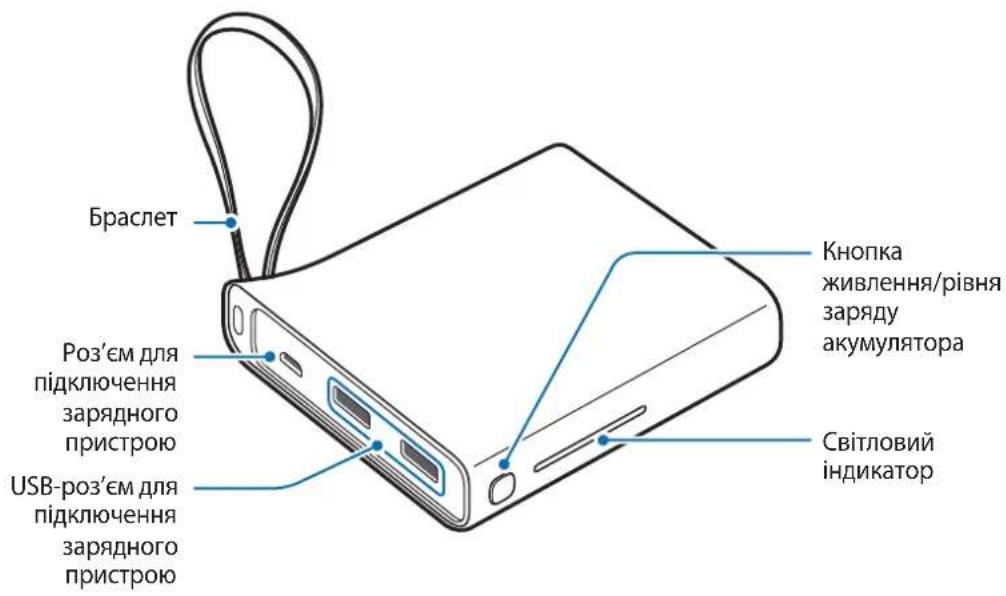
Device layout
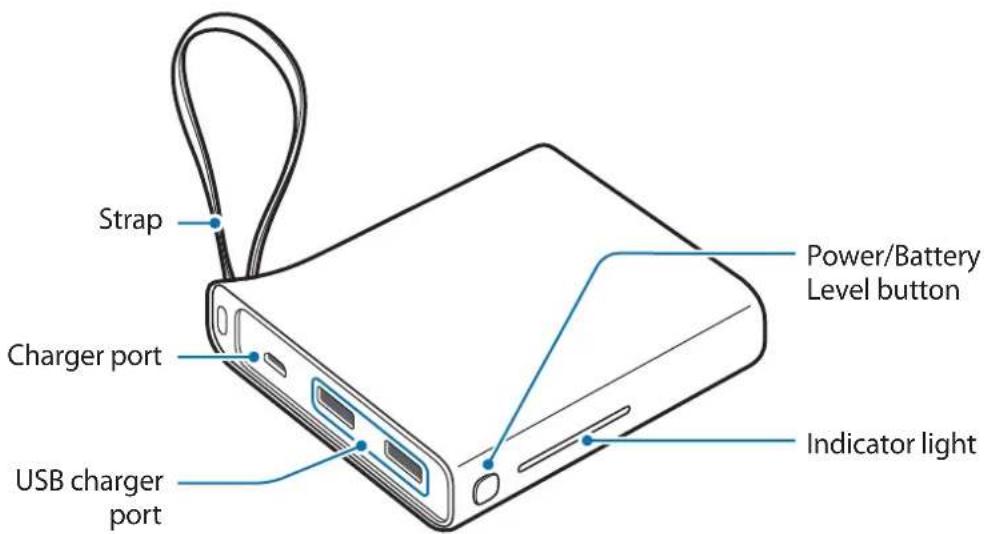
Charging the battery pack
Charge the battery before using the battery pack for the first time or when the battery pack has been unused for extended periods.

Use only Samsung-approved chargers and cables. Unapproved chargers or cables can cause the battery to explode or damage the battery pack.
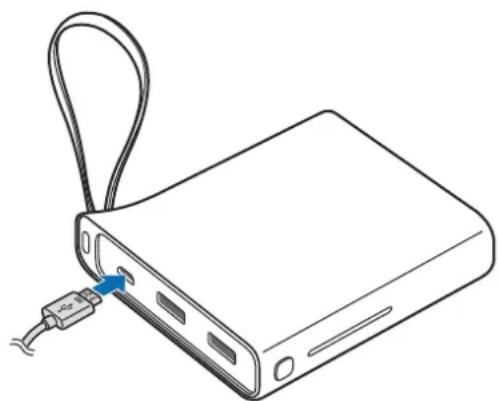
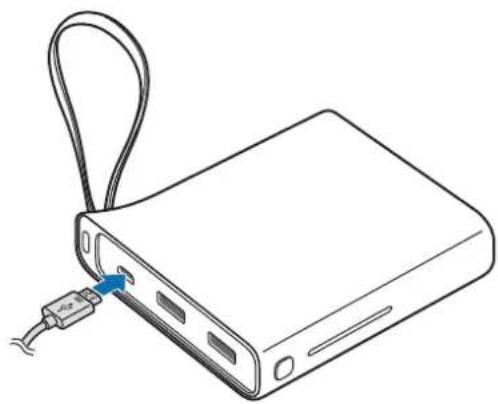
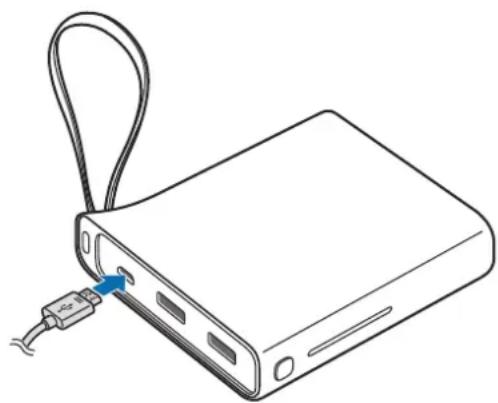
1 Connect the battery pack to a charger.
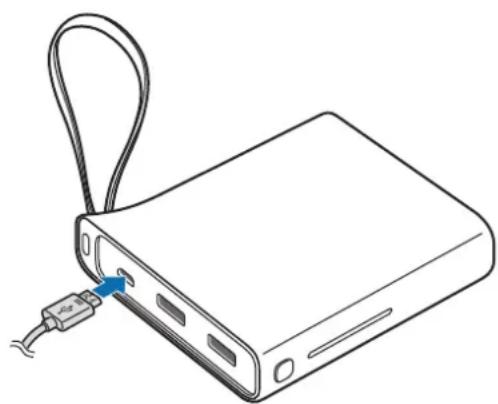

Connecting the charger improperly may cause serious damage to the battery pack. Any damage caused by misuse is not covered by the warranty.

- You can charge the battery pack using the charger (sold separately).
- Using a power source other than the charger, such as a computer, may result in a slower charging speed due to a lower electric current.
- The battery pack can be used while it is charging, but it may take longer to fully charge the battery.
- While charging, the battery pack may heat up. This is normal and should not affect the battery pack's lifespan or performance. If the battery gets hotter than usual, the charger may stop charging.
- The actual capacity (Wh) is measured based on the battery's output current and voltage. It may differ from the capacity (Wh) indicated on the device, depending on the output power condition, the connected device's circuit configuration, and the operation environment.
- If the battery pack is not charging properly, take the battery pack and the charger to a Samsung Service Centre.
2 After fully charging, disconnect the battery pack from the charger.

- To save energy, unplug the charger when not in use. The charger does not have a power switch, so you must unplug the charger from the electric socket when not in use to avoid wasting power. The charger should remain close to the electric socket and easily accessible while charging.
- The socket-outlet shall be installed near the equipment and shall be easily accessible.
Checking the remaining battery power
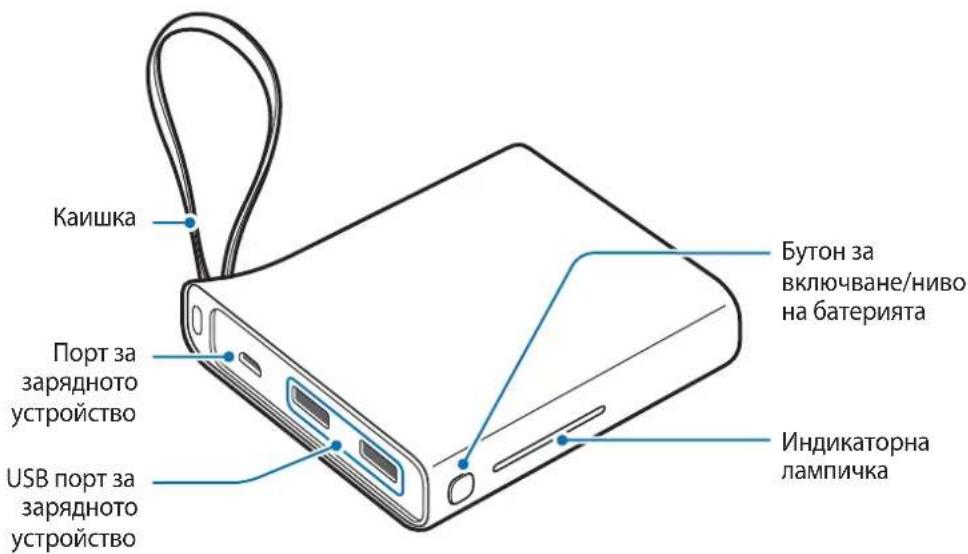
Check the remaining battery power by pressing the Battery Level button. The indicator lights alerts you to the remaining battery power.
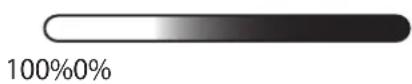
Using the battery pack
Charging the mobile device
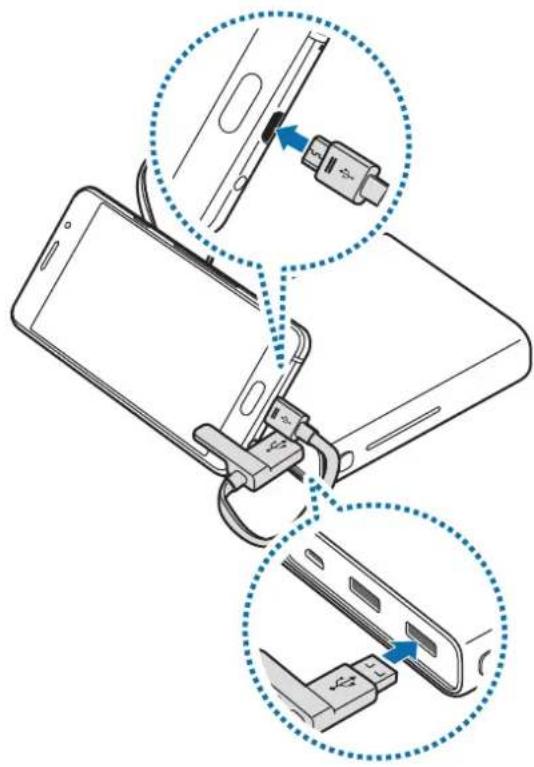
1 Connect one end of the USB cable to the battery pack's USB charger port. Then, plug the other end of the USB cable into the mobile device's multipurpose jack. Charging will start.
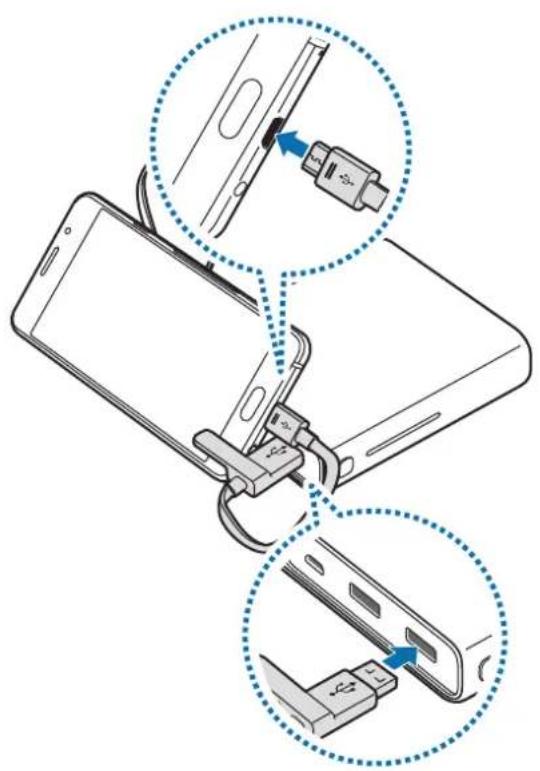
After the mobile device is fully charged, disconnect the USB cable from both devices.

- To stop charging, press and hold the Power button for approximately two seconds.
To resume charging, press the Power button. - You can use the battery pack while it is charging but you may not be able to use it if the battery level is too low.
- If the mobile device is not charging after being connected to the battery pack, press the Power button.
- The battery pack is an auxiliary external battery. It may not fully charge some mobile devices.
- If the battery pack is exposed to extremely hot or cold temperatures or an error occurs, the indicator light will flash. Disconnect the mobile device from the battery pack, and then reconnect them.
Checking the charging status
The indicator light alerts you to the connected mobile device's charging status.
| Status Indicator light | |
| Charging | 100%0% |
| Fully charged | 100%0% |
Copyright
Copyright © 2016 Samsung Electronics
This manual is protected under international copyright laws.
No part of this manual may be reproduced, distributed, translated, or transmitted in any form or by any means, electronic or mechanical, including photocopying, recording, or storing in any information storage and retrieval system, without the prior written permission of Samsung Electronics.
Trademarks
SAMSUNG and the SAMSUNG logo are registered trademarks of Samsung Electronics.
All other trademarks and copyrights are the property of their respective owners.
Copyright © 2016 Samsung Electronics
Copyright © 2016 Samsung Electronics
Copyright © 2016 Samsung Electronics
Copyright © 2016 Samsung Electronics
Copyright © 2016 Samsung Electronics
Copyright © 2016 Samsung Electronics
BaTePnHHaNakET
KpaTko pBKOBOCTBO

- Elenentte n haHnHnTe npHaIeXHOCTn, DOCTaBeHc yCtpoiCTBOTO, MoKe da ce pa3nuaBat B 3aBNCIMOcT OT perNoHa nIN DoCTaBUnKa Ha ycIyrN.
- Доставец селемпса пedingаизени само за TOВа усточь и може на He с CBМecTUMС дугу усточь.
BbHnHnT Bn i CneuNkauNTe ca npedMeT Ha npomHa 6e3 npdun3BeCTne. - MoxkeTe Da 3aKynIe DoIbHnIeHNn AkceCoapn OT BaIuN MeCTeN npOdaBaH Na Samsung. PpeiN 3aKynBaHe ce yBepTe, ye Te ca CbBMeCTmN CyCTpOInCTBOTO.
- Използваши само одбрени OT Samsung akcecoapи. Използваши на Heодобpenнakcecoapи може за причинни рpoблемс пpon3ворintelnoctт и Нeнзправноctи, КОТOT He ce pOKpNBaT OT rapaHцята.
HaIuHocTt Ha BCnKn akcecoapn IopJexn Ha npomHa n3cJIO B 3aBucmOCT OT npOn3BOJnteJIte. 3a NOBue HOpMaun 3a HaIuHInTe akcecoapn ce o6bPHeTe KbM ye6 caTa Ha Samsung.
OΦopMJIeHne Ha yCTpoIcTBOTO
3apekdahe ha 6aTeprnHna paKeT
3apeTe 6aTePnTa, npEn Da n3NoI3BaTe 6aTePnHnna PaKeT 3a npBb PbT nII KOraTo 6aTePnHnra PaKeT He e 6nI n3NoI3BaH npOdbJnxIeHNO BpeMe.

I3noJ3BaIte cmo OdopeHn OT Samsung 3apdHn yctpoiCTBa n Ka6eH. HeoO6peHnTe 3apdHn yctpoiCTBa n nn Ka6eH moKe da npuHrT ekCnIOpaHe Ha 6aTePnra nn NOBpeHa 6aTePnHn naKeT.
1 CbpxKeTe 6aTeprnHnnaKeT KbM 3apAHO yCTpoiCTBO.

HenpaBnHTo CBbP3BaHe KbM 3apAaHTo yCTpoiCTBO MOKe Da npuHn Cepno3Ha NOpeHa Ha 6aTePNnna naket. BcKaKbN NobpeNi, npuHneHi OT He npaBnHa ynotpe6a, He ce NOKpNBat OT rapaHcIyTa.

- Moxe Ta 3apeiTe 6aTeprHnra naket c nomoTa Ha 3apAHOTo yCTPOIcTBO (npOdaBa ce otDenHo).
- Използвано на заличени OT заюноту усточьо захаянваши ИЗточник, наразимер КOMПOTьр, може за прични по-6abно заекдане подллno-claбо потунацето eilektpиеско наразекенie.
- BaTePnHnT NaKeT MoXe Da Ce N3NoJ3Ba, DOKaTo Ce 3apexJa, HO PbLnHO To 3apeKdaHe Ha 6aTePnTa MoXe Da OTHEMe NOBcE BpeMe.
- Пов体现在 заразождане заразионлпakет можда заг pee. Тоба e hopmaлно и не втураьало да засгене подьжintelnoctта на лквота пилприбintelnoctта на заразионлпakет. Ако заразиета се harpee nobeche ot obuayahOTO, Зарадноустюctво можда спpe дa заразжда.
- DeиCTBNTENHЯKanauntet (Wh) e n3mepen Bb3 OCHOBa Ha n3XODHnA TOK n HappeKeHne Ha 6aTeprnaTa. Toi moke da ce pa3nUaBa OT Kanaunteta (Wh), yka3an Bbpxu yctpoiCTBOTo B 3aBnCIMOcT OT ycIOBnTa Ha n3XoDHa MOUHOCT, KOHfNpyaunrTa Ha BepnraTa Ha CBbp3aHOTO yCTPOIcTBOn n pa60THaTa cpeDa.
- Ako 6aTePnHnT nakET He ce 3apeXda npabUNHO, OTHeCeTe 6aTePnHnra naKeT n 3apAHDTo yCTpoICTBO Do cepBn3eH ueHTbp Ha Samsung.
2 Cnep KaTo ce 3apeHnHaBnHo, pa3KaueTe 6aTeprnHnnaKeT OT 3apAHOTo yCTpoiCTBO.

3a da cneCTnTe eHeprna, n3BaTe 3apraHOTo yCTPOJCTBO OT eJeKTPnuYeCKn KONTAKT, KOrato He ro n3NoI3BaTe. 3apraHOTO yCTPOJCTBO HMa npEeBKnIOUvBaTeN Bkn./IV3Kn., 3aTOBa Tp6Ba Da ro n3BaIte OT eJeKTPnuYeCKn KOHTAKT, KOrato He ro n3NoI3BaTe, 3a da He n3pa3XoIDBaTe eHeprrna. 3apraHOTO yCTPOJCTBO Tp6Ba Da oCTaHe 6JIIN3O Do eJeKTPnuYeCKn KOHTAKT IN LeCHO DOCTbIHHO, DOKaTO 3apejda.
Copyright © 2016 Samsung Electronics
Toba pBkoBOdCTBO e 3aUHTeHO OT MeKdyHapOHN 3aKOHN 3a aBTOpCKn npaba.
HnKoJtOT pBKOBOCTBOTO He moKe da 6bJe Bb3POn3BexJaHa, pa3npocTpaHBAHa, npBeEJaHa nn npexBpIHa nOd KaKBaTO n Da e oOpMa nn NO KaKBbTO n Da e NaunH, eNeKTPOHeH nn MExAHueH, B TOBa YncNo oToKOpNIPAHe, 3aInc nn CbXpaHeHne B KaKBaTO n Da e CnCTema 3a HfOpMauONHO cbXpaHeHne n N3BnuAHe, 6e3 npedBapntelHoto pa3peSeHne Ha Samsung Electronics.
TbproBcN MapKn
SAMSUNG n IoroTo Ha SAMSUNG ca pernctpnpaHn TbproBckn MapKn Ha Samsung Electronics.
- Bcunkn npyn Tbprobckn Mapkn n aBtOpckn npaba ca co6ctBeHOCT Ha CbOTBeHTHe IM co6ctBeHnCn.
Najprije pročitajte
Prije uporabe uredaja pažljivo procitajte ovaj prisucnik kako biste osigurali sigurnu i pravilnu uporabu.
- Slike se mogu razlikovati od stvarnog proizvoda. Sadržaj je podložan promjeni bez prethodne obavjiesti.
- PrijeNgu upotrijebite baterijski komplet provjerite je li kompatibilan s vašim urežajem.
- Sadržaj prisručnika temelji se na modelu EB-PA710.
Koristeni symboli

Upozorenje: situacije u kojima se vi ili druge osobe mozte ozljediti

Copyright © 2016 Samsung Electronics
Ovaj je prisuCnik zasticen medunarodnim zakonima o zastiti autorskih prava.
Niti jegan dio ovog prisučnika ne smije se reproductirati, distribuirati, prevoditi ili prenositi u bilokojem obliku, ni na koji način, elektronici ili mehanički, uključujuci fotokopiranje, snimanje ili pohranjivanje na bilo kojem mediju za pohranu informacije i sustavu dohvata podataka, bez prethodnog pisanog dopusteŋa Samsung Electronicsa.
Zašitni znakovi
SAMSUNG i SAMSUNG logotip su registrarani zašitni znakovi tvrtke Samsung Electronics.
Svi su ostali zašitni znakovi i autorska prava vlasnistvo svojih odgovarajućih vlasnika.
Prvo pročitajte
Pre Ngo sto pocnete da koristite uredaj procitajte ovo uputstvo kako biste bili sigurni da ga koristite na bezbedan i ispravan način.
- Slike mogu odstupati od stvarnog proizvoda. Sadržaj je podložan promenama bez prethodnog obaveštenja.
- Pre korišćenja pakovanja baterije, uverite se da je kompatibilan sa vašim urežajem.
Sadržaj ovoq prisuCnika jezasnovan na modelu EB-PA710.
Ikonice sa uputstvima

Copyright © 2016 Samsung Electronics
Ovaj prisučnik je zašićen medunarodnim zakonima o autorskim pravima.
Nijedan deo ovog prisučnika se ne sme reprodukovati, distribuirati, prevoditi niti prenositi ni u Jednom obliku niti bilo kojim putem, elektronskim niti mehaničkim, što podrazumeva fotokopiranje, snimanje i skladistenje u okviru bilo kog skladiša informacija i(systema za preuzimanje, bez prethodne dozvole kompanije Samsung Electronics u pisanom obliku.
Trgovačke marke
SAMSUNG i SAMSUNG logotip su registrovane trgovace marke kompanije Samsung Electronics.
Sve ostale trgovačke marke i autorska prava su vlasništro njihovih vlasnika.
Leia primeiro
Copyright © 2016 Samsung Electronics
Copyright © 2016 Samsung Electronics
Copyright © 2016 Samsung Electronics
Copyright © 2016 Samsung Electronics
Alternativekanduringevarkundesupportpatelefon81556480.
Opphavsrett
Copyright © 2016 Samsung Electronics
Copyright © 2016 Samsung Electronics
Copyright © 2016 Samsung Electronics
Copyright © 2016 Samsung Electronics
Telif hakki © 2016 Samsung Electronics
Jaiall jgall jglll lll 1 gall
jLjLjLjLjLjLjLjLjLjLjLjLjLjLjLjLjLjLjLjLjLjLjLjLjLjLjLjLjLjLjLjLjLjLjLjLjLjLjLjLjLjLjLjLjLjLjLj
.
1
j 1 j 1 j 1 j 1 j 1 j 1 j 1 j 1 j 1
1
a 1000
i 1
1
1
Oo
y
1JyjI 0000000000000000000000000000000000000000000
00 1 1 1 1 1 1 1 1 1 1 1 1 1 1 1 1 1 1 1 1 1 1 1 1 1 1 1 1 1 1 1 1

J 1
a 1

J 1

J 1 J 1 J 1 J 1 J 1 J 1 J 1 J 1 J 1 J 1 J 1 J 1 J 1 J 1 J 1 J 1 J 1 J 1 J 1 J 1 J 1 J 1 J 1 J 1 J 1 J 1 J 1

y
1
100%0%
s
0
1 USB JkS 8
1
1 1
J 1
jol 1 jol

J 1
J 1 J
.
lks 1 jol jol slo ool s wj y b j kss.
2k + 1 ≤ 3k ;
Sai jilii 1j 2000 2000 2000 2000 2000 2000
Jg0g 1j g jj j j j j j j
J
120 1
| 100%0% | الله�� |
| 100%0% | الله�� |
s
Copyright © 2016 Samsung Electronics
1
Samsung Electronics j 1j 0j 0j 0j 0j 0j 0j 0j 0j 0j 0j 0j 0j 0j 0j 0j 0j 0j 0j 0j 0j 0j
J 1
sla
Samsung Electronics
BHeuHn aKKymyTApT
KpaTKoe pyKOBOdCTBO

© Samsung Electronics, 2016.
DaHHOe pyKOBOcTBo 3aunuIeHo MeKdyHapOHyIMn 3aKOHAMn O6 aBTOpCKnx npabax.
3a nppeaetcB OcnpoN3BOIDtB, pacnpocTpaHrTb, nepeBoNTb nnnepeDaBaTb KaKne-Jn6o Yactn DaHHoro pykoBODCTBa B IIO6oF oPme n IIO6bIM CnOCOBOM, 3JeKTPoHHbIM nnMexaHnueckm, BKIOUay a foTOkOIpOBaHne, 3aIncb N XpaHeHne B IIO6oB CNCTeMe XpaHeHn y NOncKa INHΦOpMaun, 6e3 npedBapntbHO rnoCbMeHHOr pa3peSeHn KOMNaHn Samsung Electronics.
ToBapHbIe 3HaKn
SAMSUNG i IoroTn SAMSUNG 3apeHCTpnpOBaHHbIMN TOBapHbIMN 3HaKaMn KOMpaHn Samsung Electronics.
OctaIbHbIe aBTOpCKn IpaBa n TOBapHbIe 3HaKn ABJIOTc CO6CTBeHHOCtBIO INx BlaJeNbCeB.
Ozhannomtece neped noyaTkOM BnKOpncTaHn
Дя 6e3neuHOrTo Ta HanexKHorO KOpNCTyBaHHЯ npnCTpoE M nepw 3a BCE yBaXHo O3HaIOMTeC8 3 cIM noci6HnKoM.
3OBHIHINBnIaNpOdykTu MoKe BiDpi3HrTncBiD 3o6paXeHHa. Bmict MoKe 3miHOBaTnca 6e3 3aBuachoro nonepdXeHHa.
- Pered BnKOpNCTaHHaM aKymyIaTopa nepeKoHaTeCra, 00 BiH cymichn i3 Baunm npncToeM.
3mict zuoro noci6nka 3achoBaHn Ha moeni EB-PA710.
PonchIOBaJIbHi 3HaUKN

PonepeJxHn: Cntyaui, 10 MoKytb npu3BcTn Do TpaBMyBaHHaCe6e a6o iHux oci6

Ybara: cnTuayi, iO moKytb npn3BecTIO noNtKOJKeHHn npncTPOo a6o iHoro o6naHaHH

Pnmitka: npmiTkn, npa#n 3 KopncTyBaHHra a6o doaTkOba iHopMaucia
Початок роботи
Kompanečaίя
IpebeipTe HaBhICTb y KOMnJIeKTI TaKNX KOMNoHeHTiB:
- AkymylnaTopa
KopoTkn noci6nK KopncTyBaHa

KOMnoHeHTn, rki BXoJaTb DO KOMnIeKTy npNcTpoIO, MoKyTb pi3HNTncs 3aIexHo BiD KpaIHn a6o onepatopa 3B'ra3Ky.
KOMnOHeHTN,IO NOCTaUaOTbC B KOMnIeKTI,po3pO6JIeHI cneuaJIbHO IJRA ZbOro npNCtpoTO Ta MoKyTB 6yTN HeCyMICHNM 3 iHIMMnpNCtPOAMN.
3OBHIHINBnIaXapAKTePNCTKMOKytb 3MIHOBaTncs6e33aBuachoro nonepxeHH.
-ДоаТКОВIakcesCyapnMoJHa npuδbATn B MiceBOro noCTaayalbHnka Samsung.пердix npuδbaHHampekeKohAtec,иоBoH cyMiCi i3 cI M npicTpoEM.
BukopncToByuTe Iiue akcecyapn, peKomeHIOBaHI KOMNaHIEO Samsung. BkOpncTaHH HepeKomeHIOBaHnx akcecyapIB MOKe npn3BeCTn Do BUNHKHeHHI np6Jem y po6oti Ta HecnpaBHOCTe, Ha kI He p03NoBcIOxKyETbCra rapaHTi.
- Доступнистусяха akсесуаров може зminюватися заlexно вд компай-Bиробнков.
- Доступου вдфорmaцю по доступни akсесуаров можна дзhalтся на Be6-caNTi Samsung.
3OBHiushiBnIaD npncToIO
3apdxeHn 3OBnHbOro akymyITopa
Ipeed nepuim BnKOpNCtAHnA m 3OBHiunhBoro aKymyIaTopa notpi6Ho NOro 3aprAnTu, a TaKoJkUO BiH He BnKOpNCTOByBaBCra npOTaROM TpNBaIoro Yacy.

BnKopncToByte IInse 3apAinipnctpoi Ta Ka6eni, peKomeHdoBaHi KOMpaHiO Samsung. BnKopncTaHHaHepeKomeHDoBaHNx 3apAinHx npnctpoiB a6o Ka6eIb MoKe pnp3BeCTN do Bn6yxy AkymylTota Qn NOnKoJKeHHra 3OBHIshhboro aKymylTota.
1 Iiiknueitb akymyIaTOp do 3apndHoro npictpo.

HenpaBnIbHe NiKlueyHn 3apAnHO npCTpoO MoKe npN3BeCTn Do cepNo3HO rnoKoJKeHH 3OBHIshBoTo aKymyToppa. IapaHTi He noWnpEbCra Ha noWKoJKeHH npCTpoIO, cpiuHHe H enpaBnIbHM BkOpNCtAHNM.

© Samsung Electronics, 2016
Ie noci6nK KopncTyBaHa 3axnueHo 3riH0 3 MxHapOnHMn 3aKoHaMn 1Odo ABTOpcbKnX npaB.
3a6bOpHeHO BiTbOpUbaTn, po3NOBcIoxKyBaTn, nepeKnaIaTn a6o nepeDaBaTn B 6yd-kaI fOpMi a6o 6yb-IAKIMN 3acO6aMn, eNEKTPOHHMn a6o MexaHicHMn, BKIOUHO i3 KCEpOKoiIOBaHHM, 3aINCyBaHHM a6o 36epirAHNM Ha 6yb-IAKOMy npinCTpoi dIra 36epiraHHa DaHnx YI B IHOPMauiHo- NoWkoBii CnCTeMi, JODHy qactInHy cboRo noci6HnKa 6e3 nonepedHbOro nncbMOBOrO do3BOy KomnaHii Samsung Electronics.
TobapHi 3HaKn
SAMSUNG i norotin SAMSUNG 3apeectroBaHIMn TOBAPHMn 3HaKaMn KOMnaHii Samsung Electronics.
- Yci iHsi TOBapHi 3HaKn aBTopcbKi npaba HaneJaTb BiIDNObiHm BlaCHnKaM.
KymbICTbl 6actamac 6ypblH OKblHbl3
Kayinci3 epi dypbc naindaanhy yuih kypblfbiHbI naiaanaH6ac 6ypbIH ocbl HcayltbIKtBIOKbIN 1blfbHbI3.
CypeTepdiH cbIpTkbl Typi HaKTbI eHimHeh epeKwJeHyi MymKiH. Ma3Myn aIdbH aa eceptyci3 e3reptinyi MymKiH.
- BaTape TONTaMaH NaIdaIaNHydbIH aIbIH Da, OHbIH KypbIINfBiIHbI36eH yIneCIMdi eKeHiTEKcepH3.
OcbHyckaybIKtbIH Ma3MHybI EB-PA710 ylriciHe Heri3dJeIreH.
Hycayb6eIriwelep

Eckepty: e3iHizH HeMece 6aKaIapdbH XapaKaT aIybiHa oKeJyIMMkiH KaFdaJnap

A6aIIaIbI3: KypblfblHbI HeMece 6acka Xa6dbIKTbI 3aKbIMdaybl MYMKiH KaFdaJap

Eckepim: eckepTuJIep, naДaIaNy TpyaJIbI KeHecTeP HEmeC KocbIMsa aKnapaT
Kmbictbi 6actay
Opama KypaMbI
KypblfblbIHcblpTKbl KepiHici
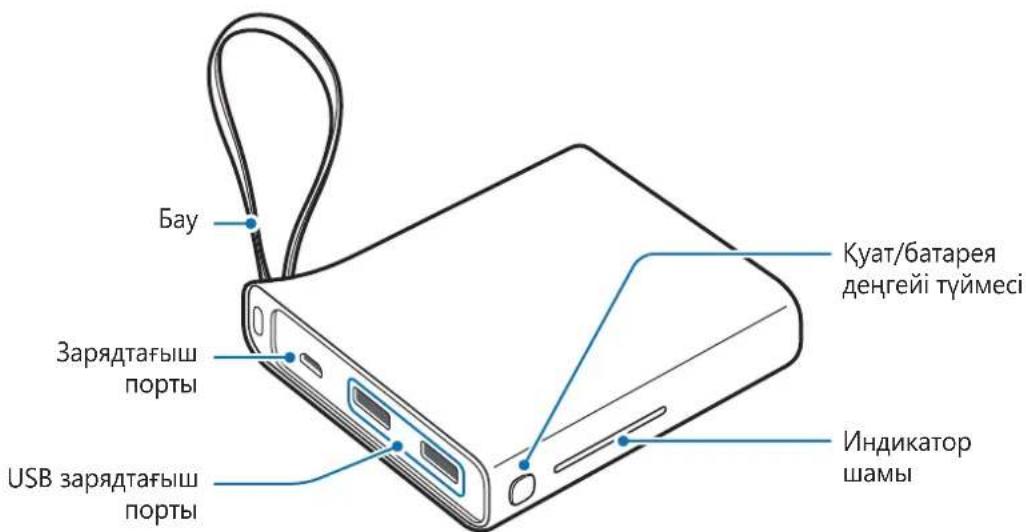
Баразец Тонтахьн заюдай
Batape TontamacbH 6ipinwi pet naJaIaHy aIbIHHa Hemece 6atape TontamacbI y3ak yaKbIT 6oBi naiDaIaNbIMaca, 6atapeHbI 3aprTaHbI3.

Tek Samsung 6ekitkeh 3apraTaBtapdbj XaHe Ka6eIbepdi naJaIaHbIbI3.
Bekitimereh 3apraTaftap HeMece Ka6eJIbep 6aTapeHbIH XapblybiHa HeMece
6atapey TontamacbHbIH 3aKbIMdaIybiHa eKeIyIMMKiH.
1 BaTapea TOnTaMaCbIH 3apAaTaBbIwKa XaJIFaHbI3.
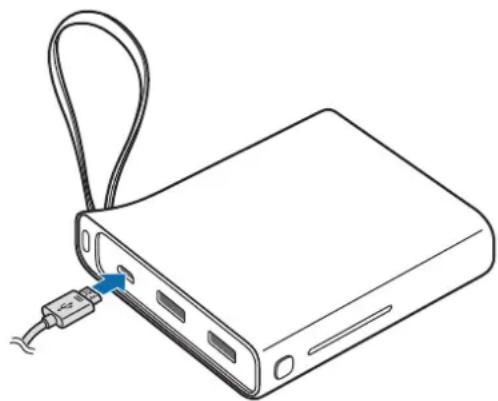

3apraTbIbIbI dypbic xanfamay 6atape TOnTaMaCbIH KaTbI 3aKbIMdaybl MymKiH. Dypbc naJaHa6ay TydbipFaH ew6ip 3akbIMbl KeiNilik KaMTbImaiDbI.

-Батaperялар TONTamacbIH 3aprTaftbIUtbl (6eJIek catbIaIbI) naJaIaNbIN 3apraTayra 6oJalbl.
KOMnbOTep cnaKTbI 3apraTafblTah epeKwelenHeH KyaT Ke3iH naJaIaHy, TOKtbH eH TeMeH XbldAmdbIfbl Ce6e6iHeH 3aprTay XbldAmdbIfblHbIH TEmeHdeYiHe aKeJIiCOKtbpbyMymKiH.
- BaTapeЯ TOnTamaCbIH 3apAaTalbIn JkaTkaHda naiJaIaHyfa 6oJaDbI, 6ipak, 6atapeeHbI ToJIbIK 3apAaTayFa y3aFbIPaK yaKbIT KeTyi MymKiH.
3apTay KeiHde, 6atape TOnTaMaCbI Kb3bIn KeTy i MymKIn. ByI KaIbITbI KaFdai XaHe 6atape TOnTaMaCbIHbIH Kbl3MeT MePImHe Hemece eHimdiirHe acep etneiy tnic. Erep 6atape aetteriE h bictbIfpaK, 6oJca, 3apTafbiw 3apTaydbI TOKTaTybl MymKiH.
HaKbI cbHbIMdbIfbl (Bt·caF) 1bIfbc TOrbl MeH 6aTapeHbIH KepHeyi 6oHbHsa eJlheDi. OJ, 1bIfbc KyaTbIHbIH, 7apTTapbHa, XaJIraHFaH Kypblfbl Ti36eKTepiHi KOHpyauncBHa JHe NaJaAly 7apTTapbHa 6aJaHaICTbl, Kypblfbla KepcetilreH cbHbIMdbIKtaH (Bt·caF) epeKweJeHy i MymKiH.
- BaTape TONTAMacbI Dypbc3aprTaJMaJ XaTca, 6atape TONTAMacbI MeH 3aprTaftbIbSamsung cepBnC opTaJIbIbHa anapbIHbI3.
2 3apay aKaTaHaHaH KeiH 6aTape TOnTaMaCbH 3apraTaBbIHTaH aXbipaTbIbI3.

KyaattbI yHemdey ywiN naJaIaHaBImaHaN Ke3De 3apraTbIbTI JKeJIeH axbipTaBbI3. 3apraTbIbTIbIH KyaT KocBbIbXoK, COHbIKTaH KyaTbI bICbIPaNTayDbI 6OJIbIPMay ywiN naJaIaHaBafn Ke3De 3apraTbIbTI bJeKtp po3eTKa YcBiHa aXbipAty Kepek. 3apraTay keiHne 3apraTbIbIsh 3JeKtp po3eTKa YcBiHa XaKbIH XeHe OHaJ KOJI JeTIMdi 6OlybI kepek.
Kaalfahn 6aTapey KyaTbIn Tekcepy
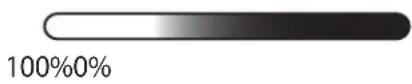
BaTapei Tymecin 6acbln, KaIfah 6bapei KyaTbH TeKcepH3.
INdkatop WamdaPb ci3re KaIfah 6bapei KyaTbI TypalbI xa6apnaIdbI.
Copyright © 2016 Samsung Electronics
Bny HcyckaybIK XaIbIKapaIbIK ABTOPbIK KkykbIKTap TypaIbI 3aHapMeH KopfaiHaH.
Samsung Electronics KOMnHaHcBbH, aIbH aIa Jaz36a7a pyKcTbHcb3 6yI HycKaYbIKbIH e6ip 6eJIirH Ke3 KeIReH Tpyde HeMece Ke3 KeIReH aDic, 3JeKtpoHdbIK HeMece MExaHnKaIbIK, coBH iwiHde, fotoKeWipy, Jazy HeMece Ke3 KeIReH aKnapaTTbIK KoMaJa XHe IblfapbIn aIy JxueCInDe caTay apKbIbI Kewipyre, Tapatyfa, aydapyFa HeMece TaCbImaJdayfF 6OImaNDbI.
Cayda 6eIrilepi
SAMSUNG XaHe SAMSUNG Iorotnpi — Samsung Electronics KOMpaHnrcbHbIn TipKeJIreH cayda 6eIriepi.
- BapIbIK 6acKa cayda 6eIriIepi XaHe aBTOpIbIK KYKbIKTap caHKeC NeIepiHi, MeHsiiri 6oJIbIn Ta6blIaIbI.
Read me first
Please read this manual before using the device to ensure safe and proper use.
- Images may differ in appearance from the actual product. Content is subject to change without prior notice.
- Before using the battery pack, make sure it is compatible with your device.
- The content of this manual is based on the EB-PA710 model.
Instructional icons

Warning: situations that could cause injury to yourself or others

Caution: situations that could cause damage to your device or other equipment

Notice: notes, usage tips, or additional information
Getting started
Package contents
Check the product box for the following items:
- Battery pack
- Quick start guide

- The items supplied with the device and any available accessories may vary depending on the region or service provider.
- The supplied items are designed only for this device and may not be compatible with other devices.
- Appearances and specifications are subject to change without prior notice.
- You can purchase additional accessories from your local Samsung retailer. Make sure they are compatible with the device before purchase.
- Use only Samsung-approved accessories. Using unapproved accessories may cause the performance problems and malfunctions that are not covered by the warranty.
- Availability of all accessories is subject to change depending entirely on manufacturing companies. For more information about available accessories, refer to the Samsung website.
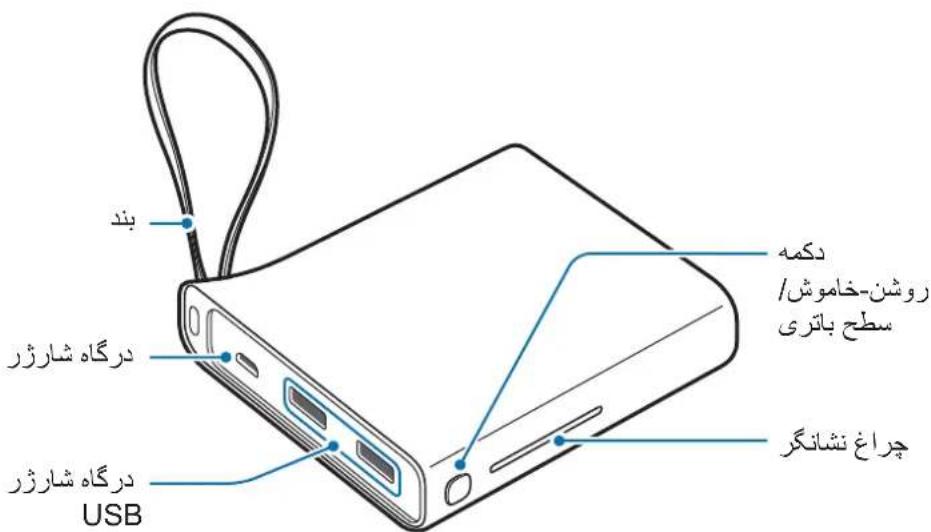
Device layout
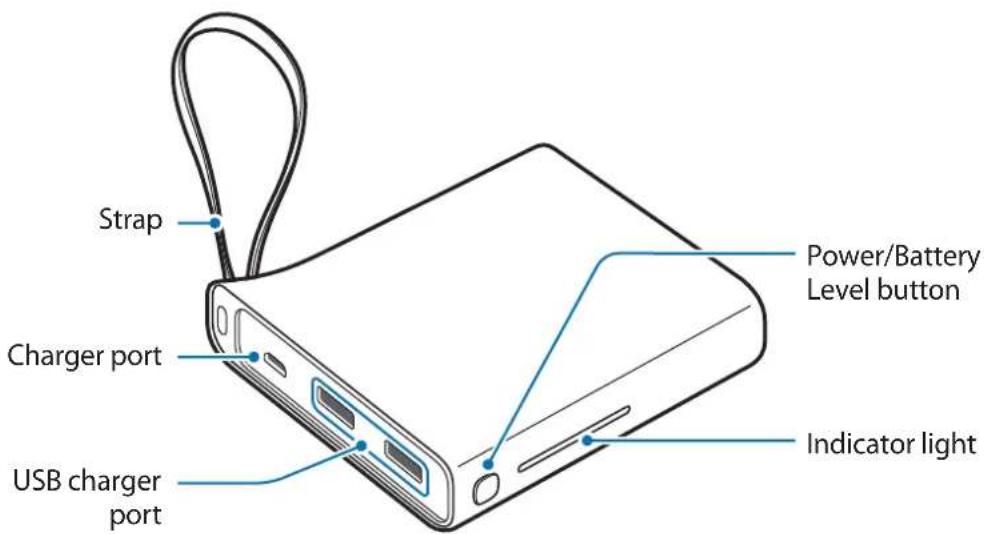
Charging the battery pack
Charge the battery before using the battery pack for the first time or when the battery pack has been unused for extended periods.

Use only Samsung-approved chargers and cables. Unapproved chargers or cables can cause the battery to explode or damage the battery pack.
1 Connect the battery pack to a charger.
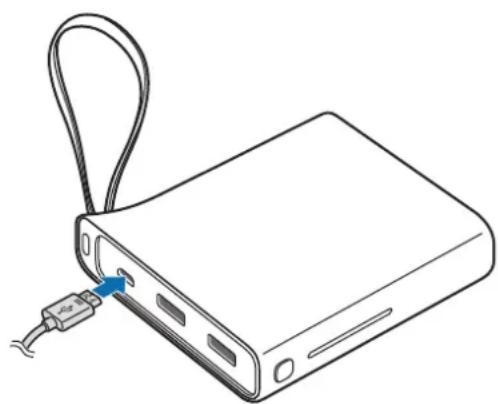

Connecting the charger improperly may cause serious damage to the battery pack. Any damage caused by misuse is not covered by the warranty.

- You can charge the battery pack using the charger (sold separately).
- Using a power source other than the charger, such as a computer, may result in a slower charging speed due to a lower electric current.
- The battery pack can be used while it is charging, but it may take longer to fully charge the battery.
- While charging, the battery pack may heat up. This is normal and should not affect the battery pack's lifespan or performance. If the battery gets hotter than usual, the charger may stop charging.
- The actual capacity (Wh) is measured based on the battery's output current and voltage. It may differ from the capacity (Wh) indicated on the device, depending on the output power condition, the connected device's circuit configuration, and the operation environment.
- If the battery pack is not charging properly, take the battery pack and the charger to a Samsung Service Center.
2 After fully charging, disconnect the battery pack from the charger.

To save energy, unplug the charger when not in use. The charger does not have a power switch, so you must unplug the charger from the electric socket when not in use to avoid wasting power. The charger should remain close to the electric socket and easily accessible while charging.
Checking the remaining battery power
Check the remaining battery power by pressing the Battery Level button.
The indicator lights alerts you to the remaining battery power.

Using the battery pack
Charging the mobile device
1 Connect one end of the USB cable to the battery pack's USB charger port. Then, plug the other end of the USB cable into the mobile device's multipurpose jack. Charging will start.
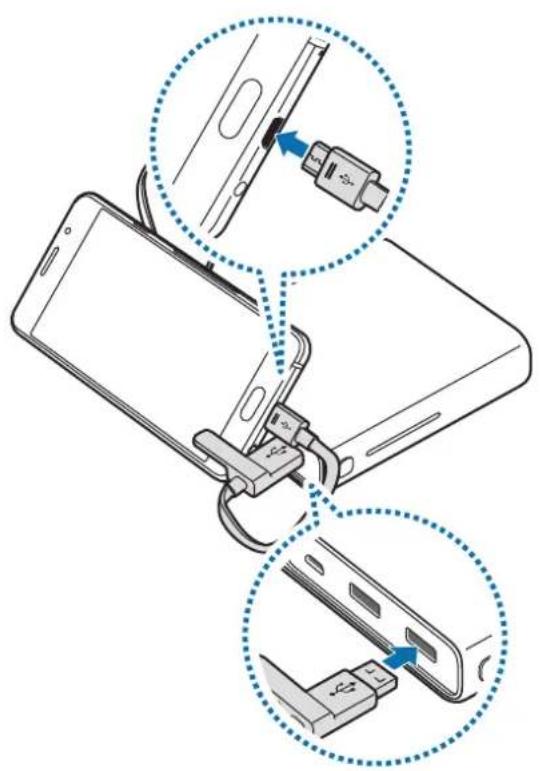
After the mobile device is fully charged, disconnect the USB cable from both devices.

- To stop charging, press and hold the Power button for approximately two seconds.
To resume charging, press the Power button. - You can use the battery pack while it is charging but you may not be able to use it if the battery level is too low.
- If the mobile device is not charging after being connected to the battery pack, press the Power button.
- The battery pack is an auxiliary external battery. It may not fully charge some mobile devices.
- If the battery pack is exposed to extremely hot or cold temperatures or an error occurs, the indicator light will flash. Disconnect the mobile device from the battery pack, and then reconnect them.
Checking the charging status
The indicator light alerts you to the connected mobile device's charging status.
| Status Indicator light | |
| Charging | 100%0% |
| Fully charged | 100%0% |
Copyright
Copyright © 2016 Samsung Electronics
This manual is protected under international copyright laws.
No part of this manual may be reproduced, distributed, translated, or transmitted in any form or by any means, electronic or mechanical, including photocopying, recording, or storing in any information storage and retrieval system, without the prior written permission of Samsung Electronics.
Trademarks
- SAMSUNG and the SAMSUNG logo are registered trademarks of Samsung Electronics.
All other trademarks and copyrights are the property of their respective owners.
Copyright © 2016 Samsung Electronics
Copyright © 2016 Samsung Electronics
本手册受國際版權法保護。
- Instructional icons
- Getting started
- Package contents
- Device layout
- Charging the battery pack
- Checking the remaining battery power
- Using the battery pack
- Charging the mobile device
- Checking the charging status
- Copyright
- Trademarks
- OΦopMJIeHne Ha yCTpoIcTBOTO
- 3apekdahe ha 6aTeprnHna paKeT
- TbproBcN MapKn
- Najprije pročitajte
- Koristeni symboli
- Zašitni znakovi
- Prvo pročitajte
- Ikonice sa uputstvima
- Trgovačke marke
- Leia primeiro
- Opphavsrett
- Oo
- y
- s
- 0
- ToBapHbIe 3HaKn
- Ozhannomtece neped noyaTkOM BnKOpncTaHn
- PonchIOBaJIbHi 3HaUKN
- Початок роботи
- Kompanečaίя
- 3OBHiushiBnIaD npncToIO
- 3apdxeHn 3OBnHbOro akymyITopa
- TobapHi 3HaKn
- KymbICTbl 6actamac 6ypblH OKblHbl3
- Hycayb6eIriwelep
- Kmbictbi 6actay
- Opama KypaMbI
- KypblfblbIHcblpTKbl KepiHici
- Баразец Тонтахьн заюдай
- Kaalfahn 6aTapey KyaTbIn Tekcepy
- Cayda 6eIrilepi
- Read me first
Brand : SAMSUNG
Model : EBPA510
Category : Power bank