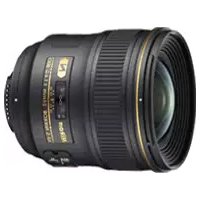
Nikkor AFS 24mm f1.4G ED - Camera lens NIKON - Free user manual and instructions
Find the device manual for free Nikkor AFS 24mm f1.4G ED NIKON in PDF.


| Product type | NIKKOR AF-S G-type photographic lens |
| Brand | Nikon |
| Model | AF-S NIKKOR 24mm f/1.4G ED |
| Focal length | 24 mm |
| Maximum aperture | f/1.4 |
| Optical construction | 12 elements in 10 groups (2 ED glass, 2 aspherical lenses, nano crystal coating) |
| Angle of view (FX format) | 84° |
| Angle of view (DX format) | 61° |
| Minimum focus distance | 0.25 m (from focal plane) |
| Filter diameter | 77 mm |
| Number of diaphragm blades | 9 (rounded) |
| Aperture range | f/1.4 to f/16 |
| Dimensions (diameter × length) | Approx. 83 mm × 88.5 mm |
| Weight | Approx. 620 g |
| Focusing | Autofocus with Silent Wave Motor (manual override possible), manual focusing via independent ring |
| Lens coating | Nano crystal, ED glass, aspherical lenses; rounded aperture for background blur |
| Power | Powered by camera via CPU contacts |
| Supplied accessories | Front lens cap LC-77, rear lens cap, lens hood HB-51, soft case CL-1118 |
| Care and cleaning | Clean with a blower or soft cloth lightly dampened with ethyl alcohol; do not use organic solvents. Protect the CPU contacts and rubber gasket. |
| Safety | Do not disassemble, do not look at the sun through the lens, keep out of reach of children, avoid flammable gas, keep dry. |
| General information | Nikon bayonet mount, built-in microprocessor, full aperture exposure metering, compatible with Nikon FX/DX SLRs and some film cameras. |
Frequently Asked Questions - Nikkor AFS 24mm f1.4G ED NIKON
User questions about Nikkor AFS 24mm f1.4G ED NIKON
0 question about this device. Answer the ones you know or ask your own.
Ask a new question about this device
Download the instructions for your Camera lens in PDF format for free! Find your manual Nikkor AFS 24mm f1.4G ED - NIKON and take your electronic device back in hand. On this page are published all the documents necessary for the use of your device. Nikkor AFS 24mm f1.4G ED by NIKON.
USER MANUAL Nikkor AFS 24mm f1.4G ED NIKON
AF-S NIKKOR 24mm f/1.4G ED
Nano Crystal Coat
使用説明書 P.2
User's Manual P. 10
Notes on Safety Operations
En
CAUTION
Do not disassemble
Touching the internal parts of the camera or lens could result in injury. Repairs should be performed only by qualified technicians. Should the camera or lens break open as the result of a fall or other accident, take the product to a Nikon-authorized service representative for inspection after unplugging the product and/or removing the battery.
Turn off immediately in the event of malfunction
Should you notice smoke or an unusual smell coming from the camera or lens, remove the battery immediately, taking care to avoid burns. Continued operation could result in injury. After removing or disconnecting the power source, take the product to a Nikon-authorized service representative for inspection.
Do not use the camera or lens in the presence of flammable gas
Operating electronic equipment in the presence of flammable gas could result in an explosion or fire.
Do not look at the sun through the lens or viewfinder
Viewing the sun or other strong light sources through the lens or viewfinder could cause permanent visual impairment.
Keep out of reach of children
Particular care should be taken to prevent infants from putting the batteries or other small parts into their mouths.
Observe the following precautions when handling the camera and lens
- Keep the camera and lens unit dry. Failure to do so could result in fire or electric shock.
- Do not handle or touch the camera or lens unit with wet hands. Failure to do so could result in electric shock.
- When shooting with back-lighting, do not point the lens at the sun or allow sunlight to pass directly down the lens as this may cause the camera to overheat and possibly cause a fire.
- When the lens will not be used for an extended period of time, attach both front and rear lens caps and store the lens away from direct sunlight. Failure to do so could result in a fire, as the lens may focus sunlight onto a flammable object.
Nomenclature
En
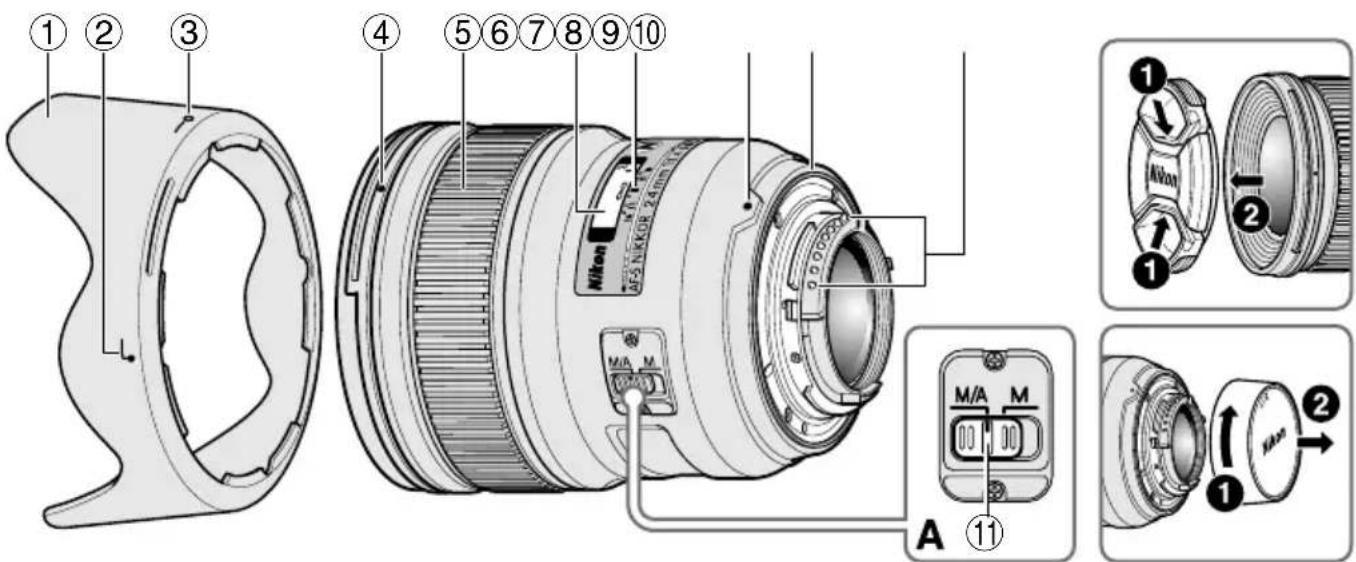
① Lens hood (p.16)
② Lens hood attachment index (p.16)
③ Lens hood setting index (p.16)
④ Lens hood mounting index (p.16)
⑤ Focus ring (p.14)
⑥ Distance scale (p.16)
⑦ Distance index line (p.16)
⑧ Mounting index
⑨ Lens mount rubber gasket (p.17)
⑩ CPU contacts (p.17)
⑪ Focus mode switch (p.14)
( ): reference page
Thank you for purchasing the AF-S NIKKOR 24mm f/1.4G ED lens. Before using this lens, please read these instructions and refer to your camera's User's Manual.
■ Major features
- The Nano Crystal Coat deposited on some of the lens elements ensures that fine, clear images can be reproduced under various shooting conditions, from the sunny outdoors to spotlighted interior scenes.
- This lens employs a Silent Wave Motor to drive the focusing mechanism, making autofocusing smooth, silent and almost instantaneous. The focus mode switch is provided for simple selection of autofocus (AF) or manual focus (MF) operation.
- Superior optical performance and rendering characteristics are maximized with the use of two aspherical lens elements and two extra-low dispersion (ED) glass elements, which ensure correction of chromatic aberration. In addition, the rounded aperture produces soft and pleasing blur characteristics in portions of pictures that are out-of-focus.
Important
- When mounted on Nikon DX format digital SLR cameras, such as the D300-Series and D7000, the lens' picture angle becomes 61° and its 35mm equivalent focal length is approx. 36 mm.
■ Usable cameras and available functions
There may be some restrictions or limitation for available functions. Refer to camera's User's Manual for details.
| Cameras Autofocus | Exposure mode | |||||
| P*1 | S | A | M | |||
| Nikon digital SLR(Nikon FX/DX format)cameras | √ | √ | √ | √ | √ | |
| F6, F5, F100,F80-Series/N80-Series*,F75-Series/N75-Series*,F65-Series/N65-Series*,Pronea 600i/6i*, Pronea S*2 | √ | √ | √ | √ | √ | |
| Cameras Autofocus | Exposure mode | ||||
| P*1 | S | A | M | ||
| F4-Series, F90X/N90s*,F90-Series/N90*,F70-Series/N70* | √ √ | √ | — | — | |
| F60-Series/N60*,F55-Series/N55-Series*,F50-Series/N50*,F-401x/N5005*,F-401s/N4004s*,F-401/N4004* | — | √ | √ | √ | |
| F-801s/N8008s*,F-801/N8008*,F-601m/N6000* | — | √ | √ | — | — |
| F3AF, F-601/N6006*,F-501/N2020**,Nikon MF cameras(except F-601m/N6000*) | — — | — — | — | ||
√: Possible —: Impossible
* : Sold exclusively in the USA
** : Sold exclusively in the USA and Canada
*1 : P includes AUTO and Vari-Program System.
*2 : Manual (M) is not available.
■ Focusing (Fig. A)
Set your camera's focus mode selector according to the chart below:
Autofocus with manual override (M/A mode)
1 Set the lens focus mode switch to M/A.
2 Autofocus is enabled, but autofocus operation can be overridden by rotating the separate focus ring while pressing the shutter-release button halfway, or by pressing the AF-ON button on the camera body of cameras so equipped.
3 Press the shutter-release button halfway or the AF-ON button once again to cancel manual focus and resume autofocus.
| Cameras | Camera focus mode | Lens' focus mode switch | |
| M/A M | |||
| Nikon digital SLR (Nikon FX/DX format) cameras, F6, F5, F4-Series, F100, F90X/N90s*, F90-Series/N90*, F80-Series/N80-Series*, F75-Series/N75-Series*, F70-Series/N70*, F65-Series/N65-Series*, Pronea 600i/6i*, Pronea S | AF | Autofocus with manual override | Manual focus (Electronic rangefinder can be used.) |
| MF | Manual focus (Electronic rangefinder can be used.) | ||
| F60-Series/N60*, F55-Series/N55-Series*, F50-Series/N50*, F-801s/N8008s*, F-801/N8008*, F-601M/N6000*, F-401x/N5005*, F-401s/N4004s*, F-401/N4004* | AF MF | Manual focus (Electronic rangefinder can be used, except with the F-601M/N6000*) | |
* Sold exclusively in the USA
Important
When using infrared film, it is necessary to use a red (R60) filter on the lens and compensate focus manually.
- Focus on the subject. Rotate the focus ring to realign the desired distance scale number ("1 m" in Fig. "Depth of field" on p. 16) to the infrared compensation scale to compensate focus. When done, attach the R60 filter.
■ Depth of field
- Approximate depth of field can be determined by checking the depth-of-field indicators.
- If your camera has a depth-of field preview (stop-down) button or lever, depth of field can be previewed through the camera viewfinder.
- For more information, see p.122.
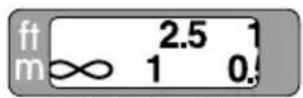
Depth-of-field indicators Distance index line Infrared compensation scale
■ Setting the aperture
Use the camera to adjust the aperture setting.
■ The built-in flash and vignetting
- The built-in flash cannot be used over distances of less than 0.6 m (2.0 ft).
- To prevent vignetting, do not use the lens hood.
- For the latest information on vignetting with this lens, see the camera manual.
| Cameras | Supported shooting distance |
| D5500, D5300, D5200, D5100, D5000, D3300, D3200, D3100, D3000, D750, D610, D600, D60, D40-Series | 1 m (3.3 ft) or greater |
■ Using the lens hood
Lens hoods minimize stray light and protect the lens.
Attaching the hood
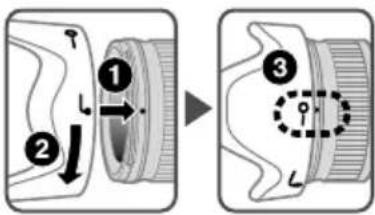
- Be sure that the lens hood mounting index (●) is aligned with the lens hood setting index (-○).
- To facilitate attachment or removal of the hood, hold it by the base (near the lens hood attachment index (☐)) rather than its outer edge.
- If the lens hood is not correctly attached, vignetting may occur.
- To store the lens hood, attach it in the reverse position.
■ Recommended focusing screens
Various interchangeable focusing screens are available for certain Nikon SLR cameras to suit any picture-taking situation. The ones recommended for use with this lens are:
| ScreenCamera | A B | C E | EC-BEC-E | G1 | G2 | G3 | G4 | J L | M U | ||||
| F6 | ◎ | ◎ | — | ◎ | — | — | — | — | — | ◎ | ◎ | ||
| F5+DP-30 | ◎ | ◎ | ◎ | ◎ | ◎ | ◎ | ◎ | ◎ | |||||
| F5+DA-30 | ◎ | ◎ | ◎ | ◎ | ◎ | ◎ | ◎ | ◎ | |||||
◎: Excellent focusing
○:Acceptablefocusing
Slight vignetting or moiré patterns appear in the viewfinder, but not on the film.
—: Not available
Blank box means not applicable. Since type M screen can be used for both macro-photography at a magnification ratio of 1:1 or above and for photomicrography, it has different applications than other screens.
Important
- For F6 cameras, when using screens other than type B or E, "Other screen" must be selected in Custom Setting. Refer to camera's User's Manual for details.
- For F5 cameras, only EC-B, EC-E, B, E, J, A, L focusing screens are usable in Matrix Metering.
- When using the B and E focusing screens in cameras other than those listed above, refer to the columns for the B and E screens.
Lens care
- Be careful not to allow the CPU contacts to become dirty or damaged.
- If the lens mount rubber gasket is damaged, be sure to visit the nearest Nikon-authorized service representative for repair.
-
Clean lens surfaces with a blower brush. To remove dirt and smudges, use a soft, clean cotton cloth or lens tissue moistened with ethanol (alcohol) or lens cleaner. Wipe in a circular motion from the center to outer edge, taking care not to leave traces or touch other parts of the lens.
-
Never use organic solvent such as thinner or benzene to clean the lens.
- NC filters are available to protect the front lens element. The lens hood also helps to protect the front of the lens.
- When storing the lens in its flexible lens pouch, attach both the front and rear lens caps.
- When the lens is mounted on a camera, do not pick up or hold the camera and lens by the lens hood.
- When the lens will not be used for an extended period of time, store it in a cool, dry place to prevent mold and rust. Be sure to store the lens away from direct sunlight or chemicals such as camphor or naphthalene.
- Do not get water on the lens or drop it in water as this will cause it to rust and malfunction.
- Reinforced plastic is used for certain parts of the lens. To avoid damage, never leave the lens in an excessively hot place.
- Rapid changes in temperature may cause damaging condensation inside and outside the lens. Before taking the lens from a warm to a cold environment or vice versa, place it in a bag or plastic case to slow the change in temperature.
■ Standard accessories
- 77mm snap-on Front Lens Cap LC-77
- Rear Lens Cap
- Bayonet Hood HB-51
- Flexible Lens Pouch CL-1118
■ Optional accessory
- 77mm screw-on filters
■ Specifications
Type of lens: G-type AF-S NIKKOR lens with built-in CPU and Nikon bayonet mount
Focal length: 24mm
Maximum f/1.4
aperture:
Lens construction: 12 elements in 10 groups (2 ED, 2 aspherical and some Nano Crystal Coat-deposited lens elements)
Picture angle: 84° with 35mm (135) format Nikon film-SLR cameras and Nikon FX format digital SLR cameras 61° with Nikon DX format digital SLR cameras 71° with IX240 system cameras
Distance information: Output to camera
Focusing: Rear Focusing (RF) system, autofocus using a Silent Wave Motor, manually via separate focus ring
Shooting distance scale: Graduated in meters and feet from 0.25 m (0.82 ft) to infinity ( )
Closest 0.25 m (0.82 ft) from focal focusing plane distance:
No. of 9 pcs. (rounded)
diaphragm
blades:
Diaphragm: Fully automatic
Aperture range: f/1.4 to f/16
Exposure measurement: Via full-aperture method
Attachment size: 77mm (P = 0.75 mm)
Dimensions: Approx. 83 mm dia. × 88.5 mm (extension from the camera's lens-mount flange)
Weight: Approx. 620 g (21.9 oz)
Specifications and designs are subject to change without notice or obligation on the part of the manufacturer.
| VerreAppareil | A | B | C | E | EC-BEC-E | G1 | G2 | G3 | G4 | J | L | M | U | ||
| F6 | ◎ | ◎ | — | ◎ | — | — | — | — | — | ◎ | ◎ | ||||
| F5+DP-30 | ◎ | ◎ | ◎ | ◎ | ◎ | ◎ | ◎ | ◎ | |||||||
| F5+DA-30 | ◎ | ◎ | ○ | ◎ | ◎ | ○ | ◎ | ◎ |
√: Possible —: Impossible
| Schermo Fotocamera | A | B | C | E | EC-B EC-E | G1 | G2 | G3 | G4 | J | L | M | U | |
| F6 | ◎ | ◎ | — | ◎ | — | — | — | — | — | — | ◎ | ◎ | ||
| F5+DP-30 | ◎ | ◎ | ◎ | ◎ | ◎ | ◎ | ◎ | ◎ | ||||||
| F5+DA-30 | ◎ | ◎ | ○ | ◎ | ◎ | ○ | ◎ | ◎ |
① 镜头遮光罩 (p. 100)
② 镜头遮光罩对齐标记 (p. 100)
③ 镜头遮光罩锁定标记 (p. 100)
④ 镜头遮光罩安装标记 (p. 100)
⑤ 对焦环 (p. 98)
⑥ 距离刻度 (p. 100)
⑦ 距离标线 (p. 100)
- 必須確保鏡頭遮光罩接環標記(●)與鏡頭遮光罩設置標記(→對準。
| 카메라\스크린 | A | B | C | E | EC-BEC-E | G1 | G2 | G3 | G4 | J | L | M | U | ||
| F6 | ◎ | ◎ | — | ◎ | — | — | — | — | — | — | — | ◎ | ◎ | ||
| F5+DP-30 | ◎ | ◎ | ◎ | ◎ | ◎ | ◎ | ◎ | ◎ | ◎ | ◎ | |||||
| F5+DA-30 | ◎ | ◎ | ○ | ◎ | ◎ | ○ | ◎ | ◎ | ◎ | ◎ |
©:매우 적합한 포커싱
○: 적합한 포커싱
■ Depth of field (ft)
| Focused distance Depth of field Reproduction ratio | |||||||||
| f/1.4 f/2 | f/2.8 f/4 | f/5.6 f/8 f/11 f/16 | |||||||
| 0.82 | 9-12/16 in. — 9-15/16 in. | 9-12/16 in. — 9-15/16 in. | 9-12/16 in. — 9-15/16 in. | 9-10/16 in. — 10-1/16 in. | 9-10/16 in. — 10-1/16 in. | 9-8/16 in. — 10-3/16 in. | 9-6/16 in. — 10-7/16 in. | 9-2/16 in. — 10-11/16 in. | 1/5.6 |
| 1 | 11-14/16 in. — 1 ft 2/16 in. | 11-14/16 in. — 1 ft 4/16 in. | 11-12/16 in. — 1 ft 4/16 in. | 11-10/16 in. — 1 ft 6/16 in. | 11-8/16 in. — 1 ft 10/16 in. | 11-6/16 in. — 1 ft 13/16 in. | 11-3/16 in. — 1 ft 1-3/16 in. | 10-13/16 in. — 1 ft 1-13/16 in. | 1/7.8 |
| 1.5 | 1 ft 5-10/16 in. — 1 ft 6-6/16 in. | 1 ft 5-8/16 in. — 1 ft 6-10/16 in. | 1 ft 5-4/16 in. — 1 ft 6-13/16 in. | 1 ft 5-1/16 in. — 1 ft 7-3/16 in. | 1 ft 4-9/16 in. — 1 ft 7-13/16 in. | 1 ft 4-1/16 in. — 1 ft 8-10/16 in. | 1 ft 3-8/16 in. — 1 ft 9-15/16 in. | 1 ft 2-10/16 in. — 2 ft 8/16 in. | 1/14.0 |
| 2.5 | 2 ft 4-11/16 in. — 2 ft 7-7/16 in. | 2 ft 4-3/16 in. — 2 ft 8-1/16 in. | 2 ft 3-10/16 in. — 2 ft 9 in. | 2 ft 2-12/16 in. — 2 ft 10-7/16 in. | 2 ft 1-9/16 in. — 3 ft 12/16 in. | 2 ft 2/16 in. — 3 ft 4-13/16 in. | 1 ft 10-9/16 in. — 3 ft 11-8/16 in. | 1 ft 8-8/16 in. — 5 ft 7-3/16 in. | 1/26.4 |
| ∞ | 43 ft 2-3/16 in. — ∞ | 30 ft 3-15/16 in. — ∞ | 21 ft 9-4/16 in. — ∞ | 15 ft 4-3/16 in. — ∞ | 11 ft 13/16 in. — ∞ | 7 ft 10-5/16 in. — ∞ | 5 ft 9-13/16 in. — ∞ | 4 ft 1-5/16 in. — ∞ | 1/∞ |
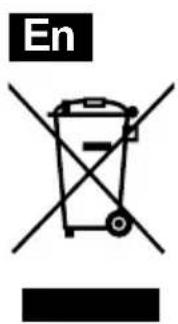
Notices for Customers in Europe
This symbol indicates that electrical and electronic equipment is to be collected separately.
The following apply only to users in European countries:
- This product is designated for separate collection at an appropriate collection point. Do not dispose of as household waste.
- Separate collection and recycling helps conserve natural resources and prevent negative consequences for human health and the environment that might result from incorrect disposal.
- For more information, contact the retailer or the local authorities in charge of waste management.
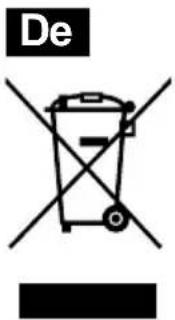
No reproduction in any form of this manual, in whole or in part (except for brief quotation in critical articles or reviews), may be made without written authorization from NIKON CORPORATION.
© 2010 Nikon Corporation
CE UK CA
TT2I12(E3)
7MAA60E3-12 △




