Comfort 300 - Water filter Ecowater - Free user manual and instructions
Find the device manual for free Comfort 300 Ecowater in PDF.


| Product type | Water softener |
| Brand | Ecowater |
| Model | Comfort 300 |
| Power supply | 220-240 V, 50 Hz |
| Control voltage | 28 V DC |
| Maximum water pressure | 8.6 bar |
| Maximum water temperature | 49 °C |
| Minimum flow rate required | 11 L/min |
| Regeneration type | Automatic or manual |
| Hardness setting | From 1 to 99 gpg (in increments) |
| Programmable regeneration time | Yes, adjustable per hour |
| Maximum days between regenerations | Adjustable up to 15 days |
| 97% regeneration function | Activable option (ON/OFF) |
| Time format | 12 or 24 hours |
| Backwash and rinse | Adjustable duration from 0 to 30 min |
| Auxiliary output | 28 V DC, 300 mA (for chlorinator) |
| Memory in case of power failure | Settings retained (except time) |
| Installation | By professional, requires bypass |
| Maintenance | Adding salt, periodic disinfection |
| Safety | Do not expose to frost; do not treat water >49°C |
Frequently Asked Questions - Comfort 300 Ecowater
User questions about Comfort 300 Ecowater
0 question about this device. Answer the ones you know or ask your own.
Ask a new question about this device
Download the instructions for your Water filter in PDF format for free! Find your manual Comfort 300 - Ecowater and take your electronic device back in hand. On this page are published all the documents necessary for the use of your device. Comfort 300 by Ecowater.
USER MANUAL Comfort 300 Ecowater
English Comfort Series Water Softener 2
Espanol Ablandador de agua série Comfort. 8
Installation Requirements 2
Safety Guides 2
Installation Illustrations 3
Water Softener Programming 4-6
Adding Salt 7
Sanitizing 7
Troubleshooting 7
INSTALLATION REQUIREMENTS
- Installation should only be performed by a trained professional.
Make sure that the main water supply is shut off before starting installation.
Always install either an EcoWater Systems bypass valve or a 3-valve bypass system. Bypass valves allow you to turn off water to the softener for repairs if needed, but still have water in house pipes. - A drain is needed for recharge discharge water. A floor drain is preferred, close to the EcoWater Systems water softener. A laundry tub, standpipe, etc., are other options.
A 220-240V, 50Hz grounded, continuously "live" electrical outlet is needed, in a dry location within 2 meters of the EcoWater Systems softener.
After completing installation of the system, perform a pressure test to detect any leaks.
After completing pressure test, perform a manual recharge.
SAFETYGUIDES
- Before beginning installation, read the manual and obtain tools and materials needed.
- The installation must conform to local plumbing and electrical codes.
- Use only lead-free solder and flux for all sweat solder connections.
- Handle the water softener with care. Do not turn upside down, drop, or set on sharp protrusions.
-
Do not locate the water softener:
-
where freezing temperatures may occur.
- in direct sunlight.
-
where it may be exposed to wet weather.
-
Do not attempt to treat water over 49^ .
- The softener requires a minimum water flow of 11 liters per minute at the inlet.
Maximum allowable inlet water pressure is 8.6 bar. If daytime pressure is over 5.5 bar, nighttime pressure may exceed the maximum. Use a pressure reducing valve if necessary. - This system works on 28 volt DC electrical power. Be sure to use the included power supply and plug it into a nominal 220-240V, 50 Hz household outlet that is in a dry location only, grounded and properly protected by an over current device such as a circuit breaker or fuse.
- This system is not intended to be used for treating water that is microbiologically unsafe or of unknown quality without adequate disinfection before or after the system.

European Directive 2002/96/EC requires all electrical and electronic equipment to be disposed of according to Waste Electrical and Electronic Equipment (WEEE) requirements. This directive or similar laws are in place nationally and can vary from region to region. Please refer to your state and local laws for proper disposal of the equipment.
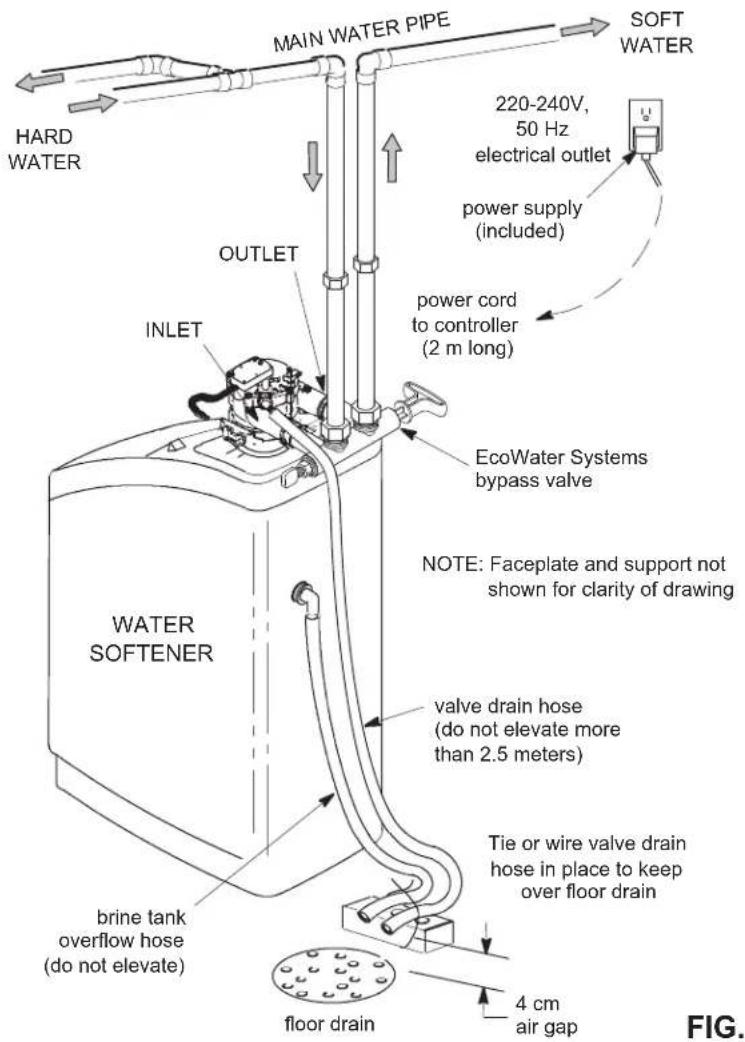
TYPICAL INSTALLATION
FIG. 1
BYPASS OPTIONS
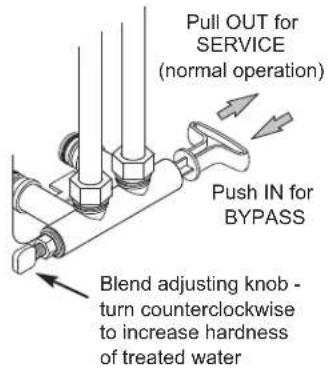
EcoWater Systems Bypass Valve
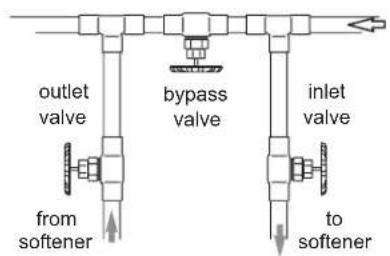
3-Valve Bypass
for SERVICE: open input and output valves close bypass valve
for BYPASS: close input and output valves open bypass valve
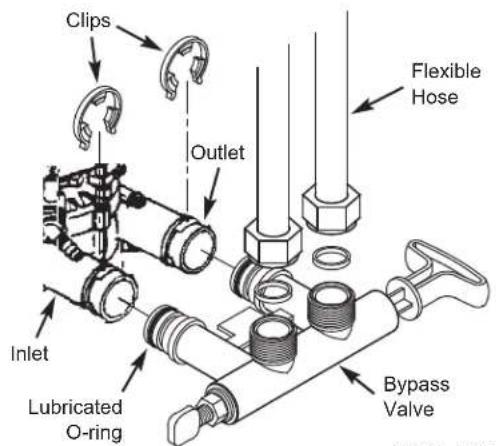
FIG. 2A
FIG. 2B
INSTALLATION USING THREADED BYPASS VALVE
FIG. 3A
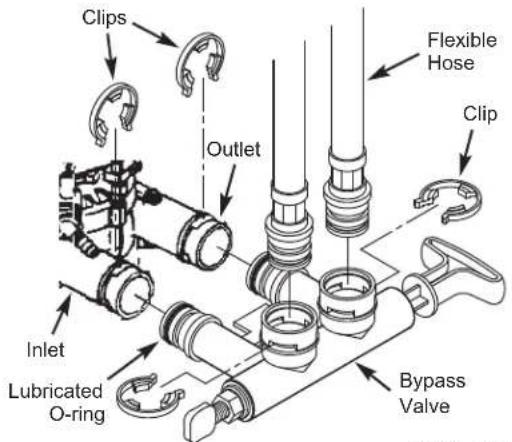
INSTALLATION USING CLIP STYLE BYPASS VALVE
FIG. 3B
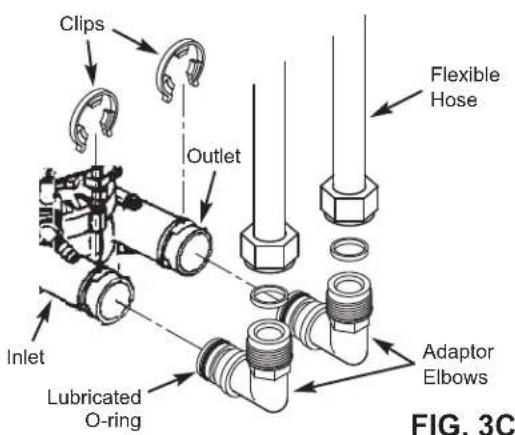
INSTALLATION USING ADAPTOR ELBOWS
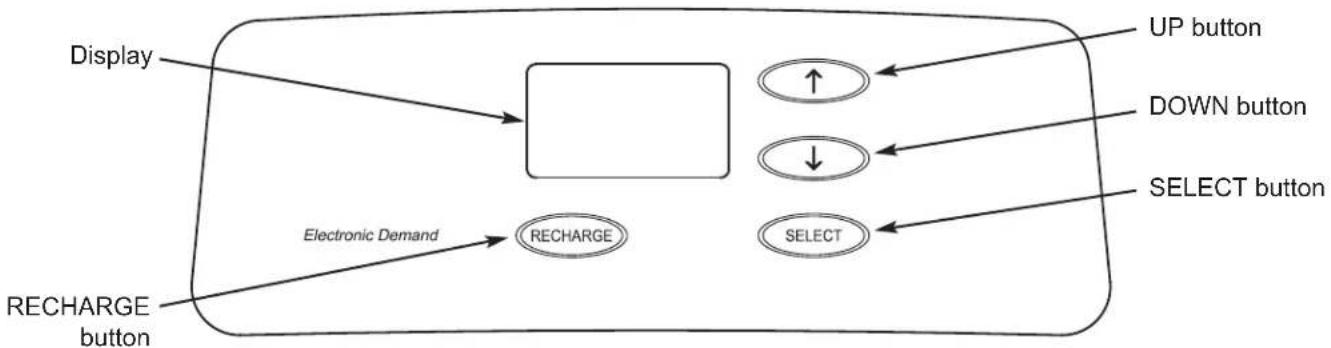
CONTROLLER SETTINGS REQUIRED
upon installation, and after an extended power outage.
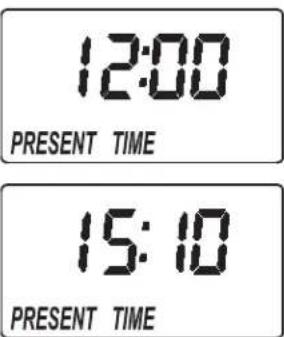
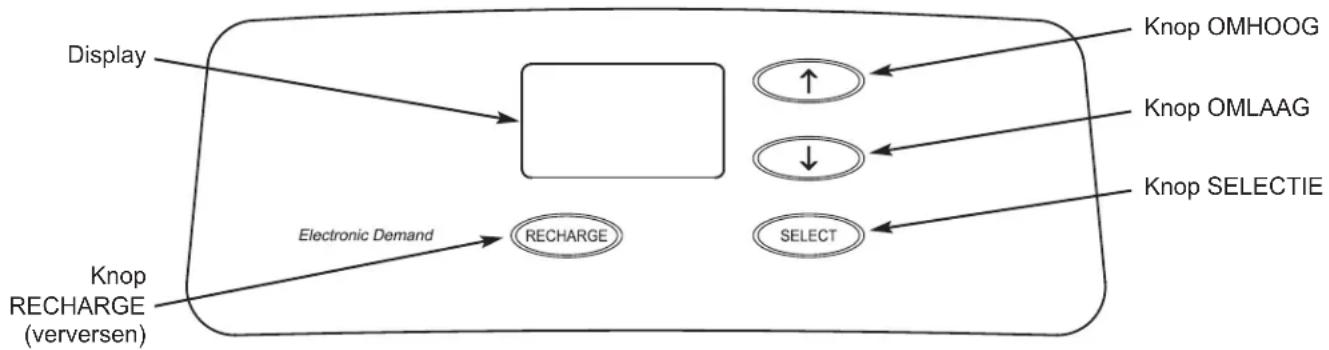
When the power supply is plugged into the electrical outlet, a model code and a version number are briefly shown in the display. Then the words "PRESENT TIME" appear and 12:00 begins to flash.
A. SET PRESENT TIME OF DAY
- If the words "PRESENT TIME" do not show in the display, press the SELECT button several times until they do.
- Press the UP or DOWN buttons to set the present time. Up moves the display ahead; down sets the time back.
NOTE: Press buttons and
quickly release to slowly advance the display.
Hold the buttons down for fast advance.
- When the correct time is displayed, press the SELECT button, and the display will change to show the "Hardness" screen.
B. SET WATER HARDNESS NUMBER
- If you completed the previous step, the word "HARDNESS" should show in the display. Otherwise, press the SELECT button several times until it does.
- Press the UP or DOWN buttons to set the value of your water's hardness in grains per gallon (gpg). The default is 25. See the following table for unit conversions.
| Hardness Unit Conversions | |
| French degrees (°f) | gpg = °f x 0.584 |
| °f = gpg x 1.712 | |
| German degrees (°dH) | gpg = °dH x 1.043 |
| °dH = gpg x 0.959 | |
| Parts per million (ppm) | gpg = ppm x 0.0584 |
| ppm = gpg x 17.12 | |
NOTE: If your water supply contains iron, compensate for it by adding to the water hardness number. For example, assume your water is 20 gpg hard and contains 2 ppm iron. Add 5 to the hardness number for each 1 ppm of iron. In this example, you would use 30 for your hardness number.
$$ \begin{array}{l l} & 2 0 \text {g p g h a r d n e s s} \ 2 \text {p p m i r o n} \times 5 = 1 0 & \underline {{+ 1 0}} \ (\text {t i m e s}) & 3 0 \text {H A R D N E S S N U M B B E R} \end{array} $$
- When finished setting your water's hardness number, press the SELECT button, and the display will change to show the "Recharge Time" screen.
C. SET RECHARGE START TIME
- If you completed the previous step, the words "RECHARGE TIME" should show in the display. Otherwise, press the SELECT button several times until they do.
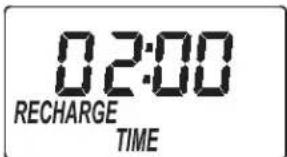
- The softener's default recharge start time is 02:00. In most households this is a good time for recharge to start (takes about 2 hours) because water is not being used. During recharge hard water is bypassed to house faucets. Use the ↑UP or ↓DOWN buttons to adjust the recharge start time in 1 hour increments.
- When the desired recharge time is displayed, press the SELECT button, and the display will change to show the normal run (time of day) screen.
NORMAL OPERATION
During normal operation, the present time of day shows in the display.
RECHARGE NOW
For times when you expect to use more water than usual, it may be desirable to perform a manually initiated recharge. To manually start a recharge cycle, press and
hold the RECHARGE button for a few seconds, until "RECHARGE NOW" flashes in the display.
The softener begins an immediate recharge. Once started, you cannot cancel this recharge. Avoid using hot water during this time, as the water heater will refill with hard water.
RECHARGE TONIGHT
To set a recharge cycle to begin at the next preset recharge start time, touch (press, but do not hold) the RECHARGE button. "RECHARGE TONIGHT" flashes in the display.
A recharge will begin at the next preset recharge start time (02:00 or as set). If you decide to cancel this recharge before it starts, touch the same button once more.
VACATION NOTE
EcoWater demand controlled water softeners recharge only while water is being used and softening capacity must be restored. For this reason, the unit will not recharge when you are away from home for extended periods. However, if you set the "Maximum Days Between Recharges" feature, the softener will recharge even when no water is used.
SET MAXIMUM DAYS BETWEEN RECHARGES
The default setting allows the timer to control recharge frequency based on water usage readings from the water meter. It provides the most economical operation.
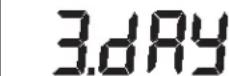
You can set a maximum time (in days) between recharges. For example, no more than 3 days will pass without a recharge occurring if you set "3 day" in the display. This feature can be set from 1 to 15 days.
18:45
1845 RECHARGE NOW
18:45 RECHARGE TONIGHT
To change the number of days between recharges:
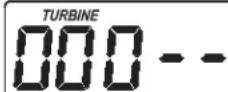
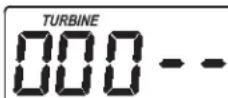
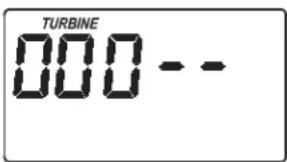
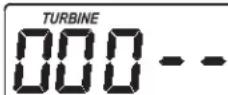
- Press and hold the SELECT button until "000 --" shows in the display.
- Press the SELECT button once again and the words "Auto RECHARGE" flash in the display.
- Press the UP or DOWN buttons to set the number of days between recharges.
- When the desired number of days are displayed, press the SELECT button several times to advance to screens and return to the display.
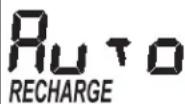
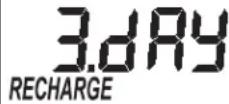
NOTE: The unit will recharge after the programmed number of days, even if no water is used during that period. To prevent recharges during vacation, set the maximum days to "Auto" before leaving. You will need to set the number of days again when you return.
SET 97% FEATURE
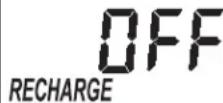
When this feature is set ON, the unit will automatically recharge when 97% of capacity has been used (at any time of day). The factory default setting is OFF.
- Press and hold the SELECT button until "000 - - " shows in the display.
- Press the SELECT button twice and "97" will flash in the display, alternating with the current setting (either "ON" or "OFF").
3.Use the UP or DOWN buttons to toggle the setting between "ON" and "OFF". - When the desired setting ("ON" or "OFF") is flashing, press the SELECT button several times to advance through the remaining screens and return to the normal run (time of day) display.
RECHARGE

12 OR 24 HOUR CLOCK
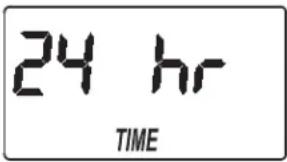
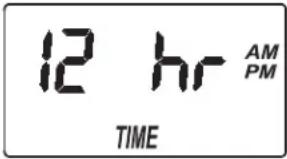
The timer has been factory preset to display a 24 hour clock. If you prefer, you may change this to display a 12 hour clock.
- Press and hold the SELECT button until "000 - - " shows in the display.
- Press the SELECT button three times and "24 hr" will flash in the display.
- Use the DOWN button to change to a 12 hour clock display.
- Press the SELECT button several times to advance through the remaining scre mal operation (time of day
- To change back to a 24 hour clock, follow Steps 1 through 4, above, except use the UP button in Step 3.
ADJUST BACKWASH TIME AND RINSE TIME
The timer can be changed to allow different backwash and fast rinse times, if so desired. Each of these can be adjusted from 0 to 30 minutes.
- Press and hold the SELECT button until "000 - - " shows in the display.
- Press the SELECT button four times and "bA-" will flash in the display.
-
Use the UP or DOWN buttons to set the number of minutes desired for backwash.
-
Press the SELECT button again and "Fr-" will flash in the display.
- Use the UP or DOWN buttons to set the number of minutes desired for fast rinse.
- Press the SELECT button to return to the normal operation (time of day) display.
AUXILIARY OUTPUT
The electronic controller's auxiliary output can be used to operate a chlorine generator. It provides a 28V DC, up to 300mA , current from terminal J4 on the electronic control board. This current is on during the brine draw portion of the softener's recharge cycle.
POWER OUTAGE MEMORY
If electrical power to the softener's control is lost, internal memory will maintain most settings such as the hardness and recharge time. However, unless the power outage was very brief, the clock's present time will need to be reset. During a power outage, the display will be blank and the softener will not recharge. When electrical power is restored:
- Check the display.
2a. If the present time is displayed steadily (not flashing), the controller did not lose time and you do not need to reset the clock.
2b. If a time is flashing in the display, then the clock needs to be reset to the correct present time. See "Set Present Time of Day" on page 4. The flashing display is to remind you to reset the clock. If you do not reset the clock, then recharges will most likely occur at the wrong time of day.
NOTE: If the softener was recharging when power was lost, it will finish the cycle when power returns.
ADDING SALT
Brine (salt dissolved in water) is needed for every recharge. The water for making brine is metered into the salt storage area by the softener valve and timer. If the water softener uses all the salt before more is added, hard water will result. Lift the brine tank lid and check the salt level frequently.
If adding salt for the first time, make sure that there is about 10cm of water in the brine tank. Be sure that the brinewell cover is on when adding salt.
NOTE: In humid areas it is best to keep the salt level less than half full and add salt more often.
RECOMMENDED SALT: Cube, pellet, coarse solar, etc., water conditioner salt with less than 1% insoluble impurities. This type of salt is high purity evaporated crystals, sometimes formed into briquets. It has less than 1% insoluble (not dissolvable in water) impurities.
SALT NOT RECOMMENDED: Rock salt high in impurities, block, granulated, table, ice melting, or ice cream making salts, etc., are not recommended.
BREAKING A SALT BRIDGE
Sometimes a hard crust or salt "bridge" forms in the brine tank. This is usually caused by high humidity or the wrong kind of salt. When this happens, an empty space forms between the water and the salt. Then salt will not dissolve in the water, the resin bed will not be recharged, and hard water will result.
A bridge may be underneath loose salt. Use a broom handle or like tool to check, as shown in Figure 4. Carefully push it straight down into the salt. If a hard object is felt, it is most likely a salt bridge. Carefully push into the bridge in several places to break it. Do not try to break the salt bridge by pounding on the salt tank.
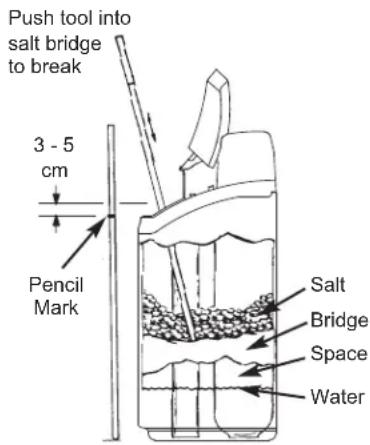
FIG. 4
SANITIZING INSTRUCTIONS
Care is taken at the factory to keep your EcoWater Systems softener sanitary. However, during shipping, storage, installing and operating, bacteria could get into the unit. For this reason, sanitizing is suggested* when installing:
- Remove the brinewell cover and pour about 40ml (2 to 3 tablespoons) of common household bleach into the conditioner/refiner brinewell. Clorox and other brand names of bleach are readily available. Replace the brinewell cover.
- Initiate a "Recharge now" (See Page 5). This recharge draws the bleach into and through the softener.
*Recommended by the Water Quality Association. On some water supplies, the EcoWater Systems unit may need periodic disinfecting.
NOTE: We recommend that you have the conditioner/refiner serviced annually.
TROUBLESHOOTING GUIDE
| PROBLEM CAUSE CORRECTION | ||
| No soft water | No salt in the storage tank. Add salt and then initiate a "Recharge now". | |
| Salt is "bridged." Break salt bridge (See above) and then initiate a "Recharge now". | ||
| Power supply unplugged, power cable leads disconnected from electronic control board, fuse blown, circuit breaker off. | Check for power loss due to any of these and correct. When power is restored, set the time if the display shows "Present Time" screen (See Page 4). | |
| Bypass valve(s) in bypass position. Place bypass valve(s) in service position. | ||
| Valve drain hose plugged or restricted. Drain hose must not have kinks, sharp bends, or be raised too high. | ||
| Water hard sometimes | Bypassed hard water being used during recharge, due to present time or recharge time settings being incorrect. | Check the present time displayed. If not correct, refer to "Set Present Time" on Page 4. Check the recharge start time, as described on Page 4. |
| Hardness number setting is too low. Refer to "Set Water Hardness" on Page 4, check the current hardness setting and increase if needed. Have hardness of water supply tested, if necessary. | ||
| Hot water being used when softener is recharging. | Avoid using hot water during recharges, because water heater refills with hard water. | |
| Error code displayed | Fault in wiring, position switch, valve, motor or electronic control board. | Contact your dealer for service. |
Modelos Comfort 200 Comfort 300 Comfort 400
CONTENIDO
Pagina
Programming waterontharder 34-36
Zouttoevoegen 37
Desinfectie 37
Probleemoplossing 37
INSTALLATIEVOORSCHRIFTEN
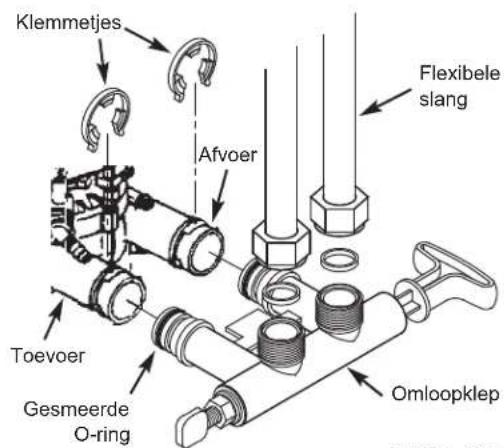
INSTALLATIE MET OMLOOPKLEPMET SCHROEFDRAAD
AFB. 3A
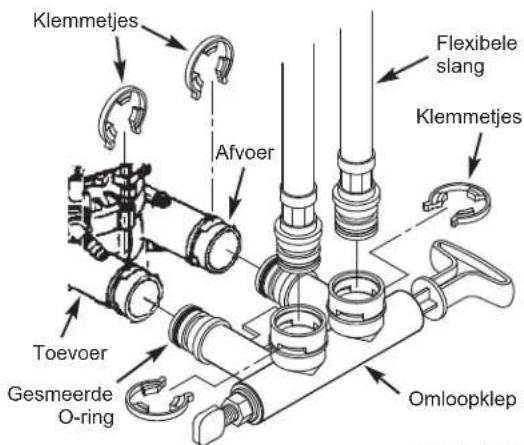
INSTALLATIE MET OMLOOPKLEPMET KLEM
AFB. 3B
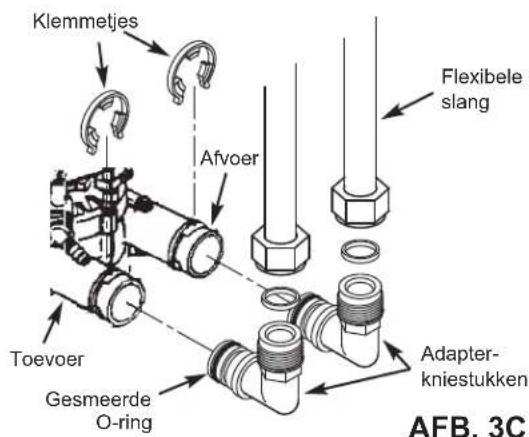
INSTALLATIE MET ADAPTERKNIESTUKKEN
VEREISTE CONTROLLER-INSTELLINGEN
na installment en na langdurige stroomuitval.
PRACA W NORMAL-NYCH WARUNKACH
YcTpaHHeH HeNCnPaBHOCTeI 49
TPEBOAHN K YCTAHOBKE
YCTAHOBKa DOJXHbBINOHNHTBCr CNEUANCTOM, pOwEduM CneuaJIbHyIO NOIROTOBky.
-NepeHauanom yctaHOBNy6eNTecb,TO OCHOBHARIOdaVA BOblOTKIOUOHe.
-Ob3aTeNbHO yCTaHOBITE nepenyckHoI Knaan Hnn 3-KnanaHHy npenpyckHy CmCTemy npoNBOcTBA KOMnAHIN EcoWater Systems. IpeynyckHO Knaan Hn0BOnJET, npu Heo6xOIMOCTH, OTKIOUATb NODaHY BoBb BY UymrHTeNB DnB BIIIOHNHeHn peMOHTA, npu 3tOM B BOOpnoBODhIx Tpy6ax BOda OCTaetca.
-Дя сиBa BOdBi Heo6xOДmO CnyckHoe OTBepCTne. Прдпчтельн OсуckHoe OTBepCTne B NOny, рядОм C ymaRHTeNem BOdBi EcoWater Systems.ТаKe моЖн ИСпОБТВ BOdO3a-BopHyTO Tpy6y, paKOBuHry DЯ CTnIPKN I T.D.
B cyxom MeCTe Ha pacctOraHn B npedeJax 2-x MetpoB OT yMAYHTeN ECoWATER Systems DoKHa 6bIb 3a3eMJIeHHa, HENpepbIBHO o6ec-NeuBaOuaJr NITAHne 3NEKtpnuecka po3eTka HOMINHOM 220-240 B,50 Tc.
- Nocne 3aBepseHn yCTaHOBKn CnCTeMbI BbINOJI Hnte npOBepKy nOД nABNeHnEM C cEJIbIO OHa-pyKeHn BO3MOxHBiX yTeueK.
- Nocne 3aBepseHnI npOBepKn daBJIeHn BbINOJI Hnte perehepauu BpyHyIO.
YKA3AHNIO B3ONACHOCTN
-Перд НалOM yCTaHOBK npoUHTaTe pyKOBOCTBO И NOIROTOBbTe HeO6XoDnMbIe NHCTpyMeTbI IN MaTePnaJIbI.
YCTAHOBKa DOJIXHA BbINONHHTBCR B COOTBETCTBUN C HOPMaMn CNECapHO-BOOIpOBODHyN 3JEKTPoTeXHueCKnx pa60T.
-ДяВСЕСCOEINHmCMRAKOnNnKOINCnOJIb3yInTeTOLbKOHe CODEpKaUHCBnEHcPnIOuNnaIbHbIMΦnIOC.
- 06paaantecb c ymraHTeIeM BOdbI aKKypaTHo. He nepeBopaunBaTe erO, He poHnTe n He pa3MeuaTHe oCTpbix BbICTyax.
He pa3meuainTe ymraTneB OdbI B MeCTax:
- rIe BO3MOXHa Hn3Ka TeMnepaTypa BO3dyxa.
B yCIOBnX npMOrO cOnHeuHOrO OcBeueHn.
B yCNoBnAx, rDe MoXeT 6bItb Cbipo.
He nItaTecb 6pa6aTbIbAtb BDOy, Tempepatya KOTOpn npebblwaer 49^
-ДяумгчтелТpe6yETcCKopoCTb NOTOKa He MeHee 11 NHTPOB B MHyTy Yepe3 BnyCKHoi KnaHaH.
- Makcimambhoe donyctmoe daBneHne BObI dIra BnyckHoro kna-nana coCTabJIeT 8,6 6ap. Ecn nDhem daBnEHe npeBbIaet 5,5 6ap, HocbIO OHO MOKeT npBbIaTaB donyctmbl MAcKcIMaNbHbI ypoBeH. Pn Heo6xoDMOCTN NcOJIb3yTe peDyKUHOHHbl Kna-nah.
CnCTema pa6oTaET O3JKeTpUeCKO rNtAHnH HOMHaIOM 28 B NOCTOHHORO TOKa. O6R3aTeNbHO NcNOJIb3yTe BXODaMnB KOMNNKET 6NOK NITAHN; BCTaBBTe ERO B O6bHyTO p03ETKY HOMHaIOM 220-240 B,50 Tc, o6R3aTeNbHO pacNoONKeHHyBO cyXOM MecTe, 3a3eMHeHHyO, CdoNkHBm IpeDOxpaHHTeNbHbIM YcTPOI CTBMOT CBepxTOKOB, TaKIM KA KppeBbTAeNb ININ PpeDOxpaHITeNbHAR np6ka.
CnCTema He npEHa3HauHe Na Opa6oTK N BoI, KOtopa Hbe30nacHa cornaHO MmKpObNOrOHeCKo OeHKe, NIO BOI, KaecTBO KOTopoH Hen3BecTHO, 6e3 COOTBeTCTByUeH De3uHpeK UIN Do nnn nocne Opa6oTK CnCTemoi.

ДиркпьБЕрпскогоCoio3a2002/96/ECТpe6уET, yTObI NIOBOe 3NEKTPnueCKeN ININ 3NEKTPoHHe OOBpydoBAHne yTININ3IPOBAnOCB B COOTBeTCTBmC O6Ba3ATENbHbIM NIOLOXENIMN O6 UTININ3aUN 3NEKTPPOHOrO IN 3NEKTPnueCkORO OOBpyOBAHNA (WEEE).ДаннayДиркпьВИ NINObSbIe eN 3AKHOdAteJIbHbIE AkTbI DeNCTByIOT Ha TeppInTopIN BCERO rOcYapcTBa, npUHem Tpe6OBAHNA MOrYT OTNlauTcBnE 3ABNCUMOCTN OT PerNoHa.ДЯnpaBnIBHOH yTININ3aUN DAHHORO OOBpyOBAHNA pyKOBoDCTByITeCb 3AKOHOnaTeJIbHbIMn AKTAMN BaWero rOcy- NapCTBa n PerNoHa.
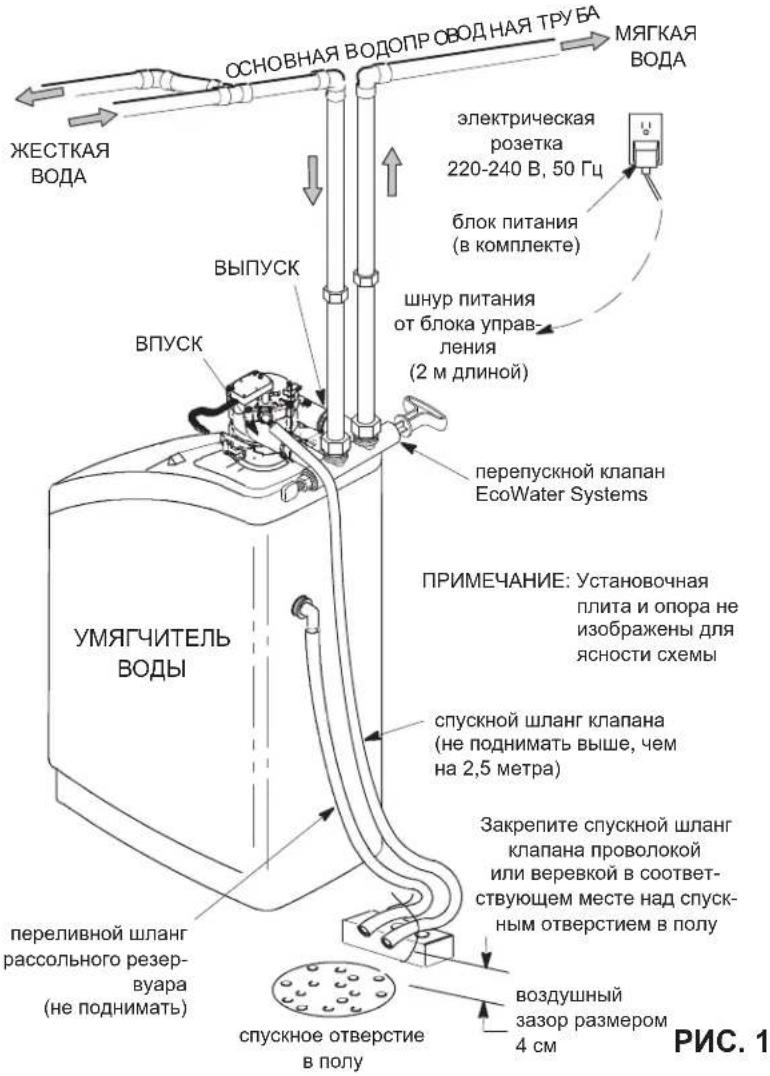
CTAHAPTHA YCTAHOBKA
ФУнкцип ПЕРENYCKHOrO KJIANAHA
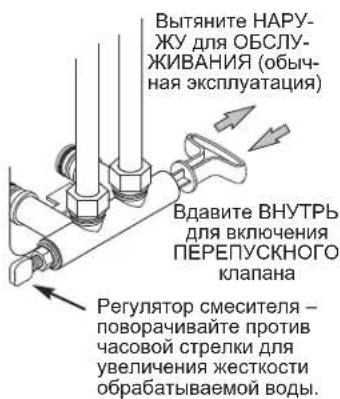
Nepenyckno knanae EcoWater Systems
PNC.2A
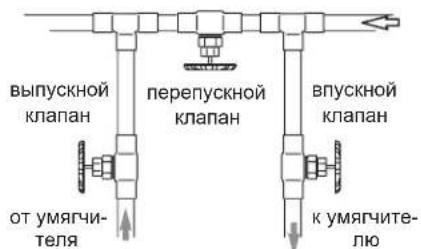
3-KnanaHHa nepenyckna hcnctema
-ДЯ OECJYKIMBAHINRA-OTKPOIte BnyckHOH N BInyckHOH KNaanBHe3aKPOIte nepenyckHOH KNaanAH
-ДьВКIOHHeH NIEPENYCKHO KJIATAHA: 3aKoTe BnYcKHO H bNbYcKHO KNaHaBt -OTKpOte NpepenyckHO KNaH
PNC.2B
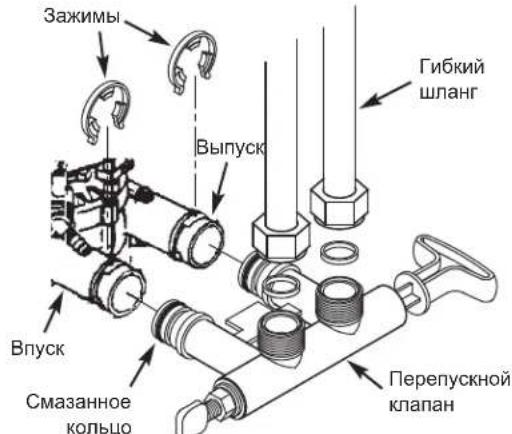
YCTAHOBKA C NCSIOJIb3OBAHNEM
NEPENYCKHO KJIANAHA C
PE3b6OBbIM COEINHEHNEM
PNC.3A
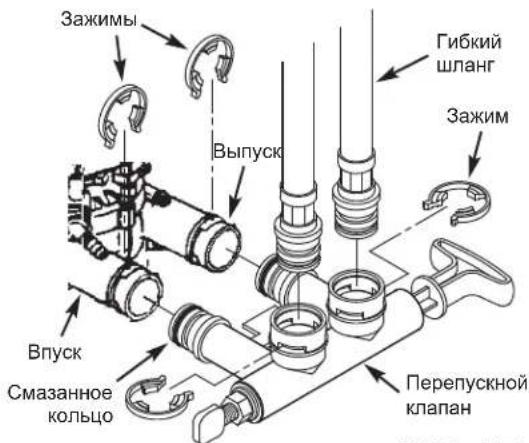
YCTAHOBKA C NCSIOJIb3OBAHHeM IEPENyCKHO KJIAPANAHC 3AXIMHBIM COEINHEHEm
PNC.3B
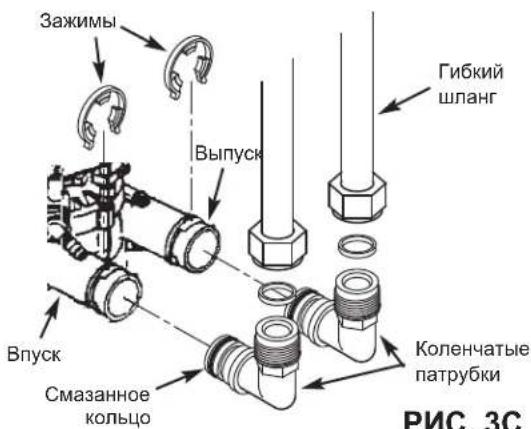
YCTAHOBKA C INCIOJIb3OBAHHeM KOJEHcATbIX NATPY6KOB
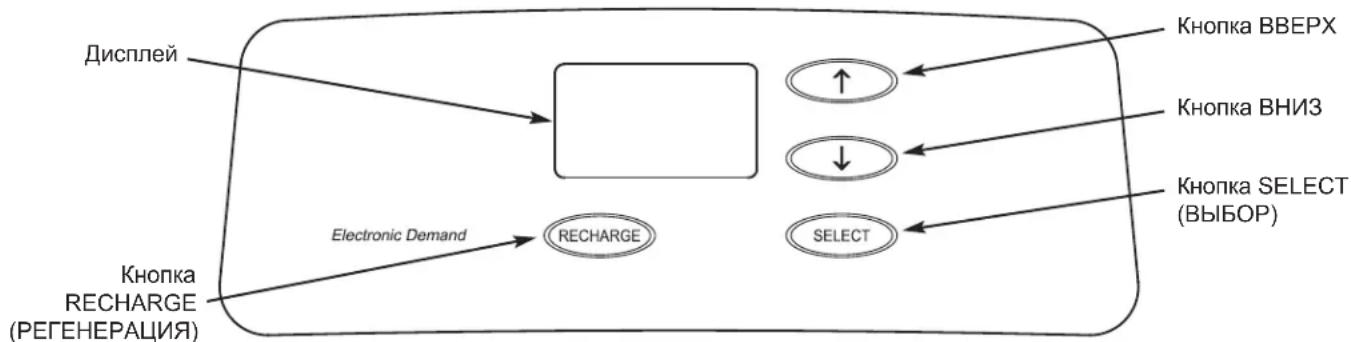
HACTPOIKA BJOKA YNPABNEHNA TPEBYETC
npyyctaHOBKe nocne OTKIOUeHnna 3NeKTponNTAHnHa nnTebhBn CpOK.
Пи ВКИЧЕНМ 6ЛОКА ПИТАнь B 3ЛЕКТРУECHKO pOSEТКу НдИСПЕЕ КраТКOBРЕМЕнHO OTOБРAXAJOТСК ДМоДЕЛ И HOMeP ВERCN. 3aTeM NOЯВЛЯТСЯДПИСь «PRESENT TIME» («TEKUYUEE BPEMЯ») И начINAET MIRATь 12:00.
A. YCTAHOBKA TEKUYIEGO BPEMEHIN
- Ecni Haanncb «PRESENT TIME»(TEKUEE BPEMRA) He OTO6paKaetcna Hau nCnnee, HAKMTe KONKY SELECT (BbIOP) HeCKoNbko pa3, noka Haanncb He NoaBntcra.
- HaximmaTe KhoNkU BBEPX nIu BHn3, YTObI yCTaHOBt b Tekyuee BpeM. KhoNka BBEPX OTCHTbIBaet BpeM Ha dncnnee Bnepe; KhoNka BH13 OTCHTbIBaet BpeM Ha3aJ.
12:00
PRESENT TIME
15:10
PRESENT TIME
2ppm xje3a x 5 = 10 +10
(ymHOxntb) 303HAUHNE XECTKOCTN
PETEHEPAUHACTYNAIOUHOCBO
YTo6b3aDaTb NaHaoIcKna
perehepauB CneDyUouee
3apaee yCTaHOBEnHoe
BpeM perehepauN, HAKMTe
(Ho He ydepXuBaTe) KONKy
RECHARGE (PETEHEPALUN).
Ha dncnnee Miraet HaJINCb
《RECHARGE TONIGHT》
(PEHEPALUN HACTYNAIO
1845
RECHARGE TONIGHT
Perehepaunna HauHETcB CnEduoUee 3apaHee yCTaHOBneHoe Bpemr perehepaun (02:00 nnn kak 6ydt YcTaHOBneHo).Ecnn Hyxho OTMeHNb 3Ty perehepaunIO do ee HauJa, HaxMMTe Ty Xe KONky eue pa3.
ПРИМЕЧАНЕ O ПЮСТОЕ
EcoWater Tpe6yET perehepaunynpabnembix ymargnteney BObl TOIbKO TOrda, KOrDa BOa nCOnNoB3yeTcN HUxHO BOC-CTAHOBNTB BIXoD yMrgHeHNOBdo. IIO 3TOI npHInHe yctpoiCTBO He 6yET peRehePnpOBAtB, ecNI Bbl OTCyTCTByeTe DOMAnITeNbHO BpEmr. Ondako ecNI ycTaHOBtB napametp «Maximum Days Between Recharges» («MaKcImaJIbHoe konuueCTBO dNeMexdy perehepaunmN»), To yMrgHTeNB 6yET ocUeCTBnptb peRehepaunIO, daXe ecNI BOa He nCOnNoB3yeTcN
YCTAHOBKA MAKCIMMAJIbHORO KOJINUECTBA DHEM MEXKdy PEGHEPAUJAMN
HactpoiNIO yMOunAHNO 03BOJnOT TaIMepy 3aDaBaTb YACTOTy pereHepaUNB 3aBNCIMoCTN OT NOKa3aHn paCXOda BObl CO CHTUka BObl. OHn ObecneuBAHOH Han6Oone EKOHOMNUHy pa6Oly.
MoxHo yCTaHOBnTb MaKcImaJIbHoe BpEma(B DnHx) MExdY peReHepaunmHaNpHMeP, eCNI Ha DCnIeE yCTaHOBtB 3DnHrTO INTEpBaJIb MeJy BblIOJIHeHempeReHepaunm 6yDet dInITbc He BoJee 3 DeH. 3OT napameTp MoXHo yCTaHOBnTb B npeJenax O1 Do 15 dHe.
IIN3MeHHeN KOnUYeCTBa DHeM MeKdY UKNaMn peReHe
paun:
- Haxmte uyepeKbauTe KhoNky SELECT (BbIOP), noka Ha dinCnnee He oTo-6pa3ntc 000 - -
- Haxmte KhoNky SELECT (BbI6OP) eue pa3, ha din- nlee HaHT MItaTb HaIinCb «Auto RECHARGE» («ABTomatueckar PEHEPALUNA»).
- HaxmMaTe KhoNkU BBEPX uuB HBN3, UTo6bI yCTaHOBnTb KOJnHe-CTBO DHeMxdy UKnAmpeHepaun.
- Nocne OTo6paKeHnna KEnaEMoro KOINueCTBa DHei HAnKMITE KOnIky SELECT HeckoBko pa3 npeKKnOeHnMeJy octA BHeHn K 3kPaHy obuHno pa

RECHARGE
RECHARGE
B. SETAREA CIFREI DE DURITATE A APEI
EcoWater Systems Italy www.ecowater-systems.it
EcoWater Systems Poland www.ecowater.pl
EcoWater Systems Romania www.ecowater.ro
EcoWater Systems UK www.ecowater.co.uk