
Bravia KDL43WG663 - Television SONY - Free user manual and instructions
Find the device manual for free Bravia KDL43WG663 SONY in PDF.




| Product Type | LED TV |
| Brand | Sony |
| Model | Bravia KDL43WG663 |
| Screen Size | 43 inches (109 cm) |
| Resolution | Full HD (1920 x 1080 pixels) |
| Scan Frequency | 50 Hz / 60 Hz |
| Audio Power | 20 W (2 x 10 W) |
| Power Consumption (Normal Mode) | Approximately 100 W |
| Standby Consumption | Less than 0.5 W |
| Power Supply | 220 - 240 V AC, 50/60 Hz |
| Weight without Stand | Approximately 10.0 kg |
| Weight with Stand | Approximately 11.5 kg |
| Dimensions without Stand (W x H x D) | 974 x 572 x 88 mm |
| Dimensions with Stand (W x H x D) | 974 x 631 x 289 mm |
| Wall Mount Compatibility | VESA 400 x 300 mm (SU-WL450 bracket recommended) |
| HDMI Connectors | 2 HDMI inputs |
| USB Connectors | 1 USB port |
| Tuner | Terrestrial (DVB-T/T2), cable (DVB-C), satellite (DVB-S/S2) |
| Main Features | Motionflow XR, cinema mode, parental control, timer |
| Maintenance and Cleaning | Clean with a soft, dry cloth; do not use abrasive products |
| Safety | Wall mounting by a certified installer recommended; do not hang heavy objects |
| Spare Parts and Repairability | Parts available through Sony authorized service; repairability index not disclosed |
| General Information | User manual available in multiple languages; Sony technical support |
Frequently Asked Questions - Bravia KDL43WG663 SONY
User questions about Bravia KDL43WG663 SONY
0 question about this device. Answer the ones you know or ask your own.
Ask a new question about this device
Download the instructions for your Television in PDF format for free! Find your manual Bravia KDL43WG663 - SONY and take your electronic device back in hand. On this page are published all the documents necessary for the use of your device. Bravia KDL43WG663 by SONY.
USER MANUAL Bravia KDL43WG663 SONY
- In the actual model names, the "□□" indicates numbers and/or characters specific to each model.
To Customers: For product protection and safety reasons, Sony strongly recommends that installation of your TV be performed by Sony dealers or licensed contractors. Do not attempt to install it yourself.
To Sony Dealers and Contractors: Provide full attention to safety during the installation, periodic maintenance, and examination of this product.
Sufficient expertise is required for installing this product, especially to determine the strength of the wall for withstanding the TV's weight. Be sure to entrust the attachment of this product to the wall to Sony dealers or licensed contractors and pay adequate attention to safety during the installation. Sony is not liable for any damage or injury caused by mishandling or improper installation.
For safety and proper installation, follow the Wall-mount Bracket Operation Instructions, TV Setup Guide, and the directions in this manual.
On Safety
Thank you for purchasing this product.
To Customers
Sufficient expertise is required for installing this product. Be sure to subcontract the installation to Sony dealers or licensed contractors and pay special attention to safety during the installation. Sony is not liable for any damages or injury caused by mishandling or improper installation, or installing any other than the specified product. Your Statutory Rights (if any) are not affected.
To Sony dealers
Sufficient expertise is required for installing this product. Be sure to read this instruction manual thoroughly to do the installation work safely. Sony is not liable for any damages or injury caused by mishandling or improper installation. Please give this manual to the customer after installation.
This instruction manual shows the correct handling of the product and important precautions necessary to prevent accidents. Be sure to read this manual thoroughly and use the product correctly. Keep this manual available for future reference.
Products by Sony are designed with safety in mind. If the products are used incorrectly, however, it may result in a serious injury through fire, electric shock, the product toppling over, or the product dropping. Be sure to observe the precautions for safety to prevent such accidents.
CAUTION
Specified products
This Wall-Mount Bracket is designed for use with the products specified TVs. For TVs, refer to their Reference Guide to verify that the Wall-Mount Bracket can be used.
To Customers
WARNING
If the following precautions are not observed, serious injury or death through fire, electric shock, or the product dropping can result.
Be sure to subcontract the installation to licensed contractors and keep small children away during the installation.
If the Wall-Mount Bracket or the TV is not installed correctly, the following accidents may occur. Be sure licensed contractors carry out installation.
The TV may fall and cause a serious injury such as a bruise or a fracture. - If the wall on which the Wall-Mount Bracket is installed is unstable, uneven, or not perpendicular to the floor, the unit may fall and cause injury or property damage. The wall should be capable of supporting a weight of at least four times the TV weight. (Refer to your TV's Reference Guide for its weight.) - If the installation of the Wall-Mount Bracket on the wall is not sufficiently sturdy, the unit may fall and cause injury or property damage.
Be sure to subcontract moving or dismounting of the TV to licensed contractors.
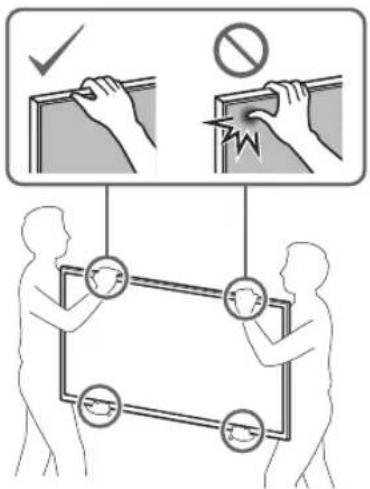
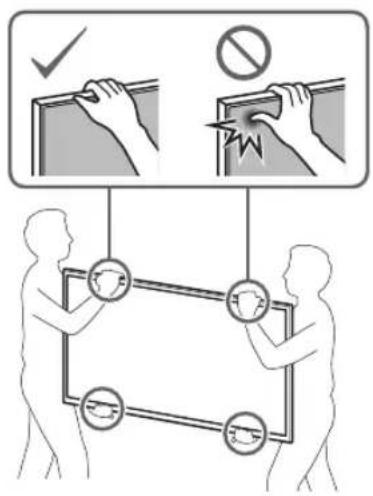
If persons other than licensed contractors transport or dismount the TV, it may fall and cause injury or property damage. Be sure that two or more persons (three or more persons for 75 inches and above TV set) carry or dismount the TV.
Do not remove screws, etc., after mounting the TV.
If you do so, the TV may fall and cause injury or property damage.
Do not make alterations to the parts of the Wall-Mount Bracket.
If you do so, the Wall-Mount Bracket may fall and cause injury or property damage.
Do not mount any equipment other than the specified product.
This Wall-Mount Bracket is designed for use with the specified product only. If you mount equipment other than specified, it may fall or break, and cause injury or property damage.
Do not apply any load other than the TV on the Wall-Mount Bracket. Do not shake the TV left/right, up/down.
If you do so, the TV may fall and cause injury or property damage.
Do not lean on or hang from the TV.
Do not lean on or hang from the TV as it may fall on you and cause serious injury.
CAUTION
If the following precautions are not observed, injury or property damage may occur.
Do not handle the product with excessive force during cleaning or maintenance.
Do not apply excessive force on the topside of the TV. If you do so, the TV may fall and cause injury or property damage.
Precautions
- If you use the TV installed on the Wall-Mount Bracket for a long time, the wall behind or above the TV may become discolored or the wallpaper may come unstuck, depending on the material of the wall.
- If the Wall-Mount Bracket is removed after installing it on the wall, the screw holes are left.
- Do not use the Wall-Mount Bracket in a place where it is subjected to mechanical vibrations.
Installing the Wall-Mount Bracket
To Sony Dealers
WARNING
The following instructions are for Sony dealers only. Be sure to read the safety precautions described above and pay special attention to safety during the installation, maintenance, and checking of this product.
Do not install the Wall-Mount Bracket on wall surfaces where the corners or the sides of the TV protrude away from the wall surface.
Do not install the Wall-Mount Bracket on wall surfaces such as a pillar, where the corners or the sides of the TV protrude away from the wall surface. If a person or object happens to hit the protruded corner or side of the TV, it may cause injury or property damage.
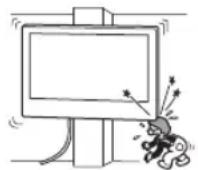
Do not install the TV over or under an air conditioner.
If the TV is exposed to water leaks or air current from an air conditioner for a long time, it may cause a fire, an electric shock, or a malfunction of the TV.
Be sure to install the Wall-Mount Bracket securely to the wall following the instructions in this instruction manual.
If any of the screws are loose or fall out, the Wall-Mount Bracket may fall and cause injury or property damage. Be sure to use the appropriate screws for the material of the wall and install the unit securely using four or more screws of 8 mm diameter (or equivalent).
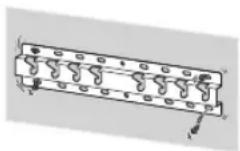
Be sure to use the supplied screws and attachment parts properly following the instructions given in this instruction manual. If you use substitute items, the TV may fall and cause bodily injury to someone or damage to the TV.
Be sure to assemble the bracket properly following the instructed procedure explained in this instruction manual.
If any of the screws are loose or fall out, the TV may fall and cause bodily injury to someone or damage to the TV.
Be sure to tighten the screws securely in the designated position.
If you fail to do so, the TV may fall and cause bodily injury to someone or damage to the TV.
Be careful not to subject the TV to shock during installation.
If the TV is exposed to shock, it may fall or break apart. This may cause injury.
Be sure to install the TV on a wall that is both perpendicular and flat.
If you fail to do so, the TV may fall and cause injury.
After proper installation of the TV, secure the cables properly.
If people or objects get tangled with cables, this may result in injury or damage to the TV.
Do not allow the mains lead or the connecting cable to be pinched.
If the mains lead or the connecting cable is pinched between the unit and the wall or is bent or twisted by force, the internal conductors may become exposed and cause a short circuit or an electrical break. This may cause a fire or an electric shock.
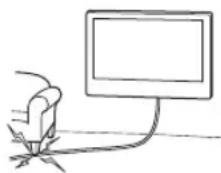
The screws needed to secure the Wall-Mount Bracket to the wall are not supplied.
Use the appropriate screws for the wall material and structure when mounting the Wall-Mount Bracket.
Installing the TV onto the wall
Installation procedure differs, depending on your TV.
Use the Wall-Mount Bracket SU-WL450 to install the TV to the wall.
Note
- If the Table-Top Stand is attached to the TV, detach the Table-Top Stand beforehand. See the Setup Guide and follow in reverse order the steps to detach the Table-Top Stand.
- Place the TV with its screen facing down on a level and stable surface covered with a thick and soft cloth, when securing the Attachment parts for Wall-Mount Bracket or when removing the Table-Top Stand from the TV to prevent damaging the surface of the LCD display.
- Be sure to store the removed screws in a safe place, keeping them away from children.
Preparing for installation
- Have the TV's Reference Guide and Setup Guide at hand before installation.
- Be sure to have a Phillips screwdriver that fits the screws prior to the assembly.
- Confirm the installing position of your TV.
- Prepare four or more screws of 8 mm diameter and one screw of 5 mm or equivalent (not supplied). Select screws suitable for the material of the wall.
Checking the parts
Supplied with SU-WL450
- Verify that all the parts are included.
| A Base (20) (1) B Pulley (2) | |
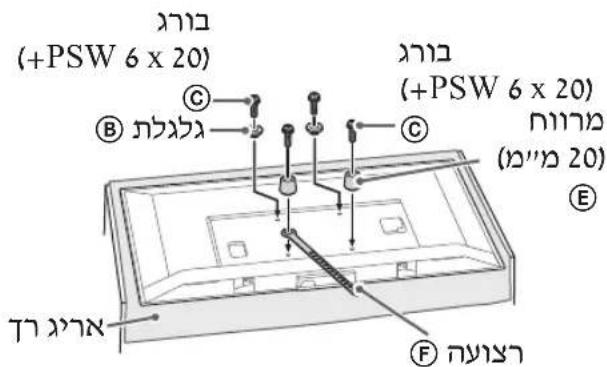
| C PSW 6x20 (4) D PSW 4x20 with Bush (2) | |
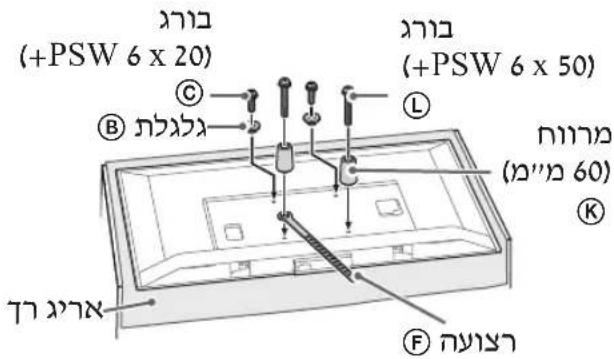
| E Spacer (20) (2) F Belt (1) | |
| G Bush (20) (M4) (2) H PSW 4x20 (2) | |
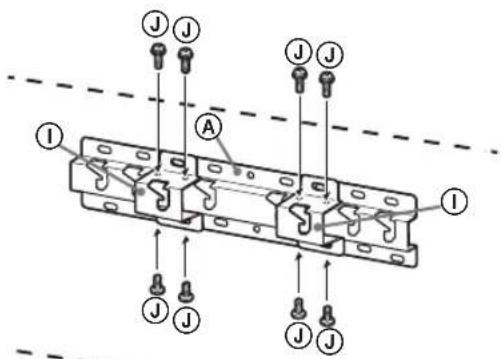
| I Base Adaptor (2) J PSW 4x10 (8) | |
| K Spacer (60) (2) L PSW 6x50 (2) | |
| M Bush (M4) (2) N PSW 4x50 (2) |
Deciding on the installation location
1 Decide on the installation location.
Make sure that the wall has enough space for the TV and is capable of supporting a weight of at least four times that of the TV.
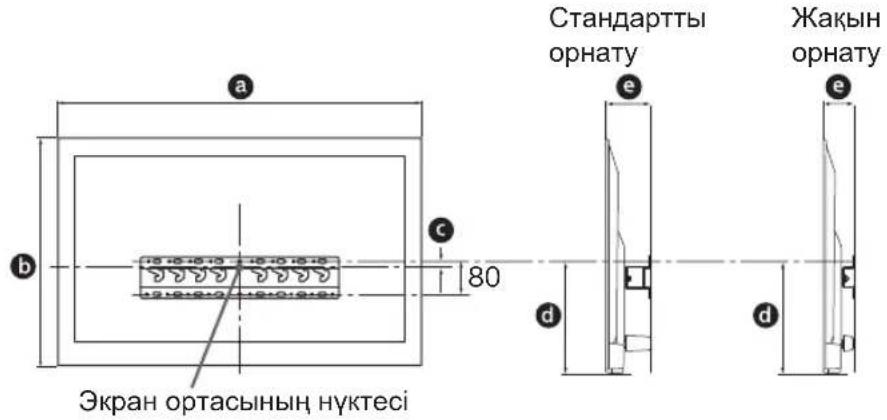
Refer to the following table on installing the TV to the wall. Refer to your TV's Reference Guide for the TV's weight.
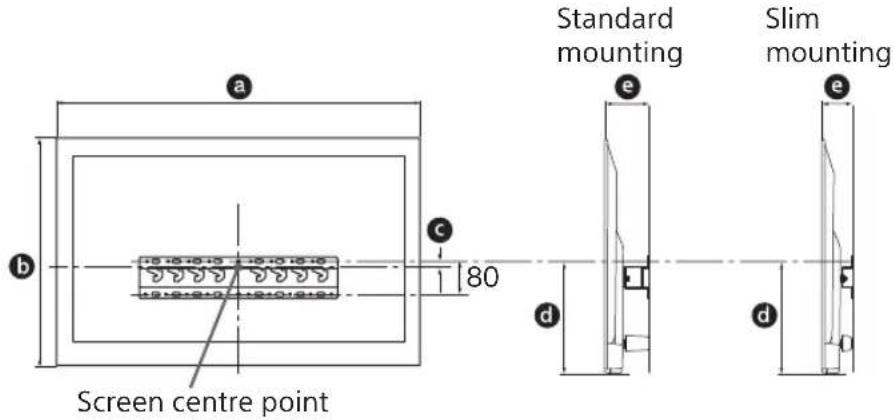
Unit: mm
| Model Name | Display dimensions | Screen centre dimension | Length for mounting | |||
| a | b | c | d | e | ||
| Standard mounting | Slim mounting | |||||
| KDL-50WG6□□ | 1,130 660 21 358 130 88 | |||||
| KDL-43WG6□□ | 974 572 54 346 130 88 | |||||
Note
- Figures in the table may differ slightly depending on the installation.
- When your TV is installed on the wall, the upper side of the TV slightly leans forward.
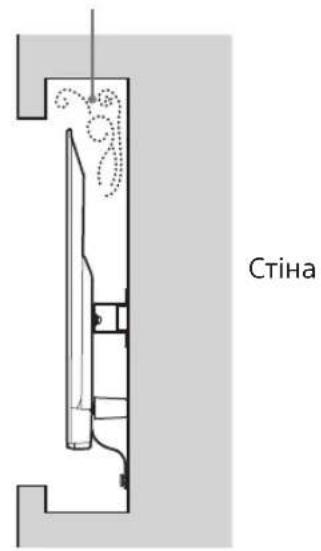
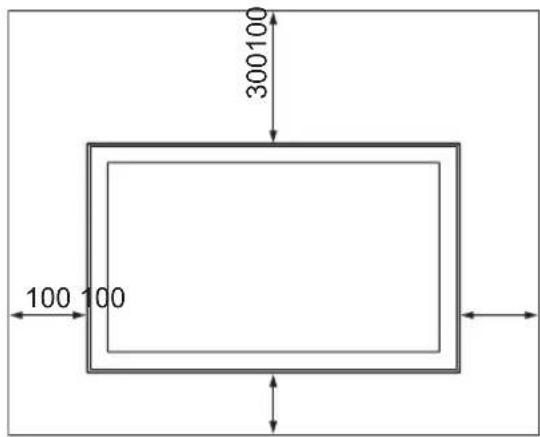
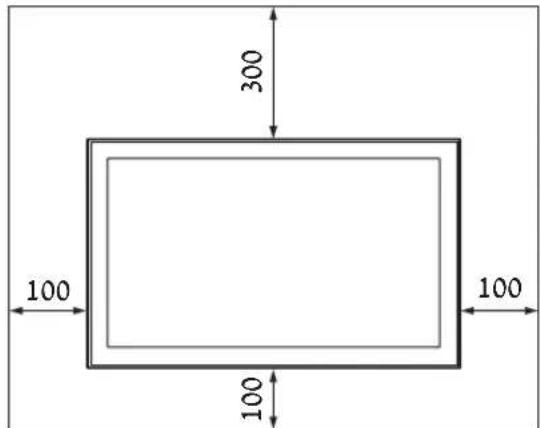
Allow for suitable clearance between the TV and the ceiling and protruding parts of the wall as shown below.
Unit: mm
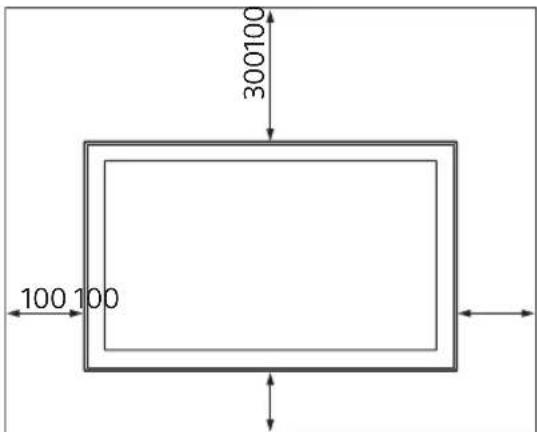
To ensure proper ventilation and prevent the collection of dirt or dust:
- Do not lay the TV set flat, install upside down, backwards, or sideways.
- Do not place the TV set on a shelf, rug, bed or in a closet.
- Do not cover the TV set with a cloth, such as curtains, or items such as newspapers, etc.
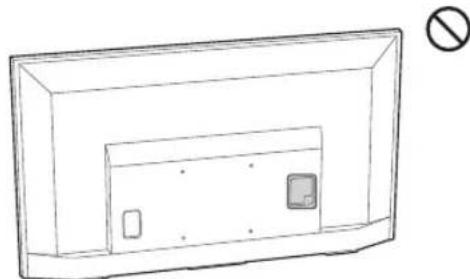
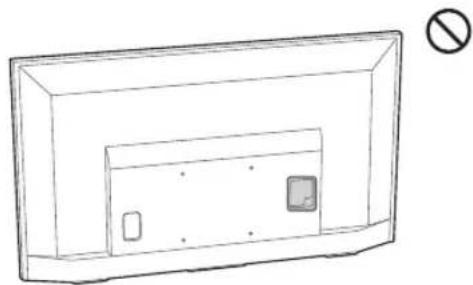
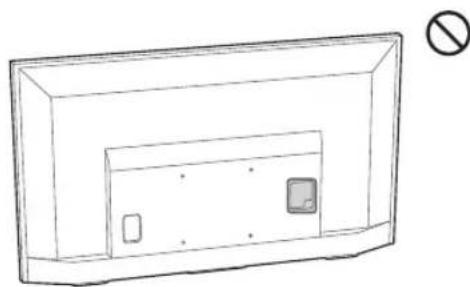
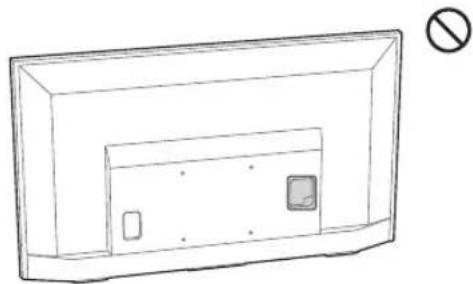
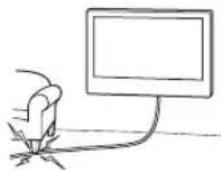
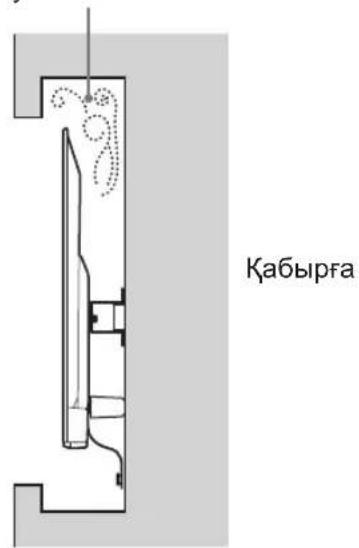
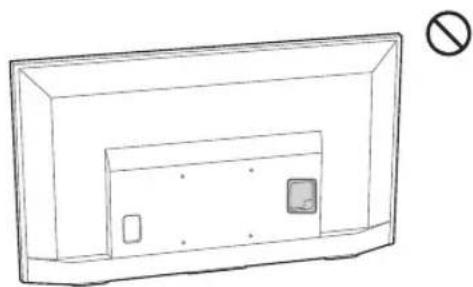
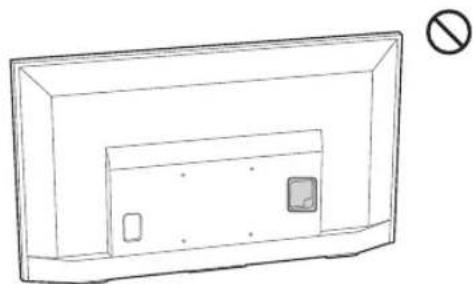
- Do not install the TV set as shown below.
Air circulation is blocked.
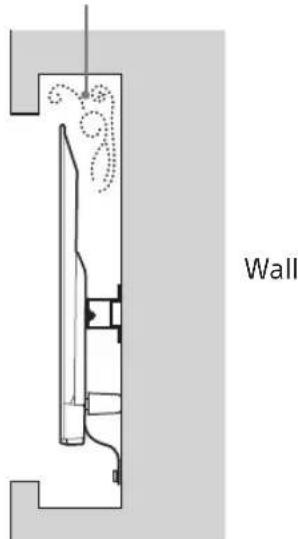
Note
- If you intend to route the cables in the wall, make a hole in the wall to insert the cables before beginning the installation.
To prevent pinching the cables, prepare a hole in the wall somewhere outside the perimeter of the Base (20) A, Base Adaptor 1 and Spacer (20) E, Spacer (60) K.
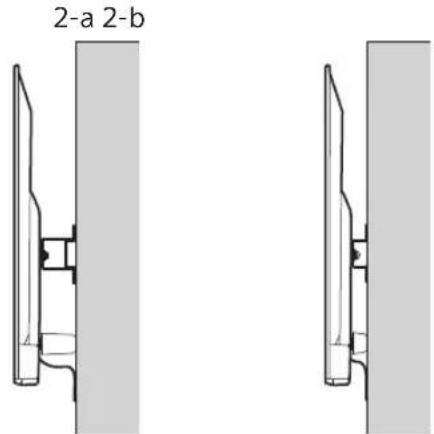
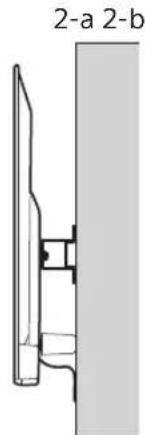
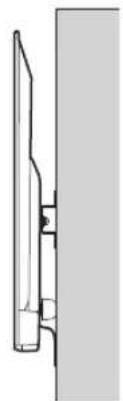
2 Select Wall mounting style. It is selectable as shown below.
2-a Standard mount
2-b Slim mount
Refer to the table of step 1.
WARNING
- When 2-b is selected, rear terminal access is limited.
2-a 2-b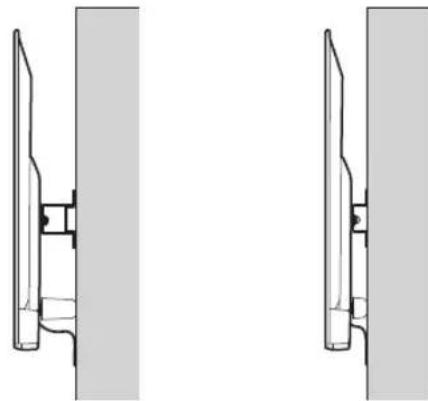
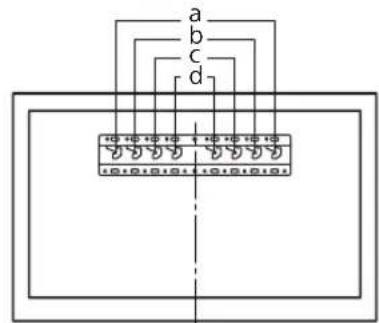
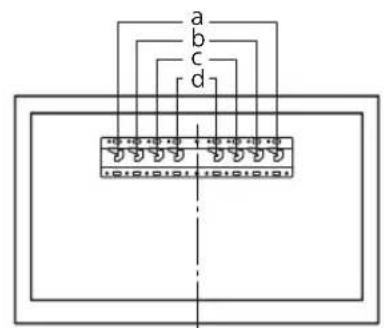
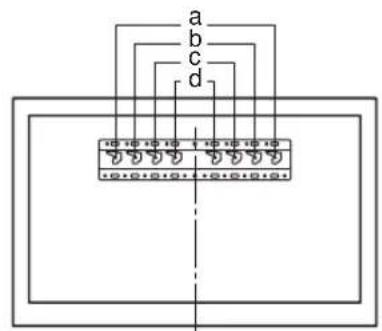
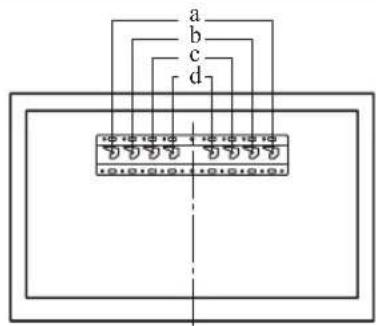
3 Refer to the table below for the Base Adaptor fitting location. If selecting 2-b, skip this step.
| Model Name Hook location | |
| KDL-50WG6□□ | c |
| KDL-43WG6□□ | |
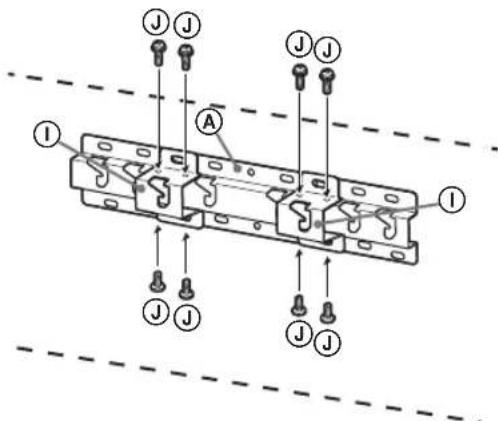
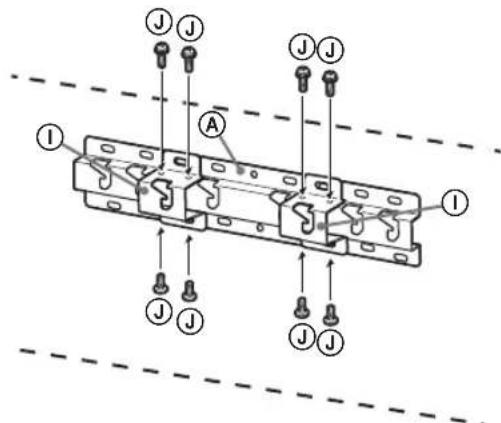
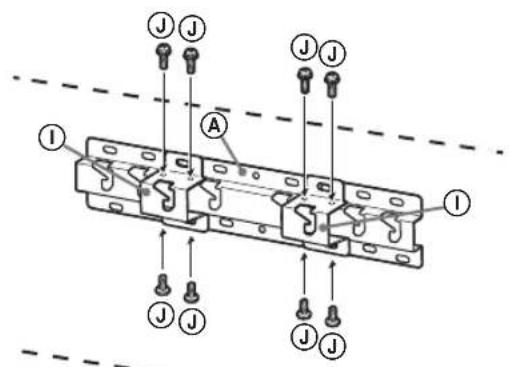
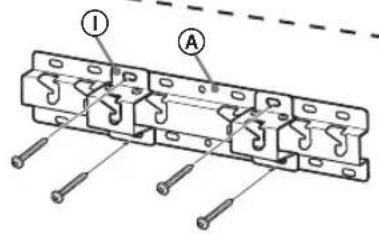
Fit Base Adaptor ① by using Screw (PSW 4x10) ② to Base (20) ④ when selecting 2-a.
4 Decide the positions of the screws for installing the Base (20) A.
Refer to the specifications on page 12. When selecting 2-a, please use the hole positions of Base Adaptor ①.
WARNING
The wall that the TV will be mounted on should be able to support a weight of at least four times that of the TV (Refer to your TV's Reference Guide for its weight.). Determine the strength of the wall the TV will be mounted on. Reinforce the wall sufficiently, if necessary.
Installing the Base on the wall
- Use four or more screws of 8 mm diameter or equivalent (not supplied).
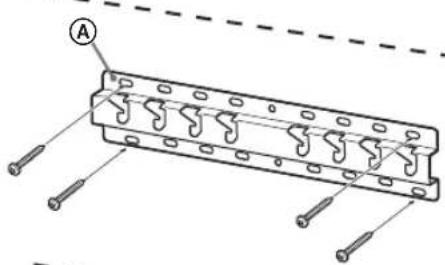
- Fit four screws to the holes of Base Adaptor ① with Base (20) A (2-a only). Install the Base (20) A on the wall horizontally.
Standard mounting (2-a)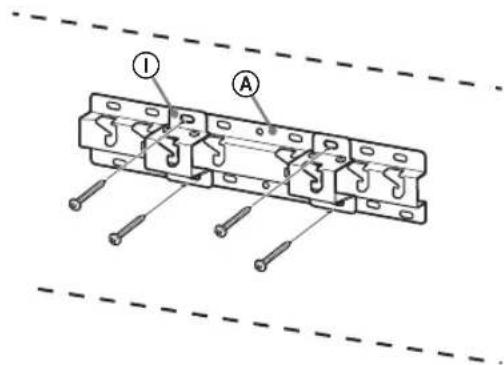
Slim mounting (2-b)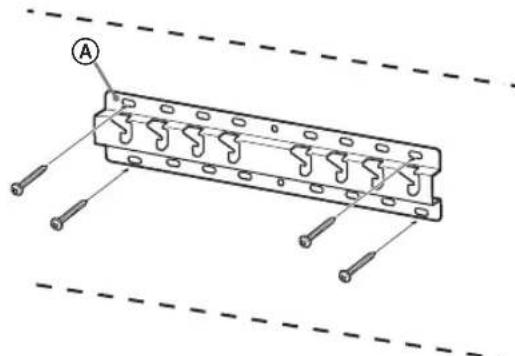
Preparing for the installation of the TV
Refer to the Setup Guide for stand installation.
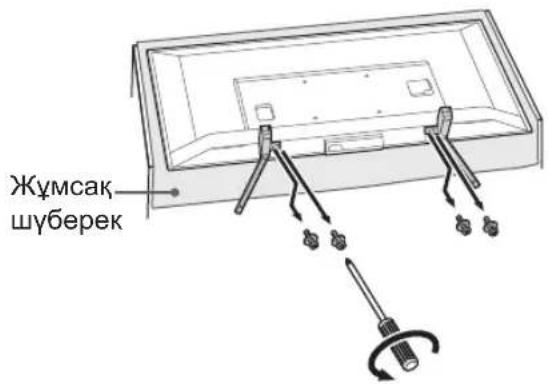
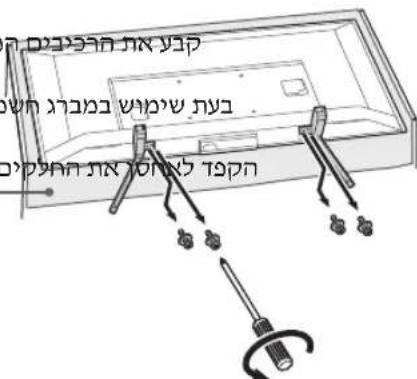
1 Detach the Table-Top Stand from the TV.
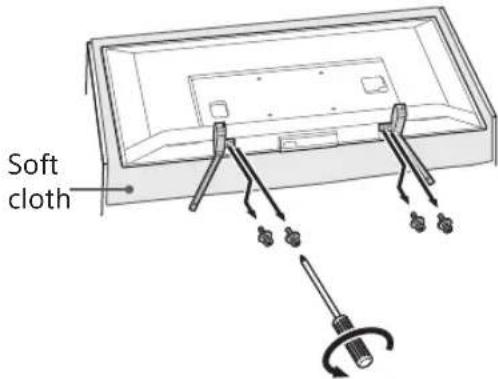
Note
Make sure to place TV on a soft cloth to prevent damaging the display's surface. - When installing the Wall-Mount Bracket, do not use the screws removed from the Table-Top Stand. - Be sure to store the removed Table-Top Stand and its screws in a safe place, keeping them away from children. You will need them if you want to use the TV on a table in the future. The Table-Top Stand cannot be purchased separately.
WARNING
- Be sure the TV is in the vertical position before switching on. The TV set must not be powered on with the LCD panel face down to avoid uneven picture uniformity. If pressure or shock is applied to the surface of the TV, the TV may break or become damaged.
- Lay the TV face down on a stable and level surface with the Table-Top Stand hanging over the edge of the surface. Having the TV face and the base of the Table-Top Stand on the same level surface will create an unstable working condition and can damage the TV.
- When detaching the Table-Top Stand from the TV, hold the Table-Top Stand securely.
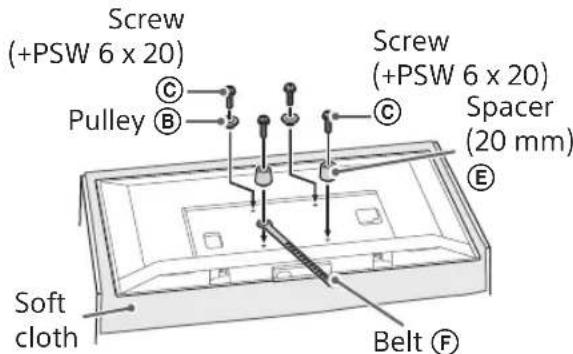
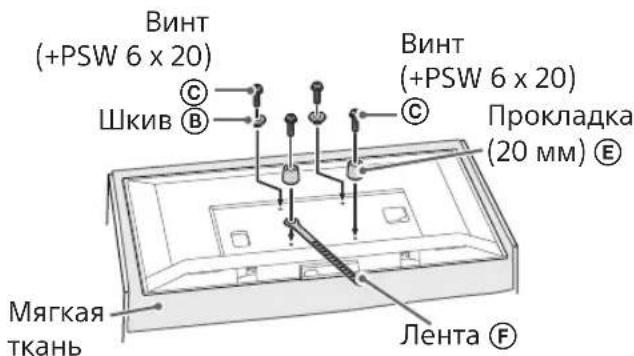
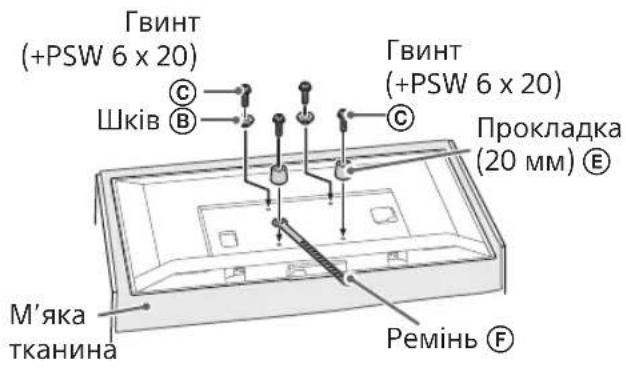
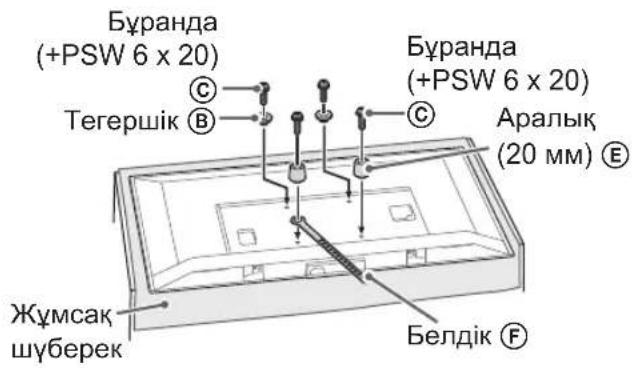
2 Attach the Attachment parts for Wall-Mount Bracket. Check the Attachment parts by referring to "Supplied with SU-WL450" in "Checking the parts" on page 5.
Note
- Firmly secure the Attachment parts using screws.
- When using an electric screwdriver, set the torque setting to approximately 1.5 N·m {15 kgf·cm}.
- Be sure to store the used or unused parts in a safe place for future use. Retain this manual for future reference.
Standard mounting (2-a)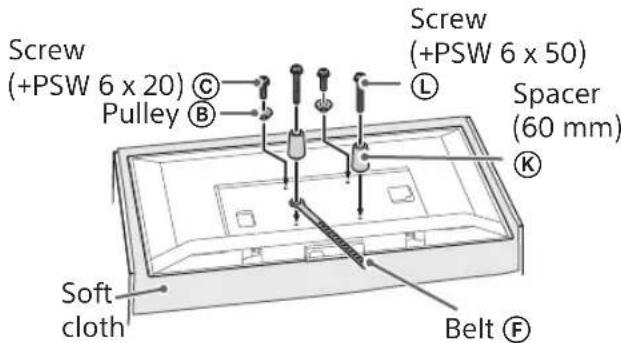
Slim mounting (2-b)
Note
- You cannot use some of the terminals on the rear of the TV when using this mounting style.
3 Connect the necessary cable(s) to the TV.
Make sure to connect the cables before installing the TV on the wall. You will be unable to connect the cables when the TV is installed.
Refer to the Reference Guide supplied with your TV.
Note
- Subcontract the cable routing in the wall to a licensed contractor.
- Bundle the connecting cables to prevent stepping on them before wall mounting.
Installing the TV on the wall
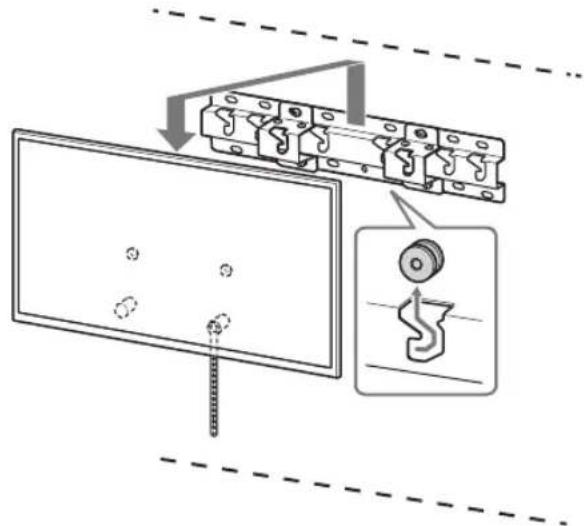
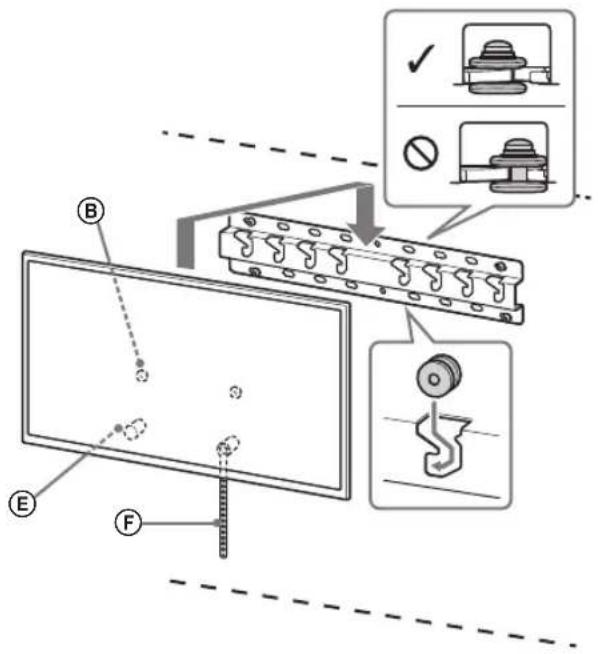
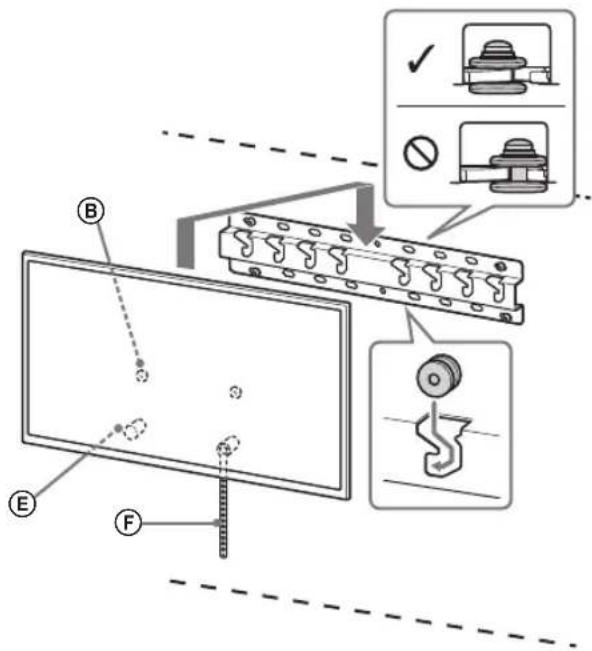
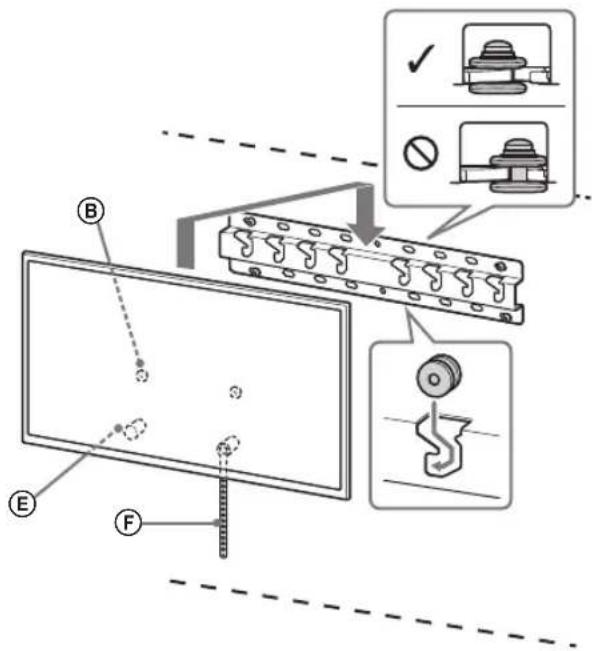
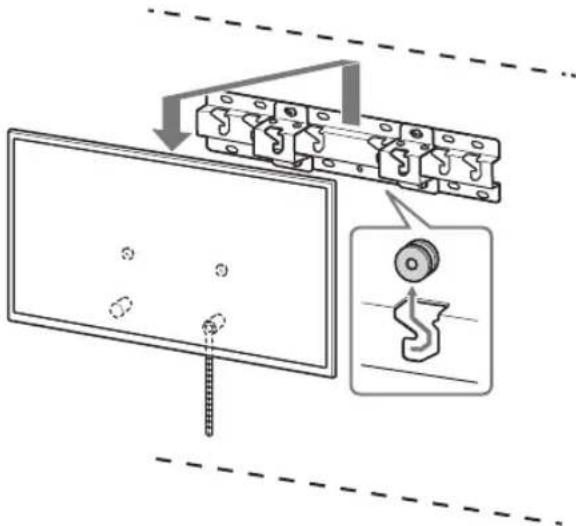
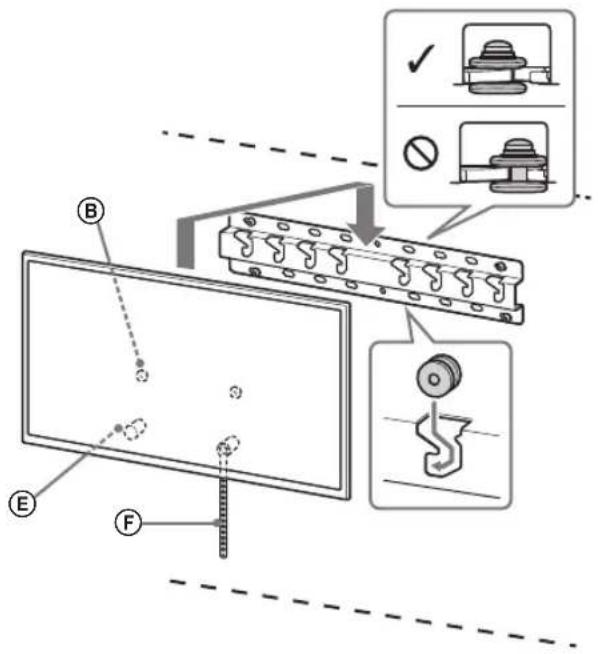
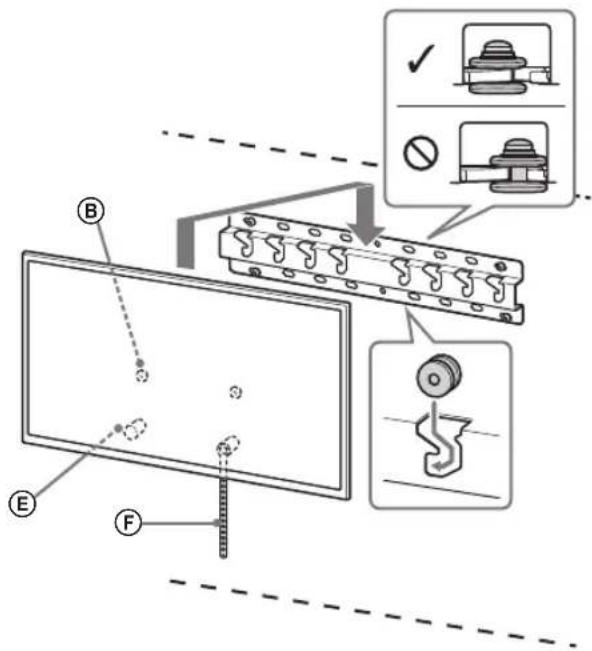
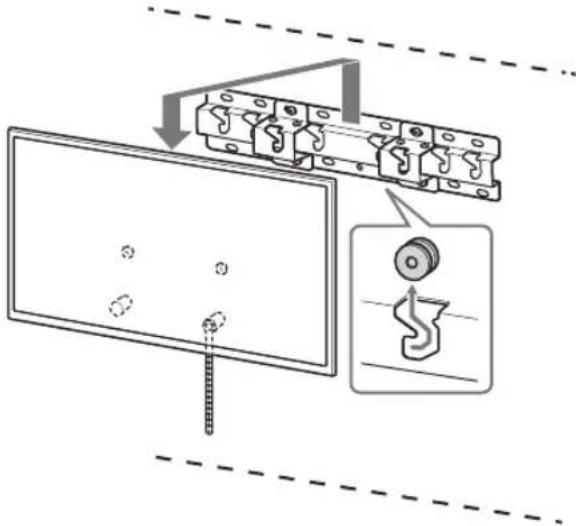
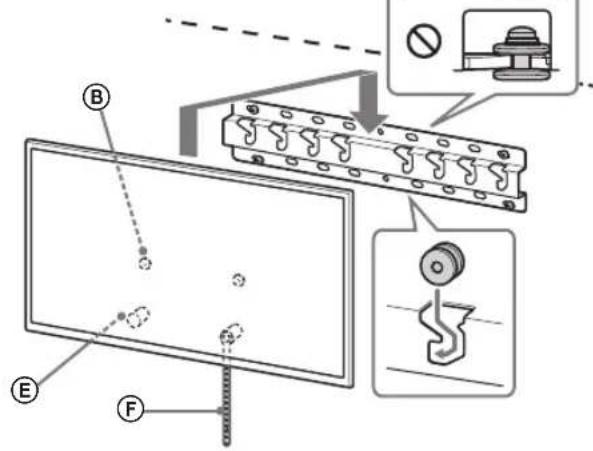
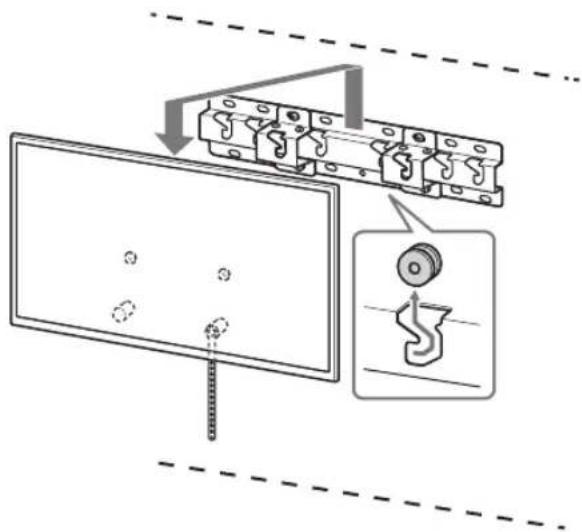
1 Install the TV onto the Base or Base Adaptor.
- For the location of the Pulleys (B) to hang on the Base or Base Adaptor, refer to the table of step 3 in "Deciding on the installation location" on page 7.
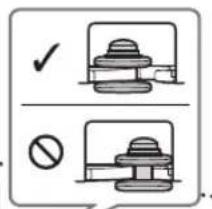
- Gently slide down the TV and hang the Pulleys (B) attached to the rear of the TV to the Base or Base Adaptor, making sure to confirm the shape of the holes. After installing the TV on the wall, confirm the Pulleys (B) are firmly latched into the Base or Base Adaptor.
- Release both hands slowly to ensure that the TV does not fall.
Standard mounting (2-a)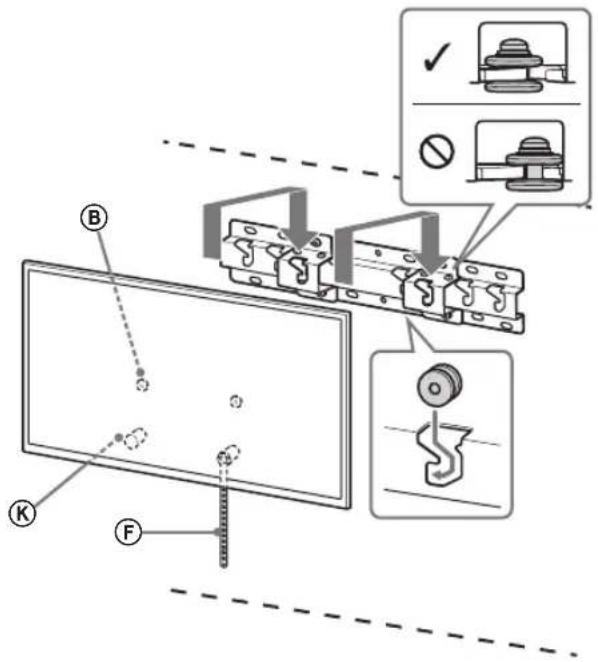
Slim mounting (2-b)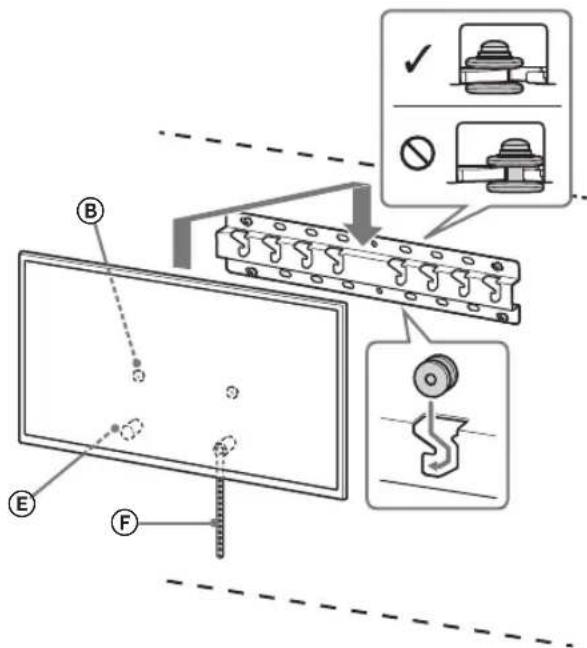
WARNING
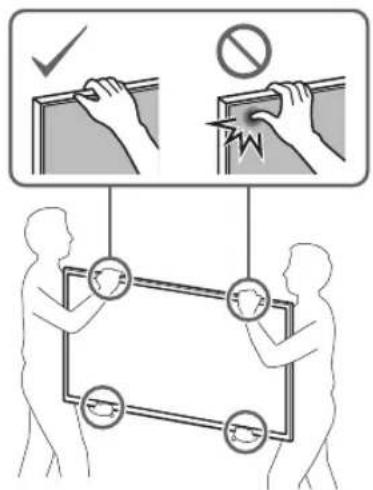
- Be sure that two or more persons (three or more persons for 75 inches and above TV set) hold the TV when carrying it.
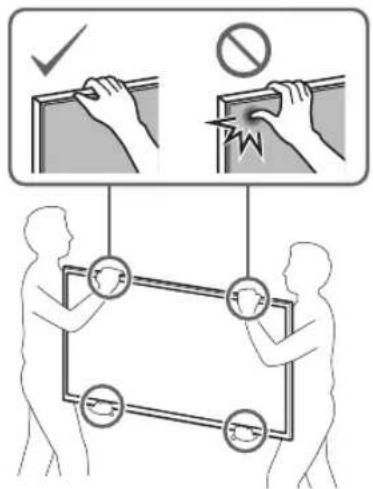
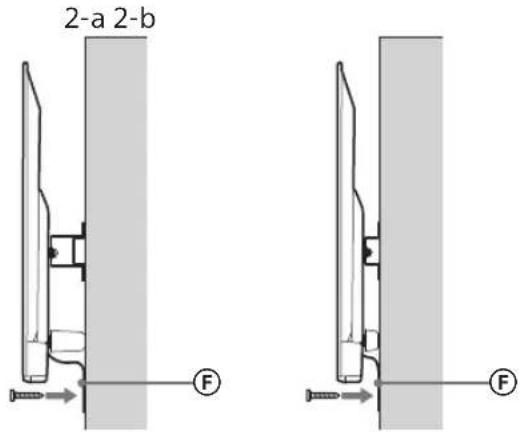
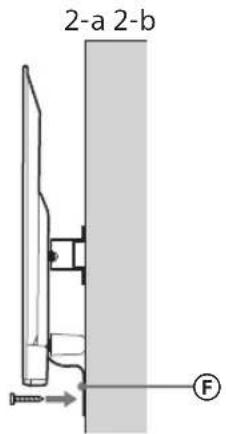
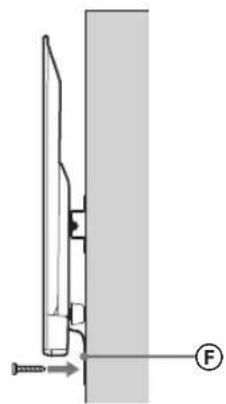
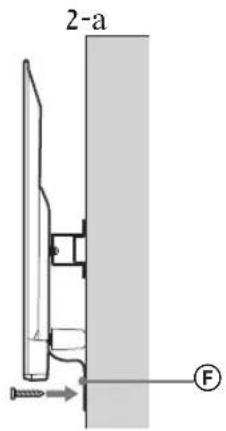
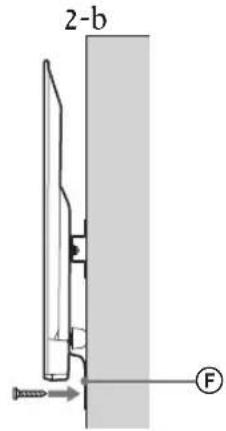
2 Preventing the bottom of the TV from shifting.
Take up the slack of Belt F and attach it to the wall tightly.
2-a 2-b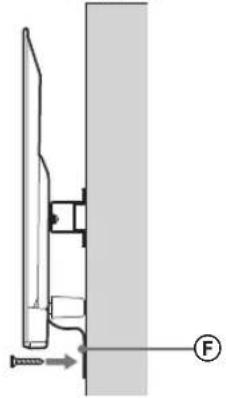
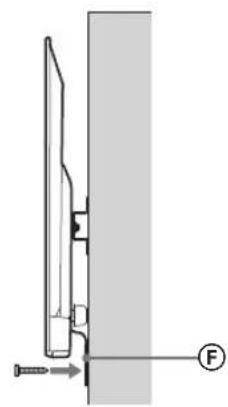
- Use a 5 mm diameter screw or equivalent (not supplied).
Note
Try to pull the bottom of the TV towards yourself slightly, to make sure that it does not move forward. If there is any movement, it is not fixed correctly, and the Belt should be secured firmly again.
Confirming the completion of the installation
Check the following points.
- The Pulleys (B) are firmly hung onto the Base or Base Adaptor.
- The cord and the cable are not twisted or pinched.
- The Belt (F) is tight with no slack.
WARNING
- Improper placement of the mains lead, etc., may cause fire or electric shock through a short circuit. Be sure to confirm the completion of the installation for safety.
Other information
When removing the TV, reverse the previous installation procedure.
WARNING
- Be sure that two or more persons (three or more persons for 75 inches and above TV set) hold the TV when removing it.
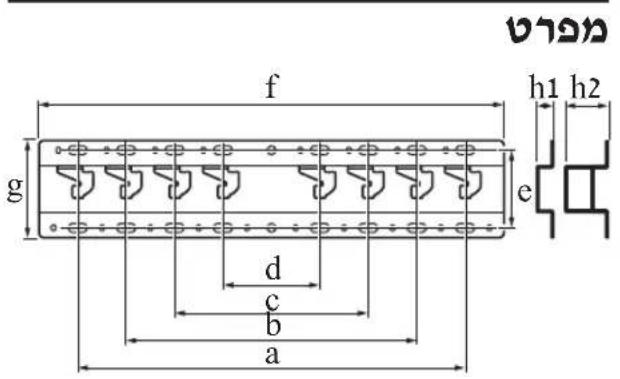
Specifications
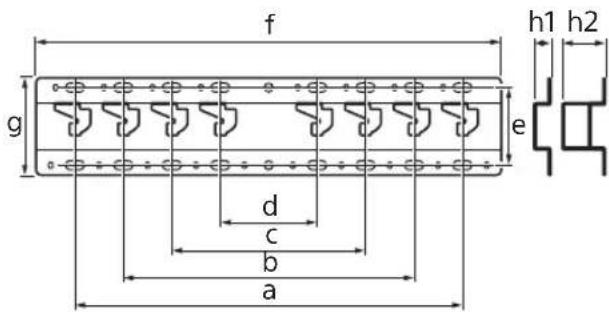
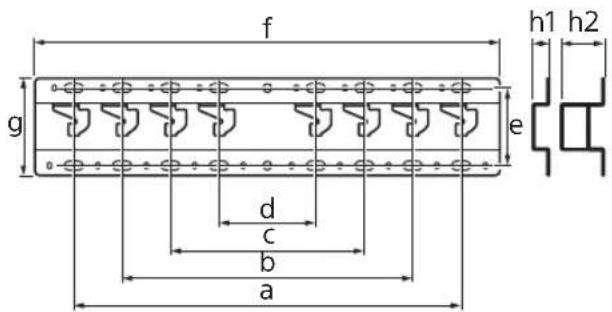
Dimensions: (Approx.) [mm]
a : 400
b : 300
c:200
d : 100
e:80
f:480
g : 100
h1:20(case 2-b)
h2:60(case 2-a)
Weight (base only): (Approx.) [kg]
0.8
Design and specifications are subject to change without notice.
Dimensions: (approx.) [mm]
a:400
b : 300
c:200
d:100
e:80
f:480
g : 100
h1:20 (case 2-b)
h2:60 (case 2-a)
Weight (base only): (approx.) [kg] 0.8
Dimensions: (approx.) [mm]
a: 400
b: 300
c: 200
d: 100
e: 80
f: 480
g: 100
h1: 20 (case 2-b)
h2: 60 (case 2-a)
Weight (base only): (Approx.) [kg]
0.8
Preparation for installation
1 Find the TV's location.
Weight (base only): (Approx.) [kg] 0.8
Design and specifications are subject to change without notice.
Dimensions: (approx.) [mm]
a:400
b:300
c:200
d:100
e:80
f:480
q:100
h1:20 (case 2-b)
h2:60 (case 2-a)
Do not tighten the screws before mounting the TV.
If you do, the TV may fall and cause injury or damage to property.
Do not skip the parts of the bracket for wall mounting.
If you do, the wall-mount bracket may fall and cause injury or damage to property.
Do not mount other equipment other than the specified product.
The wall mount bracket is designed for installation on a wall and for use only with the specified product. If you mount the equipment differently from the instructions, it may fall and cause injury or property damage.
Do not use the wall mount bracket for any product other than the television. Do not place the television on the floor or on a slanted surface.
If you do so, the television may fall and cause injury or property damage.
Do not lean on or hang from the television.
Do not lean on or hang from the television, as it may fall and cause serious injury.
WARNING
If the supplied screws are not used, the television may fall and cause injury or property damage.
Do not subject the product to excessive force during cleaning or repair.
Do not apply excessive force to the top part of the television. If you do, the television may fall and cause injury or property damage.
Supplied Screws
- If you use the television for a long time while it is mounted on the wall mount bracket, the wall and the bracket may weaken and the wall may crack, depending on the wall material. If the wall mount bracket becomes loose after installation, contact the installer. Do not use the wall mount bracket if it is loose, as it may cause vibration or mechanical failure.
Wall Mount Bracket Installation
To Sony Dealers
WARNING
These instructions are for Sony dealers only. Read the safety precautions described below and pay special attention to safety during installation, maintenance, and inspection of the product.
Do not mount the console for wall mounting on a wall surface where the TV screen protrudes from the wall surface.
Do not mount the console for wall mounting on a wall surface, for example a column, where the TV screen protrudes from the wall surface. If the TV is hit or falls, it may cause injury or property damage.
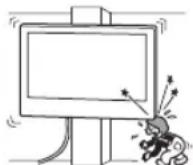
Do not mount the TV on or under air conditioners.
If the TV is exposed to dripping or splashing water or air conditioner condensation, it may cause fire, electric shock, or damage to the TV.
Mount the wall mounting console securely to the wall by following the instructions in this manual.
If any of the screws are loose or fall out, the wall mounting console may fall and cause injury or property damage. Use appropriate screws for the wall material and mount the structure securely using four or more screws with a diameter of 8 mm (or equivalent).
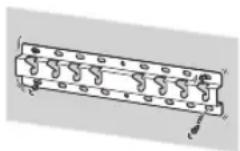
Use the correct screws and mounting parts by following the instructions in this manual. If you use substitute parts, the TV may fall and cause injury or damage.
Make sure to use the console correctly by following the procedure described in this manual.
If any of the screws become loose or fall out, the TV may fall and cause injury or damage.
Tighten the screws securely in the indicated position.
If you do not do this, the TV may fall and cause injury or damage.
Be careful not to hit the TV during installation.
If the TV is subjected to impact, it may break or shatter. This may cause injury.
Mount the TV on a wall that is perpendicular and flat.
If you do not do this, the TV may fall and cause injury.
Connect the plugs to the TV and ensure the cables are properly connected.
If you need to extend the cables, this may cause damage or malfunction to the TV.
Do not allow the power cord or connecting cables to be pinched.
If the power cord or connecting cables are pinched between the TV stand and the wall, or if they are bent or pulled with force, the internal wires may be damaged and cause a short circuit or electric shock. This may cause a fire or electric shock.
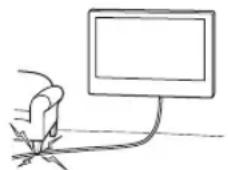
The screws required for securing the wall mount bracket to the wall are not included in the package.
Use appropriate screws for the wall material and structure when mounting the wall mount bracket.
Wall Mounting the TV
The mounting procedure varies depending on the TV model.
Use the wall mount bracket SU-WL450 to mount the TV on the wall.
Precautions
If the stand is attached to the TV, remove the stand beforehand. Refer to the setup guide and follow the steps in reverse order to remove the stand. - Place the TV face down on a flat and stable surface covered with a soft cloth or blanket while removing the stand parts or when attaching the wall mount bracket, to prevent damage to the LCD display. Do not store the removed screws in a safe place, keeping them away from children.
4 Determine the positions of the mounting screws on the base (20) A.
See the specifications on page 12.
When selecting 2-a, use the spacers for the antenna opening on the base ①.
Before mounting the TV, make sure it can support the weight of the TV (see the TV's user manual regarding its weight).
- Determine the wall structure where the TV will be mounted. If necessary, reinforce the wall sufficiently.
Mounting the wall plate
- Use four or more screws with a diameter of 8 mm or equivalent (not supplied). Tighten the four screws into the holes on the wall plate adapter ① with the wall plate (20) (only 2-a).
- Mount the wall plate (20) horizontally on the wall.
Standard mounting (2-a)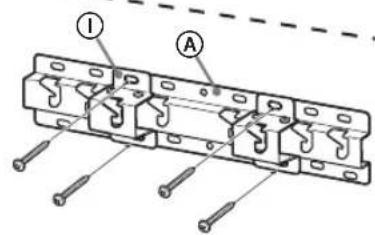
Recessed mounting (2-b)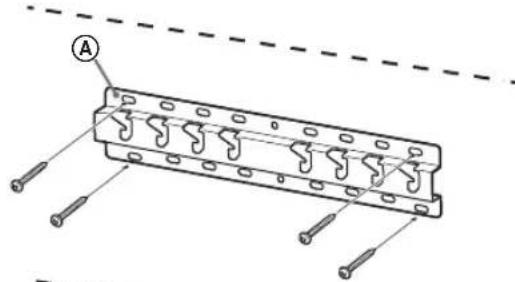
Preparing for TV mounting
Read the setup manual carefully.
1 Remove the stand from the TV.
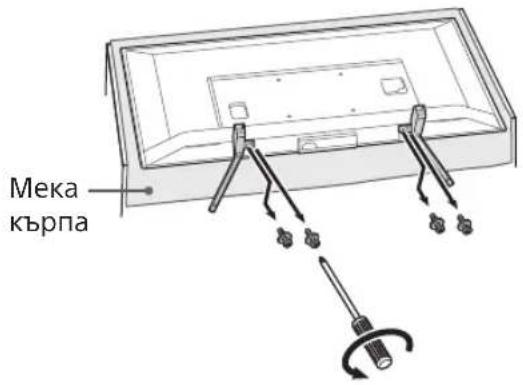
Caution
- Make sure you place the TV on a soft cloth to prevent damage to the screen surface. When mounting the wall mount bracket, do not use the screws supplied with the stand. The supplied stand and its screws are for use on a flat surface only. They are not needed if you use the TV on a wall mount. The stand cannot be purchased separately.
WARNING
- Before installing the TV, make sure it is in a vertical position. The TV should not be placed on a LCD panel, face down, to avoid unevenness of the picture. If the TV surface is exposed to pressure, it may be damaged. - Place the TV face down on a stable and flat surface, with the stand facing up. If the TV screen and the stand base are at the same level, this will lead to unstable operating conditions and may damage the TV. When removing the stand from the TV, hold the stand firmly.
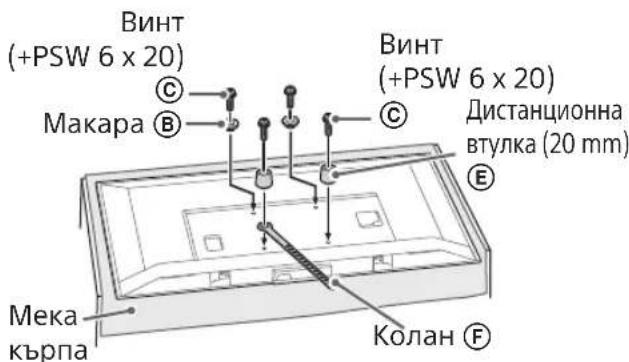
2 Attach the mounting brackets to the wall mount bracket. Check the brackets by comparing with "Supplied with SU-WL450" in "Parts Check" on page 5.
Spare parts for mounting with screws. When using an electric screwdriver, set the tightening torque to approximately 1.5 N·m {15 kgf·cm}. Store the used and unused parts safely for future use. Keep this manual for future reference.
Standard mounting (2-a)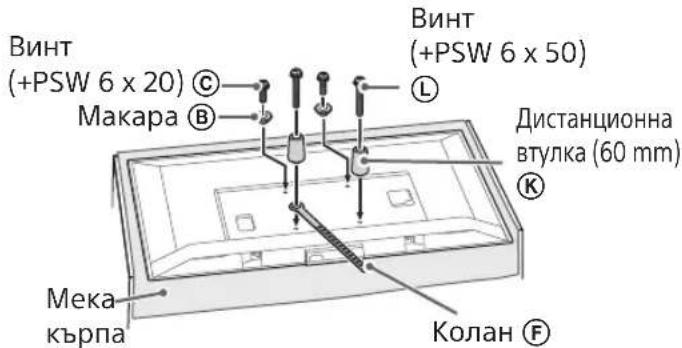
Tight mounting (2-b)
Spare parts
Connect the cables to the TV and the wall outlet.
Connect the necessary cables to the TV.
Make sure you have connected the cables before mounting the TV on the wall. If you need to connect them, do so before the TV is mounted. See the manual provided with your TV.
Spare parts
Route the cables through the wall or use a cable guide. Secure the connected cables so they do not interfere with the wall mounting.
Mounting the TV on the wall
1 Mount the TV to the base plate for the base.
For the location of the marks ⑧ for mounting on the base plate for the base, see the table in the section "Determining the mounting position" on page 7. Carefully lift the TV and align the marks ⑧, attach them to the corresponding side of the TV, to the base plate for the base, checking the shape of the holes. After mounting the TV, check that the marks ⑧ are correctly attached to the base or the base adapter. It is important to follow the two figures to ensure the TV is secure.
Standard mounting (2-a)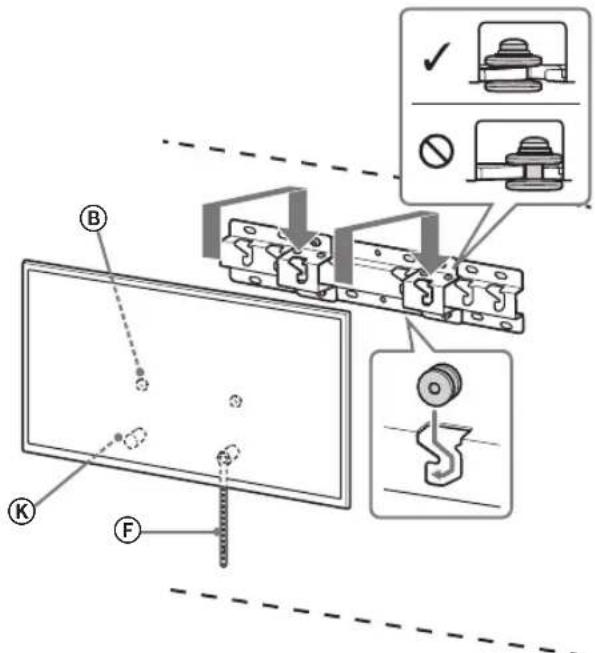
Tight mounting (2-b)
- Repeat the same procedure (the same procedure for a 75-inch TV) to hold the TV when carrying it.
Failure to follow the safety precautions below may result in death or serious injury due to electric shock, fire, tipping over, or falling of the product.
Be sure to contact a licensed contractor, and do not allow children to be near the installation site of the product.
Incorrect installation of the wall-mount bracket for the TV may lead to the accidents described below. Be sure to contact licensed contractors for installation.
The TV may fall and cause serious injury, for example, if the wall on which the wall-mount bracket is installed is not sturdy, is uneven, or is not vertical, the product may fall and be damaged or cause injury or property damage. The wall must support at least four times the weight of the TV. (To find out the weight of the TV, see the reference manual.) - If the wall-mount bracket installation is done on an insufficiently sturdy wall, the product may fall and be damaged or cause injury or property damage.
Safety precautions regarding children
Do not allow children to climb on the TV. Keep small parts out of the reach of children so they cannot swallow or choke on them.
After installing the TV, do not remove the screws, etc.
Otherwise, the TV may fall and cause injury or property damage.
Do not disassemble or modify the parts of the wall-mount bracket.
Otherwise, the wall-mount bracket may fall and cause injury or property damage.
Do not install any other equipment on the bracket other than specified.
This wall-mount bracket is intended for use only with the specified products. If equipment not intended for such installation is attached to this mounting bracket, it may fall or be damaged, and may also cause injury or property damage.
To avoid overloading the wall-mount bracket, do not place anything other than the TV on it. Do not push the TV left/right or up/down.
In any case, the TV may fall and become a cause of injury or property damage.
Do not lean on the TV or hold onto it.
Do not lean on the TV or hold onto it, as it may fall and become a cause of injury or serious damage.
WARNING
When following the precautions below, there is a risk of injury or property damage.
Care must be taken without applying excessive force.
Do not overload the top of the TV. Otherwise, the TV may fall and become a cause of injury or property damage.
Precautions
If the TV, mounted on a bracket for wall mounting, is used for a long period of time, depending on the wall material, the wall behind or above it may become discolored or the wallpaper may peel. - After removing the bracket for wall mounting, holes will remain in the wall. Do not use the bracket for wall mounting in places with mechanical vibrations.
Do not install the bracket for wall mounting on walls where the edges of the TV will protrude beyond the edges of the wall.
Do not install the bracket for wall mounting on such wall surfaces (for example, on slopes) where the edges of the TV will protrude beyond the edges of the wall surface. Hitting the protruding edge of the TV may cause injury or property damage.
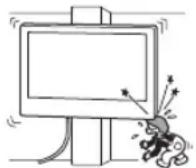
Do not install the TV under or over an air conditioner.
If during a long period of time the TV is exposed to the airflow from an air conditioner or a stream of air from an air conditioner, this may become a cause of fire, electric shock, or malfunction of the TV.
Be sure to securely attach the bracket for wall mounting to the wall, following the instructions given in this manual.
If any of the screws are loose or missing, the bracket for wall mounting may fall and become a cause of injury or property damage. When performing the installation, be sure to use screws that match the wall material and securely install the device, using at least four screws of 8 mm (or equivalent).
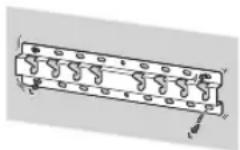
Be sure to use only the screws and parts included in the kit for mounting, and strictly follow the instructions provided in this installation guide. If other mounting materials were used during installation, the TV may fall and be damaged or cause injury.
Be sure to perform the assembly of the bracket exactly following the instructions provided in this installation guide.
If any of the screws are loose or fall out, the TV may fall and be damaged or cause injury.
Tighten the screws securely into the designated mounting holes.
Otherwise, the TV may fall and be damaged or cause injury.
Make sure that the TV is not subjected to impacts during installation.
Impacts may cause the TV to fall and be damaged. This may lead to injury.
Install the TV on a wall only if it is positioned at a right angle to the floor.
Otherwise, the TV may fall and cause injury.
After properly installing the TV, ensure the safe routing of cables.
Cables that pose a tripping hazard or obstruction may cause injury or damage to the TV.
Do not allow cables to become tangled.
with connecting cables.
If the power cord or connecting cables are pinched between the device and the wall, or are bent or twisted, the internal wires may be damaged, which could cause a short circuit or break. This may result in fire or electric shock.
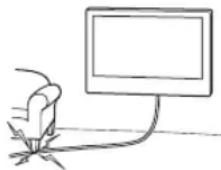
The screws for mounting the bracket to the wall for wall-mounted installation are not included in the supply package.
The wall mount bracket is designed for installation on walls; use screws that match the material and structure of the wall.
The screws should be stored in their cardboard packaging in a dark, dry, clean, and well-ventilated room, away from direct sunlight and heat sources. Storage temperature: from -20°C to +60°C. Storage humidity: < 80%
Do not install the TV on a shelf, carpet, bed, or in a cabinet.
Do not cover the TV with cloth, such as curtains, or with newspapers, etc.
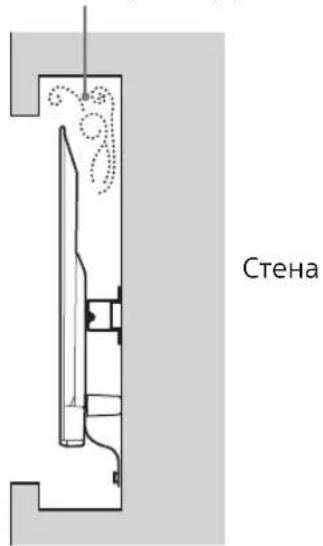
Do not install the TV as shown in the figure below.
Air circulation is obstructed.
Installation
- Before installation, if you plan to route cables through the wall, also determine the cable openings and drill the holes in the wall. To prevent cable damage, prepare the wall opening in the area behind the base plate (20) A, the base plate (20) E, and the grommets (60) K.
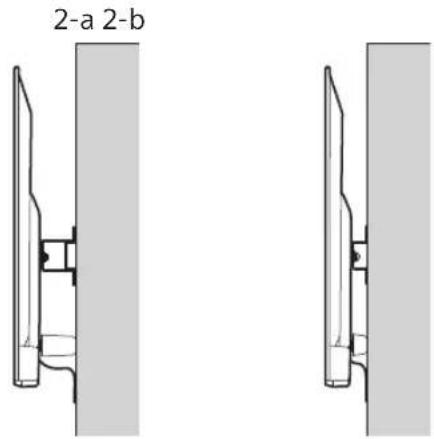
2 Choose the wall mount method. The distance from the back of the TV to the wall can be selected as shown below.
2-a Standard mounting
2-b Compact installation
See step 1 in the table.
WARNING
- When choosing option 2-b, access to the rear connectors is restricted.
3 The position of the base plate mounting holes is shown in the table below. If you choose option 2-b, skip this step.
Placement of the bracket
KDL-50WG6□□
KDL-43WG6□□
C
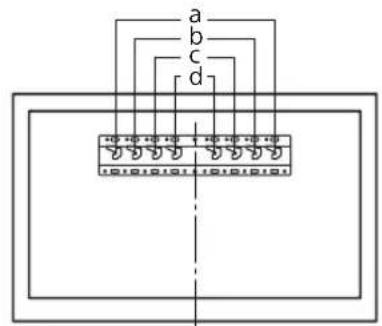
Attach the base adapter ① with the screw (PSW 4x10) to the base (20) A when selecting option 2-a.
Determine the screw positions for installing the base (20) A.
See specifications on page 13. When selecting option 2-a, use the hole positions of the base adapter ①.
WARNING
The wall on which the TV will be installed must support at least four times the total weight of the TV (to find out the weight of the TV, see the reference guide).
- Determine the strength of the wall on which the TV will be installed. If necessary, reinforce the wall.
Installing the base on the wall
- Use four or more screws with a diameter of 8 mm or equivalent (not supplied). Insert the four screws into the holes of the base adapter ①, and attach it to the base (20) A (only 2-a).
- Install the base (20) A horizontally on the wall.
Standard mounting (2-a)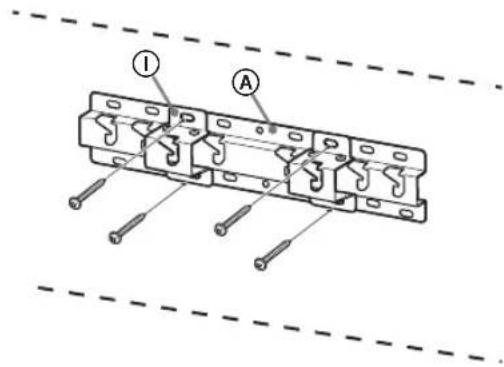
Compact installation (2-b)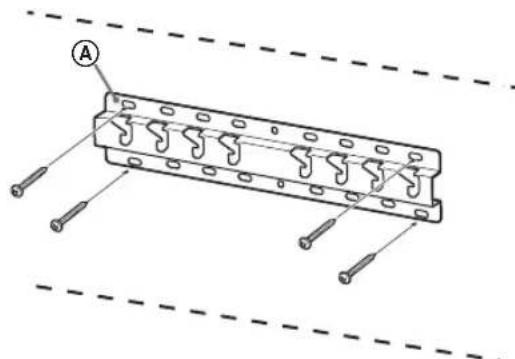
Compact installation (2-b)
Note
You will not be able to use some of the connectors on the rear panel of the TV with this type of installation.
Connect the necessary cables to the TV.
Before installing the TV on the wall, you must connect the cables. After installing the TV, connecting the cables will be impossible. See the User Manual supplied with the TV.
Note
- Have the cable routing done by a qualified installer. - Before mounting the device on the wall, lay the connecting cables so that you do not accidentally step on them.
Wall-mounting the TV
1 Mount the TV onto the base or the base adapter.
The position of the hooks on the base or base adapter is shown in Table 7 in the section "Determining the installation position" on page 8. Carefully lower the TV and hang the hooks, which are installed on the rear panel of the monitor, onto the base or base adapter, aligning the holes. - After installing the TV on the wall, make sure that the hooks are securely fixed in the base or base adapter. Gently release both hands and make sure the TV is securely installed.
Standard mounting (2-a)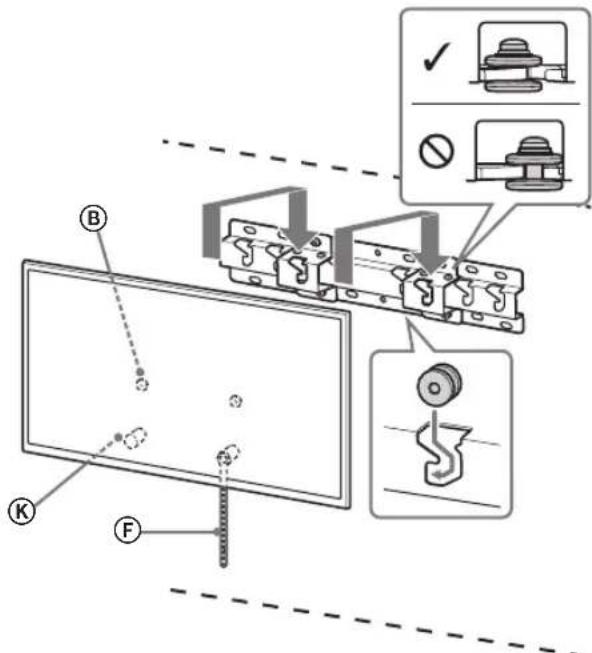
Compact installation (2-b)
WARNING
- Make sure that the TV is held by two or more people (three or more people for TVs with a screen size of 75 inches or larger) when carrying it.
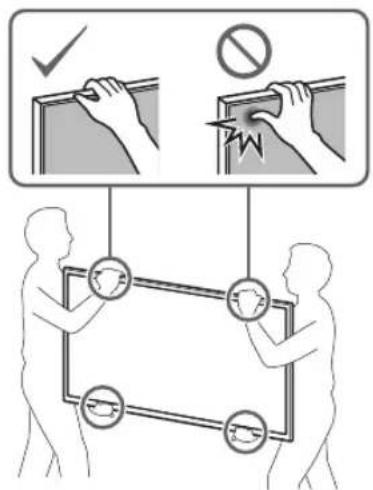
2 Adjusting the tilt of the lower part of the TV.
- Attach the strap F securely and fix it to the wall.
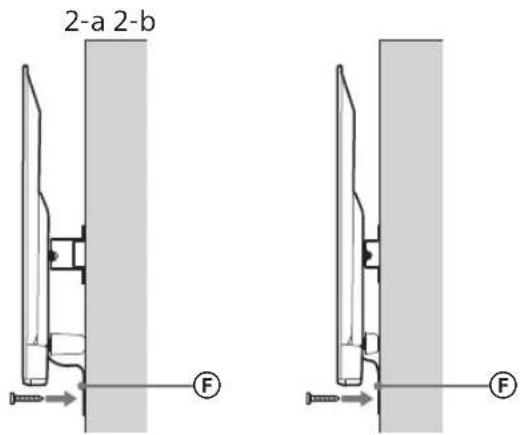
- Use a screw with a diameter of 5 mm or its equivalent (not supplied).
Application
Gently pull the bottom of the TV towards you to make sure it does not tilt forward. If there is any play, the TV is not secured properly, and strap F should be attached lower.
- The hooks ⑧ are securely attached to the base or the base adapter.
- The cord and cable are not twisted or pinched.
- Strap F is securely attached without slack.
WARNING
- Incorrect routing of cables, cords, etc. can lead to fire or electric shock due to a short circuit. To ensure safety, make sure all installation steps are completed.
Information
To remove the TV, perform the procedure described above in reverse order.
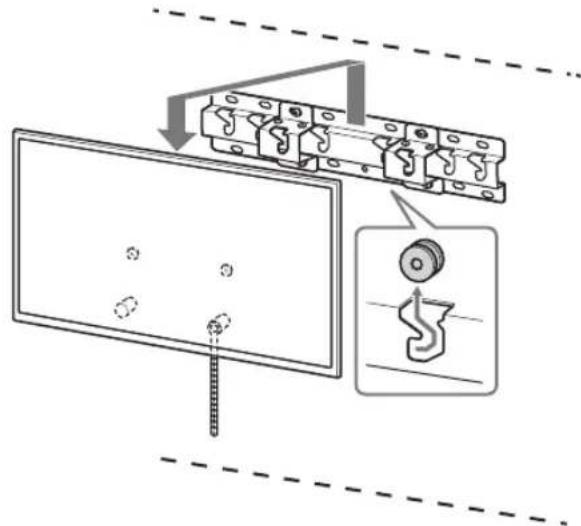
CAUTION
Make sure that the monitor is held by two or more people (two or more people should carry the TV with a screen size of 50 inches or larger) when removing it.
Technical specifications
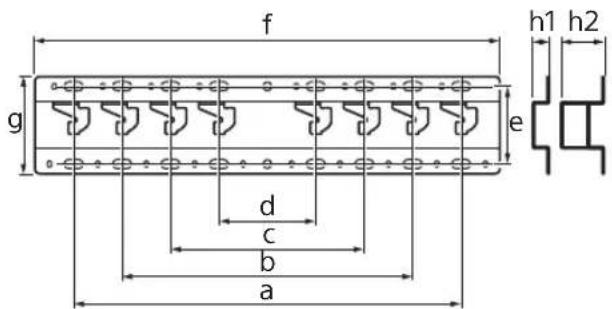
Dimensions: (approx.) [mm]
Remove the bolts, too, when mounting the TV.
If this is done, the TV can cause serious injuries or lead to damage.
Do not remove the wall mount bracket parts for partial mounting.
If this is done, the wall mount bracket for partial mounting can cause serious injuries or lead to damage.
Do not install any other devices other than the specified product.
The wall mount bracket for partial mounting is intended for use only with the specified product. Installing other devices may cause the bracket to fall, resulting in serious injuries or damage.
Do not use the wall mount bracket for partial mounting for hanging the TV on the ceiling. Do not tilt the TV left/right or up/down.
If this is done, the TV can cause serious injuries or lead to damage.
Do not lean on the TV or hang from it.
Do not lean on the TV or hang from it, as it may fall on you and cause serious injuries.
WARNING
If the above safety precautions are not followed, it may lead to serious injuries or damage.
Installing the wall mount bracket for partial mounting
When mounting the wall mount bracket for partial mounting, use bolts appropriate for the wall structure and material, as specified.
Store the product in its cardboard box, in a dark, dry, clean place with good ventilation, away from areas where acids and alkalis are stored. Storage temperature: -20 to +60°C. Storage humidity: <80%.
Mounting the TV on the wall
The installation procedure differs depending on the TV model.
To mount the TV on the wall, use the wall-mount bracket SU-WL450.
Removal
The TV comes with a wall-mount bracket attached. Remove it. Refer to the setup guide and perform the steps in reverse order to remove the wall-mount bracket. - To avoid damaging the remote control during installation of the mounting elements or removal of the wall-mount bracket, place the TV screen down on a flat, stable surface covered with a thick, soft cloth. Keep the screws in a safe place, as they are necessary for the TV.
Preparing for installation
- Before installation, carefully read the manual and the TV setup guide.
- Before assembling, make sure you have the cross-head screwdriver that fits the screws.
- Check the installation location. Prepare four screws with a diameter of 8 mm and four screws with a diameter of 5 mm or equivalent (not included in the package). Choose the screws according to the material of which the wall is made.
Checking the parts
Supplied: SU-WL450
- Check that all parts are included in the package.
| AБаза(20)(1)ВШК | В(2) |
| CГВИNTPSW6x20(4) | DГВИNTPSW4x20i3ВТУЛКОЮ(2) |
| EПрOKладka(20)(2) | FРемиь(1) |
| GВтулka(20)(M4)(2) | HГВИNTPSW4x20(2) |
| IПерек中级6aЗn(2) | JГВИNTPSW4x10(8) |
| KПрOKладka(60)(2) | LГВИNTPSW6x50(2) |
| МВтулka(M4)(2) | NГВИNTPSW4x50(2) |
Determining the installation location
1 Determine the installation location.
Make sure the wall has sufficient dimensions and can support a weight at least four times the weight of the TV.
Yes, the necessary installation of the TV on the wall can be found in the table below. The weight of the TV can be found in the TV manual.
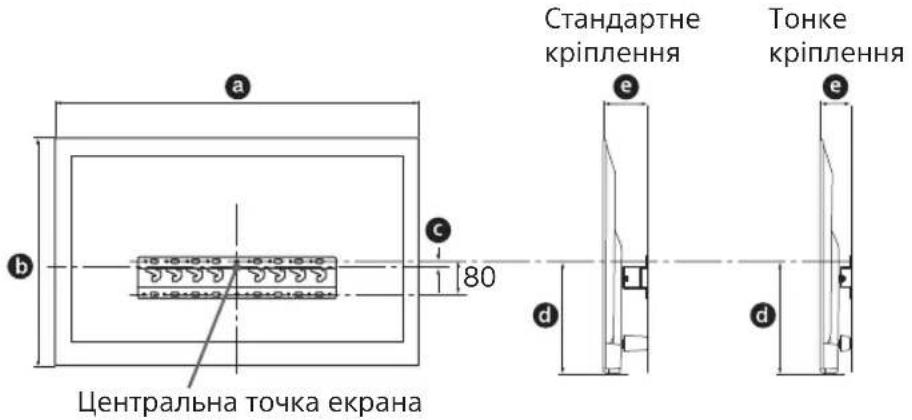
Standard mounting
Do not cover the TV with fabric (curtains) or other materials, such as newspapers. Do not install the TV as shown below.
Damaged
The product is damaged.
Note
If you plan to route cables through the wall, make a hole in the wall to insert the cables before starting installation. To prevent cable damage, make a hole in the wall outside the perimeter of the base (20) A, the base cover ① and the cable guide (20) E, the cable guide (60) K.
2 Selecting the wall installation method. Select the distance between the TV and the wall as shown below.
- If you select option 2, access to the ports on the rear panel will be limited.
From the installation position of the base, refer to the table below. If option 2 is selected, skip this step.
| Ha3Ba модени Розашиванения raкib | |
| KDL-50WG6□□ | c |
| KDL-43WG6□□ | |
Tightening (option 2)
Note
With this installation option, you will not be able to use some ports on the rear panel of the TV.
The TV connection requires cables.
Check the cable connections before installing the TV on the wall. After installing the TV, it will be impossible to connect the cables. See the TV manual.
Note
- Have the wall mounting of the TV cable done by a licensed professional. Route the cables inside the wall to prevent them from being caught under the TV during installation.
Mounting the TV on the wall
1 Mount the TV on the base or the base stand.
- Insert the hooks ⑧, by which the TV is hung on the base or the base stand, into the slots for the installation stage in the section “Determining the mounting position” on page 7. Carefully lower the TV and hang the hooks ⑧, attached to the back of the TV, on the base or the base stand (they must match the size of the holes).
- After mounting the TV on the wall, make sure that the hooks are securely fastened to the base or the base stand. -Fully push the TV against the wall, making sure it does not fall.
Standard mounting (2-a)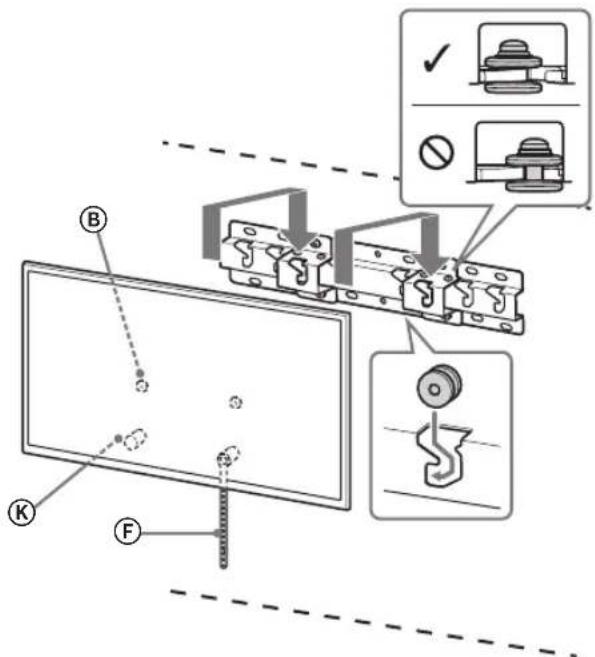
Thin mounting (2-b)
WARNING
When moving the TV, at least two people are required (three people if the TV diagonal is 75 inches or more).
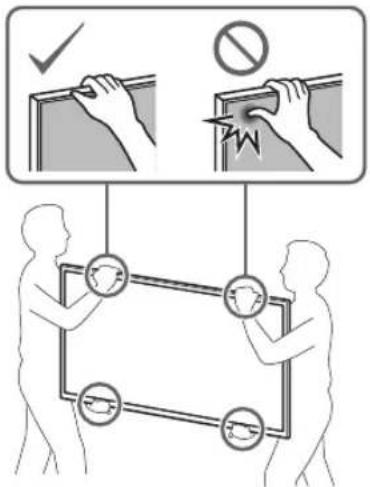
2 Avoid injuring your hands or feet.
Choose a flat surface and temporarily cover it with a cloth.
Use a screwdriver with a 5 mm tip or equivalent (not included in the package).
Note
Try gently pulling the TV toward you to make sure it does not move forward. If the TV moves, its mounting is incorrect and you need to redo the mounting steps.
Check the installation is complete.
Check the assigned values of each point.
- If a base or a front panel for the base is installed.
- The cord and cable are not crossed or pinched.
- The relay is securely closed without gaps.
WARNINGS
- Incorrect placement or handling of the alternating current can cause interference or electric shock to persons due to a short circuit. For safety, always check everything after installation is complete.
Additional information
Under no circumstances should you touch the TV during the installation procedure on the swivel stand.
WARNINGS
Risk of injury to the eyes. The TV is heavy (weighing 75 kg or more).
Technical specifications
Dimensions: (approx.) [mm]
a:400
b:300
c:200
d:100
e:80
f:480
g:100
h1:20 (bunaok2-b)
h2:60 (Bunapok2-a)
Bara (Tilbkn 6a3a): (npn6.) [Kr]
0.8
Construction and technical characteristics may be changed without prior notice.
Installation (2-b)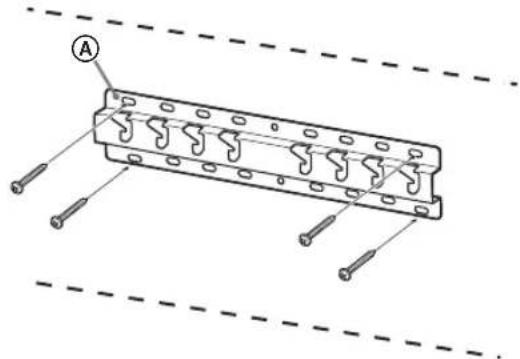
Installation (2-b)
Markus.
Installation (2-b)
WARNING
Mass (base only): (approx.) [kg]
0.8
h1:20 (2-b variants)
Manufacturer: 2-10-1 Osaki, Shinagawa-ku, Tokyo, 141-8610
Authorized representative in Russia: LLC "Heringder", 123103, Moscow, Karamyshevsky proezd, 6
Made in China
WARNING!
Do not use with fans
This product is intended for use with the specified thermostat. To prevent the thermostat from overheating, do not connect it to other devices.
For users
CAUTION
If these instructions are not followed, electric shock, fire, or damage to the fan may occur, or the product may malfunction.
Installation must be performed by a licensed electrician, and the fan must be installed out of reach of children.
If the thermostat is not installed correctly, it may cause a fire. A licensed electrician must install it according to the instructions.
Do not use the fan with a damaged cord, plug, or other parts. If the thermostat is not installed correctly, the fan may malfunction, catch fire, or be damaged. Do not use the fan if it is damaged. (Contact the manufacturer for repair.) If the thermostat is not installed correctly, the fan may malfunction, catch fire, or be damaged.
Bananapra Teneiunap yctine uibiyar pykcat 6epmeh. -yaKxa6bIbIbTapBn 6bnanapdAnaynakYCTaHbI3,xyTbIN KOIMacBH.
TeJeIaPbI TaBImaIay HeMece 6eKeTey KMbICTapbIH IuueH3nrcbI 6ap MePdirepJep JacaybI KepeK.
JIuehen3nBapMepdirepnpenBacka adamdapTelendapdbTacbmandaCHeMece BenweKeTece,onKynan,KapaKaTkaHemece MynikTHaBbIMDaHybHaAekenyiMYMKH. TeendapblkHeHMeceOaNKHaAM(75 IIOHMdiXeOaHYNKeHTeNDapKHNHafti yuiH YUHMeceOaN KEN aAM) TaCbImanayraHMeceWSeYrMyMKHdkTepi KeTeTINdrIn TekepeiH3.
TeJeIaapbl 6eKITKeHHeH KeiH 6ypaHaapblxHe T.6. 6ocatnaHbI3.
Erep conai icteiH 60ncab13, teneiIap KnyaybI HeMece MynikTIh 3akBIMdHaHybl MyMkiH.
Ka6bipfara 6ekity kpoHwTeHHiH 6eJweKTEpih aybICTbIPMaHbI3.
Erep conai icTeiTH 60ncaHb3, kabipfara 6ekity KpOnuTneHi Knyayb Hemece Myniktih 3akimdaHyb Mykhi.
ApaHbI KypblrBdaH 6acka Kypalbl 6ekitneHi3.
Ocbkbipfara6kityKpOnHTeHi Te apnabblKpybIbnApmehBipre KOnaHy yuH xacanHan. Apnabbl KpybIbnDaH 6eKe KpyaNb6keiTceH3, on Kyan He cbHbIn, XkapakatKaHe MyNikTH, 3aKbIMaHaYbHa eKenyi MYMKIH.
Ka6biprara 6ekity kpoHwTeHiHe TeNeIaDapdAn 6aca 3aTTbI KOJaHa6aHbI3. TeNeIaDapDbI conra/ OHra, XoRapbl/TMeHn KaMaHaB13.
Erep conai icteiH 6oIcaHy3, TeeIaap Knyayb Hemece MynikTIH 3akBIMdAHybl MyMKH.
TeNeiIapra cyneH6eHi3 Hemece acblbIn TypMaHbI3.
Teneiapra cyeHcH3 he acblbIn typcaHb, on ci3re Kylan, ayblp xapaKaT anyblb3 MyMIKH.
ABAI BOJIbIHbI3!
The cable can be laid, the character of the load can be changed.
Do not pull the cable while it is under tension.
If the cable is not long enough, it can be extended or replaced.
Laying the cable
When laying the cable, the cable must not be bent at sharp angles, and the cable's material must not be subjected to temperatures above or below the permissible range. After laying the cable, inspect it for damage. The cable must not be laid in places where it can be mechanically damaged.
Laying the cable
During laying, do not pull the cable.
If the cable is pulled, it can be damaged or broken. This is a characteristic of the cable.
The cable must be laid perpendicular to the cable and the pipe.
If the cable is not, it can be damaged or its characteristics can change.
After laying the cable, secure the cable with clamps.
If there are any other obstacles, the cable can be protected from damage.
The power cable or control cable must be cut.
If the power cable or control cable is cut between the clamp and the cable, and if it is damaged or broken, the two ends must be connected, which can cause a short circuit or electric shock. This can cause a fire or electric shock.
No damage is allowed to the cable during laying.
The cable entry opening must be made with the material and dimensions specified by the manufacturer.
Preparing the cable entry
The cable entry preparation procedure is described below.
For the TД cable entry, the SU-WL450 cable entry kit is provided.
Instructions
If the upper cover is closed, open the upper cover. Follow the instructions and remove the screws on the upper part. To prevent the cover from closing and to ensure proper cable entry, either keep the upper cover open or, when closing the upper cover, ensure that the cables are not pinched. If the cables are pinched, they may be damaged. Use only the provided brackets and screws.
Preparing the opening
Before preparing the opening, read the instructions and prepare the opening. Use a Phillips screwdriver to remove the screws. Do not damage the cables. The diameter of the hole should be 5 mm or 6 mm, or use a suitable hole saw. Make the hole in the material.
Removing the knockout
Provided with the SU-WL450
- Remove the knockout if it is present.
| A Heri3 (20) (1) B Terepiik (2) | |
| ◎ PSW 6x20 (4)◎ TblfbiH PSW 4x20 (2) | |
| ◎ ApaIbIK (20) (2)◎Белдik (1) | |
| ◎ TblfbiH (20) (M4) (2) | ◎ H PSW 4x20 (2) |
| ◎ Heri3ri ādantep (2) | ◎ J PSW 4x10 (8) |
| ◎ ApaIbIK (60) (2) L | PSW 6x50 (2) |
| ◎ TblfbiH (M4) (2) N | PSW 4x50 (2) |
Identifying the mounting location
1 Identify the mounting location.
Check that there is a suitable location for the TД and that the TД can be mounted without interference.
Refer to the section on preparing the cable entry. For cable maintenance, refer to the cable entry instructions.
Kypan:MM
| Ynlri hemipi | Зкран салем dipei | Зкран opтасьин cIшемi | Орнату узыдьгы | |
| a | b | c | d | |
| Стондантсы opнату | ||||
| KDL-50WG6□□ | 1130 660 21 358 130 88 | |||
| KDL-43WG6□□ | 974 572 54 346 130 88 | |||
HycKay
KecTeDerI DepeKTe pOHaTyfa 6aJNaHbICtbl a3Dan e3reWeJeHyi MymKin. TДKa6bIpFaraOpHaTbInFaHdTaKoFapBf6eNiria3an anraEKeJeDi.
Teeneiap MeT Te6e XHe Ka6bipraHbIH WbIFbIKbI 6JIiKTepi apacbIHda TeMeHde KepcetilreHdien aWbIK opbIH KaJDbHbI3.
Kypan:MM
Tnicti xenety khe Kip MeH wahhbH XnHaanybH 6oNdbpMay yuH:
- TД-ды Калларын КйmaHbI3, XKorapfbl KaFbIH TemeH Kapai, apTKa KapaTbIn Hemece KbIpbIMeH opHaTnAbI3. TД-дьсере, kinemre, TeceKKe Hemece uKaΦKa KOnMaHbI3. TД-ды nepденер сяктшубepkeн HeMece ra3etTeP T.6.CNkTbI 3JIeMeHTTepeMn KaHNaHbI.
- TД-ды TeMeHne KepeTeIReHneI opHaTnaHbI3. Aya aHaNbIMbl 6NOKTaJFaH.
HycKay
Ka6enbepdi Ka6bipra iWine caBHn 60ncahb3, opHATnac 6ypbH Ka6enb cAnbHaTbH Ka6bipraHbI Tecin aNyblh3 KepeK. Ka6enbep Kbcbln KaJMac yuiH eri3 (20) A, Herizri anaTep 1 MeH apanik (20) E, apanik (60) K nepimetpiHeH Tbc Ka6bipraHaH caBHJaY daBHHaHb3.
2 Ka6bipfara opnaty ctniH TaHaH3. TeJeIaapdbIH apTKbl XaftMeH Ka6bipfa apakaawbIKtbfbIH TEmHeKepcetinreHdenn TaHdayFa 6oNaDbpeTteNeDi.
2-a CtaHdapTTbOpHaTy 2-b KaKbIH opHaTy
1-Kaam KecTecIHe KapaHbI3.
ECKEPTY
-2-b TaHdaIraH Ke3e, ApKbI TepMHaIFa KaTbIac WeKeTeyni 6oana.
3. Attach the base to the selected holes using the screws. In case of 3.2-b selection, insert this screw and tighten it.
| Y NFLI HEMIPI IIMEK OPHBII |
| KDL-50WG6□□C |
| KDL-43WG6□□ |
Attach the base ① to the selected holes (20) A using the screws ②.
For the 4 base (20) A holes, use the screws.
Refer to the 12-page diagrams. In the case of 2-a selection, insert the base ① into the opening.
REMOVAL
To remove the cables, refer to the cable removal instructions (see the cable removal section).
Determine the tension of the cable attachment. If necessary, loosen the attachment slightly.
Cable routing
- For diameters 8 mm or larger, do not use the screws (provided). Attach the base with the screws (20) A (only 2-a). Place the base in the cable routing.
Standard routing (2-a)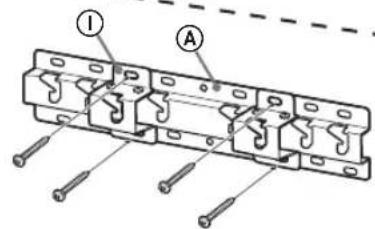
Correct routing (2-b)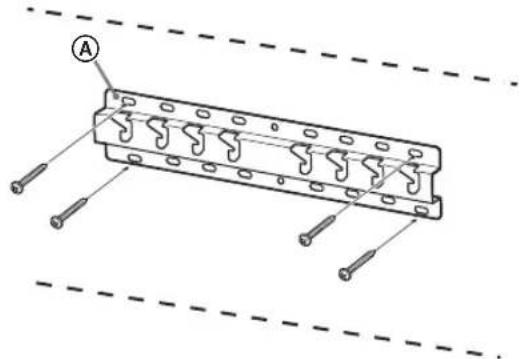
Cable routing guide
Refer to the direct routing instructions.
1. Remove the upper cover from the device.
Instructions
The device must be installed by qualified personnel in accordance with the manufacturer's instructions. When installing the device, ensure that the power supply is disconnected. If the power supply is disconnected and the device is not in use, it should be stored properly. If the device is not used for a long time, it should be stored in a dry place.
EXPERT
Before connecting the device to the power supply, check the voltage rating. To avoid any risk of electric shock, the device must be connected to a grounded power outlet. If the device is not working properly, it may be necessary to replace or repair it. The device has a power cord and plug that must be connected to a grounded outlet. If the device's power cord or plug is damaged, it should be replaced immediately. - When the power cord is disconnected from the device, do not pull on the cord.
2 For installation of the device, follow the instructions in the installation manual. See the section "Connecting the device" in the manual for the SU-WL450 model.
Note
- Before installing the device, read the instructions carefully. If the device is not installed correctly, it may cause damage. - If the device is not installed correctly, it may cause damage. Follow the instructions in the manual to avoid any risk.
Standard installation (2-a)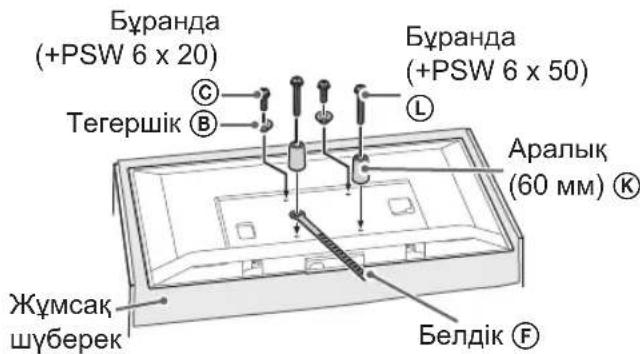
Wall installation (2-b)
Note
- During installation, some terms may be used that are not familiar to you.
3 Connect the cables to the device.
After placing the device, connect the cables. After placing the device, the cables may be connected. See the instructions for connecting the device.
Note
When connecting the cables, be careful not to damage them. Before connecting the cables, make sure they are not damaged.
Place the device on the wall
1. Install the device on a flat, stable surface.
Install the device on a flat, stable surface using the mounting bracket (8) with 7 bolts. - Connect the device to the power supply, then connect the device to the network using the Ethernet cable. - After installation, check that the device is securely attached to the flat or stable surface. To avoid device malfunction, do not use both hands.
Standard installation (2-a)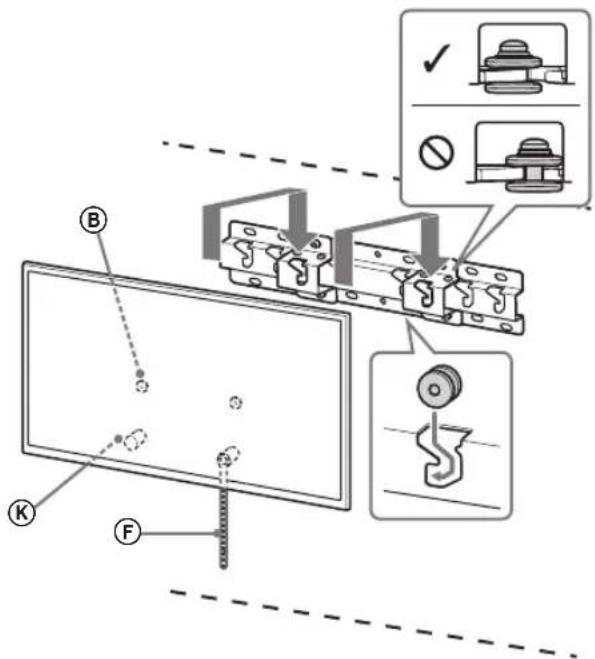
Reversed installation (2-b)
NOTE
After installing the device, check that it is securely attached to the flat or stable surface (for devices larger than 75 mm or heavier than 1 kg, use additional support).
2. Do not allow the device to get wet.
- Take the bracket (F), place it against the surface, and mark the mounting holes.
- Use drill bits of 5 mm diameter or larger (if not provided).
CAUTION
To ensure the device is securely attached, first check the mounting surface. If it is uneven, use the provided bracket (F) to secure it.
Checking the installation
Check the connections.
Ensure the device is securely attached to the flat or stable surface. - Check that the cable is not damaged or pinched. - The bracket (F) must be securely fastened.
NOTE
The device must be installed in accordance with the manufacturer's instructions. The installation must be carried out by qualified personnel.
Other equipment
The devices must be installed in accordance with the installation procedure.
WARNING
When installing the devices, use the supplied mounting brackets (75 mm or 100 mm) depending on the device size.
Technical specifications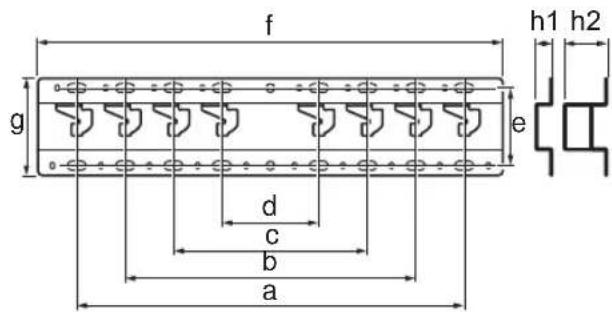
#
177
720
Sony
77
77
Sony
| n n n n n | o o o |
| c | KDL-50WG6□□ KDL-43WG6□□ |
__SUPPIMER__
1 IN DODN
nnn nn n nn nn nn nn
by nopn,ovan by nnbn
.
NTN
yNnynnn
(2-a) n7n7n7n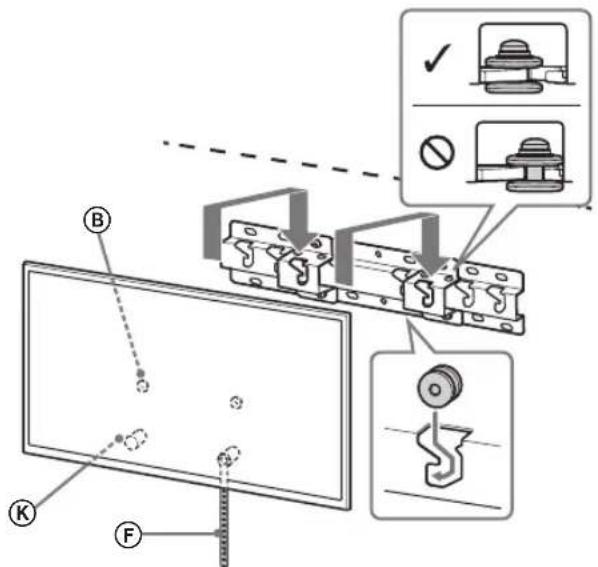
2nnn nn (2-b) nnnn
.
NNN F NNNNN
n 5 7
. (Pnno) n
nyn
77
- 7n nn nn nn nnn nn nn nn nn
-
NnON.
F
75 75
[2n] (7y):
400: a
300: b
200: c
100: d
80: e
480: f
100: g
(2-b npp) 20: h1
(2-a nnp) 60: h2
[1] (7y): (7y)
0.8
y
nppnn nnuyn
.
.
∴ S ΔOBC = S ΔCOD + SΔBOC
.
.
77
·
nn Dn np n nn nn nn
mivan yn npnn
77
nppnn nn nyn yy, npbn nn ny
∴ PB BA
77
ybn75
nannnny
- ON SAFETY
- TO CUSTOMERS
- TO SONY DEALERS
- CAUTION
- SPECIFIED PRODUCTS
- WARNING
- BE SURE TO SUBCONTRACT THE INSTALLATION TO LICENSED CONTRACTORS AND KEEP SMALL CHILDREN AWAY DURING THE INSTALLATION
- BE SURE TO SUBCONTRACT MOVING OR DISMOUNTING OF THE TV TO LICENSED CONTRACTORS
- DO NOT REMOVE SCREWS, ETC., AFTER MOUNTING THE TV
- DO NOT MAKE ALTERATIONS TO THE PARTS OF THE WALL-MOUNT BRACKET
- DO NOT MOUNT ANY EQUIPMENT OTHER THAN THE SPECIFIED PRODUCT
- DO NOT LEAN ON OR HANG FROM THE TV
- DO NOT HANDLE THE PRODUCT WITH EXCESSIVE FORCE DURING CLEANING OR MAINTENANCE
- PRECAUTIONS
- INSTALLING THE WALL-MOUNT BRACKET
- DO NOT INSTALL THE TV OVER OR UNDER AN AIR CONDITIONER
- BE SURE TO INSTALL THE WALL-MOUNT BRACKET SECURELY TO THE WALL FOLLOWING THE INSTRUCTIONS IN THIS INSTRUCTION MANUAL
- BE SURE TO ASSEMBLE THE BRACKET PROPERLY FOLLOWING THE INSTRUCTED PROCEDURE EXPLAINED IN THIS INSTRUCTION MANUAL
- BE SURE TO TIGHTEN THE SCREWS SECURELY IN THE DESIGNATED POSITION
- BE CAREFUL NOT TO SUBJECT THE TV TO SHOCK DURING INSTALLATION
- BE SURE TO INSTALL THE TV ON A WALL THAT IS BOTH PERPENDICULAR AND FLAT
- AFTER PROPER INSTALLATION OF THE TV, SECURE THE CABLES PROPERLY
- DO NOT ALLOW THE MAINS LEAD OR THE CONNECTING CABLE TO BE PINCHED
- THE SCREWS NEEDED TO SECURE THE WALL-MOUNT BRACKET TO THE WALL ARE NOT SUPPLIED
- INSTALLING THE TV ONTO THE WALL
- NOTE
- PREPARING FOR INSTALLATION
- CHECKING THE PARTS
- SUPPLIED WITH SU-WL
- DECIDING ON THE INSTALLATION LOCATION
- DECIDE ON THE INSTALLATION LOCATION
- INSTALLING THE BASE ON THE WALL
- PREPARING FOR THE INSTALLATION OF THE TV
- DETACH THE TABLE-TOP STAND FROM THE TV
- ATTACH THE ATTACHMENT PARTS FOR WALL-MOUNT BRACKET. CHECK THE ATTACHMENT PARTS BY REFERRING TO "SUPPLIED WITH SU-WL450" IN "CHECKING THE PARTS" ON PAGE
- SLIM MOUNTING (2-B)
- CONNECT THE NECESSARY CABLE(S) TO THE TV
- INSTALLING THE TV ON THE WALL
- INSTALL THE TV ONTO THE BASE OR BASE ADAPTOR
- PREVENTING THE BOTTOM OF THE TV FROM SHIFTING
- CONFIRMING THE COMPLETION OF THE INSTALLATION
- OTHER INFORMATION
- SPECIFICATIONS
- DIMENSIONS: (APPROX.) [MM]
- WEIGHT (BASE ONLY): (APPROX.) [KG]
- PREPARATION FOR INSTALLATION
- FIND THE TV'S LOCATION
- DO NOT TIGHTEN THE SCREWS BEFORE MOUNTING THE TV
- DO NOT SKIP THE PARTS OF THE BRACKET FOR WALL MOUNTING
- DO NOT MOUNT OTHER EQUIPMENT OTHER THAN THE SPECIFIED PRODUCT
- DO NOT USE THE WALL MOUNT BRACKET FOR ANY PRODUCT OTHER THAN THE TELEVISION. DO NOT PLACE THE TELEVISION ON THE FLOOR OR ON A SLANTED SURFACE
- DO NOT LEAN ON OR HANG FROM THE TELEVISION
- DO NOT SUBJECT THE PRODUCT TO EXCESSIVE FORCE DURING CLEANING OR REPAIR
- SUPPLIED SCREWS
- WALL MOUNT BRACKET INSTALLATION
- DO NOT MOUNT THE CONSOLE FOR WALL MOUNTING ON A WALL SURFACE WHERE THE TV SCREEN PROTRUDES FROM THE WALL SURFACE
- DO NOT MOUNT THE TV ON OR UNDER AIR CONDITIONERS
- MOUNT THE WALL MOUNTING CONSOLE SECURELY TO THE WALL BY FOLLOWING THE INSTRUCTIONS IN THIS MANUAL
- MAKE SURE TO USE THE CONSOLE CORRECTLY BY FOLLOWING THE PROCEDURE DESCRIBED IN THIS MANUAL
- TIGHTEN THE SCREWS SECURELY IN THE INDICATED POSITION
- BE CAREFUL NOT TO HIT THE TV DURING INSTALLATION
- MOUNT THE TV ON A WALL THAT IS PERPENDICULAR AND FLAT
- CONNECT THE PLUGS TO THE TV AND ENSURE THE CABLES ARE PROPERLY CONNECTED
- DO NOT ALLOW THE POWER CORD OR CONNECTING CABLES TO BE PINCHED
- THE SCREWS REQUIRED FOR SECURING THE WALL MOUNT BRACKET TO THE WALL ARE NOT INCLUDED IN THE PACKAGE
- WALL MOUNTING THE TV
- MOUNTING THE WALL PLATE
- PREPARING FOR TV MOUNTING
- REMOVE THE STAND FROM THE TV
- TIGHT MOUNTING (2-B)
- SPARE PARTS
- CONNECT THE NECESSARY CABLES TO THE TV
- MOUNTING THE TV ON THE WALL
- MOUNT THE TV TO THE BASE PLATE FOR THE BASE
- BE SURE TO CONTACT A LICENSED CONTRACTOR, AND DO NOT ALLOW CHILDREN TO BE NEAR THE INSTALLATION SITE OF THE PRODUCT
- SAFETY PRECAUTIONS REGARDING CHILDREN
- AFTER INSTALLING THE TV, DO NOT REMOVE THE SCREWS, ETC
- DO NOT DISASSEMBLE OR MODIFY THE PARTS OF THE WALL-MOUNT BRACKET
- DO NOT INSTALL ANY OTHER EQUIPMENT ON THE BRACKET OTHER THAN SPECIFIED
- TO AVOID OVERLOADING THE WALL-MOUNT BRACKET, DO NOT PLACE ANYTHING OTHER THAN THE TV ON IT. DO NOT PUSH THE TV LEFT/RIGHT OR UP/DOWN
- DO NOT LEAN ON THE TV OR HOLD ONTO IT
- DO NOT INSTALL THE TV UNDER OR OVER AN AIR CONDITIONER
- BE SURE TO SECURELY ATTACH THE BRACKET FOR WALL MOUNTING TO THE WALL, FOLLOWING THE INSTRUCTIONS GIVEN IN THIS MANUAL
- BE SURE TO PERFORM THE ASSEMBLY OF THE BRACKET EXACTLY FOLLOWING THE INSTRUCTIONS PROVIDED IN THIS INSTALLATION GUIDE
- TIGHTEN THE SCREWS SECURELY INTO THE DESIGNATED MOUNTING HOLES
- MAKE SURE THAT THE TV IS NOT SUBJECTED TO IMPACTS DURING INSTALLATION
- INSTALLATION
- A STANDARD MOUNTING
- B COMPACT INSTALLATION
- PLACEMENT OF THE BRACKET
- COMPACT INSTALLATION (2-B)
- WALL-MOUNTING THE TV
- MOUNT THE TV ONTO THE BASE OR THE BASE ADAPTER
- ADJUSTING THE TILT OF THE LOWER PART OF THE TV
- APPLICATION
- INFORMATION
- TECHNICAL SPECIFICATIONS
- REMOVE THE BOLTS, TOO, WHEN MOUNTING THE TV
- DO NOT REMOVE THE WALL MOUNT BRACKET PARTS FOR PARTIAL MOUNTING
- DO NOT INSTALL ANY OTHER DEVICES OTHER THAN THE SPECIFIED PRODUCT
- DO NOT USE THE WALL MOUNT BRACKET FOR PARTIAL MOUNTING FOR HANGING THE TV ON THE CEILING. DO NOT TILT THE TV LEFT/RIGHT OR UP/DOWN
- DO NOT LEAN ON THE TV OR HANG FROM IT
- INSTALLING THE WALL MOUNT BRACKET FOR PARTIAL MOUNTING
- REMOVAL
- SUPPLIED: SU-WL
- DETERMINING THE INSTALLATION LOCATION
- DETERMINE THE INSTALLATION LOCATION
- TIGHTENING (OPTION 2)
- THE TV CONNECTION REQUIRES CABLES
- MOUNT THE TV ON THE BASE OR THE BASE STAND
- THIN MOUNTING (2-B)
- AVOID INJURING YOUR HANDS OR FEET
- CHECK THE INSTALLATION IS COMPLETE
- WARNINGS
- ADDITIONAL INFORMATION
- INSTALLATION (2-B)
- MARKUS
- MASS (BASE ONLY): (APPROX.) [KG]
- DO NOT USE WITH FANS
- FOR USERS
- INSTALLATION MUST BE PERFORMED BY A LICENSED ELECTRICIAN, AND THE FAN MUST BE INSTALLED OUT OF REACH OF CHILDREN
- TEJEIAPBI TABIMAIAY HEMECE 6EKETEY KMBICTAPBIH IUUEH3NRCBI 6AP MEPDIREPJEP JACAYBI KEPEK
- TEJEIAAPBL 6EKITKEHHEH KEIH 6YPAHAAPBLXHE T.6. 6OCATNAHBI
- KA6BIPFARA 6EKITY KPOHWTEHHIH 6EJWEKTEPIH AYBICTBIPMAHBI
- APAHBI KYPBLRBDAH 6ACKA KYPALBL 6EKITNEHI
- KA6BIPRARA 6EKITY KPOHWTEHIHE TENEIADAPDAN 6ACA 3ATTBI KOJAHA6AHBI3. TENEIADAPDBI CONRA/ OHRA, XORAPBL/TMEHN KAMAHAB
- TENEIIAPRA CYNEH6EHI3 HEMECE ACBLBIN TYPMAHBI
- ABAI BOJIBIHBI
- DO NOT PULL THE CABLE WHILE IT IS UNDER TENSION
- LAYING THE CABLE
- DURING LAYING, DO NOT PULL THE CABLE
- THE CABLE MUST BE LAID PERPENDICULAR TO THE CABLE AND THE PIPE
- AFTER LAYING THE CABLE, SECURE THE CABLE WITH CLAMPS
- THE POWER CABLE OR CONTROL CABLE MUST BE CUT
- NO DAMAGE IS ALLOWED TO THE CABLE DURING LAYING
- PREPARING THE CABLE ENTRY
- INSTRUCTIONS
- PREPARING THE OPENING
- REMOVING THE KNOCKOUT
- PROVIDED WITH THE SU-WL
- IDENTIFYING THE MOUNTING LOCATION
- IDENTIFY THE MOUNTING LOCATION
- HYCKAY
- ECKEPTY
- CABLE ROUTING
- CABLE ROUTING GUIDE
- EXPERT
- WALL INSTALLATION (2-B)
- CONNECT THE CABLES TO THE DEVICE
- PLACE THE DEVICE ON THE WALL
- INSTALL THE DEVICE ON A FLAT, STABLE SURFACE
- REVERSED INSTALLATION (2-B)
- CHECKING THE INSTALLATION
- OTHER EQUIPMENT
- SONY
- NNN NN (2-B) NNNN
- NYN
- NPPNN NNUYN
Brand : SONY
Model : Bravia KDL43WG663
Category : Television