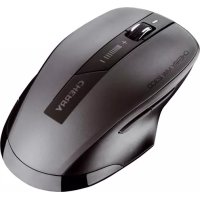
MW 2300 - Mouse Cherry - Free user manual and instructions
Find the device manual for free MW 2300 Cherry in PDF.



| Product type | Wireless optical mouse |
| Brand | Cherry |
| Model | MW 2300 |
| Dimensions (approx.) | 100 x 60 x 35 mm |
| Weight (with batteries) | Approx. 100 g |
| Power supply | 1 or 2 LR6 (AA) alkaline batteries, voltage 0.9 – 1.65 V |
| Battery life | Up to 733 hours with 2200 mAh batteries (1 hour/day, ~3 years) |
| Wireless range | 10 m (via USB nano receiver) |
| Sensor resolution | 1000 / 1500 / 2000 dpi (switchable) |
| Number of keys | Programmable with KeyM@n software |
| Power saving mode | Automatic after 0.2 s of inactivity |
| Sensor | Infrared |
| Compatibility | PC with USB port |
| Operating temperature | 0 °C to +40 °C |
| Storage temperature | -40 °C to +55 °C |
| Maintenance and cleaning | Slightly damp soft cloth (dish soap), dry with lint-free cloth; avoid solvents and liquids |
| Safety | Ergonomic advice to avoid repetitive strain injuries (RSI) |
| Spare parts | Removable nano receiver stored inside the mouse |
| Repairability | Repair by manufacturer or authorized service; legal warranty |
| General information | Manufactured by ZF Friedrichshafen AG, Germany; CE declaration available online |
Frequently Asked Questions - MW 2300 Cherry
User questions about MW 2300 Cherry
0 question about this device. Answer the ones you know or ask your own.
Ask a new question about this device
Download the instructions for your Mouse in PDF format for free! Find your manual MW 2300 - Cherry and take your electronic device back in hand. On this page are published all the documents necessary for the use of your device. MW 2300 by Cherry.
USER MANUAL MW 2300 Cherry
natural_image
Black and white image of a Denny Maw 2000 computer mouse with a small USB port (no visible text or symbols on the device body)Operating Manual....8
Mode d'emploi....12
natural_image
Close-up of a black computer mouse with visible scroll wheel and control buttons (no text or symbols on the mouse itself)DPI-Umschaltung DPI conversion Commutateur de ppp Comutación DPI Cambiamento DPI Dpi-omschakeling Comutação DPI
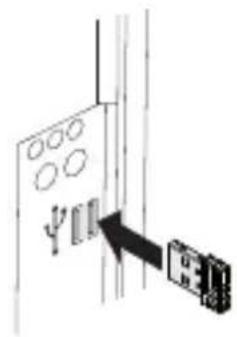
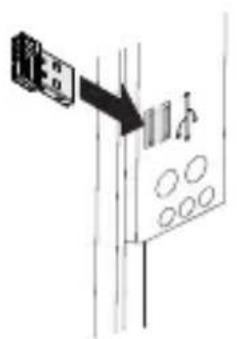
Empfänger anschließen Connecting receiver Raccorder le récepteur Conectar receptor Collegare il ricevitore Ontvanger aansluiten Ligar o receptor
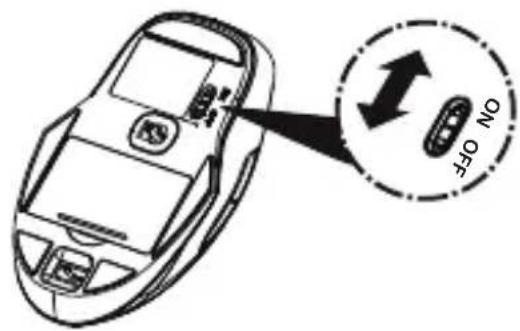
Maus einschalten Switching on the mouse Activation de la souris Encender el ratón Accensione del mouse Muis inschakelen Ligar o rato
Empfänger verstauen Storing the receiver Logement de récepteur Guardar el receptor Posizionamento del ricevitore Ontvanger opbergen Colocar o receptor
Batterien ersetzen Replacing the batteries Remplacement des piles Cambiar las pilas Sostituzione delle batterie Batterijen vervangen Substituir as pilhas

natural_image
Diagram of a car interior showing a battery pack and electrical connector (no text or symbols)
Herzlichen Glückwunsch ...
CHERRY has developed and produced innovative input systems for computers since 1967. You can now experience the difference in quality, reliability and design with your new favorite accessory.
Always insist on original CHERRY products.
For information on other products, downloads and much more, visit us at www.cherry.de
Your CHERRY mouse stands out especially due to the following features:
• Extremely low power consumption
- Nano USB receiver with up to 10 m range
- Infrared sensor with adjustable resolution for precise work with the DPI switch on the top of the mouse (1000/1500/2000 dpi)
- You can configure the mouse buttons using the KeyM@n software (as a free download at: www.cherry.de/deutsch/service/download.php)
1 Adjusting the sensitivity of the mouse (dpi number)
You can change the resolution of the mouse sensor between 1000, 1500 and 2000 dpi for precise work.
- Briefly press the + and - button on the top of the mouse.
The LED flashes depending on the setting:
Red = 1000 dpi (default)
Green = 1500 dpi
Orange = 2000 dpi
2 Switching off the mouse
The mouse switches to energy-saving mode if it is not moved for 0.2 seconds. It detects any movement and does not need to be switched on again.
However, it still consumes power in the energy-saving mode, therefore you should switch it off manually for longer periods of disuse or for transporting.
3 Tips
3.1 Adjusting the weight
The mouse can be run on one or two batteries. This offers you the advantage of being able to carry on working even if only one battery is available, or adjusting the weight of the mouse.
3.2 Battery status
When the battery status is low, the LED flashes to remind you to replace the battery.
3.3 Battery service life
When the 2200 mAh batteries supplied are used, a service life of 733 hours (for 6 mA) is achieved. Assuming the mouse is used constantly for one hour a day and 230 work days a year, you will only need to change the batteries after approx. 3 years.
3.4 Surface under the mouse
A bright, structured surface under the mouse saves energy, increases effectiveness and ensures optimum motion detection.
A reflective surface is not suitable for using the mouse on.
3.5 Storing the receiver in the mouse
The receiver is so small that it can stay in the USB socket of a laptop while being transported. To avoid any damage, you can also pull out the receiver and deposit it in the mouse to protect it from dirt and loss.
3.6 Cleaning the mouse

CAUTION: damage caused by aggressive cleaning agents or liquid in the mouse
- Do not use solvents such as benzene, alcohol, scouring agents or abrasive scourers for cleaning the mouse.
- Prevent any liquid from getting inside the mouse.
1 Switch the mouse off.
2 Clean the mouse with a slightly damp cloth and some mild detergent (such as dishwashing liquid).
3 Dry the mouse with a soft, lint-free cloth.
3.7 RSI syndrome

RSI stands for "Repetitive Strain Injury". RSI arises due to small movements continuously repeated over a long period of time.
Typical symptoms are discomfort in the fingers or neck. For further information see: www.cherry.de/english/service/servicedownload_rsi.htm
- Set up your workspace ergonomically.
- Position the keyboard and mouse in such a manner that your upper arms and wrists are outstretched and to the sides of your body.
• Take several short breaks, with stretching exercises if necessary. - Change your posture often.
3.8 Troubleshooting
1 Switch the mouse on and off again.
2 Check whether the battery is inserted correctly and has sufficient voltage.
3 Connect the receiver to another USB port on the PC.
4 Disposal
4.1 Disposing of the device

Dispose of the used device at an official collection point for electronic waste or at your local dealer.
4.2 Disposing of the batteries

This device contains alkaline batteries.
Do not dispose of them in the household waste. Batteries may contain pollutants which can harm the environment and health. Dispose of the batteries with the device in a retail outlet or at your local recycling depot. Returning the device is compulsory and free of charge. All batteries are recycled. This enables valuable resources to be restored such as iron, zinc or nickel. Recycling batteries is the easiest contribution you can make towards environmental protection.
Thank you for your cooperation.
OPERATING MANUAL
CHERRY MW 2300 // Wireless Mouse
5 Technical data General advice
| Designation Value | |
| Mouse supply voltage | 0.9 ... 1.65 V SELV |
| Receiver supply voltage | 5.0 V ±5 % SELV |
| Mouse power consumption | Max. 7 mA |
| Receiver power consumption | Max. 40 mA |
| Mouse batteries 1-2 alkali | kaline batte-ries, type LR6 (AA) |
| Storage temperature | -40 °C ... +55 °C |
| Operating temperature | 0 °C ... +40 °C |
6 Contact
ZF Friedrichshafen AG
Electronic Systems
Cherrystraße
91275 Auerbach
Germany
Please provide the following information about the device when you make an enquiry:
- Item and serial no. of the product
- Name and manufacturer of your system
- Operating system and, if applicable, installed service pack version
CHERRY, a brand of ZF Friedrichshafen AG, continuously optimizes its products as new technologies are developed. For this reason we reserve the right to make technical alterations. The evaluation of product reliability and the definition of the product's technical performance are carried out according to our own requirements in order to meet internationally recognized regulations and standards.
Requirements in addition to these can be met through mutual cooperation. Improper usage, handling, storage and external influences could lead to faults and defects during use.
We do not accept warranty for defects caused by alterations to our product by the user and shall not be held liable for unauthorized modifications. All repairs must be made by us or an officially appointed organization or person.
Possible compensation claims against ZF Friedrichshafen AG or its nominated officers – whatever the legal justification including physical or stress related injuries – are excluded. Exceptions to this exist in the case of intent or gross negligence on the part of ZF Friedrichshafen AG infringements of Product Liability Law or in cases of injury, bodily harm or risk to health. These operating instructions only apply to the accompanying product.
Full details can be obtained from your distributor or direct from us.
8 Warranty
The statutory warranty applies. Please contact your specialist dealer or contractual partner. You can find more information on the warranty under www.cherry.de.
9 Certification
9.1 CE Declaration of Conformity

Hereby, ZF Friedrichshafen AG, Electronic Systems business area, Auerbach/Opf., Germany, declares that this Radio-Frequency peripheral is in compliance with the essential requirements and other relevant provisions of Directive 1999/5/EC. The CE Declaration of Conformity can be retrieved by accessing the following internet address:
Once accessed, click on the relevant product name to retrieve the CE Declaration of Conformity.
9.2 Federal Communications Commission (FCC) Radio Frequency Interference Statement
Information to the user: This equipment has been tested and found to comply with the limits for Class B digital device, pursuant to Part 15 of the FCC Rules. These limits are designed to provide reasonable protection against harmful interference in a residential installation. This equipment generates, uses and can radiate radio frequency energy and, if not installed and used in accordance with the instructions, may cause harmful interference to radio communications. However, there is no guarantee that interference will not occur in a particular installation. If this equipment does cause harmful interference to radio or television reception, which can be determined by turning the equipment off and on, the user is encouraged to try to correct the interference by one or more of the following measures:
- Reorientate or relocate the receiving antenna.
- Increase the separation between the equipment and receiver.
- Connect the equipment into an outlet on a circuit different from that to which the receiver is connected.
- Consult the dealer or an experienced radio/TV technician for help.
Caution: Any changes or modifications not expressly approved by the party responsible for compliance could void the user's authority to operate the equipment.
9.3 For UL
For use with Listed Personal Computers only!
Félicitations...
3.5 Colocar receptor no rato
(△)금∠근 000000000000000000000000000000000000000
ZF Friedrichsen AG L-1 Cairo/昆 oil Cairo
onl onl onl onl onl onl
지고요 14000000000000000000000000000000000000000000
.扫下是答 ± 否是局 | 0是
1710문正 골오용공肯,문百 1710른
문물물물물물물물물물물물물물물물물물물물물물물물물물물물물물물물물물물물물물물물물물물물물물물물물물물물물물물물물물물물물물물물물물물물물물물물물물물물물물물물물물물물물물물물물물물물물물물물물물물물물
service/download.php)
| Toxic and hazardous materials or elements[打击和危废物或元素] | |||||
| Part name(零件名称) | Pb[针] | Hg[汞] | Cd[镉][六溴/镉] | PBB[多溴/苯醚] | PBDE[苯醚] |
| PCB's/flex circuits [PCB / 的亲体晶格] | 0 | 0 | 0 | 0 | |
| Electronic components [滑子元件] | X | 0 | 0 | 0 | |
| Solder paste [焊锡] | 0 | 0 | 0 | 0 | |
| Cable [搪瓷] | 0 | 0 | 0 | 0 | |
| Plastic parts [塑膜零件] | 0 | 0 | 0 | 0 | |
| Metal parts [金属零件] | 0 | 0 | 0 | 0 | |
| Rubber parts [橡塑零件] | 0 | 0 | 0 | 0 | |
above the relevant threshold of the
homogeneous materials in the parts is
hazardous substance of at least one of all
X: indicates that the concentration of the
圆锥。
materials in the parts is below the relevant
hazardous substance in all homogeneous
0: indicates that the concentration of the
SJ/T11364-2006]
(中華人民共和團電子行羣模準)
[颗粒危碳材料的使用者指南]
Standard SJ/T1364-2006)
China Electronic Industry
Materials (People's Republic of
9 User Guide about Hazarbucks
WW.cherry.de
哪些行销商。保国库存算术请至
提法法定保团服税。请嘱咐您心经缔而成
8 保固
°[H]
更多和圈首所请诊断的房间或直接堵塞公
四只酒片软化酶附虚品。
的赔偿要求,本公司称不自负。此使用税
造品责任规定而造成人身伤害或健康损害
由分歧忽大意,重大流失或矛盾守强制性
引进成的人身假者)均不予考虑-任何
所提出的-任何法律依赖(包括出版限
1 indistilling at museums
service/download.php)
• Musens taster kan programmes fit med software KeyM@n (grats down load under: wvw.cherry.de/deutsch/)
2000 dpi)
- infrared sensor med omskifting oplois- ning the precist arbelde med DPLkontak- ten pa musens overside (1000/1500)/
E-post: info@cherry.de
Interest: WW.cherry.de
Germany
91275 Auerbach
Cherrystraße
Electronic Systems
ZF Friedrichshafen AG
6 K on ta ka t
| Betegelse Verdi | |
| Forsyinigsspenningmuls | 0,9 ... 1,65 V SELV |
| Forsyinigsspenningmottaker | 5,0 V ± 5 % SELV |
| Strømforbruk moftaker | Maks. 7 mA |
| Strømforbruk moftaker | Maks. 40 mA |
| Batteri Muls 1-2 alkali mançan-batterier,type LR6 (AA) | |
| Lagringstemperatur | -40 °C ... +55 °C |
| Diftstemperatur | 0 °C ... +40 °C |
Tusen takk for at du deltar.
E-post: info@cherry.de
service/download.php)
• Musens knappar kan programmers med mulkvaran KeyMQn (grahis nded- ladding pa: www.cherry.de/deutsch/
2000 dpi)
- infrared sensor med installar upplos- ning for exakt styrning, DPL-reglage pa muse ns ovanisda (1000/1500)/
natural_image
Diagram of a device with a circular component and cable, showing internal components and directional arrows (no text or symbols)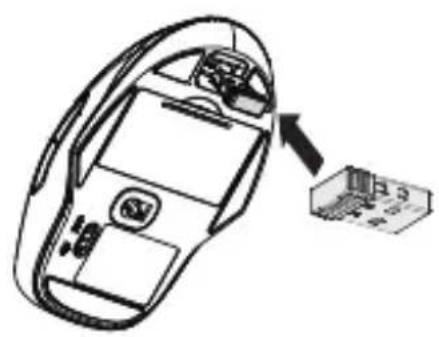
natural_image
Line drawing of a car interior with a small electronic device labeled 'P3' pointing to it (no text or symbols on the device itself)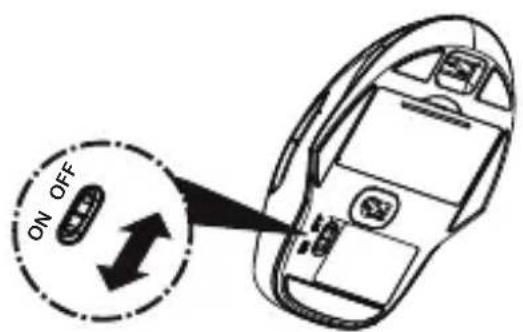
uhei al an
酱油①衣模
更换蓄电池
Obvarying at modager
Legge bort motaker
Largga in motargaren
대하
Seven ① 雷源老人名
打開滑鼠
natural_image
Black and white photo of a smart air purifier device with a small inset showing its front panel (no visible text or symbols)Wireless Mouse
CHERRY MW 2300



- Herzlichen Glückwunsch ...
- Adjusting the sensitivity of the mouse (dpi number)
- Switching off the mouse
- Tips
- Adjusting the weight
- Battery status
- Battery service life
- Surface under the mouse
- Storing the receiver in the mouse
- Cleaning the mouse
- CAUTION: damage caused by aggressive cleaning agents or liquid in the mouse
- RSI syndrome
- RSI stands for "Repetitive Strain Injury". RSI arises due to small movements continuously repeated over a long period of time.
- Troubleshooting
- Disposal
- Disposing of the device
- Disposing of the batteries
- OPERATING MANUAL
- Technical data General advice
- Contact
- Warranty
- Certification
- CE Declaration of Conformity
- Federal Communications Commission (FCC) Radio Frequency Interference Statement
- For UL
- Félicitations...
- Colocar receptor no rato
- indistilling at museums
- K on ta ka t
- Tusen takk for at du deltar.
- CHERRY MW 2300
Brand : Cherry
Model : MW 2300
Category : Mouse