
Spun Out HXTT400 - Turntable JAM - Free user manual and instructions
Find the device manual for free Spun Out HXTT400 JAM in PDF.



| Product Type | Turntable |
| Brand | JAM |
| Model | Spun Out HXTT400 |
| Playback Speeds | 33 1/3, 45, 78 RPM |
| Bluetooth Connectivity | Yes, version not specified |
| Inputs | 1 x Aux-in (3.5 mm) |
| Outputs | 1 x RCA (left/right), 1 x Headphone (3.5 mm) |
| USB Port | Yes, for digitization (type not specified) |
| Power Supply | External power adapter (included) |
| Included Accessories | 45 RPM adapter, felt slipmat, USB cable, RCA to Aux cable, quick start guide |
| Tone Arm | Straight tonearm with lift lever and lock |
| Stylus | Included, replaceable (type not specified) |
| Dimensions (approx.) | Approximately 42 x 35 x 12 cm (estimated) |
| Weight (approx.) | Approximately 3 kg (estimated) |
| Care and Cleaning | Clean with a dry, soft cloth. Do not use liquid products. |
| Safety | Do not use near water, do not open, keep out of reach of children |
| Spare Parts and Repairability | Replaceable stylus. For repairs, contact JAM customer service. |
| General Information | Limited warranty of 1 year (US/Canada) or 2 years (UK/Europe) |
Frequently Asked Questions - Spun Out HXTT400 JAM
User questions about Spun Out HXTT400 JAM
0 question about this device. Answer the ones you know or ask your own.
Ask a new question about this device
Download the instructions for your Turntable in PDF format for free! Find your manual Spun Out HXTT400 - JAM and take your electronic device back in hand. On this page are published all the documents necessary for the use of your device. Spun Out HXTT400 by JAM.
USER MANUAL Spun Out HXTT400 JAM
natural_image
Line drawing of a vintage typewriter with open lid and baseplate (no text or symbols)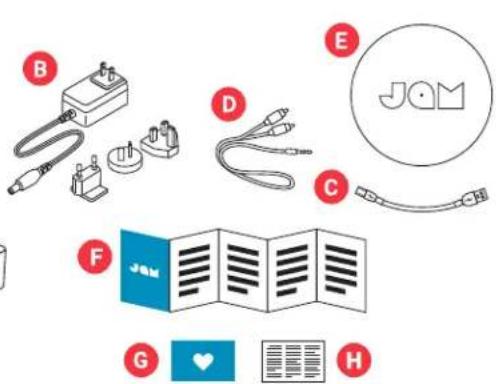
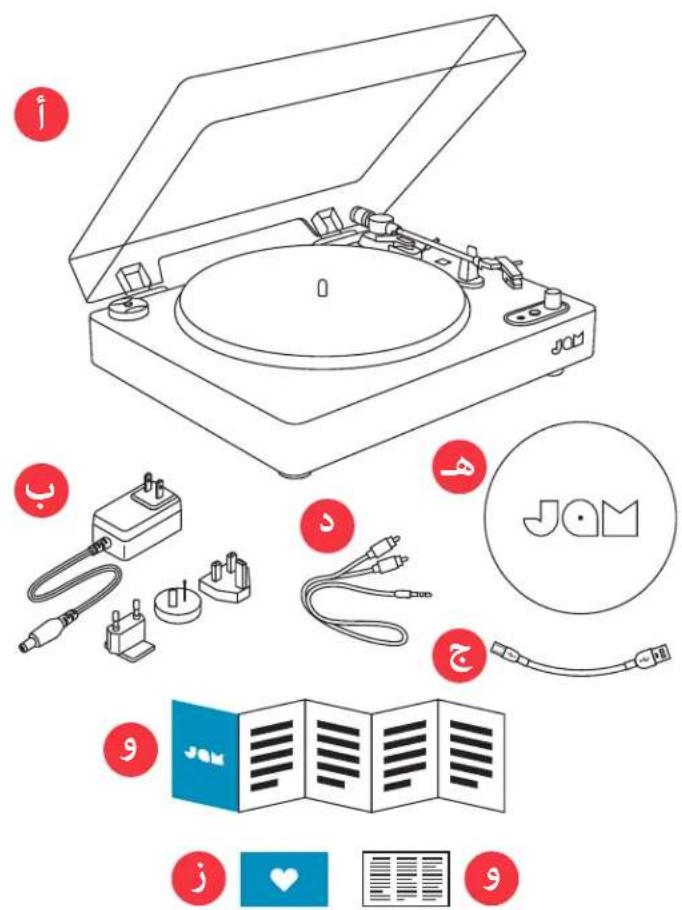
A - Turntable
B - Power adapter
C - USB-PC cable
D - RCA-to-Aux cable
E - Felt pad
F - Quick start guide
G - Welcome card
H - Legal card
CONTROLS
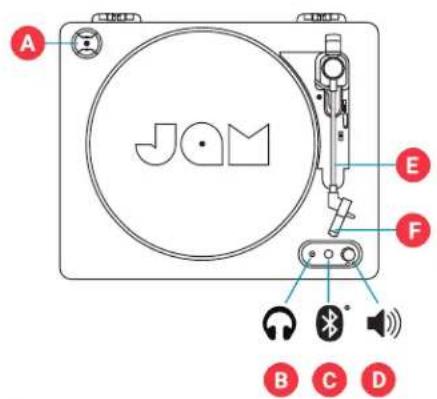
A - 45 RPM adapter
B - Headphone jack
C - Bluetooth® pairing button
D - Volume control
E - Tonearm
F - Stylus
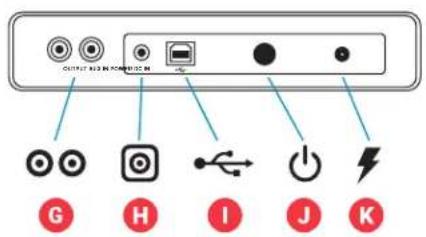
G - RCA connector
H - Aux-in port
I - USB digitization port
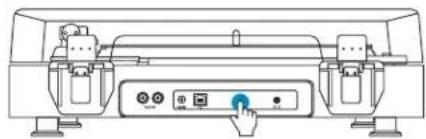
J - Power button
K - Power input
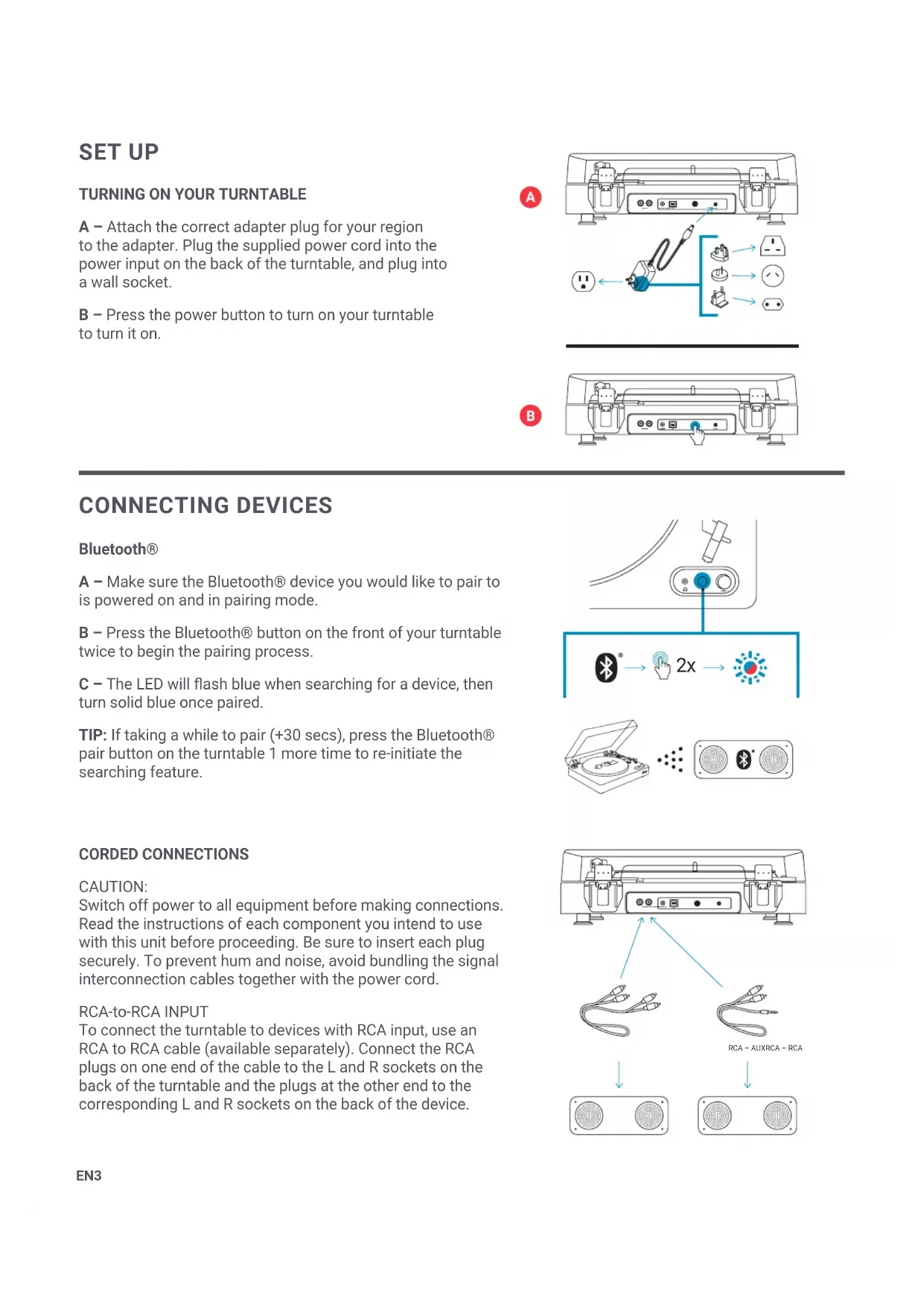
SET UP
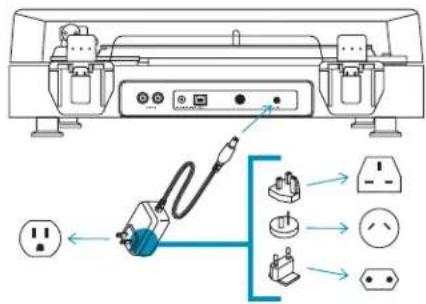
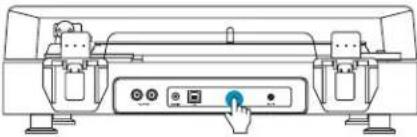
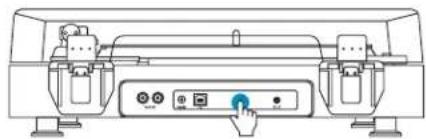
A – Attach the correct adapter plug for your region to the adapter. Plug the supplied power cord into the power input on the back of the turntable, and plug into a wall socket.
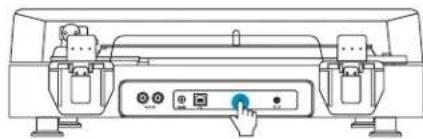
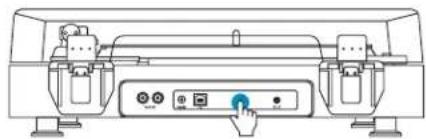
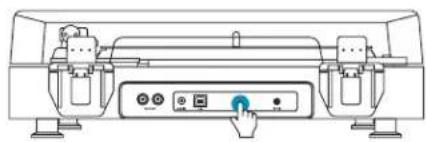
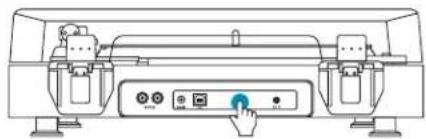
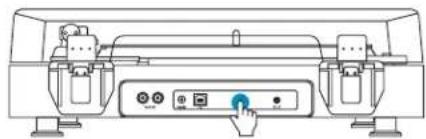
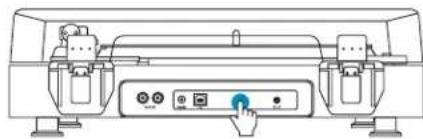
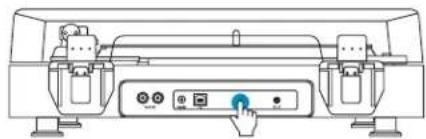
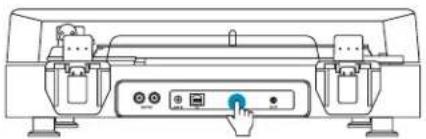
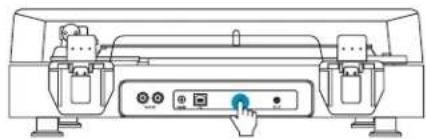
B – Press the power button to turn on your turntable to turn it on.
A
B
natural_image
Line drawing of a mechanical device with control buttons and a blue cursor pointer (no text or symbols)CONNECTING DEVICES
Bluetooth®
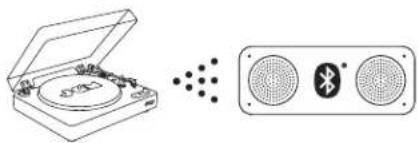
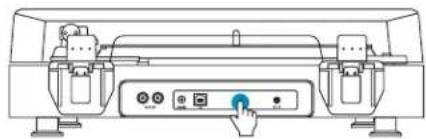
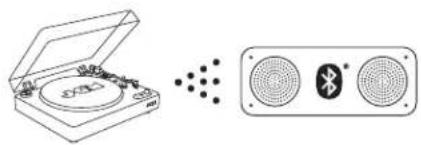
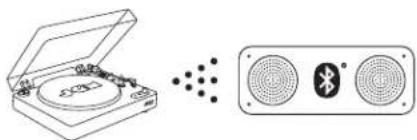
A – Make sure the Bluetooth® device you would like to pair to is powered on and in pairing mode.
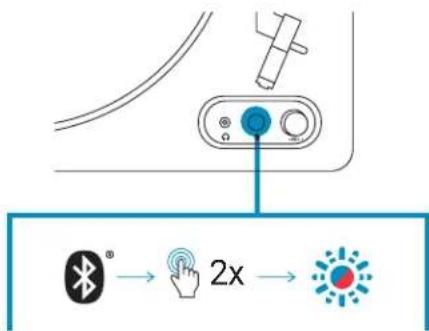
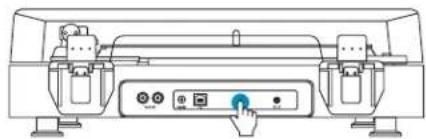
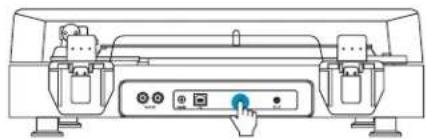
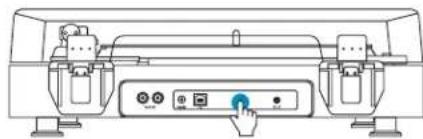
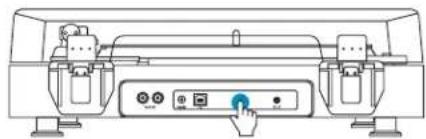
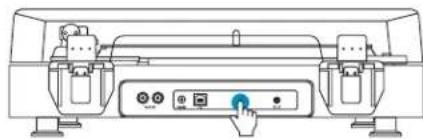
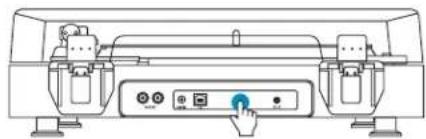
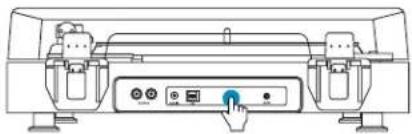
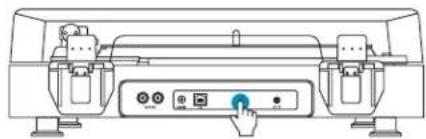
B - Press the Bluetooth® button on the front of your turntable twice to begin the pairing process.
C - The LED will flash blue when searching for a device, then turn solid blue once paired.
TIP: If taking a while to pair (+30 secs), press the Bluetooth® pair button on the turntable 1 more time to re-initiate the searching feature.
CORDED CONNECTIONS
CAUTION:
Switch off power to all equipment before making connections. Read the instructions of each component you intend to use with this unit before proceeding. Be sure to insert each plug securely. To prevent hum and noise, avoid bundling the signal interconnection cables together with the power cord.
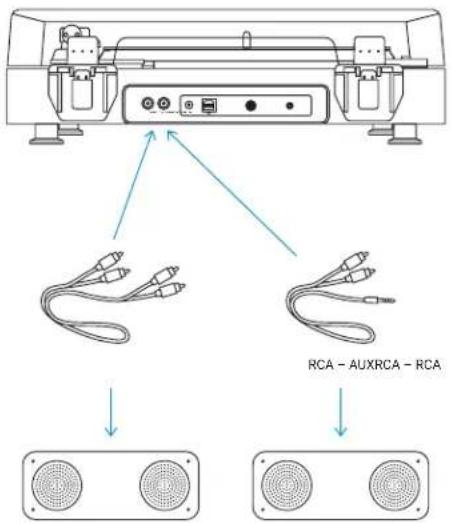
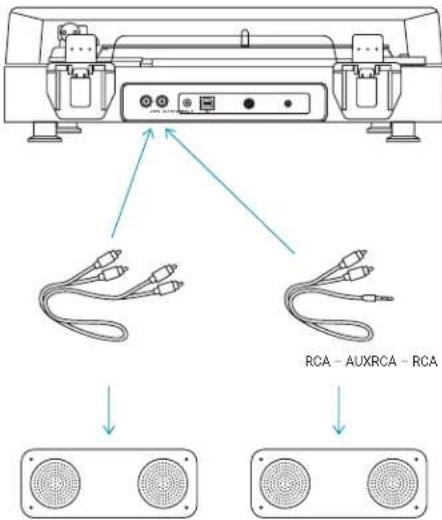
RCA-to-RCA INPUT
To connect the turntable to devices with RCA input, use an RCA to RCA cable (available separately). Connect the RCA plugs on one end of the cable to the L and R sockets on the back of the turntable and the plugs at the other end to the corresponding L and R sockets on the back of the device.
natural_image
Diagram showing a CD/DVD box open to reveal sound waves, and a speaker emitting sound waves (no text or symbols)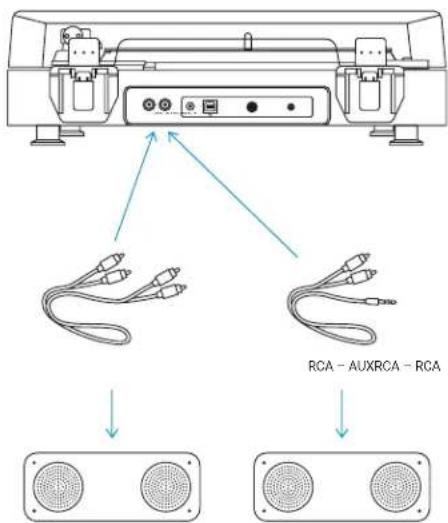
RCA-to-AUX INPUT
To connect the turntable to a device with an AUX input, use a RCA to AUX cable (included). Connect the RCA plugs to the L and R sockets on the back of the turntable and the AUX plug to the AUX socket on the back of the device.
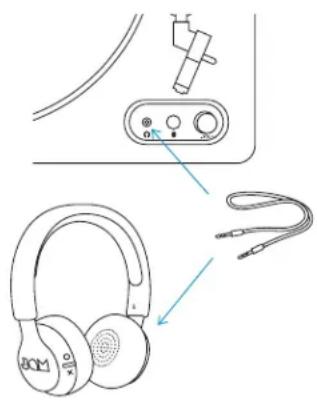
A. Connect a set of headphones or speaker (not included) via an auxiliary cable to the headphone socket on the front panel of the unit.
B. Put on the headphones or turn on the speaker and slowly increase the volume until you can hear it clearly and comfortably, without distortion.
natural_image
Line drawing of headphones connected to a device panel and cable (no text or symbols)USE
SETTING UP A RECORD
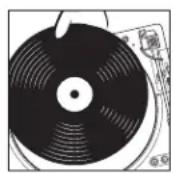
A – Lift the dust cover and place your record on the turntable and, aligning the hole with the pin.
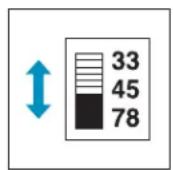
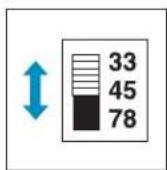
B - Select the 33 1/3, 45 or 78 RPM as required.
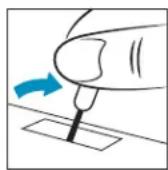
C – Remove white plastic stylus guard and keep for storage later, after use.
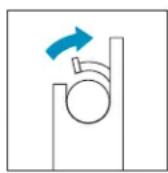
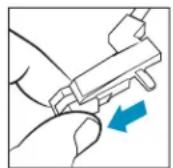
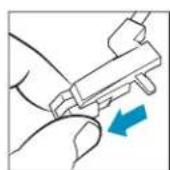
D – Next remove the tonearm lock, lift the stylus and place on your record.
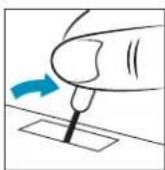
E – The record will automatically begin turning as the tonearm moves across. To play your music, pull the lift handle forward to lower the tonearm, and place the stylus on your record.
A
D
B
E
C
USING THE 45 RPM ADAPTER
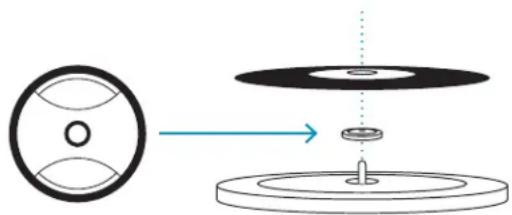
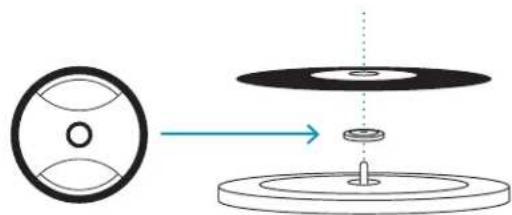
Place the 45 RPM adapter over the spindle, gently place your 45 RPM record onto the turntable, then continue following the normal operation instructions.
natural_image
Diagram showing a circular component being transferred to a mechanical component, with no text or symbols present.MAINTENANCE
- DO NOT leave vinyl records on the turntable after use.
- Return the vinyl record to its original packaging and store away until next use.
• After use, return the tonearm to its original place, replace the plastic stylus cover, and secure the tonearm lock.
- Replace the dust cover and close the lid to avoid dust damage.
- Unplug the power and other cables after use.
- Please note, the stylus cartridge can be easily damaged.
- For a replacement stylus, please go to jamaudio.com/parts
LEGAL INFORMATION
READ ALL INSTRUCTIONS BEFORE USE AND SAVE THESE INSTRUCTIONS FOR FUTURE REFERENCE.
FCC Warning:
This equipment has been tested and found to comply with the limits for a Class B digital device, pursuant to Part 15 of the FCC Rules. These limits are designed to provide reasonable protection against harmful interference in a residential installation. This equipment generates, uses, and can radiate radio frequency energy and, if not installed and used in accordance with the instructions, may cause harmful interference to radio communications. However, there is no guarantee that interference will not occur in a particular installation. If this equipment does cause harmful interference to radio or television reception, which can be determined by turning the equipment off and on, the user is encouraged to try to correct the interference by one or more of the following measures:
- Reorient or relocate the receiving antenna.
- Increase the separation between the equipment and receiver.
- Connect the equipment into an outlet on a circuit different from that to which the receiver is connected.
- Consult the dealer or an experienced radio/TV technician for help.
Any changes or modifications not expressly approved by the party responsible for compliance could void the user's authority to operate the equipment.
This device complies with Part 15 of the FCC Rules. Operation is subject to the following two conditions:
(1) This device may not cause harmful interference, and
(2) This device must accept any interference received, including interference that may cause undesired operation.
FCC RF Exposure Statement:
This equipment complies with FCC radiation exposure limits set forth for an uncontrolled environment. This transmitter must not be co-located or operating in conjunction with any other antenna or transmitter.
ISEDC Caution:
This device complies with Innovation, Science, and Economic Development Canada licence-exempt RSS standard(s). Operation is subject to the following two conditions:
(1) This device may not cause interference, and
(2) This device must accept any interference, including interference that may cause undesired operation of the device.
ISEDC RF Exposure Statement:
The device is in compliance with RF exposure guidelines; users can obtain Canadian information on RF exposure and compliance.
1-YEAR LIMITED WARRANTY – US & CANADA
WARRANTY - US & CANADA
JAM warrants this product free from defect in material and workmanship for a period of 1 year from the date of purchase. This warranty does not cover damage caused by misuse or abuse, accident, the attachment of any unauthorized accessory, alteration to the product, or any other conditions whatsoever that are beyond the control of JAM.
For detailed Warranty instructions and information, visit: www.jamaudio.com/customer-support/warranty-1yr. To obtain warranty service on your JAM product, contact a Consumer Relations representative by the telephone number or email address for your country of residence. Please make sure to have the model number of the product available.
For service in the USA Email: cservice@jamaudio.com Tel: 1-888-802-0040 8:30am-7:00pm EST M-F
For service in Canada Email: cservice@homedicsgroup.ca Tel: 1-888-225-7378 8:30am-5:00pm EST M-F
WARRANTY - UK & EUROPE
JAM warrants this product free from defect in material and workmanship for a period of 2 years from the date of purchase. This warranty does not cover damage caused by misuse or abuse, accident, the attachment of any unauthorised accessory, alteration to the product, or any other conditions whatsoever that are beyond the control of JAM. Distributed in the EU by FKA Brands Ltd, Somerhill Business Park, Tonbridge, TN11 0GP, UK. Tel: 020 3538 0768 Email: uksupport@jamaudio.com.
WARRANTY - AUSTRALIA
(1-YEAR LIMITED WARRANTY)
We or Us means JAM Australia Pty Ltd ACN 31 103 985 717 and our contact details are set out at the end of this warranty; You means the purchaser or the original end-user of the Goods. You may be a domestic user or a professional user; Supplier means the authorized distributor or retailer of the Goods that sold you the Goods in Australia and New Zealand; and Goods means the product or equipment which was accompanied by this warranty and purchased in Australia and New Zealand.
For Australia:
Our Goods come with guarantees that cannot be excluded under the Australian Consumer Law. You are entitled, subject to the provisions of the Australian Consumer Law, to a replacement or refund for a major failure and for compensation for any other reasonably foreseeable loss or damage. You are also entitled, subject to the provisions of the Australian Consumer Law, to have the Goods repaired or replaced if the goods fail to be of acceptable quality and the failure does not amount to a major failure. This is not a complete statement of your legal rights as a consumer.
For New Zealand:
Our Goods come with guarantees that cannot be excluded under the Consumer Guarantees Act 1993. This guarantee applies in addition to the conditions and guarantees implied by that legislation.
The Warranty
JAM sells its products with the intent that they are free of defects in manufacture and workmanship under normal use and service. In the unlikely event that your JAM product proves to be faulty within 1 year from the date of purchase due to workmanship or materials only, we will replace it at our own expense, subject to the terms and conditions of this guarantee. The warranty period is limited to 3 months from the date of purchase for products used commercially/professionally.
Terms and Conditions:
In addition to the rights and remedies that you have under the Australian Consumer Law, Consumer Guarantees Act of New Zealand or any other applicable law and without excluding such rights and remedies warranty against defects:
-
The Goods are designed to withstand the rigors of normal household use and are manufactured to the highest standards using the highest quality components. Whilst unlikely, if, during the first 12 months (3 months commercial use) from their date of purchase from the Supplier (Warranty Period), the Goods prove defective by reason of improper workmanship or materials and none of your statutory rights or remedies apply, we will replace the Goods, subject to the terms and conditions of this warranty.
-
We do not have to replace the Goods under this Additional Warranty if the Goods have been damaged due to misuse or abuse, accident, the attachment of any unauthorised accessory, alteration to the product, improper installation, unauthorised repairs or modifications, improper use of electrical/power supply, loss of power, malfunction, or damage of an operating part from failure to provide manufacturer's recommended maintenance, transportation damage, theft, neglect, vandalism,
environmental conditions, or any other conditions whatsoever that are beyond the control of JAM.
- This Warranty does not extend to the purchase of used, repaired, or secondhand products, or to products not imported or supplied by HoMedics Australia Pty Ltd, including but not limited to those sold on offshore internet auction sites.
- This Warranty extends only to consumers and does not extend to Suppliers.
- Even when we do not have to replace the Goods, we may decide to do so anyway. In some cases, we may decide to substitute the Goods with a similar alternative product of our choosing. All such decisions are at our absolute discretion.
- All such replaced or substituted Goods continue to receive the benefit of this Additional Warranty for the time remaining on the original Warranty Period (or 3 months, whichever is the longest).
- This Additional Warranty does not cover items damaged by normal wear and tear, including but not limited to chips, scratches, abrasions, discolouration, and other minor defects, where the damage has negligible effect on the operation or performance of the Goods.
- This Additional Warranty is limited to replacement or substitution only. As far as the law permits, we will not be liable for any loss or damage caused to property or persons arising from any cause whatsoever, and shall have no liability for any incidental, consequential, or special damages.
- This warranty is only valid and enforceable in Australia and New Zealand.
Making a Claim:
In order to claim under this Warranty, you must return the Goods to the Supplier (place of purchase) for replacement. If this is not possible, please contact our Consumer Relations department by email (cservice@homedics.com.au) or at the address below.
- All returned Goods must be accompanied by satisfactory proof of purchase that clearly indicates the name and address of the Supplier, the date and place of purchase, and identifies the product. It is best to provide an original, legible, and unmodified receipt or sales invoice.
- You must bear any expense for return of the Goods or otherwise associated with making your claim under this Additional Warranty.
Distributed in Australia by HOMEDICS AUSTRALIA PTY LTD, 14 Kingsley Close, Rowville, Victoria 3178. Distributed in New Zealand by Phoenix Distribution NZ Ltd, 7B Orbit Drive, Albany / North Shore 0757, Auckland, New Zealand.
For service in Australia
Email:
cservice@homedics.com.au
Tel: 03-87566500
8:30am-5:00pm AEST M-F
www.jam-audio.com.au
IMPORTANT SAFETY INSTRUCTIONS
READ ALL INSTRUCTIONS BEFORE USING.
WARNING: Do not place speakers too close to ears. May cause damage to ear drums, especially in young children.
- Use this product only for its intended purpose as described in this manual. Do not use attachments not recommended by Jam.
- Jam is not liable for any damage caused to smartphones, iPod/MP3 players, or any other devices.
- Do not place or store this product where it can fall or be dropped into a tub or sink without shutting waterproof doors.
- Do not place or drop into water or any other liquid without shutting waterproof doors.
• Not for use by children. THIS IS NOT A TOY. - Never operate this product if it has a damaged cord, plug, cable, or housing.
- Keep away from heated surfaces.
- Only set on dry surface. Do not place on surface wet from water or cleaning solvents if waterproof doors are open.
WARNING:
CAUTION: All servicing of this product must be performed by authorized Jam Audio service personnel only. For complete user guide and to register your product, visit www.jamaudio.com (USA), canada.jamaudio.com (Canada), or uk.jamaudio.com/instructionbooks (UK).

To prevent possible hearing damage, do not listen at high volume for long periods.

WEEE EXPLANATION
This marking indicates that this product should not be disposed with other household wastes throughout the EU. To prevent possible harm to the environment or human health from uncontrolled waste disposal, recycle it responsibly to promote the sustainable reuse of material resources.
Hereby, FKA Brands Ltd, declares that this radio device is in compliance with the essential requirements and other relevant provisions of Directive 2014/53/EU. A copy of the Declaration of Conformity can be obtained from uk.jamaudio.com/DoC.
© 2019 HMDX. All rights reserved. JAM is a registered trademark of HMDX. HMDX is a registered trademark of FKA Distributing Co. The Bluetooth® word mark and logos are registered trademarks owned by Bluetooth® SIG, Inc. and any use of such marks by HMDX is under license.


Operating frequency band: 2402 - 2480MHz
HX-TT400: Maximum radio-frequency power transmitted:-4.61dBm
Distributed by HMDX.
3000 N Pontiac Trail
Commerce Township, MI 48390
All rights reserved.
IB-HXTT400
SPUN OUT
HX-TT400
B
natural_image
Technical line drawing of a mechanical device with control panel and buttons (no text or symbols)CONNEXION D'APPAREILS
Bluetooth®
natural_image
Diagram showing a CD or DVD disc open to an external speaker and a two-nozzle speaker with Bluetooth symbol (no text or labels)CONNEXIONS À FIL
MISE EN GARDE :
natural_image
Line drawing of headphones and earbuds with connector components (no text or symbols)UTILISATION
INSTALLATION D'UN DISQUE
natural_image
Diagram showing a circular component being processed into a ring with a central hole, illustrating mechanical assembly (no text or symbols)ENTRETIEN
B
natural_image
Technical line drawing of a mechanical device with control buttons and a blue cursor pointer (no text or symbols)CÓMO CONECTAR DISPOSITIVOS
Bluetooth®
natural_image
Diagram showing a CD-ROM open with sound waves and a two-nozzle speaker (no text or symbols)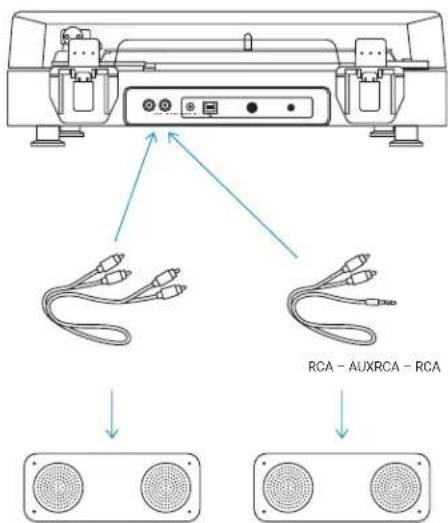
ENTRADA RCA-AUXILIAR
natural_image
Line drawing of headphones connected to a device panel and cable (no text or symbols)MODO DE USO
CÓMO TOCAR UN DISCO
natural_image
Diagram showing a rotating disc with a central hole and an arrow indicating direction (no text or symbols)MANTENIMIENTO
B
natural_image
Technical line drawing of a mechanical device with control panel and buttons (no text or symbols)ANSCHLIESSEN VON GERÄTEN
Bluetooth®
natural_image
Diagram showing a CD-ROM open with sound waves and a two-nozzle speaker (no text or symbols)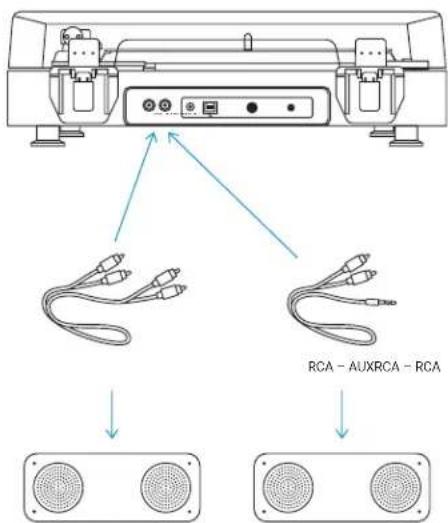
RCA-AUX-EINGANG
natural_image
Line drawing of headphones connected to a device panel and cable (no text or symbols)GEBRAUCH
natural_image
Diagram showing a wheel and disc assembly with a shaft, no text or symbols presentPFLEGE
B
natural_image
Line drawing of a mechanical device with control buttons and a blue cursor pointer (no text or symbols)APPARATEN VERBINDEN
Bluetooth®
natural_image
Diagram showing a CD/DVD box open to reveal sound waves, and a speaker emitting sound waves (no text or symbols)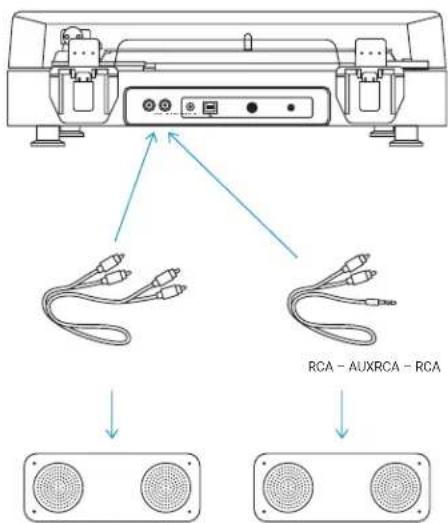
RCA-naar-AUX-INPUT
natural_image
Line drawing of headphones connected to a device panel and cable (no text or symbols)GEBRUIK
EEN PLAAT OPZETTEN
natural_image
Diagram showing a mechanical assembly with a central component and two circular parts, no text or symbols present.ONDERHOUD
B
natural_image
Technical line drawing of a mechanical device with control panel and buttons (no text or symbols)TILSLUTNING AF ENHEDER
Bluetooth®
natural_image
Diagram showing a CD-ROM open and a two-band Bluetooth speaker with sound waves (no text or symbols)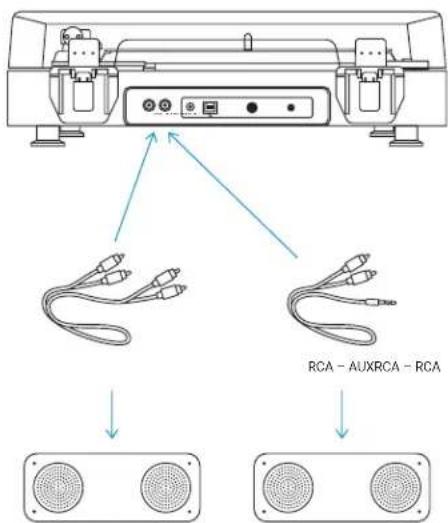
RCA-til-AUX-INDGANG
natural_image
Line drawing of headphones connected to a device panel and cable (no text or symbols)BRUG
ANBRINGELSE AF EN PLADE
natural_image
Diagram showing a circular component being transferred to a mechanical component, with no text or symbols present.VEDLIGEHOLDELSE
B
natural_image
Technical line drawing of a mechanical device with control panel and buttons (no text or symbols)COLLEGAMENTO DI DISPOSITIVI
Bluetooth®
natural_image
Diagram showing a CD-ROM open with sound waves and a two-nozzle speaker (no text or symbols)
INGRESSO RCA-AUX
natural_image
Line drawing of headphones connected to a device panel and cable (no text or symbols)USO
MANUTENZIONE
B
natural_image
Technical line drawing of a mechanical device with control panel and buttons (no text or symbols)LAITTEIDEN YHDISTÄMINEN
Bluetooth®
natural_image
Diagram showing a CD-ROM open with sound waves and a two-nozzle speaker (no text or symbols)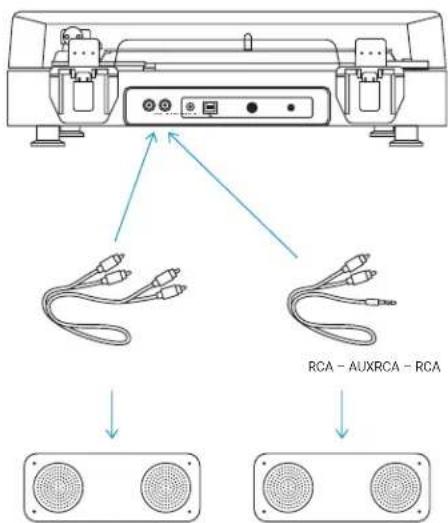
RCA AUX-TULOLIITÄNTÄÄN
natural_image
Line drawing of headphones and earbuds with connector components (no text or symbols)KÄYTTÖ
ÄÄNILEVYN ASETTAMINEN
natural_image
Diagram showing a circular component being inserted into a ring with a central hole, illustrating mechanical assembly (no text or symbols)YLLÄPITO
B
natural_image
Line drawing of a mechanical device with control buttons and a blue cursor pointer (no text or symbols)CİHAZ BAĞLANTISI
Bluetooth®
natural_image
Diagram showing a CD/DVD box open to reveal sound waves, and a speaker emitting sound waves (no text or symbols)KABLOLU BAĞLANTILAR
DİKKAT:
natural_image
Diagram showing ear headphones connected to a device panel and cable, with no visible text or symbols.KULLANIM
natural_image
Diagram showing a circular component with internal features and a mechanical assembly with a central shaft (no text or symbols)BAKIM
B
natural_image
Technical line drawing of a mechanical device with control panel and buttons (no text or symbols)ANSLUT ENHETER
Bluetooth®
natural_image
Diagram showing a CD or DVD disc open to reveal sound waves, and a two-nozzle speaker emitting sound waves (no text or symbols present)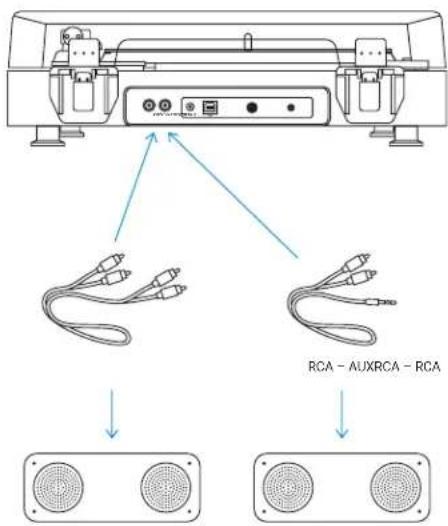
KOPPLING FRÅN RCA TILL AUX
natural_image
Line drawing of headphones connected to a device panel and cable (no text or symbols)ANVÄNDNING
LÄGG PÅ EN GRAMMOFONSKIVA
natural_image
Diagram showing a circular component with internal features and a mechanical assembly with a central shaft (no text or symbols)UNDERHÅLLT
B
natural_image
Technical line drawing of a mechanical device with control buttons and a dial (no text or symbols)flowchart
graph TD
    A["Antenna"] --> B["2x"]
    B --> C["LED"]
ВХОД RCA-AUX
natural_image
Line drawing of headphones and earbuds with connector components (no text or symbols)ИСПОЛЬЗОВАНИЕ
natural_image
Diagram showing a circular component being processed into a ring with a central knob, illustrating mechanical assembly (no text or symbols)B
natural_image
Technical line drawing of a mechanical device with control panel and buttons (no text or symbols)KOBLE TIL ENHETER
Bluetooth®
natural_image
Diagram showing a CD-ROM open and connected to a speaker with two speakers (no text or symbols present)FASTE TILKOBLINGER
OBS!
natural_image
Line drawing of headphones and earbuds with connector ports (no text or symbols)BRUK
SETTE PÅ EN VINYLPLATE
natural_image
Diagram showing a circular component being processed into a ring with a central shaft (no text or symbols)VEDLIKEHOLD
B
natural_image
Technical line drawing of a mechanical device with control panel and buttons (no text or symbols)ΣΥΝΔΕΣΗ ΣΥΣΚΕΥΩΝ
Bluetooth®
natural_image
Diagram showing a CD-ROM with an open case and a speaker emitting sound waves (no text or symbols)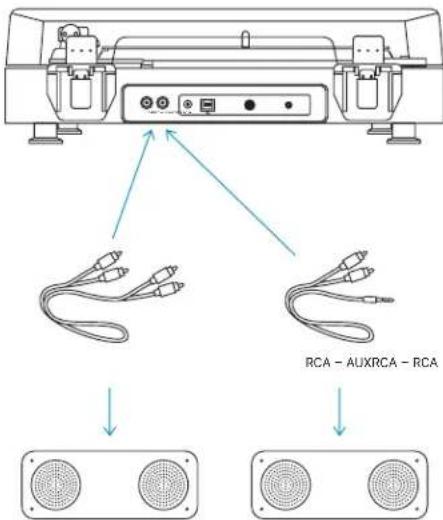
ΕΙΣΟΔΟΣ RCA-to-AUX
natural_image
Diagram showing ear headphones connected to a device panel and cable (no text or symbols present)ΧΡΗΣΗ
ΧΡΗΣΗ ΕΝΟΣ ΔΙΣΚΟΥ
B
natural_image
Technical line drawing of a mechanical device with control panel and buttons (no text or symbols)PŘIPOJOVÁNÍ ZAŘÍZENÍ
Bluetooth®
natural_image
Diagram showing a CD-ROM open and a two-band Bluetooth speaker with sound waves (no text or symbols)KABELOVÁ SPOJENÍ
UPOZORNĚNÍ:
natural_image
Line drawing of headphones connected to a device panel and cable (no text or symbols)POUŽITÍ
NASTAVENÍ GRAMOFONOVÉ DESKY
natural_image
Diagram showing a circular component being transferred to a ring with a central shaft (no text or symbols)ÚDRŽBA
DŮLEŽITÉ POKYNY TÝKAJÍCÍ SE BEZPEČNOSTI
PŘED POUŽITÍ SI PŘEČTĚTE VŠECHNY POKYNY
B
natural_image
Line drawing of a mechanical device with control panel and buttons (no text or symbols)KÉSZÜLÉKEK CSATLAKOZTATÁSA
Bluetooth®
RCA-AUX BEMENET
natural_image
Line drawing of headphones connected to a device panel and cable (no text or symbols)HASZNÁLAT
HANGLEMEZ BEÁLLÍTÁSA
natural_image
Diagram showing a circular component being transferred into a mechanical assembly with a central shaft (no text or symbols)KARBANTARTÁS
B
natural_image
Line drawing of a mechanical device with control buttons and a blue cursor pointer (no text or symbols)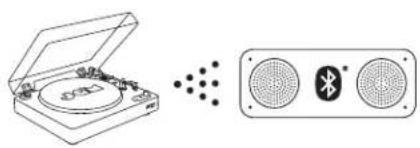
natural_image
Diagram showing a CD-ROM open with sound waves and a speaker emitting sound waves (no text or symbols)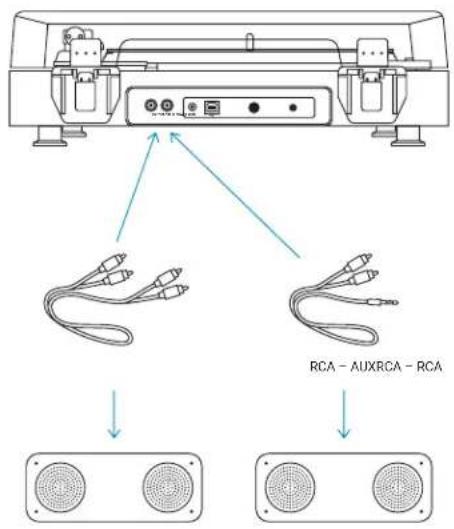
ENTRADA RCA-AUX
natural_image
Line drawing of headphones connected to a device panel and cable (no text or symbols)USO
COMO REPRODUZIR UM DISCO
natural_image
Diagram showing a circular component transforming into a ring with a central shaft (no text or symbols)MANUTENÇÃO
B
natural_image
Line drawing of a mechanical device with control buttons and a blue cursor pointer (no text or symbols)PRIPÁJANIE ZARIADENÍ
Bluetooth®
natural_image
Diagram showing a CD/DVD box open to reveal sound waves, and a speaker emitting sound waves (no text or symbols)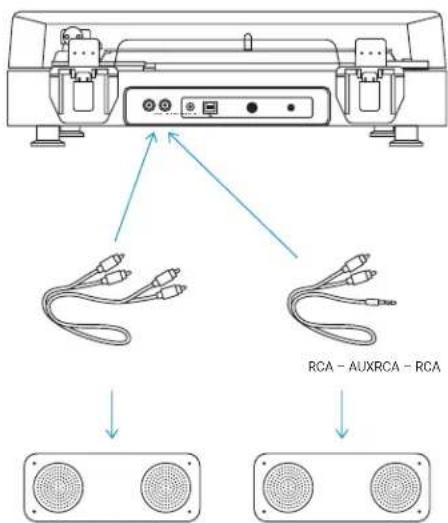
Vstup RCA-AUX
natural_image
Diagram showing ear headphones connected to a device panel and cable (no text or symbols present)POUŽITIE
NASTAVENIE GRAMOFÓNOVEJ PLATNE
POUŽITIE ADAPTÉRA NA 45 OT./MIN.
natural_image
Diagram showing a circular component being processed into a ring with a central pin (no text or symbols present)ÚDRŽBA
DÔLEŽITÉ BEZPEČNOSTNÉ POKYNY
VŠETKY POKYNY SI PREČÍTAJTE PRED POUŽITÍM.
B
natural_image
Technical line drawing of a mechanical device with control panel and buttons (no text or symbols)CONECTAREA DISPOZITIVELOR
Bluetooth®
natural_image
Diagram showing a CD-ROM open with sound waves and a two-nozzle speaker (no text or symbols)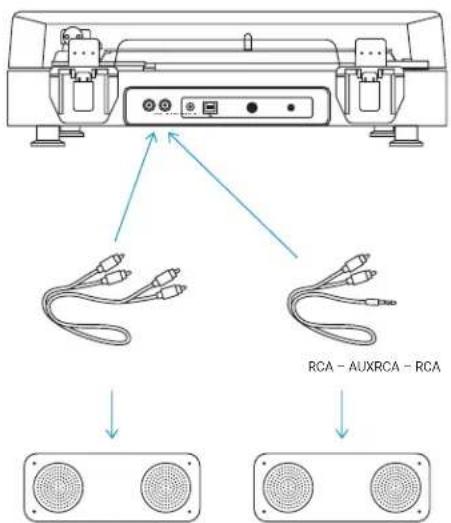
INTRARE RCA-AUX
natural_image
Diagram showing ear headphones connected to a device panel and cable (no text or symbols)UTILIZARE
INSTALAREA UNUI DISC
natural_image
Diagram showing a circular component being transferred to a ring with a central pin, illustrating mechanical or optical alignment (no text or symbols present)ÎNTRETINERE
B
natural_image
Technical line drawing of a mechanical device with control panel and buttons (no text or symbols)PODŁĄCZANIE URZĄDZEŃ
Bluetooth®
natural_image
Diagram showing a CD-ROM with sound waves and a speaker emitting sound waves (no text or symbols)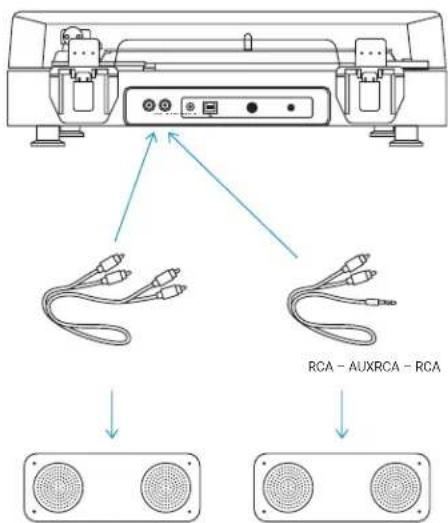
WEJŚCIE RCA-do-AUX
natural_image
Line drawing of headphones connected to a device panel and cable (no text or symbols)UŻYCIE
WŁĄCZANIE PŁYTY
natural_image
Diagram showing a mechanical assembly with a central component and two surrounding circular components, no text or symbols present.KONSERWACJA
1
natural_image
Technical line drawing of a mechanical device with control buttons and a dial (no text or symbols)[Non-Text]
الإعداد
تشغيل قرصك الدوار
natural_image
Diagram showing a physical CD with an open lid and a speaker emitting sound waves (no text or symbols)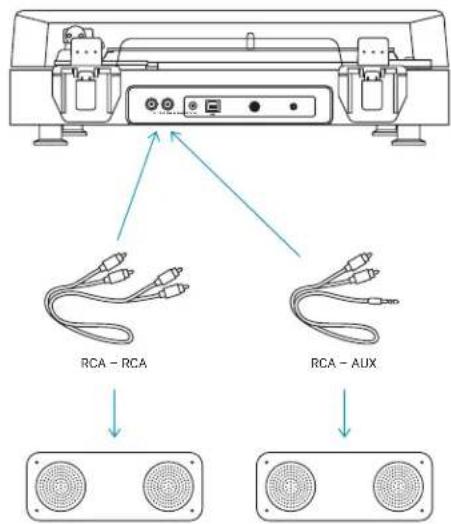
توصيل الأجنبية
بلوتوث
natural_image
Line drawing of headphones and earbuds with connector components (no text or symbols)
The image is too blurry to recognize any text content.
1
9
[Non-Text]
c
natural_image
Diagram showing a circular component transforming into a ring with a central knob, illustrating mechanical or optical alignment (no text or symbols)الاستخدام
إعداد الأسطوانة
B
natural_image
Technical line drawing of a mechanical device with control buttons and a blue cursor pointer (no text or symbols)장치 연결
Bluetooth®
natural_image
Diagram showing a CD-ROM open and connected to a speaker with Bluetooth (no text or symbols)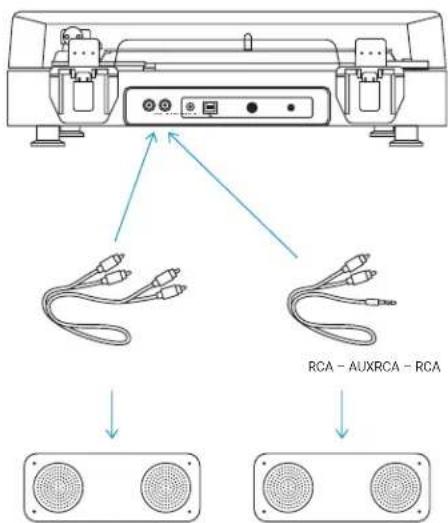
RCA-보조 입력 단자
natural_image
Line drawing of headphones and earbuds with connector components (no text or symbols)사용
레코드 설치
natural_image
Diagram showing a circular component being processed into a ring with a central shaft (no text or symbols)유지관리
제품명 (Product name): Spun Out Turntable
모델명(Model):HX-TT400
무선 방식 (Operation Frequency): Bluetooth® (2402-2480 MHz)
채널(Radio Channel):79channels for BR/EDR
변조 형식 (Modulation Type): GFSK、π/4-DQPSK
B
natural_image
Technical line drawing of a mechanical device with control buttons and a blue cursor pointer (no text or symbols)連接設備
藍牙
natural_image
Diagram showing a CD-ROM open and connected to a speaker with Bluetooth (no text or symbols)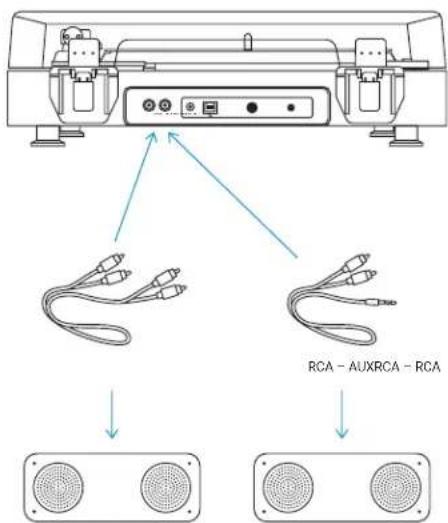
RCA-AUX 輸入
natural_image
Diagram showing ear headphones connected to a device panel and cable, with no visible text or symbols.使用
放置唱片
natural_image
Diagram showing a rotating disk with a central knob and an arrow indicating direction (no text or symbols)維護
- CONTROLS
- SET UP
- CONNECTING DEVICES
- Bluetooth®
- CORDED CONNECTIONS
- CAUTION:
- RCA-to-RCA INPUT
- RCA-to-AUX INPUT
- USE
- SETTING UP A RECORD
- USING THE 45 RPM ADAPTER
- MAINTENANCE
- LEGAL INFORMATION
- FCC Warning:
- FCC RF Exposure Statement:
- ISEDC Caution:
- ISEDC RF Exposure Statement:
- 1-YEAR LIMITED WARRANTY – US & CANADA
- WARRANTY - US & CANADA
- WARRANTY - UK & EUROPE
- WARRANTY - AUSTRALIA
- (1-YEAR LIMITED WARRANTY)
- For Australia:
- For New Zealand:
- The Warranty
- Terms and Conditions:
- Making a Claim:
- For service in Australia
- IMPORTANT SAFETY INSTRUCTIONS
- READ ALL INSTRUCTIONS BEFORE USING.
- WARNING:
- WEEE EXPLANATION
- SPUN OUT
- CONNEXION D'APPAREILS
- CONNEXIONS À FIL
- MISE EN GARDE :
- UTILISATION
- INSTALLATION D'UN DISQUE
- ENTRETIEN
- CÓMO CONECTAR DISPOSITIVOS
- ENTRADA RCA-AUXILIAR
- MODO DE USO
- CÓMO TOCAR UN DISCO
- MANTENIMIENTO
- ANSCHLIESSEN VON GERÄTEN
- RCA-AUX-EINGANG
- GEBRAUCH
- PFLEGE
- APPARATEN VERBINDEN
- RCA-naar-AUX-INPUT
- GEBRUIK
- EEN PLAAT OPZETTEN
- ONDERHOUD
- TILSLUTNING AF ENHEDER
- RCA-til-AUX-INDGANG
- BRUG
- ANBRINGELSE AF EN PLADE
- VEDLIGEHOLDELSE
- COLLEGAMENTO DI DISPOSITIVI
- INGRESSO RCA-AUX
- USO
- MANUTENZIONE
- LAITTEIDEN YHDISTÄMINEN
- RCA AUX-TULOLIITÄNTÄÄN
- KÄYTTÖ
- ÄÄNILEVYN ASETTAMINEN
- YLLÄPITO
- CİHAZ BAĞLANTISI
- KABLOLU BAĞLANTILAR
- DİKKAT:
- KULLANIM
- BAKIM
- ANSLUT ENHETER
- KOPPLING FRÅN RCA TILL AUX
- ANVÄNDNING
- LÄGG PÅ EN GRAMMOFONSKIVA
- UNDERHÅLLT
- ВХОД RCA-AUX
- ИСПОЛЬЗОВАНИЕ
- KOBLE TIL ENHETER
- FASTE TILKOBLINGER
- OBS!
- BRUK
- SETTE PÅ EN VINYLPLATE
- VEDLIKEHOLD
- ΣΥΝΔΕΣΗ ΣΥΣΚΕΥΩΝ
- ΕΙΣΟΔΟΣ RCA-to-AUX
- ΧΡΗΣΗ
- ΧΡΗΣΗ ΕΝΟΣ ΔΙΣΚΟΥ
- PŘIPOJOVÁNÍ ZAŘÍZENÍ
- KABELOVÁ SPOJENÍ
- UPOZORNĚNÍ:
- POUŽITÍ
- NASTAVENÍ GRAMOFONOVÉ DESKY
- ÚDRŽBA
- DŮLEŽITÉ POKYNY TÝKAJÍCÍ SE BEZPEČNOSTI
- PŘED POUŽITÍ SI PŘEČTĚTE VŠECHNY POKYNY
- KÉSZÜLÉKEK CSATLAKOZTATÁSA
- RCA-AUX BEMENET
- HASZNÁLAT
- HANGLEMEZ BEÁLLÍTÁSA
- KARBANTARTÁS
- ENTRADA RCA-AUX
- COMO REPRODUZIR UM DISCO
- MANUTENÇÃO
- PRIPÁJANIE ZARIADENÍ
- Vstup RCA-AUX
- POUŽITIE
- NASTAVENIE GRAMOFÓNOVEJ PLATNE
- POUŽITIE ADAPTÉRA NA 45 OT./MIN.
- DÔLEŽITÉ BEZPEČNOSTNÉ POKYNY
- VŠETKY POKYNY SI PREČÍTAJTE PRED POUŽITÍM.
- CONECTAREA DISPOZITIVELOR
- INTRARE RCA-AUX
- UTILIZARE
- INSTALAREA UNUI DISC
- ÎNTRETINERE
- PODŁĄCZANIE URZĄDZEŃ
- WEJŚCIE RCA-do-AUX
- UŻYCIE
- WŁĄCZANIE PŁYTY
- KONSERWACJA
- الاستخدام
- 장치 연결
- 사용
- 유지관리
- 連接設備
- RCA-AUX 輸入
- 使用
- 放置唱片
- 維護
Brand : JAM
Model : Spun Out HXTT400
Category : Turntable