Turf HX-P520 - Pregnant JAM - Free user manual and instructions
Find the device manual for free Turf HX-P520 JAM in PDF.


| Product Type | Portable Bluetooth Speaker |
| Brand | JAM |
| Model | Turf HX-P520 |
| Connectivity | Bluetooth, Aux-in (3.5mm) |
| Battery Type | Internal rechargeable lithium-ion |
| Charging Time | Approximately 6 hours |
| Playtime | Up to 8 hours |
| Speakerphone | Yes (built-in microphone) |
| Controls | Power, Volume +/-, Play/Pause |
| LED Indicators | Bluetooth status, battery status |
| Voice Prompts | Yes (English, Spanish, French, Portuguese) |
| Additional Features | Magnetic ball marker, tee storage (up to 5 tees), carabiner/bottle opener |
| USB Charging Output | Yes (power bank function) |
| Auto Shut-off | After 2 minutes unpaired inactivity; after 15 minutes paused |
| Cleaning | Soft dry cloth only |
| Safety Warnings | Not a toy; keep away from water; small parts choking hazard |
| Warranty | 1 Year Limited |
| Compliance | FCC, IC |
| Package Includes | Speaker, USB charging cable, 2 tees (Aux cable not included) |
Frequently Asked Questions - Turf HX-P520 JAM
User questions about Turf HX-P520 JAM
0 question about this device. Answer the ones you know or ask your own.
Ask a new question about this device
Download the instructions for your Pregnant in PDF format for free! Find your manual Turf HX-P520 - JAM and take your electronic device back in hand. On this page are published all the documents necessary for the use of your device. Turf HX-P520 by JAM.
USER MANUAL Turf HX-P520 JAM
USER GUIDE AND WARRANTY INFORMATION
HEY THERE!
Thank you for purchasing the JAM Turf. Check out the sections below for all the important information about your new speaker.
WE'RE HERE TO HELP. CONTACT US!
You've got questions? We've got answers.
Contact a Consumer Relations representative by phone or email to help answer any questions. Please be sure to have the model number of your product available. (Hint: It's HX-P520)
Register your speaker! Information about where you bought it and how you're using it is like gold for the people who make these speakers.
To register, visit:
USA: www.jamaudio.com/customer-support/product-registration
CAN: http://canada.jamaudio.com/customer-support-canada
USA
1.888.802.0040 8:30am-7:00pm EST M-F
CANADA
cservice@homedicsgroup.ca
1.888.225.7378 8:30am-5:00pm EST M-F
JUST CHARGE IT
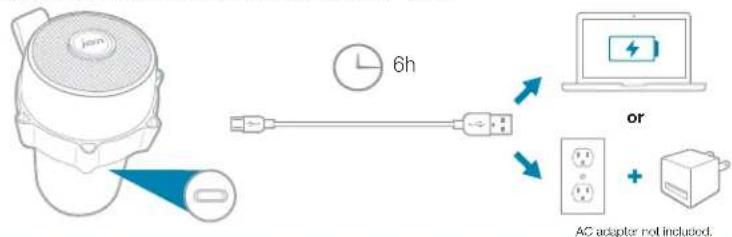
Charging the speaker is so easy you've probably figured it out by now, but just in case, you've got two options: you can charge it using your computer or a wall outlet. The Turf needs about 6 hours for up to 8 hours of party time.
-
The cord that came with the speaker — the one with the USB on one end and the micro USB on the other — will work with your computer.
-
If you want to use the wall outlet, use the adapter that came with the speaker or use any USB AC adapter, including the one for your cell.
flowchart
graph LR
    A["User Device"] -->|6h| B["USB Cable"]
    B --> C["Laptop with 'or' icon"]
    C --> D["AC adapter not included"]
CONTROL YOUR DESTINY ... OR AT LEAST YOUR SPEAKER
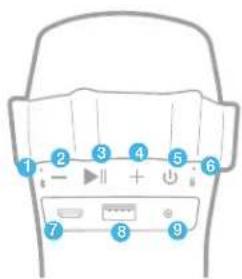
- Lets you know when Bluetooth is paired
- Turn the music down or go back a track
- Push it to play, push it again to pause
- Turn the music up or jam on to the next song
- This is the power button
- Check out how much juice is in the battery
- The power cord goes here
- Charge your devices here
- Here's where you hook it up old-school
SHED SOME LIGHT
The LED lights on your speaker let you know what it's doing.
Bluetooth Light

Pairing Mode

Connected

Aux-In Mode
Battery Light

Low Battery

Charging

Ready to Party
BLUETOOTH® CONNECTION — IT'S A SETUP
Like any amazing couple, this one starts with a connection — one between your device and the speaker's Bluetooth. Here's how it works:
- Make sure the smartphone, tablet, or computer you're using with the speaker has Bluetooth.
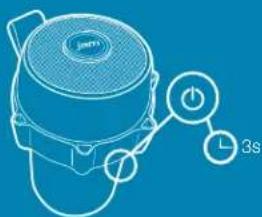
- Turn on the speaker (press and hold the power button for 3 seconds) and look for the little blinking light.
- Do whatever your device needs you to do on its end.
- Look for JAM Turf in your device's Bluetooth list or click YES
- Now hit PLAY on your speaker and crank it up — or down if you're lame.
Continued on page 2.
natural_image
Line drawing of a portable kettle with a power button and 3s time indicator (no text or symbols on the device itself)
BLUETOOTH® CONNECTION, CONTINUED
The device and Bluetooth will find each other every time, as long as the speaker is set to Bluetooth and your device's Bluetooth is, you know, on.
If you're connecting to a computer, you may have some extra steps on that end. You'll have to get that information from the computer company.
Depending on your device, you may be prompted to enter a pairing code. If prompted, enter "0000" as the code.
To disable pairing of existing device and pair a new device, press and hold the + and - buttons for 5 seconds to activate pairing mode.
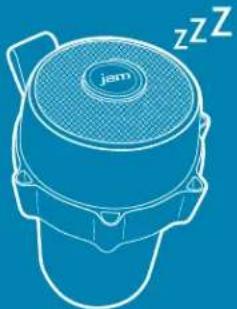
Note: If you turn on your Turf but haven't started the party yet, it will automatically power off after 2 minutes of unpaired inactivity.
Note: Once you've paired, if you pause the party for 15 minutes or more, the JAM Turf will automatically shut off to preserve battery power.
natural_image
Line drawing of a modern portable speaker with a mesh grille and 'jam' logo, no text or symbols present.
2m


15m

POWER ON THE GO
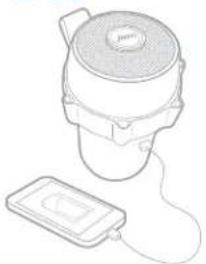
Out of juice? Let the Turf be your backup battery. Charge your smartphone or other devices from your speaker by plugging them into the USB port.
natural_image
Line drawing of a portable device with a lid and attached power strip (no text or symbols)LIKE HAVING YOUR OWN CADDIE
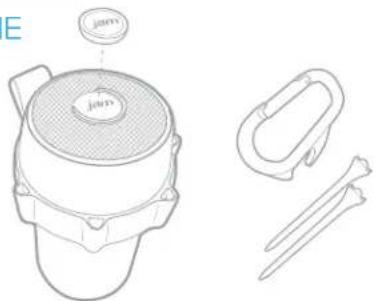
Okay, so it won't carry your clubs for you. But the Turf has your back both on and off the course. With a magnetized ball marker and storage for up to five tees, you'll always be prepared for that next shot. Two tees are included to get you started right out of the box. Back at the clubhouse, the removable carabiner doubles as a handy bottle opener.
HOOKING UP OLD-SCHOOL AUDIO, JACK
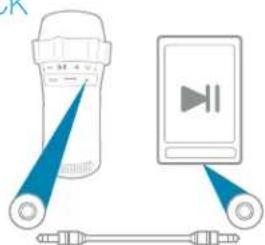
- Plug one end of the cord into the speaker and the other into the headphone jack on your device.
- Turn on the speaker.
- Hit PLAY on your device and crank it up — or down if you're lame.
You'll have to play and pause the music from your device, not your speaker. No problem. You're there anyway, right?
natural_image
Illustration of a lamp emitting blue rays to a digital media player interface connected to a cable (no text or symbols)Auxiliary cable not included.
COMING CLEAN
A soft, dry towel is all you need to clean off your speaker. Using harsh cleaners, or anything else, only starts messing with the mechanics inside. So, yeah, don't do it.
HELLO? SPEAKERPHONE? YES!
When friends call asking to join the party — and you know they will — answer the phone without disconnecting from your JAM Turf. Yes, that's right. Your speaker is a speakerphone, too. How amazing is that? Here's how it works:
-
Make sure your phone and speaker are connected through Bluetooth.
-
Answering and ending a call works the same way: simply click the PLAY/PAUSE button on your Turf.
-
If you'd rather not talk, hold down the PLAY/PAUSE button on your Turf for 3 seconds to ignore the call.
THE COOLEST PART: The Turf knows when a call is coming in and pauses the music before ringing. When you hang up, the music starts where it left off — and so does the party. If it's you making the call, just start dialing from your phone, and the Turf automatically does its hands-free thing. Isn't it refreshing to know your speaker totally gets you?
Check out the chart below for a complete guide on handling calls with your Turf.
| Situation | Short Press Play/Pause Button Long Press Play/Pause Button |
| 1^st Incoming call | Pick up callReject call |
| On call | End callMove call from speaker to device |
| 2^nd Incoming call | Call 1 on hold, pick up call 2Reject call 2 |
| Both calls active | Hang up call 1, switch to call 2Switch between 1^st call and 2^nd call |
THE VOICE FROM WITHIN
When your JAM Turf isn't rocking out, it can tell you all sorts of things it's doing: when it's powering on, ready to pair, paired, at maximum volume, charging, receiving a call, ending a call, rejecting a call, and powering off.
Just like the global gadget it is, your speaker toggles between several languages or no language at all. Your speaker can parlay with you in English, Spanish, French, or Portuguese. Making the change between language and tone is as simple as pressing the + and - buttons together. Click through until the speaker starts speaking your language.
1 YEAR LIMITED WARRANTY
For detailed warranty instructions and information visit: USA: www.jamaudio.com/customer-support/warranty-1yr CAN: canada.jamaudio.com/warranty-1yr
To obtain warranty service on your JAM product, contact a Consumer Relations representative by telephone or email for assistance (you can find their contact info on page 1). Please make sure to have the model number of the product available.
STUFF THE GOVERNMENT MAKES US SAY STUFF OUR LAWYERS MAKE US SAY
FCC Compliance:
Note: This device complies with part 15 of the FCC Rules. Operation is subject to the following two conditions: (1) This device may not cause harmful interference, and (2) this device must accept any interference received, including interference that may cause undesired operation.
Note: This equipment has been tested and found to comply with the limits for a Class B digital device, pursuant to part 15 of the FCC Rules. These limits are designed to provide reasonable protection against harmful interference in a residential installation.
This equipment generates, uses, and can radiate radio frequency energy and, if not installed and used in accordance with the instructions, may cause harmful interference to radio communications. However, there is no guarantee that interference will not occur in a particular installation.
If this equipment does cause harmful interference to radio or television reception, which can be determined by turning the equipment off and on, the user is encouraged to try to correct the interference by one or more of the following measures:
- Reorient or relocate the receiving antenna.
- Increase the separation between the equipment and receiver.
- Connect the equipment into an outlet on a circuit different from that to which the receiver is connected.
- Consult the dealer or an experienced radio/TV technician for help.
Note: Changes or modifications not expressly approved by HMDX could void the user's authority to operate this equipment.
IC Caution: RSS-GEN Issue 4 November 2014
This device complies with Industry Canada's licence-exempt RSSs.
Operation is subject to the following two conditions: (1) This device may not cause interference, and (2) This device must accept any interference, including interference that may cause undesired operation of the device.
IMPORTANT SAFEGUARDS:
When using an electrical product, basic precautions should always be followed, including the following:
READ ALL INSTRUCTIONS BEFORE USING
- WARNING: Do not place speakers too close to ears. May cause damage to eardrums, especially in young children.
- Use this product only for its intended use as described in this manual. Do not use attachments not recommended by HMDX.
- HMDX is not liable for any damage caused to smartphones, iPod/MP3 players, or any other device.
- Do not place or store this product where it can fall or be dropped into a tub or sink.
- Do not place or drop into water or any other liquid.
• Not for use by children. THIS IS NOT A TOY.
- Never operate this product if it has a damaged cord, plug, cable, or housing.
- Keep away from heated surfaces.
- Only set on dry surfaces. Do not place on surface wet from water or cleaning solvents.
Attention California Residents:
WARNING: This product contains chemicals known to the State of California to cause cancer, birth defects, and other reproductive harm.
A MESSAGE FROM THE ENVIRONMENT
WARNING:
This product has an internal, non-replaceable lithium battery. Please dispose in accordance with your local, state, province, and country guidelines.
This product contains small parts that may present a choking hazard for young children.
CAUTION: All servicing of this product must be performed by authorized HMDX Service Personnel only.
- USER GUIDE AND WARRANTY INFORMATION
- HEY THERE!
- WE'RE HERE TO HELP. CONTACT US!
- USA
- CANADA
- JUST CHARGE IT
- CONTROL YOUR DESTINY ... OR AT LEAST YOUR SPEAKER
- SHED SOME LIGHT
- Bluetooth Light
- Battery Light
- BLUETOOTH® CONNECTION — IT'S A SETUP
- BLUETOOTH® CONNECTION, CONTINUED
- POWER ON THE GO
- LIKE HAVING YOUR OWN CADDIE
- HOOKING UP OLD-SCHOOL AUDIO, JACK
- COMING CLEAN
- HELLO? SPEAKERPHONE? YES!
- THE VOICE FROM WITHIN
- YEAR LIMITED WARRANTY
- STUFF THE GOVERNMENT MAKES US SAY STUFF OUR LAWYERS MAKE US SAY
- FCC Compliance:
- IC Caution: RSS-GEN Issue 4 November 2014
- IMPORTANT SAFEGUARDS:
- READ ALL INSTRUCTIONS BEFORE USING
- Attention California Residents:
- A MESSAGE FROM THE ENVIRONMENT
- WARNING:
Brand : JAM
Model : Turf HX-P520
Category : Pregnant