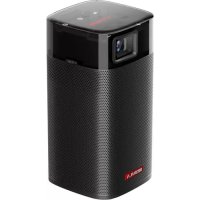
Apollo - Projector NEBULA - Free user manual and instructions
Find the device manual for free Apollo NEBULA in PDF.



| Product Type | Projector |
| Brand | NEBULA |
| Model | Apollo |
| Display Technology | DLP 0.2 inch (854 x 480 pixels) |
| Native Resolution | 854 x 480 pixels |
| Brightness | 200 ANSI lumens |
| Contrast Ratio | 400:1 |
| Projected Image Size | 20 to 100 inches |
| Projection Distance | 0.58 to 3.08 m |
| Throw Ratio | 1.3 |
| Light Source | RGB LED |
| Battery Life (movie) | Approximately 4 hours (battery mode) |
| Battery Life (music) | Approximately 30 hours (Bluetooth speaker mode) |
| Battery Capacity | 9750 mAh, 3.85 V (Li-polymer) |
| Speakers | 6 W |
| Operating System | Android 7.1 |
| Processor | Quad core A7 |
| RAM | 1 GB DDR |
| Storage | 8 GB eMMC |
| Wi-Fi Connectivity | IEEE 802.11a/b/g/n dual band 2.4G/5G |
| Bluetooth | V4.2 |
| Ports | HDMI, USB 2.0, DC Input |
| Remote Control | Yes (2 CR2032 batteries) |
| Dimensions (H × W × D) | 131 × 65 × 65 mm |
| Weight | 579 g |
| Power Supply | DC 15 V, 3 A (adapter included) |
| Operating Temperature | 0 to 35 °C |
| Maintenance | Soft lint-free cloth; lens cloth |
| Warranty | 30-day refund; 12-month manufacturing defects |
Frequently Asked Questions - Apollo NEBULA
User questions about Apollo NEBULA
0 question about this device. Answer the ones you know or ask your own.
Ask a new question about this device
Download the instructions for your Projector in PDF format for free! Find your manual Apollo - NEBULA and take your electronic device back in hand. On this page are published all the documents necessary for the use of your device. Apollo by NEBULA.
USER MANUAL Apollo NEBULA
User Manual Nebula Apollo
| 01 | English |
| 29 | Deutsch |
| 54 | Espanol |
| 79 | François |
| 104 | Italiano |
| 129 | 日本語 |
| 154 | 法語 |
Table of Contents
Safety Instructions 02
What's Included 05
Overview 05
Getting Started 10
Nebula App 14
Settings 15
Using the Nebula Apollo 19
Specifications 23
Troubleshooting 24
Notice 25
Trademarks 28
Warranty 28
Safety Instructions
Read all instructions before you use this device. Do not make any changes or create settings that are not described in this manual. If physical injury, loss of data, or damage is caused by failure to follow instructions, the warranty does not apply.
Setup
- To reduce the risk of fire and/or electric shock, do not expose the device to rain or moisture. Objects filled with liquids, such as vases, should not be placed on this device.
- Do not place this device on soft surfaces such as tablecloths or carpets, otherwise the device could be a fire hazard.
- Do not place this device in areas susceptible to excessive dust and dirt or near any appliance generating a strong magnetic field.
- To prevent overheating, do not block or clog the ventilation openings.
- Never place this device in a confined space. Always leave enough space around this device for ventilation.
- Avoid overexposing this device to direct sunlight, heat, large temperature fluctuations, and moisture. Avoid extreme temperatures. The suitable operation and storage temperature for this device and its accessories is 41^ to 95^ / 5^ to 35^ .
- When this device is running for a long period of time, the surface may become hot. If this occurs, shut it down immediately and unplug the charger. Resume operation after the device has cooled down.
Always handle this device with care. Avoid touching the lens. - Do not allow children to handle the device without supervision.
- No not place heavy or sharp objects on this device.
- To avoid electric shock, do not disassemble the device.
- Only use attachments or accessories specified by the manufacturer.
- Avoid extreme vibrations as they may damage the internal components.
Power Supply
- Use only the provided power adapter.
- Power off the device before removing the power supply from the socket.
- Protect the power cord from being walked on or pinched, particularly at plugs, convenience receptacles, and the point where they exit from this device.
- Unplug this device if there are lightning storms or when unused for a long period of time.
- Where the power plug or an appliance coupler is used as the disconnect device, the disconnect device shall remain readily operable.
- Before you make or change any connections, ensure that all devices are disconnected from the power outlet.
- Never touch the power cable or the power connector with wet hands.
Hearing Safety
- To prevent hearing damage, do not listen for extended periods at high volume. Set the volume to a safe level.
Charging
- The charger type is DST451-150300W-K with output voltage / current of DC 15V / 3A. The charger should be installed near this product and should be easily accessible.
- This charger is for indoor use only.
- When charging, place this device in an environment that has a normal room temperature (ranges from 41^ to 77^ / 5^ to 25^ ) and good ventilation.
- Due to the enclosure material, this device must only be connected to a USB 2.0 or higher.
Battery
-
Do not replace the built-in battery yourself. Contact an authorized service center to replace it.
-
The remote control contains batteries which can be swallowed. Keep the remote control out of the reach of children.
- Risk of explosion! Keep batteries away from heat, direct sunlight, or fire. Never dispose of batteries by burning.
- Remove the batteries when the remote control has not been used for a long period of time.
- Replace the remote control batteries only with the same or an equivalent type.
- Batteries contain chemical substances and they should be disposed of properly.
- Charge this device regularly. Do not store this device with a completely discharged battery.
Cleaning
- Use a soft, lint-free cloth. Never use liquid, gaseous, or easily flammable cleansers to clean.
- Do not use any liquid cleaning agents to clean the lens to avoid damaging the coating film on the lens.
- Wipe the surfaces gently. Be careful that you do not scratch the surface.
- Use lens cleaning paper to clean the lens.
Repairs
- Do not make any repairs to this device yourself. Only have your device repaired by an authorized service center.
- Improper maintenance can result in injuries to persons or damage to this device.
Refer all servicing to qualified service personnel.
Caution
- Possibly hazardous optical radiation emitted from this device.
- Do not stare directly at the operating beam. The bright light may damage your eyes.
1 Lens
Focus adjusting knob
3 Speaker
2. Rear View
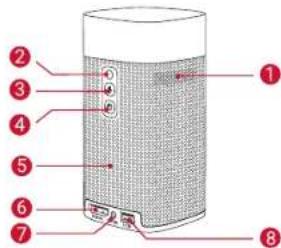

Air ventilation (outlet)
2 Infrared receiver
- Press to switch between Bluetooth speaker mode and projector mode
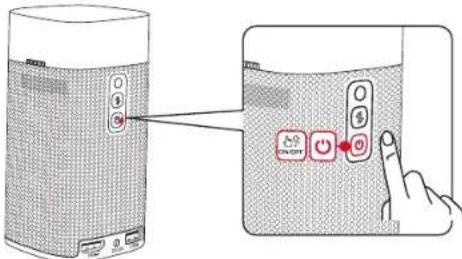
4 Power button
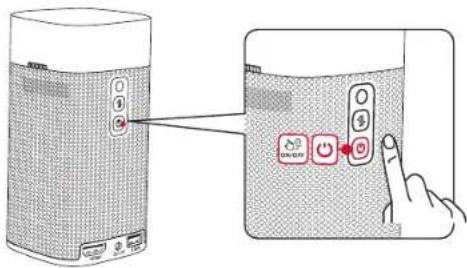
- Press and hold for 2 seconds to power on / off
5 Speaker
6 HDMI port
- Connect to a playback device via HDMI output
7 DC-IN
- Connect to power supply
USB port
- Connect to a USB flash drive
3.Top View
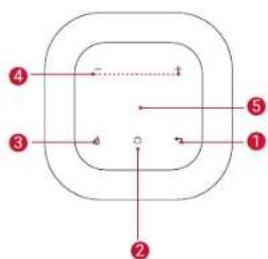
1
- Touch to return to the previous menu
2
- Touch to open the home menu
3 ①
- Touch to enter / exit mouse key mode
4+/-
- Touch to turn the volume up / down
Navigation button
- Slide up, down, left, or right to navigate
- Tap to confirm your selection
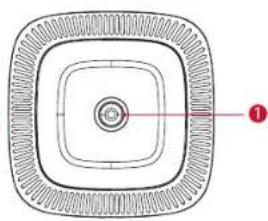
4. Bottom View
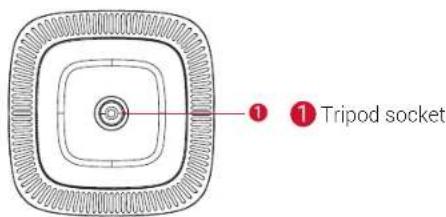
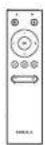
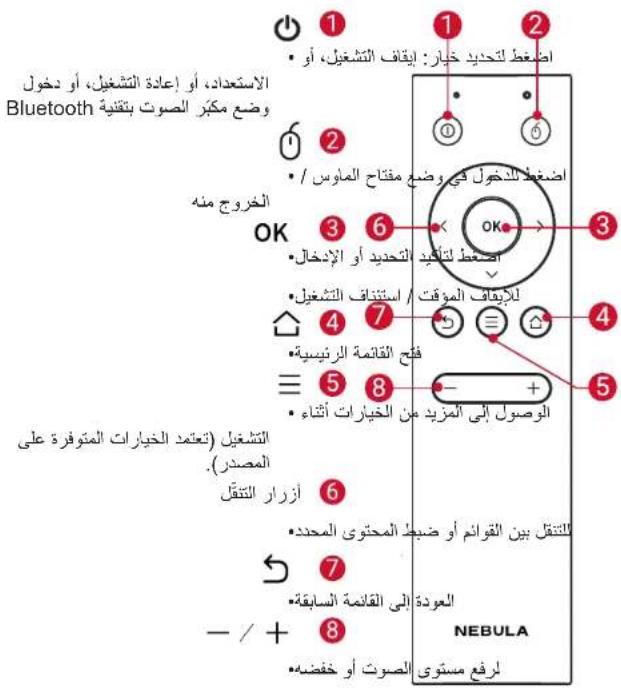
5. Remote Control
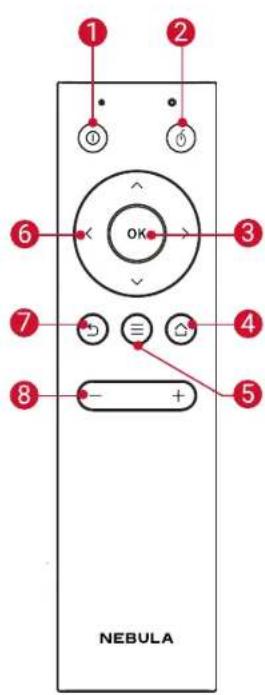
10
- Press to select an option: shutdown, standby, reboot, or enter Bluetooth speaker mode
2 0 -
Press to enter / exit mouse key mode
OK -
Press to confirm a selection or entry
-
Pause / resume play
4 -
Open the home menu
5三
- Access more options during play (available options depend upon the source)
6 Navigation buttons
- Navigate menus or adjust the selected content
- Return to the previous menu
8+
Volume up / down
6. LED Indication
| Button LED Status Description | ||
| Solid blue | Power on / operating in projector mode | |
| Solid yellow Standby in projector mode | ||
| Solid red Charging | ||
| Solid green Fully charged | ||
| Flashing red Low battery | ||
| Flashing blue | Ready to pair / Bluetooth is pairing / Bluetooth disconnected (Bluetooth speaker mode) | |
| Solid blue | Bluetooth connected (Bluetooth speaker mode) | |
Getting Started
1. Placement
Place Nebula Apollo on a stable, flat surface in front of the projection surface. For the best results, the projection surface should be white and flat. The distance between Nebula Apollo and the projection surface must be a minimum of 0.58 meters (23 inches) and a maximum of 3.08 meters (121 inches) to get a projection image between 20 and 100 inches.
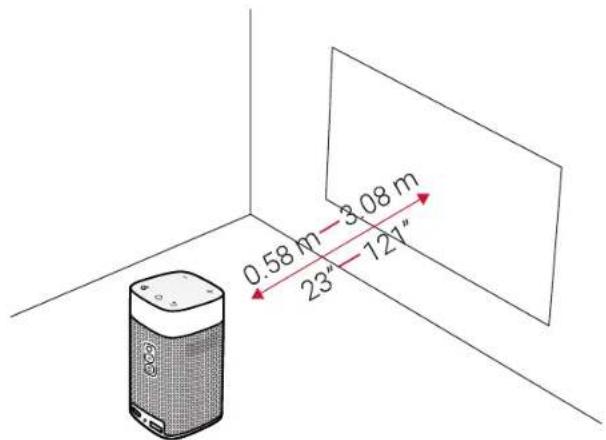

It is unnecessary to tilt Nebula Apollo towards the projection surface. You can correct the projection image with the built-in keystone correction.
- The distance between Nebula Apollo and the projection surface determines the projection image size. For the best result, position Nebula Apollo between 40 and 80 inches away from the projection surface.
ENB
2. Prepare the Remote Control
The remote control comes with two coin batteries.
① For first-time use, remove the battery insulation tabs to activate the remote control batteries.
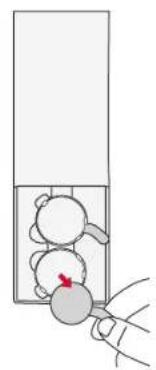
To replace the batteries, slide open the battery compartment, insert new batteries (matching the polarity (+ / - ) indicated), and close the battery compartment.
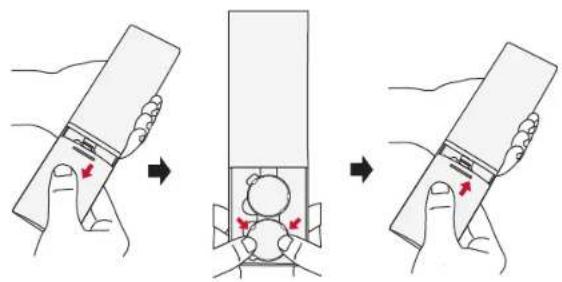
3. Get Started
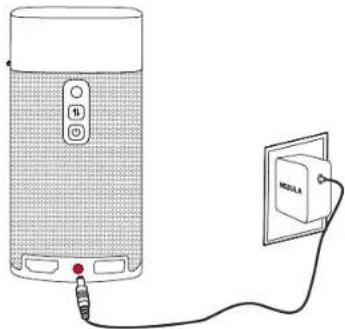
① For first-time use, fully charge the built-in battery using the provided adapter.
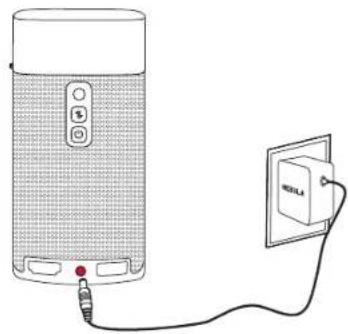
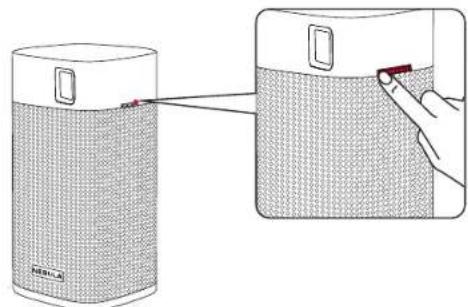
② Hold 2 seconds on the projector to turn it on.
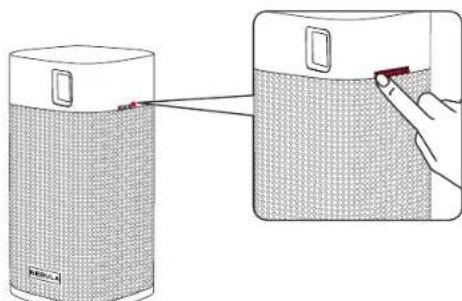
③ Turn the device towards a suitable projection surface or wall.
④ Adjust the focus by rotating the focus adjusting knob.
ENB
For first time use, follow the on-screen instructions to complete the basic setup.

To give your Nebula Apollo the fastest, safest charge, only use the provided adapter.
Nebula App
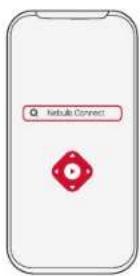
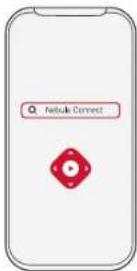
To easily control Nebula Apollo, we recommend downloading the Nebula Connect app. With this app, you can operate your mouse using the screen.
① Download the Nebula Connect app from the App Store (iOS devices) or Google Play (Android devices).

Download as the App Store

CETTON Google Play

Nebula Connect
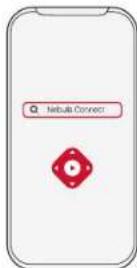
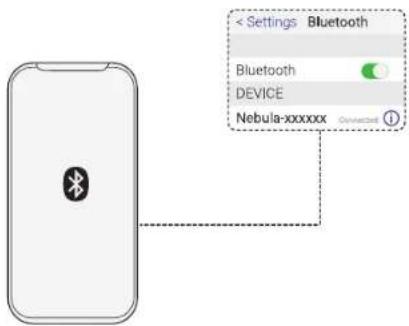
② Enable Bluetooth on your smartphone.
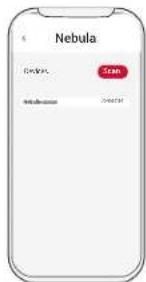
③ Open the Nebula Connect app and select [Nebula-XXXXXX] as the device to be connected.
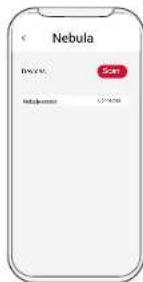
(4) Follow the on-screen instructions to complete connection setup.
Settings
Go through the setup process when you power on Nebula Apollo for the first time.
1. Network
This projector can be connected to the Internet via a wireless (Wi-Fi) connection.
① On the home menu, select [Network] and press OK
② Follow the on-screen instructions to complete the network connection.
2. Bluetooth
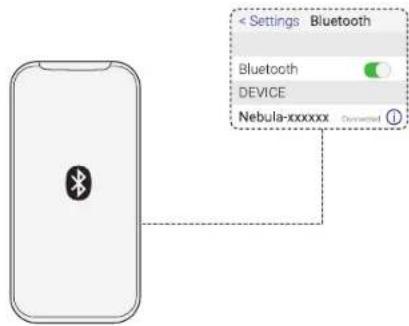
Bluetooth Speaker Mode
You can use this projector as a standalone Bluetooth speaker.
① Press switch to Bluetooth speaker mode.
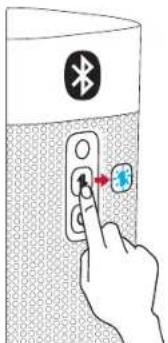
② Enable Bluetooth on your smartphone and select [Nebula-XXXXXX] as the device to be connected.
Projector Mode
You can connect a Bluetooth speaker or pair of headphones to Nebula Apollo while in projector mode.
① Press to access the home menu, select [Settings] > [Bluetooth], and press OK
(2) Follow the on-screen instructions to complete the Bluetooth connection.
3. Projector
Press to access the home menu, select [Settings] > [Projector], and press OK
[Image Mode] [Auto] / [Standard Mode] / [Battery Mode]
[Color Temperature] [Normal] / [Cool] / [Warm]
[Auto Keystone Correction] Enable / disable auto keystone correction.
[Keystone Correction]
Manually adjust the keystone value. The default value is 0.
[Front Projection]: The projector is located in front of the projection surface.
[Rear Projection]: The projector is located behind the projection surface.
[Inverted Front Projection]: The projector is hanging from the ceiling in an upside down position. The image is rotated by 180 degrees.
[Inverted Rear Projection]: The projector is hanging from the ceiling in an upside down position behind the projection surface. The image is rotated by 180 degrees and horizontally mirrored.
4. App Manager
① Press to access the home menu, select [Settings] > [App Manager], and press OK
② Select an app and check the current version, open or force stop the app, check the storage used or clear data, or uninstall the app.

When more than 3 apps are installed, you can select [All] at the bottom line of the home page to access the [Apps] page or App Store on the home page. Select an app and press on the remote control, and then you can select [Move To Home] or [Uninstall].
5. Others
On the home menu, select [Settings] to find more setting options.
[General]
[Language] Select an on-screen display language.
[Keypad Tone] Turn on / off the keypad tone.
Automatic Sleep Interval] 5 min / 15 min / 30 min
[Background] Select a background.
[Clear Cache] Clear the cached data stored on the projector.
[Screen Mirroring] Activate screen mirroring.
[Date & Time]
[Automatic Date & Time] Enable / disable automatic date and time.
[Date] Manually set date.
[Time] Manually set time.
[Select Time Zone] Select time zone.
[Use 24-Hour Format] Select 24-hour format or 12-hour format.
[Upgrade]
[Check Update]
Check if it is the latest version. Follow the on-screen instructions to upgrade the firmware version.
[About]
[Recovery]
All data on the built-in storage will be erased.
ENB
Using the Nebula Apollo
1. Play from HDMIPlayback Devices
Nebula Apollo can be connected to various HDMI playback devices such as a TV box, TV stick, DVD player, set-top box (STB), gaming consoles, or other devices.
To play content from HDMI playback devices:
① Connect Nebula Apollo to an HDMI playback device with an HDMI cable (not provided).
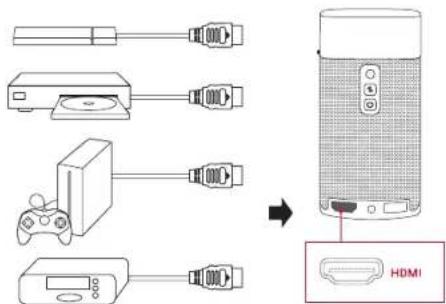
Press to access the home menu, select [HDMI], and press OK
- It will automatically start HDMI playback once connected to an HDMI playback device for the first time.
2. Play from a USB Storage Device
With Nebula Apollo, you can enjoy music, video, and pictures, or install apps that are stored on a USB 2.0 storage device.
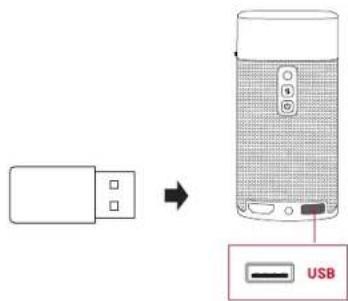
(1) Press to access the home menu.
② Select [File Manager] and press OK
③ Select a file, then press OK
3. Install Apps
Once connected to a wireless network, you can access online services, enjoy movies, music and pictures, and browse online. Aside from the pre-installed apps, you can also install additional apps either from the Nebula App Store or via a USB flash drive.
① Press to access the home menu.
(2) Select an Internet service, and press OK
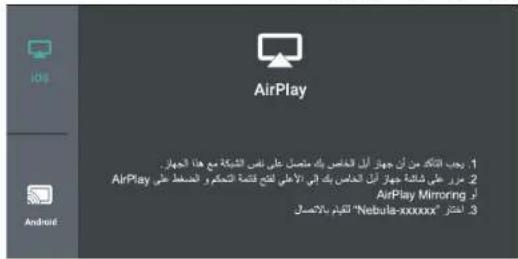
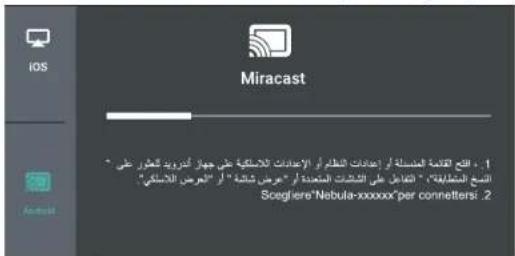
4. Screen Mirroring
You can wirelessly cast the screen of your smartphone or tablet onto the projection surface.
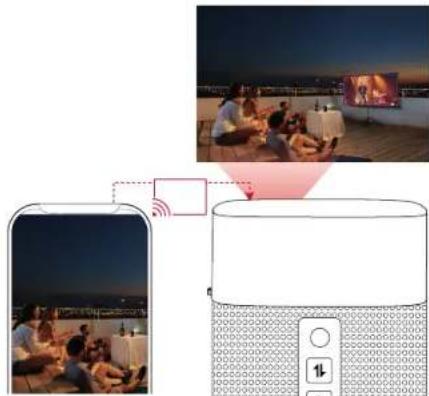
To use screen mirroring:
① Press to access the home menu, select [Settings] > [General] > [Screen Mirroring], and press OK
② Follow the on-screen instructions to complete the process.
- Nebula Apollo will mirror the screen of your smartphone phone or tablet.
For iOS devices:
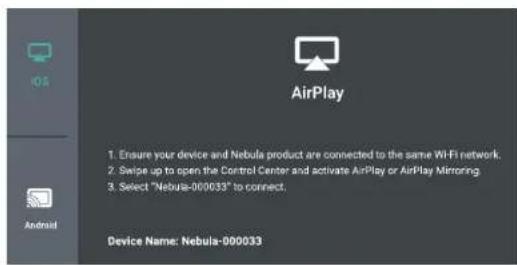
For Android devices:
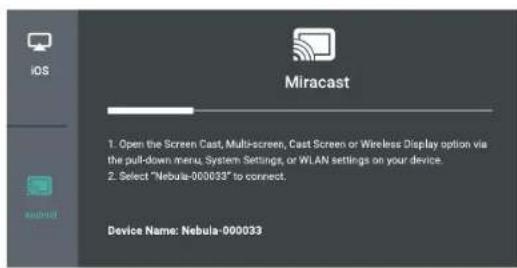

Certain content cannot be cast on Nebula Apollo due to copyright restrictions. In this case, you can stream the content via the same app installed on your Nebula Apollo.
Specifications

Specifications and design are subject to change without notice.
Power supply: DC 15V=3A
Power consumption: < 20W
Standby power consumption: < 0.5W
Display technology: 0.2 in 854 × 480p DLP
Light source: RGB LED
Projection image size: 20-100 in
Resolution: 854× 480p
Brightness: 200 ANSI Lumens
Contrast ratio: 400:1
Throw ratio: 1.3
Throw distance: 0.58 m to 3.08 m
CPU: Quad core A7
OS:Android 7.1
RAM:1GB DDR
ROM:8GB eMMC
Speaker drivers: 6W
Wi-Fi: IEEE802.11a/b/g/n Dual Frequency 2.4G / 5G
Bluetooth version: 4.2
USB file system: FAT32
Built-in battery type: Li-Polymer
Capacity: 9,750 mAh 3.85V
Movie playtime: approximately 4 hours in battery mode
Music playtime: approximately 30 hours in Bluetooth speaker mode
Remote control batteries: CR 2032 × 2
Recommended ambient temperature: 41^ to 95^ / 5^ to 35^
Relative humidity: 15% 85% (non-condensing)
Storage temperature and humidity: < 149^ / 65^, < 90% humidity
Dimensions (H× L× W) .. 131× 65× 65mm / 5.2× 2.6× 2.6 in
Weight: 579g / 16.6oz
Troubleshooting
(1) Could not turn on projector with the remote control?
-
Hold 2 seconds on the projector to turn it on.
-
When powered off, you cannot use the remote control to turn it on.
(2) The remote control doesn't work?
Make sure the battery is already installed in the remote control.
- Replace the batteries.
③ Blurred image?
- Rotate the focus adjusting knob.
(4) Reversed projection image?
- Press to access the home menu, select [Settings] > [Projector Mode] and switch to the correct state.
(5)Cannot connect to a Wi-Fi network?
-
Refresh the list of available networks and retry.
-
Reboot the wireless router or the projector and retry.
⑥ How do I update the firmware?
- When a new version is detected you will be asked to reboot and update.
Notice

Declaration of Conformity
This product complies with the radio interference requirements of the European Community.
Hereby, Anker Innovations Limited. declares that this device is in compliance with the essential requirements and other relevant provisions of Directive 2014/53/EU. For the Declaration of Conformity, visit the Web site www.SeeNebula.com.
RF exposure information: The Maximum Permissible Exposure (MPE) level has been calculated based on a distance of d = 20 cm between the device and the human body. To maintain compliance with RF exposure requirements, use products that maintain a 20cm distance between the device and human body
CAUTION RISK OF EXPLOSION IF BATTERY IS REPLACED BY AN INCORRECT TYPE. DISPOSE OF USED BATTERIES ACCORDING TO THE INSTRUCTIONS
Wifi Operating Frequency Range:2412~2472 MHz(2.4G); 5150~5250 MHz, 5725~5850 MHz (5G)
Wifi Max Output Power:16.86 dBm(2.4G);15.52 dBm(5G)
BT Operating Frequency Range: 2402~2480 MHz; BT Max Output Power:9.68 dBm
5150~5250 MHz can be used indoor only.
| AT | BE | BG | HR | CY | CZ | DK |
| EE | FI | FR | DE | EL | HU | IE |
| IT | LV | LT | LU | MT | NL | PL |
| PT | RO | SK | SI | ES | SE | UK |
The following importer is the responsible party (contact for EU matters only)
Importer: Anker Technology (UK) Ltd
Importer Address: Suite B, Fairgate House, 205 Kings Road, Tyseley, Birmingham, B11 2AA, United Kingdom
Your product is designed and manufactured with high quality materials and components, which can be recycled and reused. This symbol means the product must not be discarded as household waste, and should be delivered to an appropriate collection facility for recycling. Proper disposal and recycling helps protect natural resources, human health and the environment. For more information on disposal and recycling of this product, contact your local municipality, disposal service, or the shop where you bought this product.
FCC Notice
This device complies with the FCC rules, Part 15. Operation is subject to the following two conditions: (1) This device may not cause harmful interference, and (2) This device must accept any interference received, including interference that may cause undesired operation.
Warning: Changes or modifications not expressly approved by the partly responsible for compliance could void the user's authority to operate the equipment.
Note: This equipment has been tested and found to comply with the limits for a Class B digital device, pursuant to part 15 of the FCC Rules. These limits are designed to provide reasonable protection against harmful interference in a residential installation.
This equipment generates, uses and can radiate radio frequency energy and, if not installed and used in accordance with the instruction manual, may cause harmful interference to radio communications. However, there is no guarantee that interference will not occur in a particular installation. If this equipment does cause harmful interference to radio or television reception, which can be determined by turning the equipment off and on, the user is encouraged to try to correct the interference by one or more of the following measures:
Reorient or relocate the receiving antenna.
- Increase the separation between equipment and receiver.
- Connect the equipment into an outlet on a circuit different from that to which the receiver is connected.
- Consult the dealer or an experienced radio / TV technician for help.
FCC Radiation Exposure Statement:
This equipment complies with FCC radiation exposure limits set forth for an uncontrolled environment. This equipment should be installed
and operated with a minimum distance of 20cm between the radiator and your body. This transmitter must not be co-located or operated in conjunction with any other antenna or transmitter.
Notice: Shielded cables
All connections to other computing devices must be made using shielded cables to maintain compliance with FCC regulations.
The following importer is the responsible party.
Company Name: Fantasia Trading LLC
Address: 9155 Archibald Avenue, Suite 202, Rancho Cucamonga, CA 91730, USA
Telephone:1-909-484-1530
IC Statement
This device complies with Industry Canada licence-exempt RSS standard(s). Operation is subject to the following two conditions:
(1) this device may not cause interference, and
(2) this device must accept any interference, including interference that may cause undesired operation of the device."
When using the product, maintain a distance of 20cm from the body to ensure compliance with RF exposure requirements.
Anker Innovations Limited
Room 1318-19, Hollywood Plaza, 610 Nathan Road, Mongkok, Kowloon, Hong Kong
Trademarks
Hami
HDMI, and HDMI logo and High-Definition Multimedia Interface are trademarks or registered trademarks of HDMI licensing LLC in the United States and other countries.

Bluetooth
The Bluetooth® word mark and logos are registered trademarks owned by the Bluetooth SIG, Inc. and any use of such marks by Anker Innovations Limited is under license. Other trademarks and trade names are those of their respective owners.
Warranty
30-Day Money-Back Guarantee for Any Reason
You may return your undamaged product and packaging within 30 days of purchase to receive a FULL REFUND for any reason. If the reason for return isn't quality-related, the customer must pay for the return shipping.
12-Month Warranty for Quality-Related Issues
Nebula's products are warranted to be free from material and workmanship defects for 12 months from the date of purchase. Within this period, Nebula will provide a replacement and cover any return shipping costs for products that fail in normal use.
Please note: Any provided shipping labels must be used within 20 days from the date they're issued by Nebula Support.
Inhaltsverzeichnis
Wi-Fi: IEEE802.11a/b/g/n freuency dual 2.4 G/5 G
Version de Bluetooth: 4.2
Download on the App Store

GETON Google Play

Nebula Connect
[Projector Mode] (Mode de projection)
[Recovery] (Restauration)
Consummation: < 10W
Consumo energetico in standby: < 0.5 W
Tecnologia display: 0,2 pollici, 854 × 480 p DLP
Sorgente luminosa:LED RGB
jaii jiaiaic jaiyill aaiil
Aaiaaa aaiiieae iie ie aiee e ae e aee
21 × 21
1
y 1 y
j 1
joll
jaiy jay yj gao jia jia jia jia jia jia jia jia jia jia jia jia jia jia jia jia jia jia jia jia jia jia jia jia jia jia jia jia jia jia jia jia jia jia jia jia jia jia jia jia jia jia jia jia jia jia jia jia jia jia j
i 1
a
aal yal aai 1111111
Jg 1
1 95 0 35
中
iiaa aaiy i jyj yj 1000000000000000000000000000000000000000000000000000000
3/15 15 j/2 DST451-150300W-K
1
41 2020
a 25 5/7
.
y
1 1
jaiy 2 a
aai 15
中
y
J 1
y 1
J 1
jpeaill jqpsllpssl pae 1s aia cily jall all jay ay ydo sial
jai / jaii / jaii / jaii / jaii
5
HDMI 6
-HDMI j
DC-IN 7
aill juaa juaa jil
USB 8
USB
4
2.1.2.5
LED.6
jall jall jll jll jll jll
Alalai baiy jie yue
i ③
jssjj 4
Nebula Apollo jaii 1

Nebula
Nebula Connect Nebula Apollo (iOS App Store Nebula Connect (Android) Google Play

Download on the App Store

GOTITON Google Play
Q
Nebula Connect
Bluetooth
[Nebula-XXXXXX] Nebula Connect ③
4
111 × 211
Nebula Apollo 1234567890
4.5.11.1
(Wi-Fi)
QJ 1
2
Bluetooth 2
Bluetooth
. Bluetooth 4.0,Bluetooth Cusus jis his bili jis plsiin di
Bluetooth 1

[NeBula-XXXXXX] 28, Siil diau e Bluetooth ②
1
Nebula i j k l y j k l Bluetooth 2.0 g a a
Apollo
[Bluetooth] < [blab]
.Bluetooth Jusy 1
21 × 2^2 .
OK bai, [baiy]j< [aiy] 12a aai jai ai jai jai
| [العربية] / [العربية] / [العربية] [العربية] | |
| العربية الحرفية محيى بعساني/العربية [العربية] | |
| العربية الحرفية الحرفية الحرفية بعساني/العربية [العربية] | |
| العربية الحرفية الحرفية الحرفية الحرفية بعساني/العربية [العربية] | |
| العربية الحرفية الحرفية الحرفية الحرفية الحرفية [العربية] | |
| العربية الحرفية الحرفية الحرفية الحرفية الحرفية [العربية] | |
| العربية الحرفية الحرفية الحرفية الحرفية الحرفية [العربية] | |
| العربية الحرفية الحرفية الحرفية الحرفية [العربية] | |
| العربية الح註冊ة الحرفية الح註冊ة الح註冊ة [العربية] | |
| العربية الح註冊ة الح註冊ة الح註冊ة [العربية] | |
| العربية الح註冊ة الح註冊ة الح註冊ة [العربية] | |
| العربية الح註冊ة الح註冊ة الح註冊ة [العربية] | |
| العربية الح註冊ة الح註冊ة الح註冊ة [العربية] | |
| العربية الح註冊ة الح註冊ة الح註冊ة [العربية] | |
| [العربية] | |
| [العربية] | |
| [العربية] | |
| [العربية] | |
| [العربية] | |
| [العربية] | |
| [العربية] | |
| [العربية] | |
| [العربية] | |
| [العربية] | |
| [العربية] | |
| [лгелях] | |
| [лгелях] | |
| [лгелях] | |
| [лгелях] | |
| [лгелях] | |
| [лгелях] | |
| [лгелях] | |
| [лгелях] | |
| [лгелях] | |
| [лгелях] | |
| [лгеляx] | |
| [лгеляx] | |
| [лгеляx] | |
| [лгеляx] | |
| [лгеляx] | |
| [лгеляx] | |
| [лгеляx] | |
| [лгеляx] | |
| [лгеляx] | |
| [лгеляx] | |
| [лгелях] | |
| [лгелях] | |
| [лгеляx] | |
| [лгеляx] | |
| [лгеляx] | |
| [лгеляx] | |
| [лгеляx] | |
| [лгеляx] | |
| [лгеляx] | |
| [лгелях] | |
| [лгеляx] | |
| [лгеляx] | |
| [лгеляx] | |
| [лгеляx] | |
| [лгеляx] | |
| [лгеляx] | |
| [лгеляx] | |
| [лгPHA] | |
| [лгPHA] | |
| [лгPHA] | |
| [лгPHA] | |
| [лгPHA] | |
| [лгPHA] | |
| [лгPHA] | |
| [лгPHA] | |
| [лгPHA] | |
| [лгPHA] | |
| [лгPHA] | |
| [лгPHA ] | |
| [лгPHA] | |
| [лгPHA] | |
| [лгPHA] | |
| [лгPHA] | |
| [лгPHA] | |
| [лгPHA] | |
| [лгPHA] | |
| [лгPHA] | |
| [лгPHA] | |
| [лгPHA] | |
| [лгPHA] | |
biol 104
[1] <[1]
2
J 1 [Caihail] aie 1 Jgaiy dkiy 3 j 1 1 1
j 1 1 1 1 1 1 1 1
[ciu] j [aay] aaiall j

5
1
[pa]
aaii iie
[
aaiy
[Tab]
30/15/5
[0gswi gai j
2.4.15 2.4.16
[Tab]
Jie jie liy jia jiu liu lao zu jia zai jiu Jia
[ab]
aLiLi si Jua
[Tab]
[
y
1
[ale] < [ale] < [alal]
Aaaljayy
Nebula Apollo
:IOS paliy Jaii jaiy
Android 1234567890
Nebula Apollo

C

j 1

j13-15 jia jai jai jai jai
10>4aBd
0.5> 1
DLP≤854x480 0.2
()RGBLED
20-100:
480x854
200:
400:1:
1.3:JbJyJz
1j3,08 j1j0,58 j
CPU): Quad core A7)
Android 7.1:
DDR RAM):1)
8 ROM):eMMC) 1s
6:swll
5/24 Wi-Fi: IEEE802.11a/b/g/n
Bluetooth:V4.2
USB:FAT32
y jy yj yj yj yj yj yj yj yj yj yj yj yj yj yj yj yj yj yj yj yj yj yj yj yj yj yj yj yj yj yj yj yj yj yj yj yj yj yj yj yj yj
3.85 9750
4 4
Bluetooth 30
2x2032CR:
5/9541
35
()85% 15%
90% > 65 / 149 >
For FAQs and more information, please visit:
www.SeeNebula.com
网 support@SeeNebula.com

+1 (800) 988 7973 (US) Mon-Fri 9:00am - 5:00pm (PT)
+44 (0) 1604 936200 (UK) Mon-Fri 6:00 - 11:00 (GMT)
+49(0)6995797960(DE)Mo-Fr 6:00-11:00
+810344557823(日本)月-金9:00-17:00
Anker Innovations Limited. All rights reserved. NEBULA and the NEBULA logo are trademarks of Anker Innovations Limited, registered in the United States and other countries. All other trademarks are the property of their respective owners.
D2410 V01Model:
- User Manual Nebula Apollo
- Table of Contents
- Safety Instructions
- Setup
- Power Supply
- Hearing Safety
- Charging
- Battery
- Cleaning
- Repairs
- Caution
- Rear View
- 3.Top View
- Bottom View
- Remote Control
- LED Indication
- Getting Started
- Placement
- Prepare the Remote Control
- Get Started
- Nebula App
- Settings
- Network
- Bluetooth
- Bluetooth Speaker Mode
- Projector Mode
- Projector
- App Manager
- Others
- [General]
- [Date & Time]
- [Upgrade]
- [About]
- Using the Nebula Apollo
- Play from HDMIPlayback Devices
- Play from a USB Storage Device
- Install Apps
- Screen Mirroring
- Specifications
- Troubleshooting
- Notice
- Declaration of Conformity
- FCC Notice
- FCC Radiation Exposure Statement:
- Notice: Shielded cables
- IC Statement
- Trademarks
- Hami
- Bluetooth
- Warranty
- 30-Day Money-Back Guarantee for Any Reason
- 12-Month Warranty for Quality-Related Issues
- Inhaltsverzeichnis
- × 21
- a
- 中
- 4
- 2.1.2.5
- LED.6
- Nebula
- × 211
- Bluetooth 2
- [pa]
- [
Brand : NEBULA
Model : Apollo
Category : Projector