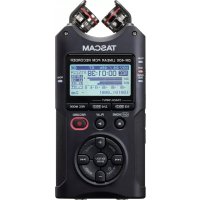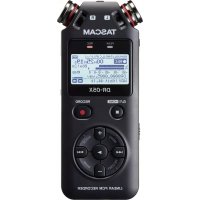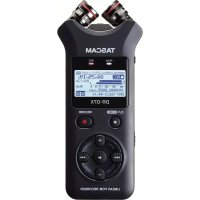
DR07X - Voice recorder TASCAM - Free user manual and instructions
Find the device manual for free DR07X TASCAM in PDF.



User questions about DR07X TASCAM
0 question about this device. Answer the ones you know or ask your own.
Ask a new question about this device
Download the instructions for your Voice recorder in PDF format for free! Find your manual DR07X - TASCAM and take your electronic device back in hand. On this page are published all the documents necessary for the use of your device. DR07X by TASCAM.
USER MANUAL DR07X TASCAM
https://tascam.com/us/
Phone: +1-323-726-0303
10410 Pioneer Blvd., Unit #1 and #4, Santa Fe Springs, CA 90640, U.S.A.
TEAC UK Ltd.
https://www.tascam.eu/en/
Phone: +44-1923-797205
Meridien House, 69-71 Clarendon Road, Watford, Herts, WD17 1DS, United Kingdom
TEAC EUROPE GmbH
https://www.tascam.eu/en/
Phone: +49-611-71580
Room 817, Block A, Hailrun Complex, 6021 Shennan Blvd., Futian District,
Shenzhen 518040, China
TASCAM
DR-07X
Linear PCM Recorder
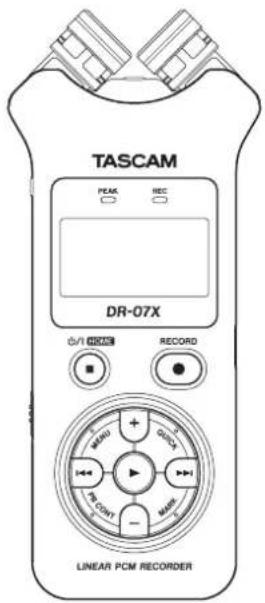

D01345600A
OWNER'S MANUAL
MODE D'EMPLOI
MANUAL DEL USUARIO
BEDIENUNGSANLEITUNG
m = 311
ITALIANO
RUSSIAN
日本語
• TASCAM is a registered trademark of TEAC Corporation.
- microSDXC Logo is a trademark of SD-3C, LLC.

- MPEG Layer-3 audio coding technology licensed from Fraunhofer IIS and Thomson.
- Supply of this product does not convey a license nor imply any right to distribute MPEG Layer-3 compliant content created with this product in revenue-generating broadcast systems (terrestrial, satellite, cable and/or other distribution channels), streaming applications (via Internet, intranets and/or other networks), other content distribution systems (pay-audio or audio-on-demand applications and the like) or on physical media (compact discs, digital versatile discs, semiconductor chips, hard drives, memory cards and the like). An independent license for such use is required. For details, please visit http://mp3licensing.com.
- Microsoft, Windows, Windows Vista and Windows Media are either registered trademarks or trademarks of Microsoft Corporation in the United States and/or other countries.
- Apple, Mac, Mac OS, macOS, iPad, iPod touch, Lightning, App Store and iTunes are trademarks of Apple Inc.
- IOS is a trademark or registered trademark of Cisco in the U.S. and other countries and is used under license.
- Other company names, product names and logos in this document are the trademarks or registered trademarks of their respective owners.
Owner's Manual
IMPORTANT SAFETY PRECAUTIONS
For U.S.A.
INFORMATION TO THE USER
This equipment has been tested and found to comply with the limits for a Class B digital device, pursuant to Part 15 of the FCC Rules. These limits are designed to provide reasonable protection against harmful interference in a residential installation. This equipment generates, uses, and can radiate radio frequency energy and, if not installed and used in accordance with the instruction manual, may cause harmful interference to radio communications. However, there is no guarantee that interference will not occur in a particular installation. If this equipment does cause harmful interference to radio or television reception, which can be determined by turning the equipment off and on, the user is encouraged to try to correct the interference by one or more of the following measures.
a) Reorient or relocate the receiving antenna.
b) Increase the separation between the equipment and receiver.
c) Connect the equipment into an outlet on a circuit different from that to which the receiver is connected. d) Consult the dealer or an experienced radio/TV technician for help.
CAUTION
Changes or modifications to this equipment not expressly approved by TEAC CORPORATION for compliance could void the user's authority to operate this equipment.
For Canada
THIS CLASS B DIGITAL APPARATUS COMPLIES WITH CANADIAN ICES-003.
CET APPAREIL NUMERIQUE DE LA CLASSE B EST CONFORME A LA NORME NMB-003 DU CANADA.
Declaration of Conformity
Model Number: DR-07X
Trade Name : TASCAM
Responsible party : TEAC AMERICA, INC.
Address: 10410 Pioneer Blvd., Unit #1 and #4, Santa Fe Springs, CA 90640, U.S.A.
Telephone number : 1-323-726-0303
This device complies with Part.15 of FCC Rules.
Operation is subject to the following two conditions:
1) This device may not cause interference, and
2) This device must accept any interference, including interference that may cause undesired operation.

This product complies with the European Directives request and the other Commission Regulations.
IMPORTANT SAFETY INSTRUCTIONS
1 Read these instructions.
2 Keep these instructions.
3 Heed all warnings.
4 Follow all instructions.
5 Do not use this apparatus near water.
6 Clean only with dry cloth.
7 Do not block any ventilation openings. Install in accordance with the manufacturer's instructions.
8 Do not install near any heat sources such as radiators, heat registers, stoves, or other apparatus (including amplifiers) that produce heat.
9 Do not defeat the safety purpose of the polarized or grounding-type plug. A polarized plug has two blades with one wider than the other. A grounding type plug has two blades and a third grounding prong. The wide blade or the third prong are provided for your safety. If the provided plug does not fit into your outlet, consult an electrician for replacement of the obsolete outlet.

10 Protect the power cord from being walked on or pinched particularly at plugs, convenience receptacles, and the point where they exit from the apparatus.
11 Only use attachments/accessories specified by the manufacturer.
12 Use only with the cart, stand, tripod, bracket, or table specified by the manufacturer, or sold with the apparatus. When a cart is used, use caution when moving the cart/apparatus combination to tip-over.

13 Unplug this apparatus during lightning storms or when unused for long periods of time.
14 Refer all servicing to qualified service personnel. Servicing is required when the apparatus has been damaged in any way, such as power-supply cord or plug is damaged, liquid has been spilled or objects have fallen into the apparatus, the apparatus has been exposed to rain or moisture, does not operate normally, or has been dropped.
The apparatus draws nominal non-operating power from the AC outlet with its POWER or STANDBY/ON switch not in the ON position.
•The mains plug is used as the disconnect device, the disconnect device shall remain readily operable.
Caution should be taken when using earphones or headphones with the product because excessive sound pressure (volume) from earphones or headphones can cause hearing loss.
If you are experiencing problems with this product, contact TEAC for a service referral. Do not use the product until it has been repaired.
WARNING

To prevent possible hearing damage, do not listen at high volume levels for long periods.
CAUTION
- Do not expose this apparatus to drips or splashes.
- Do not place any objects filled with liquids, such as vases, on the apparatus.
- Do not install this apparatus in a confined space such as a book case or similar unit.
•The apparatus should be located close enough to the AC outlet so that you can easily grasp the power cord plug at any time.
- If the product uses batteries (including a battery pack or installed batteries), they should not be exposed to sunshine, fire or excessive heat.
CAUTION for products that use replaceable lithium batteries: there is danger of explosion if a battery is replaced with an incorrect type of battery. Replace only with the same or equivalent type.
CAUTIONS ABOUT BATTERIES
This product uses batteries. Misuse of batteries could cause a leak, rupture or other trouble. Always abide by the following precautions when using batteries.
- Never recharge non-rechargeable batteries. The batteries could rupture or leak, causing fire or injury.
When installing batteries, pay attention to the polarity indications (plus/minus ( / ) orientation), and install them correctly in the battery compartment as indicated. Putting them in backward could make the batteries rupture or leak, causing fire, injury or stains around them.
When you store or dispose batteries, isolate their terminals with insulation tape or something like that to prevent them from contacting other batteries or metallic objects.
When throwing used batteries away, follow the disposal instructions indicated on the batteries and the local disposal laws.
Do not use batteries other than those specified. Do not mix and use new and old batteries or different types of batteries together. The batteries could rupture or leak, causing fire, injury or stains around them.
Do not carry or store batteries together with small metal objects. The batteries could short, causing leak, rupture or other trouble.
- Do not heat or disassemble batteries. Do not put them in fire or water. Batteries could rupture or leak, causing fire, injury or stains around them.
If the battery fluid leaks, wipe away any fluid on the battery case before inserting new batteries. If the battery fluid gets in an eye, it could cause loss of eyesight. If
fluid does enter an eye, wash it out thoroughly with clean water without rubbing the eye and then consult a doctor immediately. If the fluid gets on a person's body or clothing, it could cause skin injuries or burns. If this should happen, wash it off with clean water and then consult a doctor immediately.
The unit power should be off when you install and replace batteries.
Remove the batteries if you do not plan to use the unit for a long time. Batteries could rupture or leak, causing fire, injury or stains around them. If the battery fluid leaks, wipe away any fluid on the battery compartment before inserting new batteries.
Do not disassemble a battery. The acid inside the battery could harm skin or clothing.
For European Customers
Disposal of electrical and electronic equipment
(a) All electrical and electronic equipment should be disposed of separately from the municipal waste stream via designated collection facilities appointed by the government or the local authorities.
(b) By disposing of the electrical and electronic equipment correctly, you will help save valuable resources and prevent any potential negative effects on human health and the environment.
(c) Improper disposal of waste equipment can have serious effects on the environment and human health as a result of the presence of hazardous substances in electrical and electronic equipment.
(d) The crossed out wheeled dust bin symbol indicates that electrical and electronic equipment must be collected and disposed of separately from household waste.
(e) The return and collection systems are available to the end users. For more detailed information about disposal of old electrical and electronic equipment, please contact your city office, waste disposal service or the shop where you purchased the equipment.
Disposal of batteries and/or accumulators
(a) Waste batteries and/or accumulators should be disposed of separately from the municipal waste stream via designated collection facilities appointed by the government or the local authorities.
(b) By disposing of waste batteries and/or accumulators correctly, you will help save valuable resources and prevent any potential negative effects on human health and the environment.
(c) Improper disposal of waste batteries and/or accumulators can have serious effects on the environment and human health as a result of the presence of hazardous substances in batteries and/or accumulators.
(d) The crossed out wheeled dust bin symbol indicates that batteries and/or accumulators must be collected and disposed of separately from household waste.

Pb, Hg, Cd
If the battery or accumulator contains more than the specified values of lead (Pb), mercury (Hg), and/or cadmium (Cd) defined in the Battery Directive (2006/66/EC), then the chemical symbols for lead (Pb), mercury (Hg) and/or cadmium (Cd) will be indicated beneath the crossed out wheeled dust bin symbol.
(e) The return and collection systems are available to the end users. For more detailed information about disposal of waste batteries and/or accumulators, please contact your city office, waste disposal service or the shop where you purchased them.
Contents
Introduction....5
Note about the Reference Manual ....5
Items included with this product .... 5
Precautions for placement and use....5
Beware of condensation ....5
Cleaning the unit 5
About microSD cards....6
Using the TEAC Global Site 6
About TASCAM customer support service....6
Product registration....6
Names and Functions of Parts 6
Top panel 6
Front panel 6
Rear panel....6
Left side panel....7
Right side panel....7
Bottom Panel....7
Making preparations....7
Installing batteries....7
Inserting a card....7
Turning the unit on....7
Using the built-in microphone 8
Screen overview 8
Using the menu....9
Recording 9
Using the low-cut filter....10
Setting the limiter....10
Playing recordings....10
Selecting files 11
Changing the playback speed....11
Using I/O loop playback....11
Using as an audio interface ....12
Preparation....12
Connection....12
Monitoring 12
Disconnecting....12
Troubleshooting 13
Specifications....13
Ratings 13
Inputs and outputs....13
Control input/output ratings....13
Audio performance....14
Recording times 14
Other specifications....14
Introduction
Thank you very much for purchasing the TASCAM DR-07X Linear PCM Recorder.
Before using this unit, read this owner's manual carefully so that you will be able to use it correctly and enjoy working with it for many years. After you have finished reading this manual, please keep it in a safe place for future reference.
Note about the Reference Manual
This Owner's Manual explains the main functions of this unit. Please see the Reference Manual for information about all the unit's functions.
You can also download this Owner's Manual and the Reference Manual from the TEAC Global Site
(http://teac-global.com/).
Items included with this product
This product includes the following items.
Take care when opening the package to avoid damaging the items. Keep the packing materials for transportation in the future.
Please contact the store where you purchased this unit if any of these items are missing or have been damaged during transportation.
Main unit.... × 1
AA alkaline batteries ....... × 2
Owner's Manual (this document) including warranty ....×1
Precautions for placement and use
The environmental temperature operating range of this unit is 0–40°C (32–104°F).
Do not install this unit in the following types of locations.
Doing so could degrade the sound quality and/or cause malfunctions.
Places with significant vibrations
Near windows or other places exposed to direct sunlight
Near heaters or other extremely hot places
Extremely cold places
Places with bad ventilation or high humidity Very dusty locations
Places exposed directly to rain or other water
If this unit is placed near a power amplifier or other device with a large transformer, it could cause a hum. If this occurs, increase the distance between this unit and the other device.
- This unit could cause color irregularities on a TV screen or noise from a radio if used nearby. If this occurs, use this unit farther away.
This unit might produce noise if a mobile phone or other wireless device is used nearby to make calls or send or receive signals. If this occurs, increase the distance between this unit and those devices or turn them off.
■To enable good heat dissipation, do not place anything on top of this unit.
- Do not place this unit on top of a power amplifier or other device that generates heat.
Beware of condensation
Condensation could occur if the unit is moved from a cold place to a warm place, it is used immediately after a cold room has been heated or it is otherwise exposed to a sudden temperature change. To prevent this, or if this occurs, let the unit sit for one or two hours at the new room temperature before using it.
Cleaning the unit
Use a dry soft cloth to wipe the unit clean. Do not wipe with chemical cleaning cloths, thinner, alcohol or other chemical agents. Doing so could damage the surface or cause discoloration.
About microSD cards
A list of SD cards that have been confirmed for use with this unit can be found on our web site. Please access to a product page of this product from the TEAC Global Site (http://teac-global.com) to find the list or contact the TASCAM customer support service.
Using the TEAC Global Site
You can download updates for this unit from the TEAC Global Site:
http://teac-global.com/
In the TASCAM Downloads section, select the desired language to open the Downloads website page for that language.
About TASCAM customer support service
TASCAM products are supported and warranted only in their country/region of purchase.
To receive support after purchase, on the TASCAM Distributors list page of the TEAC Global Site (http://teac-global.com/), search for the local company or representative for the region where you purchased the product and contact that organization.
When making inquiries, the address (URL) of the shop or web shop where it was purchased and the purchase date are required. Moreover, the warranty card and proof of purchase might also be necessary.
Product registration
Customers in the USA, please visit the following TASCAM website to register your TASCAM product online.
https://tascam.com/us/
Names and Functions of Parts
Top panel
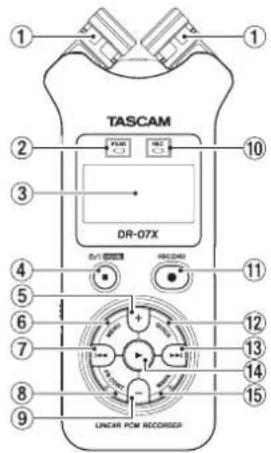
① Built-in stereo microphone
② PEAK indicator
Lights when recording level is too high
③ Display
④ ⏻/| (HOME) [■] button
Press to stop, turn the power on/off (☐/I) and open the Home screen HOME)
⑤ + button
Plus/up
⑥ MENU button
Open Menu screen
⑦ ◀◀ button
Search backward/left/cancel
⑧ PB CONT button
Open Playback Control screen
⑨ - button
Minus/down
⑩ REC indicator
Shows recording status
⑪ RECORD [●] button
Recording
⑫ QUICK button
Open the quick menu
⑬ button
Search forward/right/confirm
⑭ ▶ button
Play/confirm
⑮ MARK button
Set/clear marks
Front panel
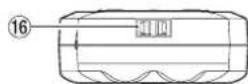
16 Strap attachment
Rear panel
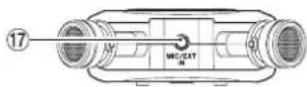
⑰ MIC/EXT IN jack
Mic/external input jack
Left side panel
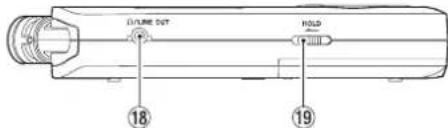
18Ω /LINE OUT jack
Headphone/line output jack
⑲ HOLD switch
Set hold function
Right side panel
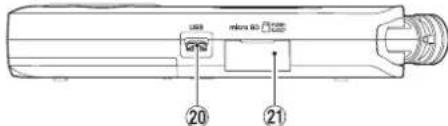
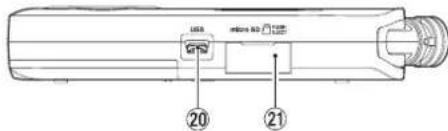
20 USB port
②1 microSD card slot
Bottom Panel
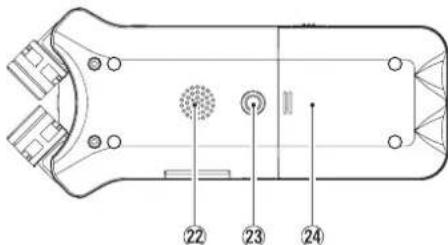
22 Mono speaker
②3 Tripod attachment screw thread (1/4-inch)
⑳ Battery compartment
Making preparations
Installing batteries
While pressing the battery compartment cover on the back of the unit, slide it open. Then, install batteries.
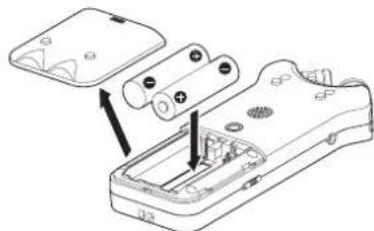
TIP
The TASCAM PS-P520E AC adapter can also be used with this unit.
Inserting a card
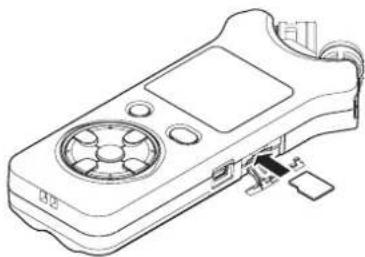
Open the microSD slot cover on the right side panel, and insert a microSD card.
natural_image
Line drawing of a handheld electronic device with ports and a connector (no text or symbols)Turning the unit on
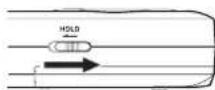
- Slide the HOLD switch in the direction of the arrow to unlock it.
TIP
By sliding it toward HOLD, button operations can be disabled, preventing misoperation during recording.
- Press and hold the ⏻/l (HOME) [■] button for several seconds.
The first time the power is turned on after purchase, setting screens like the following will open.
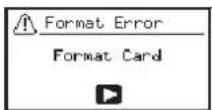
Formatting cards
Press the ▶ button to execute.
CAUTION
Execution of formatting erases all data currently on the card.
This message will not appear for cards that have already been formatted.
Setting the language
Select the language used for menus and messages.
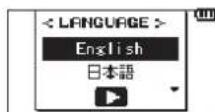
Use the + and - buttons to select the language, and press the ▶ button to confirm.
DATE/TIME
Set the date and time.
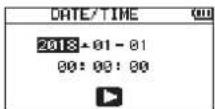
Use the ◀◀ and ▶▶1 buttons to move the cursor, and use the + and - buttons to change the date and time.
Press the ▶ button to confirm.
TIP
The language and date/time settings can be changed later from the menu.
Using the built-in microphone
This unit's built-in microphones can be adjusted, allowing the angles of the microphones to be changed. You can choose clear stereo sound or wide stereo sound according to the recording source, situation, etc. by opening or closing the microphone pair.
Setting the mics to record a wide stereo sound (A-B position)
Spread the stereo microphone to the left and right. (A-B position)
Set this way, the two microphones are spread widely left and right, and recording is possible with a strong stereo field that is good for music, for example.
If you open or close the microphone pair while using the built-in stereo microphone and the left-right channels does not suit the angle of the microphone, a pop-up message appears to ask whether you want to swap the left-right channels of the microphone.
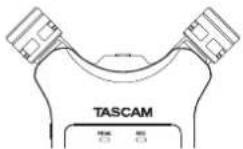
CAUTION
Set the left-right channels of the built-in microphone to L-R.
When you are using the built-in microphone and the setting is not L-R, F.L. pears on the Home screen.
Setting the mics to record a clear stereo sound (X-Y position)
Close the stereo microphone. (X-Y position) Set this way, the microphone pair is close, and recording is possible with a clear stereo field with less phase difference. If you open or close the microphone pair while using the built-in stereo microphone and the left-right channels does not suit the angle of the microphone, a pop-up message appears to ask whether you want to swap the left-right channels of the microphone.
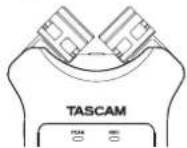
CAUTION
Set the left-right channels of the built-in microphone to R-L. When you are using the built-in microphone and the setting is not R-L, 📁 appears on the Home screen.
Screen overview
When stopped or playing back
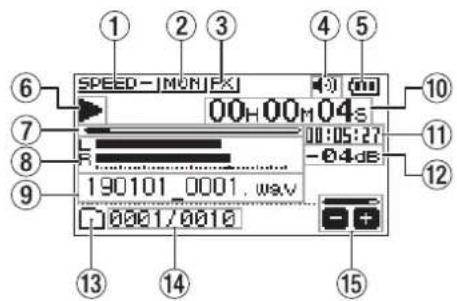
① Playback speed status
② Input mix function status
③ Effect status
④ Speaker status
⑤ Remaining battery charge/power supply status
⑥ Playback status
⑦ Playback position
⑧ Playback level meters
⑨ Playback file name
⑩ Elapsed time
⑪ Remaining time
⑫ Peak value (decibels)
⑬ Playback area
⑭ Playback file number/total number of files
⑮ Output volume status
When recording or in recording standby
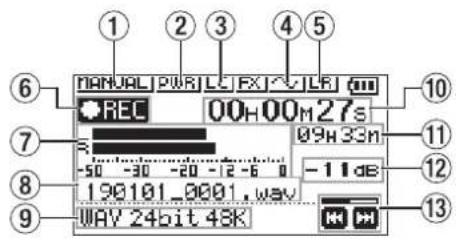
① Level mode setting status
② Plug-in power status
③ Low cut filter status
④ Tone output setting status
⑤ Built-in stereo microphone left-right setting
⑥ Recording status
⑦ Recording level meters
⑧ Recording file name
⑨ Recording format
⑩ Elapsed recording time
⑪ Remaining recording time
⑫ Peak value (decibels)
⑬ Recording level status
Using the menu
Use the menu to change various settings, including recording, playback and system settings, and to execute various functions.
- Press the MENU button.
The MENU screen will open.
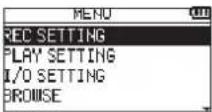
- Use the + and - buttons to select the menu item, and press ▶.
The setting screen will open.
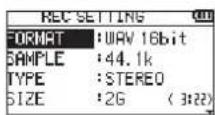
- Use the + and - buttons to select the setting item, and press ▶.
Settings can now be changed and functions executed.
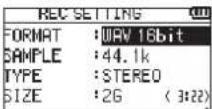
- Use the + and - buttons to change the setting.
NOTE
- Press the MENU button to return to the previous screen.
To return to the Home screen, press the ⏻/I (HOME) [■] button.
Recording
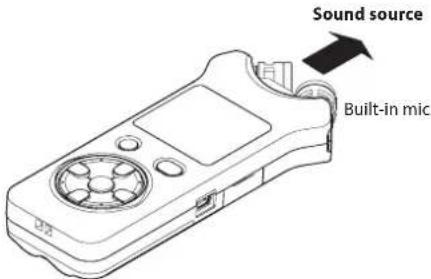
- Point the built-in mic towards the sound to be recorded.
- Press the RECORD [●] button to enter recording standby.
Recording standby will start, ● II will appear on the display, and the REC indicator will blink.
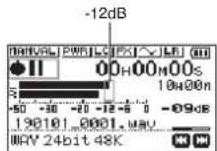
- Adjust the recording level.
Adjust the built-in mic orientation and distance from the sound source as well as the input level so that the recording level meters stay near -12 dB at the peak input level.
Use the ◀◀ and ▶▶1 buttons to adjust the input level.
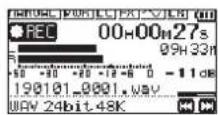
- Press the RECORD [●] button to start recording.
Recording will start, NPEC appear on the display, and the REC indicator will light.
- Press the ⏻/l (HOME) [■] button to stop recording.
Recording stops, and ■ appears on the display.
Using the low-cut filter
Noise from air conditioning and other sources can be reduced when recording.
- When in recording standby, press the QUICK button. This opens the Quick menu.
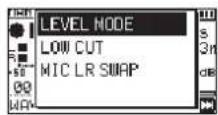
- Use the + and - buttons to select the LOW CUT, and press ▶.
The setting screen for the low-cut filter will open.
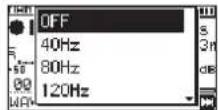
Options: OFF, 40Hz, 80Hz, 120Hz, 220Hz
- Use the + and - buttons to select the setting, and press ▶.
This changes the setting and returns to the QUICK menu screen.
- Press the ⏻/| (HOME)[■] button.
The Home screen will reopen.
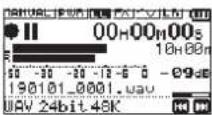
Setting the limiter
This can help prevent sound from becoming distorted when loud noises are input suddenly during recording.
- When in recording standby, press the QUICK button. This opens the Quick menu.
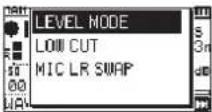
- Use the + and - buttons to select LEVEL MODE, and press ▶.
This opens the Level Mode setting screen.
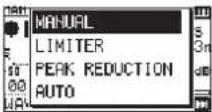
Options: MANUAL (default), LIMITER, PEAK REDUCTION, AUTO
- Use the + and - buttons to select the setting, and press ▶.
This changes the setting and returns to the QUICK menu screen.
- Press the ⏻/l (HOME)[■] button.
The Home screen will reopen.
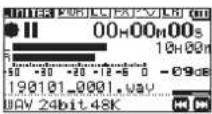
Playing recordings
- Select a file, and press the ▶ button to start playback.
Playback starts, and ▶ appears on the display.
- Adjust the volume.
Use the + and - buttons to change the output volume.
- Press the ⏻/| (HOME) [■] button to stop playback.
Playback stops, and ▶ II appears on the display.
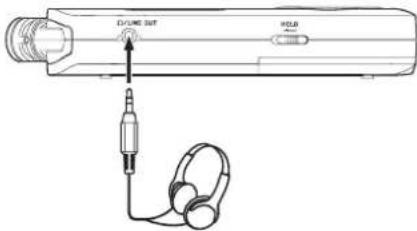
Listening with headphones
Connect headphones to the LINE OUT jack on this unit.
Operations during playback
| Pause playback Press the ■ | button |
| Search forward | Press and hold the ▶▶▶ button |
| Search backward | Press and hold the ▶◀◀ button |
| Skip to start of playing file | Press the ▶◀◀ button once briefly |
| Skip to start of file before playing file | Press the ▶◀◀ button twice briefly |
| Skip to start of file after playing file | Press the ▶▶▶ button once briefly |
| Go back the set amount of time (options: OFF, 1 sec, 3 sec, 5 sec, 10 sec, 30 sec, 1 min, 5 min, 10 min) | Press the ▶ button during playback |
| Add a mark | Press the MARK button during playback |
Selecting files
-
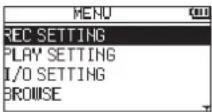
Press the MENU button. The MENU screen will open.
-
Use the + and - buttons to select BROWSE, and press ▶. The Browse screen will open.
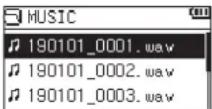
- Use the + and - buttons to select a file, and press ▶▶▶1. The Home screen will reopen.
TIP
Press the ▶ button to start playback and return to the Home screen.
Changing the playback speed
- Press the PB CONT button. The Playback Control screen will open.
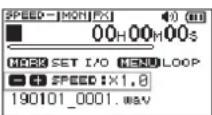
- Use the + and - buttons to change the playback speed. The playback speed can be adjusted in a range from 50% (0.5) to 200% (2.0).
Using I/O loop playback
Use this function to repeat playback between two set points (IN and OUT).
- Press the PB CONT button. The Playback Control screen will open.
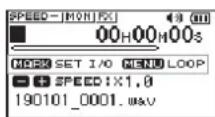
-
Press the ▶ button to start playback.
-
Press the MARK button to set the IN (starting) point.
-
Press the MARK button to set the OUT (ending) point.
When the OUT point is set, I/O loop playback will start.
TIP
During I/O loop playback, press the MENU button to end I/O loop playback while retaining the set IN and OUT points.
- Press the MARK button to clear the IN and OUT points.
Using as an audio interface
By connecting this unit to a computer (Windows/Mac) or iOS device, you can use it as an audio interface.
Preparation
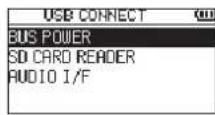
- Use a USB cable to connect the unit to a computer, and turn the unit on.
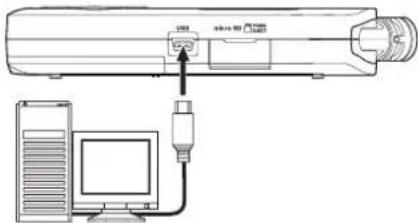
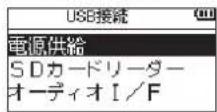
The USB CONNECT screen will open.
NOTE
An Apple Lightning-USB camera adapter is necessary to connect the unit to an iOS device
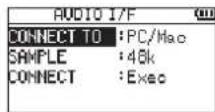
- Use the + and - buttons to select AUDIO I/F, and press ▶.
The AUDIO I/F screen will open.
Connection
- Select the type of connected device.
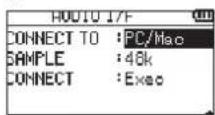
Options:PC/Mac (default), iOS
NOTE
When PC/Mac is selected, the unit with operate on bus power from the computer.
- Set the sampling rate.
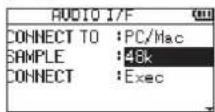
Options: 44.1k, 48k (default)
- Select Exec at the CONNECT item.
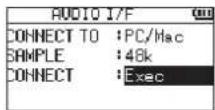
When the unit connects with the external device, the USB AUDIO I/F screen will open.
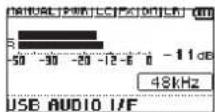
Monitoring
-
Press the MENU button. The MENU screen will open.
-
Selecting the monitored signal.
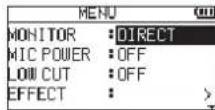
Options
PC/Mac (default): Monitor the playback sound from the PC or Mac.
DIRECT: Monitor the input sound without latency.
NOTE
■The meters can be used to check the playback sound of the external device.
Sound will not be output from the speaker.
- Use headphones to hear the sound.
Disconnecting
-
Press the MENU button. The MENU screen will open.
-
Select Exec at the DISCONNECT item.
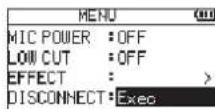
The recorder disconnects from the external device, and the Home screen opens.
Troubleshooting
If you are having trouble with the operation of this unit, please try the following before seeking repair. If these measures do not solve the problem, please contact the store where you purchased this unit or TASCAM customer support service.
Power will not turn ON.
Confirm that batteries are installed correctly.
Confirm that the HOLD switch is not set.
The unit turns off automatically.
Check the automatic power saving function setting. Set it to "Off" to prevent the power from turning off automatically. See "Setting the automatic power saving function" in "11 – Settings and Information" of the Reference Manual.
The microSD card is not recognized.
Confirm that the microSD card is inserted completely.
No sound is output or sound is not output from the speaker.
- Confirm that the output volume is not lowered it too much.
Confirm that the speaker setting is on. Even if the speaker setting is on, sound will not be output from the speaker when headphones are connected or when the unit is recording or in recording standby.
Recording is not possible.
Confirm that the REC indicator is lit. If the REC indicator is blinking, the unit is in recording standby.
- Check the remaining available recording time shown on the Recording screen.
The recorded sound is quiet or distorted.
Check the input level setting.
The unit is not recognized by a computer connected using a USB cable.
Confirm that the connected computer uses a compatible operating system.
The USB function used must be selected from the menu to enable a computer to recognize this unit.
Confirm that the USB cable is not designed only for charging.
Confirm that the connection is not being made through a USB hub.
Sound skips or noise occurs when in USB audio interface mode.
For Windows
Performance options
Select "Adjust for best performance".
Power options
Select "High performance".
The wrong language was set accidentally.
After pressing the ⏻/I (HOME) [■] button to turn the unit off, press the ⏻/I (HOME) [■] button while pressing and holding the MENU button.
The language selection menu will appear, and you will be able to select the language.
Specifications
Ratings
Recording media
microSD card (64 MB - 2 GB)
microSDHC card (4 GB - 32 GB)
microSDXC card (48GB - 128GB)
Recording/playback formats
WAV: 44.1/48/96 kHz, 16/24 bit
MP3: 44.1/48 kHz, 32/64/96/128/192/256/320 kbps
Number of channels
2 channels (stereo)
Inputs and outputs
MIC/EXT IN jack (can provide plug-in power)
Connector: 1/8" (3.5mm) stereo mini jack
Ω/LINE OUT jack
Connector: 1/8" (3.5mm) stereo mini jack
Built-in speaker
0.3W (mono)
Control input/output ratings
USB port
Connector type: Micro-B
Format:USB 2.0 HIGH SPEED mass storage class
Audio performance
Frequency response
20 Hz - 20 kHz +1/-3 dB
(MIC/EXT IN to LINE OUT, 44.1 kHz sampling frequency, JEITA)
20 Hz - 22 kHz +1/-3 dB
(MIC/EXT IN to LINE OUT, 48 kHz sampling frequency, JEITA)
20 Hz - 40 kHz +1/-3 dB
(MIC/EXT IN to LINE OUT, 96 kHz sampling frequency, JEITA)
Total harmonic distortion
0.05% or less
(MIC/EXT IN to LINE OUT, 44.1/48/96 kHz sampling frequency, JEITA*)
S/N ratio
92 dB or higher
(MIC/EXT IN to LINE OUT, 44.1/48/96 kHz sampling frequency, JEITA*)
Note) JEITA: Conforming to JEITA CP-2150
Recording times
| File format (recording setting) | Capacity | |
| 4 GB | ||
| WAV 16-bit (STEREO) 44.1 kHz | 5:44:00 | |
| WAV 24-bit (STEREO) 96 kHz 2: | 04:00 | |
| MP3 (STEREO/MONO)320 kbps | 44.1 kHz48 kHz | 29:48:00 |
The recording times shown above are estimates. They might differ depending on the microSD/microSDHC/microSDXC card in use.
•The recording times shown above are not continuous recording times, but rather they are the total possible recording times for the microSD/microSDHC/microSDXC card.
Other specifications
Power
2 AA batteries (alkaline or NiMH)
USB bus power from a computer
AC adapter (TASCAM PS-P520E, sold separately)
Power consumption
1.7 W (maximum)
Battery operation time (continuous operation)
Using alkaline batteries (EVOLTA)
| Format | Operation time | Note | |
| Recording | WAV, 44.1 kHz, 16-bit | About 17.5 hours | With built-in stereo mic input |
| Playback | WAV, 44.1 kHz, 16-bit | About 16.5 hours | Using built-in speaker |
Recording: JEITA recording time
Playback: JEITA music playback time
Using NiMH battery (eneloop)
| Format | Operation time | Note | |
| Recording | WAV, 44.1 kHz, 16-bit | About 14.5 hours | With built-in stereo mic input |
| Playback | WAV, 44.1 kHz, 16-bit | About 15 hours | Using built-in speaker |
Recording: JEITA recording time
Playback: JEITA music playback time
NOTE
The battery operation times (during continuous operation) could vary depending on the media being used.
Dimensions (W × H × D)
68 x 158 x 26mm (2.67" x 6.22" x 1.02")
(when the microphone pair is close)
90 x 158 x 26mm (3.54" x 6.22" x 1.02")
(when the microphone pair is open)
Weight
130 g (4.59 oz) (not including batteries)
171 g (6.03 oz) (including batteries)
Operating temperature range
0^ C - 40^ C (32°F - 104°F)
Illustrations in this manual might differ in part from the actual product.
Specifications and external appearance might be changed without notification to improve the product.
Detailed specifications are provided in the Reference Manual.
Mode d'emploi
PRÉCAUTIONS DE SÉCURITÉ IMPORTANTES
Pour le Canada
THIS CLASS B DIGITAL APPARATUS COMPLIES WITH CANADIAN ICES-003.
CET APPAREIL NUMÉRIQUE DE LA CLASSE B EST CONFORME À LA NORME NMB-003 DU CANADA.

MANUEL DE RÉFÉRENCE ....17
Performances audio....26
CONSEIL
natural_image
Line drawing of a handheld electronic device with a circular vent and internal components (no text or symbols)Allumage de l'unité
Options: NON, 40Hz, 80Hz, 120Hz, 220Hz
WAV: 44,1/48/96 kHz, 16/24 bit
MP3 : 44,1/48 kHz, 32/64/96/128/192/256/320 kbit/s
Nombre de canaux
2 canaux (stéréo)
Entrées et sorties
Prise MIC/EXT IN
Responsible: TEAC AMERICA, INC.
Dirección: 10410 Pioneer Blvd., Unit #1 and #4, Santa Fe Springs, CA 90640, U.S.A.
⑱ Toma /LINE OUT
22 Altavoz mono
natural_image
Diagram of a device's internal components with arrows indicating assembly (no text or symbols)AVISO
natural_image
Line drawing of a handheld electronic device with ports and a central circular component (no text or symbols)WAV: 44.1/48/96 kHz, 16/24 bits
MP3: 44.1/48 kHz, 32/64/96/128/192/256/320 kbps
Número de canales
2 canales (stereo)
Entradas y salidas
Dimensiones (L × A × P)
68 × 158 × 26 mm
Tipp
natural_image
Line drawing of a handheld electronic device with a circular vent and internal components (no text or symbols)WAV: 44,1 kHz, 48 kHz, 96 kHz, 16/24 Bit
MP3: 44,1 kHz, 48 kHz; 32/64/96/128/192/256/320 Kbit/s
Format: USB 2.0 High-Speed, Mass Storage Class
18 Presa /LINE OUT
SUGGERIMENTO
natural_image
Line drawing of a handheld electronic device with ports and a small inset component (no text or symbols)card microSD (64 MB - 2 GB)
card microSDHC (4 GB - 32 GB)
card microSDXC (48GB - 128GB)
WAV: 44.1/48/96 kHz, 16/24 bit
MP3: 44.1/48 kHz, 32/64/96/128/192/256/320 kbps
Numero di canali
2 canali (stereo)
Ingressi e uscite
Dimensioni (L × A × P)
68 x 158 x 26 mm
Адрес: 10410 Pioneer Blvd., Unit #1 and #4, Santa Fe Springs, CA 90640, U.S.A.
COBET
natural_image
Line drawing of a handheld electronic device with ports and a circuit board (no text or symbols)18Ω /LINE OUT端子
ヘッドホン/ライン出力端子
⑲ HOLDスイッチ
ホールド機能
右サイドパネル
ヒント
natural_image
Line drawing of a handheld electronic device with a circular vent and internal components (no text or symbols)電源を入れる
再生中の操作
USB接続 画面が表示されます。
メモ
(MIC/EXT IN to LINE OUT, Fs44.1k/48k/96kHz,
JEITA)
S/N 比
92dB以上
(MIC/EXT IN to LINE OUT, Fs44.1k/48k/96 kHz)
JEITA)
注)JEITA:JEITA CP-2150準拠
錄音時間
< In the United States >
This warranty gives you specific legal rights and you may also have other rights which vary from state to state. This warranty is only valid within the country the unit was originally purchased.
WHAT IS AND IS NOT COVERED
Except as specified below, this warranty covers all defects in materials and workmanship in this product. The following are not covered by the warranty:
-
Damage to or deterioration of the external cabinet.
-
Damages resulting from accident, misuse, abuse or neglect.
- Damage resulting from failure to perform basic daily maintenance and/or calibration or otherwise resulting from failure to follow instructions contained in your owner's manual.
- Damage occurring during shipment of the product. (Claims must be presented to the carrier)
- Damage resulting from repair or attempted repair by anyone other than TEAC or an authorized TASCAM service station.
- Damage resulting from causes other than product defects, including lack of technical skill, competence, or experience of the user.
- Damage to any unit which has been altered or on which the serial number has been defaced, modified or is missing.
WHO IS COVERED UNDER THE WARRANTY
This warranty may be enforced only by the original purchaser. This warranty is not valid if the product was purchased through an unauthorized dealer.
LENGTH OF WARRANTY
All parts except heads and disk drives are warranted for one (1) year from the date of original purchase. Heads and disk drives are warranted to ninety (90) days from date of original purchase. Labor is warranted for ninety (90) days from date of original purchase.
WHAT WE WILL PAY FOR
We will pay all labor and material expenses for items covered by the warranty. Payment of shipping charges is discussed in the next section of this warranty.
HOW YOU CAN GET WARRANTY SERVICE
Your unit must be serviced by an authorized TASCAM service station in the United States. (This warranty is not enforceable outside the U.S.) If you are unable to locate an authorized TASCAM service station in your area, please contact us. We either will refer you to an authorized service station or instruct you to return the unit to the factory. Whenever warranty service is required, you must present a copy of the original dated sales receipt from an Authorized TASCAM Dealer.
You must pay any shipping charges if it is necessary to ship the product to service. However, if the necessary repairs are covered by the warranty, we will pay return surface shipping charges to any destination within the United States.
LIMITATION OF IMPLIED WARRANTIES
Any implied warranties, INCLUDING WARRANTIES OF MERCHANTABILITY AND FITNESS FOR A PARTICULAR PURPOSE, are limited in duration to the length of this warranty.
EXCLUSION OF DAMAGES
TEAC's liability for any defective product is limited to repair or replacement of the product, at TEAC's option. TEAC shall not be liable for:
-
Damages based upon inconvenience, loss of use of the product, loss of time interrupted operation or commercial loss; or
-
Any other damages, whether incidental, consequential or otherwise.
Some states do not allow limitations on how long an implied warranty lasts and/or do not allow the exclusion or limitation of incidental or consequential damages, so the above limitations and exclusions may not apply to you.
To locate an Authorized Service Center in Your Area
CALL 1-800-447-8322
This product is subject to the legal warranty regulations of the country of purchase. In case of a defect or a problem, please contact the dealer where you bought the product.
These warranty provisions in Japanese are valid only in Japan.
< In other countries/areas >
This warranty gives you specific legal rights, and you may also have other rights that vary by country, state or province.
If you have a warranty claim or request, please contact the dealer where you bought the product.
If you require repair services for your TASCAM equipment, please contact the dealer where the product was purchased from or the TASCAM Distributor in your country. A list of TASCAM Distributors can be found on our website at: http://teac-global.com/
WARRANTY / 保証書
Model / Modèle / Modell / Modello Modelo / Модель / 型名
DR-07X
Serial No. / No de Série / Seriennummer / Numero di serie Número de serie / Серийный номер / 機番
Sample Date of put has / Date del'ha / Dat m de Kaun / Da a del equis o Fecha de compra / Data покупки / お買い上げ日
TASCAM
http://teac-global.com/
Owner's name / Nom du possesseur / Name des Eigentümers / Nome del proprietario Nombre del propietario / Имя владельца / お名前
Address / Adresse / Adresse / Indirizzo Dirección / Adpec / ご住所
Dealer's name / Nom du détaillant / Name des Händlers / Nome del commerciante Nombre del establecimiento / Имя дилера / 販売店
Dealer's address / Adresse du détaillant / Adresse des Händlers / Indirizzo del commerciante Dirección del establecimiento / Адрес дислера / 住所
Memo / 修理メモ