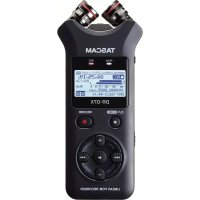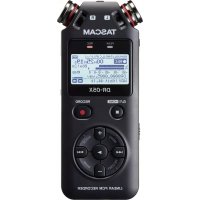
DR05X - Voice recorder TASCAM - Free user manual and instructions
Find the device manual for free DR05X TASCAM in PDF.



User questions about DR05X TASCAM
0 question about this device. Answer the ones you know or ask your own.
Ask a new question about this device
Download the instructions for your Voice recorder in PDF format for free! Find your manual DR05X - TASCAM and take your electronic device back in hand. On this page are published all the documents necessary for the use of your device. DR05X by TASCAM.
USER MANUAL DR05X TASCAM
https://tascam.com/us/
Phone: +1-323-726-0303
10410 Pioneer Blvd., Unit #1 and #4, Santa Fe Springs, CA 90640, U.S.A.
TEAC UK Ltd.
https://www.tascam.eu/en/
Phone: +44-1923-797205
Meridien House, 69-71 Clarendon Road, Watford, Herts, WD17 1DS, United Kingdom
TEAC EUROPE GmbH
https://www.tascam.eu/en/
Phone: +49-611-71580
Room 817, Block A, Hailrun Complex, 6021 Shennan Blvd., Futian District,
Shenzhen 518040, China
TASCAM DR-05X
Linear PCM Recorder
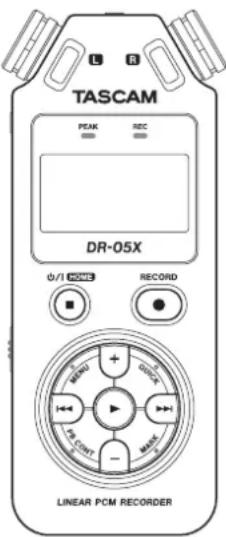

OWNER'S MANUAL
MODE D'EMPLOI
MANUAL DEL USUARIO
BEDIENUNGSANLEITUNG
PYKOBOCTBO NOIb3OBATEJIa
取級説明書
ENGLISH
FRANCAIS
ESPANOL
DEUTSCH
ITALIANO
RUSSIAN
日本語
TASCAM is a registered trademark of TEAC Corporation.
- microSDXC Logo is a trademark of SD-3C, LLC.

MPEG Layer-3 audio coding technology licensed from Fraunhofer IIS and Thomson.
- Supply of this product does not convey a license nor imply any right to distribute MPEG Layer-3 compliant content created with this product in revenue-generating broadcast systems (terrestrial, satellite, cable and/or other distribution channels), streaming applications (via Internet, intranets and/or other networks), other content distribution systems (pay-audio or audio-on-demand applications and the like) or on physical media (compact discs, digital versatile discs, semiconductor chips, hard drives, memory cards and the like). An independent license for such use is required. For details, please visit http://mp3licensing.com.
- Microsoft, Windows, Windows Vista and Windows Media are either registered trademarks or trademarks of Microsoft Corporation in the United States and/or other countries.
- Apple, Mac, Mac OS, macOS, iPad, iPod touch, Lightning, App Store and iTunes are trademarks of Apple Inc.
IOS is a trademark or registered trademark of Cisco in the U.S. and other countries and is used under license.
- Other company names, product names and logos in this document are the trademarks or registered trademarks of their respective owners.
Owner's Manual
IMPORTANT SAFETY PRECAUTIONS
For U.S.A.
INFORMATION TO THE USER
This equipment has been tested and found to comply with the limits for a Class B digital device, pursuant to Part 15 of the FCC Rules. These limits are designed to provide reasonable protection against harmful interference in a residential installation. This equipment generates, uses, and can radiate radio frequency energy and, if not installed and used in accordance with the instruction manual, may cause harmful interference to radio communications. However, there is no guarantee that interference will not occur in a particular installation. If this equipment does cause harmful interference to radio or television reception, which can be determined by turning the equipment off and on, the user is encouraged to try to correct the interference by one or more of the following measures.
a) Reorient or relocate the receiving antenna. b) Increase the separation between the equipment and receiver.
c) Connect the equipment into an outlet on a circuit different from that to which the receiver is connected. d) Consult the dealer or an experienced radio/TV technician for help.
CAUTION
Changes or modifications to this equipment not expressly approved by TEAC CORPORATION for compliance could void the user's authority to operate this equipment.
For Canada
THIS CLASS B DIGITAL APPARATUS COMPLIES WITH CANADIAN ICES-003.
CET APPAREL NUMERIQUE DE LA CLASSE B EST CONFORME A LA NORME NMB-003 DU CANADA.
Declaration of Conformity
Model Number: DR-05X
Trade Name:TASCAM
Responsible party: TEAC AMERICA, INC.
Address: 10410 Pioneer Blvd., Unit #1 and #4, Santa Fe Springs, CA 90640, U.S.A.
Telephone number: 1-323-726-0303
This device complies with Part.15 of FCC Rules.
Operation is subject to the following two conditions:
1) This device may not cause interference, and
2) This device must accept any interference, including interference that may cause undesired operation.

This product complies with the European Directives request and the other Commission Regulations.
IMPORTANT SAFETY INSTRUCTIONS
1 Read these instructions.
2 Keep these instructions.
3 Heed all warnings.
4 Follow all instructions.
5 Do not use this apparatus near water.
6 Clean only with dry cloth.
7 Do not block any ventilation openings. Install in accordance with the manufacturer's instructions.
8 Do not install near any heat sources such as radiators, heat registers, stoves, or other apparatus (including amplifiers) that produce heat.
9 Do not defeat the safety purpose of the polarized or grounding-type plug. A polarized plug has two blades with one wider than the other. A grounding type plug has two blades and a third grounding prong. The wide blade or the third prong are provided for your safety. If the provided plug does not fit into your outlet, consult an electrician for replacement of the obsolete outlet.

10 Protect the power cord from being walked on or pinched particularly at plugs, convenience receptacles, and the point where they exit from the apparatus.
11 Only use attachments/accessories specified by the manufacturer.
12 Use only with the cart, stand, tripod, bracket, or table specified by the manufacturer, or sold with the apparatus. When a cart is used, use caution when moving the cart/apparatus combination to tip-over.

13 Unplug this apparatus during lightning storms or when unused for long periods of time.
14 Refer all servicing to qualified service personnel. Servicing is required when the apparatus has been damaged in any way, such as power-supply cord or plug is damaged, liquid has been spilled or objects have fallen into the apparatus, the apparatus has been exposed to rain or moisture, does not operate normally, or has been dropped.
The apparatus draws nominal non-operating power from the AC outlet with its POWER or STANDBY/ON switch not in the ON position.
The mains plug is used as the disconnect device, the disconnect device shall remain readily operable.
Caution should be taken when using earphones or headphones with the product because excessive sound pressure (volume) from earphones or headphones can cause hearing loss.
If you are experiencing problems with this product, contact TEAC for a service referral. Do not use the product until it has been repaired.
WARNING

To prevent possible hearing damage, do not listen at high volume levels for long periods.
CAUTION
Do not expose this apparatus to drips or splashes.
Do not place any objects filled with liquids, such as vases, on the apparatus.
Do not install this apparatus in a confined space such as a book case or similar unit.
The apparatus should be located close enough to the AC outlet so that you can easily grasp the power cord plug at any time.
If the product uses batteries (including a battery pack or installed batteries), they should not be exposed to sunshine, fire or excessive heat.
CAUTION for products that use replaceable lithium batteries: there is danger of explosion if a battery is replaced with an incorrect type of battery. Replace only with the same or equivalent type.
CAUTIONS ABOUT BATTERIES
This product uses batteries. Misuse of batteries could cause a leak, rupture or other trouble. Always abide by the following precautions when using batteries.
- Never recharge non-rechargeable batteries. The batteries could rupture or leak, causing fire or injury.
When installing batteries, pay attention to the polarity indications (plus/minus (± / - ) orientation), and install them correctly in the battery compartment as indicated. Putting them in backward could make the batteries rupture or leak, causing fire, injury or stains around them.
-
When you store or dispose batteries, isolate their terminals with insulation tape or something like that to prevent them from contacting other batteries or metallic objects.
-
When throwing used batteries away, follow the disposal instructions indicated on the batteries and the local disposal laws.
Do not use batteries other than those specified. Do not mix and use new and old batteries or different types of batteries together. The batteries could rupture or leak, causing fire, injury or stains around them.
Do not carry or store batteries together with small metal objects. The batteries could short, causing leak, rupture or other trouble.
Do not heat or disassemble batteries. Do not put them in fire or water. Batteries could rupture or leak, causing fire, injury or stains around them.
If the battery fluid leaks, wipe away any fluid on the battery case before inserting new batteries. If the battery fluid gets in an eye, it could cause loss of eyesight. If
fluid does enter an eye, wash it out thoroughly with clean water without rubbing the eye and then consult a doctor immediately. If the fluid gets on a person's body or clothing, it could cause skin injuries or burns. If this should happen, wash it off with clean water and then consult a doctor immediately.
The unit power should be off when you install and replace batteries.
Remove the batteries if you do not plan to use the unit for a long time. Batteries could rupture or leak, causing fire, injury or stains around them. If the battery fluid leaks, wipe away any fluid on the battery compartment before inserting new batteries.
Do not disassemble a battery. The acid inside the battery could harm skin or clothing.
For European Customers
Disposal of electrical and electronic equipment
(a) All electrical and electronic equipment should be disposed of separately from the municipal waste stream via designated collection facilities appointed by the government or the local authorities.
(b) By disposing of the electrical and electronic equipment correctly, you will help save valuable resources and prevent any potential negative effects on human health and the environment.
(c) Improper disposal of waste equipment can have serious effects on the environment and human health as a result of the presence of hazardous substances in electrical and electronic equipment.
(d) The crossed out wheeled dust bin symbol indicates that electrical and electronic equipment must be collected and disposed of separately from household waste.
(e) The return and collection systems are available to the end users. For more detailed information about disposal of old electrical and electronic equipment, please contact your city office, waste disposal service or the shop where you purchased the equipment.
Disposal of batteries and/or accumulators
(a) Waste batteries and/or accumulators should be disposed of separately from the municipal waste stream via designated collection facilities appointed by the government or the local authorities.
(b) By disposing of waste batteries and/or accumulators correctly, you will help save valuable resources and prevent any potential negative effects on human health and the environment.
(c) Improper disposal of waste batteries and/or accumulators can have serious effects on the environment and human health as a result of the presence of hazardous substances in batteries and/or accumulators.
(d) The crossed out wheeled dust bin symbol indicates that batteries and/or accumulators must be collected and disposed of separately from household waste.

Pb,Hg,Cd
If the battery or accumulator contains more than the specified values of lead (Pb), mercury (Hg), and/or cadmium (Cd) defined in the Battery Directive (2006/66/EC), then the chemical symbols for lead (Pb), mercury (Hg) and/or cadmium (Cd) will be indicated beneath the crossed out wheeled dust bin symbol.
(e) The return and collection systems are available to the end users. For more detailed information about disposal of waste batteries and/or accumulators, please contact your city office, waste disposal service or the shop where you purchased them.
Contents
Introduction. 5
Note about the Reference Manual 5
Items included with this product 5
Precautions for placement and use. 5
Beware of condensation 5
Cleaning the unit 5
About microSD cards. 6
Using the TEAC Global Site 6
About TASCAM customer support service..
Product registration 6
Names and Functions of Parts 6
Top panel. 6
Front panel 6
Rear panel. 6
Left side panel 7
Right side panel 7
Bottom Panel. 7
Making preparations. 7
7
Inserting a card. 7
Turning the unit on
Screen overview 8
Using the menu. 9
Recording 9
Using the low-cut filter 9
Setting the limiter 10
Playing recordings 10
Selecting files 11
Changing the playback speed 11
Using I/O loop playback 11
Using as an audio interface 11
Preparation. 11
Connection. 12
Monitoring 12
Disconnecting 12
Troubleshooting 12
Specifications 13
Ratings 13
Inputs and outputs. 13
Control input/output ratings. 13
Audio performance 13
Recording times 13
Other specifications. 14
Introduction
Thank you very much for purchasing the TASCAM DR-05X Linear PCM Recorder.
Before using this unit, read this owner's manual carefully so that you will be able to use it correctly and enjoy working with it for many years. After you have finished reading this manual, please keep it in a safe place for future reference.
Note about the Reference Manual
This Owner's Manual explains the main functions of this unit. Please see the Reference Manual for information about all the unit's functions.
You can also download this Owner's Manual and the
Reference Manual from the TEAC Global Site
http://teac-global.com/).
Items included with this product
This product includes the following items.
Take care when opening the package to avoid damaging the items. Keep the packing materials for transportation in the future.
Please contact the store where you purchased this unit if any of these items are missing or have been damaged during transportation.
Main unit.
A alkaline batteries.
Owner's Manual (this document) including warranty....X
Precautions for placement and use
The environmental temperature operating range of this unit is 0 - 40^ (32-104F).
Do not install this unit in the following types of locations.
Doing so could degrade the sound quality and/or cause malfunctions.
Places with significant vibrations
Near windows or other places exposed to direct
sunlight
Near heaters or other extremely hot places
Extremely cold places
Places with bad ventilation or high humidity Very dusty locations
Places exposed directly to rain or other water
If this unit is placed near a power amplifier or other device with a large transformer, it could cause a hum. If this occurs, increase the distance between this unit and the other device.
This unit could cause color irregularities on a TV screen or noise from a radio if used nearby. If this occurs, use this unit farther away.
This unit might produce noise if a mobile phone or other wireless device is used nearby to make calls or send or receive signals. If this occurs, increase the distance between this unit and those devices or turn them off.
To enable good heat dissipation, do not place anything on top of this unit.
Do not place this unit on top of a power amplifier or other device that generates heat.
Beware of condensation
Condensation could occur if the unit is moved from a cold place to a warm place, it is used immediately after a cold room has been heated or it is otherwise exposed to a sudden temperature change. To prevent this, or if this occurs, let the unit sit for one or two hours at the new room temperature before using it.
Cleaning the unit
Use a dry soft cloth to wipe the unit clean. Do not wipe with chemical cleaning cloths, thinner, alcohol or other chemical agents. Doing so could damage the surface or cause discoloration.
About microSD cards
A list of SD cards that have been confirmed for use with this unit can be found on our web site. Please access to a product page of this product from the TEAC Global Site (http://teac-global.com) to find the list or contact the TASCAM customer support service.
Using the TEAC Global Site
You can download updates for this unit from the TEAC Global Site:
http://teac-global.com/
In the TASCAM Downloads section, select the desired language to open the Downloads website page for that language.
About TASCAM customer support service
TASCAM products are supported and warranted only in their country/region of purchase.
To receive support after purchase, on the TASCAM Distributors list page of the TEAC Global Site (http://teac-global.com/), search for the local company or representative for the region where you purchased the product and contact that organization.
When making inquiries, the address (URL) of the shop or web shop where it was purchased and the purchase date are required. Moreover, the warranty card and proof of purchase might also be necessary.
Product registration
Customers in the USA, please visit the following TASCAM website to register your TASCAM product online.
https://tascam.com/us/
Names and Functions of Parts
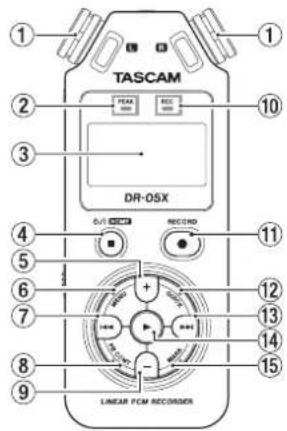
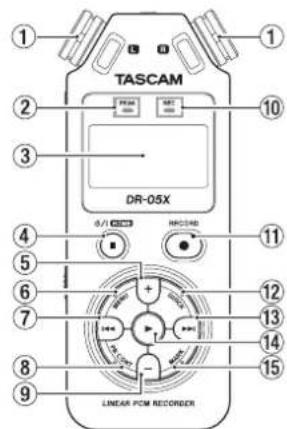
Top panel
① Built-in stereo microphone
② PEAK indicator
Lights when recording level is too high
③Display
(4) 口 / 1 (HOME)[]button
Press to stop, turn the power on/off (0/1) and open the Home screen HOME
⑤ + button
Plus/up
6 MENU button
Open Menu screen
⑦ button
Search backward/left/cancel
PB CONT button
OpenPlaybackControlscreen
⑨ -button
Minus/down
10 REC indicator
Shows recording status
RECORD[●]button
Recording
12 QUICK button
Open the quick menu
13 button
Search forward/right/confirm
14 button
Play/confirm
15 MARK button
Set/clear marks
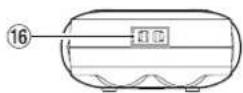
Front panel
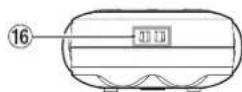
16 Strap attachment
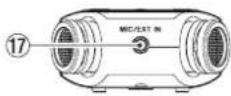
Rear panel
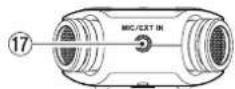
MIC/EXT IN jack
Mic/external input jack
Left side panel
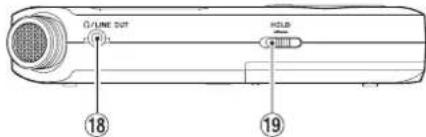
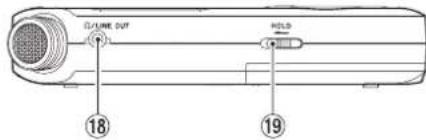
18Ω/LINE OUT jack
Headphone/line output jack
HOLD switch
Set hold function
Right side panel
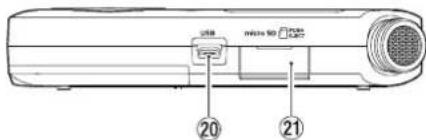
20 USB port
microSD card slot
Bottom Panel
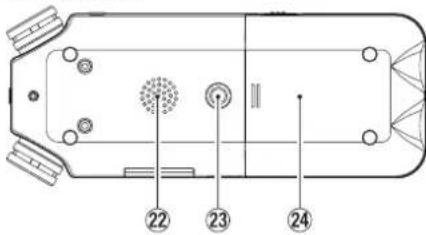
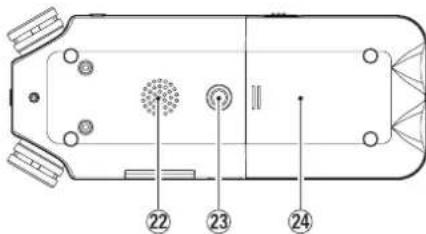
22 Mono speaker
23 Tripod attachment screw thread (1/4-inch)
24 Battery compartment
Making preparations
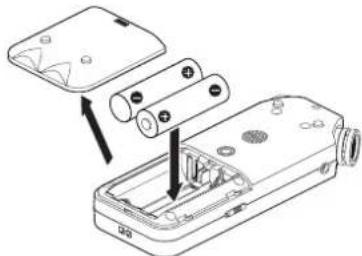
Installing batteries
While pressing the battery compartment cover on the back of the unit, slide it open. Then, install batteries.
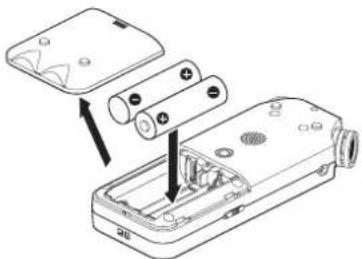
TIP
The TASCAM PS-P520E AC adapter can also be used with this unit.
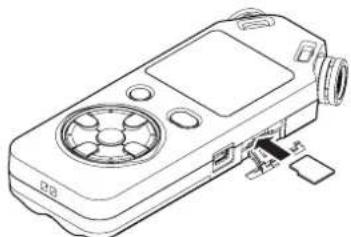
Inserting a card
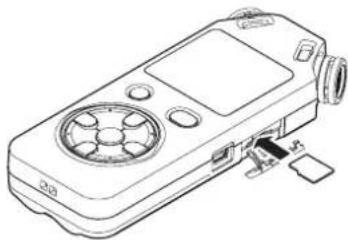
Open the microSD slot cover on the right side panel, and insert a microSD card.
Turning the unit on
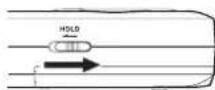
- Slide the HOLD switch in the direction of the arrow to unlock it.
TIP
By sliding it toward HOLD, button operations can be disabled, preventing misoperation during recording.
- Press and hold the /1 (HOME) [ ] button for several seconds.
The first time the power is turned on after purchase, setting screens like the following will open.
Formatting cards
Press the button to execute.

CAUTION
Execution of formatting erases all data currently on the card.
This message will not appear for cards that have already been formatted.
Setting the language
Select the language used for menus and messages.
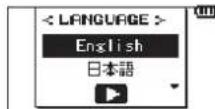
Use the + and - buttons to select the language, and press the button to confirm.
DATE/TIME
Set the date and time.
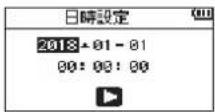
Use the and buttons to move the cursor, and use the + and - buttons to change the date and time.
Press the button to confirm.

The language and date/time settings can be changed later from the menu.
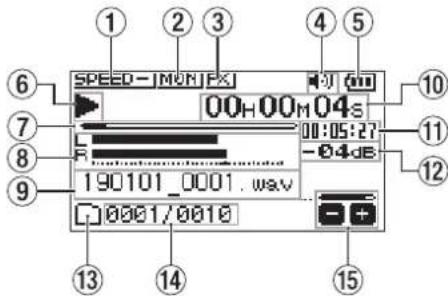
Screen overview
When stopped or playing back
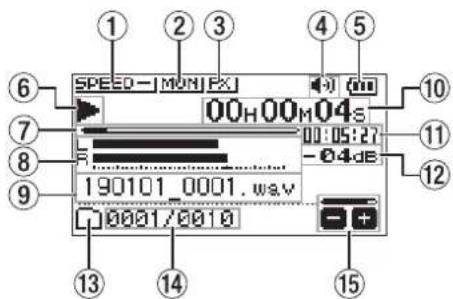
① Playback speed status
② Input mix function status
③ Effect status
④ Speaker status
⑤ Remaining battery charge/power supply status
⑥ Playback status
⑦ Playback position
⑧ Playback level meters
⑨ Playback file name
10 Elapsed time
Remaining time
12 Peak value (decibels)
13 Playback area
4 Playback file number/total number of files
15 Output volume status
When recording or in recording standby
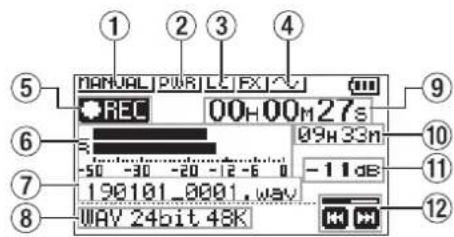
① Level mode setting status
② Plug-in power status
Low cut filter status
Tone output setting status
⑤ Recording status
Recording level meters
⑦ Recording file name
Recording format
⑨ Elapsed recording time
Remaining recording time
Peak value (decibels)
12 Recording level status
Using the menu
Use the menu to change various settings, including recording, playback and system settings, and to execute various functions.
1. Press the MENU button.
The MENU screen will open.
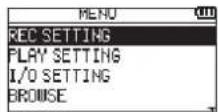
2. Use the + and - buttons to select the menu item, and press
The setting screen will open.
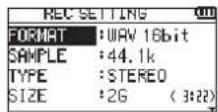
3. Use the + and - buttons to select the setting item, and press
Settings can now be changed and functions executed.
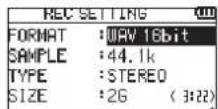
4. Use the + and - buttons to change the setting.
NOTE
Press the MENU button to return to the previous screen.
To return to the Home screen, press the /1 (HOME) [ ] button.
Recording
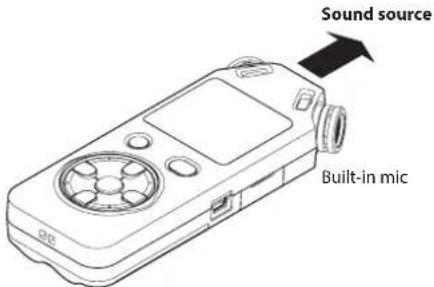
1. Point the built-in mic towards the sound to be recorded.
2. Press the RECORD [●] button to enter recording standby.
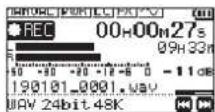
Recording standby will start, will appear on the display, and the REC indicator will blink.
![TASCAM DR05X - Press the RECORD [●] button to enter recording standby. - 1](/content/2026/03/461568/images/ef101fbb64cbd4b2d57c7a77e8db36a91fb58f1bd4e493d1ab5595b1488cd181.jpg)
-12dB
3. Adjust the recording level.
Adjust the built-in mic orientation and distance from the sound source as well as the input level so that the recording level meters stay near -12dB at the peak input level.
Use the 一 一 and buttons to adjust the input level.
4. Press the RECORD [●] button to start recording. Recording will start, ① appear on the display, and the REC indicator will light.
![TASCAM DR05X - Press the RECORD [●] button to start recording. Recording will start, ① appear on the display, and the REC indicator will light. - 1](/content/2026/03/461568/images/67e60d09d3e0eb1b08ea29e9aecedaed6052e2fd594a36e3ac822963605cde9f.jpg)
5. Press the / (HOME)[ ] button to stop recording. Recording stops, and appears on the display.
Using the low-cut filter
Noise from air conditioning and other sources can be reduced when recording.
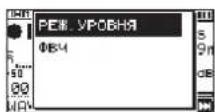
1. When in recording standby, press the QUICK button. This opens the Quick menu.
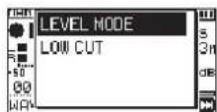
2. Use the + and - buttons to select the LOW CUT, and press
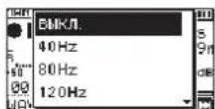
The setting screen for the low-cut filter will open.
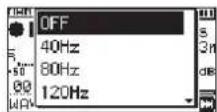
Options:0FF,40Hz,80Hz,120Hz,220Hz
3. Use the + and - buttons to select the setting, and press
This changes the setting and returns to the QUICK menu screen.
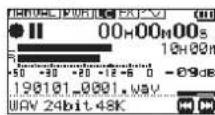
4. Press the / (HOME)[ ] button.
The Home screen will reopen.
![TASCAM DR05X - Press the / (HOME)[ ] button. - 1](/content/2026/03/461568/images/9362e213bb720722391bc381404dde4d43644c07c1b9c84b21467b1af6a0bab1.jpg)
Setting the limiter
This can help prevent sound from becoming distorted when loud noises are input suddenly during recording.
- When in recording standby, press the QUICK button. This opens the Quick menu.
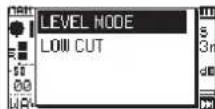
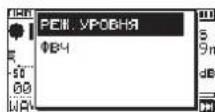
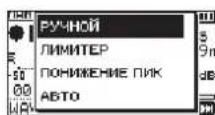
- Use the + and - buttons to select LEVEL MODE, and press This opens the Level Mode setting screen.
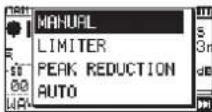
Options:MANUAL(default),LINITER,PEAKREDUCTION, AUTO
- Use the + and - buttons to select the setting, and press This changes the setting and returns to the QUICK menu screen.
- Press the / (HOME)[ ] button. The Home screen will reopen.
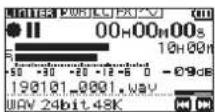
Playing recordings
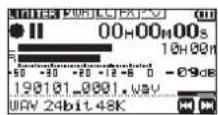
- Select a file, and press the button to start playback. Playback starts, and appears on the display.
- Adjust the volume. Use the + and - buttons to change the output volume.
- Press the / 1 (HOME) [ ] button to stop playback. Playback stops, and appears on the display.
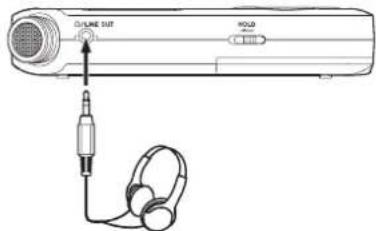
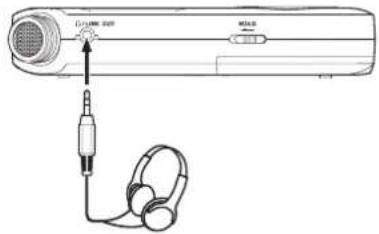
Listening with headphones
Connect headphones to the LINE OUT jack on this unit.
Operations during playback
| Pause playback Press the \( \blacksquare \) | button |
| Search forward | Press and hold the \( \blacktriangleright \blacktriangleright \) button |
| Search backward | Press and hold the \( \blacktriangleleft \blacktriangleleft \) button |
| Skip to start of playing file | Press the \( \blacktriangleleft \blacktriangleleft \) button once briefly |
| Skip to start of file before playing file | Press the \( \blacktriangleleft \blacktriangleleft \) button twice briefly |
| Skip to start of file after playing file | Press the \( \blacktriangleleft \blacktriangleleft \) button once briefly |
| Go back the set amount of time (options: OFF, 1 sec, 3 sec, 5 sec, 10 sec, 30 sec, 1 min, 5 min, 10 min) | Press the \( \blacktriangleright \) button during playback |
| Add a mark | Press the MARK button during playback |
Selecting files
- Press the MENU button. The MENU screen will open
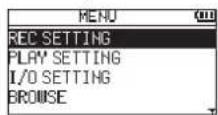
- Use the + and - buttons to select BROWSE, and press The Browse screen will open.
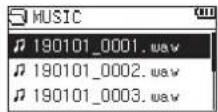
- Use the + and - buttons to select a file, and press
The Home screen will reopen.
TIP
Press the button to start playback and return to the Home screen.
Changing the playback speed
- Press the PB CONT button.
The Playback Control screen will open.
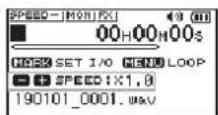
- Use the + and - buttons to change the playback speed.
The playback speed can be adjusted in a range from 50% (0.5) to 200% (2.0).
Using I/O loop playback
Use this function to repeat playback between two set points (IN and OUT).
- Press the PB CONT button.
The Playback Control screen will open.
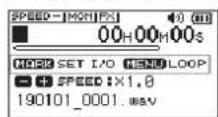
- Press the button to start playback.

- Press the MARK button to set the IN (starting) point.

- Press the MARK button to set the OUT (ending) point.

When the OUT point is set, I/O loop playback will start.
TIP
During I/O loop playback, press the MENU button to end I/O loop playback while retaining the set IN and OUT points.
- Press the MARK button to clear the IN and OUT points.
Using as an audio interface
By connecting this unit to a computer (Windows/Mac) or iOS device, you can use it as an audio interface.
Preparation
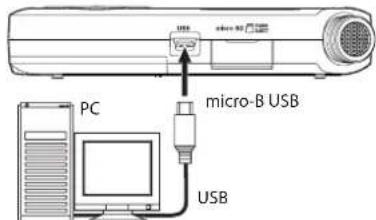
- Use a USB cable to connect the unit to a computer, and turn the unit on.
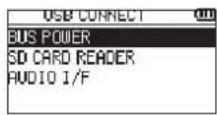
The USB CONNECT screen will open.
NOTE
An Apple Lightning-USB camera adapter is necessary to connect the unit to an iOS device
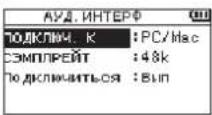
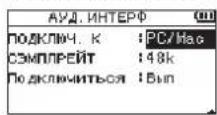
- Use the + and - buttons to select AUDIO I/F, and press
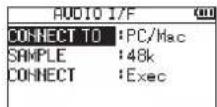
The AUDIO I/F screen will open.
Connection
1. Select the type of connected device.
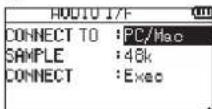
Options:PC/Hac(default),i05
NOTE
When PC/Mac is selected, the unit with operate on bus power from the computer.
2. Set the sampling rate.
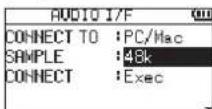
Options:44.1k,48k(default)
3. Select Exec at the CONNECT item.
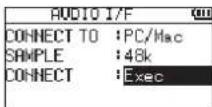
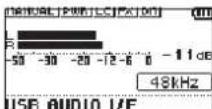
When the unit connects with the external device, the USB AUDIO I/F screen will open.
Monitoring
-
Press the MENU button. The MENU screen will open.
-
Selecting the monitored signal.
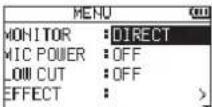
Options
PC/Mac (default): Monitor the playback sound from the PC or Mac.
DIRECT: Monitor the input sound without latency.
NOTE
The meters can be used to check the playback sound of the external device.
Sound will not be output from the speaker.
Use headphones to hear the sound.
Disconnecting
- Press the MENU button.
The HENUscreen will open.
- Select Exec at the DISCONNECT item.
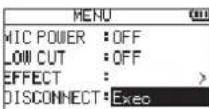
The recorder disconnects from the external device, and the Home screen opens.
Troubleshooting
If you are having trouble with the operation of this unit, please try the following before seeking repair. If these measures do not solve the problem, please contact the store where you purchased this unit or TASCAM customer support service.
Power will not turn ON.
Confirm that batteries are installed correctly.
Confirm that the HOLD switch is not set.
The unit turns off automatically.
<Check the automatic power saving function setting. Set it to "Off" to prevent the power from turning off automatically. See "Setting the automatic power saving function" in "11 - Settings and Information" of the Reference Manual.
The microSD card is not recognized.
Confirm that the microSD card is inserted completely.
No sound is output or sound is not output from the speaker.
Confirm that the output volume is not lowered it too much.
<Confirm that the speaker setting is on. Even if the speaker setting is on, sound will not be output from the speaker when headphones are connected or when the unit is recording or in recording standby.
Recording is not possible.
Confirm that the REC indicator is lit. If the REC indicator is blinking, the unit is in recording standby.
Check the remaining available recording time shown on the Recording screen.
The recorded sound is quiet or distorted.
Check the input level setting.
The unit is not recognized by a computer connected using a USB cable.
Confirm that the connected computer uses a compatible operating system.
The USB function used must be selected from the menu to enable a computer to recognize this unit.
Confirm that the USB cable is not designed only for charging.
Confirm that the connection is not being made through a USB hub.
Sound skips or noise occurs when in USB audio interface mode.
For Windows
Performance options
Select "Adjust for best performance".
Power options
Select "High performance".
The wrong language was set accidentally.
After pressing the 日 / 1 (HOME) [ ] button to turn the unit off, press the 日 / 1 (HOME) [ ] button while pressing and holding the MENU button.
The language selection menu will appear, and you will be able to select the language.
Specifications
Ratings
Recording media
microSD card (64 MB - 2 GB)
microSDHC card (4 GB - 32 GB)
microSDXC card (48GB - 128GB)
Recording/playback formats
WAV:44.1/48/96 kHz, 16/24 bit
MP3:44.1/48 kHz, 32/64/96/128/192/256/320 kbps
Number of channels
2 channels (stereo)
Inputs and outputs
MIC/EXT IN jack (can provide plug-in power)
Connector: 1/8'' (3.5mm) stereo mini jack
YLINE OUT jack
Connector: 1/8'' (3.5mm) stereo mini jack
Built-in speaker
0.3W (mono)
Control input/output ratings
USB port
Connector type: Micro-B
Format:USB 2.0 HIGH SPEED mass storage class
Audio performance
Frequency response
20 Hz - 20 kHz +1/-3 dB
(MIC/EXT IN to LINE OUT, 44.1 kHz sampling frequency, JEITA)
20Hz-22kHz+1/-3dB
(MIC/EXT IN to LINE OUT, 48 kHz sampling frequency, JEITA)
20Hz-40kHz+1/-3dB
(MIC/EXT IN to LINE OUT, 96 kHz sampling frequency, JEITA)
Total harmonic distortion
0.05% or less
(MIC/EXT IN to LINE OUT, 44.1/48/96 kHz sampling frequency, JEITA*)
S/N ratio
92 dB or higher
(MIC/EXT IN to LINE OUT, 44.1/48/96 kHz sampling frequency, JEITA*)
Note) JEITA: Conforming to JEITA CP-2150
Recording times
| File format (recording setting) | Capacity | |
| 4 GB | ||
| WAV 16-bit (STEREO) 44.1 kHz 6:44:00 | ||
| WAV 24-bit (STEREO) 96 kHz 2:04:00 | ||
| MP3 (STEREO/MONO)320 kbps | 44.1 kHz48 kHz | 29:48:00 |
The recording times shown above are estimates. They might differ depending on the microSD/microSDHC/ microSDXC card in use.
The recording times shown above are not continuous recording times, but rather they are the total possible recording times for the microSD/microSDHC/microSDXC card.
Other specifications
Power
2 AA batteries (alkaline or NiMH)
USB bus power from a computer
AC adapter (TASCAM PS-P520E, sold separately)
Power consumption
1.7 W (maximum)
Battery operation time (continuous operation)
Using alkaline batteries (EVOLTA)
| Format | Operation time | Note | |
| Recording | WAV, 44.1kHz, 16-bit | About 17.5 hours | With built-in stereo mic input |
| Playback | WAV, 44.1kHz, 16-bit | About 16.5 hours | Using built-in speaker |
Recording: JEITA recording time
Playback: JEITA music playback time
Using NiMH battery (eneloop)
| Format | Operation time | Note | |
| Recording | WAV, 44.1kHz, 16-bit | About 14.5 hours | With built-in stereo mic input |
| Playback | WAV, 44.1kHz, 16-bit | About 15 hours | Using built-in speaker |
Recording: JEITA recording time
Playback: JEITA music playback time
NOTE
The battery operation times (during continuous operation) could vary depending on the media being used.
Dimensions (W× H× D)
61× 141× 26mm (2.4^ × 5.55^ × 1.02^ )
Weight
119 g (4.2 oz) (not including batteries)
165 g (5.82 oz) (including batteries)
Operating temperature range
0^ - 40^ (32°F - 104°F)
Illustrations in this manual might differ in part from the actual product.
Specifications and external appearance might be changed without notification to improve the product.
Detailed specifications are provided in the Reference Manual.
Mode d'emploi
PRECAUTIONS DE SECURITE IMPORTANTES
Pourle Canada
THIS CLASS B DIGITAL APPARATUS COMPLIES WITH CANADIAN ICES-003.
CET APPAREIL NUMÉRIQUE DE LA CLASSE B EST CONFORME À LA NORME NMB-003 DU CANADA

Options:NON,48Hz,80Hz,120Hz,220Hz
WAV:44,1/48/96 kHz, 16/24 bit
MP3:44,1/48 kHz, 32/64/96/128/192/256/320 kbit/s
Nombre de canaux
2 canaux (stereo)
Entrées et sorties
Prise MIC/EXT IN
Responsible: TEAC AMERICA, INC.
WAV:44.1/48/96 kHz, 16/24 bits
MP3:44.1/48 kHz, 32/64/96/128/192/256/320 kbps
Numero de canales
2 canales (stereo)
Entradas y開放s
Toma MIC/EXT IN (con posibiliad de plug-in power)
Conector: clavija mini stereo de 3.5 mm
Toma LINE OUT
Conector: clavija mini stereo de 3.5 mm
Altavoz interno
0.3 W (mono)
Entrada/salida de control
Puerto USB
Tipde conector: Micro-B
Formato: USB 2.0 HIGH SPEED mass storage class
Rendimiento audio
WAV:44,1 kHz,48 kHz,96 kHz,16/24 Bit
MP3:44,1 kHz,48 kHz; 32/64/96/128/192/256/320 Kbit/s
Format: USB 2.0 High-Speed, Mass Storage Class
19 Interrupttore HOLD
card microSD (64 MB - 2 GB)
card microSDHC (4 GB - 32 GB)
card microSDXC (48GB - 128GB)
WAV:44.1/48/96 kHz, 16/24 bit
MP3: 44.1/48 kHz, 32/64/96/128/192/256/320 kbps
Numero di canali
2 canali (stereo)
Ingressi uscite
BAXHbIE MEPbI IPEIOCTOPOXHOCTN
DnACLUA
INΦOPMAUJNДЛЯПЛБ3OBATEJI
DaHHeOBopUOBAHnpeoIIOuNIOvCTbTAHnINIOqTBpDnIO OOTBeTCTBmyeTACHOHBnIMnpEeamJINIOpOBoXy tycpoCTbKlAcaBcGonAoHaCt15PabInOpEpaBnHO KOMKcMnIO CBAH.3NI pIepEnyIyctAOHBnHbIcIeJeBOeOceNe HEmAdeKBaTHOH 3aIITbOtHEbNaorponrTOHO B0dEaeCTBn HAcyTAHOBKnBxB XJIbIXbN IOMouChHnJa. dAnHoOE oOpBuOHAbe C0aTaET, NcIOBcYbMeKHTNMOyHTN BcoOTBE TCBN C PnIBeENbHMn B HAcToIeempyKOBODCTBE HCHpyKUnmHO, OHO MOKET OKa3BaBTb EbNAOPnIHThOE BO3eDBeTBAH naPOIOBcR. TEM He MeHec, He rapaHNPryTeC, YTO B KOHKpETHO KoPHfpyaumy cTAYOBKn NOMExn bdyT OTCYTBoBAT. Ecln DaHHeo OBOpUOBAHne OKa3BaIe H6NarO npMaTHOE Bo3eCTBnHa NaPMePAOICrHnA WmTENEBHNHOHR CIRHNA, Yo MOHO ONPeDcNITb TYTEM BKNIOChHn INBVKNIOeHnO bOpOyOBaHn, NpOBzOBaTeNo peKOMeHyETcN OTKOpEeTIPOBaT bako BImNHn, PpNHAB ONDMy IN HeckONkIO NpNBEDHNbHX NjMeP.a. NOpeByhNb IMpeMeCteNTb PnpMHy ANHtEHN.b.YBENmuTTbcPacTOAnie MEKdy O6OpOyBOHnEM mPiPmHnKOM.c. IOnkNIOuTHbO6OpOyBaHn K POZTeHcET cETN, OTMNHOOTcETN, K KOTOPN ONDKIOHEN pINHEMK.N.d
OsPaTb3a 3a NOMoIIOIO kPdoaBtuNIO nOblTHOMy INHeHepey No pAOIO / TEBN3IOHOH CBAM.
BHIMAHHE
N3MeHHe HIM MoHnKauHn, ABHO HeYTBpeXdEHHbIe KOMHaHHe TEAC CORPORATION KAK COOTBCTCYUIOHC, MORYT NOBHe 3a Coobn NIIuHHe NIOb30BaTeRn PAB Na 3KcNpya-tauHo DAnHO rOyctpoiCTBA.

HdEpeNcKIN DpEeN INPn
3aBHeHne o COOTBeTCTBm
Homep moen: DR-05X
ToproBoe
HANMECHOBAHNC: TASCAM
OTBeTCTBeHHHa
CTOPoHa: TEAC AMERICA, INC.
Aipec: 10410 Pioneer Blvd., Unit #1 and #4, Santa Fe
Springs, CA 90640, U.S.A.
TenefoH:

YCTPOIcTB0 COOTBETCTBYET pa3deny 15 PpaBn OeepaBHOI KOMMCCN CBAH CUA.
ФИКИОнровапсуCTpoICTBAOTBEaETDyM CIEnyOuIMYCIOBnM:
1)DaHHoeyCTPOINCTBOHeDONKHO BbI3BbATb NOMExn,
2)JAHHOE yCTPOIcTBO DOXKHO BDOEPKINBA Tb BCE NOYaMbE NOMEXH, B TOM MNCe NOMEXN, CNOOCbHe Bb3BaTb HnpePabnBHOE OyHKIOHNPOBAHIE.
BAXHBIE INHCTPYKUNI NO BE3ONACHOCTN
1PonHtaiTe daHHbE HnHCTpyKuM.
2 CoxpaHnTe daHHbIe HNCTpyKuIN.
3 O6paTHe BHMMaHHe Ha Bce npdynpexdEHH.
4BbInonHnHaeBceHcTpyKuM.
5 He icnoIb3yIte 06OpoyoBaHme B6n3n BObl.
6 OuHuaTe yCTpoIcTBoTbko cyxO kHaHbIO.
7 He 3aŋyuaηte BENTHnAηoHnBHe OTBepCTNa. BbINOHnAte yctahOBky COOTBeTCTBM C HHTCPKUAMN I3ROTOBtEnA.
8 He yctahabmaIte yctpoIcBO B6n3N NCTOCHKOB TENNA, tAKHX KAK padmatoB, o6orpebaTeN, neuN pyroecobopyoBaHne (B TOM YNCNE yCNNTen), KOtopoe BbdenenT TENo.
9 He nphehepeaTe MePAMn 6e0anachOCTn, TaKIMN KAK nNoIb3OBaHne NIOJIAPR3OBaHOHnn 33aEMNEHOB BUNIK. NIOJIaBOHNAHBNBUNA DOJNKA HmETBa JDa bTbIpy, OINH INKOTOPBX WIIPE DpyrTO.BINKz 3aEMLNEHO Tnna HmecT DBA Wtbpn I TpETNI 3aEMLIOUINuWNTΦ. UINPOKNI WITbN I TpETNI WHTNFnpDHa3AHueHb dNn 6e0anacOCTn. Ecnn BNkA, BXoDAuBn B KomlNeKT yCPOTHCTA, Ne NOxOxDN K BAeW pO3eTKe, PpOKOHcyTNpyiTEc C 3eKNTPKOM O 3aMEHe YCTapeBIeI pO3eTKn
10 3aunntte Ka6enb NtAtnHn TaK, YTo6bHa Hero He Mornn NaCTynTb, nepeDaBnTb, B YaCTHOCTN, B MECTAX CoEINHEHn C BnKAM, 3eKTPueCKmM POSEkAMn IN TOUYKO BbIXOJa N3 yCTPObTa.
11NtOJb3yTeTOnbKOeDnHEnH/BCnOMOraTeNbHbE cpeCTBa,yka3AHbHe N3rTOBNTeJIEM.
12 IcnoIb3yIte TOnIbKO TeNekky, CTOKY,UIATINB,KOHCOb H CTONIK, peKoMeHcyEmbIe HROTOBInTeM NIN BKNIOUHHB B KOMNNEKT yCTPOICTBa. KOrdaIcNoNb3yETcT TEJekka,co6IIOJaTE MePb

PnepoCTOPOKHOCTBOBPEMNEPOEMEHNTEENKNCYCTAHOBHBMHAHEYCTPOCTBOMNOBOPyOBaHcEM,TOb6Ib6kAETPBAM8Pey3bTATEOPKNDBAHm.
13 OTKIOUHAnTE O6OpOBOAHnE OPOTeKN BO BpEmrIpo3bI NIKoRDA OHO DOnIOE BpEMrHE NCIOB3yETcA.
14 CepBnHcOe 06CnyKbAHme DOnJKe HbIOnNtB KBaIINpHmOpOBaHNbIe CepBnCHbI NepcoHAn. CepBnHcOe 06CNYKbAHme Tpe6yEtCh, cInn yCTPOE Bo bIIIO KaKM-TO ObaPOM NoBPExkDEHO, AnPMIPe, npn NoBPExkDEHM npoBOda nHTAHn IIN BnIKN, IpONJIbe XnDKOCTn INnn ONaADHn NOCTOPONHXO6bKToB, a TAKKE cINN YcTPOE TBO NOANo ND DeHCTBE DoJdI INn BnARn, He pAbotaet HopMaHbHO nIN eCN erO yOpHNH.
YcTPOCTBO Ntpe6nAET HOMHAnhBHe NITAHNE B HepaOchem COCTOHN OT CENI NEPEMHORO TOKA, KOrDa ERO NEPEKIOHATeJIb POWER INN STANDBY/ON HxOoNTCA HE B IINOJOKeHN OFF.
CetBaBnKAnKaHCNOnb3yETcBAKaHeCTBe pa3MbikateNa, KOTOpBbdoJoxHcBcRaOCTaBcBAOCTynbIM.
CnEpyet cObHDoTaB octopoXHOCT np HcNOnIb3OBaHHn HauHHKOB CYPTPOICTBOM, TAK KAc Ype3MePHe 3ByKOBoe daBHeHne (rpOMKObT) B HauHHKaX MoKet Bb3BaT bNotepIO cnYxa.
- Ecn y Bac Bo3HKnPi np6bnMpi nncnB0aAHnn DAHHORo 13denn,OBpaTHeC B KOMnAHO TEAC 3a NMOouk. He cnonb3yTe 13dne Do tex nop, noKa Oho HE 6ydetOTpEMOnHPOBaHO.
PENEDIYIPPEKDEHNE

Bo 36kaHne NOBpeKHeHn CyXa, He OanyckaTe dntenbHOrO npocnyuBaHna Hs oBbou rpoMkoCTN.
BHIMAHNE
-Ⅲ6beraIte nonadHnKaenb 6pb13Ha yctpoCTBO.
- He pacnonaraiTe obekTbI, HanonHeHHbIe BOIOJI, TAKne KaK Ba3bl, HnOBepxHOCTn YcTPOJCTBa.
He yctanabnbaaTe yctpoiCtBO B orpaHneHHOM npocTpaHCTBe, HapnPmep, B wka.
• YCTPOCTBO DQNDKHO 6bTb PACNOLNOKEXHO DCIOATOCHO 6bn3KO OTOp3KN CTeBEO RNTAHNA, TAK YTO6b MOKHO 6blIO JERKO OTCOEHNTH BINKY SHUPA NITAHNA B HIOOE BPME.
- Ecni yctpoiBOM hCnOlb3yOtCH 6atapei (BKIOUaH 6bapeHn 6bnk nI IN OtDnblne 6batape), IN HE cnDyET NOBepatr B03eNCTBnIO COHcHOro CBeta, ORH INN NOBbIeHnHO Tenna.
IPEIOCTEPEXHEHNEIN3ENM,B KOTOpbIX McnOlb3yOtcm CmEHbIE HNTNBE6batape: cyueCTByET OnaCHObB 3bpBa,ecm6batae 3aMeHtB Ha 6batae HenoDxOndero Tnna.3aMeHne ToIbKIO ENHTuHbIMn 6bataeMMn 6bTaepmTOrO JKe Tnna.
PNEyIPEXKDEHNE,KACAIOUEECBAATAPEI
Bn3eHnn Hcnpb3yOCTBaTapei. PnHnepaBnHbOM nCnIb3oBAnH Bapae803mKHa yTeKa, paoNIM npyrne np6NoBMBp. Pn Hcnpb3oBAnH BApae8 Pcergda Cobkndae npHBedeHHbIe NHXe MePb npedocToPOXHOCTn
HnKoHa He 3apJXaHe Hnepe3aPraJaMeB6atapen.3To MOKET NOBpeBntb 6atapen N Bb3Ba7b yTeyK,TO MOKET PnPBCTE K N OXPAPY MIn TpABME.
- Bo Bpme yctahOBKn batapei co6bnoaHnne yka3aHHy noJNpHocBt (Pioc/MHyc, / ), yCTAHABNBaaTe batapeB tTOHOM COOTBETCBN cYkA3HmEN PNOHOCTH n OTCKeE,IIa 6batapei. YcTahOBKa C Heco6bNoDeHMem NPOHRCHT MoKet NOpeiNb batapeu nn Bb3BaT bTyEHy, TTO MOKET Bb3BaT bIOKap, TpaBMy INI NOBpeKJeHHe NOBepxHOCTe BOKpyr 6batapei.
- Pnp xpaheHHn yTINH3aunn 6atape, n3OJnyTe nx TepMmHaBn 3IOENTOH nNn aHAnOrUmHBm CpeDTBM, uTO6bl npedToBpntb KOHTAKC dpyHMn 6atapeAMn Nn MeTaJIHueCKMMn O6bKETAMn.
- PmBb6paCbHaHHb 6aTapei,co6hOaIte HNCTpyKuIM No yHb3aUauy, yka3aHbIe Ha 6aTaepx, IN MecTHOE 3aKoHOdaTeJIbCTBO.
He MCnObl3yIte 6aTapeN, KpOMeTex, KOToTpbe peKOMeHNoBaHbI. He MCnObl3yIte BmEte HOBBe N CTapBe 6aTapeN ININ 6aTapeN paBHX BvIOB. 3TO MoKET NOpeMHTb 6aTapeIN ININ BB3BaBt yTEcYK, 4TO MOKET BB3BaBt NoxAp, TpaBM YINNOpeXdHne NOpeXHOCTe BOKpy 6aTapeN.
Hepejknte HxepaHne 6bapem BMeCTe C MeTALnueKcMMN oBekTam. Bo3MOKHO 3aMbKaHne 6bapei, yTO pINBeEket K yteKe, p3aONMy uHHpYrIM npObIeMaM.
HeHarpeBaIteHepa36bpaIte6batape.Heknadite 6batapeB OROHb IIN BOy.3TO MoKET NOpEHIb 6batape IN bbl3BaBt yTEcH. TO HOKET Bbl3BaBt NOKap,TPABMY INN NOpEXJHNe NIOEpyNOXHOCTe BOKpy 6batape.
- Ecnn 3batape BbteKaet XnKocBb, BbTPnte XnKocBc c Kopnyca oTecka batape nepeyctahOBKO HOBBX. NpanadHne XnKocTb 6aapen B rna3a MoKeT bB3BaT bntepo 3prenh. Pnp nonpanadHnn XnKocTb nFa3a TaaTeNBO npomOte rna3a NCToB OBOH, He TpNTe NHeMeJ ENHO o6paTtcek K BPay. Pnp nonpanadHnn XnKocTn Ha Teno nn OeJy BO3mXho nobPekDeHne KOxNnOOKr. ECnn 3to pno3oWIO, CMOte XnKocTb NCTo BDOI N HeMeJEnHo 6opatntecb K BPay.
-BoBpEMyycTahOBKnMn3aMeHb6atapeiPiTaHne yCTPOINCTBAJOLJIHO6bITbOTKJIIOUHO.
-ECnBbIe HnHnHpye NcNtB3oBAty cTpoiCTBO
IIITBeBHO BpEM, MIBLeKHe 6BaTeApEn. B IpOTBHM Cnyae
BO3MOkHa yTEKa 6BaTeApEn, YTO MoKet Bb3BaTbNIOkap,
TPaBMy HIN NOBpeXdHe NOBepXHOteBOKpyr 6BaTeApEn,
ECnH 3BaTeApEn BtBeTKaET KxNKOCTb, BHTPITE XNKOCTb C
OTcKeA dN 6BaTeApEn nepd ycTaHOBKm HObIx.
He pa36npaTte 6atapeio.KncnoTa BHTn 6atapeM MoKet nobpeinb Koxy Hnn OeKJy.
IЯ ebponeecknx noTpbeuTeel
Yttnn3aunna 3neKtpnueckoro n 3neKtpoHHoro 06OpyOboHn
(a) Bce 3nKtpnueckoe n 3nKtpnHoe o6OpDobAHne DoJNHO yTINMnPOBaTbCRoTEnBHO TO b6tOBbIX OTOxOBoNocpeCTBM CnEuaNBbHX Cnyk6 C6opA,HaNaHeHbX npaBnTeJBCTBM IIN MeCTHBMI BIACTMRN.
(b)PpAunBnHO yTINN3Hpyr 3NeKtpMueCeKoe H 3NeKtpOnHHe O6OpyDObaHne, Bbl NPOMAeTe COxPAHnTb cEHNHe pEcPycN nPeDToBPaTnB tOneHtMaNbHo HeTaRTHo Bo3dEChTBHe Ha 3IopOBBe YenOBeKa N OKpyKaUOyO cpDeY.
(c) HenpaibinbHa yTInn3aunna OobpydoBaHm MoKet OKa3bIbaT cepbe3HOB03eCTBHe Ha OKpykaouyOcpeDy I3doPobBe IIOJeN 13-3a OnaChbX BceCTB, KOTOpbe CoDPKNT 3NEKTPNueCKeOn 3NEKTPoHnOE OobpydoBaHne.
(d)3HaOK CnO6paKHeHMe npepeKpyTOrO MycOPHOKO KOTHEHepaYkAzBaIe HATo, YTO 3NeKTPmueckoe N3KeKPOHHeO 6OpyOBaHMe DOnKHoo CoOpBapcRyNtWuNInuPobAtcR OTeBho HO TbITOBORo MYCopa.
(e) CNTembl BO3Bpata n c6opa DoCTyINbI KOHeHbIM Notpe6InTeLAM. Boene NoDpo6Hy HnΦopMauIO 06 yTmNtAaUc TApOra OeKTPueCkOro N eKtPOHOrO OobopyoBaHnMoKHO NOnyUHT B rOpOdCKoA dMnHnCTa PAnu, CnyKBe BBbO3a OTxODOB IN M BaRa3HNe, B KToTOPOM Bbl pno6bpnl o6obyoBaHne.
YtIIN3aIg6Taapeu n/nnn akKymyTApO8
(a)MnOlb3OBaHbHe 6TaPeu H/NIy AkkMyIaTOpbl DoNkHbI yTNIMnPOBAtcBOr OTEnbHOOT bTBoBbIX OTxODOB NocpeCTCBOM CneuaJIbHbIX CnyK6 Ccbop,HaNaeHHbIX npAbTIeJIbCTCBOM IIN MECTHMM BIACTHM.
(b)Ппавиьно утлимичуг Истольваньные батери n/nn ankkMyyntOpby, Вь NOmORAе сохраны.TснEHNBEpeCpCy bnpedTbpaNTbNoteHuaNbHoHe rHaTaNHObEOB3dEHTBVE Ha 3dOpoBbe Yechobeka N OkpykayaouK cypeD.
(c) HenpabInbHnay yTINN3aun HcNOnb3OanBHHbx 6aTape n/ nnAkkMyIITOPoM KOxET OKa3bYBaTe Cepb3eHoe BO3dienCTBHe Na OKpyKaJIoUy cpey I 3OpOBBe IIOei N3-3a OAnChbIX BeIeCTB, KOTOpBEcoJepKAT 6aTape n AKKMYIITOpbl.
(d) 3NaOHc N3O6paJHEmpepeKHyTOro MYCOPHO KOTHEHePA yKa3bIaET HA To, 4TO 6aTapen M/nnn AKKyMnyTOpBdoONKbI 6OHPaBCyNtYTNIN3NPOBaTbCR OTeDNbHOOT 6bITOBORc MyCopa.

Pb,Hg,Cd
Ecnb 6atapere nnn akkymnytrop coepknt CBNHua (Pb), ptytn (Hg) n/nn KaMna (Cd) 6onbue, yem onpeIeNo B JaukeTbe o 6atapeh (2006/66/EC), noJ 3aHcUOM nepeueKHYTORO MYCOPHO KOTeIHepa ykaZbBAoTcR XIMNueckne CNMBOnbl CBHNu (Pb), pTytn (Hg) w/ nn KaDMn (Cd).
(e) CnCTeMb BO3BpTa N c6Opa DocTyHbI KOHeYbIM NoTpe6BtTeAM. Bonee noPobSyIO HnFopMaIIO u 8 TynH3auINuNcNoJIb3OaBHbX6BaTapeN u/nnuAkyMnyrTOPOB MOKHO NOyUHTb B TOPOckAOdMINHCTpaUN, cnKy6e BBIOa3 OTKOoB INN B MArzInHE, B KOTOPOM Bx IN PnpO6PEN.
Copepkanme
BctynneHne 65
PykoBOCTBO no 3Kcnnyatau.. 65
KoMnneKT n3dennn 65
Mepb npedocopoknoctnpa3MeueHm nncn630BaHH..65
136eraaTe kOupeHcaun 66
OuHCTka yCtpoNCTBa 66
O KapTx microSD 66
IcnoB3OBAHne web-caTakomnHaMn TEAC 66
Ycnyn Knnentckoi noepkT TASCAM 66
Ha3BaHn u yKnuyn 67
Bepxnaenb. 67
Ipeepnnaenb 67
3aennnne 67
IeBaa 6okobar naHenb. 67
IpaBaa 6okobaa naHb. 67
Hixxha naenb 67
Ioprotobka pa6ote 68
YcTaHOBka 6aTapei 68
YCTAHOBKA KAPTH NAMTA 68
BknueHne yctpoiCTBa 68
063op nncnnn 69
IcnoB30BaHne MeHIO 69
3anucb 70
Bocnpoun3BeDene 3auncei.71
Bb6op faHOB 71
V3MeHeHHeCKOpOCTBocnpOn3BeEHH 71
IcnoB3OBaHHe uKInueckoro Bocnpou3BeDeHn CTOUkAMHaayana H
KoHua I/O 72
Mcnonb3oBAHnE B KaueCTBe ayDnO nHTeppeHa. 72
Iporotoska kpaobe 72
Toukquene 72
MOHTOP 73
OTKNOUHNE 73
YcTpaHHe HEnonadok 73
XapakTepeHCTMkn 74
Iapametpb 74
Bxodbl BbIXoBbl 74
BxOHHb/ByXoHbIe npaMeTpa3bEMOB ynpaBnHm74
3ByKOBbExapakTepnckn 74
TnTeBHOCTb 3aNNCH 74
IpoueXapaKTepeHCTUKN 74
BctynneHne
Bnaorapn 3a npno6pehenpekopepa TASCAM DR-05X Linear PCM Recorder.
PpeJxNpyaTaeyIyCpOCTBaBHNMaTeHbIO npOHTAte HACToaIe pyKoBDCTBO NOB3OBaTeN, QTObI hCNIOB3OBaTB INeIe npABINbHO CMAkUMAbHbO 3FKeKTHBHOCTbIO B TEHHeYMOHIXNET. IocIE npOHTEHnHAcTOIero pKOBOCTBA XpaHMeIero B63OpAHOM MecTe C BO3MOXHOCTbIO MNcNoB3OBaHnEO npRIe HEOXDOHMOCtI.
PykoBoDCTBO no 3Kcnnyatau
B Hactoem PykoOCTBe NOB30aTeJIaTcN pIepCTAB-He me OOCBOHbIX yHKUINX yCTPOINCTBA INHOpMaUNO bCEx FyHKUINX yCTPOINCTBA pINBOINTC B PykoOCTBe NO kCNPIyataun yCTPOINCTBA.
PykoobCTBO NOIb3OBATEH IN PykoobCTBO NO 3KcNpyatauMIMOKHO TAKKE cKaayb C caiTa KOMnAHm TEAC (http://teacglobal.com/).
KomnneKT n3dennr
Mepbl npedoctopoKHOCT npn pa3MeueHm nncnoB3OBaHm
-Дианалэн pa6oanyx temnepa typ yctpoiCTBa:0-40°C.
- He yctaHbHBeYcTPOCTBcCnDyHmIXMeCTAX (B pOITbHOM CNYae BOxMOHX OxyuXueHne KcAeCTBa 3ByKa H/nnn HENpABuHbOE FyHKUHOHNPOBAHne)
C NOBbIeHHbIMN ypOBHAMN Bn6paun
B0N3N OKOH N B Dpynx MECTaX NOI PpAdbIM BO3deCTBnEM COJIHeHbIX Nyuei
Bbni3n OboIpeBaTeTne H BpyrHMeCTax CooHb BbcOKo TEmpepatypoi
PnOuChb HN3Ko TempeaType
T MECTAX C PNOXO BERTNIAHNEIINB BICOKOJ
BnJXHOCTbO
B MeCTAX C NOBblueHHOH 3aNbIeHHOCTbIO
TOIINPIMbIM BO3DeiCTBnEM DoJIA INpyuXOcAkoB
PnnpomeeHHB6mHcHHTaMOoHocTHnnDpyrOro 06OpyOBaHOM,CpeOaIero6bIooTpaTcHcFopMAtOP, BO3MOKHO PydHeH. B TakOM Cyauey yBeINbTe pAcToHHe MEXkdy YCTPOIcTBOM IN DpyTNM O6OpyOBaHMe.
-ПинспьзбоганнHaбИЗКOMpacToHIMdAHHOcYCTPOICTBOMOKETBb3BaTbIcTETOBIENOMEXnHa3KpaHE TENEBONOPaMnUyMaPdAnOpnpeMnKa.B3TOMcnyae PACNOBKNITEYCTPOICTBOdaJIbIeOTeleBnOpApaDIOINPmEHNka.
• YCTPOIHTBOMQEETBCNPOINBDOINTbUIM, ECNI HA BNIKOMPACCTOAHINNCNOJIbYcTcMOHbHNITeFOHININJpyrMEBecPOBNOHbIEYCTPOIHTBDAaBN3BOKOBINNIPnIeMaINpePAHINCRHANOB. B TAKOMCNYAeYBEHNbTEpaccTOHnEMeKJyYCTPOIHTCBOM INdpyrHMoBOPyDObAHmENIIBHKNIOHTe OBPyDObAHmE
-Дяобсесенгнадпжero TeNIOOTBOHaHHyero He KlaNTe HaYCTpOHTBO.
He pacnojaraTe yCTPOCTBO Ha yCNIHTe MOUHOCTN INI Dpyrom 6ObOpOBAHIM, BbEJIHOUM TENIO.
U36eraaTe KOHdEHaauu
Kohdcaun MojTe Bo3HnKHyb Pn Nepemuehen H yctpoiCTBa
HxOoDa B TnN, Pn MncNtB0aHHaHNy CytPOrCTBa 8bIcTPO
Harpetom NOMeueHNm INBHXCnyAax Pe3KOro N3MeHENH
TEMnepaTybl. YTo6bI tTOrO n36BeKaTh BnEcnJyKe pOn3oHn
N3MeHENHe NEmpeTApYb, BUpDkPktye TcPOrCTBO pn HOBo
TEMpeType NOMeueHN B TeChEn OJHOrO nn DByx acOB
nepeD Tem, KaK erocNcNBo3oBAtb.
Ouuctka yctpoiCTBa
IpoTnpaTne yctpOCTBO cyxON MRAKON TKAHbKO.He npOTn- pAHTe canpeTkAMN,ponNTaHbHMIMXMMNECKMIM OHCTHTeAMN,PACTBOPuTEMe,CmPTOM N dpyrMMXMMueCkMMB EBEcCTBAAM.3TO MOKeT bblBaTb NOBpeKdHe Hn OoecUeHNBAHne NOBepxHOCTN.
O kapTax microSD
IpeueHb SD kapr, KOtOpbIe rapaHTnpOBaHNO mOry nCIOB- 3OBaTbca c daHHbIM yCTPOBCTBOM,pNBeDnHa caIte HauWei KOMpanHH. Peepdnte, NOxanycta, Ha cTpaHcy DAHHoro 13eHN h a caite TEAC Global (http://teac-global.com), tO6bI cKaahtbepeueHb, Im6o bopatntecb C Lyx6y noDepkKu KOMpanHH TASCAM.
Ucnonb3OBaHne web-caTaNOMnAHN TEAC
06OBHBNHNAJDAHNOOYCTPOCTBADOCTYNBHaCaaTe TEAC Global:
http://teac-global.com/
Bpa3e 3a py30k Bb6epnte HxhHbI a3bIK, YTO6bl OTKpbTbCTpAnu 3a py30k web-caeta Ha cooTBetCTByIOUeM a3bke.
YcnyrKnneHTckoNopdepKKNTASCAM
Iopdepkka n3denn TASCAM nppeoctabneHnepaHTN oOcyeCTBNIETCToJIbKO B CTPAH / perHOHE IX pnpOBpTeHN. IAnTO, 0TO6b noce npnpobTeHN h3denn NOyUHTB TEXHHCKYIO npDpEXKHy, HaidNTe HA caite TEAC Global (http://teac-global)/B CnICke DnCTpmbOpOB TASCAM MEChTyo KOMPAAHIO INI npEcdTBAENTEN, HAOODUPOCA B TOM perHOHe, rge bbla npnpobTeHa npodyKuIN, IN o6paTInTeCB 3Ty OprAH3AIZIO.
Pn o6paueHm, yka3aHne aDpeca (mN URL aDpeca) Mara3Ha (mN INHTPEH MAr3Ha), rde 6bno npmo6peTeHO 3dEne, a TaKoe DaTb CoBepHHeu NOKyKnO, 6b3aTeBHo. Kpome TOrO, TaKoe MoryT NOHaOoBtBcRAPaHTnBnTalTOH nEHK, noDTBePckKaIOUm COBepHHeu NOKyKn.
Ha3BaHnI nΦyHKuH y3NoB
BepxHnaHeb
① BCTpoehhbl CTpeoMHkofoH
② INHuaTop PEAK [YPOBHR NIKOB]
3aropaetcKorda ypoBeH 3annCn Upe3MePHO BbICOK.
③ Ducnnei
Khonka /I/HOME (■)
NcnoB3yETc4IgnaOCTaHOBK, BKNIOUeHnA/OTKnIOUeHnA NITAHnA (0/1) n nepeXoDa B I gnabHbI kpan (HOME).
5 Khonka+ IIOUC/BBepx
6 Khonka MENU [MEHIO] OKpbtbkpaH MeHIO
KONKaI PnCKHa3aB/BNeBO/OtMeHa
Khonka PB CONTHACTPOKA BOCIPPOM3BEHNA OTKpbTHe 3kpHa HAcTPOKn BOcPpOM3BeHn
9 KHONKa -MmHyc/BHM3
10 NtHnKApToR REC [3AINCbS]
Pok3bMbTeaBCToCHOHTB3ZanIc
11 Khonka RECORD [3AINCb] 3aInCb
12 Khonka QUICK OTKpbBaet bIcTpo MeHIO
13 KhoNka PnCK BnepeBnpaB/NOIbEPnTb
14 Khoonka Bocpon3BedeHne/npTBeepntb
15 Khonka MARK [METKA] NCTABNTb/CTepBT METK
Pepednnaheb
6 Kpennene npepeeka
3aHnaHnB
Pa3bemdxekMIC/EXT IN [MK/BHEU BX]
Pa3bEm MMKpofoHa/BHeWHeRo BXOda
JIeBa6OKoBa nHaHeB
18 Pa3bEM/LINEOUT
Pa3bEmHayuHnKOB/INHeHnHOBbXoJa
19 PepeknouaTeNb HOLD [6JOKUPOBKA]
YCTaHOBKaΦyHKmN6nOKIpOBKn
Ppabaa6okobaa naheb

USBnopT
21 CnotnnaKapTbmiicroSD
Huxnnaheb
22 MoHo dHaMnK
23 BuHTOBoe OTeBepCTne Dn yCtAHOBKn Ha WtATNB (1/4DIOHa)
24 OTeKd76aTapei
TASCAM DR-05X-Pyko8oocm8o nonb3oamena
IoproToBka K pa60Te
YcTaHOBKa 6aTapei
OTKpoTe KpbIuXy OTEcKa 6batape Ha 3aIHeN IaHEnu yCTPOICTBa, HAdABIN CdBINBy eB CTOpOHy. 3aTeM yCTAHOBITE 6batape.
COBET
Danhoe ycmpoicmeo maKke moKem pa6omab om adanmepa numah TASCAM PS-P520E.
YcTaHOBKa KapTbI naMrtn
OTkpoTe cnotdnapKapTbmiicroSDHa npabO BOKOBnnaHEnmBCTaBte COOTBETCTByouyKapTy.
BkIouchenyeyctpoIcTBA
1.CaBnHbTe nepeKnOuatoenb HOLD [5IOKPOBKA] B HanpaBaeHNyka3oHaN Ma PcyHKe CTpeKNi, 1TO6bl pa36NoKoPOMBaTb YcptnoCTBO.
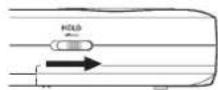
COBET
IpeeknoeHn cnaedeB a ctopoH yOLD moKHO 60
bEy3anuc6bnokopoeamb KKnKu DN pnepeoae
ueHn cyuauihM anmuynauu.
- HaxMMTe uyepeKmbaTe BteueHHe HeCKonbKnx cekyHKnONky /I/HOME) (■).
- Pn nepBOM BKNIOUeHm NOcne NOKyNKn Ha dncnnee noRBIOCTCNEIyoueE KpaHbI HAcTpoek.
OpMaTIpObaHHe KapTbi
Haxmte ▶tO6bI NOITBepnITb BInONHeHne.
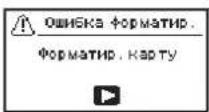
BHMaHne
Noce nodmbepehdeHua fopmatupoaba Hce Umeouieca na Kapme daHbte 6ydym cmepmb.
3mo cooeeue He noRaIeemc, eau kapma yke omfop mamupoeha.
aactponka 3bika
Bb6epnTe 3bIK OTo6paKeHMeHIO COo6eHm.

BbIePHTa3bIKcNOMOcHIOKHOHONOK+H-NOITBePHTe HAKAB
ATA/BPEM
YcTaHOBtE DaTy u BpeMa.
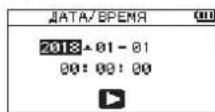
Data n Bpemr yctahabHbAOTCR c NOMOuBIOpepeMeHHN KYPcopa KHONKAMn I N H3MEHeHn 3aueHHN KHONKAMn +I- TTO6bl NOITBePmTb DaHHbIe, HAXMMTe
COBET
Hacmpouku 36ika, dambu bpeMeHu moKHO u3MeHumb MeHIO no3dhee.
063op dncnnne
ocneOCTaHOBKnNINBOBpeMa BOCnpON3BeDeHn
① YctahOBnEHnAckOPOCTb BOCnPOM3BeHnA
② YcTaHOBnEHHbIpeKIMCBeDeHnBXOda
③ CtaTyc aΦeKTa
④ CoctOaHneDnHaMnKa
5 INHdkatop 3apra6aTapeu /nHTAH
6 C0CTOHaHHe BOCnpon3BeDeHHa
⑦ MecTo BocnPon3BeDeHnA
⑧ ypOBHN CnHnA BOCnPon3BedeHHN
HaMeHOBaHHe BocpOn3BOmOro faHna
10 NCTekuee BpeM
10ctabweecBpeM
12 NIKOBBIE 3aueHH B deu6eNaX (D5)
13 06NaCTb Ncnonb3yEmbIX φaINOB DnB BocnpOn3Be-
14 Hmep Bocnpn3BODIMoro Tpeka/06uee Ymcno TpekoB
YpOBeHrpOMKoCTN BbIXoHOrO CnHaHa
Bpema 3aNnCn Nn B COCTOARHn FOTOBHOCTN K 3aNnCn
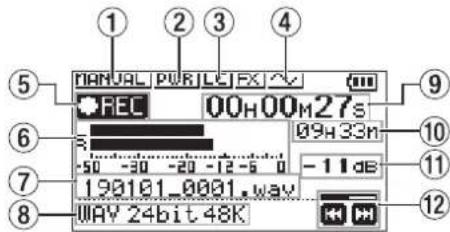
① YctaHOBNEHHbIpeKIMypOBH3anuCn
② Nopdau dononHHTenbHoro nHTaHn
③ DnBtp BbICOKNX qACTOT
④ ΦyHKU83ByKOBORo CnTHaJc CNHXPOHn3aun
5 HnukaTOP BKNIOHHO 3aHNC
6 Hdkatop ypOBHe3aHnC
⑦ mmaa 3annncn
⑧ Dopmat3aHH
PpOuDHeHoeBpeMa3nnc
10 OctabweecBpem3annc
11 NIKOBBIE 3aueHnB deu6eJax (A5)
CocToHnepeynnpOBKnypOBn3annc
IcnoB3OBAHne MeHO
MeHIO MCNONbEyTeTcIaN3MeHEHnPaaJIuHbIX NapaAMTePOB 3aINCH,BOCpOm3BeDEHnI,CCTMEhBXHaCTPoEK,aTAKCeI I BKNJIOHnN bIKyIOHcHnBCB03MOKhHXbФYNKlI.
- HAKMITE KHOKNY MENU. OTKPOeTcRkPAH MEHIO
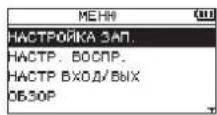
2.KHONKAMN+N-Bb6epNTe NYHKMeHO HAKMNTe □.IOBINTCAOKHOHACPTPOCK.
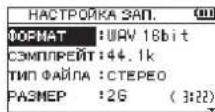
3.KhONKAMN +n-bb6epHte pa3dEN HAcTPOeKN HAKMNTE ▶. 3aTeM KOHO H3MeHtB HAcTPOeKN BKNIOHTb FyHKUHN
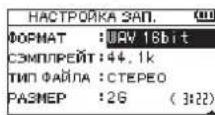
- IVcnoB3yIte KhoIKN+H-ⅡN H3MeHeHn 3HaueHn HAcTPOHn.
PIMMEYAHNE
- NaCtpoTne ypoBHe b3aHcN.
Otperynpye HapnpaBHeHMe MmKpOfoHa, pacctoHme do nTOCHNKA 3ByKa N BxOHOH yPOBeHb TAKHM Oba3OM, 1TO6bl yPOBeHb 3aNCn Ha NKe BapbnpoBanc B 30e-12 d. Dna HAcTPOKn BxOHO HorO yPOBaBBOcNoB3yTeCb KONkAMn
4.HaKMITE KONKky RECORD ,TO6bHaaytB 3anncb. 3anyCTTc3AANbc,HaCnIe neoO6pa3ITc PEC 3aOpNTCHMHKATOPREC.
5.ДЯ OCTAHOBKN 3aHNCn HAKMTE KHOKNY O/HOME (■). 3aHc6 octaHabNBAeTc, DcNnei OTObpaKaT ■
Icnonb3oBaHHe omnbTpba BbcOKnx qactOT
UyM KOHdNIOHEPOB N dpymX NCTOHNKOB MOXHO CHN3NTB B npocce 3aIcN.
1.ДЯЗТOrO BpeKIMe OXHuaHry 3aNNcH HaxMMTe KhoNky QUICK.
OTKpoetc BicCTpoe MeHIO.
2.CnOmoBIO KHOONK+NBbEpNE BBUHAXMMTEOTKPOETCAKpAH HACTPOEK qHbTpaBepxHxHxACTOT.
Bapmahtb: BBKJI,40Hz,80Hz,120Hz,220Hz
3.CnMOUbIO KHONK+N-BiBgePHTe HAcTPOKHy NAXMNTE
M3MeHHeBCTyNaOT B CNYI, PpOcXoDHT Bo3Bpat K 6bCTPOMY MEHO.
4.HaMMTKeHONKyO/HOME. HOBBtCRrAABhBnEkpA.
HactpoynKa nmmntepa
Cnmooubo30toyHKMIMOKHO npEOITBpATHTb NCKaKeHNAOT BHe3aHbIX rPOMKx3ByKOBO BVPema 3aNMC.
1.ДЯТOrO BpeKIMe OxuJaHn 3aHnCn HauKMTe KhoNkY QUICK. OTKpoTeBbCTpoe MeHO.
2.KhONKAMN+N-BbI6epNTPEX.YPOBHnHaXMHTe 1OtKpoETcAkpahHacTpoekpeKIMapeyINPobKNypOBH3aNNC.
BapnHb:PYHON (noymonauHHo),JHMHTEP, HNHNHE NIK, ABTO
- CnmoaHKnOaN+Bb6epNaHCTpOky N
N3MeHnB BCTyNaIOT BCnIy, pONCXoJNT Bo3BpAT K 6bICTPOMY MEHIO.
- Haxmte KhoNkY 1/HOME(■).
PONBNTCA rnaBHyb3KpaH.
Bocnpoun3BeDHeHne 3auncei
1.Bb6epte painn Haxkmte DnBocpnoun3BeDHeH. HauHETc BOCpnoun3BeDHeH,Ha dncnnee oTo6paTc
2. HactpoIe rpoMkoCTb.
PpomKocb perynnpyetc KHONkamn +n-
3.ДЯ OCTAHOBKBOCNPON3BeHNAHXMITEKHONKY 1/HOME(■).
Bocnpoun3BeHneOCTaHOBTcA,HaDcPiee OTO6pa3HTcA
pocnyuBaHHe C HayuHKaM
IpoKIOUOHTe HauuHnK K pa3bemy LINEOUT Ha yctpoNCTBe.
nepaun BO BpemBocnpu3BeHn
U3MeHeHneCKOpOCTu BocnpOn3BeDeHnA
- HaxMMTE KhoNKy PB CONT. OTKpoeTc 3KpaH NaCTpOKN BocnpOnBedeHnA
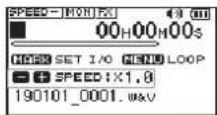
- KhoNkAMn+H-ImMeHHTe BEnHmHy ckOpOtn BoCnpoN3BEdHnKocopoTb BOCPOn3BEdHnMoKET BaPbHPOBaTcR O 50% (8.5)do 200% (2.8).
IcnoB3OBaHne uKnueckoro Bocnpn3-BeHnC ToKamHaHana N KOHa I/O
HaaHaaFyHKnnaN03BnAeT NOBtOaB BocPOnBBeHeHne OTeK3aAnmC MeJy DByx yCTaHOBHeHbX TOeK HauHa/IN N KOHa/OUT.
- HaxMMTe KONky PB CONT.
OTKpoETc3KpaHnHaCTpOKNBocPON3BeDEHm.
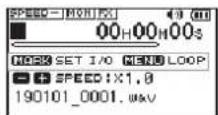
- HaxMMTe KhoNkY ▶,T06bHa Haayb BocpOn3BeDeHne.
- HaxMITE KONKY MARK, YTO6bl YCTAHOBNTb TOKy Hauana IN.
- HAKIMTE KONKY MARK, UTO6bl yCTAHOBNTb yCTAHOBNTb TOK Ky KOHua OUT.
KaKToJIbKOYCTAHABINBAETCTOUkaKOHua,3aNYcKaETcR 1IKNMlueeCKOBOCNPOH3BeneHne.
COBET
Дл османьк ушнчуескzo bocnpou3eбднua c coхалhoe mочек hayana u konua, haxkumte khoNKY MENU.
5. Haxmte KhoNky MARK, yTo6bI ydaIINb TocKn Hauana n KOHua.
IcnoB3OBaHne B KaueCTBe aydno nHTepeienca
ПОДКИМУВ YCTPOICTBO KOMMbIOTepy (Windows/Mac) nIN6O IOS YCTPOICTBY, мOKHO ИСТЛБЗВАБТЕ В КАЕСТBE АДYNI MHTEPEHCA.
IpoTobka Ka paboTe
- NookHouYeCTPOHCTBO K KomnbiOtepy C nOmoUb USB Ka6EIN BKNIOuHTeero.
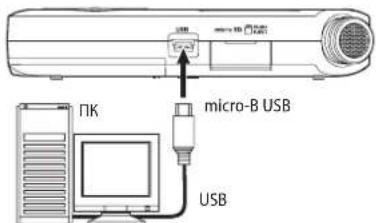
- OTKpoetcKpah USB PEKHM.
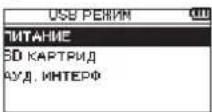
PIMMEAHHE
Дл naodknouhenya ycmpoicma κ IOS ycmpoicmey nompe6yemcA Pple Lightning-USB adanmep kamepb.
3.CnOMOuBIO KHOHOK+N-BbIePmTe AYJ.HHTEPN HAKMITE
OTKpoeTcA3kpaH AYII HHTEPΦ.
IopknloueHne
- Bb6epnttnnoKIOHIOaEMo yCTpoNCTBa.
CTPOIcTBO He BKJIouyaeTcA.
-86eMDTEcB,HTo 6aTapeynyCTaHOBnHeI npabunbHo
-yeMTcB,HTo He yCTAHOBnHa 6NoKIpOBKa HOLD.
CTPOINCTBO CAMONPON3BOJbHO BbIKIOUaETCA.
PpOBeBte ΦyHKUABTOMaTHueCKOro 3Heproc6peKeHHaYCTaHOBtEeHa «BbKlI」IINpEeTOpBaueHHaTOmatuCKrOBOBkUeHHcM.C.HactpoKaFHyKUIMABTOMaTHueCKOrO3Heproc6peKeHHaPaJdene11-HactpoKINnHfOpMaunpyKOBoCDTaNoKcnPyatauHH.
apta microSD He uetaetc
Y6eTeCb, YTO KAPTa microSD BCTaBHe nnonocbTo
TCYCTBYET BIXOHOH CNHAI INN 3BYK HE BOCINPOHNBOOHTCJINHAMNKOM.
-86eHTecb,HTo rpmKocTbe CNMUKOM H3Ka.
P IpOBepBe,TO DNHAMIK BKNIOUeH B HAcToPiKax.JaKe npN BKNIOUeHHOM DnHAMiKke,3BYK He 6yET BbBOaTbCn Ha DnHAMIK, ECINNoNDIOUeHb HayuHNiKmA, a TaKke B pekIMMe 3aHNICn H NOIOTROBKK K 3aNNiK.
aNcB HeBO3MOxHa.
-ПовьпгынДИКАТОРREC.EСИМИДИКАТОPRECMIRaET,учрйсбTOHAXODITCRBEXKHMEROTBOHOCTN3aINCHN.
-Пюверьт ha Диспjee doctунhoe octabweecn Bpem 3aHNCN.
Mrrhan 3aHnCn Cna6bIn NnNCKaKcHHbI.
PpOepeypoBeHbBxoHoroCnHana.
CTPOINCTBO HE OON3HaETC KOMNbIOTepoM PnnpNOKIIuOeHmN NocpeCTBOM USBKa6eJr.
y6eTeCb, cyo nKIOuOeHHb KOMBIOTep IMeET noIDepKJBAAemyIO npaunHHy CNTcEMy.
YtO6bKmOnbItepeHauan onpeJeAerTby yctpoIcTB npn IcnoJIb3oBAHN USB,coOTBeCTBHyOuIe pEKIMdoJKeJen6 bblBpaH B cINCKe MEHO.
- y6eHntecb, cyTo Ka6enb USB He npedHa3nueH mcknouHTenbHO nIa 3apda yctpoiCTB.
-86eHTecb,TOIOKNIUHHeBbONHeHO Hepe3 USB xa6.
peKmE ayuNO uHTepoeMa BO3HnKaIO TnpoBaIb3ByaHaNn Nm Wym.
Windows
Papametpyb6bctpoedeCTBnB Bb6epnte《06ecneuHTb haunyueee b6tpoedCTBNE》
- NapaMetpbI NITAHIN
Bb6epnte High performance.
IyuaHOb6bInBbIbpaH He TOT a3bIK.
TocnE KaHtAa KHOKNK /I/HOME IaBbKIOUeHnRAyCToPcTaBA, HAKMITE KHOKNK /I/HOME, ydepKINBa BHKAtOAM COCTOAHMN KHOKNK MENU.
IOABBITC MHeHIO BbOpa RbIka, INBc CMOKETe BbOpTaBraIK CHOBA.
XapakTepcntkn
Napametpbi
CTPOnCTBaXpaHeHn
Kapra microSD (64 MB - 2 GB)
KapTa microSDHC (4-32 FB)
Kapta microSDXC (48-128 TB)
OpMaTbI 3aHNCN/BOCnpon3BeDeHn
WAV:44,1/48/96KΓU,16/246nt
MP3:44,1/48 kTU, 32/64/96/128/192/256/320 k6nT/c
JOnmueCTBO KaHaIOB
2 KaHana (CTepeo)
BxOdbI BbIXOdbI
a3bEMMIC/EXTIN (MOxET NOaBaTb NtAHHe Na NOKIOUaemoeO6OpydoBaHne)
Pa3bEM:3,5MMCTepeo MMHnDkeK
a3bem LINEOUT[JIHHeHbI BblXO]
Pa3bEM:3,5MMCTepeo MMHn-KeK
CTpoeHHbI DnHaMnK
0,3BT(MOH)
BxOHyIe/BbIXoHbIe npaMeTpbl pa3bEMOB ynpabHeHn
SBnopT
Pa3bEm: Micro-B
ΦopMa: USB 2.0 BblCOKOCKOPOCTHO mass storage class
3ByKobbieXapaKTepnctnkn
epabHomephOCTb A4X
20Γu-20KΓu+1/-3
(MIC/EXT IN K LINE OUT,44,1 KU, JEITA)
20Γu-22KΓ+1-3
(MIC/EXT IN K LINE OUT, 48 kFJ, JEITA)
20Γu-40KΓu+1/-3πδ
(MIC/EXT IN K LINE OUT, 96 KΓU, JEITA)
03ΦΦnUHeHT HeHHeHbIX NCKaXKeHn
0.05% mnn Mehee
(MIC/EXT IN K LINE OUT, qactota ducckpetnaun
44,1/48/96 KΓu, JEITA*
THOWeHne CnHn/UyM
92dmbnBbwe
(MIC/EXT IN K LINE OUT, YACTORA Dnckpntna
44,1/48/96 KΓι, JEITA*)
PnmeaHne: JEITA -cooTBetCTByeT cHaDapTy JEITA CP-2150
AInTeBHoCTb 3aHnCn
(MIC/EXT IN to LINE OUT, Fs44.1k/48k/96 kHz)
JEITA)
S/N比
92dB以上
(MIC/EXTIN to LINE OUT, Es44.1k/48k/96 k Hz)
JEITA)
注)JEITA:JEITA CP-2150准测
錄音時間
This warranty gives you specific legal rights and you may also have other rights which vary from state to state. This warranty is only valid within the country the unit was originally purchased.
WHAT IS AND IS NOT COVERED
Except as specified below, this warranty covers all defects in materials and workmanship in this product. The following are not covered by the warranty:
1. Damage to or deterioration of the external cabinet.
2. Damages resulting from accident, misuse, abuse or neglect.
3. Damage resulting from failure to perform basic daily maintenance and/or calibration or otherwise resulting from failure to follow instructions contained in your owner's manual.
4. Damage occurring during shipment of the product. (Claims must be presented to the carrier)
5. Damage resulting from repair or attempted repair by anyone other than TEAC or an authorized TASCAM service station.
6. Damage resulting from causes other than product defects, including lack of technical skill, competence, or experience of the user.
7. Damage to any unit which has been altered or on which the serial number has been defaced, modified or is missing.
WHO IS COVERED UNDER THE WARRANTY
This warranty may be enforced only by the original purchaser. This warranty is not valid if the product was purchased through an unauthorized dealer.
LENGTH OF WARRANTY
All parts except heads and disk drives are warranted for one (1) year from the date of original purchase. Heads and disk drives are warranted to ninety (90) days from date of original purchase. Labor is warranted for ninety (90) days from date of original purchase.
WHAT WE WILL PAY FOR
We will pay all labor and material expenses for items covered by the warranty. Payment of shipping charges is discussed in the next section of this warranty.
HOW YOU CAN GET WARRANTY SERVICE
Your unit must be serviced by an authorized TASCAM service station in the United States. (This warranty is not enforceable outside the U.S.) If you are unable to locate an authorized TASCAM service station in your area, please contact us. We either will refer you to an authorized service station or instruct you to return the unit to the factory. Whenever warranty service is required, you must present a copy of the original dated sales receipt from an Authorized TASCAM Dealer.
You must pay any shipping charges if it is necessary to ship the product to service. However, if the necessary repairs are covered by the warranty, we will pay return surface shipping charges to any destination within the United States.
LIMITATION OF IMPLIED WARRANTYES
Any implied warranties, INCLUDING WARRANTY OF MERCHANTABILITY AND FITNESS FOR A PARTICULAR PURPOSE, are limited in duration to the length of this warranty.
EXCLUSION OF DAMAGES
TEAC's liability for any defective product is limited to repair or replacement of the product, at TEAC's option. TEAC shall not be liable for:
- Damages based upon inconvenience, loss of use of the product, loss of time interrupted operation or commercial loss; or
- Any other damages, whether incidental, consequential or otherwise.
Some states do not allow limitations on how long an implied warranty lasts and/or do not allow the exclusion or limitation of incidental or consequential damages, so the above limitations and exclusions may not apply to you.
To locate an Authorized Service Center in Your Area
CALL 1-800-447-8322
< Europe>
This product is subject to the legal warranty regulations of the country of purchase. In case of a defect or a problem, please contact the dealer where you bought the product.
Ce produit est sujet aux règlementations concernant la garantie légale dans le pays d'achat. En cas de défaut ou de problème, veillez contacter le revendeur chez qui vous avez acheté le produit.
Dieses Gerat unterliegt den gesetzlichen Gewährleistungsbestimmungen des Landes, in dem es erworben wurde.itte werden sie sich im Gewährleistungsfall an den Handler, bei dem sie das Gerat erworben haben.
Questo appareccchio è conforme alle norme sulla garanzia vigilanti nel rispectivo Paese in cui esso è slato acquisitato. Si prega di rivoligersi al proprio commerciale, presso il quale è slato acquistato l'appareccchio, in caso in cui vogli richiedere una prestazione in garanzia.
Las conditiones de garantía de este来电pto están susujetas a las dispuestos legales sobre garantía del pais en el que ha sido adquirido. En caso de garantía, tebe dirigirse al establishmentmente adquiren el来电pto.
<日本>
無料修理規定(持方及修理)
This warranty gives you specific legal rights, and you may also have other rights that vary by country, state or province.
If you have a warranty claim or request, please contact the dealer where you bought the product.
If you require repair services for your TASCAM equipment, please contact the dealer where the product was purchased from or the TASCAM Distributor in your country. A list of TASCAM Distributors can be found on our website at: http://teac-global.com/