PD50 - CD Player PIONEER - Free user manual and instructions
Find the device manual for free PD50 PIONEER in PDF.


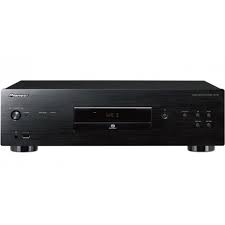
| Product Type | Super Audio CD Player |
| Brand | PIONEER |
| Model | PD-50 |
| Dimensions (W x H x D) | 435 mm x 130 mm x 329 mm |
| Weight | 7.8 kg |
| Power Supply | AC 220 V – 240 V, 50 Hz/60 Hz |
| Power Consumption | 41 W (standby: 0.45 W) |
| Playable Formats | SACD (2-channel), CD, CD-R/RW, DSD, WMA, MP3, AAC |
| Analog Audio Outputs | 1 stereo pair RCA (200 mVrms at -20 dB) |
| Digital Audio Outputs | Optical and coaxial (RCA) |
| Digital Audio Inputs | Optical and coaxial (RCA) |
| Special Functions | Pure Audio, Hi-Bit 32, Sound Retriever, Auto Level Control (ALC), random playback, programmed playback, repeat |
| Connectivity | Front USB port, iPod/iPhone/iPad, CONTROL IN/OUT jack |
| Operating Temperature | +5 °C to +35 °C |
| Operating Humidity | 5% to 85% (no condensation) |
| Signal-to-Noise Ratio | 117 dB (CD and SACD) |
| Dynamic Range | CD: 100 dB, SACD: 108 dB |
| Total Harmonic Distortion | CD: 0.0022%, SACD: 0.0020% |
| Frequency Response | CD: 2 Hz to 20 kHz, SACD: 2 Hz to 50 kHz |
| Included Accessories | Remote control, AAA batteries x2, RCA audio cable, power cord, user manual, warranty card |
| Care and Cleaning | Clean with a soft cloth; for stubborn dirt, use a diluted neutral detergent. Do not use alcohol, thinner, or insecticide. |
| Safety | Do not expose to water or naked flames; leave at least 10 cm of ventilation space around the unit. |
| Repairability | No user-serviceable parts inside; contact qualified personnel for any servicing. |
Frequently Asked Questions - PD50 PIONEER
User questions about PD50 PIONEER
0 question about this device. Answer the ones you know or ask your own.
Ask a new question about this device
Download the instructions for your CD Player in PDF format for free! Find your manual PD50 - PIONEER and take your electronic device back in hand. On this page are published all the documents necessary for the use of your device. PD50 by PIONEER.
USER MANUAL PD50 PIONEER
Thank you for buying this Pioneer product.
Please read through these operating instructions so you will know how to operate your model properly. After you have finished reading the instructions, put them away in a safe place for future reference.
IMPORTANT
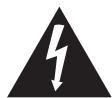
The lightning flash with arrowhead symbol, within an equilateral triangle, is intended to alert the user to the presence of uninsulated "dangerous voltage" within the product's enclosure that may be of sufficient magnitude to constitute a risk of electric shock to persons.
CAUTION
RISK OF ELECTRIC SHOCK DO NOT OPEN
CAUTION:
TO PREVENT THE RISK OF ELECTRIC SHOCK,DO NOT REMOVE COVER (OR BACK).NO USER-SERVICEABLE PARTS INSIDE.REFER SERVICING TO QUALIFIED SERVICE PERSONNEL.

The exclamation point within an equilateral triangle is intended to alert the user to the presence of important operating and maintenance (servicing) instructions in the literature accompanying the appliance.
D3-4-2-1-1_A1_En
European model only
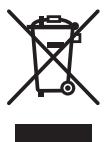
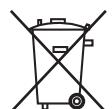
Information for users on collection and disposal of old equipment and used batteries
Symbol for equipment
Symbol examples for batteries
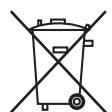
Pb
These symbols on the products, packaging, and/or accompanying documents mean that used electrical and electronic products and batteries should not be mixed with general household waste.
For proper treatment, recovery and recycling of old products and used batteries, please take them to applicable collection points in accordance with your national legislation.
By disposing of these products and batteries correctly, you will help to save valuable resources and prevent any potential negative effects on human health and the environment which could otherwise arise from inappropriate waste handling.
For more information about collection and recycling of old products and batteries, please contact your local municipality, your waste disposal service or the point of sale where you purchased the items.
These symbols are only valid in the European Union.
For countries outside the European Union:
If you wish to discard these items, please contact your local authorities or dealer and ask for the correct method of disposal.
K058a_A1_En
WARNING
This equipment is not waterproof. To prevent a fire or shock hazard, do not place any container filled with liquid near this equipment (such as a vase or flower pot) or expose it to dripping, splashing, rain or moisture.
D3-4-2-1-3_A1_En
WARNING
Before plugging in for the first time, read the following section carefully.
The voltage of the available power supply differs according to country or region. Be sure that the power supply voltage of the area where this unit will be used meets the required voltage (e.g., 230 V or 120 V) written on the rear panel.
D3-4-2-1-4*A1_En
WARNING
To prevent a fire hazard, do not place any naked flame sources (such as a lighted candle) on the equipment.
D3-4-2-1-7a_A1_En
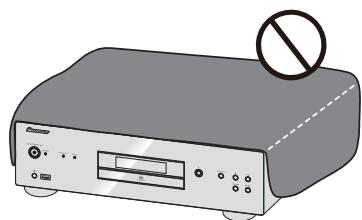
VENTILATION CAUTION
When installing this unit, make sure to leave space around the unit for ventilation to improve heat radiation (at least 10cm at top, 10cm at rear, and 10cm at each side).
WARNING
Slots and openings in the cabinet are provided for ventilation to ensure reliable operation of the product, and to protect it from overheating. To prevent fire hazard, the openings should never be blocked or covered with items (such as newspapers, table-cloths, curtains) or by operating the equipment on thick carpet or a bed.
D3-4-2-1-7b*_A1_En
Operating Environment
Operating environment temperature and humidity: +5 C to +35 C ( +41 ~F to +95 ~F) ; less than 85 % RH (cooling vents not blocked)
Do not install this unit in a poorly ventilated area, or in locations exposed to high humidity or direct sunlight (or strong artificial light)
D3-4-2-1-7c*A1En
If the AC plug of this unit does not match the AC outlet you want to use, the plug must be removed and appropriate one fitted. Replacement and mounting of an AC plug on the power supply cord of this unit should be performed only by qualified service personnel. If connected to an AC outlet, the cut-off plug can cause severe electrical shock. Make sure it is properly disposed of after removal. The equipment should be disconnected by removing the mains plug from the wall socket when left unused for a long period of time (for example, when on vacation).
D3-4-2-2-1a_A1_En
CAUTION
The O/I STANDBY/ON switch on this unit will not completely shut off all power from the AC outlet. Since the power cord serves as the main disconnect device for the unit, you will need to unplug it from the AC outlet to shut down all power. Therefore, make sure the unit has been installed so that the power cord can be easily unplugged from the AC outlet in case of an accident. To avoid fire hazard, the power cord should also be unplugged from the AC outlet when left unused for a long period of time (for example, when on vacation).
D3-4-2-2-2a*A1_EN
This product is for general household purposes. Any failure due to use for other than household purposes (such as long-term use for business purposes in a restaurant or use in a car or ship) and which requires repair will be charged for even during the warranty period.
K041_A1_En
POWER-CORD CAUTION
Handle the power cord by the plug. Do not pull out the plug by tugging the cord and never touch the power cord when your hands are wet as this could cause a short circuit or electric shock. Do not place the unit, a piece of furniture, etc., on the power cord, or pinch the cord. Never make a knot in the cord or tie it with other cords. The power cords should be routed such that they are not likely to be stepped on. A damaged power cord can cause a fire or give you an electrical shock. Check the power cord once in a while. When you find it damaged, ask your nearest PIONEER authorized service center or your dealer for a replacement.
S002*A1En
CAUTION
This product is a class 1 laser product classified under the Safety of laser products, IEC 60825-1:2007.

D58-5-2-2a_A1_En
Contents
01 Before you start
Disc/content format playback compatibility. 4
What's in the box. 4
Loading the batteries in the remote control. 4
02 Connecting up
Analog audio output connections 5
Digital audio connections 5
Using centralized control with other Pioneer components 5
Plugging in 6
03 Controls and displays
Remote control 7
Rear panel. 7
Front panel 8
Front panel display 8
04Playback
Playing discs 9
Set the power to Standby. 9
Fast forward/Fast reverse 9
Skip function 9
Direct search (designate a specific track for playback) 9
Repeat playback 9
Random playback 9
Programmed playback (Play tracks in a predetermined order) 9
View disc data. 10
iPod/iPhone/iPad playback 10
Confirm what iPod/iPhone/iPad models are supported 10
Playing your iPod/iPhone/iPad 10
Playing files stored on USB storage devices . . .11
05 Using advanced functions
Playing with high-fidelity sound 12
Sound Retriever. 12
Pure Audio 12
Hit-Bit 32. 12
Changing the playback area (layer) of an SACD/CD 12
Adjusting overall display illumination 12
Auto power down (automatically sets power to standby). 12
Auto Level Control (automatically adjusts sound volume differences) 12
Using this unit as a D/A converter. 12
Playback functions 13
06 Additional information
Playable disc 14
Playable file formats 14
Cautions on use. 15
Troubleshooting. 16
Specifications 17
Chapter 1:
Before you start
Disc/content format playback
compatibility
Discs playable on this player are as shown below.
- SACD (Super Audio CD)* (2-channel area only)
CD -
DSD disc
-
"Super Audio CD" is a registered trademark.

Note
This unit does not permit playback of the multi-channel areas of SACD discs.
- This unit's DIGITAL OUT terminals do not output sound from SACD and DSD discs, nor from iPod/ iPhone/iPad devices.
- When a disc is loaded, turning on the power will not cause playback to automatically start. As a result, timed playback is not possible even if the unit is connected to a timer.
About DualDisc playback
A DualDisc is a new two-sided disc, one side of which contains DVD content video, audio, etc. while the other side contains non-DVD content such as digital audio material. The non-DVD, audio side of the disc is not compliant with the CD Audio specification and therefore may not play. For more detailed information on the DualDisc specification, please refer to the disc manufacturer or disc retailer.
Discs that cannot be played
DVD-Video
DVD-Audio
CD-G
Video CD
- DTS CD
It is possible that some discs other than the ones listed above may not be playable either.
What's in the box
Please confirm that the following accessories are in the box when you open it.
Remote control x1
AAA/IEC R03 dry cell batteries x2
RCA audio cable (red/white plugs) x1
Power cord
Warranty card (European model only)
- Operating instructions (This document)

Note
- Illustrations featured in the Operating Instructions may have been modified or simplified for ease of explanation, and may therefore differ from the actual product appearance.
Loading the batteries in the remote control
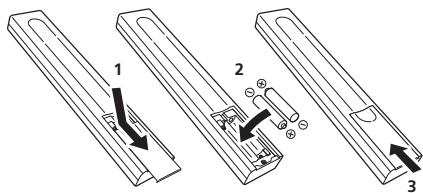
1 Open the rear lid.
2 Insert the new batteries, matching the polarities as indicated inside the case.
3 Close the rear lid.
The batteries included with the unit have been provided to allow you check product operation and may not last long. We recommend using alkaline batteries that have a longer life.

WARNING
- Do not use or store batteries in direct sunlight or other excessively hot place, such as inside a car or near a heater. This can cause batteries to leak, overheat, explode or catch fire. It can also reduce the life or performance of batteries.

Caution
Incorrect use of batteries may result in such hazards as leakage and bursting. Observe the following precautions:
- When inserting the batteries, make sure not to damage the springs on the battery's terminals. This can cause batteries to leak or overheat.
- Do not use any batteries other than the ones specified. Also, do not use a new battery together with an old one.
- When loading the batteries into the remote control, set them in the proper direction, as indicated by the polarity marks (⊕ and ⊙).
- Do not heat batteries, disassemble them, or throw them into flames or water.
-
Batteries may have different voltages, even if they are the same size and shape. Do not use different types of batteries together.
-
To prevent leakage of battery fluid, remove the batteries if you do not plan to use the remote control for a long period of time (1 month or more). If the fluid should leak, wipe it carefully off the inside of the case, then insert new batteries. If a battery should leak and the fluid should get on your skin, flush it off with large quantities of water.
- When disposing of used batteries, please comply with governmental regulations or environmental public institution's rules that apply in your country/ area.
Using the remote control
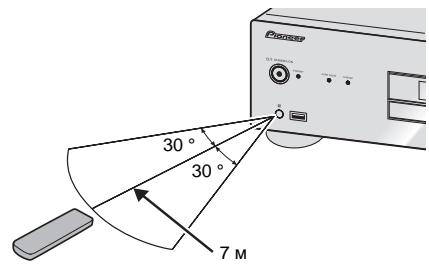
The remote has a range of about 7 m at an angle of about 30^ from the remote sensor.
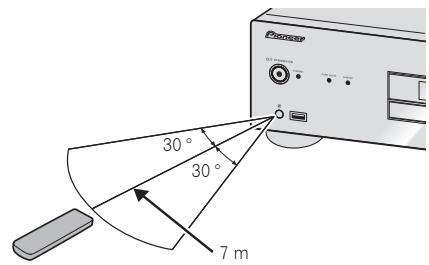
Keep in mind the following when using the remote control:
- Make sure that there are no obstacles between the remote and the remote sensor on the unit.
- Remote operation may become unreliable if strong sunlight or fluorescent light is shining on the unit's remote sensor.
- Remote controllers for different devices can interfere with each other. Avoid using remotes for other equipment located close to this unit.
- Replace the batteries when you notice a fall off in the operating range of the remote.
Chapter 2:
Connecting up

Caution
- Before making or changing the connections, switch off the power and disconnect the power cord from the AC outlet.
- Connect the power cord after all the connections between devices have been completed.
Analog audio output connections
By connecting this unit's analog audio output to the analog audio input of an amplifier, you can use the amplifier to enjoy analog audio produced from this unit.
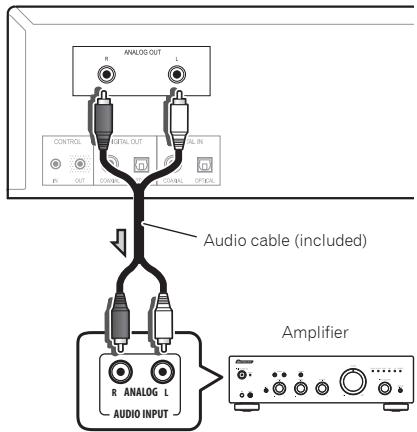
PD-50's rear panel
Digital audio connections

Important
Care in the handling of optical fiber cables
-
Do not allow optical fiber cables to be bent at sharp angles. When storing optical fiber cables, roll in coils of at least 15cm diameter.
-
When connecting optical fiber cables, align the connectors correctly and insert fully. If the orientation of the cable connector is incorrect and excessive force is applied in the attempt to fasten the connector, the connector may be deformed, preventing the shutter from closing when the cable is removed.
Digital audio output connections
If desired, the digital audio output from this unit can be connected to an AV amplifier or digital recording device (CD recorder, MD, etc.).
- This unit's DIGITAL OUT terminals do not output sound from SACD and DSD discs, nor from iPod/ iPhone/iPad devices.
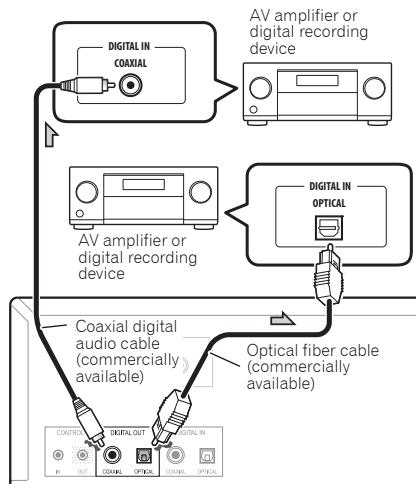
PD-50's rear panel

Note
- For digital audio output, CDs played on this unit must produce linear PCM signals with a sampling rate up to 44.1 kHz and quantitative bits up to 16 bits (some discs may not be playable depending on the connected component and environment). For information about other files, see page 14.
Digital audio input connections
This unit can be used as a D/A converter by connecting the digital audio output of a digital audio component to the digital audio input of this unit.
See the section "Using this unit as a D/A converter" (page 12) for details about the audio output of signals input to this unit's DIGITAL IN terminals.
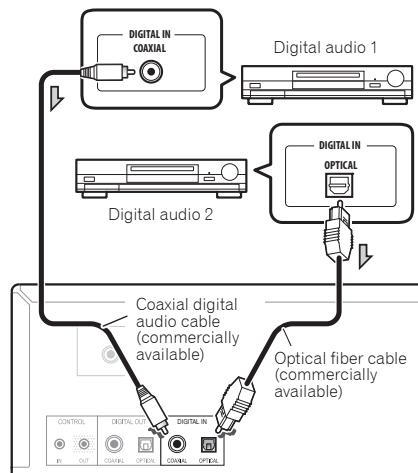
PD-50's rear panel

Note
- This unit supports linear PCM signals with sampling rates and quantitative bits up to 192kHz/24 bits (operation may not be possible in all cases, depending on components connected and operating environment).
Using centralized control with other Pioneer components
This unit and other Pioneer components equipped with CONTROL IN/OUT jacks can be controlled with a single remote control by aiming the remote toward the signal receptor on the AV amplifier or other component. This also allows remote control of components not equipped with a remote sensor, or installed in places where the component's remote sensor cannot be accessed.
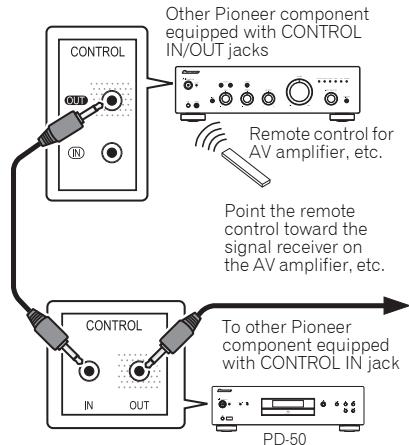

Note
- For connections use a commercially available monaural miniplug cord (without resistor).
- When connecting the CONTROL IN/OUT jacks, commercially available audio cords must also be used to make analog connections. Merely connecting the CONTROL IN/OUT jacks alone will not allow proper system control.
- When a control cord is connected to the PD-50's CONTROL IN jack, the PD-50 cannot be controlled by pointing the remote control at the unit's remote sensor (the sensor is automatically disabled).
Plugging in

Important
- If it is necessary to detach the power cord, first be sure to press the 0/1 STANDBY/ON button on the front panel of the unit so the PD-50 is turned OFF.
- Confirm that the [-OFF-] indicator is not lighted in the main unit's front panel display before disconnecting the power cord. If the power cord is disconnected while the [-OFF-] indicator is still lighted, the unit's settings may revert to factory defaults.
- When going on a trip or otherwise not using the unit for an extended period, always disconnect the power cord from its outlet.

Caution
- Do not use any power cord other than the one supplied with this unit.
- Do not use the supplied power cord for any purpose other than that described below.
After you've finished making all connections, plug the unit into an AC outlet.
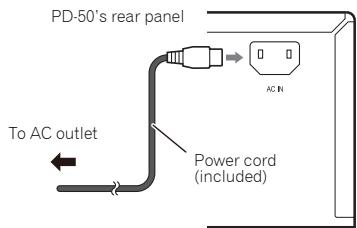
1 Plug the supplied power cord into the AC IN socket on the rear of the unit.
2 Plug the other end into AC outlet.
Chapter 3: Controls and displays
Remote control
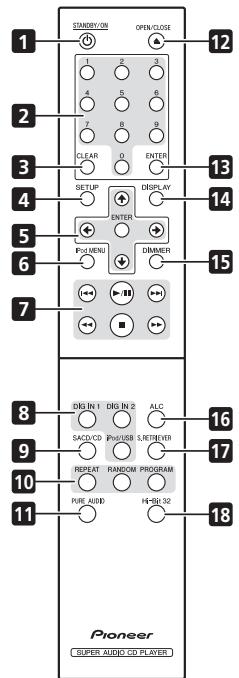
1 STANDBY/ON
Switches the unit between standby and on.
2 Number buttons
Use these buttons when you wish to specify a certain track for playback. Use the number buttons to select the track, then press ENTER to confirm the selection.
3 CLEAR
Press to clear the contents set for programmed playback (page 9).
4 SETUP
Use to set the auto power down function (page 12).
5 / / /
Use these to select items, change settings and move the cursor.
ENTER
Use this to implement the selected item or enter a setting that you have changed.
6 iPod MENU
Use when operating the iPod/iPhone/iPad menu.
7
Press to return to the beginning of the currently playing track. Press twice to return to the beginning of the previous track.
#
Press to start playback. During playback, pause/ unpause playback.
#
Press during playback to skip ahead to the beginning of the next track.
#
Press to perform fast reverse on the currently playing track. If the button is pressed again during fast reverse, the reversing speed changes in four steps.
#
Press to stop playback.
#
Press to perform fast forward on the currently playing track. If the button is pressed again during fast forward, the fast forward speed will change in four steps.
8 Input selector buttons (DIG IN 1, DIG IN 2, iPod/USB)
Press to select an input source.(page 10, 11, 12).
9 SACD/CD
Press to switch the unit's input to SACD/CD. In the case of hybrid SACD discs, if this button is pressed when playback is stopped, the disc's playback area changes (page 12).
10 REPEAT
Press to initiate repeat play (page 9).
RANDOM
Press to initiate random play (page 9).
PROGRAM
Press to initiate programmed playback (page 9).
11 PURE AUDIO
Press this button to activate the Pure Audio mode. In this mode, audio playback is performed with greatest fidelity to the original sounds (page 12).
12 ▲ OPEN/CLOSE
Press to open and close the disc tray (page 9).
13 ENTER
Use this to implement the selected item or enter a setting that you have changed.
14 DISPLAY
Press to display various data about the disc, including elapsed playing time and remaining playing time (page 10).
15 DIMMER
Press to change the illumination levels for the main unit's front panel display and indicators (page 12).
16 ALC
Press to alternate Auto Level Control ON/OFF(page 12).
17 S.RETRIEVER
Press to alternate between sound retriever function settings(page 12).
18 Hi-Bit 32
Press to alternate Hi-Bit 32 function ON/OFF (page 12).
Rear panel
See page 5 for details regarding connections.
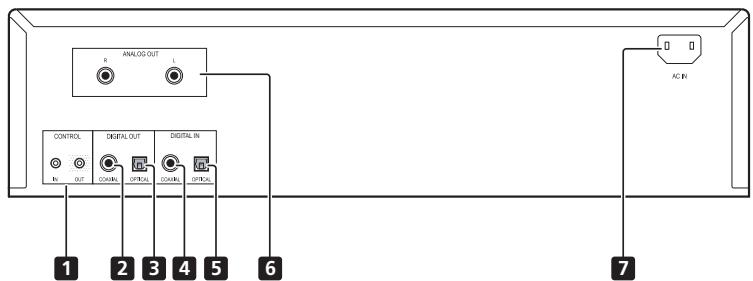
1 CONTROL IN/OUT jack
2 DIGITAL OUT (COAXIAL) terminal
3 DIGITAL OUT (OPTICAL) terminal
4 DIGITAL IN (COAXIAL) terminal
5 DIGITAL IN (OPTICAL) terminal
6 ANALOG OUT terminals
7 AC IN jack
Front panel
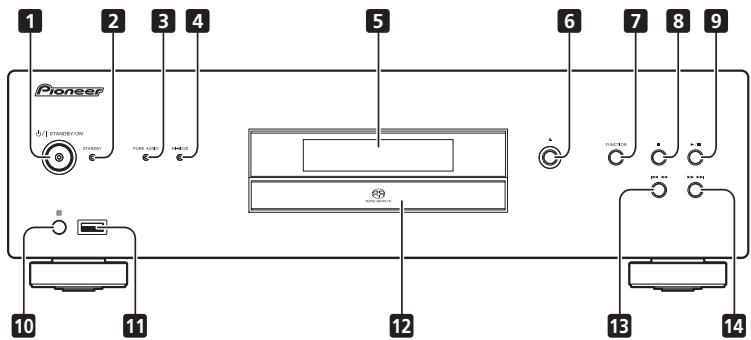
1 O/ISTANDBY/ON
When power is turned on, the power indicator in the center of the button will light.
- Press this button to switch the unit ON/OFF. To turn power ON, press the button until it remains in the depressed position.
2 STANDBY indicator
Lights when power is in the STANDBY mode.
3 PURE AUDIO indicator
Lights when Pure Audio function is ON (page 12).
4 Hi-Bit 32 indicator
Lights when Hi-Bit 32 function is ON (page 12).
5 Front panel display
(See the following description.)
6 ▲
Press to open and close the disc tray (page 9).
7 FUNCTION
Use to change the input source. The source changes as below.
DISC iPod/USB DIG IN 1 DIG IN 2 Return to the beginning (Undisplayed).
8
Press to stop playback.
9 11
Press to start playback. During playback, pause/ unpause playback.
10 Remote sensor
Receives the signals from the remote control (page 4).
11 iPod/USB port
Use to connect your Apple iPod/iPhone/iPad (page 10) or connect a USB device (page 11).
12 Disc tray (page 9)
13
Press to return to the beginning of the currently playing track. Press twice to return to the beginning of the previous track. When the button is held depressed, the currently playing track will be reversed at fast speed.
- When pressed again during fast reverse, the speed of fast reverse will change in four steps.
14
Press to advance to the beginning of the next track. When the button is held depressed, the currently playing track will be forwarded at fast speed.
- When pressed again during fast forward, the speed of fast forward will change in four steps.
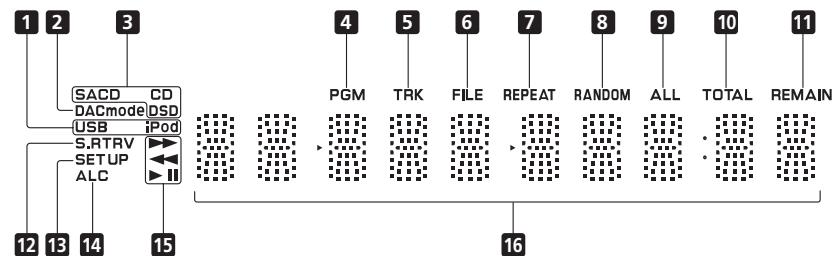
Front panel display
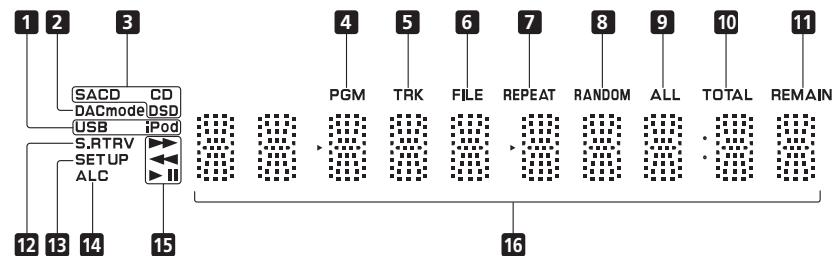
1 USB/iPod
Lights during playback of USB flash memory or iPod/ iPhone/iPad.
2 DACmode
Lights when using the unit as a D/A converter (page 12).
3 SACD/CD/DSD
The indicator lights corresponding to the currently playing disc type.
4 PGM
Lights during programmed playback (page 9).
5 TRK
Lights when displaying the track number together with either the elapsed playing time or remaining playing time.
6 FILE
Lights when a file name is displayed.
7 REPEAT
Lights during repeat playback (page 9).
8 RANDOM
Lights during random playback (page 9).
9 ALL
Lights during disc-repeat playback (page 9).
10 TOTAL
Lights when the disc's remaining playing time is displayed.
11 REMAIN
Lights when displaying the remaining playing time for track or disc.
12 S.RTRV
Lights when the sound retriever function is ON (page 12).
13 SET UP
Lights when setting the auto power-down function (page 12).
14 ALC
Lights when Auto Level Control function is ON (page 12).
15
Lights during fast forward.
Lights during fast reverse.
Lights during playback.
1
Lights during pause mode.
16 Character display
Chapter 4: Playback
The functions that can be used differ according to the type of disc and file. In some cases, some of the functions cannot be used. See Playback functions on page 13.
Playing discs
1 Press the front panel's /I STANDBY/ON button to turn power ON to the unit.
Turn on the power by pressing the /I STANDBY/ON button so that it remains at the depressed position.
Side view of front panel

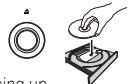
2 Press the button to open the disc tray and set the disc in place.
- Set the disc with the imprinted side facing up.
3 Press the / button to begin playback.
- To pause playback, press the button.
- To stop playback, press the button.

Steps 2 and 3 can be performed via the remote control in the same way as for the main unit's front panel controls.
Set the power to Standby
Remove any disc loaded before setting the power switch to STANDBY mode.
Press the remote control's STANDBY/ON button.
STANDBY/ON

The next time you wish to turn on the power, press the remote control's STANDBY/ON button.
- Pressing the front panel / I STANDBY/ON button sets the unit to power OFF, not STANDBY mode. To turn on the power again, press the front panel's / I STANDBY/ON button.

- If the power cord is disconnected when the unit is in the standby mode the unit will turn off, but when the cord is then reconnected, the unit will not automatically turn on. After reconnecting the power cord, press the remote control's STANDBY/ON button to turn the power on.
Fast forward/Fast reverse
During playback, press the or button.

Each time the button is pressed the forward or reverse speed is changed in four steps.
- To return to the normal play function, press the button.
Skip function
During playback, press the or button.

Playback will skip ahead or backwards the number of tracks corresponding to the times the button is pressed.
Direct search (designate a specific track for playback)
- Using the number buttons, input the desired track number, then press the ENTER button to confirm the selection.
Even if the ENTER button is not pressed, playback will begin automatically after a 5-second interval (this does not apply to programmed playback).
Repeat playback
Repeat play can be performed for the currently playing single track, or for all tracks on the entire disc.
During playback, press the REPEAT button.
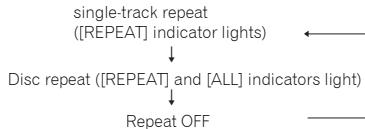
- Repeat play will begin, and the [REPEAT] indicator will light on the unit's front panel display. Press the button again to alternate the type of repeat play between single-track repeat and disc (all-track) repeat as follows:

Note
- The repeat play function is canceled when disc playback is stopped.
Random playback
All tracks on the disc are selected and played in random order, until each track has been played once.
During playback, press the RANDOM button.
Random playback starts, and the [RANDOM] lights in the main unit's front panel display.

Note
- Random playback continues until the disc stops, or until the RANDOM button is pressed once again.
- The random playback function cannot be used simultaneously with programmed playback.
- If the button is pressed during random playback, play skips ahead to the next randomly selected track. If the button is pressed, playback returns to the beginning of the currently playing track and starts again.
REPEAT

Programmed playback (Play tracks in a predetermined order)
This function allows you to program up to 24 tracks for playback in the order selected.
1 From the stop mode, press the PROGRAM button.
PROGRAM

The [PGM] indicator will light in the unit's front panel display.
2 Use the number buttons to select the number of the desired track, followed by the ENTER button.
ENTER

Example: To select track 15, press the 1 and 5 buttons, then press ENTER. In the event you make a mistake, press the CLEAR button.
3 Repeat step 2 to input the numbers of all desired tracks.
4 Press the / button.
Playback will begin in the order the tracks have been programmed. If you wish to add other tracks, repeat steps 1 and 2.


Note
- If the CLEAR button is pressed when the disc is stopped, all programmed tracks will be cancelled.
- To clear programmed tracks, from the stop mode, press the PROGRAM button followed by the CLEAR button. The programmed tracks will be cancelled, beginning with the last one programmed.
A "pause" cannot be programmed. - The contents of programmed playback (all-track repeat) can be repeated. Just press the REPEAT button after beginning programmed playback (see at left).
- Single-track repeat cannot be performed during programmed playback.
- Random playback cannot be used during programmed playback.
- If the button is pressed during programmed playback, play will jump ahead to begin playback of the next programmed track.
After playback has stopped, to begin the same programmed playback again, press the PROGRAM button, followed by the button.
View disc data
During playback, press the DISPLAY button

Various data, including elapsed and remaining playing times will be displayed.
Depending on the disc, pressing the DISPLAY button multiple times will cause the display to cycle through different data contents.

Note
- Displays file name (first 8 characters) when playing WMA/MP3/AAC files, or files on DSD discs. Depending on the characters used, however, the display may not be entirely correct.
iPod/iPhone/iPad playback
Merely by connecting your iPod/iPhone/iPad to this unit, you can enjoy high-quality sound from your iPod/iPhone/iPad.
Confirm what iPod/iPhone/iPad models are supported
The iPod/iPhone/iPad playable on this unit are shown below.
| iPod/iPhone/iPad | Audio | Control |
| iPod nano 2/3/4/5/6G | ✓ | ✓ |
| iPod touch 1/2/3/4G | ✓ | ✓ |
| iPhone | ✓ | ✓ |
| iPhone 3G/3GS | ✓ | ✓ |
| iPhone 4/4S | ✓ | ✓ |
| iPad | ✓ | ✓ |
| iPad 2 | ✓ | ✓ |
- This unit has been developed and tested for the software version of iPod/iPhone/iPad indicated on the website of Pioneer. http://pioneer.jp/homeav/support/ios/eu/ (Europe models) http://pioneer.jp/homeav/support/ios/ao/ (Others)
- Installing software versions other than indicated on the website of Pioneer to your iPod/iPhone/iPad may result in incompatibility with this unit.
Note
- Pioneer does not guarantee that this unit plays iPod/iPhone/iPad models other than the ones specified.
- Some functions may be restricted depending on the model or software version.
- iPod/iPhone/iPad is licensed for reproduction of non-copyrighted materials or materials the user is legally permitted to reproduce.
- Features such as the equalizer cannot be controlled using this system, and we recommend switching the equalizer off before connecting.
- Pioneer cannot under any circumstances accept responsibility for any direct or indirect loss arising from any inconvenience or loss of recorded material resulting from iPod/iPhone/iPad failure.
- For detailed instructions on using the iPod/iPhone/iPad, please refer to the manual supplied with the iPod/iPhone/iPad.
Playing your iPod/iPhone/iPad
1 Press iPod/USB on the remote control to select iPod as the input source.
Press the remote control's iPod/USB button.
- You can also perform the same operation by pressing the FUNCTION on the front panel repeatedly.
2 Connect your iPod/iPhone/iPad.
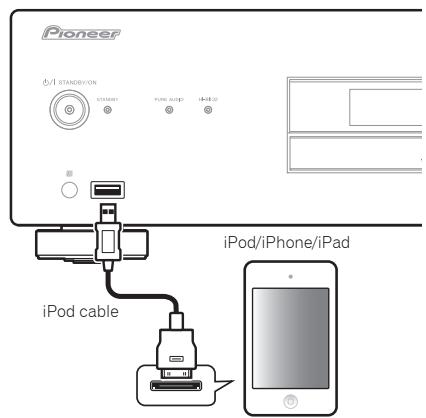
Connect your iPod/iPhone/iPad to the USB port on the unit's front panel. Use the iPod cable supplied with your iPod/iPhone/iPad for the connection.
- For the cable connection, also refer to the operating instructions for your iPod/Phone/iPad.

The following operations are possible for iPod/iPhone/ iPad.
| Button | What it does |
| ▶/II | Starts playback. During playback, pause/unpause playback. |
| ■ | Pauses playback. |
| I← | Press to skip to the start of the current file, then previous files. |
| ←← | Hold depressed for fast reverse. |
| ▶I | Press to skip to the next file. |
| ▶ | Hold depressed for fast forward. |
| RANDOM | The currently selected iPod/iPhone/iPad files are played back in random order (shuffle play). |
| REPEAT | The currently selected iPod/iPhone/iPad files are played back repeatedly.1 |
| iPod MENU | Use when operating the iPod/iPhone/iPad menu. |
| ↑/↓/ENTER | Use to perform iPod/iPhone/iPad menu operations. |
1 Each time you press REPEAT the repeat modes changes as below.
Repeat 1 Repeat all Normal playback
Repeat 1: Repeats a file currently played back.
Repeat all: Repeats all files.

Important
If this unit cannot play your iPod/iPhone/iPad, perform the following troubleshooting checks:
- Check whether the iPod/iPhone/iPad is supported by this unit.
- Reconnect the iPod/iPhone/iPad to the unit. If this doesn't seem to work, try resetting your iPod/ iPhone/iPad.
- Check the iPod/iPhone/iPad software is supported by this unit.
If the iPod/iPhone/iPad cannot be operated, check the following items:
- Is the iPod/iPhone/iPad connected correctly? Reconnect the iPod/iPhone/iPad to the unit.
- Is the iPod/iPhone/iPad experiencing a hangup? Try resetting the iPod/iPhone/iPad, and reconnect it to the unit.

Note
- If an iPod/iPhone/iPad is connected to this unit, recharging of the connected device will occur whenever the unit's power is ON (however, recharging will not occur when the Pure Audio function is ON).
- When input is switched from iPod to another function, the iPod/iPhone/iPad's playback will be stopped automatically.
Playing files stored on USB storage devices
1 Press iPod/USB on the remote control to select USB as the input source.
iPod/USB

Press the remote control's iPod/USB button.
- You can also perform the same operation by pressing the FUNCTION on the front panel repeatedly.
2 Connect the USB storage device.
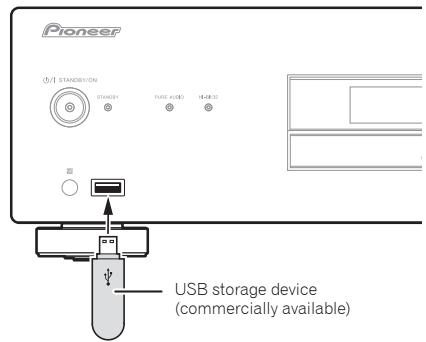
3 Press the / III button to begin playback.
- To pause playback, press the button.
- To stop playback, press the button.
You can perform the following operations. Note that some buttons are not available for operation depending on the category currently being played back.
| Button | What it does |
| ▶/II | Starts playback. During playback, pause/unpause playback. |
| ■ | Stops playback. |
| ← | Press to skip to the start of the current file, then previous files. |
| ← | Press for fast reverse. Each time button is pressed, reverse speed changes in four steps. |
| ▶I | Press to skip to the next file. |
| ▶ | Press for fast forward. Each time button is pressed, forward speed changes in four steps. |
| RANDOM | The currently selected files are played back in random order (shuffle play). |
| REPEAT | The currently selected files are played repeatedly.1 |
1 Each time you press REPEAT the repeat modes changes as below. Repeat 1 Repeat all Normal playback Repeat 1: Repeats a file currently played back. Repeat all:Repeats all files.
When the auto power down function is set to ON, and input is set for USB memory playback, if playback from the USB memory device stops for 30 minutes without other operation being performed, the power will automatically switch to standby.
Note
- This unit may not recognize the USB storage device, play files or supply power to the USB storage device. For details, see Troubleshooting on page 16.
- When the USB storage device contains a large number of files, search and other access functions may be slowed.
- Pioneer does not guarantee that any file recorded on a USB storage device will play or that power will be supplied to a USB storage device. Also note that Pioneer will accept no responsibility whatsoever for loss of files on USB storage devices caused by connection to this unit.
- This unit does not support use of a USB hub.
Chapter 5:
Using advanced functions
The functions that can be used differ according to the type of disc and file. In some cases, some of the functions cannot be used. See Playback functions on page 13.
Playing with high-fidelity sound
Sound Retriever
When compressed sound signals are decompressed for playback, some parts experience dropouts. By setting the sound retriever function to ON, compensation is added for those losses, thus producing richer, more sumptuous sound.
Press the S.RETRIEVER button.
S.RETRIEVER
Each time the button is pressed, the function will change as follows: S.RTRV: OFF S.RTRV: LOW S.RTRV: HI Returns to original status
- The sound retriever function is disabled when the pure audio function is ON.
Pure Audio
This function disables digital audio output and plays analog audio with high fidelity. When set to ON, the display shows no indicators. The factory default condition is OFF.
Press the PURE AUDIO button.
PURE AUDIO
Press again to turn the function OFF.

-
When this function is set to ON and the main unit's input is switched to SACD/CD, the PURE AUDIO indicator will light on the front panel. During disc playback, the front panel display turns OFF.
-
When the PURE AUDIO indicator is lighted, any iPod/iPhone/iPad connected to the main unit will not be recharged.
Hi-Bit 32
This function expands the dynamic range of digital audio signals. By requantifying 16-bit or 24-bit audio to 32 bits, greater sensitivity and smoother musical expression are made possible.
Press the Hi-Bit 32 button.
Hi-Bit 32

Press to alternate between ON and OFF. When set to ON, the unit's Hi-Bit 32 indicator lights.
- The Hi-Bit 32 function is disabled when the PURE AUDIO indicator is lighted (see above).
Changing the playback area (layer) of an SACD/CD
Hybrid SACD discs are composed of two layers, an SACD layer, and CD layer, allowing you to select which layer you wish to play.
1 Press the SACD/CD button.
SACD/CD

Input changes to SACD/CD.
2 In the stop mode, press the SACD/CD button.
Each time the button is pressed, the playback alternates between the CD area and SACD 2 channel area.

Note
- This unit does not support SACD multi-channel areas.
Adjusting overall display illumination
This unit is equipped with a dimmer function to allow the display illumination to be adjusted in three levels, responding to differing levels of ambient lighting. The factory default is the brightest setting.
Press the DIMMER button.
DIMMER
Each time the button is pressed it the brightness cycles through the three levels.
- The dimmer setting cannot be changed when a disc is playing with the pure audio function ON (see at left).
- The brightness of the STANDBY indicator does not change.
Auto power down (automatically sets power to standby)
This function automatically switches the unit to standby mode if no signal or switch operation is detected for 30 minutes.
1 Press the SET UP button.
2 Change the setting and confirm.
Use the / button to set the function ON or OFF as desired, then press the ENTER button to confirm.
SETUP


ENTER


Note
- This function is disabled when iPod input is selected.
Auto Level Control (automatically adjusts sound volume differences)
Sound volume differences are automatically equalized for playback. Also, when playing at low sound volume, playback is optimized for difficult-to-hear bass sounds, treble sounds, and spoken contents.
Press the ALC button.
Each time the button is pressed, the function alternates ON and OFF. When set to ON, the [ALC] indicator lights in the unit's display window.
- The Auto Level Control function is disabled when the PURE AUDIO indicator is lighted (see above).
Using this unit as a D/A converter
By inputting digital audio signals to the unit's DIGITAL IN terminals (COAXIAL or OPTICAL), those signals can be converted to analog format and output from the ANALOG OUT terminals.
1 Connect a digital input component.
See the section Digital audio input connections on page 5.
2 Switch to digital audio input.
Press the DIG IN 1 or DIG IN 2 button on
the remote. The unit's [DACmode] indicator will light on the unit's display window.
When DIG IN 1 is selected, digital input signals from the COAXIAL terminal are played; when DIG IN 2 is selected, signals from the OPTICAL terminal are played.
- The FUNCTION button on the main unit can also be pressed repeatedly to change the input source.

Note
- This unit supports linear PCM signals with sampling rates and quantitative bits up to 192kHz/24 bits (operation may not be possible in all cases, depending on components connected and operating environment).
- The Hi-Bit 32 and Auto Level Control functions (see above) also operate on digital audio signals input to the unit's DIGITAL IN terminals.
DIGIN2
ALC

7
习
when
W
DIGIN2

ght on
Playback functions
The functions that can be used differ according to the type of disc and file. In some cases, some of the functions cannot be used. Check the usable functions on the table below.
| \(Function^1\) | Disc/file type | |||
| SACD | CD-DA\(\text{CD-R/-RW}^2\) | WMA MP3\(\text{AAC}^3\) | \(\text{DSD}^4\) | |
| Fast forward/Fast reverse | ✓ | ✓ | ✓ | ✓ |
| Skip function | ✓ | ✓ | ✓ | ✓ |
| Direct search (designate a specific track for playback) | ✓ | ✓ | - | - |
| Repeat playback | ✓ | ✓ | ✓ | ✓ |
| Random playback | ✓ | ✓ | ✓ | ✓ |
| Programmed playback (Play tracks in a predetermined order) | ✓ | ✓ | - | - |
| View disc data | ✓ | ✓ | ✓ | ✓ |
| Sound Retriever | - | - | ✓ | - |
| Pure Audio | ✓ | ✓ | \(\checkmark^5\) | ✓ |
| Hi-Bit 32 | - | ✓ | ✓ | - |
| SACD/CD | \(\checkmark^6\) | - | - | - |
| ALC (automatically adjusts sound volume differences) | - | ✓ | ✓ | - |
1 Some functions may not work for some discs or files, even if indicated [✓] on the table.
2 Also see Playback of CD-R/CD-RW discs on page 14.
3 Also see Playable file formats on page 14.
4 Also see Playing DSD discs on page 14.
5 This function is enabled only during playback of files recorded on disc.
6 Hybrid SACD discs only.
Chapter 6:
Additional information
Playable disc
Playback of CD-R/CD-RW discs
- This unit can play CD-R/CD-RW discs recorded with CD music format, or audio data in WMA and MP3 format. However, some discs may not be playable, or may generate noise or distorted sound.
This unit is for playback only. It cannot record data on CD-R/CD-RW discs. - CD-R/CD-RW discs which have not be finalized cannot be played on this unit. For details, consult the operating instructions for your disc recorder.
Playing DSD discs
This unit can play DSD disc files recorded in the DSF file format.
Playable files
- Recorded discs: DVD-R/-RW
File Extension: .dsf - Folder name: DSD_DISC
Capacity: maximum 4 GB per file
Audio: 2-channel
Sampling frequency: 2.8224 MHz
Example of folder composition
The order of file/folder playback is not alphabetical, but depends on the order in which they were recorded to the disc.
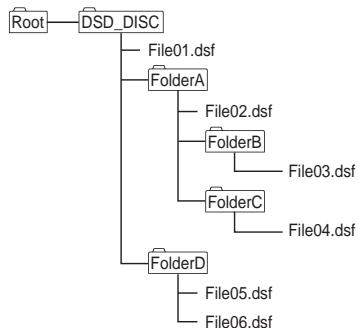
- A single folder can hold a maximum of 150 files.
- A single disc can hold a maximum of 200 folders.
Each folder should have no more than 8 levels. - File names using Japanese language fonts and certain other symbol fonts may not be displayed correctly.
- Any files other than those of DSF format will be ignored.
Caution
Some files may not be playable.
- Discs holding large numbers of files and folders may require substantial time to begin playback. In this case, you can move the desired files directly to the DSD_DISC folder, or limit the number of files to 20 or less.
Operations during playback
The following operations cannot be performed during playback of a DSD disc:
- Direct search
- Playback of disc files other than DSF type
Display
When the unit is in the stop mode when playing a DSD disc, the unit will display the indicator [DSD DISC]. During playback, pressing the DISPLAY button will cause the display to cycle through the following information each time the button is pressed:
Number of the track and its elapsed playing time
Name of file
Playable file formats
Playing audio files
This unit supports the following file formats.
Note that some file formats are not available for playback although they are listed as playable file formats.
- If an attempt is made to play files with unsupported formats, the sound may be intermittent or be accompanied by noise. In such cases, confirm that the file format is compatible with this unit.
- Music files subjected to Digital Rights Management controls cannot be played. DRM (Digital Rights Management) copy protection is a technology designed to protect copyrights. To prevent illegal copying DRM restricts playback to the disc recorder or computer originally used to record the music. For details, consult the operating instructions and help files for the device or application used during the original recording.
| Category | Extension | Stream | ||
| MP31 | .mp3 | MPEG-1/2 Audio Layer-3 | Sampling frequency | 8 kHz to 48 kHz |
| Quantization bitrate | 16 bit | |||
| Channel | 2 ch | |||
| Bitrate | 8 kbps to 320 kbps | |||
| WMA | .wma | WMA2/7/8/9 | Sampling frequency | 22.05 kHz to 48 kHz |
| Quantization bitrate | 16 bit | |||
| Channel | 2 ch | |||
| Bitrate | 32 kbps to 192 kbps |
Category Extension Stream
| MPEG-4 AAC LC MPEG-4 HE AAC (AAC Plus v1/2) | Sampling frequency | 8 kHz to 48 kHz | ||
| AAC | .m4a | Quantization bitrate | 16 bit | |
| Channel | 2 ch | |||
| Bitrate | 8 kbps to 320 kbps |
- "MPEG Layer-3 audio decoding technology licensed from Fraunhofer IIS and Thomson multimedia."
Caution
- It may not be possible to play all CD-R/CD-RW discs recorded on a CD recorder or computer, due to characteristics of the disc, disc scratches or soiling, or soiling or condensation on the player's laser lens.
- Discs recorded on a computer may not be playable on this unit due to application settings or computer environment. Be sure to record your discs using the proper format (for details consult the marketer of your application).
- Discs recorded in packet write format cannot be played on this unit.
- CD-R/CD-RW discs that have not be finalized cannot be played on this unit.
WMA file playback
Please use discs recorded to compatibility with CD-ROM file systems (ISO9660 level 1 and 2), and those compatible with extended format (Joliet, Romeo).
- This unit does not support discs recorded with Variable Bit Rate (VBR) or lossless encoding.
- This unit does not support multi-session discs.
- A total maximum of 648 folders and tracks can be recognized and played. Of that number, a maximum of 299 may be folders. However, depending on the folder composition, not all folders and tracks can be recognized and played.
- When using WMA files, be sure they have been encoded using applications verified and recognized by Microsoft Corporation. If unrecognized applications are used, improper operation may result.
MP3 file playback
Please use discs recorded to compatibility with CD-ROM file systems (ISO9660 level 1 and 2), and those compatible with extended format (Joliet, Romeo).
- This unit does not support Variable Bit Rate (VBR); (even if files are playable, the times shown in the front panel display will be incorrect due to the change in bitrate, thus changing faster or slower than the correct time values.)
This unit does not support multi-session discs.
- A total maximum of 648 folders and tracks can be recognized and played. Of that number, a maximum of 299 may be folders. However, depending on the folder composition, not all folders and tracks can be recognized and played.
- For optimum sound quality, bit rates of 128 kbps or higher are recommended for recordings.
MPEG-4 AAC file playback
- AAC is an acronym for "Advanced Audio Coding," the basic format for audio compression technology used in MPEG-2 and MPEG-4.
- This unit supports the playback of AAC files with the extension ".m4a," as encoded by iTunes®. However, playback may not be possible in the case of files copy protected by DRM, and depending on the iTunes encoding version.
- iTunes is a trademark of Apple Inc., registered in the U.S. and other countries.
Cautions on use
Moving the player
When moving this unit to a new location, always perform the following procedure first: Remove any disc loaded and close the disc tray. Press the unit's STANDBY/ON button so that the [OFF-] appears in the front panel display, then wait ten seconds before disconnecting the power cord. Damage or malfunctions may result if the unit is moved with a disc loaded in the tray.
Place of installation
Select a stable place near the TV and AV system to which the unit is connected.
Do not place the player on top of a TV or color monitor. Keep it away from cassette decks or other components easily affected by magnetism.
Avoid the following types of places:
-
Places exposed to direct sunlight
-
Humid or poorly ventilated places
- Extremely hot or cold places
- Places subject to vibration
- Places in which there is much dust or cigarette smoke
- Places exposed to soot, steam or heat (in kitchens, etc.)
Do not mount the unit on a sofa or other object or material with absorbent qualities, since sound quality may be adversely affected.
Do not place objects on top
Do not place objects on top of the player.
Keep away from heat
Do not place the player on top of an amplifier or other device generating heat. When installing in a rack, to avoid the heat generated by the amplifier and other devices, place it on a shelf below the amplifier whenever possible.
Turn the power off when not using the
player
Depending on the conditions of the TV broadcast signals, striped patterns may appear on the screen when the TV is turned on while the player's power is turned on. This is not a malfunction with the player or TV. If this happens, turn the player's power off. In the same way, noise may be heard in the sound of a radio.
Condensation
If the player is moved suddenly from a cold place into a warm room (in winter, for example) or if the temperature in the room in which the player is installed rises suddenly due to a heater, etc., water droplets (condensation) may form inside (on operating parts and the lens). When condensation is present, the player will not operate properly and playback is not possible. Let the player stand at room temperature for 1 or 2 hours with the power turned on (the time depends on the extent of condensation). The water droplets will dissipate and playback will become possible.
Condensation can also occur in the summer if the player is exposed to the direct wind from an air-conditioner. If this happens, move the player to a different place.
Cleaning the player
Normally, wipe the player with a soft cloth. For tough dirt, apply some neutral detergent diluted in 5 to 6 parts water to a soft cloth, wring out thoroughly, wipe off the dirt, then wipe again with a dry cloth.
Note that getting alcohol, thinner, benzene or insecticide on the player could cause the print and coating to peel off. Also, avoid leaving rubber or vinyl products in contact with the player for long periods of time, as this could damage the cabinet.
When using chemical-impregnated wipes, etc., read the wipe's cautions carefully.
Unplug the power cord from the power outlet when cleaning the player.
Caution for when the unit is installed in a rack with a glass door
Do not press the OPEN/CLOSE on the remote control to open the disc tray while the glass door is closed. The door will hamper the movement of the disc tray, and the unit could be damaged.
Cleaning the pickup lens
The player's lens should not become dirty in normal use, but if for some reason it should malfunction due to dust or dirt, consult your nearest Pioneer authorized service center. Although lens cleaners for players are commercially available, we advise against using them since some may damage the lens.
Handling discs
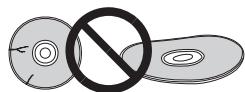
Do not use damaged (cracked or warped) discs.
Do not scratch the disc's signal surface or let it get dirty.
Do not load more than one disc into the player at a time.
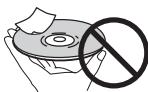
Do not glue paper or put stickers onto the disc, or use a pencil, ball-point pen or other sharp-tipped writing instrument. These could all damage the disc.
Storing discs
Always store discs in their cases, and place the cases vertically, avoiding places exposed to high temperatures or humidity, direct sunlight or extremely low temperatures.
Be sure to read the cautions included with the disc.
Cleaning discs
It may not be possible to play the disc if there are fingerprints or dust on it. In this case, using a cleaning cloth, etc., to wipe the disc gently from the center toward the outer edge. Do not use a dirty cleaning cloth.
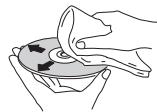
Do not use benzene, thinner or other volatile chemicals. Also do not use record spray or antistatic agents.
For tough dirt, apply some water to a soft cloth, wring out thoroughly, wipe off the dirt, then wipe off the moisture with a dry cloth.
Specially shaped discs
Specially shaped discs (heart-shaped, hexagonal, etc.) cannot be used on this player. Never use such discs, as they will damage the player.
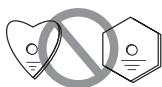
Condensation on discs
If the disc is moved suddenly from a cold place into a warm room (in winter, for example), water droplets (condensation) may form on the disc surface. Discs will not play properly if there is condensation on them. Carefully wipe off the water droplets from the disc surface before using the disc.
Troubleshooting
Incorrect operations are often mistaken for trouble and malfunctions. If you think that there is something wrong with this component, check the points below. Sometimes the trouble may lie in another component. Investigate the other components and electrical appliances being used. If the trouble cannot be rectified even after exercising the checks listed below, ask your nearest Pioneer authorized service center or your dealer to carry out repair work.
- If the unit does not operate normally due to external effects such as static electricity disconnect the power plug from the outlet and insert again to return to normal operating conditions.
| Problem | Remedy |
| The disc won't play or is automatically ejected after loading. | ·Make sure the disc is loaded with the label side face-up and aligned properly in the disc tray guide (page 9). ·Make sure the disc is free from dirt and dust and is not damaged (page 15). ·Condensation inside the player: Allow time for condensation to evaporate. Avoid using the player near an air-conditioning unit (page 15). ·The disc tray will open if an unsupported disc type is loaded (page 4). |
| Cannot play CD-R/RW discs. | ·Some CD-R/RW discs recorded on a computer cannot be played. |
| Cannot play files in WMA/MP3/AAC format. | ·The following types of files cannot be played: - Files with DRM copy protection - Recorded discs not in compliance with ISO9660 format - Files not recorded with sampling frequency of 44.1 kHz - WMA files recorded with variable bit rate (VBR) or lossless encoding. |
| Cannot operate the remote control. | ·Replace the battery (page 4). ·Operate within 7 m, 30° of the remote sensor on the front panel (page 4). ·Remove the obstacle or operate from another position. ·Avoid exposing the remote sensor on the front panel to direct light. ·Is the control cord for one component connected improperly? Confirm correct connections (page 5). |
| Settings are erased. | ·If the power cord is forcibly disconnected or a power failure occurs while the unit's power is ON, previously entered settings may be deleted. To disconnect the power cord, first press the remote control's STANDBY/ON button, then wait until the [-OFF-] goes out in the front panel display; only then disconnect the cord. Particular care should be taken when the unit's power cord is connected to an outlet on another component, since turning off the power to the other component may simultaneously disconnect power to this unit. Whenever possible, connect this unit's power cord directly to a wall outlet. |
| No audio, or audio is distorted. | ·Check that all interconnects are firmly inserted (page 5). ·Check that the plugs and terminals are free of dirt, oxide, etc. and clean if necessary. Also check the cable for damage. ·Check that the disc is not damaged, and free from dust and dirt. ·Is the unit set to "pause"? Press the ➔ button. ·Check your amplifier/receiver's settings (volume, input function, speaker settings, etc.). ·Make sure the player's output is not connected to the amplifier's phono (turntable) inputs. |
| Noticeable difference in SACD and CD volume. | ·This is due to differences in the audio format and is not a malfunction. |
| Between tracks of an SACD disc, the main unit's display indicates [---]. | ·This display may occur depending on the disc. |
| Problem | Remedy |
| The analog audio is OK, but there appears to be no digital audio signal. | ·Make sure that Pure Audio feature is switched off (page 12).·Audio from SACD and DSD discs, as well as iPod cannot be output in digital form.Use the ANALOG OUT terminals for such media (page 5). |
| USB storage device is not recognized. | ·Connect the device securely (all the way in) (page 11).·This unit does not support USB hubs. Connect the USB storage device directly.·Some USB storage devices may not be recognized properly. Turn the power off then back on.·This unit only supports USB mass storage class devices.·Only the FAT16 and FAT32 file systems are supported. Other file systems (ex. FAT, NTFS, etc.) are not supported.·This device does not support the use of external hard disc drives. |
| A USB storage device is connected and displayed, but the audio files stored on the USB storage device cannot be played back. | ·Copyrighted audio files stored on a USB storage device cannot be played back. Attempting to import music data from a CD, etc., to a computer may cause the invocation of copy protection, depending on the settings.·See the list of file formats that can be played back on this unit. |
| Much time is required to recognize the USB storage device. | ·Some time may be required to load the data when large capacity USB storage devices are connected (this could take several minutes). |
| Power is not supplied to the USB storage device. | ·When the pure audio function is set to ON, power is not supplied to USB ports (page 12).·Does an error message appear in the front panel display? (page 8)·Turn the power off then back on (page 9).·Turn the power off, then disconnect and reconnect the USB storage device (page 11).·Press FUNCTION to switch to the other mode, then switch again to the USB mode. (When the input is switched back to USB) (page 8). |
| Music files are played back even though they're not recorded in the USB storage device. | ·Confirm whether any hidden files are recorded on the device. Hidden files will be played. |
| Cannot operate the iPod/iPhone/iPad. | ·Make sure the iPod/iPhone/iPad is connected correctly (refer to iPod/iPhone/iPad playback on page 10). Also, try disconnecting the iPod/iPhone/iPad then reconnecting it.·Confirm that the connected iPod/iPhone/iPad is a model supported by this unit (page 10).·If the iPod/iPhone/iPad is experiencing a hangup, try resetting the iPod/iPhone/iPad, and reconnect it to the unit. |
| Power is not supplied to the iPod/iPhone/iPad. | ·When the pure audio function is set to ON, power is not supplied to USB ports (page 12).·Does an error message appear in the front panel display? Turn the power off, then disconnect and reconnect the iPod/iPhone/iPad. |
| Sound not produced from iPod/iPhone/iPad. | ·Is sound being produced from the speaker of the iPod/iPhone/iPad? Disconnect power to the unit, then turn on again. After setting for iPod input, connect the iPod/iPhone/iPad.·Audio is not output from the DIGITAL OUT terminals. |
Specifications
General
System. Super Audio CD player
Power requirements... AC 220 V to 240 V, 50 Hz/60 Hz
Power consumption. .41 W
Power consumption (standby) .0.45 W
Weight. 7.8 kg
Dimensions
435 mm (W) x 130 mm (H) x 329 mm (D)
Operating temperature +5 °C to +35 °C
Operating humidity 5 % to 85 % (no condensation)
Audio output (1 stereo pair)
Output level. During audio output 200 mVrms (1 kHz, -20 dB) Number of channels . 2
Jacks RCA
Digital audio characteristics
Frequency response CD. 2 Hz to 20 kHz SACD 2 Hz to 50 kHz S/N ratio CD. 117 dB SACD 117 dB
Dynamic range CD. 100 dB SACD 108 dB
Total harmonic distortion: CD. .0.0022 % SACD .0.0020 % Wow and flutter Limit of measurement (± 0.001% W. PEAK) or lower
Digital output
Optical digital output. Optical digital terminal Coaxial digital output. RCA terminal
Digital input
Optical digital input .Optical digital terminal Coaxial digital input .RCA terminal
Accessories
RCA audio cable (red/white plugs) 1
Remote control. 1
AAA/IEC R03 dry cell batteries 2
Power cord
Warranty card (European model only)
Operating Instructions (This document)

- Specifications and the design are subject to possible modifications without notice, due to improvements.
Corporation and product names mentioned herein are trademarks or registered trademarks of the respective corporations.
1 CONTROL IN/OUT prize
2 DIGITAL OUT (COAXIAL) borne
3 DIGITAL OUT (OPTICAL) borne
4 DIGITAL IN (COAXIAL) borne
5 DIGITAL IN (OPTICAL) borne
6 ANALOG OUT bornes
7 AC IN pris
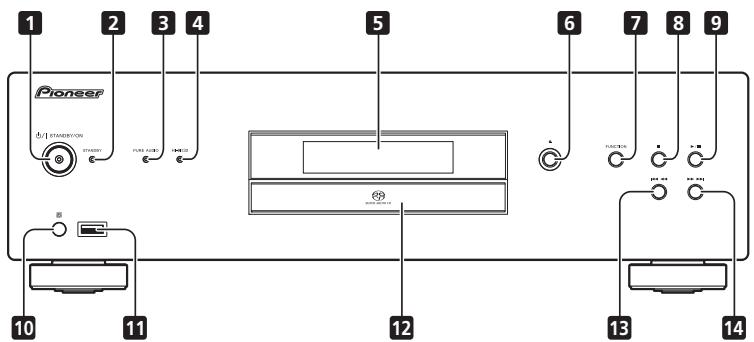
Panneau avant
1 O/ISTANDBY/ON
| iPod/iPhone/iPad | Audio | Commande |
| iPod nano 2/3/4/5/6G | ✓ | ✓ |
| iPod touch 1/2/3/4G | ✓ | ✓ |
| iPhone | ✓ | ✓ |
| iPhone 3G/3GS | ✓ | ✓ |
| iPhone 4/4S | ✓ | ✓ |
| iPad | ✓ | ✓ |
| iPad 2 | ✓ | ✓ |
| iPod/iPhone/iPad | Audio | Steuerung |
| iPod nano 2/3/4/5/6G | ✓ | ✓ |
| iPod touch 1/2/3/4G | ✓ | ✓ |
| iPhone | ✓ | ✓ |
| iPhone 3G/3GS | ✓ | ✓ |
| iPhone 4/4S | ✓ | ✓ |
| iPad | ✓ | ✓ |
| iPad 2 | ✓ | ✓ |
200 mVrms (1 kHz, -20 dB)
Anzahl der Kanäle 2
Buchsenn . Cinch
© 2012 PIONEER CORPORATION.
| iPod/iPhone/iPad | Audio | Control |
| iPod nano 2/3/4/5/6G | ✓ | ✓ |
| iPod touch 1/2/3/4G | ✓ | ✓ |
| iPhone | ✓ | ✓ |
| iPhone 3G/3GS | ✓ | ✓ |
| iPhone 4/4S | ✓ | ✓ |
| iPad | ✓ | ✓ |
| iPad 2 | ✓ | ✓ |
© 2012 PIONEER CORPORATION.
WAARSCHUWING NETSNOER
| iPod/iPhone/iPad | Audio | Besturing |
| iPod nano 2/3/4/5/6G | ✓ | ✓ |
| iPod touch 1/2/3/4G | ✓ | ✓ |
| iPhone | ✓ | ✓ |
| iPhone 3G/3GS | ✓ | ✓ |
| iPhone 4/4S | ✓ | ✓ |
| iPad | ✓ | ✓ |
| iPad 2 | ✓ | ✓ |
1 Conector CONTROL IN/OUT
5 Terminal DIGITAL IN (OPTICAL)
2 Terminal DIGITAL OUT (COAXIAL)
6 Terminales ANALOG OUT
3 Terminal DIGITAL OUT (OPTICAL)
7 Conector AC IN
4 Terminal DIGITAL IN (COAXIAL)
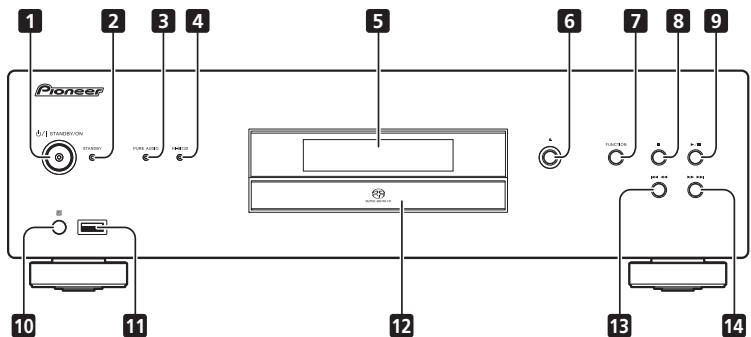
Panel frontal
1 O/ISTANDBY/ON
| iPod/iPhone/iPad | Audio | Control |
| iPod nano 2/3/4/5/6G | ✓ | ✓ |
| iPod touch 1/2/3/4G | ✓ | ✓ |
| iPhone | ✓ | ✓ |
| iPhone 3G/3GS | ✓ | ✓ |
| iPhone 4/4S | ✓ | ✓ |
| iPad | ✓ | ✓ |
| iPad 2 | ✓ | ✓ |
He yctaHabnBaIte n3dennB nnoxo
IPOBETPnBaEMOM NOMEUeHIN INB MecTe C BbICOKO BJIaXHoCTbIO,OTKpbITOM IJN PIPrMOrO COJIHeHOrO CBeta (ININ CNJIbHOro NCKycCTBeHOrO CBeta).
D3-4-2-1-7c*A1Ru
Ecni BnIka shHpa nItaHnna N3dEInn He COOTBeTCTByET IMeHOUsce 3JeKtpoP03eTKe, BnIKy CJIeDyET 3aMeHNTb Ha noXOJaUIO K PO3eTKe.
3aMeHa N yCTaHOBKa BUNIKI DOJIKHbI pON3BOiNTbCt TOBko KBaJIINΦUncPObaHHbIM TEXHNKOM.
OTcoeHHeHHa OT Ka6enBnIka, NOKJIIOueHHa K pO3eTke, MOKeT BbI3BaTb TjXeJIoe NOPaXeHne 3JIeKTPuYeCKIM TOKOM. IocJIe ydaJIeHHa BnIKu yTINlN3pUyTe ee DoJXhblm o6pa30M.
O6OpyDoBaHne CJIeJyET OTKIIOHaTb OT 3NeKTPoCeTn, n3BNEkAra BnIKy Ka6EJa IITAHNIA N3 po3EtKN, ecn OHO He 6yDet NcNOJIb3OBAtbcra B TeHeHne DoIrTO BpemEHn (HaNPmEp, ecn Bbl ye3kaete B OTnyck).
D3-4-2-2-1a_A1_Ru
BHIMAHNE
BbIKIIOUaTeNb O/ISTANDBY/ON daHnHO r yCTpoiCTBa He noJIHOCTbIO OTKIIIOuHaET erO OT 3JIeKTPocetN. YTO6bl NOIHOCTbIO OTKIIIOuNTb NITAHHe yCTPOiCTBa, BbITaUNITE BUNKy Ka6eJr NITAHINr I3 3JIeKTPoio3eTKn. POaTOMy yCTPOiCTBO CJeDyET YcTaHABINBaT TaK, YTO6bl BNky Ka6eJr NITAHINr MOXHO 6blNO JERKO BbITaUNITb I3 PO3eTkn B Upe3BbUaHbIX O6CTOaTEnbTbax. Bo n3BeJxAHne IOkapa CJeDyET N3BNeKaTaB bUNKy Ka6eJr NITAHINr I3 PO3ETKn, ecNl yCTPOiCTBO He 6bUdET NCNoIb3OBaTbCBy TeHeHne DOnIro BPemEHn (HanpIMep, ecNl Bbl Ye3KaTe B OTnyck).
D3-4-2-2-2a*A1Ru
JI3EPHbI IPOyKT KJIACC 1
D58-5-2-2a_A1_Ru
CoepejkaHne
01 NpOtroBka K nCNoJIb3OBAHnIO
COBMECTHMOCBT φOMPATA BOCIPPOH3BEJENH 4
KOMIIeKtaIIN 4
YcTaHOBka 6aTapeek B IyJBt IY .4
02Поdkлоченe
IIOKJIOHUYENBEBIXOHOHORAOHAJOROBOIAYIOCHNHTAIA.5
IoiKJIIOHHe IINΦpOBOrO ayDnOCHHaJa .5
HIOJIb3OBAHHE NIEHTPAHJ3OBAHHORO YIPRABJIENHA JpyTHMYNCTPOHCTBAMNI Pioneer. 5
IopKJIIOueHHe. 6
03 OpraHbI ynpaBJIeHn I nHdNkaCm
IyJIbT Dv. 7
3aHnHaHeJIb 7
IpeHnaHeJIb 8
IinIIeI IepedneI paHeIIN 8
04 Bocnpon3BedeHne
Bocippon3BeJeHne IINCKOB 9
IpexOxBpeKmOxHaHHa. 9
IIpma/0bpaTHa IIpeMOTka. 9
MepbI IpeIOCTOpOxHOCTH IIpn HcIOJIb3OBaHHN...15
YcTpaHHe HEnoJaIOK. 16
TexHHueckne xapaKTepeHCTKNH 17
OBocnpOn3BedeHn Dncka DualDisc
ДиСk DualDisc -ЗTO HOьI DBvXCTopoHHIДИСК,ОДИСТоюHA KOTOPO coDEpKHT IANHIIe DVD,HaIPMHep, BHДeo,aYdIO nT.IA,IpyraT StoPOHa coDEpKHT IANHIIe dApYrTO TINH (OTINHmHE oT DVD), HaNIPMHep, ΜΙΦρOBiE yAynO3aHnC.ЗТа BTOPЯ STOPOHa DVD He COBMeTHMa C φOPMatom CD Audio n, cIeDObATEJbHo, He MOxET BOcIPNO3BODJIbCSB.Bolee ПОДрбHyIu HNΦOpMaIIno O xapakTeRcTHKAX DnKcOB DualDisc bMyKeTpoIyUHTb y PON3BODITIEL NII IN pOJaBaIIa NsCKa.
DnCKN, BOCNPON3BedeHne KOTOpbIX
HEBO3MOXHO
DVD-Video
DVD-Audio
CD-G
Video CD
- DTS CD
BMO3KHO,HEKOTOPBEJyDHTHEIKKJ,KPOMeIpeHCSIEHHHXBIIIE,TAKGE HebDTBCPOH3BOITb6c.
KoMJIeKtaZna
TOKpoRte ynakOBky u y6eIITcB, noKajyIcTa, YTO HeH hakoIITcR.
-ПильтДYx1
Cuxhe6aTaapeiKNAAA/IEC R03x2
- AyINOKa6eJIb RCA (c KpaCHbIM H 6eJIbIM pa3bEmAMH) x1
Ka6eJIbIHTaHnIa
- TapaHTHnHbI TaIOH (TOJIbKO MoJeB JIN EByPOIIbI)
- HNCTpyKUH NIO 3KCIJIyATAUHN (3TOT JOKymeHT)

PpmeaHne
PcHcyHKn,INpHbOIMMbIeB“HcTpyKHHIO KckiIyataaHHMOTyI3MeHHTCBNIIHNYIpOaTHCBs IJIAynipOuHEHNO8CHENHHNIO3TOMyOTINHaTuCTcbOT BHeIHero HbDaIpoDyKTa.
YctaHOBka 6atapeek Bnylt D
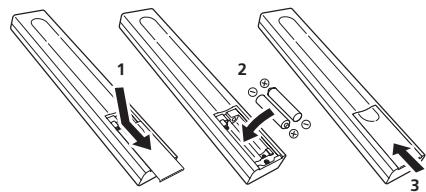
1 OtkpoTe 3aHIOKpbIiKy.
2 BcTaBbTe HOBbIe 6aTapeKn C co6JIHOdEHm POJrPHoCTn, KaK yKa3aHO BHyTpN 6aTapeHoro OTCeKa.
3 3aKpoIte 3aHIO KoBbIky.
BatapeiKn, IIpIlaeAembIe B KOMIIKeTke K yctPoHCTBy, InpEHa3NaueHbI IINIOPEBKn pa6ObTIy cTPOHCTBa n CcPOK Hx CUYk6bMoKet OKa3aTcbHeNpOIoJIKHTeJIbHbIM.MbpeKOMHeUyEM hCNOIL3OBatbIeNoCHHaeBatapeiKn, O6JIaDAIOUIHM 60JIbIHMM cPOKOM cUYk6bI.

BHIMAHNE
He HcnoIb3yHte He xpaHHTe 6atapeKn Ha pIpmOM coJIHECHM CCBETY HIN B MecTe X NOBBIIHNEHO TEmIEPATpyO, HApNMEp R ABTOMoBHJe HIN BO3JIe 6atapeH OTOnJIeHHN. To MOKeT IpiBcTeH K IpoTeK 6atapeKn, ee IpeRpeB, MKNPOB3pByH IN K Bo3rOpAHn. To MOKeT Takke cokpatHTb cspOK cJyKb6 batapeKn.

PpeynpeXeHne
HenpaBbHbOEHCIOJI3OBAHHeBaTapeEeMOKETPnIBeCTN K TAKHM OIIaBcHbIM JIeJIeHNM, KAK yTeUKA H MHKpOB3pIb. PPndepKJBHaeTReC bJeIooYHIN PnpEOCTOPOKHNOCTE:
- YctanabJIbIaB 6aTaPeIiK, He NIOpeIHTe KOHTaKTHHe IpyKInbI ΕTO moKeJt PnBeCTN K IpOteKaHHo 6aTaPeIK HIIe ee IpeRpey.
He nioIb3yIte batapeiKKn npyrHx TnIOB, KpOme yka3aHHbx. He nioIb3yIte HObIe batapeiKN co ctaPBMy.
Ipyt aTHAOB6 eAabeep B IYIbT IV c6bJIaJIe TIOJIAPHOCTbO CTOBETCTBNI O3HAKAMI (H ).
HeIOnyckaiTeHarpeBa6Tapeek,Hepa36bpaHteHX, He6pcOBeBTOBOHBHHIOBDy.
BatapeiMHMTbPA3HOHapnKeHHe,LaJke eCIN OHN HMeOT OHNKOBaBte PA3mpebHΦopMy. He HIOJIb3yIe COBMEChTO BatapeHKn P3HOrO TnHa.
Bo H36eKaHHe IIpOteKHNJIOKCTH 3b6aTapeek H3BKeHTHE IH N3IyJIb TY, ECJb BHe CEoHpaTeceb PIIJIb3OBaTbc8n HM IpOJOLOKHeJIbHO BPEm (CbJIbHI MecHa).EcJIN IpOteKcA BCE JepOH3oiIIa, TATJIeJIbNO IpOtpTeB NHyTpEHHoCTb aTapeHHOrO OTEcKa IpeJI yctAHOBKOH NobHX b6aTapeek. EcJIN BbTeKuH H3 BAtapeek KJHIOKCTb IOnaJIa HA BaIIy KOxy, IpOMOIte 3TO MeCtO BoJIbIHMM KOJIYueCTbOM BOJIb.
- PnIyTHINH3aunH NcIOHb3OBAHbHb6 batape cIeJyIte 3aKHOJATEJIbHbIM kAITAM HII OH6UHM IpABHbAM IO OXpAHKe OKpyKaIOuIe CpeB, KOTOpBE pImMeHNMBi B BAHeI CTaPHE HIN PeRHOHE.
IcnoIb3OBaHne nYnbTa
DnctahunOHHOynpaBneHn
IyIbT NCTAHUHHOYIpyABJIeHHN MEeT DaJIbHoCTb DeCTBnO KOJIO 7 M, pH 3OTOM OTKJOHeHNe OHTaPabJIeHHN HaDatqNH Ke DNOJHXIpeBbIaHbTc 30^
IopKnloyehne cnpboBoro aydnocnHa

BaxkHo
Co6nIOJadte octopOxHOCTb npo 6paueHm c ONTOBIOKOHHbIM Ka6eHem
HeOnyckaiTe IpeRn6aHnI OITBOLOKOHHO KabeJIIOI OCTbMn yIaAMn.IIpI xpaHEHHI OITBOLOKOHHO KabeJIc CMOTaIe Iero BNTKAMN dHaMetPOM He MeHee 15 cm.
-Пин ПИДКЛIOUHEN OHTOBOLOKOHORO Ka6eJIa
ВБАРИНBAIITE pa3eMБИн ДIJIЕКAZHMО 6OBa3OM H
BCTABJIte HX IJIOTHO.ЕСпЯпЗМб Ka6eJIb
copHEHTNtROBAH HePpABIVHbNO,TO pINP IIpHJIOKeHHN
чe3peMnHbX YCJIHIN pINI erO yCTAHOBKe pa3eM
MOKET DeΦoPmHPOBaTcB,IIpeIITCTByA3akpbTyHNo
IITOPKN IIPIH N3BJeUeHHN Ka6eJIa.
IopKJIIOUChHne BbIXoDHoro UuΦpOBOrO ayDnOcNHaJa
IpekeIIOueHne yctpoiCTBa H3 pa6oeryo pekHM a pekHM OKHaDnHa H o6paTHO.
2 LcnpoBbIe KhoNkn
HcnoJIb3yIte DAHHBe KHOIIKN DJI BbOba KOHNpeTHOH 3aINCH DIOBPOHNI BEEHIN HOMEPaIHNCN HAAKMMTE KHOIIKY ENTER IIOITDBEPEHNNBbOpa
3 CLEAR
HaxKMHe IJIA OUHCTKN HAcTPOeK IIporpAMMHOBOBcIPOH3BeDEHHN (ctp.9).
4 SETUP
3aHaHHe yHKiIN ABTOMaTHueCKOTo BbKJIIOUeHnI IITaHnI (cTp.12).
5 / / /
HcnoIb3yIITaeJAHIIbe KHOIIKIN JIJI Bb6Opa IIyHKta MeHIO, H3MeHENHaCTPOeK IN IpeMeIeHNHa Yk3aTeIeJI.
ENTER
ПиMHeHHeNbIbpaHnHO IyHKTa HIN BBOd H3MeHHeHn HAcTpoKH.
6 iPod MENU
們 kHONIKA HNOJIb3yETcJIYBbIOBA MEHO iPod/iPhone/ iPad.
7
HauKMMTE JIJI BO3BpTa B HauJIo TekuChIe BOCIIPOH3BOIDMOH 3aINCH. IBaKbI JI HauKMMTE JIJI BO3BpTa B HauJIo IpeIbIByuChIe 3aINCH.
#
HaKmHTeIJI3aIyNcKa BocIpOn3BcEHHn IpeKJIIOueHHe H3 peKHMa BocIpOn3BcEHHn BpeKMnIpaBy3uOBpArHO.
#
BovBPEMBOVPOPNBDEHNAHJNMEIJIINEPXODA B HauHNO CLENYOUEH 3AHNC
#
HaKMHTe IJIA 6OpaTHoI NpeMOTKn TekUyiei BOCIIPOH3BOHMIO 3aHNc. EJINb Ipouece C6pAthoI NpeMOTKN CHOBAAkaTb DAHHYIO KHOIKy, CKOpocTb NpeMOTKN H3MeHEnTcB cYtbpex peKHMx.
#
HaKMHTeIJIaOCTaHOBA BOCIPON3BEdHn.
#
HcHMHTe IIOIpyMOH IpEeMOTKN Tekyiue HocIpHOBIMO3HNCH. EcnH BPOUeCE PpMoH IpEeMOTKN CHOBAHKaT DAHHYIO KHOINKY,CKOPoCTb IPeMOTKH 13MeEHETC B YtEHpEX pKHeMHX
8 KHOJOK BbI6Opa NCTOUYHnKa (DIG IN 1, DIG IN 2, iPod/USB)
HaKMHTe, YTObI bbl6paTb HcToHHK. (ctp. 10, 11, 12).
9 SACD/CD
HakmHTe IINIpeKJIOneuHBNxoJa yctpoiCTBa h SACD/ CD.EcIn HcIOJIb3yUOTcTn6BpHIhNE bckKn SACD,IPn HakatTHaDHHOH KHONIK BpeKHe "cTOn"H3MeHETc3OHa BOcIpn03BeHEnIbNCKa (ctp.12).
10 REPEAT
HaxKMHTe IJIa BKIIIOueHnpeKHMn IOBTOphORO BOCIIPOH3BeDEHHN (CTp.9).
RANDOM
HaKMHTeIJI BKIIIOUeHHeIpeKHMa BOCIIPOH3BeEHeHBA CJIyauHOM IIOpAJIke (ctp.9).
PROGRAM
Hajmhte IJIA BKIOUOeHHa peKHMa BOCIIPOH3BeDeHHa IO npOrpAmME (ctp. 9).
11 PURE AUDIO
HauKMMte DAHHYU KOHNUYI DIA BJNUOENHRA peKHMA Pure Audio.B daHHOM peKHMA 3BVK BOCIPHO3BOJNTc c camoB bIbCOOK TOUHOCTbIO HXOJHOHO 3BUYAHIN (ctp.12).
12 ▲ OPEN/CLOSE
HaKMHTe, YTO6bI OTKpbITb HIN 3aKpbITb IOTOK dIa DnCKa (CTp.9).
13 ENTER
ПиMHeHHe BbI6paHHOrO IyHKTa NIIH BBOJ I3MeHHeHHO HactpoiKN.
14 DISPLAY
HaKMMTEI IaI OTObpaKeHenHpa3IHIVHOH HINOpMaIIHIO nIHCke, BKJIOHaeBpeMIE HCTKeIIeH eOCTABIIeEe BpeMBOcIPn03BeDEHH (ctp.10).
15 DIMMER
HauKMHTe IJIaI3MHeHEnHa YPOBbI OcBeIeHNHa CbeEHNHa HNdIKATOPOB NapeIeHne IaNEI rIaIBHOr yctpoCTBa (ctp.12).
16 ALC
BkIIOHcHHe/OTKIIIOHcHHe peKHMa aBTOMaTHueckOy peYIINPOBKN yPOBN CHHaJa (ctp. 12).
17 S.RETRIEVER
HaxKMHTe IJIa H3MeHeHHI IapAMetPoB yHKiINH Sound Retriever (ctp. 12).
18 Hi-Bit 32
BkJIIOUeHHe/OTKJIIOUeHHe HK HHi-Bit 32 (ctp. 12).
3aHnaHnB
Iopio6hoe oinncaHne iokJIOueHm. Ha ctp. 5.
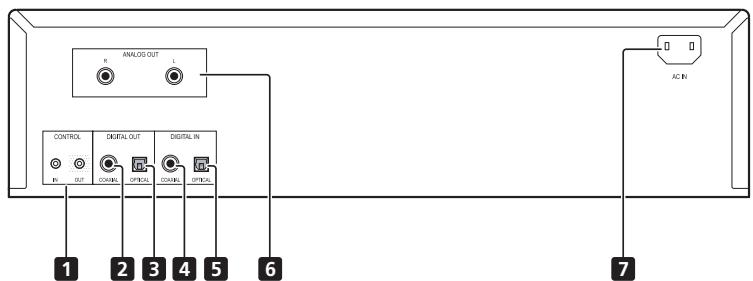
1 Pa3beM CONTROL IN/OUT
2 Pa3beM DIGITAL OUT (COAXIAL)
3 Pa3bem DIGITAL OUT (OPTICAL)
4 Pa3beM DIGITAL IN (COAXIAL)
5 Pa3beM DIGITAL IN (OPTICAL)
6 Pa3beMbI ANALOG OUT
7 Pa3beM AC IN
PepednnaheB
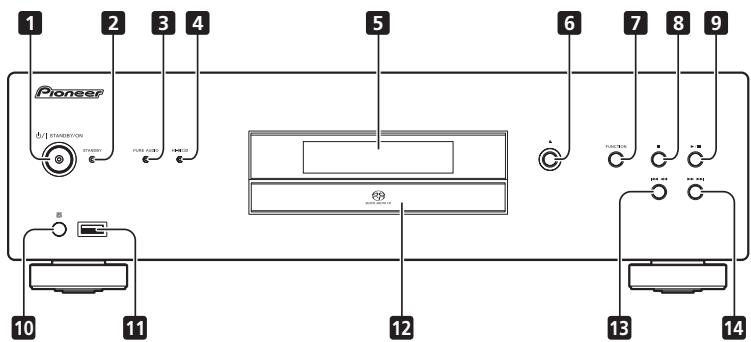
1 ⅡI STANDBY/ON
ПИМВКЛЮЕЧЕНИ NGТАГОНД 3Aragоаетс ИНДКATOP NGТАГОНД BIHTTE KHOПКИ.
HaKMHTe 3Ty KhoIIky, YTO6bI BKIOOHtB HJH BblKIOHHTb yctPOHCTBO.Длг BKIOUeHHI INTHAH HaKMHaTe DaHHyIO KhoIIky, IOKa OHa He OcTaHETcB HAOKATOM COCTOHHIY.
2 INDInKaTOp STANDBY
3aropaetcBpekme STANDBY.
3 INDnKaTOp PURE AUDIO
3aropaetc npn BKJIOeHnn fynKcHn Pure Audio (ctp. 12).
4 INDnKaTOp Hi-Bit 32
3aropaertc npn BkJIOeHH fYHKH Hi-Bit 32 (ctp. 12).
5 DnCpIe npeDne nanei
(CM. cIeIyIOJIe ee OIIHcHHe.)
6 ▲
HakmHTte, YTO6bI OTKpbTb HIN3 3aKpbTb IOTOK JIJI DnHCKA (ctp. 9).
7 FUNCTION
IpeKeJHOeHHe HcTOHHaK XbHOHOHcRTHHaA. HcToVHHKa CHrHaApeKeJIHOaOTc CJeYIOHM 6bAp3OM.
DISC iPod/USB DIG IN 1 DIG IN 2 Bo3bpaT B haJIo (He oTo6paKaetc).
8
Haxmte ⅡIIOCTaHOBA BOCIIPOIN3BeIeHHN.
9 /11
HnKMMHTeIa3IyCaKbOcPONH3BeJHn.BoBpEma BOCIOPH3BeJHnIIEpeKJIooHeHnBpeKHMa BOCIOPN3BeJHnBEpKHMPiayBsIoBpAH0.
10 DaTcN KnybTa DnctaHcNoHHoro ynpabNeHn
IIpHem cHraJIOB NJIbTa IY (cTp.4).
11 iPod/USB pa3bem
ПлклоченеAppleiPod/iPhone/iPad(ctrp.10)ииустювUSB(ctrp.11).
12 IToK dIa DnCka (CTp. 9)
13
HaKMHTe IIOB3BpTa B HauJIo TeKyuIe BoCIPNO3BOIMHO 3aINCH. IBaKbIbH NkMHTe IIOB3BpTa B HauJIo IpeJIbUyIe 3aINCH. IPrn yIepKHBaHH DaHHO KHOIKI B HauKaTOM POLOKeHHN BOICIPNO3BOIMMa 3aINCb IepemATbBAeTc 6oPbTHO C NOBbIIeHHO cKOpocTbHO.
-Пи NOBTOPOMH 美加TIN ПИ yckopeneHoi 6ObathOH пepeMOTe KcOpoTe bIpeMOTKn HmEHeRcT B YetTypex PekhMAX.
14
JaHmMHTe IJIIEpEXOa BA HauJIo CJIeIyIOeH 3aIIHNCH. IIpn yIepKbHAHNn DAHOH KHOKNB H NAKATOM IIOJOKeHHN BOCIOPH3BOIDHMAR 3aIHHC IbpeMePATBaEaTcB I PIMOM HapRAPJIENH C NOBbIeHHN CKOpCtBIO.
- Ipn IOBTOPROM HAXaTHIN Ipi yCKOpENHIOI pRPMOIIIEPEMOKTE CKOPoCTb IIePEMOKTH H3MeHReTcB YcETbIPexpeKHMAX.
Dncnne npedne nahe
1 USB/iPod
CBeTNTcP npn Bocnpn3BcEeHn c φI3H-NAKONHTeJI HIN iPod/iPhone/iPad.
2 DACmode
JIaAMIOHka OTKpIeTcR IIpH HcIIb3OBaHHY cTpOHTBA B KaueCTBe D/A KOHNBPert (ctp. 12).
3 SACD/CD/DSD
Даньим ИндКATOP 3огаразетс BA COOTBETCTBNI CTHON BOICINPHBOHMORO DHC4.
4 PGM
3aropaetcB B PekHMe IporpAMMHOro BOcIpoHNBeDEHHA (ctp. 9).
5 TRK
3AoperaeP npH OTo6bApKeHHN Homepa 3aHNHe N HcTeKHeIHOCTAOJIIEOERC BVPENHEBOVIOHBeDEHH.
6 FILE
3aropaetc npn oTo6paKeHH HmEHn faHla.
7 REPEAT
3aropaetaCBA pexkHMe NIOBTOPHORO BOCIPNO3BeDEHHA (ctp. 9).
8 RANDOM
3aropaetcB Pekhme CnyauHoro Bocnpn3BeDenHIA (ctp. 9).
9 ALL
3aropaeTcBpeKHeIOBtOPOBOBCIIPOH3BeEeHHaDnCKa (ctp.9).
10 TOTAL
3aropaetcIpiH OTO6paKeHHOCTaHOeROcB VbEmHH BOCIOPH3BEDeHHJDCka.
11 REMAIN
3aropaetcpih OTObpaKeHHN OCTaHOERocB BpeMeHH BOCIPON3BEDeHn 3aIIINCH HJIN DnCKA.
12 S.RTRV
3aropaetc pni BknoeHHn FyHKnHn Sound Retriever (ctp. 12).
13 SETUP
3aropaetca IIpH NaCTPOJIke yHKUIN ABTOMATUeCKORO BbIKJIOUeHHI INHTAHN (ctp. 12).
14 ALC
3aropaetcpih BKJIOUeHHIyHKUH ABTOMaTHueckoI peYJIINPOBKe yOBoHra cnHHaJIa (ctp. 12).
15
3aropaetcBpeKHMe yckopeHHoI pRMOI IepemOTKN.

3aRopaeTcBpeKHe yckOpEHHOI o6paTHIOIePemOTKN.

3aropaetc npn Bocnpn3BeHeHH.

3aropaetcBpeKHeIay3b.
16 CnmbolbHbI DnCpJIeI
TnaBa 4:
Bocnpon3VeJeHne
HcnoIb3OBAHne FyHKnI 3aBnCHT OTHIIaN DnKa nΦaIIa. B HekOTOpbIx CnIyAaxnx HekOTOpbe FyHKnI HneOCTynIIb. Cm.Pa3dI ΦyHKnIooNpou36eDhenHa ctrp.13.
Bocnpoun3BeJeHne IucKOB
1 Haxmte Ha nepeHne napeKhONky /I STANDBY/ON dNBAkJIIOUeHn yCTpoICTBa.
BkIOHHTNEIITAHNE,HAKAB KHONIKO/ISTANDBY/ON TAK,TTObO hOA OCTABJIACB HAKATOM IOJOKENHHI.
BnC60kyHa npeDHHIO naHeJIb
STANDBY/ON


2 HaxMnte KhoNky YTO6bl OTKpbITb JOTOK DnIa DNCKa N yCTaHOBtBEHrO DnCK.
-ДИСКУCTAHABJHBAHTEТНКЕТКOHВБЕХ.


3 Haxmnte KhONky II dny 3anycka Bocnpoun3BeHnI.
Дувемен HorO octaHOBa HauKMTe KhoIky
Дагьоьбовьгьявспрпогиьдьгьн HAKMITE KHOIIKY


PpmeaHne
Bocnpo3BeDHeNc iPod/iPhone/ iPad
IPOCTbMIOJIKIOHcEHEM iPod/iPhone/iPad K DAHHOMY yCTPOIcTBy BII MOKeTe IIOJYHTB BILCKOKaHECTBEHNHO 3BUNAe C BAWero iPod/iPhone/iPad.
ПолдерхиВаемье модалі iPod/iPhone/ iPad
Cnncok iPod/iPhone/iPad,Bocnpoh3BeJeHne c KOTopbIxIOCTyINHO Ha daHHOM yctpoiCTBE npHBeH HnKe.
| iPod/iPhone/iPad | Адно | Услвенье |
| iPod nano 2/3/4/5/6G | ✓ | ✓ |
| iPod touch 1/2/3/4G | ✓ | ✓ |
| iPhone | ✓ | ✓ |
| iPhone 3G/3GS | ✓ | ✓ |
| iPhone 4/4S | ✓ | ✓ |
| iPad | ✓ | ✓ |
| iPad 2 | ✓ | ✓ |
-Данньй пинбор разраобогани И поверен Дя Верснипограмного обсячений iPod/iPhone/iPad,уka3анно на Be6-caite КOMПИANH Pioneer. http://pioneer.jp/homeav/support/ios/eu/(Моель ДяЕрп) http://pioneer.jp/homeav/support/ios/ao/(Пюоче)
- Yctanobka hā iPod/iPhone/iPad pyrHx Bercn i npotpamMHHO obcepeHnK, kpmE yka3aHNO ha np6-caiTe KOMaHn Pioneer, MoKeT oKa3aTbch HecOBMeTHMOi C dAnHbI pN6Op.

PpmeaHne
KomiHannH Pioneer He rapaHTnHTYBocIpOHHBeJHeHaeHHbymycTpoJIcTBOMc iPod/iPhone/iPad pyTHXMOJIeJI, KOMPYEku3aAHbIX.
IcnoJIb3OBAHHe NEKOTOpbIX yHKnIIIM MOKeT 6bITb ORpaHHeHHIM B 3aBHCMOCTN OT MoEJIIN HJIN BEpCHIN IporpAmMHOrO oEChueHHeH.
-iPod/iPhone/iPad IInueH3npoBaanIiBnBOcPiOn3BedeHnMaTePnaJIOB,He3aIIuHneHHbIXABTOPCKHMIPabOMHINMaTePnaJIOB,Pa3peHneHHbIXIiBOcPiOn3BedeHnHa 3aKOHHHbxOCHOBAHHX.
- YπpαβIeHHe TaKHM ΦyHKUHMM, KAK ΚKaBλaIaI3ep, HOCTYIIHO II pHcNIOJIb3OBAHNДaHINOrO yCTPOHCTBa, IIO3OMTy MBy peKOMeHJyEM OTKJIHOHTb KBλaIaI3ep Nepd IOJIqKIHOeHHM eCTPOHCTBa.
- KomIIaHnI Pioneer HN IIpN KAKHX 6ObCTOBCTBAX He Hecet OTBETCTBEHOCTb 3a IIIO60I IIpMAO IINKOCBeHHb YUeepb Bpe3yIbTaTE HeIOCTaTkoB IINIPOTePH 3aIIHCANHbIX MATEpHaJIO II pIpyHne c6oI iPod/iPhone/iPad.
3aIOIPO6BIMM HNCTPYKIIHMNo HNCSIOBAAHIO iPod/Phone/IPad 06baIaTebc kykoOBdCTBy dAnHoro iPod/Phone/IPad.
Bocpoa3BeHne c iPod/iPhone/iPad
1 Haxmte KhoNky iPod/USB ha iPyNbTe Dy Ira Bb6opa iPod B KaueCTBe NcTOUHnKa BXoHOrO CnHaJa
iPod/USB
HaKMHTe KHOIIky iPod/USB HaIyJIbTe IV.
TOJKeMOKHOcJIaTb,HakHMaAR KHOIIKY FUNCTIONHaIpeJeHnIaHeH.
2 Iopknlouhte iPod/Phone/iPad.
ПолкимочITE iPod/Internet/Android кразыму USB на поедене hyпоститва. Дд ролкимочени iPod/Internet/HSCIOJI 3YITe Ka6bIe iPod I3 KOMIIIMKTEA NOCTABKИ.
Cleyuouine Oepeaunn DoctyHbI pn HcNoB3oBaHHn iPod/iPhone/iPad.
KhoNka
yHKU
1/11
3aIyckaaT o6bHHe BocPON3BEdHHe.Bo BpEMn BOcPON3BEdEHnPipeKIIIOeHHe H3 peKHMA BOCPON3BEdEHnBIpeKHm PAn3b H 06paTHo.

Hay3a npn Bocpon3BedeHHN.

HakmteIJIpeXoJa K hauay Tekyuero
haJla,3aTeM K pJeIbIyUHM faJlam.

YJepKbHnateB HAKATOM COCTOHNH DIAU yckopenerOBshpatOHNEPOTMKN.

Hakmite dupepeoxoJ K cIeJeUHOemy foJIy.

YJepKHBaIte B HAKATOM COCTOHNII Jy yckopeHHoIN IpyMOH IpeMeOTKN.
RANDOM
Bb6paHnHbe qaiIiPi iPod/iPhone/iPad BocipOn3BDOBTCTB C LyuayHOM IPOJKe (B p3aD8NK).
REPEAT
Bb6paHnHBe faaiIb iPod/iPhone/iPad BocipOnH3BOIaTc c NoBTOPOM.1
iPod MENU
37a KHTKNA HNIOJIbIyETcI IINI BbIOBA MEHO iPod/iPhone/iPad.
1/4/ENTER
BbnoJIeHHeIne onepaII mHeIO iPod/iPhone/ iPad.
1Пи Кадом Нажатин Khoлг REPEAT peKHM NOBTOPHTO BOCIPON3BEdHn 1mSMeHETc CJIeYUoMn 6bpa3OM.
EcHn iPod/iPhone/iPad He pa6oTaet, IpoBepbTe cIeNyIoOee:
1 HaxmTe KhoNky SET UP.
2 N3MeHnTe HacTpOpyu nIOaTBePAnTe.
KHOJIKAMH BbI6epHTe peJHM ON (BkJI). HIIH OFF (BbKI). HnKaMHTE KHOJKY ENTER IJIOIIOITBEPKJEHHA.
SETUP


ENTER


PpimueaHne
- Ecln HcTovHNIKOB XbIHOro CnHrAHa Bb5pam IPOd DAnHHa YphIKIN OTKInOyAeTc.
ABTOMaTnuecka peryIuPobKa yPOBnA (ABTOMaTnuecka peryIuPobKa yPOBnA rPOMKocTn)
AByOMATHueCKH BYIbAPBNHBAeTc yPOBEH bPROMKCTO BOCIPINB3EHeHN. TaKke, INPi BOICIPON3BEdEHn C MaJIbHM yPOBHEm IPOMKoCTH OITHMHN3HpyETc BOICIPON3BEdEHn TPyIHDOCHLIHHMbx HN3KHX N BILCOKHX YACTOTn I PA6OpHIVBOCT peu.
Haxmnte KhoNky ALC.
\PiHn HkAaTHN KHOKNH YHKIIINB KJIOaueTc HJIN BbKIOIaOeTc. IIh PbkIOJeHH NHyKHIN Ha IIHJIeIeYyOIOEHTBa3OraOpAEHIIHKeATop [ALC].
- ABROMATNIIECKOE yPOBbH yIUPBAJIENHe OyHKIIaONOTKIIIOaET, KOJa HNIIHKAtOP PURE AUDIO OTkPbETc (CMOTPetB BIIe).
IcnoJIb3OBAHne yCTpoIcTba B KaueCTBe LAn
Пин падашифpoвогу aydnocHTHnla ha pa3bEmbl DIGITAL IN (COAXIAL nH IN OPTICAL) chnHaJI pnoe6pa3yetycB hAnalorobObI hOpomat n IpepaTeCn Ha bByXIOHIIpe pa3bEmbl ANALOG OUT.
1 PoiKJIIOUHTe UINΦpOBoE BXoJHOe yCTpoIcTBO.
Cm. pa3dJI IooKIOUeHue UcmoHnKOB ufoPpO6o ayduocuznaHa ha cTp. 5.
2 IopKlnHouYte NCTOuyHK BXoJHOrO UuPpOBoro ayDnOscrHaHa.
DIG IN 1
DIG IN 2
HaKMMTE KOHIOKY DIG IN 1 HIN DIG IN 2 Na IIbIte IV. HaIIcIIeue yctpoiCTBa 3aorpaetc HINIIHKaTOp [DACmode]. EClJI HAKATA KOHIOKA DIG IN 1, BOCPOH3BOHNTCn IIHpOBoi CHTHAI c pa3bEma COXIAL; IIpH HauKaTHN KHOIKK DIG IN 2 BOCPON3BOHNTc CHTHAI c pa3bEma OPTICAL.
Bb6Pb8 HcTOVHHK CHTHA MOKHO TAKGE, HAKHMAR KHONKY FUNCTION HA JIABHOM YCTPOBJEKE.

PpmeaHne
ДанhoeустювонодрхьаerteHTHnblcIJIHeHoiHKMсчстOtOJINCKpTeH3aunIHNKBAHTITATNBHbMM6BtAMIo 192KII/246T(JaHnaYfHKIIIONoIeDpKbHbAeTcH He BCerTaB3aBHCmOCHTOTNOKJIIOHaemOobopydOBaHHNHyCIOJIbOBOAHN).
Hi-Bit 32 n ABVOMATHuecKoe ypoBHe bYpnaBaeHne yhKnHn (CMOTpeb BbIe) TAKKe pa6OaHTo H naHpOboi AyIOu CnTHAIIBXoB YcTPOHCTBO DIGITAL IN B TePMHaJax.
Bocnpoun3Bovnmbie nckn
Bocipon3BeHne DnCKOB CD-R/CD-RW
JaHnHoe yctpoBTOI3BOJTeBocIpOHN3BOJtB 1nCKn CD-R/CD-RW,HaKOTOpbXa3IIHCnHa My3bKa B φoPmATE CD IIN ayAIOJDAHbB bΦopmatx WMA i MP3. OJnako, HeKOTOpbIe NcKn MOryT He BOCIpOHN3BOITbC HIN BOICIpOHN3BOJNTbc C IIYMaMn HIN HCkAKeHHMn 3Byka.
ДанhoeустбюпдзнчсьгоТолькдьвocpoинбдд.Оно He nO3BOLJET bIbONJIHtBJ 3ANHb Ha dnckn CD-R/CD-RW.
HeHnHaJIIm3HpOBaHHbIe NDC-R/CD-RW HeJIb38 BocPONIB3BcETN HaJANHOyCTPOBCTBE.3aNoJIO6HOH HfOpMaIIeOcbpaaiTecb KpykoBOCTBy IO HcIOJIb30BaHnHO BaIeHOyCTPOBCTBa 3aINHcNHa JIbck.
Bocnpon3BeDeHne DSD-ДиCKOB
JaHnOe yctPOIcTHIO NO3OBJNET BOICPNO3BOJNTB qAJIbI C DSD-JNCKOB, JaONCAHNHBA V pOPMATE DSF.
Bocnpo3BQDMbIe paJIbI
3aHnHa dnckax: DVD-R/-RW
TnIΦaIIa:.dsf
- Имяпайки: DSD_DISC
Pa3mep: He 6oJee 4 ΓB ha φaJI
- Aydno: 2-KaHaJIbHbI 3ByK
- Yactota DnckpeTn3aunn: 2,8224 M
PnMep ctpyKtypb naKn
甲 日 日 H IaIIK NBOCINPOH3BOJITCT He B aIΦaBHTHOM IopRke, A BIOpRKeHX 3aINCH Ha INCK.
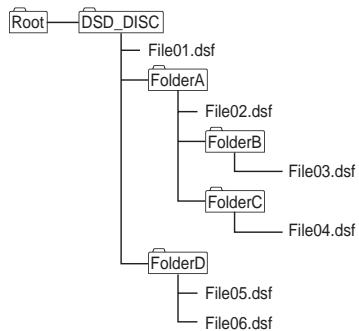
B OJHOI NAIKE MOKET pa3MeIaTbcH e 60ae 150 qaiIOB.
- OДИн ДИСК мОКЕТ сОДЕРКАТь He 6OJIe 200 пANOK.
B KaKJIoIaIIKe IJIJKHO 6bITb He 6OJIee 8ypOBHei.
HMeHaΦaJIIOB C HcNOb3OBaHHe MIIHOCHHX CMBOJIOB H OIIpeJeIeHHbIX CMBOJIOB MOrYT OTO6pKaKtBcR HeKOppeKTHO.
JIIO6bIe faJIbI He B φopMaTe DSF 6yUyt pIPOIpyIeHbI.
IpeDynpexdene
HeKOTOpbIe aIIbMOrTy He BOCIpOn3BOJITbcra.
Длгяз苹нсаьбпогиьденгьднckовс6льшм
КолінгсевомфайлOBи пANOК можетnotpe6obatьс
Занчтелhoeврем.ВТOMСИЧУМ,MOЖHOункнБ
файыпгимерсгптпрмОВпANПYDSCDISHIN
OrpanuHvHTb YNCSIOфайLOДdo 20 HINMeBHs
Onepaun Bo Bpem Bocnpoun3BedeHn
CJIeIyoIeNE OpeaIIH MoKHO BbIOIJIHrIb BO BpEIMB BOcIPONB3eDHeNDA-DSSJICA
- IprodMOIIOHCK
Bocnpo3BBeHnei qaiJIOI pyTOG TNIa c IHCka, kPOMe qaiJIOB TNIA DSF
Ducnnei
B peknme Ctoi np BocpnH3BeJeHH DSD-dnka Ha uyctohe Tbe o6bpaKaetn HnHKnatop [DSD DISC].Ecn np BocpnH3BeJeHH NaKaTb KHOIIky DISPLAY, np KaKJIOm Hkaattn DaHNOH KHOIIKN IIKNIIueckn OTo6bpaKaetc cIeJeuOua HNΦOpMaIIa:
- Homep 3aIIHn H nCTeKIIeBVPemBaOcIpnOHBeHeHH
- HmJaJIa
Bocipon3BOIMMbIeΦopMaTbIΦaIIOB
Bocnpon3BeDeHne aynodbaIIOB
JaHHeO yctpoiCTBO IIOJIePjHBAeT faiJIbI cJIeIyIOIIHX fOpMaTOB.
ΦaIIbHeKoTOpbIXΦopMATOB HeIOCTUINHJI JIAR BOCIIPOHN3BeJeHHN, XOHT OHH Yka3AHBJ CINCHKE BOCIPON3BOHMIXXΦOPMOTΦaIIIOB.
Ipn IIOIbITke BOCIIPOH3BeDEHnHa aHaIa HIOIeJepKHeMAEOMO FOPMATA 3BYK MOKeT InpBbATbcI HIN COPBOKdAcbc IIyMaMn. B TaKx CJIyAax, IPOBepbTeCOMBCTMnOCTb AaiIOB DaHHORo FOPMATA c DAHHbIM yCTpoiCTBM.
- My3bkaJIbHbe faJIbI, 3aIIHHeHNbIe DRM-TexHOJIgHHe (YIpAJIbeHE ABTOcPKHM IpabAMn Ha IIHPOBBe MaTePpAIbIi) BOCIPONIHBOJITb HeJIb3I. DRM-TexHOJIgHn IpeJHa3HAueHa dJa 3aIHTbIb ATOBcKHX Ipab. JIIE HNOJIpyEHEH N3eAKOHORO KOINHOBANH yFHKINDR OgrAHNUHBAeT BO3MOKHOCTN BOCIOPH3BEDEHnYcTOPICTBM 3aIHCHn HA NDCK HNI KOMBIHOTEPOM, KOtOpBe IepBOHauCAJIb HO NIOJIb3OBALHcI bIy 3aIHCHn DAHIHm My3bKN. IIOJXo6HyIO HnOFopMAuHcM c. HINCTryKlIXN IO NIOJIb3OBAHn H cIpaBouHbIXx faiJAX dJe ycToIbCTBa HIN INPJILOKeEHn, HcIOJIb3YeMOrO dJI opRTHNAJIbHO 3aIHNC.
He NaJIeHbAte Ha NcK 6Mya Mya CTNKepbI, He HcNoJIa3YHe kaPAnDaII, IIapHKOBYu pyKy HIn IpyToI INIIyIIN HnCTpymEt C3aOCTpeHHbIM KOHcOM. 2TO MoKET NOBpeNTb Hnck.
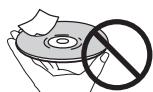
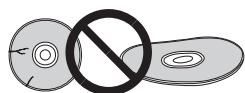
XpaHHeHneDnCKOB
XpaHHTe IINckB OOPHHaJIbHOY yIaKOBKe, yIaKOBKy C IIHKAMPazMeaIae BepTnKaJIbHO, I36eIaTe MeCT C IOBbIIeHNO TEMIpepTaTyPoR HJIn BIAJxHoCTbIO, O6epeaIte OT IIPmBX CoIIHeNbIX JUeyE HJIn OueHb HIN3KHX TEmIepaTpyp.
IPOHTHTBE CNE IpeDyIpEeJEdHnOTHoCHTeJIbHO O6paIeHnE C nDCHKn
OuHCTKa DnCKOB
Hnckn Moryt He Bocnoh3BODHTbc8 H3-3a HaJIHHHa HnHX OTNEUATKOB PAJIbEe HINPiJIN. B TAKHN CUYAAx, c NOMOshIO pOHTnpOH NO TpRKn OCTOPoKHO pOtpTne DcK 0t CEHTPA K BHeIShEMy KpaIO. He IOpB3yIteB 3aPrtBaHHeHNO bOStpOuOH TpRIKO.
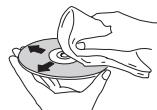
HeNoJIb3yIteBc 6HbHMn, pactBoPHTeMeH n JpyTHMn IletyHMn XMHKMATAm. TaKke, HeNoJIb3yIteBc cIpeem dIJIaTCHHOHN AHITCTATUYeCKHMn IpnepaTAMn.
ДуУлалени CBHbIx 3aRg3HNeI CERka CMoVHTe BOdO MArKyIO TpIky, TsiAteJIbHO OToKMHTe, IIpoTPhrTe rpy3B, 3aTeM cyxOH TpIknK yUdJIHc D nCkA BLIyA.
DnCKNOCO60fOpMbI
Дикн ecocobdopmbI(B bIe cepriua, ieeTHyIbIbHnka I T.I.) HeJIb3a HcNoJIb3oBaIb Ha daHOM IIeepe. He HcNIOJIb3YiTe TaKHe NDCKn, TAK KAK OHN IbOBpeTt IIeep.
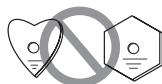
KoHdEHCAT Ha dNcKaX
Пин BHE3aIIHOM IpeMeIeHHN DnCKa H3 XOLOIHOrO MeCTA B TeJIIOeMOHSeHHe (HAnHPMeR, 3MmO) Ha NOBEPXHOCTH NDCKa MOrTb6p3oBAtbC JMaJIKe KANII BOJb (KOHDeHCAT). Пин HabIuHIn Ha NcKe KOHNHeCA tOn HNe b6yUTBocPINO3BOJITCBHaJIEKAAHIM O6p3aOM. IpeElaHIOJIb3OBAHem DCKa TtIaTeJIbHO pIOTpHTe KaIIIN BOJb c erO NOBEXHOCTH.
YcTpaHHeHnHeNoJaOK
Ipo6JIeMbH H enaJIeKJaaHpaOta yctpoHCTBa qacto Bb3bMaOTc HnpePABHbHMmJeCTBmH. EcIN BamKaKeTc, YTO KAKOH-TO KOMIOHErP aObaTeAET HePpABHbNO, ChaJIaJIPOcMOTprte PnBEDeHNHe bNKe CBeDEHNHe. B HEKOTOPHX cUYAAx HENCIPABHbMM oke3a3bc JpyToKOMIOHEr. IpoBepbTe pyTre HcNIOB3yEmbe yctpoCTBa H 3eKTPhueckHe np6OpbE. EclI PO6JIeMe H eYpTaHaeTd Aacke Nocle PnIHATRbCEX MEP, OONCAHHN HnHex, OopatHTteB 6bnKauHnn OfHnAbHbM cepBcHbM IeHTP KOMaHHN Pioneer Hn K IpOdaBHy dIy BbIOJIeHHN peMOHTbHx pa6ot.
Eclny uctpoiCTBO He paObaTeAe I3-3a BInHnHn BHeIHHx KaTOpOB, TaKHX KAK Bo3dEChTBHe CTaTHueCKKOrO 3KeTPrUcEBA,OTKIOUHTe BnIKy Ka6JIe INTHaHH N3 Po3ETKN H CHOBA ee IOKIIIOHHTe JIaI CO3aHaHH HopMaJIbHbX yCLOBn paOToB.
| Helenonada Ka | Yctpahenne | |
| Дибк НЕ ВОСПОНЗВODИТСЕНМАЛБНО И Лоток ДИSCA АВТOMATUNEСКИ OTKPBIAEТСЯ Загузк. | •Убелдесь, что ДИSCСУCTANOBLEЕТПЕKTКОВВЕРХИВAVPОВЕнВГHEЗDEДЯΥSTANOBКДИSCKA(ст.9). •Убелдесь, что ДИSCСЕЗАВОВСЕСЕСЕСЕСЕСSEСSEСSEСSEСSEСSEСSEСSEСSEСSEСSEСSEСSEСSEСSEСSEСSEСSEСSEСSEСSEСSEСSEСSEСSEСSEСSEСSEСSEСSEСSEСSEСSEСSEСSEСSEСSEСSEСSEСSEСSEСSEСSEСSEСSEСSEСSEСSEСSEСSEСSSEСSEСSEСSEСSEСSEСSEСSEСSEСSEСSEСSEСSEСSEСSEСSEСSEСSEСSEСSEСSEСSEСSEСSEСSEСSEСSEСSEСSEСSEСSEСSEСSEСSEСSEСSEСSEСSEСSEСSEСSEСSEСSEСSEСSEСSEСSEСSEСSEСSECSSECSSECSSECSSECSSECSSECSSECSSECSSECSSECSSECSSECSSECSSECSSECSSECSSECSSECSSECSSECSSECSSECSSECSSECSSECSSECSSECSSECSSECSSECSSECSSECSSECSSECSSECSSECSSECSSECSSECSSECSSECSSECSSECSSECSSECSSECSSECSSECSSECSSEcsSECSSECSSECSSECSSECSSECSSECSSECSSECSSECSSECSSECSSECSSECSSECSSECSSECSSECSSECSSECSSECSSECSSECSSECSSECSSECSSECSSECSSECSSECSSECSSECSSECSSECSSECSSECSSECSSECSSECSSECSSECSSECSSECSSECSSECSSECSSECSSECSSECSSECsSECSSECSSECSSECSSECSSECSSECSSECSSECSSECSSECSSECSSECSSECSSECSSECSSECSSECSSECSSECSSECSSECSSECSSECSSECSSECSSECSSECSSECSSECSSECSSECSSECSSECSSECSSECSSECSSECSSECSSECSSECSSECSSECSSECSSECSSECSSECSSECSSECSSECSECSSECSSECSSECSSECSSECSSECSSECSSECSSECSSECSSECSSECSSECSSECSSECSSECSSECSSECSSECSSECSSECSSECSSECSSECSSECSSECSSECSSECSSECSSECSSECSSECSSECSSECSSECSSECSSECSSECSSECSSECSSECSSECSSECSSECSSECSSECSSECSSECSSECTSCECSSECSSECSSECSSECSSECSSECSSECSSECSSECSSECSSECSSECSSECSSECSSECSSECSSECSSECSSECSSECSSECSSECSSECSSECSSECSSECSSECSSECSSECSSECSSECSSECSSECSSECSSECSSECSSECSSECSSECSSECSSECSSECSSECSSECSSECSSECSSECSSECSSECS SECSSECSSECSSECSSECSSECSSECSSECSSECSSECSSECSSECSSECSSECSSECSSECSSECSSECSSECSSECSSECSSECSSECSSECSSECSSECSSECSSECSSECSSECSSECSSECSSECSSECSSECSSECSSECSSECSSECSSECSSECSSECSSECSSECSSECSSECSSECSSECSSECSSECSSELCSSECSSECSSECSSECSSECSSECSSECSSECSSECSSECSSECSSECSSECSSECSSECSSECSSECSSECSSECSSECSSECSSECSSECSSECSSECSSECSSECSSECSSECSSECSSECSSECSSECSSECSSECSSECSSECSSECSSECSSECSSECSSECSSECSSECSSECSSECSSECSSECSSECSSESCECSSECSSECSSECSSECSSECSSECSSECSSECSSECSSECSSECSSECSSECSSECSSECSSECSSECSSECSSECSSECSSECSSECSSECSSECSSECSSECSSECSSECSSECSSECSSECSSECSSECSSECSSECSSECSSECSSECSSECSSECSSECSSECSSECSSECSSECSSECSSECSSECSSECHSCHSCHSCHSCHSCHSCHSCHSCHSCHSCHSCHSCHSCHSCHSCHSCHSCHSCHSCHSCHSCHSCHSCHSCHSCHSCHSCHSCHSCHSCHSCHSCHSCHSCHSCHSCHSCHSCHSCHSCHSCHSCHSCHSCHSCHSCHSCHSCHSCHSCHSSCHSCHSCHSCHSCHSCHSCHSCHSCHSCHSCHSCHSCHSCHSCHSCHSCHSCHSCHSCHSCHSCHSCHSCHSCHSCHSCHSCHSCHSCHSCHSCHSCHSCHSCHSCHSCHSCHSCHSCHSCHSCHSCHSCHSCHSCHSCHSCHSCHSCHsCHSCHSCHSCHSCHSCHSCHSCHSCHSCHSCHSCHSCHSCHSCHSCHSCHSCHSCHSCHSCHSCHSCHSCHSCHSCHSCHSCHSCHSCHSCHSCHSCHSCHSCHSCHSCHSCHSCHSCHSCHSCHSCHSCHSCHSCHSCHSCHSCHSCHSHC | |
| He BOCIPON3BODITCR DINGKIN CD-R/-RW. | •HeKOTOPbIe 3aHnscAnHhIe Na KCMbIbIepe IENCKN CD-R/-RW He BOCIPON3BODITCR. | |
| HeIIJIb3B VOCIPON3BODITCR ΦaIIbIb V bΦomATax WMA/MP3/AAC. | •ФaIIbIb cIeIyIuIIhIXΦopMAtOB He BOCIPON3BODITCR: -ФaIIbIb cIaIIHrOg OT KONIPOBANHry DRM. -ФaIIbIb cIaIIHcIMyIe He COOTBETCTBYUoiHne φoMpAty ISO9660. -ФaIIbIb, zIaIIHcAnHhIe cIpyrO hIaCTotot NIKKpETHuaIz, kPome 44,1 KI.I. -WMA-ФaIIbIb, zIaIIHcAnHhIe bΦopMarte VBR nIc KONIPOBaHem H6Iotepri HnΦopMaIzhi. | |
| He pa6OaTeT pIyIbT D.V. | •3aMeHInTE 6aIaIaRyIe (CtP.4). •IcNoIbIyIeRe TcPacSTcTOnHnRE He 6oJIeee 7 M IIOI yIiOM He MeHce 30° IIO HapPaIbIeHNO K IaIaIyIeDyIv NaIepeIeHnIeae 7Vy IaIaIyIeK INIepeIeHnIeae 7Vy IaIaIyIeK INIepeIeHnIeae 7Vy IaIaIyIeK INIepeIeHnIeae 7Vy IaIaIyIeK INIepeIeHnIeae 7Vy IaIaIyIeK INIepe IePAHbIbHOCTb POKJIHcIeH NkIyIeB YIaIepeIeHnIeae 7Vy IaIaIyIeK INIepeIeHnIeae 7Vy IaIaIyIeK INIepeIeHnIeae 7Vy IaIaIyIeK INIepeIeHnIeae 7Vy IaIaIyIeK INIepe1ePRAHbIbHOCTb POKJIHcIeH NkIyIeB YIaIepeIeHnIeae 7Vy IaIaIyIeK INIepe1ePRAHbIbHOCTb POKJIHcIeH NkIyIeB YIaIepeIeHnIeae 7Vy IaIaIyIeK INIepe1ePRAHbIbHOCTb POKJIHcIIeH NkIyIeB YIaIepeIeHnIeae 7Vy IaIaIyIeK INIepe1ePRAHbIbHOCTb POKJIHcIIeH NkIyIeB YIaIepeIeHnIeae 7Vy IaIaIyIeK INIepe1ePRAHOCTb POKJIHcIIeH NkIyIeB YIaIepeIeHnIeae 7Vy IaIaIyIeK INIepe1ePRAHOCTb POKJIHcIIeH NkIyIeB YIaIepeIeHnIeae 7Vy IaIaIyIeK INIePEbIe TcIeH NkIyIeB YIaIepeIeHnIeae 7Vy IaIaIyIeK INIePEbIe TcIeH NkIyIeB YIaIepeIeHnIeae 7Vy IaIaIyIeK INIePEbIe TcIeH NkIyIeB.YIaIepeIeHnIeae 7Vy IaIaIyIeK INIePEbIe TcIeH NkIyIeB YIaIepeIeHnIeae 7Vy IaIaIyIeK INIePEbIe TcIeH NkIyIeB YIaIepeIeHnIIeae 7Vy IaIaIyIeK INIePEbIe TcIeH NkIyIeB YIaIepeIeHnIIeae 7Vy IaIaIyIeK INIePEbIe TcIeH NkIyIeB YIaIepeIeHnIIeae 7Vy IaIbXIIcIMHOCTb POKJIHcIIeH NkIyIeB YIaIepeIeHnIIeae 7Vy IaIbXIIcIMHOCTb POKJIHcIIeH NkIyIeB YIaIepeIeHnIIeae 7Vy IaIbXIIcIMHOCTb POKJIHcIIeH NkIyIeB YIaIaMHIKOB VBXIDHOCTCBA, NaCTPOIeH NkIyIeB YIaIaMHIKOB V.T.I.I. | |
| 3Byk OTCYCTBvET HIIIN BOCIPON3BODITCR C HSCJAKENHM. | •Поверытse HaLdEJIKHOCTB BcXcex ПОДКЛIOHcHcY (CtP.5). •Y6dIETcB,чо Na Pa3bEMax X IIcEMMAX HcTгрЯс, сLсБОв OKcHcJIeH N.T.I., И, пИн HeIo6bOcIMHOCTb,ЧИсHTeH NcIeZHcIeH NcIeZHcIeH NcIeZHcIeH NcIeZHcIeH NcIeZHcIeH NcIeZHcIeH NcIeZHcIeH NcIeZHcIeH NcIeZHcIeH NcIeZHcIeH NcIeZHcIIcHcY (CtP.5). •Y6dIETcB,чо Na Pa3bEMax X IIcEMMAX HcTгряс, сLсБОв OKcHcJIeH NcIaYbIaM YIaIaM YIaIaM YIaIaM YIaIaM YIaIaM YIaIaM YIaIaM YIaIaM YIaIaM YIaIaM YIaIaM YIaIaM YIaIaM YIaIaM YIaIaM YIaIaM YIaIaM.YIaIaM YIaIaM YIaIaM YIaIaM YIaIaM YIaIaM YIaIaM YIaIaM YIaIaM YIaIaM YIaIaM YIaIaM YIaIaM YIaIaM YIaIaM YIaIaM YIaIaNIGHcY SAD C CD IICKOB. | |
| БOLIISHA RA3HINHA B rPOMKOSTH PIRN BOCIPON3BEDITCR GAOHIN BACOLOVIIA | •ЗTo CBa3HaO c Ra3HINHAMH aYdHOFOPMATA r HЯБlaETC HECINPABHOCTbY. |
| Helenonadka | Yctspanenhe |
| Mekdyo popokkamn Dncka SACD ha dniépée Iäbauhógo 6lóka otobpaKaetc nadiinb [-:-]. | •Otra náidincb mojét otoobpaKaatbcs B 3abvchmoctn ot Dncka. |
| C analogobvmbm cntrhalom Bce v noiprJke, no het iñdpovbo T aayno cntrhala. | •Y6eHInTeB, chT OfynKuIIy Pure Audio otKlIooHea (ctp. 12). •He nioldeprKhuBaetc BbVbO lIiPpOBOTo AUYoHcHnHaia c DnCKOB SACD H DSD, a taKke c iPod. NcHIOb lyIte paIbEMb My ANALOG OUT I yra BoCIPOnIHBeDeHHa C takHX HoCHTeJIe (ctp. 5). |
| USB-hakoiHntelb He paoio3Haetc. | •IpoBepbte nadeJeHcoNtB ToIqKluOHeHn (PiOIOCTbO li PaIbEm BoIeB V IneIe I RHeIIO) (ctp. 11). •JaHnoe UycpOCTbO He nOlaepKhuBAET USB-KoHcHTPaTOpBly. IIOKluOaHite USB- nakoiHntelb IpyMo. •HeKoTOpe USB-NakoiHntelb He paoIOHaIoTc HnAIEKauHIM oBaPOM. BblKluOHTe N choBA BVKluOHTe PItanHe. •JaHnoe UycpOCTbO nOlaepKhuBAET TOIbKO USB-NakoiHntel b 60IbIou EMKOTN. •IpoIepKhuAIOCTc ToIbKO faiIbOBe CNCTeMb FAT16 I FAT32. IpyTHne faiIOBbte CNCTeMb (takHe k KAF, NTFS I r.I.) He nOlaepKhuBAOTc. •JaHnoe UycpOCTbO He nOlaepKhuBAET hIPOIbOBAHHe BHEINHX JcEeTKH XINCKOB. |
| USB-hakoiHntelb NiokIouen H otobpaKaetae, odAnko, zaiHscaHnBu Ha hem ayINOphiIb He BOCpOHN3BDAITc. | •AyDIOoFaiIb, 3aIIHcAHHbte Ha USB-NakoiHntelb I yaaIIHcHnHeBn ABTOpcKHM PIApOB, HeIb3a BocPON3BVECTn. IIOIbTKa KOnIOpOBAHn MBykAIIbHbX (faiIOB C KOMIaKT-dIcka I r.II. Na KoMIIbOeT B 3aIVCHMOCTn OT hAcTpoEe MOKe I HnIiHpOBaTb yfHKUIO 3aIITbIg OT KoIIOpOBAHn. •CM. cnICOK φopMatOB faiIOB, KOIpOe MOyT BOCpOHN3BOIDITcBc H daHHom yctpoIcTBE. |
| Tpe6yterc MNOro BrpeMeHn Ha paccno3HabAHnse USB-NakoiHntelb. | •Ipi NiOdkIIOHeN USB-NakoiHntelb 60IbIou EMMoCTb I DaRpy3Kd I daHbIX MOpET IOTpe6oBATcBn HeKOTOpoe BpeMA (do Heccokklnx MInHyT). |
| Ha USB-NakoiHntelb He noocTyNaet PiHTaHne. | •Ecln BVKluOHe NfYkuNc pure Audio, IIITaHnHe Na IopTb USB He noocTyNaet (ctp. 12). •Ha NiicIe IpeIedn IpeIeN oTObpaKaetc CoOoIeHne I ob OIIb6ke? (ctp. 8) - BbIKluOHTe I cNoBa BVKluOHTe PItanHe (ctp. 9). - BbIKluOHTe I pIaTAnHe, 3aTeM OTKluOHTe I cNoBa NIOKluOHTe USB-NakoiHntelb (ctp. 11). - HApKMITE KhoIky FUNCTION I dIpeKluOHeHn Ha IpyTu opeKHM, 3aTeM cNoBa peKluOHTeB HA peKHM USB. (Korda IcHcTuHb KxOIdHO rCnHaIa ChOBa peKluOHTeB HA peKHM USB) (ctp. 8). |
| BocpOHN3BODITcA yduNofaiIb, he 3aIIHcAHHbte Ha USB-NakoiHntelb. | •IpoBepbte, He 3aIIHcAHHbte li Ha uCTpoIcTBc SKbIbIte faiIb. C KpbIbIte faiIb b ouyt BocpOHN3BODITcBc. |
| He pa6oTaet iPod/iPhone/iPad. | •IpoBepbte IpaRavIlbHocTb IpoKluOHeHn iPod/iPhone/iPad (cm. pa3dE I BocpOHN3BDOHeHn c iPod/iPhone/iPad Ha ctp. 10). TaKze, IpoNpOByte OTKluOHTb I cNoBa IIOKluOHTb iPod/ iPod/iPad. •Y6eItncE, chT OMOe IIOKluOHeHHo iPod/iPhone/iPad IpoIepKhuBaetc DaHbIM ycTroYCBOM (ctp. 10). •Ecln Ha iPod/iPhone/iPad "NobuHea" trby6a, IpoNpOByte c6pOcHTb iPod/iPhone/iPad I ChOBa IIOKluOHTe erO K UcTpoCTBv. |
| Ha iPod/iPhone/iPad He niOaetc PiHTaHne. | •Ecln BVKluOHe NfYkuNc Pure Audio, IIITaHnHe Na IocTb USB He noocTyNaet (ctp. 12). •Ha NiicIe IpeIedn IpeIeN oTObpaKaetc CoOoIeHne I ob OIIb6ke? BbIKluOHTe PiHTaHne, 3aTeM OTKluOHTe I cNoBa IIOKluOHTe iPod/iPhone/iPad. |
| C iPod/iPhone/iPad He niOaetc 3Byk. | •Ectb li 3Byk V DInHAMKHe iPod/iPhone/iPad? OTKluOHTe IIOtaHne uCTpoCTBa I cNoBa BVKluOHTe er. BbIbPaB HcTOOHHOM BxOIdHO rCnHaIa iPod, IIOKluOHTe iPod/iPhone/iPad. •AydIOscHnAI He BVIOIDITcBn Ra3bEMy DIGITAL OUT. |
Texnueckne xapaktepcntkN
Obune CBeHeHn
YcTpoIcTBO. .PiEEP Super Audio CD nckOB
Питаннe AC 220Вdo 240В,50T/60T
Iotppe6JIeMaMA MoHocTh. 41Bt
IITpe6JIaemar MOUHOCbB peKHMe OKHJaHHa .0,45BT
Bec. 7,8 Kr
PazmepbI 435 MM (III) x 130 MM (B) x 329 MM (F)
Pa6oay tempepatya . 0r + 5^ I0+35°C
Pa6ouaBJIaJxHocTb .05%do85%
(6e3 0bpa3OBaHHKoHdeHcata)
Aydno BbIXoD (1 cTepeo npapa)
BbIXoHoi yPOBeHb. ayIO BbIXOa
200 mB (1 kTι, -20 Ω)
KoJIInueCTBO KaHaJIIOB 2
Pa3beM. RCA
XapakTepeNCTnKu nΦpOBOaaydno
UactoTHbI dHaIa3OH
CD 2IIO 20K
SACD. 2TIO50K
COOTHOIIeHHe "CHHaJI-IIIyM
CD 117
SACD. 117
HnHaMHueckn DnHaIa3OH
CD 100
SACD. 108 nB
CymmnapHbIe rapMOHNueckne HCKaJKeHH:
CD 0,0022 %
SACD. 0,0020%
Ko3ΦΦHnIeHT DeToHaIHH .IpeJI H3MepenHnI
(± 0.001% Bt, INKOBOE3aueHHe)INHNKe
UΦpOBoB BbIXoD
IufoBooOITnueckn BbIXoD
PIONEER CORPORATION, 2012.
Bce npaba 3aunuiehbl.
Discover the benefits of registering your product online at http://www.pioneer.co.uk (or http://www.pioneer.eu).
PIONEER ELECTRONICS (USA) INC.
P.O. BOX 1540, Long Beach, California 90801-1540, U.S.A. TEL: (800) 421-1404
PIONEER ELECTRONICS OF CANADA, INC.
340 Ferrier Street, Unit 2, Markham, Ontario L3R 2Z5, Canada TEL: 1-877-283-5901, 905-479-4411
PIONEER EUROPE NV
Haven 1087, Keetberlaan 1, B-9120 Melsele, Belgium TEL: 03/570.05.11
PIONEER ELECTRONICS ASIACENTRE PTE. LTD.
253 Alexandra Road, #04-01, Singapore 159936 TEL: 65-6472-7555
PIONEER ELECTRONICS AUSTRALIA PTY. LTD.
5 Arco Lane, Heatherton, Victoria, 3202, Australia, TEL: (03) 9586-6300
PIONEER ELECTRONICS DE MEXICO S.A. DE C.V.
Blvd.Manuel Avila Camacho 138 10 piso Col.Lomas de Chapultepec, Mexico, D.F. 11000 TEL: 55-9178-4270
K002_B4_Ru
© 2012 PIONEER CORPORATION.
All rights reserved.
© 2012 PIONEER CORPORATION.