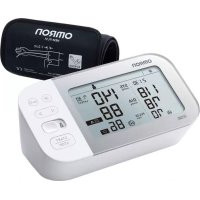
USER MANUAL X7 Smart OMRON
Read Instruction manual and before use.
FR Lire le mode d'emploi et avant l'utilisation.
DE Lesen Sie vor der Verwendung Gebrauchsanweisung und. 2
Leggere il manuale di istruzioni e pina dell'uso.
Lea el manual de instrucciones 10 antes del uso.
NL Lees gebruiksaanwijzing en voor gebruik.
Ru PpOuTnTe pyKOBODCTBa No 3KcNlyaTaunu 1 n 2 nepei nCNoB3OBAHHeM.
TR Kullanmadan once, kullanim kilavuzu ye y2kuyun.
A
All for Healthcare
C∈0197
Symbole / Symbole / Simboli / Simbolos / Symbolen / Cimbo/ by / Semboller /
EN
FR
DE
IT
ES
NL
RU
TR
AR
Symbols
EN
1. Introduction
Thank you for purchasing the OMRON Automatic Upper Arm Blood Pressure Monitor. This blood pressure monitor uses the oscillometric method of blood pressure measurement. This means this monitor detects your blood movement through your brachial artery and converts the movements into a digital reading.
1.1 Safety Instructions
This instruction manual provides you with important information about the OMRON Automatic Upper Arm Blood Pressure Monitor. To ensure the safe and proper use of this monitor, READ and UNDERSTAND all of the safety and operating instructions. If you do not understand these instructions or have any questions, contact your OMRON retail outlet or distributor before attempting to use this monitor. For specific information about your own blood pressure, consult with your physician.
1.2 Intended Use
The device is a digital monitor intended for use in measuring blood pressure and pulse rate in adult patient population. The device detects the appearance of irregular heartbeats during measurement and gives a warning signal with readings. It is mainly designed for general household use. The device can detect an irregular pulse suggestive of Atrial Fibrillation (Afib). Please note that the device is not intended to diagnose Afib. A diagnosis of Afib can only be confirmed by Electrocardiogram (ECG). If the Afib symbol appears, consult your physician.
1.3 Receiving and Inspection
Remove this monitor and other components from the packaging and inspect for damage. If this monitor or any other components is damaged, DO NOT USE and consult with your OMRON retail outlet or distributor.
Read the Important Safety Information in this instruction manual before using this monitor. Follow this instruction manual thoroughly for your safety. Keep for future reference. For specific information about your own blood pressure, CONSULT WITH YOUR PHYSICIAN.

2.1 Warning
Indicates a potentially hazardous situation which, if not avoided, could result in death or serious injury.
Data Transmission
- This product emits radio frequencies (RF) in the 2.4 GHz band. DO NOT use this product in locations where RF is restricted, such as on an aircraft or in hospitals. Turn off the Bluetooth® feature in this monitor, remove batteries and/or unplug the AC adapter when in RF restricted areas.
AC Adapter (optional accessory) Handling and Usage
- DO NOT use the AC adapter if this monitor or the AC adapter cable is damaged. If this monitor or the cable is damaged, turn off the power and unplug the AC adapter immediately.
- Plug the AC adapter into the appropriate voltage outlet. DO NOT use in a multi-outlet plug.
- NEVER plug in or unplug the AC adapter from the electric outlet with wet hands.
- DO NOT disassemble or attempt to repair the AC adapter.
Battery Handling and Usage
- Keep batteries out of the reach of infants, toddlers and children.

2.2 Caution
Indicates a potentially hazardous situation which, if not avoided, may result in minor or moderate injury to the user or patient, or cause damage to the equipment or other property.
- Stop using this monitor and consult with your physician if you experience skin irritation or discomfort.
- Consult with your physician before using this monitor on an arm where intravascular access or therapy, or an arteriovenous (A-V) shunt, is present because of temporary interference to blood flow and could result in injury.
-
Consult with your physician before using this monitor if you have had a mastectomy.
-
Consult with your physician before using this monitor if you have severe blood flow problems or blood disorders as cuff inflation can cause bruising.
- DO NOT take measurements more often than necessary because bruising, due to blood flow interference, may occur.
- ONLY inflate the arm cuff when it is applied on your upper arm.
- Remove the arm cuff if it does not start deflating during a measurement.
- DO NOT use this monitor for any purpose other than measuring blood pressure and/or detecting the possibility of Afib.
- During measurement, make sure that no mobile device or any other electrical device that emit electromagnetic fields is within 30~cm of this monitor. This may result in incorrect operation of the monitor and/or cause an inaccurate reading.
DO NOT disassemble or attempt to repair this monitor or other components. This may cause an inaccurate reading.
- DO NOT use in a location where there is moisture or a risk of water splashing this monitor. This may damage this monitor.
- DO NOT use this monitor in a moving vehicle such as in a car or on an aircraft.
DO NOT drop or subject this monitor to strong shocks or vibrations.
DO NOT use this monitor in places with high or low humidity or high or low temperatures. Refer to section 6.
- During measurement, observe the arm to ensure that the monitor is not causing prolonged impairment to blood circulation.
- DO NOT use this monitor in high-use environments such as medical clinics or physician offices.
- DO NOT use this monitor with other medical electrical (ME) equipment simultaneously. This may result in incorrect operation and/or cause an inaccurate reading.
- Avoid bathing, drinking alcohol or caffeine, smoking, exercising and eating for at least 30 minutes before taking a measurement.
Rest for at least 5 minutes before taking a measurement.
- Remove tight-fitting, thick clothing and any accessories from your arm while taking a measurement.
- Remain still and DO NOT talk while taking a measurement.
- ONLY use the arm cuff on persons whose arm circumference is within the specified range of the cuff.
-
Ensure that this monitor has acclimated to room temperature before taking a measurement. Taking a measurement after an extreme temperature change could lead to an inaccurate reading. OMRON recommends waiting for approximately 2 hours for the monitor to warm up or cool down when the monitor is used in an environment within the temperature specified as operating conditions after it is stored either at the maximum or at the minimum storage temperature. For additional information on operating and storage / transport temperature, refer to section 6.
DO NOT use this monitor after the durable period has ended. Refer to section 6.
DO NOT crease the arm cuff or the air tube excessively.
-
DO NOT fold or kink the air tube while taking a measurement. This may cause an injury by interrupting blood flow.
- To unplug the air plug, pull on the plastic air plug at the base of the tube, not the tube itself.
- ONLY use the AC adapter, arm cuff, batteries and accessories specified for this monitor. Use of unsupported AC adapters, arm cuffs and batteries may damage and/or may be hazardous to this monitor.
- ONLY use the approved arm cuff for this monitor. Use of other arm cuffs may result in incorrect readings.
- Inflating to a higher pressure than necessary may result in bruising of the arm where the cuff is applied. NOTE: refer to "If your systolic pressure is more than 210mmHg " in section 13 of instruction manual (2) for additional information.
- Read and follow the "Correct Disposal of This Product" in section 7 when disposing of the device and any used accessories or optional parts.
Data Transmission
- DO NOT replace batteries or unplug the AC adapter while your readings are being transferred to your smart device. This may result in incorrect operation of this monitor and failure to transfer your blood pressure data.
AC Adapter (optional accessory) Handling and Usage
- Fully insert the AC adapter into the outlet.
- When unplugging the AC adapter from the outlet, be sure to safely pull from the AC adapter. DO NOT pull from the AC adapter cable.
- When handling the AC adapter cable:
Do not damage it. / Do not break it. / Do not tamper with it. / DO NOT pinch it. / Do not forcibly bend or pull it. / Do not twist it. / DO NOT use it if it is gathered in a bundle. / DO NOT place it under heavy objects.
- Wipe any dust off of the AC adapter.
- Unplug the AC adapter when not in use.
- Unplug the AC adapter before cleaning this monitor.
Battery Handling and Usage
- DO NOT insert batteries with their polarities incorrectly aligned.
- ONLY use 4 "AA" alkaline or manganese batteries with this monitor. DO NOT use other types of batteries. DO NOT use new and used batteries together. DO NOT use different brands of batteries together.
-
Remove batteries if this monitor will not be used for a long period of time.
If battery fluid should get in your eyes, immediately rinse with plenty of clean water. Consult with your physician immediately.
-
If battery fluid should get on your skin, wash your skin immediately with plenty of clean, lukewarm water. If irritation, injury or pain persists, consult with your physician.
DO NOT use batteries after their expiration date.
Periodically check batteries to ensure they are in good working condition.
2.3 General Precautions
- To stop a measurement, press the [START/STOP] button while taking a measurement.
- When you take a measurement on the right arm, the air tube should be at the side of your elbow. Be careful not to rest your arm on the air tube.
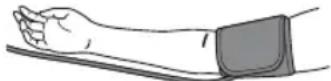
- Blood pressure may differ between the right and left arm, and may result in a different measurement value. Always use the same arm for measurements. If the values between both arms differ substantially, check with your physician on which arm to use for your measurements.
- When using an optional AC adapter, make sure not to place your monitor in a location where it is difficult to plug and unplug the AC adapter.
Battery Handling and Usage
- Disposal of used batteries should be carried out in accordance with local regulations.
- The supplied batteries may have a shorter life span than new batteries.
3. Error Messages and Troubleshooting
If any of the below problems occur during measurement, check to make sure that no other electrical device is within 30~cm . If the problem persists, please refer to the table below.
| Display/Problem Possible Cause Solution | |
| E1appears or the arm cuff does not inflate. | The [START/STOP] button was pressed while the arm cuff is not applied. | Press the [START/STOP] button again to turn the monitor off. After inserting the air plug securely and applying the arm cuff correctly, press the [START/STOP] button. |
| Air plug is not completely plugged into the monitor. | Insert the air plug securely. |
| The arm cuff is not applied correctly. Apply | the arm cuff correctly, then take another measurement. Refer to section 7 of instruction manual 2. |
| Air is leaking from the arm cuff. Replace the arm cuff to the new one. Refer to section 14 of instruction manual 2. |
| E2appears or a measurement cannot be completed after the arm cuff inflates. | You move or talk during a measurement and the arm cuff does not inflate sufficiently. | Remain still and do not talk during a measurement. If "E2" appears repeatedly, inflate the arm cuff manually until the systolic pressure is 30 to 40 mmHg above your previous readings. Refer to section 13 of instruction manual 2. |
| Due to the systolic pressure is above 210 mmHg, a measurement cannot be taken. |
| E3appears | The arm cuff is inflated exceeding the maximum allowable pressure. | Do not touch the arm cuff and/or bend the air tube while taking a measurement. If inflating the arm cuff manually, refer to section 13 of instruction manual 2. |
| E4appears | You move or talk during a measurement. Vibrations disrupt a measurement. | Remain still and do not talk during a measurement. |
| E5appears | The pulse rate is not detected correctly. Apply | Apply the arm cuff correctly, then take another measurement. Refer to section 7 of instruction manual 2. Remain still and sit correctly during a measurement. |
| E6appears | If the "●" symbol continues to appear, we recommend you to consult with your physician. |
| E7does not flash during a measurement |
| E6 appears | Blood pressure measurements were not taken correctly in an Afib mode measurement. | Apply the arm cuff correctly, then take another measurement. Refer to section 7 of instruction manual (2). Remain still and sit correctly during a measurement. Refer to section 8 of instruction manual (2). |
| Er appears | The monitor has malfunctioned. Press the [START/STOP] button again. If "Er" still appears, contact your OMRON retail outlet or distributor. |
| Err appears | The monitor cannot connect to a smart device or transmit data correctly. | Follow the instructions shown in the "OMRON connect" app. If the "Err" symbol still appears after checking the app, contact your OMRON retail outlet or distributor. |
| P flashes | The monitor is waiting for pairing with the smart device. | Refer to section 5 of instruction manual (2) for pairing your monitor with your smart device, or press [START/STOP] button to cancel pairing and turn your monitor off. |
| O flashes | The monitor is ready to transfer your readings to the smart device. | Open the "OMRON connect" app to transfer your readings. |
| flashes | More than 80 readings are not transferred. | Pair or transfer your readings to the "OMRON connect" app so you can keep them in memory in the app, and this error symbol disappears. |
| The date and time is not set. |
| appears | 100 readings are not transferred. | |
| flashes | Batteries are low. Replacing all 4 batteries with new ones is recommended. Refer to section 4 of instruction manual (2). |
| appears or the monitor is turned off unexpectedly during a measurement | Batteries are depleted. Immediately replace all 4 batteries with new ones. Refer to section 4 of instruction manual (2). |
| Nothing appears on the display of the monitor. | Battery polarities are not properly aligned. | Check the battery installation for proper placement. Refer to section 4 of instruction manual (2). |
| Readings appear too high or too low. | Blood pressure varies constantly. Many factors including stress, time of day, and/or how you apply the arm cuff, may affect your blood pressure. Review section 2 of instruction manual (2). |
| Any other communication issue occurs. | Follow the instructions shown in the smart device, or visit the "Help" section in the "OMRON connect" app for further help. If the problem still persists, contact your OMRON retail outlet or distributor. |
| Display/Problem Possible Cause Solution |
| Any other problem occurs. | Press the [START/STOP] button to turn the monitor off, then press it again to take a measurement. If the problem continues, remove all batteries and wait for 30 seconds. Then re-install batteries. If the problem still persists, contact your OMRON retail outlet or distributor. |
| Troubleshooting for Afib indicator function: |
| What is different between the Afib indicator function and ECG? | The Afib indicator function and ECG use completely different technologies. An ECG measures the electrical activity of the heart and can be used to diagnose Afib. The Afib indicator function detects irregular heartbeat and can suggest the possibility of Afib with a sensitivity of 95.5% and specificity of 93.8%. Refer to section 11 for details. |
| If the "symbol does not appear, it means there is no possibility of Afib? | Even if the "symbol does not appear, there is still a possibility of Afib. |
| Should I consult with my physician if the "symbol appears? | We recommend you to consult with your physician because there is a possibility of Afib. However, the "symbol may be displayed for other reasons, such as other heart arrhythmias. |
| What is different between Afib indicator function and irregular heart beat function? | The irregular heartbeat function detects irregularities in the pulse waves in one measurement. The Afib indicator function suggests the possibility of Afib when blood pressure is measured 3 consecutive times. |
| What should I do if the "symbol sometimes appears? | Afib does not always have symptoms. We recommend you to consult with and follow the directions of your physician. |
| I have been diagnosed with Afib by the physician, but the "symbol does not appear. | Afib may not occur at the time of specific blood pressure measurements. We recommend you to consult with your physician regularly. |
| Is the blood pressure reading reliable when the "symbol appears? | Afib or an irregular heartbeat can influence your blood pressure measurements and make it difficult to get an accurate reading. Repeated measurements may be required to overcome variabilities.* In Afib mode, the blood pressure measurement is taken 3 times, and the average is displayed. The monitor will indicate an error message (E5/E6) if the influence of the irregular heartbeat is too severe to give a measurement result. If this occurs repeatedly, we recommend that you consult with your physician. |
- Prof. Roland Asmar et al. European Society of Hypertension Recommendations for Conventional, Ambulatory and Home Blood Pressure Measurement
4. Limited Warranty
Thank you for buying an OMRON product. This product is constructed of high quality materials and great care has been taken in its manufacturing. It is designed to give you every satisfaction, provided that it is properly operated and maintained as described in the instruction manual.
This product is warranted by OMRON for a period of 3 years after the date of purchase. The proper construction, workmanship and materials of this product is warranted by OMRON. During this period of warranty OMRON will, without charge for labour or parts, repair or replace the defect product or any defective parts.
The warranty does not cover any of the following:
A. Transport costs and risks of transport.
B. Costs for repairs and / or defects resulting from repairs done by unauthorised persons.
C. Periodic check-ups and maintenance.
D. Failure or wear of optional parts or other attachments other than the main device itself, unless explicitly warranted above.
E. Costs arising due to non-acceptance of a claim (those will be charged for).
F. Damages of any kind including personal caused accidentally or from misuse. G. Calibration service is not included within the warranty.
H. Optional parts have a one (1) year warranty from date of purchase. Optional parts include, but are not limited to the following items: cuff and cuff tube.
Should warranty service be required please apply to the dealer whom the product was purchased from or an authorised OMRON distributor. For the address refer to the product packaging / literature or to your specialised retailer. If you have difficulties in finding OMRON customer services, contact us for information:
www.omron-healthcare.com
Repair or replacement under the warranty does not give rise to any extension or renewal of the warranty period.
The warranty will be granted only if the complete product is returned together with the original invoice / cash ticket issued to the consumer by the retailer.
5. Maintenance
5.1 Maintenance
To protect your monitor from damage, follow the directions below:
Changes or modifications not approved by the manufacturer will void the user warranty.

Caution
DO NOT disassemble or attempt to repair this monitor or other components. This may cause an inaccurate reading.
5.2 Storage

Caution
To unplug the air plug, pull on the plastic air plug at the base of the tube, not the tube itself.
- Gently fold the air tube into the arm cuff. Note: Do not bend or crease the air tube excessively.
- Place your monitor and other components in the storage case.
Store your monitor and other components in a clean, safe location.
Do not store your monitor and other components:
If your monitor and other components are wet.
- In locations exposed to extreme temperatures, humidity, direct sunlight, dust or corrosive vapors such as bleach.
In locations exposed to vibrations or shocks.
To protect your monitor during storage, an optional LCD cover is available as accessory. Refer to section 15 of Instruction Manual 2.
5.3 Cleaning
- Do not use any abrasive or volatile cleaners.
- Use a soft dry cloth or a soft cloth moistened with mild (neutral) detergent to clean your monitor and arm cuff, and then wipe them with a dry cloth.
- Do not wash or immerse your monitor and arm cuff or other components in water.
- Do not use gasoline, thinners or similar solvents to clean your monitor and arm cuff or other components.
5.4 Calibration and Service
| Product Category Electronic Sphygmomanometers |
| Product description Automatic Upper Arm Blood Pressure Monitor |
| Model (Code) M7 Intelli IT (HEM-7361T-EBK) / X7 Smart (HEM-7361T-ESL) |
| Display LCD digital display |
| Cuff pressure range 0 to 299 mmHg |
| Blood pressure measurement range | SYS: 60 to 260 mmHg
DIA: 40 to 215 mmHg |
| Pulse measurement range | 40 to 180 beats / min. |
| Accuracy Pressure: ±3 mmHg
Pulse: ±5% of display reading |
| Inflation Automatic by electric pump |
| Deflation Automatic pressure release valve |
| Measurement method Oscillometric method |
| Transmission method Bluetooth *Low Energy |
| Wireless communication | Frequency range: 2.4 GHz (2400 - 2483.5 MHz) / Modulation: GFSK
Effective radiated power: < 20 dBm |
| Operation mode Continuous operation |
| IP classification Monitor: IP20
Optional AC adapter: IP21 (HHP-CM01) or IP22 (HHP-BFH01) |
| Rating DC6 V 4.0 W |
| Power source | 4"AA"batteries 1.5 V or optional AC adapter (INPUT AC 100 - 240 V 50/60 Hz 0.12 - 0.065 A) |
| Battery life | Approximately 1000 measurements
(using new alkaline batteries)
The number of times may decrease when
using Afib mode because one Afib indication
consists of 3 regular measurements. |
| Durable period (Service
life) | Monitor: 5 years / Cuff: 5 years /
Optional AC adapter: 5 years |
| Operating conditions | +10 to +40°C / 15 to 90% RH
(non-condensing) / 800 to 1060 hPa |
| Storage / Transport
conditions | -20 to +60°C / 10 to 90% RH
(non-condensing) |
| Weight Monitor: approximately 460 g
(not including batteries)
Arm cuff: approximately 163 g |
| Dimensions
(approximately value) | Monitor: 191 mm (W) × 85 mm (H) ×
120 mm (L) / Arm cuff:145 mm ×
532 mm (air tube: 750 mm) |
| Cuff circumference
applicable to the monitor | 220 to 420 mm |
| Memory Stores up to 100 readings per user |
| Contents | Monitor, arm cuff (HEM-FL31), 4 "AA"
batteries, Instruction Manual ① and
②, setup instructions, storage case |
| Protection against
electric shock | Internally powered ME equipment
(When using only batteries)
Class II ME equipment (Optional AC
adapter) |
| Applied part | Type BF (arm cuff) |
Note
These specifications are subject to change without notice.
This monitor is clinically investigated according to the requirements of ISO 81060-2:2013. In the clinical validation study, K5 was used on 85 subjects for determination of diastolic blood pressure.
- This device has been validated for use on pregnant and pre-eclampsia patients according to the Modified European Society of Hypertension Protocol*.
- This device has been validated for use on diabetic (Type II) population**.
- IP classification is degrees of protection provided by enclosures in accordance with IEC 60529. This monitor and optional AC adapter are protected against solid foreign objects of 12.5mm diameter and greater such as a finger. The optional AC adapter HHP-CM01 is protected against vertically falling water drops which may cause issues during a normal operation. The optional AC adapter HHP-BFH01 is protected against oblique falling water drops which may cause issues during a normal operation.
- Topouchian J et al. Vascular Health and Risk Management 2018;14 189-197
** Chahine M.N. et al. Medical Devices: Evidence and Research 2018;11 11-20
About a wireless communication interference
This product operates in an unlicensed ISM band at 2.4 GHz. In the event this product is used near other wireless devices such as microwave and wireless LAN, which operate on the same frequency band as this product, there is a possibility that interference may occur. If interference occurs, stop the operation of the other devices or relocate this product away from other wireless devices before attempting to use it.
7. Correct Disposal of This Product (Waste Electrical & Electronic Equipment)
This marking shown on the product or its literature, indicates that it should not be disposed of, with other household wastes at the end of its working life.
To prevent possible harm to the environment or human health from uncontrolled waste disposal, please separate this product from other types of wastes and recycle it responsibly to promote the sustainable reuse of material resources.
Household users should contact either the retailer where they purchased this product, or their local government office, for details of where and how they can return this item for environmentally safe recycling.
Business users should contact their supplier and check the terms and conditions of the purchase contract. This product should not be mixed with other commercial waste for disposal.
HEM-7361T-EBK/ESL conforms to the EN60601-1-2:2015 Electromagnetic Compatibility (EMC) standard.
Further documentation in accordance with this EMC standard is available at OMRON HEALTHCARE EUROPE at the address mentioned in this instruction manual or at: www.omron-healthcare.com.
9. Guidance and Manufacturer's Declaration
- This blood pressure monitor is designed according to the European Standard EN1060, Non-invasive sphygmomanometers Part 1: General Requirements and Part 3: Supplementary requirements for electromechanical blood pressure measuring systems.
- Hereby, OMRON HEALTHCARE Co., Ltd., declares that the radio equipments type HEM-7361T-EBK/ESL is in compliance with Directive 2014/53/EU.
The full text of the EU declaration of conformity is available at the following internet address: www.omron-healthcare.com
- This OMRON product is produced under the strict quality system of OMRON HEALTHCARE Co., Ltd., Japan. The Core component for OMRON blood pressure monitors, which is the Pressure Sensor, is produced in Japan.
- Please report to the manufacturer and the competent authority of the Member State in which you are established about any serious incident that has occurred in relation to this device.
10. How to Calculate Weekly Averages
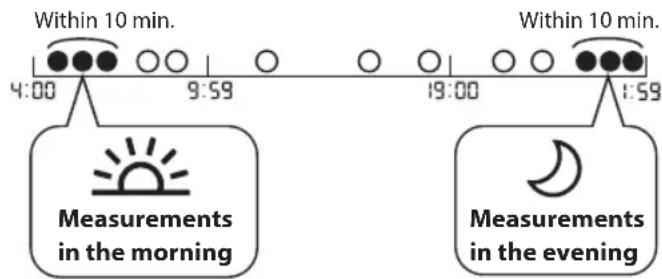
Morning Weekly Average Calculation
This is the average for the measurements taken during the morning (4:00 - 9:59) between Sunday and Saturday. The 2 or 3 readings taken within the first 10 minute timeframe in the morning between 4:00 - 9:59 will be used to calculate the morning average for each day.
Evening Weekly Average Calculation
This is the average for the measurements taken during the evening (19:00 - 1:59) between Sunday and Saturday. The 2 or 3 readings taken within the last 10 minute timeframe in the evening between 19:00 - 1:59 will be used to calculate the evening average for each day.
What is Blood Pressure?
Blood pressure is a measure of the force of blood flowing against the walls of the arteries. Arterial blood pressure is constantly changing during the course of the heart's cycle.
The highest pressure in the cycle is called the Systolic Blood Pressure; the lowest is the Diastolic Blood Pressure. Both pressures, the Systolic and Diastolic, are necessary to enable a physician to evaluate the status of a patient's blood pressure.
What is Arrhythmia?
Arrhythmia is a condition where the heartbeat rhythm is abnormal due to flaws in the bio-electrical system that drives the heartbeat. Typical symptoms are skipped heartbeats, premature contraction, an abnormally rapid (tachycardia) or slow (bradycardia) pulse.
What is Afb?
Atrial fibrillation (also called Afib or AF) is a quivering or irregular heartbeat (arrhythmia) that can lead to blood clots, stroke, heart failure and other heart-related complications. During atrial fibrillation, the heart's two upper chambers (the atria) beat chaotically and irregularly — out of coordination with the two lower chambers (the ventricles) of the heart. Episodes of atrial fibrillation can come and go, or you may develop atrial fibrillation that doesn't go away and may require treatment.
Afib indicator function detects the possibility of Afib with an accuracy of 94.2% (with sensitivity of 95.5% and specificity of 93.8% ) as demonstrated in the study* with Single-lead ECG as reference measurement.
^* M. Ishizawa, T. Noma, T. Minamino et al., Multiple measurements with automated blood pressure monitor can detect atrial fibrillation with high sensitivity and specificity in general cardiac patients, ESC Congress 2018
FR
1. Introduction
*M. Ishizawa, T. Noma, T. Minamino et al., Multiple measurements with automated blood pressure monitor can detect atrial fibrillation with high sensitivity and specificity in general cardiac patients, ESC Congress 2018
IT
1. Introduzione
- Prof. Roland Asmar et al. European Society of Hypertension Recommendations for Conventional, Ambulatory and Home Blood Pressure Measurement
4. Garanzia limitata
^ Ishizawa, T. Noma, T. Minamino et al., Multiple measurements with automated blood pressure monitor can detect atrial fibrillation with high sensitivity and specificity in general cardiac patients, Congresso ESC 2018
Instruction Manual
1
OMRON
- Prof. Roland Asmar et al. European Society of Hypertension Recommendations for Conventional, Ambulatory and Home Blood Pressure Measurement
** Chahine M.N. et al. Medical Devices: Evidence and Research 2018;11 11-20
^* M. Ishizawa, T. Noma, T. Minamino et al., Multiple measurements with automated blood pressure monitor can detect atrial fibrillation with high sensitivity and specificity in general cardiac patients, Congreso ESC 2018
NL
1. Inleiding
- Prof. Roland Asmar et al. European Society of Hypertension Recommendations for Conventional, Ambulatory and Home Blood Pressure Measurement
*M. Ishizawa, T. Noma, T. Minamino et al., Multiple measurements with automated blood pressure monitor can detect atrial fibrillation with high sensitivity and specificity in general cardiac patients, ESC Congress 2018
RU
1. BBeDHeHne
Blaoradapim Bac 3a nokykyabTOMaTHueCKOrO N3MePHTeIaTePnAIBHO DABHeHIN I aCTOTbI pNbCa OMRON. B 3tOM abTOMaTHueCKOM
N3MePHTeIe apTePNaIBHO BACTObl NcTbCa NcNOLb3yETC
OCzNILOmETpUeKcM MeTO N3MepeHIn aTePnAIBHO DaBHeHIN. To
03NaHaet, TTo np16Op opnpelJrEeD BnKHeHne KPOBn No PnuebeoApTePNi Npeo6pa3yET 3To DnKHeHBe Y uCNOBoe 3aueHme.
1.1MHCTpyKmno 6e3onacHOCTn
3To pykoOCTBO NO 3KcnnyatauIN COeepKHT BaKHyIO INHOpMaUIO 6B ATOMAUChECKMO 3MEPInTe apTePnaIbHO BAJIeHN I NACTOTbI PyNbCaOMRON.ДЯ obcepeHnE 6eONaHOnI npabInbNo HcKnPyatauIN 3TOrO npi6Ba Heo6XoJIMBO BHIMATEIbHO pOvHITATB CE hNCTpykUnn O6eONaCHOCTn I EKnPyatauIN EcN 3TN INHCTpykUnn HEnOHTHbI INBbIBaIOBnPoCbI, To nepd NaAnOM 3KcnNyatauIN 3TOrO npi6opa 6bpaNTecB KaWemy npodabuy IN dNCTp6bIoTOpY KOMNaHN OMRON. PpokocynbTnpyTeB C neuaamBpAowom OTHCnTeBHO KOHKpeThbIX 3HaueHn Bawero aTepeNaHBO daBneHn.
1.2Ha3haueHne
Pnp6op npctablaetco6ounp0ooh 3neKtponHb6nok, npedna3aueHHb
Iy n3mepeHHApTePAaBHOraBHeHHu aCTOBt ynbCa y B3pocblx.
Pnp6op onpeDetaH anuHne Heperyrphoro cepdceHn BO Bpem
n3mepeHH u OToBpaJeaCoOTBcTByUOuN INHdkaTOp BmEcTe C pe3yNbTaAMn
n3mepeHHe PekOMeHcyTc PneMMyeCTBeHHo DnA NcNoB3OBAHnB
domaunx ycnoBnx.
3TOn np6op cno6oben onpeDetaH npuyHn pHTMa, noXoJhne
Ha n6pnLAAIO npdecepui (Afib). PmNHte, qTO tO np6op He
npedha3aueH daanarhoctkn Afib. DnaRHO3 Afib moKet 6bItb noDTBepxJeH
ToBkoC nomooub 3neKtpokapnOrpamMb(3Kf). Pn noRaBHeHHn CMBOBa
Afib npOKOHcYbnTppyTebc C neaAMm Brayom.
1.3 Pacnakobkna n ocmotp
I3BnkeIne np6op n pyrNe KOMnoHEThb n ynaKOBKn nOCMOTpnte Ha Hanmne NOBpeKHeH. Ecn nnp6op nobpeXdH mnn dpyrNe KOMnoHEThn nopeXdHb, HE NOJb3yITEc b nn n o6paTtecb K BaWemy npoDaBu uy nI nDCtpn6bIoTOpY KOMnAnH OMRON.
2. Baxkhna HhOpMaun no 6e3onacHoctn
Ipeen haanom nCnoB3oBaHn np6opap npOHTe pa3den hactoero pykoBDCTBA NO 3KcNpyATAuIN Baxhna HnHphiMaunio 6e3onacHOCTN. JnBaue 6e3oNaCHOTn HeykocHntbHo BbInOnHnne IHCPTyKU, npBeHHeBn B HactoAeM pykoBDCTBE no 3KnpyTAuHN CoxpanHTe ern DnnoLyEna Heo6XoDmBbIX CbeHenn B 6dyuem. PPOKOHCYJbTIPNYTECB CJEAUIM BPAUOM OTHocTeBHO KOHKpET 3HaueHn BaWero aptepnabHoro daBHeNIA.
2.1IpeDynpexKdene!
06o3nauaet noteHuaNbHo onachHyO cHTyaunIO, KOtOpaa, cn ee He npeDToBpaTntb, MOKET npuBecNT K CMEPTN NIM TReKeblm TpaBMam.
HE NCIOB3yIte DaHHb npH6Op Ira N3mepeHnAabneHn y MnaHeueB, MaJIeHbKINx DeTei, a TakoKe y IIOeJ, KOToPbE He MoYr T BbyPa3NTb CBOe OTHOWeHne KnpOcEdupe.
3AIPUEIaETCa mocToTbHO Ha3Haayb Ce6eJeueHHe Ha oChOBe pe3yIbTaTOB, NIOUYENHbIX C NMOUcBIO 3TOI HMEpUTenApTePnAIBHO daJIeHNII. PnINHMaTE npeNaPaTBI COoTBetCTBUNC H3HaehHMe neuapeero BpaVa.TOJbKO KBAINHcNipPOBaHHb Bpaq MoKet CTaBtB dHaHRo3 NLeuHTb FInepToHmIO Aflb.
HENCIb3yITE daHHb npH6p Ha pyke,ecnO hTaBmPoBaHa HnncnocyuectBnreTc eeeueene.
HE HADEBAITE MaHKeTe Ha pyKu BO BpeMn IcNoB3ObaHn KaPeJIbHnCBy nI npn nepenBaHn KpOv.
HE NCIOJIb3YIte daHbI npH6Op B6IIN3BbICOKOaCToTHOrO (B4) Xpyprnueckoro 06pOyDobAHnA, 06pOyDobAHnA nIe mArHnTope3OHAnCH OTePAnu (MPT) nI annapatOB KOMNbIbTEPHO tomORpaHn (KT). 3To MoKet HApUaTb pa6OTy MOHToPA n/Inn pnpOBnTb K HEtouHMy I3MepeHIO.
HEHCIOJIb3yIHTe3OTnpn6OpBcpeE,HacbIeHHoKcnOpOOMnn B6JIMNBOCpIaMeHryUOxXcra3OB.
IpokoHcybTpyntcB c neaumim Bpaom, npexde yem nCnoJb30BaTb np6Op npu qacto BCTpeauoxxra apnTMnx (HaNPmep, npcepehna nnJeNyoDQKOBAA KCTPacUCTONnn nn MepuatelbHaa apnTMn), aptepnoocKepeO3e, CnHexHHoN nepfOynn, nnabeTe, 6peMeHHOCn, npEKNAMCNnn NoueHoh HeNoctatoHocTN. O5PATNE BHIMAHNE, UTO NIO6oe H3NTX COCTOHNN, a TAKKE DBNKHeHN, Tpemop nn IdoXpKaHne NaueHtA, MOrYT NOBNIATb Ha NOKa3AHn np6Opa.
HIN B KOEM CJUYAE He CTABTe Ce6e DnARHO3 HneJeHTe Ce6a Ha OCSOBAHmI NOLYUHbXpe3yJbTaTOB.083ATEIbHO KOHCynbTpyuTcBcOJeuaIMM bpaOH.
Bo n36exhaHne ydyuHnna XpaHnTe Bo3nyxOBOHyTOpy6ky uHyp aAnTepa nepemehHoro TOKA B MecTx, HeIOCTyINbIX DmIaJeHcEb N Deten.
I3dene coepjnt Menkne detan, KOptbly Moryt npectabnTb onachoctb ydyueHna, eCNN INPpOITM mAdeneu nni pe6eHok.
Pepedaa daHbix
3TOT npn60 np3nyaet paNocactoTHyO (P) 3HeprIO B dnaNa3OHe 2,4 T. HE NcNOJb3YNTE 3OT np60B p MecTx, rge Ha nCnoJIb3OBaHne paNocactoTHOHepn HanaIOTc oPAnuHcHn (Ha npIMep, Ha 6opTy cAmOte aNN b6OJIbHnAax).OTKnIOHTe fynKcHIO Bluteoth ha np60pe, INBNEKITE 3IeMeHtBu NTaHn I/INN OTCoeHNITe aanTep nepemEHoro TOKa B MeCTAC C ORpAHNuHcHnAMn HA NcNoJIb3OBaHne paNocactoTHOH 3Heprn.
06paueHne c aanTePOM nepemehnHO TOKa (DOnonHntbHa npHaJIeXHOCTb) mero nCNoJb3ObaHne
HE NIOb3yNTECb aanTepom nepemehHoro ToKa npn nobpeJdeHH npnbopa nnu Hpya aanTepa nepemehHoro ToKa. Ecn npnbop nnn uHyp anTepa nepemehHoro ToKa nobpeJdeHH, HeMeJeHHO oTKIIOHTe NITaHne nOTcoEHNHTe aanTepa nepemehHoro ToKa.
BKnIOaHTe aadTnEP npeMeHoro TOKa TOnbko B po3ETky c coOTBeTCTByIOUm HnPraJKeHem. HE POIOKJIIOuAHTe K po3ETke c pa3BETBtENEM.
HIN B KOEM CNYAe He BCTaBnTe Whyp aanTepa nepemehhoro ToKa BPO3ETky Hne BbHmaiTe erO MOKpbIM pykam.
HE PA3BIPAAITE aanTep nepemehHoro ToKa n He nbTaIaTeCb ocuieCTBnTB ero pemOHt.
06paueHne c3JeMeHTAMIITaHm INXNCIOJIb3OBaHne
XpaHNTe 3JemeHTbI NITaHnB MeCTax, HeIOcTynHbIX DnA DeTeN mnaDeHneB.

2.2 Bhumahne!
06o3nauaet nToeHuaNbHO onaChyu CnTuayu, KOTopA, ecn ee He npedTbpaNTb, MoKET npBcCTN K TpaBMam IerKoI nn cpeHne TReCTN y Nolb3ObaTeN nn NaueHeta, nn Bb3aTb NOBpExdHe 6OpOyDobAHn nn DpyrOTo NMUyeCTBa.
IpekpaTHe IcNoB3ObaHne 3TOO np6opa N o6paTtTeCb K neaUeMy BpaY npNIOBJIeHNn pa3pJaKeHnHa KaKxe IIN Bo3HNIKHOBeHn DnCKOMΦoTa.
IpnokOHcybTnpuyTeCb C neuaaHbpaOM npexJe, Yem IcnoB30BaT bTO np6Op Ha nneue, eCNH a HEM eCTb BHTPncocSydctbIOCTyn nINBBOyTcRnKapCTBa, nN cCNn IMeTcR apTeRHObeHO3na (A-B) fncTyla, NOCKoNbBy B 3OTm Cnyae BO3MOxHO BpeMeHHOE npekpaJHHe N KpOBToKA, cncoCoBHy npnbceTN K nobpeXdHIO.
- PpOKoHcyIbTnpyTecb C neaUIM BpaHOMpeepncnlo3OBAHmE 3TOrnp6opa, ecNblpepeHeCNI MaCTKToMnIO.
EcnBbCTpaAeTe cepE3HbIMn HApUeHnRAm KpOBoo6paueHnIN 3a60bnEBAHmN KPOBTO, TnepeI cNcNtBcAHm NpH6Opa Heo6XoDMIO npOKOHcybTnpOBAtbcrCLeuauIm BpaQH, NpCKoBky HaRHTaeHe 8O3dyBa BMAHXETy MOKet PnBECTN K Opa3OBAHnIO CnHkOB.
HE BbIIOJIHJYNE t3MepeHnHa QaHe, cHc HcO6XoIMNo, NocKOBky 30 MoKet npBecTe K o6pa3oBaHnIO CInHKOB bPe3yIbTaTe HApUeHnR KpOBOo6paueHn.
HarheTaIe Bo3dyB MaHKeTy TOJIbKO ecn Oha 06epHyTa BOKpyr npea.
CHIMMTE MaHKeTc,ecn OHa He HaunHaet CnyBaTbCBO Bpem N3MepeHn.
HENCIOJIb3yITEOTnp6OpHNdKaKnxZeEn,KpOmeH3MepeHnApTePnAIBHOrO DaBHeNnIuNOnPeJeHnBO3MoXHoRHOHaUNyAfib.
-ПиИЗМЕРЕНИ y6eIntecb,yTO Ha paCCTOЯнH 30cT O npi6opa HeT
MOKINHBxI yCTPOJCB T NII DpyIHX IeNKT Pnuecknx YCTPOJCTB,N3NYaUOuxN
3IeNKTpOMarHHTHbIe NOI.3To MoKET HApuTaT paboT MOHITOp N/INN
PnIOBODIT K H ToEOHYOM N3MEPERHIO.
HEPA36IPAAITEOTPnB6OpNpIpyrNEKOMNOHENTb,HneBtAaTecb BbIOHNHTbIX pMOHT. BIpOtnBHOM CnyaE 3TO MOKeT pINBeCTN K HETOUHOCTN NOK3AAHNT.
HE NCIOB3YNE BMeCTax C BbICOKO BnAaXHOCTbU NII TaM, rIe Na npi6Op MOryt nonactb BoaHbIe 6pb3rN. 3TO MoKET pnpBeCTn K NobpeJdeHIO npi6Oba.
HEICNIOB3YITE3OTnp6OpB DnBnKyuEmcra TpaHcnpTHom CpeICTBe (Haipumep,BAbTOMoBne HnCaMonTe).
HEIONYCKAITE naeHnnaTOI np6opau Hne NOBepraTe erO CINbHbIM COTPCAHnM nN Bn6paunm.
HEICNOLb3yITE daHHbI npH6Op B MeCTax C BbICOKO HIN HN3KOI BLaJXHOCTbIO HIN pRn BBcOKx HIN HN3Kx TEMNEpApTpyax.CM.pa3den 6.
BoBpemn3mpeHnneCNEJTe 3a TeM, YTO6bI np6Op Hnneue He Bb3bBaI orpaHnueHne KPOBOTOKA B TceHne DOnrO BoPemn.
HEHCNOB3yTE daHHb np6Op B cpe HeHTeHcBHO rnpMeHeHHa 06opuyoBaHnna (HaNPmep, B noNklnnKe n nn B KaHHeTe Bpa).
HEICNIOB3yIETPn60pOJHOBpeMeHHoCdpyHM MeiINHcKIM 1eKTPnueckmO6OpbyDaHBMn (Klacca ME).3To Moket HApTuTa bpaObyu I/nnPi npBOBDHTK HeTOUYBM pe3yJbTATam.
B TeueHHe He MeHee 30 MNHT Do n3MepeHnH He cneDyET pNHHMaTb BAHHy, NtHu bAnKOrObnHbHe HauNTKN Iu KooFe, KypTuB, BbInONJIb Fn3UWeckne ynpaXHeHHe mI npHHMaTb Mnu.
- Ipeepn3mpepeHem Heo6xOdmo OTdoxHyTb He MeHee 5 MNhyT.
-пени Вьлеленем Измерени CHIMMITEс плеса плOTHO O6IeAIOUTo, TOnCTYIO ODEXJy, a TaKke IIO6bIe YKpaSeHIN.
He DnraTecb HPEA3ROBAPUBAITE BO Bpema n3MepeHna.
IcnoIb3yIte MaHKeTy TOJIbKO InnaIauHeTob, y KOTopbIX OkpyKHOCTb PneueHa HaxoDITcBy kka3AHOM InnaMaHKeTb Dnana3OHe.
- Pénéb BblnoHHeHem m3Mepen y6eDntecb, 7TO TempepaTpa npnbopa cooBteCTbYET KOMHATHO. BblnoHHeHne n3Mepehen noCpEzKOrO nepenada TempepaTyp moKet npBBeCTn KNoUyeHmIO HeTouyhix 3aHuEny. EcnI np6Op pAnHpyETc NcNoB3OBatB npn TempepaTye, yka3aHHoB Y cNobJHX kCnPyataun noCte TOR, KaOH xpaHnCLP npi MakcMaJIbHO ININ MHNIMAJBHn TempepaTye xpaHENy, KOMHaHnA OMRON peKomeHdyET noDoXaTb npN6bImNTeHbNO 2 qac, TcBo6 npnbopHarpeLcno OxlanDC. DnI noNueyHdoNOnnHTeHbON HnΦOpMaUN NO TempepaTye kCnPyataun IN xpaHenHrTPaHCnOpTnpOBKn CM.paedEN
HENCIOB3YIHTOTnp60npocne ncteyehn cpoka cnxyk6bl.Cm.pa3en6.
HE CΓI6AIITE MaHKeTу N BO3DyXOBoNDHy Tpy6Ky Upe3MePHo.
BbIIOJIHNAIMepeHH,HE IEPENIBAITE N He nepeKpyuBaIte Bo3dYXOBoHDHy Tpy6Ky.3To MoKeT pNBeCTN K TpaBMe BCJeDCTBNE HApUSeHH KpOBoO6paHHeHH.
-Пи OTOcoeHHeHn BO3dUshHO STeKepa CNeIyET TReYb 3a ПлacTnKOBbl BO3duHbI SteKeP B OCHOBAHn Tpy6Kn, a He 3a camy Tpy6Ky.
Icnpnb3yTe TOJbKO aadnTep nepeMeHHoro ToKa, MaHKeTy, 3neMeHTbl nITAHnI u npHaAdNEXKHOtY, YkAaHbHeI dJe ITOrO npINbopa. Ppi pa6ote C dpYHMn aadTpamn nepeMeHHoro ToKa, MaHXeTAMn u 3neMeHTAmn nITAHnI BO3MOXHO nobpeKdHeNe i/nnn BxOd npINbopa H3 cTPOR.
Icnobnb3yte TOJbKO npedhaaHnyIO nna daHnHO npnbopa MaHkety. Icnobnb3oBaHne Dpyrnx MaHkET moKet npnbEcT N IOJyHeHHn HnpabnblbXb 3HaueHenn.
HaHrHeTAHHe 60bnIeero daBleHnry, Yem Tpe6yeTc MoKeT npNBecT N O6pa3OBAHnIO CnHKnOB Ha npEINNeue B MeCTe HAnOKeHnMAHKeTbI. PIPMEUAHNE: DnI NOUYeHn DOONIHNTeBHO INHΦOpMaun CM. Ecnn CnToNlueckoe daBleHne Bblie 210 MM.pt.CT. B pa3dene 13 pyKoBOdCTBa no 3Kcnnyataun
PpOHTaTe peKoMeHuaIe NnHaDNeXaJaaYtynH3aIy npu6opA»B pa3dene 7 nCneJyIte NM npu ytnH3aIy npu6opBa nCnObn3yeMbex C Hm npuHaNDeXHcOteM nnDoJONHntEnbHbX 3anaChbIX qacTee.
IpeepaHaaHHbIX
HE 3AMEHRIETIeIeMeHTbIITaHnHnI HeOTKIOuayTe aadTeppeMeHHORo TOKA BO BpEMe nepeDAUe pezYnbTaTOB n3MEpeHnHa CmAPt-yCTPOIcTBO. 3To MoKeT npIBeCTn K HENpaBUNbHO paOte N p6Oba N OwN6ke npi nepeDAue pezYnbTaTOB n3MEpeHnApTePNaBHO daBHeHn.
06paueHne c anaTepom nepMeHHoro ToKa
5.4 KaII6pOBKa n 06cnyKBAHne
ToHoctb daHHoro npmbopa nI3mepenra apTepaIbHoro daBneHn6bila TuaTeBHO npOBepeHa n COxpaHReTcB TeueHe nIITeBHO BpeMeHN.
- PekomehnyetcnpoBepaTbTOHObTn3MepeHnI npaBnBHOCTb pa6Otbl npinbopaKaKJIbIe bDaIpaOJIOxJIyCTBa,CbRJaHTeCb cNoHMOHbHM npedctabnttenOMRON nInu CLeHTpOM oCBykBaHnN KmEHTOB OMRON no aDapcy, yka3aHHomMy HaynakOBe, INU B npinoXeHHoDokymentauIN.
- TexHnueckne xapaKTepeNCTUKN
| Kateropnia u3delenna 3nelektroHHb cphiMOMaHometp | |
| Handeohobanie U3mepntelb artepaalbHoro
Dablenia uacTObTb PnIbca
ABTomatueckn | |
| Modelb (koJ) M7 Intelli IT (HEM-7361T-EBK)/
X7 Smart (HEM-7361T-ESL) | |
| Дисплел LcHФровжК-дИСПпел | |
| Диаразон Индикалу
apertaealbHoro daBLeHn | |
| Диаразон ИЗмерети
apertaealbHoro daBLeHn | SYS (CINT.): ot 60 do 260 MM.pT.CT.
DIA (DAVACT.): ot 40 do 215 MM.pT.CT. |
| Диаразон ИЗмерети
чactotbl Пьльса | ot 40 do 180 уd/Min. |
| Прedeьы ДОпускадоу
NORpeuShocTи prinбор
prin ИЗмерети | Диаразон ВОзduxва Манжete:
±3 MM pT. CT.
Частota пььса: ±5% ot роказану
на диспee |
| Компразся AVToMaTuaЧeCKa C nOmoшь
эл ekтчueckoro Hacoca |
| Декомпразся Кларан AVToMaTuaЧeCKo C sbPoca
Давlexия |
| Метod ИЗмерети OсцillnotempruChEу MeToD |
| Метod поедачи даньх Bluetooth C HIN3KIM
энергonoTpe6bNeHem |
| БecproBoDNah CBa3b ДиаразонЧаСТOT: 2,4 TgC (2400-
2483,5 MfC) / Мodyлauуа: GFSK
эффektuВ纳 мошноctь ИЗчEquEHу:
<20 dbM |
| РекIM pa60tby ПocstOnHHaRa pa60ta |
| Класифikaцya SteteMu
Зашы obolochkn | Злестоюнь 6лok: IP20
ДоюнитьньMu addanTep
переменHoro ToKa: IP21 (HHP-CM01)
Ии IP22 (HHP-BFH01) |
| Паразмт彬 IVSTOCHa
ПNTAHЯ | ПocstOnHHb ToK 6 B 4,0 BT |
| Источник пітаня 4эlementа пітаня «AA» 1,5 B
ИиДоюнитьMu addanTep
переменHoro ToKa (BXOD
ПЕPEMHOrO TOKA 100 - 240 B
50/60 Tg 0,12 - 0,065 A) |
*M. Ishizawa, T. Noma, T. Minamino et al., Multiple measurements with automated blood pressure monitor can detect atrial fibrillation with high sensitivity and specificity in general cardiac patients, ESC Congress 2018
TR
1. Girls
www.omron-healthcare.com
^* M. Ishizawa, T. Noma, T. Minamino et al., Multiple measurements with automated blood pressure monitor can detect atrial fibrillation with high sensitivity and specificity in general cardiac patients, ESC Congress 2018
- 与产
paal bainaagaaal la
y
1
a a a a a a a a a a a a a a a a a a a a a
=
y 1
y
a
(()()
( xt^2 + x) + 58t^2 = - 1
?Afb+gaaal
y j 11111111111111111111111111111
Jaaa 94, Jai Aifb aia
y 794,790
y
a 1
aaiy jia yao gao qay jao jao jao jao jao jao jao jao jao jao jao jao jao jao jao jao jao jao jao jao jao jao jao jao jao jao jao jao jao jao jao jao jao jao jao jao jao jao jao jao
2016 (ESC)
y
25.15 (EMC) 25.16 (EMC) 25.17 (EMC) 25.18 (EMC) 25.19 (EMC) 25.20 (EMC) 25.21 (EMC) 25.22 (EMC) 25.23 (EMC) 25.24 (EMC) 25.25 (EMC) 25.26 (EMC) 25.27 (EMC) 25.28 (EMC) 25.29 (EMC) 26.1 (OMRON HEALTHCARE EUROPE) www.omron-healthcare.com:

a


HEM-7361T-EBK/ESL 2014/53/EU

www.omron-healthcare.com:
OMRON
Sall - 10000000000000000000000000000000000000000000000000000000000000000000000000
OMRON 1000
y
jzai
www.omron-healthcare.com
aaii jiaial 1jai jiaai iui
jolalglai jlll jll jllg jllg jllg jllg jllg jllg jllg jllg jllg jllg jllg jllg jllg jllg jllg jllg jllg jllg jllg jllg jllg jllg jllg jllg jllg jllg jllg jllg jllg jllg jllg jllg jllg jllg
a
all 0.1
y
piinll jiae eell saiinll is jaii jai i ci Djai jai jai
A
y
S OBC = S COD + S_ BOC
| :Afib | العربية الحرفية محيى بعبيا بعبيا بعبيا |
| ,Afib | Afib |
| ,Afib | Afib |
| ,Afib | Afib |
| ,Afib | Afib |
| ,Afib | Afib |
| ,Afib | Afib |
| ,Afib | Afib |
| ,Afib | Afib |
| ,Afib | Afib |
| ,Afib | Afib |
| ,Afib | Afib |
| ,Afib | Afib
Afib |
| ,Afib | Afib |
| ,Afib | Afib |
| ,Afib | Afib |
| ,Afib | Afib |
| ,Afib | Afib |
| ,Afib | Afib |
| ,Afib | Afib |
| ,Afib | Afib |
| ,Afib | Afib |
| ,Afib | Afib |
| ,Afib | Aflb |
| ,Afib | Afib |
| ,Afib | Afib |
| ,Afib | Afib |
| ,Afib | Afib |
| ,Afib | Afib |
| ,Afib | Afib |
| ,Afib | Afib |
| ,Afib | Afib |
| ,Afib | Afib |
| ,Afib | Afib |
| ,Afib | Afib/العربية الحرفية محيى بعبيا بعبيا |
a a a a a a a a a a a a a a a a a a a a
y 1
.Afib
j 1
AR
,
m = 311
OMRON
i 1
a 1000
aalal 1
Jalil 1
aull clai aag ae jde kay gail gial yannall plasnil jalnai p
i j 1
Jgall lgl gglg OMRON glg g g
duiu jiuuiuiuiuiiuiuiuiuiuiuiuiuiuiui
p13i 1
aiee eae aee
y 1
pall jiall plisitll lalw yjell, ciej y gaa
(Atf) (Aif)
AafyBabaaBabu Afbj aaii jia Baa Afbj aaii jaa
Aifb jjg (ECG)
a 1.4
y
j 1
OMRON
Y
m : x = 1 或 3x + 4y + 1 = 0
j 1
i 1
y 1
1d2 = 12
m = 311


y = kx
10 15
aaii jaiyai yaiyai yaiyai yaiyai yaiyai yaiyai
a 1

.
Applied part - Type BF Degree of protection against electric shock (leakage current)

Class II equipment. Protection against electric shock

Ingress protection degree provided by IEC 60529

To indicate generally elevated, potentially hazardous, levels of non-ionizing radiation, or to indicate equipment or systems. e.g. in the medical electrical area that include RF transmitters or that intentionally apply RF electromagnetic energy for diagnosis or treatment.
FR Pour indiquer des niveaux généralement élevés, potentiellément dangereux, de rayonnement non ionisant, ou pour indiquer l'équipment ou les systèmes, par exemple dans le domaine de l'électricité Médicale qui comprend des émetteurs RF ou qui utilisent intentionnellement l'énergie electromagnétique RF pour le diagnostic ou le traitement.
DE Als Hinweis auf allgemein erhöhte, potenziell gefährliche Stufen nicht-ionisierender Strahlung oder als Hinweis auf Geräte oder Systeme zum Beispiel im medizinisch-elektrischen Bereich, etwa HF-Übertragungsgeräte, bzw. auf solche, die elektromagnetische HF-Strahlung zur Diagnose oder Behandlung verwenden.
IT Indica livelli generalmente elevati, potenzialmente pericolosi, di radiazioni non ionizzanti oppure indica apparecchiature o sistemi (ad esempio per le aree elettromedicali in cui sono presenti trasmettitori RF o in cui viene intenzionalmente applicata energia elettromagnetica a radiofrequenza per la diagnosi o il trattamento).
ES Para indicar niveles de radiación no ionizante generalmente elevados y potencialmente peligrosos, o bien para indicar equipos o sistemas, como los usados en el ambito electro Médico, que incorporen transmisores de radiofrecuencia o que apliquen energia electromagnética de radiofrecuencia intencionadamente para diagnósticos o tratimientos.
NL Geeft in het algemeen verhoogde, potenteel gevaarlijke niveaus aan van Niet-ioniserende straling of duidt op apparatuur of systemen, bijvoorbeeld in de medische elektrische omgeving, die RF-zenders bevatten of die opzettelijk elektromagnetische RF-energie toepassen voor diagnose of behandeling.
RUДлгуka3aHnnoOBbIeHHbIXиNotEHuaNbHO onaChbIx ypoBHe HEnoHn3IpyOuSeepaDnauuINnJNe O6OpyDobAHn INn CNTem (HaNPmEp, B 3OHe pa3MeueHnmeDuHckoro 3NeKtpoo6OpdyobAHnR, BKJIouaUoiNX Bce6paDnOpePaTuNK INn UcTPOINCTBa, NcNoJIb3yUOuNE paDnOAcToTHyIO 3NeKTPomarHTHHyIO3HeprnIO BuCEIAX DnaHrOCTNKINI TepanIN.
TR Genellikle yuksek ve zararl olabilecek iyonlaşmayan radyasony seiyelerini belirrt veya RF vericileri iceren veya tani ya da tedavi amacyla bilinci olarak RF elektromanyetik enerji uygulayan (ornegin medikal elektrik alaninda bulunan) ekipman ve sistemleri belirt. AR
The Bluetooth® word mark and logos are registered trademarks owned by the Bluetooth SIG, Inc. and any use of such marks by OMRON HEALTHCARE Co., Ltd. is under license. Other trademarks and trade names are those of their respective owners. App Store is a service mark of Apple Inc., registered in the U.S and other countries. Google Play and the Google Play logo are trademarks of Google LLC..
FR La marque verbale et les logos Bluetooth® sont des marques déposées détenues par Bluetooth SIG, Inc. et l'utilisation de ces marques par OMRON HEALTHCARE Co., Ltd. se fait sous licence. Les autres marques commerciales et noms de marque sont ceux de leurs détenteurs respectifs. App Store est une marque de service d'Apple Inc., déposées aux États-Unis et dans d'autres pays. Google Play et le logo Google Play sont des marques commerciales de Google LLC.
DE Die Bluetooth®-Wortmarke und -Logos sind eingetragene Marken der Bluetooth SIG, Inc. und die Verwendung solcher Marken durch OMRON HEALTHCARE Co., Ltd. erfolgt in Lizenz. Andere Marken und Markennamen gehoren ihren jeweiligen Eigentümern. App Store ist eine Dienstleistungsmarke der Apple Inc., die in den USA und anderen Ländern eingetragen ist. Google Play und das Google Play-Logo sind Marken von Google LLC.
IT Il marchio e i logotipi Bluetooth® sono marchi commerciali registrati di Bluetooth SIG, Inc. e l'utilizzo di tali marchi da parte di OMRON HEALTHCARE Co., Ltd. è stato concesso in licenza. Gli altri marchi e nomi commerciali sono di proprietà dei rispetti titolari. App Store è un marchio commerciale di Apple Inc., registrato negli Stati Uniti e in altri Paesi. Google Play e il logo Google Play sono marchi commerciali di Google LLC.
ES El nombre y los logotipos de Bluetooth® son MARCAS registRADAS de Bluetooth SIG, Inc. yrialquier uso de dichas MARCAS hecho por OMRON HEALTHCARE Co., Ltd. se ha llrado a cabo con su licencia correspondiente. Otras MARCAS registRADAS también pertenecen a sus respectivos propietarios. App Store es una marca de service registrada de Apple Inc. en EE. UU. y en otheros paises. Google Play y el logotipo de Google Play son MARCAS commerciales de Google LLC.
NL Het woordmerk en de logo's van Bluetooth® zich ge dedeponeerde handelsmerken van Bluetooth SIG, Inc. en enig gebruik hiervan door OMRON HEALTHCARE Co., Ltd. geschiedt onder licentie. Overige handelsmerken en handelsnamen zich van hun respectievelijke eigendenaren. App Store is een servicemerk van Apple Inc. en gedeponeerd in de V.S. en in andere landen. Google Play en het Google Play-logo zich handelsmerken van Google LLC.
RU CNoBecHb3 3aK N IOROTn Blcetotho RBJIIOCTc aperIeTpnpoBaHHbIMTOBapHbIMN 3HaKaMn, BBAJIOUIMMC Co6CTBeHHOCtio KOMNaHn BlctothSIG, Inc., n IIO6oe UcNOb3OBAHHe 3THX 3aKOB KOMNaHnei OMRONHEALTHCARE Co., Ltd. o6ecneuBaTeCra IueH3nei. Dpyrte TOBapHbIE 3aKn N TOpROBbIe MapKn BIAJIOCTc CO6CTBeHHOCtio COOTBeTcByUxINBnaJeIbueB. App Store RABJEcTc 3HaKOM 6cbNyKUBAHn Apple Inc., 3aperIeTpnpoBaHHbIM B CUSA n dpyrnx cTpaHax. Google Play n norotinGoogle Play ABJIIOCTc TOBAPHbIM 3HaKaMn Google LLC.
TR Bluetooth® marka adi ve logolan, Bluetooth SIG Inc. kuruluşun tescilli ticari markalarir ve OMRON HEALTHCARE Co., Ltd. bu markalaris lisans kapsaminda kullanmaktadir. Diger ticari markalar ve ticari isimler, ilgili sahiplerine aittir. App Store, Apple Inc. firmasinin ABD ve diger ülkernde tescilli hizmet markasirir. Google Play ve Google Play logosu, Google LLC firmasinin ticari markasirir.
AR
25 45 45 45 45 45 45 45 45 45 45 45 45 45 45 45 45 45 45 45 45 45 45 45 45 45 45 45 45 45 45 45 45 45 4
Google LLC 2015 Google Play
Issue Date:
IM1-HEM-7361T-E-04-01/2020
2895864-6C
Instruction Manual
2
OMRON
Automatic Upper Arm Blood Pressure Monitor
M7 Intelli IT (HEM-7361T-EBK)
X7 Smart (HEM-7361T-ESL)

Intellisense
All for Healthcare
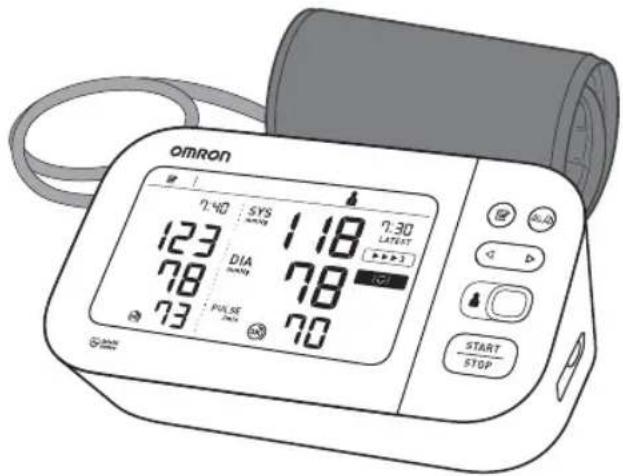
Read Instruction manual and before use.
FR Lire le mode d'emploi etvant l'utilisation.
DE Lesen Sie vor der Verwendung Gebrauchsanweisung und. 2
Leggere il manuale di istruzioni e prima dell'uso.
Lea el manual de instrucciones 17 antes del uso.
NL Lees gebruiksaanwijzing en voor gebruik.
RIpouHTe pyKOBOcTBa No 3KcNlyaTaunn 1 n 2 nepeinCNOB3OBAHneM.
TR Kullanmadan once, kullanim kilavuzu ye yizkuyun.
AR
| 1 | Package Contents............1 |
| FR Contenu de l'emballage | NL Inhoud van de verpakking |
| DE Packungsinhalt | RU Komplèkt noctabkn |
| IT Contenu della confazione | TR Paketin lcindekiler |
| ES Cont任何人都 del envase | México yatalas ............AR |
| 2 | Preparing for a Measurement..........4 |
| FR Préparation pour une prise de mesure | NL Een meting Voorbereiden |
| DE Vorbereiten einer Messung | RU Повотовке К Измерени |
| IT Preparazione per la misurazione | TR Ölcüm Hazirligi |
| ES Preparación para una medicación | AL ... |
| 3 | Downloading the "OMRON connect" App.....5 |
| FR Téléchargement de l'application « OMRON connect » | NL De app "OMRON connect" downloaden |
| DE Herunterlagen der App "OMRON connect" | RU 3açryзka приложения «OMRON connect» |
| IT Download dell'app "OMRON TR "OMRON Connect" | Uygulamasini Indirme |
| ES Descarga de la aplicación "OMRON connect" | "OMRON ...". |
| 4 | Inserting Batteries..........6 |
| FR Mise en place des piles | NL De batterijenplaatsen |
| DE Einlegen von Batterien | RU Установке заиментов...... |
| IT Inserimento delle batterie | PILLERI Takma |
| ES Introduccion de las pilas | AL ... AR |
| 5 | Pairing Your Smart Device......7 |
| FR Jumelage de votre apparéil intelligent | NL Uw smartapparaat koppelen |
| DE Koppeln mit Smartphone oder Tablet | RU Синхрониазаю смарт-усторьом |
| IT Associazione del dispositivo smart | TR Akilli Cihazinizin
Eşleştilirmesi |
| ES Sincronización con un dispositivo informativo | اللهان ملايرداني AR |
| 6 | Setting Date and Time Manually......8 |
| FR Réglage manuel de la date et de l'heure | NL Datum en tijd handmatig instellen |
| DE Manuelles Einstellen von Datum und Uhrzeit | RU Установka даты и Враемен вручны |
| IT Impostazione manuale di data e ora | TR Tarih ve Saatin Manuel
Olarak Ayarlanmasi |
| ES Ajuste manual de la Fecha y la hora | Siccaro Lelizio Lillapipovitsy |
| 7 | Applying the Cuff on the Left Arm......9 |
| FR Pose du brassard sur le bras gauche | NL De manchet op de linkerarm aanbrengen |
| DE Anbringen der Manschette am linken Arm | RU Раслоносяе манжete на лево руke |
| IT Applicazione del bracciale sul braccio sinistro | TR Kollugun Sol Kola Takilmasi |
| ES Colocación del manguito en el brazo izquierdo | AR |
| 8 | Sitting Correctly......11 |
| FR Position assise correcte | NL Correct zitten |
| DE Korrekte Körperhaltung | RU Сядte правильно |
Selecting User ID (1 or 2) 13
RU BbI6epnte NdeHTnΦnKaTOp nOJIb3OBaTeY (1 nn 2)
TR Kullanici Kimligini Segme (1 veya 2)
AR
10 Taking a Measurement. 14
FR RÉalisation d'une mesure
DE Eine Messung vornehmen
IT Misurazione
ES Obtencion de una lecture
NL Een meting verrachten
RU BbIopJIHeHne n3MepeHn
TR Bir Olcum Yapma
AR
11 Checking Readings in Comparison Mode.....18
FR Verification des mesures en mode de comparaison
DE Überprüfen von Messwerten im Vergleichsmodus
IT Controllo dei risultati in modalità Confronto
ES Comprobacion de las lecturas en modo comparativo
Using Memory Functions. 23
FR Utilisation des fonctions dememoire
DE Verwendung der Speicherfunktion
Uso delle funzioni di memoria
ES Uso de las functions dememoria
NL Geheugenfuncties gebruiken
RU NcnoJb3OBaHne yHKcnn NaMaTn
TR Hafiza Fonksiyonunun Kullanilmasi
AR
13 Other Settings. 26
FRAutres réglages
NL Andere instellingen
14 Optional Medical Accessories. 29
FR Accessoires medicaux en option
NL Optionele medische accessoires
15 Other Optional Parts. 30
2 Preparing for a Measurement
FR Préparation pour une prise de mesure
DE Vorbereiten einer Messung
Preparazione per la misurazione
ES Preparación para una medicación
NL Een meting Voorbereiden
RU NpOdrTOBka K u3MepeHnIO
TR Olçüm Hazirligi
AR
30 minutes before
FR 30 minutes avant
DE 30 Minuten vorher
IT 30 minutiprima
ES 30 horas antes
NL 30 minuten ervoor
RU 3a 30 MmHyT Do
TR 30 dakika once






AR
5 minutes before: Relax and rest.
FR 5 minutes avant : détente et repos.
DE 5 Minuten vorher: ruhig hinsetzen.
IT 5 minuti prima: rilassarsi e stare a riposo.
ES 5 horas antes: relajese y descanse.
NL 5 minuten ervoor: ontspan en rust.
RU 3a 5 MNHT Do: paccna6bTeCb n OTDOXHnTe.
TR 5 dakika once: Gevseyin ve dinlenin.
AR
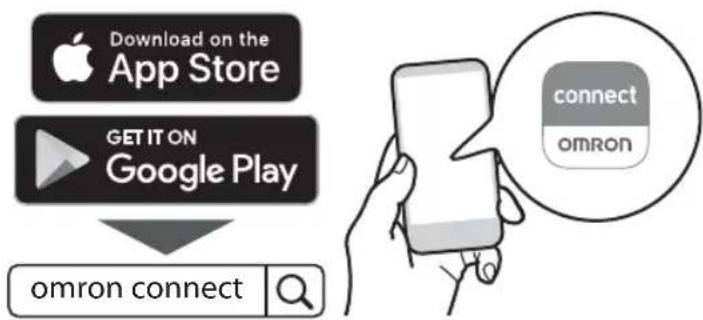
3 Downloading the "OMRON connect" App
FR Téchéargement de l'application « OMRON connect »
DE Herunterladen der App,OMRON connect"
Download dell'app "OMRON connect"
ES Descarga de la aplicacion "OMRON connect"
De app "OMRON connect" downloaden
RU 3arpyka npiloxeHn «OMRON connect»
TR "OMRON Connect" Uygulamasini Indirme
"OMRON JJAR
4 Inserting Batteries
FR Mise en place des piles
DE Einlagen von Batterien
Inserimento delle batterie
ES Introduccion de las pilas
NL De batterijenplaatsen
RU YCTAHOBKa 3JemeHToB NITaHnA
TR Pilleri Takma
AR
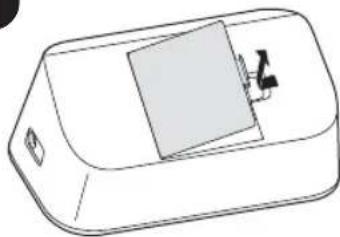
1
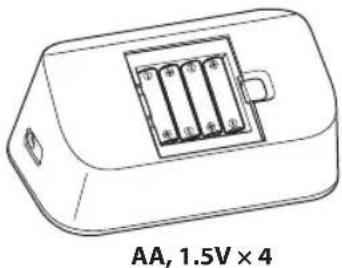
2
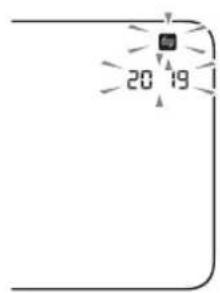
3
5 Pairing Your Smart Device
FR Jumelage de votre apparéil intelligent
DE Koppeln mit Smartphone oder Tablet
Associazione del dispositivo smart
E3 Sincronizacion con un dispositivo inteligente
NL Uw smartapparaat koppelen
RU CunxpoHn3aunco cMapr-ycTroynCTBOM
AKilli Cihazinizin Eşleştilimesi
AR

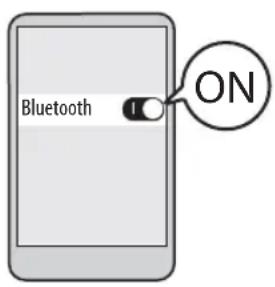


Follow the instructions.
FR Suivez les instructions.
DE Befolgen Sie die Anweisungen.
IT Attenersi alle istruzioni.
ES Siga las instrucciones.
NL Volg de instructies.
RU BbInOJIHrTe INHCTpyKlUm.
TR Talimatlari izleyin.
AR
The date and time will automatically be set when your monitor is paired with the app.
FR La date et l'heure seront automatiquement reglees lorsque voite tensionetre sera jumelé avec l'application.
DEWennIhrMessgeratmitderAppverknupftist,werdenDatumundUhrzeitautomatischeingestellt.
IT La data e l'ora verranno impostate automaticamente una volta che il misuratore verrà associato alla app.
ES La Fecha y la hora se ajustarán automatistically cuando el monitor se sincrione con la aplicacion.
NL De datum en tijd worden automatisch ingesteld wonneer uw bloeddrukmeter is gekoppeld aan de app.
RU DaTa N BpEmy UcTaHOBArTcABTOMaTHuYeCKN Iocne CINHXPOHn3aCm C npInIOKeHHeM.
TR Olçüm cihazıniz uygulamayla eşlestirildigiinde tarih ve staat otomatik olarak ayarlanir.
AR
6 Setting Date and Time Manually
FR Réglage manuel de la date et de l'heure
DE Manuelles Einstellen von Datum und Uhrzeit
Impostazione manuale di data e ora
Es Ajuste manual de la Fecha y la hora
NL Datum en tijd handmatig instellen
RU YctaHOBka DaTbI IN BpeMeHn BpyHyIO
TR Tarih ve Saatin Manuel Olarak Ayarlanmasi
AR
If your monitor is paired with your smart device, date and time is set automatically. When you need to set them manually, set year > month > day > hour > minute.
7 Applying the Cuff on the Left Arm
FR Pose du brassard sur le bras gauche
DE Anbringen der Manschette am linken Arm
m Applicazione del bracciale sul braccio sinistro
ES Colocacion del manguito en el brazo izquierdo
NL De manchet op de linkerarm aanbrengen
Ru PaCnoIoxKeHne MaXKeTbHa JleBoi pyKe
TR Kollugun Sol Kola Takilmasi
AR
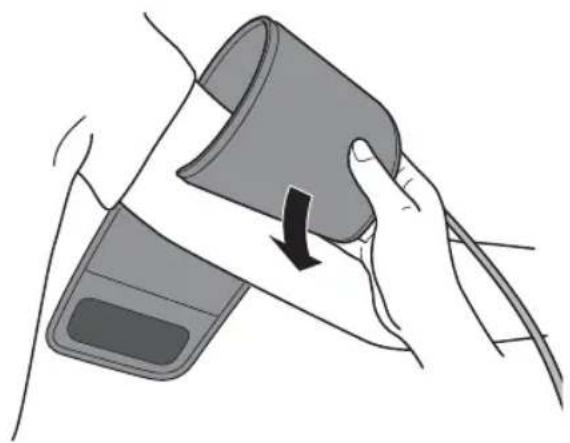
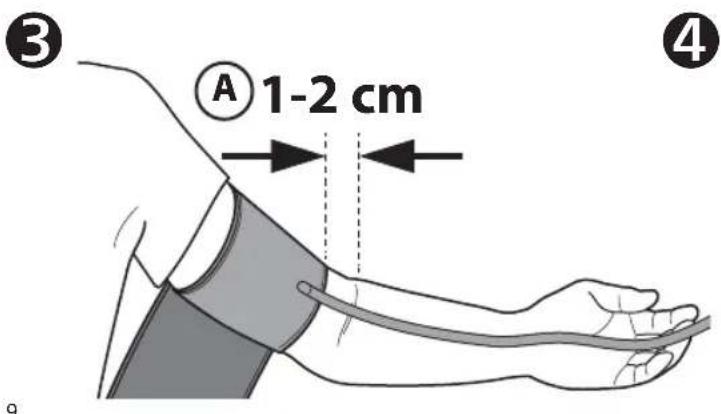
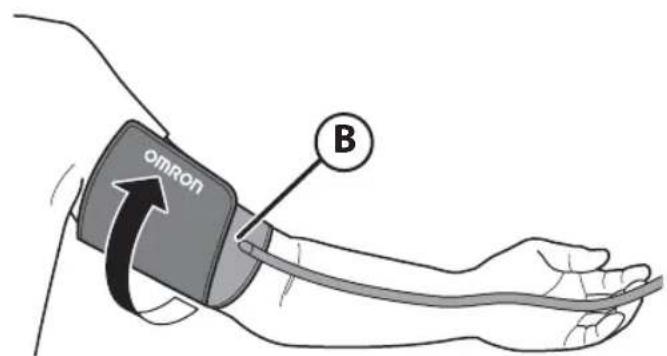
A Tube side of the cuff should be 1 - 2cm above the inside elbow.
FR Le cote tuyau du brassard doit etre positionn 1 a 2 cm au-dessus de I'intérieur du coude.
DE Das Manschettenstück mit dem Schlauch muss 1 bis 2 cm oberhalb des Ellbogens liegen.
Ilato del bracciale con il tubo deve trovarsi al di sopra del gomito interno, a una distanza di circa 1 o 2 cm.
ES El bajo del tubo del manguito deben estar 1 o 2 cm por encima de la parte interna del dato.
NL De Kant met de slang van de manchet moet 1 - 2 cm boven de binnenkant van de elleboog liggen.
RU Kpaai MaHKeTbI C Tpy6KoI OJXeH HaxOaNTbcra Ha 1-2 CM Bblie NOKTeBOr Crna.
TR Kollugun boru tarafi, dirsek icinin 1-2 cm ustunde olmalidir.
If taking measurements on the right arm, refer to:
FR Pour la prise de mesures au bras droit, voir:
DE Bei Messungen am rechten Arm siehe:
IT Se la misurazioneiene eseguita al braccio destro,fare riferimento a:
ES Si va a realizar medicaciones en el brazo derechocho, consulte:
NL Als u metingen aan de rechterarmuitvoert, raadpleeg dan:
RU Pnun3mepeHnHa npaBoi pyKe cm.
TR Saq koldan olcuml yapiyorsanz aşagidakilere bakin:
2.3
AR
Instruction Manual
B Make sure that air tube is on the inside of your arm and wrap the cuff securely so it can no longer slip round.
FR Assurez-vous que le tuyau à air se trouve du côte interieur de votre bras et enroulez fermement le brassard de manière qu'il ne puisse plus tourner.
DE Stellen Sie sicher, dass der Luftschlauch an der Arminnenseite sitszt, und befestigen Sie die Manschette sicher, so dass sie nicht verrutscht.
IT Assicurarsi che il tubo dell'aria si trovi all'interno del braccio e avvolgere il bracciale saldamente in modo che non possa ruotare.
ES Asegürese de que el tubo de aire se enquiryra en la cara interna del brazo y enrolle el manguito con firmeza para que no pueda deslizarse.
NL Zorg ervoor dat de luchtslang zich aan de binnenkant van uw arm bevindt en wikkel de manchet stevig rond uw arm zatat deze Niet meer kan weglijkden.
RU Y6eIntecb, TTO BO3dyxOBOHnA Tpy6Ka HaxoJITcHa BHyTppeHHne NOBepXHOCTn Pnuea n HadeJeH0 o6epHnTe MaHKeTy, YTO6bl OHa He npokpyuBaIacB BOKpyr pyKn.
TR Hava borusunun kolunuzun ic tarafinda oldugundan emin olun ve kollugu kaymayacak sekilde sabit sekilde sarin.
IaIall bJll 10 10 10 10 10 10 10 10 10 10 10 10 10 10 10 10 10 10 10 10 10 10 10 10 10 10 10 10 10 10 10 10 10
8 Sitting Correctly
FR Position assise correcte
DE Korrekte Körperhaltung
Come sedersi nel modo corretto
ES Como sentarse correctamente
NL Correct zitten
RU CyaBte npaBnBHO
TR Düzgün Oturma
AR
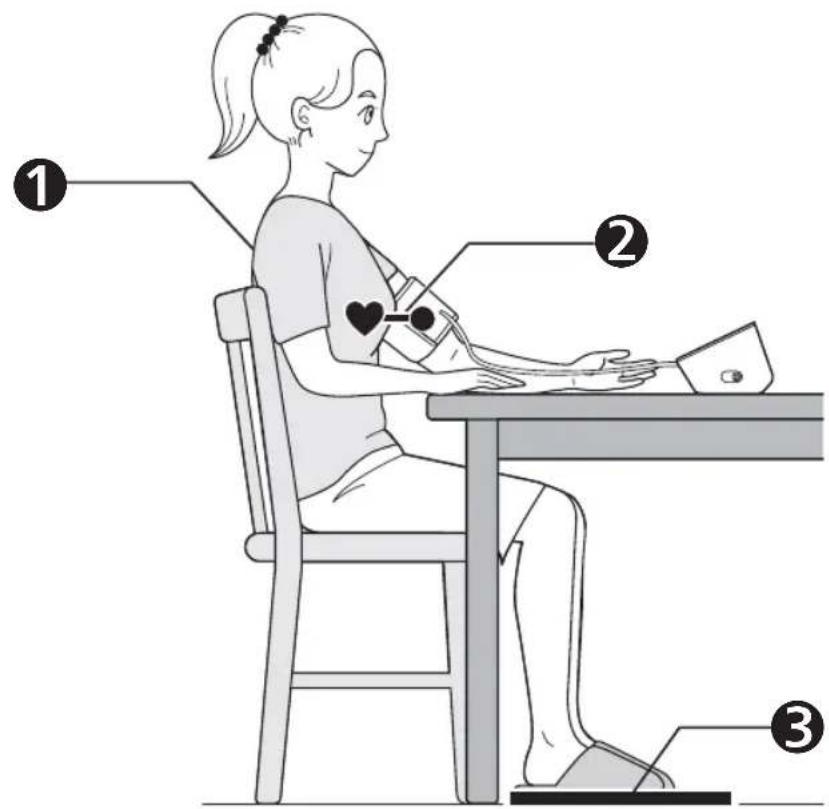
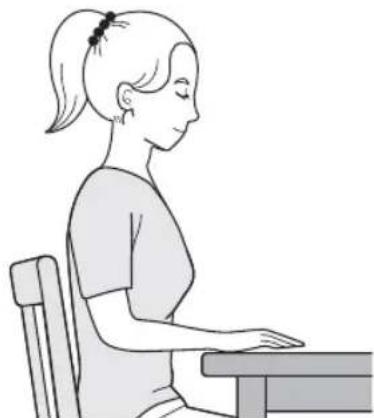
Sit comfortably with your back and arm supported.
FR S'asseoir comfortablement de maniere a ce que le dos et le bras soient bien soutenus.
DE Bequem hinsetzen, mit dem Rücken anlehen und den Arm auf eine Unterlage legen.
IT Sedere comodamente con la schiena e il braccio ben sosteniuti.
ES Siéntese cómodamente de modo que la espalda y el brazo estén bien apoyados.
NL Neem een comfortabile zitpositie in, met uw rug en arm ondersteund.
RU Cabyte yOo6Ho, yTO6bI cInHa n pyKa onnpaIncb Ha yTo-Jin6o.
TR Sirtiniz ve kolunuz desteklenerek rahat bir sekilde oturun.
AR
Place the arm cuff at the same level as your heart.
FR Le brassard doit se trouver au même niveau que votre cœur.
DE Die Manschette auf Herzhöhe platzieren.
IT Posizione are il bracciale allo stesso livllo del cuore.
ES Coloque el manguito al mesmo nivel que el corazón.
NL Plaats de armmanchet op hetzelfde niveau als uw hart.
RU MaHxTeA DoJxHa HaxOuTbCra Ha yPoBHe cepDua.
TR Kollugu kalbinizle ayni duzeye getirin.
Aaiei jy 8j 1j 1j 1j 1j 1j 1j 1j 1j 1j 1j 1j 1j 1j 1j 1j 1j 1j 1j 1j 1j 1j 1j 1j 1j 1j 1j 1j 1j
3 Keep feet flat, legs uncrossed, remain still and do not talk.
FR Garder les pieds à plat, les jambes non croisées, ne pas bouger et ne pas parler.
DE Fuße flach auf den Boden stellen, die Beine nicht kreuzen, still halten und nicht sprechen.
Teneri piedi ben poggiati, non incrociare le gambe, rinanere fermi e non parlare.
ES Mantenga los pies planos, las piernas sin cruzar, quedese quieto y noisable.
NL Houd de voeten plat, benen nicht gekruist, zit stil en praat nicht.
RU NocTaBbTe HOrn pOBHo, He nepeKpeuBaB nX, He DnraTecb n He pa3roBaBauite.
TR Ayaklarinizi diz, bacaklarinizi açık tutun, hareketsiz kaln ve konusmayin.
AR
9 Selecting User ID (1 or 2)
Switching user ID enables you to save readings for 2 people.
FR Changer d'ID Utilisateur permet d'enregister les résultats pour 2 personnes.
DE Mit verschiedene Benutzer-IDs setzen sich Messwerte für 2 Personen speichern.
IT Cambiare ID utente permette di registrar i risultati relativi a 2 personne.
ES Cambiar de ID de usuario le permette guardar las lecturas de 2 personas.
NL Door het wisselen van gebruikers-ID(Int sunt u metingen voor 2 personen opslaan.
RupeKIOeHne IeHTnФKaTopa NOnb3ObaTeIaN03BOnraT coXpaHrTaTb pe3yNbTaTbI n2- x IIOeJ.
TR Kullanici kimlikleriarasinda geci yapma,2 kisi icin olcumdegerlerini kaydetmenizi saglar.
AR
10 Taking a Measurement
FR RÉalisation d'une mesure
DE Eine Messung vornehmen
Misurazione
Obtencion de una lecture
NL Een meting verrachten
RU BbInOpHeHne n3MepeHn
TR Bir Olçüm Yapma


FRAprsune pression sur le bouton [START/STOP], la mesure demarre et le résultat est enregistré automatique. Ouvrir l'application pour transférer le résultat.
Beim Drucken der Taste [START/STOP] erfolgt die Messung. Die Messwerte werden automatisch gespeichert. Öffnen Sie die App, um die Messwerte zu übertragen.
[1] Quando si preme il pulsante [START/STOP], la misurazione viene eseguita e salvata automaticamente. Aprire la app per trasferire i risultati.
ES Al pulsar el boton [START/STOP], se obtiene la medicacion, que se guarda automatamente. Abra la aplicacion para transferir la lecture.
N L Wanner op de knop [START/STOP] worden gedrukt, worden de meting automatisch uitgevoerd en opgeslagen. Open de app om de meting te versturen.
Ru Nocne Toro, Ka KhoNka [START/STOP] Haxata, n3MepeHne BblnoHnEeTcN COxpaHReTcABTomatueckn. OTKpoTe npInoxKeHne, uTo6bI nepeDaTb pe3yNbTaTbI.
TR [START/STOP] duğmesine basildiginda olçüm yapilir ve otomatik略有kaydedilir. Olçüm degerini aktarmak icin uygulamayi acin.
AR
![OMRON X7 Smart - When the [START/STOP] button is pressed, the measurement is taken and saved automatically. Open the app to transfer the reading. - 1](/content/2026/03/460362/images/3a52b16541e8283c3fef9b234c81c17593a7a1f1173c7be216482a28f26f666e.jpg)
Taking a measurement in Afib mode
In the Afib mode, your monitor automatically takes 3 consecutive readings at 30-second intervals and displays the average. If there is a possibility of atrial fibrillation (Afib), "Afib indicator symbol" ( ) will appear.
This is not a diagnosis, it is only a potential finding for Afib. You should contact your physician to discuss the findings. If you are experiencing any symptoms, contact a medical professional.
Taking a measurement in guest mode
The guest mode can be used to take a single measurement for another user. No readings are stored in the memory, and the Afib mode is not available when the guest mode is selected.
FR Le mode Invite permet de mesurer la pression arterielle d'une autre personne une seule fois. Les résultats ne sont pas enregistrres dans la mémoire et le mode fibrillation auriculaire n'est pas disponible lorsque le mode Invite est sélectionné.
DE Soll eine einzelné Messung bei einem anderen Benutzer durchgefuhrt werden, kann davon der Gast-Modus aktiviert werden. Im Gast-Modus werden keine Messwerte gespeichert und der Afib-Modus steht nicht zur Verfugung.
La modalità Ospite può essere utilizzata per eseguire una singola misurazione su un diverso utente. I risultati ottenuiti non vengono memorizzati e la modalità Afib non è disponibile quando si selezione la modalità Ospite.
11 Checking Readings in Comparison Mode
FR Verificaton des mesures en mode de comparaison NL Metingen bekijken in vergelijkingsmodus
DE Überprüfen von Messwerten im Vergleichsmodus Ru PnoBepka pe3yNbTaTOB u3MepeHn B peKmE cpaBHeHn
Controllo dei risultati in modalità Confronto Karilalstirma Modunda Olcum Degerlerini Kontrol Etme
ES Comprobacion de las lecturas en modo comparativo
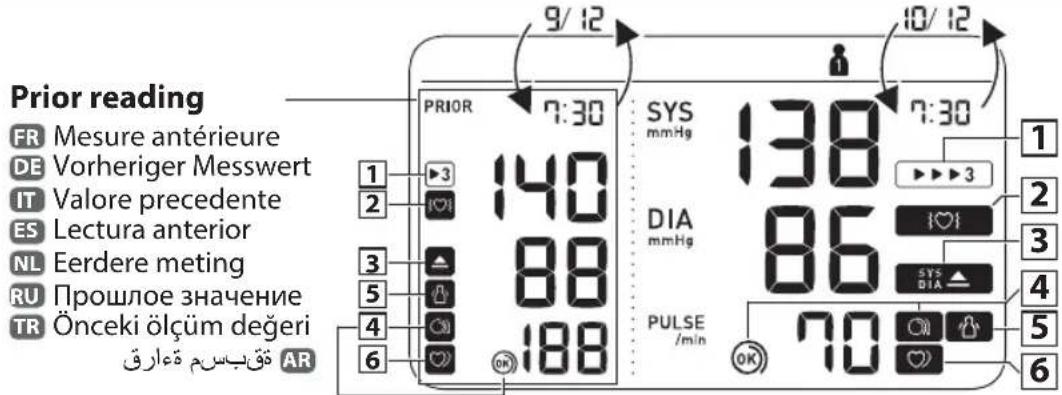
Appears when the reading was taken in Afib mode.
FR S'affiche lorsque la mesure a ete effectue en mode Fibrillation auriculaire.
3 DE Erscheint, wenn der Messwert im AFib-Modus ermittelt wurde.
IT Appare quando la misurazione è stata effettuata in modalità Afib.
Appears if a possibility of Afib* was detected during the Afib mode measurement. If it continues to appear, we recommend you to consult with and follow the directions of your physician.
Appears if "SYS" is 135 mmHg or above and/or "DIA" is 85 mmHg** or above.


Cuff is tight enough.
FR Le brassard est suffisamment serré.
DE Manschette sitzt ausreichend straff.
IT Il bracciale è stretto a sufficientia.
ES El manguito está lo suficientemente prieto.
NL Manchet zit strak genoeg.
RU MaHxeta 3aTAYTa DcTaTOuHO Tyro.
TR Kolluk yeterince sikidr.
AR

Apply cuff again MORE TIGHTLY.

FR Poser le brassard en le serrant davantage.
DE Manschette STRAFFER ziehen.
Appears when your body moves during a measurement. Remove the arm cuff, wait 2-3 minutes and try again.
(The body movement function is disabled when the possibility of Afib or irregular heartbeat is detected during a Afib mode measurement.)
FR S'affiche si vous rougez pendant une mesure. Retirer le brassard, attendre 2 à 3 minutes et essayer à nouveau. (La fonction de détéction des mouvements du corps est désactivée lorsqu'une possibilité d'Afib ou de pulsations cardiaques irrégulières est détectée durant une mesure en mode Afib.)
DE Wird angezeigt, wenn Sie sich während der Messung bewegen. Nehmen Sie die Manschette ab, warten Sie 2-3 Minuten und versuchen Sie es erneut. (Die Bewegungserkennung wird deaktiviert, wenn bei einer Messung im AFib-Modus ein mögliches Afib oder unregelmäßiger Herzschlag erkannt wird.)
Viene visualizzato se l'utilizzatore si muove durante la misurazione. Rimuovere il bracciale, attendere 2-3 minuti e riprovare. (La funzione di rilevamento del movimento del corpo viene disattivata qualora vengano rilevati una potenizia Afib o un battito cardiaco irresgolare durante una misurazione in modalità Afib.)
ES Aparece cuando se mueve el cuerpo durante una medicacion. Retire el manguito, espere uno 2 o 3 instantos e intelectelo de nuevo. (La direccion de movimiento corporal se inhabilita cuando se detecta la posibididad de Afib o latido cardiaco irregular durante una medicacion en modo de Afib.)
NL Verschijnt wonneer uw lichaam tijdens een meting beweegt. Verwijder de armmanchet, wacht 2-3 minutes en probeer het opniew. (De lichaamsbewegingsfunctie worden uitgeschakeld wonneer de mogelijkheid van Afib of een onregelmatie hartslag worden gedetecteerd tijdens de Afib-modusmeting.)
RU OTo6paKaTaC npn DnIkeHnN TeNa BO BpeMa n3MepeHnna. Chmnte MaHxety, noOxDnTe 2-3 MNHTb N nonpo6yTne eue pa3. (Ecn npn n3MepeHnB PexMme Aflb onpeJeTc BepoTHocTb Afib nn HeperypHoro cepdue6NeHn, FyHKuNn o6HapyeHn DnIkeHn Ta nOTKnIOUaTcR.)
TR Bir olcum esnasinda vucudunuz hareket ettginde gurunur. Kollugu cikarin, 2-3 dacika bekleyip tekar deneyin. (Afib modunda olcum sirasinda Afib olasiligi veya duzensiz kalp atisi tespit edildiginde vucut hareketi islevi devre di birakir.)
eJbI bI aI y Jy 100000000000000000000000000000000000000000000000000000000000000000000000

Appears when an irregular rhythm* is detected during a measurement. If it continues to appear, it is recommended to consult your physician. (It does not appear during a Afib mode measurement)
- Afib and an irregular heartbeat rhythm are defined as a rhythm that is 25 % less or 25 % more than the average rhythm detected while your monitor is measuring blood pressure. The difference between the Afib indicator function and irregular heartbeat function is:
Afib indicator function: detects Afib possibility in 3-times measurement.
Irregular heartbeat function: detects irregular heartbeat including Afib in 1 measurement.
FR * L'afib et les pulsations cardiaques irregulares sont des pulsations dont la frquence est supérieure ou inférieure de 25% par rapport a la moyenne detectee lorsque I'appareil mesure la pression arterielle. La differenc entre la fonction indicateur Afib et la fonction pulsations cardiaques irregulares est la suivant: Fonction indicateur Afib : detecte la possibilite d'une Afib par une mesure repetee 3 fois. Fonction pulsations cardiaques irregulares : detecte des pulsations cardiaques irregulares, y compris une Afib, en 1 mesure.
* Afb und unregelmäßiger Herzschlag sind definiert als ein Herzrhythmus, der 25 % unter oder 25 % über dem mittleren Herzrhythmus liegt, der während der Blutdruckmessung erkannt wird. Der Unterschied zwischen Afb-Hinweisfungkund und Erkennung unregelmäßiger Herzschläge ist: Afb-Hinweisfungkund: Erkennnt bei 3-maliger Messung möglicherweise vorliegenden Afb. Erkennung unregelmäßiger Herzschläge: Erkennnt unregelmäßigen Herzschlag einschließlich Afb bei 1-maliger Messung.
* Per Afib e battito cardiaco irregolare si intende la presenza di variazioni inferiori del 25% o superiore del 25% nel ritmo rispetto al ritmo medio rilevato dall'apparecchio durante la misurazione della pressione arteriosa. La differenza tra la funzione dell'indicatore Afib e la funzione battito cardico irregolare è la segunte: La funzione dell'indicatore Afib rileva la potenziale presenza di Afib mediante 3 misurazioni ripetute. La funzione battito cardiaco irregolare rileva il battito irregolare inclusa la Afib in 1 misurazione.
ES * La Afib y un ritmo de latido cardiaco irregular se defineen como aquel ritmo que es el 25% inferior o el 25% superior al ritmo cardiaco medio detectado cuando el monitor mide la presion arterial. La diferencia entre la functiOn de indicator de Afib y la functiOn de latido cardiaco arritmico es: Funcion de indicator de Afib: detecta una possible Afib en 3 mediciones. Funcion de latido cardiaco irregular: detecta un latido irregular incluyendo Afib en 1 medicacion.
NL* Afib en onregelmatige hartslag zijn gedeefinieerd als een harritme dat meer dan 25% lager of 25% hoger is dan het gemiddelde harritme tijdens het meten van de bloeddruk door de meter. Het verschil tussen de Afib-indicatorfunctie en onregelmatige hartslagfunctie is: Afib-indicatorfunctie: detecteert de mogelijkheid op Afib in een driemalige meting. Onregelmatige hartslagfunctie: detecteert onregelmatige hartslag inclusief Afib in een meting.
RU * Afib n Heperynayhbi pntM cepue6neHnra - 3o pTm, KOTOpB h a 25% MeJHee nnHa ha 25% 6bIcpee cpeHoro pNTma, onpeeneHHoro np6opom npu n3mepeHn artepaalbHorO daBHeHn. Pa3InuHm MExdy fynKnei HndkaTopa Afib n fynKnei HepeyraepHO rce6neHn: FynKzua INDkAToPA Afib: onpeJeet BepoTHocb Afib np TrpexKpaTHOM n3MepeHn. FynKzua Heperynayr HorO cepue6neHn: onpeJeet HeperynayrHbce cepdeuHbce cokpaeeHn, BKnUoya Afb, npn ODHOKpAHOM n3MepeHn.
TR * Afib ve dizensiz kalp ati ri tmi, olc um cihaziniz tansiyon ocmu yaparken saptanan ortalama ritme gore %25'ten az ya da %25'ten fazla sapma gosteren rim alak tanimlanir. Afib gostergesi fonksiyonu ve dizensiz kalp atisi fonksiyonuarasindaki fark su sekildedir: Afib gostergesi fonksiyonu: 3 kez yapilan olc umde Afib olasligini tespit eder. Duzensiz kalp atisi fonksiyonu: 1 olc umde, Afib de dahil olmak uzere dizensiz kalp atisi tespit eder.
jag aag g ylll jalal gglg lglal gglal gglal gglal gglal gglal gglal gglal gglal gglal gglal gglal gglal gglal gglal gglal gglal gglal gglal gglal gglal gglal gglal gglal gglal gglal gglal gglal gglal gglal gglal gglal gglal gglal g
** The high blood pressure definition is based on the 2018 ESH/ESC Guidelines.
FR** La definition de l'hypertension est basée sur les recommendations ESH/ESC 2018.
DE ** Die Definition für Bluthochdruck basiert auf den 2018 ESH/ESC-Richtlinien.
IT ** La definizione di alta pressione arteriosa si basa sulle linee guida 2018 di ESH/ESC.
ES ** La definacion de presion arterial alta se basa en las guias 2018 ESH/ESC.
NL ** De definitie van hoge bloeddruk is gebaseerd op de ESH/ESC-richtlijnen uit 2018.
RU ** OnpeJeHHe BbICOKOr apTePnaIbHoro daBHeHnO cHOBaHO Ha PeKOMeHaaIaIax 2018 ESH/ESC.
TR ** Yüksek tansiyon tanimi, 2018 ESH/ESC Kilavuzlarini temel alir.
(ESH)pIaiaiaiaiaiaiaiaiaiaiaiaiaiaiaiaiaiaiaiaiaiaiaiaiaiaiaiaiaiaiaiaiaiaiaiaiaiaiaiaiaiaiaiaiaiaiaiaiaiaiaiaiaiaiaia
Error messages or other problems? Refer to:
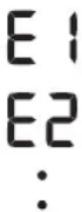
Messages d'erreur ou autres problèmes?Voir:
DE Weitere Fehlermeldungen oder Probleme siehe:
Maggi di erre o altri problemi? Fare riferimento a:
ES Hay mensajes de error u outros problemas? Consulte:
Foutmeldingen of andere problemen? Raadpleeg:
RU Coo6eHn8 o6 owu6kax nn npyrrn HeNCnpaBHOCTn? Cm.
TR Hata mesajlari veya baska sorunlar mi var? Bkz:
Instruction Manual 1 3.
12 Using Memory Functions
FR Utilisation des fonctions de mémoire
De Verwendung der Speicherfunktion
Uso delle funzioni di memoria
E5 Uso de las functions de memoria
NL Geheugenfuncties gebruiken
RU Ucnonb3ObaHne yHKcHn namrTn
TR Hafiza Fonksiyonunun Kullanilmasi
0s111 1
Before using memory functions, select your user ID.
FR Avant d'utiliser les fonctions de memoire, selectionnerer voite ID Utilisateur.
DE Wahlen Sie vor dem Verwenden der Speicherfunktionen ihre Benutzer-ID aus.
IT Prima di utilizzare le funzioni di memoria selezionare il proprio ID utente.
ES Antes de usar las functions de memoria, seleccione su ID de usuario.
NL Selecteer uw gebruikers-ID voordat u geheugenfuncties gebruikt.
RU Pered nCnoJb3OBAHnem fynKcnn namTn Bbl6epnte ndtNfokaTOp noJIb3ObaTeIa.
TR Hafiza fonksiyonunu kullanmadan once kullanici kimliginizi seksin.
AR
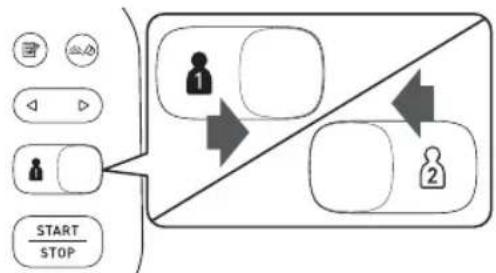
12.1 Readings Stored in Memory
FR Mesures stockées en mémoire
DE Gespeicherte Messungen
IT Risultati conservati in memoria
ES Lecturas guardadas en la memoria
NL Meetwaarden opgeslagen in het geheugen
RU CoxpaHHeHpe3yNbTaTOB b nAMrTn
TR Hafizada Saklanan Olcum Degeleri
AR
Stores up to 100 readings.
FR Mémorise jusqu'à 100 résultats.
DE Es werden bis zu 100 Messwerte gespeichert.
IT Conserva fino a 100 risultati.
ES Almacena hasta 100 lecturas.
NL Slaat tot maximaal 100 metingen op.
RU CoxpaHReTcIIO 100peyntaTOB.
TR 100 adeede kadar oIc um degeri saklar.
AR
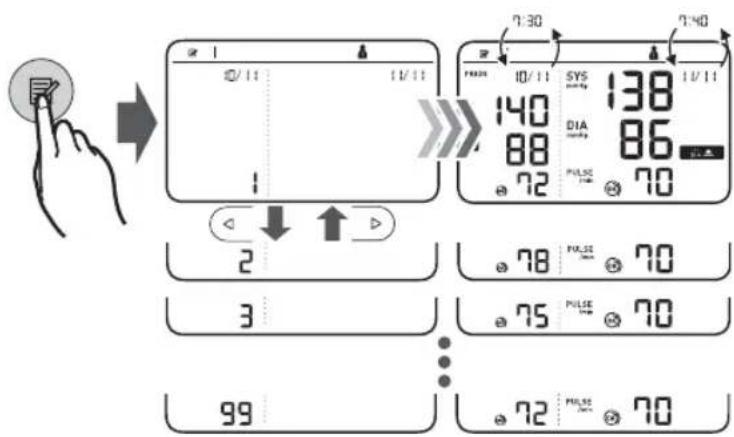
Morning/Evening Weekly Averages
FR Moyennes hebdomadaires matin/soir
DE Wochentliche Morgen-/Abendmittelwerte
Media settimanale mattutina e serale
ES Valor promedio semanal demana y noche
NL Weekgemiddelden van ochtend- en avondwaarden
RU YtpEHnE/BeepHne CpeHnE 3HaueHn8 3a HeJeIO
TR Sabah/Akşam Haftalık Ortalamaları
AR
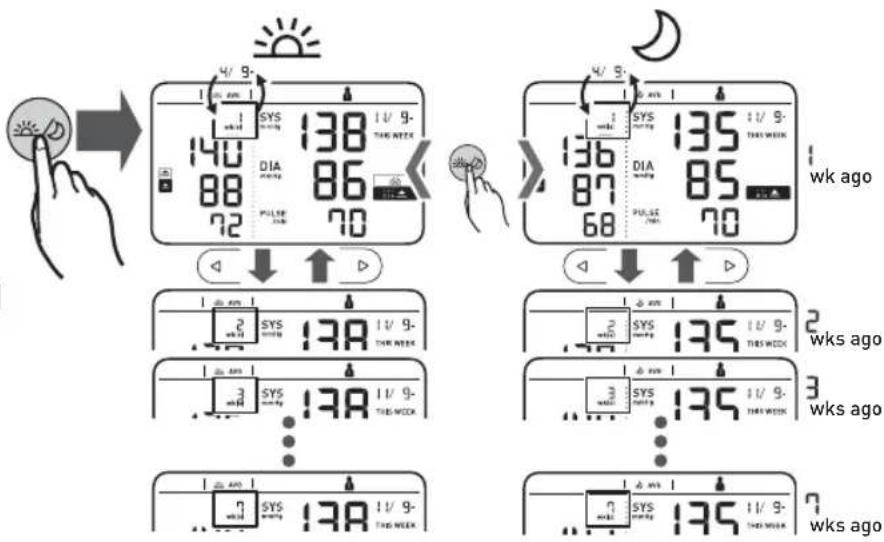

Appears if "SYS" is 135 mmHg or above and/or "DIA" is 85 mmHg or above in the morning weekly average.
FR S'affiche si « SYS » est égale ou supérieure à 135 mmHg et/ou « DIA » égale ou supérieure à 85 mmHg dans la moyenne hebdomadaire du matin.
DE Wird angezeigt, wenn im wochentlichen Morgenmittelwert, ^ 135mmHg oder mehr und/oder, ^ 85mmHg oder mehr beträgt.
Viene visualizzato se la pressione sistolica "SYS" è pari o superiore a 135 mmHg e/o la pressione diastolica "DIA" è pari o superiore a 85 mmHg nella media mattutina settimanale.
ES Aparece si "SYS" es 135 mmHg o superior y/o "DIA" es 85 mmHg o superior en el promedio semanal de manana.
NL Verschijnt als "SYS" 135 mmHg of hoger is en/of "DIA" 85 mmHg of hoger is in het ochtendweekgemiddelde.
RU OTo6paJaaetcA,ecnI cpeHne yTpEnHne 3a HeJeIO 巧 S Y S 135 MM.pT.ct. n BbIe n/WIIu 巧 D A 85 MM.pT.ct. n BbIe.
TR Sabah haftalik ortalamasinda "SYS" 135 mmHg ya da utunde oldugunda ve/veya "DIA" 85 mmHg** ya da utunde oldugunda görünür.
AR
To know how to calculate weekly averages, refer to section 10 of the Instruction Manual
FR Pour savoir comment calculer les moyennes hebdomadaires, se reporter à la section 10 du Mode d'emploi①.
DE Wie die wochentlichen Mittelwerte berechnet werden, ist in Abschnitt 10 der Gebrauchsanweisung ① beschreiben.
Per sapere come calcolare le medie settimanali, consultare la sezione 10 del manuale di istruzioni
ES Para saber como calcular medicaciones semanales, consulte la seccion 10 del manual de instrucciones
NL Zie paragraaf 10 van de gebruiksaanwijzing ① voor aanwijzingen hoe u het wekelijkke gemiddelde kunt berekenen.
RU O TOM, KaP paccHTbIaIOCTcpeDHeHne 3HaueHnra 3a HeDenIO, CM. pa3dE10 3TOrO pyKOBOcTBa no 3KcNpyaTauu ①.
TR Haftalik ortalamalarin面目heplanacagini ogrenmek icin, Kullanim Kilavuzu ① de bolum 10'a bakin.
1 1
12.3 Average of the Latest 2 or 3 Readings Taken within a 10 Minute Span
FR Moyenne des 2 ou 3 dernières mesures prises en l'espace de 10 minutes
DE Mittelwert der letzten 2 oder 3 Messwerte, die in einem 10-Minuten-Zeitrahmen erfasst wurden
Media degli ultimi 2 o 3 risultati ottenuti nell'arco di 10 minuti
ES Promedio de las 2 o 3 ultimaslectureuras realizadas en un intervalo de 10 minutes
NL Gemiddelde van de)[-3 metingen uitgevoerd binnen een tijdspanne van 10 minutes
RU CpeHHe 3HaueHHe nocnEHNx 2-x nn 3-x pe3yIbTaTOB, nonyueHHbIX B TeueHHe 10 MmHyT
TR 10 Dakika Aralikta Alinan Son 2 veya 3 Olcum Degerinin Ortalamasi
g1 1. gia jia jia dJia aljoo 10 J 1 jui jai jai AR
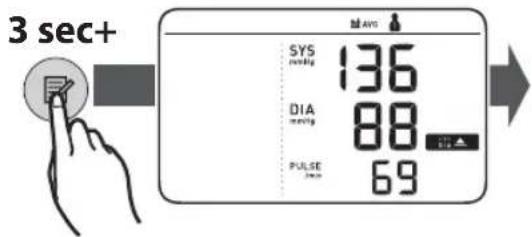
12.4 Deleting All Readings for 1 User
FR Suppression de toutes les mesures pour 1 utiliseur
DE Loschen aller Messwerte fur Benutzer 1
IT Eliminazione di tutti i risultati relativi a 1 utente
ES Eliminación de todas las lecturesas de un usuario
NL Alle meetresultaten voor 1 gebruiker wissen
RU ydaeneHne Bcex n3MepeHn OndHO rONb3OBaTeJIa
TR 1 Kullanici icin Tum Olçüm Değerlerini Silme
AR
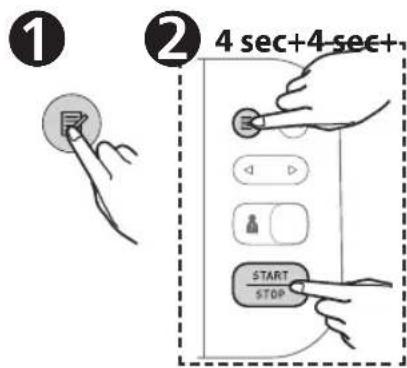
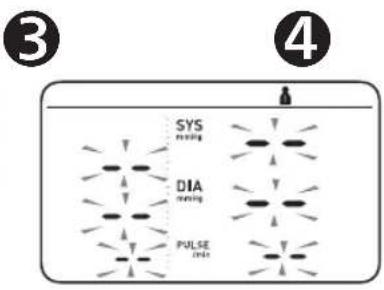
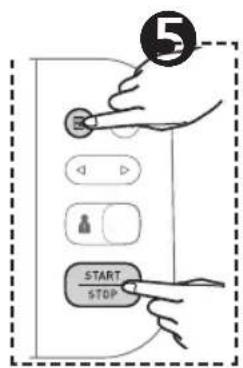
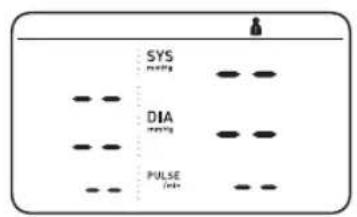
13 Other Settings
FRAutres réglages
DE Weitere Einstellungen
Altre impostazioni
Es Otros ajustes
NL Andereinstallingen
Ru pyrme hactpoKu
TR Diger Ayarlar
AR
13.1 Disabling/Enabling Bluetooth
FR Déactivation/activation de Bluetooth
DE Deaktivieren/Aktivieren der Bluetooth-Funktion
IT Disattivazione/attivazione della funzione Bluetooth
ES Activar o desactivar el Bluetooth
NL Bluetooth uitschakelen/inschakelen
RU BbIKIOUeHHe/BKIOUeHHe Bluetooth
TR Bluetooth'u Devre Disi Birakma/Etkinlestirme
Bluetooth
Bluetooth is enabled by default.
FR Bluetooth est activé par défaut.
DE Die Bluetooth-Funktion ist standardmaBig aktiviert.
La funzione Bluetooth è attiva per impostazione predefinita.
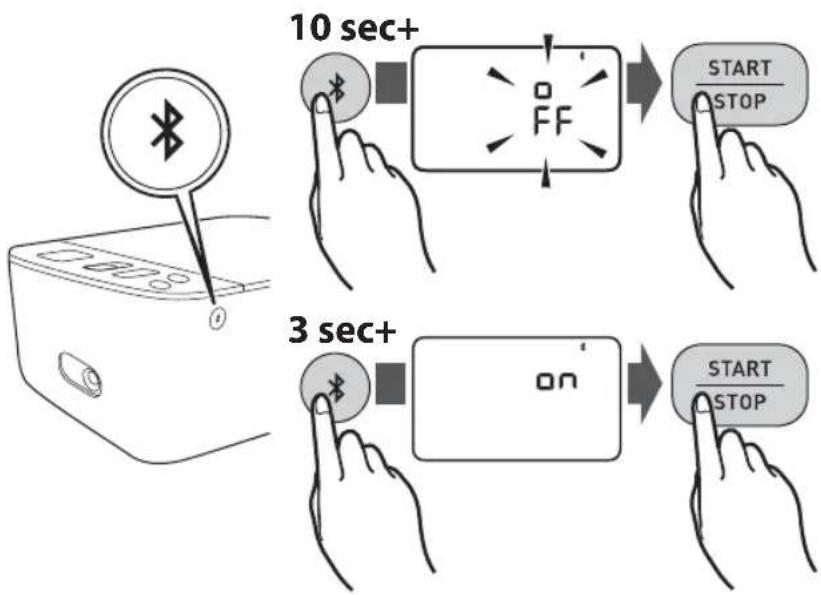
ES El Bluetooth está aktivado por defection.
NL Bluetooth is standard insgeschakeld.
RU Bluetooth BkHoue Hn yMOnuHaHIO.
TR Bluetooth varsaylan olarak etkindir.
AR
13.2 Restoring to the Default Settings
If your systolic pressure is more than 210mmHg
After the arm cuff starts to inflate, press and hold the [START/STOP] button until the monitor inflates 30 to 40mmHg higher than your expected systolic pressure.
FR Si votre pression systolique est supérieure à 210 mmHg :
Lorsque le brassard commence a se gonfler, appuyer sur le bouton [START/STOP] et le maintainir enforcé jusqu'à ce que le tensiomètreatteigne une pression de gonflage supérieure de 30 à 40 mmHg à votre pression systolique attendue.
DE Nach dem die Manschette begonnen hat, sich aufzupumpen, drucken Sie die [START/STOP]-Taste, und halten Sie sie gedrückt, bis ein Druck von 30 bis 40mmHg über Ihr erwarteten systolischen Druck erreicht ist.
T Se la pressione sistolica è superiore a 210 mmHg:
14 Optional Medical Accessories
FR Accessoires medicaux en option
DE Medizinisches optionales Zubehör
Accessori medicali opzionali
ESAccesorios medicospcionales
NL Optionele medische accessoires
RU DOnonHnTeIbHO npHaadneXHOCTN
TR Opsiyonel Tibbi Aksesuarlar
AR
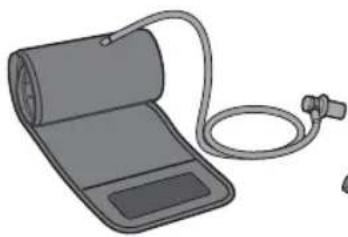
Arm Cuff
(HEM-FL31)
22-42cm
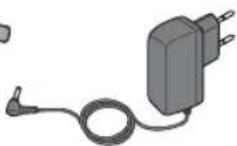
(HHP-CM01)
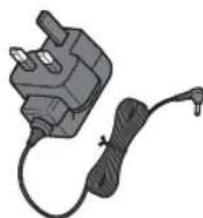
AC Adapter
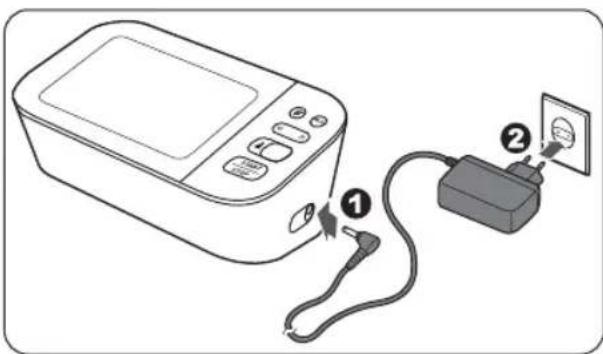
(HHP-BFH01)
Do not throw the air plug away. The air plug can be applicable to the optional cuff.
FR Ne pas jeter la prise de gonflage. La prise de gonflage peut etre utilise pour le brassard en option.
DE Entsorgen Sie den Luftschlauchstecker nicht. Der Luftschlauchstecker wird fur die optionale Manschette verwendet.
IT Non gettare via l'attacco del tubo dellaria. L'attacco del tubo dellaria cui essere applicato al bracciale opzionale.
ES No tire el conductor para tubo de aire. El conductor para tubo de aire peut ser utilisé con el manguito optional.
NL Gooi de plug van de luchtslang Niet weg. De plug van de luchtslang kan worden gebruikt op de optionele manchet.
RU He BbI6paBaiTe BO3dyHbI uTeKeP. OH MOKeT NOoITn K DOnONHTeBHO MaHKeTe.
TR Hava tipasini atmayin. Hava tipasi stege bagli kolluga uygulanabilir.
AR
15 Other Optional Parts
FRAutres pieces en option
DE Weitere optionale Teile
Altri componenti opzionali
ES Otras piezas.optionales
NL Overige optionele onderdelen
Ru Dpyrue donoHHTenbHO npno6peTaemble 3anachbte qactn
TR Diger Aksesuarlar
AR
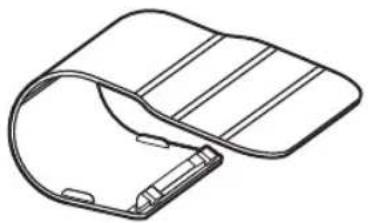
Protective LCD Cover (HEM-CACO-734)
https://www.omron-healthcare.com/
| Manufacturer
Fabricant
Hersteller | Produttore
Fabricante
Fabrikant | Проблемы в EC
Üretici
الإستعمال
丛Else | OMRON HEALTHCARE Co., Ltd.
53, Kunotsubo, Terado-cho, Muko, KYOTO, 617-0002 JAPAN |
| EC REP
EU-representative
Mandataires dans l'UE | EU-Représentant
Rappresentante per l'UE
Representante en la UE
Vertegenwording in de EU | Пrepédавител в EC
AB temsilcisi
сю任性ticity
الإستعمال
from | OMRON HEALTHCARE EUROPE B.V.
Scorpius 33, 2132 LR Hoofddorp, THE NETHERLANDS
www.omron-healthcare.com |
| Importer in EU
Importateur dans l'UE
Importeur in der EU | Importatore per l'UE
Importador en la UE
Importeur in de EU | Импорет в EC
AB'de l'thalatci
الإستعمال
from | OMRON HEALTHCARE MANUFACTURING VIETNAM CO., LTD.
No.28 VSIP II, Street 2, Vietnam-Singapore Industrial Park II,
Binh Duong Industry-Services-Urban Complex, Hoa Phu Ward,
Thu Dau Mot City, Binh Duong Province, Vietnam |
| Production facility
Site de production
Produktionsstätte | Stabilimento di produzione
Planta de produzione
Productiefacilité | П reproducibili
noipadação
üretim Tesisi
construţional | OMRON HEALTHCARE UK LTD.
Opal Drive, Fox Milne, Milton Keynes, MK15 0DG, UK
www.omron-healthcare.com |
| Subsidiaries
Succur Sales
Niederlassungen | Consociate
Empresas filiales
Dochteronder-
nemingen | Фионалы
Yan Kuruluşlar
الإستعمال
from | OMRON MEDIZINTECHNIK HANDELSGESELLSCHAFT mbH
Konrad-Zuse-Ring 28, 68163 Mannheim, GERMANY
www.omron-healthcare.com |
| OMRON SANTÉ FRANCE SAS
3, Parvis de la Gare, 94130 Nogent-sur-Marne, FRANCE
Uniquement pour le marché français:
OMRON ServiceAprès Vente
No Vert 0 800 91 43 14
www.omron-healthcare.com |
Made in Vietnam / Fabrique en Vietnam / Hergestellt in Vietnam / Prodotto in Vietnam / Fabricado en Vietnam / Geproduceerd in Vietnam / Cdnano Bo Bbentame /
Vietnam'da Uretilmi stir /
Issue Date / Date de publication / Ausgabedatum / Data di pubblicazione / Fecha de publicacion / Uitgiftedatum / Data binycka / Teslim Tarihi / 2020-03-09