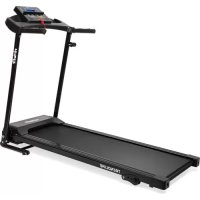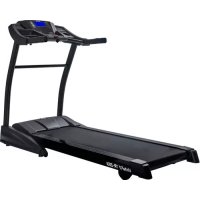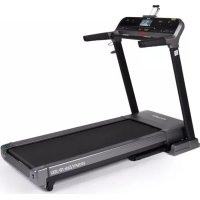
Elite TR500i - Treadmills VirtuFit - Free user manual and instructions
Find the device manual for free Elite TR500i VirtuFit in PDF.


| Product Type | Folding treadmill |
| Brand | VirtuFit |
| Model | Elite TR500i |
| Usage | Home |
| Maximum user weight | 150 kg |
| Speed | 0.8 - 20 km/h |
| Incline | 0 - 15% (motorized) |
| Training programs | 24 preset + 3 user + 2 HRC + body fat test |
| Display | LCD screen with time, distance, calories, speed, heart rate, incline |
| Heart rate sensors | Handgrip + wireless receiver (5 kHz, optional chest strap) |
| Connectivity | Bluetooth (for FitShow, Kinomap, Zwift), MP3/AUX, speakers |
| Safety | Safety key with emergency stop |
| Folding | Yes, folding system with gas shock and transport wheels |
| Transport wheels | 2 front wheels |
| Dimensions (L x W x H) | Approximately 185 x 84 x 140 cm (unfolded) |
| Net weight | Approximately 80 kg |
| Power supply | 220-240 V, 50/60 Hz (mains plug) |
| Warranty | 2 years (excluding improper use or lack of maintenance) |
| Maintenance | Lubricate belt every 300 km; regular cleaning |
| Spare parts | Available through VirtuFit after-sales service |
Frequently Asked Questions - Elite TR500i VirtuFit
User questions about Elite TR500i VirtuFit
0 question about this device. Answer the ones you know or ask your own.
Ask a new question about this device
Download the instructions for your Treadmills in PDF format for free! Find your manual Elite TR500i - VirtuFit and take your electronic device back in hand. On this page are published all the documents necessary for the use of your device. Elite TR500i by VirtuFit.
USER MANUAL Elite TR500i VirtuFit
NOTE! Don't open the packag belt (P) before the treadmill is fully assembled.
| Safety instructions | 11 | ||
| Guarantee | 11 | ||
| Assembly instructions 11 | |||
| Adjusting | 12 | ||
| Folding instructions 12 | |||
| Moving instructions 12 | |||
| Security key | 12 | ||
| Training with heart rate 12 | |||
| Training with fitness applications 13 | |||
| Maintenance | 13 | ||
| Lubricating | 14 | ||
| Troubleshooting | 14 | ||
| Console | 15 | ||
| Programs | 16 | ||
| Training guidelines | 18 | ||
SAFETY INSTRUCTIONS

WARNING!
Consult your doctor before you start exercising. This is particularly important for people with health problems. Please read all instructions before using the machine. VirtuFit assumes no responsibility for injury or property damage resulting from the use of this equipment. Please read this manual carefully before assembling and/or using the machine.
- Make sure that the machine is properly assembled and that all nuts and bolts are tight before using it.
- Do not wear loose clothing to avoid getting caught in moving parts.
Install and use the unit on a solid, level surface.
Always wear clean sports shoes when using the appliance. - Keep children and pets away from the appliance when in use.
- Maintain your balance when using the device.
- Do not place your fingers or other objects in the moving parts.
Before exercising, consult your physician to determine the appropriate frequency, duration and intensity of exercise for your age and physical condition. Stop exercising immediately if you experience nausea, shortness of breath, fainting, headache,
chest pain, tightness or any other discomfort.
This machine should only be used by one person at a time.
- This machine is designed for domestic use and the maximum user weight is 150kg .
- Leave 1-2 metres of space behind the machine to avoid accidents.
- Place the machine on a clean, flat surface. Do not place it on a thick carpet, as this may hinder the ventilation of the machine. Do not place the machine outdoors or near water.
- Keep the storage area dry, clean and level to prevent damage.
- Do not use the device for any purpose other than training.
- Use the device only in an environment where the ambient temperature is between 10^ and 35^ . Store the device only in an environment where the temperature is between 5^ and 45^ .
GUARANTEE
Warranty claims are excluded if the cause of the defect is the result of:
- Maintenance and repair work not carried out by an official dealer. Provided otherwise specified by the supplier
- Improper use, negligence and/or poor maintenance.
- Failure to maintain the appliance in accordance with the manufacturer's instructions.
ASSEMBLY INSTRUCTIONS (STEP 01-08)
Missing parts: If any parts are missing from the packaging, carefully check the polystyrene foam and the appliance itself. Some parts (bolts, screws, etc.) are already attached to the unit.
Error message: Make sure that all cables are carefully attached. The aluminium feet of the console are very sensitive and must be kept straight. If the console gives an error message after the machine has been mounted, the aluminium feet of the console may be bent. Straightening the aluminium feet may make the error message disappear.
Hex head bolts: Make sure that the hex head spanner is pushed into the bolt before applying force. This will prevent the head of the socket bolt from turning.
ADJUSTING
Adjusting
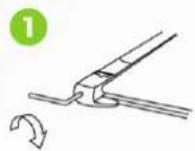
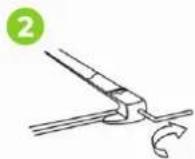
- The treadmill veers to the left: Turn on the treadmill, set the speed to 2 to 3km / h without forcing. Use the Allen key to turn the screw on the left side of the end of the treadmill a quarter turn to the right (I). Run the treadmill for 1 to 2 minutes without a load. Repeat the process until the treadmill is exactly in the middle.
- The treadmill turns to the right: start the treadmill, set the speed to 2 to 3km / h without a load on the treadmill. Using the hexagonal key, turn the screw on the right side of the end of the treadmill a quarter turn to the right (2). Run the treadmill for 1 to 2 minutes without a load.
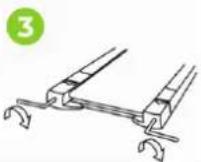
- The treadmill has jammed: Use the Allen spanner to turn the screw on the right side of the end half a turn to the right and the screw on the left side of the end half a turn to the right as well. Repeat the process until the blockage is resolved (3).
FOLDING AND UNFOLDING INSTRUCTIONS
NOTE! Keep the appliance in a dry room and out of reach of children. Ensure that the appliance is stable and secure so that it cannot fall on children or animals.
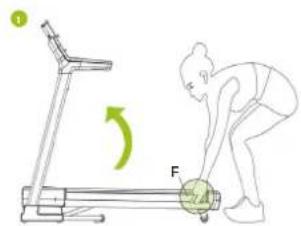
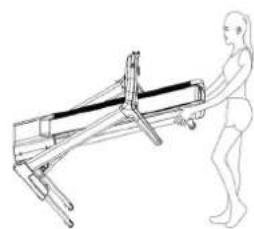
Floding (1)
Support the treadmill with your hands at point F.
Push the treadmill upwards until you hear a spring noise.
The treadmill is folded.
CAUTION! Do not fold the treadmill while it is in use.
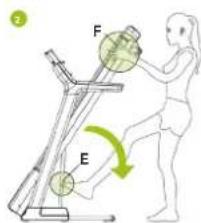
Unfolding (2)
Support the treadmill with your hands at point F.
Press point E with your foot and the treadmill will unfold.
Hold the belt and guide it until it touches the floor.
The treadmill is unfolded.
MOVING INSTRUCTIONS
NOTE! Keep the machine in a dry room and out of reach of children. Make sure the unit is stable and secure to prevent it from falling on children or pets.
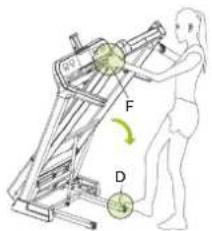
Support the treadmill with your hands at point F.
- With your hands (F), slowly push the treadmill down to the floor. When the lowest point with position F is reached, the wheels can be used.
- Push the treadmill to the place where it should be placed.
SECURITY KEY
Attach the end of the safety key to your clothing. If the safety key is pulled from the treadmill, the treadmill will make an emergency stop. The treadmill stops immediately. An alarm will sound three times and various data will appear on the display. Once the security key is reattached to the device, the device can be used again.
TRAINING WITH HEART RATE
Hand sensors
This VirtuFit fitness machine is equipped with hand sensors for measuring heart rate. The hand sensors are attached to the handle and only work if both sensors are held for a longer period of time. For optimal performance, it is important that the hands are slightly moist and exert constant pressure on the sensors. Hands that are too dry or moist may cause abnormal readings.
NOTE! To avoid interference, never use the hand sensors with a wireless heart rate monitor.
Wireless heart rate receiver (5 kHz)
This VirtuFit fitness device is equipped with a wireless heart rate receiver. For the heart rate measurement with a wireless heart rate monitor, you use a heart rate monitor which works on a 5 kHz frequency. With a wireless heart rate monitor, it is important that the electrodes are slightly moist and the heart rate monitor fits well to your body. Refer to your heart rate monitor's user manual for proper instructions. Incorrect use of the heart rate monitor may result in abnormal readings.
NOTE!
- A wireless heart rate monitor is not included as standard. Contact your dealer to purchase a wireless heart rate monitor.
- To avoid interference, never use the wireless heart rate monitor in combination with the hand sensors.

WARNING!
If you have a pacemaker, we recommend that you consult your physician before using a wireless heart rate monitor
- In rooms with multiple heart rate monitors, it is recommended that you keep enough distance to avoid interference between different devices.
Always try to keep the wireless heart rate monitor within a range of 1 meter from the console for optimal reception.
- Always wear a wireless heart rate monitor directly on the body, under clothing.
TRAINING WITH FITNESS APPLICATIONS
VirtuFit does not provide service for third party fitness applications such as Kinomap, iConsole, FitShow etc. If you encounter problems with a third party fitness application, please contact the developer of the application in question.
Instruction
- To scan the QR code with an Android or iOS phone or tablet, a QR code scanner is required. The app for scanning QR codes can be downloaded from the App Store or Google Play Store.
-
Scan one of the QR codes below to go directly to the App Store or Google Play Store page where the fitness app can be downloaded.
-
Scan the QR code on the right to access the fitness app manual. The manual describes step by step how to connect the fitness app to the device, how the fitness app works and what its capabilities are.
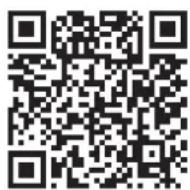
Fitshow
APP STORE
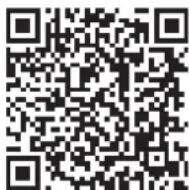
GOOGLE PLAY
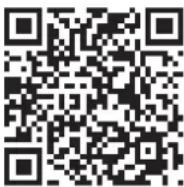
MANUAL
Kinomap
APP STORE
GOOGLE PLAY
MANUAL
Zwift
APP STORE
GOOGLE PLAY
MANUAL
MAINTENANCE
Safe and efficient use can only be achieved if the appliance is properly installed and maintained. It is your responsibility to ensure that the appliance is maintained regularly. Parts that have been used and/or damaged must be replaced before the appliance is used again. The appliance should only be used and stored indoors. Long-term exposure to weather and temperature/humidity changes can have a serious impact on the electrical components and moving parts of the unit. Always unplug the power cord from the unit before cleaning or servicing it.
Daily maintenance
Clean and remove sweat and moisture after each use.
ENGLISH
- Check that the unit is free of dust and dirt.
- Do not use aggressive cleaning agents and keep the device away from moisture.
Semi-annual maintenance
- Inspect all nuts and bolts on the moving parts of the machine. Tighten bolts and nuts as necessary and appropriate.
- Remove dust from the treadmill. Switch off the treadmill and remove the power supply. Carefully remove the cover and wipe off any dust and dirt with a soft cloth or use a (hand) hoover if necessary. Replace the cover and turn the power back on.
We recommend the following:
- Clean the unit after use.
- Use a dry cloth to clean the control panel and the areas around the on/off switch.
- Use a soft, clean cloth and detergent to remove stubborn marks and dirt from the unit.
- Store the unit in a safe, dry place away from heat and water.
CAUTION!
- Repairs must be carried out by a professional technician, unless otherwise specified by the supplier or manufacturer.
- To avoid slipping during exercise, the treadmill belt should not be too loose. To avoid abrasion between the roller and the treadmill and to ensure proper operation of the machine, the treadmill should not be too tight. The distance between the step and the belt can be adjusted. The distance between the step and the belt should be 50 to 75mm on both sides.
Cleaning
General cleaning of the unit will extend its life. Keep the appliance clean by dusting it regularly. Regular maintenance will prolong the life of your appliance and prevent injuries! For more information, please visit https://www.virtufit.nl/service/faq/
CAUTION! Wear clean shoes to reduce the risk of soiling the machine. At least once a year, remove the cover to remove dust.
LUBRICATING THE TREADMILL
The treadmill is equipped with a pre-lubricated coating that requires little maintenance. Wear and tear of the treadmill plays an important role in the function and durability of the treadmill and should therefore
be lubricated periodically. We recommend that you check the treadmill regularly.
Recommended lubrication of the treadmill
The treadmill displays a message on the screen when 300km have been covered. This is an automated reminder from the system that the treadmill needs to be lubricated.
Instruction
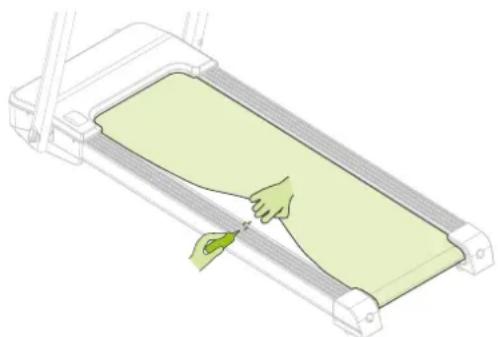
- Lift the treadmill and clean it with a damp cloth to remove dirt and dust.
- Apply a small amount of silicone oil under the treadmill. To do this, use a silicone spray bottle or drip two or three drops of silicone oil along the length of the belt. Do this on both sides of the treadmill.
- Turn on the treadmill and let it run for three minutes without standing on it. This ensures that the silicone oil is properly distributed on the belt and that excess oil is removed.
- Check the condition of the treadmill regularly and reapply silicone oil if necessary. Make sure that the belt is clean and dry before riding on it.
CAUTION! Regular maintenance will prolong the durability of the treadmill and prevent injury!
TROUBLESHOOTING
There is no signal when the power supply is connected
Check that the cables to the console are connected correctly. Make sure that all cables are securely fastened. The aluminium ends of the console cables are very sensitive and should be kept straight. If the console issues an error message, the aluminium ends of the cable may be tilted. Straighten the aluminium ends, which may resolve the error message.
No power: Check that the adapter and cables are properly connected.
ENGLISH
virtufit
Loss of power: Check that the sensor cable is correctly connected.
Security key does not work: check that the security key is correctly attached.
CONSOLE (FIG.A)
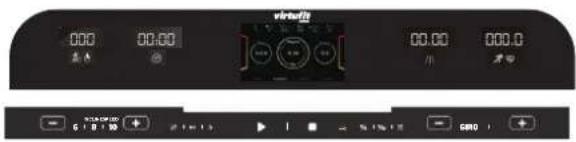
INCLINE/ CALORIES: The display shows the number of calories burned. This is an indication that may differ from the actual number. The counter counts from 0 to 999, when you reach 999, it starts again at 0. When you count down, the counter goes to 0 and when the counter reaches 0, the treadmill slowly goes into sleep mode. When incline is selected, the treadmill displays 0 - 15% . If not, the treadmill will display a calorie screen after 30 seconds.

TIME: Indicates the duration of the run.

KM: Indicates distance in kilometres.
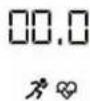
SPEED/HEART RATE: The display shows your current speed from 0.8 to 20.0km / h . When you hold the heart rate sensor, the current heart rate is displayed 50-200/ min (data cannot be used for medical purposes and is indicative).
Displays the incline height/position.
INCLINE: Press these buttons to adjust the angle of the incline. You must do this while using the treadmill. If you press the button for more than 0.5 seconds, the incline will continue to increase or decrease.

Press the MODE button again to select 15:00, 1.00, 50.0 and 5 strokes: this is the calorie countdown mode, 0:00 is the manual mode.

PLAY/PAUSE: to stop or start music or video.

Press this button to select one of the three entertainment modes: standby mode, audio mode and video mode. When playing a video, press this button to watch it in full screen.

When you attach the safety key to your clothing and have connected the power, you can press this button to start the treadmill.

Safety key.

Stop the workout.

MP3: You can connect your mobile phone or tablet with an AUX cable to listen to music.

Press and hold the button to lower the volume when listening to music or watching a video.

Press and hold the button to increase the volume when listening to music or watching a video.

Press the PROG button and the treadmill will display the following: P1-P2...P24--U1-U3-HP1-HP2-FAT in order (P1-P24 are preset programs, U1-U3 are user based programs, HP1-HP2 is a heart rate control program, and FAT is a body fat test function).
SPEED 6,8,10: Indicates speed.
Speed control button. When the treadmill is in use, you can press this button to adjust the speed. It adds or subtracts 0.1 KM each time you press either button. If you press the button for more than 0.5 seconds, the speed will continuously decrease or increase.
Features

Slope.

Hold the heart rate sensor for a few seconds and your heart rate will be displayed between 50 and 200/min (the data cannot be used for medical purposes and is indicative).

Time.

Distance.
ENGLISH

Calories.

Speed.

Bluetooth connection and application.
Stopwatch.
Distance.
Calories.
PROGRAMS (FIG.B, 1-3)
Displaying the home page (FIG. B-1)
There are four functions on the home page: MODE, PROGRAM, MUSIC and VIDEO. There are 3 different functions, CONTEST MODE, MANUAL MODE and UNDER MODE. There are also 24 preset programs, 3 manual programs, 2 HCR programs (optional) and 1 FAT test program.
Quick start
- Turn on the treadmill and attach the safety key to your clothing.
- Press START and the treadmill will reach a speed of 0.8km/h .
After the beeps count down, the countdown will change from 3
to 1.
- You can then adjust the speed to your liking by pressing SPEED.
Description of functions
Press MODE to start the timer mode. Press MODE repeatedly to select "15:00", "1.00", "50.0", "contest mode" and "0.00" (15:00 is a time mode, 1:00 is a distance mode, 50:0 is a calorie mode, 0:00 is a manual mode). When you have chosen a mode, you can set -SPEED+ or -INCLINE+. When you are ready, press START and the treadmill will begin to run.
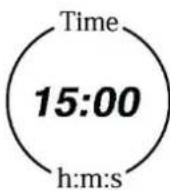
Displays the workout time from 0:00 to 18:00. When you reach 18:00, the countdown starts from 0 and the treadmill continues. In countdown mode, the display will show 15:00 to 0:00. When you reach 0:00, the treadmill stops. The system itself gives you a score and goes into sleep mode.
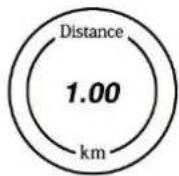
Screen: 0.-999 When you reach 999, the system will return to 0. In countdown mode, the default calorie will decrease from 50.0 to 0. The system will give you a score and go into sleep mode.
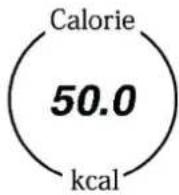
Screen: 0.-999 When you reach 999, the system will return to 0. In countdown mode, the default calorie will decrease from 50.0 to 0. The system will give you a score and go into sleep mode.
Manual Mode (FIC.B-2)
Press "START" and the treadmill will run at a speed of 0.8km/hr . All other screens will count down from 0. Press "-SPEED+" to adjust the speed. Press "-INCLINE+" to adjust the incline.
There are 3 user programs. These are user1, user2 and user 3.
- Press PROG until user 1 appears.
- Press INCLINE or SPEED to set the workout time.
- Press MODE to get the workout data. Press INCLINE or SPEED to set the workout time, speed and incline for the first level. Press MODE to set the data for the next level. Repeat the above steps to set the data for the other 8 levels. When you have finished setting all the data, everything is saved until you reset the program. After setting the data, you can press START to begin your workout.
ITEM INITIAL DATA RANGE DISPLAY
| TIME | 0:00 | 30:00 | 5:00 - 99:00 | 0:00 - 99:59 |
| INCLINE | 0 | 0 | 0 - 15 | 0 - 15 |
| SPEED | 0.0 | 0.8 | 0.8 - 20 | 0.8 - 20 |
| DISTANCE | 0.00 | 1.00 | 0.50 - 99.00 | 0.00 - 99.99 |
| HEART | P | N/A | N/A | 50 - 200 |
| CALORIE | 0 | 50.0 | 10.0 - 999 | 0.0 - 999 |
Countdown mode
- Countdown mode: Press MODE to start the countdown mode. The default time 15 will start to appear on the display. Press
"-INCLINE+" or "-SPEED+" to change the time from 5:00 to 99:00. - Distance countdown mode: Press "MODE" to start the distance countdown mode. The default distance will start at "1.00" which is displayed on the screen. Press "-INLINE+" or
ENGLISH
"-SPEED+ to change the distance from 0.5 to 99.9.
- Calorie countdown mode: Press "MODE" to start the calorie countdown mode. The default calorie countdown will start at "50.0", which is displayed on the screen. Press "-INCLINE+" or
"-SPEED+" to change the distance from 10.0 to 999.0.
- Once you have completed your workout, the display will immediately show your running data.
Match mode
Press and hold MODE to start the match mode. There are 6 race modes.
They are 3.0km 5.0 km,10.0 km,5.0 km,21.1 km and 42.19 km.

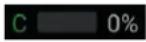
C = COMPUTER. The display shows the distance percentage of the machine. The default speed of the machine is 9km/h. You can adjust the speed of the machine by changing the running time.

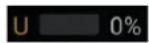
U = USER. The display shows the user's distance percentage.
| DISTANCE OF RUN | AUTOMATIC TIME |
| 3 km | 18:00 minutes |
| 5 km | 30:00 minutes |
| 10 km | 01:00:00 minutes |
| 15 km | 01:30:00 minutes |
| 21,10 km | 02:06:35 minutes |
| 42,19 km | 04:13:10 minutes |
Press MODE, select your preferred race distance and press "-INCLINE+" or "-SPEED+" to change the race time. Press START to start.
Preset program
Press PROG to start the program. Press "PROG" to select one of the following programmes: Program1-24, U1-U2-U3, HP1-HP2, FAT in order. There are 30 different predefined programs. FAT is a fat test programme.
Time
Programme duration: The automatic duration is 10 minutes. Press "INCLINE+" or "-SPEED+" to change the time from 5 to 99.
Main programme: Each programme is divided into 10 levels.
- Press PROG, the display will show "Programme 1-24".
- Select your preferred programme. The default time is 10:00. Press "-INLINE+" or "-SPEED+" to change the time.
- Press START to begin your workout. Press "-INLINE+" or
"-SPEED+" to change the speed or incline during exercise at each level. - When you have completed the previous level, the system will move to the next level where the speed and incline will be adjusted to your level.
After completing each program, the system assigns you a score. - Program overview. Each programme is divided into 10 levels and each level has its own speed and incline.
Programme HRC
Press the MODE button until "Heart Rate Program1" or "Heart Rate Program2" appears.
Each HRC program is divided into 10 levels.
- In standby mode, press PROG until "Heart rate program 1" or "Heart rate program 2" appears. The maximum speed for this program is 10.0km/h . Note: When you press "start" in HRC mode, the system requests a heart rate check. Owner setting, if age is 30, the target heart rate should be 114. Setting for the user, at age 30, the target heart rate is 114.
- Press MODE to change the age by pressing "-INLINE+" or "-SPEED+". The age can be set between 15 and 80 years.
After setting your age, press "MODE" and the system will suggest an appropriate target which will be displayed on the screen. You can also press "-INCLINE+" or "-SPEED+" to set an expected heart rate based on your physical condition, from 84 to 133. - When you have set your age and heart rate options, press "MODE" to begin setting the time. The display will show "TIME" when you press it will show 10:00, press "INCLINE+" or "SPEED+" to adjust the time from 10:00 to 99:00.
- When you have finished all the settings, you can press START to start.
- When you press "-INCLINE+" or "-SPEED+" to adjust the incline or speed, the system will adjust the speed and incline itself to the settings suitable for your physical condition.
- The first minute of the HRC programme is a warm-up, you can set the speed and incline manually. The system accelerates by 0.5 km at a time, which is automatic after the first minute depending on your heart rate. When the current speed is above 10 km/h in HP1 or 12 km/h in HP2 and your current heart rate is below your target heart rate, the system automatically adjusts the incline until your
heart rate reaches your target heart rate. If the heart rate does not maintain itself beyond 30 seconds, the system reduces the speed by 0.5km / h and the incline by one section every 10 seconds until the lowest point is reached.
NOTE!
- In HP1 or HP2 mode, press START directly and the treadmill will automatically process the data.
- The heart rate monitoring program is only available when the chest belt has been used and is close to the chest and skin.
General heart rate zones (FIC. B-3)
For intensive training, ask your doctor for advice.
- Healthy heart rate zone: 50% -60% of maximum heart rate. It is suitable for most beginners. It is good for weight loss, lowering blood pressure and cholesterol.
Temperature zone: 60% -70% of maximum heart rate. It is good for weight loss and burning more calories. - Aerobic zone: 70% - 80% of maximum heart rate. It is good for the heart and lungs.
Anaerobic threshold zone: 80% -90% of maximum heart rate. This is a very intense workout and is suitable for advanced trainers. - Red Line Zone: 90% - 100% of maximum heart rate. This is a limited workout for users. Please do not use it for too long, as it may damage your health.
Body Fat Test
- Press PROG to start the FAT mode. Enter your gender, age, height and weight. Once you have done this, hold the sensor on your wrist for more than 8 seconds. You will then see the results displayed on the screen.
- A Body Mass Index (BMI) of between 20 and 25 is ideal. When the BMI is below 19, it means you are underweight. When BMI is between 26 and 29, it means you are underweight. When BMI is between 26 and 29, it means you are slightly overweight. When the BMI is 30 or more, it means you are overweight. This data is provided as a guide and should not be used for medical purposes.
Media
Press to change modes or music and video. When the video option is selected and a video is playing, press to display the video on the entire screen.
Power save mode
If the treadmill is not used for 10 minutes, it will go into power save
mode. You can exit this mode by pressing any button.
Turning off the power
To extend the life of the treadmill, first press the STOP button. Then press the switch to turn it off. Then remove the plug and finally the safety key. If you remove the safety key immediately, the power will be turned on unnecessarily.
TRAINING GUIDELINES (FIG. C, 1-5)
A successful training program includes a warm-up, the actual training and a cool-down. Perform the complete training program at least twice, but preferably three times a week and keep a rest day between training sessions. After a few months, the intensity of the training can be increased, for example to four or five times a week.
The warm-up
The purpose of a warm-up is to prepare the body for training and to reduce the risk of injury. Warm up your body for two to five minutes before starting a cardio or strength training session. Do exercises that increase the heart rate and warm up the working muscles. Examples of this type of activity are running, jogging, jumping jacks, skipping and running in place.
Stretching
Stretching while the muscles are warm is very important after a good warm-up and cool-down. It reduces the risk of injury. Stretching exercises should be held for 15-30 seconds. Here are some examples of stretching exercises:
- Toe touch (Fig. C-1)
- Inner thight stretch (Fig. C-2)
- Hamstring stretch (Fig. C-3)
- Achilles stretch (Fig. C-4)
- Side stretch (Fig. B-5)
Cooling down
The purpose of the cool-down is to return the body to its (near) normal resting position at the end of the workout. A good cool-down slowly reduces your heart rate and promotes recovery.
INHOUD
PROGRAMMA'S (FIG.B, 1-3)
Homepage display (FIG. B-1)
Stoppt das Training.

MP3
PROGRAMME (FIG.B,1-3)
PROGRAMMES (FIG.B, 1-3)
m = 311 ;
Do you have a problem with your VirtuFit fitness equipment and would you like to submit a service request? Then scan the QR code on the right and fill in our service form.