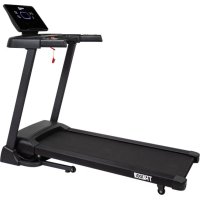
TR100i - Treadmills VirtuFit - Free user manual and instructions
Find the device manual for free TR100i VirtuFit in PDF.



| Product Type | Treadmill |
| Brand | VirtuFit |
| Model | TR100i |
| Usage | Home |
| Maximum User Weight | 110 kg |
| Minimum Speed | 1 km/h |
| Maximum Speed | 12 km/h (quick touch keys 3, 6, 9, 12) |
| Incline | Adjustable (levels 3, 6, 9, 12) |
| Preset Programs | 40 (P01-P40) |
| Customizable Programs | 3 (U01, U02, U03) |
| Heart Rate Control | Manual hand grip sensors |
| Body Mass Index Test | Yes |
| Folding Function | Yes, with air shock |
| Power Supply | Mains (220-240 V) |
| Magnetic Safety Key | Emergency stop |
| Recommended Lubrication | Non-acidic Vaseline or silicone spray |
| Cleaning | Dry cloth and mild detergent |
| Warranty | Exclusions for improper use or neglect |
Frequently Asked Questions - TR100i VirtuFit
User questions about TR100i VirtuFit
0 question about this device. Answer the ones you know or ask your own.
Ask a new question about this device
Download the instructions for your Treadmills in PDF format for free! Find your manual TR100i - VirtuFit and take your electronic device back in hand. On this page are published all the documents necessary for the use of your device. TR100i by VirtuFit.
USER MANUAL TR100i VirtuFit
34 Left bottom cover 1
35 Right bottom cover 1
44 Safety lock 1
45 Hexagon wrench #5 - 5mm 1
46 Oil bottle 1
47 With cross wrench - S=13/14/15mm 1
50 Hexagon socket flat round head screw 6
DESCRIPTION QTY
51
Arc gasket - 2081.5
4
55 Hexagon socket flat round head screw 2
67
Cross recessed pan head self-tap pin and self-drilling screws - ST4.2*19
2
73 Panel assembly
1
88 Hexagon socket head screw
2
91
Hexagon wrench #6- 6mm
92 Power cable
1
94 Flat washer - 2082
2
STEP 01
STEP02
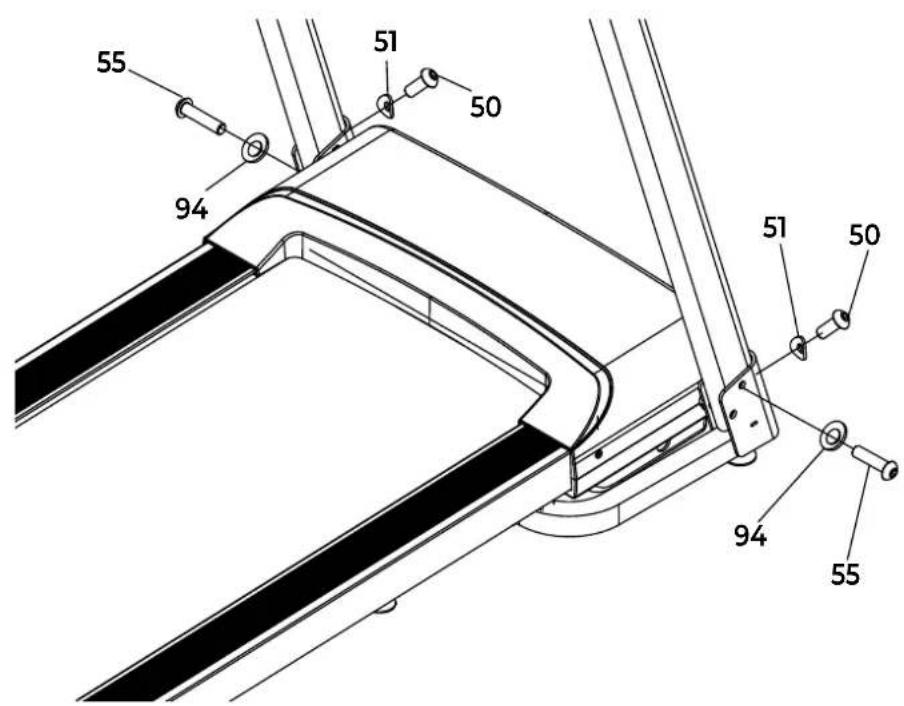
STEP03
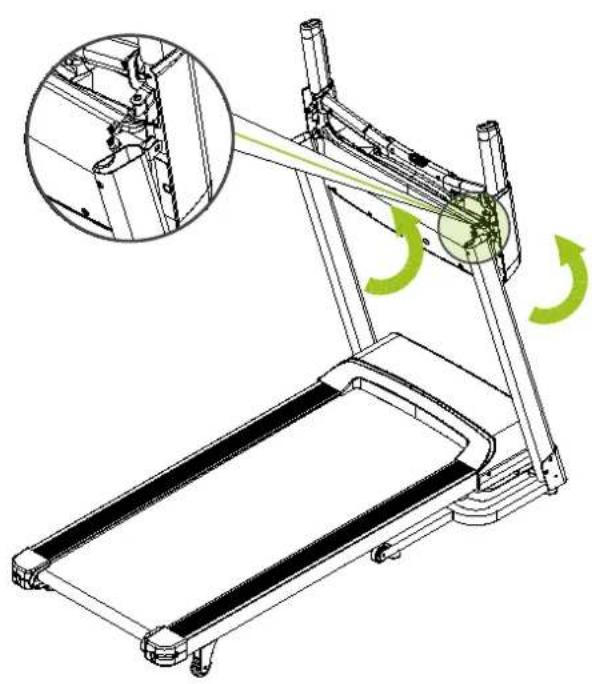
STEP04
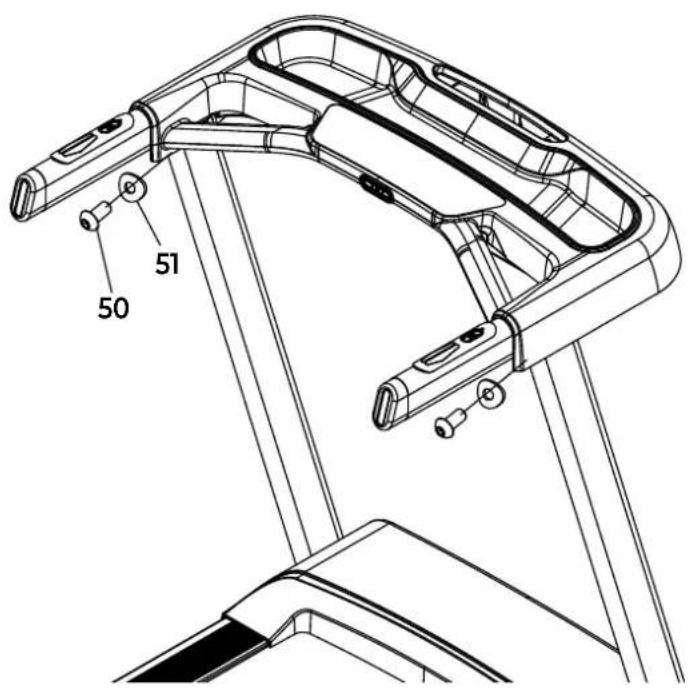
STEP05
STEP 06
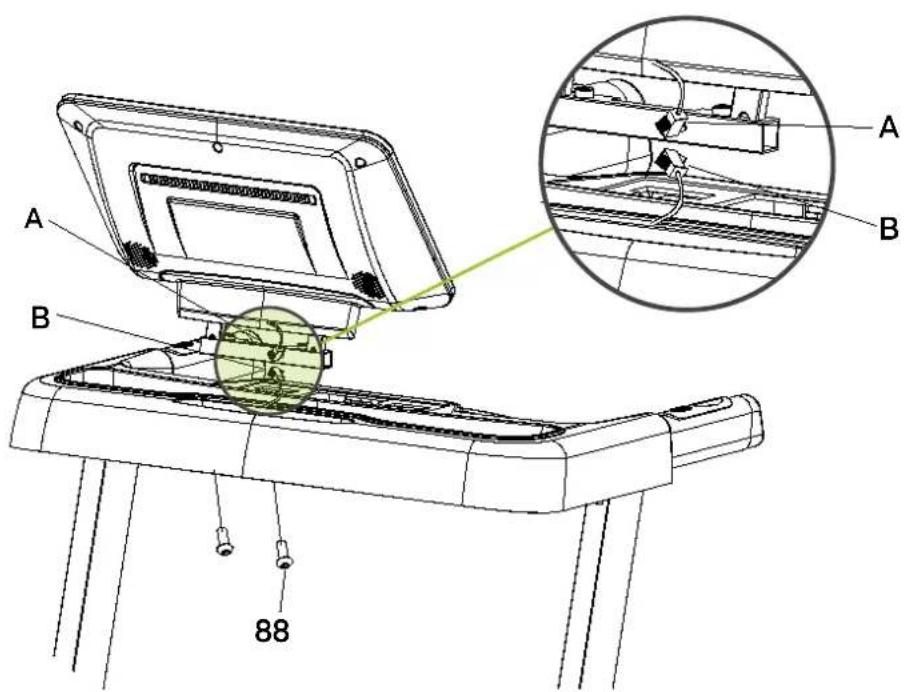
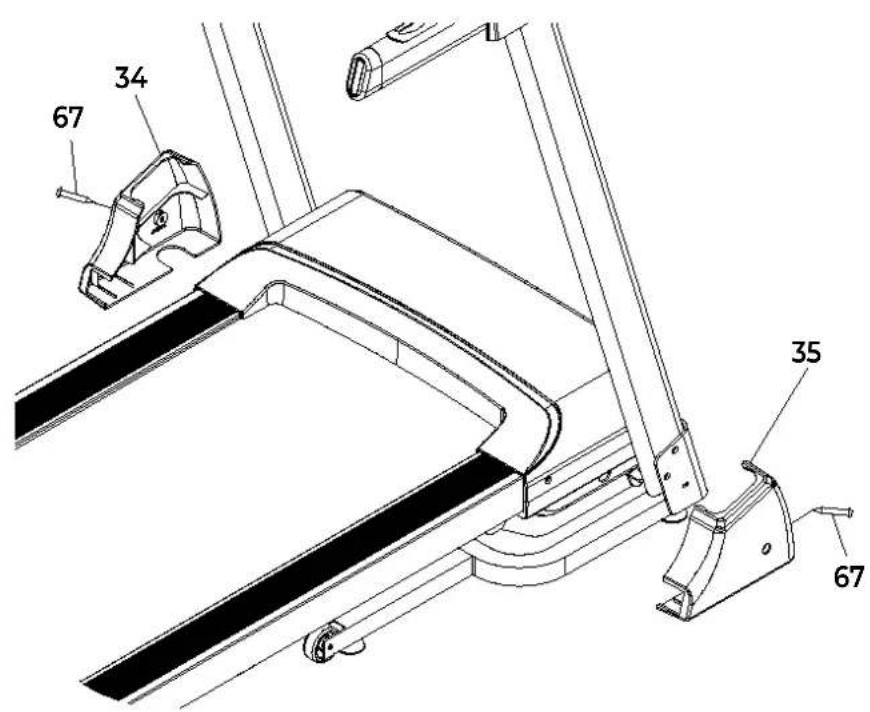
STEP07
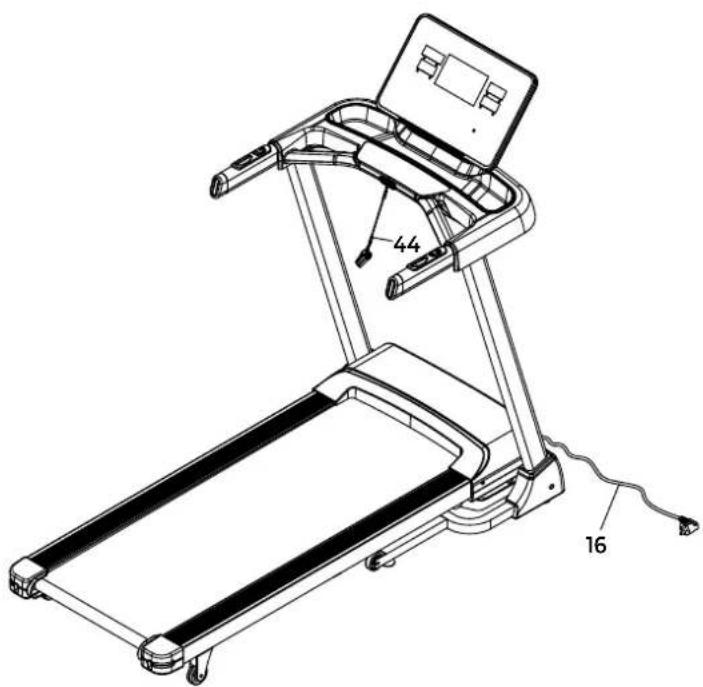
STEP08
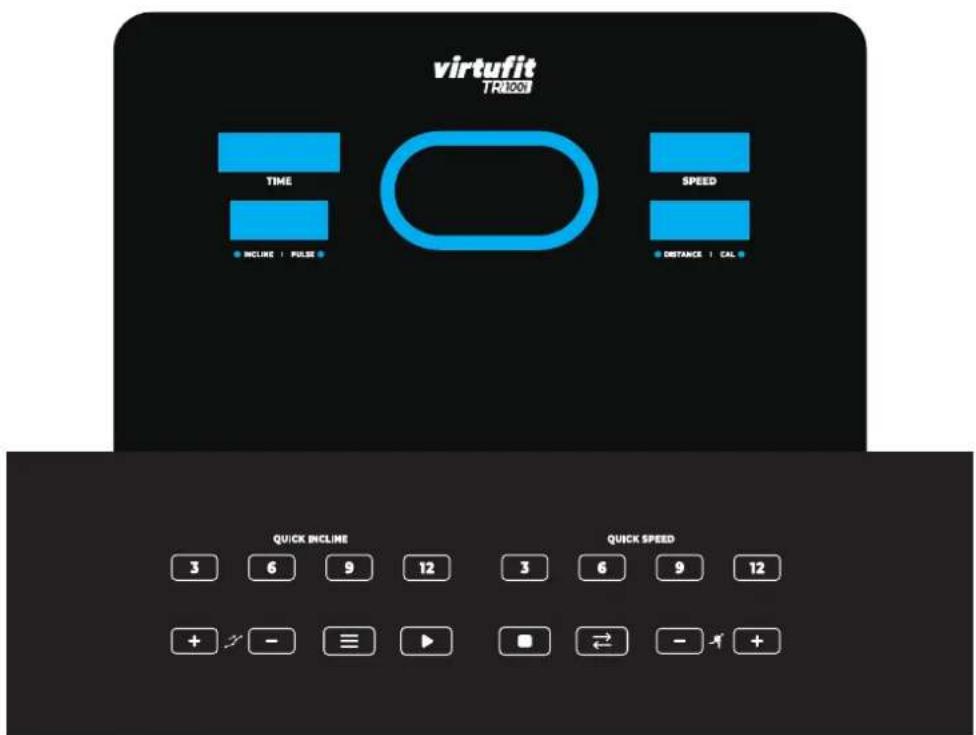
FIG. A
FIG.B
| Time Program | Set the set time/20 time periods = the running time of the upper and lower time periods | ||||||||||||||||||||
| 1 | 2 | 3 | 4 | 5 | 6 | 7 | 8 | 9 | 1 0 | 1 1 | 1 2 | 1 3 | 1 4 | 15 | 1 6 | 1 7 | 1 8 | 1 9 | 20 | ||
| P01 | SPEED | 2 | 3 | 3 | 4 | 5 | 3 | 4 | 5 | 5 | 3 | 4 | 5 | 4 | 4 | 4 | 2 | 3 | 3 | 5 | 3 |
| INCLINE | 1 | 1 | 2 | 2 | 2 | 3 | 3 | 3 | 2 | 2 | 1 | 2 | 2 | 1 | 1 | 3 | 3 | 2 | 2 | 2 | |
| P02 | SPEED | 2 | 4 | 4 | 5 | 6 | 4 | 6 | 6 | 6 | 4 | 5 | 6 | 4 | 4 | 4 | 2 | 2 | 5 | 4 | 2 |
| INCLINE | 1 | 2 | 2 | 2 | 2 | 3 | 3 | 2 | 2 | 2 | 2 | 2 | 3 | 3 | 3 | 4 | 4 | 3 | 2 | 2 | |
| P03 | SPEED | 2 | 4 | 4 | 6 | 6 | 4 | 7 | 7 | 7 | 4 | 7 | 7 | 4 | 4 | 4 | 2 | 4 | 5 | 3 | 2 |
| INCLINE | 2 | 3 | 3 | 2 | 2 | 3 | 3 | 3 | 2 | 2 | 2 | 2 | 4 | 4 | 4 | 6 | 6 | 3 | 2 | 2 | |
| P04 | SPEED | 3 | 5 | 5 | 6 | 7 | 7 | 5 | 7 | 7 | 8 | 8 | 5 | 9 | 5 | 5 | 6 | 6 | 4 | 4 | 3 |
| INCLINE | 2 | 3 | 3 | 2 | 2 | 3 | 3 | 3 | 2 | 2 | 2 | 2 | 4 | 4 | 4 | 6 | 6 | 3 | 2 | 2 | |
| P05 | SPEED | 2 | 4 | 4 | 5 | 6 | 7 | 7 | 5 | 6 | 7 | 8 | 8 | 5 | 4 | 3 | 3 | 6 | 5 | 4 | 2 |
| INCLINE | 3 | 3 | 3 | 4 | 4 | 5 | 5 | 5 | 4 | 4 | 4 | 4 | 5 | 5 | 3 | 3 | 3 | 2 | 2 | 2 | |
| P06 | SPEED | 2 | 4 | 4 | 4 | 5 | 6 | 8 | 8 | 6 | 7 | 8 | 8 | 6 | 4 | 4 | 2 | 5 | 4 | 3 | 2 |
| INCLINE | 3 | 5 | 5 | 5 | 4 | 4 | 4 | 3 | 3 | 3 | 3 | 4 | 4 | 4 | 3 | 3 | 3 | 4 | 3 | 2 | |
| P07 | SPEED | 2 | 3 | 3 | 3 | 4 | 5 | 3 | 4 | 5 | 3 | 4 | 5 | 3 | 3 | 3 | 6 | 6 | 5 | 3 | 3 |
| INCLINE | 4 | 4 | 4 | 4 | 3 | 3 | 6 | 6 | 6 | 7 | 7 | 8 | 8 | 9 | 9 | 6 | 6 | 5 | 4 | 4 | |
| P08 | SPEED | 2 | 3 | 3 | 6 | 7 | 7 | 4 | 6 | 7 | 4 | 6 | 7 | 4 | 4 | 4 | 2 | 3 | 4 | 4 | 2 |
| INCLINE | 4 | 5 | 5 | 5 | 6 | 6 | 6 | 7 | 8 | 9 | 9 | 9 | 1 0 | 10 | 10 | 1 2 | 1 2 | 8 | 6 | 3 | |
| P09 | SPEED | 2 | 4 | 4 | 7 | 7 | 4 | 7 | 8 | 4 | 8 | 9 | 9 | 4 | 4 | 4 | 5 | 6 | 3 | 3 | 2 |
| INCLINE | 5 | 5 | 5 | 6 | 6 | 6 | 4 | 4 | 6 | 6 | 5 | 5 | 8 | 8 | 9 | 9 | 9 | 7 | 4 | 2 | |
| P10 | SPEED | 2 | 4 | 5 | 6 | 7 | 5 | 4 | 6 | 8 | 8 | 6 | 6 | 5 | 4 | 4 | 2 | 4 | 4 | 3 | 3 |
| INCLINE | 5 | 6 | 6 | 6 | 7 | 5 | 8 | 8 | 4 | 4 | 4 | 5 | 5 | 8 | 8 | 1 0 | 1 0 | 8 | 6 | 3 | |
| P11 | SPEED | 2 | 5 | 8 | 10 | 7 | 7 | 10 | 1 0 | 7 | 7 | 1 0 | 1 0 | 5 | 5 | 9 | 9 | 5 | 5 | 4 | 3 |
| INCLINE | 4 | 5 | 3 | 2 | 6 | 6 | 2 | 2 | 2 | 2 | 2 | 4 | 5 | 6 | 3 | 2 | 5 | 5 | 2 | 0 | |
| P12 | SPEED | 3 | 4 | 9 | 9 | 5 | 9 | 5 | 8 | 5 | 9 | 7 | 5 | 5 | 7 | 9 | 9 | 5 | 7 | 6 | 3 |
| INCLINE | 1 | 2 | 3 | 2 | 3 | 5 | 5 | 0 | 0 | 2 | 3 | 5 | 7 | 3 | 3 | 5 | 6 | 5 | 3 | 3 | |
| P13 | SPEED | 3 | 6 | 7 | 5 | 9 | 9 | 7 | 5 | 5 | 7 | 9 | 5 | 8 | 5 | 9 | 5 | 9 | 9 | 4 | 3 |
| INCLINE | 3 | 3 | 5 | 6 | 5 | 3 | 3 | 7 | 5 | 3 | 2 | 0 | 0 | 5 | 5 | 3 | 2 | 3 | 2 | 1 | |
| P14 | SPEED | 2 | 2 | 4 | 5 | 6 | 5 | 4 | 3 | 2 | 1 | 2 | 3 | 4 | 5 | 6 | 5 | 4 | 3 | 2 | 1 |
| INCLINE | 4 | 4 | 4 | 4 | 3 | 3 | 6 | 6 | 6 | 7 | 7 | 8 | 8 | 9 | 9 | 6 | 6 | 5 | 4 | 4 | |
| P15 | SPEED | 2 | 4 | 6 | 8 | 6 | 6 | 4 | 4 | 2 | 2 | 2 | 4 | 6 | 8 | 6 | 6 | 4 | 4 | 2 | 2 |
| INCLINE | 3 | 3 | 3 | 4 | 4 | 5 | 5 | 5 | 4 | 4 | 4 | 4 | 5 | 5 | 3 | 3 | 3 | 2 | 2 | 2 | |
| P16 | SPEED | 2 | 4 | 6 | 8 | 10 | 8 | 6 | 4 | 2 | 2 | 2 | 4 | 6 | 8 | 6 | 6 | 4 | 4 | 2 | 2 |
| INCLINE | 5 | 5 | 5 | 6 | 6 | 6 | 4 | 4 | 6 | 6 | 5 | 5 | 8 | 8 | 9 | 9 | 9 | 7 | 4 | 1 | |
| P17 | SPEED | 2 | 2 | 6 | 6 | 8 | 1 0 | 6 | 6 | 2 | 2 | 2 | 2 | 6 | 6 | 8 | 1 0 | 6 | 6 | 2 | 2 |
| INCLINE | 4 | 5 | 5 | 5 | 6 | 6 | 6 | 7 | 8 | 9 | 9 | 9 | 1 0 | 10 | 10 | 1 2 | 1 2 | 8 | 6 | 3 | |
| P18 | SPEED | 2 | 3 | 4 | 5 | 2 | 3 | 4 | 5 | 3 | 2 | 2 | 3 | 4 | 5 | 2 | 3 | 4 | 5 | 3 | 2 |
| INCLINE | 4 | 4 | 4 | 4 | 3 | 3 | 6 | 6 | 6 | 7 | 7 | 8 | 8 | 9 | 9 | 6 | 6 | 5 | 3 | 2 | |
| P19 | SPEED | 2 | 4 | 6 | 2 | 4 | 6 | 2 | 4 | 6 | 2 | 2 | 4 | 6 | 2 | 4 | 6 | 2 | 4 | 6 | 2 |
| INCLINE | 3 | 5 | 5 | 5 | 4 | 4 | 4 | 3 | 3 | 3 | 3 | 4 | 4 | 4 | 3 | 3 | 3 | 4 | 3 | 2 | |
| P20 | SPEED | 1 | 3 | 4 | 5 | 6 | 5 | 4 | 3 | 2 | 1 | 1 | 3 | 4 | 5 | 6 | 5 | 4 | 3 | 2 | 1 |
| INCLINE | 3 | 3 | 3 | 4 | 4 | 5 | 5 | 5 | 4 | 4 | 4 | 4 | 5 | 5 | 3 | 3 | 3 | 2 | 2 | 2 | |
FIG. B
| P21 | SPEED | 2 | 3 | 3 | 4 | 5 | 3 | 4 | 5 | 5 | 3 | 4 | 5 | 4 | 4 | 4 | 2 | 3 | 3 | 5 | 3 | |
| INCLINE | 1 | 1 | 2 | 2 | 2 | 3 | 3 | 3 | 3 | 2 | 2 | 1 | 2 | 2 | 1 | 1 | 3 | 3 | 2 | 2 | 2 | |
| P22 | SPEED | 2 | 4 | 4 | 5 | 6 | 4 | 6 | 6 | 6 | 6 | 4 | 5 | 6 | 4 | 4 | 4 | 2 | 2 | 5 | 4 | 2 |
| INCLINE | 1 | 2 | 2 | 2 | 2 | 3 | 3 | 2 | 2 | 2 | 2 | 2 | 2 | 3 | 3 | 3 | 4 | 4 | 3 | 2 | 2 | |
| P23 | SPEED | 2 | 4 | 4 | 6 | 6 | 4 | 7 | 7 | 7 | 7 | 4 | 7 | 7 | 4 | 4 | 4 | 2 | 4 | 5 | 3 | 2 |
| INCLINE | 2 | 3 | 3 | 2 | 2 | 3 | 3 | 3 | 3 | 2 | 2 | 2 | 2 | 4 | 4 | 4 | 6 | 6 | 3 | 2 | 2 | |
| P24 | SPEED | 3 | 5 | 5 | 6 | 7 | 7 | 5 | 7 | 7 | 8 | 8 | 5 | 9 | 5 | 5 | 5 | 6 | 6 | 4 | 4 | 3 |
| INCLINE | 2 | 3 | 3 | 2 | 2 | 3 | 3 | 3 | 3 | 2 | 2 | 2 | 2 | 4 | 4 | 4 | 6 | 6 | 3 | 2 | 2 | |
| P25 | SPEED | 2 | 4 | 4 | 5 | 6 | 7 | 7 | 5 | 6 | 7 | 8 | 8 | 5 | 4 | 3 | 3 | 6 | 5 | 4 | 2 | |
| INCLINE | 3 | 3 | 3 | 4 | 4 | 5 | 5 | 5 | 4 | 4 | 4 | 4 | 5 | 5 | 3 | 3 | 3 | 2 | 2 | 2 | ||
| P26 | SPEED | 2 | 4 | 4 | 4 | 5 | 6 | 8 | 8 | 6 | 7 | 8 | 8 | 6 | 4 | 4 | 2 | 5 | 4 | 3 | 2 | |
| INCLINE | 3 | 5 | 5 | 5 | 4 | 4 | 4 | 3 | 3 | 3 | 3 | 4 | 4 | 4 | 3 | 3 | 3 | 4 | 3 | 2 | ||
| P27 | SPEED | 2 | 3 | 3 | 3 | 4 | 5 | 3 | 4 | 5 | 3 | 4 | 5 | 3 | 3 | 3 | 6 | 6 | 5 | 3 | 3 | |
| INCLINE | 4 | 4 | 4 | 4 | 3 | 3 | 6 | 6 | 6 | 7 | 7 | 8 | 8 | 9 | 9 | 6 | 6 | 5 | 3 | 3 | ||
| P28 | SPEED | 2 | 3 | 3 | 6 | 7 | 7 | 4 | 6 | 7 | 4 | 6 | 7 | 4 | 4 | 4 | 2 | 3 | 4 | 4 | 2 | |
| INCLINE | 4 | 5 | 5 | 5 | 6 | 6 | 6 | 7 | 8 | 9 | 9 | 9 | 10 | 10 | 10 | 12 | 12 | 8 | 6 | 3 | ||
| P29 | SPEED | 2 | 4 | 4 | 7 | 7 | 4 | 7 | 8 | 4 | 8 | 9 | 9 | 4 | 4 | 4 | 5 | 6 | 3 | 3 | 2 | |
| INCLINE | 5 | 5 | 5 | 6 | 6 | 6 | 4 | 4 | 6 | 6 | 5 | 5 | 8 | 8 | 9 | 9 | 9 | 7 | 4 | 2 | ||
| P30 | SPEED | 2 | 4 | 5 | 6 | 7 | 5 | 4 | 6 | 8 | 8 | 6 | 6 | 5 | 4 | 4 | 2 | 4 | 4 | 3 | 3 | |
| INCLINE | 5 | 6 | 6 | 6 | 7 | 5 | 8 | 8 | 4 | 4 | 4 | 5 | 5 | 8 | 8 | 10 | 10 | 8 | 6 | 3 | ||
| P31 | SPEED | 2 | 5 | 8 | 10 | 7 | 7 | 10 | 10 | 7 | 7 | 10 | 10 | 6 | 6 | 9 | 9 | 5 | 5 | 4 | 3 | |
| INCLINE | 4 | 5 | 3 | 2 | 6 | 6 | 2 | 2 | 2 | 2 | 2 | 4 | 5 | 6 | 3 | 2 | 5 | 5 | 2 | 0 | ||
| P32 | SPEED | 3 | 4 | 9 | 9 | 5 | 9 | 5 | 8 | 5 | 9 | 7 | 5 | 5 | 7 | 9 | 9 | 5 | 7 | 6 | 3 | |
| INCLINE | 1 | 2 | 3 | 2 | 3 | 5 | 5 | 0 | 0 | 2 | 3 | 5 | 7 | 3 | 3 | 5 | 6 | 5 | 3 | 3 | ||
| P33 | SPEED | 3 | 4 | 9 | 9 | 5 | 9 | 5 | 8 | 5 | 9 | 7 | 5 | 5 | 7 | 9 | 9 | 5 | 7 | 6 | 3 | |
| INCLINE | 1 | 2 | 3 | 2 | 3 | 5 | 5 | 0 | 0 | 2 | 3 | 5 | 7 | 3 | 3 | 5 | 6 | 5 | 3 | 3 | ||
| P34 | SPEED | 2 | 2 | 4 | 5 | 6 | 5 | 4 | 3 | 2 | 1 | 2 | 3 | 4 | 5 | 6 | 5 | 4 | 3 | 2 | 1 | |
| INCLINE | 1 | 1 | 1 | 1 | 1 | 1 | 1 | 1 | 1 | 1 | 1 | 1 | 1 | 1 | 1 | 1 | 1 | 1 | 1 | 1 | ||
| P35 | SPEED | 2 | 4 | 6 | 8 | 6 | 6 | 4 | 4 | 2 | 2 | 2 | 4 | 6 | 8 | 6 | 6 | 4 | 4 | 2 | 2 | |
| INCLINE | 1 | 1 | 1 | 1 | 1 | 1 | 1 | 1 | 1 | 1 | 1 | 1 | 1 | 1 | 1 | 1 | 1 | 1 | 1 | 1 | ||
| P36 | SPEED | 2 | 4 | 6 | 8 | 10 | 8 | 6 | 4 | 2 | 2 | 2 | 4 | 6 | 8 | 6 | 6 | 4 | 4 | 2 | 2 | |
| INCLINE | 5 | 5 | 5 | 6 | 6 | 6 | 4 | 4 | 6 | 6 | 5 | 5 | 8 | 8 | 9 | 9 | 9 | 7 | 4 | 2 | ||
| P37 | SPEED | 2 | 2 | 6 | 6 | 8 | 10 | 6 | 6 | 2 | 2 | 2 | 2 | 6 | 6 | 8 | 10 | 6 | 6 | 2 | 2 | |
| INCLINE | 4 | 5 | 5 | 5 | 6 | 6 | 6 | 7 | 8 | 9 | 9 | 9 | 10 | 10 | 10 | 12 | 12 | 8 | 6 | 3 | ||
| P38 | SPEED | 2 | 3 | 4 | 5 | 2 | 3 | 4 | 5 | 3 | 2 | 2 | 3 | 4 | 5 | 2 | 3 | 4 | 5 | 3 | 2 | |
| INCLINE | 4 | 4 | 4 | 4 | 3 | 3 | 6 | 6 | 6 | 7 | 7 | 8 | 8 | 9 | 9 | 6 | 6 | 5 | 3 | 3 | ||
| P39 | SPEED | 2 | 4 | 6 | 2 | 4 | 6 | 2 | 4 | 6 | 2 | 2 | 4 | 6 | 2 | 4 | 6 | 2 | 4 | 6 | 2 | |
| INCLINE | 3 | 5 | 5 | 5 | 4 | 4 | 4 | 3 | 3 | 3 | 3 | 4 | 4 | 4 | 3 | 3 | 3 | 4 | 3 | 2 | ||
| P40 | SPEED | 1 | 3 | 4 | 5 | 6 | 5 | 4 | 3 | 2 | 1 | 1 | 3 | 4 | 5 | 6 | 5 | 4 | 3 | 2 | 1 | |
| INCLINE | 3 | 3 | 3 | 4 | 4 | 5 | 5 | 5 | 4 | 4 | 4 | 4 | 5 | 5 | 3 | 3 | 3 | 2 | 2 | 2 |
FIG.C
HRC Parameter table (for reference only)
D = Default.
L & H = Adjustable range of minimum to maximum heart rate value.
| AGE BPM | |||
| - HD L | |||
| 15 195 123 123 | |||
| 16 194 122 122 | |||
| 17 193 122 122 | |||
| 18 192 121 121 | |||
| 19 191 121 121 | |||
| 20 190 120 120 | |||
| 21 189 119 119 | |||
| 22 188 119 119 | |||
| 23 187 118 118 | |||
| 24 186 118 118 | |||
| 25 185 117 117 | |||
| 26 184 116 116 | |||
| 27 183 116 116 | |||
| 28 182 115 115 | |||
| 29 181 115 115 | |||
| 30 181 | 114 114 | ||
| 31 180 113 113 | |||
| 32 | 179 113 113 | ||
| 33 | 178 112 112 | ||
| 34 177 112 112 | |||
| 35 | 176 | 111 | 111 |
| 36 | 175 110 110 | ||
| 37 | 174 110 110 | ||
| AGE BPM | |||
| -HDL | |||
| 38 173 | 109 109 | ||
| 39 | 172 109 | 109 | |
| 40 | 171 108 | 108 | |
| 41 170 | 107 107 | ||
| 42 169 | 107 107 | ||
| 43 168 | 106 | 106 | |
| 44 167 | 106 | 106 | |
| 45 166 | 105 105 | ||
| 46 165 | 104 | 104 | |
| 47 164 | 103 103 | ||
| 48 163 | 103 103 | ||
| 49 162 | 103 103 | ||
| 50 162 | 102 102 | ||
| 51 | 161 | 101 | 101 |
| 52 160 | 101 | 101 | |
| 53 | 159 100 | 100 | |
| 54 158 | 100 | 100 | |
| 55 | 157 | 99 | 99 |
| 56 156 | 98 | 98 | |
| 57 155 | 98 98 | ||
| 58 154 | 97 | 97 | |
| 59 | 153 | 97 | 97 |
| 60 | 152 | 96 | 96 |
| AGE BPM | |||
| -HDL | |||
| 61 | 151 95 95 | ||
| 62 150 | 95 95 | ||
| 63 149 | 94 94 | ||
| 64 148 | 94 94 | ||
| 65 147 | 93 | 93 | |
| 66 146 | 92 92 | ||
| 67 145 | 92 92 | ||
| 68 144 | 91 | 91 | |
| 69 143 | 91 | 91 | |
| 70 143 | 90 90 | ||
| 71 142 | 90 89 | ||
| 72 141 | 90 89 | ||
| 73 140 | 90 88 | ||
| 74 139 | 90 88 | ||
| 75 | 138 90 | 87 | |
| 76 | 137 | 90 | 86 |
| 77 136 | 90 86 | ||
| 78 | 135 | 90 | 85 |
| 79 134 | 90 85 | ||
| 80 133 | 90 84 | ||
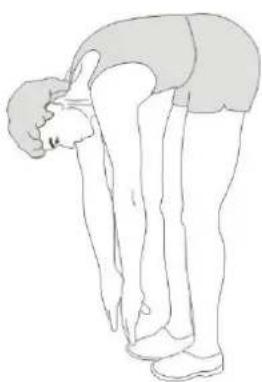
FIG. D
1
2
3
4
5
INDEX
| Safety instructions | 12 | |
| Guarantee | 12 | |
| Assembly instructions 12 | ||
| Adjusting | 13 | |
| Folding and unfolding instructions 13 | ||
| Training with heart rate 13 | ||
| Training with fitness applications 13 | ||
| Maintenance | 14 | |
| Lubricating | 14 | |
| Console | 15 | |
| Manual mode | 15 | |
| Programs | 15 | |
| Training guidelines | 16 | |
SAFETY INSTRUCTIONS

WARNING!
Consult your doctor before you start exercising. This is particularly important for people with health problems. Please read all instructions before using the machine. VirtuFit assumes no responsibility for injury or property damage resulting from the use of this equipment. Please read this manual carefully before assembling and/or using the machine.
- Make sure that the machine is properly assembled and that all nuts and bolts are tight before using it.
- Lubricate all moving parts annually with petroleum jelly (acid-free) or silicone spray.
- Do not wear loose clothing to avoid getting caught in moving parts.
Install and use the unit on a solid, level surface.
Always wear clean sports shoes when using the appliance. - Keep children and pets away from the appliance when in use.
- Maintain your balance when using the device.
- Do not place your fingers or other objects in the moving parts.
Before exercising, consult your physician to determine the appropriate frequency, duration and intensity of exercise for your age and physical condition. Stop exercising immediately if you experience nausea, shortness of breath, fainting, headache,
chest pain, tightness or any other discomfort.
This machine should only be used by one person at a time.
- This machine is designed for domestic use and the maximum user weight is 110kg .
- Leave 1-2 metres of space behind the machine to avoid accidents.
- Place the machine on a clean, flat surface. Do not place it on a thick carpet, as this may hinder the ventilation of the machine. Do not place the machine outdoors or near water.
- Keep the storage area dry, clean and level to prevent damage.
- Do not use the device for any purpose other than training.
- Use the device only in an environment where the ambient temperature is between 10^ and 35^ . Store the device only in an environment where the temperature is between 5^ and 45^ .
GUARANTEE
Warranty claims are excluded if the cause of the defect is the result of:
- Maintenance and repair work not carried out by an official dealer. Provided otherwise specified by the supplier
- Improper use, negligence and/or poor maintenance.
- Failure to maintain the appliance in accordance with the manufacturer's instructions.
ASSEMBLY INSTRUCTIONS (STEP 01-08)
Missing parts: If any parts are missing from the packaging, carefully check the polystyrene foam and the appliance itself. Some parts (bolts, screws, etc.) are already attached to the unit.
Error message: Make sure that all cables are carefully attached. The aluminium feet of the console are very sensitive and must be kept straight. If the console gives an error message after the machine has been mounted, the aluminium feet of the console may be bent. Straightening the aluminium feet may make the error message disappear.
Hex head bolts: Make sure that the hex head spanner is pushed into the bolt before applying force. This will prevent the head of the socket bolt from turning.
ADJUSTING
Adjusting the treadmill
- The treadmill veers to the left: Turn on the treadmill, set the speed to 2 to 3km / h without forcing. Use the Allen key to turn the screw on the left side of the end of the treadmill a quarter turn to the right (I). Run the treadmill for 1 to 2 minutes without a load. Repeat the process until the treadmill is exactly in the middle.
- The treadmill turns to the right: start the treadmill, set the speed to 2 to 3km / h without a load on the treadmill. Using the hexagonal key, turn the screw on the right side of the end of the treadmill a quarter turn to the right (2). Run the treadmill for 1 to 2 minutes without a load.
- The treadmill has jammed: Use the Allen spanner to turn the screw on the right side of the end half a turn to the right and the screw on the left side of the end half a turn to the right as well. Repeat the process until the blockage is resolved (3).
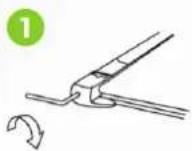
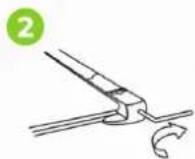
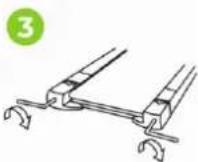
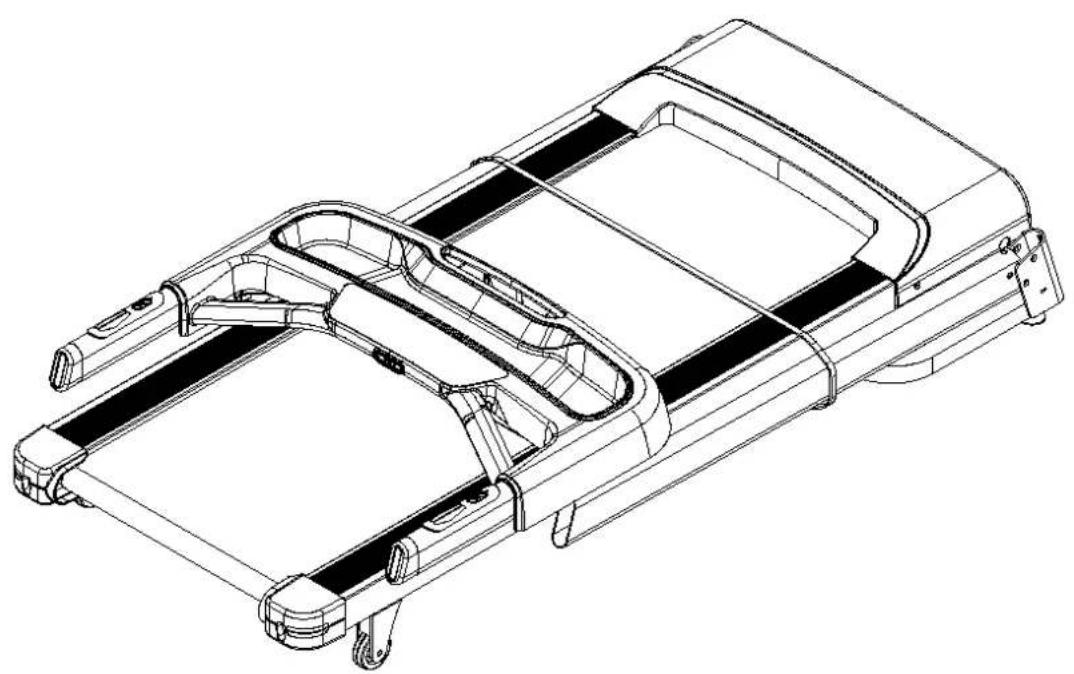
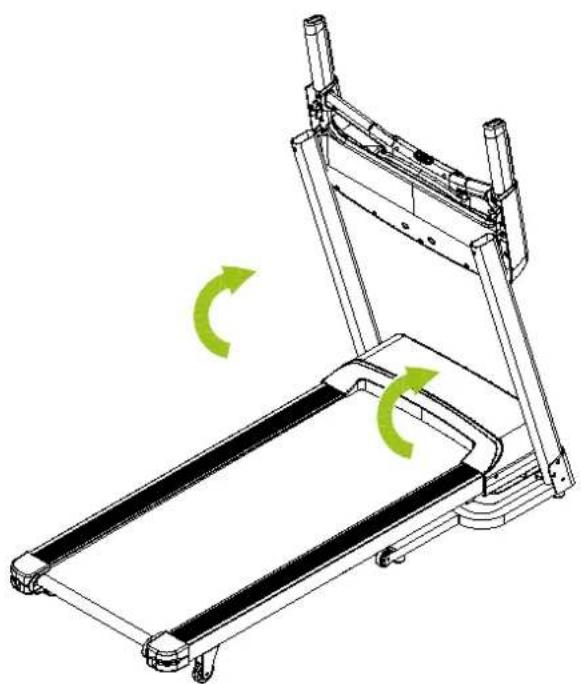
FOLDING AND UNFOLDING INSTRUCTIONS
NOTE! Keep the appliance in a dry room and out of reach of children. Ensure that the appliance is stable and secure so that it cannot fall on children or animals.
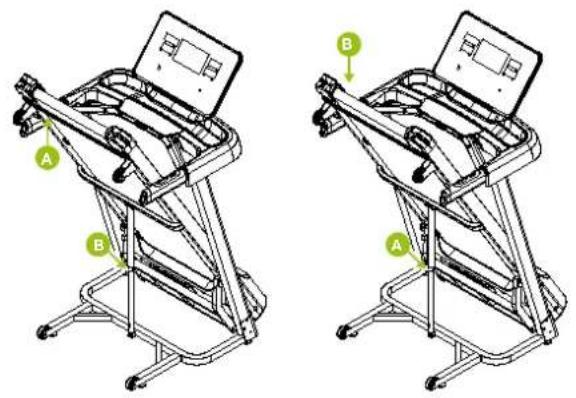
Folding
- Grasp the tread with both hands.
- Carefully lift the tread (A) until the sound of the air rod housing
is heard (B).
- Release gently and check that the tread remains in place.
Unfolding
- Hold position B with both hands.
- Lift the tread slightly and lightly kick the air rod casing (A) until it moves.
- Help the tread down gently, allowing the tread to land slowly.
TRAINING WITH HEART RATE
Hand sensors
This VirtuFit fitness machine is equipped with hand sensors to measure heart rate. The hand sensors are attached to the handle and only work if both sensors are held for a long time. For optimal performance, it is important that the hands are slightly damp and exert constant pressure on the sensors. Hands that are too dry or too wet may result in abnormal readings.
CAUTION! Never use the hand sensors in combination with a wireless device to avoid interference.
TRAINING WITH FITNESS APPLICATIONS
VirtuFit does not provide service for third party fitness applications such as Kinomap, iConsole, FitShow etc. If you encounter problems with a third party fitness application, please contact the developer of the application in question.
Instruction
- To scan the QR code with an Android or iOS phone or tablet, a QR code scanner is required. The app for scanning QR codes can be downloaded from the App Store or Google Play Store.
- Scan one of the QR codes below to go directly to the App Store or Google Play Store page where the fitness app can be downloaded.
- Scan the QR code on the right to access the fitness app manual. The manual describes step by step how to connect the fitness app to the device, how the fitness app works and what its capabilities are.
Fitshow

APP STORE

GOOGLE PLAY

MANUAL
MAINTENANCE
Safe and efficient use can only be achieved if the appliance is properly installed and maintained. It is your responsibility to ensure that the appliance is maintained regularly. Parts that have been used and/or damaged must be replaced before the appliance is used again. The appliance should only be used and stored indoors. Long-term exposure to weather and temperature/humidity changes can have a serious impact on the electrical components and moving parts of the unit. Always unplug the power cord from the unit before cleaning or servicing it.
Daily maintenance
- Clean and remove sweat and moisture after each use.
- Check that the unit is free of dust and dirt.
- Do not use aggressive cleaning agents and keep the device away from moisture.
Semi-annual maintenance
- Inspect all bolts and nuts connected to the moving parts of the unit. Tighten bolts and nuts as necessary and appropriate.
- Check the mobility of moving parts and components of the unit. Use silicone spray if necessary and appropriate.
We recommend the following:
- Unplug the power cord after each use, especially if children are present.
Clean the treadmill after use. - Use a dry cloth to clean the control panel and areas around the power switch.
- Use a soft, clean cloth and detergent to remove stubborn stains and dirt from the treadmill.
- Store your treadmill in a safe, dry place away from heat and water.
CAUTION!
- All repairs must be performed by a professional technician, unless otherwise specified by the supplier or manufacturer.
- If the treadmill has been in use for two hours, we recommend that you wait ten minutes before unplugging the power cord. This is better for the durability of the unit.
- To avoid slipping during exercise, the treadmill belt should not be too loose. To avoid abrasion between the roller and the treadmill and to ensure proper operation of the machine, the treadmill should not be too tight. The distance between the step and the belt can be adjusted. The distance between the step and the belt should be 50 to 75mm on both sides.
Cleaning
General cleaning of the machine will prolong its life. Keep the unit clean by dusting it regularly. Be sure to clean the exposed area of the treadmill and the footrests on both sides.
CAUTION! Wear clean shoes to reduce the risk of soiling the machine. At least once a year, remove the cover to remove dust.
LUBRICATING THE TREADMILL
The treadmill is equipped with a low-maintenance, pre-lubricated treadmill. Wear and tear on the treadmill plays an important role in the operation and life of the treadmill, so it should be lubricated periodically. We recommend that you inspect the belt regularly. Contact us as soon as you notice any damage to the treadmill.
Recommended lubrication of the treadmill
- Low usage (less than 3 hours per week): once a year.
Medium use (3 to 5 hours per week): every six months. - Heavy use (more than 5 hours per week): every three months.
As a general rule: Lubricate if the mat appears dry. If in doubt, contact the manufacturer. The use of Vaseline (acid-free) or silicone oil is recommended for lubricating the treadmill.
Instruction
- Lift the mat.
- Apply two to three drops of silicone oil along the length of the treadmill.
- Turn on the treadmill and run for three minutes without stressing the treadmill (i.e. without standing on the treadmill).
ENGLISH
virtufit
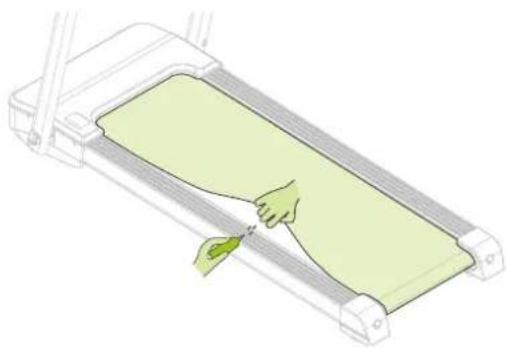
CAUTION! Regular maintenance will extend the life of the treadmill and prevent injury!
CONSOLE (FIG.A)
NOTE! When the safety key is pulled out, the treadmill makes an emergency stop and the treadmill stops slowly. When the safety key is replaced, the treadmill can be started again.
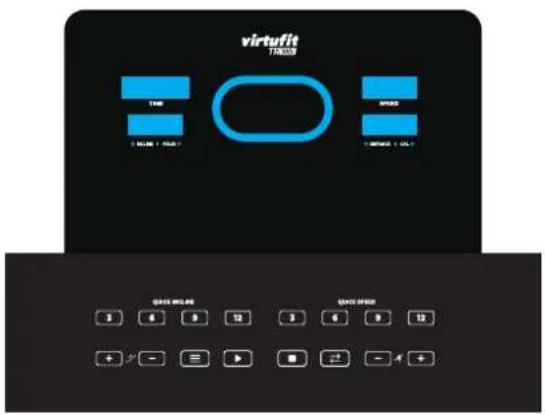

PROG
Press this key to select a programme P01-P40.

MODE
Press this key to select the mode: time mode countdown, distance mode countdown, calorie mode countdown.

START
Press this key to start the treadmill, the treadmill will start after three seconds at the lowest speed or at the speed of the programme.

STOP
Press this button to pause or stop the treadmill, the treadmill will come to a slow stop.

SPEED
During operation, press SPEED to increase the speed by 0.5km / h . When the key is held down, the speed is increased continuously.

SPEED
Press SPEED during operation to decrease the speed by 0.5km / h . When the button is held down, the speed is continuously reduced.
36912
QUICK
SPEED

INCLINE
Speed 3, 6, 9 and 12. While in use, press one of these shortcut keys to instantly increase the speed in several steps.

INCLINE
During operation, press INCLINE to increase the slope by 1 level. When the key is held down, the slope is increased continuously.
INCLINE
During operation, press INLINE to decrease the slope by 1 level. When the key is held down, the slope is continuously decreased.
36912
QUICK
INCLINE
Slope 3, 6, 9 and 12. Press one of these hotkeys during operation to adjust the slope directly in several steps.
CAUTION! When the heart rate sensors are held with both hands for at least 3 seconds, the heart rate data is displayed.
MANUAL MODE
Quick start
- Turn on the device and attach the magnetic safety key to the panel properly.
- Press and the device counts down to 0, after which a buzzer sounds. The treadmill starts running at a speed of 1km/h .
After starting, the speed can be adjusted by pressing the keys on the SPEED side.
PROGRAMS (FIG.B, P01-P40)
The treadmill has 40 programmes P01-P40. The schedule of programmes is shown in FIG.B.
- Press when the unit is in standby mode to set the programmes and press to start the treadmill.
After turning on the treadmill, press immediately so that the treadmill goes into standby mode to see all the programmes.
Each programme lasts for 30 minutes.
User-defined programs
In addition to 40 built-in programs, the treadmill also has 3 user-defined programs that allow users to set according to their personal conditions: U01, U02 and U03.
Settings
- In the standby state, press the "PROGRAM" key continuously until the user-defined PROGRAM (U01-U03) desired to be set, press the "MODE" key to determine the setting, and then set the first time period.
- When setting, use the "SPEED +" and "SPEED-" keys to set the SPEED, use the "INCLINE +" and "INCLINE-" keys to set the slope, press the "MODE" key to complete the setting of the first time period and enter the second time period setting state until the setting of all 20 time periods is completed; After the setting is completed, the data will be permanently saved until you reset the next time, and this data will not be lost due to power failure.
Launch
- In the standby state, press the "PROGRAM" key continuously until the user-defined PROGRAM (U01-U03) you want to run, and then press the start key to start after setting the running time.
- Press the start button after the user-defined program and running time setting are completed to start it immediately.
User-defined program setting instructions
Each program divides the exercise time into 20 time periods. When setting, you must complete the speed, slope and running time settings of all 20 time periods before you can press the start button to start the treadmill.
Physical fitness test
- In standby state, press "Program" key continuously to enter body mass index (BMI) detection function
Press "Mode" key to enter F-1, F-2, F-3, F-4, F-5 interface (F-1-gender, F-2-age, F-3-height, F-4-weight, F-5-fitness detection), - Press "Speed + ", "Speed-", "Incline + ", "Incline -" key to set the parameters of 01-04 (the parameters are listed below).
- Press "Mode" key to enter F-5 fitness detection interface.
- Holding the heart rate grip with hands for 5-6 seconds will display your body mass index to see if your weight is commensurate with your height.
BMI
Body mass index (BMI) is a measure of the relationship between a person's height and weight, not body ratio. BMI is suitable for any male
and female, and other health indicators The ideal BMI should be between 20 and 24. If it is below 19, it means being too thin, if it is between 25 and 29, it means being overweight, and if it is above 30, it means being obese. (This data is for reference only and cannot be used as medical data.)
| F1 Gender | Male / Female |
| F2 Age 10-99 | |
| F3 Height 100-200 | |
| F4 Weight 20-150 | |
| F5 BMI <19 (Underweight) | |
| BMI = (20-24) Normal weight | |
| BMI = (25-29) Overweight | |
| BMI > 30 Obesity |
Heart rate control (table: FIG. C)
HP1/HP2/HP3
Heart rate speed control movement time is fixed at 22 minutes.
In the standby mode, press the "Program" key until the DIST. window display HP1/HP2/HP3 (heart rate, if in the HP1/HP2/HP3 display interface, press the start key, the system will automatically recommend a heart rate control parameters available to users.
Parameters are as below:
"HPI" program, the maximum operating speed of 8.0km/h, 30 years of age\default target heart value of 150 beats/min;
HP2" program the maximum operating speed of 9.0km / h, 30 years of age \ default target heart value of 160 beats / min;
HP3" program, the maximum operating speed of 10.0km/h, 30 years of age\ default target heart value of 170 beats/min;
TRAINING GUIDELINES (FIG. D, 1-5)
A successful training program includes a warm-up, the actual training and a cool-down. Perform the complete training program at least twice, but preferably three times a week and keep a rest day between training sessions. After a few months, the intensity of the training can be increased, for example to four or five times a week.
The warm-up
The purpose of a warm-up is to prepare the body for training and to reduce the risk of injury. Warm up your body for two to five minutes
ENGLISH
before starting a cardio or strength training session. Do exercises that increase the heart rate and warm up the working muscles. Examples of this type of activity are running, jogging, jumping jacks, skipping and running in place.
Stretching
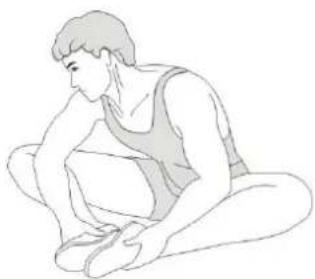
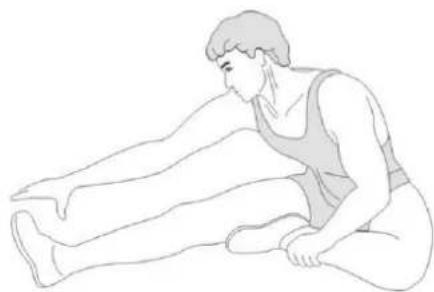
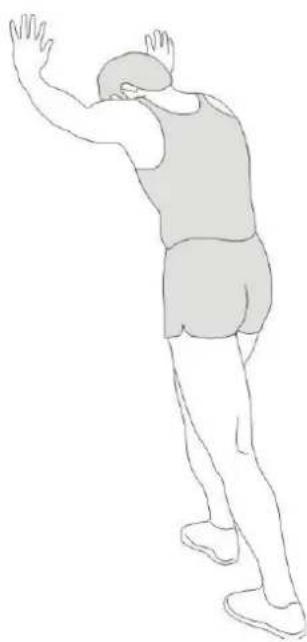
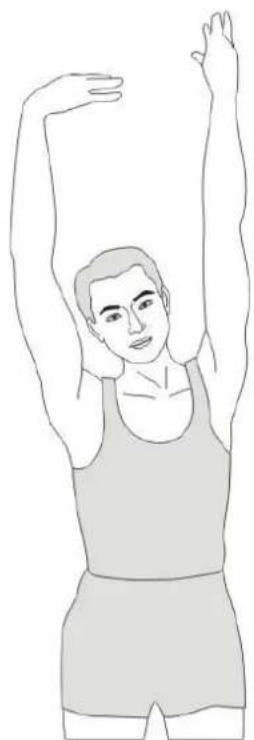
Stretching while the muscles are warm is very important after a good warm-up and cool-down. It reduces the risk of injury. Stretching exercises should be held for 15-30 seconds. Here are some examples of stretching exercises:
- Toe touch (FIG. D-1)
- Inner thight stretch (FIG. D-2)
- Hamstring stretch (FiG. D-3)
- Achilles stretch (FIG. D-4)
- Side stretch (FIG. D-5)
Cooling down
The purpose of the cool-down is to return the body to its (near) normal resting position at the end of the workout. A good cool-down slowly reduces your heart rate and promotes recovery.
INHOU
Hartfrequenzieregeling (tabel: FIG. C)
HP1/HP2/HP3
- Toe touch (FIG. D-1)
- Inner thight stretch (FIC. D-2)
Hamstring stretch (FIG. D-3)
Achilles stretch (FIG. D-4) - Side stretch (FIC. D-5)
Cooling-down
- Toe touch (FIC. D-1)
- Inner thigh stretch (FIC. D-2)
Hamstring stretch (FIG. D-3) - Achilles stretch (FIG. D-4)
- Side stretch (FIC. D-5)
Abkuhlung
-Toe touch (FIG. D-1)
- Inner thigh stretch (FIC. D-2)
- Hamstring stretch (FIC. D-3)
Achilles stretch (FIG. D-4)
- Side stretch (FIC. D-5)
Retour au calme
1 Main frame assembly 1
2 Base frame assembly 1
3 Left column assembly 1
4 Right column assembly 1
5 Electronic watch rack assembly 1
6 Lifting frame assembly 1
7 Running board 1
8 Running belt 1
9 Front drum 1
10 Reardrum 1
11 Pneumatic rod 1
12 DC motor 1
13 Control circuit board 1
14 Overload protector 1
15 Power switch 1
16 Power cord 1
17 Lower segment line of electronic watch 1
18 Annular thread guard plug B 2
19 Upper segment line of electronic watch 1
20 Side strip 2
21 Right posterior corner guard 1
22 Left rear corner guard 1
23 Roller 2
24 Panel upper cover 1
25 Running board reinforcing rod 2
26 Reinforcing rod cushion 4
27 Spacer sleeve 8
28 Buffer pad 4
29 Single branch line 1
30 Barb cushion 2
31 Nylon isolation pad 4
32 Carrying wheel 2
33 Foot pad 4
34 Left bottom cover ST4.2*13
35 Right bottom cover 1
36 Motor upper cover 1
37 Motor lower cover 1
38 Upper cover of electronic watch 1
DESCRIPTION QTY.
39 Lower cover of electronic watch 1
40 Inclined pipe plug 2
41 Sponge sheath 2
42 Speed addition and subtraction quick health 1
43 Start and stop shortcut key 1
44 Safety lock 1
45 5#hexagonwrench5mm
46 Oil bottle 1
47 With cross wrench - S = 13, 14, 15
48 Magnetic ring 2
49 Brown single branch 1
50 Hexagon socket flat round head screw M816 12
51 Arc gasket 20^8^1.5 4
52 Hexagon socket flat round head screw M825 3
53 Hexagon socket flat round head screw M845 1
54 Hexagon socket flat round head screw M840 4
55 Hexagon socket flat round head screw M842 2
56 Hexagon socket flat round head screw M1055 2
57 Internal serrated lock washer - 10 6
58 Hexagon socket flat round head screw M655 1
59 Hexagon socket flat round head screw M665 2
60 Internal serrated lock washer - 6 3
61 Hexagon socket countersunk head screw M630 4
62 Hexagon socket countersunk head screw M637 4
63 Type 1 non-metallic insert hexagon lock - M6 8
64 Type 1 non-metallic insert hexagon lock - M8 8
65 Plain washer class C-8 2
66 Standard spring washer - 8 2
67 Cross recessed pan self-tapping self-drilling screws ST 4.219 2
68 Cross recessed pan self-tapping self-drilling screws ST 4.225
69 Cross recessed pan self-tapping self-drilling screws ST 4:212 18
70 Cross recessed countersunk self-tapping screws ST 4219
71 Panel upper cover 1
72 Cross recessed countersunk head tapping screws ST 4.245 2
73 Panel assembly 1
74 Cross recessed pan head tapping screws - ST 4240 2
75 Cross recessed pan head screws - M58 1
76 Standard spring washer - 5
USER MANUAL
DESCRIPTION QTY.
77 Internal serrated lock washer - 51
78 Safety lock fixing seat 1
79 Panel decorative cover 1
80 Acrylic noodle patch 1
81 Multi-wedge belt 1
82 Lifting motor 1
83 Type 1 non-metallic insert hexagon lock - M10 6
84 Square neck screws with round head - M1045 4
85 Cross recessed countersunk head tapping screws - ST4.255 2
86 Cross recessed pan head tapping screws with pad - ST4.225 2
87 Cross recessed pan head tapping screws with pad - ST4.212 8
88 Hexagon socket head screws - M815 2
89 Cross recessed pan head tapping screws - 4.213 22
90 Cross recessed pan head tapping screws - ST269.5 2
916#hexagonwrench1
92 Power cable 1
93 Internal serrated lock washer 6
94 Flat washer 2
95ACline 1
virtufit
VIRTUFIT
Twekkelerweg 263
7553 LZ Hengelo
The Netherlands
info@virtuft.nl
VIRTUFIT SERVICE
Do you have a problem with your VirtuFit fitness equipment and would you like to submit a service request? Then scan the QR code on the right and fill in our service form.




- DESCRIPTION QTY
- STEP 01
- STEP02
- FIG.C
- INDEX
- SAFETY INSTRUCTIONS
- WARNING!
- GUARANTEE
- ASSEMBLY INSTRUCTIONS (STEP 01-08)
- ADJUSTING
- Adjusting the treadmill
- FOLDING AND UNFOLDING INSTRUCTIONS
- Folding
- Unfolding
- TRAINING WITH HEART RATE
- Hand sensors
- TRAINING WITH FITNESS APPLICATIONS
- Instruction
- Fitshow
- MAINTENANCE
- Daily maintenance
- Semi-annual maintenance
- We recommend the following:
- CAUTION!
- Cleaning
- LUBRICATING THE TREADMILL
- Recommended lubrication of the treadmill
- ENGLISH
- virtufit
- CONSOLE (FIG.A)
- 36912
- MANUAL MODE
- Quick start
- PROGRAMS (FIG.B, P01-P40)
- User-defined programs
- Settings
- Launch
- User-defined program setting instructions
- Physical fitness test
- BMI
- Heart rate control (table: FIG. C)
- HP1/HP2/HP3
- Parameters are as below:
- TRAINING GUIDELINES (FIG. D, 1-5)
- The warm-up
- Stretching
- Cooling down
- INHOU
- Hartfrequenzieregeling (tabel: FIG. C)
- Cooling-down
- Abkuhlung
- Retour au calme
- DESCRIPTION QTY.
- USER MANUAL
Brand : VirtuFit
Model : TR100i
Category : Treadmills