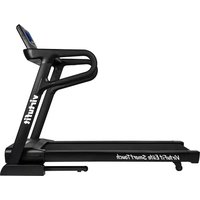
Elite SmartTouch - Treadmills VirtuFit - Free user manual and instructions
Find the device manual for free Elite SmartTouch VirtuFit in PDF.


Pick your language and provide your email: we'll send you a specifically translated version.
| Product Type | Treadmill |
| Brand | VirtuFit |
| Model | Elite SmartTouch |
| Dimensions (L x W x H) | 175 x 85 x 135 cm |
| Folded Dimensions | 95 x 85 x 40 cm |
| Net Weight | 75 kg |
| Max User Weight | 130 kg |
| Motor Power | 3.0 HP (continuous duty) |
| Speed Range | 0.8 - 18 km/h |
| Incline Levels | 0-15% (motorized) |
| Display Type | 10" HD Smart Touchscreen |
| Running Surface | 140 x 50 cm |
| Programs | 12 preset programs, 3 user-defined |
| Heart Rate Monitoring | Hand pulse sensors + wireless chest strap (optional) |
| Connectivity | Bluetooth, Wi-Fi, USB |
| Foldable | Yes (Soft Drop system) |
| Transport Wheels | Yes |
| Power Supply | 220-240V, 50/60Hz |
| Warranty | 2 years motor, 1 year parts |
| Safety Features | Safety key, auto-stop, child lock |
Frequently Asked Questions - Elite SmartTouch VirtuFit
How do I assemble the VirtuFit Elite SmartTouch treadmill?
Refer to the included assembly manual. Typically, attach the upright posts, console, and side covers. Use the provided tools. For detailed steps, watch our video guide on the product page.
How often should I lubricate the belt?
Lubricate every 6 months or after 200 km of use. Use only silicone-based lubricant. Apply under the belt in the center while the treadmill is turned off.
What do error codes E1, E2, E3 mean?
E1 indicates a motor overload; reduce user weight or check belt tension. E2 is a safety key error; ensure the key is inserted. E3 signals a communication fault between console and motor; restart the treadmill.
How do I clean my treadmill?
Wipe the console and frame with a damp cloth. Do not use harsh chemicals. Vacuum under the belt to remove debris. Keep the area around the treadmill dust-free.
Can I use the treadmill without the safety key?
No, the safety key is required for operation. If lost, purchase a replacement from VirtuFit support or use a compatible magnetic key.
Does the Elite SmartTouch support Bluetooth headphones?
Yes, the console has Bluetooth audio output. Pair your headphones via the settings menu. It also supports Bluetooth heart rate monitors.
How do I connect to the VirtuFit app?
Download the VirtuFit app from the App Store or Google Play. Pair the treadmill via Bluetooth. Follow in-app instructions to sync your data.
Why is my treadmill making a squeaking noise?
Squeaks often come from loose bolts or insufficient lubrication. Tighten all visible bolts and lubricate the belt. If noise persists, check the motor cover for debris.
How accurate are the calorie and distance counters?
Calorie count is an estimate based on average weight and speed. For more accuracy, enter your weight in the console. Distance is measured by belt rotations and is reasonably accurate.
What is the warranty period and how do I claim?
The motor is warranted for 2 years, parts for 1 year. Contact VirtuFit support with your purchase proof. They will guide you through repair or replacement.
User questions about Elite SmartTouch VirtuFit
0 question about this device. Answer the ones you know or ask your own.
Ask a new question about this device
No questions yet. Be the first to ask one.
Download the instructions for your Treadmills in PDF format for free! Find your manual Elite SmartTouch - VirtuFit and take your electronic device back in hand. On this page are published all the documents necessary for the use of your device. Elite SmartTouch by VirtuFit.
USER MANUAL Elite SmartTouch VirtuFit



Manual assistant
Powered by Anthropic
Waiting for your message
Product information
Brand : VirtuFit
Model : Elite SmartTouch
Category : Treadmills